

ide.md +100 −19
4 4
5ChatGPT Plus, Pro, Business, Edu, and Enterprise plans include Codex. Learn more about [what's included](https://developers.openai.com/codex/pricing).5ChatGPT Plus, Pro, Business, Edu, and Enterprise plans include Codex. Learn more about [what's included](https://developers.openai.com/codex/pricing).
6 6
7<YouTubeEmbed
8 title="Codex IDE extension overview"
9 videoId="sd21Igx4HtA"
10 class="max-w-md"
11/>
12<br />
13
7## Extension setup14## Extension setup
8 15
9The Codex IDE extension works with VS Code forks like Cursor and Windsurf.16The Codex IDE extension works with VS Code forks like Cursor and Windsurf.
16- [Download for Visual Studio Code Insiders](https://marketplace.visualstudio.com/items?itemName=openai.chatgpt)23- [Download for Visual Studio Code Insiders](https://marketplace.visualstudio.com/items?itemName=openai.chatgpt)
17- [Download for JetBrains IDEs](#jetbrains-ide-integration)24- [Download for JetBrains IDEs](#jetbrains-ide-integration)
18 25
1926The Codex VS Code extension is available on macOS and Linux. Windows supportCodex IDE integrations for VS Code-compatible editors and JetBrains IDEs are
2027is experimental. For the best Windows experience, use Codex in a WSL workspace available on macOS, Windows, and Linux. On Windows, run Codex natively with
2128and follow our [Windows setup guide](https://developers.openai.com/codex/windows). the Windows sandbox, or use WSL2 when you need a Linux-native environment. For
29 setup details, see the <a href="/codex/windows">Windows setup guide</a>.
22 30
2331After you install it, you’ll find the extension in your left sidebar next to your other extensions.After you install it, you'll find Codex in your editor sidebar.
32In VS Code, Codex opens in the right sidebar by default.
24If you're using VS Code, restart the editor if you don't see Codex right away.33If you're using VS Code, restart the editor if you don't see Codex right away.
25 34
26If you're using Cursor, the activity bar displays horizontally by default. Collapsed items can hide Codex, so you can pin it and reorganize the order of the extensions.35If you're using Cursor, the activity bar displays horizontally by default. Collapsed items can hide Codex, so you can pin it and reorganize the order of the extensions.
27 36
2837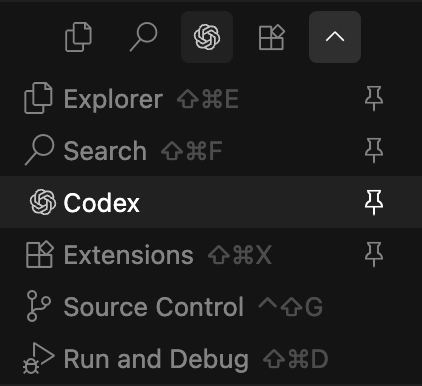<div class="not-prose max-w-56 mr-auto">
38 <img src="https://cdn.openai.com/devhub/docs/codex-extension.webp"
39 alt="Codex extension"
40 class="block h-auto w-full mx-0!"
41 />
42</div>
29 43
30## JetBrains IDE integration44## JetBrains IDE integration
31 45
32If you want to use Codex in JetBrains IDEs like Rider, IntelliJ, PyCharm, or WebStorm, install the JetBrains IDE integration. It supports signing in with ChatGPT, an API key, or a JetBrains AI subscription.46If you want to use Codex in JetBrains IDEs like Rider, IntelliJ, PyCharm, or WebStorm, install the JetBrains IDE integration. It supports signing in with ChatGPT, an API key, or a JetBrains AI subscription.
33 47
3448[Install Codex for JetBrains IDEs](https://blog.jetbrains.com/ai/2026/01/codex-in-jetbrains-ides/)<CtaPillLink
49 href="https://blog.jetbrains.com/ai/2026/01/codex-in-jetbrains-ides/"
50 label="Install Codex for JetBrains IDEs"
51 class="mt-6"
52/>
35 53
3654### Move Codex to the right sidebar### Move Codex to the right sidebar <a id="right-sidebar"></a>
37 55
3856In VS Code, you can drag the Codex icon to the right of your editor to move it to the right sidebar.In VS Code, Codex appears in the right sidebar automatically.
57If you prefer it in the primary (left) sidebar, drag the Codex icon back to the left activity bar.
39 58
4059In some IDEs, like Cursor, you may need to temporarily change the activity bar orientation first:In VS Code forks like Cursor, you may need to move Codex to the right sidebar manually.
60To do that, you may need to temporarily change the activity bar orientation first:
41 61
421. Open your editor settings and search for `activity bar` (in Workbench settings).621. Open your editor settings and search for `activity bar` (in Workbench settings).
432. Change the orientation to `vertical`.632. Change the orientation to `vertical`.
48Now drag the Codex icon to the right sidebar (for example, next to your Cursor chat). Codex appears as another tab in the sidebar.68Now drag the Codex icon to the right sidebar (for example, next to your Cursor chat). Codex appears as another tab in the sidebar.
49 69
50After you move it, reset the activity bar orientation to `horizontal` to restore the default behavior.70After you move it, reset the activity bar orientation to `horizontal` to restore the default behavior.
71If you change your mind later, you can drag Codex back to the primary (left) sidebar at any time.
51 72
52### Sign in73### Sign in
53 74
64To see all available commands and bind them as keyboard shortcuts, select the settings icon in the Codex chat and select **Keyboard shortcuts**.85To see all available commands and bind them as keyboard shortcuts, select the settings icon in the Codex chat and select **Keyboard shortcuts**.
65You can also refer to the [Codex IDE extension commands](https://developers.openai.com/codex/ide/commands) page.86You can also refer to the [Codex IDE extension commands](https://developers.openai.com/codex/ide/commands) page.
66For a list of supported slash commands, see [Codex IDE extension slash commands](https://developers.openai.com/codex/ide/slash-commands).87For a list of supported slash commands, see [Codex IDE extension slash commands](https://developers.openai.com/codex/ide/slash-commands).
88If you're new to Codex, read the [best practices guide](https://developers.openai.com/codex/learn/best-practices).
67 89
68---90---
69 91
70## Work with the Codex IDE extension92## Work with the Codex IDE extension
71 93
7294[### Prompt with editor context<BentoContainer>
95 <BentoContent href="/codex/ide/features#prompting-codex">
96
97### Prompt with editor context
98
99Use open files, selections, and `@file` references to get more relevant results with shorter prompts.
100
101 </BentoContent>
102 <BentoContent href="/codex/ide/features#switch-between-models">
103
104### Switch models
105
106Use the default model or switch to other models to leverage their respective strengths.
107
108 </BentoContent>
109 <BentoContent href="/codex/ide/features#adjust-reasoning-effort">
110
111### Adjust reasoning effort
112
113Choose `low`, `medium`, or `high` to trade off speed and depth based on the task.
114
115 </BentoContent>
116
117 <BentoContent href="/codex/ide/features#image-generation">
118
119### Image generation
120
121Generate or edit images without leaving your editor, and use reference assets when you need iteration.
122
123 </BentoContent>
124
125 <BentoContent href="/codex/ide/features#choose-an-approval-mode">
126
127### Choose an approval mode
128
129Switch between `Chat`, `Agent`, and `Agent (Full Access)` depending on how much autonomy you want Codex to have.
130
131 </BentoContent>
132
133 <BentoContent href="/codex/ide/features#cloud-delegation">
134
135### Delegate to the cloud
136
137Offload longer jobs to a cloud environment, then monitor progress and review results without leaving your IDE.
138
139 </BentoContent>
140
141 <BentoContent href="/codex/ide/features#cloud-task-follow-up">
142
143### Follow up on cloud work
144
145Preview cloud changes, ask for follow-ups, and apply the resulting diffs locally to test and finish.
146
147 </BentoContent>
148
149 <BentoContent href="/codex/ide/commands">
150
151### IDE extension commands
73 152
74153Use open files, selections, and `@file` references to get more relevant results with shorter prompts.](https://developers.openai.com/codex/ide/features#prompting-codex)[### Switch modelsBrowse the full list of commands you can run from the command palette and bind to keyboard shortcuts.
75 154
76155Use the default model or switch to other models to leverage their respective strengths.](https://developers.openai.com/codex/ide/features#switch-between-models)[### Adjust reasoning effort </BentoContent>
156 <BentoContent href="/codex/ide/slash-commands">
77 157
78158Choose `low`, `medium`, or `high` to trade off speed and depth based on the task.](https://developers.openai.com/codex/ide/features#adjust-reasoning-effort)[### Choose an approval mode### Slash commands
79 159
80160Switch between `Chat`, `Agent`, and `Agent (Full Access)` depending on how much autonomy you want Codex to have.](https://developers.openai.com/codex/ide/features#choose-an-approval-mode)[### Delegate to the cloudUse slash commands to control how Codex behaves and quickly change common settings from chat.
81 161
82162Offload longer jobs to a cloud environment, then monitor progress and review results without leaving your IDE.](https://developers.openai.com/codex/ide/features#cloud-delegation)[### Follow up on cloud work </BentoContent>
83 163
84164Preview cloud changes, ask for follow-ups, and apply the resulting diffs locally to test and finish.](https://developers.openai.com/codex/ide/features#cloud-task-follow-up)[### IDE extension commands <BentoContent href="/codex/ide/settings">
85 165
86166Browse the full list of commands you can run from the command palette and bind to keyboard shortcuts.](https://developers.openai.com/codex/ide/commands)[### Slash commands### Extension settings
87 167
88168Use slash commands to control how Codex behaves and quickly change common settings from chat.](https://developers.openai.com/codex/ide/slash-commands)[### Extension settingsTune Codex to your workflow with editor settings for models, approvals, and other defaults.
89 169
90170Tune Codex to your workflow with editor settings for models, approvals, and other defaults.](https://developers.openai.com/codex/ide/settings) </BentoContent>
171</BentoContainer>