1> ## Documentation Index
2> Fetch the complete documentation index at: https://code.claude.com/docs/llms.txt
3> Use this file to discover all available pages before exploring further.
4
5# Interface gallery for mods
6
7> See the interface elements a Claude Code mod can draw, such as text, buttons, fields, Markdown, code, and diffs, with sample code and terminal screenshots.
8
9A mod draws its interface from elements: text, boxes, buttons, fields, and a few that format content for you. The samples here show the code that draws an element, and most come with a screenshot of the result in a terminal pane, so you can pick an element by how it looks.
10
11To learn how drawing works, start with [Draw in the interface](/docs/en/plugins/mods/interface). For the main props and which apps draw each element, see the [elements reference](/docs/en/plugins/mods/reference#elements). The [type declarations](/docs/en/plugins/mods/create#get-the-types-for-your-build) list every prop.
12
13## Try a sample
14
15The samples on this page are snippets, not whole mods. Each one is the code for one element and anything nested inside it.
16
17To see a sample in your own terminal, create the small mod in these steps and paste the sample into it. The mod adds a `/gallery` command that opens a pane and draws the sample there. A [pane](/docs/en/plugins/mods/interface#pick-where-to-draw) is a sidebar beside the transcript in a wide fullscreen terminal, or a framed region above the prompt otherwise.
18
19<Steps>
20 <Step title="Create the mod">
21 Create a directory named `gallery` with `.claude-plugin` and `hooks` directories inside it. [Create a mod](/docs/en/plugins/mods/create#write-a-mod-yourself) explains the files.
22
23 Save the manifest as `gallery/.claude-plugin/plugin.json`:
24
25 ```json gallery/.claude-plugin/plugin.json theme={null}
26 {
27 "name": "gallery",
28 "version": "0.1.0",
29 "description": "Opens a pane that draws one sample",
30 "author": { "name": "Your Name" }
31 }
32 ```
33
34 Name your entry point in `gallery/hooks/hooks.json`:
35
36 ```json gallery/hooks/hooks.json theme={null}
37 {
38 "modules": ["./register.js"]
39 }
40 ```
41
42 Save the code as `gallery/hooks/register.js`. It adds a `/gallery` command that opens a pane, and draws `Plain text` in that pane:
43
44 ```javascript gallery/hooks/register.js theme={null}
45 // Stands in for your own callback in the samples that take one
46 const noop = () => {}
47 // The Select sample keeps its choice here
48 let picked = 'md'
49
50 // The Raster sample packs its cells with this function
51 const DEFAULT_COLOR = 0x01000000
52 function cellsOf(rows) {
53 const numbers = rows.flat().flatMap(([char, color]) => [char.codePointAt(0), color, DEFAULT_COLOR])
54 return new Uint8Array(Uint32Array.from(numbers).buffer).toBase64()
55 }
56
57 export function register(on) {
58 on('session.start', async ($, e, next) => {
59 await $.command.register({ name: 'gallery', description: 'Open the sample pane' })
60 return next(e)
61 })
62
63 on('command.run', { command: 'gallery' }, async ($) => {
64 await $.ui.open({ id: 'gallery', focus: true, closeOnEscape: true })
65 return {}
66 })
67
68 on('ui.render', { component: 'Pane' }, async ($, e, next) => {
69 if (e.requestId !== 'gallery') return next(e)
70 const { Box, Text, Button, Input, Select, Link, Markdown, Code, Raster, Svg } = $.ui.resolve(e)
71 // Replace the element after return with a sample
72 return Text({ children: ['Plain text'] })
73 })
74 }
75 ```
76 </Step>
77
78 <Step title="Run the mod">
79 In your shell, start Claude Code from the directory that holds `gallery`:
80
81 ```bash theme={null}
82 claude --plugin-dir ./gallery
83 ```
84
85 At the Claude Code prompt, run `/gallery`. A pane opens with `Plain text` in it.
86 </Step>
87
88 <Step title="Swap in a sample">
89 Copy a sample from this page. In `register.js`, paste it over `Text({ children: ['Plain text'] })`, so that it follows `return`, and save the file. Claude Code reloads the module each time you save, so run `/gallery` again to see the new sample.
90 </Step>
91</Steps>
92
93## Pick an element
94
95The samples are grouped by what you want to put on screen:
96
97* **[Show text](#show-text)**: `Text`, `Markdown`, and `Link`
98* **[Show code and changes](#show-code-and-changes)**: `Code`
99* **[Arrange elements](#arrange-elements)**: `Box`
100* **[Take input](#take-input)**: `Button`, `Input`, and `Select`
101* **[Draw pictures](#draw-pictures)**: `Raster`, `Svg`, `Image`, and `Client`
102
103## Show text
104
105Three elements put words on screen: `Text` for your own styling, `Markdown` for content that's already formatted, and `Link` for a URL.
106
107### `Text`
108
109`Text` draws a string with the styles you give it. This sample shows one line for each style:
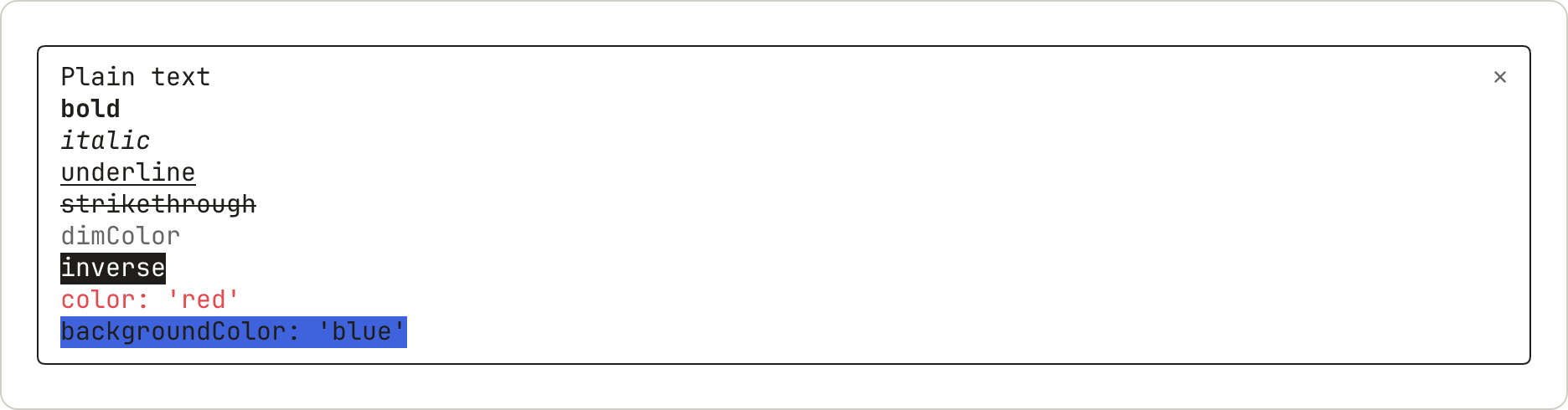
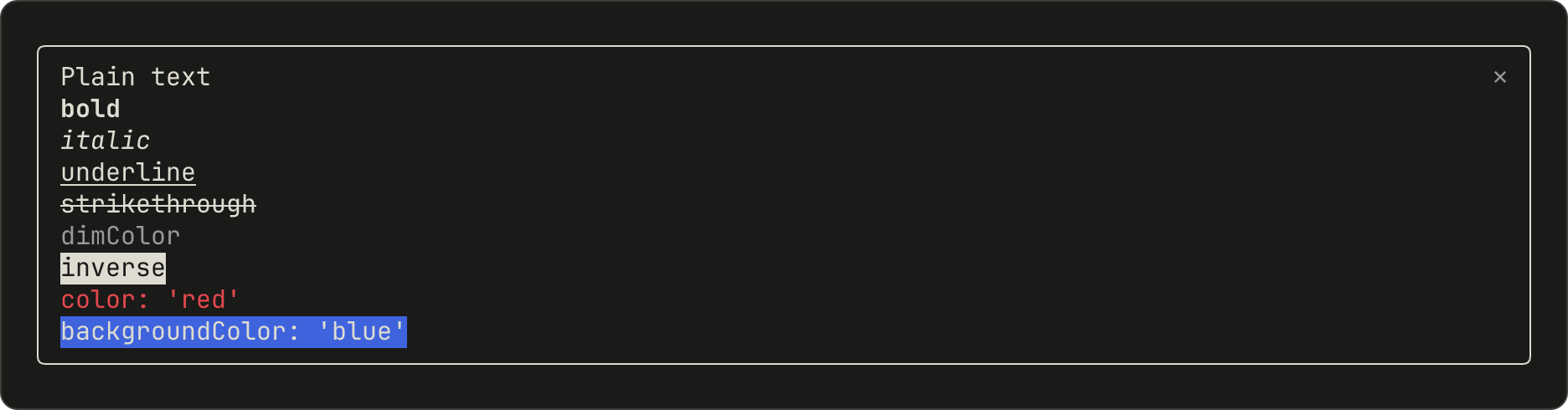
110
111```javascript theme={null}
112Box({
113 flexDirection: 'column',
114 children: [
115 Text({ children: ['Plain text'] }),
116 Text({ bold: true, children: ['bold'] }),
117 Text({ italic: true, children: ['italic'] }),
118 Text({ underline: true, children: ['underline'] }),
119 Text({ strikethrough: true, children: ['strikethrough'] }),
120 Text({ dimColor: true, children: ['dimColor'] }),
121 Text({ inverse: true, children: ['inverse'] }),
122 Text({ color: 'red', children: ["color: 'red'"] }),
123 Text({ backgroundColor: 'blue', children: ["backgroundColor: 'blue'"] }),
124 ],
125})
126```
127
128<img src="https://mintcdn.com/claude-code/EXkwf0kKMewZsyod/images/mods-el-text-light.png?fit=max&auto=format&n=EXkwf0kKMewZsyod&q=85&s=90724ce3953d9347b61b6a9266fda451" className="dark:hidden" alt="A pane with nine lines of text, each named for its style: plain, bold, italic, underline, strikethrough, dimColor in gray, inverse, color red, and backgroundColor blue." width="1872" height="490" data-path="images/mods-el-text-light.png" />
129
130<img src="https://mintcdn.com/claude-code/EXkwf0kKMewZsyod/images/mods-el-text-dark.png?fit=max&auto=format&n=EXkwf0kKMewZsyod&q=85&s=790dd3465e06db0842639d0d8fcbbc96" className="hidden dark:block" alt="A pane with nine lines of text, each named for its style: plain, bold, italic, underline, strikethrough, dimColor in gray, inverse, color red, and backgroundColor blue." width="1872" height="490" data-path="images/mods-el-text-dark.png" />
131
132`dimColor` draws the text in gray. `backgroundColor` fills only as wide as the text.
133
134### `Markdown`
135
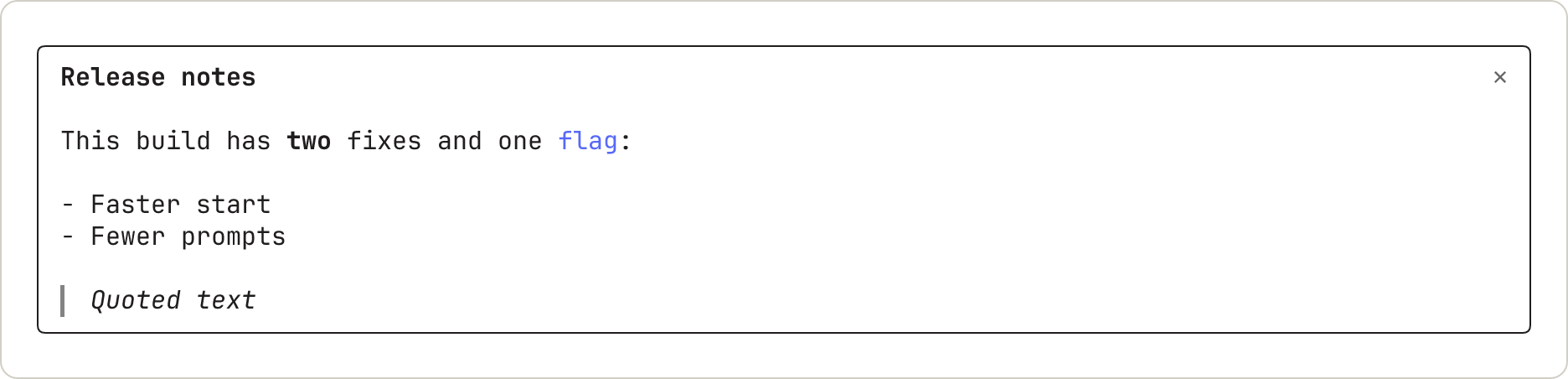
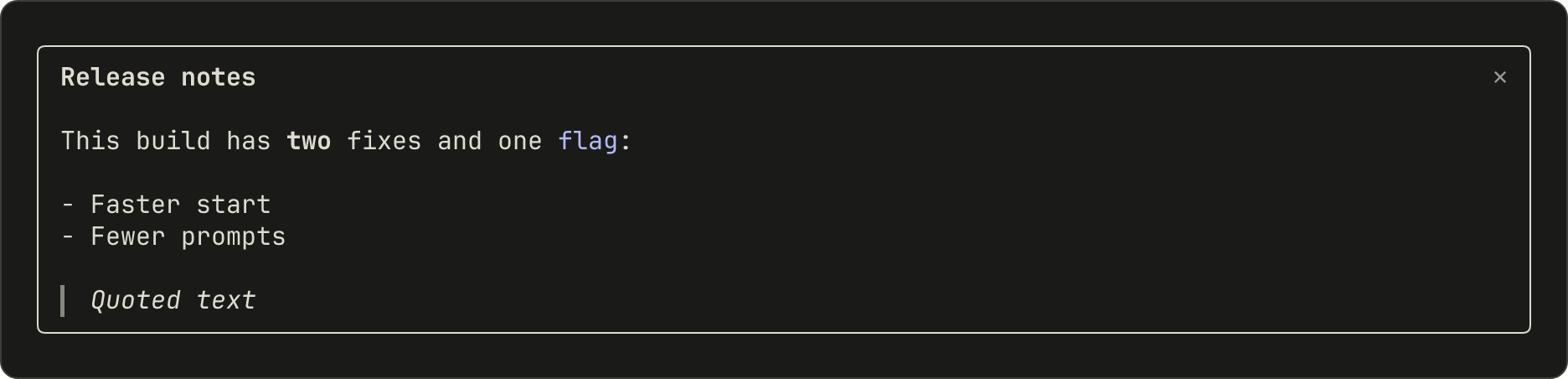
136`Markdown` formats text the way Claude's replies are formatted. Pass the content in `text`, not in `children`:
137
138```javascript theme={null}
139Markdown({
140 text: '## Release notes\n\nThis build has **two** fixes and one `flag`:\n\n- Faster start\n- Fewer prompts\n\n> Quoted text',
141})
142```
143
144<img src="https://mintcdn.com/claude-code/EXkwf0kKMewZsyod/images/mods-el-markdown-light.png?fit=max&auto=format&n=EXkwf0kKMewZsyod&q=85&s=e40eacc4e3fbe06eb003f4463f552ec1" className="dark:hidden" alt="A pane with a bold heading, Release notes, then a sentence with one bold word and one colored code word, a two-item list, and a quote drawn in italics with a bar on its left." width="1872" height="452" data-path="images/mods-el-markdown-light.png" />
145
146<img src="https://mintcdn.com/claude-code/EXkwf0kKMewZsyod/images/mods-el-markdown-dark.png?fit=max&auto=format&n=EXkwf0kKMewZsyod&q=85&s=2cc342ed0c58e752c425fff3c95a33a6" className="hidden dark:block" alt="A pane with a bold heading, Release notes, then a sentence with one bold word and one colored code word, a two-item list, and a quote drawn in italics with a bar on its left." width="1872" height="452" data-path="images/mods-el-markdown-dark.png" />
147
148A heading draws in bold without its `#` marks. Inline code draws in color without its backticks. A quote draws in italics with a bar on its left.
149
150### `Link`
151
152`Link` draws a label followed by its URL:
153
154```javascript theme={null}
155Link({ href: 'https://code.claude.com/docs', label: 'Claude Code docs' })
156```
157
158<img src="https://mintcdn.com/claude-code/EXkwf0kKMewZsyod/images/mods-el-link-light.png?fit=max&auto=format&n=EXkwf0kKMewZsyod&q=85&s=8217bd2dfb561a8ba57023c6d89ea977" className="dark:hidden" alt="A pane with one line: the label Claude Code docs, then the URL in gray." width="1872" height="186" data-path="images/mods-el-link-light.png" />
159
160<img src="https://mintcdn.com/claude-code/EXkwf0kKMewZsyod/images/mods-el-link-dark.png?fit=max&auto=format&n=EXkwf0kKMewZsyod&q=85&s=cd32f222a7d3530b070f58f5f189a1f8" className="hidden dark:block" alt="A pane with one line: the label Claude Code docs, then the URL in gray." width="1872" height="186" data-path="images/mods-el-link-dark.png" />
161
162The terminal draws the URL as text after the label. Whether a click opens it depends on the user's terminal.
163
164## Show code and changes
165
166`Code` draws source text with Claude Code's own syntax colors, or a diff.
167
168### `Code`
169
170Name the `language`, or pass a `path` for Claude Code to infer it from. With `startLine`, the lines are numbered from that number:
171
172```javascript theme={null}
173Code({
174 language: 'javascript',
175 startLine: 1,
176 source: "const name = 'mods'\nconsole.log('hello ' + name)",
177})
178```
179
180<img src="https://mintcdn.com/claude-code/EXkwf0kKMewZsyod/images/mods-el-code-light.png?fit=max&auto=format&n=EXkwf0kKMewZsyod&q=85&s=4e13f5d506d3fdcc59d6d9524f48d2a9" className="dark:hidden" alt="A pane with two numbered lines of JavaScript in syntax colors." width="1872" height="224" data-path="images/mods-el-code-light.png" />
181
182<img src="https://mintcdn.com/claude-code/EXkwf0kKMewZsyod/images/mods-el-code-dark.png?fit=max&auto=format&n=EXkwf0kKMewZsyod&q=85&s=59f797371dd91b16b874a382b784b668" className="hidden dark:block" alt="A pane with two numbered lines of JavaScript in syntax colors." width="1872" height="224" data-path="images/mods-el-code-dark.png" />
183
184The colors come from the user's theme.
185
186### `Code` as a diff
187
188With `format: 'diff'`, `source` is one or more unified diff hunks:
189
190```javascript theme={null}
191Code({
192 format: 'diff',
193 source: '@@ -1,3 +1,3 @@\n # Mods\n-A mod is a plugin.\n+A mod is a plugin that runs code.\n Read on.',
194})
195```
196
197<img src="https://mintcdn.com/claude-code/EXkwf0kKMewZsyod/images/mods-el-diff-light.png?fit=max&auto=format&n=EXkwf0kKMewZsyod&q=85&s=4f12c9f7229ceccd9b4f47479a7235dd" className="dark:hidden" alt="A pane with a four-line diff. The removed line is shaded red and the added line green, each with its line number. In the added line, the words that runs code have a stronger shade." width="1872" height="300" data-path="images/mods-el-diff-light.png" />
198
199<img src="https://mintcdn.com/claude-code/EXkwf0kKMewZsyod/images/mods-el-diff-dark.png?fit=max&auto=format&n=EXkwf0kKMewZsyod&q=85&s=9db96f34381bac8bebc32d41859b8808" className="hidden dark:block" alt="A pane with a four-line diff. The removed line is shaded red and the added line green, each with its line number. In the added line, the words that runs code have a stronger shade." width="1872" height="300" data-path="images/mods-el-diff-dark.png" />
200
201Claude Code draws line numbers in place of the `@@` line. Where a removed line and an added line are alike, the words that changed get a stronger shade.
202
203## Arrange elements
204
205### `Box`
206
207`Box` lays out what's inside it in a row or a column, and can draw a border. This sample puts a row of words above a bordered box:
208
209```javascript theme={null}
210Box({
211 flexDirection: 'column',
212 gap: 1,
213 children: [
214 Box({
215 flexDirection: 'row',
216 columnGap: 4,
217 children: [Text({ children: ['a row'] }), Text({ children: ['of three'] }), Text({ children: ['items'] })],
218 }),
219 Box({
220 borderStyle: 'round',
221 paddingX: 1,
222 children: [Text({ children: ["borderStyle: 'round'"] })],
223 }),
224 ],
225})
226```
227
228<img src="https://mintcdn.com/claude-code/EXkwf0kKMewZsyod/images/mods-el-box-light.png?fit=max&auto=format&n=EXkwf0kKMewZsyod&q=85&s=cb9263bb02f5c8afb6e5b8450e0cdadc" className="dark:hidden" alt="A pane with three words in a row, four columns apart, then a blank row, then a rounded border around one line of text. The border runs the full width of the pane." width="1872" height="338" data-path="images/mods-el-box-light.png" />
229
230<img src="https://mintcdn.com/claude-code/EXkwf0kKMewZsyod/images/mods-el-box-dark.png?fit=max&auto=format&n=EXkwf0kKMewZsyod&q=85&s=dae83407af4d667a58717f68f13848e2" className="hidden dark:block" alt="A pane with three words in a row, four columns apart, then a blank row, then a rounded border around one line of text. The border runs the full width of the pane." width="1872" height="338" data-path="images/mods-el-box-dark.png" />
231
232The border stretches to the width of the pane.
233
234## Take input
235
236`Button`, `Input`, and `Select` are controls: the user moves between them with Tab and uses the one that has the focus. [Keyboard focus and hotkeys](/docs/en/plugins/mods/interface#know-which-keys-your-mod-can-receive) covers which keys reach them.
237
238Opening a pane with `focus: true` gives the pane keyboard focus. Typed letters reach an `Input` once it has the focus, so add `autoFocus: true` to a field that should take typing as soon as the pane opens.
239
240### `Button`
241
242A button runs `onPress`. This sample shows the default form, a `plain` button with a hotkey, and a dim one:
243
244```javascript theme={null}
245Box({
246 flexDirection: 'column',
247 children: [
248 Button({ key: 'save', label: 'Save', onPress: noop }),
249 Button({ key: 'next', label: 'Next', hotkey: 'n', plain: true, onPress: noop }),
250 Button({ key: 'skip', label: 'Skip', dimColor: true, onPress: noop }),
251 ],
252})
253```
254
255<img src="https://mintcdn.com/claude-code/EXkwf0kKMewZsyod/images/mods-el-button-light.png?fit=max&auto=format&n=EXkwf0kKMewZsyod&q=85&s=8c638c15e12d9736f327dfcaa797b512" className="dark:hidden" alt="A pane with three buttons, one per line: Save in brackets, n: Next without brackets and with the n in color, and Skip in brackets in gray." width="1872" height="262" data-path="images/mods-el-button-light.png" />
256
257<img src="https://mintcdn.com/claude-code/EXkwf0kKMewZsyod/images/mods-el-button-dark.png?fit=max&auto=format&n=EXkwf0kKMewZsyod&q=85&s=6a88a1fe18ba63b050366dcfab14be45" className="hidden dark:block" alt="A pane with three buttons, one per line: Save in brackets, n: Next without brackets and with the n in color, and Skip in brackets in gray." width="1872" height="262" data-path="images/mods-el-button-dark.png" />
258
259A button that has the focus draws in inverse video. Here the user has pressed Tab twice:
260
261<img src="https://mintcdn.com/claude-code/EXkwf0kKMewZsyod/images/mods-el-button-plain-focused-light.png?fit=max&auto=format&n=EXkwf0kKMewZsyod&q=85&s=a6224e58d10752a894615047d9824ad9" className="dark:hidden" alt="The same three buttons, with the second one, n: Next, drawn in inverse video." width="1872" height="262" data-path="images/mods-el-button-plain-focused-light.png" />
262
263<img src="https://mintcdn.com/claude-code/EXkwf0kKMewZsyod/images/mods-el-button-plain-focused-dark.png?fit=max&auto=format&n=EXkwf0kKMewZsyod&q=85&s=9aeb7145615e77c84e7436180ed69e86" className="hidden dark:block" alt="The same three buttons, with the second one, n: Next, drawn in inverse video." width="1872" height="262" data-path="images/mods-el-button-plain-focused-dark.png" />
264
265### `Input`
266
267An `Input` is a one-line text field that runs `onSubmit` when the user presses Enter:
268
269```javascript theme={null}
270Input({
271 key: 'title',
272 label: 'Title',
273 placeholder: 'Type a title and press Enter',
274 value: '',
275 submitLabel: 'save',
276 onSubmit: noop,
277})
278```
279
280Without the focus, the field shows its label and its placeholder:
281
282<img src="https://mintcdn.com/claude-code/EXkwf0kKMewZsyod/images/mods-el-input-light.png?fit=max&auto=format&n=EXkwf0kKMewZsyod&q=85&s=7d580be1aaf5507032e1962b9167d725" className="dark:hidden" alt="A pane with one line: the label Title, then the placeholder Type a title and press Enter in gray." width="1872" height="186" data-path="images/mods-el-input-light.png" />
283
284<img src="https://mintcdn.com/claude-code/EXkwf0kKMewZsyod/images/mods-el-input-dark.png?fit=max&auto=format&n=EXkwf0kKMewZsyod&q=85&s=9d254a8adc5959ba173717fb45eabd52" className="hidden dark:block" alt="A pane with one line: the label Title, then the placeholder Type a title and press Enter in gray." width="1872" height="186" data-path="images/mods-el-input-dark.png" />
285
286With the focus, the label turns bold, a cursor appears, and the `submitLabel` shows after `⏎`:
287
288<img src="https://mintcdn.com/claude-code/EXkwf0kKMewZsyod/images/mods-el-input-focused-light.png?fit=max&auto=format&n=EXkwf0kKMewZsyod&q=85&s=dcfcce0174480cc624d06c8521734fe7" className="dark:hidden" alt="The same field with its label in bold, a block cursor on the first letter of the placeholder, and a return sign followed by the word save." width="1872" height="186" data-path="images/mods-el-input-focused-light.png" />
289
290<img src="https://mintcdn.com/claude-code/EXkwf0kKMewZsyod/images/mods-el-input-focused-dark.png?fit=max&auto=format&n=EXkwf0kKMewZsyod&q=85&s=2f5cf7d0e5f813983070e883009f528e" className="hidden dark:block" alt="The same field with its label in bold, a block cursor on the first letter of the placeholder, and a return sign followed by the word save." width="1872" height="186" data-path="images/mods-el-input-focused-dark.png" />
291
292Typing replaces the placeholder:
293
294<img src="https://mintcdn.com/claude-code/EXkwf0kKMewZsyod/images/mods-el-input-typed-light.png?fit=max&auto=format&n=EXkwf0kKMewZsyod&q=85&s=4eb6d4443763a21415dad4e426bc747a" className="dark:hidden" alt="The same field holding the typed letters Rel, followed by the return sign and the word save." width="1872" height="186" data-path="images/mods-el-input-typed-light.png" />
295
296<img src="https://mintcdn.com/claude-code/EXkwf0kKMewZsyod/images/mods-el-input-typed-dark.png?fit=max&auto=format&n=EXkwf0kKMewZsyod&q=85&s=90fbac3c7a47ab26a4fb71401975eac6" className="hidden dark:block" alt="The same field holding the typed letters Rel, followed by the return sign and the word save." width="1872" height="186" data-path="images/mods-el-input-typed-dark.png" />
297
298### `Select`
299
300A `Select` lets the user pick one of several options, and runs `onSelect` with the option's `value`:
301
302```javascript theme={null}
303Select({
304 key: 'format',
305 label: 'Format',
306 value: picked,
307 options: [
308 { value: 'md', label: 'Markdown' },
309 { value: 'html', label: 'HTML' },
310 { value: 'txt', label: 'Plain text' },
311 ],
312 onSelect: (value) => {
313 picked = value
314 },
315})
316```
317
318Closed, it shows its label and the current option:
319
320<img src="https://mintcdn.com/claude-code/EXkwf0kKMewZsyod/images/mods-el-select-light.png?fit=max&auto=format&n=EXkwf0kKMewZsyod&q=85&s=4e3b18268ffd87d2cad06442e6d661a9" className="dark:hidden" alt="A pane with one line: the label Format, the current option Markdown, and a small down arrow." width="1872" height="186" data-path="images/mods-el-select-light.png" />
321
322<img src="https://mintcdn.com/claude-code/EXkwf0kKMewZsyod/images/mods-el-select-dark.png?fit=max&auto=format&n=EXkwf0kKMewZsyod&q=85&s=1e329e6aee748c2dd70e92dbe4960de0" className="hidden dark:block" alt="A pane with one line: the label Format, the current option Markdown, and a small down arrow." width="1872" height="186" data-path="images/mods-el-select-dark.png" />
323
324Open, it lists its options and marks one:
325
326<img src="https://mintcdn.com/claude-code/EXkwf0kKMewZsyod/images/mods-el-select-moved-light.png?fit=max&auto=format&n=EXkwf0kKMewZsyod&q=85&s=deb6ce0a49d213235feedaa79ac658c0" className="dark:hidden" alt="The picker open, with its three options listed under the label. The second option, HTML, is drawn in inverse video." width="1872" height="300" data-path="images/mods-el-select-moved-light.png" />
327
328<img src="https://mintcdn.com/claude-code/EXkwf0kKMewZsyod/images/mods-el-select-moved-dark.png?fit=max&auto=format&n=EXkwf0kKMewZsyod&q=85&s=d69edeecd4f97dad4bdb39b908e3d98e" className="hidden dark:block" alt="The picker open, with its three options listed under the label. The second option, HTML, is drawn in inverse video." width="1872" height="300" data-path="images/mods-el-select-moved-dark.png" />
329
330After the user picks an option, the list closes:
331
332<img src="https://mintcdn.com/claude-code/EXkwf0kKMewZsyod/images/mods-el-select-picked-light.png?fit=max&auto=format&n=EXkwf0kKMewZsyod&q=85&s=f065ab5bc479868f03088dc736f17097" className="dark:hidden" alt="The picker closed again, now showing HTML as the current option." width="1872" height="186" data-path="images/mods-el-select-picked-light.png" />
333
334<img src="https://mintcdn.com/claude-code/EXkwf0kKMewZsyod/images/mods-el-select-picked-dark.png?fit=max&auto=format&n=EXkwf0kKMewZsyod&q=85&s=f084630e325825f3831219215a6a595e" className="hidden dark:block" alt="The picker closed again, now showing HTML as the current option." width="1872" height="186" data-path="images/mods-el-select-picked-dark.png" />
335
336## Draw pictures
337
338### `Raster`
339
340A `Raster` is a grid of colored character cells, for a heat map, a sparkline, or a game board. The terminal draws it. This sample uses the `cellsOf` function in the starter module, which packs the cells into the string a `Raster` takes. [Draw a grid of colored cells](/docs/en/plugins/mods/interface#draw-a-grid-of-colored-cells) explains it:
341
342```javascript theme={null}
343Raster({
344 key: 'grid',
345 columns: 3,
346 rows: 2,
347 cells: cellsOf([
348 [['█', 0x2e7d32], ['█', 0xf9a825], ['█', 0xc62828]],
349 [['█', 0x2e7d32], ['█', 0x2e7d32], ['█', 0xf9a825]],
350 ]),
351})
352```
353
354<img src="https://mintcdn.com/claude-code/EXkwf0kKMewZsyod/images/mods-el-raster-light.png?fit=max&auto=format&n=EXkwf0kKMewZsyod&q=85&s=5ed719481d3dd45b568bab696e57bf16" className="dark:hidden" alt="A pane with a small grid of colored blocks, two rows of three: green, amber, and red, then green, green, and amber." width="1872" height="224" data-path="images/mods-el-raster-light.png" />
355
356<img src="https://mintcdn.com/claude-code/EXkwf0kKMewZsyod/images/mods-el-raster-dark.png?fit=max&auto=format&n=EXkwf0kKMewZsyod&q=85&s=b381f05d4cc99e2abfacb505c77b17f5" className="hidden dark:block" alt="A pane with a small grid of colored blocks, two rows of three: green, amber, and red, then green, green, and amber." width="1872" height="224" data-path="images/mods-el-raster-dark.png" />
357
358A `Raster` rounds each color to a smaller palette, so `0x2e7d32` draws as `#337733`.
359
360### `Svg`
361
362An `Svg` draws an SVG document in the Desktop app:
363
364```javascript theme={null}
365Svg({
366 alt: 'Three bars of rising height',
367 width: 120,
368 height: 60,
369 source:
370 '<svg xmlns="http://www.w3.org/2000/svg" viewBox="0 0 120 60"><rect x="10" y="40" width="20" height="20" fill="#2e7d32"/><rect x="50" y="25" width="20" height="35" fill="#f9a825"/><rect x="90" y="5" width="20" height="55" fill="#c62828"/></svg>',
371})
372```
373
374In the terminal, a pane that returns only an `Svg` opens empty. To draw something else there, check [`e.surface`](/docs/en/plugins/mods/interface#pick-where-to-draw) and return a different tree.
375
376### `Image` and `Client`
377
378Two more elements have no sample here. `Image` draws a PNG or raw pixels in the terminal. `Client` is a region that a second file of yours draws, for animation and pointer input. The [elements reference](/docs/en/plugins/mods/reference#elements) lists their props.
379
380## See where a mod can draw
381
382The samples all draw in a pane. A mod can also draw in other places, and call Claude Code to show something for it:
383
384* **Pane and band**: [Pick where to draw](/docs/en/plugins/mods/interface#pick-where-to-draw)
385* **Claude Code's own rows, such as the spinner**: [Change what Claude Code already draws](/docs/en/plugins/mods/interface#change-what-claude-code-already-draws)
386* **Toast, status line, and log line**: [Show something without starting a turn](/docs/en/plugins/mods/api#show-something-without-starting-a-turn)
387* **Question dialog**: [Hold a tool call until the user decides](/docs/en/plugins/mods/events#hold-a-tool-call-until-the-user-decides)
388
389## Next steps
390
391* [Draw in the interface](/docs/en/plugins/mods/interface): build a pane with tabs, step by step
392* [Test a drawing](/docs/en/plugins/mods/test#test-a-drawing): press your buttons from a test
393* [Elements reference](/docs/en/plugins/mods/reference#elements): each element's main props and the apps that draw it