6 6
7> Claude Opus 4.7 with the new xhigh effort level, Routines on Claude Code on the web, mobile push notifications that ping your phone when Claude needs you, a /usage breakdown that shows what's driving your limits, and native binaries replacing the bundled JavaScript.7> Claude Opus 4.7 with the new xhigh effort level, Routines on Claude Code on the web, mobile push notifications that ping your phone when Claude needs you, a /usage breakdown that shows what's driving your limits, and native binaries replacing the bundled JavaScript.
8 8
9<div className="digest-meta">9Releases [v2.1.105 → v2.1.113](/docs/en/changelog#2-1-105)
10 <span>Releases <a href="/docs/en/changelog#2-1-105">v2.1.105 → v2.1.113</a></span>105 features · April 13–17
11 <span>5 features · April 13–17</span>
12</div>
13 11
14<div className="digest-feature">12Claude Opus 4.7
15 <div className="digest-feature-header">13new model
16 <span className="digest-feature-title">Claude Opus 4.7</span>
17 <span className="digest-feature-pill">new model</span>
18 </div>
19 14
20 <p className="digest-feature-lede">Anthropic's strongest coding model yet is now the default on Max and Team Premium, and available everywhere else from <code>/model</code>. It adds a new <code>xhigh</code> effort level that sits between <code>high</code> and <code>max</code>: best results for most coding and agentic tasks, applied as the default the first time you switch to 4.7. <code>/effort</code> now opens an interactive arrow-key slider when you call it without arguments, so you can dial intelligence against speed without remembering the level names.</p>15Anthropic's strongest coding model yet is now the default on Max and Team Premium, and available everywhere else from `/model`. It adds a new `xhigh` effort level that sits between `high` and `max`: best results for most coding and agentic tasks, applied as the default the first time you switch to 4.7. `/effort` now opens an interactive arrow-key slider when you call it without arguments, so you can dial intelligence against speed without remembering the level names.
21 16
22 <p className="digest-feature-try">Switch model and effort in one go:</p>17Switch model and effort in one go:
23 18
24 ```text Claude Code theme={null}19```text Claude Code theme={null}
25 > /model opus20> /model opus
26 > /effort xhigh21> /effort xhigh
27 ```22```
28 23
29 <a className="digest-feature-link" href="/docs/en/model-config#adjust-effort-level">Model config: effort levels</a>24[Model config: effort levels](/docs/en/model-config#adjust-effort-level)
30</div>
31 25
32<div className="digest-feature">26Routines
33 <div className="digest-feature-header">27web
34 <span className="digest-feature-title">Routines</span>
35 <span className="digest-feature-pill">web</span>
36 </div>
37 28
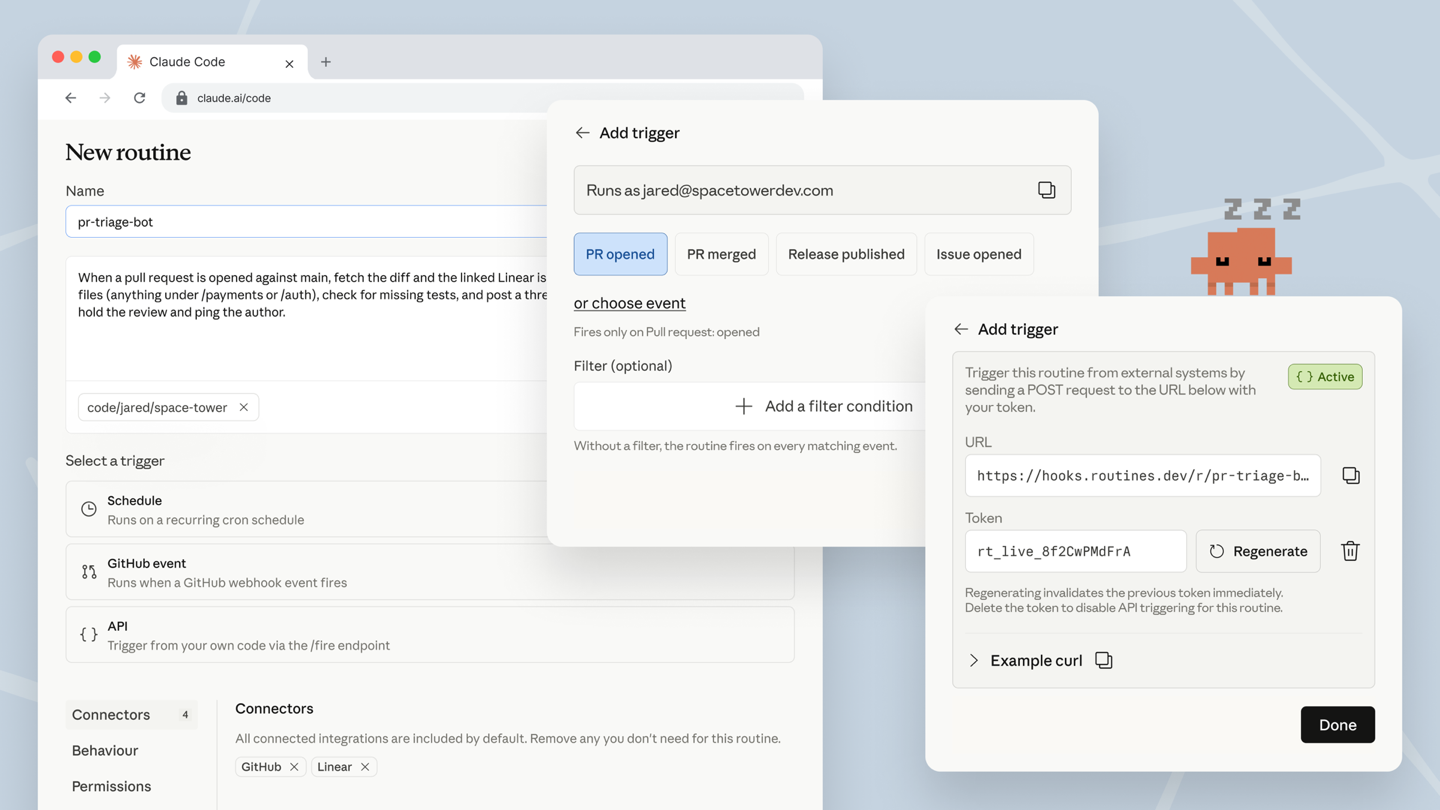
38 <p className="digest-feature-lede">Templated cloud agents that fire on a schedule, a GitHub event, or an API call. Define a routine once on Claude Code on the web with a prompt, the repos it can touch, and the connectors it needs, then let PR-opened, release-published, or your own webhook trigger it without your machine running. The trigger picker now covers GitHub events with optional filters and gives every routine a tokened <code>/fire</code> endpoint for external systems.</p>29Templated cloud agents that fire on a schedule, a GitHub event, or an API call. Define a routine once on Claude Code on the web with a prompt, the repos it can touch, and the connectors it needs, then let PR-opened, release-published, or your own webhook trigger it without your machine running. The trigger picker now covers GitHub events with optional filters and gives every routine a tokened `/fire` endpoint for external systems.
39 30
40 <Frame>31
41 <img className="w-full" src="https://mintcdn.com/claude-code/FTi4SBJ9YRs7d-5X/images/whats-new/routines.png?fit=max&auto=format&n=FTi4SBJ9YRs7d-5X&q=85&s=2ba818ea9280c549511cb48b9b4d1dc5" alt="Creating a routine on Claude Code on the web with schedule, GitHub event, and API triggers" width="1440" height="810" data-path="images/whats-new/routines.png" />
42 </Frame>
43 32
44 <p className="digest-feature-try">Create one from the web UI, or scaffold from your terminal:</p>33Create one from the web UI, or scaffold from your terminal:
45 34
46 ```text Claude Code theme={null}35```text Claude Code theme={null}
47 > /schedule daily PR review at 9am36> /schedule daily PR review at 9am
48 ```37```
49 38
50 <a className="digest-feature-link" href="/docs/en/routines">Routines guide</a>39[Routines guide](/docs/en/routines)
51</div>
52 40
53<div className="digest-feature">41/usage breakdown
54 <div className="digest-feature-header">42CLI
55 <span className="digest-feature-title">/usage breakdown</span>
56 <span className="digest-feature-pill">CLI</span>
57 </div>
58 43
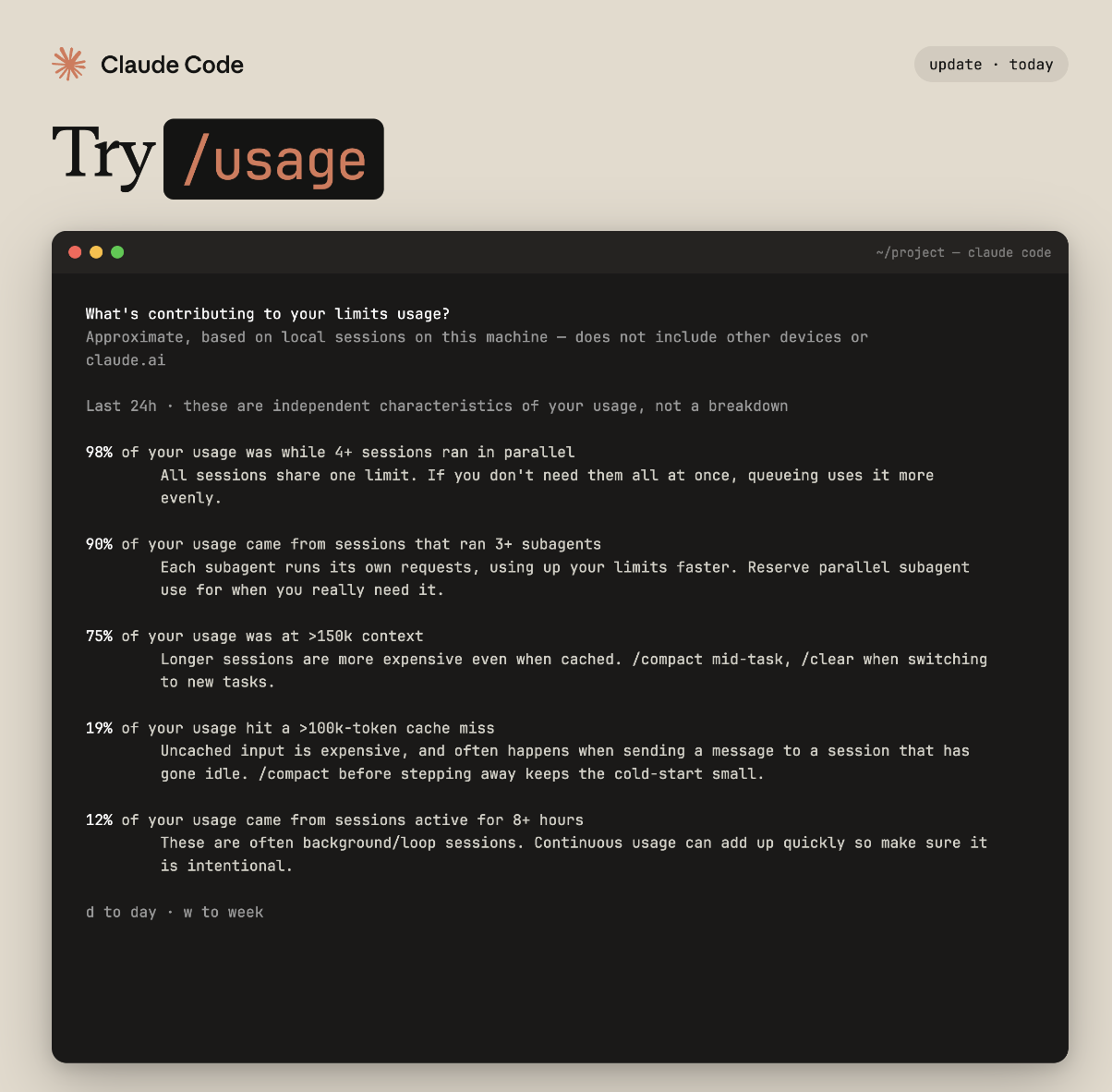
59 <p className="digest-feature-lede">More visibility into where your Claude Code usage goes. <code>/usage</code> now shows what's driving your limits: parallel sessions, subagents, cache misses, and long context, each with a percentage of your last 24 hours and a tip to optimize it. Press <code>d</code> or <code>w</code> to switch between day and week views.</p>44More visibility into where your Claude Code usage goes. `/usage` now shows what's driving your limits: parallel sessions, subagents, cache misses, and long context, each with a percentage of your last 24 hours and a tip to optimize it. Press `d` or `w` to switch between day and week views.
60 45
61 <Frame>46
62 <img className="w-full" src="https://mintcdn.com/claude-code/FTi4SBJ9YRs7d-5X/images/whats-new/usage.png?fit=max&auto=format&n=FTi4SBJ9YRs7d-5X&q=85&s=792a4b43cbef4e2931974831f076bca6" alt="The /usage command showing a breakdown of what's contributing to limits usage" width="1204" height="1182" data-path="images/whats-new/usage.png" />
63 </Frame>
64 47
65 <p className="digest-feature-try">Run it any time:</p>48Run it any time:
66 49
67 ```text Claude Code theme={null}50```text Claude Code theme={null}
68 > /usage51> /usage
69 ```52```
70 53
71 <a className="digest-feature-link" href="/docs/en/commands">Commands reference</a>54[Commands reference](/docs/en/commands)
72</div>
73 55
74<div className="digest-feature">56Mobile push notifications
75 <div className="digest-feature-header">57mobile
76 <span className="digest-feature-title">Mobile push notifications</span>
77 <span className="digest-feature-pill">mobile</span>
78 </div>
79 58
80 <p className="digest-feature-lede">With <a href="/docs/en/remote-control">Remote Control</a> connected, Claude can send a push notification to your phone when a long task finishes or it needs a decision to keep going. Turn it on with "Push when Claude decides" in <code>/config</code>, or ask for one in your prompt. Useful when you kick off a long agent run and want to step away from the terminal.</p>59With [Remote Control](/docs/en/remote-control) connected, Claude can send a push notification to your phone when a long task finishes or it needs a decision to keep going. Turn it on with "Push when Claude decides" in `/config`, or ask for one in your prompt. Useful when you kick off a long agent run and want to step away from the terminal.
81 60
82 <Frame>61<video autoPlay muted loop playsInline src="https://mintcdn.com/claude-code/uII1TETOZxBUZ3lB/images/whats-new/push-notifications.mp4?fit=max&auto=format&n=uII1TETOZxBUZ3lB&q=85&s=c91a967139596500cbdb581a53822ac1" />
83 <video autoPlay muted loop playsInline className="w-full" src="https://mintcdn.com/claude-code/uII1TETOZxBUZ3lB/images/whats-new/push-notifications.mp4?fit=max&auto=format&n=uII1TETOZxBUZ3lB&q=85&s=c91a967139596500cbdb581a53822ac1" data-path="images/whats-new/push-notifications.mp4" />
84 </Frame>
85 62
86 <p className="digest-feature-try">Ask Claude to ping you when it's done:</p>63Ask Claude to ping you when it's done:
87 64
88 ```text Claude Code theme={null}65```text Claude Code theme={null}
89 > notify me when the tests pass66> notify me when the tests pass
90 ```67```
91 68
92 <a className="digest-feature-link" href="/docs/en/remote-control#mobile-push-notifications">Remote Control: mobile push notifications</a>69[Remote Control: mobile push notifications](/docs/en/remote-control#mobile-push-notifications)
93</div>
94 70
95<div className="digest-feature">71Native binaries
96 <div className="digest-feature-header">72v2.1.113
97 <span className="digest-feature-title">Native binaries</span>
98 <span className="digest-feature-pill">v2.1.113</span>
99 </div>
100 73
101 <p className="digest-feature-lede">The <code>claude</code> CLI now spawns a native per-platform binary instead of bundled JavaScript, so the installed <code>claude</code> command no longer invokes Node. The npm package pulls the right binary in through an optional dependency such as <code>@anthropic-ai/claude-code-darwin-arm64</code>, so your install command doesn't change. The standalone installer already shipped this binary; npm now matches it.</p>74The `claude` CLI now spawns a native per-platform binary instead of bundled JavaScript, so the installed `claude` command no longer invokes Node. The npm package pulls the right binary in through an optional dependency such as `@anthropic-ai/claude-code-darwin-arm64`, so your install command doesn't change. The standalone installer already shipped this binary; npm now matches it.
102 75
103 <p className="digest-feature-try">Upgrade and check what you're running:</p>76Upgrade and check what you're running:
104 77
105 ```bash theme={null}78```bash theme={null}
106 claude update79claude update
107 claude --version80claude --version
108 ```81```
109 82
110 <a className="digest-feature-link" href="/docs/en/setup">Setup guide</a>83[Setup guide](/docs/en/setup)
111</div>
112 84
113<div className="digest-wins">85Other wins
114 <p className="digest-wins-title">Other wins</p>
115 86
116 <div className="digest-wins-grid">87New [`/ultrareview`](/docs/en/ultrareview): comprehensive code review in the cloud using parallel multi-agent analysis and an adversarial critique pass. Run it bare to review your current branch, or `/ultrareview <PR#>` for a specific PR[Auto mode](/docs/en/permission-modes#eliminate-prompts-with-auto-mode) is now available for Max subscribers on Opus 4.7, and the `--enable-auto-mode` flag is no longer required[Session recap](/docs/en/interactive-mode#session-recap) shows a one-line summary of what happened while you were away; run `/recap` on demand or turn it off from `/config`New `/tui` command and `tui` setting switch between classic and flicker-free rendering mid-conversation; focus view moved from `Ctrl+O` to its own `/focus` commandPlugins can ship background watchers via a top-level `monitors` manifest key that auto-arms at session start or on skill invoke"Auto (match terminal)" option in `/theme` follows your terminal's dark/light mode`/fewer-permission-prompts` scans your transcripts for common read-only Bash and MCP calls and proposes an allowlist for `.claude/settings.json`Claude can now discover and run built-in commands like `/init`, `/review`, and `/security-review` via the Skill tool`PreCompact` hooks can block compaction by exiting with code 2 or returning `{"decision":"block"}``ENABLE_PROMPT_CACHING_1H` opts API key, Amazon Bedrock, Google Cloud's Agent Platform, and Microsoft Foundry users into 1-hour prompt cache TTL`sandbox.network.deniedDomains` setting carves specific domains out of a broader `allowedDomains` wildcard`/undo` is now an alias for `/rewind`, and `/proactive` is an alias for `/loop`Hardened Bash permissions: deny rules now match through `env`/`sudo`/`watch` wrappers, and `Bash(find:*)` allow rules no longer auto-approve `-exec` or `-delete`
117 <div>New <a href="/docs/en/ultrareview"><code>/ultrareview</code></a>: comprehensive code review in the cloud using parallel multi-agent analysis and an adversarial critique pass. Run it bare to review your current branch, or <code>/ultrareview \<PR#></code> for a specific PR</div>
118 <div><a href="/docs/en/permission-modes#eliminate-prompts-with-auto-mode">Auto mode</a> is now available for Max subscribers on Opus 4.7, and the `--enable-auto-mode` flag is no longer required</div>
119 <div><a href="/docs/en/interactive-mode#session-recap">Session recap</a> shows a one-line summary of what happened while you were away; run <code>/recap</code> on demand or turn it off from <code>/config</code></div>
120 <div>New <code>/tui</code> command and <code>tui</code> setting switch between classic and flicker-free rendering mid-conversation; focus view moved from <code>Ctrl+O</code> to its own <code>/focus</code> command</div>
121 <div>Plugins can ship background watchers via a top-level <code>monitors</code> manifest key that auto-arms at session start or on skill invoke</div>
122 <div>"Auto (match terminal)" option in <code>/theme</code> follows your terminal's dark/light mode</div>
123 <div><code>/fewer-permission-prompts</code> scans your transcripts for common read-only Bash and MCP calls and proposes an allowlist for <code>.claude/settings.json</code></div>
124 <div>Claude can now discover and run built-in commands like <code>/init</code>, <code>/review</code>, and <code>/security-review</code> via the Skill tool</div>
125 <div><code>PreCompact</code> hooks can block compaction by exiting with code 2 or returning <code>{"{"}"decision":"block"{"}"}</code></div>
126 <div><code>ENABLE\_PROMPT\_CACHING\_1H</code> opts API key, Amazon Bedrock, Google Cloud's Agent Platform, and Microsoft Foundry users into 1-hour prompt cache TTL</div>
127 <div><code>sandbox.network.deniedDomains</code> setting carves specific domains out of a broader <code>allowedDomains</code> wildcard</div>
128 <div><code>/undo</code> is now an alias for <code>/rewind</code>, and <code>/proactive</code> is an alias for <code>/loop</code></div>
129 <div>Hardened Bash permissions: deny rules now match through <code>env</code>/<code>sudo</code>/<code>watch</code> wrappers, and <code>Bash(find:\*)</code> allow rules no longer auto-approve <code>-exec</code> or <code>-delete</code></div>
130 </div>
131</div>
132 88
133[Full changelog for v2.1.105–v2.1.113 →](/docs/en/changelog#2-1-105)89[Full changelog for v2.1.105–v2.1.113 →](/docs/en/changelog#2-1-105)