6 6
7> Opus 5가 기본 Opus 모델이 되고, Claude Code Desktop에 iOS Simulator 창이 추가되며, Claude Security 플러그인이 코드의 취약점을 스캔합니다.7> Opus 5가 기본 Opus 모델이 되고, Claude Code Desktop에 iOS Simulator 창이 추가되며, Claude Security 플러그인이 코드의 취약점을 스캔합니다.
8 8
9릴리스 [v2.1.214 → v2.1.219](/docs/en/changelog.md#2-1-214)9릴리스 [v2.1.214 → v2.1.219](https://code.claude.com/docs/en/changelog.md#2-1-214)
103가지 기능 · 7월 20–24103가지 기능 · 7월 20–24
11 11
12Claude Opus 512Claude Opus 5
13새로운 모델13새로운 모델
14 14
15Claude Opus 5는 Claude Code의 새로운 기본 Opus 모델입니다. Max, Team Premium, Enterprise 종량제 및 Anthropic API에서 기본값이며, AWS의 Claude Platform, Amazon Bedrock 및 Google Cloud의 Agent Platform에서도 기본값입니다. Anthropic API 및 Max, Team, Enterprise 플랜에서 Opus 5는 [1M 토큰 컨텍스트 윈도우](/docs/ko/model-config.md#extended-context)로 실행됩니다. Amazon Bedrock 및 Google Cloud의 Agent Platform에서는 1M 모델 변형을 선택하십시오. Fast 모드는 Opus 5로 이동하며 MTok당 $10/$50입니다. v2.1.219 이상이 필요합니다.15Claude Opus 5는 Claude Code의 새로운 기본 Opus 모델입니다. Max, Team Premium, Enterprise 종량제 및 Anthropic API에서 기본값이며, AWS의 Claude Platform, Amazon Bedrock 및 Google Cloud의 Agent Platform에서도 기본값입니다. Anthropic API 및 Max, Team, Enterprise 플랜에서 Opus 5는 [1M 토큰 컨텍스트 윈도우](https://code.claude.com/docs/ko/model-config.md#extended-context)로 실행됩니다. Amazon Bedrock 및 Google Cloud의 Agent Platform에서는 1M 모델 변형을 선택하십시오. Fast 모드는 Opus 5로 이동하며 MTok당 $10/$50입니다. v2.1.219 이상이 필요합니다.
16 16
17<video autoPlay muted loop playsInline src="https://mintcdn.com/claude-code/N3yEaTYPXMXFrF6k/images/whats-new/opus-5.mp4?fit=max&auto=format&n=N3yEaTYPXMXFrF6k&q=85&s=8536b1cb3180e539008f39930403e47b" />17<video autoPlay muted loop playsInline src="https://mintcdn.com/claude-code/N3yEaTYPXMXFrF6k/images/whats-new/opus-5.mp4?fit=max&auto=format&n=N3yEaTYPXMXFrF6k&q=85&s=8536b1cb3180e539008f39930403e47b" />
18 18
22> /model claude-opus-522> /model claude-opus-5
23```23```
24 24
25[모델 구성](/docs/ko/model-config.md#available-models)25[모델 구성](https://code.claude.com/docs/ko/model-config.md#available-models)
26 26
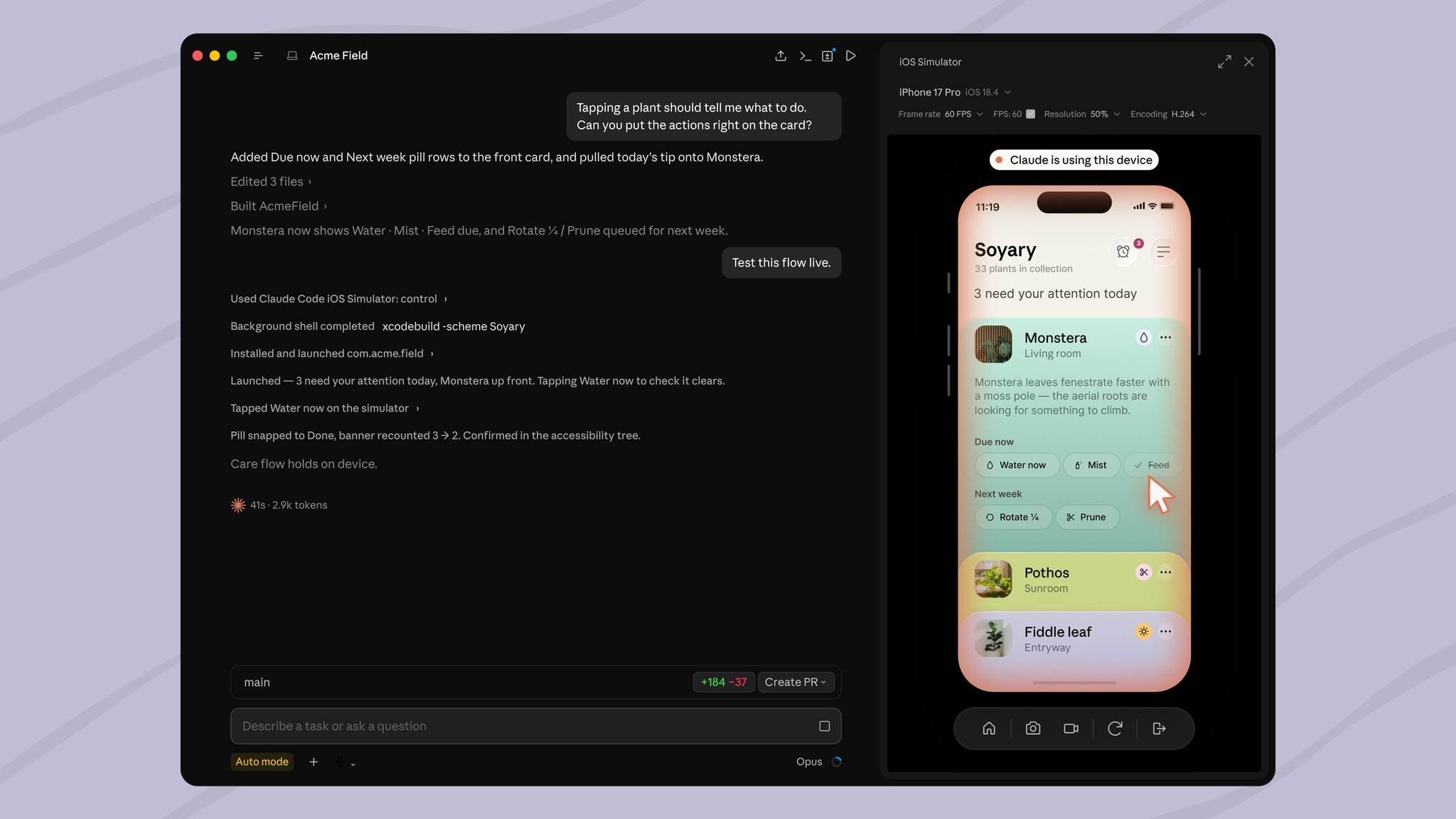
27Claude Code Desktop의 iOS Simulator27Claude Code Desktop의 iOS Simulator
28Desktop28Desktop
37> Build the app and run it in the simulator to check the onboarding flow.37> Build the app and run it in the simulator to check the onboarding flow.
38```38```
39 39
40[시뮬레이터에서 iOS 앱 테스트](/docs/ko/desktop-ios-simulator.md#run-your-app-in-the-simulator)40[시뮬레이터에서 iOS 앱 테스트](https://code.claude.com/docs/ko/desktop-ios-simulator.md#run-your-app-in-the-simulator)
41 41
42Claude Security 플러그인42Claude Security 플러그인
43플러그인43플러그인
50> /plugin install claude-security@claude-plugins-official50> /plugin install claude-security@claude-plugins-official
51```51```
52 52
53[코드베이스 스캔 및 수정](/docs/ko/claude-security.md#scan-and-fix-your-codebase)53[코드베이스 스캔 및 수정](https://code.claude.com/docs/ko/claude-security.md#scan-and-fix-your-codebase)
54 54
55기타 개선 사항55기타 개선 사항
56 56
57[`/code-review`](/docs/ko/code-review-local)는 이제 자체 컨텍스트 윈도우가 있는 백그라운드 서브에이전트로 실행되므로 검토 작업이 대화에서 벗어나고 완료되면 발견 사항이 도착합니다`/verify`, `/code-review` 및 `/deep-research`는 호출할 때만 실행됩니다. Claude는 더 이상 자동으로 실행하지 않습니다[이모지 단축코드](/docs/ko/interactive-mode.md#emoji-shortcodes)는 프롬프트 입력에서 자동 완성됩니다. `:heart:`를 입력하여 이모지를 삽입하거나 `:` 뒤에 2개 이상의 문자를 입력하여 제안을 받으십시오. `emojiCompletionEnabled`로 끌 수 있습니다`context: fork`가 있는 스킬은 [기본적으로 백그라운드에서](/docs/ko/skills.md#run-skills-in-a-subagent) 실행되며, 스킬의 frontmatter에서 `background: false`는 같은 턴에서 결과를 기다립니다세션은 기본적으로 최대 20개의 서브에이전트를 동시에 실행합니다. `CLAUDE_CODE_MAX_CONCURRENT_SUBAGENTS`로 [제한](/docs/ko/sub-agents.md#concurrent-subagent-limit)을 변경하십시오`--max-budget-usd`는 이제 서브에이전트에 대한 상한을 적용합니다. 지출이 도달하면 Claude는 더 이상 시작할 수 없고 실행 중인 백그라운드 서브에이전트가 중지됩니다새로운 [`sandbox.filesystem.disabled`](/docs/ko/sandboxing#disable-filesystem-isolation) 설정은 네트워크 송신 제어를 유지하면서 파일 시스템 격리를 건너뜁니다자동 모드에서 위험한 `rm` 명령, 백그라운드 작업 및 의심스러운 Windows 경로에 대한 확인은 더 이상 권한 대화를 열지 않습니다. 자동 모드 분류기가 대신 판정합니다Bash 권한 확인은 파일 설명자 리디렉션, `[[ ]]` 비교의 Zsh 변수 첨자, 안전하지 않은 옵션을 실행할 수 있는 `help` 및 `man` 호출, 10,000자를 초과하는 명령을 포함한 더 많은 셸 형식에서 안전하게 차단(fail closed)됩니다[빠른 모드](/docs/ko/fast-mode.md)는 더 이상 Opus 4.7을 지원하지 않습니다. `/fast`는 이제 Opus 5 및 Opus 4.8에 적용됩니다장시간 실행되는 도구 호출은 침묵하는 대신 주기적인 진행 상황 하트비트를 내보냅니다57[`/code-review`](https://code.claude.com/docs/ko/code-review-local)는 이제 자체 컨텍스트 윈도우가 있는 백그라운드 서브에이전트로 실행되므로 검토 작업이 대화에서 벗어나고 완료되면 발견 사항이 도착합니다`/verify`, `/code-review` 및 `/deep-research`는 호출할 때만 실행됩니다. Claude는 더 이상 자동으로 실행하지 않습니다[이모지 단축코드](https://code.claude.com/docs/ko/interactive-mode.md#emoji-shortcodes)는 프롬프트 입력에서 자동 완성됩니다. `:heart:`를 입력하여 이모지를 삽입하거나 `:` 뒤에 2개 이상의 문자를 입력하여 제안을 받으십시오. `emojiCompletionEnabled`로 끌 수 있습니다`context: fork`가 있는 스킬은 [기본적으로 백그라운드에서](https://code.claude.com/docs/ko/skills.md#run-skills-in-a-subagent) 실행되며, 스킬의 frontmatter에서 `background: false`는 같은 턴에서 결과를 기다립니다세션은 기본적으로 최대 20개의 서브에이전트를 동시에 실행합니다. `CLAUDE_CODE_MAX_CONCURRENT_SUBAGENTS`로 [제한](https://code.claude.com/docs/ko/sub-agents.md#concurrent-subagent-limit)을 변경하십시오`--max-budget-usd`는 이제 서브에이전트에 대한 상한을 적용합니다. 지출이 도달하면 Claude는 더 이상 시작할 수 없고 실행 중인 백그라운드 서브에이전트가 중지됩니다새로운 [`sandbox.filesystem.disabled`](https://code.claude.com/docs/ko/sandboxing#disable-filesystem-isolation) 설정은 네트워크 송신 제어를 유지하면서 파일 시스템 격리를 건너뜁니다자동 모드에서 위험한 `rm` 명령, 백그라운드 작업 및 의심스러운 Windows 경로에 대한 확인은 더 이상 권한 대화를 열지 않습니다. 자동 모드 분류기가 대신 판정합니다Bash 권한 확인은 파일 설명자 리디렉션, `[[ ]]` 비교의 Zsh 변수 첨자, 안전하지 않은 옵션을 실행할 수 있는 `help` 및 `man` 호출, 10,000자를 초과하는 명령을 포함한 더 많은 셸 형식에서 안전하게 차단(fail closed)됩니다[빠른 모드](https://code.claude.com/docs/ko/fast-mode.md)는 더 이상 Opus 4.7을 지원하지 않습니다. `/fast`는 이제 Opus 5 및 Opus 4.8에 적용됩니다장시간 실행되는 도구 호출은 침묵하는 대신 주기적인 진행 상황 하트비트를 내보냅니다
58 58
59[v2.1.214–v2.1.219의 전체 변경 로그 →](/docs/en/changelog.md#2-1-214)59[v2.1.214–v2.1.219의 전체 변경 로그 →](https://code.claude.com/docs/en/changelog.md#2-1-214)