
自定义你的状态行
配置自定义状态栏以监控 Claude Code 中的上下文窗口使用情况、成本和 git 状态
状态行是 Claude Code 底部的可自定义栏,可以运行你配置的任何 shell 脚本。它通过 stdin 接收 JSON 会话数据,并显示你的脚本打印的任何内容,为你提供一个持久的、一目了然的上下文使用情况、成本、git 状态或任何其他你想跟踪的内容的视图。
状态行在以下情况下很有用:
- 你想在工作时监控上下文窗口使用情况
- 你需要跟踪会话成本
- 你在多个会话中工作,需要区分它们
- 你希望 git 分支和状态始终可见
这是一个多行状态行的示例,它在第一行显示 git 信息,在第二行显示颜色编码的上下文栏。
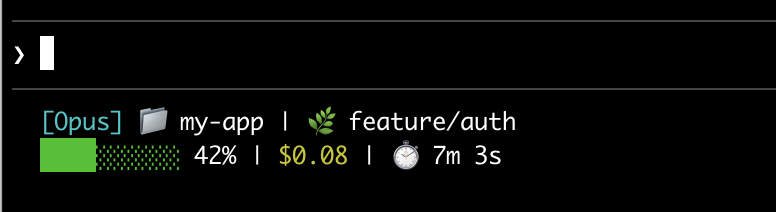
本页面介绍了设置基本状态行,解释了数据如何从 Claude Code 流向你的脚本,列出了你可以显示的所有字段,并提供了常见模式的现成示例,如 git 状态、成本跟踪和进度条。
设置状态行
使用/statusline 命令让 Claude Code 为你生成脚本,或手动创建脚本并将其添加到你的设置中。
使用 /statusline 命令
/statusline 命令接受描述你想显示的内容的自然语言指令。Claude Code 在 ~/.claude/ 中生成脚本文件并自动更新你的设置:
/statusline show model name and context percentage with a progress bar
手动配置状态行
将 statusLine 字段添加到你的用户设置(~/.claude/settings.json,其中 ~ 是你的主目录)或项目设置。将 type 设置为 "command" 并将 command 指向脚本路径或内联 shell 命令。有关创建脚本的完整演练,请参阅逐步构建状态行。
{
  "statusLine": {
    "type": "command",
    "command": "~/.claude/statusline.sh",
    "padding": 2
  }
}
command 字段在 shell 中运行,所以你也可以使用内联命令而不是脚本文件。此示例使用 jq 解析 JSON 输入并显示模型名称和上下文百分比:
{
  "statusLine": {
    "type": "command",
    "command": "jq -r '\"[\\(.model.display_name)] \\(.context_window.used_percentage // 0)% context\"'"
  }
}
可选的 padding 字段为状态行内容添加额外的水平间距(以字符为单位)。默认为 0。此填充是在界面的内置间距之外的,所以它控制相对缩进而不是距离终端边缘的绝对距离。
可选的 refreshInterval 字段除了事件驱动的更新外,每 N 秒重新运行一次你的命令。最小值为 1。当你的状态行显示基于时间的数据(如时钟)或后台子代理在主会话空闲时更改 git 状态时,设置此选项。如果不设置,则仅在事件上运行。
可选的 hideVimModeIndicator 字段会抑制提示符下方的内置 -- INSERT -- 文本。当你的脚本自己呈现 vim.mode 时,将此设置为 true,这样模式就不会显示两次。
禁用状态行
运行 /statusline 并要求它删除或清除你的状态行(例如,/statusline delete、/statusline clear、/statusline remove it)。你也可以手动从 settings.json 中删除 statusLine 字段。
逐步构建状态行
本演练展示了通过手动创建显示当前模型、工作目录和上下文窗口使用百分比的状态行来了解幕后发生的情况。
这些示例使用 Bash 脚本,在 macOS 和 Linux 上工作。在 Windows 上,请参阅Windows 配置了解 PowerShell 和 Git Bash 示例。
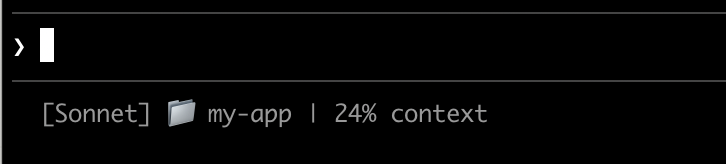
创建一个读取 JSON 并打印输出的脚本
Claude Code 通过 stdin 向你的脚本发送 JSON 数据。此脚本使用 jq,一个你可能需要安装的命令行 JSON 解析器,来提取模型名称、目录和上下文百分比,然后打印格式化的行。
将其保存到 ~/.claude/statusline.sh(其中 ~ 是你的主目录,例如 macOS 上的 /Users/username 或 Linux 上的 /home/username):
#!/bin/bash
# Read JSON data that Claude Code sends to stdin
input=$(cat)

# Extract fields using jq
MODEL=$(echo "$input" | jq -r '.model.display_name')
DIR=$(echo "$input" | jq -r '.workspace.current_dir')
# The "// 0" provides a fallback if the field is null
PCT=$(echo "$input" | jq -r '.context_window.used_percentage // 0' | cut -d. -f1)

# Output the status line - ${DIR##*/} extracts just the folder name
echo "[$MODEL] 📁 ${DIR##*/} | ${PCT}% context"
使其可执行
将脚本标记为可执行,以便你的 shell 可以运行它:
chmod +x ~/.claude/statusline.sh
添加到设置
告诉 Claude Code 运行你的脚本作为状态行。将此配置添加到 ~/.claude/settings.json,它将 type 设置为 "command"(意思是"运行此 shell 命令")并将 command 指向你的脚本:
{
"statusLine": {
"type": "command",
"command": "~/.claude/statusline.sh"
}
}
你的状态行出现在界面的底部。设置会自动重新加载,但更改在你与 Claude Code 的下一次交互之前不会出现。
状态行如何工作
Claude Code 运行你的脚本并通过 stdin 向其传输 JSON 会话数据。你的脚本读取 JSON,提取它需要的内容,并将文本打印到 stdout。Claude Code 显示你的脚本打印的任何内容。
何时更新
你的脚本在每条新的助手消息之后、/compact 完成后、权限模式更改时或 vim 模式切换时运行。更新在 300ms 处进行防抖,这意味着快速更改会批处理在一起,你的脚本在事情稳定后运行一次。如果在你的脚本仍在运行时触发新的更新,则会取消正在进行的执行。如果你编辑你的脚本,更改在 Claude Code 的下一次交互触发更新之前不会出现。
这些触发器在主会话空闲时可能会安静,例如当协调器等待后台子代理时。为了在空闲期间保持基于时间或外部来源的段的最新状态,将 refreshInterval 设置为也在固定计时器上重新运行命令。
你的脚本可以输出什么
- 多行:每个
echo或print语句显示为单独的行。请参阅多行示例。 - 颜色:使用 ANSI 转义码,如
\033[32m表示绿色(终端必须支持它们)。请参阅 git 状态示例。 - 链接:使用 OSC 8 转义序列 使文本可点击(macOS 上为 Cmd+click,Windows/Linux 上为 Ctrl+click)。需要支持超链接的终端,如 iTerm2、Kitty 或 WezTerm。请参阅可点击链接示例。
调整输出大小以适应终端
Claude Code 捕获你的脚本输出而不是直接将其连接到终端,因此 tput cols 和语言级宽度检测无法从脚本内部读取终端大小。{/* min-version: 2.1.153 */}改为读取 COLUMNS 和 LINES 环境变量。Claude Code 在运行你的脚本之前将这些设置为当前终端尺寸。需要 Claude Code v2.1.153 或更高版本。
可用数据
Claude Code 通过 stdin 向你的脚本发送以下 JSON 字段:
| 字段 | 描述 |
|---|---|
model.id, model.display_name |
当前模型标识符和显示名称 |
cwd, workspace.current_dir |
当前工作目录。两个字段包含相同的值;为了与 workspace.project_dir 保持一致,首选 workspace.current_dir。 |
workspace.project_dir |
启动 Claude Code 的目录,如果在会话期间工作目录更改,可能与 cwd 不同 |
workspace.added_dirs |
通过 /add-dir 或 --add-dir 添加的其他目录。如果未添加任何目录,则为空数组 |
workspace.git_worktree |
当前目录在使用 git worktree add 创建的链接 worktree 内时的 Git worktree 名称。在主工作树中不存在。对于任何 git worktree 都会填充,不同于仅适用于 --worktree 会话的 worktree.* |
workspace.repo.host, workspace.repo.owner, workspace.repo.name |
从 origin 远程解析的存储库标识,例如 "github.com"、"anthropics"、"claude-code"。在 git 存储库外或未配置 origin 远程时不存在 |
cost.total_cost_usd |
以美元计的估计会话成本,在客户端计算。可能与你的实际账单不同 |
cost.total_duration_ms |
自会话开始以来的总挂钟时间(毫秒) |
cost.total_api_duration_ms |
等待 API 响应的总时间(毫秒) |
cost.total_lines_added, cost.total_lines_removed |
更改的代码行数 |
context_window.total_input_tokens, context_window.total_output_tokens |
当前在上下文窗口中的令牌计数,来自最近的 API 响应。输入包括缓存读取和写入。在 v2.1.132 之前,这些是累积的会话总计 |
context_window.context_window_size |
最大上下文窗口大小(令牌)。默认为 200000,或对于具有扩展上下文的模型为 1000000。 |
context_window.used_percentage |
预计算的已使用上下文窗口百分比 |
context_window.remaining_percentage |
预计算的剩余上下文窗口百分比 |
context_window.current_usage |
来自最后一次 API 调用的令牌计数,在上下文窗口字段中描述 |
exceeds_200k_tokens |
最近一次 API 响应中的总令牌计数(输入、缓存和输出令牌合并)是否超过 200k。这是一个固定阈值,与实际上下文窗口大小无关。 |
effort.level |
当前推理工作量(low、medium、high、xhigh 或 max)。反映实时会话值,包括中途 /effort 更改。Ultracode 不是一个独立的级别,报告为 xhigh。当当前模型不支持工作量参数时不存在 |
thinking.enabled |
是否为会话启用了扩展思考 |
rate_limits.five_hour.used_percentage, rate_limits.seven_day.used_percentage |
消耗的 5 小时或 7 天速率限制的百分比,从 0 到 100 |
rate_limits.five_hour.resets_at, rate_limits.seven_day.resets_at |
Unix 纪元秒,当 5 小时或 7 天速率限制窗口重置时 |
session_id |
唯一的会话标识符 |
session_name |
使用 --name 标志或 /rename 设置的自定义会话名称。如果未设置自定义名称,则不存在 |
transcript_path |
对话记录文件的路径 |
version |
Claude Code 版本 |
output_style.name |
当前输出样式的名称 |
vim.mode |
启用 vim 模式 时的当前 vim 模式(NORMAL、INSERT、VISUAL 或 VISUAL LINE) |
agent.name |
使用 --agent 标志或配置的代理设置运行时的代理名称 |
pr.number, pr.url |
当前分支的开放拉取请求。镜像底部状态栏中的 PR 徽章。在找到 PR 之前、不在 git 存储库中或 PR 合并或关闭后不存在 |
pr.review_state |
开放 PR 的审查状态:approved、pending、changes_requested 或 draft。即使 pr 存在,也可能独立不存在 |
worktree.name |
活跃 worktree 的名称。仅在 --worktree 会话期间出现 |
worktree.path |
worktree 目录的绝对路径 |
worktree.branch |
worktree 的 Git 分支名称(例如,"worktree-my-feature")。对于基于钩子的 worktree 不存在 |
worktree.original_cwd |
Claude 进入 worktree 之前所在的目录 |
worktree.original_branch |
进入 worktree 之前检出的 Git 分支。对于基于钩子的 worktree 不存在 |
完整 JSON 架构
你的状态行命令通过 stdin 接收此 JSON 结构:
{
"cwd": "/current/working/directory",
"session_id": "abc123...",
"session_name": "my-session",
"transcript_path": "/path/to/transcript.jsonl",
"model": {
"id": "claude-opus-4-8",
"display_name": "Opus"
},
"workspace": {
"current_dir": "/current/working/directory",
"project_dir": "/original/project/directory",
"added_dirs": [],
"git_worktree": "feature-xyz",
"repo": {
"host": "github.com",
"owner": "anthropics",
"name": "claude-code"
}
},
"version": "2.1.90",
"output_style": {
"name": "default"
},
"cost": {
"total_cost_usd": 0.01234,
"total_duration_ms": 45000,
"total_api_duration_ms": 2300,
"total_lines_added": 156,
"total_lines_removed": 23
},
"context_window": {
"total_input_tokens": 15500,
"total_output_tokens": 1200,
"context_window_size": 200000,
"used_percentage": 8,
"remaining_percentage": 92,
"current_usage": {
"input_tokens": 8500,
"output_tokens": 1200,
"cache_creation_input_tokens": 5000,
"cache_read_input_tokens": 2000
}
},
"exceeds_200k_tokens": false,
"effort": {
"level": "high"
},
"thinking": {
"enabled": true
},
"rate_limits": {
"five_hour": {
"used_percentage": 23.5,
"resets_at": 1738425600
},
"seven_day": {
"used_percentage": 41.2,
"resets_at": 1738857600
}
},
"vim": {
"mode": "NORMAL"
},
"agent": {
"name": "security-reviewer"
},
"pr": {
"number": 1234,
"url": "https://github.com/anthropics/claude-code/pull/1234",
"review_state": "pending"
},
"worktree": {
"name": "my-feature",
"path": "/path/to/.claude/worktrees/my-feature",
"branch": "worktree-my-feature",
"original_cwd": "/path/to/project",
"original_branch": "main"
}
}
可能不存在的字段(不在 JSON 中):
session_name:仅在使用--name或/rename设置自定义名称时出现workspace.git_worktree:仅当当前目录在链接的 git worktree 内时出现workspace.repo:仅在 git 存储库内且配置了origin远程时出现effort:仅当当前模型支持推理工作量参数时出现vim:仅在启用 vim 模式时出现agent:仅在使用--agent标志或配置的代理设置运行时出现pr:仅在为当前分支找到开放 PR 时出现,一旦 PR 合并或关闭就会被移除。pr.review_state可能独立不存在worktree:仅在--worktree会话期间出现。当存在时,branch和original_branch对于基于钩子的 worktree 也可能不存在rate_limits:仅对 Claude.ai 订阅者(Pro/Max)在会话中第一次 API 响应后出现。每个窗口(five_hour、seven_day)可能独立不存在。使用jq -r '.rate_limits.five_hour.used_percentage // empty'来优雅地处理缺失。
可能为 null 的字段:
context_window.current_usage:在会话中第一次 API 调用之前为null,以及在/compact之后直到下一次 API 调用重新填充它为止为nullcontext_window.used_percentage,context_window.remaining_percentage:在会话早期可能为null
在你的脚本中使用条件访问处理缺失字段,使用回退默认值处理 null 值。
上下文窗口字段
context_window 对象描述来自最近一次 API 响应的实时上下文窗口。从 v2.1.132 开始,total_input_tokens 和 total_output_tokens 反映当前上下文使用情况,而不是累积的会话总计。
- 合并总计(
total_input_tokens,total_output_tokens):当前在上下文窗口中的令牌。total_input_tokens是input_tokens、cache_creation_input_tokens和cache_read_input_tokens的总和;total_output_tokens是最近一次响应中的输出令牌。在第一次 API 响应之前,两者都是0。 - 按组件使用情况(
current_usage):相同的令牌计数按类别分解。当你需要将缓存命中与新输入分开时,使用此选项。
current_usage 对象包含:
input_tokens:当前上下文中的输入令牌output_tokens:生成的输出令牌cache_creation_input_tokens:写入缓存的令牌cache_read_input_tokens:从缓存读取的令牌
有关缓存字段的含义以及它们如何计费的信息,请参阅检查缓存性能。
used_percentage 字段仅从输入令牌计算:input_tokens + cache_creation_input_tokens + cache_read_input_tokens。它不包括 output_tokens。
如果你从 current_usage 手动计算上下文百分比,使用相同的仅输入公式来匹配 used_percentage。
current_usage 对象在会话中第一次 API 调用之前为 null,以及在 /compact 之后直到下一次 API 调用重新填充它为止再次为 null。
示例
这些示例展示了常见的状态行模式。要使用任何示例:
- 将脚本保存到文件,如
~/.claude/statusline.sh(或.py/.js) - 使其可执行:
chmod +x ~/.claude/statusline.sh - 将路径添加到你的设置
Bash 示例使用 jq 来解析 JSON。Python 和 Node.js 具有内置的 JSON 解析。
上下文窗口使用情况
显示当前模型和上下文窗口使用情况,带有可视进度条。每个脚本从 stdin 读取 JSON,提取 used_percentage 字段,并构建一个 10 字符的栏,其中填充的块(▓)代表使用情况:
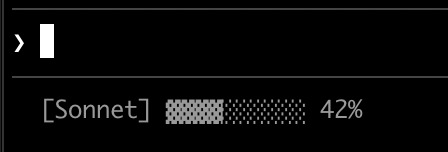
#!/bin/bash
# Read all of stdin into a variable
input=$(cat)

# Extract fields with jq, "// 0" provides fallback for null
MODEL=$(echo "$input" | jq -r '.model.display_name')
PCT=$(echo "$input" | jq -r '.context_window.used_percentage // 0' | cut -d. -f1)

# Build progress bar: printf -v creates a run of spaces, then
# ${var// /▓} replaces each space with a block character
BAR_WIDTH=10
FILLED=$((PCT * BAR_WIDTH / 100))
EMPTY=$((BAR_WIDTH - FILLED))
BAR=""
[ "$FILLED" -gt 0 ] && printf -v FILL "%${FILLED}s" && BAR="${FILL// /▓}"
[ "$EMPTY" -gt 0 ] && printf -v PAD "%${EMPTY}s" && BAR="${BAR}${PAD// /░}"

echo "[$MODEL] $BAR $PCT%"
#!/usr/bin/env python3
import json, sys

# json.load reads and parses stdin in one step
data = json.load(sys.stdin)
model = data['model']['display_name']
# "or 0" handles null values
pct = int(data.get('context_window', {}).get('used_percentage', 0) or 0)

# String multiplication builds the bar
filled = pct * 10 // 100
bar = '▓' * filled + '░' * (10 - filled)

print(f"[{model}] {bar} {pct}%")
#!/usr/bin/env node
// Node.js reads stdin asynchronously with events
let input = '';
process.stdin.on('data', chunk => input += chunk);
process.stdin.on('end', () => {
const data = JSON.parse(input);
const model = data.model.display_name;
// Optional chaining (?.) safely handles null fields
const pct = Math.floor(data.context_window?.used_percentage || 0);

// String.repeat() builds the bar
const filled = Math.floor(pct * 10 / 100);
const bar = '▓'.repeat(filled) + '░'.repeat(10 - filled);

console.log(`[${model}] ${bar} ${pct}%`);
});
Git 状态与颜色
显示 git 分支,带有暂存和修改文件的颜色编码指示器。此脚本使用ANSI 转义码表示终端颜色:\033[32m 是绿色,\033[33m 是黄色,\033[0m 重置为默认值。
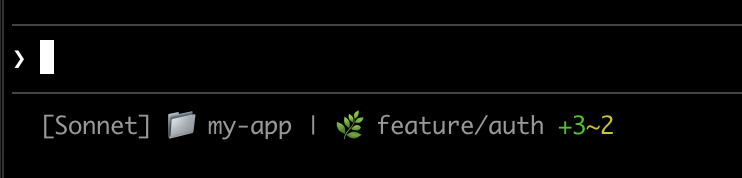
每个脚本检查当前目录是否是 git 存储库,计算暂存和修改文件,并显示颜色编码的指示器:
#!/bin/bash
input=$(cat)

MODEL=$(echo "$input" | jq -r '.model.display_name')
DIR=$(echo "$input" | jq -r '.workspace.current_dir')

GREEN='\033[32m'
YELLOW='\033[33m'
RESET='\033[0m'

if git rev-parse --git-dir > /dev/null 2>&1; then
BRANCH=$(git branch --show-current 2>/dev/null)
STAGED=$(git diff --cached --numstat 2>/dev/null | wc -l | tr -d ' ')
MODIFIED=$(git diff --numstat 2>/dev/null | wc -l | tr -d ' ')

GIT_STATUS=""
[ "$STAGED" -gt 0 ] && GIT_STATUS="${GREEN}+${STAGED}${RESET}"
[ "$MODIFIED" -gt 0 ] && GIT_STATUS="${GIT_STATUS}${YELLOW}~${MODIFIED}${RESET}"

echo -e "[$MODEL] 📁 ${DIR##*/} | 🌿 $BRANCH $GIT_STATUS"
else
echo "[$MODEL] 📁 ${DIR##*/}"
fi
#!/usr/bin/env python3
import json, sys, subprocess, os

data = json.load(sys.stdin)
model = data['model']['display_name']
directory = os.path.basename(data['workspace']['current_dir'])

GREEN, YELLOW, RESET = '\033[32m', '\033[33m', '\033[0m'

try:
subprocess.check_output(['git', 'rev-parse', '--git-dir'], stderr=subprocess.DEVNULL)
branch = subprocess.check_output(['git', 'branch', '--show-current'], text=True).strip()
staged_output = subprocess.check_output(['git', 'diff', '--cached', '--numstat'], text=True).strip()
modified_output = subprocess.check_output(['git', 'diff', '--numstat'], text=True).strip()
staged = len(staged_output.split('\n')) if staged_output else 0
modified = len(modified_output.split('\n')) if modified_output else 0

git_status = f"{GREEN}+{staged}{RESET}" if staged else ""
git_status += f"{YELLOW}~{modified}{RESET}" if modified else ""

print(f"[{model}] 📁 {directory} | 🌿 {branch} {git_status}")
except:
print(f"[{model}] 📁 {directory}")
#!/usr/bin/env node
const { execSync } = require('child_process');
const path = require('path');

let input = '';
process.stdin.on('data', chunk => input += chunk);
process.stdin.on('end', () => {
const data = JSON.parse(input);
const model = data.model.display_name;
const dir = path.basename(data.workspace.current_dir);

const GREEN = '\x1b[32m', YELLOW = '\x1b[33m', RESET = '\x1b[0m';

try {
execSync('git rev-parse --git-dir', { stdio: 'ignore' });
const branch = execSync('git branch --show-current', { encoding: 'utf8' }).trim();
const staged = execSync('git diff --cached --numstat', { encoding: 'utf8' }).trim().split('\n').filter(Boolean).length;
const modified = execSync('git diff --numstat', { encoding: 'utf8' }).trim().split('\n').filter(Boolean).length;

let gitStatus = staged ? `${GREEN}+${staged}${RESET}` : '';
gitStatus += modified ? `${YELLOW}~${modified}${RESET}` : '';

console.log(`[${model}] 📁 ${dir} | 🌿 ${branch} ${gitStatus}`);
} catch {
console.log(`[${model}] 📁 ${dir}`);
}
});
成本和持续时间跟踪
跟踪你的会话的 API 成本和经过的时间。cost.total_cost_usd 字段累积当前会话中所有 API 调用的估计成本。cost.total_duration_ms 字段测量自会话开始以来的总经过时间,而 cost.total_api_duration_ms 仅跟踪等待 API 响应的时间。
每个脚本将成本格式化为货币并将毫秒转换为分钟和秒:
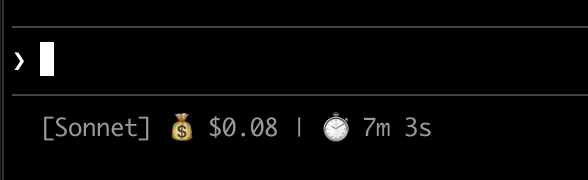
#!/bin/bash
input=$(cat)

MODEL=$(echo "$input" | jq -r '.model.display_name')
COST=$(echo "$input" | jq -r '.cost.total_cost_usd // 0')
DURATION_MS=$(echo "$input" | jq -r '.cost.total_duration_ms // 0')

COST_FMT=$(printf '$%.2f' "$COST")
DURATION_SEC=$((DURATION_MS / 1000))
MINS=$((DURATION_SEC / 60))
SECS=$((DURATION_SEC % 60))

echo "[$MODEL] 💰 $COST_FMT | ⏱️ ${MINS}m ${SECS}s"
#!/usr/bin/env python3
import json, sys

data = json.load(sys.stdin)
model = data['model']['display_name']
cost = data.get('cost', {}).get('total_cost_usd', 0) or 0
duration_ms = data.get('cost', {}).get('total_duration_ms', 0) or 0

duration_sec = duration_ms // 1000
mins, secs = duration_sec // 60, duration_sec % 60

print(f"[{model}] 💰 ${cost:.2f} | ⏱️ {mins}m {secs}s")
#!/usr/bin/env node
let input = '';
process.stdin.on('data', chunk => input += chunk);
process.stdin.on('end', () => {
const data = JSON.parse(input);
const model = data.model.display_name;
const cost = data.cost?.total_cost_usd || 0;
const durationMs = data.cost?.total_duration_ms || 0;

const durationSec = Math.floor(durationMs / 1000);
const mins = Math.floor(durationSec / 60);
const secs = durationSec % 60;

console.log(`[${model}] 💰 $${cost.toFixed(2)} | ⏱️ ${mins}m ${secs}s`);
});
显示多行
你的脚本可以输出多行来创建更丰富的显示。每个 echo 语句在状态区域中产生单独的行。
此示例结合了几种技术:基于阈值的颜色(70% 以下为绿色,70-89% 为黄色,90%+ 为红色)、进度条和 git 分支信息。每个 print 或 echo 语句创建单独的行:
#!/bin/bash
input=$(cat)

MODEL=$(echo "$input" | jq -r '.model.display_name')
DIR=$(echo "$input" | jq -r '.workspace.current_dir')
COST=$(echo "$input" | jq -r '.cost.total_cost_usd // 0')
PCT=$(echo "$input" | jq -r '.context_window.used_percentage // 0' | cut -d. -f1)
DURATION_MS=$(echo "$input" | jq -r '.cost.total_duration_ms // 0')

CYAN='\033[36m'; GREEN='\033[32m'; YELLOW='\033[33m'; RED='\033[31m'; RESET='\033[0m'

# Pick bar color based on context usage
if [ "$PCT" -ge 90 ]; then BAR_COLOR="$RED"
elif [ "$PCT" -ge 70 ]; then BAR_COLOR="$YELLOW"
else BAR_COLOR="$GREEN"; fi

FILLED=$((PCT / 10)); EMPTY=$((10 - FILLED))
printf -v FILL "%${FILLED}s"; printf -v PAD "%${EMPTY}s"
BAR="${FILL// /█}${PAD// /░}"

MINS=$((DURATION_MS / 60000)); SECS=$(((DURATION_MS % 60000) / 1000))

BRANCH=""
git rev-parse --git-dir > /dev/null 2>&1 && BRANCH=" | 🌿 $(git branch --show-current 2>/dev/null)"

echo -e "${CYAN}[$MODEL]${RESET} 📁 ${DIR##*/}$BRANCH"
COST_FMT=$(printf '$%.2f' "$COST")
echo -e "${BAR_COLOR}${BAR}${RESET} ${PCT}% | ${YELLOW}${COST_FMT}${RESET} | ⏱️ ${MINS}m ${SECS}s"
#!/usr/bin/env python3
import json, sys, subprocess, os

data = json.load(sys.stdin)
model = data['model']['display_name']
directory = os.path.basename(data['workspace']['current_dir'])
cost = data.get('cost', {}).get('total_cost_usd', 0) or 0
pct = int(data.get('context_window', {}).get('used_percentage', 0) or 0)
duration_ms = data.get('cost', {}).get('total_duration_ms', 0) or 0

CYAN, GREEN, YELLOW, RED, RESET = '\033[36m', '\033[32m', '\033[33m', '\033[31m', '\033[0m'

bar_color = RED if pct >= 90 else YELLOW if pct >= 70 else GREEN
filled = pct // 10
bar = '█' * filled + '░' * (10 - filled)

mins, secs = duration_ms // 60000, (duration_ms % 60000) // 1000

try:
branch = subprocess.check_output(['git', 'branch', '--show-current'], text=True, stderr=subprocess.DEVNULL).strip()
branch = f" | 🌿 {branch}" if branch else ""
except:
branch = ""

print(f"{CYAN}[{model}]{RESET} 📁 {directory}{branch}")
print(f"{bar_color}{bar}{RESET} {pct}% | {YELLOW}${cost:.2f}{RESET} | ⏱️ {mins}m {secs}s")
#!/usr/bin/env node
const { execSync } = require('child_process');
const path = require('path');

let input = '';
process.stdin.on('data', chunk => input += chunk);
process.stdin.on('end', () => {
const data = JSON.parse(input);
const model = data.model.display_name;
const dir = path.basename(data.workspace.current_dir);
const cost = data.cost?.total_cost_usd || 0;
const pct = Math.floor(data.context_window?.used_percentage || 0);
const durationMs = data.cost?.total_duration_ms || 0;

const CYAN = '\x1b[36m', GREEN = '\x1b[32m', YELLOW = '\x1b[33m', RED = '\x1b[31m', RESET = '\x1b[0m';

const barColor = pct >= 90 ? RED : pct >= 70 ? YELLOW : GREEN;
const filled = Math.floor(pct / 10);
const bar = '█'.repeat(filled) + '░'.repeat(10 - filled);

const mins = Math.floor(durationMs / 60000);
const secs = Math.floor((durationMs % 60000) / 1000);

let branch = '';
try {
branch = execSync('git branch --show-current', { encoding: 'utf8', stdio: ['pipe', 'pipe', 'ignore'] }).trim();
branch = branch ? ` | 🌿 ${branch}` : '';
} catch {}

console.log(`${CYAN}[${model}]${RESET} 📁 ${dir}${branch}`);
console.log(`${barColor}${bar}${RESET} ${pct}% | ${YELLOW}$${cost.toFixed(2)}${RESET} | ⏱️ ${mins}m ${secs}s`);
});
可点击链接
此示例创建指向你的 GitHub 存储库的可点击链接。它读取 git 远程 URL,使用 sed 将 SSH 格式转换为 HTTPS,并将存储库名称包装在 OSC 8 转义码中。按住 Cmd(macOS)或 Ctrl(Windows/Linux)并单击以在浏览器中打开链接。
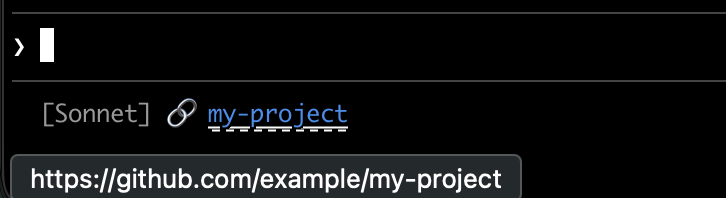
每个脚本获取 git 远程 URL,将 SSH 格式转换为 HTTPS,并将存储库名称包装在 OSC 8 转义码中。Bash 版本使用 printf '%b',它比 echo -e 更可靠地跨不同 shell 解释反斜杠转义:
#!/bin/bash
input=$(cat)

MODEL=$(echo "$input" | jq -r '.model.display_name')

# Convert git SSH URL to HTTPS
REMOTE=$(git remote get-url origin 2>/dev/null | sed 's/git@github.com:/https:\/\/github.com\//' | sed 's/\.git$//')

if [ -n "$REMOTE" ]; then
REPO_NAME=$(basename "$REMOTE")
# OSC 8 format: \e]8;;URL\a then TEXT then \e]8;;\a
# printf %b interprets escape sequences reliably across shells
printf '%b' "[$MODEL] 🔗 \e]8;;${REMOTE}\a${REPO_NAME}\e]8;;\a\n"
else
echo "[$MODEL]"
fi
#!/usr/bin/env python3
import json, sys, subprocess, re, os

data = json.load(sys.stdin)
model = data['model']['display_name']

# Get git remote URL
try:
remote = subprocess.check_output(
['git', 'remote', 'get-url', 'origin'],
stderr=subprocess.DEVNULL, text=True
).strip()
# Convert SSH to HTTPS format
remote = re.sub(r'^git@github\.com:', 'https://github.com/', remote)
remote = re.sub(r'\.git$', '', remote)
repo_name = os.path.basename(remote)
# OSC 8 escape sequences
link = f"\033]8;;{remote}\a{repo_name}\033]8;;\a"
print(f"[{model}] 🔗 {link}")
except:
print(f"[{model}]")
#!/usr/bin/env node
const { execSync } = require('child_process');
const path = require('path');

let input = '';
process.stdin.on('data', chunk => input += chunk);
process.stdin.on('end', () => {
const data = JSON.parse(input);
const model = data.model.display_name;

try {
let remote = execSync('git remote get-url origin', { encoding: 'utf8', stdio: ['pipe', 'pipe', 'ignore'] }).trim();
// Convert SSH to HTTPS format
remote = remote.replace(/^git@github\.com:/, 'https://github.com/').replace(/\.git$/, '');
const repoName = path.basename(remote);
// OSC 8 escape sequences
const link = `\x1b]8;;${remote}\x07${repoName}\x1b]8;;\x07`;
console.log(`[${model}] 🔗 ${link}`);
} catch {
console.log(`[${model}]`);
}
});
速率限制使用情况
在状态行中显示 Claude.ai 订阅速率限制使用情况。rate_limits 对象包含 five_hour(5 小时滚动窗口)和 seven_day(每周)窗口。每个窗口提供 used_percentage(0-100)和 resets_at(Unix 纪元秒,当窗口重置时)。
此字段仅对 Claude.ai 订阅者(Pro/Max)在第一次 API 响应后出现。每个脚本优雅地处理缺失字段:
#!/bin/bash
input=$(cat)

MODEL=$(echo "$input" | jq -r '.model.display_name')
# "// empty" produces no output when rate_limits is absent
FIVE_H=$(echo "$input" | jq -r '.rate_limits.five_hour.used_percentage // empty')
WEEK=$(echo "$input" | jq -r '.rate_limits.seven_day.used_percentage // empty')

LIMITS=""
[ -n "$FIVE_H" ] && LIMITS="5h: $(printf '%.0f' "$FIVE_H")%"
[ -n "$WEEK" ] && LIMITS="${LIMITS:+$LIMITS }7d: $(printf '%.0f' "$WEEK")%"

[ -n "$LIMITS" ] && echo "[$MODEL] | $LIMITS" || echo "[$MODEL]"
#!/usr/bin/env python3
import json, sys

data = json.load(sys.stdin)
model = data['model']['display_name']

parts = []
rate = data.get('rate_limits', {})
five_h = rate.get('five_hour', {}).get('used_percentage')
week = rate.get('seven_day', {}).get('used_percentage')

if five_h is not None:
parts.append(f"5h: {five_h:.0f}%")
if week is not None:
parts.append(f"7d: {week:.0f}%")

if parts:
print(f"[{model}] | {' '.join(parts)}")
else:
print(f"[{model}]")
#!/usr/bin/env node
let input = '';
process.stdin.on('data', chunk => input += chunk);
process.stdin.on('end', () => {
const data = JSON.parse(input);
const model = data.model.display_name;

const parts = [];
const fiveH = data.rate_limits?.five_hour?.used_percentage;
const week = data.rate_limits?.seven_day?.used_percentage;

if (fiveH != null) parts.push(`5h: ${Math.round(fiveH)}%`);
if (week != null) parts.push(`7d: ${Math.round(week)}%`);

console.log(parts.length ? `[${model}] | ${parts.join(' ')}` : `[${model}]`);
});
缓存昂贵的操作
你的状态行脚本在活跃会话期间频繁运行。像 git status 或 git diff 这样的命令可能很慢,特别是在大型存储库中。此示例将 git 信息缓存到临时文件,并仅每 5 秒刷新一次。
缓存文件名需要在会话内的状态行调用中保持稳定,但在会话之间是唯一的,以便不同存储库中的并发会话不会读取彼此的缓存 git 状态。基于进程的标识符如 $$、os.getpid() 或 process.pid 在每次调用时都会改变,会破坏缓存。改用 JSON 输入中的 session_id:它在会话的生命周期内是稳定的,并且对每个会话是唯一的。
每个脚本在运行 git 命令之前检查缓存文件是否缺失或早于 5 秒:
#!/bin/bash
input=$(cat)

MODEL=$(echo "$input" | jq -r '.model.display_name')
DIR=$(echo "$input" | jq -r '.workspace.current_dir')
SESSION_ID=$(echo "$input" | jq -r '.session_id')

CACHE_FILE="/tmp/statusline-git-cache-$SESSION_ID"
CACHE_MAX_AGE=5  # seconds

cache_is_stale() {
[ ! -f "$CACHE_FILE" ] || \
# stat -f %m is macOS, stat -c %Y is Linux
[ $(($(date +%s) - $(stat -f %m "$CACHE_FILE" 2>/dev/null || stat -c %Y "$CACHE_FILE" 2>/dev/null || echo 0))) -gt $CACHE_MAX_AGE ]
}

if cache_is_stale; then
if git rev-parse --git-dir > /dev/null 2>&1; then
BRANCH=$(git branch --show-current 2>/dev/null)
STAGED=$(git diff --cached --numstat 2>/dev/null | wc -l | tr -d ' ')
MODIFIED=$(git diff --numstat 2>/dev/null | wc -l | tr -d ' ')
echo "$BRANCH|$STAGED|$MODIFIED" > "$CACHE_FILE"
else
echo "||" > "$CACHE_FILE"
fi
fi

IFS='|' read -r BRANCH STAGED MODIFIED < "$CACHE_FILE"

if [ -n "$BRANCH" ]; then
echo "[$MODEL] 📁 ${DIR##*/} | 🌿 $BRANCH +$STAGED ~$MODIFIED"
else
echo "[$MODEL] 📁 ${DIR##*/}"
fi
#!/usr/bin/env python3
import json, sys, subprocess, os, time

data = json.load(sys.stdin)
model = data['model']['display_name']
directory = os.path.basename(data['workspace']['current_dir'])
session_id = data['session_id']

CACHE_FILE = f"/tmp/statusline-git-cache-{session_id}"
CACHE_MAX_AGE = 5  # seconds

def cache_is_stale():
if not os.path.exists(CACHE_FILE):
return True
return time.time() - os.path.getmtime(CACHE_FILE) > CACHE_MAX_AGE

if cache_is_stale():
try:
subprocess.check_output(['git', 'rev-parse', '--git-dir'], stderr=subprocess.DEVNULL)
branch = subprocess.check_output(['git', 'branch', '--show-current'], text=True).strip()
staged = subprocess.check_output(['git', 'diff', '--cached', '--numstat'], text=True).strip()
modified = subprocess.check_output(['git', 'diff', '--numstat'], text=True).strip()
staged_count = len(staged.split('\n')) if staged else 0
modified_count = len(modified.split('\n')) if modified else 0
with open(CACHE_FILE, 'w') as f:
f.write(f"{branch}|{staged_count}|{modified_count}")
except:
with open(CACHE_FILE, 'w') as f:
f.write("||")

with open(CACHE_FILE) as f:
branch, staged, modified = f.read().strip().split('|')

if branch:
print(f"[{model}] 📁 {directory} | 🌿 {branch} +{staged} ~{modified}")
else:
print(f"[{model}] 📁 {directory}")
#!/usr/bin/env node
const { execSync } = require('child_process');
const fs = require('fs');
const path = require('path');

let input = '';
process.stdin.on('data', chunk => input += chunk);
process.stdin.on('end', () => {
const data = JSON.parse(input);
const model = data.model.display_name;
const dir = path.basename(data.workspace.current_dir);
const sessionId = data.session_id;

const CACHE_FILE = `/tmp/statusline-git-cache-${sessionId}`;
const CACHE_MAX_AGE = 5; // seconds

const cacheIsStale = () => {
if (!fs.existsSync(CACHE_FILE)) return true;
return (Date.now() / 1000) - fs.statSync(CACHE_FILE).mtimeMs / 1000 > CACHE_MAX_AGE;
};

if (cacheIsStale()) {
try {
execSync('git rev-parse --git-dir', { stdio: 'ignore' });
const branch = execSync('git branch --show-current', { encoding: 'utf8' }).trim();
const staged = execSync('git diff --cached --numstat', { encoding: 'utf8' }).trim().split('\n').filter(Boolean).length;
const modified = execSync('git diff --numstat', { encoding: 'utf8' }).trim().split('\n').filter(Boolean).length;
fs.writeFileSync(CACHE_FILE, `${branch}|${staged}|${modified}`);
} catch {
fs.writeFileSync(CACHE_FILE, '||');
}
}

const [branch, staged, modified] = fs.readFileSync(CACHE_FILE, 'utf8').trim().split('|');

if (branch) {
console.log(`[${model}] 📁 ${dir} | 🌿 ${branch} +${staged} ~${modified}`);
} else {
console.log(`[${model}] 📁 ${dir}`);
}
});
Windows 配置
在 Windows 上,Claude Code 通过 Git Bash 运行状态行命令(如果已安装 Git Bash),或在没有 Git Bash 时通过 PowerShell 运行。
Git Bash 将未引用的反斜杠视为转义字符,因此 Windows 风格的路径(如 C:\Users\username\script.mjs)到达脚本运行器时会删除其分隔符,命令会失败而没有可见的错误。在 command 字符串中使用正斜杠编写文件路径,如下面的示例所示。~ 快捷方式也有效,并扩展到你的 Windows 主目录。
要将 PowerShell 脚本作为状态行运行,请通过 powershell 调用它。无论 Claude Code 通过 Git Bash 还是 PowerShell 路由命令,这都有效:
{
"statusLine": {
"type": "command",
"command": "powershell -NoProfile -File C:/Users/username/.claude/statusline.ps1"
}
}
$input_json = $input | Out-String | ConvertFrom-Json
$cwd = $input_json.cwd
$model = $input_json.model.display_name
$used = $input_json.context_window.used_percentage
$dirname = Split-Path $cwd -Leaf

if ($used) {
Write-Host "$dirname [$model] ctx: $used%"
} else {
Write-Host "$dirname [$model]"
}
或者,当安装了 Git Bash 时,直接运行 Bash 脚本:
{
"statusLine": {
"type": "command",
"command": "~/.claude/statusline.sh"
}
}
#!/usr/bin/env bash
input=$(cat)
cwd=$(echo "$input" | grep -o '"cwd":"[^"]*"' | cut -d'"' -f4)
model=$(echo "$input" | grep -o '"display_name":"[^"]*"' | cut -d'"' -f4)
dirname="${cwd##*[/\\]}"
echo "$dirname [$model]"
子代理状态行
subagentStatusLine 设置为代理面板中显示的每个子代理呈现自定义行体。使用它来替换默认的 name · description · token count 行为你自己的格式。
{
  "subagentStatusLine": {
    "type": "command",
    "command": "~/.claude/subagent-statusline.sh"
  }
}
该命令在每个刷新周期运行一次,所有可见的子代理行作为单个 JSON 对象传递到 stdin。输入包括基本钩子字段加上 columns(可用行宽)和 tasks 数组,其中每个任务有 id、name、type、status、description、label、startTime、tokenCount、tokenSamples 和 cwd。
将一个 JSON 行写入 stdout,用于你想覆盖的每一行,形式为 {"id": "<task id>", "content": "<row body>"} 。content 字符串按原样呈现,包括 ANSI 颜色和 OSC 8 超链接。省略任务的 id 以保持该行的默认呈现;发出空 content 字符串以隐藏它。
适用于 statusLine 的相同信任和 disableAllHooks 门控也适用于此处。插件可以在其settings.json中提供默认的 subagentStatusLine。
提示
- 使用模拟输入测试:
echo '{"model":{"display_name":"Opus"},"workspace":{"current_dir":"/home/user/project"},"context_window":{"used_percentage":25},"session_id":"test-session-abc"}' | ./statusline.sh - 保持输出简短:状态栏的宽度有限,所以长输出可能会被截断或换行不当
- 缓存慢速操作:你的脚本在活跃会话期间频繁运行,所以像
git status这样的命令可能会导致延迟。请参阅缓存示例了解如何处理这个问题。
社区项目如 ccstatusline 和 starship-claude 提供带有主题和其他功能的预构建配置。
故障排除
状态行未出现
- 验证你的脚本是可执行的:
chmod +x ~/.claude/statusline.sh - 检查你的脚本输出到 stdout,而不是 stderr
- 手动运行你的脚本以验证它产生输出
- 在安装了 Git Bash 的 Windows 上,
command路径中的反斜杠可能在脚本运行前被当作转义字符消耗。在路径中使用正斜杠。参见 Windows 配置。 - 如果
disableAllHooks在你的设置中设置为true,状态行也会被禁用。删除此设置或将其设置为false以重新启用。 - 运行
claude --debug以记录会话中第一次状态行调用的退出代码和 stderr - 要求 Claude 读取你的设置文件并直接执行
statusLine命令以显示错误
状态行显示 -- 或空值
- 在第一次 API 响应完成之前,字段可能为
null - 在你的脚本中使用回退处理 null 值,如 jq 中的
// 0 - 如果值在多条消息后仍然为空,请重新启动 Claude Code
上下文百分比显示意外值
- 使用
used_percentage获得最简单的准确上下文状态 - 上下文百分比可能与
/context输出不同,因为每个的计算时间不同
OSC 8 链接不可点击
-
验证你的终端支持 OSC 8 超链接(iTerm2、Kitty、WezTerm)
-
Terminal.app 不支持可点击链接
-
如果链接文本出现但不可点击,Claude Code 可能未检测到你的终端中的超链接支持。这通常影响 Windows Terminal 和其他不在自动检测列表中的模拟器。在启动 Claude Code 之前设置
FORCE_HYPERLINK环境变量以覆盖检测:FORCE_HYPERLINK=1 claude在 PowerShell 中,首先在当前会话中设置变量:
$env:FORCE_HYPERLINK = "1"; claude -
SSH 和 tmux 会话可能根据配置剥离 OSC 序列
-
如果转义序列显示为文字文本,如
\e]8;;,使用printf '%b'而不是echo -e以获得更可靠的转义处理
转义序列显示故障
- 复杂的转义序列(ANSI 颜色、OSC 8 链接)如果与其他 UI 更新重叠,偶尔会导致输出混乱
- 如果你看到损坏的文本,尝试简化你的脚本为纯文本输出
- 带有转义码的多行状态行比单行纯文本更容易出现渲染问题
工作区信任需要
- 状态行命令仅在你接受当前目录的工作区信任对话框时运行。因为
statusLine执行 shell 命令,它需要与 hooks 和其他执行 shell 的设置相同的信任接受。 - 如果未接受信任,你将看到通知
statusline skipped · restart to fix而不是你的状态行输出。重新启动 Claude Code 并接受信任提示以启用它。
脚本错误或挂起
- 以非零代码退出或不产生输出的脚本会导致状态行变为空白
- 慢速脚本会阻止状态行更新,直到它们完成。保持脚本快速以避免陈旧输出。
- 如果在慢速脚本运行时触发新的更新,正在进行的脚本会被取消
- 在配置之前使用模拟输入独立测试你的脚本
通知共享状态行行
- 系统通知,如 MCP 服务器错误和自动更新,显示在与你的状态行相同行的右侧。临时通知,如上下文低警告,也会循环通过此区域。
- 启用详细模式会向此区域添加令牌计数器
- 在窄终端上,这些通知可能会截断你的状态行输出