
在 Pull Request 上使用 PR Steward
了解 PR Steward 会在您的 GitHub Pull Request 上添加哪些内容,如何向它提供指令,如何通过评论或标签启动或停止它,以及如何限制它为您执行的操作
PR Steward 是一个 Agent,它会在已启用它的仓库中处理您打开的 GitHub Pull Request。它会推送提交以处理审查反馈,并尝试修复失败的检查和解决合并冲突。
您可以告诉它要处理什么,或为自己关闭它。要在某个 Pull Request 上停止它,请移除 claude-pr-steward-watching 标签,或评论 @claude stop。
PR Steward 会在 Pull Request 上添加什么
在 github.com 上,PR Steward 以 claude[bot] 的身份发布评论,这是 Claude GitHub App 的账户。
PR Steward 会在 Pull Request 上添加以下标签、评论和提交:

PR Steward 在以下时间点添加各项内容:
| PR Steward 添加的内容 | 时间 |
|---|---|
claude-pr-steward-watching 标签 |
在它监视该 Pull Request 期间 |
claude-pr-steward-is-working 标签 |
在它工作期间 |
| 以 Claude PR Steward 为标题的评论 | 在它首次在该 Pull Request 上启动时 |
| 进度评论 | 在每项工作之前和之后 |
作者和提交者均为 Claude <noreply@anthropic.com> 的提交 |
在它推送修复时 |
推送后的进度评论会列出需要还原的提交,以便您撤销该推送。
修复失败检查的示例
在此示例中,您在一个 PR Steward 会自行启动的仓库中打开了一个 Pull Request,并且针对您所更改代码的一项测试失败了。进度评论由 Claude 撰写,因此其措辞会有所不同。
-
PR Steward 启动:它添加
claude-pr-steward-watching标签并发布第一条评论。表情符号和开头的措辞会因 Pull Request 而异,其余内容如下:🛠️ Claude PR Steward — On it. I'll chase down CI failures, work through review comments, and push fixes until it's green. Ask me anything in a comment and I'll answer or take action. I'll check for a steward skill at .claude/skills/steward/SKILL.md for any repo-specific behavior I should follow. Remove the claude-pr-steward-watching label any time to take over. React with 👍 or 👎 to provide feedback · Settings -
测试失败:PR Steward 添加
claude-pr-steward-is-working标签,并说明它计划执行的操作:The unit-tests check failed on test_parse_date. I'll find the cause and push a fix. – Claude PR steward · Settings -
PR Steward 推送修复:PR Steward 可能会在推送前等待,例如在其他检查仍在运行时,并会在评论中说明这一点。随后,
Claude <noreply@anthropic.com>的一个提交会出现在您的分支上。第二条进度评论会说明更改了什么以及如何撤销:Pushed a1b2c3d: parse_date now accepts a date with no time zone, which is the case that test_parse_date covers. To undo it, revert a1b2c3d, or remove the claude-pr-steward-watching label to stop me entirely. – Claude PR steward · Settings -
工作结束:PR Steward 移除
claude-pr-steward-is-working标签,并继续监视该 Pull Request
更改 PR Steward 的行为
PR Steward 从默认指令出发,处理失败的检查、审查评论和基础分支。您可以针对单个 Pull Request、您打开的每个 Pull Request 或整个仓库更改它的行为:
- 针对您打开的单个 Pull Request:在该 Pull Request 上以
@claude开头发表评论 - 针对您打开的每个 Pull Request:在 claude.ai 的设置中,关闭或限制它、选择它要处理的内容或输入指令
- 针对仓库中所有人的 Pull Request:在该仓库中将文件保存到
.claude/skills/steward/SKILL.md
PR Steward 的默认指令
PR Steward 的默认指令是给 Claude 的指令,因此它们描述的是 PR Steward 力求做到的事情。
在您没有提供任何指令时,PR Steward 会遵循如下默认行为:
| 工作 | 默认行为 |
|---|---|
| 失败的检查 | 当失败发生在该 Pull Request 所涉及的代码中时,进行修复并推送 |
| 不稳定的检查 | 当某个作业在任何测试运行之前就已失败,或在同一提交上曾经通过时,重新运行该失败的作业一次 |
| 基础分支 | 存在冲突时将基础分支合并到您的分支。在您的分支落后时也可以合并 |
| 锁文件和生成的文件 | 重新生成它们 |
| 小型审查请求,例如重命名或添加测试 | 推送更改并解决该讨论串 |
| 大型或设计层面的审查请求 | 进行回复,不推送也不解决该讨论串,除非审查者指明要做哪项更改 |
| Code Review 的可选发现 | 回复并解决该讨论串。不会仅为这些发现而推送 |
| 方案选择 | 自行选择一种方案,不会询问您采用哪种 |
要针对仓库中所有人的 Pull Request 更改其中大多数默认行为,请在该仓库中将指令保存到 .claude/skills/steward/SKILL.md。
在评论中向 PR Steward 提供指令
在您打开的 Pull Request 上,以 @claude 开头发表评论,并说明您的需求。
以下评论要求 PR Steward 只修复一类失败:
@claude only fix the lint failures. I'm still working on the tests.
在您的所有 Pull Request 上关闭或限制 PR Steward
在 claude.ai 上前往 Settings > Code 中的 PR Steward,选择 PR Steward 在您打开的 Pull Request 上执行多少操作。要更改此设置,您需要一个已连接的 GitHub 账户。
| 选项 | PR Steward 在您的 Pull Request 上的行为 |
|---|---|
| Off | 仅在您本人添加 claude-pr-steward-watching 标签或评论 @claude steward 时启动 |
| Only when tagged | 仅在您或具有写入权限的团队成员添加 claude-pr-steward-watching 标签或评论 @claude steward 时启动 |
| Act on its own | 在每个符合条件的 Pull Request 上启动,包括在 Owner 设置为 Manual 的仓库中 |
| Customize | 遵循每个仓库自身关于何时启动的设置。由您选择它要处理的内容 |
在您选择选项之前,设置页面显示 Act on its own 为已选中状态。在您做出选择之前,PR Steward 会遵循每个仓库自身的设置。
PR Steward 在 Pull Request 上启动时读取您的设置,因此更改会应用于之后的启动。
选择 PR Steward 要处理的内容
要针对您打开的每个 Pull Request 告诉 PR Steward 要处理什么,请使用设置中的开关。仓库的 .claude/skills/steward/SKILL.md 可能有不同的规定,因此请参阅哪些指令优先。
- 在 claude.ai 上前往 Settings > Code 中的 PR Steward
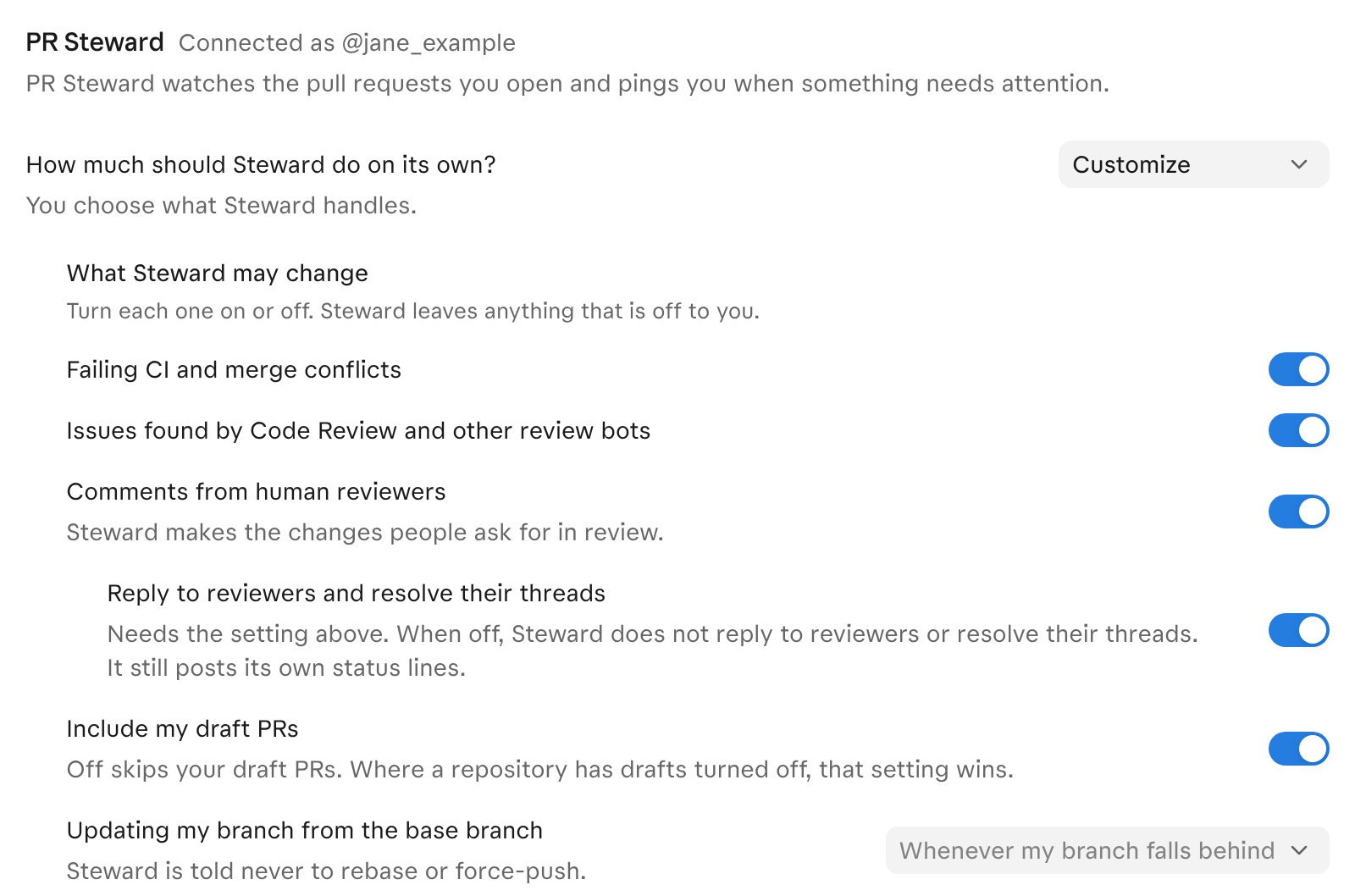
- 对于 How much should Steward do on its own?,选择 Customize
- 关闭您不希望 PR Steward 执行的每一项对应的开关。每个开关在您关闭之前都处于打开状态:
- Failing CI and merge conflicts
- Issues found by Code Review and other review bots
- Comments from human reviewers
- Reply to reviewers and resolve their threads,需要打开 Comments from human reviewers
- Include my draft PRs
选中 Customize 后,设置如下所示:
[!NOTE]
Customize 还会改变 PR Steward 的启动时机:它会遵循每个仓库自身的设置。如果您之前选择的是 Off 或 Only when tagged,那么此后它可能会自行启动。
当 Include my draft PRs 打开时,PR Steward 会在 Owner 设置为包含草稿的仓库中处理您的草稿。在 Owner 设置为 Manual 的仓库中,当有人在草稿上请求它时,PR Steward 也会处理您的草稿。当该开关关闭时,PR Steward 不会在您的草稿上启动。
当 Failing CI and merge conflicts 打开时,您还可以指定 PR Steward 何时将基础分支合并到您的分支。将 Updating my branch from the base branch 设置为 Whenever my branch falls behind、Only when there is a conflict 或 Never, I update it myself。
为您打开的每个 Pull Request 保存 PR Steward 指令
要在您打开的每个 Pull Request 上向 PR Steward 提供相同的指令,请在 claude.ai 上前往 Settings > Code 中的 PR Steward。在 My instructions for Steward 下,输入最多 1,000 个字符。
以下指令要求使用小型提交,并且不要回复审查者:
Keep commits small.
Don't reply to reviewers for me.
为仓库中的所有人保存 PR Steward 指令
要为仓库中的所有人设置 PR Steward 的行为,请将文件保存到 .claude/skills/steward/SKILL.md 并将其合并到默认分支。
以下示例告诉 PR Steward 要承担哪些工作,以及如何处理一个文件和一项不稳定的检查:
---
name: steward
description: House rules for PR Steward in this repository
user-invocable: false
disable-model-invocation: true
---

- Work on failing checks, merge conflicts, and Important findings from Code Review.
- Leave comments from human reviewers to the author.
- Regenerate `package-lock.json` with `npm install`. Don't edit it directly.
- The `e2e-nightly` check is flaky. Re-run it once before you look for a cause.
要检查 PR Steward 是否遵循该文件:
- 在该文件进入默认分支后,打开一个测试用的 Pull Request。
- 如果
claude-pr-steward-watching标签没有自动出现,请评论@claude steward。 - 标签出现后,请一位团队成员留下审查评论。
该示例将人工审查者的评论留给作者处理,因此 PR Steward 不应针对该审查评论推送任何修复。
PR Steward 还会读取仓库根目录中 CLAUDE.md、.claude/CLAUDE.md、.claude/rules/ 和 AGENTS.md 等文件中的指令。它从默认分支读取这些文件。
[!NOTE]
Claude Code 中的
/ship和/steward命令读取同一个文件。在监视期间,Claude 遵循您检出副本中的版本。
哪些 PR Steward 指令优先
您的设置、仓库的文件和您的评论可能会相互冲突。PR Steward 按以下方式解决:
- PR Steward 是否启动:在 PR Steward 读取任何指令之前,会先检查您选择的选项和 Include my draft PRs
- PR Steward 启动后做什么:当您自己的设置与仓库的
.claude/skills/steward/SKILL.md冲突时,以该文件为准。您在 Pull Request 上的评论会覆盖您自己在此处的设置,而要求 PR Steward 停止或暂缓的评论还会覆盖该文件
启动或停止 PR Steward
使用评论或标签在单个 Pull Request 上启动或停止 PR Steward。要在您打开的每个 Pull Request 上关闭或限制它,请更改您的设置。
在单个 Pull Request 上启动或停止 PR Steward
要在某个 Pull Request 上停止 PR Steward,请移除 claude-pr-steward-watching 标签,或评论 @claude stop。
要通过评论启动或停止 PR Steward,请在打开状态的 Pull Request 上,将以下命令之一放在顶层评论的开头:
| 评论 | 作用 |
|---|---|
@claude stop |
停止 PR Steward。该命令须构成整条评论 |
@claude steward stop 或 @claude unwatch |
停止 PR Steward |
@claude steward |
启动 PR Steward |
@claude babysit、@claude watch、@claude babysit stop、@claude watch stop |
启动和停止命令的其他写法 |
执行停止命令后,PR Steward 会移除其标签并在评论中确认。在您移除标签后,它会停止,且不发表评论。
之后您推送或评论时,PR Steward 仍保持停止状态。要重新启动它,请评论 @claude steward 或再次添加标签。如果它没有启动,请参阅 PR Steward didn't start on a pull request。
撤销 PR Steward 推送的修复
还原后,PR Steward 可能会再次进行相同的修复,因此请按顺序执行以下步骤:
- 阻止 PR Steward:停止它。
- 还原提交:还原
Claude <noreply@anthropic.com>的您不需要的提交。
从一开始就让 PR Steward 不处理某个 Pull Request
在打开 Pull Request 时,在描述中包含以下标记:
<!-- claude-pr-steward-disable -->
如果之后要在该 Pull Request 上启动 PR Steward,请先移除该标记。
谁可以启动和停止 PR Steward
启动或停止 PR Steward 需要以下仓库访问权限:
| 操作 | 谁可以执行 |
|---|---|
| 通过评论启动或停止 PR Steward | 对该仓库具有写入权限的人 |
通过添加 claude-pr-steward-watching 标签启动 PR Steward |
具有写入权限的人 |
| 通过移除标签停止 PR Steward | GitHub 允许其移除标签的任何人 |