
自訂您的狀態列
設定自訂狀態列以監控 Claude Code 中的 context window 使用情況、成本和 git 狀態
狀態列是 Claude Code 底部的可自訂列,可執行您設定的任何 shell 指令碼。它透過 stdin 接收 JSON 工作階段資料,並顯示您的指令碼列印的任何內容,為您提供 context 使用情況、成本、git 狀態或任何其他您想追蹤的內容的持久、一目瞭然的檢視。
狀態列在以下情況下很有用:
- 您想在工作時監控 context window 使用情況
- 您需要追蹤工作階段成本
- 您跨多個工作階段工作,需要區分它們
- 您希望 git 分支和狀態始終可見
狀態列會在內建頁尾徽章上方的自己的列中呈現,不會取代它們。若要在對話中出現 ID 時在頁尾新增可點擊的連結徽章,而不需要撰寫指令碼,請改為設定 footerLinksRegexes。
以下是一個多行狀態列的範例,在第一行顯示 git 資訊,在第二行顯示顏色編碼的 context 列。
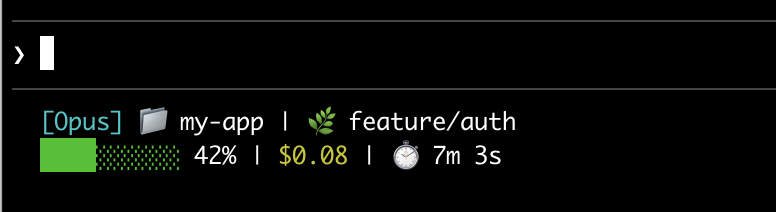
本頁面介紹設定基本狀態列、說明資料如何從 Claude Code 流向您的指令碼、列出您可以顯示的所有欄位,並提供常見模式的現成範例,例如 git 狀態、成本追蹤和進度列。
設定狀態列
使用/statusline 命令讓 Claude Code 為您產生指令碼,或手動建立指令碼並將其新增到您的設定。
使用 /statusline 命令
/statusline 命令接受描述您想顯示內容的自然語言指令。Claude Code 在 ~/.claude/ 中產生指令碼檔案並自動更新您的設定:
/statusline show model name and context percentage with a progress bar
手動設定狀態列
將 statusLine 欄位新增到您的使用者設定(~/.claude/settings.json,其中 ~ 是您的主目錄)或專案設定。將 type 設定為 "command",並將 command 指向指令碼路徑或內聯 shell 命令。如需建立指令碼的完整逐步說明,請參閱逐步建立狀態列。
{
  "statusLine": {
    "type": "command",
    "command": "~/.claude/statusline.sh",
    "padding": 2
  }
}
command 欄位在 shell 中執行,因此您也可以使用內聯命令而不是指令碼檔案。此範例使用 jq 解析 JSON 輸入並顯示模型名稱和 context 百分比:
{
  "statusLine": {
    "type": "command",
    "command": "jq -r '\"[\\(.model.display_name)] \\(.context_window.used_percentage // 0)% context\"'"
  }
}
可選的 padding 欄位為狀態列內容新增額外的水平間距(以字元為單位)。預設為 0。此填充是在介面的內建間距之外,因此它控制相對縮排而不是距離終端邊緣的絕對距離。
可選的 refreshInterval 欄位除了事件驅動的更新外,每 N 秒重新執行一次您的命令。最小值為 1。當您的狀態列顯示基於時間的資料(例如時鐘)或背景子代理在主工作階段閒置時變更 git 狀態時,請設定此項。保持未設定以僅在事件上執行。
可選的 hideVimModeIndicator 欄位會隱藏提示下方的內建 -- INSERT -- 文字。當您的指令碼自行呈現 vim.mode 時,請將此設定為 true,以便模式不會顯示兩次。
停用狀態列
執行 /statusline 並要求它移除或清除您的狀態列(例如 /statusline delete、/statusline clear、/statusline remove it)。您也可以手動從 settings.json 中刪除 statusLine 欄位。
逐步建立狀態列
此逐步說明透過手動建立顯示目前模型、工作目錄和 context window 使用百分比的狀態列來展示幕後發生的情況。
這些範例使用 Bash 指令碼,適用於 macOS 和 Linux。在 Windows 上,請參閱 Windows 設定以取得 PowerShell 和 Git Bash 範例。
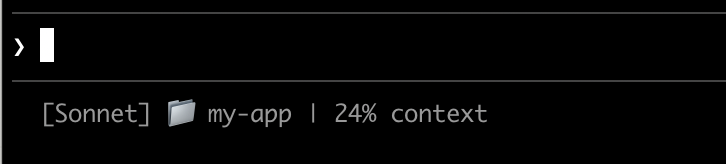
建立讀取 JSON 並列印輸出的指令碼
Claude Code 透過 stdin 將 JSON 資料傳送到您的指令碼。此指令碼使用 jq(一個您可能需要安裝的命令列 JSON 解析器)來提取模型名稱、目錄和 context 百分比,然後列印格式化的行。
將此儲存到 ~/.claude/statusline.sh(其中 ~ 是您的主目錄,例如 macOS 上的 /Users/username 或 Linux 上的 /home/username):
#!/bin/bash
# Read JSON data that Claude Code sends to stdin
input=$(cat)

# Extract fields using jq
MODEL=$(echo "$input" | jq -r '.model.display_name')
DIR=$(echo "$input" | jq -r '.workspace.current_dir')
# The "// 0" provides a fallback if the field is null
PCT=$(echo "$input" | jq -r '.context_window.used_percentage // 0' | cut -d. -f1)

# Output the status line - ${DIR##*/} extracts just the folder name
echo "[$MODEL] 📁 ${DIR##*/} | ${PCT}% context"
使其可執行
將指令碼標記為可執行,以便您的 shell 可以執行它:
chmod +x ~/.claude/statusline.sh
新增到設定
告訴 Claude Code 執行您的指令碼作為狀態列。將此設定新增到 ~/.claude/settings.json,它將 type 設定為 "command"(意思是「執行此 shell 命令」)並將 command 指向您的指令碼:
{
"statusLine": {
"type": "command",
"command": "~/.claude/statusline.sh"
}
}
您的狀態列出現在介面底部。設定會自動重新載入,但變更在您與 Claude Code 的下一次互動之前不會出現。
狀態列如何運作
Claude Code 執行您的指令碼並透過 stdin 將 JSON 工作階段資料 傳送給它。您的指令碼讀取 JSON、提取所需內容並將文字列印到 stdout。Claude Code 顯示您的指令碼列印的任何內容。
何時更新
您的指令碼在每個新的助手訊息之後、/compact 完成後、權限模式變更時或 vim 模式切換時執行。更新在 300ms 處進行去抖動,這意味著快速變更會批次在一起,您的指令碼在事情穩定後執行一次。如果在您的指令碼仍在執行時觸發新的更新,則會取消進行中的執行。如果您編輯指令碼,變更在您與 Claude Code 的下一次互動觸發更新之前不會出現。
這些觸發器在主工作階段閒置時可能會安靜,例如當協調器等待背景子代理時。為了在閒置期間保持基於時間或外部來源的片段最新,請將 refreshInterval 設定為也在固定計時器上重新執行命令。
您的指令碼可以輸出什麼
- 多行:每個
echo或print陳述式顯示為單獨的行。請參閱多行範例。 - 顏色:使用 ANSI 逃逸碼,例如
\033[32m表示綠色(終端必須支援它們)。請參閱 git 狀態範例。 - 連結:使用 OSC 8 逃逸序列 使文字可點擊(macOS 上為 Cmd+click,Windows/Linux 上為 Ctrl+click)。需要支援超連結的終端,例如 iTerm2、Kitty 或 WezTerm。請參閱可點擊連結範例。
調整輸出大小以適應終端
Claude Code 會擷取您指令碼的輸出,而不是直接將其連接到終端,因此 tput cols 和語言層級的寬度偵測無法從指令碼內部讀取終端大小。{/* min-version: 2.1.153 */}改為讀取 COLUMNS 和 LINES 環境變數。Claude Code 在執行您的指令碼之前會將這些設定為目前的終端尺寸。需要 Claude Code v2.1.153 或更新版本。
可用資料
Claude Code 透過 stdin 將以下 JSON 欄位傳送到您的指令碼:
| 欄位 | 描述 |
|---|---|
model.id, model.display_name |
目前的模型識別碼和顯示名稱 |
cwd, workspace.current_dir |
目前的工作目錄。兩個欄位包含相同的值;workspace.current_dir 因與 workspace.project_dir 一致而首選。 |
workspace.project_dir |
啟動 Claude Code 的目錄,如果工作階段期間工作目錄變更,可能與 cwd 不同 |
workspace.added_dirs |
透過 /add-dir 或 --add-dir 新增的其他目錄。如果未新增任何目錄,則為空陣列 |
workspace.git_worktree |
當目前目錄位於使用 git worktree add 建立的連結 worktree 內時的 Git worktree 名稱。在主工作樹中不存在。對任何 git worktree 都會填入,不同於 worktree.* 僅適用於 --worktree 工作階段 |
workspace.repo.host, workspace.repo.owner, workspace.repo.name |
從 origin 遠端解析的儲存庫身分,例如 "github.com"、"anthropics"、"claude-code"。在 git 儲存庫外或未設定 origin 遠端時不存在 |
cost.total_cost_usd |
工作階段總成本(美元),在用戶端計算。可能與您的實際帳單不同 |
cost.total_duration_ms |
自工作階段開始以來的總掛鐘時間(毫秒) |
cost.total_api_duration_ms |
等待 API 回應所花費的總時間(毫秒) |
cost.total_lines_added, cost.total_lines_removed |
變更的程式碼行數 |
context_window.total_input_tokens, context_window.total_output_tokens |
目前在 context window 中的令牌計數,來自最近的 API 回應。輸入包括快取讀取和寫入。{/* min-version: 2.1.132 */}v2.1.132 之前這些是累積工作階段總計 |
context_window.context_window_size |
最大 context window 大小(令牌)。預設為 200000,或具有擴展 context 的模型為 1000000。 |
context_window.used_percentage |
預先計算的已使用 context window 百分比 |
context_window.remaining_percentage |
預先計算的剩餘 context window 百分比 |
context_window.current_usage |
最後一次 API 呼叫中的令牌計數,在 context window 欄位中描述 |
exceeds_200k_tokens |
最近 API 回應中的總令牌計數(輸入、快取和輸出令牌合併)是否超過 200k。這是一個固定閾值,與實際 context window 大小無關。 |
effort.level |
目前的推理努力等級(low、medium、high、xhigh 或 max)。反映即時工作階段值,包括工作階段中途的 /effort 變更。Ultracode 不是一個不同的等級,報告為 xhigh。當目前模型不支援努力參數時不存在 |
thinking.enabled |
是否為工作階段啟用擴展思考 |
rate_limits.five_hour.used_percentage, rate_limits.seven_day.used_percentage |
消耗的 5 小時或 7 天速率限制的百分比,從 0 到 100 |
rate_limits.five_hour.resets_at, rate_limits.seven_day.resets_at |
5 小時或 7 天速率限制視窗重設時的 Unix 紀元秒數 |
session_id |
唯一的工作階段識別碼 |
session_name |
使用 --name 旗標或 /rename 設定的自訂工作階段名稱。如果未設定自訂名稱,則不存在 |
transcript_path |
對話記錄檔案的路徑 |
version |
Claude Code 版本 |
output_style.name |
目前輸出樣式的名稱 |
vim.mode |
啟用 vim 模式時的目前 vim 模式(NORMAL、INSERT、VISUAL 或 VISUAL LINE) |
agent.name |
使用 --agent 旗標或設定的代理設定執行時的代理名稱 |
pr.number, pr.url |
目前分支的開啟提取請求。鏡像底部狀態列中的 PR 徽章。在找到 PR 之前、不在 git 儲存庫中或 PR 合併或關閉後不存在 |
pr.review_state |
開啟 PR 的審查狀態:approved、pending、changes_requested 或 draft。即使 pr 存在,也可能獨立不存在 |
worktree.name |
作用中 worktree 的名稱。僅在 --worktree 工作階段期間出現 |
worktree.path |
worktree 目錄的絕對路徑 |
worktree.branch |
worktree 的 Git 分支名稱(例如 "worktree-my-feature")。對於基於 hook 的 worktree 不存在 |
worktree.original_cwd |
Claude 進入 worktree 之前所在的目錄 |
worktree.original_branch |
進入 worktree 之前簽出的 Git 分支。對於基於 hook 的 worktree 不存在 |
完整 JSON 架構
您的狀態列命令透過 stdin 接收此 JSON 結構:
{
"cwd": "/current/working/directory",
"session_id": "abc123...",
"session_name": "my-session",
"transcript_path": "/path/to/transcript.jsonl",
"model": {
"id": "claude-opus-4-8",
"display_name": "Opus"
},
"workspace": {
"current_dir": "/current/working/directory",
"project_dir": "/original/project/directory",
"added_dirs": [],
"git_worktree": "feature-xyz",
"repo": {
"host": "github.com",
"owner": "anthropics",
"name": "claude-code"
}
},
"version": "2.1.90",
"output_style": {
"name": "default"
},
"cost": {
"total_cost_usd": 0.01234,
"total_duration_ms": 45000,
"total_api_duration_ms": 2300,
"total_lines_added": 156,
"total_lines_removed": 23
},
"context_window": {
"total_input_tokens": 15500,
"total_output_tokens": 1200,
"context_window_size": 200000,
"used_percentage": 8,
"remaining_percentage": 92,
"current_usage": {
"input_tokens": 8500,
"output_tokens": 1200,
"cache_creation_input_tokens": 5000,
"cache_read_input_tokens": 2000
}
},
"exceeds_200k_tokens": false,
"effort": {
"level": "high"
},
"thinking": {
"enabled": true
},
"rate_limits": {
"five_hour": {
"used_percentage": 23.5,
"resets_at": 1738425600
},
"seven_day": {
"used_percentage": 41.2,
"resets_at": 1738857600
}
},
"vim": {
"mode": "NORMAL"
},
"agent": {
"name": "security-reviewer"
},
"pr": {
"number": 1234,
"url": "https://github.com/anthropics/claude-code/pull/1234",
"review_state": "pending"
},
"worktree": {
"name": "my-feature",
"path": "/path/to/.claude/worktrees/my-feature",
"branch": "worktree-my-feature",
"original_cwd": "/path/to/project",
"original_branch": "main"
}
}
可能不存在的欄位(不在 JSON 中):
session_name:僅在使用--name或/rename設定自訂名稱時出現workspace.git_worktree:僅當目前目錄位於連結 git worktree 內時出現workspace.repo:僅在 git 儲存庫內且設定了origin遠端時出現effort:僅當目前模型支援推理努力參數時出現vim:僅在啟用 vim 模式時出現agent:僅在使用--agent旗標或設定的代理設定執行時出現pr:僅在為目前分支找到開啟 PR 時出現,一旦 PR 合併或關閉就會移除。pr.review_state可能獨立不存在worktree:僅在--worktree工作階段期間出現。存在時,branch和original_branch對於基於 hook 的 worktree 也可能不存在rate_limits:僅對 Claude.ai 訂閱者(Pro/Max)在工作階段中第一次 API 回應後出現。每個視窗(five_hour、seven_day)可能獨立不存在。使用jq -r '.rate_limits.five_hour.used_percentage // empty'以優雅地處理不存在的情況。
可能為 null 的欄位:
context_window.current_usage:在工作階段中第一次 API 呼叫之前為null,以及在/compact之後直到下一次 API 呼叫重新填入為止context_window.used_percentage,context_window.remaining_percentage:在工作階段早期可能為null
在您的指令碼中使用條件存取處理遺漏的欄位,並使用後備預設值處理 null 值。
Context window 欄位
context_window 物件描述來自最近 API 回應的即時 context window。自 v2.1.132 起,total_input_tokens 和 total_output_tokens 反映目前 context 使用情況,而非累積工作階段總計。
- 合併總計(
total_input_tokens,total_output_tokens):目前在 context window 中的令牌。total_input_tokens是input_tokens、cache_creation_input_tokens和cache_read_input_tokens的總和;total_output_tokens是最近回應中的輸出令牌。在第一次 API 回應之前兩者都是0。 - 按元件使用情況(
current_usage):相同的令牌計數按類別分解。當您需要將快取命中與新輸入分開時,請使用此項。
current_usage 物件包含:
input_tokens:目前 context 中的輸入令牌output_tokens:產生的輸出令牌cache_creation_input_tokens:寫入快取的令牌cache_read_input_tokens:從快取讀取的令牌
如需了解快取欄位的含義及其計費方式,請參閱檢查快取效能。
used_percentage 欄位僅從輸入令牌計算:input_tokens + cache_creation_input_tokens + cache_read_input_tokens。它不包括 output_tokens。
如果您從 current_usage 手動計算 context 百分比,請使用相同的僅輸入公式以符合 used_percentage。
current_usage 物件在工作階段中第一次 API 呼叫之前為 null,以及在 /compact 之後直到下一次 API 呼叫重新填入為止再次為 null。
範例
這些範例展示常見的狀態列模式。若要使用任何範例:
- 將指令碼儲存到檔案,例如
~/.claude/statusline.sh(或.py/.js) - 使其可執行:
chmod +x ~/.claude/statusline.sh - 將路徑新增到您的設定
Bash 範例使用 jq 來解析 JSON。Python 和 Node.js 具有內建的 JSON 解析。
Context window 使用情況
顯示目前模型和 context window 使用情況,帶有視覺進度列。每個指令碼從 stdin 讀取 JSON,提取 used_percentage 欄位,並建立一個 10 字元的列,其中填充的塊(▓)代表使用情況:
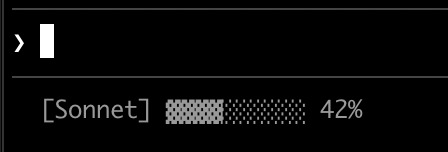
#!/bin/bash
# Read all of stdin into a variable
input=$(cat)

# Extract fields with jq, "// 0" provides fallback for null
MODEL=$(echo "$input" | jq -r '.model.display_name')
PCT=$(echo "$input" | jq -r '.context_window.used_percentage // 0' | cut -d. -f1)

# Build progress bar: printf -v creates a run of spaces, then
# ${var// /▓} replaces each space with a block character
BAR_WIDTH=10
FILLED=$((PCT * BAR_WIDTH / 100))
EMPTY=$((BAR_WIDTH - FILLED))
BAR=""
[ "$FILLED" -gt 0 ] && printf -v FILL "%${FILLED}s" && BAR="${FILL// /▓}"
[ "$EMPTY" -gt 0 ] && printf -v PAD "%${EMPTY}s" && BAR="${BAR}${PAD// /░}"

echo "[$MODEL] $BAR $PCT%"
#!/usr/bin/env python3
import json, sys

# json.load reads and parses stdin in one step
data = json.load(sys.stdin)
model = data['model']['display_name']
# "or 0" handles null values
pct = int(data.get('context_window', {}).get('used_percentage', 0) or 0)

# String multiplication builds the bar
filled = pct * 10 // 100
bar = '▓' * filled + '░' * (10 - filled)

print(f"[{model}] {bar} {pct}%")
#!/usr/bin/env node
// Node.js reads stdin asynchronously with events
let input = '';
process.stdin.on('data', chunk => input += chunk);
process.stdin.on('end', () => {
const data = JSON.parse(input);
const model = data.model.display_name;
// Optional chaining (?.) safely handles null fields
const pct = Math.floor(data.context_window?.used_percentage || 0);

// String.repeat() builds the bar
const filled = Math.floor(pct * 10 / 100);
const bar = '▓'.repeat(filled) + '░'.repeat(10 - filled);

console.log(`[${model}] ${bar} ${pct}%`);
});
Git 狀態與顏色
顯示 git 分支,帶有暫存和修改檔案的顏色編碼指示器。此指令碼使用 ANSI 逃逸碼表示終端顏色:\033[32m 是綠色,\033[33m 是黃色,\033[0m 重設為預設值。
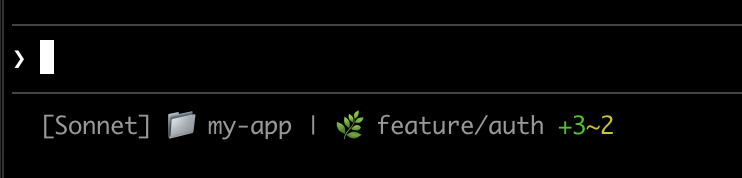
每個指令碼檢查目前目錄是否是 git 儲存庫,計算暫存和修改檔案,並顯示顏色編碼的指示器:
#!/bin/bash
input=$(cat)

MODEL=$(echo "$input" | jq -r '.model.display_name')
DIR=$(echo "$input" | jq -r '.workspace.current_dir')

GREEN='\033[32m'
YELLOW='\033[33m'
RESET='\033[0m'

if git rev-parse --git-dir > /dev/null 2>&1; then
BRANCH=$(git branch --show-current 2>/dev/null)
STAGED=$(git diff --cached --numstat 2>/dev/null | wc -l | tr -d ' ')
MODIFIED=$(git diff --numstat 2>/dev/null | wc -l | tr -d ' ')

GIT_STATUS=""
[ "$STAGED" -gt 0 ] && GIT_STATUS="${GREEN}+${STAGED}${RESET}"
[ "$MODIFIED" -gt 0 ] && GIT_STATUS="${GIT_STATUS}${YELLOW}~${MODIFIED}${RESET}"

echo -e "[$MODEL] 📁 ${DIR##*/} | 🌿 $BRANCH $GIT_STATUS"
else
echo "[$MODEL] 📁 ${DIR##*/}"
fi
#!/usr/bin/env python3
import json, sys, subprocess, os

data = json.load(sys.stdin)
model = data['model']['display_name']
directory = os.path.basename(data['workspace']['current_dir'])

GREEN, YELLOW, RESET = '\033[32m', '\033[33m', '\033[0m'

try:
subprocess.check_output(['git', 'rev-parse', '--git-dir'], stderr=subprocess.DEVNULL)
branch = subprocess.check_output(['git', 'branch', '--show-current'], text=True).strip()
staged_output = subprocess.check_output(['git', 'diff', '--cached', '--numstat'], text=True).strip()
modified_output = subprocess.check_output(['git', 'diff', '--numstat'], text=True).strip()
staged = len(staged_output.split('\n')) if staged_output else 0
modified = len(modified_output.split('\n')) if modified_output else 0

git_status = f"{GREEN}+{staged}{RESET}" if staged else ""
git_status += f"{YELLOW}~{modified}{RESET}" if modified else ""

print(f"[{model}] 📁 {directory} | 🌿 {branch} {git_status}")
except:
print(f"[{model}] 📁 {directory}")
#!/usr/bin/env node
const { execSync } = require('child_process');
const path = require('path');

let input = '';
process.stdin.on('data', chunk => input += chunk);
process.stdin.on('end', () => {
const data = JSON.parse(input);
const model = data.model.display_name;
const dir = path.basename(data.workspace.current_dir);

const GREEN = '\x1b[32m', YELLOW = '\x1b[33m', RESET = '\x1b[0m';

try {
execSync('git rev-parse --git-dir', { stdio: 'ignore' });
const branch = execSync('git branch --show-current', { encoding: 'utf8' }).trim();
const staged = execSync('git diff --cached --numstat', { encoding: 'utf8' }).trim().split('\n').filter(Boolean).length;
const modified = execSync('git diff --numstat', { encoding: 'utf8' }).trim().split('\n').filter(Boolean).length;

let gitStatus = staged ? `${GREEN}+${staged}${RESET}` : '';
gitStatus += modified ? `${YELLOW}~${modified}${RESET}` : '';

console.log(`[${model}] 📁 ${dir} | 🌿 ${branch} ${gitStatus}`);
} catch {
console.log(`[${model}] 📁 ${dir}`);
}
});
成本和持續時間追蹤
追蹤您的工作階段 API 成本和經過的時間。cost.total_cost_usd 欄位累積目前工作階段中所有 API 呼叫的估計成本。cost.total_duration_ms 欄位測量自工作階段開始以來的總經過時間,而 cost.total_api_duration_ms 僅追蹤等待 API 回應所花費的時間。
每個指令碼將成本格式化為貨幣,並將毫秒轉換為分鐘和秒:
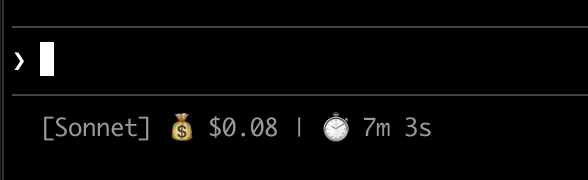
#!/bin/bash
input=$(cat)

MODEL=$(echo "$input" | jq -r '.model.display_name')
COST=$(echo "$input" | jq -r '.cost.total_cost_usd // 0')
DURATION_MS=$(echo "$input" | jq -r '.cost.total_duration_ms // 0')

COST_FMT=$(printf '$%.2f' "$COST")
DURATION_SEC=$((DURATION_MS / 1000))
MINS=$((DURATION_SEC / 60))
SECS=$((DURATION_SEC % 60))

echo "[$MODEL] 💰 $COST_FMT | ⏱️ ${MINS}m ${SECS}s"
#!/usr/bin/env python3
import json, sys

data = json.load(sys.stdin)
model = data['model']['display_name']
cost = data.get('cost', {}).get('total_cost_usd', 0) or 0
duration_ms = data.get('cost', {}).get('total_duration_ms', 0) or 0

duration_sec = duration_ms // 1000
mins, secs = duration_sec // 60, duration_sec % 60

print(f"[{model}] 💰 ${cost:.2f} | ⏱️ {mins}m {secs}s")
#!/usr/bin/env node
let input = '';
process.stdin.on('data', chunk => input += chunk);
process.stdin.on('end', () => {
const data = JSON.parse(input);
const model = data.model.display_name;
const cost = data.cost?.total_cost_usd || 0;
const durationMs = data.cost?.total_duration_ms || 0;

const durationSec = Math.floor(durationMs / 1000);
const mins = Math.floor(durationSec / 60);
const secs = durationSec % 60;

console.log(`[${model}] 💰 $${cost.toFixed(2)} | ⏱️ ${mins}m ${secs}s`);
});
顯示多行
您的指令碼可以輸出多行以建立更豐富的顯示。每個 echo 陳述式在狀態區域中產生單獨的行。
此範例結合了多種技術:基於閾值的顏色(70% 以下為綠色,70-89% 為黃色,90%+ 為紅色)、進度列和 git 分支資訊。每個 print 或 echo 陳述式建立單獨的行:
#!/bin/bash
input=$(cat)

MODEL=$(echo "$input" | jq -r '.model.display_name')
DIR=$(echo "$input" | jq -r '.workspace.current_dir')
COST=$(echo "$input" | jq -r '.cost.total_cost_usd // 0')
PCT=$(echo "$input" | jq -r '.context_window.used_percentage // 0' | cut -d. -f1)
DURATION_MS=$(echo "$input" | jq -r '.cost.total_duration_ms // 0')

CYAN='\033[36m'; GREEN='\033[32m'; YELLOW='\033[33m'; RED='\033[31m'; RESET='\033[0m'

# Pick bar color based on context usage
if [ "$PCT" -ge 90 ]; then BAR_COLOR="$RED"
elif [ "$PCT" -ge 70 ]; then BAR_COLOR="$YELLOW"
else BAR_COLOR="$GREEN"; fi

FILLED=$((PCT / 10)); EMPTY=$((10 - FILLED))
printf -v FILL "%${FILLED}s"; printf -v PAD "%${EMPTY}s"
BAR="${FILL// /█}${PAD// /░}"

MINS=$((DURATION_MS / 60000)); SECS=$(((DURATION_MS % 60000) / 1000))

BRANCH=""
git rev-parse --git-dir > /dev/null 2>&1 && BRANCH=" | 🌿 $(git branch --show-current 2>/dev/null)"

echo -e "${CYAN}[$MODEL]${RESET} 📁 ${DIR##*/}$BRANCH"
COST_FMT=$(printf '$%.2f' "$COST")
echo -e "${BAR_COLOR}${BAR}${RESET} ${PCT}% | ${YELLOW}${COST_FMT}${RESET} | ⏱️ ${MINS}m ${SECS}s"
#!/usr/bin/env python3
import json, sys, subprocess, os

data = json.load(sys.stdin)
model = data['model']['display_name']
directory = os.path.basename(data['workspace']['current_dir'])
cost = data.get('cost', {}).get('total_cost_usd', 0) or 0
pct = int(data.get('context_window', {}).get('used_percentage', 0) or 0)
duration_ms = data.get('cost', {}).get('total_duration_ms', 0) or 0

CYAN, GREEN, YELLOW, RED, RESET = '\033[36m', '\033[32m', '\033[33m', '\033[31m', '\033[0m'

bar_color = RED if pct >= 90 else YELLOW if pct >= 70 else GREEN
filled = pct // 10
bar = '█' * filled + '░' * (10 - filled)

mins, secs = duration_ms // 60000, (duration_ms % 60000) // 1000

try:
branch = subprocess.check_output(['git', 'branch', '--show-current'], text=True, stderr=subprocess.DEVNULL).strip()
branch = f" | 🌿 {branch}" if branch else ""
except:
branch = ""

print(f"{CYAN}[{model}]{RESET} 📁 {directory}{branch}")
print(f"{bar_color}{bar}{RESET} {pct}% | {YELLOW}${cost:.2f}{RESET} | ⏱️ {mins}m {secs}s")
#!/usr/bin/env node
const { execSync } = require('child_process');
const path = require('path');

let input = '';
process.stdin.on('data', chunk => input += chunk);
process.stdin.on('end', () => {
const data = JSON.parse(input);
const model = data.model.display_name;
const dir = path.basename(data.workspace.current_dir);
const cost = data.cost?.total_cost_usd || 0;
const pct = Math.floor(data.context_window?.used_percentage || 0);
const durationMs = data.cost?.total_duration_ms || 0;

const CYAN = '\x1b[36m', GREEN = '\x1b[32m', YELLOW = '\x1b[33m', RED = '\x1b[31m', RESET = '\x1b[0m';

const barColor = pct >= 90 ? RED : pct >= 70 ? YELLOW : GREEN;
const filled = Math.floor(pct / 10);
const bar = '█'.repeat(filled) + '░'.repeat(10 - filled);

const mins = Math.floor(durationMs / 60000);
const secs = Math.floor((durationMs % 60000) / 1000);

let branch = '';
try {
branch = execSync('git branch --show-current', { encoding: 'utf8', stdio: ['pipe', 'pipe', 'ignore'] }).trim();
branch = branch ? ` | 🌿 ${branch}` : '';
} catch {}

console.log(`${CYAN}[${model}]${RESET} 📁 ${dir}${branch}`);
console.log(`${barColor}${bar}${RESET} ${pct}% | ${YELLOW}$${cost.toFixed(2)}${RESET} | ⏱️ ${mins}m ${secs}s`);
});
可點擊的連結
此範例建立指向您的 GitHub 儲存庫的可點擊連結。它讀取 git 遠端 URL,使用 sed 將 SSH 格式轉換為 HTTPS,並將儲存庫名稱包裝在 OSC 8 逃逸碼中。按住 Cmd(macOS)或 Ctrl(Windows/Linux)並點擊以在瀏覽器中開啟連結。
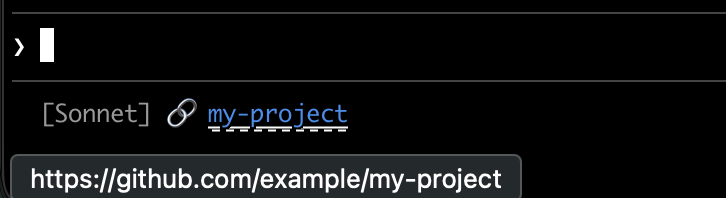
每個指令碼取得 git 遠端 URL,將 SSH 格式轉換為 HTTPS,並將儲存庫名稱包裝在 OSC 8 逃逸碼中。Bash 版本使用 printf '%b',它比 echo -e 更可靠地跨不同 shell 解釋反斜杠逃逸:
#!/bin/bash
input=$(cat)

MODEL=$(echo "$input" | jq -r '.model.display_name')

# Convert git SSH URL to HTTPS
REMOTE=$(git remote get-url origin 2>/dev/null | sed 's/git@github.com:/https:\/\/github.com\//' | sed 's/\.git$//')

if [ -n "$REMOTE" ]; then
REPO_NAME=$(basename "$REMOTE")
# OSC 8 format: \e]8;;URL\a then TEXT then \e]8;;\a
# printf %b interprets escape sequences reliably across shells
printf '%b' "[$MODEL] 🔗 \e]8;;${REMOTE}\a${REPO_NAME}\e]8;;\a\n"
else
echo "[$MODEL]"
fi
#!/usr/bin/env python3
import json, sys, subprocess, re, os

data = json.load(sys.stdin)
model = data['model']['display_name']

# Get git remote URL
try:
remote = subprocess.check_output(
['git', 'remote', 'get-url', 'origin'],
stderr=subprocess.DEVNULL, text=True
).strip()
# Convert SSH to HTTPS format
remote = re.sub(r'^git@github\.com:', 'https://github.com/', remote)
remote = re.sub(r'\.git$', '', remote)
repo_name = os.path.basename(remote)
# OSC 8 escape sequences
link = f"\033]8;;{remote}\a{repo_name}\033]8;;\a"
print(f"[{model}] 🔗 {link}")
except:
print(f"[{model}]")
#!/usr/bin/env node
const { execSync } = require('child_process');
const path = require('path');

let input = '';
process.stdin.on('data', chunk => input += chunk);
process.stdin.on('end', () => {
const data = JSON.parse(input);
const model = data.model.display_name;

try {
let remote = execSync('git remote get-url origin', { encoding: 'utf8', stdio: ['pipe', 'pipe', 'ignore'] }).trim();
// Convert SSH to HTTPS format
remote = remote.replace(/^git@github\.com:/, 'https://github.com/').replace(/\.git$/, '');
const repoName = path.basename(remote);
// OSC 8 escape sequences
const link = `\x1b]8;;${remote}\x07${repoName}\x1b]8;;\x07`;
console.log(`[${model}] 🔗 ${link}`);
} catch {
console.log(`[${model}]`);
}
});
速率限制使用情況
在狀態列中顯示 Claude.ai 訂閱速率限制使用情況。rate_limits 物件包含 five_hour(5 小時滾動視窗)和 seven_day(每週)視窗。每個視窗提供 used_percentage(0-100)和 resets_at(Unix 紀元秒,視窗重設時)。
此欄位僅對 Claude.ai 訂閱者(Pro/Max)在第一次 API 回應後出現。每個指令碼優雅地處理不存在的欄位:
#!/bin/bash
input=$(cat)

MODEL=$(echo "$input" | jq -r '.model.display_name')
# "// empty" produces no output when rate_limits is absent
FIVE_H=$(echo "$input" | jq -r '.rate_limits.five_hour.used_percentage // empty')
WEEK=$(echo "$input" | jq -r '.rate_limits.seven_day.used_percentage // empty')

LIMITS=""
[ -n "$FIVE_H" ] && LIMITS="5h: $(printf '%.0f' "$FIVE_H")%"
[ -n "$WEEK" ] && LIMITS="${LIMITS:+$LIMITS }7d: $(printf '%.0f' "$WEEK")%"

[ -n "$LIMITS" ] && echo "[$MODEL] | $LIMITS" || echo "[$MODEL]"
#!/usr/bin/env python3
import json, sys

data = json.load(sys.stdin)
model = data['model']['display_name']

parts = []
rate = data.get('rate_limits', {})
five_h = rate.get('five_hour', {}).get('used_percentage')
week = rate.get('seven_day', {}).get('used_percentage')

if five_h is not None:
parts.append(f"5h: {five_h:.0f}%")
if week is not None:
parts.append(f"7d: {week:.0f}%")

if parts:
print(f"[{model}] | {' '.join(parts)}")
else:
print(f"[{model}]")
#!/usr/bin/env node
let input = '';
process.stdin.on('data', chunk => input += chunk);
process.stdin.on('end', () => {
const data = JSON.parse(input);
const model = data.model.display_name;

const parts = [];
const fiveH = data.rate_limits?.five_hour?.used_percentage;
const week = data.rate_limits?.seven_day?.used_percentage;

if (fiveH != null) parts.push(`5h: ${Math.round(fiveH)}%`);
if (week != null) parts.push(`7d: ${Math.round(week)}%`);

console.log(parts.length ? `[${model}] | ${parts.join(' ')}` : `[${model}]`);
});
快取昂貴的操作
您的狀態列指令碼在活躍工作階段期間頻繁執行。git status 或 git diff 等命令可能很慢,特別是在大型儲存庫中。此範例將 git 資訊快取到臨時檔案,並且僅每 5 秒重新整理一次。
快取檔案名稱需要在工作階段內的狀態列呼叫中保持穩定,但在工作階段之間保持唯一,以便不同儲存庫中的並行工作階段不會讀取彼此的快取 git 狀態。基於程序的識別碼(如 $$、os.getpid() 或 process.pid)在每次呼叫時都會變更,並會破壞快取。改用 JSON 輸入中的 session_id:它在工作階段的生命週期內保持穩定,並且每個工作階段都是唯一的。
每個指令碼在執行 git 命令之前檢查快取檔案是否遺漏或超過 5 秒:
#!/bin/bash
input=$(cat)

MODEL=$(echo "$input" | jq -r '.model.display_name')
DIR=$(echo "$input" | jq -r '.workspace.current_dir')
SESSION_ID=$(echo "$input" | jq -r '.session_id')

CACHE_FILE="/tmp/statusline-git-cache-$SESSION_ID"
CACHE_MAX_AGE=5  # seconds

cache_is_stale() {
[ ! -f "$CACHE_FILE" ] || \
# stat -f %m is macOS, stat -c %Y is Linux
[ $(($(date +%s) - $(stat -f %m "$CACHE_FILE" 2>/dev/null || stat -c %Y "$CACHE_FILE" 2>/dev/null || echo 0))) -gt $CACHE_MAX_AGE ]
}

if cache_is_stale; then
if git rev-parse --git-dir > /dev/null 2>&1; then
BRANCH=$(git branch --show-current 2>/dev/null)
STAGED=$(git diff --cached --numstat 2>/dev/null | wc -l | tr -d ' ')
MODIFIED=$(git diff --numstat 2>/dev/null | wc -l | tr -d ' ')
echo "$BRANCH|$STAGED|$MODIFIED" > "$CACHE_FILE"
else
echo "||" > "$CACHE_FILE"
fi
fi

IFS='|' read -r BRANCH STAGED MODIFIED < "$CACHE_FILE"

if [ -n "$BRANCH" ]; then
echo "[$MODEL] 📁 ${DIR##*/} | 🌿 $BRANCH +$STAGED ~$MODIFIED"
else
echo "[$MODEL] 📁 ${DIR##*/}"
fi
#!/usr/bin/env python3
import json, sys, subprocess, os, time

data = json.load(sys.stdin)
model = data['model']['display_name']
directory = os.path.basename(data['workspace']['current_dir'])
session_id = data['session_id']

CACHE_FILE = f"/tmp/statusline-git-cache-{session_id}"
CACHE_MAX_AGE = 5  # seconds

def cache_is_stale():
if not os.path.exists(CACHE_FILE):
return True
return time.time() - os.path.getmtime(CACHE_FILE) > CACHE_MAX_AGE

if cache_is_stale():
try:
subprocess.check_output(['git', 'rev-parse', '--git-dir'], stderr=subprocess.DEVNULL)
branch = subprocess.check_output(['git', 'branch', '--show-current'], text=True).strip()
staged = subprocess.check_output(['git', 'diff', '--cached', '--numstat'], text=True).strip()
modified = subprocess.check_output(['git', 'diff', '--numstat'], text=True).strip()
staged_count = len(staged.split('\n')) if staged else 0
modified_count = len(modified.split('\n')) if modified else 0
with open(CACHE_FILE, 'w') as f:
f.write(f"{branch}|{staged_count}|{modified_count}")
except:
with open(CACHE_FILE, 'w') as f:
f.write("||")

with open(CACHE_FILE) as f:
branch, staged, modified = f.read().strip().split('|')

if branch:
print(f"[{model}] 📁 {directory} | 🌿 {branch} +{staged} ~{modified}")
else:
print(f"[{model}] 📁 {directory}")
#!/usr/bin/env node
const { execSync } = require('child_process');
const fs = require('fs');
const path = require('path');

let input = '';
process.stdin.on('data', chunk => input += chunk);
process.stdin.on('end', () => {
const data = JSON.parse(input);
const model = data.model.display_name;
const dir = path.basename(data.workspace.current_dir);
const sessionId = data.session_id;

const CACHE_FILE = `/tmp/statusline-git-cache-${sessionId}`;
const CACHE_MAX_AGE = 5; // seconds

const cacheIsStale = () => {
if (!fs.existsSync(CACHE_FILE)) return true;
return (Date.now() / 1000) - fs.statSync(CACHE_FILE).mtimeMs / 1000 > CACHE_MAX_AGE;
};

if (cacheIsStale()) {
try {
execSync('git rev-parse --git-dir', { stdio: 'ignore' });
const branch = execSync('git branch --show-current', { encoding: 'utf8' }).trim();
const staged = execSync('git diff --cached --numstat', { encoding: 'utf8' }).trim().split('\n').filter(Boolean).length;
const modified = execSync('git diff --numstat', { encoding: 'utf8' }).trim().split('\n').filter(Boolean).length;
fs.writeFileSync(CACHE_FILE, `${branch}|${staged}|${modified}`);
} catch {
fs.writeFileSync(CACHE_FILE, '||');
}
}

const [branch, staged, modified] = fs.readFileSync(CACHE_FILE, 'utf8').trim().split('|');

if (branch) {
console.log(`[${model}] 📁 ${dir} | 🌿 ${branch} +${staged} ~${modified}`);
} else {
console.log(`[${model}] 📁 ${dir}`);
}
});
Windows 設定
在 Windows 上,Claude Code 透過 Git Bash 執行狀態列命令(如果已安裝 Git Bash),或在 Git Bash 不存在時透過 PowerShell 執行。若要執行 PowerShell 指令碼作為您的狀態列,請透過 powershell 呼叫它。這在任一 shell 中都有效:
{
"statusLine": {
"type": "command",
"command": "powershell -NoProfile -File C:/Users/username/.claude/statusline.ps1"
}
}
$input_json = $input | Out-String | ConvertFrom-Json
$cwd = $input_json.cwd
$model = $input_json.model.display_name
$used = $input_json.context_window.used_percentage
$dirname = Split-Path $cwd -Leaf

if ($used) {
Write-Host "$dirname [$model] ctx: $used%"
} else {
Write-Host "$dirname [$model]"
}
或者,當已安裝 Git Bash 時,直接執行 Bash 指令碼:
{
"statusLine": {
"type": "command",
"command": "~/.claude/statusline.sh"
}
}
#!/usr/bin/env bash
input=$(cat)
cwd=$(echo "$input" | grep -o '"cwd":"[^"]*"' | cut -d'"' -f4)
model=$(echo "$input" | grep -o '"display_name":"[^"]*"' | cut -d'"' -f4)
dirname="${cwd##*[/\\]}"
echo "$dirname [$model]"
子代理狀態列
subagentStatusLine 設定為子代理面板中顯示的每個子代理呈現自訂行主體。使用它來用您自己的格式化取代預設的 name · description · token count 行。
{
  "subagentStatusLine": {
    "type": "command",
    "command": "~/.claude/subagent-statusline.sh"
  }
}
命令在每個重新整理刻度上執行一次,所有可見的子代理行作為單個 JSON 物件在 stdin 上傳遞。輸入包括基本 hook 欄位加上 columns(可用行寬度)和 tasks 陣列,其中每個任務具有 id、name、type、status、description、label、startTime、tokenCount、tokenSamples 和 cwd。
將一個 JSON 行寫入 stdout,每行您想要覆蓋,形式為 {"id": "<task id>", "content": "<row body>"} 。content 字串按原樣呈現,包括 ANSI 顏色和 OSC 8 超連結。省略任務的 id 以保持該行的預設呈現;發出空 content 字串以隱藏它。
適用於 statusLine 的相同信任和 disableAllHooks 閘門也適用於此。外掛程式可以在其 settings.json 中提供預設 subagentStatusLine。
提示
- 使用模擬輸入測試:
echo '{"model":{"display_name":"Opus"},"workspace":{"current_dir":"/home/user/project"},"context_window":{"used_percentage":25},"session_id":"test-session-abc"}' | ./statusline.sh - 保持輸出簡短:狀態列寬度有限,因此長輸出可能會被截斷或換行不當
- 快取慢速操作:您的指令碼在活躍工作階段期間頻繁執行,因此
git status等命令可能會導致延遲。請參閱快取範例以瞭解如何處理此問題。
社群專案如 ccstatusline 和 starship-claude 提供具有主題和其他功能的預先建立設定。
疑難排解
狀態列未出現
- 驗證您的指令碼是否可執行:
chmod +x ~/.claude/statusline.sh - 檢查您的指令碼是否輸出到 stdout 而不是 stderr
- 手動執行您的指令碼以驗證它產生輸出
- 在安裝了 Git Bash 的 Windows 上,
command路徑中的反斜線可能在指令碼執行前被當作逃逸字元消耗。在路徑中使用正斜線。請參閱 Windows 設定。 - 如果
disableAllHooks在您的設定中設定為true,狀態列也會被停用。移除此設定或將其設定為false以重新啟用。 - 執行
claude --debug以記錄工作階段中第一次狀態列呼叫的結束代碼和 stderr - 要求 Claude 讀取您的設定檔案並直接執行
statusLine命令以顯示錯誤
狀態列顯示 -- 或空值
- 欄位在第一次 API 回應完成之前可能為
null - 在您的指令碼中使用後備(例如 jq 中的
// 0)處理 null 值 - 如果多個訊息後值仍為空,請重新啟動 Claude Code
Context 百分比顯示意外值
- 使用
used_percentage以取得最簡單的準確 context 狀態 - Context 百分比可能與
/context輸出不同,因為每個計算時間不同
OSC 8 連結不可點擊
-
驗證您的終端支援 OSC 8 超連結(iTerm2、Kitty、WezTerm)
-
Terminal.app 不支援可點擊連結
-
如果連結文字出現但不可點擊,Claude Code 可能未在您的終端中偵測到超連結支援。這通常會影響 Windows Terminal 和其他不在自動偵測清單中的模擬器。設定
FORCE_HYPERLINK環境變數以在啟動 Claude Code 之前覆蓋偵測:FORCE_HYPERLINK=1 claude在 PowerShell 中,先在目前工作階段中設定變數:
$env:FORCE_HYPERLINK = "1"; claude -
SSH 和 tmux 工作階段可能根據設定去除 OSC 序列
-
如果逃逸序列顯示為文字(如
\e]8;;),請使用printf '%b'而不是echo -e以獲得更可靠的逃逸處理
逃逸序列的顯示故障
- 複雜的逃逸序列(ANSI 顏色、OSC 8 連結)如果與其他 UI 更新重疊,偶爾會導致輸出損壞
- 如果您看到損壞的文字,請嘗試簡化您的指令碼為純文字輸出
- 帶有逃逸碼的多行狀態列比單行純文字更容易出現呈現問題
工作區信任必需
- 狀態列命令僅在您已接受目前目錄的工作區信任對話時執行。因為
statusLine執行 shell 命令,它需要與 hooks 和其他執行 shell 的設定相同的信任接受。 - 如果未接受信任,您將看到通知
statusline skipped · restart to fix而不是您的狀態列輸出。重新啟動 Claude Code 並接受信任提示以啟用它。
指令碼錯誤或掛起
- 以非零代碼結束或不產生輸出的指令碼會導致狀態列變為空白
- 慢速指令碼會阻止狀態列更新,直到它們完成。保持指令碼快速以避免過時的輸出。
- 如果在慢速指令碼執行時觸發新的更新,進行中的指令碼會被取消
- 在設定之前使用模擬輸入獨立測試您的指令碼
通知共享狀態列行
- 系統通知(如 MCP 伺服器錯誤和自動更新)顯示在與您的狀態列相同行的右側。暫時性通知(例如 context-low 警告)也會在此區域循環。
- 啟用詳細模式會在此區域新增令牌計數器
- 在狹窄的終端上,這些通知可能會截斷您的狀態列輸出