
自訂您的狀態列
設定自訂狀態列以監控 Claude Code 中的 context window 使用情況、成本和 git 狀態
狀態列是 Claude Code 底部的可自訂列,可執行您設定的任何 shell 指令碼。它透過 stdin 接收 JSON 工作階段資料,並顯示您的指令碼列印的任何內容,為您提供 context 使用情況、成本、git 狀態或任何其他您想追蹤的內容的持久、一目瞭然的檢視。
狀態列在以下情況下很有用:
- 您想在工作時監控 context window 使用情況
- 您需要追蹤工作階段成本
- 您跨多個工作階段工作,需要區分它們
- 您希望 git 分支和狀態始終可見
狀態列會在內建頁尾徽章上方的自己的列中呈現,不會取代它們。使用自訂狀態列設定後,Claude Code 會停止顯示部分頁尾提示,例如 ? for shortcuts 以及 hold space to speak 語音聽寫提示。若要在對話中出現 ID 時在頁尾新增可點擊的連結徽章,而不需要撰寫指令碼,請改為設定 footerLinksRegexes。
以下是一個多行狀態列的範例,在第一行顯示 git 資訊,在第二行顯示顏色編碼的 context 列。
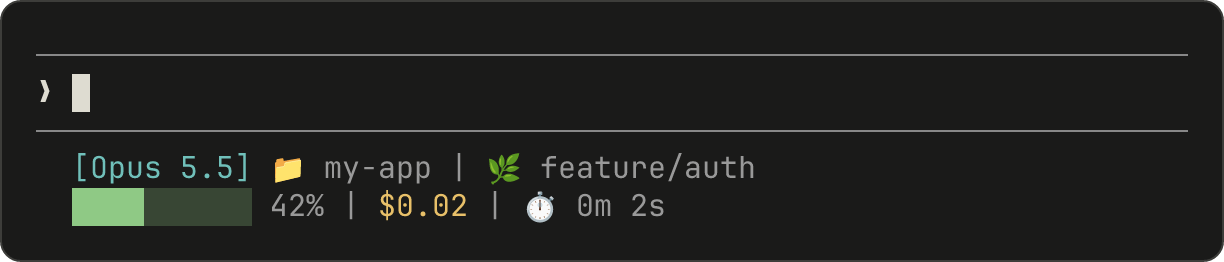
本頁面介紹設定基本狀態列、說明資料如何從 Claude Code 流向您的指令碼、列出您可以顯示的所有欄位,並提供常見模式的現成範例,例如 git 狀態、成本追蹤和進度列。
設定狀態列
使用/statusline 命令讓 Claude Code 為您產生指令碼,或手動建立指令碼並將其新增到您的設定。
使用 /statusline 命令
/statusline 命令接受描述您想顯示內容的自然語言指令。Claude Code 在 ~/.claude/ 中產生指令碼檔案並自動更新您的設定:
/statusline show model name and context percentage with a progress bar
如果 Claude Code 在設定期間要求許可,請核准檔案編輯提示。
手動設定狀態列
將 statusLine 欄位新增到您的使用者設定(~/.claude/settings.json,其中 ~ 是您的主目錄)或專案設定。將 type 設定為 "command",並將 command 指向指令碼路徑或內聯 shell 命令。如需建立指令碼的完整逐步說明,請參閱逐步建立狀態列。
{
  "statusLine": {
    "type": "command",
    "command": "~/.claude/statusline.sh",
    "padding": 2
  }
}
command 欄位在 shell 中執行,因此您也可以使用內聯命令而不是指令碼檔案。此範例使用 jq 解析 JSON 輸入並顯示模型名稱和 context 百分比:
{
  "statusLine": {
    "type": "command",
    "command": "jq -r '\"[\\(.model.display_name)] \\(.context_window.used_percentage // 0)% context\"'"
  }
}
可選的 padding 欄位為狀態列內容新增額外的水平間距(以字元為單位)。預設為 0。此填充是在介面的內建間距之外,因此它控制相對縮排而不是距離終端邊緣的絕對距離。
可選的 refreshInterval 欄位除了事件驅動的更新外,每 N 秒重新執行一次您的命令。最小值為 1。當您的狀態列顯示基於時間的資料(例如時鐘)或背景子代理在主工作階段閒置時變更 git 狀態時,請設定此項。保持未設定以僅在事件上執行。
可選的 hideVimModeIndicator 欄位會隱藏提示下方的內建 -- INSERT -- 文字。當您的指令碼自行呈現 vim.mode 時,請將此設定為 true,以便模式不會顯示兩次。
停用狀態列
執行 /statusline 並要求它移除或清除您的狀態列(例如 /statusline delete、/statusline clear、/statusline remove it)。您也可以手動從 settings.json 中刪除 statusLine 欄位。
逐步建立狀態列
此逐步說明透過手動建立顯示目前模型、工作目錄和 context window 使用百分比的狀態列來展示 /statusline 為您設定的內容。
[!NOTE]
使用
/statusline和您想要的內容描述會自動為您設定所有這些。
這些範例使用 Bash 指令碼,適用於 macOS 和 Linux。在 Windows 上,請參閱 Windows 設定以取得 PowerShell 和 Git Bash 範例。

1. 建立讀取 JSON 並列印輸出的指令碼
Claude Code 透過 stdin 將 JSON 資料傳送到您的指令碼。此指令碼使用 jq(一個您可能需要安裝的命令列 JSON 解析器)來提取模型名稱、目錄和 context 百分比,然後列印格式化的行。
將此儲存到 ~/.claude/statusline.sh(其中 ~ 是您的主目錄,例如 macOS 上的 /Users/username 或 Linux 上的 /home/username):
#!/bin/bash
# Read JSON data that Claude Code sends to stdin
input=$(cat)

# Extract fields using jq
MODEL=$(echo "$input" | jq -r '.model.display_name')
DIR=$(echo "$input" | jq -r '.workspace.current_dir')
# The "// 0" provides a fallback if the field is null
PCT=$(echo "$input" | jq -r '.context_window.used_percentage // 0' | cut -d. -f1)

# Output the status line - ${DIR##*/} extracts just the folder name
echo "[$MODEL] 📁 ${DIR##*/} | ${PCT}% context"
2. 使其可執行
將指令碼標記為可執行,以便您的 shell 可以執行它:
chmod +x ~/.claude/statusline.sh
3. 新增到設定
告訴 Claude Code 執行您的指令碼作為狀態列。將此設定新增到 ~/.claude/settings.json,它將 type 設定為 "command"(意思是「執行此 shell 命令」)並將 command 指向您的指令碼:
{
  "statusLine": {
    "type": "command",
    "command": "~/.claude/statusline.sh"
  }
}
您的狀態列出現在介面底部。Claude Code 會自動重新載入設定,並在您儲存檔案後立即執行您的指令碼。
狀態列的運作方式
Claude Code 會在 stdin 上執行您的指令碼,並傳入 JSON 工作階段資料,然後顯示指令碼列印到 stdout 的任何內容。
[!NOTE]
狀態列在本機執行,不會消耗 API token。它會在某些 UI 互動期間暫時隱藏,包括說明功能表和權限提示。
狀態列何時更新
您的指令碼會在工作階段開始時執行一次,包括當您復原工作階段時。之後,它會在以下情況下再次執行:
- 新的助理訊息到達
/compact完成- 權限模式變更
- Vim 模式切換
- 您變更
statusLine設定中的command - 如果您設定了
refreshInterval,計時器會經過 - 您的指令碼最後接收的資料中的速率限制視窗達到其
resets_at時間 - 您的指令碼最後接收的資料中的預熱提示詞快取達到其
expires_at時間
Claude Code 會在 300ms 時進行去抖動,因此快速變更會批次處理,您的指令碼會在變更停止後執行一次。對 command 本身的變更會跳過去抖動:Claude Code 會立即執行新命令。如果在您的指令碼仍在執行時觸發新的更新,Claude Code 會取消執行中的指令碼。如果您編輯指令碼,變更會在下次更新觸發重新執行時出現。
當主工作階段閒置時,事件驅動的觸發器可能會安靜下來,例如當協調器等待背景 subagent 時。若要在閒置期間保持基於時間或外部來源的區段為最新狀態,請設定 refreshInterval 以同時在固定計時器上重新執行命令。
您的指令碼可以輸出什麼
您的指令碼可以列印的不只是單行純文字:
- 多行:每個
echo或print陳述式會顯示為單獨的列。請參閱多行範例。 - 顏色:使用 ANSI 逸出碼,例如
\033[32m表示綠色(終端機必須支援)。請參閱 git 狀態範例。 - 連結:使用 OSC 8 逸出序列 使文字可點擊(macOS 上為 Cmd+click,Windows/Linux 上為 Ctrl+click)。需要支援超連結的終端機,例如 iTerm2、Kitty 或 WezTerm。請參閱可點擊連結範例。
調整輸出大小以符合終端機
Claude Code 會擷取您的指令碼輸出,而不是直接將其連接到終端機,因此 tput cols 和語言層級的寬度偵測無法從指令碼內部讀取終端機大小。請改為讀取 COLUMNS 和 LINES 環境變數。Claude Code 會在執行您的指令碼之前將這些設定為目前的終端機尺寸。
可用資料
Claude Code 會透過 stdin 將下列 JSON 欄位傳送給您的指令碼:
| 欄位 | 說明 |
|---|---|
model.id, model.display_name |
目前模型的識別碼與顯示名稱 |
cwd, workspace.current_dir |
目前工作目錄。兩個欄位包含相同的值;建議使用 workspace.current_dir,以便與 workspace.project_dir 保持一致。 |
workspace.project_dir |
啟動 Claude Code 的目錄,若工作目錄在工作階段期間變更,可能與 cwd 不同 |
workspace.added_dirs |
透過 /add-dir 或 --add-dir 新增的其他目錄。若未新增任何目錄,則為空陣列 |
workspace.git_worktree |
當目前目錄位於以 git worktree add 建立的連結 worktree 內時的 Git worktree 名稱。在主要工作樹中不存在。任何 git worktree 都會填入此欄位,這點與 worktree.* 不同,後者僅在工作階段處於 worktree 工作階段 時才會出現 |
workspace.repo.host, workspace.repo.owner, workspace.repo.name |
從 origin 遠端解析出的儲存庫身分,例如 "github.com"、"anthropics"、"claude-code"。在 git 儲存庫之外或未設定 origin 遠端時不存在。對於巢狀於子群組中的 gitlab.com 專案,owner 是包含斜線的完整命名空間路徑,例如 "group/subgroup"。在 v2.1.260 之前,這類專案的 workspace.repo 不存在 |
cost.total_cost_usd |
以美元計的預估工作階段費用,除非 modelPricing 表格生效,否則會在用戶端依牌價計算。可能與您的實際帳單不同。當 /clear 開始新的工作階段時會重設為 $0 |
cost.total_duration_ms |
工作階段實際執行的總掛鐘時間,以毫秒為單位。會在多次恢復工作階段之間累計,且不包含工作階段未執行期間的時間 |
cost.total_api_duration_ms |
等待 API 回應所花費的總時間,以毫秒為單位 |
cost.total_lines_added, cost.total_lines_removed |
變更的程式碼行數 |
context_window.total_input_tokens, context_window.total_output_tokens |
目前位於上下文視窗中的 token 數量,來自最近一次的 API 回應。輸入包含快取讀取與寫入 |
context_window.context_window_size |
以 token 計的最大上下文視窗大小 |
context_window.used_percentage |
預先計算的上下文視窗已使用百分比 |
context_window.remaining_percentage |
預先計算的上下文視窗剩餘百分比 |
context_window.current_usage |
上一次 API 呼叫的 token 數量,說明請見 上下文視窗欄位 |
exceeds_200k_tokens |
最近一次 API 回應的 token 總數(輸入、快取與輸出 token 的總和)是否超過 200k。這是固定的門檻值,與實際上下文視窗大小無關。 |
fast_mode |
工作階段是否啟用了 快速模式 |
effort.level |
為工作階段設定的推理 effort 等級(low、medium、high、xhigh 或 max),而非由 skill、subagent 或 ultrathink 設定的等級。若您設定了模型不支援的等級,此處會顯示 Claude Code 實際改用執行的等級。您變更的等級即使在開始生效之前也會顯示於此。若在 CLAUDE_CODE_EFFORT_LEVEL 中設定了等級,此處會顯示該等級。當目前模型不支援 effort 參數時不存在 |
thinking.enabled |
工作階段是否啟用了延伸思考 |
rate_limits.five_hour.used_percentage, rate_limits.seven_day.used_percentage |
5 小時或 7 天速率限制的已使用百分比,範圍為 0 到 100 |
rate_limits.five_hour.resets_at, rate_limits.seven_day.resets_at |
5 小時或 7 天速率限制視窗重設時的 Unix epoch 秒數 |
rate_limits.spend_limit.used_percentage, rate_limits.spend_limit.resets_at |
在 Claude apps 閘道後方時,您已使用多少支出上限,以及其週期何時重設。請參閱 支出上限欄位。需要 Claude Code v2.1.251 或更新版本 |
rate_limits.spend_limit.used_usd, rate_limits.spend_limit.limit_usd, rate_limits.spend_limit.period |
以美元計的預估支出與上限,以及上限的週期。這些欄位可能不存在。請參閱 支出上限欄位。Claude Code 與閘道都需要 v2.1.284 或更新版本 |
prompt_cache |
工作階段主要對話的 提示快取 統計資料:命中率、未命中次數,以及快取是否處於暖狀態。所有欄位請參閱 提示快取欄位。在主要對話的第一個 API 回應之前不存在。需要 Claude Code v2.1.251 或更新版本 |
session_id |
唯一的工作階段識別碼 |
session_name |
工作階段名稱。若存在以 --name 旗標或 /rename 設定的自訂名稱則使用該名稱,否則使用 AI 產生的工作階段標題。預設顯示名稱(例如 my-app-3f)不會填入此欄位。當工作階段既沒有自訂名稱也沒有 AI 產生的標題時不存在 |
prompt_id |
識別目前正在處理之使用者提示詞的 UUID。與 OpenTelemetry 事件上的 prompt.id 屬性 相符。在第一次使用者輸入之前不存在 |
transcript_path |
對話逐字稿檔案的路徑 |
version |
Claude Code 版本 |
output_style.name |
目前輸出風格的名稱 |
vim.mode |
啟用 vim 模式 時的目前 vim 模式(NORMAL、INSERT、VISUAL 或 VISUAL LINE) |
agent.name |
使用 --agent 旗標執行或已設定 agent 設定時的 agent 名稱 |
pr.number, pr.url |
目前分支的開啟中 pull request。與頁尾中的 PR 徽章相對應。在具有 GitLab 遠端的儲存庫中,Claude Code 會改以該分支開啟中的 merge request 填入這些欄位,因此 pr.number 是 merge request 編號。Merge request 資料需要 Claude Code v2.1.234 或更新版本。在 git 儲存庫之外、找到 pull request 或 merge request 之前,或其合併或關閉後,皆不存在 |
pr.review_state |
開啟中 PR 的審查狀態:approved、pending、changes_requested 或 draft。即使 pr 存在,此欄位也可能單獨不存在 |
pr.kind |
當 pr 描述的是 GitLab merge request 時為 mr。對於 GitHub pull request 則不存在,因此在此欄位出現之前撰寫的指令碼仍可正常運作。對於 merge request,當 GitLab 回報其可合併時,Claude Code 會將 review_state 設為 approved,其他任何開啟中狀態設為 pending,草稿則設為 draft。需要 Claude Code v2.1.234 或更新版本 |
worktree.name |
作用中 worktree 的名稱。僅在工作階段處於 worktree 工作階段 時出現 |
worktree.path |
worktree 目錄的絕對路徑 |
worktree.branch |
worktree 的 Git 分支名稱(例如 "worktree-my-feature")。對於以 hook 為基礎的 worktree 則不存在 |
worktree.original_cwd |
Claude 進入 worktree 之前所在的目錄 |
worktree.original_branch |
進入 worktree 之前已簽出的 Git 分支。對於以 hook 為基礎的 worktree 則不存在 |
[accordion] 完整 JSON schema
您的狀態列命令會透過 stdin 接收此 JSON 結構:
{ "cwd": "/current/working/directory", "session_id": "abc123...", "session_name": "my-session", "prompt_id": "550e8400-e29b-41d4-a716-446655440000", "transcript_path": "/path/to/transcript.jsonl", "model": { "id": "claude-opus-5-5", "display_name": "Opus" }, "workspace": { "current_dir": "/current/working/directory", "project_dir": "/original/project/directory", "added_dirs": [], "git_worktree": "feature-xyz", "repo": { "host": "github.com", "owner": "anthropics", "name": "claude-code" } }, "version": "2.1.90", "output_style": { "name": "default" }, "cost": { "total_cost_usd": 0.01234, "total_duration_ms": 45000, "total_api_duration_ms": 2300, "total_lines_added": 156, "total_lines_removed": 23 }, "context_window": { "total_input_tokens": 15500, "total_output_tokens": 1200, "context_window_size": 200000, "used_percentage": 8, "remaining_percentage": 92, "current_usage": { "input_tokens": 8500, "output_tokens": 1200, "cache_creation_input_tokens": 5000, "cache_read_input_tokens": 2000 } }, "exceeds_200k_tokens": false, "prompt_cache": { "warm": true, "caching_observed": true, "ttl": "1h", "expires_at": 1738429200, "requests": 14, "misses": 2, "expected_rebuilds": 1, "hit_ratio": 0.91, "cache_write_tokens": 352000, "miss_recache_tokens": 310200, "last_miss_at": 1738425230, "last_miss_cause": { "causes": ["tools_changed"], "tools_added": 2, "tools_removed": 0 }, "miss_causes": { "tools_changed": 2 }, "recache_tokens_if_cold": 45000 }, "fast_mode": false, "effort": { "level": "high" }, "thinking": { "enabled": true }, "rate_limits": { "five_hour": { "used_percentage": 23.5, "resets_at": 1738425600 }, "seven_day": { "used_percentage": 41.2, "resets_at": 1738857600 }, "spend_limit": { "used_percentage": 62.8, "resets_at": 1740787200, "used_usd": 314.12, "limit_usd": 500, "period": "monthly" } }, "vim": { "mode": "NORMAL" }, "agent": { "name": "security-reviewer" }, "pr": { "number": 1234, "url": "https://github.com/anthropics/claude-code/pull/1234", "review_state": "pending" }, "worktree": { "name": "my-feature", "path": "/path/to/.claude/worktrees/my-feature", "branch": "worktree-my-feature", "original_cwd": "/path/to/project", "original_branch": "main" } }可能不存在的欄位(不會出現在 JSON 中):
session_name:當已透過--name或/rename設定自訂名稱,或已存在 AI 產生的工作階段標題時出現。預設顯示名稱(例如my-app-3f)不會填入此欄位prompt_id:僅在第一次使用者輸入之後出現workspace.git_worktree:僅在目前目錄位於連結的 git worktree 內時出現workspace.repo:僅在已設定origin遠端的 git 儲存庫內出現effort:僅在目前模型支援推理投入程度參數時出現vim:僅在啟用 vim 模式時出現agent:僅在使用--agent旗標執行或已設定 agent 設定時出現pr:僅在目前分支找到開啟中的 PR 或 GitLab merge request 時出現,並會在其合併或關閉後移除。pr.review_state與pr.kind可能單獨不存在worktree:僅在工作階段處於 worktree 工作階段 時出現。出現時,對於以 hook 為基礎的 worktree,branch與original_branch也可能不存在rate_limits:僅對 claude.ai Pro、Max 與 Ultra 訂閱者,或位於為您設定支出上限的 Claude apps 閘道後方時出現。即便如此,也僅在工作階段的第一個 API 回應之後出現。每個視窗(five_hour、seven_day、spend_limit)可能單獨不存在,且一旦其resets_at時間過後,Claude Code 就會移除該視窗。使用jq -r '.rate_limits.five_hour.used_percentage // empty'可妥善處理欄位不存在的情況。prompt_cache:在主要對話的第一個 API 回應之後出現。請參閱 提示快取欄位可能為
null的欄位:
context_window.current_usage:在工作階段的第一次 API 呼叫之前為null,在/compact之後也會再次為null,直到下一次 API 呼叫重新填入context_window.used_percentage、context_window.remaining_percentage:在工作階段初期可能為null請在指令碼中使用條件式存取處理缺少的欄位,並以備援預設值處理 null 值。
上下文視窗欄位
context_window 物件描述最近一次 API 回應中的即時上下文視窗。
- 合計總數(
total_input_tokens、total_output_tokens):目前位於上下文視窗中的 token。total_input_tokens是input_tokens、cache_creation_input_tokens與cache_read_input_tokens的總和;total_output_tokens是最近一次回應的輸出 token。兩者在第一個 API 回應之前皆為0。 - 各元件用量(
current_usage):依類別細分的相同 token 數量。當您需要將快取命中與新輸入分開時,請使用此欄位。
current_usage 物件包含:
input_tokens:目前上下文中的輸入 tokenoutput_tokens:產生的輸出 tokencache_creation_input_tokens:寫入快取的 tokencache_read_input_tokens:從快取讀取的 token
關於快取欄位的意義及其計費方式,請參閱 檢查快取效能。
used_percentage 欄位僅根據輸入 token 計算:input_tokens + cache_creation_input_tokens + cache_read_input_tokens。不包含 output_tokens。
若您從 current_usage 手動計算上下文百分比,請使用相同的僅輸入公式,以與 used_percentage 一致。
current_usage 物件在工作階段的第一次 API 呼叫之前為 null,在 /compact 之後也會立即再次為 null,直到下一次 API 呼叫重新填入。
支出上限欄位
在 具有支出上限的 Claude apps 閘道 後方時,rate_limits.spend_limit 物件描述適用於您的支出上限。它會在工作階段的第一個 API 回應之後出現,且需要 Claude Code v2.1.251 或更新版本。您的指令碼會依不同的時程接收其欄位:
used_percentage與resets_at:隨每個回應一起提供,因此只要spend_limit存在,它們就會存在。used_percentage的範圍為 0 到 100,超過上限後會大於 100;resets_at是上限週期重設時的 Unix epoch 秒數。used_usd、limit_usd與period:您到目前為止以美元計的預估支出與上限,以及上限涵蓋的週期,為daily、weekly或monthly其中之一。閘道會 根據 token 數量計算used_usd,因此它是預估值,而非實際計費金額。Claude Code 會在您傳送請求期間,約每五分鐘以另一個請求從閘道讀取這些欄位。金額可能比used_percentage舊約五分鐘,因此兩者可能短暫不一致。Claude Code 與閘道都需要 v2.1.284 或更新版本。
即使 spend_limit 存在,也請將 used_usd、limit_usd 與 period 視為選用欄位,因為您的指令碼會先收到百分比。請在指令碼中以備援值讀取每個欄位,例如 jq -r '.rate_limits.spend_limit.used_usd // empty'。在 Claude Code v2.1.295 之前,若您設定了 CLAUDE_CODE_DISABLE_NONESSENTIAL_TRAFFIC,這些欄位會一直不存在,因為該設定會關閉這個請求。
提示快取欄位
prompt_cache 物件總結工作階段的主要對話如何使用 提示快取。Claude Code 根據 API 回應中的快取 token 數量計算此物件,因此適用於所有供應商。
此物件會在主要對話的第一個 API 回應之後出現。Claude Code 不會將 subagent 請求計入這些統計資料。需要 Claude Code v2.1.251 或更新版本。
下表列出每個欄位及其意義。時間戳記為 Unix epoch 秒數,與 rate_limits.*.resets_at 的單位相同。簡短的狀態列通常只會顯示其中一兩個;warm 與 hit_ratio 最能直接概括快取狀態。
| 欄位 | 說明 |
|---|---|
warm |
快取的前綴是否仍在其 TTL 內。當上一次回應未回報任何快取 token 時為 false,即使 caching_observed 為 true 亦然 |
caching_observed |
此工作階段中是否有任何回應回報了快取 token。false 表示提示快取已關閉,或您的供應商或閘道未回報此資訊 |
ttl |
目前快取前綴的 快取存留時間:"5m" 或 "1h" |
expires_at |
快取前綴超出其 TTL 並轉為冷狀態的時間,以 epoch 秒數表示。當上一次回應未回報任何快取 token 時為 null |
requests |
此工作階段中為主要對話記錄的 API 請求數 |
misses |
重新處理快取中已有內容的請求:超過該請求可從快取讀取之內容的 5% 且至少 2,000 個 token,且沒有壓縮或工具結果清除可解釋快取讀取的不足 |
expected_rebuilds |
在壓縮或清除舊工具結果之後發生的快取重建次數 |
hit_ratio |
此工作階段中快取讀取 token 佔所有輸入 token 的比例,範圍為 0 到 1。分母計入快取讀取、快取寫入與未快取的輸入。當這些數量皆為零時為 null |
cache_write_tokens |
此工作階段中寫入快取的所有 token,包括第一個請求的初始寫入 |
miss_recache_tokens |
被計為未命中的請求所寫入快取的 token |
last_miss_at |
上一次未命中發生的時間,以 epoch 秒數表示。當工作階段沒有未命中時為 null |
last_miss_cause |
Claude Code 判定為上一次未命中的可能原因,說明請見 上一次未命中原因。需要 Claude Code v2.1.260 或更新版本 |
miss_causes |
此工作階段中已診斷的未命中各有多少屬於每個原因,以與 last_miss_cause 相同的原因名稱作為鍵。需要 Claude Code v2.1.260 或更新版本 |
recache_tokens_if_cold |
若快取屆時已轉為冷狀態,下一個請求將重新快取的 token 數。在壓縮或清除舊工具結果之後立即為 null,直到下一個請求記錄改寫後對話的大小 |
Claude Code 也會在終端機中的 /usage 命令的 Prompt cache (main) 行 顯示相同的統計資料。
上一次未命中原因
last_miss_cause 物件回報 Claude Code 判定為最近一次未命中的可能原因。其 causes 陣列包含一個或多個原因名稱,例如 tools_changed、system_prompt_changed、ttl_expired_5m 或 likely_server_side。此物件在工作階段第一次未命中之前為 null,且每當 Claude Code 無法為最近一次未命中判定原因時,也會再次為 null。需要 Claude Code v2.1.260 或更新版本。
有兩個原因會在物件中加入計數:
tools_added與tools_removed:搭配tools_changed,表示請求中新增或移除了多少個工具system_char_delta:搭配system_prompt_changed,表示系統提示詞長度的變化,以字元為單位
範例
這些範例展示常見的狀態列模式。若要使用任何範例:
- 將指令碼儲存到檔案,例如
~/.claude/statusline.sh(或.py/.js) - 使其可執行:
chmod +x ~/.claude/statusline.sh - 將路徑新增到您的設定
Bash 範例使用 jq 來解析 JSON。Python 和 Node.js 具有內建的 JSON 解析。
Context window 使用情況
顯示目前模型和 context window 使用情況,帶有視覺進度列。每個指令碼從 stdin 讀取 JSON,提取 used_percentage 欄位,並建立一個 10 字元的列,其中填充的塊(▓)代表使用情況:

#!/bin/bash
# Read all of stdin into a variable
input=$(cat)

# Extract fields with jq, "// 0" provides fallback for null
MODEL=$(echo "$input" | jq -r '.model.display_name')
PCT=$(echo "$input" | jq -r '.context_window.used_percentage // 0' | cut -d. -f1)

# Build progress bar: printf -v creates a run of spaces, then
# ${var// /▓} replaces each space with a block character
BAR_WIDTH=10
FILLED=$((PCT * BAR_WIDTH / 100))
EMPTY=$((BAR_WIDTH - FILLED))
BAR=""
[ "$FILLED" -gt 0 ] && printf -v FILL "%${FILLED}s" && BAR="${FILL// /▓}"
[ "$EMPTY" -gt 0 ] && printf -v PAD "%${EMPTY}s" && BAR="${BAR}${PAD// /░}"

echo "[$MODEL] $BAR $PCT%"
#!/usr/bin/env python3
import json, sys

# json.load reads and parses stdin in one step
data = json.load(sys.stdin)
model = data['model']['display_name']
# "or 0" handles null values
pct = int(data.get('context_window', {}).get('used_percentage', 0) or 0)

# String multiplication builds the bar
filled = pct * 10 // 100
bar = '▓' * filled + '░' * (10 - filled)

print(f"[{model}] {bar} {pct}%")
#!/usr/bin/env node
// Node.js reads stdin asynchronously with events
let input = '';
process.stdin.on('data', chunk => input += chunk);
process.stdin.on('end', () => {
    const data = JSON.parse(input);
    const model = data.model.display_name;
    // Optional chaining (?.) safely handles null fields
    const pct = Math.floor(data.context_window?.used_percentage || 0);

    // String.repeat() builds the bar
    const filled = Math.floor(pct * 10 / 100);
    const bar = '▓'.repeat(filled) + '░'.repeat(10 - filled);

    console.log(`[${model}] ${bar} ${pct}%`);
});
Git 狀態與顏色
顯示 git 分支,帶有暫存和修改檔案的顏色編碼指示器。此指令碼使用 ANSI 逃逸碼表示終端顏色:\033[32m 是綠色,\033[33m 是黃色,\033[0m 重設為預設值。

每個指令碼檢查目前目錄是否是 git 儲存庫,計算暫存和修改檔案,並顯示顏色編碼的指示器:
#!/bin/bash
input=$(cat)

MODEL=$(echo "$input" | jq -r '.model.display_name')
DIR=$(echo "$input" | jq -r '.workspace.current_dir')

GREEN='\033[32m'
YELLOW='\033[33m'
RESET='\033[0m'

if git rev-parse --git-dir > /dev/null 2>&1; then
    BRANCH=$(git branch --show-current 2>/dev/null)
    STAGED=$(git diff --cached --numstat 2>/dev/null | wc -l | tr -d ' ')
    MODIFIED=$(git diff --numstat 2>/dev/null | wc -l | tr -d ' ')

    GIT_STATUS=""
    [ "$STAGED" -gt 0 ] && GIT_STATUS="${GREEN}+${STAGED}${RESET}"
    [ "$MODIFIED" -gt 0 ] && GIT_STATUS="${GIT_STATUS}${YELLOW}~${MODIFIED}${RESET}"

    echo -e "[$MODEL] 📁 ${DIR##*/} | 🌿 $BRANCH $GIT_STATUS"
else
    echo "[$MODEL] 📁 ${DIR##*/}"
fi
#!/usr/bin/env python3
import json, sys, subprocess, os

data = json.load(sys.stdin)
model = data['model']['display_name']
directory = os.path.basename(data['workspace']['current_dir'])

GREEN, YELLOW, RESET = '\033[32m', '\033[33m', '\033[0m'

try:
    subprocess.check_output(['git', 'rev-parse', '--git-dir'], stderr=subprocess.DEVNULL)
    branch = subprocess.check_output(['git', 'branch', '--show-current'], text=True).strip()
    staged_output = subprocess.check_output(['git', 'diff', '--cached', '--numstat'], text=True).strip()
    modified_output = subprocess.check_output(['git', 'diff', '--numstat'], text=True).strip()
    staged = len(staged_output.split('\n')) if staged_output else 0
    modified = len(modified_output.split('\n')) if modified_output else 0

    git_status = f"{GREEN}+{staged}{RESET}" if staged else ""
    git_status += f"{YELLOW}~{modified}{RESET}" if modified else ""

    print(f"[{model}] 📁 {directory} | 🌿 {branch} {git_status}")
except:
    print(f"[{model}] 📁 {directory}")
#!/usr/bin/env node
const { execSync } = require('child_process');
const path = require('path');

let input = '';
process.stdin.on('data', chunk => input += chunk);
process.stdin.on('end', () => {
    const data = JSON.parse(input);
    const model = data.model.display_name;
    const dir = path.basename(data.workspace.current_dir);

    const GREEN = '\x1b[32m', YELLOW = '\x1b[33m', RESET = '\x1b[0m';

    try {
        execSync('git rev-parse --git-dir', { stdio: 'ignore' });
        const branch = execSync('git branch --show-current', { encoding: 'utf8' }).trim();
        const staged = execSync('git diff --cached --numstat', { encoding: 'utf8' }).trim().split('\n').filter(Boolean).length;
        const modified = execSync('git diff --numstat', { encoding: 'utf8' }).trim().split('\n').filter(Boolean).length;

        let gitStatus = staged ? `${GREEN}+${staged}${RESET}` : '';
        gitStatus += modified ? `${YELLOW}~${modified}${RESET}` : '';

        console.log(`[${model}] 📁 ${dir} | 🌿 ${branch} ${gitStatus}`);
    } catch {
        console.log(`[${model}] 📁 ${dir}`);
    }
});
成本和持續時間追蹤
追蹤您的工作階段 API 成本和經過的時間。cost.total_cost_usd 欄位累積目前工作階段中所有 API 呼叫的估計成本。cost.total_duration_ms 欄位測量自工作階段開始以來的總經過時間,而 cost.total_api_duration_ms 僅追蹤等待 API 回應所花費的時間。
每個指令碼將成本格式化為貨幣,並將毫秒轉換為分鐘和秒:

#!/bin/bash
input=$(cat)

MODEL=$(echo "$input" | jq -r '.model.display_name')
COST=$(echo "$input" | jq -r '.cost.total_cost_usd // 0')
DURATION_MS=$(echo "$input" | jq -r '.cost.total_duration_ms // 0')

COST_FMT=$(printf '$%.2f' "$COST")
DURATION_SEC=$((DURATION_MS / 1000))
MINS=$((DURATION_SEC / 60))
SECS=$((DURATION_SEC % 60))

echo "[$MODEL] 💰 $COST_FMT | ⏱️ ${MINS}m ${SECS}s"
#!/usr/bin/env python3
import json, sys

data = json.load(sys.stdin)
model = data['model']['display_name']
cost = data.get('cost', {}).get('total_cost_usd', 0) or 0
duration_ms = data.get('cost', {}).get('total_duration_ms', 0) or 0

duration_sec = duration_ms // 1000
mins, secs = duration_sec // 60, duration_sec % 60

print(f"[{model}] 💰 ${cost:.2f} | ⏱️ {mins}m {secs}s")
#!/usr/bin/env node
let input = '';
process.stdin.on('data', chunk => input += chunk);
process.stdin.on('end', () => {
    const data = JSON.parse(input);
    const model = data.model.display_name;
    const cost = data.cost?.total_cost_usd || 0;
    const durationMs = data.cost?.total_duration_ms || 0;

    const durationSec = Math.floor(durationMs / 1000);
    const mins = Math.floor(durationSec / 60);
    const secs = durationSec % 60;

    console.log(`[${model}] 💰 $${cost.toFixed(2)} | ⏱️ ${mins}m ${secs}s`);
});
顯示多行
您的指令碼可以輸出多行以建立更豐富的顯示。
此範例結合了多種技術:基於閾值的顏色(70% 以下為綠色,70-89% 為黃色,90%+ 為紅色)、進度列和 git 分支資訊。每個 print 或 echo 陳述式建立單獨的行:
#!/bin/bash
input=$(cat)

MODEL=$(echo "$input" | jq -r '.model.display_name')
DIR=$(echo "$input" | jq -r '.workspace.current_dir')
COST=$(echo "$input" | jq -r '.cost.total_cost_usd // 0')
PCT=$(echo "$input" | jq -r '.context_window.used_percentage // 0' | cut -d. -f1)
DURATION_MS=$(echo "$input" | jq -r '.cost.total_duration_ms // 0')

CYAN='\033[36m'; GREEN='\033[32m'; YELLOW='\033[33m'; RED='\033[31m'; RESET='\033[0m'

# Pick bar color based on context usage
if [ "$PCT" -ge 90 ]; then BAR_COLOR="$RED"
elif [ "$PCT" -ge 70 ]; then BAR_COLOR="$YELLOW"
else BAR_COLOR="$GREEN"; fi

FILLED=$((PCT / 10)); EMPTY=$((10 - FILLED))
printf -v FILL "%${FILLED}s"; printf -v PAD "%${EMPTY}s"
BAR="${FILL// /█}${PAD// /░}"

MINS=$((DURATION_MS / 60000)); SECS=$(((DURATION_MS % 60000) / 1000))

BRANCH=""
git rev-parse --git-dir > /dev/null 2>&1 && BRANCH=" | 🌿 $(git branch --show-current 2>/dev/null)"

echo -e "${CYAN}[$MODEL]${RESET} 📁 ${DIR##*/}$BRANCH"
COST_FMT=$(printf '$%.2f' "$COST")
echo -e "${BAR_COLOR}${BAR}${RESET} ${PCT}% | ${YELLOW}${COST_FMT}${RESET} | ⏱️ ${MINS}m ${SECS}s"
#!/usr/bin/env python3
import json, sys, subprocess, os

data = json.load(sys.stdin)
model = data['model']['display_name']
directory = os.path.basename(data['workspace']['current_dir'])
cost = data.get('cost', {}).get('total_cost_usd', 0) or 0
pct = int(data.get('context_window', {}).get('used_percentage', 0) or 0)
duration_ms = data.get('cost', {}).get('total_duration_ms', 0) or 0

CYAN, GREEN, YELLOW, RED, RESET = '\033[36m', '\033[32m', '\033[33m', '\033[31m', '\033[0m'

bar_color = RED if pct >= 90 else YELLOW if pct >= 70 else GREEN
filled = pct // 10
bar = '█' * filled + '░' * (10 - filled)

mins, secs = duration_ms // 60000, (duration_ms % 60000) // 1000

try:
    branch = subprocess.check_output(['git', 'branch', '--show-current'], text=True, stderr=subprocess.DEVNULL).strip()
    branch = f" | 🌿 {branch}" if branch else ""
except:
    branch = ""

print(f"{CYAN}[{model}]{RESET} 📁 {directory}{branch}")
print(f"{bar_color}{bar}{RESET} {pct}% | {YELLOW}${cost:.2f}{RESET} | ⏱️ {mins}m {secs}s")
#!/usr/bin/env node
const { execSync } = require('child_process');
const path = require('path');

let input = '';
process.stdin.on('data', chunk => input += chunk);
process.stdin.on('end', () => {
    const data = JSON.parse(input);
    const model = data.model.display_name;
    const dir = path.basename(data.workspace.current_dir);
    const cost = data.cost?.total_cost_usd || 0;
    const pct = Math.floor(data.context_window?.used_percentage || 0);
    const durationMs = data.cost?.total_duration_ms || 0;

    const CYAN = '\x1b[36m', GREEN = '\x1b[32m', YELLOW = '\x1b[33m', RED = '\x1b[31m', RESET = '\x1b[0m';

    const barColor = pct >= 90 ? RED : pct >= 70 ? YELLOW : GREEN;
    const filled = Math.floor(pct / 10);
    const bar = '█'.repeat(filled) + '░'.repeat(10 - filled);

    const mins = Math.floor(durationMs / 60000);
    const secs = Math.floor((durationMs % 60000) / 1000);

    let branch = '';
    try {
        branch = execSync('git branch --show-current', { encoding: 'utf8', stdio: ['pipe', 'pipe', 'ignore'] }).trim();
        branch = branch ? ` | 🌿 ${branch}` : '';
    } catch {}

    console.log(`${CYAN}[${model}]${RESET} 📁 ${dir}${branch}`);
    console.log(`${barColor}${bar}${RESET} ${pct}% | ${YELLOW}$${cost.toFixed(2)}${RESET} | ⏱️ ${mins}m ${secs}s`);
});
可點擊的連結
此範例建立指向您的 GitHub 儲存庫的可點擊連結。按住 Cmd(macOS)或 Ctrl(Windows/Linux)並點擊以在瀏覽器中開啟連結。

每個指令碼取得 git 遠端 URL,將 SSH 格式轉換為 HTTPS,並將儲存庫名稱包裝在 OSC 8 逃逸碼中。Bash 版本使用 printf '%b',它比 echo -e 更可靠地跨不同 shell 解釋反斜杠逃逸:
#!/bin/bash
input=$(cat)

MODEL=$(echo "$input" | jq -r '.model.display_name')

# Convert git SSH URL to HTTPS
REMOTE=$(git remote get-url origin 2>/dev/null | sed 's/git@github.com:/https:\/\/github.com\//' | sed 's/\.git$//')

if [ -n "$REMOTE" ]; then
    REPO_NAME=$(basename "$REMOTE")
    # OSC 8 format: \e]8;;URL\a then TEXT then \e]8;;\a
    # printf %b interprets escape sequences reliably across shells
    printf '%b' "[$MODEL] 🔗 \e]8;;${REMOTE}\a${REPO_NAME}\e]8;;\a\n"
else
    echo "[$MODEL]"
fi
#!/usr/bin/env python3
import json, sys, subprocess, re, os

data = json.load(sys.stdin)
model = data['model']['display_name']

# Get git remote URL
try:
    remote = subprocess.check_output(
        ['git', 'remote', 'get-url', 'origin'],
        stderr=subprocess.DEVNULL, text=True
    ).strip()
    # Convert SSH to HTTPS format
    remote = re.sub(r'^git@github\.com:', 'https://github.com/', remote)
    remote = re.sub(r'\.git$', '', remote)
    repo_name = os.path.basename(remote)
    # OSC 8 escape sequences
    link = f"\033]8;;{remote}\a{repo_name}\033]8;;\a"
    print(f"[{model}] 🔗 {link}")
except:
    print(f"[{model}]")
#!/usr/bin/env node
const { execSync } = require('child_process');
const path = require('path');

let input = '';
process.stdin.on('data', chunk => input += chunk);
process.stdin.on('end', () => {
    const data = JSON.parse(input);
    const model = data.model.display_name;

    try {
        let remote = execSync('git remote get-url origin', { encoding: 'utf8', stdio: ['pipe', 'pipe', 'ignore'] }).trim();
        // Convert SSH to HTTPS format
        remote = remote.replace(/^git@github\.com:/, 'https://github.com/').replace(/\.git$/, '');
        const repoName = path.basename(remote);
        // OSC 8 escape sequences
        const link = `\x1b]8;;${remote}\x07${repoName}\x1b]8;;\x07`;
        console.log(`[${model}] 🔗 ${link}`);
    } catch {
        console.log(`[${model}]`);
    }
});
速率限制使用情況
在狀態列中顯示 claude.ai 訂閱速率限制使用情況,或您相對於 Claude 應用程式閘道支出限制的支出。對於訂閱者,rate_limits 物件可包含滾動 five_hour 視窗和每週 seven_day 視窗。每個視窗提供 used_percentage(0 到 100)和 resets_at(視窗重設時的 Unix 紀元秒數)。在閘道後面,請讀取 spend_limit 物件,詳見支出限制欄位。
rate_limits 物件僅對 claude.ai Pro、Max 和 Ultra 訂閱者或具有支出限制的 Claude 應用程式閘道後面出現,並且僅在第一次 API 回應後出現。每個指令碼優雅地處理不存在的欄位,並且在閘道後面會印出 spend: $314.12 / $500,或在美元欄位不存在時印出 spend: 63%:
#!/bin/bash
input=$(cat)

MODEL=$(echo "$input" | jq -r '.model.display_name')
# "// empty" produces no output when rate_limits is absent
FIVE_H=$(echo "$input" | jq -r '.rate_limits.five_hour.used_percentage // empty')
WEEK=$(echo "$input" | jq -r '.rate_limits.seven_day.used_percentage // empty')

LIMITS=""
[ -n "$FIVE_H" ] && LIMITS="5h: $(printf '%.0f' "$FIVE_H")%"
[ -n "$WEEK" ] && LIMITS="${LIMITS:+$LIMITS }7d: $(printf '%.0f' "$WEEK")%"

# Behind a Claude apps gateway: dollars when the gateway reports them, else the percentage
SPEND_PCT=$(echo "$input" | jq -r '.rate_limits.spend_limit.used_percentage // empty')
SPEND_USD=$(echo "$input" | jq -r '.rate_limits.spend_limit | select(.used_usd != null) | "$\(.used_usd) / $\(.limit_usd)"')
[ -n "$SPEND_PCT" ] && LIMITS="${LIMITS:+$LIMITS }spend: ${SPEND_USD:-$(printf '%.0f' "$SPEND_PCT")%}"

[ -n "$LIMITS" ] && echo "[$MODEL] | $LIMITS" || echo "[$MODEL]"
#!/usr/bin/env python3
import json, sys

data = json.load(sys.stdin)
model = data['model']['display_name']

parts = []
rate = data.get('rate_limits', {})
five_h = rate.get('five_hour', {}).get('used_percentage')
week = rate.get('seven_day', {}).get('used_percentage')

if five_h is not None:
    parts.append(f"5h: {five_h:.0f}%")
if week is not None:
    parts.append(f"7d: {week:.0f}%")

# Behind a Claude apps gateway: dollars when the gateway reports them, else the percentage
spend = rate.get('spend_limit', {})
if spend.get('used_percentage') is not None:
    if spend.get('used_usd') is not None:
        parts.append(f"spend: ${spend['used_usd']} / ${spend['limit_usd']}")
    else:
        parts.append(f"spend: {spend['used_percentage']:.0f}%")

if parts:
    print(f"[{model}] | {' '.join(parts)}")
else:
    print(f"[{model}]")
#!/usr/bin/env node
let input = '';
process.stdin.on('data', chunk => input += chunk);
process.stdin.on('end', () => {
    const data = JSON.parse(input);
    const model = data.model.display_name;

    const parts = [];
    const fiveH = data.rate_limits?.five_hour?.used_percentage;
    const week = data.rate_limits?.seven_day?.used_percentage;

    if (fiveH != null) parts.push(`5h: ${Math.round(fiveH)}%`);
    if (week != null) parts.push(`7d: ${Math.round(week)}%`);

    // Behind a Claude apps gateway: dollars when the gateway reports them, else the percentage
    const spend = data.rate_limits?.spend_limit;
    if (spend?.used_percentage != null) {
        parts.push(spend.used_usd != null
            ? `spend: $${spend.used_usd} / $${spend.limit_usd}`
            : `spend: ${Math.round(spend.used_percentage)}%`);
    }

    console.log(parts.length ? `[${model}] | ${parts.join(' ')}` : `[${model}]`);
});
快取昂貴的操作
您的狀態列指令碼在活躍工作階段期間頻繁執行。git status 或 git diff 等命令可能很慢,特別是在大型儲存庫中。此範例將 git 資訊快取到臨時檔案,並且僅每 5 秒重新整理一次。
快取檔案名稱需要在工作階段內的狀態列呼叫中保持穩定,但在工作階段之間保持唯一,以便不同儲存庫中的並行工作階段不會讀取彼此的快取 git 狀態。基於程序的識別碼(如 $$、os.getpid() 或 process.pid)在每次呼叫時都會變更,並會破壞快取。改用 JSON 輸入中的 session_id:它在工作階段的生命週期內保持穩定,並且每個工作階段都是唯一的。
每個指令碼在執行 git 命令之前檢查快取檔案是否遺漏或超過 5 秒:
#!/bin/bash
input=$(cat)

MODEL=$(echo "$input" | jq -r '.model.display_name')
DIR=$(echo "$input" | jq -r '.workspace.current_dir')
SESSION_ID=$(echo "$input" | jq -r '.session_id')

CACHE_FILE="/tmp/statusline-git-cache-$SESSION_ID"
CACHE_MAX_AGE=5  # seconds

cache_is_stale() {
    [ ! -f "$CACHE_FILE" ] || \
    # stat -c %Y (Linux) or stat -f %m (macOS) prints the file's last-modified
    # time. The Linux form must run first: on Linux, the macOS form prints a
    # filesystem report to stdout before failing, and that output would be
    # captured by the command substitution and break the arithmetic.
    [ $(($(date +%s) - $(stat -c %Y "$CACHE_FILE" 2>/dev/null || stat -f %m "$CACHE_FILE" 2>/dev/null || echo 0))) -gt $CACHE_MAX_AGE ]
}

if cache_is_stale; then
    if git rev-parse --git-dir > /dev/null 2>&1; then
        BRANCH=$(git branch --show-current 2>/dev/null)
        STAGED=$(git diff --cached --numstat 2>/dev/null | wc -l | tr -d ' ')
        MODIFIED=$(git diff --numstat 2>/dev/null | wc -l | tr -d ' ')
        echo "$BRANCH|$STAGED|$MODIFIED" > "$CACHE_FILE"
    else
        echo "||" > "$CACHE_FILE"
    fi
fi

IFS='|' read -r BRANCH STAGED MODIFIED < "$CACHE_FILE"

if [ -n "$BRANCH" ]; then
    echo "[$MODEL] 📁 ${DIR##*/} | 🌿 $BRANCH +$STAGED ~$MODIFIED"
else
    echo "[$MODEL] 📁 ${DIR##*/}"
fi
#!/usr/bin/env python3
import json, sys, subprocess, os, time

data = json.load(sys.stdin)
model = data['model']['display_name']
directory = os.path.basename(data['workspace']['current_dir'])
session_id = data['session_id']

CACHE_FILE = f"/tmp/statusline-git-cache-{session_id}"
CACHE_MAX_AGE = 5  # seconds

def cache_is_stale():
    if not os.path.exists(CACHE_FILE):
        return True
    return time.time() - os.path.getmtime(CACHE_FILE) > CACHE_MAX_AGE

if cache_is_stale():
    try:
        subprocess.check_output(['git', 'rev-parse', '--git-dir'], stderr=subprocess.DEVNULL)
        branch = subprocess.check_output(['git', 'branch', '--show-current'], text=True).strip()
        staged = subprocess.check_output(['git', 'diff', '--cached', '--numstat'], text=True).strip()
        modified = subprocess.check_output(['git', 'diff', '--numstat'], text=True).strip()
        staged_count = len(staged.split('\n')) if staged else 0
        modified_count = len(modified.split('\n')) if modified else 0
        with open(CACHE_FILE, 'w') as f:
            f.write(f"{branch}|{staged_count}|{modified_count}")
    except:
        with open(CACHE_FILE, 'w') as f:
            f.write("||")

with open(CACHE_FILE) as f:
    branch, staged, modified = f.read().strip().split('|')

if branch:
    print(f"[{model}] 📁 {directory} | 🌿 {branch} +{staged} ~{modified}")
else:
    print(f"[{model}] 📁 {directory}")
#!/usr/bin/env node
const { execSync } = require('child_process');
const fs = require('fs');
const path = require('path');

let input = '';
process.stdin.on('data', chunk => input += chunk);
process.stdin.on('end', () => {
    const data = JSON.parse(input);
    const model = data.model.display_name;
    const dir = path.basename(data.workspace.current_dir);
    const sessionId = data.session_id;

    const CACHE_FILE = `/tmp/statusline-git-cache-${sessionId}`;
    const CACHE_MAX_AGE = 5; // seconds

    const cacheIsStale = () => {
        if (!fs.existsSync(CACHE_FILE)) return true;
        return (Date.now() / 1000) - fs.statSync(CACHE_FILE).mtimeMs / 1000 > CACHE_MAX_AGE;
    };

    if (cacheIsStale()) {
        try {
            execSync('git rev-parse --git-dir', { stdio: 'ignore' });
            const branch = execSync('git branch --show-current', { encoding: 'utf8' }).trim();
            const staged = execSync('git diff --cached --numstat', { encoding: 'utf8' }).trim().split('\n').filter(Boolean).length;
            const modified = execSync('git diff --numstat', { encoding: 'utf8' }).trim().split('\n').filter(Boolean).length;
            fs.writeFileSync(CACHE_FILE, `${branch}|${staged}|${modified}`);
        } catch {
            fs.writeFileSync(CACHE_FILE, '||');
        }
    }

    const [branch, staged, modified] = fs.readFileSync(CACHE_FILE, 'utf8').trim().split('|');

    if (branch) {
        console.log(`[${model}] 📁 ${dir} | 🌿 ${branch} +${staged} ~${modified}`);
    } else {
        console.log(`[${model}] 📁 ${dir}`);
    }
});
Windows 設定
在 Windows 上,Claude Code 透過 Git Bash 執行狀態列命令(如果已安裝 Git Bash),或在 Git Bash 不存在時透過 PowerShell 執行。
Git Bash 將未引用的反斜杠視為逃逸字元,因此 Windows 風格的路徑(例如 C:\Users\username\script.mjs)到達指令碼執行器時會移除其分隔符,命令會失敗而沒有可見的錯誤。在 command 字串中使用正斜杠寫入檔案路徑,如下面的範例所示。~ 快捷方式也有效,並展開到您的 Windows 主目錄。
若要執行 PowerShell 指令碼作為您的狀態列,請透過 powershell 呼叫它。無論 Claude Code 透過 Git Bash 或 PowerShell 路由命令,這都有效:
{
  "statusLine": {
    "type": "command",
    "command": "powershell -NoProfile -File C:/Users/username/.claude/statusline.ps1"
  }
}
$input_json = $input | Out-String | ConvertFrom-Json
$cwd = $input_json.cwd
$model = $input_json.model.display_name
$used = $input_json.context_window.used_percentage
$dirname = Split-Path $cwd -Leaf

if ($used) {
    Write-Host "$dirname [$model] ctx: $used%"
} else {
    Write-Host "$dirname [$model]"
}
或者,當已安裝 Git Bash 時,直接執行 Bash 指令碼:
{
  "statusLine": {
    "type": "command",
    "command": "~/.claude/statusline.sh"
  }
}
#!/usr/bin/env bash
input=$(cat)
cwd=$(echo "$input" | grep -o '"cwd":"[^"]*"' | cut -d'"' -f4)
model=$(echo "$input" | grep -o '"display_name":"[^"]*"' | cut -d'"' -f4)
dirname="${cwd##*[/\\]}"
echo "$dirname [$model]"
提示
- 使用模擬輸入測試:
echo '{"model":{"display_name":"Opus"},"workspace":{"current_dir":"/home/user/project"},"context_window":{"used_percentage":25},"session_id":"test-session-abc"}' | ./statusline.sh - 保持輸出簡短:狀態列寬度有限,因此長輸出可能會被截斷或換行不當
- 快取慢速操作:您的指令碼在活躍工作階段期間頻繁執行,因此
git status等命令可能會導致延遲。請參閱快取範例以瞭解如何處理此問題。
社群專案如 ccstatusline 和 starship-claude 提供具有主題和其他功能的預先建立設定。
疑難排解
如果狀態列是空白的,請從狀態列未出現開始。尚未信任的資料夾以及執行失敗的指令碼也會使狀態列保持空白,如需要工作區信任和指令碼錯誤或掛起所述。
狀態列未出現
如果您已設定狀態列,但介面底部沒有顯示任何內容,請逐一進行以下檢查:
- 驗證您的指令碼是否可執行:
chmod +x ~/.claude/statusline.sh - 檢查您的指令碼是否輸出到 stdout 而不是 stderr
- 手動執行您的指令碼以驗證它產生輸出
- 在安裝了 Git Bash 的 Windows 上,
command路徑中的反斜線可能在指令碼執行前被當作逃逸字元消耗。在路徑中使用正斜線。請參閱 Windows 設定。 - 如果在套用設定優先順序後
disableAllHooks在受管設定外為true,Claude Code 只會執行來自受管設定的statusLine,且沒有受管statusLine時狀態列會被停用。移除此設定或在設定它的檔案中將其設定為false以重新啟用。請參閱disableAllHooks。 - 如果您的組織在受管設定中設定
allowManagedHooksOnly,您的自訂狀態列會無警告地消失:您只能從那些受管設定中的statusLine值取得狀態列。請參閱在allowManagedHooksOnly下執行的內容以了解完整行為,並詢問您的管理員此設定是否適用於您。 - 執行
claude --debug以在每次狀態列呼叫時記錄您的指令碼的 stderr,以及在工作階段中第一次呼叫時記錄其結束代碼 - 要求 Claude 讀取您的設定檔並直接執行
statusLine命令以顯示錯誤
狀態列顯示 -- 或空值
欄位在第一次 API 回應完成之前可能為 null,因此請在您的指令碼中使用備援值(例如 jq 中的 // 0)處理 null 值。如果多則訊息後值仍為空,請重新啟動 Claude Code。
上下文百分比顯示意外值
狀態列報告來自最後一次 API 回應的計數,而 /context 會加上自該回應以來新增訊息的估計值,因此 /context 在下一次回應前可能顯示較高的值。使用 used_percentage 以取得最簡單且準確的上下文狀態。關於 used_percentage 背後的公式,請參閱上下文視窗欄位。
OSC 8 連結不可點擊
連結是否可點擊,取決於您的終端機、Claude Code 是否在其中偵測到超連結支援、SSH 或 tmux 是否去除逃逸序列,以及您的指令碼如何輸出它:
-
驗證您的終端機支援 OSC 8 超連結(iTerm2、Kitty、WezTerm)
-
Terminal.app 不支援可點擊連結
-
如果連結文字出現但不可點擊,Claude Code 可能未在您的終端機中偵測到超連結支援。設定
FORCE_HYPERLINK環境變數以在啟動 Claude Code 之前覆寫偵測:FORCE_HYPERLINK=1 claude在 PowerShell 中,先在目前工作階段中設定變數:
$env:FORCE_HYPERLINK = "1"; claude -
SSH 和 tmux 工作階段可能根據設定去除 OSC 序列
-
如果逃逸序列顯示為文字(如
\e]8;;),請使用printf '%b'而不是echo -e以獲得更可靠的逃逸處理
逃逸序列的顯示故障
複雜的逃逸序列(ANSI 顏色、OSC 8 連結)如果與其他 UI 更新重疊,偶爾會導致輸出損壞。帶有逃逸碼的多行狀態列比單行純文字更容易出現呈現問題。
如果您看到損壞的文字,請嘗試簡化您的指令碼為純文字輸出。
需要工作區信任
在您接受工作區信任對話框之前,狀態列會保持空白。因為 statusLine 執行 shell 命令,Claude Code 在與設定檔中的 hook 相同的工作區信任規則下執行它。接受該資料夾的對話框,或接受其信任延伸到該資料夾的父目錄的對話框,就足夠了。
在此之前,claude --debug 會記錄 Status line command skipped: workspace trust not accepted。重新啟動 Claude Code 並接受信任對話框以啟用它。
指令碼錯誤或掛起
Claude Code 只會在您的指令碼以代碼 0 結束後才顯示其輸出:
- 以非零代碼結束或不產生輸出的指令碼會導致狀態列變為空白
- 慢速指令碼會阻止狀態列更新,直到它們完成。保持指令碼快速以避免過時的輸出。
- 如果在慢速指令碼執行時觸發新的更新,進行中的指令碼會被取消
- 在設定之前使用模擬輸入獨立測試您的指令碼
通知共享狀態列行
在全螢幕呈現外,Claude Code 在與您的狀態列相同行上顯示通知。在全螢幕呈現中,Claude Code 為通知提供自己的行。
- 系統通知(如 MCP 伺服器錯誤和自動更新)顯示在行的右側。暫時性通知(例如 context-low 警告)也會在此區域循環。
- 啟用詳細模式會在此區域新增 token 計數器,顯示最後一次 API 回應所報告的上下文大小,而非旋轉指示器旁的每輪計數
- 在狹窄的終端機上,這些通知可能會截斷您的狀態列輸出