
Web QA with embeddings
This tutorial walks through a simple example of crawling a website (in this example, the OpenAI website), turning the crawled pages into embeddings using the Embeddings API, and then creating a basic search functionality that allows a user to ask questions about the embedded information. This is intended to be a starting point for more sophisticated applications that make use of custom knowledge bases.
Getting started
Some basic knowledge of Python and GitHub is helpful for this tutorial. Before diving in, make sure to set up an OpenAI API key and walk through the quickstart tutorial. This will give a good intuition on how to use the API to its full potential.
Python is used as the main programming language along with the OpenAI, Pandas, transformers, NumPy, and other popular packages. If you run into any issues working through this tutorial, please ask a question on the OpenAI Community Forum.
To start with the code, clone the full code for this tutorial on GitHub. Alternatively, follow along and copy each section into a Jupyter notebook and run the code step by step, or just read along. A good way to avoid any issues is to set up a new virtual environment and install the required packages by running the following commands:
python -m venv env

source env/bin/activate

pip install -r requirements.txt
Setting up a web crawler
The primary focus of this tutorial is the OpenAI API so if you prefer, you can skip the context on how to create a web crawler and just download the source code. Otherwise, expand the section below to work through the scraping mechanism implementation.
Learn how to build a web crawler
View source code
</div>
While this crawler is written from scratch, open source packages like Scrapy can also help with these operations.
This crawler will start from the root URL passed in at the bottom of the code below, visit each page, find additional links, and visit those pages as well (as long as they have the same root domain). To begin, import the required packages, set up the basic URL, and define a HTMLParser class.
import requests
import re
import urllib.request
from bs4 import BeautifulSoup
from collections import deque
from html.parser import HTMLParser
from urllib.parse import urlparse
import os

# Regex pattern to match a URL
HTTP_URL_PATTERN = r"^http[s]*://.+"

domain = "openai.com"  # <- put your domain to be crawled
full_url = "https://openai.com/"  # <- put your domain to be crawled with https or http


# Create a class to parse the HTML and get the hyperlinks
class HyperlinkParser(HTMLParser):
    def __init__(self):
        super().__init__()
        # Create a list to store the hyperlinks
        self.hyperlinks = []

    # Override the HTMLParser's handle_starttag method to get the hyperlinks
    def handle_starttag(self, tag, attrs):
        attrs = dict(attrs)

        # If the tag is an anchor tag and it has an href attribute, add the href attribute to the list of hyperlinks
        if tag == "a" and "href" in attrs:
            self.hyperlinks.append(attrs["href"])
The next function takes a URL as an argument, opens the URL, and reads the HTML content. Then, it returns all the hyperlinks found on that page.
# Function to get the hyperlinks from a URL
def get_hyperlinks(url):
    # Try to open the URL and read the HTML
    try:
        with urllib.request.urlopen(url, timeout=30) as response:
            # If the response is not HTML, return an empty list
            if not response.info().get("Content-Type", "").startswith("text/html"):
                return []

            # Decode the HTML
            html = response.read().decode("utf-8")
    except Exception as error:
        print(error)
        return []

    # Create the HTML Parser and then Parse the HTML to get hyperlinks
    parser = HyperlinkParser()
    parser.feed(html)

    return parser.hyperlinks
The goal is to crawl through and index only the content that lives under the OpenAI domain. For this purpose, a function that calls the get_hyperlinks function but filters out any URLs that are not part of the specified domain is needed.
# Function to get the hyperlinks from a URL that are within the same domain
def get_domain_hyperlinks(local_domain, url):
    clean_links = []
    for link in set(get_hyperlinks(url)):
        clean_link = None

        # If the link is a URL, check if it is within the same domain
        if re.search(HTTP_URL_PATTERN, link):
            # Parse the URL and check if the domain is the same
            url_obj = urlparse(link)
            if url_obj.netloc == local_domain:
                clean_link = link

        # If the link is not a URL, check if it is a relative link
        else:
            if link.startswith("/"):
                link = link[1:]
            elif link.startswith("#") or link.startswith("mailto:"):
                continue
            clean_link = "https://" + local_domain + "/" + link

        if clean_link is not None:
            if clean_link.endswith("/"):
                clean_link = clean_link[:-1]
            clean_links.append(clean_link)

    # Return the list of hyperlinks that are within the same domain
    return list(set(clean_links))
The crawl function is the final step in the web scraping task setup. It keeps track of the visited URLs to avoid repeating the same page, which might be linked across multiple pages on a site. It also extracts the raw text from a page without the HTML tags, and writes the text content into a local .txt file specific to the page.
def crawl(url):
    # Parse the URL and get the domain
    local_domain = urlparse(url).netloc

    # Create a queue to store the URLs to crawl
    queue = deque([url])

    # Create a set to store the URLs that have already been seen (no duplicates)
    seen = set([url])

    # Create a directory to store the text files
    if not os.path.exists("text/"):
        os.mkdir("text/")

    if not os.path.exists("text/" + local_domain + "/"):
        os.mkdir("text/" + local_domain + "/")

    # Create a directory to store the csv files
    if not os.path.exists("processed"):
        os.mkdir("processed")

    # While the queue is not empty, continue crawling
    while queue:
        # Get the next URL from the queue
        url = queue.pop()
        print(url)  # for debugging and to see the progress

        # Save text from the url to a <url>.txt file
        page_name = (local_domain + urlparse(url).path).replace("/", "_")
        with open(
            "text/" + local_domain + "/" + page_name + ".txt",
            "w",
            encoding="UTF-8",
        ) as f:
            # Get the text from the URL using BeautifulSoup
            response = requests.get(url, timeout=10)
            response.raise_for_status()
            soup = BeautifulSoup(response.text, "html.parser")

            # Get the text but remove the tags
            text = soup.get_text()

            # If the crawler gets to a page that requires JavaScript, it will stop the crawl
            if "You need to enable JavaScript to run this app." in text:
                print(
                    "Unable to parse page " + url + " due to JavaScript being required"
                )

            # Otherwise, write the text to the file in the text directory
            f.write(text)

        # Get the hyperlinks from the URL and add them to the queue
        for link in get_domain_hyperlinks(local_domain, url):
            if link not in seen:
                queue.append(link)
                seen.add(link)


crawl(full_url)
The last line of the above example runs the crawler which goes through all the accessible links and turns those pages into text files. This will take a few minutes to run depending on the size and complexity of your site.
Building an embeddings index
def remove_newlines(serie):
    serie = serie.str.replace("\n", " ")
    serie = serie.str.replace("\\n", " ")
    serie = serie.str.replace("  ", " ")
    serie = serie.str.replace("  ", " ")
    return serie
Converting the text to CSV requires looping through the text files in the text directory created earlier. After opening each file, remove the extra spacing and append the modified text to a list. Then, add the text with the new lines removed to an empty Pandas data frame and write the data frame to a CSV file.
Extra spacing and new lines can clutter the text and complicate the embeddings process. The code used here helps to remove some of them but you may find 3rd party libraries or other methods useful to get rid of more unnecessary characters.
import pandas as pd

# Create a list to store the text files
texts = []

# Get all the text files in the text directory
for file in os.listdir("text/" + domain + "/"):
    # Open the file and read the text
    with open("text/" + domain + "/" + file, "r", encoding="UTF-8") as f:
        text = f.read()

        page_name = Path(file).stem
        domain_prefix = f"{domain}_"
        if page_name.startswith(domain_prefix):
            page_name = page_name[len(domain_prefix) :]
        elif page_name == domain:
            page_name = "index"

        # Replace -, _, and #update with spaces.
        texts.append(
            (
                page_name.replace("-", " ").replace("_", " ").replace("#update", ""),
                text,
            )
        )

# Create a dataframe from the list of texts
df = pd.DataFrame(texts, columns=["fname", "text"])

# Set the text column to be the raw text with the newlines removed
df["text"] = df.fname + ". " + remove_newlines(df.text)
df.to_csv("processed/scraped.csv")
df.head()
Tokenization is the next step after saving the raw text into a CSV file. This process splits the input text into tokens by breaking down the sentences and words. A visual demonstration of this can be seen by checking out our Tokenizer in the docs.
A helpful rule of thumb is that one token generally corresponds to ~4 characters of text for common English text. This translates to roughly ¾ of a word (so 100 tokens ~= 75 words).
The API has a limit on the maximum number of input tokens for embeddings. To stay below the limit, the text in the CSV file needs to be broken down into multiple rows. The existing length of each row will be recorded first to identify which rows need to be split.
import tiktoken

# Load the cl100k_base tokenizer which is designed to work with the ada-002 model
tokenizer = tiktoken.get_encoding("cl100k_base")

df = pd.read_csv("processed/scraped.csv", index_col=0)
df.columns = ["title", "text"]

# Tokenize the text and save the number of tokens to a new column
df["n_tokens"] = df.text.apply(lambda x: len(tokenizer.encode(x)))

# Visualize the distribution of the number of tokens per row using a histogram
df.n_tokens.hist()
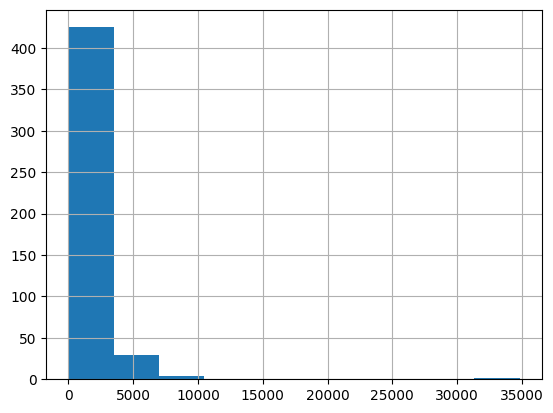
The newest embeddings model can handle inputs with up to 8191 input tokens so most of the rows would not need any chunking, but this may not be the case for every subpage scraped so the next code chunk will split the longer lines into smaller chunks.
max_tokens = 500


# Function to split the text into chunks of a maximum number of tokens
def split_into_many(text, max_tokens=max_tokens):

    # Split the text into sentences
    sentences = text.split(". ")

    # Get the number of tokens for each sentence
    n_tokens = [len(tokenizer.encode(" " + sentence)) for sentence in sentences]

    chunks = []
    tokens_so_far = 0
    chunk = []

    # Loop through the sentences and tokens joined together in a tuple
    for sentence, token in zip(sentences, n_tokens):
        # If the number of tokens so far plus the number of tokens in the current sentence is greater
        # than the max number of tokens, then add the chunk to the list of chunks and reset
        # the chunk and tokens so far
        if tokens_so_far + token > max_tokens:
            chunks.append(". ".join(chunk) + ".")
            chunk = []
            tokens_so_far = 0

        # If the number of tokens in the current sentence is greater than the max number of
        # tokens, go to the next sentence
        if token > max_tokens:
            continue

        # Otherwise, add the sentence to the chunk and add the number of tokens to the total
        chunk.append(sentence)
        tokens_so_far += token + 1

    return chunks


shortened = []

# Loop through the dataframe
for row in df.iterrows():
    # If the text is None, go to the next row
    if row[1]["text"] is None:
        continue

    # If the number of tokens is greater than the max number of tokens, split the text into chunks
    if row[1]["n_tokens"] > max_tokens:
        shortened += split_into_many(row[1]["text"])

    # Otherwise, add the text to the list of shortened texts
    else:
        shortened.append(row[1]["text"])
Visualizing the updated histogram again can help to confirm if the rows were successfully split into shortened sections.
df = pd.DataFrame(shortened, columns=["text"])
df["n_tokens"] = df.text.apply(lambda x: len(tokenizer.encode(x)))
df.n_tokens.hist()
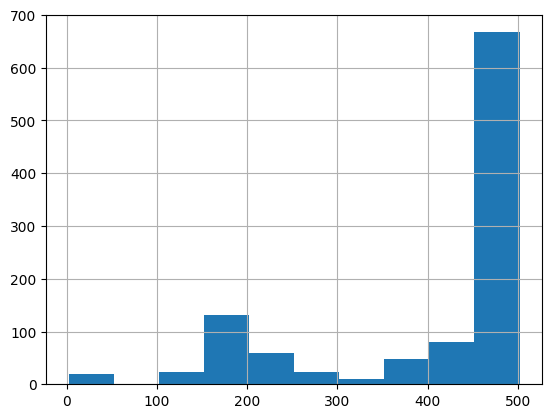
The content is now broken down into smaller chunks and a simple request can be sent to the OpenAI API specifying the use of the new text-embedding-ada-002 model to create the embeddings:
from openai import OpenAI

client = OpenAI()

df["embeddings"] = df.text.apply(
    lambda x: client.embeddings.create(
        input=x, model="text-embedding-3-small"
    ).data[0].embedding
)

df.to_csv("processed/embeddings.csv")
df.head()
This should take about 3-5 minutes but after you will have your embeddings ready to use!
Building a question answer system with your embeddings
Turning the embeddings into a NumPy array is the first step, which will provide more flexibility in how to use it given the many functions available that operate on NumPy arrays. It will also flatten the dimension to 1-D, which is the required format for many subsequent operations.
import numpy as np

df = pd.read_csv("processed/embeddings.csv", index_col=0)
df["embeddings"] = df["embeddings"].apply(eval).apply(np.array)

df.head()
The question needs to be converted to an embedding with a simple function, now that the data is ready. This is important because the search with embeddings compares the vector of numbers (which was the conversion of the raw text) using cosine distance. The vectors are likely related and might be the answer to the question if they are close in cosine distance. The OpenAI python package has a built in distances_from_embeddings function which is useful here.
def create_context(question, df, max_len=1800, size="ada"):
    """
    Create a context for a question by finding the most similar context from the dataframe
    """

    # Get the embeddings for the question
    q_embeddings = (
        client.embeddings.create(input=question, model="text-embedding-3-small")
        .data[0]
        .embedding
    )

    # Get the distances from the embeddings
    df["distances"] = distances_from_embeddings(
        q_embeddings, df["embeddings"].values, distance_metric="cosine"
    )

    returns = []
    cur_len = 0

    # Sort by distance and add the text to the context until the context is too long
    for _, row in df.sort_values("distances", ascending=True).iterrows():
        # Add the length of the text to the current length
        cur_len += row["n_tokens"] + 4

        # If the context is too long, break
        if cur_len > max_len:
            break

        # Else add it to the text that is being returned
        returns.append(row["text"])

    # Return the context
    return "\n\n###\n\n".join(returns)
The text was broken up into smaller sets of tokens, so looping through in ascending order and continuing to add the text is a critical step to ensure a full answer. The max_len can also be modified to something smaller, if more content than desired is returned.
The previous step only retrieved chunks of texts that are semantically related to the question, so they might contain the answer, but there's no guarantee of it. The chance of finding an answer can be further increased by returning the top 5 most likely results.
The answering prompt will then try to extract the relevant facts from the retrieved contexts, in order to formulate a coherent answer. If there is no relevant answer, the prompt will return “I don’t know”.
A realistic sounding answer to the question can be created with the completion endpoint using gpt-3.5-turbo-instruct.
def answer_question(
    df,
    model="gpt-3.5-turbo-instruct",
    question="Am I allowed to publish model outputs to Twitter, without a human review?",
    max_len=1800,
    size="ada",
    debug=False,
    max_tokens=150,
    stop_sequence=None,
):
    """
    Answer a question based on the most similar context from the dataframe texts
    """
    context = create_context(
        question,
        df,
        max_len=max_len,
        size=size,
    )
    # If debug, print the raw model response
    if debug:
        print("Context:\n" + context)
        print("\n\n")

    try:
        # Create a completion using the question and context
        response = client.completions.create(
            model=model,
            prompt=(
                "Answer the question based on the context below, and if the "
                "question can't be answered based on the context, say "
                '"I don\'t know"'
                f"\n\nContext: {context}\n\n---\n\nQuestion: {question}\nAnswer:"
            ),
            temperature=0,
            max_tokens=max_tokens,
            top_p=1,
            frequency_penalty=0,
            presence_penalty=0,
            stop=stop_sequence,
        )
        return response.choices[0].text.strip()
    except Exception as error:
        print(error)
        return ""
It is done! A working Q/A system that has the knowledge embedded from the OpenAI website is now ready. A few quick tests can be done to see the quality of the output:
answer_question(df, question="What day is it?", debug=False)

answer_question(df, question="What is our newest embeddings model?")

answer_question(df, question="What is ChatGPT?")
The responses will look something like the following:
"I don't know."

'The newest embeddings model is text-embedding-ada-002.'

'ChatGPT is a model trained to interact in a conversational way. It is able to answer followup questions, admit its mistakes, challenge incorrect premises, and reject inappropriate requests.'
If the system is not able to answer a question that is expected, it is worth searching through the raw text files to see if the information that is expected to be known actually ended up being embedded or not. The crawling process that was done initially was setup to skip sites outside the original domain that was provided, so it might not have that knowledge if there was a subdomain setup.
Currently, the dataframe is being passed in each time to answer a question. For more production workflows, a vector database solution should be used instead of storing the embeddings in a CSV file, but the current approach is a great option for prototyping.
tutorials/web-qa-embeddings.md +83 −58
58import os58import os
59 59
60# Regex pattern to match a URL60# Regex pattern to match a URL
6161HTTP_URL_PATTERN = r'^http[s]*://.+'HTTP_URL_PATTERN = r"^http[s]*://.+"
62 62
63domain = "openai.com" # <- put your domain to be crawled63domain = "openai.com" # <- put your domain to be crawled
64full_url = "https://openai.com/" # <- put your domain to be crawled with https or http64full_url = "https://openai.com/" # <- put your domain to be crawled with https or http
85```python86```python
86# Function to get the hyperlinks from a URL87# Function to get the hyperlinks from a URL
87def get_hyperlinks(url):88def get_hyperlinks(url):
88
89 # Try to open the URL and read the HTML89 # Try to open the URL and read the HTML
90 try:90 try:
9191 # Open the URL and read the HTML with urllib.request.urlopen(url, timeout=30) as response:
92 with urllib.request.urlopen(url) as response:
93
94 # If the response is not HTML, return an empty list92 # If the response is not HTML, return an empty list
9593 if not response.info().get('Content-Type').startswith("text/html"): if not response.info().get("Content-Type", "").startswith("text/html"):
96 return []94 return []
97 95
98 # Decode the HTML96 # Decode the HTML
9997 html = response.read().decode('utf-8') html = response.read().decode("utf-8")
10098 except Exception as e: except Exception as error:
10199 print(e) print(error)
102 return []100 return []
103 101
104 # Create the HTML Parser and then Parse the HTML to get hyperlinks102 # Create the HTML Parser and then Parse the HTML to get hyperlinks
160 if not os.path.exists("text/"):158 if not os.path.exists("text/"):
161 os.mkdir("text/")159 os.mkdir("text/")
162 160
163161 if not os.path.exists("text/"+local_domain+"/"): if not os.path.exists("text/" + local_domain + "/"):
164 os.mkdir("text/" + local_domain + "/")162 os.mkdir("text/" + local_domain + "/")
165 163
166 # Create a directory to store the csv files164 # Create a directory to store the csv files
175 print(url) # for debugging and to see the progress172 print(url) # for debugging and to see the progress
176 173
177 # Save text from the url to a <url>.txt file174 # Save text from the url to a <url>.txt file
178175 with open('text/'+local_domain+'/'+url[8:].replace("/", "_") + ".txt", "w", encoding="UTF-8") as f: page_name = (local_domain + urlparse(url).path).replace("/", "_")
179176 with open(
177 "text/" + local_domain + "/" + page_name + ".txt",
178 "w",
179 encoding="UTF-8",
180 ) as f:
180 # Get the text from the URL using BeautifulSoup181 # Get the text from the URL using BeautifulSoup
181182 soup = BeautifulSoup(requests.get(url).text, "html.parser") response = requests.get(url, timeout=10)
183 response.raise_for_status()
184 soup = BeautifulSoup(response.text, "html.parser")
182 185
183 # Get the text but remove the tags186 # Get the text but remove the tags
184 text = soup.get_text()187 text = soup.get_text()
185 188
186 # If the crawler gets to a page that requires JavaScript, it will stop the crawl189 # If the crawler gets to a page that requires JavaScript, it will stop the crawl
187190 if ("You need to enable JavaScript to run this app." in text): if "You need to enable JavaScript to run this app." in text:
188191 print("Unable to parse page " + url + " due to JavaScript being required") print(
192 "Unable to parse page " + url + " due to JavaScript being required"
193 )
189 194
190 # Otherwise, write the text to the file in the text directory195 # Otherwise, write the text to the file in the text directory
191 f.write(text)196 f.write(text)
224 230
225```python231```python
226def remove_newlines(serie):232def remove_newlines(serie):
227233 serie = serie.str.replace('\n', ' ') serie = serie.str.replace("\n", " ")
228234 serie = serie.str.replace('\\n', ' ') serie = serie.str.replace("\\n", " ")
229235 serie = serie.str.replace(' ', ' ') serie = serie.str.replace(" ", " ")
230236 serie = serie.str.replace(' ', ' ') serie = serie.str.replace(" ", " ")
231 return serie237 return serie
232```238```
233 239
243import pandas as pd249import pandas as pd
244 250
245# Create a list to store the text files251# Create a list to store the text files
246252texts=[]texts = []
247 253
248# Get all the text files in the text directory254# Get all the text files in the text directory
249for file in os.listdir("text/" + domain + "/"):255for file in os.listdir("text/" + domain + "/"):
252 with open("text/" + domain + "/" + file, "r", encoding="UTF-8") as f:257 with open("text/" + domain + "/" + file, "r", encoding="UTF-8") as f:
253 text = f.read()258 text = f.read()
254 259
255260 # Omit the first 11 lines and the last 4 lines, then replace -, _, and #update with spaces. page_name = Path(file).stem
256261 texts.append((file[11:-4].replace('-',' ').replace('_', ' ').replace('#update',''), text)) domain_prefix = f"{domain}_"
262 if page_name.startswith(domain_prefix):
263 page_name = page_name[len(domain_prefix) :]
264 elif page_name == domain:
265 page_name = "index"
266
267 # Replace -, _, and #update with spaces.
268 texts.append(
269 (
270 page_name.replace("-", " ").replace("_", " ").replace("#update", ""),
271 text,
272 )
273 )
257 274
258# Create a dataframe from the list of texts275# Create a dataframe from the list of texts
259276df = pd.DataFrame(texts, columns = ['fname', 'text'])df = pd.DataFrame(texts, columns=["fname", "text"])
260 277
261# Set the text column to be the raw text with the newlines removed278# Set the text column to be the raw text with the newlines removed
262279df['text'] = df.fname + ". " + remove_newlines(df.text)df["text"] = df.fname + ". " + remove_newlines(df.text)
263280df.to_csv('processed/scraped.csv')df.to_csv("processed/scraped.csv")
264df.head()281df.head()
265```282```
266 283
277# Load the cl100k_base tokenizer which is designed to work with the ada-002 model294# Load the cl100k_base tokenizer which is designed to work with the ada-002 model
278tokenizer = tiktoken.get_encoding("cl100k_base")295tokenizer = tiktoken.get_encoding("cl100k_base")
279 296
280297df = pd.read_csv('processed/scraped.csv', index_col=0)df = pd.read_csv("processed/scraped.csv", index_col=0)
281298df.columns = ['title', 'text']df.columns = ["title", "text"]
282 299
283# Tokenize the text and save the number of tokens to a new column300# Tokenize the text and save the number of tokens to a new column
284301df['n_tokens'] = df.text.apply(lambda x: len(tokenizer.encode(x)))df["n_tokens"] = df.text.apply(lambda x: len(tokenizer.encode(x)))
285 302
286# Visualize the distribution of the number of tokens per row using a histogram303# Visualize the distribution of the number of tokens per row using a histogram
287df.n_tokens.hist()304df.n_tokens.hist()
303```python320```python
304max_tokens = 500321max_tokens = 500
305 322
323
306# Function to split the text into chunks of a maximum number of tokens324# Function to split the text into chunks of a maximum number of tokens
307325def split_into_many(text, max_tokens = max_tokens):def split_into_many(text, max_tokens=max_tokens):
308 326
309 # Split the text into sentences327 # Split the text into sentences
310328 sentences = text.split('. ') sentences = text.split(". ")
311 329
312 # Get the number of tokens for each sentence330 # Get the number of tokens for each sentence
313 n_tokens = [len(tokenizer.encode(" " + sentence)) for sentence in sentences]331 n_tokens = [len(tokenizer.encode(" " + sentence)) for sentence in sentences]
343 360
344# Loop through the dataframe361# Loop through the dataframe
345for row in df.iterrows():362for row in df.iterrows():
346
347 # If the text is None, go to the next row363 # If the text is None, go to the next row
348364 if row[1]['text'] is None: if row[1]["text"] is None:
349 continue365 continue
350 366
351 # If the number of tokens is greater than the max number of tokens, split the text into chunks367 # If the number of tokens is greater than the max number of tokens, split the text into chunks
352368 if row[1]['n_tokens'] > max_tokens: if row[1]["n_tokens"] > max_tokens:
353369 shortened += split_into_many(row[1]['text']) shortened += split_into_many(row[1]["text"])
354 370
355 # Otherwise, add the text to the list of shortened texts371 # Otherwise, add the text to the list of shortened texts
356 else:372 else:
357373 shortened.append( row[1]['text'] ) shortened.append(row[1]["text"])
358```374```
359 375
360 376
361Visualizing the updated histogram again can help to confirm if the rows were successfully split into shortened sections.377Visualizing the updated histogram again can help to confirm if the rows were successfully split into shortened sections.
362 378
363```python379```python
364380df = pd.DataFrame(shortened, columns = ['text'])df = pd.DataFrame(shortened, columns=["text"])
365381df['n_tokens'] = df.text.apply(lambda x: len(tokenizer.encode(x)))df["n_tokens"] = df.text.apply(lambda x: len(tokenizer.encode(x)))
366df.n_tokens.hist()382df.n_tokens.hist()
367```383```
368 384
382```python398```python
383from openai import OpenAI399from openai import OpenAI
384 400
385401client = OpenAI(client = OpenAI()
386 api_key=os.environ.get("OPENAI_API_KEY"),
387)
388 402
389403df['embeddings'] = df.text.apply(lambda x: client.embeddings.create(input=x, engine='text-embedding-ada-002')['data'][0]['embedding'])df["embeddings"] = df.text.apply(
404 lambda x: client.embeddings.create(
405 input=x, model="text-embedding-3-small"
406 ).data[0].embedding
407)
390 408
391409df.to_csv('processed/embeddings.csv')df.to_csv("processed/embeddings.csv")
392df.head()410df.head()
393```411```
394 412
418 436
419```python437```python
420import numpy as np438import numpy as np
421from openai.embeddings_utils import distances_from_embeddings
422 439
423440df=pd.read_csv('processed/embeddings.csv', index_col=0)df = pd.read_csv("processed/embeddings.csv", index_col=0)
424441df['embeddings'] = df['embeddings'].apply(eval).apply(np.array)df["embeddings"] = df["embeddings"].apply(eval).apply(np.array)
425 442
426df.head()443df.head()
427```444```
430The question needs to be converted to an embedding with a simple function, now that the data is ready. This is important because the search with embeddings compares the vector of numbers (which was the conversion of the raw text) using cosine distance. The vectors are likely related and might be the answer to the question if they are close in cosine distance. The OpenAI python package has a built in `distances_from_embeddings` function which is useful here.447The question needs to be converted to an embedding with a simple function, now that the data is ready. This is important because the search with embeddings compares the vector of numbers (which was the conversion of the raw text) using cosine distance. The vectors are likely related and might be the answer to the question if they are close in cosine distance. The OpenAI python package has a built in `distances_from_embeddings` function which is useful here.
431 448
432```python449```python
433450def create_context(def create_context(question, df, max_len=1800, size="ada"):
434 question, df, max_len=1800, size="ada"
435):
436 """451 """
437 Create a context for a question by finding the most similar context from the dataframe452 Create a context for a question by finding the most similar context from the dataframe
438 """453 """
439 454
440 # Get the embeddings for the question455 # Get the embeddings for the question
441456 q_embeddings = client.embeddings.create(input=question, engine='text-embedding-ada-002')['data'][0]['embedding'] q_embeddings = (
457 client.embeddings.create(input=question, model="text-embedding-3-small")
458 .data[0]
459 .embedding
460 )
442 461
443 # Get the distances from the embeddings462 # Get the distances from the embeddings
444463 df['distances'] = distances_from_embeddings(q_embeddings, df['embeddings'].values, distance_metric='cosine') df["distances"] = distances_from_embeddings(
445464 q_embeddings, df["embeddings"].values, distance_metric="cosine"
465 )
446 466
447 returns = []467 returns = []
448 cur_len = 0468 cur_len = 0
449 469
450 # Sort by distance and add the text to the context until the context is too long470 # Sort by distance and add the text to the context until the context is too long
451471 for i, row in df.sort_values('distances', ascending=True).iterrows(): for _, row in df.sort_values("distances", ascending=True).iterrows():
452
453 # Add the length of the text to the current length472 # Add the length of the text to the current length
454473 cur_len += row['n_tokens'] + 4 cur_len += row["n_tokens"] + 4
455 474
456 # If the context is too long, break475 # If the context is too long, break
457 if cur_len > max_len:476 if cur_len > max_len:
482 size="ada",501 size="ada",
483 debug=False,502 debug=False,
484 max_tokens=150,503 max_tokens=150,
485504 stop_sequence=None stop_sequence=None,
486):505):
487 """506 """
488 Answer a question based on the most similar context from the dataframe texts507 Answer a question based on the most similar context from the dataframe texts
502 # Create a completion using the question and context521 # Create a completion using the question and context
503 response = client.completions.create(522 response = client.completions.create(
504 model=model,523 model=model,
505524 prompt=f"Answer the question based on the context below, and if the question can't be answered based on the context, say \"I don't know\"\n\nContext: {context}\n\n---\n\nQuestion: {question}\nAnswer:", prompt=(
525 "Answer the question based on the context below, and if the "
526 "question can't be answered based on the context, say "
527 '"I don\'t know"'
528 f"\n\nContext: {context}\n\n---\n\nQuestion: {question}\nAnswer:"
529 ),
506 temperature=0,530 temperature=0,
507 max_tokens=max_tokens,531 max_tokens=max_tokens,
508 top_p=1,532 top_p=1,
511 stop=stop_sequence,535 stop=stop_sequence,
512 )536 )
513 return response.choices[0].text.strip()537 return response.choices[0].text.strip()
514538 except Exception as e: except Exception as error:
515539 print(e) print(error)
516 return ""540 return ""
517```541```
518 542