
guides/realtime-webrtc.md +0 −281 deleted
File Deleted View Diff
1# Realtime API with WebRTC
2
3> For the complete documentation index, see [llms.txt](/llms.txt). Markdown versions of documentation pages are available by appending `.md` to the page URL.
4
5[WebRTC](https://webrtc.org/) is a powerful set of standard interfaces for building real-time applications. The OpenAI Realtime API supports connecting to realtime models through a WebRTC peer connection.
6
7For browser-based speech-to-speech voice applications, we recommend starting with [Voice agents](https://developers.openai.com/api/docs/guides/voice-agents), which covers the Agents SDK's higher-level helpers and APIs for managing Realtime sessions. The WebRTC interface is powerful and flexible, but lower level than the Agents SDK.
8
9When connecting to a Realtime model from the client (like a web browser or
10 mobile device), we recommend using WebRTC rather than WebSockets for more
11 consistent performance.
12
13For more guidance on building user interfaces on top of WebRTC, [refer to the docs on MDN](https://developer.mozilla.org/en-US/docs/Web/API/WebRTC_API).
14
15## Overview
16
17The Realtime API supports two mechanisms for connecting to the Realtime API from the browser, either using ephemeral API keys ([generated via the OpenAI REST API](https://developers.openai.com/api/reference/resources/realtime/subresources/client_secrets)), or via the new unified interface. Generally, using the unified interface is simpler, but puts your application server in the critical path for session initialization.
18
19### Connecting using the unified interface
20
21The process for initializing a WebRTC connection using the unified interface is as follows (assuming a web browser client):
22
231. The browser makes a request to a developer-controlled server using the SDP data from its WebRTC peer connection.
242. The server combines that SDP with its session configuration in a multipart form and sends that to the OpenAI Realtime API, authenticating it with its [standard API key](https://platform.openai.com/settings/organization/api-keys).
25
26#### Creating a session via the unified interface
27
28To create a realtime API session via the unified interface, you will need to build a small server-side application (or integrate with an existing one) to make an request to `/v1/realtime/calls`. You will use a [standard API key](https://platform.openai.com/settings/organization/api-keys) to authenticate this request on your backend server.
29
30Below is an example of a simple Node.js [express](https://expressjs.com/) server which creates a realtime API session:
31
32```javascript
33import express from "express";
34
35const app = express();
36
37// Parse raw SDP payloads posted from the browser
38app.use(express.text({ type: ["application/sdp", "text/plain"] }));
39
40const sessionConfig = JSON.stringify({
41 type: "realtime",
42 model: "gpt-realtime-2.1",
43 audio: { output: { voice: "marin" } },
44});
45
46// An endpoint which creates a Realtime API session.
47app.post("/session", async (req, res) => {
48 const fd = new FormData();
49 fd.set("sdp", req.body);
50 fd.set("session", sessionConfig);
51
52 try {
53 const r = await fetch("https://api.openai.com/v1/realtime/calls", {
54 method: "POST",
55 headers: {
56 Authorization: `Bearer ${process.env.OPENAI_API_KEY}`,
57 "OpenAI-Safety-Identifier": "hashed-user-id",
58 },
59 body: fd,
60 });
61 // Send back the SDP we received from the OpenAI REST API
62 const sdp = await r.text();
63 res.send(sdp);
64 } catch (error) {
65 console.error("Token generation error:", error);
66 res.status(500).json({ error: "Failed to generate token" });
67 }
68});
69
70app.listen(3000);
71```
72
73
74If your application assigns a [safety identifier](https://developers.openai.com/api/docs/guides/safety-best-practices#implement-safety-identifiers)
75for each end user, include it as the `OpenAI-Safety-Identifier` header in this
76server-side request. Use a stable, privacy-preserving value, such as a hashed
77internal user ID. The header should be set by your trusted backend, not by the
78browser.
79
80#### Connecting to the server
81
82In the browser, you can use standard WebRTC APIs to connect to the Realtime API via your application server. The client directly POSTs its SDP data to your server.
83
84```javascript
85// Create a peer connection
86const pc = new RTCPeerConnection();
87
88// Set up to play remote audio from the model
89audioElement.current = document.createElement("audio");
90audioElement.current.autoplay = true;
91pc.ontrack = (e) => (audioElement.current.srcObject = e.streams[0]);
92
93// Add local audio track for microphone input in the browser
94const ms = await navigator.mediaDevices.getUserMedia({
95 audio: true,
96});
97pc.addTrack(ms.getTracks()[0]);
98
99// Set up data channel for sending and receiving events
100const dc = pc.createDataChannel("oai-events");
101
102// Start the session using the Session Description Protocol (SDP)
103const offer = await pc.createOffer();
104await pc.setLocalDescription(offer);
105
106const sdpResponse = await fetch("/session", {
107 method: "POST",
108 body: offer.sdp,
109 headers: {
110 "Content-Type": "application/sdp",
111 },
112});
113
114const answer = {
115 type: "answer",
116 sdp: await sdpResponse.text(),
117};
118await pc.setRemoteDescription(answer);
119```
120
121
122### Connecting using an ephemeral token
123
124The process for initializing a WebRTC connection using an ephemeral API key is as follows (assuming a web browser client):
125
1261. The browser makes a request to a developer-controlled server to mint an ephemeral API key.
1271. The developer's server uses a [standard API key](https://platform.openai.com/settings/organization/api-keys) to request an ephemeral key from the [OpenAI REST API](https://developers.openai.com/api/reference/resources/realtime/subresources/client_secrets), and returns that new key to the browser.
1281. The browser uses the ephemeral key to authenticate a session directly with the OpenAI Realtime API as a [WebRTC peer connection](https://developer.mozilla.org/en-US/docs/Web/API/RTCPeerConnection).
129
130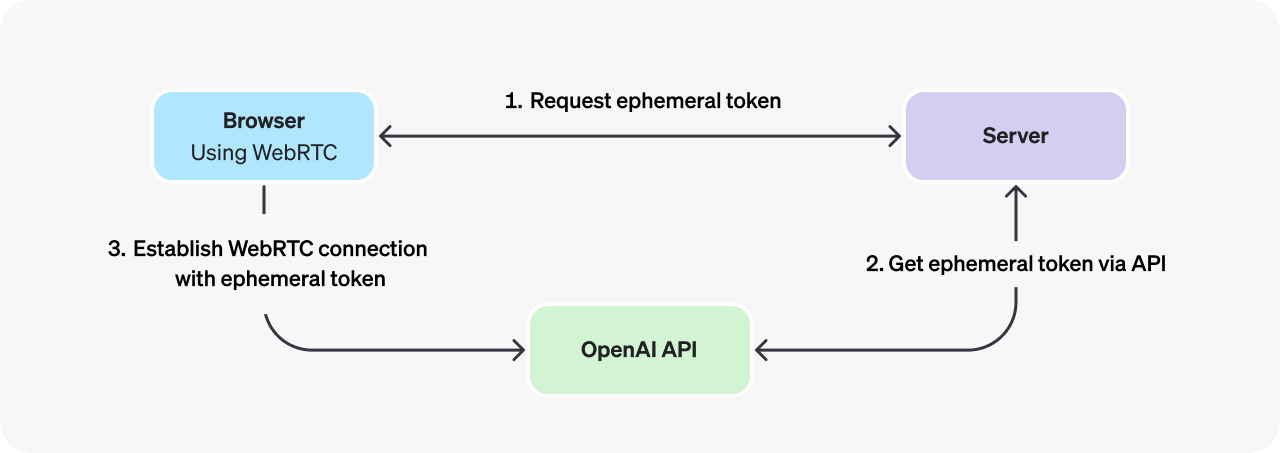
131
132#### Creating an ephemeral token
133
134To create an ephemeral token to use on the client-side, you will need to build a small server-side application (or integrate with an existing one) to make an [OpenAI REST API](https://developers.openai.com/api/reference/resources/realtime/subresources/client_secrets) request for an ephemeral key. You will use a [standard API key](https://platform.openai.com/settings/organization/api-keys) to authenticate this request on your backend server.
135
136Below is an example of a simple Node.js [express](https://expressjs.com/) server which mints an ephemeral API key using the REST API:
137
138```javascript
139import express from "express";
140
141const app = express();
142
143const sessionConfig = JSON.stringify({
144 session: {
145 type: "realtime",
146 model: "gpt-realtime-2.1",
147 audio: {
148 output: {
149 voice: "marin",
150 },
151 },
152 },
153});
154
155// An endpoint which would work with the client code above - it returns
156// the contents of a REST API request to this protected endpoint
157app.get("/token", async (req, res) => {
158 try {
159 const response = await fetch(
160 "https://api.openai.com/v1/realtime/client_secrets",
161 {
162 method: "POST",
163 headers: {
164 Authorization: `Bearer ${apiKey}`,
165 "Content-Type": "application/json",
166 "OpenAI-Safety-Identifier": "hashed-user-id",
167 },
168 body: sessionConfig,
169 }
170 );
171
172 const data = await response.json();
173 res.json(data);
174 } catch (error) {
175 console.error("Token generation error:", error);
176 res.status(500).json({ error: "Failed to generate token" });
177 }
178});
179
180app.listen(3000);
181```
182
183
184You can create a server endpoint like this one on any platform that can send and receive HTTP requests. Just ensure that **you only use standard OpenAI API keys on the server, not in the browser.**
185
186When using ephemeral tokens, set `OpenAI-Safety-Identifier` on the server-side
187request that creates the client secret. The Realtime API binds the identifier to
188the resulting ephemeral token, so the browser does not need to send the safety
189identifier when it later connects with that token.
190
191#### Connecting to the server
192
193In the browser, you can use standard WebRTC APIs to connect to the Realtime API with an ephemeral token. The client first fetches a token from your server endpoint, and then POSTs its SDP data (with the ephemeral token) to the Realtime API.
194
195```javascript
196// Get a session token for OpenAI Realtime API
197const tokenResponse = await fetch("/token");
198const data = await tokenResponse.json();
199const EPHEMERAL_KEY = data.value;
200
201// Create a peer connection
202const pc = new RTCPeerConnection();
203
204// Set up to play remote audio from the model
205audioElement.current = document.createElement("audio");
206audioElement.current.autoplay = true;
207pc.ontrack = (e) => (audioElement.current.srcObject = e.streams[0]);
208
209// Add local audio track for microphone input in the browser
210const ms = await navigator.mediaDevices.getUserMedia({
211 audio: true,
212});
213pc.addTrack(ms.getTracks()[0]);
214
215// Set up data channel for sending and receiving events
216const dc = pc.createDataChannel("oai-events");
217
218// Start the session using the Session Description Protocol (SDP)
219const offer = await pc.createOffer();
220await pc.setLocalDescription(offer);
221
222const sdpResponse = await fetch("https://api.openai.com/v1/realtime/calls", {
223 method: "POST",
224 body: offer.sdp,
225 headers: {
226 Authorization: `Bearer ${EPHEMERAL_KEY}`,
227 "Content-Type": "application/sdp",
228 },
229});
230
231const answer = {
232 type: "answer",
233 sdp: await sdpResponse.text(),
234};
235await pc.setRemoteDescription(answer);
236```
237
238
239## Sending and receiving events
240
241Realtime API sessions are managed using a combination of [client-sent events](https://developers.openai.com/api/reference/resources/realtime/client-events#session.update) emitted by you as the developer, and [server-sent events](https://developers.openai.com/api/reference/resources/realtime/server-events#error) created by the Realtime API to indicate session lifecycle events.
242
243When connecting to a Realtime model via WebRTC, you don't have to handle audio events from the model in the same granular way you must with [WebSockets](https://developers.openai.com/api/docs/guides/realtime-websocket). The WebRTC peer connection object, if configured as above, will do all that work for you.
244
245To send and receive other client and server events, you can use the WebRTC peer connection's [data channel](https://developer.mozilla.org/en-US/docs/Web/API/WebRTC_API/Using_data_channels).
246
247```javascript
248// This is the data channel set up in the browser code above...
249const dc = pc.createDataChannel("oai-events");
250
251// Listen for server events
252dc.addEventListener("message", (e) => {
253 const event = JSON.parse(e.data);
254 console.log(event);
255});
256
257// Send client events
258const event = {
259 type: "conversation.item.create",
260 item: {
261 type: "message",
262 role: "user",
263 content: [
264 {
265 type: "input_text",
266 text: "hello there!",
267 },
268 ],
269 },
270};
271dc.send(JSON.stringify(event));
272```
273
274
275To learn more about managing Realtime conversations, refer to the [Realtime conversations guide](https://developers.openai.com/api/docs/guides/realtime-conversations).
276
277[Realtime Console
278
279
280
281 Check out the WebRTC Realtime API in this light weight example app.](https://github.com/openai/openai-realtime-console/)