For the complete documentation index, see llms.txt. Markdown versions of documentation pages are available by appending .md to the page URL.
Secure MCP Tunnel lets you connect private MCP servers to supported OpenAI products without opening inbound firewall ports or exposing those servers to the public internet. Run tunnel-client inside the network that can already reach your MCP server; it opens an outbound HTTPS path to OpenAI, pulls queued MCP work, forwards requests locally, and returns responses through the same tunnel.
Secure MCP Tunnel supports private MCP connections, including custom MCP
server testing. It does not support public plugin submission or distribution.
Public plugins require a stable, publicly reachable HTTPS MCP endpoint. If the
MCP server must stay private, expose a public HTTPS proxy that forwards
requests to it. See public plugin submission for
endpoint and authentication requirements.
What is an MCP tunnel?
An MCP tunnel is an outbound-only connection from a host inside your network to an OpenAI-hosted MCP endpoint. Use it when your MCP server is private, on-premises, or behind a firewall, but ChatGPT, Codex, the Responses API, or another supported OpenAI surface still needs to call it.
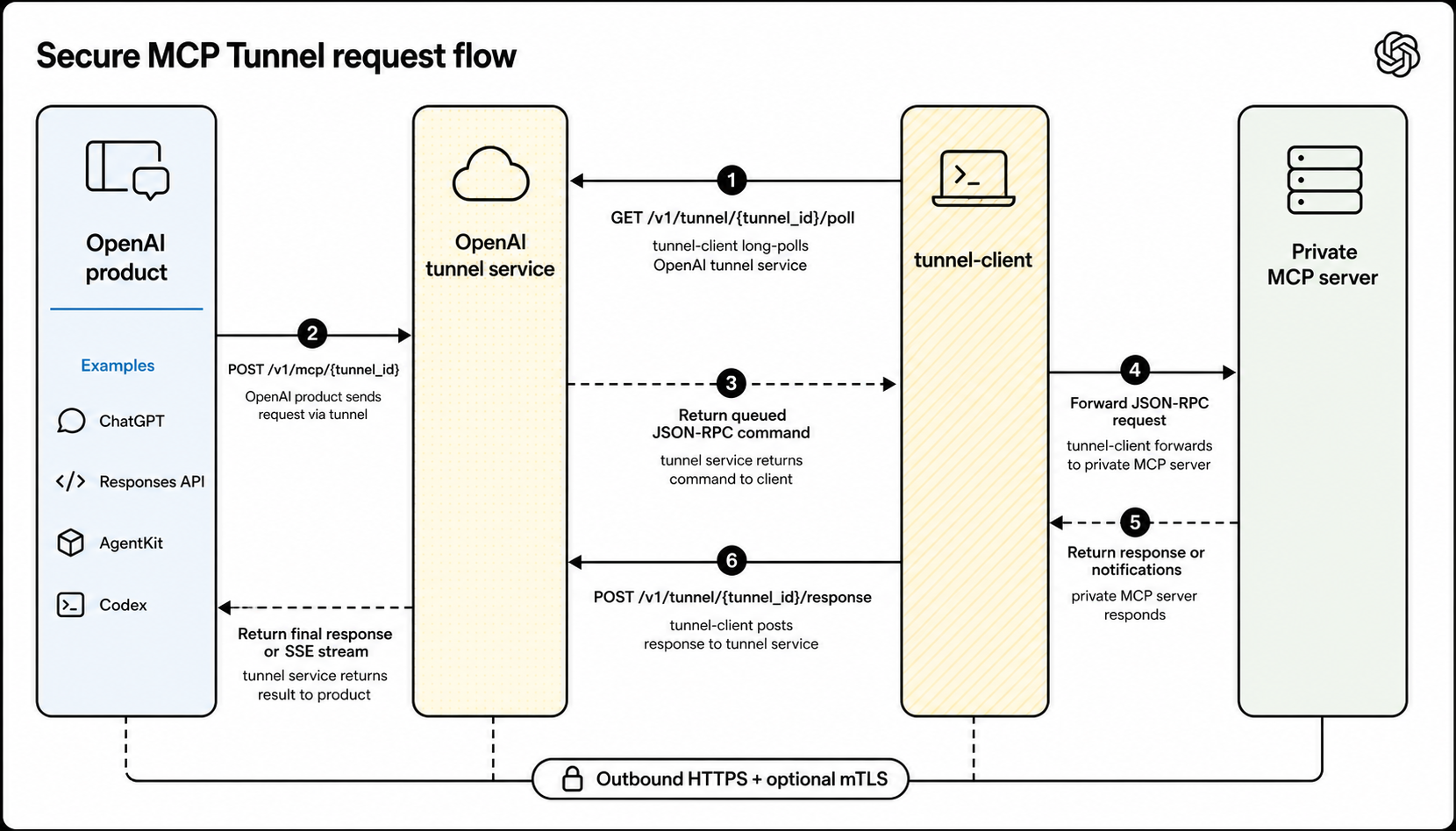
Secure MCP Tunnel keeps the MCP server private while giving supported OpenAI products a normal MCP request path. tunnel-client polls OpenAI for work, forwards MCP requests locally, and returns responses through the same tunnel.
Use Secure MCP Tunnel when
Your MCP server runs on a private network, on-premises, on a developer machine, or behind existing access controls.
You want ChatGPT, Codex, the Responses API, or another supported OpenAI surface to use that server without making the MCP server public.
Your network allows the host running tunnel-client to make outbound HTTPS requests to api.openai.com:443 by default, or mtls.api.openai.com:443 when control-plane mTLS is configured, and reach the private MCP server.
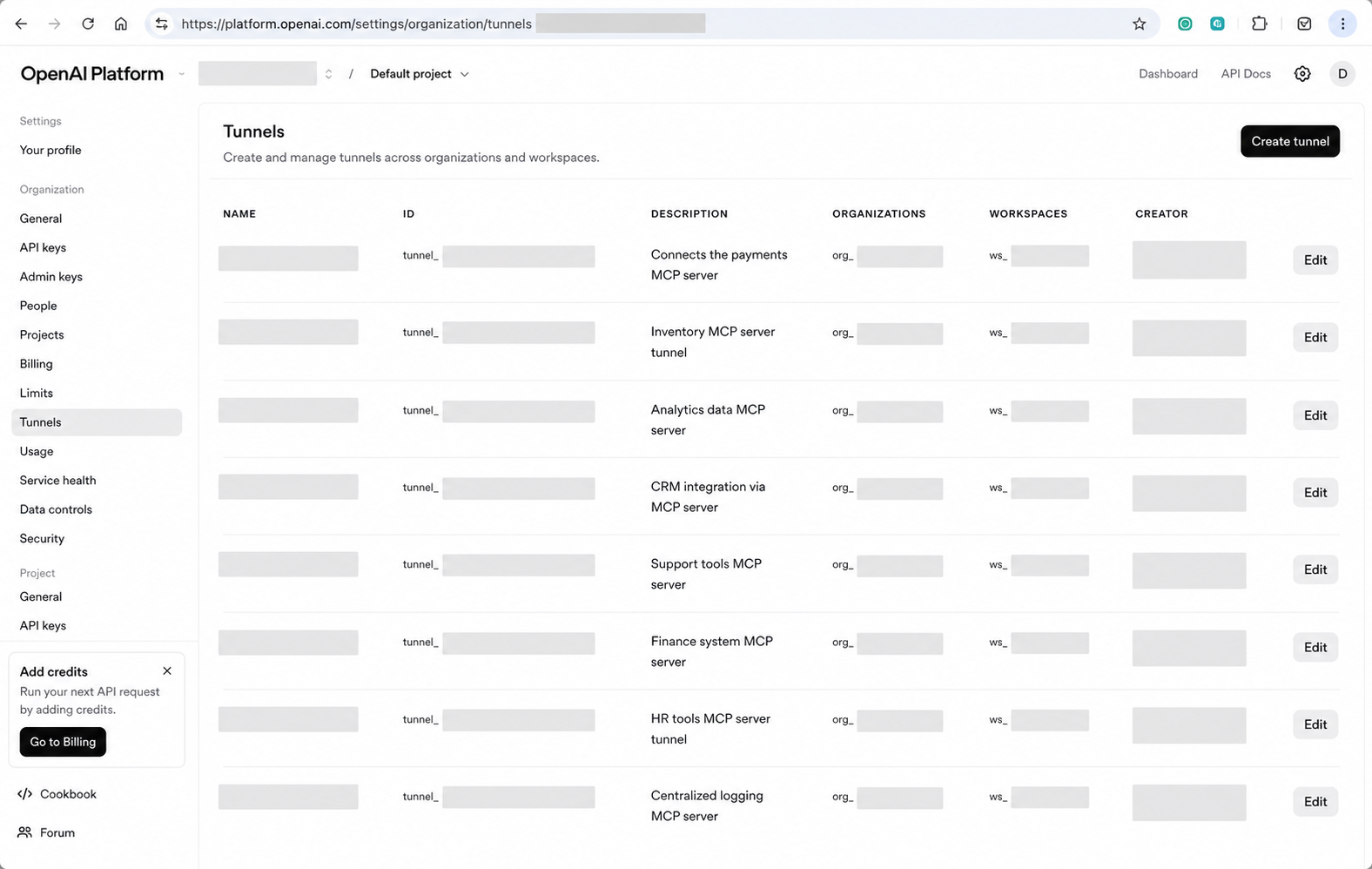
Create or manage an OpenAI-hosted MCP tunnel endpoint in Platform tunnel settings.
Run tunnel-client inside the network that can reach your private MCP server.
Configure tunnel-client with the tunnel identity and the private MCP server address.
OpenAI products send MCP requests to the OpenAI-hosted tunnel endpoint.
tunnel-client long-polls for queued work, forwards each JSON-RPC request to the private MCP server, and posts the response back through the tunnel.
The private MCP server does not need a public listener. The OpenAI-hosted endpoint gives supported products a normal MCP request path, while the network initiation point stays inside your boundary. When a connector asks for streamed results, the tunnel path can forward intermediate server-sent events.
OpenAI products call the OpenAI-hosted tunnel endpoint; `tunnel-client`
long-polls for queued work and returns the MCP response through the same
tunnel.
Creating or editing a tunnel requires Tunnels Read + Manage.
Running tunnel-client or selecting the tunnel while creating an app requires Tunnels Read + Use.
Tunnel permissions apply to a Platform organization. A Platform organization owner or RBAC administrator grants the tunnel role.
Adding and using custom MCP servers in ChatGPT remains subject to workspace permissions and security restrictions. See Add custom MCP server.
Ask the target ChatGPT workspace admin for permission to add and use custom MCP servers, and ask the target Platform organization owner/RBAC admin for tunnel permissions.
Associate tunnels with the right organizations and workspaces
A tunnel can be associated with one or more Platform organizations or ChatGPT workspaces. Use these associations to define every OpenAI context that should be allowed to find or use the tunnel.
Include the Platform organization that owns or manages the tunnel.
Include the ChatGPT workspace that should list the tunnel when creating apps.
Include another Platform organization when Codex, the Responses API, or another supported product will call the private MCP server from that organization.
Use the same tunnel_id for tunnel-client; adding organizations or workspaces does not create a second tunnel or change the private MCP server endpoint.
For personal accounts, use the personal Platform organization that belongs to that account. For ChatGPT and Codex testing, associate the tunnel with the target ChatGPT workspace and the Platform organization that Codex will use. A tunnel associated only with a personal Platform organization doesn't automatically appear in an Enterprise/Edu workspace.
If the Platform organization and ChatGPT workspace are already linked, you can add the missing organization or workspace in Platform tunnel settings. If your enterprise setup can't be verified automatically, such as when the Platform organization has no corresponding ChatGPT workspace, contact your OpenAI account team to request a reviewed manual association override for the enterprise account mapping that should use the tunnel.
Network requirements
tunnel-client does not need inbound internet access. It needs outbound HTTPS to OpenAI and local reachability to the private MCP server:
From
To
Used for
Host running tunnel-client
api.openai.com:443 over HTTPS on /v1/tunnel/*
Default polling and response posting.
Host running tunnel-client
mtls.api.openai.com:443 over HTTPS on /v1/tunnel/*
Polling and response posting when control-plane mTLS is configured.
Host running tunnel-client
The configured stdio command or MCP server URL
Forwarding MCP requests from inside your network.
Limits
Secure MCP Tunnel applies these default hosted-service limits to connector MCP traffic:
Limit
Default
Scope
MCP request rate
600 requests per minute (10 per second sustained)
Shared by requests with the same tunnel ID and calling application ID across MCP channels. If the calling application ID is unavailable, requests with the same tunnel ID and user share the limit. Running more than one tunnel-client process does not multiply the allowance.
Serialized request or response
10 MiB (10,485,760 bytes)
Applies to the complete serialized tunnel envelope, including headers and protocol metadata, so usable MCP content is slightly smaller. The service applies the limit to each streaming notification and final response.
Request deadline
120 seconds
One absolute budget from when the request enters the hosted queue through final response delivery. Queue time consumes this budget, and progress notifications do not reset it.
Pending queue
1,000 requests per tunnel
Shared across MCP channels. Counts requests waiting for tunnel-client to poll them; requests already fetched for execution are not included.
These limits are service protections, not throughput or latency guarantees. Queue-record retention for cleanup does not extend the 120-second request deadline. To request a change to these limits, contact OpenAI Support.
Set up tunnel-client
Open Platform tunnel settings, then use the download link there or the latest public tunnel-client release from openai/tunnel-client. Keep your runbook pointed at the latest-release URL instead of hard-coding a specific release URL.
If you already have a binary, start with tunnel-client help quickstart. For a named local stdio profile, use:
For an HTTP MCP server, use --mcp-server-url https://mcp.internal.example.com/mcp instead of --mcp-command.
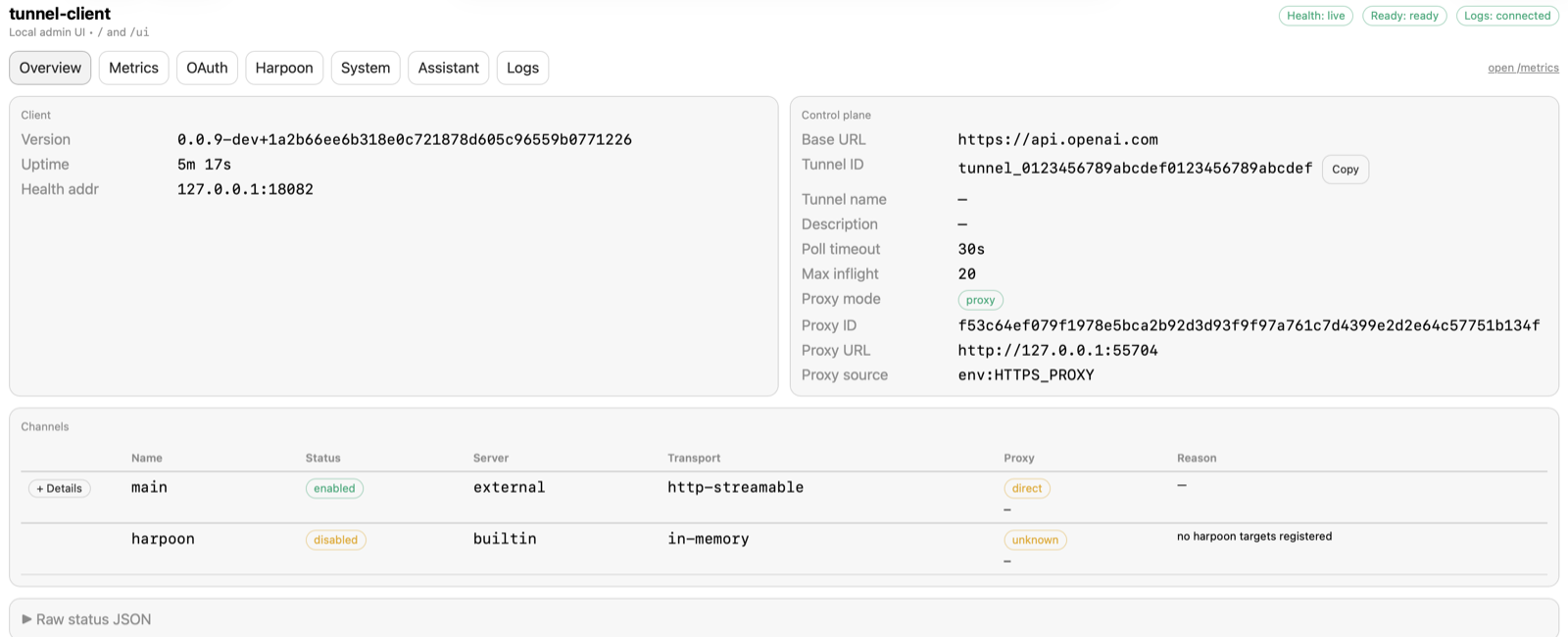
Keep tunnel-client run ... healthy while you create or test the app. App discovery and MCP tool calls depend on the running client.
The local admin UI at `/ui` shows whether the running client is
healthy, ready, and connected before you test from ChatGPT, Codex, or an API
flow.
Choose where to run tunnel-client
Run tunnel-client in the same trust boundary that can already reach the private MCP server. Common deployment patterns are:
Kubernetes sidecar: Run tunnel-client beside the MCP server in one Pod and connect over localhost.
Dedicated Kubernetes deployment: Run tunnel-client separately when the MCP server is already reachable through a private Service.
VM or systemd service: Run tunnel-client on a host that can reach the MCP server over private networking.
Connect from ChatGPT
Go to ChatGPT Plugins, select the plus button, then Add custom MCP server, and choose Tunnel under Connection. Select an available tunnel when ChatGPT lists it, or paste a valid tunnel_id if you already have one. Configure authentication, review the risk warning, and select I understand and want to continue, then Create as a plugin.
If the tunnel does not appear in ChatGPT, verify that the tunnel is associated with the target ChatGPT workspace, not only with a Platform organization, and that the app creator has Tunnels Read + Use.
Set up and verify with Codex
To have Codex guide the setup, give it browser access to Platform and ChatGPT
and terminal access to the host that can reach your private MCP server. Paste
this prompt into Codex:
Help me set up and verify a private Secure MCP Tunnel from my internal MCP
server to ChatGPT end to end. Use browser/computer access and a terminal,
following https://developers.openai.com/api/docs/guides/secure-mcp-tunnels
and https://github.com/openai/tunnel-client/blob/master/docs/onboarding.md;
check the current UI and CLI help as you go.

First identify the intended Platform organization and ChatGPT workspace, MCP
server HTTP URL or stdio command, and client host. Inspect any existing tunnel,
key, and ChatGPT custom MCP plugin; reuse suitable resources. Confirm the
tunnel's organization and workspace association and permissions: tunnel
creators need Tunnels Read + Manage; the restricted runtime key and plugin
operator need Tunnels Read + Use.

Keep literal secrets out of chat, command arguments, logs, screenshots, and
config files. Have me enter them locally through a secure input or environment
reference. Install the supported tunnel-client; run
`tunnel-client help quickstart`, configure the server, run
`tunnel-client doctor --profile <name> --explain`, start the client, and
verify readiness and active polling. Keep it running for discovery and calls.

In ChatGPT Plugins, add or finish a private custom MCP server with
Connection: Tunnel, select the same tunnel, configure required authentication,
and make a safe representative tool call. Report observed evidence for each
checkpoint and the exact error and next action for any blocker. Call setup
complete only after the ChatGPT tool call succeeds.
Connect from the Responses API
Pass the tunnel identifier as tunnel_id in the MCP tool definition. Do not pass the OpenAI-hosted tunnel endpoint as server_url; use server_url only for an MCP server that the Responses API can reach directly.
Use Secure MCP Tunnel with the Responses API
curl https://api.openai.com/v1/responses \
-H"Content-Type: application/json" \
-H"Authorization: Bearer $OPENAI_API_KEY" \
-d '{
"model": "gpt-6-astra",
"input": "Use the private MCP server to answer my request.",
"tools": [
{
"type": "mcp",
"server_label": "private_mcp",
"tunnel_id": "tunnel_0123456789abcdef0123456789abcdef"
}
]
}'
Security and networking
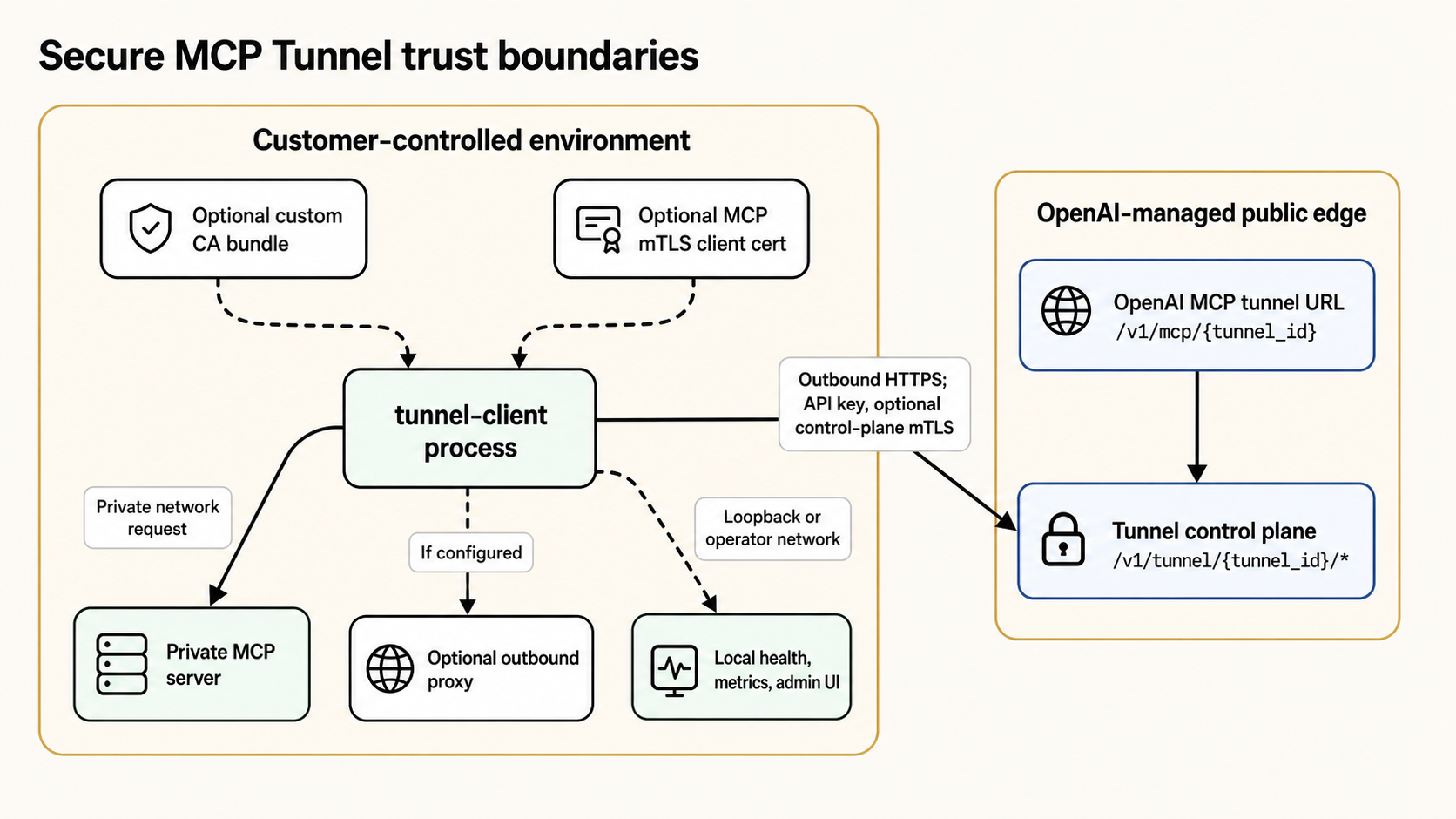
The private MCP server stays inside the customer-controlled environment.
`tunnel-client` reaches OpenAI over outbound HTTPS using the runtime API key
and, when required, optional control-plane mTLS.
The MCP server address stays private and is used only from inside the environment where tunnel-client runs.
tunnel-client authenticates to the OpenAI tunnel control plane; supported OpenAI products use the OpenAI-hosted tunnel endpoint.
Tunnel access follows the existing organization and workspace context instead of introducing a separate public ingress path.
tunnel-client supports enterprise networking requirements such as outbound proxies, custom CA bundles, control-plane client certificates, and MCP-side mTLS.
Logging boundaries
Secure MCP Tunnel separates tunnel transport from app-level product logging:
Tunnel control-plane auth, long-poll / response traffic, and individual tunnel transport requests are not emitted as ChatGPT Compliance Platform app events by the tunnel path.
Tunnel metadata changes are exposed through the API Platform Audit logs surface as tunnel.created, tunnel.updated, and tunnel.deleted.
When ChatGPT reaches a custom app through Secure MCP Tunnel, the tunnel remains only the transport path. Normal app-level compliance logging still applies on the app path, including app invocation logs and app auth lifecycle logs such as APP_AUTH_LOG when the app is linked or unlinked.
Advanced: Allowlisted HTTP callouts
Secure MCP Tunnel can also support narrowly scoped HTTP callouts from supported agent or API flows into a customer network. tunnel-client includes an embedded MCP server, Harpoon, that exposes configured HTTP targets by label and lets callers invoke them through the tunnel with bounded request/response limits.
Use this when you need to reach a small set of private REST endpoints without exposing them publicly. Harpoon is not a general-purpose proxy: callers cannot choose arbitrary hosts, and requests are limited to the targets and methods configured by the customer.
Troubleshooting
“Tunnels access required” in Platform tunnel settings: Tunnel permissions are organization-level, not project-level. Select the intended Platform organization, then ask an organization owner or RBAC administrator to add you to a role or group with Read to view tunnels, or Read + Manage to create, edit, or delete them. If no matching role exists, they can create one, assign it to a group, and add you to that group. You also need Use to run tunnel-client or select a tunnel in connector settings. Allow up to 30 minutes for a new role assignment to propagate.
Tunnel not visible in ChatGPT: Check that the tunnel includes the target ChatGPT workspace, not only a Platform organization; then check the connector operator's Tunnels Use permission. If the workspace cannot be linked automatically for an enterprise account, contact your OpenAI account team for a reviewed manual association override.
Connector discovery or tool calls fail: Confirm that tunnel-client run ... is still running, then re-run tunnel-client doctor --profile <name> --explain.
You can inspect a tunnel but cannot edit it: The operator likely has Tunnels Read but not Tunnels Manage.
tunnel-client exposes /healthz, /readyz, /metrics, and a local admin UI at /ui.
The admin UI is loopback-only by default. Expose it remotely only when you intentionally need an operator network to reach it.
Use those surfaces to confirm that the client is healthy, ready, and polling before testing from ChatGPT, Codex, or an API flow.
If the client is not connected, requests through the tunnel fail until tunnel-client reconnects.
Raw HTTP logging is disabled by default, and support exports are redacted.
OAuth
OAuth discovery can travel through the tunnel path so the MCP server itself can remain private.
The tunnel preserves the upstream authorization server metadata needed for browser-facing OAuth flows.
The authorization server itself is not automatically tunneled. If it is unreachable from the public internet and from the tunnel-client host, the OAuth flow can still fail even when the MCP server is reachable.
Validate your tunnel-client profile with tunnel-client doctor --profile <profile> --explain.
Connect the tunnel from ChatGPT Plugins or the supported OpenAI surface you are using.
[](https://platform.openai.com/settings/organization/tunnels)
Create and manage OpenAI-hosted MCP tunnel endpoints from Platform tunnel
settings.
guides/secure-mcp-tunnels.md+47−0
89| Host running `tunnel-client` | `mtls.api.openai.com:443` over HTTPS on `/v1/tunnel/*` | Polling and response posting when control-plane mTLS is configured. |89| Host running `tunnel-client` | `mtls.api.openai.com:443` over HTTPS on `/v1/tunnel/*` | Polling and response posting when control-plane mTLS is configured. |
90| Host running `tunnel-client` | The configured stdio command or MCP server URL | Forwarding MCP requests from inside your network. |90| Host running `tunnel-client` | The configured stdio command or MCP server URL | Forwarding MCP requests from inside your network. |
9191
92## Limits
93
94Secure MCP Tunnel applies these default hosted-service limits to connector MCP traffic:
98| MCP request rate | 600 requests per minute (10 per second sustained) | Shared by requests with the same tunnel ID and calling application ID across MCP channels. If the calling application ID is unavailable, requests with the same tunnel ID and user share the limit. Running more than one `tunnel-client` process does not multiply the allowance. |
99| Serialized request or response | 10 MiB (10,485,760 bytes) | Applies to the complete serialized tunnel envelope, including headers and protocol metadata, so usable MCP content is slightly smaller. The service applies the limit to each streaming notification and final response. |
100| Request deadline | 120 seconds | One absolute budget from when the request enters the hosted queue through final response delivery. Queue time consumes this budget, and progress notifications do not reset it. |
101| Pending queue | 1,000 requests per tunnel | Shared across MCP channels. Counts requests waiting for `tunnel-client` to poll them; requests already fetched for execution are not included. |
102
103These limits are service protections, not throughput or latency guarantees. Queue-record retention for cleanup does not extend the 120-second request deadline. To request a change to these limits, contact [OpenAI Support](https://help.openai.com/en/articles/6614161-how-can-i-contact-support).
104
92## Set up tunnel-client105## Set up tunnel-client
93106
94Open [Platform tunnel settings](https://platform.openai.com/settings/organization/tunnels), then use the download link there or the latest public `tunnel-client` release from [openai/tunnel-client](https://github.com/openai/tunnel-client/releases/latest). Keep your runbook pointed at the latest-release URL instead of hard-coding a specific release URL.107Open [Platform tunnel settings](https://platform.openai.com/settings/organization/tunnels), then use the download link there or the latest public `tunnel-client` release from [openai/tunnel-client](https://github.com/openai/tunnel-client/releases/latest). Keep your runbook pointed at the latest-release URL instead of hard-coding a specific release URL.
139152
140If the tunnel does not appear in ChatGPT, verify that the tunnel is associated with the target ChatGPT workspace, not only with a Platform organization, and that the app creator has Tunnels **Read** + **Use**.153If the tunnel does not appear in ChatGPT, verify that the tunnel is associated with the target ChatGPT workspace, not only with a Platform organization, and that the app creator has Tunnels **Read** + **Use**.
141154
155## Set up and verify with Codex
156
157To have Codex guide the setup, give it browser access to Platform and ChatGPT
158and terminal access to the host that can reach your private MCP server. Paste
159this prompt into Codex:
160
161```text
162Help me set up and verify a private Secure MCP Tunnel from my internal MCP
163server to ChatGPT end to end. Use browser/computer access and a terminal,
168First identify the intended Platform organization and ChatGPT workspace, MCP
169server HTTP URL or stdio command, and client host. Inspect any existing tunnel,
170key, and ChatGPT custom MCP plugin; reuse suitable resources. Confirm the
171tunnel's organization and workspace association and permissions: tunnel
172creators need Tunnels Read + Manage; the restricted runtime key and plugin
173operator need Tunnels Read + Use.
174
175Keep literal secrets out of chat, command arguments, logs, screenshots, and
176config files. Have me enter them locally through a secure input or environment
177reference. Install the supported tunnel-client; run
178`tunnel-client help quickstart`, configure the server, run
179`tunnel-client doctor --profile <name> --explain`, start the client, and
180verify readiness and active polling. Keep it running for discovery and calls.
181
182In ChatGPT Plugins, add or finish a private custom MCP server with
183Connection: Tunnel, select the same tunnel, configure required authentication,
184and make a safe representative tool call. Report observed evidence for each
185checkpoint and the exact error and next action for any blocker. Call setup
186complete only after the ChatGPT tool call succeeds.
187```
188
142## Connect from the Responses API189## Connect from the Responses API
143190
144Pass the tunnel identifier as `tunnel_id` in the MCP tool definition. Do not pass the OpenAI-hosted tunnel endpoint as `server_url`; use `server_url` only for an MCP server that the Responses API can reach directly.191Pass the tunnel identifier as `tunnel_id` in the MCP tool definition. Do not pass the OpenAI-hosted tunnel endpoint as `server_url`; use `server_url` only for an MCP server that the Responses API can reach directly.

 ](https://platform.openai.com/settings/organization/tunnels)