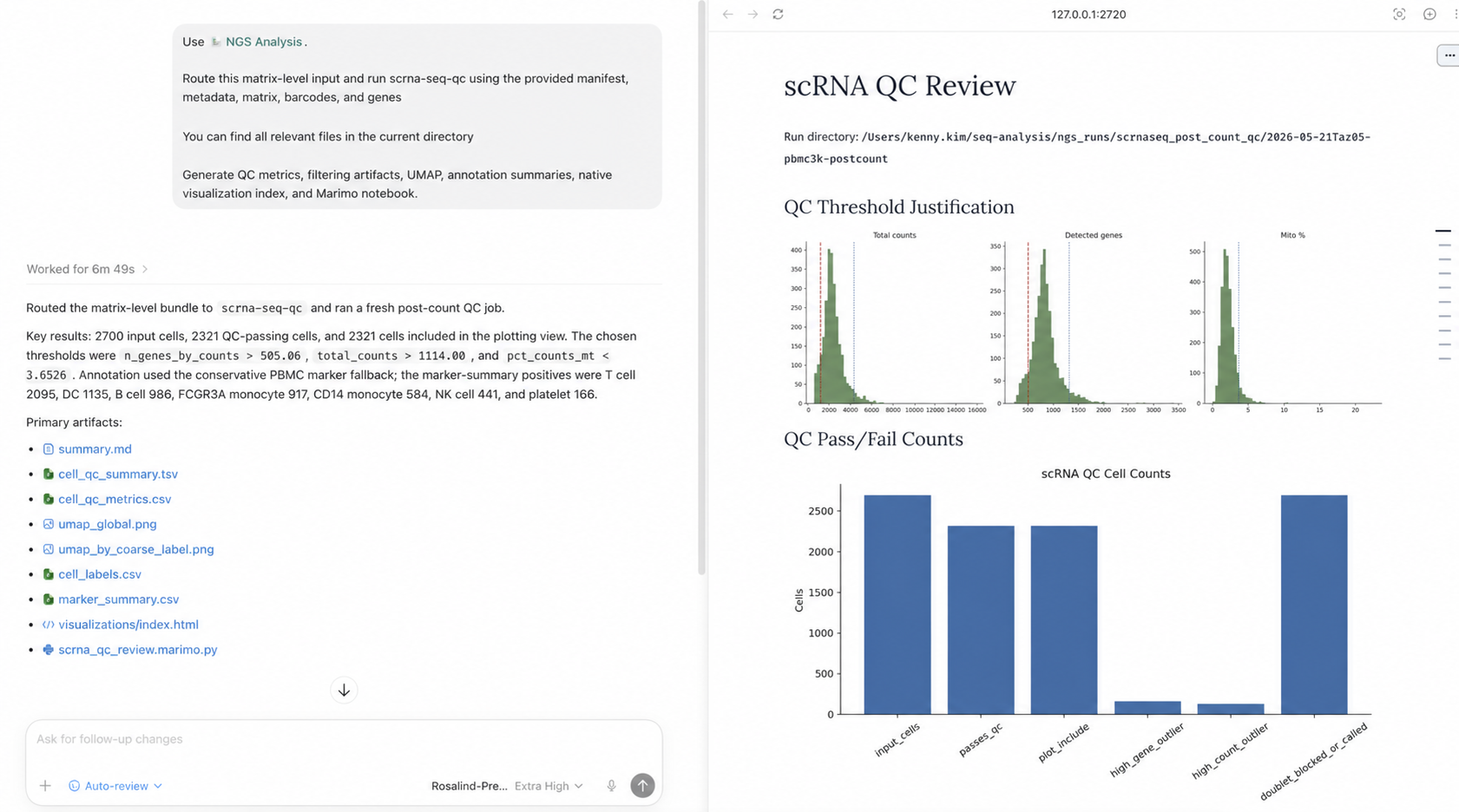
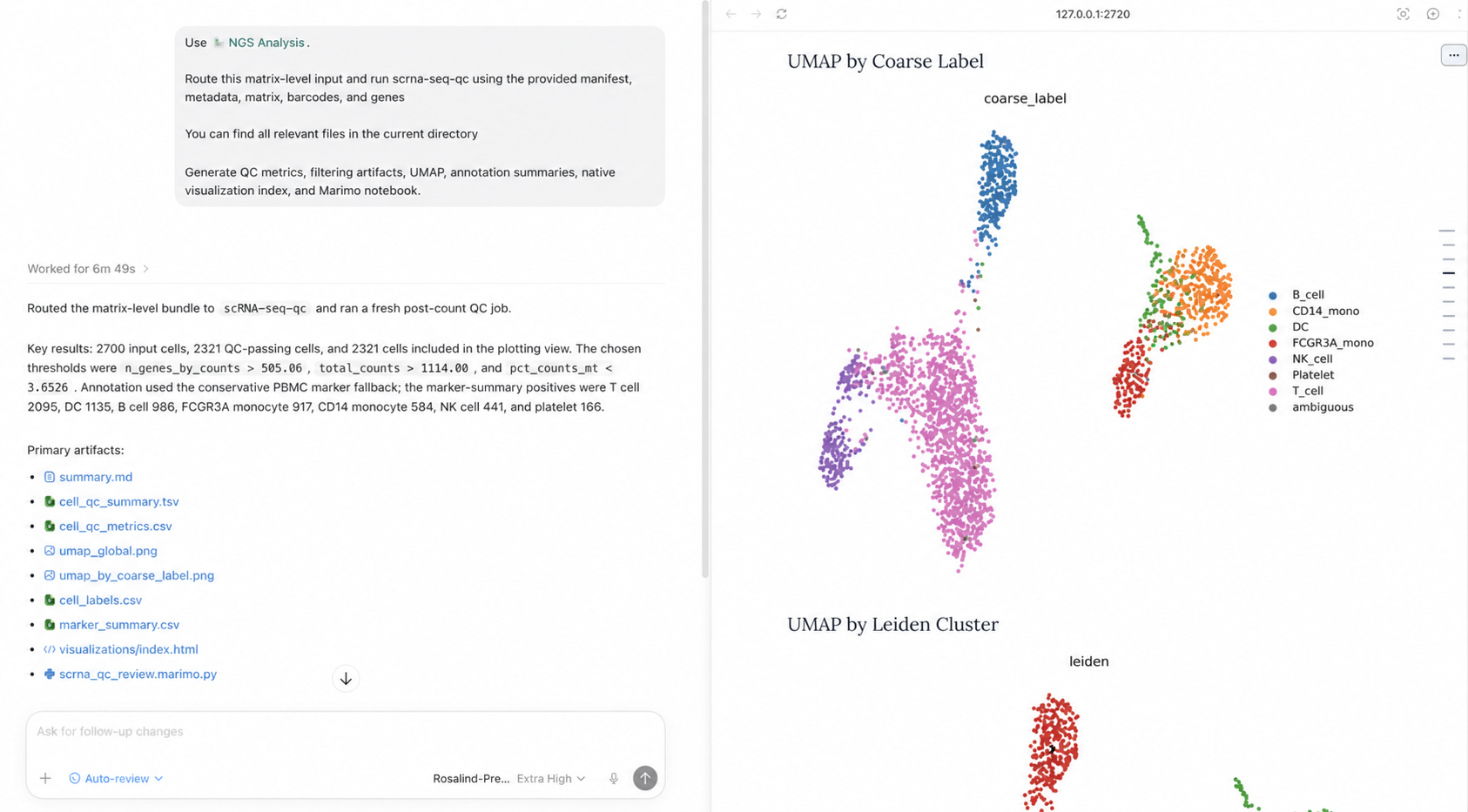
1# Annotate scRNA-seq data | Codex use cases1---
2 2name: Annotate scRNA-seq data
3Codex use cases3tagline: Review single-cell QC, annotations, and UMAPs in one thread.
4 4summary: Use Codex with the NGS Analysis plugin to turn a 10x-style matrix
55 bundle into QC-filtered single-cell artifacts, threshold-justified filtering
6 6 summaries, annotations, and UMAPs you can inspect and revise in the same
77 thread.
8 8skills:
9Codex use case9 - token: NGS Analysis
10 10 url: codex://plugins/ngs-analysis@openai-curated
11# Annotate scRNA-seq data11 description: Run single-cell post-count QC and return filtering, visualization,
12 12 annotation, and notebook artifacts.
13Review single-cell QC, annotations, and UMAPs in one thread.13bestFor:
14 14 - Single-cell teams doing matrix-level QC, annotation, and visualization after
15Difficulty **Intermediate**15 count generation.
16 16 - Researchers who need threshold-justified filtering and an auditable record
17Time horizon **1h**17 of cells removed or flagged.
18 18 - Teams that want a portable review surface with generated figures, a
19Use Codex with the NGS Analysis plugin to turn a 10x-style matrix bundle into QC-filtered single-cell artifacts, threshold-justified filtering summaries, annotations, and UMAPs you can inspect and revise in the same thread.19 visualization index, and a notebook or app handoff.
20 20starterPrompt:
21## Best for21 title: Run scRNA-seq Post-count QC
22 22 body: >-
23- Single-cell teams doing matrix-level QC, annotation, and visualization after count generation.23 Use the NGS Analysis plugin.
24- Researchers who need threshold-justified filtering and an auditable record of cells removed or flagged.24
25- Teams that want a portable review surface with generated figures, a visualization index, and a notebook or app handoff.25
26 26 Route this matrix-level input to scrna-seq-qc using the indicated 10x-style
27# Contents27 matrix bundle, plus the manifest and dataset metadata.
28 28
29[← All use cases](https://developers.openai.com/codex/use-cases)29
30 30 Choose QC thresholds from the observed distributions, preserve raw counts,
31Copy page [Export as PDF](https://developers.openai.com/codex/use-cases/scrna-seq-post-count-qc/?export=pdf)31 and generate global/per-group UMAPs.
32 32
33Use Codex with the NGS Analysis plugin to turn a 10x-style matrix bundle into QC-filtered single-cell artifacts, threshold-justified filtering summaries, annotations, and UMAPs you can inspect and revise in the same thread.33
34 34 Return:
35Intermediate35
36 36 - summary.md
371h37
38 38 - a QC summary table with cells removed or flagged per filter
39Related links39
40 40 - threshold-justification plots
41[Request access to GPT-Rosalind](https://openai.com/form/life-sciences-access/)41
42 42 - filtered .h5ad
43## Best for43 suggestedEffort: high
44 44relatedLinks:
45- Single-cell teams doing matrix-level QC, annotation, and visualization after count generation.45 - label: Request access to GPT-Rosalind
46- Researchers who need threshold-justified filtering and an auditable record of cells removed or flagged.46 url: https://openai.com/form/life-sciences-access/
47- Teams that want a portable review surface with generated figures, a visualization index, and a notebook or app handoff.47---
48
49## Skills & Plugins
50
51- [NGS Analysis](codex://plugins/ngs-analysis@openai-curated)
52
53 Run single-cell post-count QC and return filtering, visualization, annotation, and notebook artifacts.
54
55| Skill | Why use it |
56| --- | --- |
57| [NGS Analysis](codex://plugins/ngs-analysis@openai-curated) | Run single-cell post-count QC and return filtering, visualization, annotation, and notebook artifacts. |
58
59## Starter prompt
60
61Use the NGS Analysis plugin.
62Route this matrix-level input to scrna-seq-qc using the indicated 10x-style matrix bundle, plus the manifest and dataset metadata.
63Choose QC thresholds from the observed distributions, preserve raw counts, and generate global/per-group UMAPs.
64Return:
65- summary.md
66- a QC summary table with cells removed or flagged per filter
67- threshold-justification plots
68- filtered .h5ad
69
70Open in the Codex app
71
72Use the NGS Analysis plugin.
73Route this matrix-level input to scrna-seq-qc using the indicated 10x-style matrix bundle, plus the manifest and dataset metadata.
74Choose QC thresholds from the observed distributions, preserve raw counts, and generate global/per-group UMAPs.
75Return:
76- summary.md
77- a QC summary table with cells removed or flagged per filter
78- threshold-justification plots
79- filtered .h5ad
80 48
81## Leverage skills49## Leverage skills
82 50
116first pass.88first pass.
117 89
118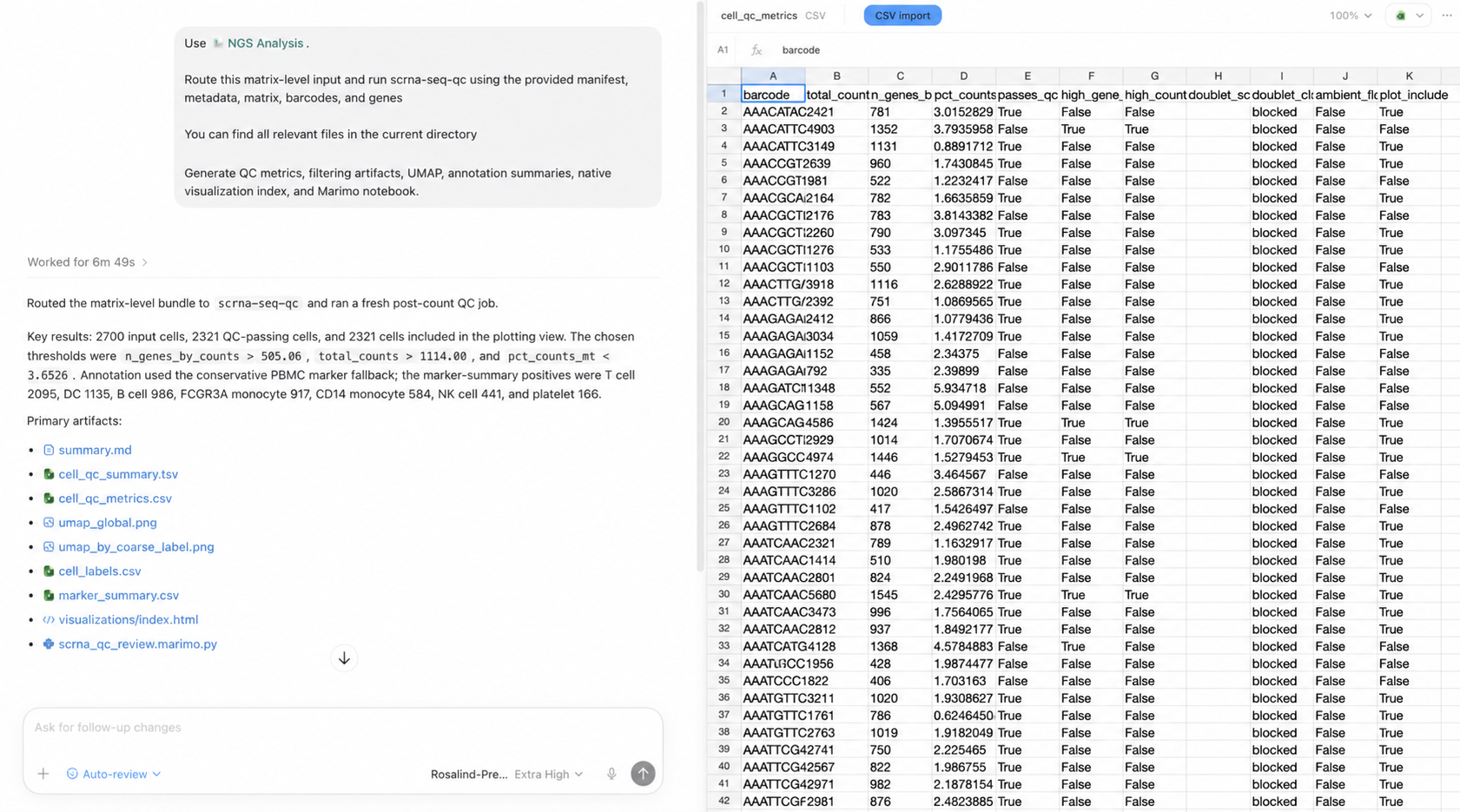90
119
120## Related use cases
121
122[
123
124### Validate bulk RNA-seq inputs
125
126Use Codex with the NGS Analysis plugin to validate sample sheets, FASTQs, and references...
127
128Sciences Data](https://developers.openai.com/codex/use-cases/bulk-rna-seq-fastq-qc)[
129
130### Discover protein folding architectures
131
132Use Codex with Goal Mode to research and implement novel architectural modifications to...
133
134Sciences Engineering](https://developers.openai.com/codex/use-cases/discover-protein-folding-architectures)[
135
136### Prioritize drug targets
137
138Use Codex with the Life Science Research plugin to normalize entities, retrieve genetics...
139
140Sciences Data](https://developers.openai.com/codex/use-cases/target-prioritization)
141