1# Use Codex in Slack1# Use Codex in Slack
2 2
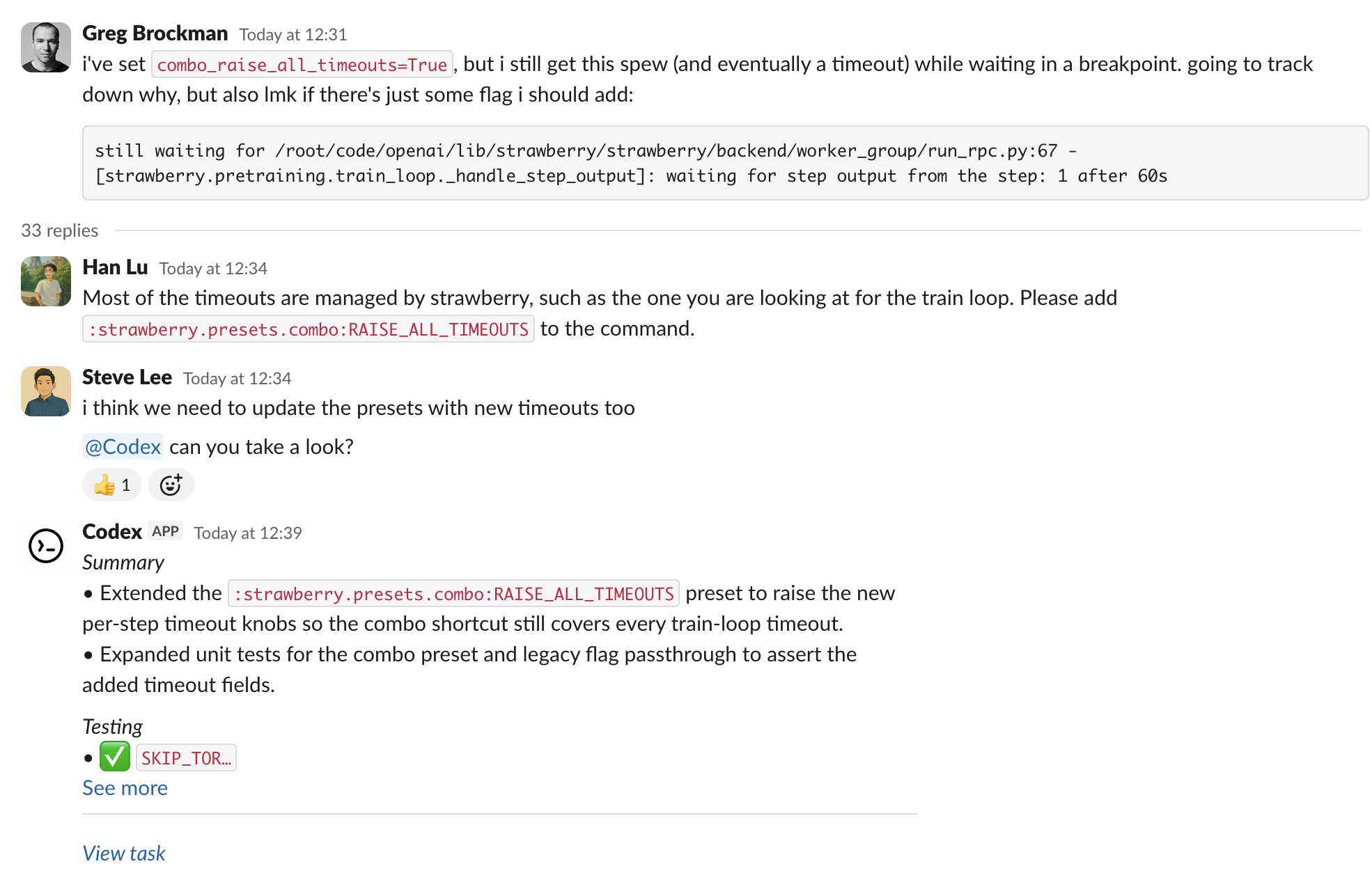
3Use Codex in Slack to kick off coding tasks from channels and threads. Mention `@Codex` with a prompt, and Codex creates a cloud task and replies with the results.3Use Codex in Slack to kick off coding work from channels and threads. Mention `@Codex` with a prompt, and Codex creates a cloud chat and replies with the results.
4 4
5<div class="not-prose max-w-3xl mr-auto">5<div class="not-prose max-w-3xl mr-auto">
6 <img src="https://developers.openai.com/images/codex/integrations/slack-example.png"6 <img src="https://developers.openai.com/images/codex/integrations/slack-example.png"
13 13
14## Set up the Slack app14## Set up the Slack app
15 15
161. Set up [Codex cloud tasks](https://learn.chatgpt.com/docs/cloud). You need a Plus, Pro, Business, Enterprise, or Edu plan (see [ChatGPT pricing](https://chatgpt.com/pricing)), a connected GitHub account, and at least one [environment](https://learn.chatgpt.com/docs/environments/cloud-environment).161. Set up [Codex cloud chats](https://learn.chatgpt.com/docs/cloud). You need a Plus, Pro, Business, Enterprise, or Edu plan (see [ChatGPT pricing](https://chatgpt.com/pricing)), a connected GitHub account, and at least one [environment](https://learn.chatgpt.com/docs/environments/cloud-environment).
172. Go to [Codex settings](https://chatgpt.com/codex/settings/connectors) and install the Slack app for your workspace. Depending on your Slack workspace policies, an admin may need to approve the install.172. Go to [Codex settings](https://chatgpt.com/codex/settings/connectors) and install the Slack app for your workspace. Depending on your Slack workspace policies, an admin may need to approve the install.
183. Add `@Codex` to a channel. If you haven't added it yet, Slack prompts you when you mention it.183. Add `@Codex` to a channel. If you haven't added it yet, Slack prompts you when you mention it.
19 19
20## Start a task20<a id="start-a-task"></a>
21
22## Start a chat
21 23
221. In a channel or thread, mention `@Codex` and include your prompt. Codex can reference earlier messages in the thread, so you often don't need to restate context.241. In a channel or thread, mention `@Codex` and include your prompt. Codex can reference earlier messages in the thread, so you often don't need to restate context.
232. (Optional) Specify an environment or repository in your prompt, for example: `@Codex fix the above in openai/codex`.252. (Optional) Specify an environment or repository in your prompt, for example: `@Codex fix the above in openai/codex`.
243. Wait for Codex to react (👀) and reply with a link to the task. When it finishes, Codex posts the result and, depending on your settings, an answer in the thread.263. Wait for Codex to react (👀) and reply with a link to the chat. When it finishes, Codex posts the result and, depending on your settings, an answer in the thread.
25 27
26### How Codex chooses an environment and repo28### How Codex chooses an environment and repo
27 29
28- Codex reviews the environments you have access to and selects the one that best matches your request. If the request is ambiguous, it falls back to the environment you used most recently.30- Codex reviews the environments you have access to and selects the one that best matches your request. If the request is ambiguous, it falls back to the environment you used most recently.
29- The task runs against the default branch of the first repository listed in that environment’s repo map. Update the repo map in Codex if you need a different default or more repositories.31- The chat runs against the default branch of the first repository listed in that environment’s repo map. Update the repo map in Codex if you need a different default or more repositories.
30- If no suitable environment or repository is available, Codex will reply in Slack with instructions on how to fix the issue before retrying.32- If no suitable environment or repository is available, Codex will reply in Slack with instructions on how to fix the issue before retrying.
31 33
32### Enterprise data controls34### Enterprise data controls
33 35
34By default, Codex replies in the thread with an answer, which can include information from the environment it ran in.36By default, Codex replies in the thread with an answer, which can include information from the environment it ran in.
35To prevent this, an Enterprise admin can clear **Allow Codex Slack app to post answers on task completion** in [ChatGPT workspace settings](https://chatgpt.com/admin/settings). When an admin turns off answers, Codex replies only with a link to the task.37To prevent this, an Enterprise admin can clear **Allow Codex Slack app to post answers on task completion** in [ChatGPT workspace settings](https://chatgpt.com/admin/settings). When an admin turns off answers, Codex replies only with a link to the chat.
36 38
37### Data usage, privacy, and security39### Data usage, privacy, and security
38 40
39When you mention `@Codex`, Codex receives your message and thread history to understand your request and create a task.41When you mention `@Codex`, Codex receives your message and thread history to understand your request and create a chat.
40Data handling follows OpenAI's [Privacy Policy](https://openai.com/privacy), [Terms of Use](https://openai.com/terms/), and other applicable [policies](https://openai.com/policies).42Data handling follows OpenAI's [Privacy Policy](https://openai.com/privacy), [Terms of Use](https://openai.com/terms/), and other applicable [policies](https://openai.com/policies).
41For more on security, see the Codex [security documentation](https://learn.chatgpt.com/docs/agent-approvals-security).43For more on security, see the Codex [security documentation](https://learn.chatgpt.com/docs/agent-approvals-security).
42 44
47- **Missing connections**: If Codex can't confirm your Slack or GitHub connection, it replies with a link to reconnect.49- **Missing connections**: If Codex can't confirm your Slack or GitHub connection, it replies with a link to reconnect.
48- **Unexpected environment choice**: Reply in the thread with the environment you want (for example, `Please run this in openai/openai (applied)`), then mention `@Codex` again.50- **Unexpected environment choice**: Reply in the thread with the environment you want (for example, `Please run this in openai/openai (applied)`), then mention `@Codex` again.
49- **Long or complex threads**: Summarize key details in your latest message so Codex doesn't miss context buried earlier in the thread.51- **Long or complex threads**: Summarize key details in your latest message so Codex doesn't miss context buried earlier in the thread.
50- **Workspace posting**: Some Enterprise workspaces restrict posting final answers. In those cases, open the task link to view progress and results.52- **Workspace posting**: Some Enterprise workspaces restrict posting final answers. In those cases, open the chat link to view progress and results.
51- **More help**: See the [OpenAI Help Center](https://help.openai.com/).53- **More help**: See the [OpenAI Help Center](https://help.openai.com/).