
submit-plugins.md +0 −339 deleted
File Deleted View Diff
1# Submit plugins
2
3Use the plugin submission portal to submit a plugin for review when you're
4ready to publish it for public use.
5
6A plugin is an app, skills, or both. You can submit:
7
8- A skills-only plugin that packages reusable workflows.
9- An app-only plugin backed by an MCP server. Custom UI is optional.
10- An app-plus-skills plugin that combines an MCP-backed app with bundled skills.
11
12The submission form collects listing information, MCP server details, bundled
13skills, starter prompts, test cases, country availability, and policy
14attestations. Which fields you complete depends on whether the plugin includes
15skills, an app, or both.
16
17For local development, packaging, and marketplace setup, see
18[Build plugins](https://learn.chatgpt.com/docs/build-plugins).
19
20For the app portion of the plugin, see [Build an app](https://learn.chatgpt.com/docs/build-app).
21
22## Before you submit
23
24### Submit the MCP server, not an existing app reference
25
26You will not be able to submit a plugin that references an existing,
27already-published ChatGPT app. If your plugin includes an app that already
28exists in ChatGPT, submit that app's MCP server from scratch through the portal
29as a new MCP-backed plugin submission. The portal scans that MCP server,
30validates the tool metadata, and uses the submitted server details during
31review.
32
33### Get plugin submission access
34
35You need an organization role with app management write access before you can
36create or submit plugin drafts.
37
381. Open [OpenAI Platform roles settings](https://platform.openai.com/settings/organization/people/roles).
392. Select the organization that owns the plugin.
403. Open the role assigned to the submitter, or create a new role.
414. In the role permissions, set **Apps Management** to **Write**.
425. Save the role and assign it to each person who needs to create, edit, or
43 submit plugin drafts.
446. Reload the [plugin submission portal](https://platform.openai.com/plugins).
45
46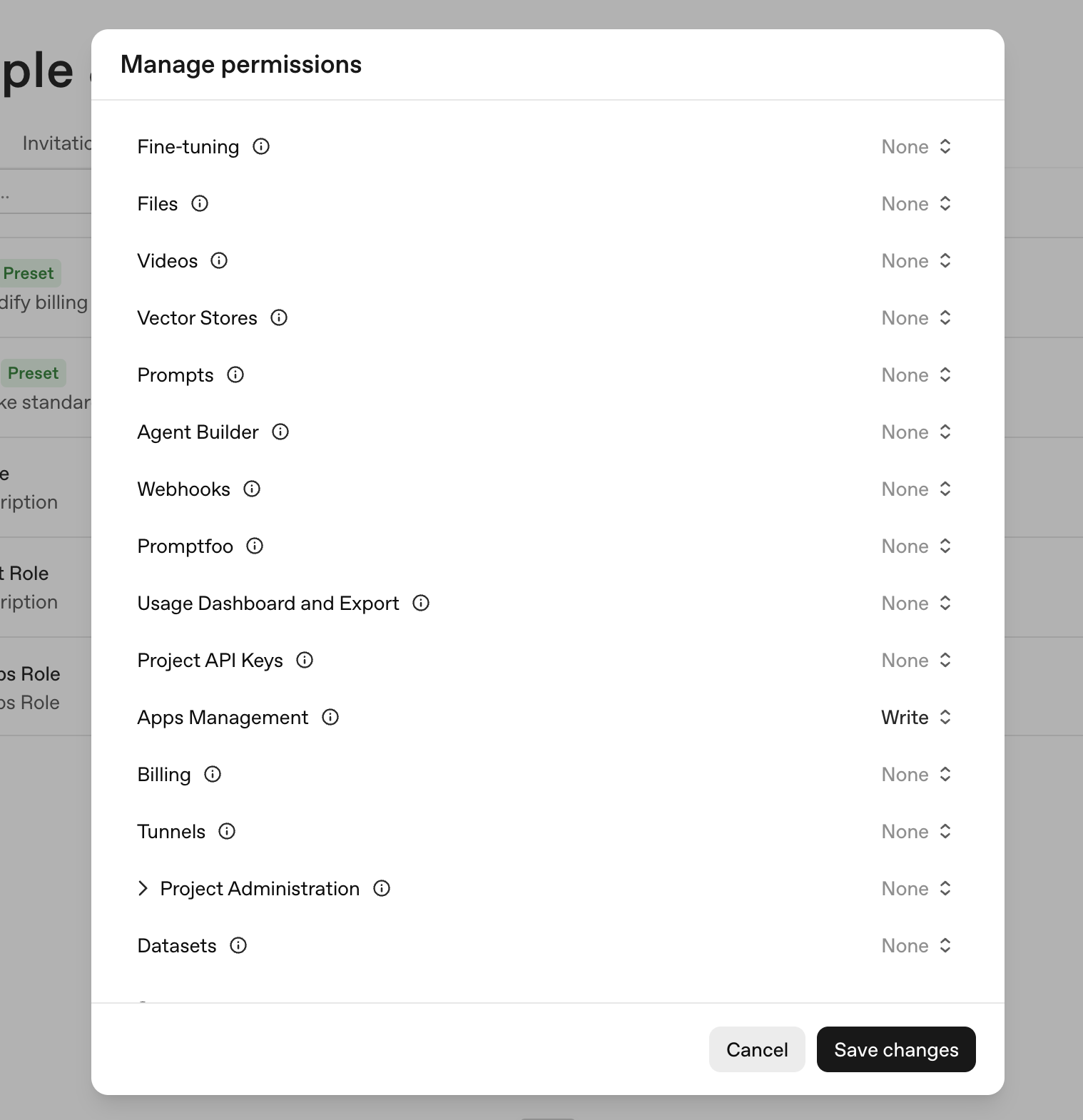
47
48Organization owners already have app management permissions. Non-owner
49submitters need write access to create or submit drafts, and read access to view
50drafts and review status.
51
52### Verify your developer or business identity
53
54Every public submission must use a verified developer or business identity in
55the OpenAI Platform. Reviewers use this identity to confirm the submission
56matches the name, website, support contact, privacy policy, and terms in your
57public listing.
58
59To verify an identity:
60
611. Sign in to the [OpenAI Platform](https://platform.openai.com).
622. Select the organization that will publish the plugin.
633. Open [organization settings](https://platform.openai.com/settings/organization/general).
644. Complete **individual verification** if you will publish under your own
65 name, or **business verification** if you will publish under a company name.
665. Return to the plugin submission form and select the verified identity in the
67 **Developer Identity** field.
68
69Reviewers may reject submissions that use an unverified or mismatched publisher
70identity. See the Apps SDK
71[organization verification requirements](https://developers.openai.com/apps-sdk/deploy/submission#organization-verification)
72for the underlying review rule.
73
74If the Platform shows that the developer or business identity is verified but
75the plugin submission form does not recognize it, check that you are submitting
76from the same organization and project where the identity was verified. The
77submitter also needs **Apps Management** write access for that organization.
78Ask an organization owner or admin to update the role assigned to the
79submitter, then reload the plugin submission portal.
80
81### Prepare required materials
82
83Before opening the form, collect:
84
85| Material | What to prepare |
86| ------------------ | ------------------------------------------------------------------------------------------------------------------------------------------------------------------------------------------ |
87| Listing details | Plugin name, short description, long description, logo, category, website, support URL, privacy policy URL, and terms URL. |
88| Developer identity | Verified individual or business identity in the OpenAI Platform. |
89| MCP server | For plugins that contain apps: public MCP server URL, domain verification access, authentication details, demo credentials if needed, content security policy, and accurate tool metadata. |
90| Tool annotations | For plugins that contain apps: `readOnlyHint`, `openWorldHint`, and `destructiveHint` values for every MCP tool. |
91| Skills | For skills plugins: skill bundle or ZIP with the final skill file tree. |
92| Prompts | Starter prompts that show useful, realistic workflows. |
93| Test cases | Five positive test cases and three negative test cases with clear expected behavior. |
94| Availability | Countries or regions where the plugin should be available. |
95| Release notes | A short summary of what you are submitting and what changed since any prior version. |
96
97## Create a plugin submission
98
991. Open the [plugin submission portal](https://platform.openai.com/plugins).
1002. Select **Create plugin**.
1013. Choose the submission type:
102 - **Skills only** for a plugin that only packages skills.
103 - **With MCP** for an app-only plugin backed by an MCP server.
104 - **With MCP** for an app-plus-skills plugin that combines an MCP-backed app
105 with bundled skills.
106
107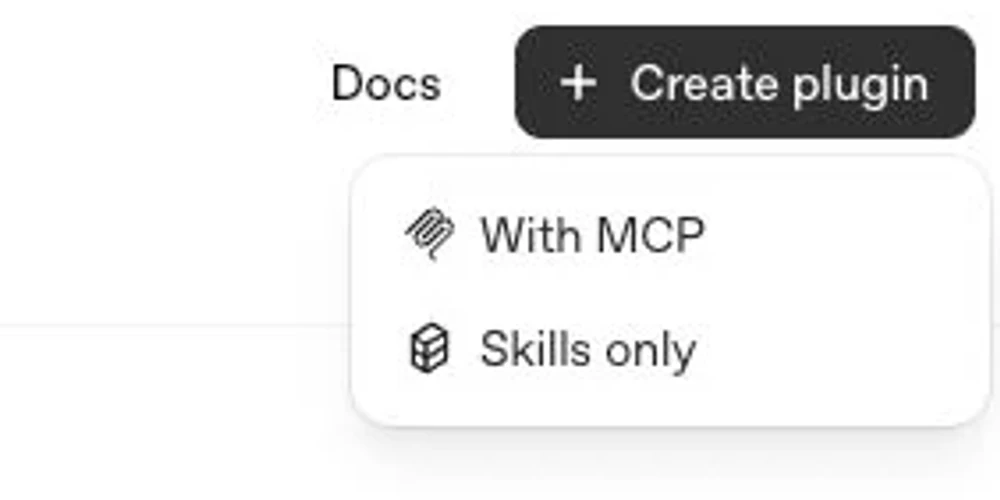
108
109The portal saves the submission as a draft while you complete the form.
110
111## Complete the form
112
113### Info
114
115Complete the public listing and publisher fields:
116
117- **Plugin name:** Use the customer-facing product or workflow name.
118- **Descriptions:** Explain what the plugin helps users do. Keep the short
119 description concise and use the long description for workflow details.
120- **Developer Identity:** Select the verified individual or business identity
121 for the publisher.
122- **Logo and category:** Use production-ready brand assets.
123- **Website, support, privacy, and terms URLs:** Use public URLs that match the
124 publisher and disclose relevant data handling.
125
126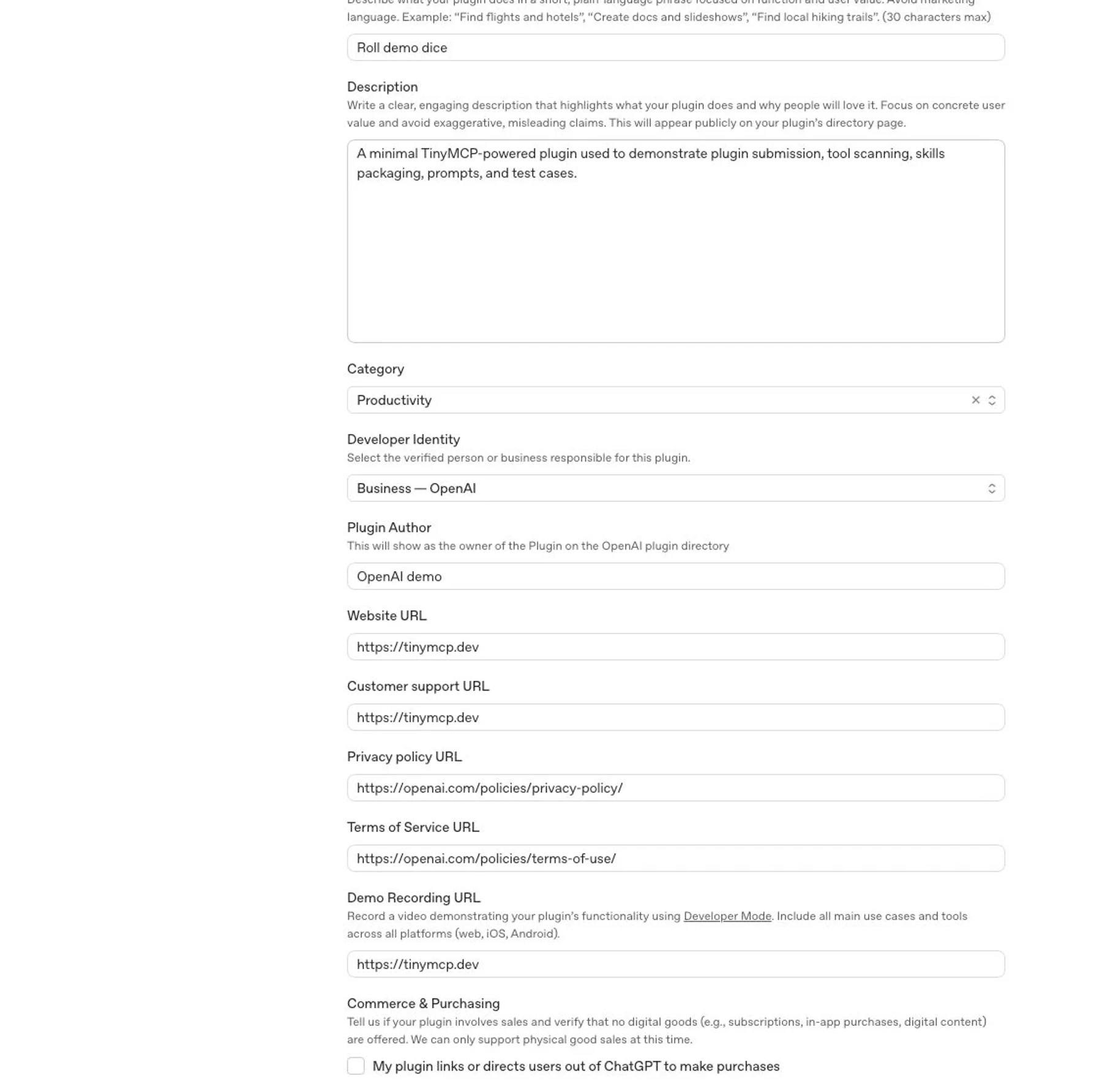
127
128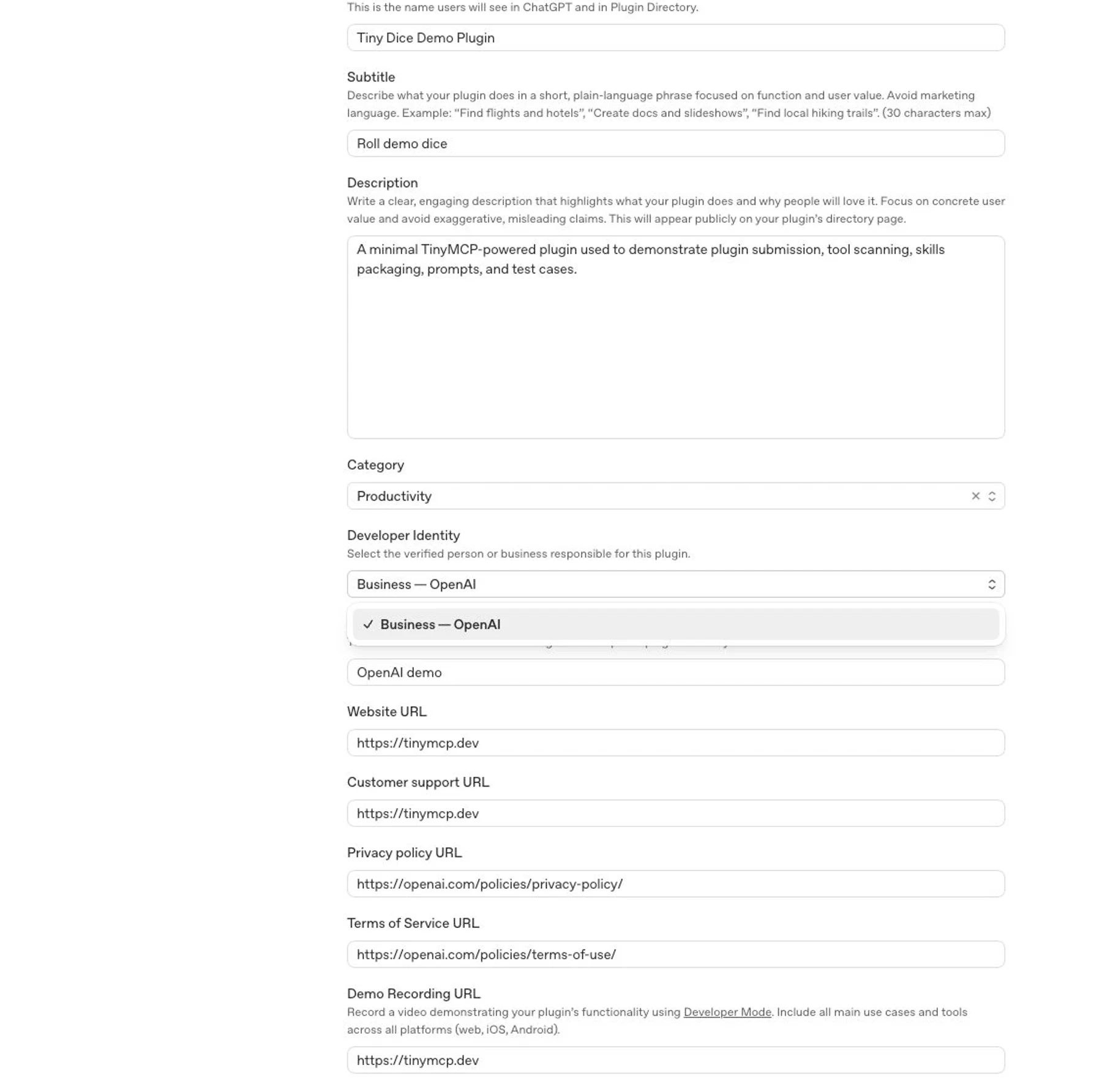
129
130Review your MCP responses against your privacy policy before you submit. Remove
131unnecessary personal data, auth secrets, debug payloads, internal identifiers,
132and undisclosed user-related fields from tool responses.
133
134### MCP
135
136For app or MCP submissions:
137
1381. Enter the production MCP server URL.
1392. Configure authentication and provide reviewer-ready demo credentials if the
140 server requires sign-in.
1413. Define a content security policy that allows the exact domains your app
142 fetches from.
1434. Complete domain verification if the portal shows a **Domain not verified**
144 challenge. Use an HTTPS origin on the MCP host or a parent host, and
145 host the exact token at `/.well-known/openai-apps-challenge`.
1465. Select **Scan Tools**.
1476. Review the discovered tools, domains, validation output, and tool metadata.
1487. Fix server or metadata issues, deploy the fix, then scan again.
149
150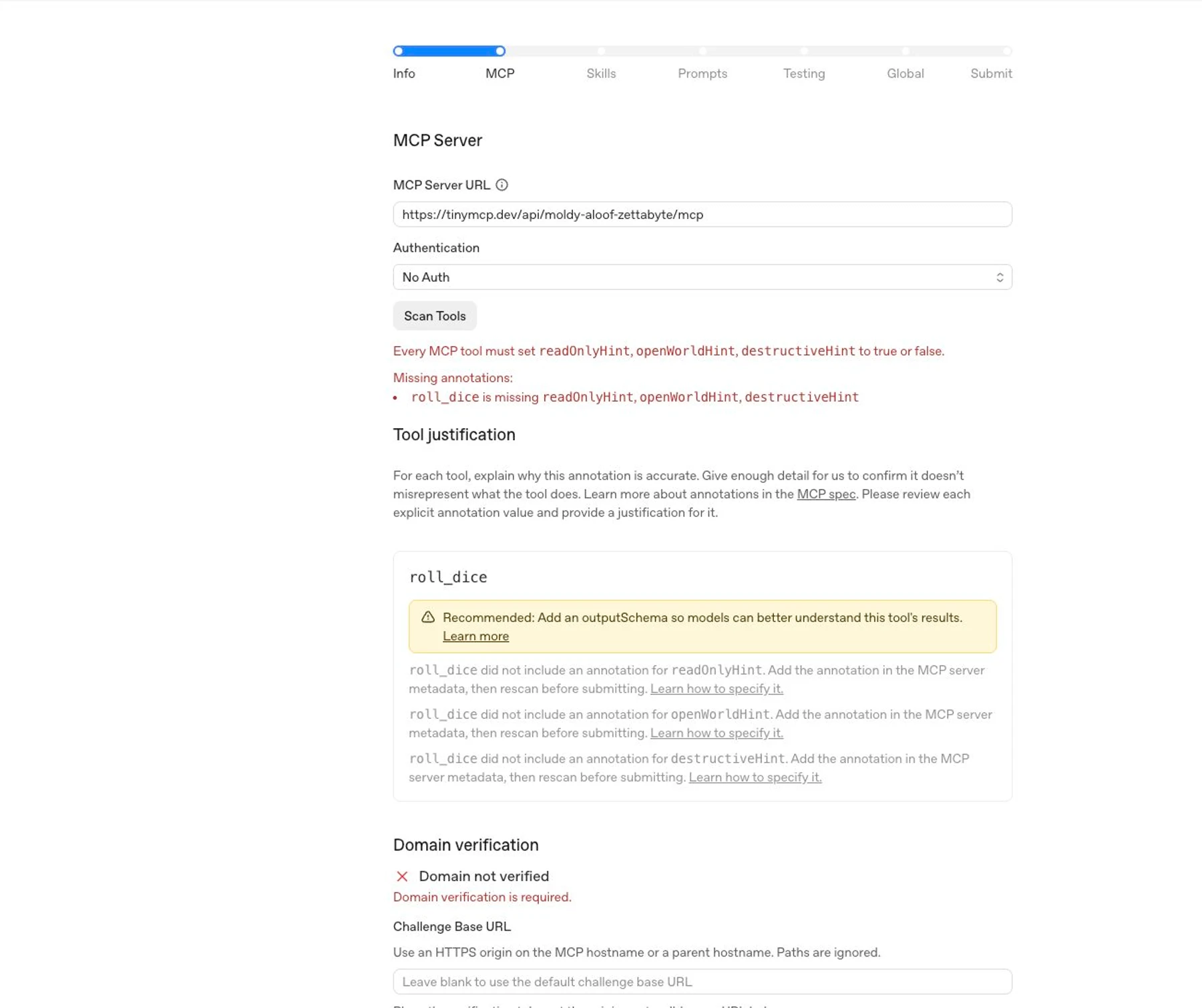
151
152Do not enter a ChatGPT app ID or try to point the portal at an existing,
153published ChatGPT app. The submission must provide the MCP server URL and review
154materials directly, even when that server backs an app that is already published
155in ChatGPT.
156
157#### Domain verification
158
159Plugins that contain apps must verify control of the domain that hosts the
160app's MCP server. When the portal shows a domain verification challenge, place
161the exact verification token at the generated well-known URL:
162
163```text
164https://<challenge-base-host>/.well-known/openai-apps-challenge
165```
166
167The challenge endpoint must return only that plugin's verification token. Do not
168return JSON, a list of tokens, or multiple tokens from the same URL.
169
170The **Challenge Base URL** is an optional HTTPS origin that tells the portal
171where to check the token. It must be the MCP host or a parent host.
172Paths are ignored. For example, if the MCP server URL is
173`https://api.example.com/mcp`, the default challenge URL is
174`https://api.example.com/.well-known/openai-apps-challenge`, and
175`https://example.com` can be used as a parent-origin challenge base if you can
176host the token there.
177
178If two plugins that contain apps share the same MCP host but differ only by
179path, they also share the same default challenge URL. You cannot verify them
180separately by putting different tenant paths in the Challenge Base URL, because
181the path is ignored. Use a parent origin that can host the new token, give the
182app's MCP server a distinct host, or work with OpenAI support if neither
183hosting option is possible.
184
185If another plugin that contains an app already uses the same MCP host, do
186not replace its existing challenge token unless that plugin no longer needs it.
187Use an allowed parent-origin Challenge Base URL or a distinct MCP host for
188the new submission.
189
190Every tool should have clear names, descriptions, schemas, and output
191structure. Add output schemas when they help reviewers and models understand
192what the tool returns.
193
194Set tool annotations to match each tool's real behavior:
195
196| Annotation | Use it when |
197| ----------------- | ------------------------------------------------------------------------------------------------------------------------------------------------------------------------------------------------------------------------------------------------------------------------------------------------------------------------------------------------------ |
198| `readOnlyHint` | Set to `true` only when the tool fetches, looks up, lists, retrieves, previews, or computes information and doesn't change anything. Set to `false` if the tool can create, update, delete, send, enqueue, run jobs, start workflows, write logs, or otherwise change state. |
199| `openWorldHint` | For write tools, set to `true` if the tool can change publicly visible internet state, such as posting online, sending external messages, publishing content, pushing code, or submitting forms to third parties. Set to `false` only if the tool operates entirely within closed or private systems and can't change publicly visible internet state. |
200| `destructiveHint` | For write tools, set to `true` if the tool can delete, overwrite, revoke access, send messages or transactions that can't be undone, or cause another irreversible side effect. Otherwise, set it to `false`. |
201
202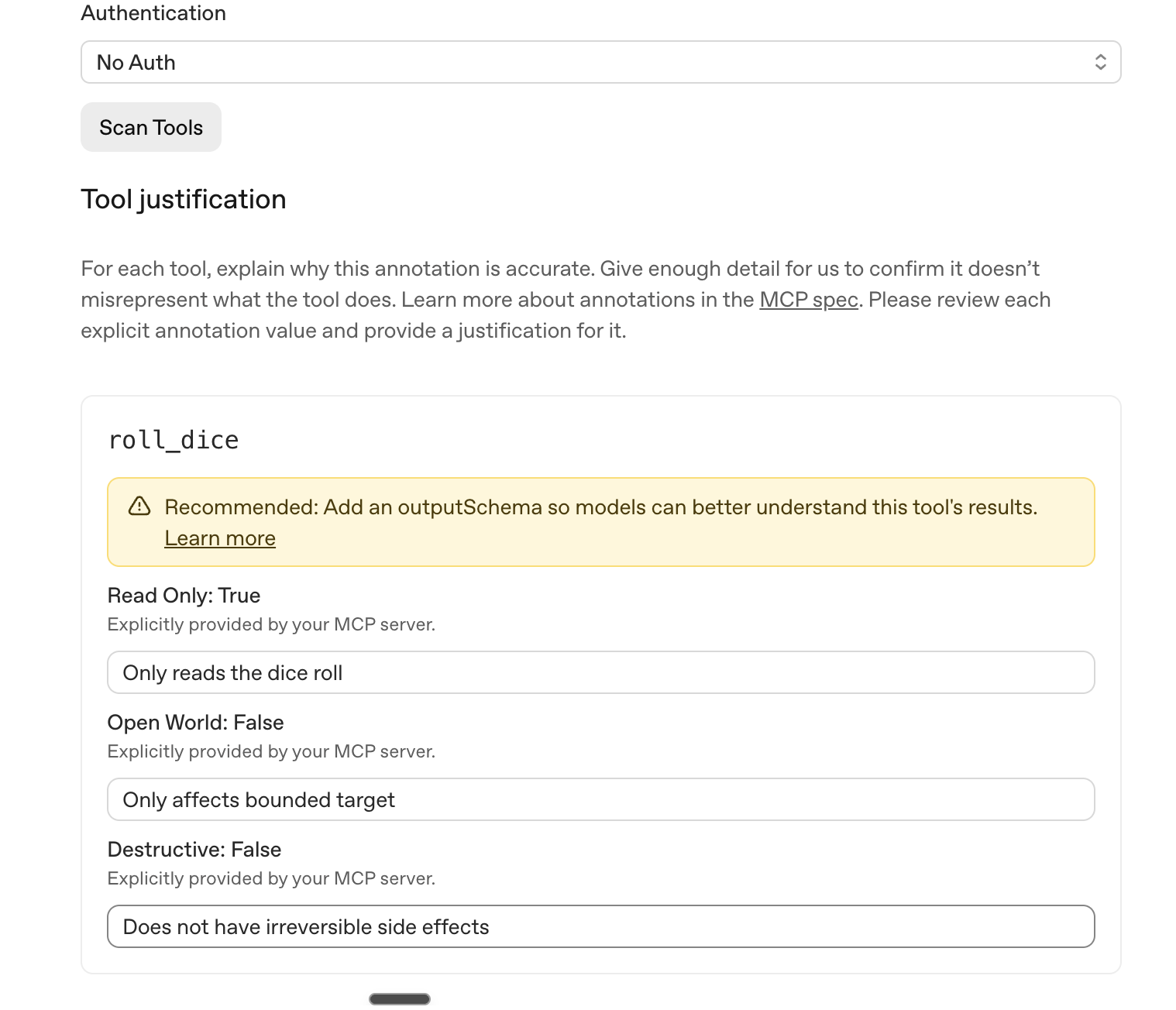
203
204For implementation details, see
205[tool annotations and elicitation](https://developers.openai.com/apps-sdk/build/mcp-server#tool-annotations-and-elicitation).
206For review expectations, see the Apps SDK
207[tool hint rejection guidance](https://developers.openai.com/apps-sdk/deploy/submission#review-and-approval-faqs).
208
209### Skills
210
211Upload the final skill bundle for skills-only or app-plus-skills submissions.
212Use the same file tree and instructions you tested locally.
213
214For a **Skills only** submission, upload a ZIP no larger than 100 MB with one
215plugin root. Put the plugin manifest, such as `.codex-plugin/plugin.json`, and
216`skills/<skill>/SKILL.md` in that root. ZIP uploads only support skills. The
217portal excludes `.mcp.json`, `mcpServers`, `.app.json`, `apps`, and
218`interface.screenshots` and reports a warning when they are present.
219
220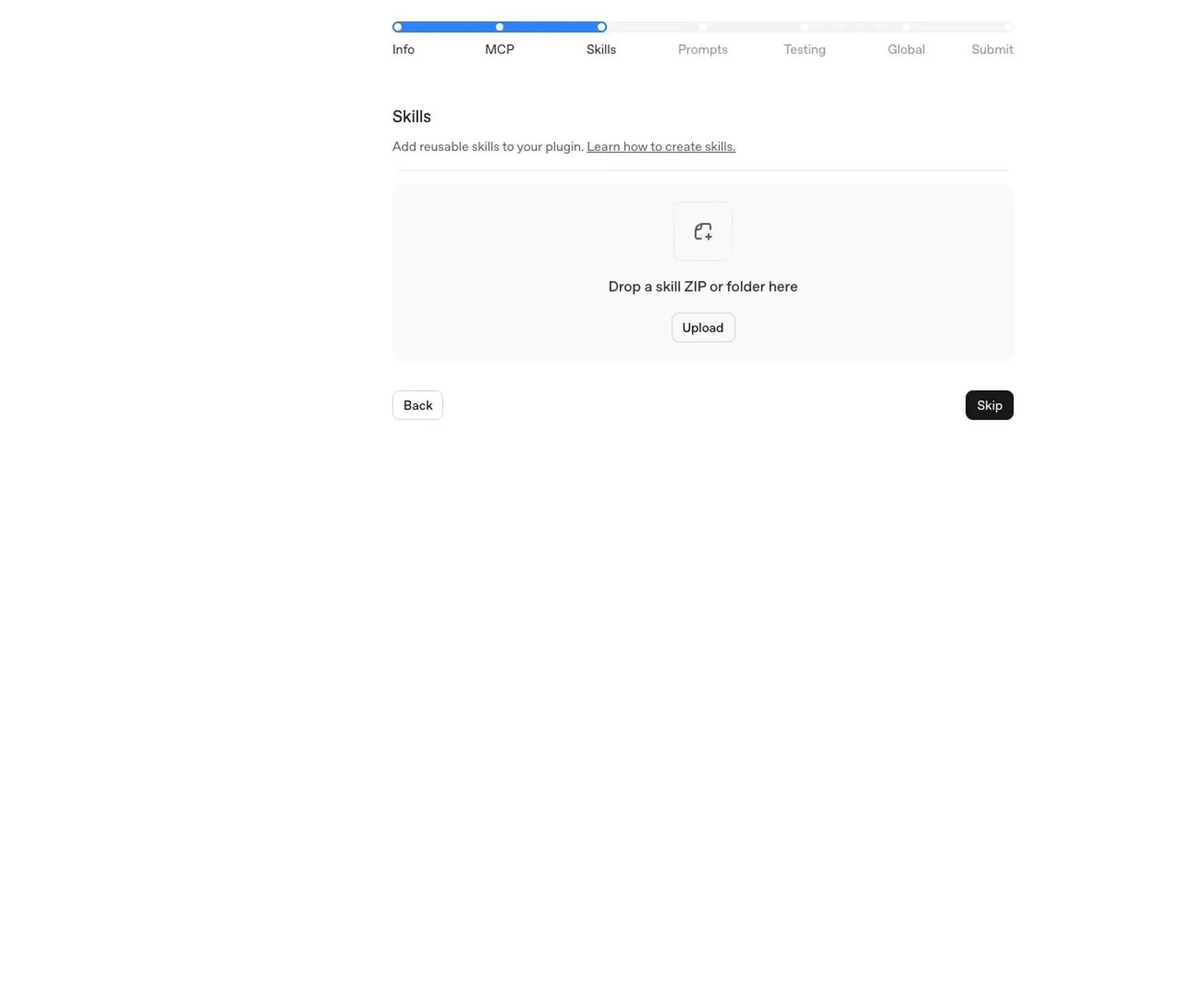
221
222Each skill should include:
223
224- A clear `SKILL.md` with trigger conditions and task instructions.
225- Any referenced scripts, templates, or assets.
226- Minimal, scoped instructions that fit the plugin's purpose.
227
228Uploaded skills are scanned for policy compliance and security risks, including
229sensitive information, unnecessary access requests, and instructions that may
230conflict with safe or expected plugin behavior. Skills must follow the same
231standards as the rest of the plugin and may block submission or require
232remediation if they fail automated scanning.
233
234### Prompts
235
236Add starter prompts that show the plugin's highest-value workflows. Good
237prompts are specific enough to show when to use the plugin, but general enough
238that users can adapt them.
239
240Examples:
241
242- "Investigate checkout errors from the last release and summarize likely root
243 causes."
244- "Create a P1 incident brief from the latest support tickets and related
245 deploys."
246- "Review unsuccessful deployment logs and recommend the next debugging step."
247
248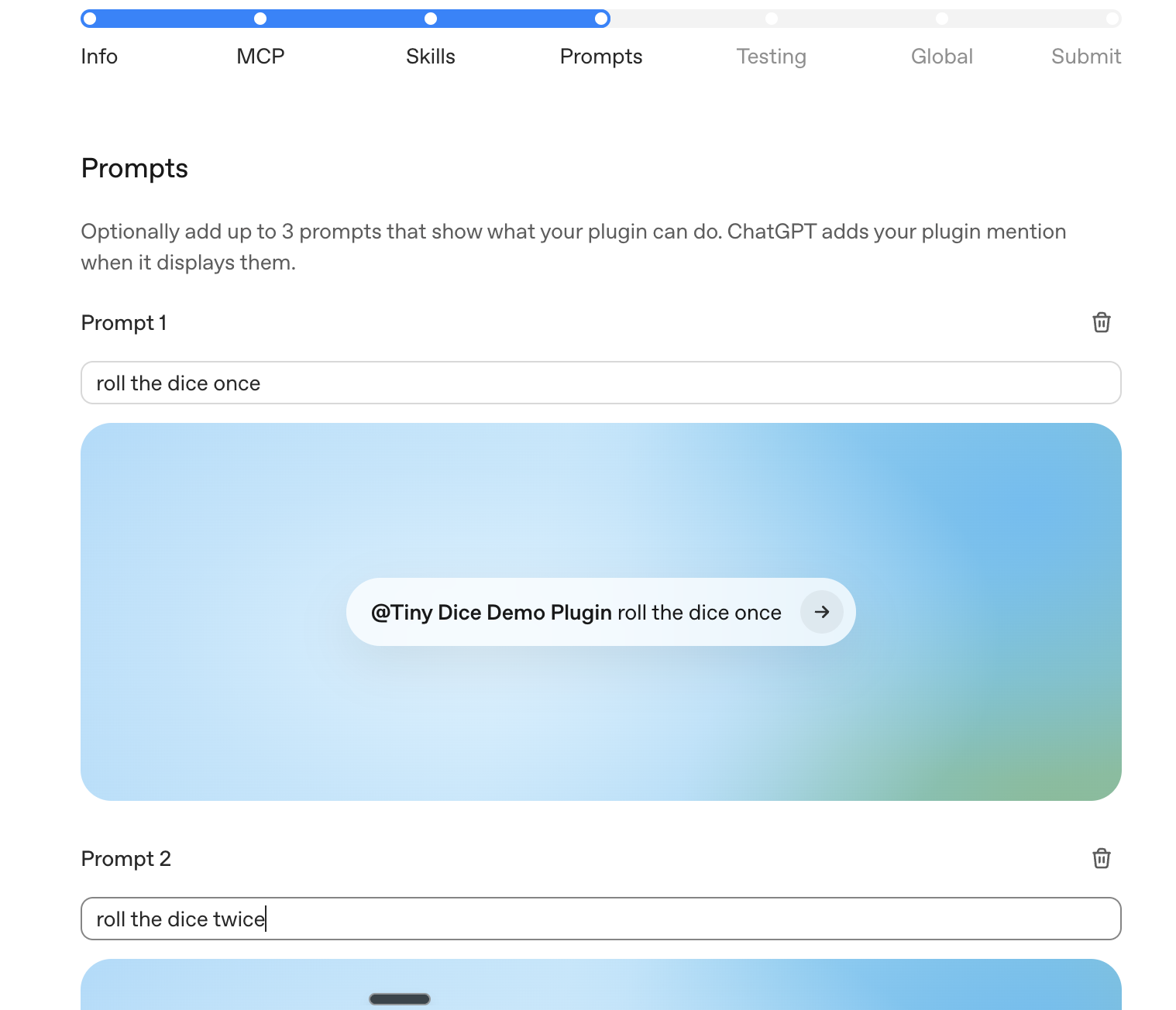
249
250### Testing
251
252Submit exactly five positive test cases and three negative test cases.
253
254For each positive test case, include:
255
256- User prompt.
257- Expected tool, skill, or workflow behavior.
258- Expected result shape.
259- Test account or fixture data required to reproduce it.
260
261For each negative test case, include:
262
263- User prompt or scenario.
264- Expected refusal, clarification, or safe fallback behavior.
265- Why the plugin shouldn't complete the requested action.
266
267Use test cases that reviewers can run without internal context. If your plugin
268requires authentication, make sure the provided demo credentials can complete
269each test without MFA, SMS, email confirmation, or private-network access.
270
271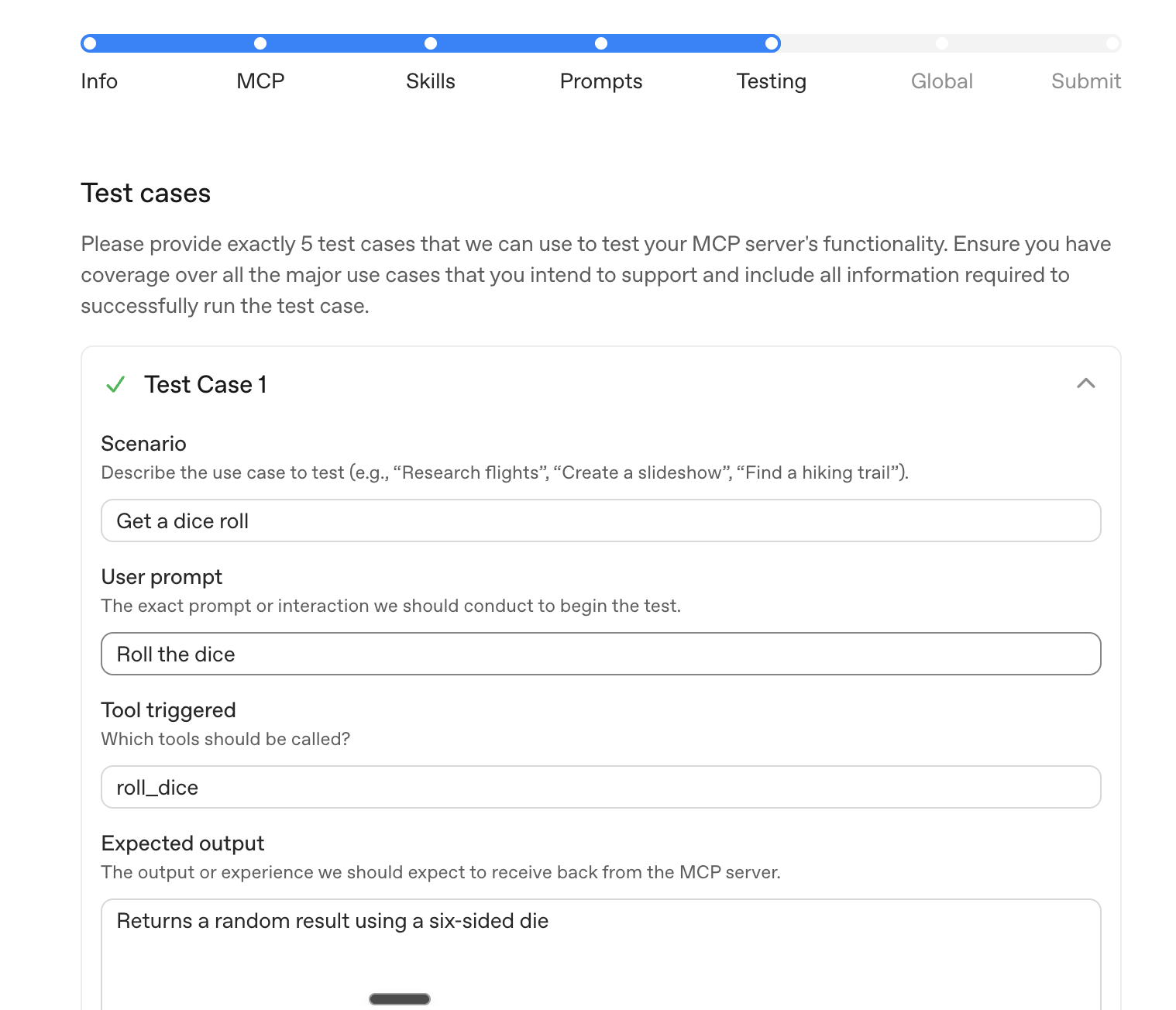
272
273### Global
274
275Choose the countries or regions where the plugin should be available. Only
276select locations where the publisher, product, support process, and legal terms
277are ready for users.
278
279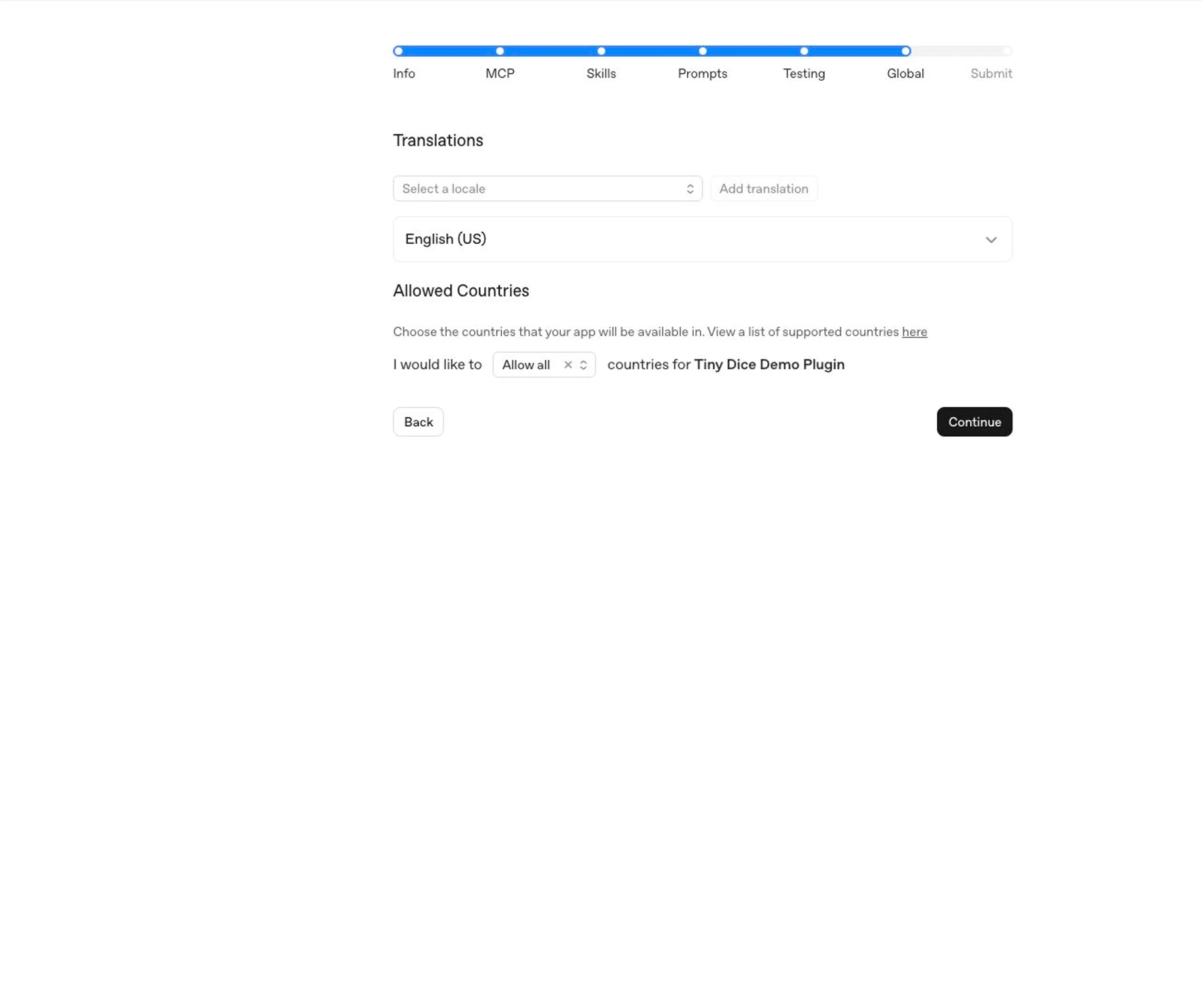
280
281### Submit
282
283Review the full draft before submitting.
284
285Directory plugins are held to a higher standard and require additional
286validation. See [Plugin submission errors](https://learn.chatgpt.com/docs/plugin-submission-errors) for
287the full list of checks and how to fix each error.
288
289In the release notes, summarize:
290
291- What the plugin does.
292- Whether this is an initial submission or an update.
293- What changed since the prior submitted version, if any.
294- Anything reviewers should know about test credentials, expected data, or
295 setup.
296
297Complete the policy attestations only after confirming the listing, server,
298skills, prompts, tests, and availability are accurate. Then select
299**Submit for Review**.
300
301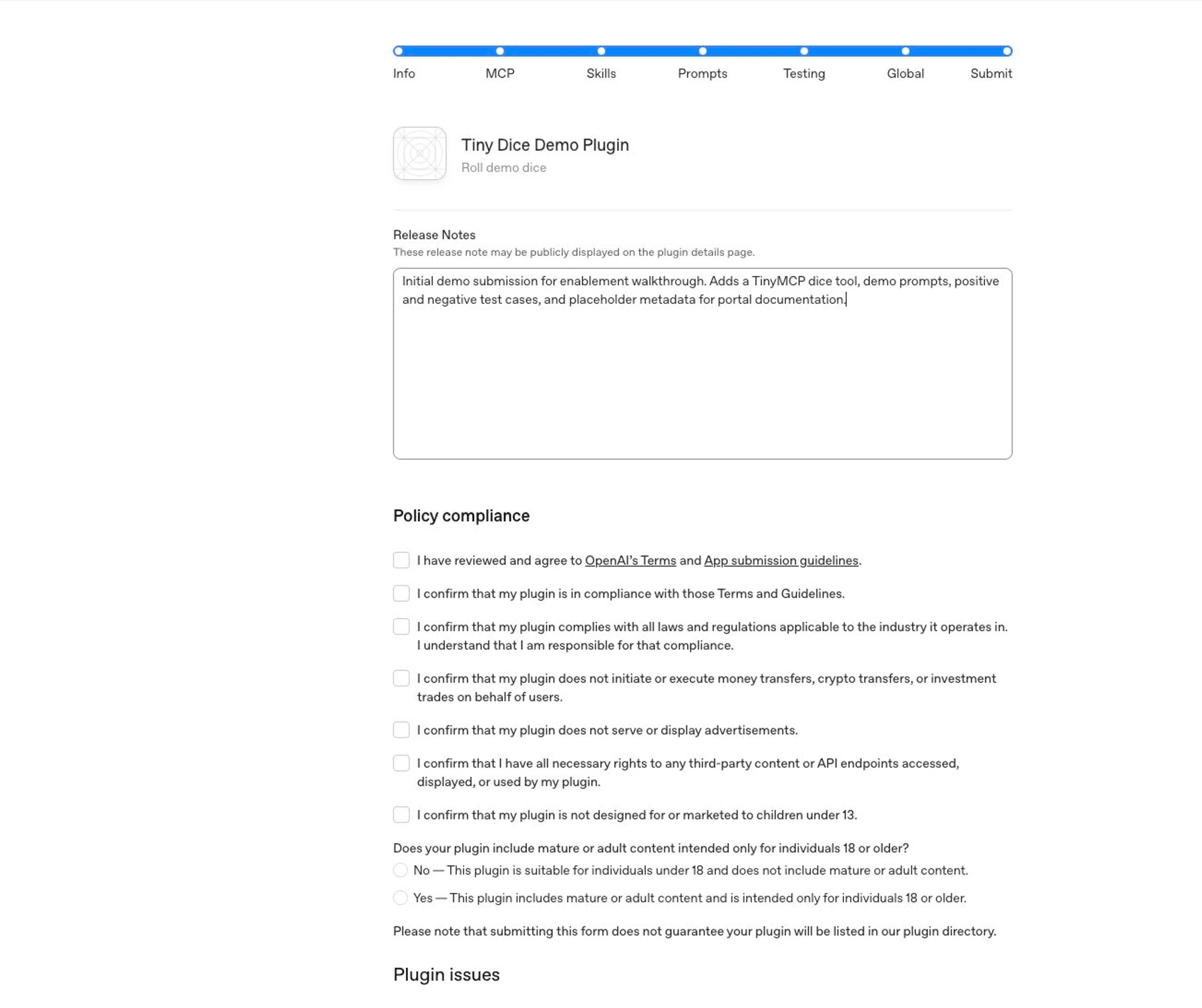
302
303## Public publishing flow
304
305Submitting a plugin starts review; it doesn't publish the plugin immediately.
306For public availability, the flow is:
307
3081. Submit the plugin through the plugin submission portal.
3092. OpenAI reviews the submission. Review timelines may vary as OpenAI builds
310 and scales the review process.
3113. After OpenAI approves the plugin, the developer chooses when to publish it
312 and publishes it from the portal.
3134. After publication, the plugin appears in the Plugins Directory
314 available in both ChatGPT and Codex.
315
316Plugins that contain apps, skills-only plugins, and app-plus-skills plugins all
317appear in the Plugins Directory.
318
319## Final checklist
320
321Before submitting, confirm:
322
323- The submitter has **Apps Management** write access.
324- The publisher has a verified developer or business identity.
325- The MCP server uses a public, production URL.
326- Plugins that contain apps define a content security policy for the exact
327 domains the app fetches from.
328- Reviewer credentials work without MFA, email confirmation, SMS confirmation,
329 or private-network access.
330- Tool names, descriptions, schemas, and annotations match actual behavior.
331- Every tool has accurate `readOnlyHint`, `openWorldHint`, and
332 `destructiveHint` values.
333- Tool responses don't include unnecessary personal data, auth secrets, debug
334 payloads, internal identifiers, or undisclosed user-related fields.
335- You tested the skills locally with the final file tree.
336- Starter prompts show realistic user workflows.
337- The submission includes five positive and three negative test cases.
338- Privacy policy, terms, support, and website URLs are public and match the
339 publisher identity.