
name: Build an AI tour guide tagline: Help users learn your app with a tour that adapts as they go. summary: Use Codex to add a WebMCP-powered tour to your web app. Highlight the next control, explain what to do, and adapt the guidance to the user's current state while they complete the steps themselves. bestFor:
-
Teams helping new users complete their first workflow in a web app.
-
Onboarding flows that change with sign-in status, connected services, or open panels.
-
Tasks where users should learn the controls and perform the actions themselves. starterPrompt: title: Build an AI tour guide body: >- Add a guided tour to [web app/repository] so Codex can show users how to [complete one specific workflow].
Read the app's existing UI, state management, and documentation first. Use WebMCP to let Codex:
-
discover tour targets through stable, semantic IDs, labels, and descriptions
-
highlight a target with a short explanation and dismiss the highlight
-
read the UI state needed to choose the next step
-
wait for the user to act, then read the updated state
-
read the app's instructions and relevant documentation
The user should complete the workflow themselves. Keep tour tools separate from tools that perform actions, and preserve the app's existing authentication and permission checks.
Start with one complete flow. Reuse the existing components and design system. Test the tour in a browser environment where Codex can call the WebMCP tools, including different starting states, a canceled step, and a target that isn't visible yet.
Summarize what changed, what you verified, and any setup still needed. Do not deploy or publish without my approval. suggestedEffort: high relatedLinks:
-
-
label: Automating repetitive work at OpenAI with Codex url: /blog/automating-repetitive-work-at-openai-with-codex
-
label: Runme url: https://web.runme.dev
-
label: QA your app with Computer Use url: /use-cases/qa-your-app-with-computer-use
For the complete documentation index, see llms.txt. Markdown versions of documentation pages are available by appending
.mdto the page URL.
Introduction
Some workflows are easier to learn when someone shows you where to go and what to select. Use Codex to build a tour that guides users through your web app while they perform the actions themselves.
With WebMCP tools for your app's controls, state, and documentation, Codex can choose the next instruction based on what the user sees. A user who hasn't connected a service needs a different first step from someone who has already completed setup.
How to use
- Open your app's repository in Codex and choose one workflow to guide, such as connecting a service or adding a folder.
- Provide the relevant documentation and describe the starting states the tour should handle.
- Run the starter prompt on this page to add tour targets, UI-state tools, and access to the app's instructions.
- Test the flow in a browser environment where Codex can call your app's WebMCP tools. Ask Codex to guide you, then complete each step yourself.
Keep the first tour narrow. Verify that it can guide a user from setup to completion before adding more workflows.
Example: Add a Google Drive folder in Runme
In Runme, users edit notebooks and use a file explorer to add Google Drive folders and navigate their files. The tour helps a new user find those controls and learn the flow.
To learn more about Runme, you can read Automating repetitive work at OpenAI with Codex.
Watch Codex highlight Runme's controls and explain their purpose. The screenshots below show a separate, task-focused tour for adding a Google Drive folder.
The Google Drive tour starts with a request:
Prompt:
Show me how to add a Google Drive folder.
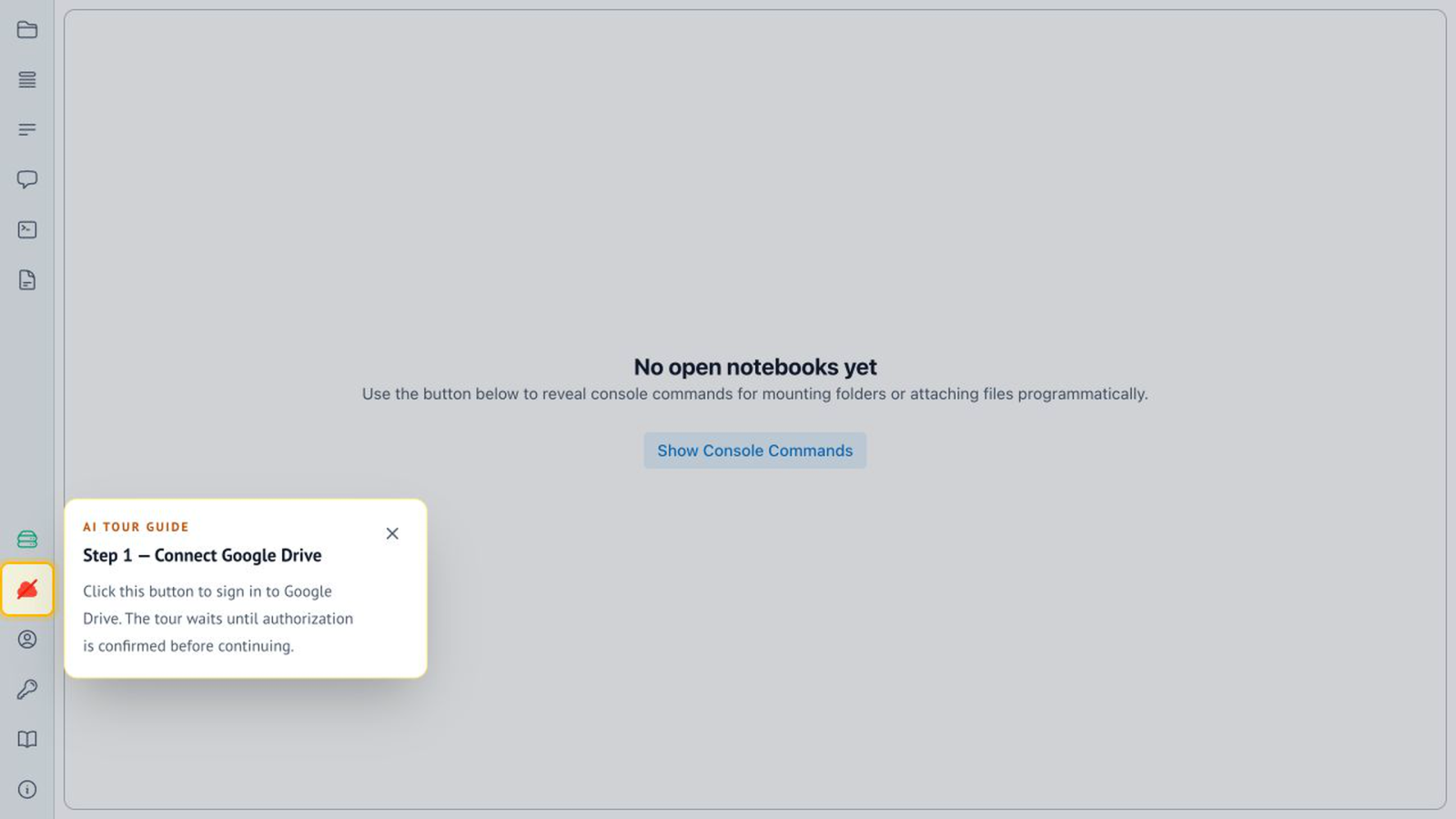
Connect Google Drive
Codex checks whether Google Drive is connected. If it isn't, Codex highlights Connect Google Drive and asks the user to select it and complete the connection.
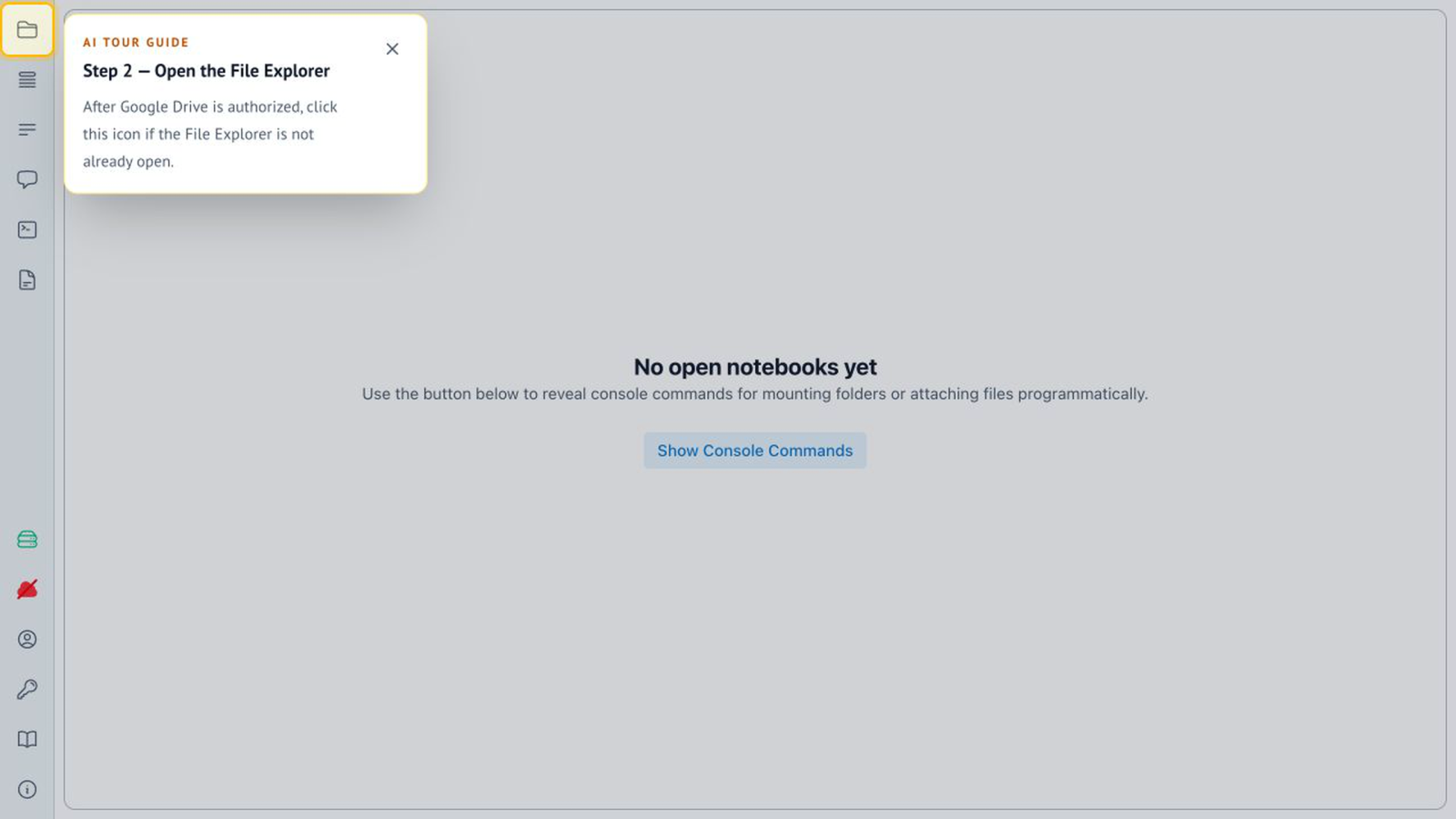
Open the file explorer
After the connection is complete, Codex guides the user to the file explorer. The next instruction follows the updated app state.
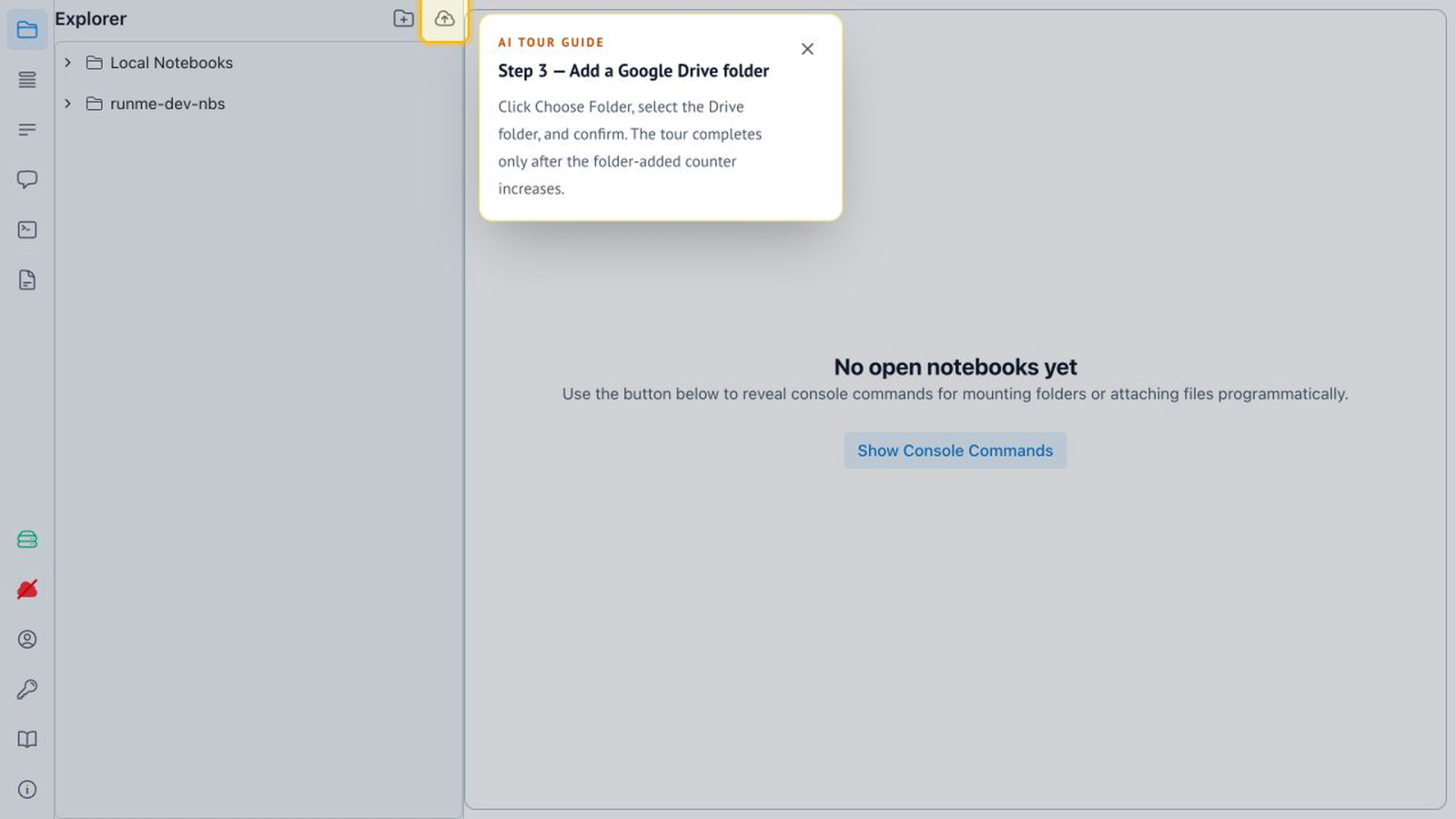
Add the folder
Once the user expands the toolbar, Codex highlights the control for adding a Google Drive folder. The user stays in control of the interaction and learns where to find it next time.
Give Codex the context to guide users
Runme's implementation provides three kinds of context: tour targets, application state, and documentation. The tool names below come from Runme; adapt the same roles to your app.
Make controls discoverable
Give tour targets stable, semantic data-tour-id values, with a label and description for each. Runme exposes these controls through three WebMCP tools:
listTargetslists the registered targets, IDs, labels, and descriptions.showTourStep({ target, title?, message, placement? })highlights a target and displays an explanation.dismissremoves the highlight.
This gives Codex a way to identify and explain a control without performing its action for the user.
Read state and wait for the user
Runme keeps tour-related state outside React and exposes it through a controller. Its getUiSnapshot tool provides the current UI state, including sign-in status. waitForUiChange(...) lets Codex wait for a change, such as the user selecting the highlighted control.
Ask Codex to read the state again after each interaction. Advancing the tour should depend on what happened in the app, not on whether Codex has already shown an instruction.
Keep instructions with the app
Runme bundles Markdown documentation with the application and makes it available through WebMCP:
readInstructionsForAIAgentsexplains how Codex should interact with the app and its tools.listDocumentation()lists the available pages and their descriptions.getDocumentation({ name })returns a selected page as Markdown.
The tour instructions and tools can ship with the app, without a separate Codex plugin for the tour.
Review the tour
Try the same request from different starting states. Check that the tour skips completed setup, waits for the user, and updates its guidance when the UI changes.
Also test a canceled step and a control that isn't visible yet. Codex should explain what is missing or choose a valid next step. It shouldn't claim that an action succeeded just because it highlighted a button.
Keep authentication, permission checks, and user actions in the existing app flow. The tour should help users understand the interface without bypassing those controls.
Good follow-ups
Once the first flow works, continue in the same chat:
- "Test this tour when Google Drive is already connected and the file explorer is closed."
- "Handle a user canceling a step, then asking to continue the tour."
- "Add a tour for [next workflow], reusing the existing targets and state tools."