
name: Automate bug triage tagline: Turn daily bug reports into a prioritized list, then automate the sweep. summary: Ask Codex to check recent alerts, issues, failed checks, logs, and chat reports, tune the list in one chat, then run that sweep on a schedule. skills:
-
token: github url: https://github.com/openai/plugins/tree/main/plugins/github description: Read issues, pull requests, comments, review threads, and failed checks when GitHub is part of your bug intake.
-
token: $sentry url: https://github.com/openai/skills/tree/main/skills/.curated/sentry description: Inspect production errors, stack traces, affected releases, and event context when alerts are part of the sweep.
-
token: slack url: https://github.com/openai/plugins/tree/main/plugins/slack description: Read the channels or threads where teammates report bugs and prepare a draft summary for a team channel.
-
token: linear url: https://github.com/openai/plugins/tree/main/plugins/linear description: Read bug queues, find existing issues, draft updates, or prepare linked follow-up tickets after the triage pass. bestFor:
-
Teams that track bugs across Sentry alerts, Slack threads, Linear issues, GitHub issues, failing PR checks, support tickets, or logs.
-
Triage workflows you want to run manually in one Codex chat before scheduling the work. starterPrompt: title: Run a Bug Triage Sweep body: >- Run a bug triage sweep for [repo/service/team] covering the last [time window].
Use these plugins: [@Sentry / @Slack / @Linear / @GitHub / none]
Input sources:
-
Sentry: [project / alert link / none]
-
Slack: [channel / thread links / none]
-
Linear: [team / project / view / issue query / none]
-
GitHub: [repo / issue query / PR checks / none]
-
Other: [logs / support tickets / deploy link / dashboard / attached file / none]
Output format:
First, name any input source you could not access.
Then return a prioritized list of bugs, sorted from P0 to P3.
If you find no bugs, say: No qualifying bugs found.
For each bug, include:
-
Priority: P0, P1, P2, or P3
-
Title
-
Evidence (links or short citations)
-
Recommended next action
Rules:
-
Do not post, create, assign, label, close, rerun, or edit anything.
-
Group duplicate reports under one bug.
-
Keep observed evidence separate from guesses. relatedLinks:
-
-
label: Scheduled tasks url: /codex/automations
-
label: Plugins url: /codex/plugins
-
label: Codex MCP url: /codex/extend/mcp
-
label: Use Codex in Linear url: /codex/third-party/linear techStack:
-
need: Where bug context gathers goodDefault: Sentry alerts, Slack channels, Linear views, GitHub issues, PR checks, support queues, on-call notes, logs, dashboards, and deploy notes why: Name the exact queues, channels, views, repos, alert links, dashboards, and files Codex should sweep.
-
need: How Codex reads it goodDefault: "Plugins for Slack, Linear, GitHub, and Sentry; connectors; MCP servers; repo CLIs; links; exports; attachments; and pasted logs" why: Install the existing integration when there is one. Build or configure a small MCP server, CLI, export, or dashboard link for internal sources Codex cannot read yet.
For the complete documentation index, see llms.txt. Markdown versions of documentation pages are available by appending
.mdto the page URL.
How to use
Ask Codex to check the places where bugs already appear: Sentry alerts, Linear issues, GitHub issues, PR checks, deploy logs, support tickets, and Slack threads. Start with one manual sweep, tune the report in the chat, then run it on a schedule.
Use one Codex chat for the whole triage loop:
- Run an on-demand sweep and get a draft list.
- Review the list and give feedback in that same chat.
- Schedule a task for the triage work from that chat.
- Optional: ask Codex to draft Linear issues, Slack updates, GitHub comments, or handoff notes when you are confident in the report.
Before you start, install the plugins Codex needs, such as Sentry, Slack, Linear, or GitHub. In the starter prompt, replace the bracketed plugin list with real @ plugin chips. Then replace each bracketed source with the exact place to search: a Sentry project or alert URL, Slack channel or thread, Linear team, view, or query, GitHub repo, issue query, or PR check, deploy link, log file, support queue, or dashboard.
Phase 1: Run the sweep
Start Codex from the repo that owns the bugs when local context helps: tests, repo tooling, build checks, or CI failures. You can also run the sweep from any repo if your bug sources are available through plugins, connectors, MCP servers, links, exports, pasted logs, or attachments.
Run the starter prompt above first. Keep only the plugins and sources that are part of your sweep.
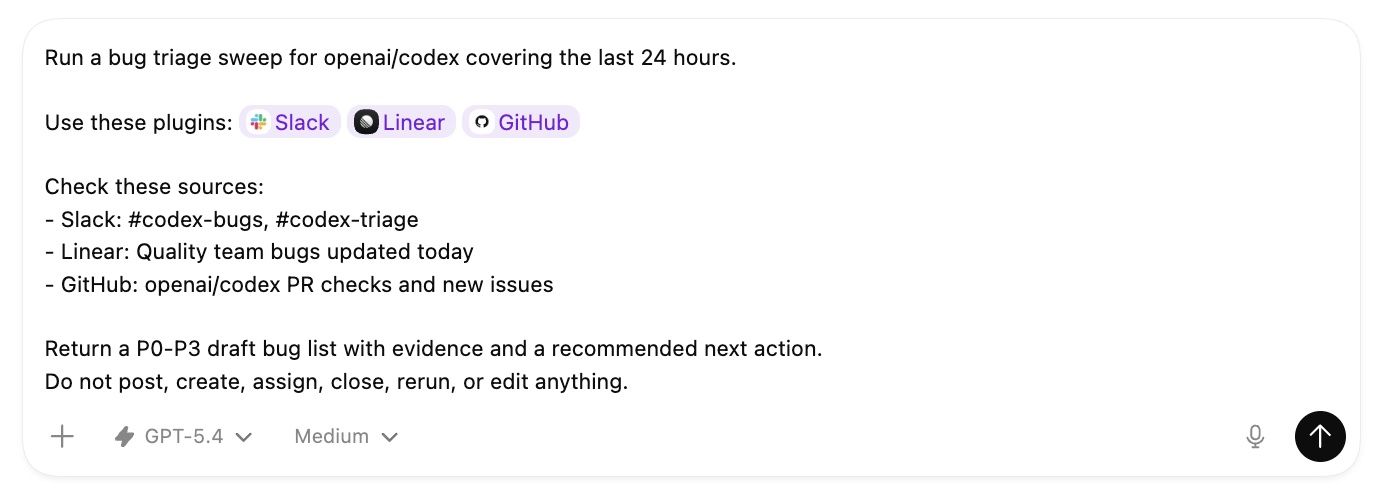
For example, a filled-in prompt can name the plugins and the exact queues, channels, or repos you want in the sweep.
Phase 2: Make the report useful
Before you automate, make sure the report is useful enough to read every day.
A useful first run has:
- High-signal bugs sorted from P0 to P3.
- Duplicate reports are grouped under one bug.
- Each bug has linked evidence or short citations.
- Guesses are separated from observed facts.
- Each bug has a short recommended next action.
Tune the report in the same chat before you schedule it. You can ask Codex to:
- Check one more source before ranking the list.
- Drop noisy alerts that the team already knows about.
- Only return P0 and P1 bugs.
- Merge Slack reports, Sentry alerts, and GitHub failures when they point to the same bug.
- Show the single best link for each bug.
- Add enough evidence that someone else can reproduce or route the issue.
Phase 3: Automate it
When the on-demand report is useful, stay in the same chat and schedule a task for the triage work from it. Codex can use what you refined in the chat to write the recurring prompt.
Schedule the triage work
Prompt:
Schedule a task for the bug triage workflow we refined in this chat.

Schedule: [every hour / every weekday morning / daily]

Use the same sources, priority rules, duplicate grouping, evidence style, and P0-P3 report format from this chat.

When you write the prompt for this scheduled work, include the plugin mentions or connected-source instructions the scheduled run needs to read those sources again.

Keep the scheduled work draft-only. Do not post, create, assign, label, close, rerun, start fixes, or edit code.

Before you schedule it, show me the task prompt, schedule, sources, and action policy.
Phase 4: Route follow-ups
Once the scheduled report is useful, decide where the work should go next. Codex can draft a Slack update for a team channel, write Linear issues for the bugs you want to track, write GitHub comments for a failing PR, or produce a handoff for whoever is on call.
Prompt:
Update the bug triage task scheduled from this chat.

After each scheduled run, draft the follow-up I need:

- Slack update for [channel]
- Linear issues for [which bugs should become issues]
- GitHub comment for [issue / PR / failing check]
- Handoff note for [team / on-call / owner]

Rules:

- Draft the follow-up in Codex first.
- Do not post to Slack, create Linear issues, or comment on GitHub until I explicitly approve that action.
- Include links to existing Linear, GitHub, Slack, or alert sources when available.
- Keep draft-only behavior for any action not explicitly approved.