
name: Make a custom flyer tagline: Create a flyer from a description or an existing design. summary: Use ChatGPT to generate a flyer for a business, event, or personal project. Describe what you want, add your text and reference images, and refine the design until you're happy with it. bestFor:
-
Creating a flyer to promote a business, event, or community project.
-
Making a new design based on an existing flyer or visual reference. starterPrompt: title: Make a flyer body: >- Make a flyer for [describe what it's for]. It should include this text: [add your text].
I'd like it to look [describe the style, colors, or illustrations you have in mind]. If I've attached a reference image, use it to guide the design. Make the text easy to read and use a format that works for [printing or sharing online]. relatedLinks:
-
label: Generate and edit images url: /docs/image-generation
For the complete documentation index, see llms.txt. Markdown versions of documentation pages are available by appending
.mdto the page URL.
Create a first version
Tell ChatGPT what the flyer is for and describe the design you have in mind. You can be specific about the colors, illustrations, and layout, or ask ChatGPT to suggest a few directions if you're unsure.
If you already have a logo, a previous flyer, or an image you like, attach it as a reference. Include the exact wording you want on the flyer, and mention whether you plan to print it or share it online.
Example
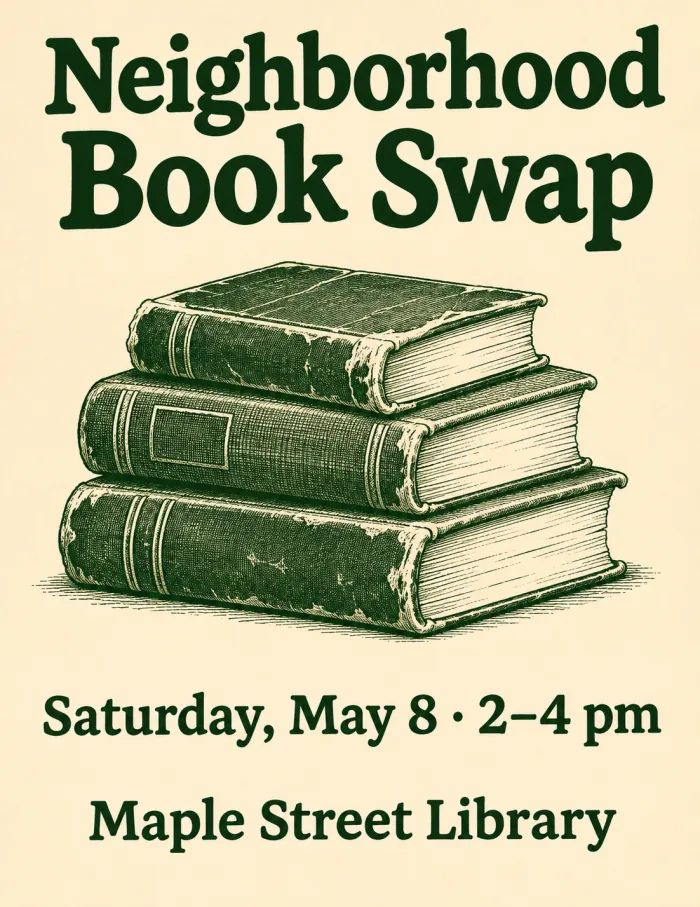
For example, here's a prompt you can try for a neighborhood book swap, along with the image ChatGPT generated from it.
Prompt:
Create a portrait flyer for a neighborhood book swap. Draw a stack of three well-loved books in dark green ink on warm cream paper. Use large, easy-to-read lettering. Include only these three lines of text, exactly as written:
Neighborhood Book Swap
Saturday, May 8 · 2–4 pm
Maple Street Library
Make the title the largest text and leave room around the time and place.
Refine the design
Once you have a first version, you can ask for changes in the same chat. For example, ask ChatGPT to enlarge the title, change the colors, or move an illustration to leave more room for the text. You can also upload the image again later and continue editing it.
When you're happy with the result, check that all the text and details are correct, then download the flyer.