6 6
7> Install Claude Code on desktop and start your first coding session7> Install Claude Code on desktop and start your first coding session
8 8
9The desktop app gives you Claude Code with a graphical interface: visual diff review, parallel sessions with Git worktree isolation, file attachments, and the ability to run long-running tasks remotely. Work with local files, connect to remote machines over SSH, or run sessions in the cloud. No terminal required.9The desktop app gives you Claude Code with a graphical interface: visual diff review, live app preview, GitHub PR monitoring with auto-merge, parallel sessions with Git worktree isolation, and the ability to run tasks remotely. No terminal required.
10 10
11If you're already set up, see [Use Claude Code Desktop](/en/desktop) for the full reference.11This page walks through installing the app and starting your first session. If you're already set up, see [Use Claude Code Desktop](/en/desktop) for the full reference.
12 12
13<Frame>13<Frame>
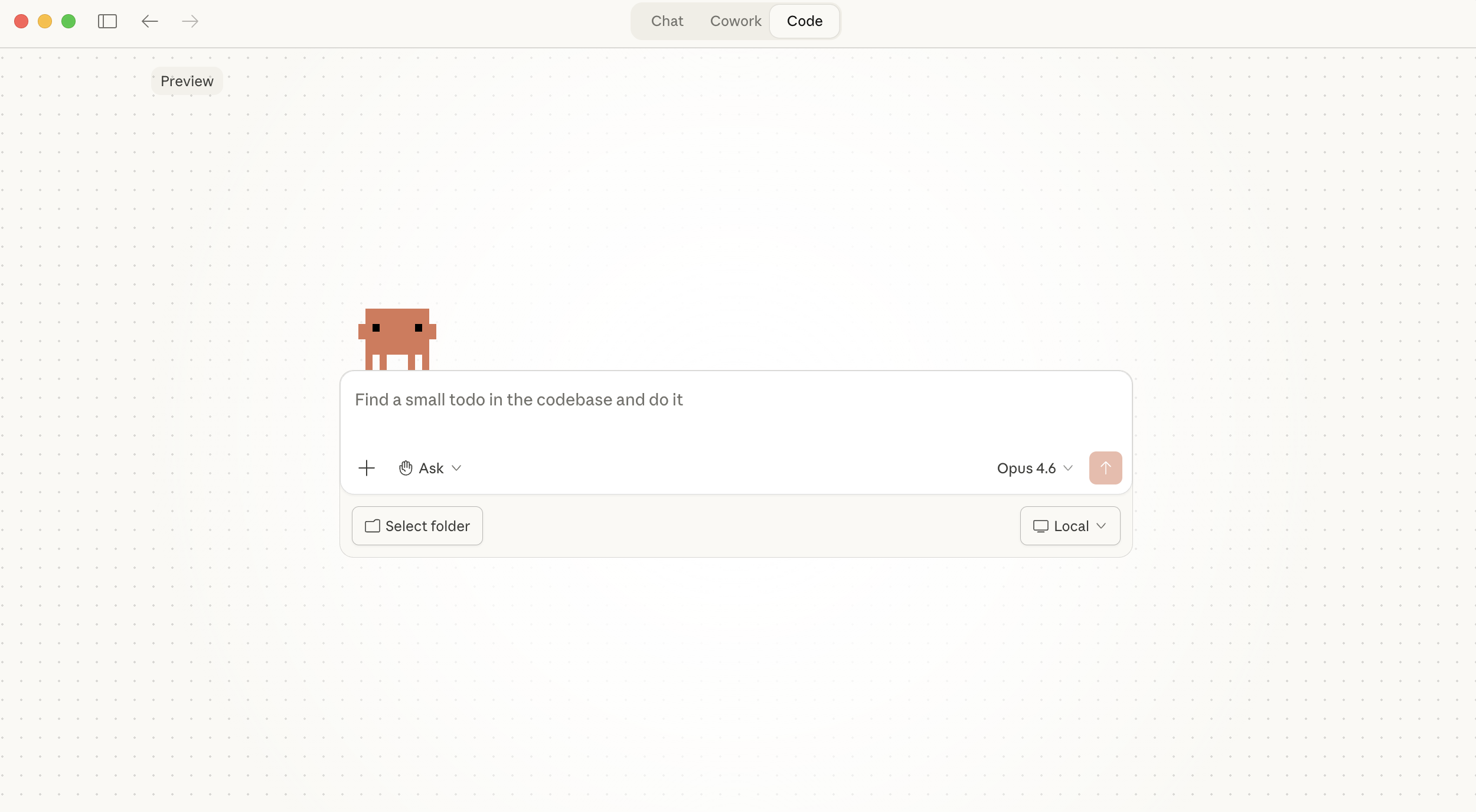
14 <img src="https://mintcdn.com/claude-code/CNLUpFGiXoc9mhvD/images/desktop-code-tab-light.png?fit=max&auto=format&n=CNLUpFGiXoc9mhvD&q=85&s=9a36a7a27b9f4c6f2e1c83bdb34f69ce" className="block dark:hidden" alt="The Claude Code Desktop interface showing the Code tab selected, with a prompt box, permission mode selector set to Ask, model picker, folder selector, and Local environment option" data-og-width="2500" width="2500" data-og-height="1376" height="1376" data-path="images/desktop-code-tab-light.png" data-optimize="true" data-opv="3" srcset="https://mintcdn.com/claude-code/CNLUpFGiXoc9mhvD/images/desktop-code-tab-light.png?w=280&fit=max&auto=format&n=CNLUpFGiXoc9mhvD&q=85&s=b4d1408a312d3ff3ac96dd133e4ef32b 280w, https://mintcdn.com/claude-code/CNLUpFGiXoc9mhvD/images/desktop-code-tab-light.png?w=560&fit=max&auto=format&n=CNLUpFGiXoc9mhvD&q=85&s=c2d9f668767d4de33696b3de190c0024 560w, https://mintcdn.com/claude-code/CNLUpFGiXoc9mhvD/images/desktop-code-tab-light.png?w=840&fit=max&auto=format&n=CNLUpFGiXoc9mhvD&q=85&s=89a78335d513c0ec2131feb11eeef6dc 840w, https://mintcdn.com/claude-code/CNLUpFGiXoc9mhvD/images/desktop-code-tab-light.png?w=1100&fit=max&auto=format&n=CNLUpFGiXoc9mhvD&q=85&s=0ef93540eafcedd2fb0ad718553325f4 1100w, https://mintcdn.com/claude-code/CNLUpFGiXoc9mhvD/images/desktop-code-tab-light.png?w=1650&fit=max&auto=format&n=CNLUpFGiXoc9mhvD&q=85&s=e7923c583f632de9f8a7e0e0da4f8c84 1650w, https://mintcdn.com/claude-code/CNLUpFGiXoc9mhvD/images/desktop-code-tab-light.png?w=2500&fit=max&auto=format&n=CNLUpFGiXoc9mhvD&q=85&s=38d64bdceaba941a73446f258be336ea 2500w" />14 <img src="https://mintcdn.com/claude-code/CNLUpFGiXoc9mhvD/images/desktop-code-tab-light.png?fit=max&auto=format&n=CNLUpFGiXoc9mhvD&q=85&s=9a36a7a27b9f4c6f2e1c83bdb34f69ce" className="block dark:hidden" alt="The Claude Code Desktop interface showing the Code tab selected, with a prompt box, permission mode selector set to Ask permissions, model picker, folder selector, and Local environment option" data-og-width="2500" width="2500" data-og-height="1376" height="1376" data-path="images/desktop-code-tab-light.png" data-optimize="true" data-opv="3" srcset="https://mintcdn.com/claude-code/CNLUpFGiXoc9mhvD/images/desktop-code-tab-light.png?w=280&fit=max&auto=format&n=CNLUpFGiXoc9mhvD&q=85&s=b4d1408a312d3ff3ac96dd133e4ef32b 280w, https://mintcdn.com/claude-code/CNLUpFGiXoc9mhvD/images/desktop-code-tab-light.png?w=560&fit=max&auto=format&n=CNLUpFGiXoc9mhvD&q=85&s=c2d9f668767d4de33696b3de190c0024 560w, https://mintcdn.com/claude-code/CNLUpFGiXoc9mhvD/images/desktop-code-tab-light.png?w=840&fit=max&auto=format&n=CNLUpFGiXoc9mhvD&q=85&s=89a78335d513c0ec2131feb11eeef6dc 840w, https://mintcdn.com/claude-code/CNLUpFGiXoc9mhvD/images/desktop-code-tab-light.png?w=1100&fit=max&auto=format&n=CNLUpFGiXoc9mhvD&q=85&s=0ef93540eafcedd2fb0ad718553325f4 1100w, https://mintcdn.com/claude-code/CNLUpFGiXoc9mhvD/images/desktop-code-tab-light.png?w=1650&fit=max&auto=format&n=CNLUpFGiXoc9mhvD&q=85&s=e7923c583f632de9f8a7e0e0da4f8c84 1650w, https://mintcdn.com/claude-code/CNLUpFGiXoc9mhvD/images/desktop-code-tab-light.png?w=2500&fit=max&auto=format&n=CNLUpFGiXoc9mhvD&q=85&s=38d64bdceaba941a73446f258be336ea 2500w" />
15 15
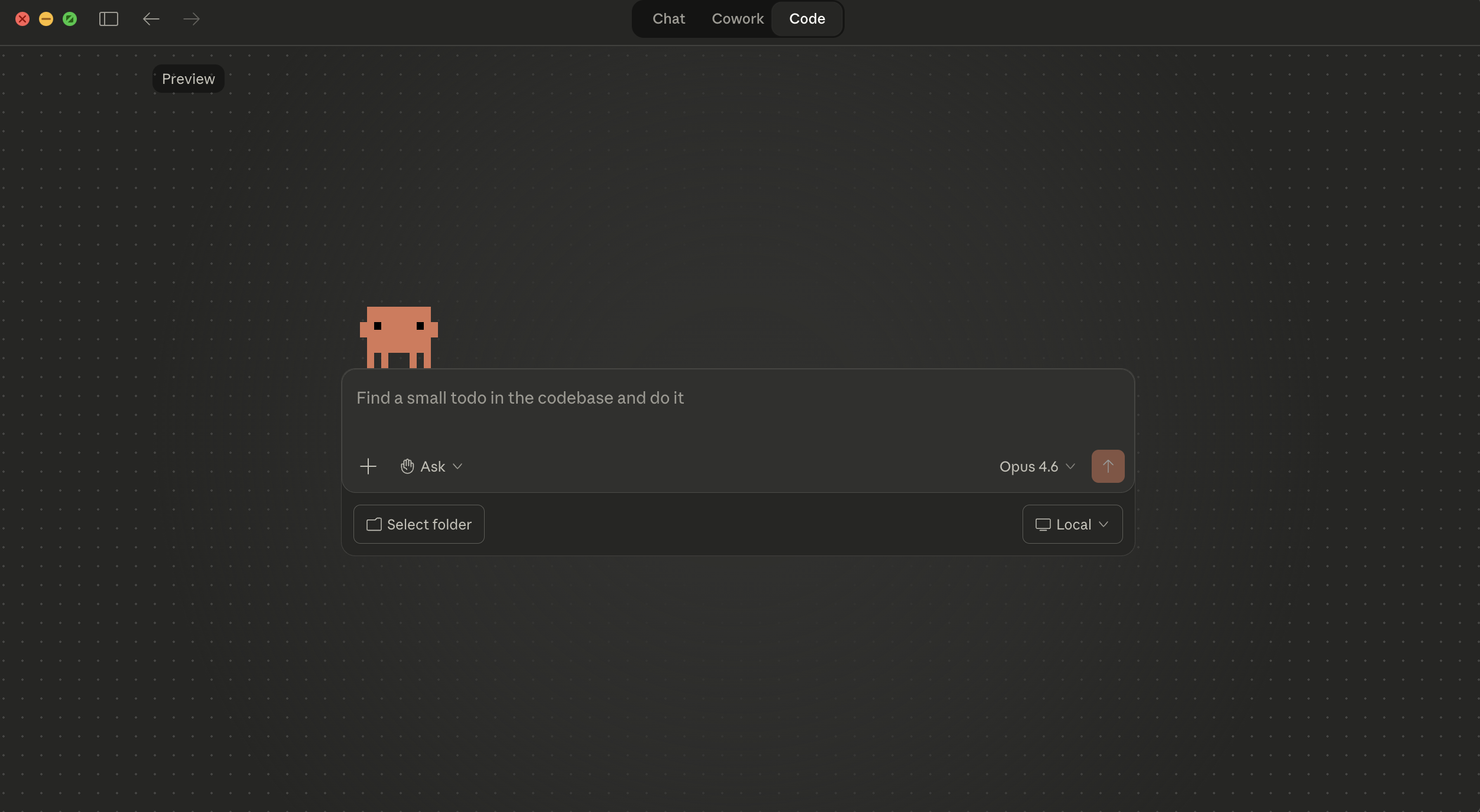
16 <img src="https://mintcdn.com/claude-code/CNLUpFGiXoc9mhvD/images/desktop-code-tab-dark.png?fit=max&auto=format&n=CNLUpFGiXoc9mhvD&q=85&s=5463defe81c459fb9b1f91f6a958cfb8" className="hidden dark:block" alt="The Claude Code Desktop interface in dark mode showing the Code tab selected, with a prompt box, permission mode selector set to Ask, model picker, folder selector, and Local environment option" data-og-width="2504" width="2504" data-og-height="1374" height="1374" data-path="images/desktop-code-tab-dark.png" data-optimize="true" data-opv="3" srcset="https://mintcdn.com/claude-code/CNLUpFGiXoc9mhvD/images/desktop-code-tab-dark.png?w=280&fit=max&auto=format&n=CNLUpFGiXoc9mhvD&q=85&s=f2a6322688262feb9d680b99c24817ab 280w, https://mintcdn.com/claude-code/CNLUpFGiXoc9mhvD/images/desktop-code-tab-dark.png?w=560&fit=max&auto=format&n=CNLUpFGiXoc9mhvD&q=85&s=ffe9a3d1c4260fb12c66f533fdedc02e 560w, https://mintcdn.com/claude-code/CNLUpFGiXoc9mhvD/images/desktop-code-tab-dark.png?w=840&fit=max&auto=format&n=CNLUpFGiXoc9mhvD&q=85&s=867b7997a910af3ffac1101559564dd7 840w, https://mintcdn.com/claude-code/CNLUpFGiXoc9mhvD/images/desktop-code-tab-dark.png?w=1100&fit=max&auto=format&n=CNLUpFGiXoc9mhvD&q=85&s=976c9049c9e4cea2b02d4b6a1ef55142 1100w, https://mintcdn.com/claude-code/CNLUpFGiXoc9mhvD/images/desktop-code-tab-dark.png?w=1650&fit=max&auto=format&n=CNLUpFGiXoc9mhvD&q=85&s=d8f3792ddadf66f61306dc41680aaa34 1650w, https://mintcdn.com/claude-code/CNLUpFGiXoc9mhvD/images/desktop-code-tab-dark.png?w=2500&fit=max&auto=format&n=CNLUpFGiXoc9mhvD&q=85&s=88d049488f547e483e8c4f59ea8b2fd8 2500w" />16 <img src="https://mintcdn.com/claude-code/CNLUpFGiXoc9mhvD/images/desktop-code-tab-dark.png?fit=max&auto=format&n=CNLUpFGiXoc9mhvD&q=85&s=5463defe81c459fb9b1f91f6a958cfb8" className="hidden dark:block" alt="The Claude Code Desktop interface in dark mode showing the Code tab selected, with a prompt box, permission mode selector set to Ask permissions, model picker, folder selector, and Local environment option" data-og-width="2504" width="2504" data-og-height="1374" height="1374" data-path="images/desktop-code-tab-dark.png" data-optimize="true" data-opv="3" srcset="https://mintcdn.com/claude-code/CNLUpFGiXoc9mhvD/images/desktop-code-tab-dark.png?w=280&fit=max&auto=format&n=CNLUpFGiXoc9mhvD&q=85&s=f2a6322688262feb9d680b99c24817ab 280w, https://mintcdn.com/claude-code/CNLUpFGiXoc9mhvD/images/desktop-code-tab-dark.png?w=560&fit=max&auto=format&n=CNLUpFGiXoc9mhvD&q=85&s=ffe9a3d1c4260fb12c66f533fdedc02e 560w, https://mintcdn.com/claude-code/CNLUpFGiXoc9mhvD/images/desktop-code-tab-dark.png?w=840&fit=max&auto=format&n=CNLUpFGiXoc9mhvD&q=85&s=867b7997a910af3ffac1101559564dd7 840w, https://mintcdn.com/claude-code/CNLUpFGiXoc9mhvD/images/desktop-code-tab-dark.png?w=1100&fit=max&auto=format&n=CNLUpFGiXoc9mhvD&q=85&s=976c9049c9e4cea2b02d4b6a1ef55142 1100w, https://mintcdn.com/claude-code/CNLUpFGiXoc9mhvD/images/desktop-code-tab-dark.png?w=1650&fit=max&auto=format&n=CNLUpFGiXoc9mhvD&q=85&s=d8f3792ddadf66f61306dc41680aaa34 1650w, https://mintcdn.com/claude-code/CNLUpFGiXoc9mhvD/images/desktop-code-tab-dark.png?w=2500&fit=max&auto=format&n=CNLUpFGiXoc9mhvD&q=85&s=88d049488f547e483e8c4f59ea8b2fd8 2500w" />
17</Frame>17</Frame>
18 18
19The desktop app has three tabs:19The desktop app has three tabs:
44 </Card>44 </Card>
45 </CardGroup>45 </CardGroup>
46 46
47 For Windows ARM64, [download here](https://claude.ai/api/desktop/win32/arm64/exe/latest/redirect?utm_source=claude_code\&utm_medium=docs). Local sessions are not available on ARM64 devices, so use remote sessions instead. See [ARM64 limitations](/en/desktop#windows-specific-issues) for details.47 For Windows ARM64, [download here](https://claude.ai/api/desktop/win32/arm64/exe/latest/redirect?utm_source=claude_code\&utm_medium=docs).
48 48
49 Linux is not currently supported.49 Linux is not currently supported.
50 </Step>50 </Step>
58 </Step>58 </Step>
59</Steps>59</Steps>
60 60
61The desktop app includes Claude Code. You don't need to install Node.js or the CLI separately. To use `claude` from the terminal, install the CLI separately. See [Get started with the CLI](/en/quickstart).
62
61## Start your first session63## Start your first session
62 64
63With the Code tab open, choose a project and give Claude something to do.65With the Code tab open, choose a project and give Claude something to do.
67 Select **Local** to run Claude on your machine using your files directly. Click **Select folder** and choose your project directory.69 Select **Local** to run Claude on your machine using your files directly. Click **Select folder** and choose your project directory.
68 70
69 <Tip>71 <Tip>
70 Start with a small project you know well. It's the fastest way to see what Claude Code can do. Session isolation requires [Git](https://git-scm.com/downloads); without Git, all sessions in the same folder edit the same files.72 Start with a small project you know well. It's the fastest way to see what Claude Code can do. On Windows, [Git](https://git-scm.com/downloads/win) must be installed for local sessions to work. Most Macs include Git by default.
71 </Tip>73 </Tip>
72 74
73 You can also select:75 You can also select:
74 76
75 * **Remote**: Run sessions on Anthropic's cloud infrastructure that continue even if you close the app. Remote sessions use the same infrastructure as [Claude Code on the web](/en/claude-code-on-the-web).77 * **Remote**: Run sessions on Anthropic's cloud infrastructure that continue even if you close the app. Remote sessions use the same infrastructure as [Claude Code on the web](/en/claude-code-on-the-web).
76 * **SSH**: Connect to a remote machine over SSH (your own servers, cloud VMs, or dev containers). Claude runs on the remote machine with access to its files and tools.78 * **SSH**: Connect to a remote machine over SSH (your own servers, cloud VMs, or dev containers). Claude Code must be installed on the remote machine.
77 </Step>79 </Step>
78 80
79 <Step title="Choose a model">81 <Step title="Choose a model">
80 Select a model from the dropdown next to the send button. See [models](/en/overview#models) for a comparison of Opus, Sonnet, and Haiku. You cannot change the model after the session starts.82 Select a model from the dropdown next to the send button. See [models](/en/model-config#available-models) for a comparison of Opus, Sonnet, and Haiku. You cannot change the model after the session starts.
81 </Step>83 </Step>
82 84
83 <Step title="Tell Claude what to do">85 <Step title="Tell Claude what to do">
91 </Step>93 </Step>
92 94
93 <Step title="Review and accept changes">95 <Step title="Review and accept changes">
94 By default, the Code tab starts in [Ask mode](/en/desktop#choose-a-permission-mode), where Claude proposes changes and waits for your approval before applying them. You'll see:96 By default, the Code tab starts in [Ask permissions mode](/en/desktop#choose-a-permission-mode), where Claude proposes changes and waits for your approval before applying them. You'll see:
95 97
96 1. A [diff view](/en/desktop#review-changes-with-diff-view) showing exactly what will change in each file98 1. A [diff view](/en/desktop#review-changes-with-diff-view) showing exactly what will change in each file
97 2. Accept/Reject buttons to approve or decline each change99 2. Accept/Reject buttons to approve or decline each change
111 113
112**Use skills for repeatable tasks.** Type `/` or click **+** → **Slash commands** to browse [built-in commands](/en/interactive-mode#built-in-commands), [custom skills](/en/skills), and plugin skills. Skills are reusable prompts you can invoke whenever you need them, like code review checklists or deployment steps.114**Use skills for repeatable tasks.** Type `/` or click **+** → **Slash commands** to browse [built-in commands](/en/interactive-mode#built-in-commands), [custom skills](/en/skills), and plugin skills. Skills are reusable prompts you can invoke whenever you need them, like code review checklists or deployment steps.
113 115
114**Review changes before committing.** After Claude edits files, a `+12 -1` indicator appears. Click it to open the [diff view](/en/desktop#review-changes-with-diff-view), review modifications file by file, and comment on specific lines. Claude reads your comments and revises.116**Review changes before committing.** After Claude edits files, a `+12 -1` indicator appears. Click it to open the [diff view](/en/desktop#review-changes-with-diff-view), review modifications file by file, and comment on specific lines. Claude reads your comments and revises. Click **Review code** to have Claude evaluate the diffs itself and leave inline suggestions.
115 117
116**Adjust how much control you have.** Your [permission mode](/en/desktop#choose-a-permission-mode) controls the balance. Ask mode (default) requires approval before every edit. Code mode auto-accepts file edits for faster iteration. Plan mode lets Claude map out an approach without touching any files, which is useful before a large refactor.118**Adjust how much control you have.** Your [permission mode](/en/desktop#choose-a-permission-mode) controls the balance. Ask permissions (default) requires approval before every edit. Auto accept edits auto-accepts file edits for faster iteration. Plan mode lets Claude map out an approach without touching any files, which is useful before a large refactor.
117 119
118**Add plugins for more capabilities.** Click the **+** button next to the prompt box and select **Plugins** to browse and install [plugins](/en/desktop#install-plugins) that add skills, agents, MCP servers, and more.120**Add plugins for more capabilities.** Click the **+** button next to the prompt box and select **Plugins** to browse and install [plugins](/en/desktop#install-plugins) that add skills, agents, MCP servers, and more.
119 121
120**Scale up when you're ready.** Open [parallel sessions](/en/desktop#work-in-parallel-with-sessions) from the sidebar to work on multiple tasks at once, each in its own Git worktree. Send [long-running work to the cloud](/en/desktop#run-long-running-tasks-remotely) so it continues even if you close the app, or [continue a session on the web or in VS Code](/en/desktop#continue-in-another-surface) if a task takes longer than expected. [Connect external tools](/en/desktop#extend-claude-code) like GitHub, Slack, and Linear to bring your workflow together.122**Preview your app.** Click the **Preview** dropdown to run your dev server directly in the desktop. Claude can view the running app, test endpoints, inspect logs, and iterate on what it sees. See [Preview your app](/en/desktop#preview-your-app).
123
124**Track your pull request.** After opening a PR, Claude Code monitors CI check results and can automatically fix failures or merge the PR once all checks pass. See [Monitor pull request status](/en/desktop#monitor-pull-request-status).
125
126**Scale up when you're ready.** Open [parallel sessions](/en/desktop#work-in-parallel-with-sessions) from the sidebar to work on multiple tasks at once, each in its own Git worktree. Send [long-running work to the cloud](/en/desktop#run-long-running-tasks-remotely) so it continues even if you close the app, or [continue a session on the web or in your IDE](/en/desktop#continue-in-another-surface) if a task takes longer than expected. [Connect external tools](/en/desktop#extend-claude-code) like GitHub, Slack, and Linear to bring your workflow together.
121 127
122## Coming from the CLI?128## Coming from the CLI?
123 129