16 16
17To see a sample in your own terminal, create the small mod in these steps and paste the sample into it. The mod adds a `/gallery` command that opens a pane and draws the sample there. A [pane](/docs/en/plugins/mods/interface#pick-where-to-draw) is a sidebar beside the transcript in a wide fullscreen terminal, or a framed region above the prompt otherwise.17To see a sample in your own terminal, create the small mod in these steps and paste the sample into it. The mod adds a `/gallery` command that opens a pane and draws the sample there. A [pane](/docs/en/plugins/mods/interface#pick-where-to-draw) is a sidebar beside the transcript in a wide fullscreen terminal, or a framed region above the prompt otherwise.
18 18
19<Steps>19**1. Create the mod**
20 <Step title="Create the mod">
21 Create a directory named `gallery` with `.claude-plugin` and `hooks` directories inside it. [Create a mod](/docs/en/plugins/mods/create#write-a-mod-yourself) explains the files.
22 20
23 Save the manifest as `gallery/.claude-plugin/plugin.json`:21Create a directory named `gallery` with `.claude-plugin` and `hooks` directories inside it. [Create a mod](/docs/en/plugins/mods/create#write-a-mod-yourself) explains the files.
24 22
25 ```json gallery/.claude-plugin/plugin.json theme={null}23Save the manifest as `gallery/.claude-plugin/plugin.json`:
26 {24
25```json gallery/.claude-plugin/plugin.json theme={null}
26{
27 "name": "gallery",27 "name": "gallery",
28 "version": "0.1.0",28 "version": "0.1.0",
29 "description": "Opens a pane that draws one sample",29 "description": "Opens a pane that draws one sample",
30 "author": { "name": "Your Name" }30 "author": { "name": "Your Name" }
31 }31}
32 ```32```
33 33
34 Name your entry point in `gallery/hooks/hooks.json`:34Name your entry point in `gallery/hooks/hooks.json`:
35 35
36 ```json gallery/hooks/hooks.json theme={null}36```json gallery/hooks/hooks.json theme={null}
37 {37{
38 "modules": ["./register.js"]38 "modules": ["./register.js"]
39 }39}
40 ```40```
41 41
42 Save the code as `gallery/hooks/register.js`. It adds a `/gallery` command that opens a pane, and draws `Plain text` in that pane:42Save the code as `gallery/hooks/register.js`. It adds a `/gallery` command that opens a pane, and draws `Plain text` in that pane:
43 43
44 ```javascript gallery/hooks/register.js theme={null}44```javascript gallery/hooks/register.js theme={null}
45 // Stands in for your own callback in the samples that take one45// Stands in for your own callback in the samples that take one
46 const noop = () => {}46const noop = () => {}
47 // The Select sample keeps its choice here47// The Select sample keeps its choice here
48 let picked = 'md'48let picked = 'md'
49 49
50 // The Raster sample packs its cells with this function50// The Raster sample packs its cells with this function
51 const DEFAULT_COLOR = 0x0100000051const DEFAULT_COLOR = 0x01000000
52 function cellsOf(rows) {52function cellsOf(rows) {
53 const numbers = rows.flat().flatMap(([char, color]) => [char.codePointAt(0), color, DEFAULT_COLOR])53 const numbers = rows.flat().flatMap(([char, color]) => [char.codePointAt(0), color, DEFAULT_COLOR])
54 return new Uint8Array(Uint32Array.from(numbers).buffer).toBase64()54 return new Uint8Array(Uint32Array.from(numbers).buffer).toBase64()
55 }55}
56 56
57 export function register(on) {57export function register(on) {
58 on('session.start', async ($, e, next) => {58 on('session.start', async ($, e, next) => {
59 await $.command.register({ name: 'gallery', description: 'Open the sample pane' })59 await $.command.register({ name: 'gallery', description: 'Open the sample pane' })
60 return next(e)60 return next(e)
71 // Replace the element after return with a sample71 // Replace the element after return with a sample
72 return Text({ children: ['Plain text'] })72 return Text({ children: ['Plain text'] })
73 })73 })
74 }74}
75 ```75```
76 </Step>76
77**2. Run the mod**
78
79In your shell, start Claude Code from the directory that holds `gallery`:
77 80
78 <Step title="Run the mod">81```bash theme={null}
79 In your shell, start Claude Code from the directory that holds `gallery`:82claude --plugin-dir ./gallery
83```
80 84
81 ```bash theme={null}85At the Claude Code prompt, run `/gallery`. A pane opens with `Plain text` in it.
82 claude --plugin-dir ./gallery
83 ```
84 86
85 At the Claude Code prompt, run `/gallery`. A pane opens with `Plain text` in it.87**3. Swap in a sample**
86 </Step>
87 88
88 <Step title="Swap in a sample">89Copy a sample from this page. In `register.js`, paste it over `Text({ children: ['Plain text'] })`, so that it follows `return`, and save the file. Claude Code reloads the module each time you save, so run `/gallery` again to see the new sample.
89 Copy a sample from this page. In `register.js`, paste it over `Text({ children: ['Plain text'] })`, so that it follows `return`, and save the file. Claude Code reloads the module each time you save, so run `/gallery` again to see the new sample.
90 </Step>
91</Steps>
92 90
93## Pick an element91## Pick an element
94 92
125})123})
126```124```
127 125
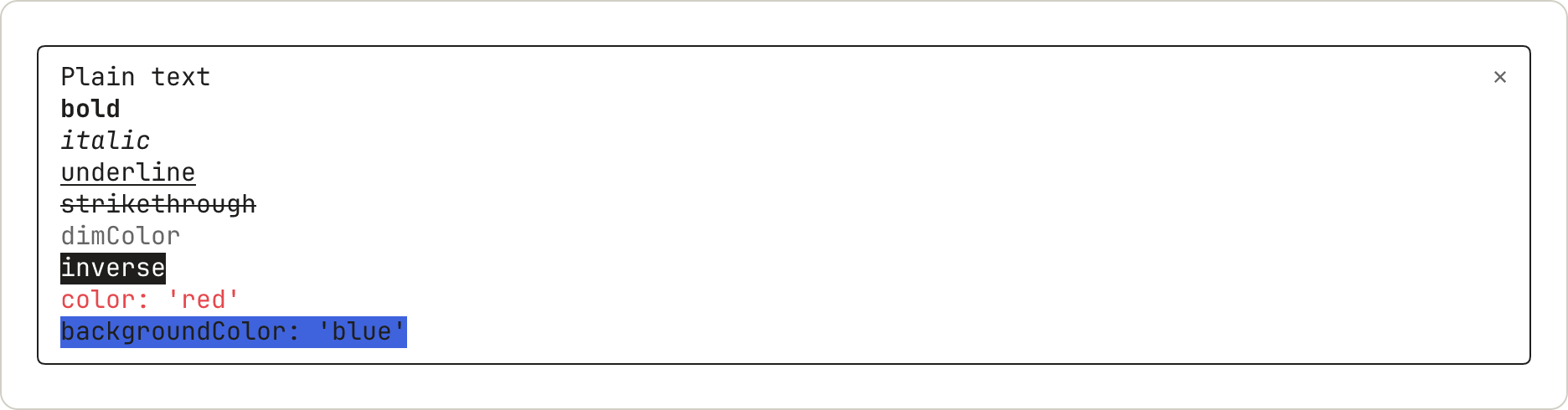
128<img src="https://mintcdn.com/claude-code/EXkwf0kKMewZsyod/images/mods-el-text-light.png?fit=max&auto=format&n=EXkwf0kKMewZsyod&q=85&s=90724ce3953d9347b61b6a9266fda451" className="dark:hidden" alt="A pane with nine lines of text, each named for its style: plain, bold, italic, underline, strikethrough, dimColor in gray, inverse, color red, and backgroundColor blue." width="1872" height="490" data-path="images/mods-el-text-light.png" />126
129
130<img src="https://mintcdn.com/claude-code/EXkwf0kKMewZsyod/images/mods-el-text-dark.png?fit=max&auto=format&n=EXkwf0kKMewZsyod&q=85&s=790dd3465e06db0842639d0d8fcbbc96" className="hidden dark:block" alt="A pane with nine lines of text, each named for its style: plain, bold, italic, underline, strikethrough, dimColor in gray, inverse, color red, and backgroundColor blue." width="1872" height="490" data-path="images/mods-el-text-dark.png" />
131 127
132`dimColor` draws the text in gray. `backgroundColor` fills only as wide as the text.128`dimColor` draws the text in gray. `backgroundColor` fills only as wide as the text.
133 129
141})137})
142```138```
143 139
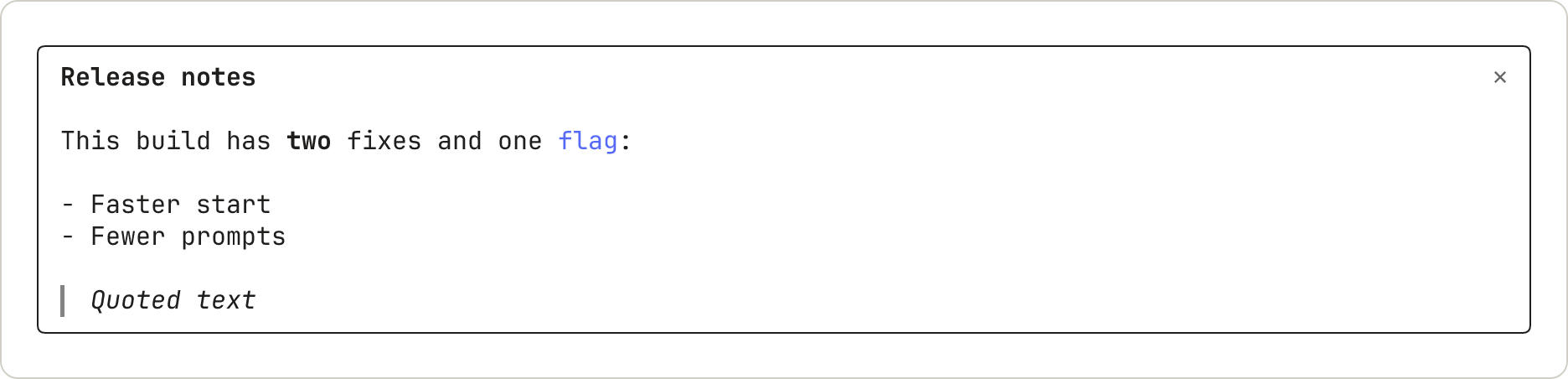
144<img src="https://mintcdn.com/claude-code/EXkwf0kKMewZsyod/images/mods-el-markdown-light.png?fit=max&auto=format&n=EXkwf0kKMewZsyod&q=85&s=e40eacc4e3fbe06eb003f4463f552ec1" className="dark:hidden" alt="A pane with a bold heading, Release notes, then a sentence with one bold word and one colored code word, a two-item list, and a quote drawn in italics with a bar on its left." width="1872" height="452" data-path="images/mods-el-markdown-light.png" />140
145
146<img src="https://mintcdn.com/claude-code/EXkwf0kKMewZsyod/images/mods-el-markdown-dark.png?fit=max&auto=format&n=EXkwf0kKMewZsyod&q=85&s=2cc342ed0c58e752c425fff3c95a33a6" className="hidden dark:block" alt="A pane with a bold heading, Release notes, then a sentence with one bold word and one colored code word, a two-item list, and a quote drawn in italics with a bar on its left." width="1872" height="452" data-path="images/mods-el-markdown-dark.png" />
147 141
148A heading draws in bold without its `#` marks. Inline code draws in color without its backticks. A quote draws in italics with a bar on its left.142A heading draws in bold without its `#` marks. Inline code draws in color without its backticks. A quote draws in italics with a bar on its left.
149 143
155Link({ href: 'https://code.claude.com/docs', label: 'Claude Code docs' })149Link({ href: 'https://code.claude.com/docs', label: 'Claude Code docs' })
156```150```
157 151
158<img src="https://mintcdn.com/claude-code/EXkwf0kKMewZsyod/images/mods-el-link-light.png?fit=max&auto=format&n=EXkwf0kKMewZsyod&q=85&s=8217bd2dfb561a8ba57023c6d89ea977" className="dark:hidden" alt="A pane with one line: the label Claude Code docs, then the URL in gray." width="1872" height="186" data-path="images/mods-el-link-light.png" />152
159
160<img src="https://mintcdn.com/claude-code/EXkwf0kKMewZsyod/images/mods-el-link-dark.png?fit=max&auto=format&n=EXkwf0kKMewZsyod&q=85&s=cd32f222a7d3530b070f58f5f189a1f8" className="hidden dark:block" alt="A pane with one line: the label Claude Code docs, then the URL in gray." width="1872" height="186" data-path="images/mods-el-link-dark.png" />
161 153
162The terminal draws the URL as text after the label. Whether a click opens it depends on the user's terminal.154The terminal draws the URL as text after the label. Whether a click opens it depends on the user's terminal.
163 155
177})169})
178```170```
179 171
180<img src="https://mintcdn.com/claude-code/EXkwf0kKMewZsyod/images/mods-el-code-light.png?fit=max&auto=format&n=EXkwf0kKMewZsyod&q=85&s=4e13f5d506d3fdcc59d6d9524f48d2a9" className="dark:hidden" alt="A pane with two numbered lines of JavaScript in syntax colors." width="1872" height="224" data-path="images/mods-el-code-light.png" />172
181
182<img src="https://mintcdn.com/claude-code/EXkwf0kKMewZsyod/images/mods-el-code-dark.png?fit=max&auto=format&n=EXkwf0kKMewZsyod&q=85&s=59f797371dd91b16b874a382b784b668" className="hidden dark:block" alt="A pane with two numbered lines of JavaScript in syntax colors." width="1872" height="224" data-path="images/mods-el-code-dark.png" />
183 173
184The colors come from the user's theme.174The colors come from the user's theme.
185 175
194})184})
195```185```
196 186
197<img src="https://mintcdn.com/claude-code/EXkwf0kKMewZsyod/images/mods-el-diff-light.png?fit=max&auto=format&n=EXkwf0kKMewZsyod&q=85&s=4f12c9f7229ceccd9b4f47479a7235dd" className="dark:hidden" alt="A pane with a four-line diff. The removed line is shaded red and the added line green, each with its line number. In the added line, the words that runs code have a stronger shade." width="1872" height="300" data-path="images/mods-el-diff-light.png" />187
198
199<img src="https://mintcdn.com/claude-code/EXkwf0kKMewZsyod/images/mods-el-diff-dark.png?fit=max&auto=format&n=EXkwf0kKMewZsyod&q=85&s=9db96f34381bac8bebc32d41859b8808" className="hidden dark:block" alt="A pane with a four-line diff. The removed line is shaded red and the added line green, each with its line number. In the added line, the words that runs code have a stronger shade." width="1872" height="300" data-path="images/mods-el-diff-dark.png" />
200 188
201Claude Code draws line numbers in place of the `@@` line. Where a removed line and an added line are alike, the words that changed get a stronger shade.189Claude Code draws line numbers in place of the `@@` line. Where a removed line and an added line are alike, the words that changed get a stronger shade.
202 190
225})213})
226```214```
227 215
228<img src="https://mintcdn.com/claude-code/EXkwf0kKMewZsyod/images/mods-el-box-light.png?fit=max&auto=format&n=EXkwf0kKMewZsyod&q=85&s=cb9263bb02f5c8afb6e5b8450e0cdadc" className="dark:hidden" alt="A pane with three words in a row, four columns apart, then a blank row, then a rounded border around one line of text. The border runs the full width of the pane." width="1872" height="338" data-path="images/mods-el-box-light.png" />216
229
230<img src="https://mintcdn.com/claude-code/EXkwf0kKMewZsyod/images/mods-el-box-dark.png?fit=max&auto=format&n=EXkwf0kKMewZsyod&q=85&s=dae83407af4d667a58717f68f13848e2" className="hidden dark:block" alt="A pane with three words in a row, four columns apart, then a blank row, then a rounded border around one line of text. The border runs the full width of the pane." width="1872" height="338" data-path="images/mods-el-box-dark.png" />
231 217
232The border stretches to the width of the pane.218The border stretches to the width of the pane.
233 219
252})238})
253```239```
254 240
255<img src="https://mintcdn.com/claude-code/EXkwf0kKMewZsyod/images/mods-el-button-light.png?fit=max&auto=format&n=EXkwf0kKMewZsyod&q=85&s=8c638c15e12d9736f327dfcaa797b512" className="dark:hidden" alt="A pane with three buttons, one per line: Save in brackets, n: Next without brackets and with the n in color, and Skip in brackets in gray." width="1872" height="262" data-path="images/mods-el-button-light.png" />241
256
257<img src="https://mintcdn.com/claude-code/EXkwf0kKMewZsyod/images/mods-el-button-dark.png?fit=max&auto=format&n=EXkwf0kKMewZsyod&q=85&s=6a88a1fe18ba63b050366dcfab14be45" className="hidden dark:block" alt="A pane with three buttons, one per line: Save in brackets, n: Next without brackets and with the n in color, and Skip in brackets in gray." width="1872" height="262" data-path="images/mods-el-button-dark.png" />
258 242
259A button that has the focus draws in inverse video. Here the user has pressed Tab twice:243A button that has the focus draws in inverse video. Here the user has pressed Tab twice:
260 244
261<img src="https://mintcdn.com/claude-code/EXkwf0kKMewZsyod/images/mods-el-button-plain-focused-light.png?fit=max&auto=format&n=EXkwf0kKMewZsyod&q=85&s=a6224e58d10752a894615047d9824ad9" className="dark:hidden" alt="The same three buttons, with the second one, n: Next, drawn in inverse video." width="1872" height="262" data-path="images/mods-el-button-plain-focused-light.png" />245
262
263<img src="https://mintcdn.com/claude-code/EXkwf0kKMewZsyod/images/mods-el-button-plain-focused-dark.png?fit=max&auto=format&n=EXkwf0kKMewZsyod&q=85&s=9aeb7145615e77c84e7436180ed69e86" className="hidden dark:block" alt="The same three buttons, with the second one, n: Next, drawn in inverse video." width="1872" height="262" data-path="images/mods-el-button-plain-focused-dark.png" />
264 246
265### `Input`247### `Input`
266 248
279 261
280Without the focus, the field shows its label and its placeholder:262Without the focus, the field shows its label and its placeholder:
281 263
282<img src="https://mintcdn.com/claude-code/EXkwf0kKMewZsyod/images/mods-el-input-light.png?fit=max&auto=format&n=EXkwf0kKMewZsyod&q=85&s=7d580be1aaf5507032e1962b9167d725" className="dark:hidden" alt="A pane with one line: the label Title, then the placeholder Type a title and press Enter in gray." width="1872" height="186" data-path="images/mods-el-input-light.png" />264
283
284<img src="https://mintcdn.com/claude-code/EXkwf0kKMewZsyod/images/mods-el-input-dark.png?fit=max&auto=format&n=EXkwf0kKMewZsyod&q=85&s=9d254a8adc5959ba173717fb45eabd52" className="hidden dark:block" alt="A pane with one line: the label Title, then the placeholder Type a title and press Enter in gray." width="1872" height="186" data-path="images/mods-el-input-dark.png" />
285 265
286With the focus, the label turns bold, a cursor appears, and the `submitLabel` shows after `⏎`:266With the focus, the label turns bold, a cursor appears, and the `submitLabel` shows after `⏎`:
287 267
288<img src="https://mintcdn.com/claude-code/EXkwf0kKMewZsyod/images/mods-el-input-focused-light.png?fit=max&auto=format&n=EXkwf0kKMewZsyod&q=85&s=dcfcce0174480cc624d06c8521734fe7" className="dark:hidden" alt="The same field with its label in bold, a block cursor on the first letter of the placeholder, and a return sign followed by the word save." width="1872" height="186" data-path="images/mods-el-input-focused-light.png" />268
289
290<img src="https://mintcdn.com/claude-code/EXkwf0kKMewZsyod/images/mods-el-input-focused-dark.png?fit=max&auto=format&n=EXkwf0kKMewZsyod&q=85&s=2f5cf7d0e5f813983070e883009f528e" className="hidden dark:block" alt="The same field with its label in bold, a block cursor on the first letter of the placeholder, and a return sign followed by the word save." width="1872" height="186" data-path="images/mods-el-input-focused-dark.png" />
291 269
292Typing replaces the placeholder:270Typing replaces the placeholder:
293 271
294<img src="https://mintcdn.com/claude-code/EXkwf0kKMewZsyod/images/mods-el-input-typed-light.png?fit=max&auto=format&n=EXkwf0kKMewZsyod&q=85&s=4eb6d4443763a21415dad4e426bc747a" className="dark:hidden" alt="The same field holding the typed letters Rel, followed by the return sign and the word save." width="1872" height="186" data-path="images/mods-el-input-typed-light.png" />272
295
296<img src="https://mintcdn.com/claude-code/EXkwf0kKMewZsyod/images/mods-el-input-typed-dark.png?fit=max&auto=format&n=EXkwf0kKMewZsyod&q=85&s=90fbac3c7a47ab26a4fb71401975eac6" className="hidden dark:block" alt="The same field holding the typed letters Rel, followed by the return sign and the word save." width="1872" height="186" data-path="images/mods-el-input-typed-dark.png" />
297 273
298### `Select`274### `Select`
299 275
317 293
318Closed, it shows its label and the current option:294Closed, it shows its label and the current option:
319 295
320<img src="https://mintcdn.com/claude-code/EXkwf0kKMewZsyod/images/mods-el-select-light.png?fit=max&auto=format&n=EXkwf0kKMewZsyod&q=85&s=4e3b18268ffd87d2cad06442e6d661a9" className="dark:hidden" alt="A pane with one line: the label Format, the current option Markdown, and a small down arrow." width="1872" height="186" data-path="images/mods-el-select-light.png" />296
321
322<img src="https://mintcdn.com/claude-code/EXkwf0kKMewZsyod/images/mods-el-select-dark.png?fit=max&auto=format&n=EXkwf0kKMewZsyod&q=85&s=1e329e6aee748c2dd70e92dbe4960de0" className="hidden dark:block" alt="A pane with one line: the label Format, the current option Markdown, and a small down arrow." width="1872" height="186" data-path="images/mods-el-select-dark.png" />
323 297
324Open, it lists its options and marks one:298Open, it lists its options and marks one:
325 299
326<img src="https://mintcdn.com/claude-code/EXkwf0kKMewZsyod/images/mods-el-select-moved-light.png?fit=max&auto=format&n=EXkwf0kKMewZsyod&q=85&s=deb6ce0a49d213235feedaa79ac658c0" className="dark:hidden" alt="The picker open, with its three options listed under the label. The second option, HTML, is drawn in inverse video." width="1872" height="300" data-path="images/mods-el-select-moved-light.png" />300
327
328<img src="https://mintcdn.com/claude-code/EXkwf0kKMewZsyod/images/mods-el-select-moved-dark.png?fit=max&auto=format&n=EXkwf0kKMewZsyod&q=85&s=d69edeecd4f97dad4bdb39b908e3d98e" className="hidden dark:block" alt="The picker open, with its three options listed under the label. The second option, HTML, is drawn in inverse video." width="1872" height="300" data-path="images/mods-el-select-moved-dark.png" />
329 301
330After the user picks an option, the list closes:302After the user picks an option, the list closes:
331 303
332<img src="https://mintcdn.com/claude-code/EXkwf0kKMewZsyod/images/mods-el-select-picked-light.png?fit=max&auto=format&n=EXkwf0kKMewZsyod&q=85&s=f065ab5bc479868f03088dc736f17097" className="dark:hidden" alt="The picker closed again, now showing HTML as the current option." width="1872" height="186" data-path="images/mods-el-select-picked-light.png" />304
333
334<img src="https://mintcdn.com/claude-code/EXkwf0kKMewZsyod/images/mods-el-select-picked-dark.png?fit=max&auto=format&n=EXkwf0kKMewZsyod&q=85&s=f084630e325825f3831219215a6a595e" className="hidden dark:block" alt="The picker closed again, now showing HTML as the current option." width="1872" height="186" data-path="images/mods-el-select-picked-dark.png" />
335 305
336## Draw pictures306## Draw pictures
337 307
351})321})
352```322```
353 323
354<img src="https://mintcdn.com/claude-code/EXkwf0kKMewZsyod/images/mods-el-raster-light.png?fit=max&auto=format&n=EXkwf0kKMewZsyod&q=85&s=5ed719481d3dd45b568bab696e57bf16" className="dark:hidden" alt="A pane with a small grid of colored blocks, two rows of three: green, amber, and red, then green, green, and amber." width="1872" height="224" data-path="images/mods-el-raster-light.png" />324
355
356<img src="https://mintcdn.com/claude-code/EXkwf0kKMewZsyod/images/mods-el-raster-dark.png?fit=max&auto=format&n=EXkwf0kKMewZsyod&q=85&s=b381f05d4cc99e2abfacb505c77b17f5" className="hidden dark:block" alt="A pane with a small grid of colored blocks, two rows of three: green, amber, and red, then green, green, and amber." width="1872" height="224" data-path="images/mods-el-raster-dark.png" />
357 325
358A `Raster` rounds each color to a smaller palette, so `0x2e7d32` draws as `#337733`.326A `Raster` rounds each color to a smaller palette, so `0x2e7d32` draws as `#337733`.
359 327
377 345
378Two more elements have no sample here. `Image` draws a PNG or raw pixels in the terminal. `Client` is a region that a second file of yours draws, for animation and pointer input. The [elements reference](/docs/en/plugins/mods/reference#elements) lists their props.346Two more elements have no sample here. `Image` draws a PNG or raw pixels in the terminal. `Client` is a region that a second file of yours draws, for animation and pointer input. The [elements reference](/docs/en/plugins/mods/reference#elements) lists their props.
379 347
380Unless Claude Code detects that the terminal draws kitty graphics protocol images with Unicode placeholders, the user sees an `Image`'s `alt` text, dimmed, in place of the picture. Write `alt` text that stands on its own. Detection runs at startup: it succeeds in kitty 0.28 or later and in Ghostty, once the terminal answers Claude Code's graphics query, and fails in these cases:348An `Image` draws as a picture in these terminals:
349
350* kitty 0.28 or later
351* Ghostty
352* iTerm2 3.5 or later. Drawing in iTerm2 requires Claude Code v2.1.305 or later.
353
354In any other terminal, the user sees the `Image`'s `alt` text, dimmed, in place of the picture. Write `alt` text that stands on its own, because it also shows in these cases, among others:
381 355
382* **Other terminals**: any terminal that isn't one of those two, or that doesn't answer the query.356* **tmux and screen**: a session running inside tmux or screen, in any terminal.
383* **tmux and screen**: a session running inside tmux or screen, in any terminal, kitty and Ghostty included.
384* **Background sessions**: every [background session](/docs/en/agent-view), whatever terminal it's attached from.357* **Background sessions**: every [background session](/docs/en/agent-view), whatever terminal it's attached from.
358* **iTerm2 outside fullscreen rendering**: in iTerm2 the picture draws only under [fullscreen rendering](/docs/en/fullscreen), and not while [`CLAUDE_CODE_ALT_SCREEN_FULL_REPAINT`](/docs/en/env-vars) is set to `1`. To see the picture, run `/tui fullscreen` at the Claude Code prompt and leave that variable unset.
359* **A file path source in iTerm2**: iTerm2 draws an `Image` whose `source` prop holds `png` or `rgba` bytes, and shows the `alt` text for one whose `source` names a `file`. If your mod has iTerm2 users, pass the picture as base64 in `source.png` or `source.rgba` rather than as a path in `source.file`.
385 360
386If your mod's users see the dimmed text in a terminal that does draw those placeholder images, they can set [`CLAUDE_CODE_FORCE_TERMINAL_IMAGES`](/docs/en/env-vars) to `1`, which skips detection. Inside tmux or screen that doesn't help: the `alt` text goes away, and Claude Code sends the picture without wrapping it for tmux or screen passthrough.361If your mod's users see the dimmed text in a terminal that draws kitty graphics protocol images with Unicode placeholders, they can set [`CLAUDE_CODE_FORCE_TERMINAL_IMAGES`](/docs/en/env-vars) to `1`. Inside tmux or screen that doesn't help: the `alt` text goes away, and Claude Code sends the picture without wrapping it for tmux or screen passthrough.
387 362
388## See where a mod can draw363## See where a mod can draw
389 364