6 6
7> Claude Code sessions message each other, self-hosted environments run cloud sessions on your infrastructure, and auto mode becomes the default permission mode.7> Claude Code sessions message each other, self-hosted environments run cloud sessions on your infrastructure, and auto mode becomes the default permission mode.
8 8
9<div className="digest-meta">9Releases [v2.1.220 → v2.1.224](/docs/en/changelog#2-1-220)
10 <span>Releases <a href="/docs/en/changelog#2-1-220">v2.1.220 → v2.1.224</a></span>103 features · August 3–7
11 <span>3 features · August 3–7</span>
12</div>
13 11
14<div className="digest-feature">12Cross-session messaging
15 <div className="digest-feature-header">13v2.1.224
16 <span className="digest-feature-title">Cross-session messaging</span>
17 <span className="digest-feature-pill">v2.1.224</span>
18 </div>
19 14
20 <p className="digest-feature-lede">Your Claude Code sessions can now message each other. Claude discovers your other sessions with the <code>ListAgents</code> tool and sends with <code>SendMessage</code>, either when you ask it to or on its own, such as after a change in one session affects what another is working on. A message is text Claude writes for the other session, never your conversation history or files. Available on macOS and Linux. Requires v2.1.224 or later.</p>15Your Claude Code sessions can now message each other. Claude discovers your other sessions with the `ListAgents` tool and sends with `SendMessage`, either when you ask it to or on its own, such as after a change in one session affects what another is working on. A message is text Claude writes for the other session, never your conversation history or files. Available on macOS and Linux. Requires v2.1.224 or later.
21 16
22 <Frame>17<video autoPlay muted loop playsInline src="https://mintcdn.com/claude-code/N3yEaTYPXMXFrF6k/images/whats-new/cross-session-messaging.mp4?fit=max&auto=format&n=N3yEaTYPXMXFrF6k&q=85&s=8f33c3390f78660a4a26dc980f46159f" />
23 <video autoPlay muted loop playsInline className="w-full" src="https://mintcdn.com/claude-code/N3yEaTYPXMXFrF6k/images/whats-new/cross-session-messaging.mp4?fit=max&auto=format&n=N3yEaTYPXMXFrF6k&q=85&s=8f33c3390f78660a4a26dc980f46159f" data-path="images/whats-new/cross-session-messaging.mp4" />
24 </Frame>
25 18
26 <p className="digest-feature-try">With two sessions open on the same machine, ask one of them to pass something along:</p>19With two sessions open on the same machine, ask one of them to pass something along:
27 20
28 ```text title="Claude Code" wrap theme={null}21```text title="Claude Code" wrap theme={null}
29 Tell the session working on the payments API that users.name is now users.display_name22Tell the session working on the payments API that users.name is now users.display_name
30 ```23```
31 24
32 <p className="digest-feature-try">The other session shows a <code>Message from</code> row once Claude has read the message; press <code>Ctrl+O</code> to expand it. To see which sessions Claude can reach, run <code>/list-agents</code>.</p>25The other session shows a `Message from` row once Claude has read the message; press `Ctrl+O` to expand it. To see which sessions Claude can reach, run `/list-agents`.
33 26
34 <a className="digest-feature-link" href="/docs/en/cross-session-messaging#message-another-session">Message another session</a>27[Message another session](/docs/en/cross-session-messaging#message-another-session)
35</div>
36 28
37<div className="digest-feature">29Self-hosted environments
38 <div className="digest-feature-header">30v2.1.224
39 <span className="digest-feature-title">Self-hosted environments</span>
40 <span className="digest-feature-pill">v2.1.224</span>
41 </div>
42 31
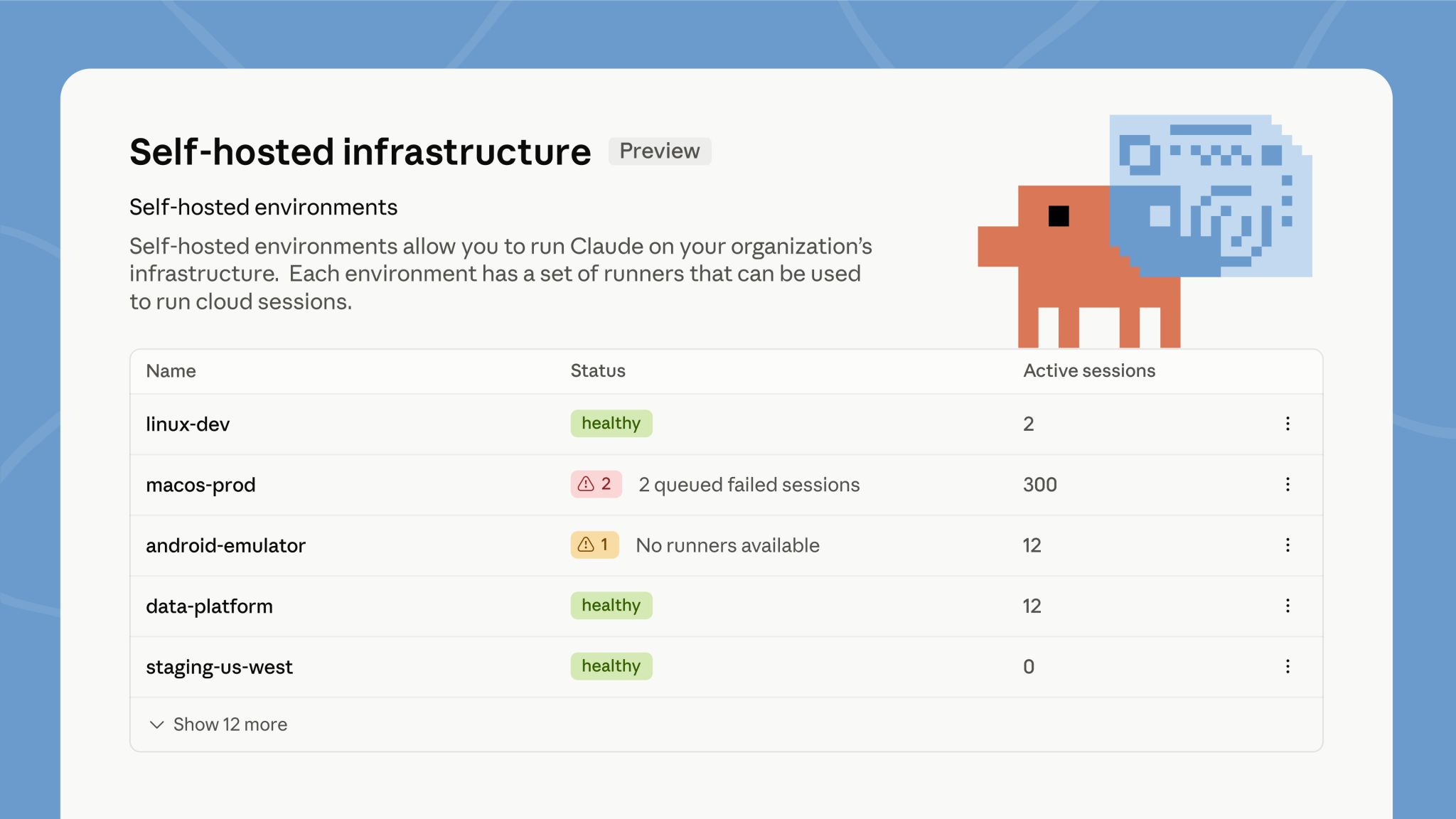
43 <p className="digest-feature-lede">Self-hosted environments run Claude Code cloud sessions on your organization's own infrastructure, in public beta on Team and Enterprise plans. Run <code>claude self-hosted-runner</code> on your machines or containers to turn them into runners. When someone picks your environment while starting a session from claude.ai, the mobile or desktop apps, or `claude --cloud`, that session runs inside your network, with access to your internal services. An Owner turns on <strong>Allow self-hosted environments</strong> in <a href="https://claude.ai/admin-settings/cloud-environments">admin settings</a> first.</p>32Self-hosted environments run Claude Code cloud sessions on your organization's own infrastructure, in public beta on Team and Enterprise plans. Run `claude self-hosted-runner` on your machines or containers to turn them into runners. When someone picks your environment while starting a session from claude.ai, the mobile or desktop apps, or `claude --cloud`, that session runs inside your network, with access to your internal services. An Owner turns on **Allow self-hosted environments** in [admin settings](https://claude.ai/admin-settings/cloud-environments) first.
44 33
45 <Frame>34
46 <img className="w-full" src="https://mintcdn.com/claude-code/N3yEaTYPXMXFrF6k/images/whats-new/self-hosted-environments.jpg?fit=max&auto=format&n=N3yEaTYPXMXFrF6k&q=85&s=ae9152cb1670c8af517d1aee57689b14" alt="The self-hosted environments admin page listing environments such as linux-dev and macos-prod with their status and active session counts" width="2048" height="1152" data-path="images/whats-new/self-hosted-environments.jpg" />
47 </Frame>
48 35
49 <p className="digest-feature-try">Signed in as an Owner, run the guided setup, which walks you through creating the environment and starts a runner:</p>36Signed in as an Owner, run the guided setup, which walks you through creating the environment and starts a runner:
50 37
51 ```bash terminal theme={null}38```bash terminal theme={null}
52 claude self-hosted-runner setup39claude self-hosted-runner setup
53 ```40```
54 41
55 <p className="digest-feature-try">The environment shows <strong>Healthy</strong> in admin settings once the runner registers.</p>42The environment shows **Healthy** in admin settings once the runner registers.
56 43
57 <a className="digest-feature-link" href="/docs/en/self-hosted-environments-quickstart#set-up-an-environment-and-runner">Self-hosted environments quickstart</a>44[Self-hosted environments quickstart](/docs/en/self-hosted-environments-quickstart#set-up-an-environment-and-runner)
58</div>
59 45
60<div className="digest-feature">46Auto mode becomes the default
61 <div className="digest-feature-header">47CLI
62 <span className="digest-feature-title">Auto mode becomes the default</span>
63 <span className="digest-feature-pill">CLI</span>
64 </div>
65 48
66 <p className="digest-feature-lede">Starting August 14, auto mode is the default permission mode for new sessions on Pro, Max, and Team plans. If you set a default mode yourself, it stays in place unless you accept the one-time switch prompt, and a default your organization manages doesn't change. You can still switch modes at any time. Already in effect on those plans: the classifier calls auto mode makes no longer count toward your usage limits.</p>49Starting August 14, auto mode is the default permission mode for new sessions on Pro, Max, and Team plans. If you set a default mode yourself, it stays in place unless you accept the one-time switch prompt, and a default your organization manages doesn't change. You can still switch modes at any time. Already in effect on those plans: the classifier calls auto mode makes no longer count toward your usage limits.
67 50
68 <p className="digest-feature-try">To start every session in auto mode before the switch, set it as your default in your user settings:</p>51To start every session in auto mode before the switch, set it as your default in your user settings:
69 52
70 ```json ~/.claude/settings.json {3} theme={null}53```json ~/.claude/settings.json {3} theme={null}
71 {54{
72 "permissions": {55 "permissions": {
73 "defaultMode": "auto"56 "defaultMode": "auto"
74 }57 }
75 }58}
76 ```59```
77 60
78 <p className="digest-feature-try">New sessions then show <code>auto mode on</code> in the status bar.</p>61New sessions then show `auto mode on` in the status bar.
79 62
80 <a className="digest-feature-link" href="/docs/en/permission-modes#eliminate-prompts-with-auto-mode">Auto mode requirements and controls</a>63[Auto mode requirements and controls](/docs/en/permission-modes#eliminate-prompts-with-auto-mode)
81</div>64
82 65Other wins
83<div className="digest-wins">66
84 <p className="digest-wins-title">Other wins</p>67The VS Code extension gets [Focus view](/docs/en/vs-code#extension-settings), which hides tool activity behind one expandable row per turn; toggle it from the command menu or with `Ctrl+Alt+F` (`Ctrl+Option+F` on Mac)Sandbox credential files accept [`mode: "mask"`](/docs/en/sandboxing#mask-credential-files) on Linux and WSL2, so sandboxed commands read a sentinel copy while the sandbox proxy substitutes the real value on egress; credential masking also gains `extract`, JWT-aware `decode`, and AWS SigV4 re-signing optionsMarketplaces can distribute a plugin as a [zip archive](/docs/en/plugins/marketplace-reference#archive-plugin-source) with the new `archive` source, downloaded over HTTPS with an optional SHA-256 pin, so installs work without git or npm`/review` is now an alias of [`/code-review`](/docs/en/code-review-local), and `/code-review` with no effort level reuses the level you typed lastA session you copy with [`/fork`](/docs/en/agent-view#copy-the-session-with-%2Ffork) now makes its code changes in a worktree of its own instead of the original session's checkoutPlugins you install from [`/plugin`](/docs/en/plugins/install#install-a-plugin) activate in the current session when it's safe to do so; the install summary reports `Plugin is now active.` or tells you to run `/reload-plugins`[Background sessions](/docs/en/agent-view#how-file-edits-are-isolated) that changed code in a worktree now commit and push before finishing, open a draft pull request only when the task calls for one, and follow the git instructions in your `CLAUDE.md`The 200-subagent-per-session cap is removed, so long-running sessions no longer refuse new subagents; the [concurrency](/docs/en/sub-agents#concurrent-subagent-limit) and depth limits still applyA repository's checked-in settings can no longer turn on [Remote Control auto-connect](/docs/en/remote-control#enable-remote-control-for-all-sessions); set `remoteControlAtStartup` in your user or managed settings instead, and project and local settings can only turn it off[Worktree isolation](/docs/en/worktrees#how-claude-code-enforces-isolation) now blocks not only file edits but also Bash commands and git redirects that reach the main checkout, in every session type and in the session's subagentsA Bash command can no longer hide part of itself from permission checks, and tab or invisible-Unicode padding no longer hides part of a command from the approval dialogPreToolUse auto-allow hooks no longer bypass tool restrictions in Claude Code's internal side tasks such as summaries and compactionThe [Ultraplan](/docs/en/ultraplan) research preview is removed, including the `/ultraplan` command and the `ultraplan` keyword; use plan mode or Claude Code on the web instead
85
86 <div className="digest-wins-grid">
87 <div>The VS Code extension gets <a href="/docs/en/vs-code#extension-settings">Focus view</a>, which hides tool activity behind one expandable row per turn; toggle it from the command menu or with <code>Ctrl+Alt+F</code> (<code>Ctrl+Option+F</code> on Mac)</div>
88 <div>Sandbox credential files accept <a href="/docs/en/sandboxing#mask-credential-files"><code>mode: "mask"</code></a> on Linux and WSL2, so sandboxed commands read a sentinel copy while the sandbox proxy substitutes the real value on egress; credential masking also gains <code>extract</code>, JWT-aware <code>decode</code>, and AWS SigV4 re-signing options</div>
89 <div>Marketplaces can distribute a plugin as a <a href="/docs/en/plugins/marketplace-reference#archive-plugin-source">zip archive</a> with the new <code>archive</code> source, downloaded over HTTPS with an optional SHA-256 pin, so installs work without git or npm</div>
90 <div><code>/review</code> is now an alias of <a href="/docs/en/code-review-local"><code>/code-review</code></a>, and <code>/code-review</code> with no effort level reuses the level you typed last</div>
91 <div>A session you copy with <a href="/docs/en/agent-view#copy-the-session-with-%2Ffork"><code>/fork</code></a> now makes its code changes in a worktree of its own instead of the original session's checkout</div>
92 <div>Plugins you install from <a href="/docs/en/plugins/install#install-a-plugin"><code>/plugin</code></a> activate in the current session when it's safe to do so; the install summary reports <code>Plugin is now active.</code> or tells you to run <code>/reload-plugins</code></div>
93 <div><a href="/docs/en/agent-view#how-file-edits-are-isolated">Background sessions</a> that changed code in a worktree now commit and push before finishing, open a draft pull request only when the task calls for one, and follow the git instructions in your <code>CLAUDE.md</code></div>
94 <div>The 200-subagent-per-session cap is removed, so long-running sessions no longer refuse new subagents; the <a href="/docs/en/sub-agents#concurrent-subagent-limit">concurrency</a> and depth limits still apply</div>
95 <div>A repository's checked-in settings can no longer turn on <a href="/docs/en/remote-control#enable-remote-control-for-all-sessions">Remote Control auto-connect</a>; set <code>remoteControlAtStartup</code> in your user or managed settings instead, and project and local settings can only turn it off</div>
96 <div><a href="/docs/en/worktrees#how-claude-code-enforces-isolation">Worktree isolation</a> now blocks not only file edits but also Bash commands and git redirects that reach the main checkout, in every session type and in the session's subagents</div>
97 <div>A Bash command can no longer hide part of itself from permission checks, and tab or invisible-Unicode padding no longer hides part of a command from the approval dialog</div>
98 <div>PreToolUse auto-allow hooks no longer bypass tool restrictions in Claude Code's internal side tasks such as summaries and compaction</div>
99 <div>The <a href="/docs/en/ultraplan">Ultraplan</a> research preview is removed, including the <code>/ultraplan</code> command and the <code>ultraplan</code> keyword; use plan mode or Claude Code on the web instead</div>
100 </div>
101</div>
102 68
103[Full changelog for v2.1.220–v2.1.224 →](/docs/en/changelog#2-1-220)69[Full changelog for v2.1.220–v2.1.224 →](/docs/en/changelog#2-1-220)