1> ## Documentation Index
2> Fetch the complete documentation index at: https://code.claude.com/docs/llms.txt
3> Use this file to discover all available pages before exploring further.
4
5# 第 20 週 · 2026 年 5 月 11–15 日
6
7> 從一個螢幕管理每個 Claude Code 工作階段,使用代理檢視,讓 Claude 持續朝著目標工作直到條件成立,並在 Opus 4.7 上預設執行快速模式。
8
9<div className="digest-meta">
10 <span>版本 <a href="/zh-TW/changelog#2-1-139">v2.1.139 → v2.1.142</a></span>
11 <span>3 項功能 · 5 月 11–15</span>
12</div>
13
14<div className="digest-feature">
15 <div className="digest-feature-header">
16 <span className="digest-feature-title">Agent view</span>
17 <span className="digest-feature-pill">research preview</span>
18 </div>
19
20 <p className="digest-feature-lede"><code>claude agents</code> 為每個 Claude Code 工作階段開啟一個螢幕:什麼正在執行、什麼在等待您的輸入,以及什麼已完成。分派一個錯誤修復、一個拉取請求審查和一個不穩定測試調查作為三行,在另一個視窗中繼續工作,只在一行需要您時才介入。附加到任何一行以進入其完整對話,然後按 <code>←</code> 返回列表。每個背景工作階段在沒有終端連接的情況下繼續執行。</p>
21
22 <Frame>
23 <video autoPlay muted loop playsInline className="w-full" src="https://mintcdn.com/claude-code/ITvjicPxe1SM3GX7/images/whats-new/agent-view.mp4?fit=max&auto=format&n=ITvjicPxe1SM3GX7&q=85&s=0eefe6cbe75464c8f7902bba630ab7a4" data-path="images/whats-new/agent-view.mp4" />
24 </Frame>
25
26 <p className="digest-feature-try">從您的 shell 開啟儀表板:</p>
27
28 ```bash terminal theme={null}
29 claude agents
30 ```
31
32 <a className="digest-feature-link" href="/zh-TW/agent-view">Agent view</a>
33</div>
34
35<div className="digest-feature">
36 <div className="digest-feature-header">
37 <span className="digest-feature-title">/goal</span>
38 <span className="digest-feature-pill">v2.1.139</span>
39 </div>
40
41 <p className="digest-feature-lede">設定完成條件,Claude 會在多個回合中持續朝著它工作,無需您提示每一步。在每個回合之後,一個快速模型檢查條件是否成立;如果不成立,Claude 會開始另一個回合,而不是將控制權交回。適用於具有可驗證終止狀態的大量工作,例如遷移模組直到每個呼叫位置都編譯並通過測試。目標在條件滿足後清除,並在互動、<code>-p</code> 和 Remote Control 中工作。</p>
42
43 <Frame>
44 <video autoPlay muted loop playsInline className="w-full" src="https://mintcdn.com/claude-code/ITvjicPxe1SM3GX7/images/whats-new/goal.mp4?fit=max&auto=format&n=ITvjicPxe1SM3GX7&q=85&s=6806df3780c548b93a02d6fa71da276b" data-path="images/whats-new/goal.mp4" />
45 </Frame>
46
47 <p className="digest-feature-try">設定目標並讓 Claude 執行直到它成立:</p>
48
49 ```text Claude Code theme={null}
50 > /goal all tests in test/auth pass and the lint step is clean
51 ```
52
53 <a className="digest-feature-link" href="/zh-TW/goal">Goals</a>
54</div>
55
56<div className="digest-feature">
57 <div className="digest-feature-header">
58 <span className="digest-feature-title">Fast mode on Opus 4.7</span>
59 <span className="digest-feature-pill">research preview</span>
60 </div>
61
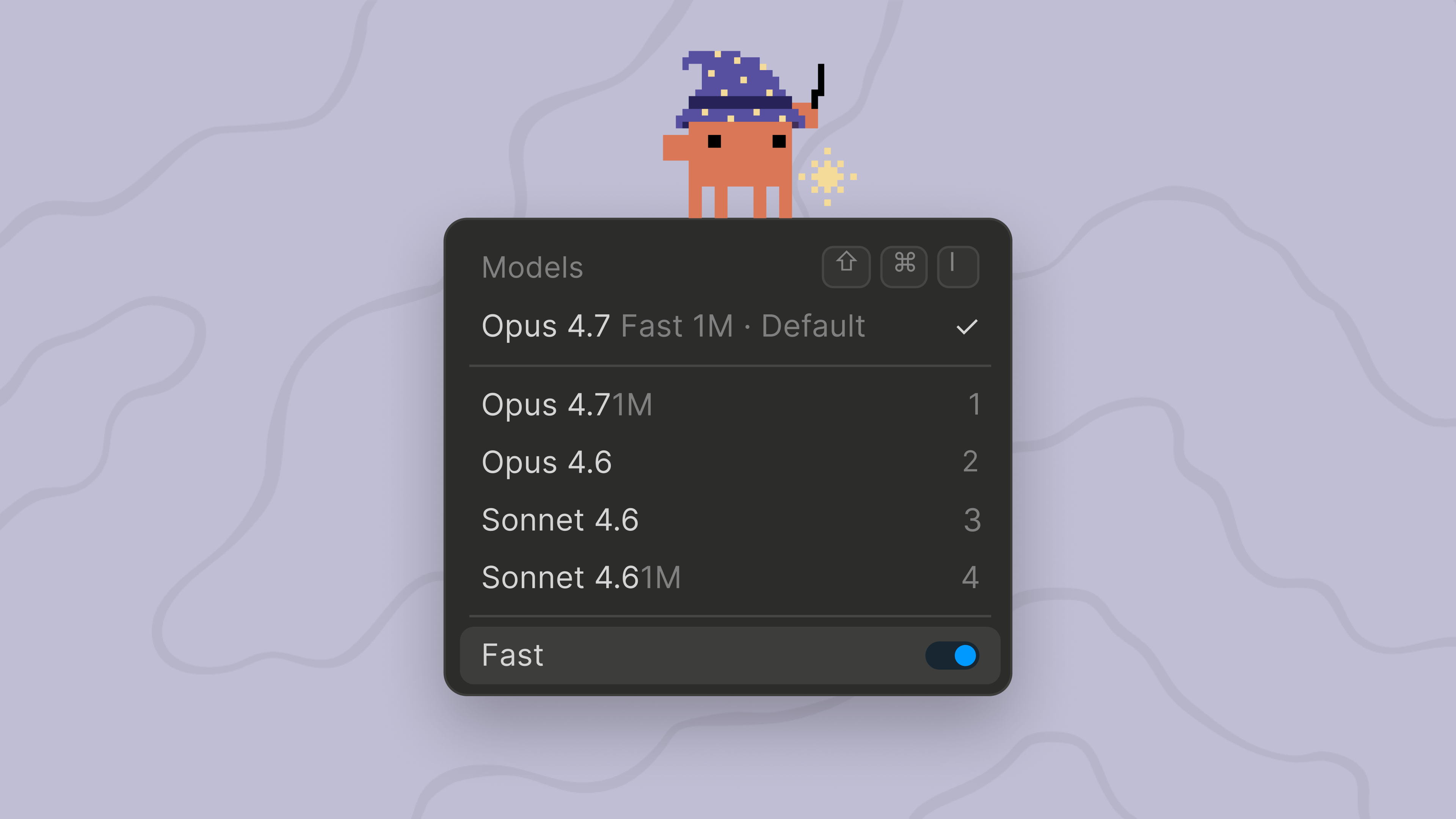
62 <p className="digest-feature-lede"><code>/fast</code> 現在預設在 Opus 4.7 上執行,而不是 Opus 4.6。快速模式是高速 Opus 配置:相同的模型品質,速度約快 2.5 倍,但每個 token 成本更高,適用於快速迭代和即時除錯。定價保持不變,為 $30/$150 per MTok,與 Opus 4.6 快速模式相同。要將快速模式固定到 Opus 4.6,請設定 <code>CLAUDE\_CODE\_OPUS\_4\_6\_FAST\_MODE\_OVERRIDE=1</code>。</p>
63
64 <Frame>
65 <img className="w-full" src="https://mintcdn.com/claude-code/ITvjicPxe1SM3GX7/images/whats-new/fast-mode-opus-47.png?fit=max&auto=format&n=ITvjicPxe1SM3GX7&q=85&s=6b6d92f7748ce5328a1ee9a269fb1a87" alt="Claude Code 模型選擇器顯示 Opus 4.7 Fast 1M 作為預設值,並啟用了 Fast 切換" width="3840" height="2160" data-path="images/whats-new/fast-mode-opus-47.png" />
66 </Frame>
67
68 <p className="digest-feature-try">切換快速模式,現在在 Opus 4.7 上執行:</p>
69
70 ```text Claude Code theme={null}
71 > /fast
72 ```
73
74 <a className="digest-feature-link" href="/zh-TW/fast-mode#understand-the-cost-tradeoff">Fast mode on Opus 4.7</a>
75</div>
76
77<div className="digest-wins">
78 <p className="digest-wins-title">其他成果</p>
79
80 <div className="digest-wins-grid">
81 <div><code>claude agents</code> 獲得了分派標誌(<code>--add-dir</code>、<code>--settings</code>、<code>--mcp-config</code>、<code>--plugin-dir</code>、<code>--permission-mode</code>、<code>--model</code>、<code>--effort</code>、<code>--dangerously-skip-permissions</code>)來配置背景工作階段,<code>claude agents --cwd \<path></code> 將工作階段列表限制在一個目錄</div>
82 <div>新的 hook <code>args: string\[]</code> exec 形式直接生成命令而不使用 shell,因此路徑佔位符永遠不需要引用</div>
83 <div>新的 <code>continueOnBlock</code> 配置選項用於 <code>PostToolUse</code> hooks,將 hook 的拒絕原因反饋給 Claude 並繼續回合,而不是結束它</div>
84 <div>hook JSON 輸出中的新 <code>terminalSequence</code> 欄位讓 hooks 發出桌面通知、視窗標題和鈴聲,無需控制終端</div>
85 <div>Rewind 菜單新增了「在此處總結」以壓縮較早的上下文,同時保持最近的回合完整</div>
86 <div>當設定 <code>ANTHROPIC\_API\_KEY</code>、<code>apiKeyHelper</code> 或 <code>ANTHROPIC\_AUTH\_TOKEN</code> 時,Remote Control、<code>/schedule</code>、Claude.ai MCP 連接器和通知偏好設定現在被禁用,即使與 Claude.ai 登入並行;取消設定 API 金鑰以使用這些功能</div>
87 <div>MCP stdio 伺服器現在在其環境中接收 <code>CLAUDE\_PROJECT\_DIR</code>,與 hooks 相符,plugin 配置可以在命令中參考 <code>\${"{"}CLAUDE\_PROJECT\_DIR{"}"}</code></div>
88 <div><code>claude plugin details \<name></code> 顯示 plugin 的元件清單和預計的每個工作階段 token 成本,<code>/plugin</code> 詳細資訊窗格現在也列出 plugin 提供的 LSP 伺服器</div>
89 <div>具有根級 <code>SKILL.md</code> 且沒有 <code>skills/</code> 子目錄的 Plugins 現在被呈現為一個 skill</div>
90 <div><code>/feedback</code> 現在可以包含過去 24 小時或 7 天內的最近工作階段,用於跨越超過當前工作階段的問題</div>
91 <div>Agent tool <code>subagent\_type</code> 現在不區分大小寫和分隔符地匹配,因此 <code>"Code Reviewer"</code> 解析為 <code>code-reviewer</code></div>
92 </div>
93</div>
94
95[v2.1.139–v2.1.142 的完整變更日誌 →](/zh-TW/changelog#2-1-139)