
assistants/deep-dive.md +0 −1141 deleted
File Deleted View Diff
1# Assistants API deep dive
2
3> For the complete documentation index, see [llms.txt](/llms.txt). Markdown versions of documentation pages are available by appending `.md` to the page URL.
4
5After achieving feature parity in the Responses API, we've deprecated the Assistants API. It will shut down on August 26, 2026. Follow the [migration guide](https://developers.openai.com/platform/assistants/migration) to update your integration. [Learn more](https://platform.openai.com/docs/guides/migrate-to-responses).
6
7## Overview
8
9Don't start a new integration on the Assistants API. We've announced plans to deprecate it soon, as the Responses API now provides the same features and a more elegant integration.
10
11There are several concepts involved in building an app with the Assistants API, covered below in case it helps with your [migration to Responses](https://developers.openai.com/api/docs/assistants/migration).
12
13## Creating assistants
14
15We recommend using OpenAI's [latest models](https://developers.openai.com/api/docs/models) with
16 the Assistants API for best results and maximum compatibility with tools.
17
18To get started, creating an Assistant only requires specifying the `model` to use. But you can further customize the behavior of the Assistant:
19
201. Use the `instructions` parameter to guide the personality of the Assistant and define its goals. Instructions are similar to system messages in the Chat Completions API.
212. Use the `tools` parameter to give the Assistant access to up to 128 tools. You can give it access to OpenAI built-in tools like `code_interpreter` and `file_search`, or call a third-party tools via a `function` calling.
223. Use the `tool_resources` parameter to give the tools like `code_interpreter` and `file_search` access to files. Files are uploaded using the `File` [upload endpoint](https://developers.openai.com/api/reference/resources/files/methods/create) and must have the `purpose` set to `assistants` to be used with this API.
23
24For example, to create an Assistant that can create data visualization based on a `.csv` file, first upload a file.
25
26```javascript
27const file = await openai.files.create({
28 file: fs.createReadStream("revenue-forecast.csv"),
29 purpose: "assistants",
30});
31```
32
33```python
34file = client.files.create(
35 file=open("revenue-forecast.csv", "rb"), purpose="assistants"
36)
37```
38
39```go
40input, err := os.Open("revenue-forecast.csv")
41if err != nil {
42 panic(err)
43}
44defer input.Close()
45file, err := client.Files.New(context.Background(), openai.FileNewParams{
46 File: input,
47 Purpose: openai.FilePurposeAssistants,
48})
49if err != nil {
50 panic(err)
51}
52```
53
54```java
55import com.openai.client.OpenAIClient;
56import com.openai.client.okhttp.OpenAIOkHttpClient;
57import com.openai.models.files.FileCreateParams;
58import com.openai.models.files.FilePurpose;
59import java.nio.file.Path;
60
61var file =
62 client
63 .files()
64 .create(
65 FileCreateParams.builder()
66 .file(Path.of(System.getenv("OPENAI_EXAMPLE_FILE_PATH")))
67 .purpose(FilePurpose.ASSISTANTS)
68 .build());
69
70System.out.println(file.id());
71```
72
73```ruby
74require "openai"
75require "pathname"
76
77client = OpenAI::Client.new
78file = Pathname("revenue-forecast.csv")
79uploaded = client.files.create(file: file, purpose: :assistants)
80puts(uploaded.id)
81```
82
83```bash
84curl https://api.openai.com/v1/files \
85 -H "Authorization: Bearer $OPENAI_API_KEY" \
86 -F purpose="assistants" \
87 -F file="@revenue-forecast.csv"
88```
89
90
91Then, create the Assistant with the `code_interpreter` tool enabled and provide the file as a resource to the tool.
92
93```javascript
94const assistant = await openai.beta.assistants.create({
95 name: "Data visualizer",
96 description:
97 "You are great at creating beautiful data visualizations. You analyze data present in .csv files, understand trends, and come up with data visualizations relevant to those trends. You also share a brief text summary of the trends observed.",
98 model: "gpt-4o",
99 tools: [{ type: "code_interpreter" }],
100 tool_resources: {
101 code_interpreter: {
102 file_ids: [file.id],
103 },
104 },
105});
106```
107
108```python
109assistant = client.beta.assistants.create(
110 name="Data visualizer",
111 description="You are great at creating beautiful data visualizations. You analyze data present in .csv files, understand trends, and come up with data visualizations relevant to those trends. You also share a brief text summary of the trends observed.",
112 model="gpt-4o",
113 tools=[{"type": "code_interpreter"}],
114 tool_resources={"code_interpreter": {"file_ids": [file.id]}},
115)
116```
117
118```go
119assistant, err := client.Beta.Assistants.New(context.Background(), openai.BetaAssistantNewParams{
120 Name: openai.String("Data visualizer"),
121 Description: openai.String("You are great at creating beautiful data visualizations. You analyze data present in .csv files, understand trends, and come up with data visualizations relevant to those trends. You also share a brief text summary of the trends observed."),
122 Model: shared.ChatModelGPT4o,
123 Tools: []openai.AssistantToolUnionParam{{OfCodeInterpreter: &openai.CodeInterpreterToolParam{}}},
124 ToolResources: openai.BetaAssistantNewParamsToolResources{
125 CodeInterpreter: openai.BetaAssistantNewParamsToolResourcesCodeInterpreter{FileIDs: []string{"file-BK7bzQj3FfZFXr7DbL6xJwfo"}},
126 },
127})
128if err != nil {
129 panic(err)
130}
131```
132
133```java
134import com.openai.client.OpenAIClient;
135import com.openai.client.okhttp.OpenAIOkHttpClient;
136import com.openai.models.beta.assistants.AssistantCreateParams;
137import com.openai.models.beta.assistants.CodeInterpreterTool;
138
139String fileId = "file-BK7bzQj3FfZFXr7DbL6xJwfo";
140
141var assistant =
142 client
143 .beta()
144 .assistants()
145 .create(
146 AssistantCreateParams.builder()
147 .name("Data visualizer")
148 .model("gpt-4o")
149 .description(
150 "You are great at creating beautiful data visualizations. You analyze data"
151 + " present in .csv files, understand trends, and come up with data"
152 + " visualizations relevant to those trends. You also share a brief text"
153 + " summary of the trends observed.")
154 .addTool(CodeInterpreterTool.builder().build())
155 .toolResources(
156 AssistantCreateParams.ToolResources.builder()
157 .codeInterpreter(
158 AssistantCreateParams.ToolResources.CodeInterpreter.builder()
159 .addFileId(fileId)
160 .build())
161 .build())
162 .build());
163
164System.out.println(assistant.id());
165```
166
167```ruby
168require "openai"
169
170client = OpenAI::Client.new
171assistant = client.beta.assistants.create(
172 name: "Data visualizer",
173 model: "gpt-4o",
174 instructions: "Analyze CSV data, create relevant visualizations, and summarize the trends.",
175 tools: [{type: :code_interpreter}],
176 tool_resources: {
177 code_interpreter: {file_ids: ["file-BK7bzQj3FfZFXr7DbL6xJwfo"]}
178 }
179)
180puts(assistant.id)
181```
182
183```bash
184curl https://api.openai.com/v1/assistants \
185 -H "Authorization: Bearer $OPENAI_API_KEY" \
186 -H "Content-Type: application/json" \
187 -H "OpenAI-Beta: assistants=v2" \
188 -d '{
189 "name": "Data visualizer",
190 "description": "You are great at creating beautiful data visualizations. You analyze data present in .csv files, understand trends, and come up with data visualizations relevant to those trends. You also share a brief text summary of the trends observed.",
191 "model": "gpt-4o",
192 "tools": [{"type": "code_interpreter"}],
193 "tool_resources": {
194 "code_interpreter": {
195 "file_ids": ["file-BK7bzQj3FfZFXr7DbL6xJwfo"]
196 }
197 }
198 }'
199```
200
201
202You can attach a maximum of 20 files to `code_interpreter` and 10,000 files to `file_search` (using `vector_store` [objects](https://developers.openai.com/api/reference/resources/vector_stores)). For vector stores created starting in November 2025, the `file_search` limit is 100,000,000 files.
203
204Each file can be at most 512 MB in size and have a maximum of 5,000,000 tokens. By default, each project can store up to 2.5 TB of files total. There is no organization-wide storage limit. You can reach out to our support team to increase this limit.
205
206## Managing Threads and Messages
207
208Threads and Messages represent a conversation session between an Assistant and a user. There is a limit of 100,000 Messages per Thread. Once the size of the Messages exceeds the context window of the model, the Thread will attempt to smartly truncate messages, before fully dropping the ones it considers the least important.
209
210You can create a Thread with an initial list of Messages like this:
211
212```javascript
213const thread = await openai.beta.threads.create({
214 messages: [
215 {
216 role: "user",
217 content: "Create 3 data visualizations based on the trends in this file.",
218 attachments: [
219 {
220 file_id: file.id,
221 tools: [{ type: "code_interpreter" }],
222 },
223 ],
224 },
225 ],
226});
227```
228
229```python
230thread = client.beta.threads.create(
231 messages=[
232 {
233 "role": "user",
234 "content": "Create 3 data visualizations based on the trends in this file.",
235 "attachments": [
236 {"file_id": file.id, "tools": [{"type": "code_interpreter"}]}
237 ],
238 }
239 ]
240)
241```
242
243```go
244thread, err := client.Beta.Threads.New(context.Background(), openai.BetaThreadNewParams{
245 Messages: []openai.BetaThreadNewParamsMessage{{
246 Role: "user",
247 Content: openai.BetaThreadNewParamsMessageContentUnion{
248 OfString: openai.String("Create 3 data visualizations based on the trends in this file."),
249 },
250 Attachments: []openai.BetaThreadNewParamsMessageAttachment{{
251 FileID: openai.String("file-ACq8OjcLQm2eIG0BvRM4z5qX"),
252 Tools: []openai.BetaThreadNewParamsMessageAttachmentToolUnion{{OfCodeInterpreter: &openai.CodeInterpreterToolParam{}}},
253 }},
254 }},
255})
256if err != nil {
257 panic(err)
258}
259```
260
261```java
262import com.openai.client.OpenAIClient;
263import com.openai.client.okhttp.OpenAIOkHttpClient;
264import com.openai.models.beta.assistants.CodeInterpreterTool;
265import com.openai.models.beta.threads.ThreadCreateParams;
266
267String fileId = "file-ACq8OjcLQm2eIG0BvRM4z5qX";
268
269var thread =
270 client
271 .beta()
272 .threads()
273 .create(
274 ThreadCreateParams.builder()
275 .addMessage(
276 ThreadCreateParams.Message.builder()
277 .role(ThreadCreateParams.Message.Role.USER)
278 .content(
279 "Create 3 data visualizations based on the trends in this file.")
280 .addAttachment(
281 ThreadCreateParams.Message.Attachment.builder()
282 .fileId(fileId)
283 .addTool(CodeInterpreterTool.builder().build())
284 .build())
285 .build())
286 .build());
287
288System.out.println(thread.id());
289```
290
291```ruby
292require "openai"
293
294client = OpenAI::Client.new
295thread = client.beta.threads.create(
296 messages: [{
297 role: :user,
298 content: "Create 3 data visualizations based on the trends in this file.",
299 attachments: [{
300 file_id: "file-ACq8OjcLQm2eIG0BvRM4z5qX",
301 tools: [{type: :code_interpreter}]
302 }]
303 }]
304)
305puts(thread.id)
306```
307
308```bash
309curl https://api.openai.com/v1/threads \
310 -H "Authorization: Bearer $OPENAI_API_KEY" \
311 -H "Content-Type: application/json" \
312 -H "OpenAI-Beta: assistants=v2" \
313 -d '{
314 "messages": [
315 {
316 "role": "user",
317 "content": "Create 3 data visualizations based on the trends in this file.",
318 "attachments": [
319 {
320 "file_id": "file-ACq8OjcLQm2eIG0BvRM4z5qX",
321 "tools": [{"type": "code_interpreter"}]
322 }
323 ]
324 }
325 ]
326 }'
327```
328
329
330Messages can contain text, images, or file attachment. Message `attachments` are helper methods that add files to a thread's `tool_resources`. You can also choose to add files to the `thread.tool_resources` directly.
331
332### Creating image input content
333
334Message content can contain either external image URLs or File IDs uploaded via the [File API](https://developers.openai.com/api/reference/resources/files/methods/create). Only [models](https://developers.openai.com/api/docs/models) with Vision support can accept image input. Supported image content types include png, jpg, gif, and webp. When creating image files, pass `purpose="vision"` to allow you to later download and display the input content. Projects are limited to 2.5 TB total file storage, and there is no organization-wide storage limit. Please contact us to request a limit increase.
335
336Tools cannot access image content unless specified. To pass image files to Code Interpreter, add the file ID in the message `attachments` list to allow the tool to read and analyze the input. Image URLs cannot be downloaded in Code Interpreter today.
337
338```javascript
339import fs from "fs";
340
341const file = await openai.files.create({
342 file: fs.createReadStream("myimage.png"),
343 purpose: "vision",
344});
345const thread = await openai.beta.threads.create({
346 messages: [
347 {
348 role: "user",
349 content: [
350 {
351 type: "text",
352 text: "What is the difference between these images?",
353 },
354 {
355 type: "image_url",
356 image_url: {
357 url: "https://openai-documentation.vercel.app/images/cat_and_otter.png",
358 },
359 },
360 {
361 type: "image_file",
362 image_file: { file_id: file.id },
363 },
364 ],
365 },
366 ],
367});
368```
369
370```python
371file = client.files.create(file=open("myimage.png", "rb"), purpose="vision")
372thread = client.beta.threads.create(
373 messages=[
374 {
375 "role": "user",
376 "content": [
377 {
378 "type": "text",
379 "text": "What is the difference between these images?",
380 },
381 {
382 "type": "image_url",
383 "image_url": {
384 "url": "https://openai-documentation.vercel.app/images/cat_and_otter.png"
385 },
386 },
387 {"type": "image_file", "image_file": {"file_id": file.id}},
388 ],
389 }
390 ]
391)
392```
393
394```go
395image, err := os.Open("myimage.png")
396if err != nil {
397 panic(err)
398}
399defer image.Close()
400file, err := client.Files.New(context.Background(), openai.FileNewParams{
401 File: image,
402 Purpose: openai.FilePurposeVision,
403})
404if err != nil {
405 panic(err)
406}
407thread, err := client.Beta.Threads.New(context.Background(), openai.BetaThreadNewParams{
408 Messages: []openai.BetaThreadNewParamsMessage{{
409 Role: "user",
410 Content: openai.BetaThreadNewParamsMessageContentUnion{OfArrayOfContentParts: []openai.MessageContentPartParamUnion{
411 openai.MessageContentPartParamOfText("What is the difference between these images?"),
412 openai.MessageContentPartParamOfImageURL(openai.ImageURLParam{URL: "https://openai-documentation.vercel.app/images/cat_and_otter.png"}),
413 openai.MessageContentPartParamOfImageFile(openai.ImageFileParam{FileID: file.ID}),
414 }},
415 }},
416})
417if err != nil {
418 panic(err)
419}
420```
421
422```java
423import com.openai.client.OpenAIClient;
424import com.openai.client.okhttp.OpenAIOkHttpClient;
425import com.openai.models.beta.threads.ThreadCreateParams;
426import com.openai.models.beta.threads.messages.ImageFile;
427import com.openai.models.beta.threads.messages.ImageFileContentBlock;
428import com.openai.models.beta.threads.messages.ImageUrl;
429import com.openai.models.beta.threads.messages.ImageUrlContentBlock;
430import com.openai.models.beta.threads.messages.MessageContentPartParam;
431import com.openai.models.beta.threads.messages.TextContentBlockParam;
432import com.openai.models.files.FileCreateParams;
433import com.openai.models.files.FilePurpose;
434import java.nio.file.Path;
435import java.util.List;
436
437var file =
438 client
439 .files()
440 .create(
441 FileCreateParams.builder()
442 .file(Path.of(System.getenv("OPENAI_EXAMPLE_FILE_PATH")))
443 .purpose(FilePurpose.VISION)
444 .build());
445
446var imageUrl =
447 ImageUrl.builder()
448 .url("https://openai-documentation.vercel.app/images/cat_and_otter.png")
449 .build();
450var thread =
451 client
452 .beta()
453 .threads()
454 .create(
455 ThreadCreateParams.builder()
456 .addMessage(
457 ThreadCreateParams.Message.builder()
458 .role(ThreadCreateParams.Message.Role.USER)
459 .content(
460 ThreadCreateParams.Message.Content.ofArrayOfContentParts(
461 List.of(
462 MessageContentPartParam.ofText(
463 TextContentBlockParam.builder()
464 .text(
465 "What is the difference between these images?")
466 .build()),
467 MessageContentPartParam.ofImageUrl(
468 ImageUrlContentBlock.builder()
469 .imageUrl(imageUrl)
470 .build()),
471 MessageContentPartParam.ofImageFile(
472 ImageFileContentBlock.builder()
473 .imageFile(
474 ImageFile.builder().fileId(file.id()).build())
475 .build()))))
476 .build())
477 .build());
478
479System.out.println(thread.id());
480```
481
482```ruby
483require "openai"
484require "pathname"
485
486client = OpenAI::Client.new
487file = client.files.create(
488 file: Pathname("myimage.png"),
489 purpose: :vision
490)
491thread = client.beta.threads.create(
492 messages: [{
493 role: :user,
494 content: [
495 {type: :text, text: "What is the difference between these images?"},
496 {
497 type: :image_url,
498 image_url: {url: "https://openai-documentation.vercel.app/images/cat_and_otter.png"}
499 },
500 {type: :image_file, image_file: {file_id: file.id}}
501 ]
502 }]
503)
504puts(thread.id)
505```
506
507```bash
508# Upload a file with an "vision" purpose
509curl https://api.openai.com/v1/files \
510 -H "Authorization: Bearer $OPENAI_API_KEY" \
511 -F purpose="vision" \
512 -F file="@/path/to/myimage.png"
513
514## Pass the file ID in the content
515
516curl https://api.openai.com/v1/threads \
517-H "Authorization: Bearer $OPENAI_API_KEY" \
518-H "Content-Type: application/json" \
519-H "OpenAI-Beta: assistants=v2" \
520-d '{
521"messages": [
522{
523"role": "user",
524"content": [
525{
526"type": "text",
527"text": "What is the difference between these images?"
528},
529{
530"type": "image_url",
531"image_url": {"url": "https://openai-documentation.vercel.app/images/cat_and_otter.png"}
532},
533{
534"type": "image_file",
535"image_file": {"file_id": file.id}
536}
537]
538}
539]
540}'
541```
542
543
544#### Low or high fidelity image understanding
545
546By controlling the `detail` parameter, which has three options, `low`, `high`, or `auto`, you have control over how the model processes the image and generates its textual understanding.
547
548- `low` will enable the "low res" mode. The model will receive a low-res 512px x 512px version of the image, and represent the image with a budget of 85 tokens. This allows the API to return faster responses and consume fewer input tokens for use cases that do not require high detail.
549- `high` will enable "high res" mode, which first allows the model to see the low res image and then creates detailed crops of input images based on the input image size. Use the [pricing calculator](https://openai.com/api/pricing/) to see token counts for various image sizes.
550
551```javascript
552const thread = await openai.beta.threads.create({
553 messages: [
554 {
555 role: "user",
556 content: [
557 {
558 type: "text",
559 text: "What is this an image of?",
560 },
561 {
562 type: "image_url",
563 image_url: {
564 url: "https://openai-documentation.vercel.app/images/cat_and_otter.png",
565 detail: "high",
566 },
567 },
568 ],
569 },
570 ],
571});
572```
573
574```python
575thread = client.beta.threads.create(
576 messages=[
577 {
578 "role": "user",
579 "content": [
580 {"type": "text", "text": "What is this an image of?"},
581 {
582 "type": "image_url",
583 "image_url": {
584 "url": "https://openai-documentation.vercel.app/images/cat_and_otter.png",
585 "detail": "high",
586 },
587 },
588 ],
589 }
590 ]
591)
592```
593
594```go
595thread, err := client.Beta.Threads.New(context.Background(), openai.BetaThreadNewParams{
596 Messages: []openai.BetaThreadNewParamsMessage{{
597 Role: "user",
598 Content: openai.BetaThreadNewParamsMessageContentUnion{OfArrayOfContentParts: []openai.MessageContentPartParamUnion{
599 openai.MessageContentPartParamOfText("What is this an image of?"),
600 openai.MessageContentPartParamOfImageURL(openai.ImageURLParam{
601 URL: "https://openai-documentation.vercel.app/images/cat_and_otter.png",
602 Detail: openai.ImageURLDetailHigh,
603 }),
604 }},
605 }},
606})
607if err != nil {
608 panic(err)
609}
610```
611
612```java
613import com.openai.client.OpenAIClient;
614import com.openai.client.okhttp.OpenAIOkHttpClient;
615import com.openai.models.beta.threads.ThreadCreateParams;
616import com.openai.models.beta.threads.messages.ImageUrl;
617import com.openai.models.beta.threads.messages.ImageUrlContentBlock;
618import com.openai.models.beta.threads.messages.MessageContentPartParam;
619import com.openai.models.beta.threads.messages.TextContentBlockParam;
620import java.util.List;
621
622var thread =
623 client
624 .beta()
625 .threads()
626 .create(
627 ThreadCreateParams.builder()
628 .addMessage(
629 ThreadCreateParams.Message.builder()
630 .role(ThreadCreateParams.Message.Role.USER)
631 .content(
632 ThreadCreateParams.Message.Content.ofArrayOfContentParts(
633 List.of(
634 MessageContentPartParam.ofText(
635 TextContentBlockParam.builder()
636 .text("What is this an image of?")
637 .build()),
638 MessageContentPartParam.ofImageUrl(
639 ImageUrlContentBlock.builder()
640 .imageUrl(
641 ImageUrl.builder()
642 .url(
643 "https://openai-documentation.vercel.app/images/cat_and_otter.png")
644 .detail(ImageUrl.Detail.HIGH)
645 .build())
646 .build()))))
647 .build())
648 .build());
649
650System.out.println(thread.id());
651```
652
653```ruby
654require "openai"
655
656client = OpenAI::Client.new
657thread = client.beta.threads.create(
658 messages: [{
659 role: :user,
660 content: [
661 {type: :text, text: "What is this an image of?"},
662 {
663 type: :image_url,
664 image_url: {
665 url: "https://openai-documentation.vercel.app/images/cat_and_otter.png",
666 detail: :high
667 }
668 }
669 ]
670 }]
671)
672puts(thread.id)
673```
674
675```bash
676curl https://api.openai.com/v1/threads \
677 -H "Authorization: Bearer $OPENAI_API_KEY" \
678 -H "Content-Type: application/json" \
679 -H "OpenAI-Beta: assistants=v2" \
680 -d '{
681 "messages": [
682 {
683 "role": "user",
684 "content": [
685 {
686 "type": "text",
687 "text": "What is this an image of?"
688 },
689 {
690 "type": "image_url",
691 "image_url": {
692 "url": "https://openai-documentation.vercel.app/images/cat_and_otter.png",
693 "detail": "high"
694 }
695 },
696 ]
697 }
698 ]
699 }'
700```
701
702
703### Context window management
704
705The Assistants API automatically manages the truncation to ensure it stays within the model's maximum context length. You can customize this behavior by specifying the maximum tokens you'd like a run to utilize and/or the maximum number of recent messages you'd like to include in a run.
706
707#### Max Completion and Max Prompt Tokens
708
709To control the token usage in a single Run, set `max_prompt_tokens` and `max_completion_tokens` when creating the Run. These limits apply to the total number of tokens used in all completions throughout the Run's lifecycle.
710
711For example, initiating a Run with `max_prompt_tokens` set to 500 and `max_completion_tokens` set to 1000 means the first completion will truncate the thread to 500 tokens and cap the output at 1000 tokens. If only 200 prompt tokens and 300 completion tokens are used in the first completion, the second completion will have available limits of 300 prompt tokens and 700 completion tokens.
712
713If a completion reaches the `max_completion_tokens` limit, the Run will terminate with a status of `incomplete`, and details will be provided in the `incomplete_details` field of the Run object.
714
715When using the File Search tool, we recommend setting the max_prompt_tokens to
716 no less than 20,000. For longer conversations or multiple interactions with
717 File Search, consider increasing this limit to 50,000, or ideally, removing
718 the max_prompt_tokens limits altogether to get the highest quality results.
719
720#### Truncation Strategy
721
722You may also specify a truncation strategy to control how your thread should be rendered into the model's context window.
723Using a truncation strategy of type `auto` will use OpenAI's default truncation strategy. Using a truncation strategy of type `last_messages` will allow you to specify the number of the most recent messages to include in the context window.
724
725### Message annotations
726
727Messages created by Assistants may contain [`annotations`](https://developers.openai.com/api/reference/resources/beta/subresources/threads/subresources/messages#messages/object-content) within the `content` array of the object. Annotations provide information around how you should annotate the text in the Message.
728
729There are two types of Annotations:
730
7311. `file_citation`: File citations are created by the [`file_search`](https://developers.openai.com/api/docs/assistants/tools/file-search) tool and define references to a specific file that was uploaded and used by the Assistant to generate the response.
7322. `file_path`: File path annotations are created by the [`code_interpreter`](https://developers.openai.com/api/docs/assistants/tools/code-interpreter) tool and contain references to the files generated by the tool.
733
734When annotations are present in the Message object, you'll see illegible model-generated substrings in the text that you should replace with the annotations. These strings may look something like `【13†source】` or `sandbox:/mnt/data/file.csv`. Here’s an example python code snippet that replaces these strings with the annotations.
735
736```python
737import os
738from pathlib import Path
739
740thread_id = os.environ["OPENAI_THREAD_ID"]
741message_id = os.environ["OPENAI_MESSAGE_ID"]
742downloads = Path("downloads")
743downloads.mkdir(exist_ok=True)
744
745# Retrieve the message object
746message = client.beta.threads.messages.retrieve(
747 thread_id=thread_id,
748 message_id=message_id,
749)
750
751# Extract the message content
752
753message_content = message.content[0].text
754annotations = message_content.annotations
755citations = []
756
757# Iterate over the annotations and add footnotes
758
759for index, annotation in enumerate(annotations):
760 # Replace the text with a footnote.
761 message_content.value = message_content.value.replace(
762 annotation.text, f" [{index}]"
763 )
764
765 # Gather citations based on annotation attributes
766 if file_citation := getattr(annotation, "file_citation", None):
767 cited_file = client.files.retrieve(file_citation.file_id)
768 citations.append(f"[{index}] {file_citation.quote} from {cited_file.filename}")
769 elif file_path := getattr(annotation, "file_path", None):
770 cited_file = client.files.retrieve(file_path.file_id)
771 file_content = client.files.content(file_path.file_id)
772 output_path = downloads / Path(cited_file.filename).name
773 output_path.write_bytes(file_content.read())
774 citations.append(f"[{index}] Downloaded {output_path}")
775
776# Add footnotes to the end of the message before displaying to user
777
778message_content.value += "\n" + "\n".join(citations)
779```
780
781```go
782message, err := client.Beta.Threads.Messages.Get(context.Background(), "thread_abc123", "msg_abc123")
783if err != nil {
784 panic(err)
785}
786if len(message.Content) == 0 || message.Content[0].Type != "text" {
787 panic("message does not contain text")
788}
789messageContent := message.Content[0].AsText().Text
790citations := make([]string, 0, len(messageContent.Annotations))
791for index, annotation := range messageContent.Annotations {
792 messageContent.Value = strings.ReplaceAll(messageContent.Value, annotation.Text, fmt.Sprintf(" [%d]", index))
793 switch annotation.Type {
794 case "file_citation":
795 citation := annotation.AsFileCitation()
796 file, err := client.Files.Get(context.Background(), citation.FileCitation.FileID)
797 if err != nil {
798 panic(err)
799 }
800 citations = append(citations, fmt.Sprintf("[%d] %s", index, file.Filename))
801 case "file_path":
802 filePath := annotation.AsFilePath()
803 file, err := client.Files.Get(context.Background(), filePath.FilePath.FileID)
804 if err != nil {
805 panic(err)
806 }
807 response, err := client.Files.Content(context.Background(), filePath.FilePath.FileID)
808 if err != nil {
809 panic(err)
810 }
811 defer response.Body.Close()
812 if err := os.MkdirAll("downloads", 0o755); err != nil {
813 panic(err)
814 }
815 outputPath := filepath.Join("downloads", filepath.Base(file.Filename))
816 output, err := os.Create(outputPath)
817 if err != nil {
818 panic(err)
819 }
820 if _, err := io.Copy(output, response.Body); err != nil {
821 output.Close()
822 panic(err)
823 }
824 if err := output.Close(); err != nil {
825 panic(err)
826 }
827 citations = append(citations, fmt.Sprintf("[%d] Downloaded %s", index, outputPath))
828 }
829}
830messageContent.Value += "\n" + strings.Join(citations, "\n")
831fmt.Println(messageContent.Value)
832```
833
834```java
835import com.openai.client.OpenAIClient;
836import com.openai.client.okhttp.OpenAIOkHttpClient;
837import com.openai.models.beta.threads.messages.MessageRetrieveParams;
838import java.nio.file.Files;
839import java.nio.file.Path;
840import java.nio.file.StandardCopyOption;
841import java.util.ArrayList;
842import java.util.regex.Matcher;
843import java.util.regex.Pattern;
844
845String messageId = "msg_abc123";
846
847String threadId = "thread_abc123";
848
849var message =
850 client
851 .beta()
852 .threads()
853 .messages()
854 .retrieve(messageId, MessageRetrieveParams.builder().threadId(threadId).build());
855
856var text =
857 message.content().stream()
858 .flatMap(content -> content.text().stream())
859 .findFirst()
860 .orElseThrow(() -> new IllegalStateException("No text content returned"))
861 .text();
862String rendered = text.value();
863var references = new ArrayList<String>();
864for (int index = 0; index < text.annotations().size(); index++) {
865 var annotation = text.annotations().get(index);
866 if (annotation.isFileCitation()) {
867 var citation = annotation.asFileCitation();
868 rendered =
869 rendered.replaceFirst(
870 Pattern.quote(citation.text()), Matcher.quoteReplacement(" [" + index + "]"));
871 var file = client.files().retrieve(citation.fileCitation().fileId());
872 references.add("[" + index + "] " + file.filename());
873 } else if (annotation.isFilePath()) {
874 var filePath = annotation.asFilePath();
875 rendered =
876 rendered.replaceFirst(
877 Pattern.quote(filePath.text()), Matcher.quoteReplacement(" [" + index + "]"));
878 String fileId = filePath.filePath().fileId();
879 var file = client.files().retrieve(fileId);
880 Path downloads = Path.of("downloads");
881 Files.createDirectories(downloads);
882 Path target = downloads.resolve(Path.of(file.filename()).getFileName()).normalize();
883 if (!target.startsWith(downloads)) throw new IllegalArgumentException("Unsafe filename");
884 try (var content = client.files().content(fileId)) {
885 Files.copy(content.body(), target, StandardCopyOption.REPLACE_EXISTING);
886 }
887 references.add("[" + index + "] Downloaded " + target);
888 }
889}
890System.out.println(rendered);
891references.forEach(System.out::println);
892```
893
894```ruby
895require "openai"
896require "pathname"
897
898client = OpenAI::Client.new
899message = client.beta.threads.messages.retrieve(
900 "msg_abc123",
901 thread_id: "thread_abc123"
902)
903text_block = message.content.find do |content|
904 content.is_a?(OpenAI::Models::Beta::Threads::TextContentBlock)
905end
906unless text_block.is_a?(OpenAI::Models::Beta::Threads::TextContentBlock)
907 raise "No text content returned"
908end
909text = text_block.text
910downloads = Pathname("downloads")
911references = text.annotations.each_with_index.filter_map do |annotation, index|
912 text.value = text.value.sub(annotation.text, " [#{index}]")
913
914 case annotation
915 when OpenAI::Models::Beta::Threads::FileCitationAnnotation
916 file = client.files.retrieve(annotation.file_citation.file_id)
917 "[#{index}] #{file.filename}"
918 when OpenAI::Models::Beta::Threads::FilePathAnnotation
919 file_id = annotation.file_path.file_id
920 file = client.files.retrieve(file_id)
921 downloads.mkpath
922 output_path = downloads.join(Pathname(file.filename).basename)
923 output_path.binwrite(client.files.content(file_id).read)
924 "[#{index}] Downloaded #{output_path}"
925 end
926end
927
928puts(([text.value] + references).join("\n"))
929```
930
931
932## Runs and Run Steps
933
934When you have all the context you need from your user in the Thread, you can run the Thread with an Assistant of your choice.
935
936```javascript
937const run = await openai.beta.threads.runs.create(thread.id, {
938 assistant_id: assistant.id,
939});
940```
941
942```python
943run = client.beta.threads.runs.create(
944 thread_id=thread.id,
945 assistant_id=assistant.id,
946)
947```
948
949```go
950_, err := client.Beta.Threads.Runs.New(context.Background(), "thread_abc123", openai.BetaThreadRunNewParams{
951 AssistantID: "asst_ToSF7Gb04YMj8AMMm50ZLLtY",
952})
953if err != nil {
954 panic(err)
955}
956```
957
958```java
959import com.openai.client.OpenAIClient;
960import com.openai.client.okhttp.OpenAIOkHttpClient;
961import com.openai.models.beta.threads.runs.RunCreateParams;
962
963String threadId = "thread_abc123";
964
965String assistantId = "asst_ToSF7Gb04YMj8AMMm50ZLLtY";
966
967var run =
968 client
969 .beta()
970 .threads()
971 .runs()
972 .create(threadId, RunCreateParams.builder().assistantId(assistantId).build());
973
974System.out.println(run.status());
975```
976
977```ruby
978require "openai"
979
980client = OpenAI::Client.new
981run = client.beta.threads.runs.create("thread_abc123", assistant_id: "asst_ToSF7Gb04YMj8AMMm50ZLLtY")
982puts(run.id)
983```
984
985```bash
986curl https://api.openai.com/v1/threads/THREAD_ID/runs \
987 -H "Authorization: Bearer $OPENAI_API_KEY" \
988 -H "Content-Type: application/json" \
989 -H "OpenAI-Beta: assistants=v2" \
990 -d '{
991 "assistant_id": "asst_ToSF7Gb04YMj8AMMm50ZLLtY"
992 }'
993```
994
995
996By default, a Run will use the `model` and `tools` configuration specified in Assistant object, but you can override most of these when creating the Run for added flexibility:
997
998```javascript
999const run = await openai.beta.threads.runs.create(thread.id, {
1000 assistant_id: assistant.id,
1001 model: "gpt-4o",
1002 instructions: "New instructions that override the Assistant instructions",
1003 tools: [{ type: "code_interpreter" }, { type: "file_search" }],
1004});
1005```
1006
1007```python
1008run = client.beta.threads.runs.create(
1009 thread_id=thread.id,
1010 assistant_id=assistant.id,
1011 model="gpt-4o",
1012 instructions="New instructions that override the Assistant instructions",
1013 tools=[{"type": "code_interpreter"}, {"type": "file_search"}],
1014)
1015```
1016
1017```go
1018_, err := client.Beta.Threads.Runs.New(context.Background(), "thread_abc123", openai.BetaThreadRunNewParams{
1019 AssistantID: "asst_ToSF7Gb04YMj8AMMm50ZLLtY",
1020 Model: shared.ChatModelGPT4o,
1021 Instructions: openai.String("New instructions that override the Assistant instructions"),
1022 Tools: []openai.AssistantToolUnionParam{
1023 {OfCodeInterpreter: &openai.CodeInterpreterToolParam{}},
1024 {OfFileSearch: &openai.FileSearchToolParam{}},
1025 },
1026})
1027if err != nil {
1028 panic(err)
1029}
1030```
1031
1032```java
1033import com.openai.client.OpenAIClient;
1034import com.openai.client.okhttp.OpenAIOkHttpClient;
1035import com.openai.models.beta.assistants.CodeInterpreterTool;
1036import com.openai.models.beta.assistants.FileSearchTool;
1037import com.openai.models.beta.threads.runs.RunCreateParams;
1038
1039String threadId = "thread_abc123";
1040
1041String assistantId = "asst_ToSF7Gb04YMj8AMMm50ZLLtY";
1042
1043var run =
1044 client
1045 .beta()
1046 .threads()
1047 .runs()
1048 .create(
1049 threadId,
1050 RunCreateParams.builder()
1051 .assistantId(assistantId)
1052 .model("gpt-4o")
1053 .instructions("New instructions that override the Assistant instructions")
1054 .addTool(CodeInterpreterTool.builder().build())
1055 .addTool(FileSearchTool.builder().build())
1056 .build());
1057
1058System.out.println(run.status());
1059```
1060
1061```ruby
1062require "openai"
1063
1064client = OpenAI::Client.new
1065run = client.beta.threads.runs.create(
1066 "thread_abc123",
1067 assistant_id: "asst_ToSF7Gb04YMj8AMMm50ZLLtY",
1068 model: "gpt-4o",
1069 instructions: "New instructions that override the Assistant instructions",
1070 tools: [{type: :code_interpreter}, {type: :file_search}]
1071)
1072puts(run.id)
1073```
1074
1075```bash
1076curl https://api.openai.com/v1/threads/THREAD_ID/runs \
1077 -H "Authorization: Bearer $OPENAI_API_KEY" \
1078 -H "Content-Type: application/json" \
1079 -H "OpenAI-Beta: assistants=v2" \
1080 -d '{
1081 "assistant_id": "ASSISTANT_ID",
1082 "model": "gpt-4o",
1083 "instructions": "New instructions that override the Assistant instructions",
1084 "tools": [{"type": "code_interpreter"}, {"type": "file_search"}]
1085 }'
1086```
1087
1088
1089Note: `tool_resources` associated with the Assistant cannot be overridden during Run creation. You must use the [modify Assistant](https://developers.openai.com/api/reference/resources/beta/subresources/assistants/methods/update) endpoint to do this.
1090
1091#### Run lifecycle
1092
1093Run objects can have multiple statuses.
1094
1095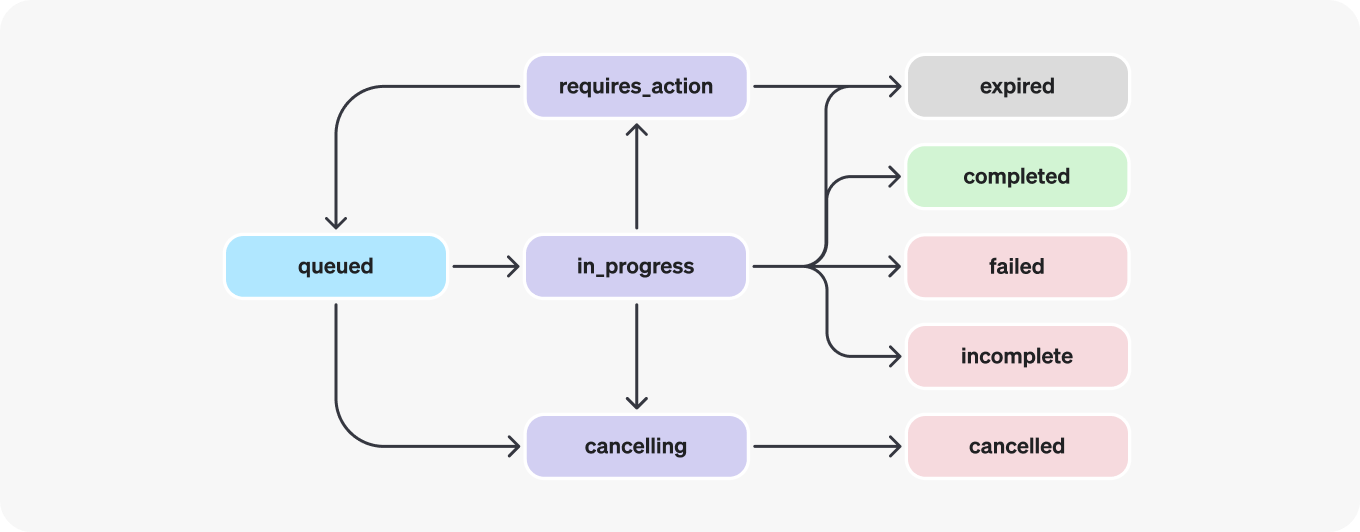
1096
1097| Status | Definition |
1098| ----------------- | ---------------------------------------------------------------------------------------------------------------------------------------------------------------------------------------------------------------------------------------------------------------------------------------------------------------------------------------------------------------------------------------------------------------------------------------------------------------------------------------------------------- |
1099| `queued` | When Runs are first created or when you complete the `required_action`, they are moved to a queued status. They should almost immediately move to `in_progress`. |
1100| `in_progress` | While `in_progress`, the Assistant uses the model and tools to perform steps. You can view progress being made by the Run by examining the [Run Steps](https://developers.openai.com/api/reference/resources/beta/subresources/threads/subresources/runs/subresources/steps). |
1101| `completed` | The Run successfully completed! You can now view all Messages the Assistant added to the Thread, and all the steps the Run took. You can also continue the conversation by adding more user Messages to the Thread and creating another Run. |
1102| `requires_action` | When using the [Function calling](https://developers.openai.com/api/docs/assistants/tools/function-calling) tool, the Run will move to a `required_action` state once the model determines the names and arguments of the functions to be called. You must then run those functions and [submit the outputs](https://developers.openai.com/api/reference/resources/beta/subresources/threads/subresources/runs/methods/submit_tool_outputs) before the run proceeds. If the outputs are not provided before the `expires_at` timestamp passes (roughly 10 mins past creation), the run will move to an expired status. |
1103| `expired` | This happens when the function calling outputs were not submitted before `expires_at` and the run expires. Additionally, if the runs take too long to execute and go beyond the time stated in `expires_at`, our systems will expire the run. |
1104| `cancelling` | You can attempt to cancel an `in_progress` run using the [Cancel Run](https://developers.openai.com/api/reference/resources/beta/subresources/threads/subresources/runs/methods/cancel) endpoint. Once the attempt to cancel succeeds, status of the Run moves to `cancelled`. Cancellation is attempted but not guaranteed. |
1105| `cancelled` | Run was successfully cancelled. |
1106| `failed` | You can view the reason for the failure by looking at the `last_error` object in the Run. The timestamp for the failure will be recorded under `failed_at`. |
1107| `incomplete` | Run ended due to `max_prompt_tokens` or `max_completion_tokens` reached. You can view the specific reason by looking at the `incomplete_details` object in the Run. |
1108
1109#### Polling for updates
1110
1111If you are not using [streaming](https://developers.openai.com/api/docs/assistants/migration#step-4-create-a-run?context=with-streaming), in order to keep the status of your run up to date, you will have to periodically [retrieve the Run](https://developers.openai.com/api/reference/resources/beta/subresources/threads/subresources/runs/methods/retrieve) object. You can check the status of the run each time you retrieve the object to determine what your application should do next.
1112
1113You can optionally use Polling Helpers in our [Node](https://github.com/openai/openai-node?tab=readme-ov-file#polling-helpers) and [Python](https://github.com/openai/openai-python?tab=readme-ov-file#polling-helpers) SDKs to help you with this. These helpers will automatically poll the Run object for you and return the Run object when it's in a terminal state.
1114
1115#### Thread locks
1116
1117When a Run is `in_progress` and not in a terminal state, the Thread is locked. This means that:
1118
1119- New Messages cannot be added to the Thread.
1120- New Runs cannot be created on the Thread.
1121
1122#### Run steps
1123
1124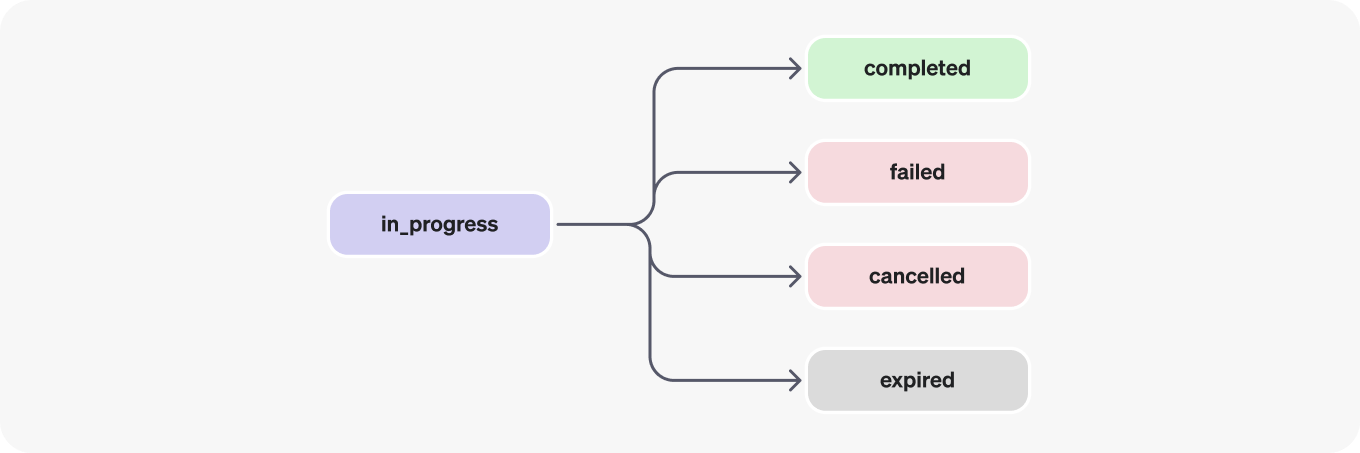
1125
1126Run step statuses have the same meaning as Run statuses.
1127
1128Most of the interesting detail in the Run Step object lives in the `step_details` field. There can be two types of step details:
1129
11301. `message_creation`: This Run Step is created when the Assistant creates a Message on the Thread.
11312. `tool_calls`: This Run Step is created when the Assistant calls a tool. Details around this are covered in the relevant sections of the [Tools](https://developers.openai.com/api/docs/assistants/tools) guide.
1132
1133## Data Access Guidance
1134
1135Currently, Assistants, Threads, Messages, and Vector Stores created via the API are scoped to the Project they're created in. As such, any person with API key access to that Project is able to read or write Assistants, Threads, Messages, and Runs in the Project.
1136
1137We strongly recommend the following data access controls:
1138
1139- _Implement authorization._ Before performing reads or writes on Assistants, Threads, Messages, and Vector Stores, ensure that the end-user is authorized to do so. For example, store in your database the object IDs that the end-user has access to, and check it before fetching the object ID with the API.
1140- _Restrict API key access._ Carefully consider who in your organization should have API keys and be part of a Project. Periodically audit this list. API keys enable a wide range of operations including reading and modifying sensitive information, such as Messages and Files.
1141- _Create separate accounts._ Consider creating separate Projects for different applications in order to isolate data across multiple applications.