SpyBara
Go Premium

Documentation 2026-08-26 22:57 UTC to 2026-08-27 22:01 UTC

46 files changed +3,666 −4,307. View all changes and history on the product overview
2026
Mon 31 23:00 Fri 28 18:00 Thu 27 22:01 Wed 26 22:57 Tue 25 18:59 Mon 24 22:00 Fri 21 19:59 Thu 20 23:59 Wed 19 18:02 Tue 18 04:58 Mon 17 22:57 Sat 15 01:01 Fri 14 20:01 Thu 13 22:00 Wed 12 02:57 Tue 11 19:59 Mon 10 19:00 Fri 7 00:58 Thu 6 21:58 Wed 5 18:01 Tue 4 22:59 Mon 3 18:01

assistants/deep-dive.md +0 −1141 deleted

File Deleted View Diff

1# Assistants API deep dive

2 

3> For the complete documentation index, see [llms.txt](/llms.txt). Markdown versions of documentation pages are available by appending `.md` to the page URL.

4 

5After achieving feature parity in the Responses API, we've deprecated the Assistants API. It will shut down on August 26, 2026. Follow the [migration guide](https://developers.openai.com/platform/assistants/migration) to update your integration. [Learn more](https://platform.openai.com/docs/guides/migrate-to-responses).

6 

7## Overview

8 

9Don't start a new integration on the Assistants API. We've announced plans to deprecate it soon, as the Responses API now provides the same features and a more elegant integration.

10 

11There are several concepts involved in building an app with the Assistants API, covered below in case it helps with your [migration to Responses](https://developers.openai.com/api/docs/assistants/migration).

12 

13## Creating assistants

14 

15We recommend using OpenAI's [latest models](https://developers.openai.com/api/docs/models) with

16 the Assistants API for best results and maximum compatibility with tools.

17 

18To get started, creating an Assistant only requires specifying the `model` to use. But you can further customize the behavior of the Assistant:

19 

201. Use the `instructions` parameter to guide the personality of the Assistant and define its goals. Instructions are similar to system messages in the Chat Completions API.

212. Use the `tools` parameter to give the Assistant access to up to 128 tools. You can give it access to OpenAI built-in tools like `code_interpreter` and `file_search`, or call a third-party tools via a `function` calling.

223. Use the `tool_resources` parameter to give the tools like `code_interpreter` and `file_search` access to files. Files are uploaded using the `File` [upload endpoint](https://developers.openai.com/api/reference/resources/files/methods/create) and must have the `purpose` set to `assistants` to be used with this API.

23 

24For example, to create an Assistant that can create data visualization based on a `.csv` file, first upload a file.

25 

26```javascript

27const file = await openai.files.create({

28 file: fs.createReadStream("revenue-forecast.csv"),

29 purpose: "assistants",

30});

31```

32 

33```python

34file = client.files.create(

35 file=open("revenue-forecast.csv", "rb"), purpose="assistants"

36)

37```

38 

39```go

40input, err := os.Open("revenue-forecast.csv")

41if err != nil {

42 panic(err)

43}

44defer input.Close()

45file, err := client.Files.New(context.Background(), openai.FileNewParams{

46 File: input,

47 Purpose: openai.FilePurposeAssistants,

48})

49if err != nil {

50 panic(err)

51}

52```

53 

54```java

55import com.openai.client.OpenAIClient;

56import com.openai.client.okhttp.OpenAIOkHttpClient;

57import com.openai.models.files.FileCreateParams;

58import com.openai.models.files.FilePurpose;

59import java.nio.file.Path;

60 

61var file =

62 client

63 .files()

64 .create(

65 FileCreateParams.builder()

66 .file(Path.of(System.getenv("OPENAI_EXAMPLE_FILE_PATH")))

67 .purpose(FilePurpose.ASSISTANTS)

68 .build());

69 

70System.out.println(file.id());

71```

72 

73```ruby

74require "openai"

75require "pathname"

76 

77client = OpenAI::Client.new

78file = Pathname("revenue-forecast.csv")

79uploaded = client.files.create(file: file, purpose: :assistants)

80puts(uploaded.id)

81```

82 

83```bash

84curl https://api.openai.com/v1/files \

85 -H "Authorization: Bearer $OPENAI_API_KEY" \

86 -F purpose="assistants" \

87 -F file="@revenue-forecast.csv"

88```

89 

90 

91Then, create the Assistant with the `code_interpreter` tool enabled and provide the file as a resource to the tool.

92 

93```javascript

94const assistant = await openai.beta.assistants.create({

95 name: "Data visualizer",

96 description:

97 "You are great at creating beautiful data visualizations. You analyze data present in .csv files, understand trends, and come up with data visualizations relevant to those trends. You also share a brief text summary of the trends observed.",

98 model: "gpt-4o",

99 tools: [{ type: "code_interpreter" }],

100 tool_resources: {

101 code_interpreter: {

102 file_ids: [file.id],

103 },

104 },

105});

106```

107 

108```python

109assistant = client.beta.assistants.create(

110 name="Data visualizer",

111 description="You are great at creating beautiful data visualizations. You analyze data present in .csv files, understand trends, and come up with data visualizations relevant to those trends. You also share a brief text summary of the trends observed.",

112 model="gpt-4o",

113 tools=[{"type": "code_interpreter"}],

114 tool_resources={"code_interpreter": {"file_ids": [file.id]}},

115)

116```

117 

118```go

119assistant, err := client.Beta.Assistants.New(context.Background(), openai.BetaAssistantNewParams{

120 Name: openai.String("Data visualizer"),

121 Description: openai.String("You are great at creating beautiful data visualizations. You analyze data present in .csv files, understand trends, and come up with data visualizations relevant to those trends. You also share a brief text summary of the trends observed."),

122 Model: shared.ChatModelGPT4o,

123 Tools: []openai.AssistantToolUnionParam{{OfCodeInterpreter: &openai.CodeInterpreterToolParam{}}},

124 ToolResources: openai.BetaAssistantNewParamsToolResources{

125 CodeInterpreter: openai.BetaAssistantNewParamsToolResourcesCodeInterpreter{FileIDs: []string{"file-BK7bzQj3FfZFXr7DbL6xJwfo"}},

126 },

127})

128if err != nil {

129 panic(err)

130}

131```

132 

133```java

134import com.openai.client.OpenAIClient;

135import com.openai.client.okhttp.OpenAIOkHttpClient;

136import com.openai.models.beta.assistants.AssistantCreateParams;

137import com.openai.models.beta.assistants.CodeInterpreterTool;

138 

139String fileId = "file-BK7bzQj3FfZFXr7DbL6xJwfo";

140 

141var assistant =

142 client

143 .beta()

144 .assistants()

145 .create(

146 AssistantCreateParams.builder()

147 .name("Data visualizer")

148 .model("gpt-4o")

149 .description(

150 "You are great at creating beautiful data visualizations. You analyze data"

151 + " present in .csv files, understand trends, and come up with data"

152 + " visualizations relevant to those trends. You also share a brief text"

153 + " summary of the trends observed.")

154 .addTool(CodeInterpreterTool.builder().build())

155 .toolResources(

156 AssistantCreateParams.ToolResources.builder()

157 .codeInterpreter(

158 AssistantCreateParams.ToolResources.CodeInterpreter.builder()

159 .addFileId(fileId)

160 .build())

161 .build())

162 .build());

163 

164System.out.println(assistant.id());

165```

166 

167```ruby

168require "openai"

169 

170client = OpenAI::Client.new

171assistant = client.beta.assistants.create(

172 name: "Data visualizer",

173 model: "gpt-4o",

174 instructions: "Analyze CSV data, create relevant visualizations, and summarize the trends.",

175 tools: [{type: :code_interpreter}],

176 tool_resources: {

177 code_interpreter: {file_ids: ["file-BK7bzQj3FfZFXr7DbL6xJwfo"]}

178 }

179)

180puts(assistant.id)

181```

182 

183```bash

184curl https://api.openai.com/v1/assistants \

185 -H "Authorization: Bearer $OPENAI_API_KEY" \

186 -H "Content-Type: application/json" \

187 -H "OpenAI-Beta: assistants=v2" \

188 -d '{

189 "name": "Data visualizer",

190 "description": "You are great at creating beautiful data visualizations. You analyze data present in .csv files, understand trends, and come up with data visualizations relevant to those trends. You also share a brief text summary of the trends observed.",

191 "model": "gpt-4o",

192 "tools": [{"type": "code_interpreter"}],

193 "tool_resources": {

194 "code_interpreter": {

195 "file_ids": ["file-BK7bzQj3FfZFXr7DbL6xJwfo"]

196 }

197 }

198 }'

199```

200 

201 

202You can attach a maximum of 20 files to `code_interpreter` and 10,000 files to `file_search` (using `vector_store` [objects](https://developers.openai.com/api/reference/resources/vector_stores)). For vector stores created starting in November 2025, the `file_search` limit is 100,000,000 files.

203 

204Each file can be at most 512 MB in size and have a maximum of 5,000,000 tokens. By default, each project can store up to 2.5 TB of files total. There is no organization-wide storage limit. You can reach out to our support team to increase this limit.

205 

206## Managing Threads and Messages

207 

208Threads and Messages represent a conversation session between an Assistant and a user. There is a limit of 100,000 Messages per Thread. Once the size of the Messages exceeds the context window of the model, the Thread will attempt to smartly truncate messages, before fully dropping the ones it considers the least important.

209 

210You can create a Thread with an initial list of Messages like this:

211 

212```javascript

213const thread = await openai.beta.threads.create({

214 messages: [

215 {

216 role: "user",

217 content: "Create 3 data visualizations based on the trends in this file.",

218 attachments: [

219 {

220 file_id: file.id,

221 tools: [{ type: "code_interpreter" }],

222 },

223 ],

224 },

225 ],

226});

227```

228 

229```python

230thread = client.beta.threads.create(

231 messages=[

232 {

233 "role": "user",

234 "content": "Create 3 data visualizations based on the trends in this file.",

235 "attachments": [

236 {"file_id": file.id, "tools": [{"type": "code_interpreter"}]}

237 ],

238 }

239 ]

240)

241```

242 

243```go

244thread, err := client.Beta.Threads.New(context.Background(), openai.BetaThreadNewParams{

245 Messages: []openai.BetaThreadNewParamsMessage{{

246 Role: "user",

247 Content: openai.BetaThreadNewParamsMessageContentUnion{

248 OfString: openai.String("Create 3 data visualizations based on the trends in this file."),

249 },

250 Attachments: []openai.BetaThreadNewParamsMessageAttachment{{

251 FileID: openai.String("file-ACq8OjcLQm2eIG0BvRM4z5qX"),

252 Tools: []openai.BetaThreadNewParamsMessageAttachmentToolUnion{{OfCodeInterpreter: &openai.CodeInterpreterToolParam{}}},

253 }},

254 }},

255})

256if err != nil {

257 panic(err)

258}

259```

260 

261```java

262import com.openai.client.OpenAIClient;

263import com.openai.client.okhttp.OpenAIOkHttpClient;

264import com.openai.models.beta.assistants.CodeInterpreterTool;

265import com.openai.models.beta.threads.ThreadCreateParams;

266 

267String fileId = "file-ACq8OjcLQm2eIG0BvRM4z5qX";

268 

269var thread =

270 client

271 .beta()

272 .threads()

273 .create(

274 ThreadCreateParams.builder()

275 .addMessage(

276 ThreadCreateParams.Message.builder()

277 .role(ThreadCreateParams.Message.Role.USER)

278 .content(

279 "Create 3 data visualizations based on the trends in this file.")

280 .addAttachment(

281 ThreadCreateParams.Message.Attachment.builder()

282 .fileId(fileId)

283 .addTool(CodeInterpreterTool.builder().build())

284 .build())

285 .build())

286 .build());

287 

288System.out.println(thread.id());

289```

290 

291```ruby

292require "openai"

293 

294client = OpenAI::Client.new

295thread = client.beta.threads.create(

296 messages: [{

297 role: :user,

298 content: "Create 3 data visualizations based on the trends in this file.",

299 attachments: [{

300 file_id: "file-ACq8OjcLQm2eIG0BvRM4z5qX",

301 tools: [{type: :code_interpreter}]

302 }]

303 }]

304)

305puts(thread.id)

306```

307 

308```bash

309curl https://api.openai.com/v1/threads \

310 -H "Authorization: Bearer $OPENAI_API_KEY" \

311 -H "Content-Type: application/json" \

312 -H "OpenAI-Beta: assistants=v2" \

313 -d '{

314 "messages": [

315 {

316 "role": "user",

317 "content": "Create 3 data visualizations based on the trends in this file.",

318 "attachments": [

319 {

320 "file_id": "file-ACq8OjcLQm2eIG0BvRM4z5qX",

321 "tools": [{"type": "code_interpreter"}]

322 }

323 ]

324 }

325 ]

326 }'

327```

328 

329 

330Messages can contain text, images, or file attachment. Message `attachments` are helper methods that add files to a thread's `tool_resources`. You can also choose to add files to the `thread.tool_resources` directly.

331 

332### Creating image input content

333 

334Message content can contain either external image URLs or File IDs uploaded via the [File API](https://developers.openai.com/api/reference/resources/files/methods/create). Only [models](https://developers.openai.com/api/docs/models) with Vision support can accept image input. Supported image content types include png, jpg, gif, and webp. When creating image files, pass `purpose="vision"` to allow you to later download and display the input content. Projects are limited to 2.5 TB total file storage, and there is no organization-wide storage limit. Please contact us to request a limit increase.

335 

336Tools cannot access image content unless specified. To pass image files to Code Interpreter, add the file ID in the message `attachments` list to allow the tool to read and analyze the input. Image URLs cannot be downloaded in Code Interpreter today.

337 

338```javascript

339import fs from "fs";

340 

341const file = await openai.files.create({

342 file: fs.createReadStream("myimage.png"),

343 purpose: "vision",

344});

345const thread = await openai.beta.threads.create({

346 messages: [

347 {

348 role: "user",

349 content: [

350 {

351 type: "text",

352 text: "What is the difference between these images?",

353 },

354 {

355 type: "image_url",

356 image_url: {

357 url: "https://openai-documentation.vercel.app/images/cat_and_otter.png",

358 },

359 },

360 {

361 type: "image_file",

362 image_file: { file_id: file.id },

363 },

364 ],

365 },

366 ],

367});

368```

369 

370```python

371file = client.files.create(file=open("myimage.png", "rb"), purpose="vision")

372thread = client.beta.threads.create(

373 messages=[

374 {

375 "role": "user",

376 "content": [

377 {

378 "type": "text",

379 "text": "What is the difference between these images?",

380 },

381 {

382 "type": "image_url",

383 "image_url": {

384 "url": "https://openai-documentation.vercel.app/images/cat_and_otter.png"

385 },

386 },

387 {"type": "image_file", "image_file": {"file_id": file.id}},

388 ],

389 }

390 ]

391)

392```

393 

394```go

395image, err := os.Open("myimage.png")

396if err != nil {

397 panic(err)

398}

399defer image.Close()

400file, err := client.Files.New(context.Background(), openai.FileNewParams{

401 File: image,

402 Purpose: openai.FilePurposeVision,

403})

404if err != nil {

405 panic(err)

406}

407thread, err := client.Beta.Threads.New(context.Background(), openai.BetaThreadNewParams{

408 Messages: []openai.BetaThreadNewParamsMessage{{

409 Role: "user",

410 Content: openai.BetaThreadNewParamsMessageContentUnion{OfArrayOfContentParts: []openai.MessageContentPartParamUnion{

411 openai.MessageContentPartParamOfText("What is the difference between these images?"),

412 openai.MessageContentPartParamOfImageURL(openai.ImageURLParam{URL: "https://openai-documentation.vercel.app/images/cat_and_otter.png"}),

413 openai.MessageContentPartParamOfImageFile(openai.ImageFileParam{FileID: file.ID}),

414 }},

415 }},

416})

417if err != nil {

418 panic(err)

419}

420```

421 

422```java

423import com.openai.client.OpenAIClient;

424import com.openai.client.okhttp.OpenAIOkHttpClient;

425import com.openai.models.beta.threads.ThreadCreateParams;

426import com.openai.models.beta.threads.messages.ImageFile;

427import com.openai.models.beta.threads.messages.ImageFileContentBlock;

428import com.openai.models.beta.threads.messages.ImageUrl;

429import com.openai.models.beta.threads.messages.ImageUrlContentBlock;

430import com.openai.models.beta.threads.messages.MessageContentPartParam;

431import com.openai.models.beta.threads.messages.TextContentBlockParam;

432import com.openai.models.files.FileCreateParams;

433import com.openai.models.files.FilePurpose;

434import java.nio.file.Path;

435import java.util.List;

436 

437var file =

438 client

439 .files()

440 .create(

441 FileCreateParams.builder()

442 .file(Path.of(System.getenv("OPENAI_EXAMPLE_FILE_PATH")))

443 .purpose(FilePurpose.VISION)

444 .build());

445 

446var imageUrl =

447 ImageUrl.builder()

448 .url("https://openai-documentation.vercel.app/images/cat_and_otter.png")

449 .build();

450var thread =

451 client

452 .beta()

453 .threads()

454 .create(

455 ThreadCreateParams.builder()

456 .addMessage(

457 ThreadCreateParams.Message.builder()

458 .role(ThreadCreateParams.Message.Role.USER)

459 .content(

460 ThreadCreateParams.Message.Content.ofArrayOfContentParts(

461 List.of(

462 MessageContentPartParam.ofText(

463 TextContentBlockParam.builder()

464 .text(

465 "What is the difference between these images?")

466 .build()),

467 MessageContentPartParam.ofImageUrl(

468 ImageUrlContentBlock.builder()

469 .imageUrl(imageUrl)

470 .build()),

471 MessageContentPartParam.ofImageFile(

472 ImageFileContentBlock.builder()

473 .imageFile(

474 ImageFile.builder().fileId(file.id()).build())

475 .build()))))

476 .build())

477 .build());

478 

479System.out.println(thread.id());

480```

481 

482```ruby

483require "openai"

484require "pathname"

485 

486client = OpenAI::Client.new

487file = client.files.create(

488 file: Pathname("myimage.png"),

489 purpose: :vision

490)

491thread = client.beta.threads.create(

492 messages: [{

493 role: :user,

494 content: [

495 {type: :text, text: "What is the difference between these images?"},

496 {

497 type: :image_url,

498 image_url: {url: "https://openai-documentation.vercel.app/images/cat_and_otter.png"}

499 },

500 {type: :image_file, image_file: {file_id: file.id}}

501 ]

502 }]

503)

504puts(thread.id)

505```

506 

507```bash

508# Upload a file with an "vision" purpose

509curl https://api.openai.com/v1/files \

510 -H "Authorization: Bearer $OPENAI_API_KEY" \

511 -F purpose="vision" \

512 -F file="@/path/to/myimage.png"

513 

514## Pass the file ID in the content

515 

516curl https://api.openai.com/v1/threads \

517-H "Authorization: Bearer $OPENAI_API_KEY" \

518-H "Content-Type: application/json" \

519-H "OpenAI-Beta: assistants=v2" \

520-d '{

521"messages": [

522{

523"role": "user",

524"content": [

525{

526"type": "text",

527"text": "What is the difference between these images?"

528},

529{

530"type": "image_url",

531"image_url": {"url": "https://openai-documentation.vercel.app/images/cat_and_otter.png"}

532},

533{

534"type": "image_file",

535"image_file": {"file_id": file.id}

536}

537]

538}

539]

540}'

541```

542 

543 

544#### Low or high fidelity image understanding

545 

546By controlling the `detail` parameter, which has three options, `low`, `high`, or `auto`, you have control over how the model processes the image and generates its textual understanding.

547 

548- `low` will enable the "low res" mode. The model will receive a low-res 512px x 512px version of the image, and represent the image with a budget of 85 tokens. This allows the API to return faster responses and consume fewer input tokens for use cases that do not require high detail.

549- `high` will enable "high res" mode, which first allows the model to see the low res image and then creates detailed crops of input images based on the input image size. Use the [pricing calculator](https://openai.com/api/pricing/) to see token counts for various image sizes.

550 

551```javascript

552const thread = await openai.beta.threads.create({

553 messages: [

554 {

555 role: "user",

556 content: [

557 {

558 type: "text",

559 text: "What is this an image of?",

560 },

561 {

562 type: "image_url",

563 image_url: {

564 url: "https://openai-documentation.vercel.app/images/cat_and_otter.png",

565 detail: "high",

566 },

567 },

568 ],

569 },

570 ],

571});

572```

573 

574```python

575thread = client.beta.threads.create(

576 messages=[

577 {

578 "role": "user",

579 "content": [

580 {"type": "text", "text": "What is this an image of?"},

581 {

582 "type": "image_url",

583 "image_url": {

584 "url": "https://openai-documentation.vercel.app/images/cat_and_otter.png",

585 "detail": "high",

586 },

587 },

588 ],

589 }

590 ]

591)

592```

593 

594```go

595thread, err := client.Beta.Threads.New(context.Background(), openai.BetaThreadNewParams{

596 Messages: []openai.BetaThreadNewParamsMessage{{

597 Role: "user",

598 Content: openai.BetaThreadNewParamsMessageContentUnion{OfArrayOfContentParts: []openai.MessageContentPartParamUnion{

599 openai.MessageContentPartParamOfText("What is this an image of?"),

600 openai.MessageContentPartParamOfImageURL(openai.ImageURLParam{

601 URL: "https://openai-documentation.vercel.app/images/cat_and_otter.png",

602 Detail: openai.ImageURLDetailHigh,

603 }),

604 }},

605 }},

606})

607if err != nil {

608 panic(err)

609}

610```

611 

612```java

613import com.openai.client.OpenAIClient;

614import com.openai.client.okhttp.OpenAIOkHttpClient;

615import com.openai.models.beta.threads.ThreadCreateParams;

616import com.openai.models.beta.threads.messages.ImageUrl;

617import com.openai.models.beta.threads.messages.ImageUrlContentBlock;

618import com.openai.models.beta.threads.messages.MessageContentPartParam;

619import com.openai.models.beta.threads.messages.TextContentBlockParam;

620import java.util.List;

621 

622var thread =

623 client

624 .beta()

625 .threads()

626 .create(

627 ThreadCreateParams.builder()

628 .addMessage(

629 ThreadCreateParams.Message.builder()

630 .role(ThreadCreateParams.Message.Role.USER)

631 .content(

632 ThreadCreateParams.Message.Content.ofArrayOfContentParts(

633 List.of(

634 MessageContentPartParam.ofText(

635 TextContentBlockParam.builder()

636 .text("What is this an image of?")

637 .build()),

638 MessageContentPartParam.ofImageUrl(

639 ImageUrlContentBlock.builder()

640 .imageUrl(

641 ImageUrl.builder()

642 .url(

643 "https://openai-documentation.vercel.app/images/cat_and_otter.png")

644 .detail(ImageUrl.Detail.HIGH)

645 .build())

646 .build()))))

647 .build())

648 .build());

649 

650System.out.println(thread.id());

651```

652 

653```ruby

654require "openai"

655 

656client = OpenAI::Client.new

657thread = client.beta.threads.create(

658 messages: [{

659 role: :user,

660 content: [

661 {type: :text, text: "What is this an image of?"},

662 {

663 type: :image_url,

664 image_url: {

665 url: "https://openai-documentation.vercel.app/images/cat_and_otter.png",

666 detail: :high

667 }

668 }

669 ]

670 }]

671)

672puts(thread.id)

673```

674 

675```bash

676curl https://api.openai.com/v1/threads \

677 -H "Authorization: Bearer $OPENAI_API_KEY" \

678 -H "Content-Type: application/json" \

679 -H "OpenAI-Beta: assistants=v2" \

680 -d '{

681 "messages": [

682 {

683 "role": "user",

684 "content": [

685 {

686 "type": "text",

687 "text": "What is this an image of?"

688 },

689 {

690 "type": "image_url",

691 "image_url": {

692 "url": "https://openai-documentation.vercel.app/images/cat_and_otter.png",

693 "detail": "high"

694 }

695 },

696 ]

697 }

698 ]

699 }'

700```

701 

702 

703### Context window management

704 

705The Assistants API automatically manages the truncation to ensure it stays within the model's maximum context length. You can customize this behavior by specifying the maximum tokens you'd like a run to utilize and/or the maximum number of recent messages you'd like to include in a run.

706 

707#### Max Completion and Max Prompt Tokens

708 

709To control the token usage in a single Run, set `max_prompt_tokens` and `max_completion_tokens` when creating the Run. These limits apply to the total number of tokens used in all completions throughout the Run's lifecycle.

710 

711For example, initiating a Run with `max_prompt_tokens` set to 500 and `max_completion_tokens` set to 1000 means the first completion will truncate the thread to 500 tokens and cap the output at 1000 tokens. If only 200 prompt tokens and 300 completion tokens are used in the first completion, the second completion will have available limits of 300 prompt tokens and 700 completion tokens.

712 

713If a completion reaches the `max_completion_tokens` limit, the Run will terminate with a status of `incomplete`, and details will be provided in the `incomplete_details` field of the Run object.

714 

715When using the File Search tool, we recommend setting the max_prompt_tokens to

716 no less than 20,000. For longer conversations or multiple interactions with

717 File Search, consider increasing this limit to 50,000, or ideally, removing

718 the max_prompt_tokens limits altogether to get the highest quality results.

719 

720#### Truncation Strategy

721 

722You may also specify a truncation strategy to control how your thread should be rendered into the model's context window.

723Using a truncation strategy of type `auto` will use OpenAI's default truncation strategy. Using a truncation strategy of type `last_messages` will allow you to specify the number of the most recent messages to include in the context window.

724 

725### Message annotations

726 

727Messages created by Assistants may contain [`annotations`](https://developers.openai.com/api/reference/resources/beta/subresources/threads/subresources/messages#messages/object-content) within the `content` array of the object. Annotations provide information around how you should annotate the text in the Message.

728 

729There are two types of Annotations:

730 

7311. `file_citation`: File citations are created by the [`file_search`](https://developers.openai.com/api/docs/assistants/tools/file-search) tool and define references to a specific file that was uploaded and used by the Assistant to generate the response.

7322. `file_path`: File path annotations are created by the [`code_interpreter`](https://developers.openai.com/api/docs/assistants/tools/code-interpreter) tool and contain references to the files generated by the tool.

733 

734When annotations are present in the Message object, you'll see illegible model-generated substrings in the text that you should replace with the annotations. These strings may look something like `【13†source】` or `sandbox:/mnt/data/file.csv`. Here’s an example python code snippet that replaces these strings with the annotations.

735 

736```python

737import os

738from pathlib import Path

739 

740thread_id = os.environ["OPENAI_THREAD_ID"]

741message_id = os.environ["OPENAI_MESSAGE_ID"]

742downloads = Path("downloads")

743downloads.mkdir(exist_ok=True)

744 

745# Retrieve the message object

746message = client.beta.threads.messages.retrieve(

747 thread_id=thread_id,

748 message_id=message_id,

749)

750 

751# Extract the message content

752 

753message_content = message.content[0].text

754annotations = message_content.annotations

755citations = []

756 

757# Iterate over the annotations and add footnotes

758 

759for index, annotation in enumerate(annotations):

760 # Replace the text with a footnote.

761 message_content.value = message_content.value.replace(

762 annotation.text, f" [{index}]"

763 )

764 

765 # Gather citations based on annotation attributes

766 if file_citation := getattr(annotation, "file_citation", None):

767 cited_file = client.files.retrieve(file_citation.file_id)

768 citations.append(f"[{index}] {file_citation.quote} from {cited_file.filename}")

769 elif file_path := getattr(annotation, "file_path", None):

770 cited_file = client.files.retrieve(file_path.file_id)

771 file_content = client.files.content(file_path.file_id)

772 output_path = downloads / Path(cited_file.filename).name

773 output_path.write_bytes(file_content.read())

774 citations.append(f"[{index}] Downloaded {output_path}")

775 

776# Add footnotes to the end of the message before displaying to user

777 

778message_content.value += "\n" + "\n".join(citations)

779```

780 

781```go

782message, err := client.Beta.Threads.Messages.Get(context.Background(), "thread_abc123", "msg_abc123")

783if err != nil {

784 panic(err)

785}

786if len(message.Content) == 0 || message.Content[0].Type != "text" {

787 panic("message does not contain text")

788}

789messageContent := message.Content[0].AsText().Text

790citations := make([]string, 0, len(messageContent.Annotations))

791for index, annotation := range messageContent.Annotations {

792 messageContent.Value = strings.ReplaceAll(messageContent.Value, annotation.Text, fmt.Sprintf(" [%d]", index))

793 switch annotation.Type {

794 case "file_citation":

795 citation := annotation.AsFileCitation()

796 file, err := client.Files.Get(context.Background(), citation.FileCitation.FileID)

797 if err != nil {

798 panic(err)

799 }

800 citations = append(citations, fmt.Sprintf("[%d] %s", index, file.Filename))

801 case "file_path":

802 filePath := annotation.AsFilePath()

803 file, err := client.Files.Get(context.Background(), filePath.FilePath.FileID)

804 if err != nil {

805 panic(err)

806 }

807 response, err := client.Files.Content(context.Background(), filePath.FilePath.FileID)

808 if err != nil {

809 panic(err)

810 }

811 defer response.Body.Close()

812 if err := os.MkdirAll("downloads", 0o755); err != nil {

813 panic(err)

814 }

815 outputPath := filepath.Join("downloads", filepath.Base(file.Filename))

816 output, err := os.Create(outputPath)

817 if err != nil {

818 panic(err)

819 }

820 if _, err := io.Copy(output, response.Body); err != nil {

821 output.Close()

822 panic(err)

823 }

824 if err := output.Close(); err != nil {

825 panic(err)

826 }

827 citations = append(citations, fmt.Sprintf("[%d] Downloaded %s", index, outputPath))

828 }

829}

830messageContent.Value += "\n" + strings.Join(citations, "\n")

831fmt.Println(messageContent.Value)

832```

833 

834```java

835import com.openai.client.OpenAIClient;

836import com.openai.client.okhttp.OpenAIOkHttpClient;

837import com.openai.models.beta.threads.messages.MessageRetrieveParams;

838import java.nio.file.Files;

839import java.nio.file.Path;

840import java.nio.file.StandardCopyOption;

841import java.util.ArrayList;

842import java.util.regex.Matcher;

843import java.util.regex.Pattern;

844 

845String messageId = "msg_abc123";

846 

847String threadId = "thread_abc123";

848 

849var message =

850 client

851 .beta()

852 .threads()

853 .messages()

854 .retrieve(messageId, MessageRetrieveParams.builder().threadId(threadId).build());

855 

856var text =

857 message.content().stream()

858 .flatMap(content -> content.text().stream())

859 .findFirst()

860 .orElseThrow(() -> new IllegalStateException("No text content returned"))

861 .text();

862String rendered = text.value();

863var references = new ArrayList<String>();

864for (int index = 0; index < text.annotations().size(); index++) {

865 var annotation = text.annotations().get(index);

866 if (annotation.isFileCitation()) {

867 var citation = annotation.asFileCitation();

868 rendered =

869 rendered.replaceFirst(

870 Pattern.quote(citation.text()), Matcher.quoteReplacement(" [" + index + "]"));

871 var file = client.files().retrieve(citation.fileCitation().fileId());

872 references.add("[" + index + "] " + file.filename());

873 } else if (annotation.isFilePath()) {

874 var filePath = annotation.asFilePath();

875 rendered =

876 rendered.replaceFirst(

877 Pattern.quote(filePath.text()), Matcher.quoteReplacement(" [" + index + "]"));

878 String fileId = filePath.filePath().fileId();

879 var file = client.files().retrieve(fileId);

880 Path downloads = Path.of("downloads");

881 Files.createDirectories(downloads);

882 Path target = downloads.resolve(Path.of(file.filename()).getFileName()).normalize();

883 if (!target.startsWith(downloads)) throw new IllegalArgumentException("Unsafe filename");

884 try (var content = client.files().content(fileId)) {

885 Files.copy(content.body(), target, StandardCopyOption.REPLACE_EXISTING);

886 }

887 references.add("[" + index + "] Downloaded " + target);

888 }

889}

890System.out.println(rendered);

891references.forEach(System.out::println);

892```

893 

894```ruby

895require "openai"

896require "pathname"

897 

898client = OpenAI::Client.new

899message = client.beta.threads.messages.retrieve(

900 "msg_abc123",

901 thread_id: "thread_abc123"

902)

903text_block = message.content.find do |content|

904 content.is_a?(OpenAI::Models::Beta::Threads::TextContentBlock)

905end

906unless text_block.is_a?(OpenAI::Models::Beta::Threads::TextContentBlock)

907 raise "No text content returned"

908end

909text = text_block.text

910downloads = Pathname("downloads")

911references = text.annotations.each_with_index.filter_map do |annotation, index|

912 text.value = text.value.sub(annotation.text, " [#{index}]")

913 

914 case annotation

915 when OpenAI::Models::Beta::Threads::FileCitationAnnotation

916 file = client.files.retrieve(annotation.file_citation.file_id)

917 "[#{index}] #{file.filename}"

918 when OpenAI::Models::Beta::Threads::FilePathAnnotation

919 file_id = annotation.file_path.file_id

920 file = client.files.retrieve(file_id)

921 downloads.mkpath

922 output_path = downloads.join(Pathname(file.filename).basename)

923 output_path.binwrite(client.files.content(file_id).read)

924 "[#{index}] Downloaded #{output_path}"

925 end

926end

927 

928puts(([text.value] + references).join("\n"))

929```

930 

931 

932## Runs and Run Steps

933 

934When you have all the context you need from your user in the Thread, you can run the Thread with an Assistant of your choice.

935 

936```javascript

937const run = await openai.beta.threads.runs.create(thread.id, {

938 assistant_id: assistant.id,

939});

940```

941 

942```python

943run = client.beta.threads.runs.create(

944 thread_id=thread.id,

945 assistant_id=assistant.id,

946)

947```

948 

949```go

950_, err := client.Beta.Threads.Runs.New(context.Background(), "thread_abc123", openai.BetaThreadRunNewParams{

951 AssistantID: "asst_ToSF7Gb04YMj8AMMm50ZLLtY",

952})

953if err != nil {

954 panic(err)

955}

956```

957 

958```java

959import com.openai.client.OpenAIClient;

960import com.openai.client.okhttp.OpenAIOkHttpClient;

961import com.openai.models.beta.threads.runs.RunCreateParams;

962 

963String threadId = "thread_abc123";

964 

965String assistantId = "asst_ToSF7Gb04YMj8AMMm50ZLLtY";

966 

967var run =

968 client

969 .beta()

970 .threads()

971 .runs()

972 .create(threadId, RunCreateParams.builder().assistantId(assistantId).build());

973 

974System.out.println(run.status());

975```

976 

977```ruby

978require "openai"

979 

980client = OpenAI::Client.new

981run = client.beta.threads.runs.create("thread_abc123", assistant_id: "asst_ToSF7Gb04YMj8AMMm50ZLLtY")

982puts(run.id)

983```

984 

985```bash

986curl https://api.openai.com/v1/threads/THREAD_ID/runs \

987 -H "Authorization: Bearer $OPENAI_API_KEY" \

988 -H "Content-Type: application/json" \

989 -H "OpenAI-Beta: assistants=v2" \

990 -d '{

991 "assistant_id": "asst_ToSF7Gb04YMj8AMMm50ZLLtY"

992 }'

993```

994 

995 

996By default, a Run will use the `model` and `tools` configuration specified in Assistant object, but you can override most of these when creating the Run for added flexibility:

997 

998```javascript

999const run = await openai.beta.threads.runs.create(thread.id, {

1000 assistant_id: assistant.id,

1001 model: "gpt-4o",

1002 instructions: "New instructions that override the Assistant instructions",

1003 tools: [{ type: "code_interpreter" }, { type: "file_search" }],

1004});

1005```

1006 

1007```python

1008run = client.beta.threads.runs.create(

1009 thread_id=thread.id,

1010 assistant_id=assistant.id,

1011 model="gpt-4o",

1012 instructions="New instructions that override the Assistant instructions",

1013 tools=[{"type": "code_interpreter"}, {"type": "file_search"}],

1014)

1015```

1016 

1017```go

1018_, err := client.Beta.Threads.Runs.New(context.Background(), "thread_abc123", openai.BetaThreadRunNewParams{

1019 AssistantID: "asst_ToSF7Gb04YMj8AMMm50ZLLtY",

1020 Model: shared.ChatModelGPT4o,

1021 Instructions: openai.String("New instructions that override the Assistant instructions"),

1022 Tools: []openai.AssistantToolUnionParam{

1023 {OfCodeInterpreter: &openai.CodeInterpreterToolParam{}},

1024 {OfFileSearch: &openai.FileSearchToolParam{}},

1025 },

1026})

1027if err != nil {

1028 panic(err)

1029}

1030```

1031 

1032```java

1033import com.openai.client.OpenAIClient;

1034import com.openai.client.okhttp.OpenAIOkHttpClient;

1035import com.openai.models.beta.assistants.CodeInterpreterTool;

1036import com.openai.models.beta.assistants.FileSearchTool;

1037import com.openai.models.beta.threads.runs.RunCreateParams;

1038 

1039String threadId = "thread_abc123";

1040 

1041String assistantId = "asst_ToSF7Gb04YMj8AMMm50ZLLtY";

1042 

1043var run =

1044 client

1045 .beta()

1046 .threads()

1047 .runs()

1048 .create(

1049 threadId,

1050 RunCreateParams.builder()

1051 .assistantId(assistantId)

1052 .model("gpt-4o")

1053 .instructions("New instructions that override the Assistant instructions")

1054 .addTool(CodeInterpreterTool.builder().build())

1055 .addTool(FileSearchTool.builder().build())

1056 .build());

1057 

1058System.out.println(run.status());

1059```

1060 

1061```ruby

1062require "openai"

1063 

1064client = OpenAI::Client.new

1065run = client.beta.threads.runs.create(

1066 "thread_abc123",

1067 assistant_id: "asst_ToSF7Gb04YMj8AMMm50ZLLtY",

1068 model: "gpt-4o",

1069 instructions: "New instructions that override the Assistant instructions",

1070 tools: [{type: :code_interpreter}, {type: :file_search}]

1071)

1072puts(run.id)

1073```

1074 

1075```bash

1076curl https://api.openai.com/v1/threads/THREAD_ID/runs \

1077 -H "Authorization: Bearer $OPENAI_API_KEY" \

1078 -H "Content-Type: application/json" \

1079 -H "OpenAI-Beta: assistants=v2" \

1080 -d '{

1081 "assistant_id": "ASSISTANT_ID",

1082 "model": "gpt-4o",

1083 "instructions": "New instructions that override the Assistant instructions",

1084 "tools": [{"type": "code_interpreter"}, {"type": "file_search"}]

1085 }'

1086```

1087 

1088 

1089Note: `tool_resources` associated with the Assistant cannot be overridden during Run creation. You must use the [modify Assistant](https://developers.openai.com/api/reference/resources/beta/subresources/assistants/methods/update) endpoint to do this.

1090 

1091#### Run lifecycle

1092 

1093Run objects can have multiple statuses.

1094 

1095![Run lifecycle - diagram showing possible status transitions](https://cdn.openai.com/API/docs/images/diagram-run-statuses-v2.png)
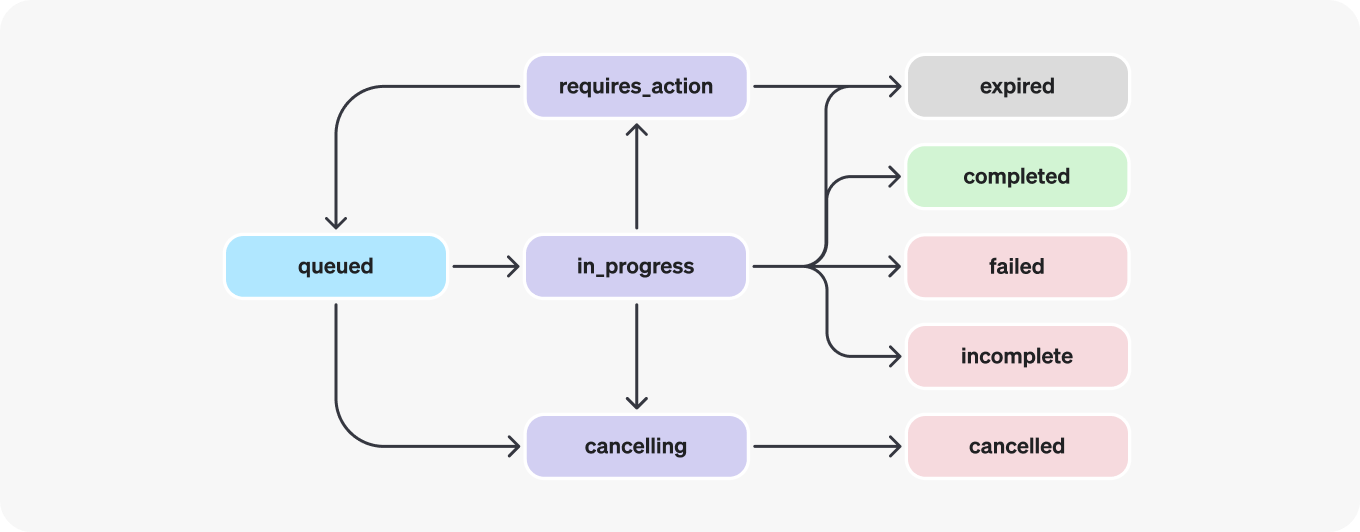
1096 

1097| Status | Definition |

1098| ----------------- | ---------------------------------------------------------------------------------------------------------------------------------------------------------------------------------------------------------------------------------------------------------------------------------------------------------------------------------------------------------------------------------------------------------------------------------------------------------------------------------------------------------- |

1099| `queued` | When Runs are first created or when you complete the `required_action`, they are moved to a queued status. They should almost immediately move to `in_progress`. |

1100| `in_progress` | While `in_progress`, the Assistant uses the model and tools to perform steps. You can view progress being made by the Run by examining the [Run Steps](https://developers.openai.com/api/reference/resources/beta/subresources/threads/subresources/runs/subresources/steps). |

1101| `completed` | The Run successfully completed! You can now view all Messages the Assistant added to the Thread, and all the steps the Run took. You can also continue the conversation by adding more user Messages to the Thread and creating another Run. |

1102| `requires_action` | When using the [Function calling](https://developers.openai.com/api/docs/assistants/tools/function-calling) tool, the Run will move to a `required_action` state once the model determines the names and arguments of the functions to be called. You must then run those functions and [submit the outputs](https://developers.openai.com/api/reference/resources/beta/subresources/threads/subresources/runs/methods/submit_tool_outputs) before the run proceeds. If the outputs are not provided before the `expires_at` timestamp passes (roughly 10 mins past creation), the run will move to an expired status. |

1103| `expired` | This happens when the function calling outputs were not submitted before `expires_at` and the run expires. Additionally, if the runs take too long to execute and go beyond the time stated in `expires_at`, our systems will expire the run. |

1104| `cancelling` | You can attempt to cancel an `in_progress` run using the [Cancel Run](https://developers.openai.com/api/reference/resources/beta/subresources/threads/subresources/runs/methods/cancel) endpoint. Once the attempt to cancel succeeds, status of the Run moves to `cancelled`. Cancellation is attempted but not guaranteed. |

1105| `cancelled` | Run was successfully cancelled. |

1106| `failed` | You can view the reason for the failure by looking at the `last_error` object in the Run. The timestamp for the failure will be recorded under `failed_at`. |

1107| `incomplete` | Run ended due to `max_prompt_tokens` or `max_completion_tokens` reached. You can view the specific reason by looking at the `incomplete_details` object in the Run. |

1108 

1109#### Polling for updates

1110 

1111If you are not using [streaming](https://developers.openai.com/api/docs/assistants/migration#step-4-create-a-run?context=with-streaming), in order to keep the status of your run up to date, you will have to periodically [retrieve the Run](https://developers.openai.com/api/reference/resources/beta/subresources/threads/subresources/runs/methods/retrieve) object. You can check the status of the run each time you retrieve the object to determine what your application should do next.

1112 

1113You can optionally use Polling Helpers in our [Node](https://github.com/openai/openai-node?tab=readme-ov-file#polling-helpers) and [Python](https://github.com/openai/openai-python?tab=readme-ov-file#polling-helpers) SDKs to help you with this. These helpers will automatically poll the Run object for you and return the Run object when it's in a terminal state.

1114 

1115#### Thread locks

1116 

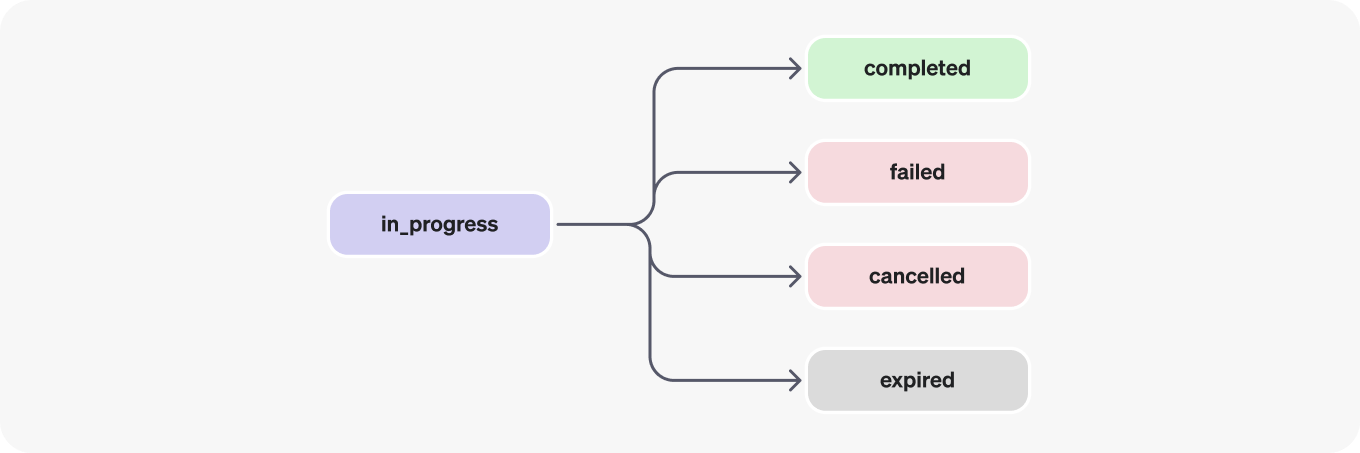
1117When a Run is `in_progress` and not in a terminal state, the Thread is locked. This means that:

1118 

1119- New Messages cannot be added to the Thread.

1120- New Runs cannot be created on the Thread.

1121 

1122#### Run steps

1123 

1124![Run steps lifecycle - diagram showing possible status transitions](https://cdn.openai.com/API/docs/images/diagram-2.png)
1125 

1126Run step statuses have the same meaning as Run statuses.

1127 

1128Most of the interesting detail in the Run Step object lives in the `step_details` field. There can be two types of step details:

1129 

11301. `message_creation`: This Run Step is created when the Assistant creates a Message on the Thread.

11312. `tool_calls`: This Run Step is created when the Assistant calls a tool. Details around this are covered in the relevant sections of the [Tools](https://developers.openai.com/api/docs/assistants/tools) guide.

1132 

1133## Data Access Guidance

1134 

1135Currently, Assistants, Threads, Messages, and Vector Stores created via the API are scoped to the Project they're created in. As such, any person with API key access to that Project is able to read or write Assistants, Threads, Messages, and Runs in the Project.

1136 

1137We strongly recommend the following data access controls:

1138 

1139- _Implement authorization._ Before performing reads or writes on Assistants, Threads, Messages, and Vector Stores, ensure that the end-user is authorized to do so. For example, store in your database the object IDs that the end-user has access to, and check it before fetching the object ID with the API.

1140- _Restrict API key access._ Carefully consider who in your organization should have API keys and be part of a Project. Periodically audit this list. API keys enable a wide range of operations including reading and modifying sensitive information, such as Messages and Files.

1141- _Create separate accounts._ Consider creating separate Projects for different applications in order to isolate data across multiple applications.

Details

2 2 

3> For the complete documentation index, see [llms.txt](/llms.txt). Markdown versions of documentation pages are available by appending `.md` to the page URL.3> For the complete documentation index, see [llms.txt](/llms.txt). Markdown versions of documentation pages are available by appending `.md` to the page URL.

4 4 

5After achieving feature parity in the Responses API, we've deprecated the Assistants API. It will shut down on August 26, 2026. Follow the [migration guide](https://developers.openai.com/platform/assistants/migration) to update your integration. [Learn more](https://platform.openai.com/docs/guides/migrate-to-responses).5The Assistants API was officially sunset on August 26, 2026, and is no longer available. Use the [Responses API](https://developers.openai.com/api/docs/guides/migrate-to-responses) for new integrations.

6 6 

7 7 

8 8 

9 9 

10We're moving from the Assistants API to the new [Responses API](https://developers.openai.com/api/docs/guides/migrate-to-responses) for a simpler and more flexible mental model.10Thank you to everyone who used the Assistants API. We appreciate everything you built and the feedback you shared along the way.

11 

12Use this guide to migrate your integration to the [Responses API](https://developers.openai.com/api/docs/guides/migrate-to-responses).

11 13 

12Responses are simpler—send input items and get output items back. With the Responses API, you also get better performance and new features like [deep research](https://developers.openai.com/api/docs/guides/deep-research), [MCP](https://developers.openai.com/api/docs/guides/tools-connectors-mcp), and [computer use](https://developers.openai.com/api/docs/guides/tools-computer-use). This change also lets you manage conversations instead of passing back `previous_response_id`.14Responses are simpler—send input items and get output items back. With the Responses API, you also get better performance and new features like [deep research](https://developers.openai.com/api/docs/guides/deep-research), [MCP](https://developers.openai.com/api/docs/guides/tools-connectors-mcp), and [computer use](https://developers.openai.com/api/docs/guides/tools-computer-use). This change also lets you manage conversations instead of passing back `previous_response_id`.

13 15 


277 279 

278### 2. Move new user chats over to conversations and responses280### 2. Move new user chats over to conversations and responses

279 281 

280We will not provide an automated tool for migrating Threads to Conversations. Instead, we recommend migrating new user threads onto conversations and migrating older ones as necessary.282Start new chats with the Conversations API and Responses API. To preserve earlier conversation history, use messages already stored by your application.

281 283 

282Here's an example for how you might backfill a thread:284The example below shows how thread history could be migrated before the sunset. The Assistants API call that retrieves thread messages no longer works; use your stored messages instead.

283 285 

284```python286```python

285import os287import os


454 456

455Responses API457Responses API

456 458 

459```javascript

460import express from "express";

461import OpenAI from "openai";

462 

463const app = express();

464const client = new OpenAI();

465const conversationsBySession = new Map();

466 

467app.use(express.json());

468 

469app.post("/messages", async (request, response) => {

470 const { content, session_id: sessionId } = request.body ?? {};

471 if (

472 typeof content !== "string" ||

473 !content.trim() ||

474 typeof sessionId !== "string" ||

475 !sessionId.trim()

476 ) {

477 response.status(400).json({

478 error: "content and session_id must be non-empty strings.",

479 });

480 return;

481 }

482 

483 let conversationIdPromise = conversationsBySession.get(sessionId);

484 

485 if (!conversationIdPromise) {

486 conversationIdPromise = client.conversations

487 .create()

488 .then((conversation) => conversation.id)

489 .catch((error) => {

490 conversationsBySession.delete(sessionId);

491 throw error;

492 });

493 conversationsBySession.set(sessionId, conversationIdPromise);

494 }

495 const conversationId = await conversationIdPromise;

496 

497 const promptId = process.env.OPENAI_PROMPT_ID;

498 if (!promptId) {

499 response.status(500).json({ error: "OPENAI_PROMPT_ID is required." });

500 return;

501 }

502 

503 const result = await client.responses.create({

504 prompt: { id: promptId },

505 input: [{ role: "user", content }],

506 conversation: conversationId,

507 });

508 

509 response.json({ content: result.output_text });

510});

511 

512app.listen(Number(process.env.OPENAI_EXAMPLE_PORT ?? 8000), "127.0.0.1");

513```

514 

457```python515```python

458conversations_by_session: dict[str, str] = {}516conversations_by_session: dict[str, str] = {}

459 517 

assistants/tools.md +0 −45 deleted

File Deleted View Diff

1# Assistants API tools

2 

3> For the complete documentation index, see [llms.txt](/llms.txt). Markdown versions of documentation pages are available by appending `.md` to the page URL.

4 

5After achieving feature parity in the Responses API, we've deprecated the Assistants API. It will shut down on August 26, 2026. Follow the [migration guide](https://developers.openai.com/platform/assistants/migration) to update your integration. [Learn more](https://platform.openai.com/docs/guides/migrate-to-responses).

6 

7## Overview

8 

9Assistants created using the Assistants API can be equipped with tools that allow them to perform more complex tasks or interact with your application.

10We provide built-in tools for assistants, but you can also define your own tools to extend their capabilities using Function Calling.

11 

12The Assistants API currently supports the following tools:

13 

14 

15 

16File Search

17 

18 

19 

20 Built-in RAG tool to process and search through files

21 

22 

23 

24 

25Code Interpreter

26 

27 

28 

29 Write and run python code, process files and diverse data

30 

31 

32 

33 

34Function Calling

35 

36 

37 

38 Use your own custom functions to interact with your application

39 

40 

41 

42## Next steps

43 

44- See the API reference to [submit tool outputs](https://developers.openai.com/api/reference/resources/beta/subresources/threads/subresources/runs/methods/submit_tool_outputs)

45- Build a tool-using assistant with our [Quickstart app](https://github.com/openai/openai-assistants-quickstart)

assistants/tools/code-interpreter.md +0 −615 deleted

File Deleted View Diff

1# Assistants Code Interpreter

2 

3> For the complete documentation index, see [llms.txt](/llms.txt). Markdown versions of documentation pages are available by appending `.md` to the page URL.

4 

5After achieving feature parity in the Responses API, we've deprecated the Assistants API. It will shut down on August 26, 2026. Follow the [migration guide](https://developers.openai.com/platform/assistants/migration) to update your integration. [Learn more](https://platform.openai.com/docs/guides/migrate-to-responses).

6 

7## Overview

8 

9Code Interpreter allows Assistants to write and run Python code in a sandboxed execution environment. This tool can process files with diverse data and formatting, and generate files with data and images of graphs. Code Interpreter allows your Assistant to run code iteratively to solve challenging code and math problems. When your Assistant writes code that fails to run, it can iterate on this code by attempting to run different code until the code execution succeeds.

10 

11See a quickstart of how to get started with Code Interpreter [here](https://developers.openai.com/api/docs/assistants/migration#step-1-create-an-assistant?context=with-streaming).

12 

13## How it works

14 

15Code Interpreter is charged at $0.03 per session. If your Assistant calls Code Interpreter simultaneously in two different threads (e.g., one thread per end-user), two Code Interpreter sessions are created. Each session is active by default for one hour, which means that you only pay for one session per if users interact with Code Interpreter in the same thread for up to one hour.

16 

17### Enabling Code Interpreter

18 

19Pass `code_interpreter` in the `tools` parameter of the Assistant object to enable Code Interpreter:

20 

21```javascript

22const assistant = await openai.beta.assistants.create({

23 instructions:

24 "You are a personal math tutor. When asked a math question, write and run code to answer the question.",

25 model: "gpt-4o",

26 tools: [{ type: "code_interpreter" }],

27});

28```

29 

30```python

31assistant = client.beta.assistants.create(

32 instructions="You are a personal math tutor. When asked a math question, write and run code to answer the question.",

33 model="gpt-4o",

34 tools=[{"type": "code_interpreter"}],

35)

36```

37 

38```go

39assistant, err := client.Beta.Assistants.New(context.Background(), openai.BetaAssistantNewParams{

40 Instructions: openai.String("You are a personal math tutor. When asked a math question, write and run code to answer the question."),

41 Model: shared.ChatModelGPT4o,

42 Tools: []openai.AssistantToolUnionParam{{OfCodeInterpreter: &openai.CodeInterpreterToolParam{}}},

43})

44if err != nil {

45 panic(err)

46}

47```

48 

49```java

50import com.openai.client.OpenAIClient;

51import com.openai.client.okhttp.OpenAIOkHttpClient;

52import com.openai.models.beta.assistants.AssistantCreateParams;

53import com.openai.models.beta.assistants.CodeInterpreterTool;

54 

55var assistant =

56 client

57 .beta()

58 .assistants()

59 .create(

60 AssistantCreateParams.builder()

61 .model("gpt-4o")

62 .instructions(

63 "You are a personal math tutor. When asked a math question, write and run"

64 + " code to answer the question.")

65 .addTool(CodeInterpreterTool.builder().build())

66 .build());

67 

68System.out.println(assistant.id());

69```

70 

71```ruby

72require "openai"

73 

74client = OpenAI::Client.new

75assistant = client.beta.assistants.create(

76 model: "gpt-4o",

77 tools: [{type: :code_interpreter}]

78)

79puts(assistant.id)

80```

81 

82```bash

83curl https://api.openai.com/v1/assistants \

84 -u :$OPENAI_API_KEY \

85 -H 'Content-Type: application/json' \

86 -H 'OpenAI-Beta: assistants=v2' \

87 -d '{

88 "instructions": "You are a personal math tutor. When asked a math question, write and run code to answer the question.",

89 "tools": [

90 { "type": "code_interpreter" }

91 ],

92 "model": "gpt-4o"

93 }'

94```

95 

96 

97The model then decides when to invoke Code Interpreter in a Run based on the nature of the user request. This behavior can be promoted by prompting in the Assistant's `instructions` (e.g., “write code to solve this problem”).

98 

99### Passing files to Code Interpreter

100 

101Files that are passed at the Assistant level are accessible by all Runs with this Assistant:

102 

103```javascript

104// Upload a file with an "assistants" purpose

105const file = await openai.files.create({

106 file: fs.createReadStream("mydata.csv"),

107 purpose: "assistants",

108});

109 

110// Create an assistant using the file ID

111const assistant = await openai.beta.assistants.create({

112 instructions:

113 "You are a personal math tutor. When asked a math question, write and run code to answer the question.",

114 model: "gpt-4o",

115 tools: [{ type: "code_interpreter" }],

116 tool_resources: {

117 code_interpreter: {

118 file_ids: [file.id],

119 },

120 },

121});

122```

123 

124```python

125# Upload a file with an "assistants" purpose

126file = client.files.create(file=open("mydata.csv", "rb"), purpose="assistants")

127 

128# Create an assistant using the file ID

129assistant = client.beta.assistants.create(

130 instructions="You are a personal math tutor. When asked a math question, write and run code to answer the question.",

131 model="gpt-4o",

132 tools=[{"type": "code_interpreter"}],

133 tool_resources={"code_interpreter": {"file_ids": [file.id]}},

134)

135```

136 

137```go

138input, err := os.Open("mydata.csv")

139if err != nil {

140 panic(err)

141}

142defer input.Close()

143file, err := client.Files.New(context.Background(), openai.FileNewParams{

144 File: input,

145 Purpose: openai.FilePurposeAssistants,

146})

147if err != nil {

148 panic(err)

149}

150assistant, err := client.Beta.Assistants.New(context.Background(), openai.BetaAssistantNewParams{

151 Instructions: openai.String("You are a personal math tutor. When asked a math question, write and run code to answer the question."),

152 Model: shared.ChatModelGPT4o,

153 Tools: []openai.AssistantToolUnionParam{{OfCodeInterpreter: &openai.CodeInterpreterToolParam{}}},

154 ToolResources: openai.BetaAssistantNewParamsToolResources{

155 CodeInterpreter: openai.BetaAssistantNewParamsToolResourcesCodeInterpreter{FileIDs: []string{file.ID}},

156 },

157})

158if err != nil {

159 panic(err)

160}

161```

162 

163```java

164import com.openai.client.OpenAIClient;

165import com.openai.client.okhttp.OpenAIOkHttpClient;

166import com.openai.models.beta.assistants.AssistantCreateParams;

167import com.openai.models.beta.assistants.CodeInterpreterTool;

168import com.openai.models.files.FileCreateParams;

169import com.openai.models.files.FilePurpose;

170import java.nio.file.Path;

171 

172var file =

173 client

174 .files()

175 .create(

176 FileCreateParams.builder()

177 .file(Path.of(System.getenv("OPENAI_EXAMPLE_FILE_PATH")))

178 .purpose(FilePurpose.ASSISTANTS)

179 .build());

180var assistant =

181 client

182 .beta()

183 .assistants()

184 .create(

185 AssistantCreateParams.builder()

186 .model("gpt-4o")

187 .instructions("When asked a math question, write and run code to answer it.")

188 .addTool(CodeInterpreterTool.builder().build())

189 .toolResources(

190 AssistantCreateParams.ToolResources.builder()

191 .codeInterpreter(

192 AssistantCreateParams.ToolResources.CodeInterpreter.builder()

193 .addFileId(file.id())

194 .build())

195 .build())

196 .build());

197System.out.println(assistant.id());

198```

199 

200```ruby

201require "openai"

202require "pathname"

203 

204client = OpenAI::Client.new

205file = client.files.create(

206 file: Pathname("revenue-forecast.csv"),

207 purpose: :assistants

208)

209assistant = client.beta.assistants.create(

210 model: "gpt-4o",

211 instructions: "When asked a math question, write and run code to answer it.",

212 tools: [{type: :code_interpreter}],

213 tool_resources: {

214 code_interpreter: {file_ids: [file.id]}

215 }

216)

217puts(assistant.id)

218```

219 

220```bash

221# Upload a file with an "assistants" purpose

222curl https://api.openai.com/v1/files \

223 -H "Authorization: Bearer $OPENAI_API_KEY" \

224 -F purpose="assistants" \

225 -F file="@/path/to/mydata.csv"

226 

227# Create an assistant using the file ID

228curl https://api.openai.com/v1/assistants \

229 -u :$OPENAI_API_KEY \

230 -H 'Content-Type: application/json' \

231 -H 'OpenAI-Beta: assistants=v2' \

232 -d '{

233 "instructions": "You are a personal math tutor. When asked a math question, write and run code to answer the question.",

234 "tools": [{"type": "code_interpreter"}],

235 "model": "gpt-4o",

236 "tool_resources": {

237 "code_interpreter": {

238 "file_ids": ["file-BK7bzQj3FfZFXr7DbL6xJwfo"]

239 }

240 }

241 }'

242```

243 

244 

245Files can also be passed at the Thread level. These files are only accessible in the specific Thread. Upload the File using the [File upload](https://developers.openai.com/api/reference/resources/files/methods/create) endpoint and then pass the File ID as part of the Message creation request:

246 

247```javascript

248const thread = await openai.beta.threads.create({

249 messages: [

250 {

251 role: "user",

252 content: "I need to solve the equation `3x + 11 = 14`. Can you help me?",

253 attachments: [

254 {

255 file_id: file.id,

256 tools: [{ type: "code_interpreter" }],

257 },

258 ],

259 },

260 ],

261});

262```

263 

264```python

265thread = client.beta.threads.create(

266 messages=[

267 {

268 "role": "user",

269 "content": "I need to solve the equation `3x + 11 = 14`. Can you help me?",

270 "attachments": [

271 {"file_id": file.id, "tools": [{"type": "code_interpreter"}]}

272 ],

273 }

274 ]

275)

276```

277 

278```go

279thread, err := client.Beta.Threads.New(context.Background(), openai.BetaThreadNewParams{

280 Messages: []openai.BetaThreadNewParamsMessage{{

281 Role: "user",

282 Content: openai.BetaThreadNewParamsMessageContentUnion{OfString: openai.String("I need to solve the equation `3x + 11 = 14`. Can you help me?")},

283 Attachments: []openai.BetaThreadNewParamsMessageAttachment{{

284 FileID: openai.String("file-ACq8OjcLQm2eIG0BvRM4z5qX"),

285 Tools: []openai.BetaThreadNewParamsMessageAttachmentToolUnion{{OfCodeInterpreter: &openai.CodeInterpreterToolParam{}}},

286 }},

287 }},

288})

289if err != nil {

290 panic(err)

291}

292```

293 

294```java

295import com.openai.client.OpenAIClient;

296import com.openai.client.okhttp.OpenAIOkHttpClient;

297import com.openai.models.beta.assistants.CodeInterpreterTool;

298import com.openai.models.beta.threads.ThreadCreateParams;

299 

300String fileId = "file-ACq8OjcLQm2eIG0BvRM4z5qX";

301 

302var thread =

303 client

304 .beta()

305 .threads()

306 .create(

307 ThreadCreateParams.builder()

308 .addMessage(

309 ThreadCreateParams.Message.builder()

310 .role(ThreadCreateParams.Message.Role.USER)

311 .content(

312 "I need to solve the equation `3x + 11 = 14`. Can you help me?")

313 .addAttachment(

314 ThreadCreateParams.Message.Attachment.builder()

315 .fileId(fileId)

316 .addTool(CodeInterpreterTool.builder().build())

317 .build())

318 .build())

319 .build());

320 

321System.out.println(thread.id());

322```

323 

324```ruby

325require "openai"

326 

327client = OpenAI::Client.new

328thread = client.beta.threads.create(

329 messages: [{

330 role: :user,

331 content: "I need to solve the equation `3x + 11 = 14`. Can you help me?",

332 attachments: [{

333 file_id: "file-ACq8OjcLQm2eIG0BvRM4z5qX",

334 tools: [{type: :code_interpreter}]

335 }]

336 }]

337)

338puts(thread.id)

339```

340 

341```bash

342curl https://api.openai.com/v1/threads/thread_abc123/messages \

343 -u :$OPENAI_API_KEY \

344 -H 'Content-Type: application/json' \

345 -H 'OpenAI-Beta: assistants=v2' \

346 -d '{

347 "role": "user",

348 "content": "I need to solve the equation `3x + 11 = 14`. Can you help me?",

349 "attachments": [

350 {

351 "file_id": "file-ACq8OjcLQm2eIG0BvRM4z5qX",

352 "tools": [{"type": "code_interpreter"}]

353 }

354 ]

355 }'

356```

357 

358 

359Files have a maximum size of 512 MB. Code Interpreter supports a variety of file formats including `.csv`, `.pdf`, `.json` and many more. More details on the file extensions (and their corresponding MIME-types) supported can be found in the [Supported files](#supported-files) section below.

360 

361### Reading images and files generated by Code Interpreter

362 

363Code Interpreter in the API also outputs files, such as generating image diagrams, CSVs, and PDFs. There are two types of files that are generated:

364 

3651. Images

3662. Data files (e.g. a `csv` file with data generated by the Assistant)

367 

368When Code Interpreter generates an image, you can look up and download this file in the `file_id` field of the Assistant Message response:

369 

370```json

371{

372 "id": "msg_abc123",

373 "object": "thread.message",

374 "created_at": 1698964262,

375 "thread_id": "thread_abc123",

376 "role": "assistant",

377 "content": [

378 {

379 "type": "image_file",

380 "image_file": {

381 "file_id": "file-abc123"

382 }

383 }

384 ]

385 # ...

386}

387```

388 

389The file content can then be downloaded by passing the file ID to the Files API:

390 

391```javascript

392import fs from "fs";

393import OpenAI from "openai";

394 

395const openai = new OpenAI();

396 

397async function main() {

398 const response = await openai.files.content("file-abc123");

399 

400 // Extract the binary data from the Response object

401 const image_data = await response.arrayBuffer();

402 

403 // Convert the binary data to a Buffer

404 const image_data_buffer = Buffer.from(image_data);

405 

406 // Save the image to a specific location

407 fs.writeFileSync("./my-image.png", image_data_buffer);

408}

409 

410main();

411```

412 

413```python

414import os

415 

416from openai import OpenAI

417 

418file_id = os.environ["OPENAI_FILE_ID"]

419client = OpenAI()

420 

421image_data = client.files.content(file_id)

422image_data_bytes = image_data.read()

423 

424with open("./my-image.png", "wb") as file:

425 file.write(image_data_bytes)

426```

427 

428```go

429response, err := client.Files.Content(context.Background(), "file-abc123")

430if err != nil {

431 panic(err)

432}

433defer response.Body.Close()

434output, err := os.Create("./my-image.png")

435if err != nil {

436 panic(err)

437}

438if _, err := io.Copy(output, response.Body); err != nil {

439 output.Close()

440 panic(err)

441}

442if err := output.Close(); err != nil {

443 panic(err)

444}

445```

446 

447```java

448import com.openai.client.OpenAIClient;

449import com.openai.client.okhttp.OpenAIOkHttpClient;

450import com.openai.core.http.HttpResponse;

451import java.io.IOException;

452import java.nio.file.Files;

453import java.nio.file.Path;

454import java.nio.file.StandardCopyOption;

455 

456String fileId = "file-abc123";

457 

458try (HttpResponse content = client.files().content(fileId)) {

459 Files.copy(content.body(), Path.of("my-image.png"), StandardCopyOption.REPLACE_EXISTING);

460}

461```

462 

463```ruby

464require "openai"

465 

466client = OpenAI::Client.new

467image = client.files.content("file-abc123")

468File.binwrite("my-image.png", image.read)

469```

470 

471```bash

472curl https://api.openai.com/v1/files/file-abc123/content \

473 -H "Authorization: Bearer $OPENAI_API_KEY" \

474 --output image.png

475```

476 

477 

478When Code Interpreter references a file path (e.g., ”Download this csv file”), file paths are listed as annotations. You can convert these annotations into links to download the file:

479 

480```json

481{

482 "id": "msg_abc123",

483 "object": "thread.message",

484 "created_at": 1699073585,

485 "thread_id": "thread_abc123",

486 "role": "assistant",

487 "content": [

488 {

489 "type": "text",

490 "text": {

491 "value": "The rows of the CSV file have been shuffled and saved to a new CSV file. You can download the shuffled CSV file from the following link:\\n\\n[Download Shuffled CSV File](sandbox:/mnt/data/shuffled_file.csv)",

492 "annotations": [

493 {

494 "type": "file_path",

495 "text": "sandbox:/mnt/data/shuffled_file.csv",

496 "start_index": 167,

497 "end_index": 202,

498 "file_path": {

499 "file_id": "file-abc123"

500 }

501 }

502 ...

503```

504 

505### Input and output logs of Code Interpreter

506 

507By listing the steps of a Run that called Code Interpreter, you can inspect the code `input` and `outputs` logs of Code Interpreter:

508 

509```javascript

510const runSteps = await openai.beta.threads.runs.steps.list(run.id, {

511 thread_id: thread.id,

512});

513```

514 

515```python

516import os

517 

518thread_id = os.environ["OPENAI_THREAD_ID"]

519run_id = os.environ["OPENAI_RUN_ID"]

520 

521run_steps = client.beta.threads.runs.steps.list(

522 thread_id=thread_id,

523 run_id=run_id,

524)

525```

526 

527```go

528runSteps, err := client.Beta.Threads.Runs.Steps.List(context.Background(), "thread_abc123", "run_abc123", openai.BetaThreadRunStepListParams{})

529if err != nil {

530 panic(err)

531}

532fmt.Println(runSteps.Data)

533```

534 

535```ruby

536require "openai"

537 

538client = OpenAI::Client.new

539steps = client.beta.threads.runs.steps.list(

540 "run_abc123",

541 thread_id: "thread_abc123"

542)

543puts(steps.data)

544```

545 

546```bash

547curl https://api.openai.com/v1/threads/thread_abc123/runs/RUN_ID/steps \

548 -H "Authorization: Bearer $OPENAI_API_KEY" \

549 -H "OpenAI-Beta: assistants=v2" \

550```

551 

552 

553```bash

554{

555 "object": "list",

556 "data": [

557 {

558 "id": "step_abc123",

559 "object": "thread.run.step",

560 "type": "tool_calls",

561 "run_id": "run_abc123",

562 "thread_id": "thread_abc123",

563 "status": "completed",

564 "step_details": {

565 "type": "tool_calls",

566 "tool_calls": [

567 {

568 "type": "code",

569 "code": {

570 "input": "# Calculating 2 + 2\\nresult = 2 + 2\\nresult",

571 "outputs": [

572 {

573 "type": "logs",

574 "logs": "4"

575 }

576 ...

577 }

578```

579 

580## Supported files

581 

582| File format | MIME type |

583| ----------- | --------------------------------------------------------------------------- |

584| `.c` | `text/x-c` |

585| `.cs` | `text/x-csharp` |

586| `.cpp` | `text/x-c++` |

587| `.csv` | `text/csv` |

588| `.doc` | `application/msword` |

589| `.docx` | `application/vnd.openxmlformats-officedocument.wordprocessingml.document` |

590| `.html` | `text/html` |

591| `.java` | `text/x-java` |

592| `.json` | `application/json` |

593| `.md` | `text/markdown` |

594| `.pdf` | `application/pdf` |

595| `.php` | `text/x-php` |

596| `.pptx` | `application/vnd.openxmlformats-officedocument.presentationml.presentation` |

597| `.py` | `text/x-python` |

598| `.py` | `text/x-script.python` |

599| `.rb` | `text/x-ruby` |

600| `.tex` | `text/x-tex` |

601| `.txt` | `text/plain` |

602| `.css` | `text/css` |

603| `.js` | `text/javascript` |

604| `.sh` | `application/x-sh` |

605| `.ts` | `application/typescript` |

606| `.csv` | `application/csv` |

607| `.jpeg` | `image/jpeg` |

608| `.jpg` | `image/jpeg` |

609| `.gif` | `image/gif` |

610| `.pkl` | `application/octet-stream` |

611| `.png` | `image/png` |

612| `.tar` | `application/x-tar` |

613| `.xlsx` | `application/vnd.openxmlformats-officedocument.spreadsheetml.sheet` |

614| `.xml` | `application/xml or "text/xml"` |

615| `.zip` | `application/zip` |

assistants/tools/function-calling.md +0 −1084 deleted

File Deleted View Diff

1# Assistants Function Calling

2 

3> For the complete documentation index, see [llms.txt](/llms.txt). Markdown versions of documentation pages are available by appending `.md` to the page URL.

4 

5After achieving feature parity in the Responses API, we've deprecated the Assistants API. It will shut down on August 26, 2026. Follow the [migration guide](https://developers.openai.com/platform/assistants/migration) to update your integration. [Learn more](https://platform.openai.com/docs/guides/migrate-to-responses).

6 

7## Overview

8 

9Similar to the Chat Completions API, the Assistants API supports function calling. Function calling allows you to describe functions to the Assistants API and have it intelligently return the functions that need to be called along with their arguments.

10 

11## Quickstart

12 

13In this example, we'll create a weather assistant and define two functions,

14`get_current_temperature` and `get_rain_probability`, as tools that the Assistant can call.

15Depending on the user query, the model will invoke parallel function calling if using our

16latest models released on or after Nov 6, 2023.

17In our example that uses parallel function calling, we will ask the Assistant what the weather in

18San Francisco is like today and the chances of rain. We also show how to output the Assistant's response with streaming.

19 

20With the launch of Structured Outputs, you can now use the parameter `strict:

21 true` when using function calling with the Assistants API. For more

22 information, refer to the [Function calling

23 guide](https://developers.openai.com/api/docs/guides/function-calling#strict-mode). Please note that

24 Structured Outputs are not supported in the Assistants API when using vision.

25 

26### Step 1: Define functions

27 

28When creating your assistant, you will first define the functions under the `tools` param of the assistant.

29 

30```javascript

31const assistant = await client.beta.assistants.create({

32 model: "gpt-4o",

33 instructions:

34 "You are a weather bot. Use the provided functions to answer questions.",

35 tools: [

36 {

37 type: "function",

38 function: {

39 name: "getCurrentTemperature",

40 description: "Get the current temperature for a specific location",

41 parameters: {

42 type: "object",

43 properties: {

44 location: {

45 type: "string",

46 description: "The city and state, e.g., San Francisco, CA",

47 },

48 unit: {

49 type: "string",

50 enum: ["Celsius", "Fahrenheit"],

51 description:

52 "The temperature unit to use. Infer this from the user's location.",

53 },

54 },

55 required: ["location", "unit"],

56 },

57 },

58 },

59 {

60 type: "function",

61 function: {

62 name: "getRainProbability",

63 description: "Get the probability of rain for a specific location",

64 parameters: {

65 type: "object",

66 properties: {

67 location: {

68 type: "string",

69 description: "The city and state, e.g., San Francisco, CA",

70 },

71 },

72 required: ["location"],

73 },

74 },

75 },

76 ],

77});

78```

79 

80```python

81from openai import OpenAI

82 

83client = OpenAI()

84 

85assistant = client.beta.assistants.create(

86 instructions="You are a weather bot. Use the provided functions to answer questions.",

87 model="gpt-4o",

88 tools=[

89 {

90 "type": "function",

91 "function": {

92 "name": "get_current_temperature",

93 "description": "Get the current temperature for a specific location",

94 "parameters": {

95 "type": "object",

96 "properties": {

97 "location": {

98 "type": "string",

99 "description": "The city and state, e.g., San Francisco, CA",

100 },

101 "unit": {

102 "type": "string",

103 "enum": ["Celsius", "Fahrenheit"],

104 "description": "The temperature unit to use. Infer this from the user's location.",

105 },

106 },

107 "required": ["location", "unit"],

108 },

109 },

110 },

111 {

112 "type": "function",

113 "function": {

114 "name": "get_rain_probability",

115 "description": "Get the probability of rain for a specific location",

116 "parameters": {

117 "type": "object",

118 "properties": {

119 "location": {

120 "type": "string",

121 "description": "The city and state, e.g., San Francisco, CA",

122 }

123 },

124 "required": ["location"],

125 },

126 },

127 },

128 ],

129)

130```

131 

132```go

133assistant, err := client.Beta.Assistants.New(context.Background(), openai.BetaAssistantNewParams{

134 Model: shared.ChatModelGPT4o,

135 Instructions: openai.String("You are a weather bot. Use the provided functions to answer questions."),

136 Tools: weatherTools(false),

137})

138if err != nil {

139 panic(err)

140}

141 

142func weatherTools(strict bool) []openai.AssistantToolUnionParam {

143 return []openai.AssistantToolUnionParam{

144 openai.AssistantToolParamOfFunction(shared.FunctionDefinitionParam{

145 Name: "get_current_temperature",

146 Description: openai.String("Get the current temperature for a specific location"),

147 Parameters: map[string]any{

148 "type": "object",

149 "properties": map[string]any{

150 "location": map[string]any{"type": "string", "description": "The city and state, e.g., San Francisco, CA"},

151 "unit": map[string]any{"type": "string", "enum": []string{"Celsius", "Fahrenheit"}, "description": "The temperature unit to use. Infer this from the user's location."},

152 },

153 "required": []string{"location", "unit"},

154 },

155 Strict: openai.Bool(strict),

156 }),

157 openai.AssistantToolParamOfFunction(shared.FunctionDefinitionParam{

158 Name: "get_rain_probability",

159 Description: openai.String("Get the probability of rain for a specific location"),

160 Parameters: map[string]any{

161 "type": "object",

162 "properties": map[string]any{

163 "location": map[string]any{"type": "string", "description": "The city and state, e.g., San Francisco, CA"},

164 },

165 "required": []string{"location"},

166 },

167 Strict: openai.Bool(strict),

168 }),

169 }

170}

171```

172 

173```java

174import com.openai.client.OpenAIClient;

175import com.openai.client.okhttp.OpenAIOkHttpClient;

176import com.openai.core.JsonValue;

177import com.openai.models.FunctionDefinition;

178import com.openai.models.FunctionParameters;

179import com.openai.models.beta.assistants.AssistantCreateParams;

180import java.util.List;

181import java.util.Map;

182 

183var assistant =

184 client

185 .beta()

186 .assistants()

187 .create(

188 AssistantCreateParams.builder()

189 .model("gpt-4o")

190 .instructions(

191 "You are a weather bot. Use the provided functions to answer questions.")

192 .addFunctionTool(

193 FunctionDefinition.builder()

194 .name("get_current_temperature")

195 .description("Get the current temperature for a specific location")

196 .parameters(

197 FunctionParameters.builder()

198 .putAdditionalProperty("type", JsonValue.from("object"))

199 .putAdditionalProperty(

200 "properties",

201 JsonValue.from(

202 Map.of(

203 "location",

204 Map.of(

205 "type", "string",

206 "description",

207 "The city and state, e.g., San Francisco, CA"),

208 "unit",

209 Map.of(

210 "type",

211 "string",

212 "enum",

213 List.of("Celsius", "Fahrenheit"),

214 "description",

215 "The temperature unit to use. Infer this from the user's location."))))

216 .putAdditionalProperty(

217 "required", JsonValue.from(List.of("location", "unit")))

218 .build())

219 .build())

220 .addFunctionTool(

221 FunctionDefinition.builder()

222 .name("get_rain_probability")

223 .description("Get the probability of rain for a specific location")

224 .parameters(

225 FunctionParameters.builder()

226 .putAdditionalProperty("type", JsonValue.from("object"))

227 .putAdditionalProperty(

228 "properties",

229 JsonValue.from(

230 Map.of(

231 "location",

232 Map.of(

233 "type", "string",

234 "description",

235 "The city and state, e.g., San Francisco, CA"))))

236 .putAdditionalProperty(

237 "required", JsonValue.from(List.of("location")))

238 .build())

239 .build())

240 .build());

241 

242System.out.println(assistant.id());

243```

244 

245```ruby

246require "openai"

247 

248client = OpenAI::Client.new

249assistant = client.beta.assistants.create(

250 model: "gpt-4o",

251 instructions: "Use the provided functions to answer weather questions.",

252 tools: [

253 {

254 type: :function,

255 function: {

256 name: "get_current_temperature",

257 description: "Get the current temperature for a location",

258 parameters: {

259 type: :object,

260 properties: {

261 location: {type: :string},

262 unit: {type: :string, enum: ["Celsius", "Fahrenheit"]}

263 },

264 required: ["location", "unit"]

265 }

266 }

267 },

268 {

269 type: :function,

270 function: {

271 name: "get_rain_probability",

272 description: "Get the probability of rain for a location",

273 parameters: {

274 type: :object,

275 properties: {location: {type: :string}},

276 required: ["location"]

277 }

278 }

279 }

280 ]

281)

282puts(assistant.id)

283```

284 

285 

286### Step 2: Create a Thread and add Messages

287 

288Create a Thread when a user starts a conversation and add Messages to the Thread as the user asks questions.

289 

290```javascript

291const thread = await client.beta.threads.create();

292const message = client.beta.threads.messages.create(thread.id, {

293 role: "user",

294 content:

295 "What's the weather in San Francisco today and the likelihood it'll rain?",

296});

297```

298 

299```python

300thread = client.beta.threads.create()

301message = client.beta.threads.messages.create(

302 thread_id=thread.id,

303 role="user",

304 content="What's the weather in San Francisco today and the likelihood it'll rain?",

305)

306```

307 

308```go

309thread, err := client.Beta.Threads.New(context.Background(), openai.BetaThreadNewParams{})

310if err != nil {

311 panic(err)

312}

313_, err = client.Beta.Threads.Messages.New(context.Background(), thread.ID, openai.BetaThreadMessageNewParams{

314 Role: "user",

315 Content: openai.BetaThreadMessageNewParamsContentUnion{

316 OfString: openai.String("What's the weather in San Francisco today and the likelihood it'll rain?"),

317 },

318})

319if err != nil {

320 panic(err)

321}

322```

323 

324```java

325import com.openai.client.OpenAIClient;

326import com.openai.client.okhttp.OpenAIOkHttpClient;

327import com.openai.models.beta.threads.ThreadCreateParams;

328import com.openai.models.beta.threads.messages.MessageCreateParams;

329 

330var thread = client.beta().threads().create(ThreadCreateParams.builder().build());

331var message =

332 client

333 .beta()

334 .threads()

335 .messages()

336 .create(

337 thread.id(),

338 MessageCreateParams.builder()

339 .role(MessageCreateParams.Role.USER)

340 .content("What's the weather in San Francisco today, and will it rain?")

341 .build());

342 

343System.out.println(message.id());

344```

345 

346```ruby

347require "openai"

348 

349client = OpenAI::Client.new

350thread = client.beta.threads.create

351message = client.beta.threads.messages.create(

352 thread.id,

353 role: :user,

354 content: "What's the weather in San Francisco today, and will it rain?"

355)

356puts(message.id)

357```

358 

359 

360### Step 3: Initiate a Run

361 

362When you initiate a Run on a Thread containing a user Message that triggers one or more functions,

363the Run will enter a `pending` status. After it processes, the run will enter a `requires_action` state which you can

364verify by checking the Run’s `status`. This indicates that you need to run tools and submit their outputs to the

365Assistant to continue Run execution. In our case, we will see two `tool_calls`, which indicates that the

366user query resulted in parallel function calling.

367 

368Note that a runs expire ten minutes after creation. Be sure to submit your

369 tool outputs before the 10 min mark.

370 

371You will see two `tool_calls` within `required_action`, which indicates the user query triggered parallel function calling.

372 

373```json

374{

375 "id": "run_qJL1kI9xxWlfE0z1yfL0fGg9",

376 ...

377 "status": "requires_action",

378 "required_action": {

379 "submit_tool_outputs": {

380 "tool_calls": [

381 {

382 "id": "call_FthC9qRpsL5kBpwwyw6c7j4k",

383 "function": {

384 "arguments": "{"location": "San Francisco, CA"}",

385 "name": "get_rain_probability"

386 },

387 "type": "function"

388 },

389 {

390 "id": "call_RpEDoB8O0FTL9JoKTuCVFOyR",

391 "function": {

392 "arguments": "{"location": "San Francisco, CA", "unit": "Fahrenheit"}",

393 "name": "get_current_temperature"

394 },

395 "type": "function"

396 }

397 ]

398 },

399 ...

400 "type": "submit_tool_outputs"

401 }

402}

403```

404 

405<figcaption>Run object truncated here for readability</figcaption>

406 

407 

408 

409How you initiate a Run and submit `tool_calls` will differ depending on whether you are using streaming or not,

410although in both cases all `tool_calls` need to be submitted at the same time.

411You can then complete the Run by submitting the tool outputs from the functions you called.

412Pass each `tool_call_id` referenced in the `required_action` object to match outputs to each function call.

413 

414 

415 

416With streaming

417 

418

419 

420For the streaming case, we create an EventHandler class to handle events in the response stream and submit all tool outputs at once with the “submit tool outputs stream” helper in the Python and Node SDKs.

421 

422```javascript

423class EventHandler extends EventEmitter {

424 constructor(client) {

425 super();

426 this.client = client;

427 }

428 

429 async onEvent(event) {

430 try {

431 console.log(event);

432 // Retrieve events that are denoted with 'requires_action'

433 // since these will have our tool_calls

434 if (event.event === "thread.run.requires_action") {

435 await this.handleRequiresAction(

436 event.data,

437 event.data.id,

438 event.data.thread_id

439 );

440 }

441 } catch (error) {

442 console.error("Error handling event:", error);

443 }

444 }

445 

446 async handleRequiresAction(data, runId, threadId) {

447 const toolOutputs = data.required_action.submit_tool_outputs.tool_calls.map(

448 (toolCall) => {

449 if (toolCall.function.name === "getCurrentTemperature") {

450 return { tool_call_id: toolCall.id, output: "57" };

451 } else if (toolCall.function.name === "getRainProbability") {

452 return { tool_call_id: toolCall.id, output: "0.06" };

453 }

454 throw new Error(`Unknown tool: ${toolCall.function.name}`);

455 }

456 );

457 // Submit all the tool outputs at the same time

458 await this.submitToolOutputs(toolOutputs, runId, threadId);

459 }

460 

461 async submitToolOutputs(toolOutputs, runId, threadId) {

462 try {

463 // Use the submitToolOutputsStream helper

464 const stream = this.client.beta.threads.runs.submitToolOutputsStream(

465 runId,

466 { thread_id: threadId, tool_outputs: toolOutputs }

467 );

468 for await (const event of stream) {

469 this.emit("event", event);

470 }

471 } catch (error) {

472 console.error("Error submitting tool outputs:", error);

473 }

474 }

475}

476 

477const eventHandler = new EventHandler(client);

478eventHandler.on("event", eventHandler.onEvent.bind(eventHandler));

479 

480const stream = await client.beta.threads.runs.stream(threadId, {

481 assistant_id: assistantId,

482});

483 

484for await (const event of stream) {

485 eventHandler.emit("event", event);

486}

487```

488 

489```python

490from typing_extensions import override

491from openai import AssistantEventHandler

492 

493class EventHandler(AssistantEventHandler):

494 @override

495 def on_event(self, event):

496 # Retrieve events that are denoted with 'requires_action'

497 # since these will have our tool_calls

498 if event.event == "thread.run.requires_action":

499 run_id = event.data.id # Retrieve the run ID from the event data

500 self.handle_requires_action(event.data, run_id)

501 

502 def handle_requires_action(self, data, run_id):

503 tool_outputs = []

504 

505 for tool in data.required_action.submit_tool_outputs.tool_calls:

506 if tool.function.name == "get_current_temperature":

507 tool_outputs.append({"tool_call_id": tool.id, "output": "57"})

508 elif tool.function.name == "get_rain_probability":

509 tool_outputs.append({"tool_call_id": tool.id, "output": "0.06"})

510 

511 # Submit all tool_outputs at the same time

512 self.submit_tool_outputs(tool_outputs, run_id)

513 

514 def submit_tool_outputs(self, tool_outputs, run_id):

515 # Use the submit_tool_outputs_stream helper

516 with client.beta.threads.runs.submit_tool_outputs_stream(

517 thread_id=self.current_run.thread_id,

518 run_id=self.current_run.id,

519 tool_outputs=tool_outputs,

520 event_handler=EventHandler(),

521 ) as stream:

522 for text in stream.text_deltas:

523 print(text, end="", flush=True)

524 print()

525 

526with client.beta.threads.runs.stream(

527 thread_id=thread.id,

528 assistant_id=assistant.id,

529 event_handler=EventHandler(),

530) as stream:

531 stream.until_done()

532```

533 

534 

535

536 

537

538 

539

540Without streaming

541 

542

543 

544Runs are asynchronous, which means you'll want to monitor their `status` by polling the Run object until a

545[terminal status](https://developers.openai.com/api/docs/assistants/deep-dive#runs-and-run-steps) is reached. For convenience, where available, the 'create and poll' SDK helpers assist both in

546creating the run and then polling for its completion. The Go tab shows the equivalent workflow with manual polling. Once the Run completes, you can list the

547Messages added to the Thread by the Assistant. Finally, you would retrieve all the `tool_outputs` from

548`required_action` and submit them at the same time to the 'submit tool outputs and poll' helper.

549 

550```javascript

551async function handleRequiresAction(run) {

552 // Check if there are tools that require outputs

553 if (

554 run.required_action &&

555 run.required_action.submit_tool_outputs &&

556 run.required_action.submit_tool_outputs.tool_calls

557 ) {

558 // Loop through each tool in the required action section

559 const toolOutputs = run.required_action.submit_tool_outputs.tool_calls.map(

560 (tool) => {

561 if (tool.function.name === "getCurrentTemperature") {

562 return { tool_call_id: tool.id, output: "57" };

563 } else if (tool.function.name === "getRainProbability") {

564 return { tool_call_id: tool.id, output: "0.06" };

565 }

566 throw new Error(`Unknown tool: ${tool.function.name}`);

567 }

568 );

569 

570 // Submit all tool outputs at once after collecting them in a list

571 if (toolOutputs.length > 0) {

572 run = await client.beta.threads.runs.submitToolOutputsAndPoll(run.id, {

573 thread_id: thread.id,

574 tool_outputs: toolOutputs,

575 });

576 console.log("Tool outputs submitted successfully.");

577 } else {

578 console.log("No tool outputs to submit.");

579 }

580 

581 // Check status after submitting tool outputs

582 return handleRunStatus(run);

583 }

584}

585 

586async function handleRunStatus(run) {

587 // Check if the run is completed

588 if (run.status === "completed") {

589 let messages = await client.beta.threads.messages.list(thread.id);

590 console.log(messages.data);

591 return messages.data;

592 } else if (run.status === "requires_action") {

593 console.log(run.status);

594 return await handleRequiresAction(run);

595 } else {

596 console.error("Run did not complete:", run);

597 }

598}

599 

600// Create and poll run

601let run = await client.beta.threads.runs.createAndPoll(thread.id, {

602 assistant_id: assistant.id,

603});

604 

605handleRunStatus(run);

606```

607 

608```python

609run = client.beta.threads.runs.create_and_poll(

610 thread_id=thread.id,

611 assistant_id=assistant.id,

612)

613 

614if run.status == "completed":

615 messages = client.beta.threads.messages.list(thread_id=thread.id)

616 print(messages)

617 

618# Define the list to store tool outputs

619tool_outputs = []

620 

621# Loop through each tool in the required action section

622if run.required_action:

623 for tool in run.required_action.submit_tool_outputs.tool_calls:

624 if tool.function.name == "get_current_temperature":

625 tool_outputs.append({"tool_call_id": tool.id, "output": "57"})

626 elif tool.function.name == "get_rain_probability":

627 tool_outputs.append({"tool_call_id": tool.id, "output": "0.06"})

628 

629# Submit all tool outputs at once after collecting them in a list

630if tool_outputs:

631 try:

632 run = client.beta.threads.runs.submit_tool_outputs_and_poll(

633 thread_id=thread.id,

634 run_id=run.id,

635 tool_outputs=tool_outputs,

636 )

637 print("Tool outputs submitted successfully.")

638 except Exception as e:

639 print("Failed to submit tool outputs:", e)

640else:

641 print("No tool outputs to submit.")

642 

643if run.status == "completed":

644 messages = client.beta.threads.messages.list(thread_id=thread.id)

645 print(messages)

646else:

647 print(run.status)

648```

649 

650```go

651run, err := client.Beta.Threads.Runs.New(context.Background(), thread.ID, openai.BetaThreadRunNewParams{

652 AssistantID: assistant.ID,

653})

654if err != nil {

655 panic(err)

656}

657run = pollRun(client, thread.ID, run)

658if run.Status == openai.RunStatusRequiresAction {

659 outputs := make([]openai.BetaThreadRunSubmitToolOutputsParamsToolOutput, 0)

660 for _, toolCall := range run.RequiredAction.SubmitToolOutputs.ToolCalls {

661 switch toolCall.Function.Name {

662 case "get_current_temperature":

663 outputs = append(outputs, openai.BetaThreadRunSubmitToolOutputsParamsToolOutput{

664 ToolCallID: openai.String(toolCall.ID), Output: openai.String("57"),

665 })

666 case "get_rain_probability":

667 outputs = append(outputs, openai.BetaThreadRunSubmitToolOutputsParamsToolOutput{

668 ToolCallID: openai.String(toolCall.ID), Output: openai.String("0.06"),

669 })

670 }

671 }

672 if len(outputs) > 0 {

673 run, err = client.Beta.Threads.Runs.SubmitToolOutputs(

674 context.Background(), thread.ID, run.ID,

675 openai.BetaThreadRunSubmitToolOutputsParams{ToolOutputs: outputs},

676 )

677 if err != nil {

678 panic(err)

679 }

680 run = pollRun(client, thread.ID, run)

681 }

682}

683if run.Status == openai.RunStatusCompleted {

684 messages, err := client.Beta.Threads.Messages.List(context.Background(), thread.ID, openai.BetaThreadMessageListParams{})

685 if err != nil {

686 panic(err)

687 }

688 fmt.Println(messages.Data)

689} else {

690 fmt.Println(run.Status)

691}

692 

693func pollRun(client openai.Client, threadID string, run *openai.Run) *openai.Run {

694 for run.Status == openai.RunStatusQueued || run.Status == openai.RunStatusInProgress {

695 time.Sleep(time.Second)

696 next, err := client.Beta.Threads.Runs.Get(context.Background(), threadID, run.ID)

697 if err != nil {

698 panic(err)

699 }

700 run = next

701 }

702 return run

703}

704```

705 

706```java

707import com.openai.client.OpenAIClient;

708import com.openai.client.okhttp.OpenAIOkHttpClient;

709import com.openai.models.beta.threads.runs.Run;

710import com.openai.models.beta.threads.runs.RunCreateParams;

711import com.openai.models.beta.threads.runs.RunRetrieveParams;

712import com.openai.models.beta.threads.runs.RunStatus;

713import com.openai.models.beta.threads.runs.RunSubmitToolOutputsParams;

714import java.util.ArrayList;

715 

716String threadId = System.getenv("OPENAI_EXAMPLE_THREAD_ID");

717Run run =

718 client

719 .beta()

720 .threads()

721 .runs()

722 .create(

723 threadId,

724 RunCreateParams.builder()

725 .assistantId(System.getenv("OPENAI_EXAMPLE_ASSISTANT_ID"))

726 .build());

727run = poll(client, threadId, run);

728 

729if (run.status().equals(RunStatus.REQUIRES_ACTION)) {

730 var action =

731 run.requiredAction()

732 .orElseThrow(() -> new IllegalStateException("Run has no required action"));

733 var outputs = new ArrayList<RunSubmitToolOutputsParams.ToolOutput>();

734 for (var call : action.submitToolOutputs().toolCalls()) {

735 String output =

736 switch (call.function().name()) {

737 case "get_current_temperature" -> "57";

738 case "get_rain_probability" -> "0.06";

739 default -> null;

740 };

741 if (output != null) {

742 outputs.add(

743 RunSubmitToolOutputsParams.ToolOutput.builder()

744 .toolCallId(call.id())

745 .output(output)

746 .build());

747 }

748 }

749 if (outputs.isEmpty()) throw new IllegalStateException("No supported tool calls requested");

750 run =

751 client

752 .beta()

753 .threads()

754 .runs()

755 .submitToolOutputs(

756 run.id(),

757 RunSubmitToolOutputsParams.builder()

758 .threadId(threadId)

759 .toolOutputs(outputs)

760 .build());

761 run = poll(client, threadId, run);

762}

763 

764if (!run.status().equals(RunStatus.COMPLETED)) {

765 throw new IllegalStateException("Run ended with status: " + run.status());

766}

767client.beta().threads().messages().list(threadId).items().stream()

768 .flatMap(message -> message.content().stream())

769 .flatMap(content -> content.text().stream())

770 .forEach(content -> System.out.println(content.text().value()));

771```

772 

773```ruby

774require "openai"

775 

776client = OpenAI::Client.new

777thread_id = ENV.fetch("OPENAI_THREAD_ID")

778assistant_id = ENV.fetch("OPENAI_ASSISTANT_ID")

779 

780poll_run = lambda do |run|

781 while [

782 OpenAI::Beta::Threads::RunStatus::QUEUED,

783 OpenAI::Beta::Threads::RunStatus::IN_PROGRESS

784 ].include?(run.status)

785 sleep(2)

786 run = client.beta.threads.runs.retrieve(run.id, thread_id: thread_id)

787 end

788 run

789end

790 

791run = client.beta.threads.runs.create(thread_id, assistant_id: assistant_id)

792run = poll_run.call(run)

793 

794if run.status == OpenAI::Beta::Threads::RunStatus::REQUIRES_ACTION

795 required_action = run.required_action or raise "Run has no required action"

796 tool_outputs = required_action.submit_tool_outputs.tool_calls.filter_map do |tool_call|

797 output = case tool_call.function.name

798 when "get_current_temperature" then "57"

799 when "get_rain_probability" then "0.06"

800 end

801 {tool_call_id: tool_call.id, output: output} if output

802 end

803 raise "No supported tool calls were requested" if tool_outputs.empty?

804 

805 run = client.beta.threads.runs.submit_tool_outputs(

806 run.id,

807 thread_id: thread_id,

808 tool_outputs: tool_outputs

809 )

810 run = poll_run.call(run)

811end

812 

813if run.status == OpenAI::Beta::Threads::RunStatus::COMPLETED

814 messages = client.beta.threads.messages.list(thread_id)

815 messages.auto_paging_each { |message| puts(message.content) }

816else

817 warn("Run ended with status: #{run.status}")

818end

819```

820 

821 

822 

823### Using Structured Outputs

824 

825When you enable [Structured Outputs](https://developers.openai.com/api/docs/guides/structured-outputs) by supplying `strict: true`, the OpenAI API will pre-process your supplied schema on your first request, and then use this artifact to constrain the model to your schema.

826 

827```javascript

828const assistant = await client.beta.assistants.create({

829 model: "gpt-4o-2024-08-06",

830 instructions:

831 "You are a weather bot. Use the provided functions to answer questions.",

832 tools: [

833 {

834 type: "function",

835 function: {

836 name: "getCurrentTemperature",

837 description: "Get the current temperature for a specific location",

838 parameters: {

839 type: "object",

840 properties: {

841 location: {

842 type: "string",

843 description: "The city and state, e.g., San Francisco, CA",

844 },

845 unit: {

846 type: "string",

847 enum: ["Celsius", "Fahrenheit"],

848 description:

849 "The temperature unit to use. Infer this from the user's location.",

850 },

851 },

852 required: ["location", "unit"],

853 // highlight-start

854 additionalProperties: false,

855 // highlight-end

856 },

857 // highlight-start

858 strict: true,

859 // highlight-end

860 },

861 },

862 {

863 type: "function",

864 function: {

865 name: "getRainProbability",

866 description: "Get the probability of rain for a specific location",

867 parameters: {

868 type: "object",

869 properties: {

870 location: {

871 type: "string",

872 description: "The city and state, e.g., San Francisco, CA",

873 },

874 },

875 required: ["location"],

876 // highlight-start

877 additionalProperties: false,

878 // highlight-end

879 },

880 // highlight-start

881 strict: true,

882 // highlight-end

883 },

884 },

885 ],

886});

887```

888 

889```python

890from openai import OpenAI

891 

892client = OpenAI()

893 

894assistant = client.beta.assistants.create(

895 instructions="You are a weather bot. Use the provided functions to answer questions.",

896 model="gpt-4o-2024-08-06",

897 tools=[

898 {

899 "type": "function",

900 "function": {

901 "name": "get_current_temperature",

902 "description": "Get the current temperature for a specific location",

903 "parameters": {

904 "type": "object",

905 "properties": {

906 "location": {

907 "type": "string",

908 "description": "The city and state, e.g., San Francisco, CA",

909 },

910 "unit": {

911 "type": "string",

912 "enum": ["Celsius", "Fahrenheit"],

913 "description": "The temperature unit to use. Infer this from the user's location.",

914 },

915 },

916 "required": ["location", "unit"],

917 # highlight-start

918 "additionalProperties": False,

919 # highlight-end

920 },

921 # highlight-start

922 "strict": True,

923 # highlight-end

924 },

925 },

926 {

927 "type": "function",

928 "function": {

929 "name": "get_rain_probability",

930 "description": "Get the probability of rain for a specific location",

931 "parameters": {

932 "type": "object",

933 "properties": {

934 "location": {

935 "type": "string",

936 "description": "The city and state, e.g., San Francisco, CA",

937 }

938 },

939 "required": ["location"],

940 # highlight-start

941 "additionalProperties": False,

942 # highlight-end

943 },

944 # highlight-start

945 "strict": True,

946 # highlight-end

947 },

948 },

949 ],

950)

951```

952 

953```go

954assistant, err := client.Beta.Assistants.New(context.Background(), openai.BetaAssistantNewParams{

955 Model: shared.ChatModelGPT4o2024_08_06,

956 Instructions: openai.String("You are a weather bot. Use the provided functions to answer questions."),

957 Tools: weatherTools(),

958})

959if err != nil {

960 panic(err)

961}

962 

963func weatherTools() []openai.AssistantToolUnionParam {

964 return []openai.AssistantToolUnionParam{

965 openai.AssistantToolParamOfFunction(shared.FunctionDefinitionParam{

966 Name: "get_current_temperature",

967 Description: openai.String("Get the current temperature for a specific location"),

968 Parameters: map[string]any{

969 "type": "object",

970 "properties": map[string]any{

971 "location": map[string]any{"type": "string", "description": "The city and state, e.g., San Francisco, CA"},

972 "unit": map[string]any{"type": "string", "enum": []string{"Celsius", "Fahrenheit"}, "description": "The temperature unit to use. Infer this from the user's location."},

973 },

974 "required": []string{"location", "unit"},

975 "additionalProperties": false,

976 },

977 Strict: openai.Bool(true),

978 }),

979 openai.AssistantToolParamOfFunction(shared.FunctionDefinitionParam{

980 Name: "get_rain_probability",

981 Description: openai.String("Get the probability of rain for a specific location"),

982 Parameters: map[string]any{

983 "type": "object",

984 "properties": map[string]any{

985 "location": map[string]any{"type": "string", "description": "The city and state, e.g., San Francisco, CA"},

986 },

987 "required": []string{"location"},

988 "additionalProperties": false,

989 },

990 Strict: openai.Bool(true),

991 }),

992 }

993}

994```

995 

996```java

997import com.openai.client.OpenAIClient;

998import com.openai.client.okhttp.OpenAIOkHttpClient;

999import com.openai.core.JsonValue;

1000import com.openai.models.FunctionDefinition;

1001import com.openai.models.FunctionParameters;

1002import com.openai.models.beta.assistants.AssistantCreateParams;

1003import java.util.List;

1004import java.util.Map;

1005 

1006var assistant =

1007 client

1008 .beta()

1009 .assistants()

1010 .create(

1011 AssistantCreateParams.builder()

1012 .model("gpt-4o-2024-08-06")

1013 .instructions(

1014 "You are a weather bot. Use the provided functions to answer questions.")

1015 .addFunctionTool(

1016 FunctionDefinition.builder()

1017 .name("get_current_temperature")

1018 .description("Get the current temperature for a specific location")

1019 .strict(true)

1020 .parameters(

1021 FunctionParameters.builder()

1022 .putAdditionalProperty("type", JsonValue.from("object"))

1023 .putAdditionalProperty(

1024 "properties",

1025 JsonValue.from(

1026 Map.of(

1027 "location",

1028 Map.of(

1029 "type", "string",

1030 "description",

1031 "The city and state, e.g., San Francisco, CA"),

1032 "unit",

1033 Map.of(

1034 "type",

1035 "string",

1036 "enum",

1037 List.of("Celsius", "Fahrenheit"),

1038 "description",

1039 "The temperature unit to use. Infer this from the user's location."))))

1040 .putAdditionalProperty(

1041 "required", JsonValue.from(List.of("location", "unit")))

1042 .putAdditionalProperty(

1043 "additionalProperties", JsonValue.from(false))

1044 .build())

1045 .build())

1046 .addFunctionTool(

1047 FunctionDefinition.builder()

1048 .name("get_rain_probability")

1049 .description("Get the probability of rain for a specific location")

1050 .strict(true)

1051 .parameters(

1052 FunctionParameters.builder()

1053 .putAdditionalProperty("type", JsonValue.from("object"))

1054 .putAdditionalProperty(

1055 "properties",

1056 JsonValue.from(

1057 Map.of(

1058 "location",

1059 Map.of(

1060 "type", "string",

1061 "description",

1062 "The city and state, e.g., San Francisco, CA"))))

1063 .putAdditionalProperty(

1064 "required", JsonValue.from(List.of("location")))

1065 .putAdditionalProperty(

1066 "additionalProperties", JsonValue.from(false))

1067 .build())

1068 .build())

1069 .build());

1070 

1071System.out.println(assistant.id());

1072```

1073 

1074```ruby

1075require "openai"

1076 

1077client = OpenAI::Client.new

1078assistant = client.beta.assistants.create(

1079 model: "gpt-4o",

1080 name: "Weather assistant",

1081 tools: [{type: :function, function: {name: "get_weather", description: "Get weather", parameters: {type: :object, properties: {city: {type: :string}}, required: ["city"], additionalProperties: false}, strict: true}}]

1082)

1083puts(assistant.id)

1084```

deprecations.md +12 −12

Details

174| 2026-09-28 | `davinci-002` | `gpt-5.6-terra` |174| 2026-09-28 | `davinci-002` | `gpt-5.6-terra` |

175| 2026-09-28 | `gpt-3.5-turbo-1106` | `gpt-5.6-terra` |175| 2026-09-28 | `gpt-3.5-turbo-1106` | `gpt-5.6-terra` |

176 176 

177### 2025-08-20: Assistants API

178 

179On August 26th, 2025, we notified developers using the Assistants API of its deprecation and removal from the API one year later, on August 26, 2026.

180 

181When we released the [Responses API](https://developers.openai.com/api/reference/resources/responses/methods/create) in [March 2025](https://developers.openai.com/api/docs/changelog), we announced plans to bring all Assistants API features to the easier to use Responses API, with a sunset date in 2026.

182 

183See the Assistants to Conversations [migration guide](https://developers.openai.com/api/docs/assistants/migration) to learn more about how to migrate your current integration to the Responses API and Conversations API.

184 

185| Shutdown date | Model / system | Recommended replacement |

186| ------------- | -------------- | ----------------------------------- |

187| 2026‑08‑26 | Assistants API | Responses API and Conversations API |

188 

189## Past deprecations177## Past deprecations

190 178 

191Past deprecations are listed below, with the most recent announcements at the top.179Past deprecations are listed below, with the most recent announcements at the top.


280| 2026-05-07 | gpt-4o-audio-preview | gpt-audio-1.5 |268| 2026-05-07 | gpt-4o-audio-preview | gpt-audio-1.5 |

281| 2026-05-07 | gpt-4o-mini-audio-preview | gpt-audio-mini |269| 2026-05-07 | gpt-4o-mini-audio-preview | gpt-audio-mini |

282 270 

271### 2025-08-20: Assistants API

272 

273The Assistants API was officially sunset on August 26, 2026, following its deprecation announcement on August 26, 2025.

274 

275When we released the [Responses API](https://developers.openai.com/api/reference/resources/responses/methods/create) in [March 2025](https://developers.openai.com/api/docs/changelog), we announced plans to bring all Assistants API features to the easier to use Responses API, with a sunset date in 2026.

276 

277See the Assistants to Conversations [migration guide](https://developers.openai.com/api/docs/assistants/migration) to learn more about how to migrate your current integration to the Responses API and Conversations API.

278 

279| Shutdown date | Model / system | Recommended replacement |

280| ------------- | -------------- | ----------------------------------- |

281| 2026‑08‑26 | Assistants API | Responses API and Conversations API |

282 

283### 2025-06-10: gpt-4o-realtime-preview-2024-10-01283### 2025-06-10: gpt-4o-realtime-preview-2024-10-01

284 284 

285On June 10th, 2025, we notified developers using gpt-4o-realtime-preview-2024-10-01 of its deprecation and removal from the API in three months.285On June 10th, 2025, we notified developers using gpt-4o-realtime-preview-2024-10-01 of its deprecation and removal from the API in three months.

Details

119 119 

120To confirm the number generated by our function above is the same as what the API returns, create a new Chat Completion:120To confirm the number generated by our function above is the same as what the API returns, create a new Chat Completion:

121 121 

122```javascript

123import OpenAI from "openai";

124 

125const client = new OpenAI();

126 

127const response = await client.chat.completions.create({

128 model,

129 messages,

130 temperature: 0,

131});

132 

133console.log(`${response.usage.prompt_tokens} prompt tokens used.`);

134```

135 

122```python136```python

123# example token count from the OpenAI API137# example token count from the OpenAI API

124from openai import OpenAI138from openai import OpenAI

Details

103System.out.println(response.status().orElseThrow());103System.out.println(response.status().orElseThrow());

104```104```

105 105 

106```csharp

107using OpenAI.Responses;

108#pragma warning disable OPENAI001

109 

110string key = Environment.GetEnvironmentVariable("OPENAI_API_KEY")!;

111ResponsesClient client = new(key);

112 

113CreateResponseOptions options = new()

114{

115 Model = "gpt-5.6",

116 BackgroundModeEnabled = true,

117};

118options.InputItems.Add(

119 ResponseItem.CreateUserMessageItem("Write a very long novel about otters in space.")

120);

121 

122ResponseResult response = await client.CreateResponseAsync(options);

123Console.WriteLine(response.Status);

124```

125 

106```ruby126```ruby

107require "openai"127require "openai"

108 128 


235 .forEach(text -> System.out.println(text.text()));255 .forEach(text -> System.out.println(text.text()));

236```256```

237 257 

258```csharp

259using OpenAI.Responses;

260#pragma warning disable OPENAI001

261 

262string key = Environment.GetEnvironmentVariable("OPENAI_API_KEY")!;

263ResponsesClient client = new(key);

264 

265CreateResponseOptions options = new()

266{

267 Model = "gpt-5.6",

268 BackgroundModeEnabled = true,

269};

270options.InputItems.Add(

271 ResponseItem.CreateUserMessageItem("Write a very long novel about otters in space.")

272);

273 

274ResponseResult created = await client.CreateResponseAsync(options);

275ResponseResult response = await client.GetResponseAsync(created.Id);

276while (response.Status is ResponseStatus.Queued or ResponseStatus.InProgress)

277{

278 await Task.Delay(TimeSpan.FromSeconds(1));

279 response = await client.GetResponseAsync(response.Id);

280}

281if (response.Status != ResponseStatus.Completed)

282{

283 throw new InvalidOperationException($"Background response ended with status: {response.Status}");

284}

285Console.WriteLine($"Status: {response.Status}");

286Console.WriteLine(response.GetOutputText());

287```

288 

238```ruby289```ruby

239require "openai"290require "openai"

240 291 


323System.out.println(response.status());374System.out.println(response.status());

324```375```

325 376 

377```csharp

378using OpenAI.Responses;

379#pragma warning disable OPENAI001

380 

381string key = Environment.GetEnvironmentVariable("OPENAI_API_KEY")!;

382ResponsesClient client = new(key);

383 

384string responseId = "resp_123";

385 

386ResponseResult response = await client.CancelResponseAsync(responseId);

387Console.WriteLine(response.Status);

388```

389 

326```ruby390```ruby

327require "openai"391require "openai"

328 392 


524}588}

525```589```

526 590 

591```csharp

592using OpenAI.Responses;

593#pragma warning disable OPENAI001

594 

595string key = Environment.GetEnvironmentVariable("OPENAI_API_KEY")!;

596ResponsesClient client = new(key);

597 

598CreateResponseOptions options = new()

599{

600 Model = "gpt-5.6",

601 BackgroundModeEnabled = true,

602 StreamingEnabled = true,

603};

604options.InputItems.Add(

605 ResponseItem.CreateUserMessageItem("Write a very long novel about otters in space.")

606);

607 

608string? responseId = null;

609int lastSequenceNumber = -1;

610bool completed = false;

611 

612void HandleUpdate(StreamingResponseUpdate update)

613{

614 lastSequenceNumber = update.SequenceNumber;

615 switch (update)

616 {

617 case StreamingResponseCreatedUpdate created:

618 responseId = created.Response.Id;

619 break;

620 case StreamingResponseOutputTextDeltaUpdate text:

621 Console.Write(text.Delta);

622 break;

623 case StreamingResponseCompletedUpdate:

624 completed = true;

625 break;

626 case StreamingResponseFailedUpdate:

627 throw new InvalidOperationException("The background response failed.");

628 case StreamingResponseIncompleteUpdate:

629 throw new InvalidOperationException("The background response was incomplete.");

630 case StreamingResponseErrorUpdate error:

631 throw new InvalidOperationException($"The response stream failed: {error.Message}");

632 }

633}

634 

635try

636{

637 await foreach (

638 StreamingResponseUpdate update in client.CreateResponseStreamingAsync(options)

639 )

640 {

641 HandleUpdate(update);

642 }

643}

644catch (Exception error)

645 when (error is HttpRequestException or IOException && responseId is not null)

646{

647 // The background response continues after its streaming connection is interrupted.

648}

649 

650if (!completed)

651{

652 if (responseId is null)

653 {

654 throw new InvalidOperationException("The response stream ended before providing its ID.");

655 }

656 

657 GetResponseOptions resumeOptions = new(responseId)

658 {

659 StartingAfter = lastSequenceNumber,

660 StreamingEnabled = true,

661 };

662 await foreach (StreamingResponseUpdate update in client.GetResponseStreamingAsync(resumeOptions))

663 {

664 HandleUpdate(update);

665 }

666 

667 if (!completed)

668 {

669 throw new InvalidOperationException(

670 "The resumed response stream ended before the background response completed."

671 );

672 }

673}

674```

675 

527```ruby676```ruby

528require "openai"677require "openai"

529 678 

Details

128 .forEach(text -> System.out.println(text.text()));128 .forEach(text -> System.out.println(text.text()));

129```129```

130 130 

131```csharp

132using OpenAI.Responses;

133#pragma warning disable OPENAI001

134 

135string key = Environment.GetEnvironmentVariable("OPENAI_API_KEY")!;

136ResponsesClient client = new(key);

137 

138CreateResponseOptions options = new()

139{

140 Model = "gpt-5.6",

141 ReasoningOptions = new ResponseReasoningOptions

142 {

143 ReasoningEffortLevel = ResponseReasoningEffortLevel.High,

144 },

145};

146options.InputItems.Add(

147 ResponseItem.CreateUserMessageItem(

148 """

149 Find the null pointer exception in this code:

150 

151 def display_name(user):

152 return user.profile.name

153 

154 print(display_name(None))

155 """

156 )

157);

158 

159ResponseResult response = await client.CreateResponseAsync(options);

160Console.WriteLine(response.GetOutputText());

161```

162 

131```ruby163```ruby

132require "openai"164require "openai"

133 165 

Details

52 52 

53## Example user flow53## Example user flow

54 54 

55```javascript

56import OpenAI from "openai";

57import { toResponseInputItems } from "openai/lib/responses/ResponseInputItems";

58 

59const client = new OpenAI();

60 

61/** @type {import("openai/resources/responses/responses").ResponseInput} */

62const conversation = [

63 {

64 type: "message",

65 role: "user",

66 content: "Let's begin a long coding task.",

67 },

68];

69 

70const response = await client.responses.create({

71 model: "gpt-5.3-codex",

72 input: conversation,

73 store: false,

74 context_management: [{ type: "compaction", compact_threshold: 200_000 }],

75});

76 

77conversation.push(...toResponseInputItems(response.output));

78console.log(response.output_text);

79```

80 

55```python81```python

56conversation = [82conversation = [

57 {83 {


259 285 

260### Example user flow286### Example user flow

261 287 

288```javascript

289import OpenAI from "openai";

290 

291const client = new OpenAI();

292 

293/** @type {import("openai/resources/responses/responses").ResponseInput} */

294const conversation = [{ role: "user", content: "Plan a trip to Kyoto." }];

295 

296const compacted = await client.responses.compact({

297 model: "gpt-5.6",

298 input: conversation,

299});

300 

301/** @type {import("openai/resources/responses/responses").ResponseInput} */

302const nextInput = [

303 ...compacted.output.map(

304 (item) =>

305 /** @type {import("openai/resources/responses/responses").ResponseInputItem} */ (

306 item

307 )

308 ),

309 { role: "user", content: "Add two more days to the itinerary." },

310];

311 

312const response = await client.responses.create({

313 model: "gpt-5.6",

314 input: nextInput,

315 store: false,

316});

317 

318console.log(response.output_text);

319```

320 

262```python321```python

263# Full window collected from prior turns322# Full window collected from prior turns

264long_input_items_array = [{"role": "user", "content": "Plan a trip to Kyoto."}]323long_input_items_array = [{"role": "user", "content": "Plan a trip to Kyoto."}]

Details

48 48 

49Verify an image49Verify an image

50 50 

51```javascript

52import { createReadStream } from "node:fs";

53import OpenAI, { toStreamingFile } from "openai";

54 

55const client = new OpenAI();

56 

57const result = await client.contentProvenanceChecks.create({

58 file: toStreamingFile(createReadStream("myimage.png"), "myimage.png", {

59 type: "image/png",

60 }),

61});

62 

63console.log(result);

64```

65 

51```python66```python

52from openai import OpenAI67from openai import OpenAI

53 68 

Details

430 430 

431 Create a conversation431 Create a conversation

432 432 

433```javascript

434const conversation = await client.conversations.create();

435```

436 

433```python437```python

434conversation = openai.conversations.create()438conversation = openai.conversations.create()

435```439```


459 463 

460 Manage conversation state with Conversations and Responses APIs464 Manage conversation state with Conversations and Responses APIs

461 465 

466```javascript

467const response = await client.responses.create({

468 model: "gpt-5.6",

469 input: [{ role: "user", content: "What are the five Ds of dodgeball?" }],

470 conversation: conversation.id,

471});

472 

473console.log(response.output_text);

474```

475 

462```python476```python

463response = openai.responses.create(477response = openai.responses.create(

464 model="gpt-5.6",478 model="gpt-5.6",

Details

169 .forEach(text -> System.out.println(text.text()));169 .forEach(text -> System.out.println(text.text()));

170```170```

171 171 

172```csharp

173using OpenAI.Responses;

174#pragma warning disable OPENAI001

175 

176string key = Environment.GetEnvironmentVariable("OPENAI_API_KEY")!;

177ResponsesClient client = new(key);

178 

179CodeInterpreterToolContainer container = new(

180 CodeInterpreterToolContainerConfiguration.CreateAutomaticContainerConfiguration([])

181);

182CreateResponseOptions options = new()

183{

184 Model = "o3-deep-research",

185 BackgroundModeEnabled = true,

186};

187options.Tools.Add(ResponseTool.CreateWebSearchPreviewTool());

188string vectorStoreId = Environment.GetEnvironmentVariable("OPENAI_EXAMPLE_VECTOR_STORE_ID")

189 ?? throw new InvalidOperationException("Set OPENAI_EXAMPLE_VECTOR_STORE_ID to search your research documents.");

190options.Tools.Add(ResponseTool.CreateFileSearchTool([vectorStoreId]));

191options.Tools.Add(ResponseTool.CreateCodeInterpreterTool(container));

192options.InputItems.Add(

193 ResponseItem.CreateUserMessageItem(

194 """

195 Research the economic impact of semaglutide on global healthcare systems.

196 Do:

197 - Include specific figures, trends, statistics, and measurable outcomes.

198 - Prioritize reliable, up-to-date sources: peer-reviewed research, health

199 organizations (e.g., WHO, CDC), regulatory agencies, or pharmaceutical

200 earnings reports.

201 - Include inline citations and return all source metadata.

202 

203 Be analytical, avoid generalities, and ensure that each section supports

204 data-backed reasoning that could inform healthcare policy or financial modeling.

205 """

206 )

207);

208 

209ResponseResult response = await client.CreateResponseAsync(options);

210while (response.Status is ResponseStatus.Queued or ResponseStatus.InProgress)

211{

212 await Task.Delay(TimeSpan.FromSeconds(1));

213 response = await client.GetResponseAsync(response.Id);

214}

215if (response.Status != ResponseStatus.Completed)

216{

217 throw new InvalidOperationException($"Research ended with status: {response.Status}");

218}

219Console.WriteLine(response.GetOutputText());

220```

221 

172```ruby222```ruby

173require "openai"223require "openai"

174 224 


408 .forEach(text -> System.out.println(text.text()));458 .forEach(text -> System.out.println(text.text()));

409```459```

410 460 

461```csharp

462using OpenAI.Responses;

463#pragma warning disable OPENAI001

464 

465string key = Environment.GetEnvironmentVariable("OPENAI_API_KEY")!;

466ResponsesClient client = new(key);

467 

468CreateResponseOptions options = new()

469{

470 Model = "gpt-5.6",

471 Instructions =

472 """

473 You are talking to a user who is asking for a research task to be conducted.

474 Your job is to gather more information to successfully complete the task.

475 

476 GUIDELINES:

477 - Gather all necessary information concisely and in a well-structured manner.

478 - Use bullet points or numbered lists when they improve clarity.

479 - Do not ask for unnecessary information or repeat details the user already provided.

480 

481 IMPORTANT: Do NOT conduct any research yourself. Gather information that a

482 researcher will use to complete the task.

483 """,

484};

485options.InputItems.Add(

486 ResponseItem.CreateUserMessageItem("Research surfboards for me.")

487);

488 

489ResponseResult response = await client.CreateResponseAsync(options);

490Console.WriteLine(response.GetOutputText());

491```

492 

411```ruby493```ruby

412require "openai"494require "openai"

413 495 


775 .forEach(text -> System.out.println(text.text()));857 .forEach(text -> System.out.println(text.text()));

776```858```

777 859 

860```csharp

861using OpenAI.Responses;

862#pragma warning disable OPENAI001

863 

864string key = Environment.GetEnvironmentVariable("OPENAI_API_KEY")!;

865ResponsesClient client = new(key);

866 

867CreateResponseOptions options = new()

868{

869 Model = "gpt-5.6",

870 Instructions =

871 """

872 You will receive a research task from a user. Produce instructions for the

873 researcher who will complete it. Do NOT conduct the research yourself.

874 

875 GUIDELINES:

876 1. Maximize specificity and detail. Include every stated preference and all

877 attributes or dimensions the user identifies.

878 2. Treat unstated but necessary dimensions as open-ended. Do not assume an

879 unstated preference or invent details the user did not provide.

880 3. Phrase the research request in the first person, from the user's perspective.

881 4. Request tables whenever they clarify comparisons, project tracking, budgets,

882 competitive analysis, or other structured information.

883 5. Describe the expected output format, including report headers and other

884 formatting needed to keep the research clear and well organized.

885 6. Respond in the user's language unless they explicitly request another one.

886 7. Prioritize reliable primary sources. Prefer official brand or manufacturer

887 websites for products, original papers and journals for scientific questions,

888 and sources published in the language of the user's request.

889 """,

890};

891options.InputItems.Add(

892 ResponseItem.CreateUserMessageItem("Research surfboards for me.")

893);

894 

895ResponseResult response = await client.CreateResponseAsync(options);

896Console.WriteLine(response.GetOutputText());

897```

898 

778```ruby899```ruby

779require "openai"900require "openai"

780 901 


983 .forEach(text -> System.out.println(text.text()));1104 .forEach(text -> System.out.println(text.text()));

984```1105```

985 1106 

1107```csharp

1108using OpenAI.Responses;

1109#pragma warning disable OPENAI001

1110 

1111string key = Environment.GetEnvironmentVariable("OPENAI_API_KEY")!;

1112ResponsesClient client = new(key);

1113 

1114CreateResponseOptions options = new()

1115{

1116 Model = "o3-deep-research",

1117 BackgroundModeEnabled = true,

1118 Instructions = "Analyze the Salesforce opportunity notes carefully.",

1119 ReasoningOptions = new ResponseReasoningOptions

1120 {

1121 ReasoningSummaryVerbosity = ResponseReasoningSummaryVerbosity.Auto,

1122 },

1123};

1124string serverUrl = Environment.GetEnvironmentVariable("OPENAI_MCP_SERVER_URL")

1125 ?? throw new InvalidOperationException("Set OPENAI_MCP_SERVER_URL to connect your research data source.");

1126options.Tools.Add(

1127 ResponseTool.CreateMcpTool(

1128 "mycompany_mcp_server",

1129 new Uri(serverUrl),

1130 toolCallApprovalPolicy: GlobalMcpToolCallApprovalPolicy.NeverRequireApproval

1131 )

1132);

1133options.InputItems.Add(

1134 ResponseItem.CreateUserMessageItem(

1135 "What similarities appear in notes for closed or lost Salesforce opportunities?"

1136 )

1137);

1138 

1139ResponseResult response = await client.CreateResponseAsync(options);

1140while (response.Status is ResponseStatus.Queued or ResponseStatus.InProgress)

1141{

1142 await Task.Delay(TimeSpan.FromSeconds(1));

1143 response = await client.GetResponseAsync(response.Id);

1144}

1145if (response.Status != ResponseStatus.Completed)

1146{

1147 throw new InvalidOperationException($"Research ended with status: {response.Status}");

1148}

1149Console.WriteLine(response.GetOutputText());

1150```

1151 

986```ruby1152```ruby

987require "openai"1153require "openai"

988 1154 

Details

1162 .forEach(text -> System.out.println(text.text()));1162 .forEach(text -> System.out.println(text.text()));

1163```1163```

1164 1164 

1165```csharp

1166using OpenAI.Responses;

1167#pragma warning disable OPENAI001

1168 

1169string key = Environment.GetEnvironmentVariable("OPENAI_API_KEY")!;

1170ResponsesClient client = new(key);

1171 

1172CreateResponseOptions options = new()

1173{

1174 Model = "gpt-5.6",

1175 PromptCacheKey = "tenant-acme-support-agent",

1176 Instructions = "Follow the Acme support policy and escalation rubric.",

1177};

1178options.InputItems.Add(

1179 ResponseItem.CreateUserMessageItem("Summarize the current escalation for the on-call lead.")

1180);

1181 

1182ResponseResult response = await client.CreateResponseAsync(options);

1183Console.WriteLine(response.GetOutputText());

1184```

1185 

1165```ruby1186```ruby

1166require "openai"1187require "openai"

1167 1188 

Details

191 191 

192 192 

193Get_embeddings_from_dataset.ipynb193Get_embeddings_from_dataset.ipynb

194```javascript

195import { mkdir, writeFile } from "node:fs/promises";

196import OpenAI from "openai";

197 

198const client = new OpenAI();

199const reviews = ["A rich cup of coffee.", "A bright herbal tea."];

200 

201const response = await client.embeddings.create({

202 model: "text-embedding-3-small",

203 input: reviews.map((review) => review.replaceAll("\n", " ")),

204});

205 

206const csvField = (value) => `"${value.replaceAll('"', '""')}"`;

207const rows = response.data.map(({ embedding }, index) =>

208 [csvField(reviews[index]), csvField(JSON.stringify(embedding))].join(",")

209);

210 

211await mkdir("output", { recursive: true });

212await writeFile(

213 "output/embedded_1k_reviews.csv",

214 ["combined,ada_embedding", ...rows].join("\n") + "\n"

215);

216```

217 

194```python218```python

195from openai import OpenAI219from openai import OpenAI

196 220 


267 291 

268In general, using the `dimensions` parameter when creating the embedding is the suggested approach. In certain cases, you may need to change the embedding dimension after you generate it. When you change the dimension manually, you need to be sure to normalize the dimensions of the embedding as is shown below.292In general, using the `dimensions` parameter when creating the embedding is the suggested approach. In certain cases, you may need to change the embedding dimension after you generate it. When you change the dimension manually, you need to be sure to normalize the dimensions of the embedding as is shown below.

269 293 

294```javascript

295import OpenAI from "openai";

296 

297const client = new OpenAI();

298 

299const response = await client.embeddings.create({

300 model: "text-embedding-3-small",

301 input: "Testing 123",

302 encoding_format: "float",

303});

304 

305const shortened = response.data[0].embedding.slice(0, 256);

306const magnitude = Math.hypot(...shortened);

307const normalized = shortened.map((value) =>

308 magnitude === 0 ? 0 : value / magnitude

309);

310 

311console.log(normalized);

312```

313 

270```python314```python

271from openai import OpenAI315from openai import OpenAI

272import numpy as np316import numpy as np


364Question_answering_using_embeddings.ipynb408Question_answering_using_embeddings.ipynb

365 There are many common cases where the model is not trained on data which contains key facts and information you want to make accessible when generating responses to a user query. One way of solving this, as shown below, is to put additional information into the context window of the model. This is effective in many use cases but leads to higher token costs. In this notebook, we explore the tradeoff between this approach and embeddings bases search.409 There are many common cases where the model is not trained on data which contains key facts and information you want to make accessible when generating responses to a user query. One way of solving this, as shown below, is to put additional information into the context window of the model. This is effective in many use cases but leads to higher token costs. In this notebook, we explore the tradeoff between this approach and embeddings bases search.

366 410 

411```javascript

412import OpenAI from "openai";

413 

414const client = new OpenAI();

415const article =

416 "At the 2022 Winter Olympics, Great Britain won women's curling and Sweden won men's curling.";

417const question = `Use the article below to answer the question. If the answer cannot be found, say "I don't know."

418 

419Article:

420${article}

421 

422Question: Which athletes won the gold medal in curling at the 2022 Winter Olympics?`;

423 

424const response = await client.chat.completions.create({

425 model: "gpt-4.1-mini",

426 messages: [

427 {

428 role: "system",

429 content: "You answer questions about the 2022 Winter Olympics.",

430 },

431 { role: "user", content: question },

432 ],

433 temperature: 0,

434});

435 

436console.log(response.choices[0].message.content);

437```

438 

367```python439```python

368query = f"""Use the below article on the 2022 Winter Olympics to answer the subsequent question. If the answer cannot be found, write "I don't know."440query = f"""Use the below article on the 2022 Winter Olympics to answer the subsequent question. If the answer cannot be found, write "I don't know."

369 441 


434Semantic_text_search_using_embeddings.ipynb506Semantic_text_search_using_embeddings.ipynb

435 To retrieve the most relevant documents we use the cosine similarity between the embedding vectors of the query and each document, and return the highest scored documents.507 To retrieve the most relevant documents we use the cosine similarity between the embedding vectors of the query and each document, and return the highest scored documents.

436 508 

509```javascript

510import OpenAI from "openai";

511 

512const client = new OpenAI();

513const reviews = [

514 "A rich cup of coffee.",

515 "Smooth beans in tomato sauce.",

516 "Dark chocolate with orange.",

517];

518 

519const { data } = await client.embeddings.create({

520 model: "text-embedding-3-small",

521 input: [...reviews, "delicious beans"],

522});

523 

524const query = data.at(-1).embedding;

525const similarity = (embedding) => {

526 const dotProduct = embedding.reduce(

527 (total, value, index) => total + value * query[index],

528 0

529 );

530 return dotProduct / (Math.hypot(...embedding) * Math.hypot(...query));

531};

532 

533const results = reviews

534 .map((review, index) => ({

535 review,

536 score: similarity(data[index].embedding),

537 }))

538 .sort((left, right) => right.score - left.score)

539 .slice(0, 3);

540 

541console.log(results);

542```

543 

437```python544```python

438def search_reviews(df, product_description, n=3, pprint=True):545def search_reviews(df, product_description, n=3, pprint=True):

439 embedding = get_embedding(product_description, model="text-embedding-3-small")546 embedding = get_embedding(product_description, model="text-embedding-3-small")


513 620 

514To perform a code search, we embed the query in natural language using the same model. Then we calculate cosine similarity between the resulting query embedding and each of the function embeddings. The highest cosine similarity results are most relevant.621To perform a code search, we embed the query in natural language using the same model. Then we calculate cosine similarity between the resulting query embedding and each of the function embeddings. The highest cosine similarity results are most relevant.

515 622 

623```javascript

624import OpenAI from "openai";

625 

626const client = new OpenAI();

627const functions = [

628 "function add(a, b) { return a + b; }",

629 "function complete(prompt) { return prompt; }",

630];

631 

632const { data } = await client.embeddings.create({

633 model: "text-embedding-3-small",

634 input: [...functions, "Completions API tests"],

635});

636 

637const query = data.at(-1).embedding;

638const similarity = (embedding) => {

639 const dotProduct = embedding.reduce(

640 (total, value, index) => total + value * query[index],

641 0

642 );

643 return dotProduct / (Math.hypot(...embedding) * Math.hypot(...query));

644};

645 

646const results = functions

647 .map((source, index) => ({

648 source,

649 score: similarity(data[index].embedding),

650 }))

651 .sort((left, right) => right.score - left.score);

652 

653console.log(results);

654```

655 

516```python656```python

517df["code_embedding"] = df["code"].apply(657df["code_embedding"] = df["code"].apply(

518 lambda x: get_embedding(x, model="text-embedding-3-small")658 lambda x: get_embedding(x, model="text-embedding-3-small")


593 733 

594Below, we illustrate a basic recommender. It takes in a list of strings and one 'source' string, computes their embeddings, and then returns a ranking of the strings, ranked from most similar to least similar. As a concrete example, the linked notebook below applies a version of this function to the [AG news dataset](http://groups.di.unipi.it/~gulli/AG_corpus_of_news_articles.html) (sampled down to 2,000 news article descriptions) to return the top 5 most similar articles to any given source article.734Below, we illustrate a basic recommender. It takes in a list of strings and one 'source' string, computes their embeddings, and then returns a ranking of the strings, ranked from most similar to least similar. As a concrete example, the linked notebook below applies a version of this function to the [AG news dataset](http://groups.di.unipi.it/~gulli/AG_corpus_of_news_articles.html) (sampled down to 2,000 news article descriptions) to return the top 5 most similar articles to any given source article.

595 735 

736```javascript

737import OpenAI from "openai";

738 

739const client = new OpenAI();

740const strings = [

741 "A cheetah is a fast land animal.",

742 "A peregrine falcon is a fast bird.",

743 "A tortoise moves slowly.",

744];

745 

746const { data } = await client.embeddings.create({

747 model: "text-embedding-3-small",

748 input: strings,

749});

750 

751const query = data[0].embedding;

752const recommendations = data

753 .map(({ embedding }, index) => {

754 const dotProduct = embedding.reduce(

755 (total, value, dimension) => total + value * query[dimension],

756 0

757 );

758 const similarity =

759 dotProduct / (Math.hypot(...embedding) * Math.hypot(...query));

760 return { index, text: strings[index], similarity };

761 })

762 .sort((left, right) => right.similarity - left.similarity);

763 

764console.log(recommendations);

765```

766 

596```python767```python

597def recommendations_from_strings(768def recommendations_from_strings(

598 strings: List[str],769 strings: List[str],


812Zero-shot_classification_with_embeddings.ipynb983Zero-shot_classification_with_embeddings.ipynb

813 We can use embeddings for zero shot classification without any labeled training data. For each class, we embed the class name or a short description of the class. To classify some new text in a zero-shot manner, we compare its embedding to all class embeddings and predict the class with the highest similarity.984 We can use embeddings for zero shot classification without any labeled training data. For each class, we embed the class name or a short description of the class. To classify some new text in a zero-shot manner, we compare its embedding to all class embeddings and predict the class with the highest similarity.

814 985 

986```javascript

987import OpenAI from "openai";

988 

989const client = new OpenAI();

990const labels = ["negative", "positive"];

991 

992const { data } = await client.embeddings.create({

993 model: "text-embedding-3-small",

994 input: [...labels, "The coffee arrived quickly and tastes great."],

995});

996 

997const review = data.at(-1).embedding;

998const similarity = (embedding) => {

999 const dotProduct = embedding.reduce(

1000 (total, value, index) => total + value * review[index],

1001 0

1002 );

1003 return dotProduct / (Math.hypot(...embedding) * Math.hypot(...review));

1004};

1005 

1006const [negative, positive] = data.map(({ embedding }) => similarity(embedding));

1007console.log(positive > negative ? "positive" : "negative");

1008```

1009 

815```python1010```python

816df = df[df.Score != 3]1011df = df[df.Score != 3]

817df["sentiment"] = df.Score.replace(1012df["sentiment"] = df.Score.replace(

Details

375 375 

376We advise you to programmatically handle errors returned by the API. To do so, you may want to use a code snippet like below:376We advise you to programmatically handle errors returned by the API. To do so, you may want to use a code snippet like below:

377 377 

378```javascript

379import OpenAI from "openai";

380 

381const client = new OpenAI();

382 

383try {

384 const response = await client.responses.create({

385 model: "gpt-5.6",

386 input: "Hello world",

387 });

388 console.log(response.output_text);

389} catch (error) {

390 if (error instanceof OpenAI.APIConnectionError) {

391 console.error("Failed to connect to the OpenAI API:", error.message);

392 } else if (error instanceof OpenAI.RateLimitError) {

393 console.error("OpenAI API request exceeded its rate limit:", error.message);

394 } else if (error instanceof OpenAI.APIError) {

395 console.error("OpenAI API returned an error:", error.status, error.message);

396 } else {

397 throw error;

398 }

399}

400```

401 

378```python402```python

379import openai403import openai

380from openai import OpenAI404from openai import OpenAI

guides/evals.md +20 −0

Details

142 .forEach(text -> System.out.println(text.text()));142 .forEach(text -> System.out.println(text.text()));

143```143```

144 144 

145```csharp

146using OpenAI.Responses;

147#pragma warning disable OPENAI001

148 

149string key = Environment.GetEnvironmentVariable("OPENAI_API_KEY")!;

150ResponsesClient client = new(key);

151 

152ResponseResult response = await client.CreateResponseAsync(

153 "gpt-5.6",

154 [

155 ResponseItem.CreateDeveloperMessageItem(

156 "Categorize the IT support ticket as Hardware, Software, or Other. Respond with only one of those words."

157 ),

158 ResponseItem.CreateUserMessageItem("My monitor will not turn on. Help!"),

159 ]

160);

161 

162Console.WriteLine(response.GetOutputText());

163```

164 

145```ruby165```ruby

146require "openai"166require "openai"

147 167 

Details

731 .forEach(text -> System.out.println(text.text()));731 .forEach(text -> System.out.println(text.text()));

732```732```

733 733 

734```csharp

735using OpenAI.Responses;

736#pragma warning disable OPENAI001

737 

738string key = Environment.GetEnvironmentVariable("OPENAI_API_KEY")!;

739ResponsesClient client = new(key);

740 

741BinaryData fileBytes = BinaryData.FromBytes(await File.ReadAllBytesAsync("draconomicon.pdf"));

742ResponseResult response = await client.CreateResponseAsync(

743 "gpt-5.6",

744 [

745 ResponseItem.CreateUserMessageItem(

746 [

747 ResponseContentPart.CreateInputFilePart(

748 fileBytes,

749 "application/pdf",

750 "draconomicon.pdf"

751 ),

752 ResponseContentPart.CreateInputTextPart(

753 "What is the first dragon in the book?"

754 ),

755 ]

756 ),

757 ]

758);

759 

760Console.WriteLine(response.GetOutputText());

761```

762 

734```ruby763```ruby

735require "base64"764require "base64"

736require "openai"765require "openai"

Details

105 .forEach(text -> System.out.println(text.text()));105 .forEach(text -> System.out.println(text.text()));

106```106```

107 107 

108```csharp

109using System.ClientModel;

110using OpenAI.Responses;

111#pragma warning disable OPENAI001

112 

113string key = Environment.GetEnvironmentVariable("OPENAI_API_KEY")!;

114ResponsesClientOptions clientOptions = new() { NetworkTimeout = TimeSpan.FromMinutes(15) };

115ResponsesClient client = new(new ApiKeyCredential(key), clientOptions);

116 

117CreateResponseOptions options = new()

118{

119 Model = "gpt-5.6",

120 Instructions = "List and describe all the metaphors used in this book.",

121 ServiceTier = ResponseServiceTier.Flex,

122};

123options.InputItems.Add(ResponseItem.CreateUserMessageItem("<very long text of book here>"));

124 

125using CancellationTokenSource timeout = new(TimeSpan.FromMinutes(15));

126ResponseResult response = await client.CreateResponseAsync(options, timeout.Token);

127Console.WriteLine(response.GetOutputText());

128```

129 

108```ruby130```ruby

109require "openai"131require "openai"

110 132 

Details

341Files.write(Path.of("otter.png"), Base64.getDecoder().decode(encoded));341Files.write(Path.of("otter.png"), Base64.getDecoder().decode(encoded));

342```342```

343 343 

344```csharp

345using OpenAI.Responses;

346#pragma warning disable OPENAI001

347 

348string key = Environment.GetEnvironmentVariable("OPENAI_API_KEY")!;

349ResponsesClient client = new(key);

350 

351CreateResponseOptions options = new() { Model = "gpt-5.6" };

352options.InputItems.Add(

353 ResponseItem.CreateUserMessageItem(

354 "Generate an image of a gray tabby cat hugging an otter with an orange scarf."

355 )

356);

357options.Tools.Add(ResponseTool.CreateImageGenerationTool(model: "gpt-image-2"));

358 

359ResponseResult response = await client.CreateResponseAsync(options);

360ImageGenerationCallResponseItem image = response

361 .OutputItems.OfType<ImageGenerationCallResponseItem>()

362 .FirstOrDefault()

363 ?? throw new InvalidOperationException("No generated image was returned.");

364await File.WriteAllBytesAsync("otter.png", image.ImageResultBytes.ToArray());

365```

366 

344```ruby367```ruby

345require "base64"368require "base64"

346require "openai"369require "openai"


492System.out.println(output);515System.out.println(output);

493```516```

494 517 

518```csharp

519using OpenAI.Responses;

520#pragma warning disable OPENAI001

521 

522string key = Environment.GetEnvironmentVariable("OPENAI_API_KEY")!;

523ResponsesClient client = new(key);

524 

525CreateResponseOptions options = new() { Model = "gpt-5.6" };

526options.InputItems.Add(

527 ResponseItem.CreateUserMessageItem(

528 "Generate an image of a gray tabby cat hugging an otter with an orange scarf."

529 )

530);

531options.Tools.Add(

532 ResponseTool.CreateImageGenerationTool(

533 model: "gpt-image-2",

534 action: ImageGenerationToolAction.Generate

535 )

536);

537 

538ResponseResult response = await client.CreateResponseAsync(options);

539ImageGenerationCallResponseItem image = response

540 .OutputItems.OfType<ImageGenerationCallResponseItem>()

541 .FirstOrDefault()

542 ?? throw new InvalidOperationException("No generated image was returned.");

543await File.WriteAllBytesAsync("otter.png", image.ImageResultBytes.ToArray());

544```

545 

495```ruby546```ruby

496require "base64"547require "base64"

497require "openai"548require "openai"


730 .orElseThrow(() -> new IllegalStateException("No follow-up image returned"))));781 .orElseThrow(() -> new IllegalStateException("No follow-up image returned"))));

731```782```

732 783 

784```csharp

785using OpenAI.Responses;

786#pragma warning disable OPENAI001

787 

788string key = Environment.GetEnvironmentVariable("OPENAI_API_KEY")!;

789ResponsesClient client = new(key);

790 

791CreateResponseOptions options = new() { Model = "gpt-5.6" };

792options.Tools.Add(ResponseTool.CreateImageGenerationTool(model: "gpt-image-2"));

793options.InputItems.Add(

794 ResponseItem.CreateUserMessageItem(

795 "Generate an image of a gray tabby cat hugging an otter with an orange scarf."

796 )

797);

798 

799ResponseResult first = await client.CreateResponseAsync(options);

800ImageGenerationCallResponseItem initialImage = first

801 .OutputItems.OfType<ImageGenerationCallResponseItem>()

802 .First();

803await File.WriteAllBytesAsync("cat_and_otter.png", initialImage.ImageResultBytes.ToArray());

804 

805CreateResponseOptions followUp = new()

806{

807 Model = "gpt-5.6",

808 PreviousResponseId = first.Id,

809};

810followUp.Tools.Add(ResponseTool.CreateImageGenerationTool(model: "gpt-image-2"));

811followUp.InputItems.Add(ResponseItem.CreateUserMessageItem("Now make it look realistic."));

812 

813ResponseResult second = await client.CreateResponseAsync(followUp);

814ImageGenerationCallResponseItem updatedImage = second

815 .OutputItems.OfType<ImageGenerationCallResponseItem>()

816 .First();

817await File.WriteAllBytesAsync(

818 "cat_and_otter_realistic.png",

819 updatedImage.ImageResultBytes.ToArray()

820);

821```

822 

733```ruby823```ruby

734require "base64"824require "base64"

735require "openai"825require "openai"


1029 .orElseThrow(() -> new IllegalStateException("No follow-up image returned"))));1119 .orElseThrow(() -> new IllegalStateException("No follow-up image returned"))));

1030```1120```

1031 1121 

1122```csharp

1123using OpenAI.Responses;

1124#pragma warning disable OPENAI001

1125 

1126string key = Environment.GetEnvironmentVariable("OPENAI_API_KEY")!;

1127ResponsesClient client = new(key);

1128 

1129CreateResponseOptions options = new() { Model = "gpt-5.6" };

1130options.Tools.Add(ResponseTool.CreateImageGenerationTool(model: "gpt-image-2"));

1131options.InputItems.Add(

1132 ResponseItem.CreateUserMessageItem(

1133 "Generate an image of a gray tabby cat hugging an otter with an orange scarf."

1134 )

1135);

1136 

1137ResponseResult first = await client.CreateResponseAsync(options);

1138ImageGenerationCallResponseItem initialImage = first

1139 .OutputItems.OfType<ImageGenerationCallResponseItem>()

1140 .First();

1141await File.WriteAllBytesAsync("cat_and_otter.png", initialImage.ImageResultBytes.ToArray());

1142 

1143CreateResponseOptions followUp = new() { Model = "gpt-5.6" };

1144followUp.Tools.Add(ResponseTool.CreateImageGenerationTool(model: "gpt-image-2"));

1145followUp.InputItems.Add(ResponseItem.CreateUserMessageItem("Now make it look realistic."));

1146followUp.InputItems.Add(ResponseItem.CreateReferenceItem(initialImage.Id));

1147 

1148ResponseResult second = await client.CreateResponseAsync(followUp);

1149ImageGenerationCallResponseItem updatedImage = second

1150 .OutputItems.OfType<ImageGenerationCallResponseItem>()

1151 .First();

1152await File.WriteAllBytesAsync(

1153 "cat_and_otter_realistic.png",

1154 updatedImage.ImageResultBytes.ToArray()

1155);

1156```

1157 

1032```ruby1158```ruby

1033require "base64"1159require "base64"

1034require "openai"1160require "openai"

Details

133 .forEach(text -> System.out.println(text.text()));133 .forEach(text -> System.out.println(text.text()));

134```134```

135 135 

136```csharp

137using OpenAI.Responses;

138#pragma warning disable OPENAI001

139 

140string key = Environment.GetEnvironmentVariable("OPENAI_API_KEY")!;

141ResponsesClient client = new(key);

142 

143CreateResponseOptions options = new()

144{

145 Model = "gpt-5.2",

146 ReasoningOptions = new ResponseReasoningOptions

147 {

148 ReasoningEffortLevel = ResponseReasoningEffortLevel.None,

149 },

150};

151options.InputItems.Add(

152 ResponseItem.CreateUserMessageItem(

153 "Think carefully and outline your steps before answering. How much gold would it take to coat the Statue of Liberty in a 1mm layer?"

154 )

155);

156 

157ResponseResult response = await client.CreateResponseAsync(options);

158Console.WriteLine(response.GetOutputText());

159```

160 

136```ruby161```ruby

137require "openai"162require "openai"

138 163 

Details

136 .forEach(text -> System.out.println(text.text()));136 .forEach(text -> System.out.println(text.text()));

137```137```

138 138 

139```csharp

140using OpenAI.Responses;

141#pragma warning disable OPENAI001

142 

143string key = Environment.GetEnvironmentVariable("OPENAI_API_KEY")!;

144ResponsesClient client = new(key);

145 

146CreateResponseOptions options = new()

147{

148 Model = "gpt-5.4",

149 ReasoningOptions = new ResponseReasoningOptions

150 {

151 ReasoningEffortLevel = ResponseReasoningEffortLevel.None,

152 },

153};

154options.InputItems.Add(

155 ResponseItem.CreateUserMessageItem(

156 "Think carefully and outline your steps before answering. How much gold would it take to coat the Statue of Liberty in a 1mm layer?"

157 )

158);

159 

160ResponseResult response = await client.CreateResponseAsync(options);

161Console.WriteLine(response.GetOutputText());

162```

163 

139```ruby164```ruby

140require "openai"165require "openai"

141 166 

Details

911 .forEach(text -> System.out.println(text.text()));911 .forEach(text -> System.out.println(text.text()));

912```912```

913 913 

914```csharp

915using OpenAI.Responses;

916#pragma warning disable OPENAI001

917 

918string key = Environment.GetEnvironmentVariable("OPENAI_API_KEY")!;

919ResponsesClient client = new(key);

920 

921List<ResponseItem> history =

922[

923 ResponseItem.CreateUserMessageItem("What is the capital of France?"),

924];

925 

926ResponseResult first = await client.CreateResponseAsync("gpt-5.6", history);

927history.AddRange(first.OutputItems);

928history.Add(ResponseItem.CreateUserMessageItem("And its population?"));

929 

930ResponseResult second = await client.CreateResponseAsync("gpt-5.6", history);

931Console.WriteLine(second.GetOutputText());

932```

933 

914```ruby934```ruby

915require "openai"935require "openai"

916 936 


1955 .forEach(text -> System.out.println(text.text()));1975 .forEach(text -> System.out.println(text.text()));

1956```1976```

1957 1977 

1978```csharp

1979using OpenAI.Responses;

1980#pragma warning disable OPENAI001

1981 

1982string key = Environment.GetEnvironmentVariable("OPENAI_API_KEY")!;

1983ResponsesClient client = new(key);

1984 

1985CreateResponseOptions options = new() { Model = "gpt-5.6" };

1986options.Tools.Add(ResponseTool.CreateWebSearchTool());

1987options.InputItems.Add(

1988 ResponseItem.CreateUserMessageItem("Who is the current president of France?")

1989);

1990 

1991ResponseResult response = await client.CreateResponseAsync(options);

1992Console.WriteLine(response.GetOutputText());

1993```

1994 

1958```ruby1995```ruby

1959require "openai"1996require "openai"

1960 1997 


2014 2051 

2015Based on developer feedback from the [Assistants API](https://developers.openai.com/api/reference/resources/beta/subresources/assistants) beta, we've incorporated key improvements into the Responses API to make it more flexible, faster, and easier to use. The Responses API represents the future direction for building agents on OpenAI.2052Based on developer feedback from the [Assistants API](https://developers.openai.com/api/reference/resources/beta/subresources/assistants) beta, we've incorporated key improvements into the Responses API to make it more flexible, faster, and easier to use. The Responses API represents the future direction for building agents on OpenAI.

2016 2053 

2017We now have Assistant-like and Thread-like objects in the Responses API. Learn more in the [migration guide](https://developers.openai.com/api/docs/assistants/migration). As of August 26, 2025, we're deprecating the Assistants API, with a sunset date of August 26, 2026.2054The Assistants API was officially sunset on August 26, 2026, and is no longer available. Follow the [migration guide](https://developers.openai.com/api/docs/assistants/migration) to update your integration to the Responses API.

Details

183 .forEach(System.out::println);183 .forEach(System.out::println);

184```184```

185 185 

186```csharp

187using OpenAI.Chat;

188#pragma warning disable OPENAI001

189 

190string key = Environment.GetEnvironmentVariable("OPENAI_API_KEY")!;

191string model = "gpt-4.1";

192ChatClient client = new(model, key);

193 

194string code =

195 """

196 class User {

197 firstName = "";

198 lastName = "";

199 username = "";

200 }

201 

202 export default User;

203 """;

204ChatCompletionOptions options = new()

205{

206 OutputPrediction = ChatOutputPrediction.CreateStaticContentPrediction(code),

207};

208ChatCompletion completion = await client.CompleteChatAsync(

209 [

210 new UserChatMessage(

211 "Replace the username property with an email property. Respond only with code, and with no markdown formatting."

212 ),

213 new UserChatMessage(code),

214 ],

215 options

216);

217 

218Console.WriteLine(completion.Content[0].Text);

219```

220 

186```ruby221```ruby

187require "openai"222require "openai"

188 223 


443}478}

444```479```

445 480 

481```csharp

482using OpenAI.Chat;

483#pragma warning disable OPENAI001

484 

485string key = Environment.GetEnvironmentVariable("OPENAI_API_KEY")!;

486string model = "gpt-4.1";

487ChatClient client = new(model, key);

488 

489string code =

490 """

491 class User {

492 firstName = "";

493 lastName = "";

494 username = "";

495 }

496 

497 export default User;

498 """;

499ChatCompletionOptions options = new()

500{

501 OutputPrediction = ChatOutputPrediction.CreateStaticContentPrediction(code),

502};

503 

504await foreach (

505 StreamingChatCompletionUpdate update in client.CompleteChatStreamingAsync(

506 [

507 new UserChatMessage(

508 "Replace the username property with an email property. Respond only with code, and with no markdown formatting."

509 ),

510 new UserChatMessage(code),

511 ],

512 options

513 )

514)

515{

516 foreach (ChatMessageContentPart part in update.ContentUpdate)

517 {

518 Console.Write(part.Text);

519 }

520}

521```

522 

446```ruby523```ruby

447require "openai"524require "openai"

448 525 

Details

703 .forEach(text -> System.out.println(text.text()));703 .forEach(text -> System.out.println(text.text()));

704```704```

705 705 

706```csharp

707using OpenAI.Responses;

708#pragma warning disable OPENAI001

709 

710string key = Environment.GetEnvironmentVariable("OPENAI_API_KEY")!;

711ResponsesClient client = new(key);

712 

713string instructions = await File.ReadAllTextAsync("prompt.txt");

714CreateResponseOptions options = new()

715{

716 Model = "gpt-5.6",

717 Instructions = instructions,

718};

719options.InputItems.Add(

720 ResponseItem.CreateUserMessageItem("How would I declare a variable for a last name?")

721);

722 

723ResponseResult response = await client.CreateResponseAsync(options);

724Console.WriteLine(response.GetOutputText());

725```

726 

706```ruby727```ruby

707require "openai"728require "openai"

708 729 

Details

27 27 

28 Text meta-prompt28 Text meta-prompt

29 29 

30```javascript

31import OpenAI from "openai";

32 

33const client = new OpenAI();

34 

35const metaPrompt = `Given a task description or existing prompt, produce a detailed system prompt to guide a language model in completing the task effectively.

36 

37# Guidelines

38 

39- Understand the Task: Grasp the main objective, goals, requirements, constraints, and expected output.

40- Minimal Changes: If an existing prompt is provided, improve it only if it's simple. For complex prompts, enhance clarity and add missing elements without altering the original structure.

41- Reasoning Before Conclusions**: Encourage reasoning steps before any conclusions are reached. ATTENTION! If the user provides examples where the reasoning happens afterward, REVERSE the order! NEVER START EXAMPLES WITH CONCLUSIONS!

42 - Reasoning Order: Call out reasoning portions of the prompt and conclusion parts (specific fields by name). For each, determine the ORDER in which this is done, and whether it needs to be reversed.

43 - Conclusion, classifications, or results should ALWAYS appear last.

44- Examples: Include high-quality examples if helpful, using placeholders [in brackets] for complex elements.

45 - What kinds of examples may need to be included, how many, and whether they are complex enough to benefit from placeholders.

46- Clarity and Conciseness: Use clear, specific language. Avoid unnecessary instructions or bland statements.

47- Formatting: Use markdown features for readability. DO NOT USE \`\`\` CODE BLOCKS UNLESS SPECIFICALLY REQUESTED.

48- Preserve User Content: If the input task or prompt includes extensive guidelines or examples, preserve them entirely, or as closely as possible. If they are vague, consider breaking down into sub-steps. Keep any details, guidelines, examples, variables, or placeholders provided by the user.

49- Constants: DO include constants in the prompt, as they are not susceptible to prompt injection. Such as guides, rubrics, and examples.

50- Output Format: Explicitly the most appropriate output format, in detail. This should include length and syntax (e.g. short sentence, paragraph, JSON, etc.)

51 - For tasks outputting well-defined or structured data (classification, JSON, etc.) bias toward outputting a JSON.

52 - JSON should never be wrapped in code blocks (\`\`\`) unless explicitly requested.

53 

54The final prompt you output should adhere to the following structure below. Do not include any additional commentary, only output the completed system prompt. SPECIFICALLY, do not include any additional messages at the start or end of the prompt. (e.g. no "---")

55 

56[Concise instruction describing the task - this should be the first line in the prompt, no section header]

57 

58[Additional details as needed.]

59 

60[Optional sections with headings or bullet points for detailed steps.]

61 

62# Steps [optional]

63 

64[optional: a detailed breakdown of the steps necessary to accomplish the task]

65 

66# Output Format

67 

68[Specifically call out how the output should be formatted, be it response length, structure e.g. JSON, markdown, etc]

69 

70# Examples [optional]

71 

72[Optional: 1-3 well-defined examples with placeholders if necessary. Clearly mark where examples start and end, and what the input and output are. User placeholders as necessary.]

73[If the examples are shorter than what a realistic example is expected to be, make a reference with () explaining how real examples should be longer / shorter / different. AND USE PLACEHOLDERS! ]

74 

75# Notes [optional]

76 

77[optional: edge cases, details, and an area to call or repeat out specific important considerations]`;

78 

79async function generatePrompt(taskOrPrompt) {

80 const completion = await client.chat.completions.create({

81 model: "gpt-5.6",

82 messages: [

83 { role: "system", content: metaPrompt },

84 {

85 role: "user",

86 content: "Task, Goal, or Current Prompt:\n" + taskOrPrompt,

87 },

88 ],

89 });

90 

91 return completion.choices[0].message.content;

92}

93 

94console.log(

95 await generatePrompt("Write a concise product launch announcement.")

96);

97```

98 

30````python99````python

31from openai import OpenAI100from openai import OpenAI

32 101 


172 241 

173 Audio meta-prompt242 Audio meta-prompt

174 243 

244```javascript

245import OpenAI from "openai";

246 

247const client = new OpenAI();

248 

249const metaPrompt = `Given a task description or existing prompt, produce a detailed system prompt to guide a realtime audio output language model in completing the task effectively.

250 

251# Guidelines

252 

253- Understand the Task: Grasp the main objective, goals, requirements, constraints, and expected output.

254- Tone: Make sure to specifically call out the tone. By default it should be emotive and friendly, and speak quickly to avoid keeping the user just waiting.

255- Audio Output Constraints: Because the model is outputting audio, the responses should be short and conversational.

256- Minimal Changes: If an existing prompt is provided, improve it only if it's simple. For complex prompts, enhance clarity and add missing elements without altering the original structure.

257- Examples: Include high-quality examples if helpful, using placeholders [in brackets] for complex elements.

258 - What kinds of examples may need to be included, how many, and whether they are complex enough to benefit from placeholders.

259 - It is very important that any examples included reflect the short, conversational output responses of the model.

260Keep the sentences very short by default. Instead of 3 sentences in a row by the assistant, it should be split up with a back and forth with the user instead.

261 - By default each sentence should be a few words only (5-20ish words). However, if the user specifically asks for "short" responses, then the examples should truly have 1-10 word responses max.

262 - Make sure the examples are multi-turn (at least 4 back-forth-back-forth per example), not just one questions an response. They should reflect an organic conversation.

263- Clarity and Conciseness: Use clear, specific language. Avoid unnecessary instructions or bland statements.

264- Preserve User Content: If the input task or prompt includes extensive guidelines or examples, preserve them entirely, or as closely as possible. If they are vague, consider breaking down into sub-steps. Keep any details, guidelines, examples, variables, or placeholders provided by the user.

265- Constants: DO include constants in the prompt, as they are not susceptible to prompt injection. Such as guides, rubrics, and examples.

266 

267The final prompt you output should adhere to the following structure below. Do not include any additional commentary, only output the completed system prompt. SPECIFICALLY, do not include any additional messages at the start or end of the prompt. (e.g. no "---")

268 

269[Concise instruction describing the task - this should be the first line in the prompt, no section header]

270 

271[Additional details as needed.]

272 

273[Optional sections with headings or bullet points for detailed steps.]

274 

275# Examples [optional]

276 

277[Optional: 1-3 well-defined examples with placeholders if necessary. Clearly mark where examples start and end, and what the input and output are. User placeholders as necessary.]

278[If the examples are shorter than what a realistic example is expected to be, make a reference with () explaining how real examples should be longer / shorter / different. AND USE PLACEHOLDERS! ]

279 

280# Notes [optional]

281 

282[optional: edge cases, details, and an area to call or repeat out specific important considerations]`;

283 

284async function generatePrompt(taskOrPrompt) {

285 const completion = await client.chat.completions.create({

286 model: "gpt-5.6",

287 messages: [

288 { role: "system", content: metaPrompt },

289 {

290 role: "user",

291 content: "Task, Goal, or Current Prompt:\n" + taskOrPrompt,

292 },

293 ],

294 });

295 

296 return completion.choices[0].message.content;

297}

298 

299console.log(

300 await generatePrompt("Create a friendly voice assistant for a bike shop.")

301);

302```

303 

175```python304```python

176from openai import OpenAI305from openai import OpenAI

177 306 


303 432 

304 Text meta-prompt for edits433 Text meta-prompt for edits

305 434 

435```javascript

436import OpenAI from "openai";

437 

438const client = new OpenAI();

439 

440const metaPrompt = `Given a current prompt and a change description, produce a detailed system prompt to guide a language model in completing the task effectively.

441 

442Your final output will be the full corrected prompt verbatim. However, before that, at the very beginning of your response, use <reasoning> tags to analyze the prompt and determine the following, explicitly:

443<reasoning>

444- Simple Change: (yes/no) Is the change description explicit and simple? (If so, skip the rest of these questions.)

445- Reasoning: (yes/no) Does the current prompt use reasoning, analysis, or chain of thought?

446 - Identify: (max 10 words) if so, which section(s) utilize reasoning?

447 - Conclusion: (yes/no) is the chain of thought used to determine a conclusion?

448 - Ordering: (before/after) is the chain of though located before or after

449- Structure: (yes/no) does the input prompt have a well defined structure

450- Examples: (yes/no) does the input prompt have few-shot examples

451 - Representative: (1-5) if present, how representative are the examples?

452- Complexity: (1-5) how complex is the input prompt?

453 - Task: (1-5) how complex is the implied task?

454 - Necessity: ()

455- Specificity: (1-5) how detailed and specific is the prompt? (not to be confused with length)

456- Prioritization: (list) what 1-3 categories are the MOST important to address.

457- Conclusion: (max 30 words) given the previous assessment, give a very concise, imperative description of what should be changed and how. this does not have to adhere strictly to only the categories listed

458</reasoning>

459 

460# Guidelines

461 

462- Understand the Task: Grasp the main objective, goals, requirements, constraints, and expected output.

463- Minimal Changes: If an existing prompt is provided, improve it only if it's simple. For complex prompts, enhance clarity and add missing elements without altering the original structure.

464- Reasoning Before Conclusions**: Encourage reasoning steps before any conclusions are reached. ATTENTION! If the user provides examples where the reasoning happens afterward, REVERSE the order! NEVER START EXAMPLES WITH CONCLUSIONS!

465 - Reasoning Order: Call out reasoning portions of the prompt and conclusion parts (specific fields by name). For each, determine the ORDER in which this is done, and whether it needs to be reversed.

466 - Conclusion, classifications, or results should ALWAYS appear last.

467- Examples: Include high-quality examples if helpful, using placeholders [in brackets] for complex elements.

468 - What kinds of examples may need to be included, how many, and whether they are complex enough to benefit from placeholders.

469- Clarity and Conciseness: Use clear, specific language. Avoid unnecessary instructions or bland statements.

470- Formatting: Use markdown features for readability. DO NOT USE \`\`\` CODE BLOCKS UNLESS SPECIFICALLY REQUESTED.

471- Preserve User Content: If the input task or prompt includes extensive guidelines or examples, preserve them entirely, or as closely as possible. If they are vague, consider breaking down into sub-steps. Keep any details, guidelines, examples, variables, or placeholders provided by the user.

472- Constants: DO include constants in the prompt, as they are not susceptible to prompt injection. Such as guides, rubrics, and examples.

473- Output Format: Explicitly the most appropriate output format, in detail. This should include length and syntax (e.g. short sentence, paragraph, JSON, etc.)

474 - For tasks outputting well-defined or structured data (classification, JSON, etc.) bias toward outputting a JSON.

475 - JSON should never be wrapped in code blocks (\`\`\`) unless explicitly requested.

476 

477The final prompt you output should adhere to the following structure below. Do not include any additional commentary, only output the completed system prompt. SPECIFICALLY, do not include any additional messages at the start or end of the prompt. (e.g. no "---")

478 

479[Concise instruction describing the task - this should be the first line in the prompt, no section header]

480 

481[Additional details as needed.]

482 

483[Optional sections with headings or bullet points for detailed steps.]

484 

485# Steps [optional]

486 

487[optional: a detailed breakdown of the steps necessary to accomplish the task]

488 

489# Output Format

490 

491[Specifically call out how the output should be formatted, be it response length, structure e.g. JSON, markdown, etc]

492 

493# Examples [optional]

494 

495[Optional: 1-3 well-defined examples with placeholders if necessary. Clearly mark where examples start and end, and what the input and output are. User placeholders as necessary.]

496[If the examples are shorter than what a realistic example is expected to be, make a reference with () explaining how real examples should be longer / shorter / different. AND USE PLACEHOLDERS! ]

497 

498# Notes [optional]

499 

500[optional: edge cases, details, and an area to call or repeat out specific important considerations]

501[NOTE: you must start with a <reasoning> section. the immediate next token you produce should be <reasoning>]`;

502 

503async function generatePrompt(taskOrPrompt) {

504 const completion = await client.chat.completions.create({

505 model: "gpt-5.6",

506 messages: [

507 { role: "system", content: metaPrompt },

508 {

509 role: "user",

510 content: "Task, Goal, or Current Prompt:\n" + taskOrPrompt,

511 },

512 ],

513 });

514 

515 return completion.choices[0].message.content;

516}

517 

518console.log(

519 await generatePrompt("Make this support prompt more concise and empathetic.")

520);

521```

522 

306````python523````python

307from openai import OpenAI524from openai import OpenAI

308 525 


486 703 

487 Audio meta-prompt for edits704 Audio meta-prompt for edits

488 705 

706```javascript

707import OpenAI from "openai";

708 

709const client = new OpenAI();

710 

711const metaPrompt = `Given a current prompt and a change description, produce a detailed system prompt to guide a realtime audio output language model in completing the task effectively.

712 

713Your final output will be the full corrected prompt verbatim. However, before that, at the very beginning of your response, use <reasoning> tags to analyze the prompt and determine the following, explicitly:

714<reasoning>

715- Simple Change: (yes/no) Is the change description explicit and simple? (If so, skip the rest of these questions.)

716- Reasoning: (yes/no) Does the current prompt use reasoning, analysis, or chain of thought?

717 - Identify: (max 10 words) if so, which section(s) utilize reasoning?

718 - Conclusion: (yes/no) is the chain of thought used to determine a conclusion?

719 - Ordering: (before/after) is the chain of though located before or after

720- Structure: (yes/no) does the input prompt have a well defined structure

721- Examples: (yes/no) does the input prompt have few-shot examples

722 - Representative: (1-5) if present, how representative are the examples?

723- Complexity: (1-5) how complex is the input prompt?

724 - Task: (1-5) how complex is the implied task?

725 - Necessity: ()

726- Specificity: (1-5) how detailed and specific is the prompt? (not to be confused with length)

727- Prioritization: (list) what 1-3 categories are the MOST important to address.

728- Conclusion: (max 30 words) given the previous assessment, give a very concise, imperative description of what should be changed and how. this does not have to adhere strictly to only the categories listed

729</reasoning>

730 

731# Guidelines

732 

733- Understand the Task: Grasp the main objective, goals, requirements, constraints, and expected output.

734- Tone: Make sure to specifically call out the tone. By default it should be emotive and friendly, and speak quickly to avoid keeping the user just waiting.

735- Audio Output Constraints: Because the model is outputting audio, the responses should be short and conversational.

736- Minimal Changes: If an existing prompt is provided, improve it only if it's simple. For complex prompts, enhance clarity and add missing elements without altering the original structure.

737- Examples: Include high-quality examples if helpful, using placeholders [in brackets] for complex elements.

738 - What kinds of examples may need to be included, how many, and whether they are complex enough to benefit from placeholders.

739 - It is very important that any examples included reflect the short, conversational output responses of the model.

740Keep the sentences very short by default. Instead of 3 sentences in a row by the assistant, it should be split up with a back and forth with the user instead.

741 - By default each sentence should be a few words only (5-20ish words). However, if the user specifically asks for "short" responses, then the examples should truly have 1-10 word responses max.

742 - Make sure the examples are multi-turn (at least 4 back-forth-back-forth per example), not just one questions an response. They should reflect an organic conversation.

743- Clarity and Conciseness: Use clear, specific language. Avoid unnecessary instructions or bland statements.

744- Preserve User Content: If the input task or prompt includes extensive guidelines or examples, preserve them entirely, or as closely as possible. If they are vague, consider breaking down into sub-steps. Keep any details, guidelines, examples, variables, or placeholders provided by the user.

745- Constants: DO include constants in the prompt, as they are not susceptible to prompt injection. Such as guides, rubrics, and examples.

746 

747The final prompt you output should adhere to the following structure below. Do not include any additional commentary, only output the completed system prompt. SPECIFICALLY, do not include any additional messages at the start or end of the prompt. (e.g. no "---")

748 

749[Concise instruction describing the task - this should be the first line in the prompt, no section header]

750 

751[Additional details as needed.]

752 

753[Optional sections with headings or bullet points for detailed steps.]

754 

755# Examples [optional]

756 

757[Optional: 1-3 well-defined examples with placeholders if necessary. Clearly mark where examples start and end, and what the input and output are. User placeholders as necessary.]

758[If the examples are shorter than what a realistic example is expected to be, make a reference with () explaining how real examples should be longer / shorter / different. AND USE PLACEHOLDERS! ]

759 

760# Notes [optional]

761 

762[optional: edge cases, details, and an area to call or repeat out specific important considerations]

763[NOTE: you must start with a <reasoning> section. the immediate next token you produce should be <reasoning>]`;

764 

765async function generatePrompt(taskOrPrompt) {

766 const completion = await client.chat.completions.create({

767 model: "gpt-5.6",

768 messages: [

769 { role: "system", content: metaPrompt },

770 {

771 role: "user",

772 content: "Task, Goal, or Current Prompt:\n" + taskOrPrompt,

773 },

774 ],

775 });

776 

777 return completion.choices[0].message.content;

778}

779 

780console.log(

781 await generatePrompt(

782 "Make this voice assistant prompt warmer and more direct."

783 )

784);

785```

786 

489```python787```python

490from openai import OpenAI788from openai import OpenAI

491 789 


702 1000 

703 Structured output meta-schema1001 Structured output meta-schema

704 1002 

705```python1003```javascript

706from openai import OpenAI1004import OpenAI from "openai";

707import json

708 1005 

709client = OpenAI()1006const client = new OpenAI();

710 1007 

711META_SCHEMA = {1008const metaSchema = {

712 "name": "metaschema",1009 name: "metaschema",

713 "schema": {1010 schema: {

714 "type": "object",1011 type: "object",

715 "properties": {1012 properties: {

716 "name": {"type": "string", "description": "The name of the schema"},1013 name: {

717 "type": {1014 type: "string",

718 "type": "string",1015 description: "The name of the schema",

719 "enum": ["object", "array", "string", "number", "boolean", "null"],

720 },1016 },

721 "properties": {1017 type: {

722 "type": "object",1018 type: "string",

723 "additionalProperties": {"$ref": "#/$defs/schema_definition"},1019 enum: ["object", "array", "string", "number", "boolean", "null"],

724 },1020 },

725 "items": {1021 properties: {

726 "anyOf": [1022 type: "object",

727 {"$ref": "#/$defs/schema_definition"},1023 additionalProperties: {

728 {"type": "array", "items": {"$ref": "#/$defs/schema_definition"}},1024 $ref: "#/$defs/schema_definition",

729 ]

730 },1025 },

731 "required": {"type": "array", "items": {"type": "string"}},

732 "additionalProperties": {"type": "boolean"},

733 },1026 },

734 "required": ["type"],1027 items: {

735 "additionalProperties": False,1028 anyOf: [

736 "if": {"properties": {"type": {"const": "object"}}},1029 {

737 "then": {"required": ["properties"]},1030 $ref: "#/$defs/schema_definition",

738 "$defs": {1031 },

739 "schema_definition": {1032 {

740 "type": "object",1033 type: "array",

741 "properties": {1034 items: {

1035 $ref: "#/$defs/schema_definition",

1036 },

1037 },

1038 ],

1039 },

1040 required: {

1041 type: "array",

1042 items: {

1043 type: "string",

1044 },

1045 },

1046 additionalProperties: {

1047 type: "boolean",

1048 },

1049 },

1050 required: ["type"],

1051 additionalProperties: false,

1052 if: {

1053 properties: {

1054 type: {

1055 const: "object",

1056 },

1057 },

1058 },

1059 then: {

1060 required: ["properties"],

1061 },

1062 $defs: {

1063 schema_definition: {

1064 type: "object",

1065 properties: {

1066 type: {

1067 type: "string",

1068 enum: ["object", "array", "string", "number", "boolean", "null"],

1069 },

1070 properties: {

1071 type: "object",

1072 additionalProperties: {

1073 $ref: "#/$defs/schema_definition",

1074 },

1075 },

1076 items: {

1077 anyOf: [

1078 {

1079 $ref: "#/$defs/schema_definition",

1080 },

1081 {

1082 type: "array",

1083 items: {

1084 $ref: "#/$defs/schema_definition",

1085 },

1086 },

1087 ],

1088 },

1089 required: {

1090 type: "array",

1091 items: {

1092 type: "string",

1093 },

1094 },

1095 additionalProperties: {

1096 type: "boolean",

1097 },

1098 },

1099 required: ["type"],

1100 additionalProperties: false,

1101 if: {

1102 properties: {

1103 type: {

1104 const: "object",

1105 },

1106 },

1107 },

1108 then: {

1109 required: ["properties"],

1110 },

1111 },

1112 },

1113 },

1114};

1115 

1116const metaPrompt = `# Instructions

1117Return a valid schema for the described JSON.

1118 

1119You must also make sure:

1120- all fields in an object are set as required

1121- I REPEAT, ALL FIELDS MUST BE MARKED AS REQUIRED

1122- all objects must have additionalProperties set to false

1123 - because of this, some cases like "attributes" or "metadata" properties that would normally allow additional properties should instead have a fixed set of properties

1124- all objects must have properties defined

1125- field order matters. any form of "thinking" or "explanation" should come before the conclusion

1126- $defs must be defined under the schema param

1127 

1128Notable keywords NOT supported include:

1129- For objects: unevaluatedProperties, propertyNames, minProperties, maxProperties

1130- For arrays: unevaluatedItems, contains, minContains, maxContains, uniqueItems

1131 

1132Other notes:

1133- definitions and recursion are supported

1134- only if necessary to include references e.g. "$defs", it must be inside the "schema" object

1135 

1136# Examples

1137Input: Generate a math reasoning schema with steps and a final answer.

1138Output: {

1139 "name": "math_reasoning",

1140 "type": "object",

1141 "properties": {

1142 "steps": {

1143 "type": "array",

1144 "description": "A sequence of steps involved in solving the math problem.",

1145 "items": {

1146 "type": "object",

1147 "properties": {

1148 "explanation": {

1149 "type": "string",

1150 "description": "Description of the reasoning or method used in this step."

1151 },

1152 "output": {

1153 "type": "string",

1154 "description": "Result or outcome of this specific step."

1155 }

1156 },

1157 "required": [

1158 "explanation",

1159 "output"

1160 ],

1161 "additionalProperties": false

1162 }

1163 },

1164 "final_answer": {

1165 "type": "string",

1166 "description": "The final solution or answer to the math problem."

1167 }

1168 },

1169 "required": [

1170 "steps",

1171 "final_answer"

1172 ],

1173 "additionalProperties": false

1174}

1175 

1176Input: Give me a linked list

1177Output: {

1178 "name": "linked_list",

1179 "type": "object",

1180 "properties": {

1181 "linked_list": {

1182 "$ref": "#/$defs/linked_list_node",

1183 "description": "The head node of the linked list."

1184 }

1185 },

1186 "$defs": {

1187 "linked_list_node": {

1188 "type": "object",

1189 "description": "Defines a node in a singly linked list.",

1190 "properties": {

1191 "value": {

1192 "type": "number",

1193 "description": "The value stored in this node."

1194 },

1195 "next": {

1196 "anyOf": [

1197 {

1198 "$ref": "#/$defs/linked_list_node"

1199 },

1200 {

1201 "type": "null"

1202 }

1203 ],

1204 "description": "Reference to the next node; null if it is the last node."

1205 }

1206 },

1207 "required": [

1208 "value",

1209 "next"

1210 ],

1211 "additionalProperties": false

1212 }

1213 },

1214 "required": [

1215 "linked_list"

1216 ],

1217 "additionalProperties": false

1218}

1219 

1220Input: Dynamically generated UI

1221Output: {

1222 "name": "ui",

1223 "type": "object",

1224 "properties": {

1225 "type": {

1226 "type": "string",

1227 "description": "The type of the UI component",

1228 "enum": [

1229 "div",

1230 "button",

1231 "header",

1232 "section",

1233 "field",

1234 "form"

1235 ]

1236 },

1237 "label": {

1238 "type": "string",

1239 "description": "The label of the UI component, used for buttons or form fields"

1240 },

1241 "children": {

1242 "type": "array",

1243 "description": "Nested UI components",

1244 "items": {

1245 "$ref": "#"

1246 }

1247 },

1248 "attributes": {

1249 "type": "array",

1250 "description": "Arbitrary attributes for the UI component, suitable for any element",

1251 "items": {

1252 "type": "object",

1253 "properties": {

1254 "name": {

1255 "type": "string",

1256 "description": "The name of the attribute, for example onClick or className"

1257 },

1258 "value": {

1259 "type": "string",

1260 "description": "The value of the attribute"

1261 }

1262 },

1263 "required": [

1264 "name",

1265 "value"

1266 ],

1267 "additionalProperties": false

1268 }

1269 }

1270 },

1271 "required": [

1272 "type",

1273 "label",

1274 "children",

1275 "attributes"

1276 ],

1277 "additionalProperties": false

1278}`;

1279 

1280async function generateSchema(description) {

1281 const completion = await client.chat.completions.create({

1282 model: "gpt-5.6-terra",

1283 response_format: { type: "json_schema", json_schema: metaSchema },

1284 messages: [

1285 { role: "system", content: metaPrompt },

1286 { role: "user", content: "Description:\n" + description },

1287 ],

1288 });

1289 

1290 const content = completion.choices[0].message.content;

1291 if (!content) throw new Error("The model did not return a schema.");

1292 return JSON.parse(content);

1293}

1294 

1295console.log(

1296 JSON.stringify(await generateSchema("Describe a calendar event."), null, 2)

1297);

1298```

1299 

1300```python

1301from openai import OpenAI

1302import json

1303 

1304client = OpenAI()

1305 

1306META_SCHEMA = {

1307 "name": "metaschema",

1308 "schema": {

1309 "type": "object",

1310 "properties": {

1311 "name": {"type": "string", "description": "The name of the schema"},

1312 "type": {

1313 "type": "string",

1314 "enum": ["object", "array", "string", "number", "boolean", "null"],

1315 },

1316 "properties": {

1317 "type": "object",

1318 "additionalProperties": {"$ref": "#/$defs/schema_definition"},

1319 },

1320 "items": {

1321 "anyOf": [

1322 {"$ref": "#/$defs/schema_definition"},

1323 {"type": "array", "items": {"$ref": "#/$defs/schema_definition"}},

1324 ]

1325 },

1326 "required": {"type": "array", "items": {"type": "string"}},

1327 "additionalProperties": {"type": "boolean"},

1328 },

1329 "required": ["type"],

1330 "additionalProperties": False,

1331 "if": {"properties": {"type": {"const": "object"}}},

1332 "then": {"required": ["properties"]},

1333 "$defs": {

1334 "schema_definition": {

1335 "type": "object",

1336 "properties": {

742 "type": {1337 "type": {

743 "type": "string",1338 "type": "string",

744 "enum": [1339 "enum": [


1303 1898 

1304 Structured output meta-schema1899 Structured output meta-schema

1305 1900 

1901```javascript

1902import OpenAI from "openai";

1903 

1904const client = new OpenAI();

1905 

1906const metaSchema = {

1907 name: "function-metaschema",

1908 schema: {

1909 type: "object",

1910 properties: {

1911 name: {

1912 type: "string",

1913 description: "The name of the function",

1914 },

1915 description: {

1916 type: "string",

1917 description: "A description of what the function does",

1918 },

1919 parameters: {

1920 $ref: "#/$defs/schema_definition",

1921 description: "A JSON schema that defines the function's parameters",

1922 },

1923 },

1924 required: ["name", "description", "parameters"],

1925 additionalProperties: false,

1926 $defs: {

1927 schema_definition: {

1928 type: "object",

1929 properties: {

1930 type: {

1931 type: "string",

1932 enum: ["object", "array", "string", "number", "boolean", "null"],

1933 },

1934 properties: {

1935 type: "object",

1936 additionalProperties: {

1937 $ref: "#/$defs/schema_definition",

1938 },

1939 },

1940 items: {

1941 anyOf: [

1942 {

1943 $ref: "#/$defs/schema_definition",

1944 },

1945 {

1946 type: "array",

1947 items: {

1948 $ref: "#/$defs/schema_definition",

1949 },

1950 },

1951 ],

1952 },

1953 required: {

1954 type: "array",

1955 items: {

1956 type: "string",

1957 },

1958 },

1959 additionalProperties: {

1960 type: "boolean",

1961 },

1962 },

1963 required: ["type"],

1964 additionalProperties: false,

1965 if: {

1966 properties: {

1967 type: {

1968 const: "object",

1969 },

1970 },

1971 },

1972 then: {

1973 required: ["properties"],

1974 },

1975 },

1976 },

1977 },

1978};

1979 

1980const metaPrompt = `# Instructions

1981Return a valid schema for the described function.

1982 

1983Pay special attention to making sure that "required" and "type" are always at the correct level of nesting. For example, "required" should be at the same level as "properties", not inside it.

1984Make sure that every property, no matter how short, has a type and description correctly nested inside it.

1985 

1986# Examples

1987Input: Assign values to NN hyperparameters

1988Output: {

1989 "name": "set_hyperparameters",

1990 "description": "Assign values to NN hyperparameters",

1991 "parameters": {

1992 "type": "object",

1993 "required": [

1994 "learning_rate",

1995 "epochs"

1996 ],

1997 "properties": {

1998 "epochs": {

1999 "type": "number",

2000 "description": "Number of complete passes through dataset"

2001 },

2002 "learning_rate": {

2003 "type": "number",

2004 "description": "Speed of model learning"

2005 }

2006 }

2007 }

2008}

2009 

2010Input: Plans a motion path for the robot

2011Output: {

2012 "name": "plan_motion",

2013 "description": "Plans a motion path for the robot",

2014 "parameters": {

2015 "type": "object",

2016 "required": [

2017 "start_position",

2018 "end_position"

2019 ],

2020 "properties": {

2021 "end_position": {

2022 "type": "object",

2023 "properties": {

2024 "x": {

2025 "type": "number",

2026 "description": "End X coordinate"

2027 },

2028 "y": {

2029 "type": "number",

2030 "description": "End Y coordinate"

2031 }

2032 }

2033 },

2034 "obstacles": {

2035 "type": "array",

2036 "description": "Array of obstacle coordinates",

2037 "items": {

2038 "type": "object",

2039 "properties": {

2040 "x": {

2041 "type": "number",

2042 "description": "Obstacle X coordinate"

2043 },

2044 "y": {

2045 "type": "number",

2046 "description": "Obstacle Y coordinate"

2047 }

2048 }

2049 }

2050 },

2051 "start_position": {

2052 "type": "object",

2053 "properties": {

2054 "x": {

2055 "type": "number",

2056 "description": "Start X coordinate"

2057 },

2058 "y": {

2059 "type": "number",

2060 "description": "Start Y coordinate"

2061 }

2062 }

2063 }

2064 }

2065 }

2066}

2067 

2068Input: Calculates various technical indicators

2069Output: {

2070 "name": "technical_indicator",

2071 "description": "Calculates various technical indicators",

2072 "parameters": {

2073 "type": "object",

2074 "required": [

2075 "ticker",

2076 "indicators"

2077 ],

2078 "properties": {

2079 "indicators": {

2080 "type": "array",

2081 "description": "List of technical indicators to calculate",

2082 "items": {

2083 "type": "string",

2084 "description": "Technical indicator",

2085 "enum": [

2086 "RSI",

2087 "MACD",

2088 "Bollinger_Bands",

2089 "Stochastic_Oscillator"

2090 ]

2091 }

2092 },

2093 "period": {

2094 "type": "number",

2095 "description": "Time period for the analysis"

2096 },

2097 "ticker": {

2098 "type": "string",

2099 "description": "Stock ticker symbol"

2100 }

2101 }

2102 }

2103}`;

2104 

2105async function generateFunctionSchema(description) {

2106 const completion = await client.chat.completions.create({

2107 model: "gpt-5.6-terra",

2108 response_format: { type: "json_schema", json_schema: metaSchema },

2109 messages: [

2110 { role: "system", content: metaPrompt },

2111 { role: "user", content: "Description:\n" + description },

2112 ],

2113 });

2114 

2115 const content = completion.choices[0].message.content;

2116 if (!content) throw new Error("The model did not return a schema.");

2117 return JSON.parse(content);

2118}

2119 

2120console.log(

2121 JSON.stringify(

2122 await generateFunctionSchema(

2123 "Create a function that checks the weather in a city."

2124 ),

2125 null,

2126 2

2127 )

2128);

2129```

2130 

1306```python2131```python

1307from openai import OpenAI2132from openai import OpenAI

1308import json2133import json

Details

258 .forEach(text -> System.out.println(text.text()));258 .forEach(text -> System.out.println(text.text()));

259```259```

260 260 

261```csharp

262using OpenAI.Responses;

263#pragma warning disable OPENAI001

264 

265string key = Environment.GetEnvironmentVariable("OPENAI_API_KEY")!;

266ResponsesClient client = new(key);

267 

268ResponseResult response = await client.CreateResponseAsync(

269 "gpt-5.6",

270 [

271 ResponseItem.CreateSystemMessageItem(

272 "You are a helpful support assistant. Be concise, accurate, and friendly."

273 ),

274 ResponseItem.CreateUserMessageItem(

275 "Customer name: Acme. Issue: billing question. Write a response to the customer."

276 ),

277 ]

278);

279 

280Console.WriteLine(response.GetOutputText());

281```

282 

261```ruby283```ruby

262require "openai"284require "openai"

263 285 


451 .forEach(text -> System.out.println(text.text()));473 .forEach(text -> System.out.println(text.text()));

452```474```

453 475 

476```csharp

477using OpenAI.Responses;

478#pragma warning disable OPENAI001

479 

480string key = Environment.GetEnvironmentVariable("OPENAI_API_KEY")!;

481ResponsesClient client = new(key);

482 

483static ResponseItem[] BuildSupportPrompt(string customerName, string issue) =>

484[

485 ResponseItem.CreateSystemMessageItem(

486 "You are a helpful support assistant. Be concise, accurate, and friendly. Do not invent policy details."

487 ),

488 ResponseItem.CreateUserMessageItem(

489 $"Customer name: {customerName}. Issue: {issue}. Write a response to the customer."

490 ),

491];

492 

493ResponseResult response = await client.CreateResponseAsync(

494 "gpt-5.6",

495 BuildSupportPrompt("Acme", "billing question")

496);

497Console.WriteLine(response.GetOutputText());

498```

499 

454```ruby500```ruby

455require "openai"501require "openai"

456 502 

Details

119ws.send(json.dumps(event))119ws.send(json.dumps(event))

120```120```

121 121 

122```ruby

123connection.session.update(

124 type: :realtime,

125 model: "gpt-realtime-2.1",

126 output_modalities: [:audio],

127 audio: {

128 input: {

129 format: {type: :"audio/pcm", rate: 24_000},

130 turn_detection: {type: :semantic_vad}

131 },

132 output: {

133 format: {type: :"audio/pcm", rate: 24_000},

134 voice: :marin

135 }

136 },

137 prompt: {

138 id: ENV.fetch("OPENAI_REALTIME_PROMPT_ID"),

139 version: "89",

140 variables: {city: "Paris"}

141 },

142 instructions: "Speak clearly and briefly. Confirm before taking action."

143)

144```

145 

122 146 

123When the session has been updated, the server will emit a [`session.updated`](https://developers.openai.com/api/reference/resources/realtime) event with the new state of the session.147When the session has been updated, the server will emit a [`session.updated`](https://developers.openai.com/api/reference/resources/realtime) event with the new state of the session.

124 148 


184ws.send(json.dumps(event))208ws.send(json.dumps(event))

185```209```

186 210 

211```ruby

212connection.conversation.items.create(

213 type: :message,

214 role: :user,

215 content: [{type: :input_text, text: "What is the weather like today?"}]

216)

217```

218 

187 219 

188After adding the user message to the conversation, send the [`response.create`](https://developers.openai.com/api/reference/resources/realtime) event to initiate a response from the model. If both audio and text are enabled for the current session, the model will respond with both audio and text content. If you'd like to generate text only, you can specify that when sending the `response.create` client event, as shown below.220After adding the user message to the conversation, send the [`response.create`](https://developers.openai.com/api/reference/resources/realtime) event to initiate a response from the model. If both audio and text are enabled for the current session, the model will respond with both audio and text content. If you'd like to generate text only, you can specify that when sending the `response.create` client event, as shown below.

189 221 


206ws.send(json.dumps(event))238ws.send(json.dumps(event))

207```239```

208 240 

241```ruby

242connection.response.create(

243 output_modalities: [:text],

244 instructions: "Respond with a concise text message."

245)

246```

247 

209 248 

210When the response is completely finished, the server will emit the [`response.done`](https://developers.openai.com/api/reference/resources/realtime) event. This event will contain the full text generated by the model, as shown below.249When the response is completely finished, the server will emit the [`response.done`](https://developers.openai.com/api/reference/resources/realtime) event. This event will contain the full text generated by the model, as shown below.

211 250 


234 print(server_event["response"]["output"][0])273 print(server_event["response"]["output"][0])

235```274```

236 275 

276```ruby

277connection.each do |event|

278 next unless event.is_a?(OpenAI::Realtime::ResponseDoneEvent)

279 

280 puts("Response status: #{event.response.status}")

281 Array(event.response.output).each do |item|

282 next unless item.is_a?(OpenAI::Realtime::RealtimeConversationItemAssistantMessage)

283 

284 item.content.each do |content|

285 puts(content.text) if content.type == :output_text

286 end

287 end

288 break

289end

290```

291 

237 292 

238While the model response is being generated, the server will emit a number of lifecycle events during the process. You can listen for these events, such as [`response.output_text.delta`](https://developers.openai.com/api/reference/resources/realtime), to provide realtime feedback to users as the response is generated. A full listing of the events emitted by the server is found below under **related server events**. They are provided in the rough order of when they are emitted, along with relevant client-side events for text generation.293While the model response is being generated, the server will emit a number of lifecycle events during the process. You can listen for these events, such as [`response.output_text.delta`](https://developers.openai.com/api/reference/resources/realtime), to provide realtime feedback to users as the response is generated. A full listing of the events emitted by the server is found below under **related server events**. They are provided in the rough order of when they are emitted, along with relevant client-side events for text generation.

239 294 


548 ws.send(json.dumps(event))603 ws.send(json.dumps(event))

549```604```

550 605 

606```ruby

607File.open("speech.pcm", "rb") do |audio|

608 while (chunk = audio.read(9_600))

609 connection.input_audio_buffer.append_bytes(chunk)

610 end

611end

612```

613 

551 614 

552### Send full audio messages615### Send full audio messages

553 616 


596ws.send(json.dumps(event))659ws.send(json.dumps(event))

597```660```

598 661 

662```ruby

663audio = Base64.strict_encode64(File.binread("speech.pcm"))

664 

665connection.conversation.items.create(

666 type: :message,

667 role: :user,

668 content: [{type: :input_audio, audio: audio}]

669)

670```

671 

599 672 

600### Working with audio output from a WebSocket673### Working with audio output from a WebSocket

601 674 


633 print(server_event["delta"])706 print(server_event["delta"])

634```707```

635 708 

709```ruby

710connection.each do |event|

711 case event

712 when OpenAI::Realtime::ResponseAudioDeltaEvent

713 audio_bytes = Base64.strict_decode64(event.delta)

714 puts("Received #{audio_bytes.bytesize} audio bytes")

715 when OpenAI::Realtime::ResponseDoneEvent

716 break

717 end

718end

719```

720 

636 721 

637## Image inputs722## Image inputs

638 723 


661dataChannel.send(JSON.stringify(event));746dataChannel.send(JSON.stringify(event));

662```747```

663 748 

749```ruby

750encoded_image = Base64.strict_encode64(File.binread("image.png"))

751 

752connection.conversation.items.create(

753 type: :message,

754 role: :user,

755 content: [

756 {type: :input_image, image_url: "data:image/png;base64,#{encoded_image}"},

757 {type: :input_text, text: "Describe this image."}

758 ]

759)

760connection.response.create(output_modalities: [:text])

761```

762 

664 763 

665## Voice activity detection764## Voice activity detection

666 765 


743ws.send(json.dumps(event))842ws.send(json.dumps(event))

744```843```

745 844 

845```ruby

846connection.response.create(

847 conversation: :none,

848 metadata: {topic: "classification"},

849 output_modalities: [:text],

850 instructions: "Classify the conversation as support or sales."

851)

852```

853 

746 854 

747Now, when you listen for the [`response.done`](https://developers.openai.com/api/reference/resources/realtime) server event, you can identify the result of your out-of-band response.855Now, when you listen for the [`response.done`](https://developers.openai.com/api/reference/resources/realtime) server event, you can identify the result of your out-of-band response.

748 856 


784 print(server_event["response"]["output"][0])892 print(server_event["response"]["output"][0])

785```893```

786 894 

895```ruby

896connection.each do |event|

897 next unless event.is_a?(OpenAI::Realtime::ResponseDoneEvent)

898 next unless event.response.metadata&.fetch(:topic, nil) == "classification"

899 

900 puts("Classification response completed: #{event.response.status}")

901 Array(event.response.output).each do |item|

902 next unless item.is_a?(OpenAI::Realtime::RealtimeConversationItemAssistantMessage)

903 

904 item.content.each do |content|

905 puts("Classification: #{content.text}") if content.type == :output_text

906 end

907 end

908 break

909end

910```

911 

787 912 

788### Create a custom context for responses913### Create a custom context for responses

789 914 


855ws.send(json.dumps(event))980ws.send(json.dumps(event))

856```981```

857 982 

983```ruby

984connection.response.create(

985 conversation: :none,

986 metadata: {topic: "classification"},

987 output_modalities: [:text],

988 input: [

989 {type: :item_reference, id: ENV.fetch("OPENAI_REALTIME_CONTEXT_ITEM_ID")},

990 {

991 type: :message,

992 role: :user,

993 content: [{type: :input_text, text: "Classify this issue: my order is late."}]

994 }

995 ]

996)

997```

998 

858 999 

859### Create responses with no context1000### Create responses with no context

860 1001 


901ws.send(json.dumps(event))1042ws.send(json.dumps(event))

902```1043```

903 1044 

1045```ruby

1046connection.response.create(

1047 input: [],

1048 output_modalities: [:text],

1049 instructions: "Generate a concise greeting without conversation context."

1050)

1051```

1052 

904 1053 

905## Function calling1054## Function calling

906 1055 

Details

85ws.send(json.dumps(event))85ws.send(json.dumps(event))

86```86```

87 87 

88```ruby

89connection.session.update(

90 type: :realtime,

91 model: "gpt-realtime-2.1",

92 tools: [{

93 type: :function,

94 name: "lookup_order",

95 description: "Look up an order by its order number.",

96 parameters: {

97 type: "object",

98 properties: {

99 order_number: {

100 type: "string",

101 description: "The customer-facing order number."

102 }

103 },

104 required: ["order_number"]

105 }

106 }],

107 tool_choice: :auto

108)

109```

110 

88 111 

89When the model calls the function, listen for the function call item, run your application logic, then send the output back:112When the model calls the function, listen for the function call item, run your application logic, then send the output back:

90 113 


126ws.send(json.dumps({"type": "response.create"}))149ws.send(json.dumps({"type": "response.create"}))

127```150```

128 151 

152```ruby

153connection.conversation.items.create(

154 type: :function_call_output,

155 call_id: call_id,

156 output: JSON.generate(status: "shipped", delivery_date: "2026-05-09")

157)

158connection.response.create(tool_choice: :none)

159```

160 

129 161 

130For a full event-by-event walkthrough of function calling, see [Managing conversations](https://developers.openai.com/api/docs/guides/realtime-conversations#function-calling).162For a full event-by-event walkthrough of function calling, see [Managing conversations](https://developers.openai.com/api/docs/guides/realtime-conversations#function-calling).

131 163 


191ws.send(json.dumps(event))223ws.send(json.dumps(event))

192```224```

193 225 

226```ruby

227connection.session.update(

228 type: :realtime,

229 model: "gpt-realtime-2.1",

230 output_modalities: [:text],

231 tools: [{

232 type: :mcp,

233 server_label: "openai_docs",

234 server_url: "https://developers.openai.com/mcp",

235 allowed_tools: ["search_openai_docs", "fetch_openai_doc"],

236 require_approval: :never

237 }]

238)

239```

240 

194 241 

195Built-in connectors use the same MCP tool shape, but pass `connector_id`242Built-in connectors use the same MCP tool shape, but pass `connector_id`

196instead of `server_url`. For example, Google Calendar uses243instead of `server_url`. For example, Google Calendar uses


251ws.send(json.dumps(event))298ws.send(json.dumps(event))

252```299```

253 300 

301```ruby

302access_token = ENV.fetch("OPENAI_MCP_ACCESS_TOKEN")

303 

304connection.session.update(

305 type: :realtime,

306 model: "gpt-realtime-2.1",

307 output_modalities: [:text],

308 tools: [{

309 type: :mcp,

310 server_label: "google_calendar",

311 connector_id: "connector_googlecalendar",

312 authorization: access_token,

313 allowed_tools: ["search_events", "read_event"],

314 require_approval: :never

315 }]

316)

317```

318 

254 319 

255Remote MCP servers 320Remote MCP servers

256 **don't automatically receive the full conversation context**,321 **don't automatically receive the full conversation context**,


425 print("Realtime turn complete.")490 print("Realtime turn complete.")

426```491```

427 492 

493```ruby

494connection.each do |event|

495 case event

496 when OpenAI::Realtime::McpListToolsInProgress

497 puts("Listing MCP tools for item: #{event.item_id}")

498 when OpenAI::Realtime::McpListToolsFailed

499 warn("MCP tool listing failed for item: #{event.item_id}")

500 break

501 when OpenAI::Realtime::McpListToolsCompleted

502 puts("MCP tools ready for item: #{event.item_id}")

503 connection.response.create(

504 output_modalities: [:text],

505 input: [{

506 type: :message,

507 role: :user,

508 content: [{

509 type: :input_text,

510 text: "Which Realtime API transport should browser clients use?"

511 }]

512 }],

513 tool_choice: :required

514 )

515 when OpenAI::Realtime::ConversationItemDone

516 item = event.item

517 case item

518 when OpenAI::Realtime::RealtimeMcpListTools

519 names = item.tools.map(&:name).join(", ")

520 puts("MCP tools ready on #{item.server_label}: #{names}")

521 when OpenAI::Realtime::RealtimeMcpApprovalRequest

522 puts("Approval required for: #{item.name} #{item.arguments}")

523 end

524 when OpenAI::Realtime::ResponseMcpCallArgumentsDone

525 puts("Final MCP call arguments: #{event.arguments}")

526 when OpenAI::Realtime::ResponseMcpCallInProgress

527 puts("Running MCP tool for item: #{event.item_id}")

528 when OpenAI::Realtime::ResponseMcpCallCompleted

529 puts("MCP tool call completed: #{event.item_id}")

530 when OpenAI::Realtime::ResponseMcpCallFailed

531 warn("MCP tool call failed: #{event.item_id}")

532 break

533 when OpenAI::Realtime::ResponseOutputItemDoneEvent

534 item = event.item

535 case item

536 when OpenAI::Realtime::RealtimeMcpToolCall

537 puts("MCP output from #{item.server_label}.#{item.name}: #{item.output}")

538 when OpenAI::Realtime::RealtimeConversationItemAssistantMessage

539 text = item.content.filter_map do |content|

540 content.text if content.type == :output_text

541 end.join

542 puts("Assistant: #{text}")

543 end

544 when OpenAI::Realtime::RealtimeErrorEvent

545 warn("Realtime API error: #{event.error.message}")

546 break

547 when OpenAI::Realtime::ResponseDoneEvent

548 puts("Realtime turn complete.")

549 break

550 end

551end

552```

553 

428 554 

429## Common failures555## Common failures

430 556 


472 ws.send(json.dumps(event))598 ws.send(json.dumps(event))

473```599```

474 600 

601```ruby

602approval_request_id = item.id

603 

604connection.conversation.items.create(

605 type: :mcp_approval_response,

606 id: "mcp_approval_#{approval_request_id}",

607 approval_request_id: approval_request_id,

608 approve: true

609)

610```

611 

475 612 

476If you reject the request, set `approve` to `false` and optionally include a `reason`.613If you reject the request, set `approve` to `false` and optionally include a `reason`.

477 614 


545ws.send(json.dumps(event))682ws.send(json.dumps(event))

546```683```

547 684 

685```ruby

686connection.response.create(

687 output_modalities: [:text],

688 input: [{

689 type: :message,

690 role: :user,

691 content: [{

692 type: :input_text,

693 text: "Which Realtime API transport should browser clients use?"

694 }]

695 }],

696 tools: [{

697 type: :mcp,

698 server_label: "openai_docs",

699 server_url: "https://developers.openai.com/mcp",

700 allowed_tools: ["search_openai_docs", "fetch_openai_doc"],

701 require_approval: :never

702 }]

703)

704```

705 

548 706 

549This is useful when only one response needs external context, or when different turns should use different MCP servers.707This is useful when only one response needs external context, or when different turns should use different MCP servers.

550 708 


619ws.send(json.dumps(event))777ws.send(json.dumps(event))

620```778```

621 779 

780```ruby

781connection.response.create(

782 output_modalities: [:text],

783 input: [{

784 type: :message,

785 role: :user,

786 content: [{type: :input_text, text: "Check my schedule this afternoon."}]

787 }],

788 tools: [{type: :mcp, server_label: "google_calendar"}]

789)

790```

791 

622 792 

623This reuse is session-scoped. If you start a new Realtime session, send the793This reuse is session-scoped. If you start a new Realtime session, send the

624full MCP definition again so the server can import its tool list.794full MCP definition again so the server can import its tool list.

Details

203- `40.67.149.176/28`203- `40.67.149.176/28`

204- `40.83.204.240/28`204- `40.83.204.240/28`

205 205 

206## Python example206## Server examples

207 207 

208The following is an example of a `realtime.call.incoming` handler. It accepts the call and then logs all the events from208The following is an example of a `realtime.call.incoming` handler. It accepts the call and then logs all the events from

209the Realtime API.209the Realtime API.

210 210 

211For the Ruby example, set the `OPENAI_API_KEY` and `OPENAI_WEBHOOK_SECRET`

212environment variables, then install the required dependencies with

213`gem install openai webrick async-websocket`.

211 214 

212 215Handle an incoming SIP call

213Python

214 

215 Python

216 216 

217```python217```python

218from flask import Flask, request, Response, jsonify, make_response218from flask import Flask, request, Response, jsonify, make_response


286 app.run(port=8000)286 app.run(port=8000)

287```287```

288 288 

289```ruby

290require "openai"

291require "webrick"

292 

293client = OpenAI::Client.new(webhook_secret: ENV.fetch("OPENAI_WEBHOOK_SECRET"))

294server = WEBrick::HTTPServer.new(

295 BindAddress: "127.0.0.1",

296 Port: Integer(ENV.fetch("OPENAI_WEBHOOK_PORT", "8000")),

297 Logger: WEBrick::Log.new($stderr, WEBrick::BasicLog::WARN),

298 AccessLog: []

299)

300sideband_workers = []

301 

302server.mount_proc("/webhook") do |request, response|

303 if request.request_method != "POST"

304 response.status = 405

305 next

306 end

307 

308 headers = request.header.transform_values(&:first)

309 event = client.webhooks.unwrap(request.body, headers)

310 

311 if event.is_a?(OpenAI::Models::Webhooks::RealtimeCallIncomingWebhookEvent)

312 call_id = event.data.call_id

313 sideband_workers.select!(&:alive?)

314 sideband_workers << Thread.new(call_id) do |active_call_id|

315 client.realtime.calls.accept(

316 active_call_id,

317 type: :realtime,

318 model: "gpt-realtime-2.1",

319 instructions: "You are a helpful support agent."

320 )

321 

322 client.realtime.connect_to_call(call_id: active_call_id) do |connection|

323 connection.response.create(

324 instructions: "Thank the caller and ask how you can help."

325 )

326 connection.each do |server_event|

327 puts "Realtime event: #{server_event.type}"

328 end

329 end

330 end

331 end

332 

333 response.status = 200

334 response.body = "ok"

335rescue OpenAI::Errors::InvalidWebhookSignatureError, ArgumentError

336 response.status = 400

337 response.body = "Invalid signature"

338ensure

339 server.shutdown if ENV["OPENAI_WEBHOOK_EXIT_AFTER_REQUEST"] == "1"

340end

341 

342Signal.trap("INT") do

343 sideband_workers.each(&:kill)

344 server.shutdown

345end

346port = server.listeners.first.addr[1]

347puts "Webhook server listening on http://127.0.0.1:#{port}/webhook"

348$stdout.flush

349server.start

350sideband_workers.each(&:join)

351```

289 352 

290 353 

291## Next steps354## Next steps

Details

90 90

91 91 

92 92

93OpenAI SDK (Ruby)

94 

95

96 

97 Install the required gems with

98 `gem install openai async-websocket`.

99

100 

101 Connect with the OpenAI SDK (Ruby)

102 

103```ruby

104require "openai"

105 

106client = OpenAI::Client.new(

107 default_headers: {"OpenAI-Safety-Identifier" => "hashed-user-id"}

108)

109 

110client.realtime.connect(model: "gpt-realtime-2.1") do |connection|

111 puts("Connected to the Realtime API: #{connection.url.host}")

112 connection.each { |event| puts("Received event: #{event.type}") }

113end

114```

115 

116

117 

118

119 

120

93WebSocket (browsers)121WebSocket (browsers)

94 122 

95 Connect with standard WebSocket (browsers)123 Connect with standard WebSocket (browsers)

Details

416}416}

417```417```

418 418 

419```csharp

420using OpenAI.Responses;

421#pragma warning disable OPENAI001

422 

423string key = Environment.GetEnvironmentVariable("OPENAI_API_KEY")!;

424ResponsesClient client = new(key);

425 

426CreateResponseOptions options = new()

427{

428 Model = "gpt-5.6",

429 MaxOutputTokenCount = 300,

430 ReasoningOptions = new ResponseReasoningOptions

431 {

432 ReasoningEffortLevel = ResponseReasoningEffortLevel.Medium,

433 },

434};

435options.InputItems.Add(

436 ResponseItem.CreateUserMessageItem("Write a bash script that transposes a matrix.")

437);

438 

439ResponseResult response = await client.CreateResponseAsync(options);

440if (

441 response.Status == ResponseStatus.Incomplete

442 && response.IncompleteStatusDetails?.Reason == ResponseIncompleteStatusReason.MaxOutputTokens

443)

444{

445 Console.WriteLine("The response ended before all output tokens were generated.");

446 string partialOutput = response.GetOutputText();

447 Console.WriteLine(

448 string.IsNullOrWhiteSpace(partialOutput)

449 ? "Ran out of tokens during reasoning."

450 : $"Partial output: {partialOutput}"

451 );

452}

453else if (

454 response.Status == ResponseStatus.Incomplete

455 && response.IncompleteStatusDetails?.Reason == ResponseIncompleteStatusReason.ContentFilter

456)

457{

458 Console.WriteLine("The response was interrupted by the content filter.");

459}

460else if (response.Status == ResponseStatus.Completed)

461{

462 Console.WriteLine(response.GetOutputText());

463}

464else

465{

466 throw new InvalidOperationException($"The response ended with status: {response.Status}");

467}

468```

469 

419```ruby470```ruby

420require "openai"471require "openai"

421 472 


979 .forEach(summary -> System.out.println(summary.text()));1030 .forEach(summary -> System.out.println(summary.text()));

980```1031```

981 1032 

1033```csharp

1034using OpenAI.Responses;

1035#pragma warning disable OPENAI001

1036 

1037string key = Environment.GetEnvironmentVariable("OPENAI_API_KEY")!;

1038ResponsesClient client = new(key);

1039 

1040CreateResponseOptions options = new()

1041{

1042 Model = "gpt-5.6",

1043 ReasoningOptions = new ResponseReasoningOptions

1044 {

1045 ReasoningEffortLevel = ResponseReasoningEffortLevel.Low,

1046 ReasoningSummaryVerbosity = ResponseReasoningSummaryVerbosity.Auto,

1047 },

1048};

1049options.InputItems.Add(ResponseItem.CreateUserMessageItem("What is the capital of France?"));

1050 

1051ResponseResult response = await client.CreateResponseAsync(options);

1052foreach (ReasoningResponseItem reasoning in response.OutputItems.OfType<ReasoningResponseItem>())

1053{

1054 Console.WriteLine(reasoning.GetSummaryText());

1055}

1056Console.WriteLine(response.GetOutputText());

1057```

1058 

982```ruby1059```ruby

983require "openai"1060require "openai"

984 1061 


1404 .forEach(text -> System.out.println(text.text()));1481 .forEach(text -> System.out.println(text.text()));

1405```1482```

1406 1483 

1484```csharp

1485using OpenAI.Responses;

1486#pragma warning disable OPENAI001

1487 

1488string key = Environment.GetEnvironmentVariable("OPENAI_API_KEY")!;

1489ResponsesClient client = new(key);

1490 

1491string prompt =

1492 """

1493 Instructions:

1494 - Given the React component below, make nonfiction book titles red.

1495 - Return only the updated component code in your reply.

1496 - Do not include any additional formatting, such as markdown code blocks.

1497 - For formatting, use four space tabs, and do not allow any lines of code to

1498 exceed 80 columns.

1499 

1500 const books = [

1501 { title: 'Dune', category: 'fiction', id: 1 },

1502 { title: 'Frankenstein', category: 'fiction', id: 2 },

1503 { title: 'Moneyball', category: 'nonfiction', id: 3 },

1504 ];

1505 

1506 export default function BookList() {

1507 const listItems = books.map(book =>

1508 <li>

1509 {book.title}

1510 </li>

1511 );

1512 

1513 return (

1514 <ul>{listItems}</ul>

1515 );

1516 }

1517 """;

1518ResponseResult response = await client.CreateResponseAsync(

1519 "gpt-5.6",

1520 [ResponseItem.CreateUserMessageItem(prompt)]

1521);

1522Console.WriteLine(response.GetOutputText());

1523```

1524 

1407```ruby1525```ruby

1408require "openai"1526require "openai"

1409 1527 


1709 .forEach(text -> System.out.println(text.text()));1827 .forEach(text -> System.out.println(text.text()));

1710```1828```

1711 1829 

1830```csharp

1831using OpenAI.Responses;

1832#pragma warning disable OPENAI001

1833 

1834string key = Environment.GetEnvironmentVariable("OPENAI_API_KEY")!;

1835ResponsesClient client = new(key);

1836 

1837string prompt =

1838 """

1839 What are three compounds we should investigate to advance research into

1840 new antibiotics? Why should we consider them?

1841 """;

1842ResponseResult response = await client.CreateResponseAsync(

1843 "gpt-5.6",

1844 [ResponseItem.CreateUserMessageItem(prompt)]

1845);

1846Console.WriteLine(response.GetOutputText());

1847```

1848 

1712```ruby1849```ruby

1713require "openai"1850require "openai"

1714 1851 

Details

62 62 

63Example: Providing a safety identifier63Example: Providing a safety identifier

64 64 

65```javascript

66import OpenAI from "openai";

67 

68const client = new OpenAI();

69 

70const response = await client.chat.completions.create({

71 model: "gpt-5.6",

72 messages: [{ role: "user", content: "This is a test" }],

73 max_completion_tokens: 5,

74 safety_identifier: "user_123456",

75});

76 

77console.log(response.choices[0].message.content);

78```

79 

65```python80```python

66from openai import OpenAI81from openai import OpenAI

67 82 

Details

33 33 

34 Providing a safety identifier with the Responses API34 Providing a safety identifier with the Responses API

35 35 

36```javascript

37import OpenAI from "openai";

38 

39const client = new OpenAI();

40 

41const response = await client.responses.create({

42 model: "gpt-5.6-terra",

43 input: "This is a test",

44 safety_identifier: "user_123456",

45});

46 

47console.log(response.output_text);

48```

49 

36```python50```python

37from openai import OpenAI51from openai import OpenAI

38 52 


122 136 

123 Providing a safety identifier with the Chat Completions API137 Providing a safety identifier with the Chat Completions API

124 138 

139```javascript

140import OpenAI from "openai";

141 

142const client = new OpenAI();

143 

144const response = await client.chat.completions.create({

145 model: "gpt-5.6-terra",

146 messages: [{ role: "user", content: "This is a test" }],

147 safety_identifier: "user_123456",

148});

149 

150console.log(response.choices[0].message.content);

151```

152 

125```python153```python

126from openai import OpenAI154from openai import OpenAI

127 155 

Details

756 word -> System.out.println(word.word() + ": " + word.start() + " - " + word.end()));756 word -> System.out.println(word.word() + ": " + word.start() + " - " + word.end()));

757```757```

758 758 

759```csharp

760using OpenAI.Audio;

761 

762string key = Environment.GetEnvironmentVariable("OPENAI_API_KEY")!;

763string model = "whisper-1";

764AudioClient client = new(model, key);

765 

766await using FileStream audio = File.OpenRead("speech.wav");

767AudioTranscriptionOptions options = new()

768{

769 ResponseFormat = AudioTranscriptionFormat.Verbose,

770 TimestampGranularities = AudioTimestampGranularities.Word,

771};

772AudioTranscription transcription = await client.TranscribeAudioAsync(

773 audio,

774 "speech.wav",

775 options

776);

777 

778foreach (TranscribedWord word in transcription.Words)

779{

780 Console.WriteLine(

781 $"{word.Word}: {word.StartTime.TotalSeconds:0.00}s - {word.EndTime.TotalSeconds:0.00}s"

782 );

783}

784```

785 

759```ruby786```ruby

760require "openai"787require "openai"

761require "pathname"788require "pathname"


1066}1093}

1067```1094```

1068 1095 

1096```csharp

1097using OpenAI.Audio;

1098 

1099string key = Environment.GetEnvironmentVariable("OPENAI_API_KEY")!;

1100string model = "whisper-1";

1101AudioClient client = new(model, key);

1102 

1103await using FileStream audio = File.OpenRead("speech.wav");

1104AudioTranscriptionOptions options = new()

1105{

1106 ResponseFormat = AudioTranscriptionFormat.Text,

1107 Prompt = "ZyntriQix, Digique Plus, CynapseFive, VortiQore V8, EchoNix Array, OrbitalLink Seven, DigiFractal Matrix, PULSE, RAPT, B.R.I.C.K., Q.U.A.R.T.Z., F.L.I.N.T.",

1108};

1109AudioTranscription transcription = await client.TranscribeAudioAsync(

1110 audio,

1111 "speech.wav",

1112 options

1113);

1114 

1115Console.WriteLine(transcription.Text);

1116```

1117 

1069```ruby1118```ruby

1070require "openai"1119require "openai"

1071require "pathname"1120require "pathname"


1264 .forEach(System.out::println);1313 .forEach(System.out::println);

1265```1314```

1266 1315 

1316```csharp

1317using OpenAI.Audio;

1318using OpenAI.Chat;

1319 

1320string key = Environment.GetEnvironmentVariable("OPENAI_API_KEY")!;

1321string model = "gpt-4.1";

1322ChatClient client = new(model, key);

1323 

1324string transcriptionModel = "gpt-4o-transcribe";

1325AudioClient audio = new(transcriptionModel, key);

1326 

1327await using FileStream source = File.OpenRead("speech.wav");

1328AudioTranscription transcription = await audio.TranscribeAudioAsync(source, "speech.wav");

1329 

1330string systemPrompt =

1331 """

1332 You are a helpful assistant for the company ZyntriQix. Correct any

1333 spelling discrepancies in the transcribed text. Make sure the names

1334 of these products are spelled correctly: ZyntriQix, Digique Plus,

1335 CynapseFive, VortiQore V8, EchoNix Array, OrbitalLink Seven,

1336 DigiFractal Matrix, PULSE, RAPT, B.R.I.C.K., Q.U.A.R.T.Z., F.L.I.N.T.

1337 Only add necessary punctuation such as periods, commas, and

1338 capitalization, and use only the context provided.

1339 """;

1340ChatCompletionOptions correctionOptions = new() { Temperature = 0 };

1341ChatCompletion completion = await client.CompleteChatAsync(

1342 [

1343 new SystemChatMessage(systemPrompt),

1344 new UserChatMessage(transcription.Text),

1345 ],

1346 correctionOptions

1347);

1348Console.WriteLine(completion.Content[0].Text);

1349```

1350 

1267```ruby1351```ruby

1268require "openai"1352require "openai"

1269require "pathname"1353require "pathname"

Details

141 141 

142For a full list of event types, see the [API reference for streaming](https://developers.openai.com/api/reference/resources/responses). Here are a few examples:142For a full list of event types, see the [API reference for streaming](https://developers.openai.com/api/reference/resources/responses). Here are a few examples:

143 143 

144```javascript

145for await (const event of stream) {

146 if (event.type === "response.output_text.delta") {

147 process.stdout.write(event.delta);

148 } else if (event.type === "response.completed") {

149 console.log("\nResponse completed.");

150 } else if (event.type === "error") {

151 console.error(event.message);

152 }

153}

154```

155 

144```python156```python

145StreamingEvent = (157StreamingEvent = (

146 ResponseCreatedEvent158 ResponseCreatedEvent

Details

556 .forEach(text -> System.out.println(text.text()));556 .forEach(text -> System.out.println(text.text()));

557```557```

558 558 

559```csharp

560using System.Text.Json;

561using OpenAI.Responses;

562#pragma warning disable OPENAI001

563 

564string key = Environment.GetEnvironmentVariable("OPENAI_API_KEY")!;

565ResponsesClient client = new(key);

566 

567BinaryData schema = BinaryData.FromString(

568 """

569 {

570 "type": "object",

571 "properties": {

572 "steps": {

573 "type": "array",

574 "items": {

575 "type": "object",

576 "properties": {

577 "explanation": { "type": "string" },

578 "output": { "type": "string" }

579 },

580 "required": ["explanation", "output"],

581 "additionalProperties": false

582 }

583 },

584 "final_answer": { "type": "string" }

585 },

586 "required": ["steps", "final_answer"],

587 "additionalProperties": false

588 }

589 """

590);

591CreateResponseOptions options = new()

592{

593 Model = "gpt-5.6",

594 TextOptions = new ResponseTextOptions

595 {

596 TextFormat = ResponseTextFormat.CreateJsonSchemaFormat(

597 "math_response",

598 schema,

599 jsonSchemaIsStrict: true

600 ),

601 },

602};

603options.InputItems.Add(ResponseItem.CreateSystemMessageItem("You are a helpful math tutor. Guide the user through the solution step by step."));

604options.InputItems.Add(ResponseItem.CreateUserMessageItem("How can I solve 8x + 7 = -23?"));

605 

606ResponseResult response = await client.CreateResponseAsync(options);

607using JsonDocument parsed = JsonDocument.Parse(response.GetOutputText());

608Console.WriteLine(parsed.RootElement);

609```

610 

559```ruby611```ruby

560require "openai"612require "openai"

561 613 


895 .forEach(text -> System.out.println(text.text()));947 .forEach(text -> System.out.println(text.text()));

896```948```

897 949 

950```csharp

951using System.Text.Json;

952using OpenAI.Responses;

953#pragma warning disable OPENAI001

954 

955string key = Environment.GetEnvironmentVariable("OPENAI_API_KEY")!;

956ResponsesClient client = new(key);

957 

958BinaryData schema = BinaryData.FromString(

959 """

960 {

961 "type": "object",

962 "properties": {

963 "title": { "type": "string" },

964 "authors": { "type": "array", "items": { "type": "string" } },

965 "abstract": { "type": "string" },

966 "keywords": { "type": "array", "items": { "type": "string" } }

967 },

968 "required": ["title", "authors", "abstract", "keywords"],

969 "additionalProperties": false

970 }

971 """

972);

973CreateResponseOptions options = new()

974{

975 Model = "gpt-5.6",

976 TextOptions = new ResponseTextOptions

977 {

978 TextFormat = ResponseTextFormat.CreateJsonSchemaFormat(

979 "research_paper",

980 schema,

981 jsonSchemaIsStrict: true

982 ),

983 },

984};

985options.InputItems.Add(ResponseItem.CreateSystemMessageItem("Extract the title, authors, abstract, and keywords from the research paper."));

986options.InputItems.Add(

987 ResponseItem.CreateUserMessageItem(

988 """

989 Attention Is All You Need by Ashish Vaswani, Noam Shazeer,

990 Niki Parmar, Jakob Uszkoreit, Llion Jones, Aidan N. Gomez,

991 Łukasz Kaiser, and Illia Polosukhin. We propose the

992 Transformer, a sequence transduction architecture based

993 entirely on attention. Keywords: transformers, attention,

994 sequence transduction.

995 """

996 )

997);

998 

999ResponseResult response = await client.CreateResponseAsync(options);

1000using JsonDocument parsed = JsonDocument.Parse(response.GetOutputText());

1001Console.WriteLine(parsed.RootElement);

1002```

1003 

898```ruby1004```ruby

899require "openai"1005require "openai"

900 1006 


1255 .forEach(text -> System.out.println(text.text()));1361 .forEach(text -> System.out.println(text.text()));

1256```1362```

1257 1363 

1364```csharp

1365using System.Text.Json;

1366using OpenAI.Responses;

1367#pragma warning disable OPENAI001

1368 

1369string key = Environment.GetEnvironmentVariable("OPENAI_API_KEY")!;

1370ResponsesClient client = new(key);

1371 

1372BinaryData schema = BinaryData.FromString(

1373 """

1374 {

1375 "type": "object",

1376 "properties": {

1377 "ui": { "$ref": "#/$defs/component" }

1378 },

1379 "required": ["ui"],

1380 "additionalProperties": false,

1381 "$defs": {

1382 "component": {

1383 "type": "object",

1384 "properties": {

1385 "type": { "type": "string", "enum": ["div", "button", "header", "section", "field", "form"] },

1386 "label": { "type": "string" },

1387 "children": { "type": "array", "items": { "$ref": "#/$defs/component" } },

1388 "attributes": {

1389 "type": "array",

1390 "items": {

1391 "type": "object",

1392 "properties": { "name": { "type": "string" }, "value": { "type": "string" } },

1393 "required": ["name", "value"],

1394 "additionalProperties": false

1395 }

1396 }

1397 },

1398 "required": ["type", "label", "children", "attributes"],

1399 "additionalProperties": false

1400 }

1401 }

1402 }

1403 """

1404);

1405CreateResponseOptions options = new()

1406{

1407 Model = "gpt-5.6",

1408 TextOptions = new ResponseTextOptions

1409 {

1410 TextFormat = ResponseTextFormat.CreateJsonSchemaFormat(

1411 "ui",

1412 schema,

1413 jsonSchemaIsStrict: true

1414 ),

1415 },

1416};

1417options.InputItems.Add(ResponseItem.CreateSystemMessageItem("You are a UI generator. Convert the user request into a component tree."));

1418options.InputItems.Add(ResponseItem.CreateUserMessageItem("Make a User Profile Form"));

1419 

1420ResponseResult response = await client.CreateResponseAsync(options);

1421using JsonDocument parsed = JsonDocument.Parse(response.GetOutputText());

1422Console.WriteLine(parsed.RootElement);

1423```

1424 

1258```ruby1425```ruby

1259require "openai"1426require "openai"

1260 1427 


1663 .forEach(text -> System.out.println(text.text()));1830 .forEach(text -> System.out.println(text.text()));

1664```1831```

1665 1832 

1833```csharp

1834using System.Text.Json;

1835using OpenAI.Responses;

1836#pragma warning disable OPENAI001

1837 

1838string key = Environment.GetEnvironmentVariable("OPENAI_API_KEY")!;

1839ResponsesClient client = new(key);

1840 

1841BinaryData schema = BinaryData.FromString(

1842 """

1843 {

1844 "type": "object",

1845 "properties": {

1846 "is_violating": { "type": "boolean" },

1847 "category": {

1848 "type": ["string", "null"],

1849 "enum": ["violence", "sexual", "self_harm", null]

1850 },

1851 "explanation_if_violating": { "type": ["string", "null"] }

1852 },

1853 "required": ["is_violating", "category", "explanation_if_violating"],

1854 "additionalProperties": false

1855 }

1856 """

1857);

1858CreateResponseOptions options = new()

1859{

1860 Model = "gpt-5.6",

1861 TextOptions = new ResponseTextOptions

1862 {

1863 TextFormat = ResponseTextFormat.CreateJsonSchemaFormat(

1864 "content_compliance",

1865 schema,

1866 jsonSchemaIsStrict: true

1867 ),

1868 },

1869};

1870options.InputItems.Add(ResponseItem.CreateSystemMessageItem("Determine whether the user input violates content guidelines."));

1871options.InputItems.Add(ResponseItem.CreateUserMessageItem("How do I prepare for a job interview?"));

1872 

1873ResponseResult response = await client.CreateResponseAsync(options);

1874using JsonDocument parsed = JsonDocument.Parse(response.GetOutputText());

1875Console.WriteLine(parsed.RootElement);

1876```

1877 

1666```ruby1878```ruby

1667require "openai"1879require "openai"

1668 1880 


2035 .forEach(text -> System.out.println(text.text()));2247 .forEach(text -> System.out.println(text.text()));

2036```2248```

2037 2249 

2250```csharp

2251using System.Text.Json;

2252using OpenAI.Responses;

2253#pragma warning disable OPENAI001

2254 

2255string key = Environment.GetEnvironmentVariable("OPENAI_API_KEY")!;

2256ResponsesClient client = new(key);

2257 

2258BinaryData schema = BinaryData.FromString(

2259 """

2260 {

2261 "type": "object",

2262 "properties": {

2263 "steps": {

2264 "type": "array",

2265 "items": {

2266 "type": "object",

2267 "properties": {

2268 "explanation": { "type": "string" },

2269 "output": { "type": "string" }

2270 },

2271 "required": ["explanation", "output"],

2272 "additionalProperties": false

2273 }

2274 },

2275 "final_answer": { "type": "string" }

2276 },

2277 "required": ["steps", "final_answer"],

2278 "additionalProperties": false

2279 }

2280 """

2281);

2282CreateResponseOptions options = new()

2283{

2284 Model = "gpt-5.6",

2285 TextOptions = new ResponseTextOptions

2286 {

2287 TextFormat = ResponseTextFormat.CreateJsonSchemaFormat(

2288 "math_response",

2289 schema,

2290 jsonSchemaIsStrict: true

2291 ),

2292 },

2293};

2294options.InputItems.Add(ResponseItem.CreateSystemMessageItem("You are a helpful math tutor. Guide the user through the solution step by step."));

2295options.InputItems.Add(ResponseItem.CreateUserMessageItem("How can I solve 8x + 7 = -23?"));

2296 

2297ResponseResult response = await client.CreateResponseAsync(options);

2298using JsonDocument parsed = JsonDocument.Parse(response.GetOutputText());

2299Console.WriteLine(parsed.RootElement);

2300```

2301 

2038```ruby2302```ruby

2039require "openai"2303require "openai"

2040 2304 


2460}2724}

2461```2725```

2462 2726 

2727```csharp

2728using OpenAI.Responses;

2729#pragma warning disable OPENAI001

2730 

2731string key = Environment.GetEnvironmentVariable("OPENAI_API_KEY")!;

2732ResponsesClient client = new(key);

2733 

2734BinaryData schema = BinaryData.FromString(

2735 """

2736 {

2737 "type": "object",

2738 "properties": {

2739 "steps": {

2740 "type": "array",

2741 "items": {

2742 "type": "object",

2743 "properties": {

2744 "explanation": { "type": "string" },

2745 "output": { "type": "string" }

2746 },

2747 "required": ["explanation", "output"],

2748 "additionalProperties": false

2749 }

2750 },

2751 "final_answer": { "type": "string" }

2752 },

2753 "required": ["steps", "final_answer"],

2754 "additionalProperties": false

2755 }

2756 """

2757);

2758CreateResponseOptions options = new()

2759{

2760 Model = "gpt-5.6",

2761 MaxOutputTokenCount = 300,

2762 TextOptions = new ResponseTextOptions

2763 {

2764 TextFormat = ResponseTextFormat.CreateJsonSchemaFormat(

2765 "math_response",

2766 schema,

2767 jsonSchemaIsStrict: true

2768 ),

2769 },

2770};

2771options.InputItems.Add(ResponseItem.CreateSystemMessageItem("You are a helpful math tutor. Guide the user through the solution step by step."));

2772options.InputItems.Add(ResponseItem.CreateUserMessageItem("How can I solve 8x + 7 = -23?"));

2773 

2774ResponseResult response = await client.CreateResponseAsync(options);

2775if (

2776 response.Status == ResponseStatus.Incomplete

2777 && response.IncompleteStatusDetails?.Reason == ResponseIncompleteStatusReason.MaxOutputTokens

2778)

2779{

2780 throw new InvalidOperationException("The structured response was incomplete.");

2781}

2782if (

2783 response.Status == ResponseStatus.Incomplete

2784 && response.IncompleteStatusDetails?.Reason == ResponseIncompleteStatusReason.ContentFilter

2785)

2786{

2787 throw new InvalidOperationException("The structured response was interrupted by the content filter.");

2788}

2789MessageResponseItem message = response.OutputItems.OfType<MessageResponseItem>().FirstOrDefault()

2790 ?? throw new InvalidOperationException("The response did not include an output message.");

2791ResponseContentPart content = message.Content.FirstOrDefault()

2792 ?? throw new InvalidOperationException("The response did not include output content.");

2793Console.WriteLine(

2794 content.Kind == ResponseContentPartKind.Refusal ? content.Refusal : content.Text

2795);

2796```

2797 

2463```ruby2798```ruby

2464require "openai"2799require "openai"

2465 2800 


2767}3102}

2768```3103```

2769 3104 

3105```csharp

3106using OpenAI.Responses;

3107#pragma warning disable OPENAI001

3108 

3109string key = Environment.GetEnvironmentVariable("OPENAI_API_KEY")!;

3110ResponsesClient client = new(key);

3111 

3112BinaryData schema = BinaryData.FromString(

3113 """

3114 {

3115 "type": "object",

3116 "properties": {

3117 "steps": {

3118 "type": "array",

3119 "items": {

3120 "type": "object",

3121 "properties": {

3122 "explanation": { "type": "string" },

3123 "output": { "type": "string" }

3124 },

3125 "required": ["explanation", "output"],

3126 "additionalProperties": false

3127 }

3128 },

3129 "final_answer": { "type": "string" }

3130 },

3131 "required": ["steps", "final_answer"],

3132 "additionalProperties": false

3133 }

3134 """

3135);

3136CreateResponseOptions options = new()

3137{

3138 Model = "gpt-5.6",

3139 TextOptions = new ResponseTextOptions

3140 {

3141 TextFormat = ResponseTextFormat.CreateJsonSchemaFormat(

3142 "math_response",

3143 schema,

3144 jsonSchemaIsStrict: true

3145 ),

3146 },

3147};

3148options.InputItems.Add(ResponseItem.CreateSystemMessageItem("You are a helpful math tutor. Guide the user through the solution step by step."));

3149options.InputItems.Add(ResponseItem.CreateUserMessageItem("How can I solve 8x + 7 = -23?"));

3150 

3151ResponseResult response = await client.CreateResponseAsync(options);

3152foreach (MessageResponseItem message in response.OutputItems.OfType<MessageResponseItem>())

3153{

3154 foreach (ResponseContentPart content in message.Content)

3155 {

3156 Console.WriteLine(

3157 content.Kind == ResponseContentPartKind.Refusal ? content.Refusal : content.Text

3158 );

3159 }

3160}

3161```

3162 

2770```ruby3163```ruby

2771require "openai"3164require "openai"

2772 3165 


3845}4238}

3846```4239```

3847 4240 

4241```csharp

4242using OpenAI.Responses;

4243#pragma warning disable OPENAI001

4244 

4245string key = Environment.GetEnvironmentVariable("OPENAI_API_KEY")!;

4246ResponsesClient client = new(key);

4247 

4248CreateResponseOptions options = new()

4249{

4250 Model = "gpt-5.6",

4251 TextOptions = new ResponseTextOptions

4252 {

4253 TextFormat = ResponseTextFormat.CreateJsonObjectFormat(),

4254 },

4255};

4256options.InputItems.Add(ResponseItem.CreateSystemMessageItem("You are a helpful assistant designed to output JSON."));

4257options.InputItems.Add(ResponseItem.CreateUserMessageItem("Who won the World Series in 2020? Respond with the winner in JSON."));

4258 

4259ResponseResult response = await client.CreateResponseAsync(options);

4260if (

4261 response.Status == ResponseStatus.Incomplete

4262 && response.IncompleteStatusDetails?.Reason == ResponseIncompleteStatusReason.MaxOutputTokens

4263)

4264{

4265 Console.WriteLine("The response was truncated before the JSON completed.");

4266}

4267else if (

4268 response.Status == ResponseStatus.Incomplete

4269 && response.IncompleteStatusDetails?.Reason == ResponseIncompleteStatusReason.ContentFilter

4270)

4271{

4272 Console.WriteLine("The response was interrupted by the content filter.");

4273}

4274else if (response.Status == ResponseStatus.Completed)

4275{

4276 MessageResponseItem message = response.OutputItems.OfType<MessageResponseItem>().FirstOrDefault()

4277 ?? throw new InvalidOperationException("The response did not include an output message.");

4278 ResponseContentPart content = message.Content.FirstOrDefault()

4279 ?? throw new InvalidOperationException("The response did not include output content.");

4280 Console.WriteLine(

4281 content.Kind == ResponseContentPartKind.Refusal ? content.Refusal : content.Text

4282 );

4283}

4284else

4285{

4286 throw new InvalidOperationException($"The response ended with status: {response.Status}");

4287}

4288```

4289 

3848```ruby4290```ruby

3849require "json"4291require "json"

3850require "openai"4292require "openai"

Details

44 44 

45Ask the model to plan and emit patches45Ask the model to plan and emit patches

46 46 

47```javascript

48const response = await client.responses.create({

49 model: "gpt-5.6",

50 input: fileContext,

51 tools: [{ type: "apply_patch" }],

52});

53 

54const patchCalls = response.output.filter(

55 (item) => item.type === "apply_patch_call"

56);

57```

58 

47```python59```python

48from openai import OpenAI60from openai import OpenAI

49 61 


170 182 

171Apply the patch and return results183Apply the patch and return results

172 184 

185```javascript

186/** @type {import("openai/resources/responses/responses").ResponseInput} */

187const results = patchCalls.map((call) => {

188 const { success, output } = applyOperation(call.operation);

189 

190 return {

191 type: "apply_patch_call_output",

192 call_id: call.call_id,

193 status: success ? "completed" : "failed",

194 output,

195 };

196});

197 

198const followup = await client.responses.create({

199 model: "gpt-5.6",

200 previous_response_id: response.id,

201 input: results,

202 tools: [{ type: "apply_patch" }],

203});

204 

205console.log(followup.output_text);

206```

207 

173```python208```python

174from apply_patch_harness import apply_operation # your implementation209from apply_patch_harness import apply_operation # your implementation

175 210 

Details

134Files.write(Path.of("otter.png"), Base64.getDecoder().decode(encoded));134Files.write(Path.of("otter.png"), Base64.getDecoder().decode(encoded));

135```135```

136 136 

137```csharp

138using OpenAI.Responses;

139#pragma warning disable OPENAI001

140 

141string key = Environment.GetEnvironmentVariable("OPENAI_API_KEY")!;

142ResponsesClient client = new(key);

143 

144CreateResponseOptions options = new() { Model = "gpt-5.6" };

145options.InputItems.Add(

146 ResponseItem.CreateUserMessageItem(

147 "Generate an image of a gray tabby cat hugging an otter with an orange scarf."

148 )

149);

150options.Tools.Add(ResponseTool.CreateImageGenerationTool(model: "gpt-image-2"));

151 

152ResponseResult response = await client.CreateResponseAsync(options);

153ImageGenerationCallResponseItem image = response

154 .OutputItems.OfType<ImageGenerationCallResponseItem>()

155 .FirstOrDefault()

156 ?? throw new InvalidOperationException("No generated image was returned.");

157await File.WriteAllBytesAsync("otter.png", image.ImageResultBytes.ToArray());

158```

159 

137```ruby160```ruby

138require "base64"161require "base64"

139require "openai"162require "openai"


417 .orElseThrow(() -> new IllegalStateException("No follow-up image returned"))));440 .orElseThrow(() -> new IllegalStateException("No follow-up image returned"))));

418```441```

419 442 

443```csharp

444using OpenAI.Responses;

445#pragma warning disable OPENAI001

446 

447string key = Environment.GetEnvironmentVariable("OPENAI_API_KEY")!;

448ResponsesClient client = new(key);

449 

450CreateResponseOptions options = new() { Model = "gpt-5.6" };

451options.Tools.Add(ResponseTool.CreateImageGenerationTool(model: "gpt-image-2"));

452options.InputItems.Add(

453 ResponseItem.CreateUserMessageItem(

454 "Generate an image of a gray tabby cat hugging an otter with an orange scarf."

455 )

456);

457 

458ResponseResult first = await client.CreateResponseAsync(options);

459ImageGenerationCallResponseItem initialImage = first

460 .OutputItems.OfType<ImageGenerationCallResponseItem>()

461 .First();

462await File.WriteAllBytesAsync("cat_and_otter.png", initialImage.ImageResultBytes.ToArray());

463 

464CreateResponseOptions followUp = new()

465{

466 Model = "gpt-5.6",

467 PreviousResponseId = first.Id,

468};

469followUp.Tools.Add(ResponseTool.CreateImageGenerationTool(model: "gpt-image-2"));

470followUp.InputItems.Add(ResponseItem.CreateUserMessageItem("Now make it look realistic."));

471 

472ResponseResult second = await client.CreateResponseAsync(followUp);

473ImageGenerationCallResponseItem updatedImage = second

474 .OutputItems.OfType<ImageGenerationCallResponseItem>()

475 .First();

476await File.WriteAllBytesAsync(

477 "cat_and_otter_realistic.png",

478 updatedImage.ImageResultBytes.ToArray()

479);

480```

481 

420```ruby482```ruby

421require "base64"483require "base64"

422require "openai"484require "openai"


716 .orElseThrow(() -> new IllegalStateException("No follow-up image returned"))));778 .orElseThrow(() -> new IllegalStateException("No follow-up image returned"))));

717```779```

718 780 

781```csharp

782using OpenAI.Responses;

783#pragma warning disable OPENAI001

784 

785string key = Environment.GetEnvironmentVariable("OPENAI_API_KEY")!;

786ResponsesClient client = new(key);

787 

788CreateResponseOptions options = new() { Model = "gpt-5.6" };

789options.Tools.Add(ResponseTool.CreateImageGenerationTool(model: "gpt-image-2"));

790options.InputItems.Add(

791 ResponseItem.CreateUserMessageItem(

792 "Generate an image of a gray tabby cat hugging an otter with an orange scarf."

793 )

794);

795 

796ResponseResult first = await client.CreateResponseAsync(options);

797ImageGenerationCallResponseItem initialImage = first

798 .OutputItems.OfType<ImageGenerationCallResponseItem>()

799 .First();

800await File.WriteAllBytesAsync("cat_and_otter.png", initialImage.ImageResultBytes.ToArray());

801 

802CreateResponseOptions followUp = new() { Model = "gpt-5.6" };

803followUp.Tools.Add(ResponseTool.CreateImageGenerationTool(model: "gpt-image-2"));

804followUp.InputItems.Add(ResponseItem.CreateUserMessageItem("Now make it look realistic."));

805followUp.InputItems.Add(ResponseItem.CreateReferenceItem(initialImage.Id));

806 

807ResponseResult second = await client.CreateResponseAsync(followUp);

808ImageGenerationCallResponseItem updatedImage = second

809 .OutputItems.OfType<ImageGenerationCallResponseItem>()

810 .First();

811await File.WriteAllBytesAsync(

812 "cat_and_otter_realistic.png",

813 updatedImage.ImageResultBytes.ToArray()

814);

815```

816 

719```ruby817```ruby

720require "base64"818require "base64"

721require "openai"819require "openai"

guides/webhooks.md +116 −0

Details

12 12 

13Below are examples of simple servers capable of ingesting webhooks from OpenAI, specifically for the [`response.completed`](https://developers.openai.com/api/reference/resources/webhooks) event.13Below are examples of simple servers capable of ingesting webhooks from OpenAI, specifically for the [`response.completed`](https://developers.openai.com/api/reference/resources/webhooks) event.

14 14 

15For the Ruby examples, install the required dependencies with

16`gem install openai webrick`, then set `OPENAI_API_KEY` and

17`OPENAI_WEBHOOK_SECRET`.

18 

15Webhooks server19Webhooks server

16 20 

17```javascript21```javascript


86 app.run(port=8000)90 app.run(port=8000)

87```91```

88 92 

93```ruby

94require "openai"

95require "webrick"

96 

97client = OpenAI::Client.new(

98 webhook_secret: ENV.fetch("OPENAI_WEBHOOK_SECRET")

99)

100 

101server = WEBrick::HTTPServer.new(

102 BindAddress: "127.0.0.1",

103 Port: Integer(ENV.fetch("OPENAI_WEBHOOK_PORT", "8000")),

104 Logger: WEBrick::Log.new($stderr, WEBrick::BasicLog::WARN),

105 AccessLog: []

106)

107response_workers = []

108 

109server.mount_proc("/webhook") do |request, response|

110 if request.request_method != "POST"

111 response.status = 405

112 next

113 end

114 

115 headers = request.header.transform_values(&:first)

116 event = client.webhooks.unwrap(request.body, headers)

117 

118 if event.is_a?(OpenAI::Models::Webhooks::ResponseCompletedWebhookEvent)

119 response_workers.select!(&:alive?)

120 response_workers << Thread.new(event.data.id) do |response_id|

121 completed_response = client.responses.retrieve(response_id)

122 puts "Response output: #{completed_response.output_text}"

123 end

124 end

125 

126 response.status = 200

127 response.body = "ok"

128rescue OpenAI::Errors::InvalidWebhookSignatureError, ArgumentError => error

129 warn "Invalid signature: #{error.message}"

130 response.status = 400

131 response.body = "Invalid signature"

132ensure

133 server.shutdown if ENV["OPENAI_WEBHOOK_EXIT_AFTER_REQUEST"] == "1"

134end

135 

136Signal.trap("INT") { server.shutdown }

137port = server.listeners.first.addr[1]

138puts "Webhook server listening on http://127.0.0.1:#{port}/webhook"

139$stdout.flush

140server.start

141response_workers.each(&:join)

142```

143 

89 144 

90To see a webhook like this one in action, you can set up a webhook endpoint in the OpenAI dashboard subscribed to `response.completed`, and then make an API request to [generate a response in background mode](https://developers.openai.com/api/docs/guides/background).145To see a webhook like this one in action, you can set up a webhook endpoint in the OpenAI dashboard subscribed to `response.completed`, and then make an API request to [generate a response in background mode](https://developers.openai.com/api/docs/guides/background).

91 146 


176System.out.println(response.status().orElseThrow());231System.out.println(response.status().orElseThrow());

177```232```

178 233 

234```csharp

235using OpenAI.Responses;

236#pragma warning disable OPENAI001

237 

238string key = Environment.GetEnvironmentVariable("OPENAI_API_KEY")!;

239ResponsesClient client = new(key);

240 

241CreateResponseOptions options = new()

242{

243 Model = "gpt-5.6",

244 BackgroundModeEnabled = true,

245};

246options.InputItems.Add(

247 ResponseItem.CreateUserMessageItem("Write a very long novel about otters in space.")

248);

249 

250ResponseResult response = await client.CreateResponseAsync(options);

251Console.WriteLine(response.Status);

252```

253 

179```ruby254```ruby

180require "openai"255require "openai"

181 256 


288)363)

289```364```

290 365 

366```ruby

367require "openai"

368require "webrick"

369 

370client = OpenAI::Client.new(

371 api_key: ENV.fetch("OPENAI_API_KEY"),

372 webhook_secret: ENV.fetch("OPENAI_WEBHOOK_SECRET")

373)

374server = WEBrick::HTTPServer.new(

375 BindAddress: "127.0.0.1",

376 Port: Integer(ENV.fetch("OPENAI_WEBHOOK_PORT", "8000")),

377 Logger: WEBrick::Log.new($stderr, WEBrick::BasicLog::WARN),

378 AccessLog: []

379)

380 

381server.mount_proc("/webhook") do |request, response|

382 if request.request_method != "POST"

383 response.status = 405

384 next

385 end

386 

387 headers = request.header.transform_values(&:first)

388 event = client.webhooks.unwrap(request.body, headers)

389 puts "Verified webhook event: #{event.type}"

390 

391 response.status = 200

392 response.body = "ok"

393rescue OpenAI::Errors::InvalidWebhookSignatureError, ArgumentError

394 response.status = 400

395 response.body = "Invalid signature"

396ensure

397 server.shutdown if ENV["OPENAI_WEBHOOK_EXIT_AFTER_REQUEST"] == "1"

398end

399 

400Signal.trap("INT") { server.shutdown }

401port = server.listeners.first.addr[1]

402puts "Webhook server listening on http://127.0.0.1:#{port}/webhook"

403$stdout.flush

404server.start

405```

406 

291 407 

292Signatures can also be verified with the [Standard Webhooks libraries](https://github.com/standard-webhooks/standard-webhooks/tree/main?tab=readme-ov-file#reference-implementations):408Signatures can also be verified with the [Standard Webhooks libraries](https://github.com/standard-webhooks/standard-webhooks/tree/main?tab=readme-ov-file#reference-implementations):

293 409 

Details

126pip install openai oci requests126pip install openai oci requests

127```127```

128 128 

129For Ruby, install the OpenAI and OCI gems:

130 

131```bash

132gem install openai oci

133```

134 

129Set `OCI_IDENTITY_DOMAIN_URL` to the base URL of the identity domain in the same tenancy as the workload. Set `OPENAI_IDENTITY_PROVIDER_ID` and `OPENAI_SERVICE_ACCOUNT_ID` to the IDs from your OpenAI provider and service account mapping.135Set `OCI_IDENTITY_DOMAIN_URL` to the base URL of the identity domain in the same tenancy as the workload. Set `OPENAI_IDENTITY_PROVIDER_ID` and `OPENAI_SERVICE_ACCOUNT_ID` to the IDs from your OpenAI provider and service account mapping.

130 136 

131The following example signs an Oracle token exchange request with the OCI instance principal, returns the IDCS access token to the OpenAI SDK, and lets the SDK exchange it for a short-lived OpenAI access token when needed:137The following example signs an Oracle token exchange request with the OCI instance principal, returns the IDCS access token to the OpenAI SDK, and lets the SDK exchange it for a short-lived OpenAI access token when needed:


188print(response.output_text)194print(response.output_text)

189```195```

190 196 

197```ruby

198require "json"

199require "net/http"

200require "oci"

201require "openai"

202require "uri"

203 

204class OracleInstancePrincipalTokenProvider

205 include OpenAI::Auth::SubjectTokenProvider

206 

207 def initialize(identity_domain_url:)

208 @identity_domain_url = identity_domain_url.sub(%r{/+\z}, "")

209 end

210 

211 def token_type

212 OpenAI::Auth::TokenType::JWT

213 end

214 

215 def get_token

216 uri = URI("#{@identity_domain_url}/oauth2/v1/token")

217 unless uri.is_a?(URI::HTTPS)

218 raise OpenAI::Errors::SubjectTokenProviderError.new(

219 message: "Oracle identity domain URL must use HTTPS",

220 provider: "oracle-instance-principal"

221 )

222 end

223 

224 body = URI.encode_www_form(

225 grant_type: "urn:ietf:params:oauth:grant-type:token-exchange",

226 scope: "urn:opc:idm:__myscopes__",

227 requested_token_type: "urn:ietf:params:oauth:token-type:access_token"

228 )

229 headers = {

230 "content-type": "application/x-www-form-urlencoded;charset=utf-8"

231 }

232 

233 signer = OCI::Auth::Signers::InstancePrincipalsSecurityTokenSigner.new

234 signer.sign(:post, uri.to_s, headers, body)

235 

236 request = Net::HTTP::Post.new(uri)

237 headers.each { |name, value| request[name.to_s] = value }

238 request.body = body

239 

240 response = Net::HTTP.start(

241 uri.hostname,

242 uri.port,

243 use_ssl: true,

244 open_timeout: 10,

245 read_timeout: 30

246 ) do |http|

247 http.request(request)

248 end

249 

250 unless response.is_a?(Net::HTTPSuccess)

251 raise OpenAI::Errors::SubjectTokenProviderError.new(

252 message: "Oracle identity token request failed with status #{response.code}",

253 provider: "oracle-instance-principal"

254 )

255 end

256 

257 token = JSON.parse(response.body).fetch("access_token")

258 unless token.is_a?(String) && !token.empty?

259 raise OpenAI::Errors::SubjectTokenProviderError.new(

260 message: "Oracle identity domain did not return an access token",

261 provider: "oracle-instance-principal"

262 )

263 end

264 

265 token

266 rescue JSON::ParserError

267 raise OpenAI::Errors::SubjectTokenProviderError.new(

268 message: "Oracle identity token response was not valid JSON",

269 provider: "oracle-instance-principal"

270 ), cause: nil

271 rescue KeyError

272 raise OpenAI::Errors::SubjectTokenProviderError.new(

273 message: "Oracle identity domain did not return an access token",

274 provider: "oracle-instance-principal"

275 ), cause: nil

276 rescue SystemCallError, Timeout::Error => error

277 raise OpenAI::Errors::SubjectTokenProviderError.new(

278 message: "Failed to request Oracle identity token: #{error.message}",

279 provider: "oracle-instance-principal",

280 cause: error

281 )

282 end

283end

284 

285provider = OracleInstancePrincipalTokenProvider.new(

286 identity_domain_url: ENV.fetch("OCI_IDENTITY_DOMAIN_URL")

287)

288 

289workload_identity = OpenAI::Auth::WorkloadIdentity.new(

290 identity_provider_id: ENV.fetch("OPENAI_IDENTITY_PROVIDER_ID"),

291 service_account_id: ENV.fetch("OPENAI_SERVICE_ACCOUNT_ID"),

292 provider: provider

293)

294 

295client = OpenAI::Client.new(workload_identity: workload_identity)

296 

297response = client.responses.create(

298 model: "gpt-5.6-terra",

299 input: "Say hello from Oracle Cloud Infrastructure workload identity federation."

300)

301 

302puts(response.output_text)

303```

304 

191 305 

192The subject token provider requests a fresh Oracle token when the OpenAI SDK needs to renew the workload identity credential. Never print or persist the Oracle subject token or the resulting OpenAI access token.306The subject token provider requests a fresh Oracle token when the OpenAI SDK needs to renew the workload identity credential. Never print or persist the Oracle subject token or the resulting OpenAI access token.

193 307 

Details

205print(response.output_text)205print(response.output_text)

206```206```

207 207 

208```ruby

209require "openai"

210 

211client = OpenAI::Client.new

212 

213response = client.responses.create(

214 model: "gpt-5.6-terra",

215 input: "Reply with OK."

216)

217puts(response.output_text)

218 

219response = client.with_options(data_residency: :us).responses.create(

220 model: "gpt-5.6-terra",

221 input: "Reply with OK."

222)

223puts(response.output_text)

224 

225response = client.with_options(data_residency: :eu).responses.create(

226 model: "gpt-5.6-terra",

227 input: "Reply with OK."

228)

229puts(response.output_text)

230```

231 

208 232 

209### Which models and features are eligible for data residency?233### Which models and features are eligible for data residency?

210 234 

libraries.md +1 −1

Details

173<dependency>173<dependency>

174 <groupId>com.openai</groupId>174 <groupId>com.openai</groupId>

175 <artifactId>openai-java</artifactId>175 <artifactId>openai-java</artifactId>

176 <version>4.53.0</version>176 <version>4.54.0</version>

177</dependency>177</dependency>

178```178```

179 179 

quickstart.md +27 −1

Details

190<dependency>190<dependency>

191 <groupId>com.openai</groupId>191 <groupId>com.openai</groupId>

192 <artifactId>openai-java</artifactId>192 <artifactId>openai-java</artifactId>

193 <version>4.53.0</version>193 <version>4.54.0</version>

194</dependency>194</dependency>

195```195```

196 196 


1460 .forEach(text -> System.out.println(text.text()));1460 .forEach(text -> System.out.println(text.text()));

1461```1461```

1462 1462 

1463```csharp

1464using OpenAI.Responses;

1465#pragma warning disable OPENAI001

1466 

1467string key = Environment.GetEnvironmentVariable("OPENAI_API_KEY")!;

1468ResponsesClient client = new(key);

1469 

1470CodeInterpreterToolContainer container = new(

1471 CodeInterpreterToolContainerConfiguration.CreateAutomaticContainerConfiguration([])

1472);

1473CreateResponseOptions options = new()

1474{

1475 Model = "gpt-5.6",

1476 Instructions = "You are a personal math tutor. Write and run code to answer math questions.",

1477};

1478options.Tools.Add(ResponseTool.CreateCodeInterpreterTool(container));

1479options.InputItems.Add(

1480 ResponseItem.CreateUserMessageItem(

1481 "I need to solve the equation 3x + 11 = 14. Can you help me?"

1482 )

1483);

1484 

1485ResponseResult response = await client.CreateResponseAsync(options);

1486Console.WriteLine(response.GetOutputText());

1487```

1488 

1463```ruby1489```ruby

1464require "openai"1490require "openai"

1465 1491