
Image generation
For the complete documentation index, see llms.txt. Markdown versions of documentation pages are available by appending
.mdto the page URL.
Overview
The OpenAI API lets you generate and edit images from text prompts using GPT Image models, including our latest, gpt-image-2. You can access image generation capabilities through two APIs:
Image API
Starting with gpt-image-1 and later models, the Image API provides two endpoints, each with distinct capabilities:
- Generations: Generate images from scratch based on a text prompt
- Edits: Modify existing images using a new prompt, either partially or entirely
Responses API
The Responses API allows you to generate images as part of conversations or multi-step flows. It supports image generation as a built-in tool, and accepts image inputs and outputs within context.
Compared to the Image API, it adds:
- Multi-turn editing: Iteratively make high fidelity edits to images with prompting
- Flexible inputs: Accept image File IDs as input images, not just bytes
The Responses API image generation tool uses its own GPT Image model selection. For details on mainline models that support calling this tool, refer to the supported models below.
Choosing the right API
- If you only need to generate or edit a single image from one prompt, the Image API is your best choice.
- If you want to build conversational, editable image experiences with GPT Image, go with the Responses API.
With the Image API, you choose a GPT Image model directly. With the Responses API, you choose a mainline model that supports the image generation tool; the tool handles GPT Image model selection. Responses API requests include the mainline model's token usage in addition to image generation costs.
Both APIs let you customize output by adjusting quality, size, format, and compression. Transparent backgrounds depend on model support.
This guide focuses on GPT Image.
To ensure these models are used responsibly, you may need to complete the API
Organization
Verification
from your developer
console before
using GPT Image models, including gpt-image-2, gpt-image-1.5,
gpt-image-1, and gpt-image-1-mini.
Generate Images
You can use the image generation endpoint to create images based on text prompts, or the image generation tool in the Responses API to generate images as part of a conversation.
To learn more about customizing the output (size, quality, format, compression), refer to the customize image output section below.
You can set the n parameter to generate multiple images at once in a single request (by default, the API returns a single image).
Image API
Generate an image
import OpenAI from "openai";
import fs from "fs";
const openai = new OpenAI();

const prompt = `
A children's book drawing of a veterinarian using a stethoscope to
listen to the heartbeat of a baby otter.
`;

const result = await openai.images.generate({
  model: "gpt-image-2",
  prompt,
});

// Save the image to a file
const image_base64 = result.data[0].b64_json;
const image_bytes = Buffer.from(image_base64, "base64");
fs.writeFileSync("otter.png", image_bytes);
from openai import OpenAI
import base64

client = OpenAI()

prompt = """
A children's book drawing of a veterinarian using a stethoscope to
listen to the heartbeat of a baby otter.
"""

result = client.images.generate(model="gpt-image-2", prompt=prompt)

image_base64 = result.data[0].b64_json
image_bytes = base64.b64decode(image_base64)

# Save the image to a file
with open("otter.png", "wb") as f:
    f.write(image_bytes)
package main

import (
	"context"
	"encoding/base64"
	"os"

	"github.com/openai/openai-go/v3"
)

func main() {
	client := openai.NewClient()
	result, err := client.Images.Generate(context.Background(), openai.ImageGenerateParams{
		Model: openai.ImageModel("gpt-image-2"),
		Prompt: "A children's book drawing of a veterinarian using a stethoscope to " +
			"listen to the heartbeat of a baby otter.",
	})
	if err != nil {
		panic(err)
	}
	image, err := base64.StdEncoding.DecodeString(result.Data[0].B64JSON)
	if err != nil {
		panic(err)
	}
	if err := os.WriteFile("otter.png", image, 0o600); err != nil {
		panic(err)
	}
}
require "base64"
require "openai"

client = OpenAI::Client.new
result = client.images.generate(
  model: "gpt-image-2",
  prompt: "A watercolor robot reading in a library"
)
generated_image = result.data&.first or raise "No image returned"
File.binwrite(
  "generated-image.png",
  Base64.strict_decode64(generated_image.b64_json)
)
curl -X POST "https://api.openai.com/v1/images/generations" \
    -H "Authorization: Bearer $OPENAI_API_KEY" \
    -H "Content-type: application/json" \
    -d '{
        "model": "gpt-image-2",
        "prompt": "A children'\''s book drawing of a veterinarian using a stethoscope to listen to the heartbeat of a baby otter."
    }' | jq -r '.data[0].b64_json' | base64 --decode > otter.png
openai images generate \
  --model gpt-image-2 \
  --prompt "A children's book drawing of a veterinarian using a stethoscope to listen to the heartbeat of a baby otter." \
  --raw-output \
  --transform 'data.0.b64_json' | base64 --decode > otter.png
Responses API
Generate an image
import OpenAI from "openai";
const openai = new OpenAI();

const response = await openai.responses.create({
  model: "gpt-5.6",
  input:
    "Generate an image of gray tabby cat hugging an otter with an orange scarf",
  tools: [{ type: "image_generation" }],
});

// Save the image to a file
const imageData = response.output
  .filter((output) => output.type === "image_generation_call")
  .map((output) => output.result);

if (imageData.length > 0) {
  const imageBase64 = imageData[0];
  const fs = await import("fs");
  fs.writeFileSync("otter.png", Buffer.from(imageBase64, "base64"));
}
from openai import OpenAI
import base64

client = OpenAI()

response = client.responses.create(
    model="gpt-5.6",
    input="Generate an image of gray tabby cat hugging an otter with an orange scarf",
    tools=[{"type": "image_generation"}],
)

# Save the image to a file
image_data = [
    output.result
    for output in response.output
    if output.type == "image_generation_call"
]

if image_data:
    image_base64 = image_data[0]
    with open("otter.png", "wb") as f:
        f.write(base64.b64decode(image_base64))
package main

import (
	"context"
	"encoding/base64"
	"os"

	"github.com/openai/openai-go/v3"
	"github.com/openai/openai-go/v3/responses"
)

func main() {
	client := openai.NewClient()
	response, err := client.Responses.New(context.Background(), responses.ResponseNewParams{
		Model: "gpt-5.6",
		Input: responses.ResponseNewParamsInputUnion{
			OfString: openai.String("Generate an image of gray tabby cat hugging an otter with an orange scarf"),
		},
		Tools: []responses.ToolUnionParam{{OfImageGeneration: &responses.ToolImageGenerationParam{}}},
	})
	if err != nil {
		panic(err)
	}
	saveFirstGeneratedImage(response, "otter.png")
}

func saveFirstGeneratedImage(response *responses.Response, filename string) {
	for _, output := range response.Output {
		if output.Type != "image_generation_call" {
			continue
		}
		image, err := base64.StdEncoding.DecodeString(output.AsImageGenerationCall().Result)
		if err != nil {
			panic(err)
		}
		if err := os.WriteFile(filename, image, 0o600); err != nil {
			panic(err)
		}
		return
	}
	panic("response did not include an image generation call")
}
require "base64"
require "openai"

client = OpenAI::Client.new
response = client.responses.create(
  model: "gpt-5.6",
  input: "Generate an image of a gray tabby cat hugging an otter with an orange scarf.",
  tools: [{type: :image_generation}]
)

image_call = response.output.find do |item|
  item.is_a?(OpenAI::Models::Responses::ResponseOutputItem::ImageGenerationCall)
end
unless image_call.is_a?(OpenAI::Models::Responses::ResponseOutputItem::ImageGenerationCall)
  raise "No image generation call returned"
end

encoded_image = image_call.result or raise "No image returned"
File.binwrite("otter.png", Base64.strict_decode64(encoded_image))
Multi-turn image generation
With the Responses API, you can build multi-turn conversations involving image generation either by providing image generation calls outputs within context (you can also just use the image ID), or by using the previous_response_id parameter.
This lets you iterate on images across multiple turns—refining prompts, applying new instructions, and evolving the visual output as the conversation progresses.
With the Responses API image generation tool, supported tool models can choose whether to generate a new image or edit one already in the conversation. The optional action parameter controls this behavior: keep action: "auto" to let the model decide, set action: "generate" to always create a new image, or set action: "edit" to force editing when an image is in context.
Force image creation with action
import OpenAI from "openai";
const openai = new OpenAI();

const response = await openai.responses.create({
  model: "gpt-5.6",
  input:
    "Generate an image of gray tabby cat hugging an otter with an orange scarf",
  tools: [{ type: "image_generation", action: "generate" }],
});

// Save the image to a file
const imageData = response.output
  .filter((output) => output.type === "image_generation_call")
  .map((output) => output.result);

if (imageData.length > 0) {
  const imageBase64 = imageData[0];
  const fs = await import("fs");
  fs.writeFileSync("otter.png", Buffer.from(imageBase64, "base64"));
}
from openai import OpenAI
import base64

client = OpenAI()

response = client.responses.create(
    model="gpt-5.6",
    input="Generate an image of gray tabby cat hugging an otter with an orange scarf",
    tools=[{"type": "image_generation", "action": "generate"}],
)

# Save the image to a file
image_data = [
    output.result
    for output in response.output
    if output.type == "image_generation_call"
]

if image_data:
    image_base64 = image_data[0]
    with open("otter.png", "wb") as f:
        f.write(base64.b64decode(image_base64))
package main

import (
	"context"
	"encoding/base64"
	"os"

	"github.com/openai/openai-go/v3"
	"github.com/openai/openai-go/v3/responses"
)

func main() {
	client := openai.NewClient()
	response, err := client.Responses.New(context.Background(), responses.ResponseNewParams{
		Model: "gpt-5.6",
		Input: responses.ResponseNewParamsInputUnion{
			OfString: openai.String("Generate an image of gray tabby cat hugging an otter with an orange scarf"),
		},
		Tools: []responses.ToolUnionParam{{OfImageGeneration: &responses.ToolImageGenerationParam{Action: "generate"}}},
	})
	if err != nil {
		panic(err)
	}
	for _, output := range response.Output {
		if output.Type != "image_generation_call" {
			continue
		}
		image, err := base64.StdEncoding.DecodeString(output.AsImageGenerationCall().Result)
		if err != nil {
			panic(err)
		}
		if err := os.WriteFile("otter.png", image, 0o600); err != nil {
			panic(err)
		}
		return
	}
	panic("response did not include an image generation call")
}
require "base64"
require "openai"

client = OpenAI::Client.new
response = client.responses.create(
  model: "gpt-5.6",
  input: "Generate an image of a gray tabby cat hugging an otter with an orange scarf.",
  tools: [{type: :image_generation, action: :generate}]
)

image_call = response.output.find do |item|
  item.is_a?(OpenAI::Models::Responses::ResponseOutputItem::ImageGenerationCall)
end
unless image_call.is_a?(OpenAI::Models::Responses::ResponseOutputItem::ImageGenerationCall)
  raise "No image generation call returned"
end

encoded_image = image_call.result or raise "No image returned"
output_path = ENV.fetch("OPENAI_EXAMPLE_OUTPUT_PATH", "otter.png")
File.binwrite(output_path, Base64.decode64(encoded_image))
puts(output_path)
If you force edit without providing an image in context, the call will return an error. Leave action at auto to have the model decide when to generate or edit.
Using previous response ID
Multi-turn image generation
import OpenAI from "openai";
const openai = new OpenAI();

const response = await openai.responses.create({
  model: "gpt-5.6",
  input:
    "Generate an image of gray tabby cat hugging an otter with an orange scarf",
  tools: [{ type: "image_generation" }],
});

const imageData = response.output
  .filter((output) => output.type === "image_generation_call")
  .map((output) => output.result);

if (imageData.length > 0) {
  const imageBase64 = imageData[0];
  const fs = await import("fs");
  fs.writeFileSync("cat_and_otter.png", Buffer.from(imageBase64, "base64"));
}

// Follow up

const response_fwup = await openai.responses.create({
  model: "gpt-5.6",
  previous_response_id: response.id,
  input: "Now make it look realistic",
  tools: [{ type: "image_generation" }],
});

const imageData_fwup = response_fwup.output
  .filter((output) => output.type === "image_generation_call")
  .map((output) => output.result);

if (imageData_fwup.length > 0) {
  const imageBase64 = imageData_fwup[0];
  const fs = await import("fs");
  fs.writeFileSync(
    "cat_and_otter_realistic.png",
    Buffer.from(imageBase64, "base64")
  );
}
from openai import OpenAI
import base64

client = OpenAI()

response = client.responses.create(
    model="gpt-5.6",
    input="Generate an image of gray tabby cat hugging an otter with an orange scarf",
    tools=[{"type": "image_generation"}],
)

image_data = [
    output.result
    for output in response.output
    if output.type == "image_generation_call"
]

if image_data:
    image_base64 = image_data[0]

    with open("cat_and_otter.png", "wb") as f:
        f.write(base64.b64decode(image_base64))


# Follow up

response_fwup = client.responses.create(
    model="gpt-5.6",
    previous_response_id=response.id,
    input="Now make it look realistic",
    tools=[{"type": "image_generation"}],
)

image_data_fwup = [
    output.result
    for output in response_fwup.output
    if output.type == "image_generation_call"
]

if image_data_fwup:
    image_base64 = image_data_fwup[0]
    with open("cat_and_otter_realistic.png", "wb") as f:
        f.write(base64.b64decode(image_base64))
package main

import (
	"context"
	"encoding/base64"
	"os"

	"github.com/openai/openai-go/v3"
	"github.com/openai/openai-go/v3/responses"
)

func main() {
	client := openai.NewClient()
	first, err := client.Responses.New(context.Background(), responses.ResponseNewParams{
		Model: "gpt-5.6",
		Input: responses.ResponseNewParamsInputUnion{
			OfString: openai.String("Generate an image of gray tabby cat hugging an otter with an orange scarf"),
		},
		Tools: []responses.ToolUnionParam{{OfImageGeneration: &responses.ToolImageGenerationParam{}}},
	})
	if err != nil {
		panic(err)
	}
	saveFirstGeneratedImage(first, "cat_and_otter.png")

	followUp, err := client.Responses.New(context.Background(), responses.ResponseNewParams{
		Model:              "gpt-5.6",
		PreviousResponseID: openai.String(first.ID),
		Input: responses.ResponseNewParamsInputUnion{
			OfString: openai.String("Now make it look realistic"),
		},
		Tools: []responses.ToolUnionParam{{OfImageGeneration: &responses.ToolImageGenerationParam{}}},
	})
	if err != nil {
		panic(err)
	}
	saveFirstGeneratedImage(followUp, "cat_and_otter_realistic.png")
}

func saveFirstGeneratedImage(response *responses.Response, filename string) {
	for _, output := range response.Output {
		if output.Type != "image_generation_call" {
			continue
		}
		image, err := base64.StdEncoding.DecodeString(output.AsImageGenerationCall().Result)
		if err != nil {
			panic(err)
		}
		if err := os.WriteFile(filename, image, 0o600); err != nil {
			panic(err)
		}
		return
	}
	panic("response did not include an image generation call")
}
require "base64"
require "openai"

client = OpenAI::Client.new
first = client.responses.create(
  model: "gpt-5.6",
  input: "Generate an image of a gray tabby cat hugging an otter with an orange scarf.",
  tools: [{type: :image_generation}]
)

first_image = first.output.find do |item|
  item.is_a?(OpenAI::Models::Responses::ResponseOutputItem::ImageGenerationCall)
end
unless first_image.is_a?(OpenAI::Models::Responses::ResponseOutputItem::ImageGenerationCall)
  raise "No image generation call returned"
end

encoded_image = first_image.result or raise "No image returned"
File.binwrite("cat_and_otter.png", Base64.strict_decode64(encoded_image))

follow_up = client.responses.create(
  model: "gpt-5.6",
  input: "Now make it look realistic.",
  previous_response_id: first.id,
  tools: [{type: :image_generation}]
)

follow_up_image = follow_up.output.find do |item|
  item.is_a?(OpenAI::Models::Responses::ResponseOutputItem::ImageGenerationCall)
end
unless follow_up_image.is_a?(OpenAI::Models::Responses::ResponseOutputItem::ImageGenerationCall)
  raise "No follow-up image generation call returned"
end

encoded_image = follow_up_image.result or raise "No follow-up image returned"
File.binwrite("cat_and_otter_realistic.png", Base64.strict_decode64(encoded_image))
Using image ID
Multi-turn image generation
import OpenAI from "openai";
const openai = new OpenAI();

const response = await openai.responses.create({
  model: "gpt-5.6",
  input:
    "Generate an image of gray tabby cat hugging an otter with an orange scarf",
  tools: [{ type: "image_generation" }],
});

const imageGenerationCalls = response.output.filter(
  (output) => output.type === "image_generation_call"
);

const imageData = imageGenerationCalls.map((output) => output.result);

if (imageData.length > 0) {
  const imageBase64 = imageData[0];
  const fs = await import("fs");
  fs.writeFileSync("cat_and_otter.png", Buffer.from(imageBase64, "base64"));
}

// Follow up

const response_fwup = await openai.responses.create({
  model: "gpt-5.6",
  input: [
    {
      role: "user",
      content: [{ type: "input_text", text: "Now make it look realistic" }],
    },
    {
      type: "image_generation_call",
      id: imageGenerationCalls[0].id,
    },
  ],
  tools: [{ type: "image_generation" }],
});

const imageData_fwup = response_fwup.output
  .filter((output) => output.type === "image_generation_call")
  .map((output) => output.result);

if (imageData_fwup.length > 0) {
  const imageBase64 = imageData_fwup[0];
  const fs = await import("fs");
  fs.writeFileSync(
    "cat_and_otter_realistic.png",
    Buffer.from(imageBase64, "base64")
  );
}
import openai
import base64

response = openai.responses.create(
    model="gpt-5.6",
    input="Generate an image of gray tabby cat hugging an otter with an orange scarf",
    tools=[{"type": "image_generation"}],
)

image_generation_calls = [
    output for output in response.output if output.type == "image_generation_call"
]

image_data = [output.result for output in image_generation_calls]

if image_data:
    image_base64 = image_data[0]

    with open("cat_and_otter.png", "wb") as f:
        f.write(base64.b64decode(image_base64))


# Follow up

response_fwup = openai.responses.create(
    model="gpt-5.6",
    input=[
        {
            "role": "user",
            "content": [{"type": "input_text", "text": "Now make it look realistic"}],
        },
        {
            "type": "image_generation_call",
            "id": image_generation_calls[0].id,
        },
    ],
    tools=[{"type": "image_generation"}],
)

image_data_fwup = [
    output.result
    for output in response_fwup.output
    if output.type == "image_generation_call"
]

if image_data_fwup:
    image_base64 = image_data_fwup[0]
    with open("cat_and_otter_realistic.png", "wb") as f:
        f.write(base64.b64decode(image_base64))
package main

import (
	"context"
	"encoding/base64"
	"encoding/json"
	"os"

	"github.com/openai/openai-go/v3"
	"github.com/openai/openai-go/v3/responses"
)

func main() {
	client := openai.NewClient()
	first, err := client.Responses.New(context.Background(), responses.ResponseNewParams{
		Model: "gpt-5.6",
		Input: responses.ResponseNewParamsInputUnion{
			OfString: openai.String("Generate an image of gray tabby cat hugging an otter with an orange scarf"),
		},
		Tools: []responses.ToolUnionParam{{OfImageGeneration: &responses.ToolImageGenerationParam{}}},
	})
	if err != nil {
		panic(err)
	}
	call := firstImageGenerationCall(first)
	saveImage("cat_and_otter.png", call.Result)
	input := outputAsInput(first.Output)
	input = append(input, responses.ResponseInputItemParamOfMessage(
		responses.ResponseInputMessageContentListParam{responses.ResponseInputContentParamOfInputText("Now make it look realistic")},
		responses.EasyInputMessageRoleUser,
	))

	followUp, err := client.Responses.New(context.Background(), responses.ResponseNewParams{
		Model: "gpt-5.6",
		Input: responses.ResponseNewParamsInputUnion{OfInputItemList: input},
		Tools: []responses.ToolUnionParam{{OfImageGeneration: &responses.ToolImageGenerationParam{}}},
	})
	if err != nil {
		panic(err)
	}
	saveImage("cat_and_otter_realistic.png", firstImageGenerationCall(followUp).Result)
}

func firstImageGenerationCall(response *responses.Response) responses.ResponseOutputItemImageGenerationCall {
	for _, output := range response.Output {
		if output.Type == "image_generation_call" {
			return output.AsImageGenerationCall()
		}
	}
	panic("response did not include an image generation call")
}

func outputAsInput(output []responses.ResponseOutputItemUnion) []responses.ResponseInputItemUnionParam {
	input := make([]responses.ResponseInputItemUnionParam, 0, len(output))
	for _, item := range output {
		var converted responses.ResponseInputItemUnion
		if err := json.Unmarshal([]byte(item.RawJSON()), &converted); err != nil {
			panic(err)
		}
		input = append(input, converted.ToParam())
	}
	return input
}

func saveImage(filename, encoded string) {
	image, err := base64.StdEncoding.DecodeString(encoded)
	if err != nil {
		panic(err)
	}
	if err := os.WriteFile(filename, image, 0o600); err != nil {
		panic(err)
	}
}
require "base64"
require "openai"

client = OpenAI::Client.new
first = client.responses.create(
  model: "gpt-5.6",
  input: "Generate an image of a gray tabby cat hugging an otter with an orange scarf.",
  tools: [{type: :image_generation}]
)

first_image = first.output.find do |item|
  item.is_a?(OpenAI::Models::Responses::ResponseOutputItem::ImageGenerationCall)
end
unless first_image.is_a?(OpenAI::Models::Responses::ResponseOutputItem::ImageGenerationCall)
  raise "No image generation call returned"
end

encoded_image = first_image.result or raise "No image returned"
File.binwrite("cat_and_otter.png", Base64.strict_decode64(encoded_image))

follow_up = client.responses.create(
  model: "gpt-5.6",
  input: [
    {
      role: :user,
      content: [{type: :input_text, text: "Now make it look realistic."}]
    },
    {type: :image_generation_call, id: first_image.id}
  ],
  tools: [{type: :image_generation}]
)

follow_up_image = follow_up.output.find do |item|
  item.is_a?(OpenAI::Models::Responses::ResponseOutputItem::ImageGenerationCall)
end
unless follow_up_image.is_a?(OpenAI::Models::Responses::ResponseOutputItem::ImageGenerationCall)
  raise "No follow-up image generation call returned"
end

encoded_image = follow_up_image.result or raise "No follow-up image returned"
File.binwrite("cat_and_otter_realistic.png", Base64.strict_decode64(encoded_image))
Result
| "Generate an image of gray tabby cat hugging an otter with an orange scarf" |
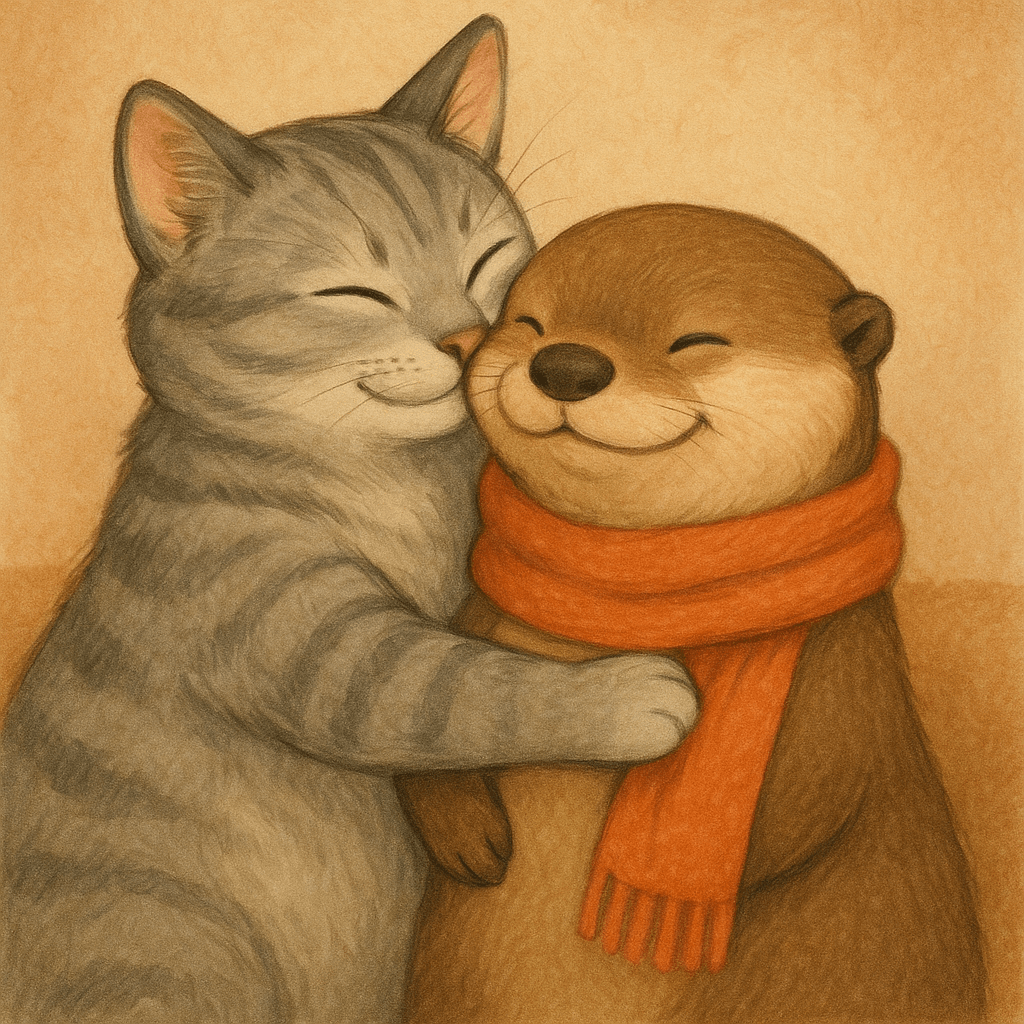
|
| "Now make it look realistic" |
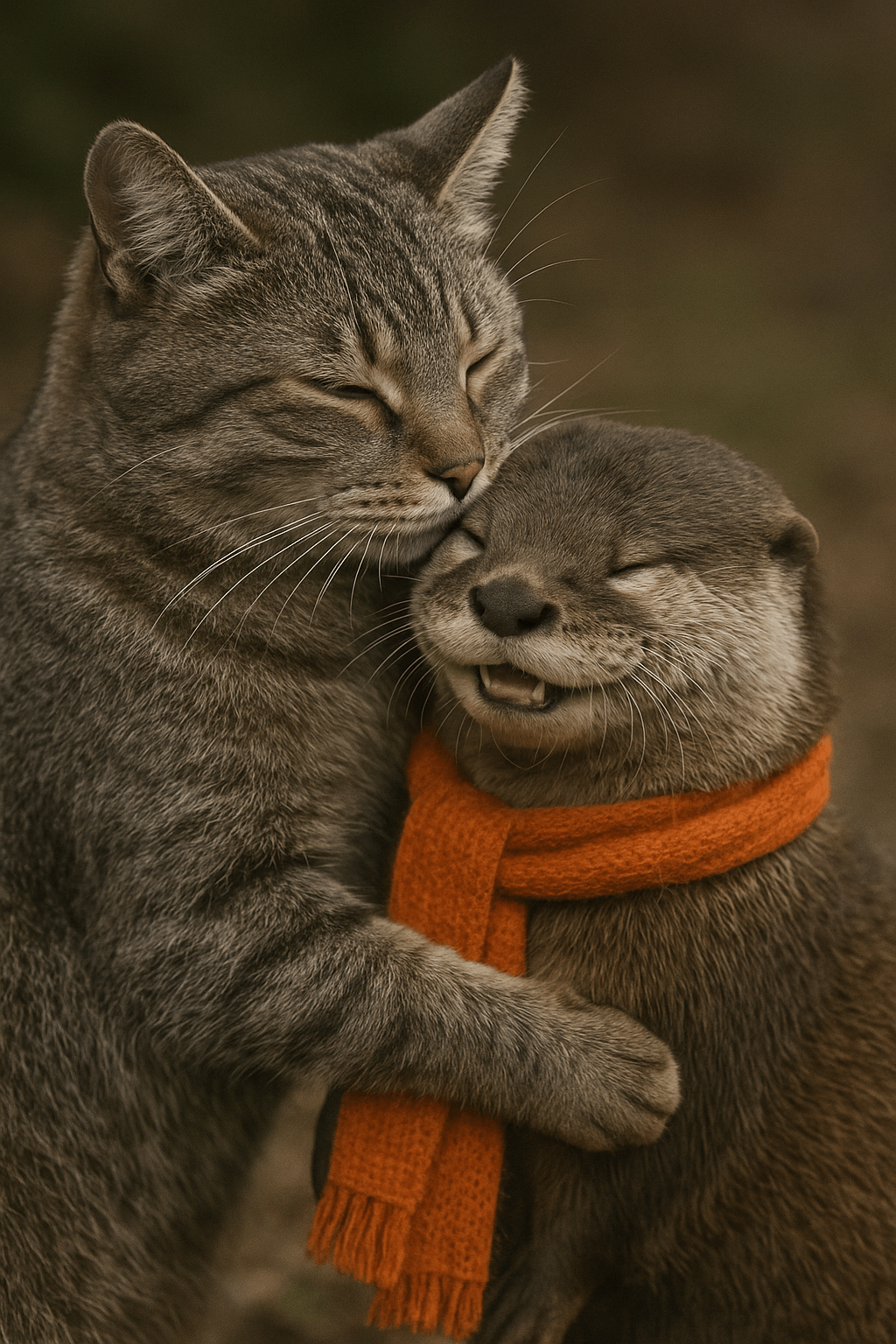
|
Streaming
The Responses API and Image API support streaming image generation. You can stream partial images as the APIs generate them, providing a more interactive experience.
You can adjust the partial_images parameter to receive 0-3 partial images.
- If you set
partial_imagesto 0, you will only receive the final image. - For values larger than zero, you may not receive the full number of partial images you requested if the full image is generated more quickly.
Responses API
Stream an image
import OpenAI from "openai";
import fs from "fs";
const openai = new OpenAI();

function saveBase64Image(filename, imageBase64) {
  const imageBuffer = Buffer.from(imageBase64, "base64");
  fs.writeFileSync(filename, imageBuffer);
}

const stream = await openai.responses.create({
  model: "gpt-5.6",
  input:
    "Draw a gorgeous image of a river made of white owl feathers, snaking its way through a serene winter landscape",
  stream: true,
  tools: [{ type: "image_generation", partial_images: 2 }],
});

for await (const event of stream) {
  if (event.type === "response.image_generation_call.partial_image") {
    const idx = event.partial_image_index;
    saveBase64Image(`river-partial-${idx}.png`, event.partial_image_b64);
  } else if (event.type === "response.completed") {
    const imageData = event.response.output
      .filter((output) => output.type === "image_generation_call")
      .map((output) => output.result);

    if (imageData.length > 0) {
      saveBase64Image("river-final.png", imageData[0]);
    }
  }
}
from openai import OpenAI
import base64

client = OpenAI()


def save_base64_image(filename, image_base64):
    image_bytes = base64.b64decode(image_base64)
    with open(filename, "wb") as f:
        f.write(image_bytes)


stream = client.responses.create(
    model="gpt-5.6",
    input="Draw a gorgeous image of a river made of white owl feathers, snaking its way through a serene winter landscape",
    stream=True,
    tools=[{"type": "image_generation", "partial_images": 2}],
)

for event in stream:
    if event.type == "response.image_generation_call.partial_image":
        idx = event.partial_image_index
        save_base64_image(f"river-partial-{idx}.png", event.partial_image_b64)
    elif event.type == "response.completed":
        image_data = [
            output.result
            for output in event.response.output
            if output.type == "image_generation_call"
        ]

        if image_data:
            save_base64_image("river-final.png", image_data[0])
package main

import (
	"context"
	"encoding/base64"
	"fmt"
	"os"

	"github.com/openai/openai-go/v3"
	"github.com/openai/openai-go/v3/responses"
)

func main() {
	client := openai.NewClient()
	stream := client.Responses.NewStreaming(context.Background(), responses.ResponseNewParams{
		Model: "gpt-5.6",
		Input: responses.ResponseNewParamsInputUnion{
			OfString: openai.String("Draw a gorgeous image of a river made of white owl feathers, snaking its way through a serene winter landscape"),
		},
		Tools: []responses.ToolUnionParam{{OfImageGeneration: &responses.ToolImageGenerationParam{PartialImages: openai.Int(2)}}},
	})
	for stream.Next() {
		event := stream.Current()
		if event.Type == "response.image_generation_call.partial_image" {
			partial := event.AsResponseImageGenerationCallPartialImage()
			saveImage(fmt.Sprintf("river-partial-%d.png", partial.PartialImageIndex), partial.PartialImageB64)
		}
		if event.Type == "response.completed" {
			for _, output := range event.AsResponseCompleted().Response.Output {
				if output.Type == "image_generation_call" {
					saveImage("river-final.png", output.AsImageGenerationCall().Result)
				}
			}
		}
	}
	if err := stream.Err(); err != nil {
		panic(err)
	}
}

func saveImage(filename, encoded string) {
	image, err := base64.StdEncoding.DecodeString(encoded)
	if err != nil {
		panic(err)
	}
	if err := os.WriteFile(filename, image, 0o600); err != nil {
		panic(err)
	}
}
require "base64"
require "openai"

client = OpenAI::Client.new
stream = client.responses.stream(
  model: "gpt-5.6",
  input: "Generate an image of a river made of white owl feathers.",
  tools: [{type: :image_generation, partial_images: 2}]
)

stream.each do |event|
  case event
  when OpenAI::Models::Responses::ResponseImageGenCallPartialImageEvent
    image = Base64.strict_decode64(event.partial_image_b64)
    File.binwrite("river-partial-#{event.partial_image_index}.png", image)
  when OpenAI::Models::Responses::ResponseCompletedEvent
    image_call = event.response.output.find do |item|
      item.is_a?(OpenAI::Models::Responses::ResponseOutputItem::ImageGenerationCall)
    end
    next unless image_call.is_a?(OpenAI::Models::Responses::ResponseOutputItem::ImageGenerationCall)

    File.binwrite(
      "river-final.png",
      Base64.strict_decode64(image_call.result)
    )
  end
end
Image API
Stream an image
import fs from "fs";
import OpenAI from "openai";

const openai = new OpenAI();

const prompt =
  "Draw a gorgeous image of a river made of white owl feathers, snaking its way through a serene winter landscape";
const stream = await openai.images.generate({
  prompt: prompt,
  model: "gpt-image-2",
  stream: true,
  partial_images: 2,
});

for await (const event of stream) {
  if (event.type === "image_generation.partial_image") {
    const idx = event.partial_image_index;
    const imageBase64 = event.b64_json;
    const imageBuffer = Buffer.from(imageBase64, "base64");
    fs.writeFileSync(`river${idx}.png`, imageBuffer);
  }
}
from openai import OpenAI
import base64

client = OpenAI()

stream = client.images.generate(
    prompt="Draw a gorgeous image of a river made of white owl feathers, snaking its way through a serene winter landscape",
    model="gpt-image-2",
    stream=True,
    partial_images=2,
)

for event in stream:
    if event.type == "image_generation.partial_image":
        idx = event.partial_image_index
        image_base64 = event.b64_json
        image_bytes = base64.b64decode(image_base64)
        with open(f"river{idx}.png", "wb") as f:
            f.write(image_bytes)
package main

import (
	"context"
	"encoding/base64"
	"fmt"
	"os"

	"github.com/openai/openai-go/v3"
)

func main() {
	client := openai.NewClient()
	stream := client.Images.GenerateStreaming(context.Background(), openai.ImageGenerateParams{
		Model:         openai.ImageModel("gpt-image-2"),
		Prompt:        "Draw a gorgeous image of a river made of white owl feathers, snaking its way through a serene winter landscape",
		PartialImages: openai.Int(2),
	})
	for stream.Next() {
		event := stream.Current()
		if event.Type != "image_generation.partial_image" {
			continue
		}
		partial := event.AsImageGenerationPartialImage()
		saveImage(fmt.Sprintf("river%d.png", partial.PartialImageIndex), partial.B64JSON)
	}
	if err := stream.Err(); err != nil {
		panic(err)
	}
}

func saveImage(filename, encoded string) {
	image, err := base64.StdEncoding.DecodeString(encoded)
	if err != nil {
		panic(err)
	}
	if err := os.WriteFile(filename, image, 0o600); err != nil {
		panic(err)
	}
}
require "base64"
require "openai"

client = OpenAI::Client.new
stream = client.images.generate_stream_raw(
  model: "gpt-image-2",
  prompt: "A river made of white owl feathers in a winter landscape",
  partial_images: 2
)

stream.each do |event|
  next unless event.is_a?(OpenAI::Models::ImageGenPartialImageEvent)

  image = Base64.strict_decode64(event.b64_json)
  File.binwrite("river#{event.partial_image_index}.png", image)
end
Result
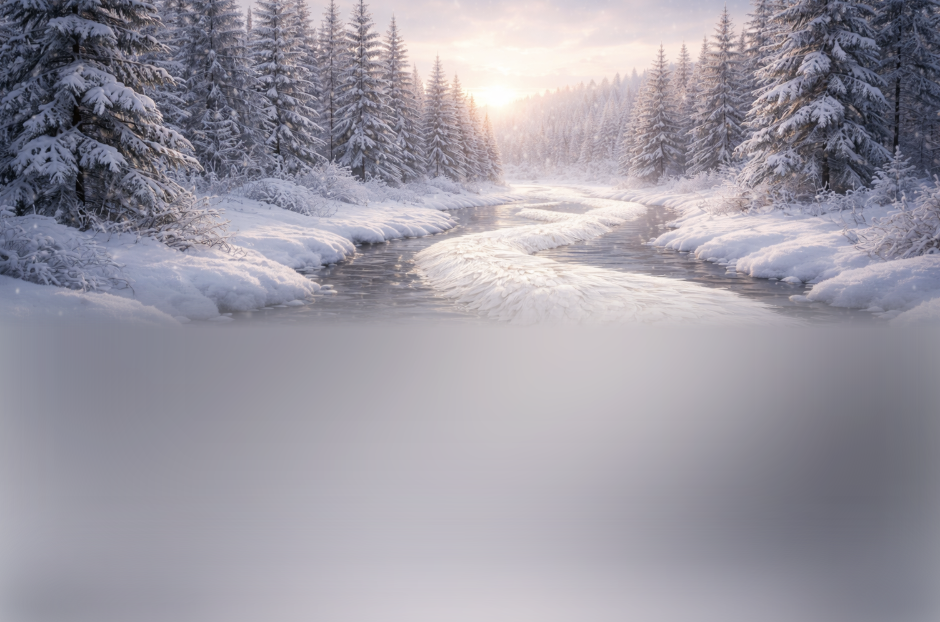
| Partial 1 | Partial 2 | Final image |
|---|---|---|
 |
 |
 |
Prompt: Draw a gorgeous image of a river made of white owl feathers, snaking its way through a serene winter landscape
Revised prompt
When using the image generation tool in the Responses API, the mainline model (for example, gpt-5.5) will automatically revise your prompt for improved performance.
You can access the revised prompt in the revised_prompt field of the image generation call:
Revised prompt response
{
  "id": "ig_123",
  "type": "image_generation_call",
  "status": "completed",
  "revised_prompt": "A gray tabby cat hugging an otter. The otter is wearing an orange scarf. Both animals are cute and friendly, depicted in a warm, heartwarming style.",
  "result": "..."
}
Edit Images
The image edits endpoint lets you:
- Edit existing images
- Generate new images using other images as a reference
- Edit parts of an image by uploading an image and mask that identifies the areas to replace
Create a new image using image references
You can use one or more images as a reference to generate a new image.
In this example, we'll use 4 input images to generate a new image of a gift basket containing the items in the reference images.
Responses API
With the Responses API, you can provide input images in 3 different ways:
- By providing a fully qualified URL
- By providing an image as a Base64-encoded data URL
- By providing a file ID (created with the Files API)
Create a File
Create a File
import fs from "fs";
import OpenAI from "openai";

const openai = new OpenAI();

async function createFile(filePath) {
  const fileContent = fs.createReadStream(filePath);
  const result = await openai.files.create({
    file: fileContent,
    purpose: "vision",
  });
  return result.id;
}
from openai import OpenAI

client = OpenAI()


def create_file(file_path):
    with open(file_path, "rb") as file_content:
        result = client.files.create(
            file=file_content,
            purpose="vision",
        )
        return result.id
package main

import (
	"context"
	"fmt"
	"os"

	"github.com/openai/openai-go/v3"
)

func main() {
	client := openai.NewClient()
	file, err := os.Open("image.png")
	if err != nil {
		panic(err)
	}
	defer file.Close()

	uploaded, err := client.Files.New(context.Background(), openai.FileNewParams{
		File:    file,
		Purpose: openai.FilePurposeVision,
	})
	if err != nil {
		panic(err)
	}
	fmt.Println(uploaded.ID)
}
require "openai"
require "pathname"

client = OpenAI::Client.new
file = client.files.create(
  file: Pathname("image.png"),
  purpose: OpenAI::Models::FilePurpose::VISION
)
puts(file.id)
Create a base64 encoded image
Create a base64 encoded image
import fs from "fs";

function encodeImage(filePath) {
  const base64Image = fs.readFileSync(filePath, "base64");
  return base64Image;
}
import base64


def encode_image(file_path):
    with open(file_path, "rb") as f:
        base64_image = base64.b64encode(f.read()).decode("utf-8")
    return base64_image
package main

import (
	"encoding/base64"
	"fmt"
	"os"
)

func main() {
	image, err := os.ReadFile("image.png")
	if err != nil {
		panic(err)
	}
	fmt.Println(base64.StdEncoding.EncodeToString(image))
}
require "base64"

image = File.binread("image.png")
puts(Base64.strict_encode64(image))
Edit an image
import fs from "fs";
import OpenAI from "openai";

const openai = new OpenAI();

function encodeImage(filePath) {
  return fs.readFileSync(filePath, "base64");
}

async function createFile(filePath) {
  const result = await openai.files.create({
    file: fs.createReadStream(filePath),
    purpose: "vision",
  });
  return result.id;
}

const prompt = `Generate a photorealistic image of a gift basket on a white background
labeled 'Relax & Unwind' with a ribbon and handwriting-like font,
containing all the items in the reference pictures.`;

const base64Image1 = encodeImage("fixtures/body-lotion.png");
const base64Image2 = encodeImage("fixtures/soap.png");
const fileId1 = await createFile("fixtures/bath-bomb.png");
const fileId2 = await createFile("fixtures/incense-kit.png");

const response = await openai.responses.create({
  model: "gpt-5.6",
  input: [
    {
      role: "user",
      content: [
        { type: "input_text", text: prompt },
        {
          type: "input_image",
          image_url: `data:image/png;base64,${base64Image1}`,
          detail: "auto",
        },
        {
          type: "input_image",
          image_url: `data:image/png;base64,${base64Image2}`,
          detail: "auto",
        },
        {
          type: "input_image",
          file_id: fileId1,
          detail: "auto",
        },
        {
          type: "input_image",
          file_id: fileId2,
          detail: "auto",
        },
      ],
    },
  ],
  tools: [{ type: "image_generation" }],
});

const imageData = response.output
  .filter((output) => output.type === "image_generation_call")
  .map((output) => output.result);

if (imageData.length > 0) {
  const imageBase64 = imageData[0];
  fs.writeFileSync("gift-basket.png", Buffer.from(imageBase64, "base64"));
} else {
  console.log(response.output_text);
}
from openai import OpenAI
import base64

client = OpenAI()


def encode_image(file_path):
    with open(file_path, "rb") as image_file:
        return base64.b64encode(image_file.read()).decode("utf-8")


def create_file(file_path):
    with open(file_path, "rb") as file_content:
        result = client.files.create(file=file_content, purpose="vision")
    return result.id


prompt = """Generate a photorealistic image of a gift basket on a white background
labeled 'Relax & Unwind' with a ribbon and handwriting-like font,
containing all the items in the reference pictures."""

base64_image1 = encode_image("body-lotion.png")
base64_image2 = encode_image("soap.png")
file_id1 = create_file("bath-bomb.png")
file_id2 = create_file("incense-kit.png")

response = client.responses.create(
    model="gpt-5.6",
    input=[
        {
            "role": "user",
            "content": [
                {"type": "input_text", "text": prompt},
                {
                    "type": "input_image",
                    "image_url": f"data:image/png;base64,{base64_image1}",
                },
                {
                    "type": "input_image",
                    "image_url": f"data:image/png;base64,{base64_image2}",
                },
                {
                    "type": "input_image",
                    "file_id": file_id1,
                },
                {
                    "type": "input_image",
                    "file_id": file_id2,
                },
            ],
        }
    ],
    tools=[{"type": "image_generation"}],
)

image_generation_calls = [
    output for output in response.output if output.type == "image_generation_call"
]

image_data = [output.result for output in image_generation_calls]

if image_data:
    image_base64 = image_data[0]
    with open("gift-basket.png", "wb") as f:
        f.write(base64.b64decode(image_base64))
else:
    print(response.output_text)
package main

import (
	"context"
	"encoding/base64"
	"os"

	"github.com/openai/openai-go/v3"
	"github.com/openai/openai-go/v3/responses"
)

func main() {
	client := openai.NewClient()
	bathBombID := uploadImage(client, "bath-bomb.png")
	incenseKitID := uploadImage(client, "incense-kit.png")

	response, err := client.Responses.New(context.Background(), responses.ResponseNewParams{
		Model: "gpt-5.6",
		Input: responses.ResponseNewParamsInputUnion{OfInputItemList: responses.ResponseInputParam{
			responses.ResponseInputItemParamOfMessage(
				responses.ResponseInputMessageContentListParam{
					responses.ResponseInputContentParamOfInputText("Generate a photorealistic image of a gift basket on a white background labeled 'Relax & Unwind' with a ribbon and handwriting-like font, containing all the items in the reference pictures."),
					{OfInputImage: &responses.ResponseInputImageParam{ImageURL: openai.String(dataURL("body-lotion.png")), Detail: responses.ResponseInputImageDetailAuto}},
					{OfInputImage: &responses.ResponseInputImageParam{ImageURL: openai.String(dataURL("soap.png")), Detail: responses.ResponseInputImageDetailAuto}},
					{OfInputImage: &responses.ResponseInputImageParam{FileID: openai.String(bathBombID), Detail: responses.ResponseInputImageDetailAuto}},
					{OfInputImage: &responses.ResponseInputImageParam{FileID: openai.String(incenseKitID), Detail: responses.ResponseInputImageDetailAuto}},
				},
				responses.EasyInputMessageRoleUser,
			),
		}},
		Tools: []responses.ToolUnionParam{{OfImageGeneration: &responses.ToolImageGenerationParam{}}},
	})
	if err != nil {
		panic(err)
	}
	saveFirstGeneratedImage(response, "gift-basket.png")
}

func uploadImage(client openai.Client, filename string) string {
	file, err := os.Open(filename)
	if err != nil {
		panic(err)
	}
	defer file.Close()
	uploaded, err := client.Files.New(context.Background(), openai.FileNewParams{File: file, Purpose: openai.FilePurposeVision})
	if err != nil {
		panic(err)
	}
	return uploaded.ID
}

func dataURL(filename string) string {
	image, err := os.ReadFile(filename)
	if err != nil {
		panic(err)
	}
	return "data:image/png;base64," + base64.StdEncoding.EncodeToString(image)
}

func saveFirstGeneratedImage(response *responses.Response, filename string) {
	for _, output := range response.Output {
		if output.Type != "image_generation_call" {
			continue
		}
		image, err := base64.StdEncoding.DecodeString(output.AsImageGenerationCall().Result)
		if err != nil {
			panic(err)
		}
		if err := os.WriteFile(filename, image, 0o600); err != nil {
			panic(err)
		}
		return
	}
	panic("response did not include an image generation call")
}
require "base64"
require "openai"
require "pathname"

client = OpenAI::Client.new
base64_images = ["body-lotion.png", "soap.png"].map do |path|
  Base64.strict_encode64(File.binread(path))
end
file_ids = [
  client.files.create(file: Pathname("bath-bomb.png"), purpose: :vision).id,
  client.files.create(file: Pathname("incense-kit.png"), purpose: :vision).id
]
prompt = <<~PROMPT
  Generate a photorealistic image of a gift basket on a white background
  labeled 'Relax & Unwind' with a ribbon and handwriting-like font,
  containing all the items in the reference pictures.
PROMPT
response = client.responses.create(
  model: "gpt-5.6",
  input: [{
    role: :user,
    content: [
      {type: :input_text, text: prompt},
      *base64_images.map do |image|
        {type: :input_image, image_url: "data:image/png;base64,#{image}"}
      end,
      *file_ids.map do |file_id|
        {type: :input_image, file_id: file_id}
      end
    ]
  }],
  tools: [{type: :image_generation}]
)

image_call = response.output.find do |item|
  item.is_a?(OpenAI::Models::Responses::ResponseOutputItem::ImageGenerationCall)
end
unless image_call.is_a?(OpenAI::Models::Responses::ResponseOutputItem::ImageGenerationCall)
  raise "No image generation call returned"
end

File.binwrite("gift-basket.png", Base64.strict_decode64(image_call.result))
Image API
Edit an image
import fs from "fs";
import OpenAI, { toFile } from "openai";

const client = new OpenAI();

const prompt = `
Generate a photorealistic image of a gift basket on a white background
labeled 'Relax & Unwind' with a ribbon and handwriting-like font,
containing all the items in the reference pictures.
`;

const imageFiles = [
  "fixtures/bath-bomb.png",
  "fixtures/body-lotion.png",
  "fixtures/incense-kit.png",
  "fixtures/soap.png",
];

const images = await Promise.all(
  imageFiles.map(
    async (file) =>
      await toFile(fs.createReadStream(file), null, {
        type: "image/png",
      })
  )
);

const response = await client.images.edit({
  model: "gpt-image-2",
  image: images,
  prompt,
});

// Save the image to a file
const image_base64 = response.data[0].b64_json;
const image_bytes = Buffer.from(image_base64, "base64");
fs.writeFileSync("basket.png", image_bytes);
import base64
from openai import OpenAI

client = OpenAI()

prompt = """
Generate a photorealistic image of a gift basket on a white background
labeled 'Relax & Unwind' with a ribbon and handwriting-like font,
containing all the items in the reference pictures.
"""

result = client.images.edit(
    model="gpt-image-2",
    image=[
        open("body-lotion.png", "rb"),
        open("bath-bomb.png", "rb"),
        open("incense-kit.png", "rb"),
        open("soap.png", "rb"),
    ],
    prompt=prompt,
)

image_base64 = result.data[0].b64_json
image_bytes = base64.b64decode(image_base64)

# Save the image to a file
with open("gift-basket.png", "wb") as f:
    f.write(image_bytes)
package main

import (
	"context"
	"encoding/base64"
	"io"
	"os"

	"github.com/openai/openai-go/v3"
)

func main() {
	client := openai.NewClient()
	files, closeFiles := openImages(
		"bath-bomb.png",
		"body-lotion.png",
		"incense-kit.png",
		"soap.png",
	)
	defer closeFiles()

	response, err := client.Images.Edit(context.Background(), openai.ImageEditParams{
		Model: openai.ImageModel("gpt-image-2"),
		Image: openai.ImageEditParamsImageUnion{OfFileArray: files},
		Prompt: "Generate a photorealistic image of a gift basket on a white background " +
			"labeled 'Relax & Unwind' with a ribbon and handwriting-like font, containing all the items in the reference pictures.",
	})
	if err != nil {
		panic(err)
	}
	saveImage("basket.png", response.Data[0].B64JSON)
}

func openImages(names ...string) ([]io.Reader, func()) {
	images := make([]io.Reader, 0, len(names))
	files := make([]*os.File, 0, len(names))
	for _, name := range names {
		file, err := os.Open(name)
		if err != nil {
			closeFiles(files)
			panic(err)
		}
		images = append(images, openai.File(file, name, "image/png"))
		files = append(files, file)
	}
	return images, func() { closeFiles(files) }
}

func closeFiles(files []*os.File) {
	for _, file := range files {
		if err := file.Close(); err != nil {
			panic(err)
		}
	}
}

func saveImage(filename, encoded string) {
	image, err := base64.StdEncoding.DecodeString(encoded)
	if err != nil {
		panic(err)
	}
	if err := os.WriteFile(filename, image, 0o600); err != nil {
		panic(err)
	}
}
require "base64"
require "openai"
require "pathname"

client = OpenAI::Client.new
images = %w[body-lotion.png bath-bomb.png incense-kit.png soap.png].map do |path|
  Pathname(path)
end
result = client.images.edit(
  image: images,
  model: "gpt-image-2",
  prompt: <<~PROMPT
    Generate a photorealistic image of a gift basket on a white background
    labeled 'Relax & Unwind' with a ribbon and handwriting-like font,
    containing all the items in the reference pictures.
  PROMPT
)
generated_image = result.data&.first or raise "No image returned"
File.binwrite("gift-basket.png", Base64.strict_decode64(generated_image.b64_json))
curl -s -D >(grep -i x-request-id >&2) \
  -o >(jq -r '.data[0].b64_json' | base64 --decode > gift-basket.png) \
  -X POST "https://api.openai.com/v1/images/edits" \
  -H "Authorization: Bearer $OPENAI_API_KEY" \
  -F "model=gpt-image-2" \
  -F "image[]=@body-lotion.png" \
  -F "image[]=@bath-bomb.png" \
  -F "image[]=@incense-kit.png" \
  -F "image[]=@soap.png" \
  -F 'prompt=Generate a photorealistic image of a gift basket on a white background labeled "Relax & Unwind" with a ribbon and handwriting-like font, containing all the items in the reference pictures'
openai images edit \
  --model gpt-image-2 \
  --image body-lotion.png \
  --image bath-bomb.png \
  --image incense-kit.png \
  --image soap.png \
  --prompt 'Generate a photorealistic image of a gift basket on a white background labeled "Relax & Unwind" with a ribbon and handwriting-like font, containing all the items in the reference pictures' \
  --raw-output \
  --transform 'data.0.b64_json' | base64 --decode > gift-basket.png
Edit an image using a mask
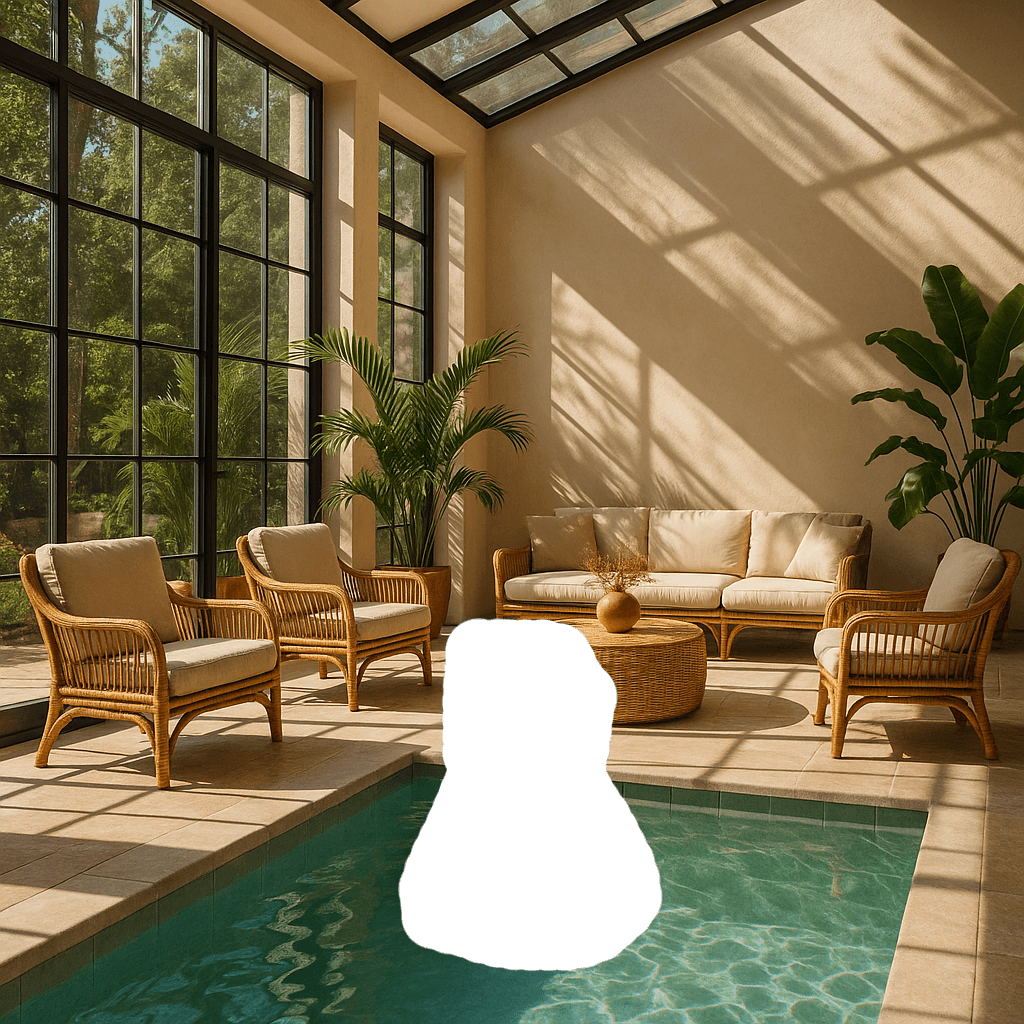
You can provide a mask to indicate which part of the image should be edited.
When using a mask with GPT Image, additional instructions are sent to the model to help guide the editing process accordingly.
Masking with GPT Image is entirely prompt-based. The model uses the mask as guidance, but may not follow its exact shape with complete precision.
If you provide multiple input images, the mask will be applied to the first image.
Responses API
Edit an image with a mask
import fs from "fs";
import OpenAI from "openai";

const openai = new OpenAI();

async function createFile(filePath) {
  const result = await openai.files.create({
    file: fs.createReadStream(filePath),
    purpose: "vision",
  });
  return result.id;
}

const fileId = await createFile("fixtures/sunlit_lounge.png");
const maskId = await createFile("fixtures/mask.png");

const response = await openai.responses.create({
  model: "gpt-5.6",
  input: [
    {
      role: "user",
      content: [
        {
          type: "input_text",
          text: "generate an image of the same sunlit indoor lounge area with a pool but the pool should contain a flamingo",
        },
        {
          type: "input_image",
          file_id: fileId,
          detail: "auto",
        },
      ],
    },
  ],
  tools: [
    {
      type: "image_generation",
      quality: "high",
      input_image_mask: {
        file_id: maskId,
      },
    },
  ],
});

const imageData = response.output
  .filter((output) => output.type === "image_generation_call")
  .map((output) => output.result);

if (imageData.length > 0) {
  const imageBase64 = imageData[0];
  fs.writeFileSync("lounge.png", Buffer.from(imageBase64, "base64"));
}
from openai import OpenAI
import base64

client = OpenAI()


def create_file(file_path):
    with open(file_path, "rb") as file_content:
        result = client.files.create(file=file_content, purpose="vision")
    return result.id


fileId = create_file("sunlit_lounge.png")
maskId = create_file("mask.png")

response = client.responses.create(
    model="gpt-5.6",
    input=[
        {
            "role": "user",
            "content": [
                {
                    "type": "input_text",
                    "text": "generate an image of the same sunlit indoor lounge area with a pool but the pool should contain a flamingo",
                },
                {
                    "type": "input_image",
                    "file_id": fileId,
                },
            ],
        },
    ],
    tools=[
        {
            "type": "image_generation",
            "quality": "high",
            "input_image_mask": {
                "file_id": maskId,
            },
        },
    ],
)

image_data = [
    output.result
    for output in response.output
    if output.type == "image_generation_call"
]

if image_data:
    image_base64 = image_data[0]
    with open("lounge.png", "wb") as f:
        f.write(base64.b64decode(image_base64))
package main

import (
	"context"
	"encoding/base64"
	"os"

	"github.com/openai/openai-go/v3"
	"github.com/openai/openai-go/v3/responses"
)

func main() {
	client := openai.NewClient()
	imageID := uploadImage(client, "sunlit_lounge.png")
	maskID := uploadImage(client, "mask.png")
	response, err := client.Responses.New(context.Background(), responses.ResponseNewParams{
		Model: "gpt-5.6",
		Input: responses.ResponseNewParamsInputUnion{OfInputItemList: responses.ResponseInputParam{
			responses.ResponseInputItemParamOfMessage(
				responses.ResponseInputMessageContentListParam{
					responses.ResponseInputContentParamOfInputText("Generate an image of the same sunlit indoor lounge area with a pool, but the pool should contain a flamingo."),
					{OfInputImage: &responses.ResponseInputImageParam{FileID: openai.String(imageID), Detail: responses.ResponseInputImageDetailAuto}},
				},
				responses.EasyInputMessageRoleUser,
			),
		}},
		Tools: []responses.ToolUnionParam{{OfImageGeneration: &responses.ToolImageGenerationParam{
			Quality:        "high",
			InputImageMask: responses.ToolImageGenerationInputImageMaskParam{FileID: openai.String(maskID)},
		}}},
	})
	if err != nil {
		panic(err)
	}
	saveFirstGeneratedImage(response, "lounge.png")
}

func uploadImage(client openai.Client, filename string) string {
	file, err := os.Open(filename)
	if err != nil {
		panic(err)
	}
	defer file.Close()
	uploaded, err := client.Files.New(context.Background(), openai.FileNewParams{File: file, Purpose: openai.FilePurposeVision})
	if err != nil {
		panic(err)
	}
	return uploaded.ID
}

func saveFirstGeneratedImage(response *responses.Response, filename string) {
	for _, output := range response.Output {
		if output.Type != "image_generation_call" {
			continue
		}
		image, err := base64.StdEncoding.DecodeString(output.AsImageGenerationCall().Result)
		if err != nil {
			panic(err)
		}
		if err := os.WriteFile(filename, image, 0o600); err != nil {
			panic(err)
		}
		return
	}
	panic("response did not include an image generation call")
}
require "base64"
require "openai"
require "pathname"

client = OpenAI::Client.new
image = client.files.create(file: Pathname("sunlit_lounge.png"), purpose: :vision)
mask = client.files.create(file: Pathname("mask.png"), purpose: :vision)
response = client.responses.create(
  model: "gpt-5.6",
  input: [{
    role: :user,
    content: [
      {type: :input_text, text: "Add a flamingo to the pool."},
      {type: :input_image, file_id: image.id}
    ]
  }],
  tools: [{
    type: :image_generation,
    input_image_mask: {file_id: mask.id}
  }]
)

image_call = response.output.find do |item|
  item.is_a?(OpenAI::Models::Responses::ResponseOutputItem::ImageGenerationCall)
end
unless image_call.is_a?(OpenAI::Models::Responses::ResponseOutputItem::ImageGenerationCall)
  raise "No image generation call returned"
end

File.binwrite("lounge.png", Base64.strict_decode64(image_call.result))
Image API
Edit an image with a mask
import fs from "fs";
import OpenAI, { toFile } from "openai";

const client = new OpenAI();

const rsp = await client.images.edit({
  model: "gpt-image-2",
  image: await toFile(fs.createReadStream("fixtures/sunlit_lounge.png"), null, {
    type: "image/png",
  }),
  mask: await toFile(fs.createReadStream("fixtures/mask.png"), null, {
    type: "image/png",
  }),
  prompt: "A sunlit indoor lounge area with a pool containing a flamingo",
});

// Save the image to a file
const image_base64 = rsp.data[0].b64_json;
const image_bytes = Buffer.from(image_base64, "base64");
fs.writeFileSync("lounge.png", image_bytes);
from openai import OpenAI
import base64

client = OpenAI()

result = client.images.edit(
    model="gpt-image-2",
    image=open("sunlit_lounge.png", "rb"),
    mask=open("mask.png", "rb"),
    prompt="A sunlit indoor lounge area with a pool containing a flamingo",
)

image_base64 = result.data[0].b64_json
image_bytes = base64.b64decode(image_base64)

# Save the image to a file
with open("composition.png", "wb") as f:
    f.write(image_bytes)
package main

import (
	"context"
	"encoding/base64"
	"os"

	"github.com/openai/openai-go/v3"
)

func main() {
	client := openai.NewClient()
	image, err := os.Open("sunlit_lounge.png")
	if err != nil {
		panic(err)
	}
	defer image.Close()
	mask, err := os.Open("mask.png")
	if err != nil {
		panic(err)
	}
	defer mask.Close()

	response, err := client.Images.Edit(context.Background(), openai.ImageEditParams{
		Model:  openai.ImageModel("gpt-image-2"),
		Image:  openai.ImageEditParamsImageUnion{OfFile: openai.File(image, "sunlit_lounge.png", "image/png")},
		Mask:   openai.File(mask, "mask.png", "image/png"),
		Prompt: "A sunlit indoor lounge area with a pool containing a flamingo",
	})
	if err != nil {
		panic(err)
	}
	result, err := base64.StdEncoding.DecodeString(response.Data[0].B64JSON)
	if err != nil {
		panic(err)
	}
	if err := os.WriteFile("lounge.png", result, 0o600); err != nil {
		panic(err)
	}
}
require "openai"
require "pathname"
require "base64"

client = OpenAI::Client.new
image = Pathname("sunlit_lounge.png")
mask = Pathname("mask.png")
result = client.images.edit(
  image: image,
  mask: mask,
  model: "gpt-image-2",
  prompt: "A sunlit indoor lounge area with a pool containing a flamingo"
)
generated_image = result.data&.first or raise "No image returned"
File.binwrite("lounge.png", Base64.strict_decode64(generated_image.b64_json))
curl -s -D >(grep -i x-request-id >&2) \
  -o >(jq -r '.data[0].b64_json' | base64 --decode > lounge.png) \
  -X POST "https://api.openai.com/v1/images/edits" \
  -H "Authorization: Bearer $OPENAI_API_KEY" \
  -F "model=gpt-image-2" \
  -F "mask=@mask.png" \
  -F "image[]=@sunlit_lounge.png" \
  -F 'prompt=A sunlit indoor lounge area with a pool containing a flamingo'
openai images edit \
  --model gpt-image-2 \
  --image sunlit_lounge.png \
  --mask mask.png \
  --prompt "A sunlit indoor lounge area with a pool containing a flamingo" \
  --raw-output \
  --transform 'data.0.b64_json' | base64 --decode > out.png
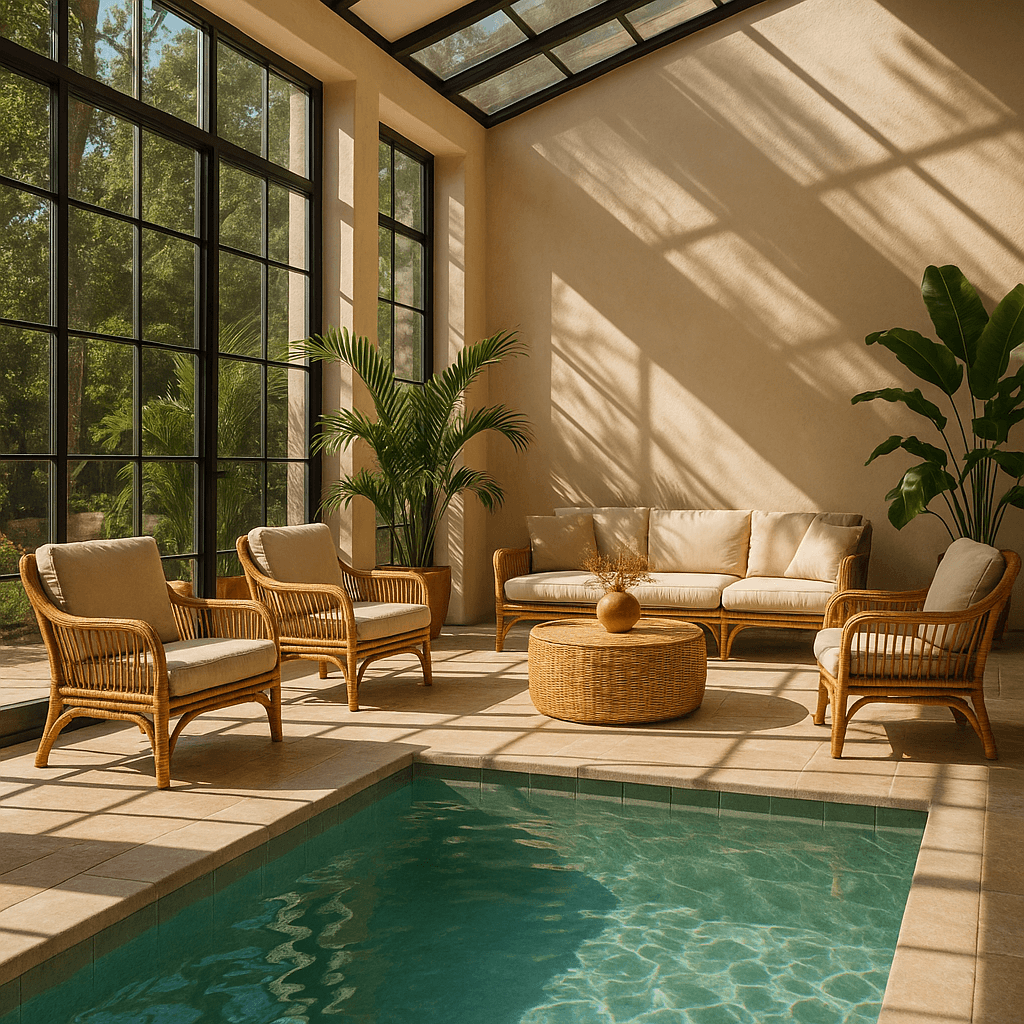
| Image | Mask | Output |
|---|---|---|
 |
 |
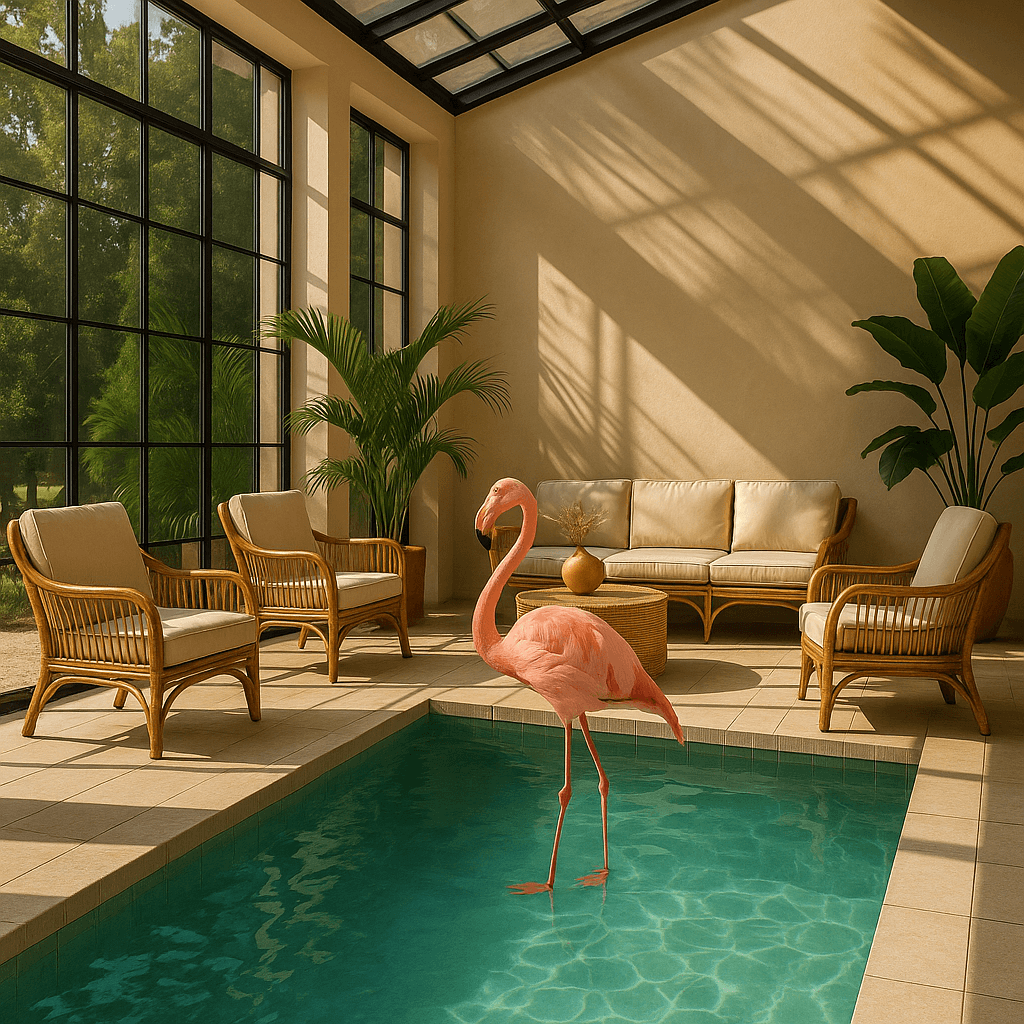 |
Prompt: a sunlit indoor lounge area with a pool containing a flamingo
Mask requirements
The image to edit and mask must be of the same format and size (less than 50MB in size).
The mask image must also contain an alpha channel. If you're using an image editing tool to create the mask, make sure to save the mask with an alpha channel.
You can modify a black and white image programmatically to add an alpha channel.
Add an alpha channel to a black and white mask
from PIL import Image
from io import BytesIO

# 1. Load your black & white mask as a grayscale image
mask = Image.open("mask.png").convert("L")

# 2. Convert it to RGBA so it has space for an alpha channel
mask_rgba = mask.convert("RGBA")

# 3. Then use the mask itself to fill that alpha channel
mask_rgba.putalpha(mask)

# 4. Convert the mask into bytes
buf = BytesIO()
mask_rgba.save(buf, format="PNG")
mask_bytes = buf.getvalue()

# 5. Save the resulting file
img_path_mask_alpha = "mask_alpha.png"
with open(img_path_mask_alpha, "wb") as f:
    f.write(mask_bytes)
package main

import (
	"image"
	"image/color"
	"image/png"
	"os"
)

func main() {
	file, err := os.Open("mask.png")
	if err != nil {
		panic(err)
	}
	defer file.Close()

	mask, _, err := image.Decode(file)
	if err != nil {
		panic(err)
	}
	bounds := mask.Bounds()
	withAlpha := image.NewNRGBA(bounds)
	for y := bounds.Min.Y; y < bounds.Max.Y; y++ {
		for x := bounds.Min.X; x < bounds.Max.X; x++ {
			gray := color.GrayModel.Convert(mask.At(x, y)).(color.Gray)
			withAlpha.SetNRGBA(x, y, color.NRGBA{R: gray.Y, G: gray.Y, B: gray.Y, A: gray.Y})
		}
	}

	output, err := os.Create("mask_alpha.png")
	if err != nil {
		panic(err)
	}
	if err := png.Encode(output, withAlpha); err != nil {
		panic(err)
	}
	if err := output.Close(); err != nil {
		panic(err)
	}
}
Image input fidelity
The input_fidelity parameter controls how strongly a model preserves details from input images during edits and reference-image workflows. For gpt-image-2, omit this parameter; the API doesn't allow changing it because the model processes every image input at high fidelity automatically.
Because gpt-image-2 always processes image inputs at high fidelity, image
input tokens can be higher for edit requests that include reference images. To
understand the cost implications, refer to the vision
costs
section.
Customize Image Output
You can configure the following output options:
- Size: Image dimensions (for example,
1024x1024,1024x1536) - Quality: Rendering quality (for example,
low,medium,high) - Format: File output format
- Compression: Compression level (0-100%) for JPEG and WebP formats
- Background: Opaque or automatic
size, quality, and background support the auto option, where the model will automatically select the best option based on the prompt.
gpt-image-2 doesn't currently support transparent backgrounds. Requests with
background: "transparent" aren't supported for this model.
Size and quality options
gpt-image-2 accepts any resolution in the size parameter when it satisfies the constraints below. Square images are typically fastest to generate.
| Popular sizes |
|
| Size constraints |
|
| Quality options |
|
Use quality: "low" for fast drafts, thumbnails, and quick iterations. It is
the fastest option and works well for many common use cases before you move to
medium or high for final assets.
Outputs that contain more than 2560x1440 (3,686,400) total pixels,
typically referred to as 2K, are considered experimental.
Output format
The Image API returns base64-encoded image data.
The default format is png, but you can also request jpeg or webp.
If using jpeg or webp, you can also specify the output_compression parameter to control the compression level (0-100%). For example, output_compression=50 will compress the image by 50%.
Using jpeg is faster than png, so you should prioritize this format if
latency is a concern.
Limitations
GPT Image models (gpt-image-2, gpt-image-1.5, gpt-image-1, and gpt-image-1-mini) are powerful and versatile image generation models, but they still have some limitations to be aware of:
- Latency: Complex prompts may take up to 2 minutes to process.
- Text Rendering: Although significantly improved, the model can still struggle with precise text placement and clarity.
- Consistency: While capable of producing consistent imagery, the model may occasionally struggle to maintain visual consistency for recurring characters or brand elements across multiple generations.
- Composition Control: Despite improved instruction following, the model may have difficulty placing elements precisely in structured or layout-sensitive compositions.
Content Moderation
All prompts and generated images are filtered in accordance with our content policy.
For image generation using GPT Image models (gpt-image-2, gpt-image-1.5, gpt-image-1, and gpt-image-1-mini), you can control moderation strictness with the moderation parameter. This parameter supports two values:
auto(default): Standard filtering that seeks to limit creating certain categories of potentially age-inappropriate content.low: Less restrictive filtering.
Handling blocked requests and other errors
Handle image generation failures the same way you handle other API errors: check the HTTP status or SDK exception type, log the request ID, and refer to the error codes guide for authentication, quota, rate-limit, and server failures. Retries are appropriate for transient failures like 429 and 5xx, but not for image generation user errors that require changing the request.
Some image generation failures are user-correctable and may return error.type = "image_generation_user_error". Don't automatically retry these errors without modifying the prompt or input images. For programmatic handling, use error.code as the stable discriminator.
When error.code = "moderation_blocked", the error may also include an optional error.moderation_details object:
{
  "error": {
    "type": "image_generation_user_error",
    "code": "moderation_blocked",
    "moderation_details": {
      "moderation_stage": "input",
      "categories": ["harassment"]
    }
  }
}
The moderation_details object provides coarse debugging context without exposing internal classifier labels or scores.
moderation_stage can be:
input: The block came from the prompt or request inputs.output: The block came from a generated image or downstream output moderation stage.unknown: A rare fallback when provenance is hard to determine.
categories contains coarse public labels. For example, you might see values like harassment, self-harm, sexual, or violence.
For most apps, keep the primary end-user message generic. Use moderation_details for developer logs, support workflows, analytics, and light remediation hints.
For example, if harassment appears, suggest removing abusive or targeting language. If the block happened at the input stage, guide the user to revise the prompt. If it happened at the output stage, treat it as a generated result safety block and distinguish it in your logs. Always branch on error.code = "moderation_blocked" first, and treat moderation_details as optional extra context.
Handle moderation-blocked image generation errors
import OpenAI from "openai";

const openai = new OpenAI();

try {
  // The same error handling pattern applies to image generation requests,
  // image edits, and Responses API tool calls that generate images.
  await openai.images.generate({
    model: "gpt-image-2",
    prompt: "Create a poster humiliating my coworker with insulting captions",
  });
} catch (error) {
  if (error?.code !== "moderation_blocked") {
    throw error;
  }

  const moderationDetails = error.error?.moderation_details;
  const categories = moderationDetails?.categories ?? [];
  const stage = moderationDetails?.moderation_stage;

  let hint =
    "This request could not be completed because it did not meet safety requirements.";

  if (categories.includes("harassment")) {
    hint =
      "Try removing abusive or targeting language and focus on neutral visual details instead.";
  } else if (stage === "input") {
    hint =
      "Try revising the prompt or input images and submit the request again.";
  } else if (stage === "output") {
    hint =
      "The generated result was blocked by a safety check. Try changing the prompt and generating again.";
  }

  console.error("Image generation blocked", {
    request_id: error?.requestID,
    code: error?.code,
    moderation_details: moderationDetails,
  });

  console.log(hint);
}
import openai
from openai import OpenAI

client = OpenAI()

try:
    # The same error handling pattern applies to image generation requests,
    # image edits, and Responses API tool calls that generate images.
    client.images.generate(
        model="gpt-image-2",
        prompt="Create a poster humiliating my coworker with insulting captions",
    )
except openai.BadRequestError as error:
    if error.code != "moderation_blocked":
        raise

    error_body = error.body if isinstance(error.body, dict) else {}
    moderation_details = error_body.get("moderation_details") or {}
    categories = moderation_details.get("categories") or []
    stage = moderation_details.get("moderation_stage")

    hint = "This request could not be completed because it did not meet safety requirements."

    if "harassment" in categories:
        hint = "Try removing abusive or targeting language and focus on neutral visual details instead."
    elif stage == "input":
        hint = "Try revising the prompt or input images and submit the request again."
    elif stage == "output":
        hint = "The generated result was blocked by a safety check. Try changing the prompt and generating again."

    print(
        "Image generation blocked",
        {
            "request_id": error.request_id,
            "code": error.code,
            "moderation_details": moderation_details,
        },
    )

    print(hint)
package main

import (
	"context"
	"encoding/json"
	"errors"
	"fmt"
	"slices"

	"github.com/openai/openai-go/v3"
)

func main() {
	client := openai.NewClient()
	_, err := client.Images.Generate(context.Background(), openai.ImageGenerateParams{
		Model:  openai.ImageModel("gpt-image-2"),
		Prompt: "Create a poster humiliating my coworker with insulting captions",
	})
	if err == nil {
		return
	}

	var apiError *openai.Error
	if !errors.As(err, &apiError) || apiError.Code != "moderation_blocked" {
		panic(err)
	}

	var body struct {
		ModerationDetails struct {
			Categories      []string `json:"categories"`
			ModerationStage string   `json:"moderation_stage"`
		} `json:"moderation_details"`
	}
	if err := json.Unmarshal([]byte(apiError.RawJSON()), &body); err != nil {
		panic(err)
	}

	hint := "This request could not be completed because it did not meet safety requirements."
	if slices.Contains(body.ModerationDetails.Categories, "harassment") {
		hint = "Try removing abusive or targeting language and focus on neutral visual details instead."
	} else if body.ModerationDetails.ModerationStage == "input" {
		hint = "Try revising the prompt or input images and submit the request again."
	} else if body.ModerationDetails.ModerationStage == "output" {
		hint = "The generated result was blocked by a safety check. Try changing the prompt and generating again."
	}

	fmt.Printf("Image generation blocked (%s): %s\n", apiError.Code, hint)
}
require "openai"

client = OpenAI::Client.new
begin
  client.images.generate(
    model: "gpt-image-2",
    prompt: "Create a poster humiliating my coworker with insulting captions"
  )
rescue OpenAI::Errors::BadRequestError => error
  raise unless error.code == "moderation_blocked"

  body = Hash.try_convert(error.body) || {}
  moderation_details = body[:moderation_details] || body["moderation_details"] || {}
  categories = moderation_details[:categories] || moderation_details["categories"] || []
  stage = moderation_details[:moderation_stage] || moderation_details["moderation_stage"]

  hint = "This request did not meet safety requirements."
  if categories.include?("harassment")
    hint = "Remove abusive or targeting language and focus on neutral visual details."
  elsif stage == "input"
    hint = "Revise the prompt or input images, then submit the request again."
  elsif stage == "output"
    hint = "Change the prompt and generate again; the generated result was blocked."
  end

  warn("Image generation blocked (#{error.code}): #{hint}")
end
Supported models
When using image generation in the Responses API, gpt-5 and newer models should support the image generation tool. Check the model detail page for your model to confirm if your desired model can use the image generation tool.
Cost and latency
gpt-image-2 output tokens
For gpt-image-2, use the calculator to estimate output tokens from the requested quality and size:
Models prior to gpt-image-2
GPT Image models prior to gpt-image-2 generate images by first producing specialized image tokens. Both latency and eventual cost are proportional to the number of tokens required to render an image—larger image sizes and higher quality settings result in more tokens.
The number of tokens generated depends on image dimensions and quality:
| Quality | Square (1024×1024) | Portrait (1024×1536) | Landscape (1536×1024) |
|---|---|---|---|
| Low | 272 tokens | 408 tokens | 400 tokens |
| Medium | 1056 tokens | 1584 tokens | 1568 tokens |
| High | 4160 tokens | 6240 tokens | 6208 tokens |
Note that you will also need to account for input tokens: text tokens for the prompt and image tokens for the input images if editing images.
Because gpt-image-2 always processes image inputs at high fidelity, edit requests that include reference images can use more input tokens.
Refer to the pricing page for current text and image token prices, and use the Calculating costs section below to estimate request costs.
The final cost is the sum of:
- input text tokens
- input image tokens if using the edits endpoint
- image output tokens
Calculating costs
Use the pricing calculator below to estimate request costs for GPT Image models.
gpt-image-2 supports thousands of valid resolutions; the table below lists the
same sizes used for previous GPT Image models for comparison. For GPT Image 1.5,
GPT Image 1, and GPT Image 1 Mini, the legacy per-image output pricing table is
also listed below. You should still account for text and image input tokens when
estimating the total cost of a request.
A larger non-square resolution can sometimes produce fewer output tokens than a smaller or square resolution at the same quality setting.
| Model | Quality | 1024 x 1024 | 1024 x 1536 | 1536 x 1024 |
|---|---|---|---|---|
|
GPT Image 2
Additional sizes available |
Partial images cost
If you want to stream image generation using the partial_images parameter, each partial image will incur an additional 100 image output tokens.
guides/image-generation.md +361 −0
141}141}
142```142```
143 143
144```ruby
145require "base64"
146require "openai"
147
148client = OpenAI::Client.new
149result = client.images.generate(
150 model: "gpt-image-2",
151 prompt: "A watercolor robot reading in a library"
152)
153generated_image = result.data&.first or raise "No image returned"
154File.binwrite(
155 "generated-image.png",
156 Base64.strict_decode64(generated_image.b64_json)
157)
158```
159
144```bash160```bash
145curl -X POST "https://api.openai.com/v1/images/generations" \161curl -X POST "https://api.openai.com/v1/images/generations" \
146 -H "Authorization: Bearer $OPENAI_API_KEY" \162 -H "Authorization: Bearer $OPENAI_API_KEY" \
261}277}
262```278```
263 279
280```ruby
281require "base64"
282require "openai"
283
284client = OpenAI::Client.new
285response = client.responses.create(
286 model: "gpt-5.6",
287 input: "Generate an image of a gray tabby cat hugging an otter with an orange scarf.",
288 tools: [{type: :image_generation}]
289)
290
291image_call = response.output.find do |item|
292 item.is_a?(OpenAI::Models::Responses::ResponseOutputItem::ImageGenerationCall)
293end
294unless image_call.is_a?(OpenAI::Models::Responses::ResponseOutputItem::ImageGenerationCall)
295 raise "No image generation call returned"
296end
297
298encoded_image = image_call.result or raise "No image returned"
299File.binwrite("otter.png", Base64.strict_decode64(encoded_image))
300```
301
264 302
265 303
266### Multi-turn image generation304### Multi-turn image generation
361}399}
362```400```
363 401
402```ruby
403require "base64"
404require "openai"
405
406client = OpenAI::Client.new
407response = client.responses.create(
408 model: "gpt-5.6",
409 input: "Generate an image of a gray tabby cat hugging an otter with an orange scarf.",
410 tools: [{type: :image_generation, action: :generate}]
411)
412
413image_call = response.output.find do |item|
414 item.is_a?(OpenAI::Models::Responses::ResponseOutputItem::ImageGenerationCall)
415end
416unless image_call.is_a?(OpenAI::Models::Responses::ResponseOutputItem::ImageGenerationCall)
417 raise "No image generation call returned"
418end
419
420encoded_image = image_call.result or raise "No image returned"
421output_path = ENV.fetch("OPENAI_EXAMPLE_OUTPUT_PATH", "otter.png")
422File.binwrite(output_path, Base64.decode64(encoded_image))
423puts(output_path)
424```
425
364 426
365If you force `edit` without providing an image in context, the call will return an error. Leave `action` at `auto` to have the model decide when to generate or edit.427If you force `edit` without providing an image in context, the call will return an error. Leave `action` at `auto` to have the model decide when to generate or edit.
366 428
518}580}
519```581```
520 582
583```ruby
584require "base64"
585require "openai"
586
587client = OpenAI::Client.new
588first = client.responses.create(
589 model: "gpt-5.6",
590 input: "Generate an image of a gray tabby cat hugging an otter with an orange scarf.",
591 tools: [{type: :image_generation}]
592)
593
594first_image = first.output.find do |item|
595 item.is_a?(OpenAI::Models::Responses::ResponseOutputItem::ImageGenerationCall)
596end
597unless first_image.is_a?(OpenAI::Models::Responses::ResponseOutputItem::ImageGenerationCall)
598 raise "No image generation call returned"
599end
600
601encoded_image = first_image.result or raise "No image returned"
602File.binwrite("cat_and_otter.png", Base64.strict_decode64(encoded_image))
603
604follow_up = client.responses.create(
605 model: "gpt-5.6",
606 input: "Now make it look realistic.",
607 previous_response_id: first.id,
608 tools: [{type: :image_generation}]
609)
610
611follow_up_image = follow_up.output.find do |item|
612 item.is_a?(OpenAI::Models::Responses::ResponseOutputItem::ImageGenerationCall)
613end
614unless follow_up_image.is_a?(OpenAI::Models::Responses::ResponseOutputItem::ImageGenerationCall)
615 raise "No follow-up image generation call returned"
616end
617
618encoded_image = follow_up_image.result or raise "No follow-up image returned"
619File.binwrite("cat_and_otter_realistic.png", Base64.strict_decode64(encoded_image))
620```
621
521 622
522 623
523 624
709}810}
710```811```
711 812
813```ruby
814require "base64"
815require "openai"
816
817client = OpenAI::Client.new
818first = client.responses.create(
819 model: "gpt-5.6",
820 input: "Generate an image of a gray tabby cat hugging an otter with an orange scarf.",
821 tools: [{type: :image_generation}]
822)
823
824first_image = first.output.find do |item|
825 item.is_a?(OpenAI::Models::Responses::ResponseOutputItem::ImageGenerationCall)
826end
827unless first_image.is_a?(OpenAI::Models::Responses::ResponseOutputItem::ImageGenerationCall)
828 raise "No image generation call returned"
829end
830
831encoded_image = first_image.result or raise "No image returned"
832File.binwrite("cat_and_otter.png", Base64.strict_decode64(encoded_image))
833
834follow_up = client.responses.create(
835 model: "gpt-5.6",
836 input: [
837 {
838 role: :user,
839 content: [{type: :input_text, text: "Now make it look realistic."}]
840 },
841 {type: :image_generation_call, id: first_image.id}
842 ],
843 tools: [{type: :image_generation}]
844)
845
846follow_up_image = follow_up.output.find do |item|
847 item.is_a?(OpenAI::Models::Responses::ResponseOutputItem::ImageGenerationCall)
848end
849unless follow_up_image.is_a?(OpenAI::Models::Responses::ResponseOutputItem::ImageGenerationCall)
850 raise "No follow-up image generation call returned"
851end
852
853encoded_image = follow_up_image.result or raise "No follow-up image returned"
854File.binwrite("cat_and_otter_realistic.png", Base64.strict_decode64(encoded_image))
855```
856
712 857
713 858
714#### Result859#### Result
887}1032}
888```1033```
889 1034
1035```ruby
1036require "base64"
1037require "openai"
1038
1039client = OpenAI::Client.new
1040stream = client.responses.stream(
1041 model: "gpt-5.6",
1042 input: "Generate an image of a river made of white owl feathers.",
1043 tools: [{type: :image_generation, partial_images: 2}]
1044)
1045
1046stream.each do |event|
1047 case event
1048 when OpenAI::Models::Responses::ResponseImageGenCallPartialImageEvent
1049 image = Base64.strict_decode64(event.partial_image_b64)
1050 File.binwrite("river-partial-#{event.partial_image_index}.png", image)
1051 when OpenAI::Models::Responses::ResponseCompletedEvent
1052 image_call = event.response.output.find do |item|
1053 item.is_a?(OpenAI::Models::Responses::ResponseOutputItem::ImageGenerationCall)
1054 end
1055 next unless image_call.is_a?(OpenAI::Models::Responses::ResponseOutputItem::ImageGenerationCall)
1056
1057 File.binwrite(
1058 "river-final.png",
1059 Base64.strict_decode64(image_call.result)
1060 )
1061 end
1062end
1063```
1064
890 1065
891 1066
892 1067
986}1161}
987```1162```
988 1163
1164```ruby
1165require "base64"
1166require "openai"
1167
1168client = OpenAI::Client.new
1169stream = client.images.generate_stream_raw(
1170 model: "gpt-image-2",
1171 prompt: "A river made of white owl feathers in a winter landscape",
1172 partial_images: 2
1173)
1174
1175stream.each do |event|
1176 next unless event.is_a?(OpenAI::Models::ImageGenPartialImageEvent)
1177
1178 image = Base64.strict_decode64(event.b64_json)
1179 File.binwrite("river#{event.partial_image_index}.png", image)
1180end
1181```
1182
989 1183
990 1184
991#### Result1185#### Result
1115}1309}
1116```1310```
1117 1311
1312```ruby
1313require "openai"
1314require "pathname"
1315
1316client = OpenAI::Client.new
1317file = client.files.create(
1318 file: Pathname("image.png"),
1319 purpose: OpenAI::Models::FilePurpose::VISION
1320)
1321puts(file.id)
1322```
1323
1118 1324
1119#### Create a base64 encoded image1325#### Create a base64 encoded image
1120 1326
1157}1363}
1158```1364```
1159 1365
1366```ruby
1367require "base64"
1368
1369image = File.binread("image.png")
1370puts(Base64.strict_encode64(image))
1371```
1372
1160 1373
1161Edit an image1374Edit an image
1162 1375
1380}1593}
1381```1594```
1382 1595
1596```ruby
1597require "base64"
1598require "openai"
1599require "pathname"
1600
1601client = OpenAI::Client.new
1602base64_images = ["body-lotion.png", "soap.png"].map do |path|
1603 Base64.strict_encode64(File.binread(path))
1604end
1605file_ids = [
1606 client.files.create(file: Pathname("bath-bomb.png"), purpose: :vision).id,
1607 client.files.create(file: Pathname("incense-kit.png"), purpose: :vision).id
1608]
1609prompt = <<~PROMPT
1610 Generate a photorealistic image of a gift basket on a white background
1611 labeled 'Relax & Unwind' with a ribbon and handwriting-like font,
1612 containing all the items in the reference pictures.
1613PROMPT
1614response = client.responses.create(
1615 model: "gpt-5.6",
1616 input: [{
1617 role: :user,
1618 content: [
1619 {type: :input_text, text: prompt},
1620 *base64_images.map do |image|
1621 {type: :input_image, image_url: "data:image/png;base64,#{image}"}
1622 end,
1623 *file_ids.map do |file_id|
1624 {type: :input_image, file_id: file_id}
1625 end
1626 ]
1627 }],
1628 tools: [{type: :image_generation}]
1629)
1630
1631image_call = response.output.find do |item|
1632 item.is_a?(OpenAI::Models::Responses::ResponseOutputItem::ImageGenerationCall)
1633end
1634unless image_call.is_a?(OpenAI::Models::Responses::ResponseOutputItem::ImageGenerationCall)
1635 raise "No image generation call returned"
1636end
1637
1638File.binwrite("gift-basket.png", Base64.strict_decode64(image_call.result))
1639```
1640
1383 1641
1384 1642
1385 1643
1529}1787}
1530```1788```
1531 1789
1790```ruby
1791require "base64"
1792require "openai"
1793require "pathname"
1794
1795client = OpenAI::Client.new
1796images = %w[body-lotion.png bath-bomb.png incense-kit.png soap.png].map do |path|
1797 Pathname(path)
1798end
1799result = client.images.edit(
1800 image: images,
1801 model: "gpt-image-2",
1802 prompt: <<~PROMPT
1803 Generate a photorealistic image of a gift basket on a white background
1804 labeled 'Relax & Unwind' with a ribbon and handwriting-like font,
1805 containing all the items in the reference pictures.
1806 PROMPT
1807)
1808generated_image = result.data&.first or raise "No image returned"
1809File.binwrite("gift-basket.png", Base64.strict_decode64(generated_image.b64_json))
1810```
1811
1532```bash1812```bash
1533curl -s -D >(grep -i x-request-id >&2) \1813curl -s -D >(grep -i x-request-id >&2) \
1534 -o >(jq -r '.data[0].b64_json' | base64 --decode > gift-basket.png) \1814 -o >(jq -r '.data[0].b64_json' | base64 --decode > gift-basket.png) \
1754}2034}
1755```2035```
1756 2036
2037```ruby
2038require "base64"
2039require "openai"
2040require "pathname"
2041
2042client = OpenAI::Client.new
2043image = client.files.create(file: Pathname("sunlit_lounge.png"), purpose: :vision)
2044mask = client.files.create(file: Pathname("mask.png"), purpose: :vision)
2045response = client.responses.create(
2046 model: "gpt-5.6",
2047 input: [{
2048 role: :user,
2049 content: [
2050 {type: :input_text, text: "Add a flamingo to the pool."},
2051 {type: :input_image, file_id: image.id}
2052 ]
2053 }],
2054 tools: [{
2055 type: :image_generation,
2056 input_image_mask: {file_id: mask.id}
2057 }]
2058)
2059
2060image_call = response.output.find do |item|
2061 item.is_a?(OpenAI::Models::Responses::ResponseOutputItem::ImageGenerationCall)
2062end
2063unless image_call.is_a?(OpenAI::Models::Responses::ResponseOutputItem::ImageGenerationCall)
2064 raise "No image generation call returned"
2065end
2066
2067File.binwrite("lounge.png", Base64.strict_decode64(image_call.result))
2068```
2069
1757 2070
1758 2071
1759 2072
1850}2163}
1851```2164```
1852 2165
2166```ruby
2167require "openai"
2168require "pathname"
2169require "base64"
2170
2171client = OpenAI::Client.new
2172image = Pathname("sunlit_lounge.png")
2173mask = Pathname("mask.png")
2174result = client.images.edit(
2175 image: image,
2176 mask: mask,
2177 model: "gpt-image-2",
2178 prompt: "A sunlit indoor lounge area with a pool containing a flamingo"
2179)
2180generated_image = result.data&.first or raise "No image returned"
2181File.binwrite("lounge.png", Base64.strict_decode64(generated_image.b64_json))
2182```
2183
1853```bash2184```bash
1854curl -s -D >(grep -i x-request-id >&2) \2185curl -s -D >(grep -i x-request-id >&2) \
1855 -o >(jq -r '.data[0].b64_json' | base64 --decode > lounge.png) \2186 -o >(jq -r '.data[0].b64_json' | base64 --decode > lounge.png) \
2283}2614}
2284```2615```
2285 2616
2617```ruby
2618require "openai"
2619
2620client = OpenAI::Client.new
2621begin
2622 client.images.generate(
2623 model: "gpt-image-2",
2624 prompt: "Create a poster humiliating my coworker with insulting captions"
2625 )
2626rescue OpenAI::Errors::BadRequestError => error
2627 raise unless error.code == "moderation_blocked"
2628
2629 body = Hash.try_convert(error.body) || {}
2630 moderation_details = body[:moderation_details] || body["moderation_details"] || {}
2631 categories = moderation_details[:categories] || moderation_details["categories"] || []
2632 stage = moderation_details[:moderation_stage] || moderation_details["moderation_stage"]
2633
2634 hint = "This request did not meet safety requirements."
2635 if categories.include?("harassment")
2636 hint = "Remove abusive or targeting language and focus on neutral visual details."
2637 elsif stage == "input"
2638 hint = "Revise the prompt or input images, then submit the request again."
2639 elsif stage == "output"
2640 hint = "Change the prompt and generate again; the generated result was blocked."
2641 end
2642
2643 warn("Image generation blocked (#{error.code}): #{hint}")
2644end
2645```
2646
2286 2647
2287### Supported models2648### Supported models
2288 2649