
Image generation
For the complete documentation index, see llms.txt. Markdown versions of documentation pages are available by appending
.mdto the page URL.
Overview
The API lets you generate and edit images from text prompts using gpt-image-2.5-sunburst and gpt-image-2.5-flare. Choose Sunburst for workflows where editing precision matters most, and Flare for fast, high-quality everyday image generation. You can access image generation capabilities through two APIs:
Image API
The Image API provides two endpoints, each with distinct capabilities:
- Generations: Generate images from scratch based on a text prompt
- Edits: Modify existing images using a new prompt, either partially or entirely
Responses API
The Responses API allows you to generate images as part of conversations or multi-step flows. It supports image generation as a built-in tool, and accepts image inputs and outputs within context.
Compared to the Image API, it adds:
- Multi-turn editing: Iteratively make high fidelity edits to images with prompting
- Flexible inputs: Accept image File IDs as input images, not just bytes
For mainline models that can call the image generation tool, refer to supported models.
Choosing the right API
- If you only need to generate or edit a single image from one prompt, the Image API is your best choice.
- If you want to build conversational, editable image experiences with GPT Image, go with the Responses API.
With the Image API, set model to gpt-image-2.5-sunburst or gpt-image-2.5-flare directly. With the Responses API, select a supported mainline model at the top level and specify gpt-image-2.5-sunburst or gpt-image-2.5-flare in the image generation tool's model field.
Both APIs let you customize output by adjusting quality, size, format, and compression.
To ensure these models are used responsibly, you may need to complete the API Organization Verification from your developer console before using GPT Image models.
GPT Image 2.6
GPT Image 2.6 includes Sunburst for detailed visual work and Flare for fast iteration. Both models support complexity control, markup-guided edits, SVG output, and animated GIF output through the Image API. The existing examples below use GPT Image 2.5.
Set image complexity
Use the complexity request field to control how much the image model plans before rendering. Lower complexity can suit focused edits, such as changing a background or a sign. Higher complexity can help with dense text, complex layouts, and relationships between objects. Higher complexity can increase latency and introduce unwanted changes, so compare results for your task.
The supported complexity levels for Sunburst and Flare are low, medium, and high. If you omit complexity, both models use high. The separate quality setting controls rendering quality.
Adjusting complexity has no separate fee.
Sunburst generated these paper-cut football scenes from the same prompt at medium quality. Compare the trophy, the uniforms, and the placement of the “CHAMPIONS” sign as complexity changes.


Safety identifiers
If your application serves individual end users, include a stable,
privacy-preserving safety_identifier in each image generation
or image edit request. Hash a
username or email address instead of sending identifying information, and keep
the identifier to 128 characters or fewer. Safety identifiers are recommended
but not required.
The Images API user parameter is deprecated. Send the same identifier as
safety_identifier instead. Existing requests using user remain supported. A
nonempty safety_identifier takes precedence over user; when
safety_identifier is omitted, null, or an empty string, the API uses user
when available.
Generate Images
You can use the image generation endpoint to create images based on text prompts, or the image generation tool in the Responses API to generate images as part of a conversation.
To learn more about customizing the output (size, quality, format, compression), refer to the customize image output section below.
You can set the n parameter to generate multiple images at once in a single request (by default, the API returns a single image).
Image API
Generate an image
import OpenAI from "openai";
import fs from "fs";
const openai = new OpenAI();

const prompt = `
A children's book drawing of a veterinarian using a stethoscope to
listen to the heartbeat of a baby otter.
`;

const result = await openai.images.generate({
  model: "gpt-image-2.5-sunburst",
  prompt,
});

// Save the image to a file
const image_base64 = result.data[0].b64_json;
const image_bytes = Buffer.from(image_base64, "base64");
fs.writeFileSync("otter.png", image_bytes);
from openai import OpenAI
import base64

client = OpenAI()

prompt = """
A children's book drawing of a veterinarian using a stethoscope to
listen to the heartbeat of a baby otter.
"""

result = client.images.generate(model="gpt-image-2.5-sunburst", prompt=prompt)

image_base64 = result.data[0].b64_json
image_bytes = base64.b64decode(image_base64)

# Save the image to a file
with open("otter.png", "wb") as f:
    f.write(image_bytes)
package main

import (
	"context"
	"encoding/base64"
	"os"

	"github.com/openai/openai-go/v3"
)

func main() {
	client := openai.NewClient()
	result, err := client.Images.Generate(context.Background(), openai.ImageGenerateParams{
		Model: openai.ImageModel("gpt-image-2.5-sunburst"),
		Prompt: "A children's book drawing of a veterinarian using a stethoscope to " +
			"listen to the heartbeat of a baby otter.",
	})
	if err != nil {
		panic(err)
	}
	image, err := base64.StdEncoding.DecodeString(result.Data[0].B64JSON)
	if err != nil {
		panic(err)
	}
	if err := os.WriteFile("otter.png", image, 0o600); err != nil {
		panic(err)
	}
}
import com.openai.client.OpenAIClient;
import com.openai.client.okhttp.OpenAIOkHttpClient;
import com.openai.models.images.ImageGenerateParams;
import java.io.IOException;
import java.nio.file.Files;
import java.nio.file.Path;
import java.util.Base64;

var images =
    client
        .images()
        .generate(
            ImageGenerateParams.builder()
                .model("gpt-image-2.5-sunburst")
                .prompt("A watercolor robot reading in a library")
                .build());

Files.write(
    Path.of("generated-image.png"),
    Base64.getDecoder().decode(images.data().orElseThrow().get(0).b64Json().orElseThrow()));
using OpenAI.Images;

string key = Environment.GetEnvironmentVariable("OPENAI_API_KEY")!;
string model = "gpt-image-2.5-sunburst";
ImageClient client = new(model, key);

GeneratedImage image = await client.GenerateImageAsync(
    "A children's book drawing of a veterinarian using a stethoscope to "
        + "listen to the heartbeat of a baby otter."
);

await File.WriteAllBytesAsync("otter.png", image.ImageBytes.ToArray());
require "base64"
require "openai"

client = OpenAI::Client.new
result = client.images.generate(
  model: "gpt-image-2.5-sunburst",
  prompt: "A watercolor robot reading in a library"
)
generated_image = result.data&.first or raise "No image returned"
File.binwrite(
  "generated-image.png",
  Base64.strict_decode64(generated_image.b64_json)
)
curl -X POST "https://api.openai.com/v1/images/generations" \
    -H "Authorization: Bearer $OPENAI_API_KEY" \
    -H "Content-type: application/json" \
    -d '{
        "model": "gpt-image-2.5-sunburst",
        "prompt": "A children'\''s book drawing of a veterinarian using a stethoscope to listen to the heartbeat of a baby otter."
    }' | jq -r '.data[0].b64_json' | base64 --decode > otter.png
openai images generate \
  --model gpt-image-2.5-sunburst \
  --prompt "A children's book drawing of a veterinarian using a stethoscope to listen to the heartbeat of a baby otter." \
  --raw-output \
  --transform 'data.0.b64_json' | base64 --decode > otter.png
Responses API
Generate an image
import OpenAI from "openai";
const openai = new OpenAI();

const response = await openai.responses.create({
  model: "gpt-6-astra",
  input:
    "Generate an image of gray tabby cat hugging an otter with an orange scarf",
  tools: [{ type: "image_generation", model: "gpt-image-2.5-sunburst" }],
});

// Save the image to a file
const imageData = response.output
  .filter((output) => output.type === "image_generation_call")
  .map((output) => output.result);

if (imageData.length > 0) {
  const imageBase64 = imageData[0];
  const fs = await import("fs");
  fs.writeFileSync("otter.png", Buffer.from(imageBase64, "base64"));
}
from openai import OpenAI
import base64

client = OpenAI()

response = client.responses.create(
    model="gpt-6-astra",
    input="Generate an image of gray tabby cat hugging an otter with an orange scarf",
    tools=[{"type": "image_generation", "model": "gpt-image-2.5-sunburst"}],
)

# Save the image to a file
image_data = [
    output.result
    for output in response.output
    if output.type == "image_generation_call"
]

if image_data:
    image_base64 = image_data[0]
    with open("otter.png", "wb") as f:
        f.write(base64.b64decode(image_base64))
package main

import (
	"context"
	"encoding/base64"
	"os"

	"github.com/openai/openai-go/v3"
	"github.com/openai/openai-go/v3/responses"
)

func main() {
	client := openai.NewClient()
	response, err := client.Responses.New(context.Background(), responses.ResponseNewParams{
		Model: "gpt-6-astra",
		Input: responses.ResponseNewParamsInputUnion{
			OfString: openai.String("Generate an image of gray tabby cat hugging an otter with an orange scarf"),
		},
		Tools: []responses.ToolUnionParam{{OfImageGeneration: &responses.ToolImageGenerationParam{Model: "gpt-image-2.5-sunburst"}}},
	})
	if err != nil {
		panic(err)
	}
	saveFirstGeneratedImage(response, "otter.png")
}

func saveFirstGeneratedImage(response *responses.Response, filename string) {
	for _, output := range response.Output {
		if output.Type != "image_generation_call" {
			continue
		}
		image, err := base64.StdEncoding.DecodeString(output.AsImageGenerationCall().Result)
		if err != nil {
			panic(err)
		}
		if err := os.WriteFile(filename, image, 0o600); err != nil {
			panic(err)
		}
		return
	}
	panic("response did not include an image generation call")
}
import com.openai.client.OpenAIClient;
import com.openai.client.okhttp.OpenAIOkHttpClient;
import com.openai.models.responses.ResponseCreateParams;
import com.openai.models.responses.Tool;
import java.nio.file.Files;
import java.nio.file.Path;
import java.util.Base64;

ResponseCreateParams params =
    ResponseCreateParams.builder()
        .model("gpt-6-astra")
        .input("Generate an image of a gray tabby cat hugging an otter with an orange scarf.")
        .addTool(Tool.ImageGeneration.builder().build())
        .build();

var image =
    client.responses().create(params).output().stream()
        .flatMap(item -> item.imageGenerationCall().stream())
        .findFirst()
        .orElseThrow(() -> new IllegalStateException("No image generation call returned"));
String encoded =
    image.result().orElseThrow(() -> new IllegalStateException("No image returned"));
Files.write(Path.of("otter.png"), Base64.getDecoder().decode(encoded));
using OpenAI.Responses;
#pragma warning disable OPENAI001

string key = Environment.GetEnvironmentVariable("OPENAI_API_KEY")!;
ResponsesClient client = new(key);

CreateResponseOptions options = new() { Model = "gpt-6-astra" };
options.InputItems.Add(
    ResponseItem.CreateUserMessageItem(
        "Generate an image of a gray tabby cat hugging an otter with an orange scarf."
    )
);
options.Tools.Add(ResponseTool.CreateImageGenerationTool(model: "gpt-image-2.5-sunburst"));

ResponseResult response = await client.CreateResponseAsync(options);
ImageGenerationCallResponseItem image = response
    .OutputItems.OfType<ImageGenerationCallResponseItem>()
    .FirstOrDefault()
    ?? throw new InvalidOperationException("No generated image was returned.");
await File.WriteAllBytesAsync("otter.png", image.ImageResultBytes.ToArray());
require "base64"
require "openai"

client = OpenAI::Client.new
response = client.responses.create(
  model: "gpt-6-astra",
  input: "Generate an image of a gray tabby cat hugging an otter with an orange scarf.",
  tools: [
    {
      type: :image_generation,
      model: "gpt-image-2.5-sunburst"
    }
  ]
)

image_call = response.output.find do |item|
  item.is_a?(OpenAI::Models::Responses::ResponseOutputItem::ImageGenerationCall)
end
unless image_call.is_a?(OpenAI::Models::Responses::ResponseOutputItem::ImageGenerationCall)
  raise "No image generation call returned"
end

encoded_image = image_call.result or raise "No image returned"
File.binwrite("otter.png", Base64.strict_decode64(encoded_image))
Multi-turn image generation
With the Responses API, you can build multi-turn conversations involving image generation either by providing image generation calls outputs within context (you can also just use the image ID), or by using the previous_response_id parameter.
This lets you iterate on images across multiple turns—refining prompts, applying new instructions, and evolving the visual output as the conversation progresses.
With the Responses API image generation tool, supported tool models can choose whether to generate a new image or edit one already in the conversation. The optional action parameter controls this behavior: keep action: "auto" to let the model decide, set action: "generate" to always create a new image, or set action: "edit" to force editing when an image is in context.
Force image creation with action
import OpenAI from "openai";
const openai = new OpenAI();

const response = await openai.responses.create({
  model: "gpt-6-astra",
  input:
    "Generate an image of gray tabby cat hugging an otter with an orange scarf",
  tools: [
    { type: "image_generation", model: "gpt-image-2.5-sunburst", action: "generate" },
  ],
});

// Save the image to a file
const imageData = response.output
  .filter((output) => output.type === "image_generation_call")
  .map((output) => output.result);

if (imageData.length > 0) {
  const imageBase64 = imageData[0];
  const fs = await import("fs");
  fs.writeFileSync("otter.png", Buffer.from(imageBase64, "base64"));
}
from openai import OpenAI
import base64

client = OpenAI()

response = client.responses.create(
    model="gpt-6-astra",
    input="Generate an image of gray tabby cat hugging an otter with an orange scarf",
    tools=[
        {"type": "image_generation", "model": "gpt-image-2.5-sunburst", "action": "generate"}
    ],
)

# Save the image to a file
image_data = [
    output.result
    for output in response.output
    if output.type == "image_generation_call"
]

if image_data:
    image_base64 = image_data[0]
    with open("otter.png", "wb") as f:
        f.write(base64.b64decode(image_base64))
package main

import (
	"context"
	"encoding/base64"
	"os"

	"github.com/openai/openai-go/v3"
	"github.com/openai/openai-go/v3/responses"
)

func main() {
	client := openai.NewClient()
	response, err := client.Responses.New(context.Background(), responses.ResponseNewParams{
		Model: "gpt-6-astra",
		Input: responses.ResponseNewParamsInputUnion{
			OfString: openai.String("Generate an image of gray tabby cat hugging an otter with an orange scarf"),
		},
		Tools: []responses.ToolUnionParam{{OfImageGeneration: &responses.ToolImageGenerationParam{Model: "gpt-image-2.5-sunburst", Action: "generate"}}},
	})
	if err != nil {
		panic(err)
	}
	for _, output := range response.Output {
		if output.Type != "image_generation_call" {
			continue
		}
		image, err := base64.StdEncoding.DecodeString(output.AsImageGenerationCall().Result)
		if err != nil {
			panic(err)
		}
		if err := os.WriteFile("otter.png", image, 0o600); err != nil {
			panic(err)
		}
		return
	}
	panic("response did not include an image generation call")
}
import com.openai.client.OpenAIClient;
import com.openai.client.okhttp.OpenAIOkHttpClient;
import com.openai.models.responses.ResponseCreateParams;
import com.openai.models.responses.Tool;
import java.io.IOException;
import java.nio.file.Files;
import java.nio.file.Path;
import java.util.Base64;

ResponseCreateParams params =
    ResponseCreateParams.builder()
        .model("gpt-6-astra")
        .input("Generate an image of a gray tabby cat hugging an otter with an orange scarf.")
        .addTool(
            Tool.ImageGeneration.builder().action(Tool.ImageGeneration.Action.GENERATE).build())
        .build();

String imageResult =
    client.responses().create(params).output().stream()
        .flatMap(item -> item.imageGenerationCall().stream())
        .flatMap(call -> call.result().stream())
        .findFirst()
        .orElseThrow(() -> new IllegalStateException("No generated image returned"));
Path output = Path.of(System.getenv().getOrDefault("OPENAI_EXAMPLE_OUTPUT_PATH", "otter.png"));
Files.write(output, Base64.getDecoder().decode(imageResult));
System.out.println(output);
using OpenAI.Responses;
#pragma warning disable OPENAI001

string key = Environment.GetEnvironmentVariable("OPENAI_API_KEY")!;
ResponsesClient client = new(key);

CreateResponseOptions options = new() { Model = "gpt-6-astra" };
options.InputItems.Add(
    ResponseItem.CreateUserMessageItem(
        "Generate an image of a gray tabby cat hugging an otter with an orange scarf."
    )
);
options.Tools.Add(
    ResponseTool.CreateImageGenerationTool(
        model: "gpt-image-2.5-sunburst",
        action: ImageGenerationToolAction.Generate
    )
);

ResponseResult response = await client.CreateResponseAsync(options);
ImageGenerationCallResponseItem image = response
    .OutputItems.OfType<ImageGenerationCallResponseItem>()
    .FirstOrDefault()
    ?? throw new InvalidOperationException("No generated image was returned.");
await File.WriteAllBytesAsync("otter.png", image.ImageResultBytes.ToArray());
require "base64"
require "openai"

client = OpenAI::Client.new
response = client.responses.create(
  model: "gpt-6-astra",
  input: "Generate an image of a gray tabby cat hugging an otter with an orange scarf.",
  tools: [
    {
      type: :image_generation,
      model: "gpt-image-2.5-sunburst",
      action: :generate
    }
  ]
)

image_call = response.output.find do |item|
  item.is_a?(OpenAI::Models::Responses::ResponseOutputItem::ImageGenerationCall)
end
unless image_call.is_a?(OpenAI::Models::Responses::ResponseOutputItem::ImageGenerationCall)
  raise "No image generation call returned"
end

encoded_image = image_call.result or raise "No image returned"
output_path = ENV.fetch("OPENAI_EXAMPLE_OUTPUT_PATH", "otter.png")
File.binwrite(output_path, Base64.decode64(encoded_image))
puts(output_path)
If you force edit without providing an image in context, the call will return an error. Leave action at auto to have the model decide when to generate or edit.
Using previous response ID
Multi-turn image generation
import OpenAI from "openai";
const openai = new OpenAI();

const response = await openai.responses.create({
  model: "gpt-6-astra",
  input:
    "Generate an image of gray tabby cat hugging an otter with an orange scarf",
  tools: [{ type: "image_generation", model: "gpt-image-2.5-sunburst" }],
});

const imageData = response.output
  .filter((output) => output.type === "image_generation_call")
  .map((output) => output.result);

if (imageData.length > 0) {
  const imageBase64 = imageData[0];
  const fs = await import("fs");
  fs.writeFileSync("cat_and_otter.png", Buffer.from(imageBase64, "base64"));
}

// Follow up

const response_fwup = await openai.responses.create({
  model: "gpt-6-astra",
  previous_response_id: response.id,
  input: "Now make it look realistic",
  tools: [{ type: "image_generation", model: "gpt-image-2.5-sunburst" }],
});

const imageData_fwup = response_fwup.output
  .filter((output) => output.type === "image_generation_call")
  .map((output) => output.result);

if (imageData_fwup.length > 0) {
  const imageBase64 = imageData_fwup[0];
  const fs = await import("fs");
  fs.writeFileSync(
    "cat_and_otter_realistic.png",
    Buffer.from(imageBase64, "base64")
  );
}
from openai import OpenAI
import base64

client = OpenAI()

response = client.responses.create(
    model="gpt-6-astra",
    input="Generate an image of gray tabby cat hugging an otter with an orange scarf",
    tools=[{"type": "image_generation", "model": "gpt-image-2.5-sunburst"}],
)

image_data = [
    output.result
    for output in response.output
    if output.type == "image_generation_call"
]

if image_data:
    image_base64 = image_data[0]

    with open("cat_and_otter.png", "wb") as f:
        f.write(base64.b64decode(image_base64))


# Follow up

response_fwup = client.responses.create(
    model="gpt-6-astra",
    previous_response_id=response.id,
    input="Now make it look realistic",
    tools=[{"type": "image_generation", "model": "gpt-image-2.5-sunburst"}],
)

image_data_fwup = [
    output.result
    for output in response_fwup.output
    if output.type == "image_generation_call"
]

if image_data_fwup:
    image_base64 = image_data_fwup[0]
    with open("cat_and_otter_realistic.png", "wb") as f:
        f.write(base64.b64decode(image_base64))
package main

import (
	"context"
	"encoding/base64"
	"os"

	"github.com/openai/openai-go/v3"
	"github.com/openai/openai-go/v3/responses"
)

func main() {
	client := openai.NewClient()
	first, err := client.Responses.New(context.Background(), responses.ResponseNewParams{
		Model: "gpt-6-astra",
		Input: responses.ResponseNewParamsInputUnion{
			OfString: openai.String("Generate an image of gray tabby cat hugging an otter with an orange scarf"),
		},
		Tools: []responses.ToolUnionParam{{OfImageGeneration: &responses.ToolImageGenerationParam{Model: "gpt-image-2.5-sunburst"}}},
	})
	if err != nil {
		panic(err)
	}
	saveFirstGeneratedImage(first, "cat_and_otter.png")

	followUp, err := client.Responses.New(context.Background(), responses.ResponseNewParams{
		Model:              "gpt-6-astra",
		PreviousResponseID: openai.String(first.ID),
		Input: responses.ResponseNewParamsInputUnion{
			OfString: openai.String("Now make it look realistic"),
		},
		Tools: []responses.ToolUnionParam{{OfImageGeneration: &responses.ToolImageGenerationParam{Model: "gpt-image-2.5-sunburst"}}},
	})
	if err != nil {
		panic(err)
	}
	saveFirstGeneratedImage(followUp, "cat_and_otter_realistic.png")
}

func saveFirstGeneratedImage(response *responses.Response, filename string) {
	for _, output := range response.Output {
		if output.Type != "image_generation_call" {
			continue
		}
		image, err := base64.StdEncoding.DecodeString(output.AsImageGenerationCall().Result)
		if err != nil {
			panic(err)
		}
		if err := os.WriteFile(filename, image, 0o600); err != nil {
			panic(err)
		}
		return
	}
	panic("response did not include an image generation call")
}
import com.openai.client.OpenAIClient;
import com.openai.client.okhttp.OpenAIOkHttpClient;
import com.openai.models.responses.ResponseCreateParams;
import com.openai.models.responses.Tool;
import java.nio.file.Files;
import java.nio.file.Path;
import java.util.Base64;

var first =
    client
        .responses()
        .create(
            ResponseCreateParams.builder()
                .model("gpt-6-astra")
                .input(
                    "Generate an image of a gray tabby cat hugging an otter with an orange scarf.")
                .addTool(Tool.ImageGeneration.builder().build())
                .build());
var firstImage =
    first.output().stream()
        .flatMap(item -> item.imageGenerationCall().stream())
        .findFirst()
        .orElseThrow(() -> new IllegalStateException("No image generation call returned"));
Files.write(
    Path.of("cat_and_otter.png"),
    Base64.getDecoder()
        .decode(
            firstImage
                .result()
                .orElseThrow(() -> new IllegalStateException("No image returned"))));

var second =
    client
        .responses()
        .create(
            ResponseCreateParams.builder()
                .model("gpt-6-astra")
                .input("Now make it look realistic.")
                .previousResponseId(first.id())
                .addTool(Tool.ImageGeneration.builder().build())
                .build());
var secondImage =
    second.output().stream()
        .flatMap(item -> item.imageGenerationCall().stream())
        .findFirst()
        .orElseThrow(
            () -> new IllegalStateException("No follow-up image generation call returned"));
Files.write(
    Path.of("cat_and_otter_realistic.png"),
    Base64.getDecoder()
        .decode(
            secondImage
                .result()
                .orElseThrow(() -> new IllegalStateException("No follow-up image returned"))));
using OpenAI.Responses;
#pragma warning disable OPENAI001

string key = Environment.GetEnvironmentVariable("OPENAI_API_KEY")!;
ResponsesClient client = new(key);

CreateResponseOptions options = new() { Model = "gpt-6-astra" };
options.Tools.Add(ResponseTool.CreateImageGenerationTool(model: "gpt-image-2.5-sunburst"));
options.InputItems.Add(
    ResponseItem.CreateUserMessageItem(
        "Generate an image of a gray tabby cat hugging an otter with an orange scarf."
    )
);

ResponseResult first = await client.CreateResponseAsync(options);
ImageGenerationCallResponseItem initialImage = first
    .OutputItems.OfType<ImageGenerationCallResponseItem>()
    .First();
await File.WriteAllBytesAsync("cat_and_otter.png", initialImage.ImageResultBytes.ToArray());

CreateResponseOptions followUp = new()
{
    Model = "gpt-6-astra",
    PreviousResponseId = first.Id,
};
followUp.Tools.Add(ResponseTool.CreateImageGenerationTool(model: "gpt-image-2.5-sunburst"));
followUp.InputItems.Add(ResponseItem.CreateUserMessageItem("Now make it look realistic."));

ResponseResult second = await client.CreateResponseAsync(followUp);
ImageGenerationCallResponseItem updatedImage = second
    .OutputItems.OfType<ImageGenerationCallResponseItem>()
    .First();
await File.WriteAllBytesAsync(
    "cat_and_otter_realistic.png",
    updatedImage.ImageResultBytes.ToArray()
);
require "base64"
require "openai"

client = OpenAI::Client.new
first = client.responses.create(
  model: "gpt-6-astra",
  input: "Generate an image of a gray tabby cat hugging an otter with an orange scarf.",
  tools: [
    {
      type: :image_generation,
      model: "gpt-image-2.5-sunburst"
    }
  ]
)

first_image = first.output.find do |item|
  item.is_a?(OpenAI::Models::Responses::ResponseOutputItem::ImageGenerationCall)
end
unless first_image.is_a?(OpenAI::Models::Responses::ResponseOutputItem::ImageGenerationCall)
  raise "No image generation call returned"
end

encoded_image = first_image.result or raise "No image returned"
File.binwrite("cat_and_otter.png", Base64.strict_decode64(encoded_image))

follow_up = client.responses.create(
  model: "gpt-6-astra",
  input: "Now make it look realistic.",
  previous_response_id: first.id,
  tools: [
    {
      type: :image_generation,
      model: "gpt-image-2.5-sunburst"
    }
  ]
)

follow_up_image = follow_up.output.find do |item|
  item.is_a?(OpenAI::Models::Responses::ResponseOutputItem::ImageGenerationCall)
end
unless follow_up_image.is_a?(OpenAI::Models::Responses::ResponseOutputItem::ImageGenerationCall)
  raise "No follow-up image generation call returned"
end

encoded_image = follow_up_image.result or raise "No follow-up image returned"
File.binwrite("cat_and_otter_realistic.png", Base64.strict_decode64(encoded_image))
Using image ID
Multi-turn image generation
import OpenAI from "openai";
const openai = new OpenAI();

const response = await openai.responses.create({
  model: "gpt-6-astra",
  input:
    "Generate an image of gray tabby cat hugging an otter with an orange scarf",
  tools: [{ type: "image_generation", model: "gpt-image-2.5-sunburst" }],
});

const imageGenerationCalls = response.output.filter(
  (output) => output.type === "image_generation_call"
);

const imageData = imageGenerationCalls.map((output) => output.result);

if (imageData.length > 0) {
  const imageBase64 = imageData[0];
  const fs = await import("fs");
  fs.writeFileSync("cat_and_otter.png", Buffer.from(imageBase64, "base64"));
}

// Follow up

const response_fwup = await openai.responses.create({
  model: "gpt-6-astra",
  input: [
    {
      role: "user",
      content: [{ type: "input_text", text: "Now make it look realistic" }],
    },
    {
      type: "image_generation_call",
      id: imageGenerationCalls[0].id,
    },
  ],
  tools: [{ type: "image_generation", model: "gpt-image-2.5-sunburst" }],
});

const imageData_fwup = response_fwup.output
  .filter((output) => output.type === "image_generation_call")
  .map((output) => output.result);

if (imageData_fwup.length > 0) {
  const imageBase64 = imageData_fwup[0];
  const fs = await import("fs");
  fs.writeFileSync(
    "cat_and_otter_realistic.png",
    Buffer.from(imageBase64, "base64")
  );
}
import openai
import base64

response = openai.responses.create(
    model="gpt-6-astra",
    input="Generate an image of gray tabby cat hugging an otter with an orange scarf",
    tools=[{"type": "image_generation", "model": "gpt-image-2.5-sunburst"}],
)

image_generation_calls = [
    output for output in response.output if output.type == "image_generation_call"
]

image_data = [output.result for output in image_generation_calls]

if image_data:
    image_base64 = image_data[0]

    with open("cat_and_otter.png", "wb") as f:
        f.write(base64.b64decode(image_base64))


# Follow up

response_fwup = openai.responses.create(
    model="gpt-6-astra",
    input=[
        {
            "role": "user",
            "content": [{"type": "input_text", "text": "Now make it look realistic"}],
        },
        {
            "type": "image_generation_call",
            "id": image_generation_calls[0].id,
        },
    ],
    tools=[{"type": "image_generation", "model": "gpt-image-2.5-sunburst"}],
)

image_data_fwup = [
    output.result
    for output in response_fwup.output
    if output.type == "image_generation_call"
]

if image_data_fwup:
    image_base64 = image_data_fwup[0]
    with open("cat_and_otter_realistic.png", "wb") as f:
        f.write(base64.b64decode(image_base64))
package main

import (
	"context"
	"encoding/base64"
	"encoding/json"
	"os"

	"github.com/openai/openai-go/v3"
	"github.com/openai/openai-go/v3/responses"
)

func main() {
	client := openai.NewClient()
	first, err := client.Responses.New(context.Background(), responses.ResponseNewParams{
		Model: "gpt-6-astra",
		Input: responses.ResponseNewParamsInputUnion{
			OfString: openai.String("Generate an image of gray tabby cat hugging an otter with an orange scarf"),
		},
		Tools: []responses.ToolUnionParam{{OfImageGeneration: &responses.ToolImageGenerationParam{Model: "gpt-image-2.5-sunburst"}}},
	})
	if err != nil {
		panic(err)
	}
	call := firstImageGenerationCall(first)
	saveImage("cat_and_otter.png", call.Result)
	input := outputAsInput(first.Output)
	input = append(input, responses.ResponseInputItemParamOfMessage(
		responses.ResponseInputMessageContentListParam{responses.ResponseInputContentParamOfInputText("Now make it look realistic")},
		responses.EasyInputMessageRoleUser,
	))

	followUp, err := client.Responses.New(context.Background(), responses.ResponseNewParams{
		Model: "gpt-6-astra",
		Input: responses.ResponseNewParamsInputUnion{OfInputItemList: input},
		Tools: []responses.ToolUnionParam{{OfImageGeneration: &responses.ToolImageGenerationParam{Model: "gpt-image-2.5-sunburst"}}},
	})
	if err != nil {
		panic(err)
	}
	saveImage("cat_and_otter_realistic.png", firstImageGenerationCall(followUp).Result)
}

func firstImageGenerationCall(response *responses.Response) responses.ResponseOutputItemImageGenerationCall {
	for _, output := range response.Output {
		if output.Type == "image_generation_call" {
			return output.AsImageGenerationCall()
		}
	}
	panic("response did not include an image generation call")
}

func outputAsInput(output []responses.ResponseOutputItemUnion) []responses.ResponseInputItemUnionParam {
	input := make([]responses.ResponseInputItemUnionParam, 0, len(output))
	for _, item := range output {
		var converted responses.ResponseInputItemUnion
		if err := json.Unmarshal([]byte(item.RawJSON()), &converted); err != nil {
			panic(err)
		}
		input = append(input, converted.ToParam())
	}
	return input
}

func saveImage(filename, encoded string) {
	image, err := base64.StdEncoding.DecodeString(encoded)
	if err != nil {
		panic(err)
	}
	if err := os.WriteFile(filename, image, 0o600); err != nil {
		panic(err)
	}
}
import com.openai.client.OpenAIClient;
import com.openai.client.okhttp.OpenAIOkHttpClient;
import com.openai.core.JsonValue;
import com.openai.models.responses.ResponseCreateParams;
import com.openai.models.responses.ResponseInputItem;
import com.openai.models.responses.Tool;
import java.nio.file.Files;
import java.nio.file.Path;
import java.util.Base64;
import java.util.List;
import java.util.Map;

var first =
    client
        .responses()
        .create(
            ResponseCreateParams.builder()
                .model("gpt-6-astra")
                .input(
                    "Generate an image of a gray tabby cat hugging an otter with an orange scarf.")
                .addTool(Tool.ImageGeneration.builder().build())
                .build());
var firstImage =
    first.output().stream()
        .flatMap(item -> item.imageGenerationCall().stream())
        .findFirst()
        .orElseThrow(() -> new IllegalStateException("No image generation call returned"));
Files.write(
    Path.of("cat_and_otter.png"),
    Base64.getDecoder()
        .decode(
            firstImage
                .result()
                .orElseThrow(() -> new IllegalStateException("No image returned"))));

var second =
    client
        .responses()
        .create(
            ResponseCreateParams.builder()
                .model("gpt-6-astra")
                .inputOfResponse(
                    List.of(
                        ResponseInputItem.ofMessage(
                            ResponseInputItem.Message.builder()
                                .role(ResponseInputItem.Message.Role.USER)
                                .addInputTextContent("Now make it look realistic.")
                                .build()),
                        JsonValue.from(
                                Map.of("type", "image_generation_call", "id", firstImage.id()))
                            .convert(ResponseInputItem.class)))
                .addTool(Tool.ImageGeneration.builder().build())
                .build());
var secondImage =
    second.output().stream()
        .flatMap(item -> item.imageGenerationCall().stream())
        .findFirst()
        .orElseThrow(
            () -> new IllegalStateException("No follow-up image generation call returned"));
Files.write(
    Path.of("cat_and_otter_realistic.png"),
    Base64.getDecoder()
        .decode(
            secondImage
                .result()
                .orElseThrow(() -> new IllegalStateException("No follow-up image returned"))));
using OpenAI.Responses;
#pragma warning disable OPENAI001

string key = Environment.GetEnvironmentVariable("OPENAI_API_KEY")!;
ResponsesClient client = new(key);

CreateResponseOptions options = new() { Model = "gpt-6-astra" };
options.Tools.Add(ResponseTool.CreateImageGenerationTool(model: "gpt-image-2.5-sunburst"));
options.InputItems.Add(
    ResponseItem.CreateUserMessageItem(
        "Generate an image of a gray tabby cat hugging an otter with an orange scarf."
    )
);

ResponseResult first = await client.CreateResponseAsync(options);
ImageGenerationCallResponseItem initialImage = first
    .OutputItems.OfType<ImageGenerationCallResponseItem>()
    .First();
await File.WriteAllBytesAsync("cat_and_otter.png", initialImage.ImageResultBytes.ToArray());

CreateResponseOptions followUp = new() { Model = "gpt-6-astra" };
followUp.Tools.Add(ResponseTool.CreateImageGenerationTool(model: "gpt-image-2.5-sunburst"));
followUp.InputItems.Add(ResponseItem.CreateUserMessageItem("Now make it look realistic."));
followUp.InputItems.Add(ResponseItem.CreateReferenceItem(initialImage.Id));

ResponseResult second = await client.CreateResponseAsync(followUp);
ImageGenerationCallResponseItem updatedImage = second
    .OutputItems.OfType<ImageGenerationCallResponseItem>()
    .First();
await File.WriteAllBytesAsync(
    "cat_and_otter_realistic.png",
    updatedImage.ImageResultBytes.ToArray()
);
require "base64"
require "openai"

client = OpenAI::Client.new
first = client.responses.create(
  model: "gpt-6-astra",
  input: "Generate an image of a gray tabby cat hugging an otter with an orange scarf.",
  tools: [
    {
      type: :image_generation,
      model: "gpt-image-2.5-sunburst"
    }
  ]
)

first_image = first.output.find do |item|
  item.is_a?(OpenAI::Models::Responses::ResponseOutputItem::ImageGenerationCall)
end
unless first_image.is_a?(OpenAI::Models::Responses::ResponseOutputItem::ImageGenerationCall)
  raise "No image generation call returned"
end

encoded_image = first_image.result or raise "No image returned"
File.binwrite("cat_and_otter.png", Base64.strict_decode64(encoded_image))

follow_up = client.responses.create(
  model: "gpt-6-astra",
  input: [
    {
      role: :user,
      content: [
        {
          type: :input_text,
          text: "Now make it look realistic."
        }
      ]
    },
    {
      type: :image_generation_call,
      id: first_image.id
    }
  ],
  tools: [
    {
      type: :image_generation,
      model: "gpt-image-2.5-sunburst"
    }
  ]
)

follow_up_image = follow_up.output.find do |item|
  item.is_a?(OpenAI::Models::Responses::ResponseOutputItem::ImageGenerationCall)
end
unless follow_up_image.is_a?(OpenAI::Models::Responses::ResponseOutputItem::ImageGenerationCall)
  raise "No follow-up image generation call returned"
end

encoded_image = follow_up_image.result or raise "No follow-up image returned"
File.binwrite("cat_and_otter_realistic.png", Base64.strict_decode64(encoded_image))
Result
| "Generate an image of gray tabby cat hugging an otter with an orange scarf" |
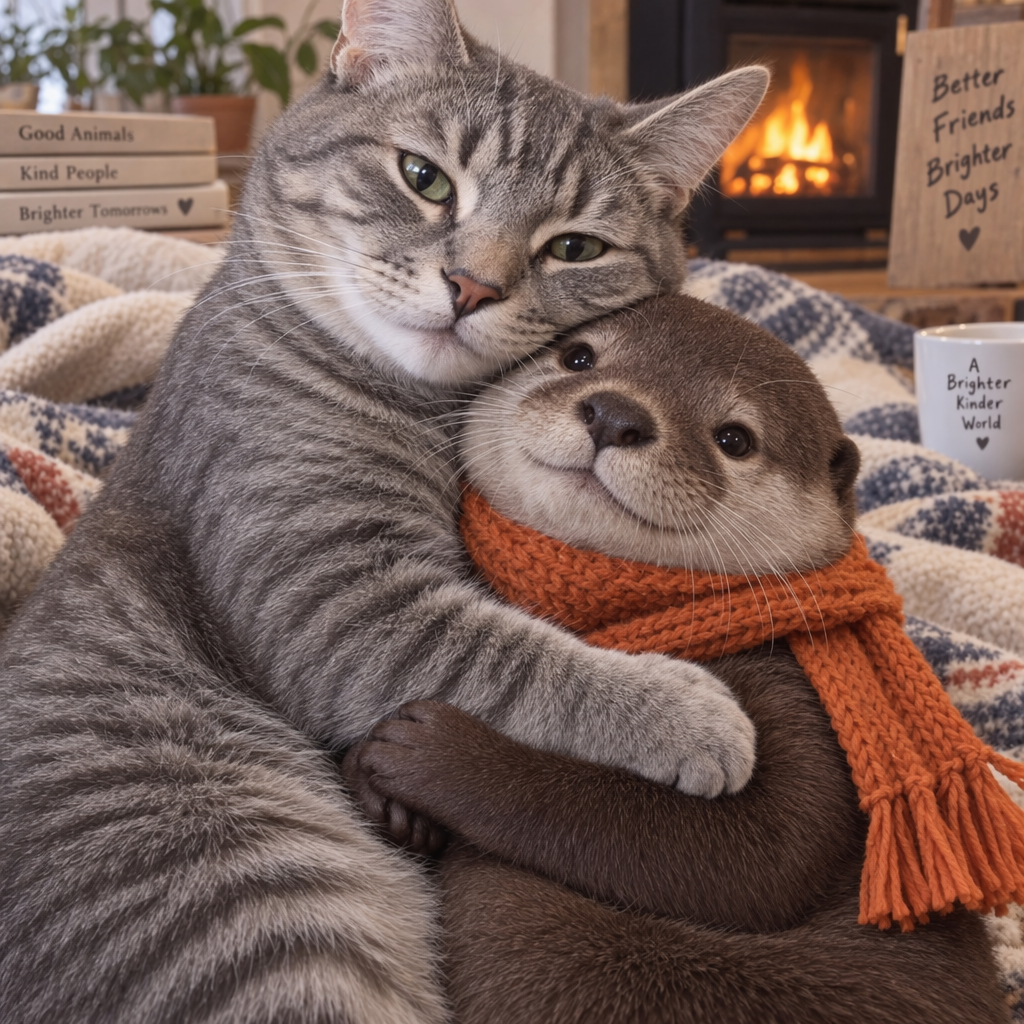
|
| "Now make it look realistic" |
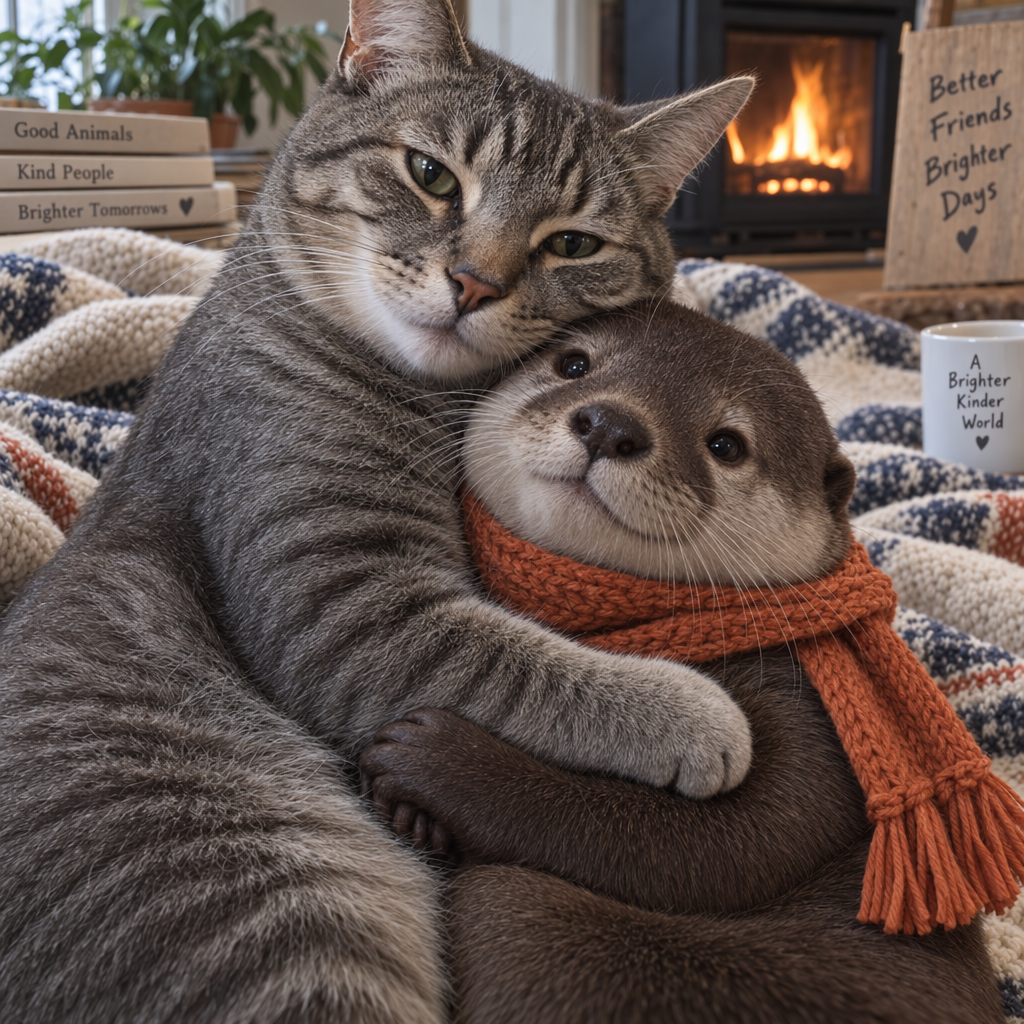
|
Streaming
The Responses API and Image API support streaming image generation. You can stream partial images as the APIs generate them, providing a more interactive experience.
You can adjust the partial_images parameter to receive 0-3 partial images.
- If you set
partial_imagesto 0, you will only receive the final image. - For values larger than zero, you may not receive the full number of partial images you requested if the full image is generated more quickly.
Responses API
Stream an image
import OpenAI from "openai";
import fs from "fs";
const openai = new OpenAI();

function saveBase64Image(filename, imageBase64) {
  const imageBuffer = Buffer.from(imageBase64, "base64");
  fs.writeFileSync(filename, imageBuffer);
}

const stream = await openai.responses.create({
  model: "gpt-6-astra",
  input:
    "Draw a gorgeous image of a river made of white owl feathers, snaking its way through a serene winter landscape",
  stream: true,
  tools: [
    { type: "image_generation", model: "gpt-image-2.5-sunburst", partial_images: 2 },
  ],
});

for await (const event of stream) {
  if (event.type === "response.image_generation_call.partial_image") {
    const idx = event.partial_image_index;
    saveBase64Image(`river-partial-${idx}.png`, event.partial_image_b64);
  } else if (event.type === "response.completed") {
    const imageData = event.response.output
      .filter((output) => output.type === "image_generation_call")
      .map((output) => output.result);

    if (imageData.length > 0) {
      saveBase64Image("river-final.png", imageData[0]);
    }
  }
}
from openai import OpenAI
import base64

client = OpenAI()


def save_base64_image(filename, image_base64):
    image_bytes = base64.b64decode(image_base64)
    with open(filename, "wb") as f:
        f.write(image_bytes)


stream = client.responses.create(
    model="gpt-6-astra",
    input="Draw a gorgeous image of a river made of white owl feathers, snaking its way through a serene winter landscape",
    stream=True,
    tools=[
        {"type": "image_generation", "model": "gpt-image-2.5-sunburst", "partial_images": 2}
    ],
)

for event in stream:
    if event.type == "response.image_generation_call.partial_image":
        idx = event.partial_image_index
        save_base64_image(f"river-partial-{idx}.png", event.partial_image_b64)
    elif event.type == "response.completed":
        image_data = [
            output.result
            for output in event.response.output
            if output.type == "image_generation_call"
        ]

        if image_data:
            save_base64_image("river-final.png", image_data[0])
package main

import (
	"context"
	"encoding/base64"
	"fmt"
	"os"

	"github.com/openai/openai-go/v3"
	"github.com/openai/openai-go/v3/responses"
)

func main() {
	client := openai.NewClient()
	stream := client.Responses.NewStreaming(context.Background(), responses.ResponseNewParams{
		Model: "gpt-6-astra",
		Input: responses.ResponseNewParamsInputUnion{
			OfString: openai.String("Draw a gorgeous image of a river made of white owl feathers, snaking its way through a serene winter landscape"),
		},
		Tools: []responses.ToolUnionParam{{OfImageGeneration: &responses.ToolImageGenerationParam{Model: "gpt-image-2.5-sunburst", PartialImages: openai.Int(2)}}},
	})
	for stream.Next() {
		event := stream.Current()
		if event.Type == "response.image_generation_call.partial_image" {
			partial := event.AsResponseImageGenerationCallPartialImage()
			saveImage(fmt.Sprintf("river-partial-%d.png", partial.PartialImageIndex), partial.PartialImageB64)
		}
		if event.Type == "response.completed" {
			for _, output := range event.AsResponseCompleted().Response.Output {
				if output.Type == "image_generation_call" {
					saveImage("river-final.png", output.AsImageGenerationCall().Result)
				}
			}
		}
	}
	if err := stream.Err(); err != nil {
		panic(err)
	}
}

func saveImage(filename, encoded string) {
	image, err := base64.StdEncoding.DecodeString(encoded)
	if err != nil {
		panic(err)
	}
	if err := os.WriteFile(filename, image, 0o600); err != nil {
		panic(err)
	}
}
import com.openai.client.OpenAIClient;
import com.openai.client.okhttp.OpenAIOkHttpClient;
import com.openai.core.http.StreamResponse;
import com.openai.models.responses.ResponseCreateParams;
import com.openai.models.responses.ResponseStreamEvent;
import com.openai.models.responses.Tool;
import java.io.IOException;
import java.nio.file.Files;
import java.nio.file.Path;
import java.util.Base64;

ResponseCreateParams params =
    ResponseCreateParams.builder()
        .model("gpt-6-astra")
        .input("Generate an image of a river made of white owl feathers.")
        .addTool(Tool.ImageGeneration.builder().partialImages(2).build())
        .build();

try (StreamResponse<ResponseStreamEvent> stream = client.responses().createStreaming(params)) {
  var events = stream.stream().iterator();
  while (events.hasNext()) {
    ResponseStreamEvent event = events.next();
    if (event.imageGenerationCallPartialImage().isPresent()) {
      var partial = event.imageGenerationCallPartialImage().orElseThrow();
      Files.write(
          Path.of("river-partial-" + partial.partialImageIndex() + ".png"),
          Base64.getDecoder().decode(partial.partialImageB64()));
    }
    if (event.completed().isPresent()) {
      var image =
          event.completed().orElseThrow().response().output().stream()
              .flatMap(item -> item.imageGenerationCall().stream())
              .findFirst()
              .orElseThrow(() -> new IllegalStateException("No generated image returned"));
      Files.write(
          Path.of("river-final.png"),
          Base64.getDecoder()
              .decode(
                  image
                      .result()
                      .orElseThrow(
                          () -> new IllegalStateException("No final image returned"))));
    }
  }
}
require "base64"
require "openai"

client = OpenAI::Client.new
stream = client.responses.stream(
  model: "gpt-6-astra",
  input: "Generate an image of a river made of white owl feathers.",
  tools: [
    {
      type: :image_generation,
      model: "gpt-image-2.5-sunburst",
      partial_images: 2
    }
  ]
)

stream.each do |event|
  case event
  when OpenAI::Models::Responses::ResponseImageGenCallPartialImageEvent
    image = Base64.strict_decode64(event.partial_image_b64)
    File.binwrite("river-partial-#{event.partial_image_index}.png", image)
  when OpenAI::Models::Responses::ResponseCompletedEvent
    image_call = event.response.output.find do |item|
      item.is_a?(OpenAI::Models::Responses::ResponseOutputItem::ImageGenerationCall)
    end
    next unless image_call.is_a?(OpenAI::Models::Responses::ResponseOutputItem::ImageGenerationCall)

    File.binwrite(
      "river-final.png",
      Base64.strict_decode64(image_call.result)
    )
  end
end
Image API
Stream an image
import fs from "fs";
import OpenAI from "openai";

const openai = new OpenAI();

const prompt =
  "Draw a gorgeous image of a river made of white owl feathers, snaking its way through a serene winter landscape";
const stream = await openai.images.generate({
  prompt: prompt,
  model: "gpt-image-2.5-sunburst",
  stream: true,
  partial_images: 2,
});

for await (const event of stream) {
  if (event.type === "image_generation.partial_image") {
    const idx = event.partial_image_index;
    const imageBase64 = event.b64_json;
    const imageBuffer = Buffer.from(imageBase64, "base64");
    fs.writeFileSync(`river${idx}.png`, imageBuffer);
  }
}
from openai import OpenAI
import base64

client = OpenAI()

stream = client.images.generate(
    prompt="Draw a gorgeous image of a river made of white owl feathers, snaking its way through a serene winter landscape",
    model="gpt-image-2.5-sunburst",
    stream=True,
    partial_images=2,
)

for event in stream:
    if event.type == "image_generation.partial_image":
        idx = event.partial_image_index
        image_base64 = event.b64_json
        image_bytes = base64.b64decode(image_base64)
        with open(f"river{idx}.png", "wb") as f:
            f.write(image_bytes)
package main

import (
	"context"
	"encoding/base64"
	"fmt"
	"os"

	"github.com/openai/openai-go/v3"
)

func main() {
	client := openai.NewClient()
	stream := client.Images.GenerateStreaming(context.Background(), openai.ImageGenerateParams{
		Model:         openai.ImageModel("gpt-image-2.5-sunburst"),
		Prompt:        "Draw a gorgeous image of a river made of white owl feathers, snaking its way through a serene winter landscape",
		PartialImages: openai.Int(2),
	})
	for stream.Next() {
		event := stream.Current()
		if event.Type != "image_generation.partial_image" {
			continue
		}
		partial := event.AsImageGenerationPartialImage()
		saveImage(fmt.Sprintf("river%d.png", partial.PartialImageIndex), partial.B64JSON)
	}
	if err := stream.Err(); err != nil {
		panic(err)
	}
}

func saveImage(filename, encoded string) {
	image, err := base64.StdEncoding.DecodeString(encoded)
	if err != nil {
		panic(err)
	}
	if err := os.WriteFile(filename, image, 0o600); err != nil {
		panic(err)
	}
}
import com.openai.client.okhttp.OpenAIOkHttpClient;
import com.openai.models.images.ImageGenerateParams;
import java.nio.file.Files;
import java.nio.file.Path;
import java.util.Base64;

var params =
    ImageGenerateParams.builder()
        .prompt(
            "Draw a gorgeous image of a river made of white owl feathers, snaking its way through a serene winter landscape")
        .model("gpt-image-2.5-sunburst")
        .partialImages(2)
        .build();
try (var stream = client.images().generateStreaming(params)) {
  var events = stream.stream().iterator();
  while (events.hasNext()) {
    var event = events.next();
    if (event.generationPartialImage().isPresent()) {
      var partial = event.generationPartialImage().orElseThrow();
      Files.write(
          Path.of("river" + partial.partialImageIndex() + ".png"),
          Base64.getDecoder().decode(partial.b64Json()));
    }
  }
}
require "base64"
require "openai"

client = OpenAI::Client.new
stream = client.images.generate_stream_raw(
  model: "gpt-image-2.5-sunburst",
  prompt: "A river made of white owl feathers in a winter landscape",
  partial_images: 2
)

stream.each do |event|
  next unless event.is_a?(OpenAI::Models::ImageGenPartialImageEvent)

  image = Base64.strict_decode64(event.b64_json)
  File.binwrite("river#{event.partial_image_index}.png", image)
end
Result
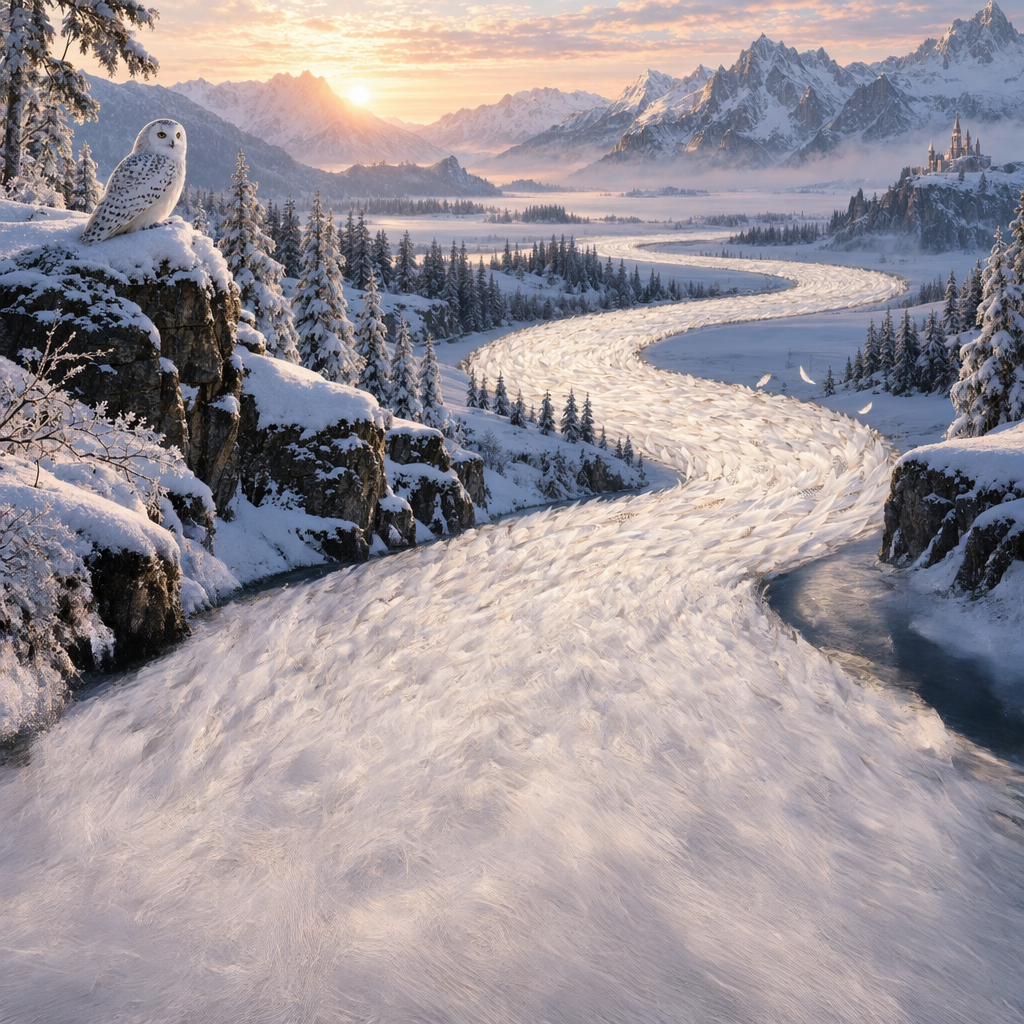
| Partial 1 | Partial 2 | Final image |
|---|---|---|
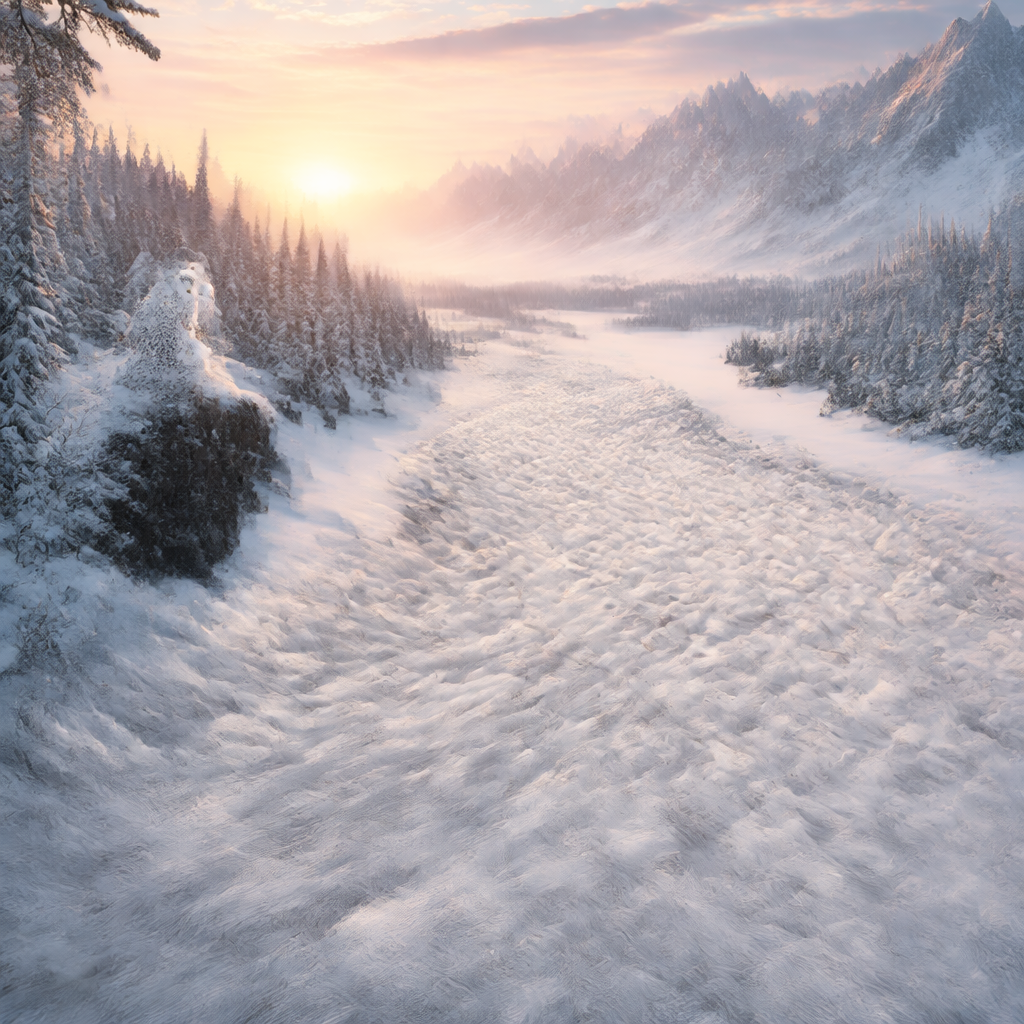 |
 |
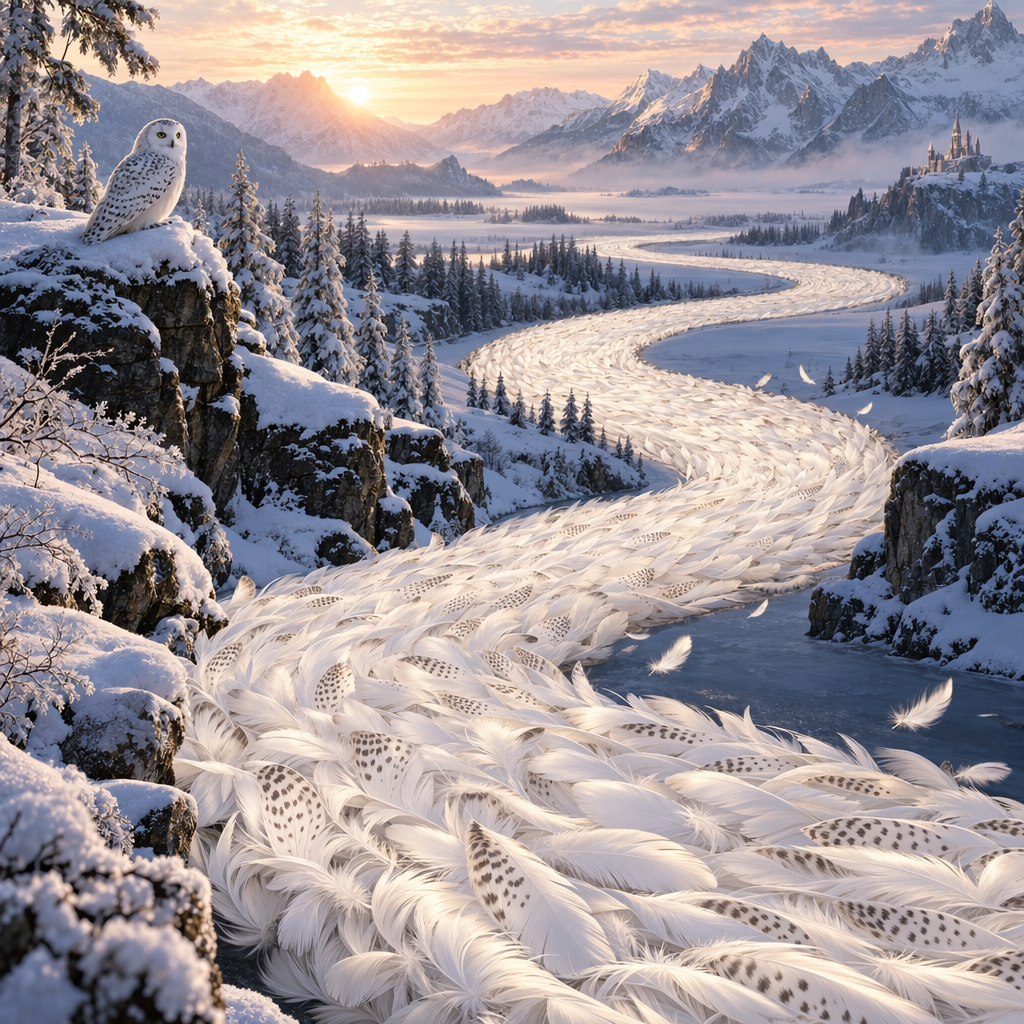 |
Prompt: Draw a gorgeous image of a river made of white owl feathers, snaking its way through a serene winter landscape
Revised prompt
When using the image generation tool in the Responses API, the mainline model (for example, gpt-5.5) will automatically revise your prompt for improved performance.
You can access the revised prompt in the revised_prompt field of the image generation call:
Revised prompt response
{
  "id": "ig_123",
  "type": "image_generation_call",
  "status": "completed",
  "revised_prompt": "A gray tabby cat hugging an otter. The otter is wearing an orange scarf. Both animals are cute and friendly, depicted in a warm, heartwarming style.",
  "result": "..."
}
Edit Images
The image edits endpoint lets you:
- Edit existing images
- Generate new images using other images as a reference
- Edit parts of an image by uploading an image and mask that identifies the areas to replace
Create a new image using image references
You can use one or more images as a reference to generate a new image.
In this example, we'll use 4 input images to generate a new image of a gift basket containing the items in the reference images.
Responses API
With the Responses API, you can provide input images in 3 different ways:
- By providing a fully qualified URL
- By providing an image as a Base64-encoded data URL
- By providing a file ID (created with the Files API)
Create a File
Create a File
import fs from "fs";
import OpenAI from "openai";

const openai = new OpenAI();

async function createFile(filePath) {
  const fileContent = fs.createReadStream(filePath);
  const result = await openai.files.create({
    file: fileContent,
    purpose: "vision",
  });
  return result.id;
}
from openai import OpenAI

client = OpenAI()


def create_file(file_path):
    with open(file_path, "rb") as file_content:
        result = client.files.create(
            file=file_content,
            purpose="vision",
        )
        return result.id
package main

import (
	"context"
	"fmt"
	"os"

	"github.com/openai/openai-go/v3"
)

func main() {
	client := openai.NewClient()
	file, err := os.Open("image.png")
	if err != nil {
		panic(err)
	}
	defer file.Close()

	uploaded, err := client.Files.New(context.Background(), openai.FileNewParams{
		File:    file,
		Purpose: openai.FilePurposeVision,
	})
	if err != nil {
		panic(err)
	}
	fmt.Println(uploaded.ID)
}
import com.openai.client.OpenAIClient;
import com.openai.client.okhttp.OpenAIOkHttpClient;
import com.openai.models.files.FileCreateParams;
import com.openai.models.files.FilePurpose;
import java.nio.file.Path;

var file =
    client
        .files()
        .create(
            FileCreateParams.builder()
                .file(Path.of(System.getenv("OPENAI_EXAMPLE_FILE_PATH")))
                .purpose(FilePurpose.VISION)
                .build());

System.out.println(file.id());
require "openai"
require "pathname"

client = OpenAI::Client.new
file = client.files.create(
  file: Pathname("image.png"),
  purpose: OpenAI::Models::FilePurpose::VISION
)
puts(file.id)
Create a base64 encoded image
Create a base64 encoded image
import fs from "fs";

function encodeImage(filePath) {
  const base64Image = fs.readFileSync(filePath, "base64");
  return base64Image;
}
import base64


def encode_image(file_path):
    with open(file_path, "rb") as f:
        base64_image = base64.b64encode(f.read()).decode("utf-8")
    return base64_image
package main

import (
	"encoding/base64"
	"fmt"
	"os"
)

func main() {
	image, err := os.ReadFile("image.png")
	if err != nil {
		panic(err)
	}
	fmt.Println(base64.StdEncoding.EncodeToString(image))
}
import java.nio.file.Files;
import java.nio.file.Path;
import java.util.Base64;

System.out.println(encodeImage(Path.of("example.png")));

private static String encodeImage(Path path) throws java.io.IOException {
  return Base64.getEncoder().encodeToString(Files.readAllBytes(path));
}
using System;

Console.WriteLine(EncodeImage("example.png"));

static string EncodeImage(string filePath) => Convert.ToBase64String(File.ReadAllBytes(filePath));
require "base64"

image = File.binread("image.png")
puts(Base64.strict_encode64(image))
Edit an image
import fs from "fs";
import OpenAI from "openai";

const openai = new OpenAI();

function encodeImage(filePath) {
  return fs.readFileSync(filePath, "base64");
}

async function createFile(filePath) {
  const result = await openai.files.create({
    file: fs.createReadStream(filePath),
    purpose: "vision",
  });
  return result.id;
}

const prompt = `Generate a photorealistic image of a gift basket on a white background
labeled 'Relax & Unwind' with a ribbon and handwriting-like font,
containing all the items in the reference pictures.`;

const base64Image1 = encodeImage("fixtures/body-lotion.png");
const base64Image2 = encodeImage("fixtures/soap.png");
const fileId1 = await createFile("fixtures/bath-bomb.png");
const fileId2 = await createFile("fixtures/incense-kit.png");

const response = await openai.responses.create({
  model: "gpt-6-astra",
  input: [
    {
      role: "user",
      content: [
        { type: "input_text", text: prompt },
        {
          type: "input_image",
          image_url: `data:image/png;base64,${base64Image1}`,
          detail: "auto",
        },
        {
          type: "input_image",
          image_url: `data:image/png;base64,${base64Image2}`,
          detail: "auto",
        },
        {
          type: "input_image",
          file_id: fileId1,
          detail: "auto",
        },
        {
          type: "input_image",
          file_id: fileId2,
          detail: "auto",
        },
      ],
    },
  ],
  tools: [{ type: "image_generation", model: "gpt-image-2.5-sunburst" }],
});

const imageData = response.output
  .filter((output) => output.type === "image_generation_call")
  .map((output) => output.result);

if (imageData.length > 0) {
  const imageBase64 = imageData[0];
  fs.writeFileSync("gift-basket.png", Buffer.from(imageBase64, "base64"));
} else {
  console.log(response.output_text);
}
from openai import OpenAI
import base64

client = OpenAI()


def encode_image(file_path):
    with open(file_path, "rb") as image_file:
        return base64.b64encode(image_file.read()).decode("utf-8")


def create_file(file_path):
    with open(file_path, "rb") as file_content:
        result = client.files.create(file=file_content, purpose="vision")
    return result.id


prompt = """Generate a photorealistic image of a gift basket on a white background
labeled 'Relax & Unwind' with a ribbon and handwriting-like font,
containing all the items in the reference pictures."""

base64_image1 = encode_image("body-lotion.png")
base64_image2 = encode_image("soap.png")
file_id1 = create_file("bath-bomb.png")
file_id2 = create_file("incense-kit.png")

response = client.responses.create(
    model="gpt-6-astra",
    input=[
        {
            "role": "user",
            "content": [
                {"type": "input_text", "text": prompt},
                {
                    "type": "input_image",
                    "image_url": f"data:image/png;base64,{base64_image1}",
                },
                {
                    "type": "input_image",
                    "image_url": f"data:image/png;base64,{base64_image2}",
                },
                {
                    "type": "input_image",
                    "file_id": file_id1,
                },
                {
                    "type": "input_image",
                    "file_id": file_id2,
                },
            ],
        }
    ],
    tools=[{"type": "image_generation", "model": "gpt-image-2.5-sunburst"}],
)

image_generation_calls = [
    output for output in response.output if output.type == "image_generation_call"
]

image_data = [output.result for output in image_generation_calls]

if image_data:
    image_base64 = image_data[0]
    with open("gift-basket.png", "wb") as f:
        f.write(base64.b64decode(image_base64))
else:
    print(response.output_text)
package main

import (
	"context"
	"encoding/base64"
	"os"

	"github.com/openai/openai-go/v3"
	"github.com/openai/openai-go/v3/responses"
)

func main() {
	client := openai.NewClient()
	bathBombID := uploadImage(client, "bath-bomb.png")
	incenseKitID := uploadImage(client, "incense-kit.png")

	response, err := client.Responses.New(context.Background(), responses.ResponseNewParams{
		Model: "gpt-6-astra",
		Input: responses.ResponseNewParamsInputUnion{OfInputItemList: responses.ResponseInputParam{
			responses.ResponseInputItemParamOfMessage(
				responses.ResponseInputMessageContentListParam{
					responses.ResponseInputContentParamOfInputText("Generate a photorealistic image of a gift basket on a white background labeled 'Relax & Unwind' with a ribbon and handwriting-like font, containing all the items in the reference pictures."),
					{OfInputImage: &responses.ResponseInputImageParam{ImageURL: openai.String(dataURL("body-lotion.png")), Detail: responses.ResponseInputImageDetailAuto}},
					{OfInputImage: &responses.ResponseInputImageParam{ImageURL: openai.String(dataURL("soap.png")), Detail: responses.ResponseInputImageDetailAuto}},
					{OfInputImage: &responses.ResponseInputImageParam{FileID: openai.String(bathBombID), Detail: responses.ResponseInputImageDetailAuto}},
					{OfInputImage: &responses.ResponseInputImageParam{FileID: openai.String(incenseKitID), Detail: responses.ResponseInputImageDetailAuto}},
				},
				responses.EasyInputMessageRoleUser,
			),
		}},
		Tools: []responses.ToolUnionParam{{OfImageGeneration: &responses.ToolImageGenerationParam{Model: "gpt-image-2.5-sunburst"}}},
	})
	if err != nil {
		panic(err)
	}
	saveFirstGeneratedImage(response, "gift-basket.png")
}

func uploadImage(client openai.Client, filename string) string {
	file, err := os.Open(filename)
	if err != nil {
		panic(err)
	}
	defer file.Close()
	uploaded, err := client.Files.New(context.Background(), openai.FileNewParams{File: file, Purpose: openai.FilePurposeVision})
	if err != nil {
		panic(err)
	}
	return uploaded.ID
}

func dataURL(filename string) string {
	image, err := os.ReadFile(filename)
	if err != nil {
		panic(err)
	}
	return "data:image/png;base64," + base64.StdEncoding.EncodeToString(image)
}

func saveFirstGeneratedImage(response *responses.Response, filename string) {
	for _, output := range response.Output {
		if output.Type != "image_generation_call" {
			continue
		}
		image, err := base64.StdEncoding.DecodeString(output.AsImageGenerationCall().Result)
		if err != nil {
			panic(err)
		}
		if err := os.WriteFile(filename, image, 0o600); err != nil {
			panic(err)
		}
		return
	}
	panic("response did not include an image generation call")
}
import com.openai.client.OpenAIClient;
import com.openai.client.okhttp.OpenAIOkHttpClient;
import com.openai.models.files.FileCreateParams;
import com.openai.models.files.FilePurpose;
import com.openai.models.responses.ResponseCreateParams;
import com.openai.models.responses.ResponseInputImage;
import com.openai.models.responses.ResponseInputItem;
import com.openai.models.responses.Tool;
import java.nio.file.Files;
import java.nio.file.Path;
import java.util.Base64;
import java.util.List;

Path lotionImage = Path.of(System.getenv("OPENAI_EXAMPLE_IMAGE_PATH"));
Path soapImage = Path.of(System.getenv("OPENAI_EXAMPLE_IMAGE_PATH_2"));
Path bathBombImage = Path.of(System.getenv("OPENAI_EXAMPLE_IMAGE_PATH_3"));
Path incenseImage = Path.of(System.getenv("OPENAI_EXAMPLE_IMAGE_PATH_4"));
String lotionBase64 = Base64.getEncoder().encodeToString(Files.readAllBytes(lotionImage));
String soapBase64 = Base64.getEncoder().encodeToString(Files.readAllBytes(soapImage));
var firstFile =
    client
        .files()
        .create(
            FileCreateParams.builder().file(bathBombImage).purpose(FilePurpose.VISION).build());
var secondFile =
    client
        .files()
        .create(
            FileCreateParams.builder().file(incenseImage).purpose(FilePurpose.VISION).build());
String prompt =
    """
    Generate a photorealistic image of a gift basket on a white background
    labeled 'Relax & Unwind' with a ribbon and handwriting-like font,
    containing all the items in the reference pictures.
    """;
var input =
    ResponseInputItem.ofMessage(
        ResponseInputItem.Message.builder()
            .role(ResponseInputItem.Message.Role.USER)
            .addInputTextContent(prompt)
            .addContent(
                ResponseInputImage.builder()
                    .detail(ResponseInputImage.Detail.AUTO)
                    .imageUrl("data:image/png;base64," + lotionBase64)
                    .build())
            .addContent(
                ResponseInputImage.builder()
                    .detail(ResponseInputImage.Detail.AUTO)
                    .imageUrl("data:image/png;base64," + soapBase64)
                    .build())
            .addContent(
                ResponseInputImage.builder()
                    .detail(ResponseInputImage.Detail.AUTO)
                    .fileId(firstFile.id())
                    .build())
            .addContent(
                ResponseInputImage.builder()
                    .detail(ResponseInputImage.Detail.AUTO)
                    .fileId(secondFile.id())
                    .build())
            .build());
var response =
    client
        .responses()
        .create(
            ResponseCreateParams.builder()
                .model("gpt-6-astra")
                .inputOfResponse(List.of(input))
                .addTool(Tool.ImageGeneration.builder().build())
                .build());
var image =
    response.output().stream()
        .flatMap(item -> item.imageGenerationCall().stream())
        .findFirst()
        .orElseThrow(() -> new IllegalStateException("No image generation call returned"));
Files.write(
    Path.of("gift-basket.png"),
    Base64.getDecoder()
        .decode(
            image.result().orElseThrow(() -> new IllegalStateException("No image returned"))));
require "base64"
require "openai"
require "pathname"

client = OpenAI::Client.new
base64_images = ["body-lotion.png", "soap.png"].map do |path|
  Base64.strict_encode64(File.binread(path))
end
file_ids = [
  client.files.create(file: Pathname("bath-bomb.png"), purpose: :vision).id,
  client.files.create(file: Pathname("incense-kit.png"), purpose: :vision).id
]
prompt = <<~PROMPT
  Generate a photorealistic image of a gift basket on a white background
  labeled 'Relax & Unwind' with a ribbon and handwriting-like font,
  containing all the items in the reference pictures.
PROMPT
response = client.responses.create(
  model: "gpt-6-astra",
  input: [
    {
      role: :user,
      content: [
        {
          type: :input_text,
          text: prompt
        },
        *base64_images.map do |image|
          {
            type: :input_image,
            image_url: "data:image/png;base64,#{image}"
          }
        end,
        *file_ids.map do |file_id|
          {
            type: :input_image,
            file_id: file_id
          }
        end
      ]
    }
  ],
  tools: [
    {
      type: :image_generation,
      model: "gpt-image-2.5-sunburst"
    }
  ]
)

image_call = response.output.find do |item|
  item.is_a?(OpenAI::Models::Responses::ResponseOutputItem::ImageGenerationCall)
end
unless image_call.is_a?(OpenAI::Models::Responses::ResponseOutputItem::ImageGenerationCall)
  raise "No image generation call returned"
end

File.binwrite("gift-basket.png", Base64.strict_decode64(image_call.result))
Image API
Edit an image
import fs from "fs";
import OpenAI, { toFile } from "openai";

const client = new OpenAI();

const prompt = `
Generate a photorealistic image of a gift basket on a white background
labeled 'Relax & Unwind' with a ribbon and handwriting-like font,
containing all the items in the reference pictures.
`;

const imageFiles = [
  "fixtures/bath-bomb.png",
  "fixtures/body-lotion.png",
  "fixtures/incense-kit.png",
  "fixtures/soap.png",
];

const images = await Promise.all(
  imageFiles.map(
    async (file) =>
      await toFile(fs.createReadStream(file), null, {
        type: "image/png",
      })
  )
);

const response = await client.images.edit({
  model: "gpt-image-2.5-sunburst",
  image: images,
  prompt,
});

// Save the image to a file
const image_base64 = response.data[0].b64_json;
const image_bytes = Buffer.from(image_base64, "base64");
fs.writeFileSync("basket.png", image_bytes);
import base64
from openai import OpenAI

client = OpenAI()

prompt = """
Generate a photorealistic image of a gift basket on a white background
labeled 'Relax & Unwind' with a ribbon and handwriting-like font,
containing all the items in the reference pictures.
"""

result = client.images.edit(
    model="gpt-image-2.5-sunburst",
    image=[
        open("body-lotion.png", "rb"),
        open("bath-bomb.png", "rb"),
        open("incense-kit.png", "rb"),
        open("soap.png", "rb"),
    ],
    prompt=prompt,
)

image_base64 = result.data[0].b64_json
image_bytes = base64.b64decode(image_base64)

# Save the image to a file
with open("gift-basket.png", "wb") as f:
    f.write(image_bytes)
package main

import (
	"context"
	"encoding/base64"
	"io"
	"os"

	"github.com/openai/openai-go/v3"
)

func main() {
	client := openai.NewClient()
	files, closeFiles := openImages(
		"bath-bomb.png",
		"body-lotion.png",
		"incense-kit.png",
		"soap.png",
	)
	defer closeFiles()

	response, err := client.Images.Edit(context.Background(), openai.ImageEditParams{
		Model: openai.ImageModel("gpt-image-2.5-sunburst"),
		Image: openai.ImageEditParamsImageUnion{OfFileArray: files},
		Prompt: "Generate a photorealistic image of a gift basket on a white background " +
			"labeled 'Relax & Unwind' with a ribbon and handwriting-like font, containing all the items in the reference pictures.",
	})
	if err != nil {
		panic(err)
	}
	saveImage("basket.png", response.Data[0].B64JSON)
}

func openImages(names ...string) ([]io.Reader, func()) {
	images := make([]io.Reader, 0, len(names))
	files := make([]*os.File, 0, len(names))
	for _, name := range names {
		file, err := os.Open(name)
		if err != nil {
			closeFiles(files)
			panic(err)
		}
		images = append(images, openai.File(file, name, "image/png"))
		files = append(files, file)
	}
	return images, func() { closeFiles(files) }
}

func closeFiles(files []*os.File) {
	for _, file := range files {
		if err := file.Close(); err != nil {
			panic(err)
		}
	}
}

func saveImage(filename, encoded string) {
	image, err := base64.StdEncoding.DecodeString(encoded)
	if err != nil {
		panic(err)
	}
	if err := os.WriteFile(filename, image, 0o600); err != nil {
		panic(err)
	}
}
import com.openai.client.OpenAIClient;
import com.openai.client.okhttp.OpenAIOkHttpClient;
import com.openai.core.MultipartField;
import com.openai.models.images.ImageEditParams;
import java.io.IOException;
import java.io.InputStream;
import java.nio.file.Files;
import java.nio.file.Path;
import java.util.Base64;
import java.util.List;

Path lotion = Path.of(System.getenv("OPENAI_EXAMPLE_IMAGE_PATH"));
Path soap = Path.of(System.getenv("OPENAI_EXAMPLE_IMAGE_PATH_2"));
Path bathBomb = Path.of(System.getenv("OPENAI_EXAMPLE_IMAGE_PATH_3"));
Path incense = Path.of(System.getenv("OPENAI_EXAMPLE_IMAGE_PATH_4"));
try (InputStream lotionImage = Files.newInputStream(lotion);
    InputStream bathBombImage = Files.newInputStream(bathBomb);
    InputStream incenseImage = Files.newInputStream(incense);
    InputStream soapImage = Files.newInputStream(soap)) {
  var images =
      client
          .images()
          .edit(
              ImageEditParams.builder()
                  .model("gpt-image-2.5-sunburst")
                  .image(
                      MultipartField.<ImageEditParams.Image>builder()
                          .value(
                              ImageEditParams.Image.ofInputStreams(
                                  List.of(lotionImage, bathBombImage, incenseImage, soapImage)))
                          .contentType("image/png")
                          .filename("gift-basket-reference.png")
                          .build())
                  .prompt(
                      """
                      Generate a photorealistic image of a gift basket on a white background
                      labeled 'Relax & Unwind' with a ribbon and handwriting-like font,
                      containing all the items in the reference pictures.
                      """)
                  .build());

  Files.write(
      Path.of("gift-basket.png"),
      Base64.getDecoder().decode(images.data().orElseThrow().get(0).b64Json().orElseThrow()));
}
require "base64"
require "openai"
require "pathname"

client = OpenAI::Client.new
images = %w[body-lotion.png bath-bomb.png incense-kit.png soap.png].map do |path|
  OpenAI::FilePart.new(Pathname(path), content_type: "image/png")
end
result = client.images.edit(
  image: images,
  model: "gpt-image-2.5-sunburst",
  prompt: <<~PROMPT
    Generate a photorealistic image of a gift basket on a white background
    labeled 'Relax & Unwind' with a ribbon and handwriting-like font,
    containing all the items in the reference pictures.
  PROMPT
)
generated_image = result.data&.first or raise "No image returned"
File.binwrite("gift-basket.png", Base64.strict_decode64(generated_image.b64_json))
curl -s -D >(grep -i x-request-id >&2) \
  -o >(jq -r '.data[0].b64_json' | base64 --decode > gift-basket.png) \
  -X POST "https://api.openai.com/v1/images/edits" \
  -H "Authorization: Bearer $OPENAI_API_KEY" \
  -F "model=gpt-image-2.5-sunburst" \
  -F "image[]=@body-lotion.png" \
  -F "image[]=@bath-bomb.png" \
  -F "image[]=@incense-kit.png" \
  -F "image[]=@soap.png" \
  -F 'prompt=Generate a photorealistic image of a gift basket on a white background labeled "Relax & Unwind" with a ribbon and handwriting-like font, containing all the items in the reference pictures'
openai images edit \
  --model gpt-image-2.5-sunburst \
  --image body-lotion.png \
  --image bath-bomb.png \
  --image incense-kit.png \
  --image soap.png \
  --prompt 'Generate a photorealistic image of a gift basket on a white background labeled "Relax & Unwind" with a ribbon and handwriting-like font, containing all the items in the reference pictures' \
  --raw-output \
  --transform 'data.0.b64_json' | base64 --decode > gift-basket.png
Guide an edit with markup
Use the Image API’s POST /v1/images/edits endpoint for markup-guided edits with supported GPT Image 2.5 and 2.6 models. For regional edits with the Responses API, use a mask. Use an annotation layer to show where a change should happen and describe the change in prompt.
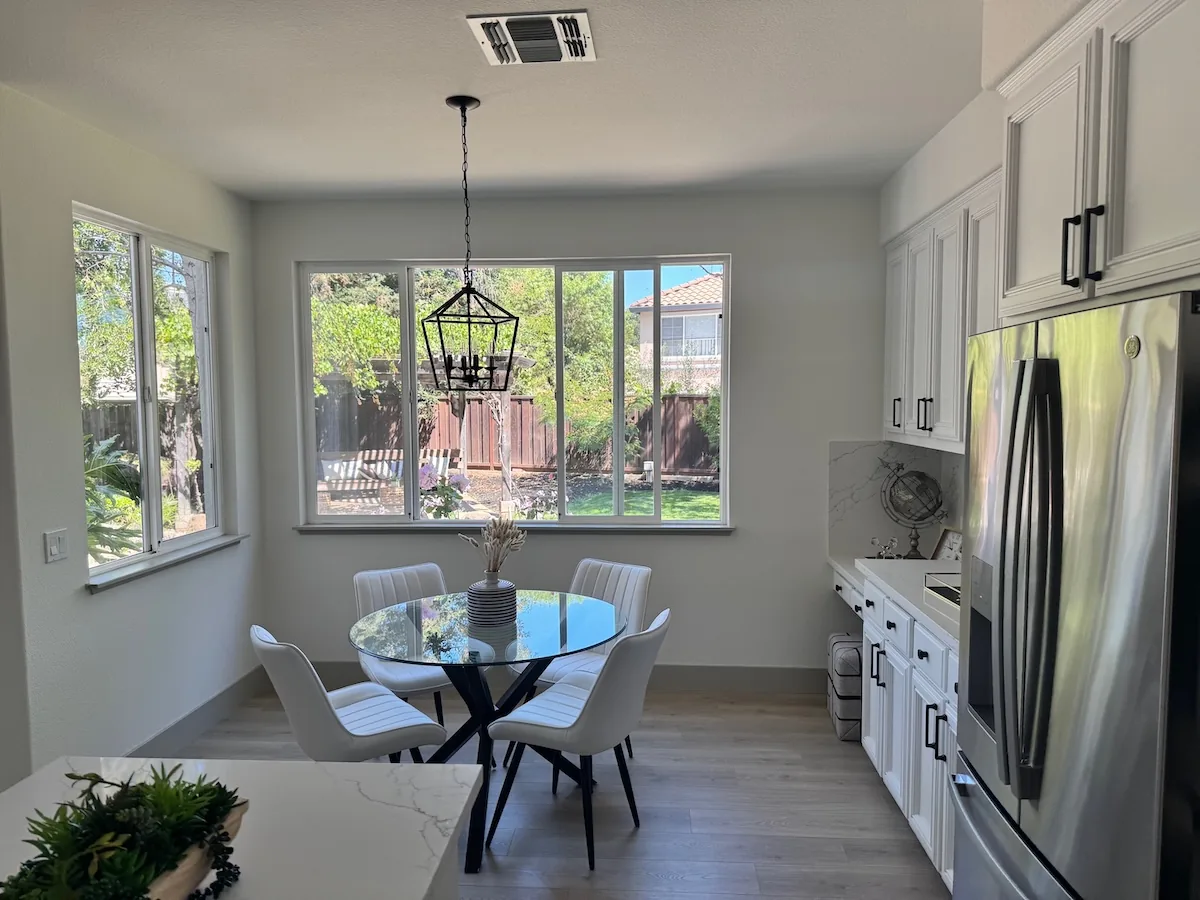
For example, download the kitchen photo and transparent overlay into the same directory. The overlay circles the vase to recolor.

Edit the circled vase with the Image API
import base64
from pathlib import Path

from openai import OpenAI

client = OpenAI()
overlay = Path("markup-vase-overlay-gpt-image-2-6.png")
with open("kitchen.webp", "rb") as image, overlay.open("rb") as markup:
    result = client.images.edit(
        model="gpt-image-2.6-flare",
        image=("kitchen.webp", image, "image/webp"),
        markup=(overlay.name, markup, "image/png"),
        quality="medium",
        prompt=(
            "Recolor the striped vase inside the red circle to solid cobalt blue ceramic. "
            "Keep its shape, the dried stems, and the rest of the kitchen unchanged. "
            "Remove the red circle from the finished photo."
        ),
    )

Path("vase.png").write_bytes(base64.b64decode(result.data[0].b64_json))
client := openai.NewClient()
image, err := os.Open("kitchen.webp")
if err != nil {
	panic(err)
}
defer image.Close()
markup, err := os.Open("markup-vase-overlay-gpt-image-2-6.png")
if err != nil {
	panic(err)
}
defer markup.Close()

response, err := client.Images.Edit(context.Background(), openai.ImageEditParams{
	Model:   openai.ImageModel("gpt-image-2.6-flare"),
	Image:   openai.ImageEditParamsImageUnion{OfFile: openai.File(image, "kitchen.webp", "image/webp")},
	Markup:  openai.File(markup, "markup-vase-overlay-gpt-image-2-6.png", "image/png"),
	Quality: "medium",
	Prompt: "Recolor the striped vase inside the red circle to solid cobalt blue ceramic. " +
		"Keep its shape, the dried stems, and the rest of the kitchen unchanged. " +
		"Remove the red circle from the finished photo.",
})
if err != nil {
	panic(err)
}
result, err := base64.StdEncoding.DecodeString(response.Data[0].B64JSON)
if err != nil {
	panic(err)
}
if err := os.WriteFile("vase.png", result, 0o600); err != nil {
	panic(err)
}
set -euo pipefail

curl --fail --silent --show-error https://api.openai.com/v1/images/edits \
  -H "Authorization: Bearer $OPENAI_API_KEY" \
  -F model=gpt-image-2.6-flare \
  -F quality=medium \
  -F 'image=@kitchen.webp;type=image/webp' \
  -F 'markup=@markup-vase-overlay-gpt-image-2-6.png;type=image/png' \
  -F 'prompt=Recolor the striped vase inside the red circle to solid cobalt blue ceramic. Keep its shape, the dried stems, and the rest of the kitchen unchanged. Remove the red circle from the finished photo.' |
  jq -er '.data[0].b64_json' | base64 --decode > vase.png
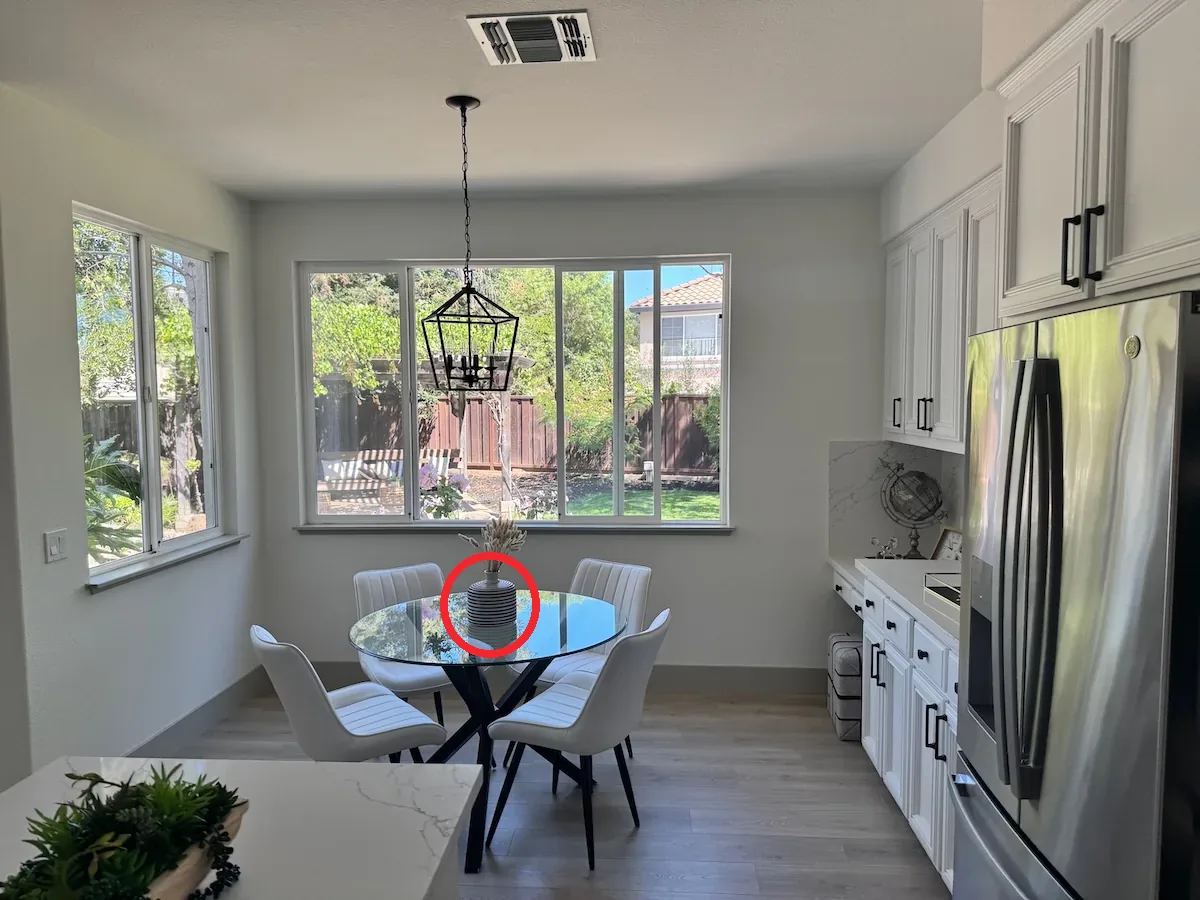
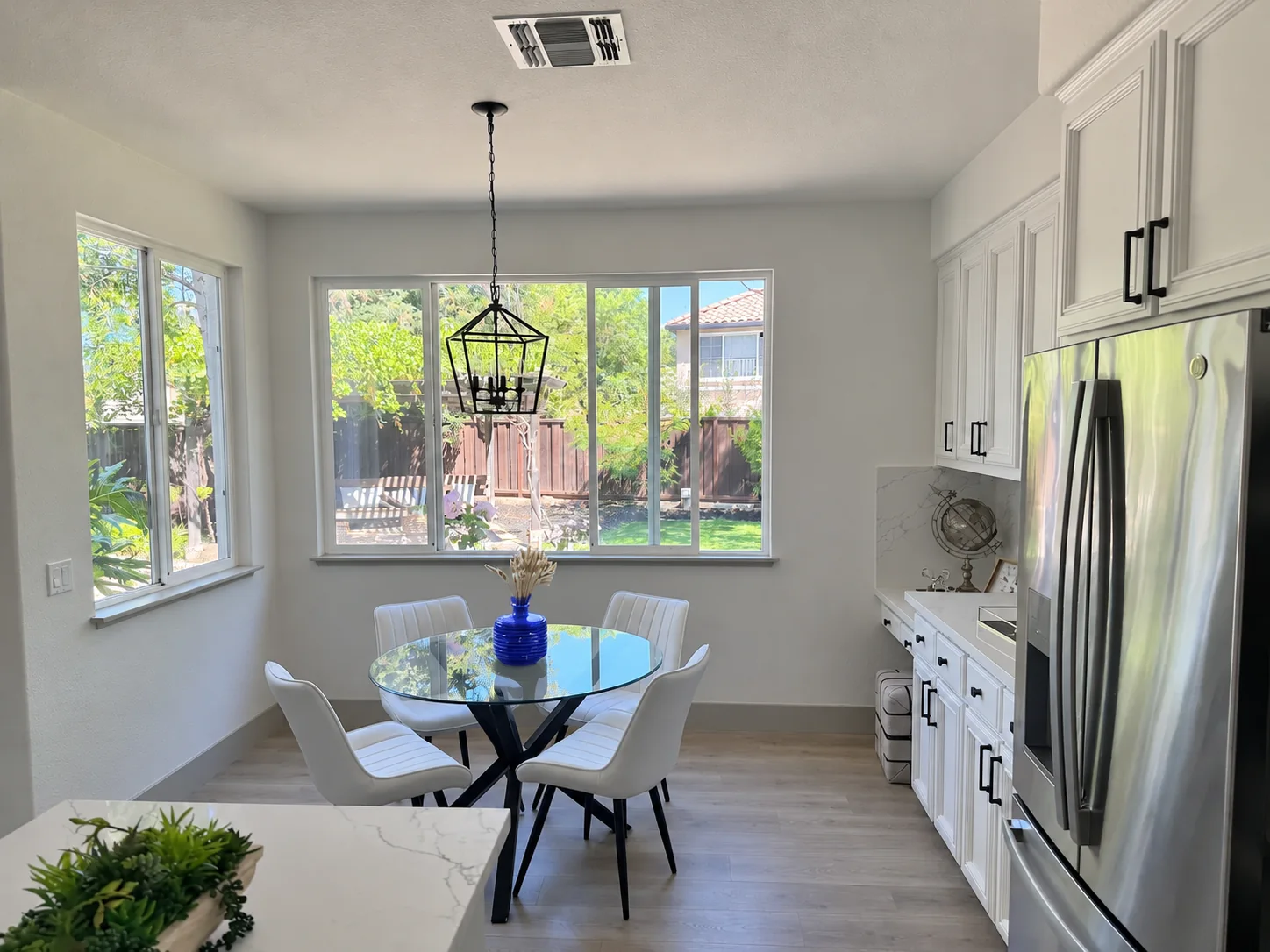
- Keep the original image as the first input image.
- Create a separate transparent PNG containing your circles, sketches, or other annotations. After orientation, the annotation layer and the first image must have the same width and height. The PNG must contain transparent pixels; do not flatten it onto the original image.
- Send the annotation layer as
markup. Multipart requests accept a file upload. JSON requests accept an object containing exactly one ofimage_urlorfile_id;image_urlcan contain an HTTPS URL or a base64 data URL. JSON edit requests useimagesfor the input image array. - Describe the requested change and the details you want to preserve. Review the result before using it.
Markup applies to the first input image. Additional images serve as references. The first input image and the annotation layer can each contain at most 16,777,216 pixels. The annotation file also has a 50 MB size limit. Do not combine markup with mask or prompt_rewriter.
Edit an image using a mask
You can provide a mask to indicate which part of the image should be edited.
When using a mask with GPT Image, additional instructions are sent to the model to help guide the editing process accordingly.
Masking with GPT Image is entirely prompt-based. The model uses the mask as guidance, but may not follow its exact shape with complete precision.
If you provide multiple input images, the mask will be applied to the first image.
Responses API
Edit an image with a mask
import fs from "fs";
import OpenAI from "openai";

const openai = new OpenAI();

async function createFile(filePath) {
  const result = await openai.files.create({
    file: fs.createReadStream(filePath),
    purpose: "vision",
  });
  return result.id;
}

const fileId = await createFile("fixtures/sunlit_lounge.png");
const maskId = await createFile("fixtures/mask.png");

const response = await openai.responses.create({
  model: "gpt-6-astra",
  input: [
    {
      role: "user",
      content: [
        {
          type: "input_text",
          text: "generate an image of the same sunlit indoor lounge area with a pool but the pool should contain a flamingo",
        },
        {
          type: "input_image",
          file_id: fileId,
          detail: "auto",
        },
      ],
    },
  ],
  tools: [
    {
      type: "image_generation",
      model: "gpt-image-2.5-sunburst",
      quality: "high",
      input_image_mask: {
        file_id: maskId,
      },
    },
  ],
});

const imageData = response.output
  .filter((output) => output.type === "image_generation_call")
  .map((output) => output.result);

if (imageData.length > 0) {
  const imageBase64 = imageData[0];
  fs.writeFileSync("lounge.png", Buffer.from(imageBase64, "base64"));
}
from openai import OpenAI
import base64

client = OpenAI()


def create_file(file_path):
    with open(file_path, "rb") as file_content:
        result = client.files.create(file=file_content, purpose="vision")
    return result.id


fileId = create_file("sunlit_lounge.png")
maskId = create_file("mask.png")

response = client.responses.create(
    model="gpt-6-astra",
    input=[
        {
            "role": "user",
            "content": [
                {
                    "type": "input_text",
                    "text": "generate an image of the same sunlit indoor lounge area with a pool but the pool should contain a flamingo",
                },
                {
                    "type": "input_image",
                    "file_id": fileId,
                },
            ],
        },
    ],
    tools=[
        {
            "type": "image_generation",
            "model": "gpt-image-2.5-sunburst",
            "quality": "high",
            "input_image_mask": {
                "file_id": maskId,
            },
        },
    ],
)

image_data = [
    output.result
    for output in response.output
    if output.type == "image_generation_call"
]

if image_data:
    image_base64 = image_data[0]
    with open("lounge.png", "wb") as f:
        f.write(base64.b64decode(image_base64))
package main

import (
	"context"
	"encoding/base64"
	"os"

	"github.com/openai/openai-go/v3"
	"github.com/openai/openai-go/v3/responses"
)

func main() {
	client := openai.NewClient()
	imageID := uploadImage(client, "sunlit_lounge.png")
	maskID := uploadImage(client, "mask.png")
	response, err := client.Responses.New(context.Background(), responses.ResponseNewParams{
		Model: "gpt-6-astra",
		Input: responses.ResponseNewParamsInputUnion{OfInputItemList: responses.ResponseInputParam{
			responses.ResponseInputItemParamOfMessage(
				responses.ResponseInputMessageContentListParam{
					responses.ResponseInputContentParamOfInputText("Generate an image of the same sunlit indoor lounge area with a pool, but the pool should contain a flamingo."),
					{OfInputImage: &responses.ResponseInputImageParam{FileID: openai.String(imageID), Detail: responses.ResponseInputImageDetailAuto}},
				},
				responses.EasyInputMessageRoleUser,
			),
		}},
		Tools: []responses.ToolUnionParam{{OfImageGeneration: &responses.ToolImageGenerationParam{
			Model:          "gpt-image-2.5-sunburst",
			Quality:        "high",
			InputImageMask: responses.ToolImageGenerationInputImageMaskParam{FileID: openai.String(maskID)},
		}}},
	})
	if err != nil {
		panic(err)
	}
	saveFirstGeneratedImage(response, "lounge.png")
}

func uploadImage(client openai.Client, filename string) string {
	file, err := os.Open(filename)
	if err != nil {
		panic(err)
	}
	defer file.Close()
	uploaded, err := client.Files.New(context.Background(), openai.FileNewParams{File: file, Purpose: openai.FilePurposeVision})
	if err != nil {
		panic(err)
	}
	return uploaded.ID
}

func saveFirstGeneratedImage(response *responses.Response, filename string) {
	for _, output := range response.Output {
		if output.Type != "image_generation_call" {
			continue
		}
		image, err := base64.StdEncoding.DecodeString(output.AsImageGenerationCall().Result)
		if err != nil {
			panic(err)
		}
		if err := os.WriteFile(filename, image, 0o600); err != nil {
			panic(err)
		}
		return
	}
	panic("response did not include an image generation call")
}
import com.openai.client.OpenAIClient;
import com.openai.client.okhttp.OpenAIOkHttpClient;
import com.openai.models.files.FileCreateParams;
import com.openai.models.files.FilePurpose;
import com.openai.models.responses.ResponseCreateParams;
import com.openai.models.responses.ResponseInputImage;
import com.openai.models.responses.ResponseInputItem;
import com.openai.models.responses.Tool;
import java.io.IOException;
import java.nio.file.Files;
import java.nio.file.Path;
import java.util.Base64;
import java.util.List;

var image =
    client
        .files()
        .create(
            FileCreateParams.builder()
                .file(Path.of(System.getenv("OPENAI_EXAMPLE_FILE_PATH")))
                .purpose(FilePurpose.VISION)
                .build());

var mask =
    client
        .files()
        .create(
            FileCreateParams.builder()
                .file(Path.of(System.getenv("OPENAI_EXAMPLE_IMAGE_MASK_PATH")))
                .purpose(FilePurpose.VISION)
                .build());

var response =
    client
        .responses()
        .create(
            ResponseCreateParams.builder()
                .model("gpt-6-astra")
                .inputOfResponse(
                    List.of(
                        ResponseInputItem.ofMessage(
                            ResponseInputItem.Message.builder()
                                .role(ResponseInputItem.Message.Role.USER)
                                .addInputTextContent("Add a flamingo to the pool.")
                                .addContent(
                                    ResponseInputImage.builder()
                                        .detail(ResponseInputImage.Detail.AUTO)
                                        .fileId(image.id())
                                        .build())
                                .build())))
                .addTool(
                    Tool.ImageGeneration.builder()
                        .inputImageMask(
                            Tool.ImageGeneration.InputImageMask.builder()
                                .fileId(mask.id())
                                .build())
                        .build())
                .build());

String imageResult =
    response.output().stream()
        .flatMap(item -> item.imageGenerationCall().stream())
        .flatMap(call -> call.result().stream())
        .findFirst()
        .orElseThrow(() -> new IllegalStateException("No generated image returned"));
Files.write(Path.of("lounge.png"), Base64.getDecoder().decode(imageResult));
require "base64"
require "openai"
require "pathname"

client = OpenAI::Client.new
image = client.files.create(file: Pathname("sunlit_lounge.png"), purpose: :vision)
mask = client.files.create(file: Pathname("mask.png"), purpose: :vision)
response = client.responses.create(
  model: "gpt-6-astra",
  input: [
    {
      role: :user,
      content: [
        {
          type: :input_text,
          text: "Add a flamingo to the pool."
        },
        {
          type: :input_image,
          file_id: image.id
        }
      ]
    }
  ],
  tools: [
    {
      type: :image_generation,
      model: "gpt-image-2.5-sunburst",
      input_image_mask: { file_id: mask.id }
    }
  ]
)

image_call = response.output.find do |item|
  item.is_a?(OpenAI::Models::Responses::ResponseOutputItem::ImageGenerationCall)
end
unless image_call.is_a?(OpenAI::Models::Responses::ResponseOutputItem::ImageGenerationCall)
  raise "No image generation call returned"
end

File.binwrite("lounge.png", Base64.strict_decode64(image_call.result))
Image API
Edit an image with a mask
import fs from "fs";
import OpenAI, { toFile } from "openai";

const client = new OpenAI();

const rsp = await client.images.edit({
  model: "gpt-image-2.5-sunburst",
  image: await toFile(fs.createReadStream("fixtures/sunlit_lounge.png"), null, {
    type: "image/png",
  }),
  mask: await toFile(fs.createReadStream("fixtures/mask.png"), null, {
    type: "image/png",
  }),
  prompt: "A sunlit indoor lounge area with a pool containing a flamingo",
});

// Save the image to a file
const image_base64 = rsp.data[0].b64_json;
const image_bytes = Buffer.from(image_base64, "base64");
fs.writeFileSync("lounge.png", image_bytes);
from openai import OpenAI
import base64

client = OpenAI()

result = client.images.edit(
    model="gpt-image-2.5-sunburst",
    image=open("sunlit_lounge.png", "rb"),
    mask=open("mask.png", "rb"),
    prompt="A sunlit indoor lounge area with a pool containing a flamingo",
)

image_base64 = result.data[0].b64_json
image_bytes = base64.b64decode(image_base64)

# Save the image to a file
with open("composition.png", "wb") as f:
    f.write(image_bytes)
package main

import (
	"context"
	"encoding/base64"
	"os"

	"github.com/openai/openai-go/v3"
)

func main() {
	client := openai.NewClient()
	image, err := os.Open("sunlit_lounge.png")
	if err != nil {
		panic(err)
	}
	defer image.Close()
	mask, err := os.Open("mask.png")
	if err != nil {
		panic(err)
	}
	defer mask.Close()

	response, err := client.Images.Edit(context.Background(), openai.ImageEditParams{
		Model:  openai.ImageModel("gpt-image-2.5-sunburst"),
		Image:  openai.ImageEditParamsImageUnion{OfFile: openai.File(image, "sunlit_lounge.png", "image/png")},
		Mask:   openai.File(mask, "mask.png", "image/png"),
		Prompt: "A sunlit indoor lounge area with a pool containing a flamingo",
	})
	if err != nil {
		panic(err)
	}
	result, err := base64.StdEncoding.DecodeString(response.Data[0].B64JSON)
	if err != nil {
		panic(err)
	}
	if err := os.WriteFile("lounge.png", result, 0o600); err != nil {
		panic(err)
	}
}
import com.openai.client.OpenAIClient;
import com.openai.client.okhttp.OpenAIOkHttpClient;
import com.openai.core.MultipartField;
import com.openai.models.images.ImageEditParams;
import java.io.IOException;
import java.io.InputStream;
import java.nio.file.Files;
import java.nio.file.Path;
import java.util.Base64;

Path imagePath = Path.of(System.getenv("OPENAI_EXAMPLE_FILE_PATH"));
Path maskPath = Path.of(System.getenv("OPENAI_EXAMPLE_IMAGE_MASK_PATH"));
try (InputStream image = Files.newInputStream(imagePath);
    InputStream mask = Files.newInputStream(maskPath)) {
  var images =
      client
          .images()
          .edit(
              ImageEditParams.builder()
                  .model("gpt-image-2.5-sunburst")
                  .image(
                      MultipartField.<ImageEditParams.Image>builder()
                          .value(ImageEditParams.Image.ofInputStream(image))
                          .contentType("image/png")
                          .filename(imagePath.getFileName().toString())
                          .build())
                  .prompt("A sunlit indoor lounge area with a pool containing a flamingo")
                  .mask(
                      MultipartField.<InputStream>builder()
                          .value(mask)
                          .contentType("image/png")
                          .filename(maskPath.getFileName().toString())
                          .build())
                  .build());

  Files.write(
      Path.of("lounge.png"),
      Base64.getDecoder().decode(images.data().orElseThrow().get(0).b64Json().orElseThrow()));
}
require "openai"
require "pathname"
require "base64"

client = OpenAI::Client.new
image = OpenAI::FilePart.new(Pathname("sunlit_lounge.png"), content_type: "image/png")
mask = OpenAI::FilePart.new(Pathname("mask.png"), content_type: "image/png")
result = client.images.edit(
  image: image,
  mask: mask,
  model: "gpt-image-2.5-sunburst",
  prompt: "A sunlit indoor lounge area with a pool containing a flamingo"
)
generated_image = result.data&.first or raise "No image returned"
File.binwrite("lounge.png", Base64.strict_decode64(generated_image.b64_json))
curl -s -D >(grep -i x-request-id >&2) \
  -o >(jq -r '.data[0].b64_json' | base64 --decode > lounge.png) \
  -X POST "https://api.openai.com/v1/images/edits" \
  -H "Authorization: Bearer $OPENAI_API_KEY" \
  -F "model=gpt-image-2.5-sunburst" \
  -F "mask=@mask.png" \
  -F "image[]=@sunlit_lounge.png" \
  -F 'prompt=A sunlit indoor lounge area with a pool containing a flamingo'
openai images edit \
  --model gpt-image-2.5-sunburst \
  --image sunlit_lounge.png \
  --mask mask.png \
  --prompt "A sunlit indoor lounge area with a pool containing a flamingo" \
  --raw-output \
  --transform 'data.0.b64_json' | base64 --decode > out.png
| Image | Mask | Output |
|---|---|---|
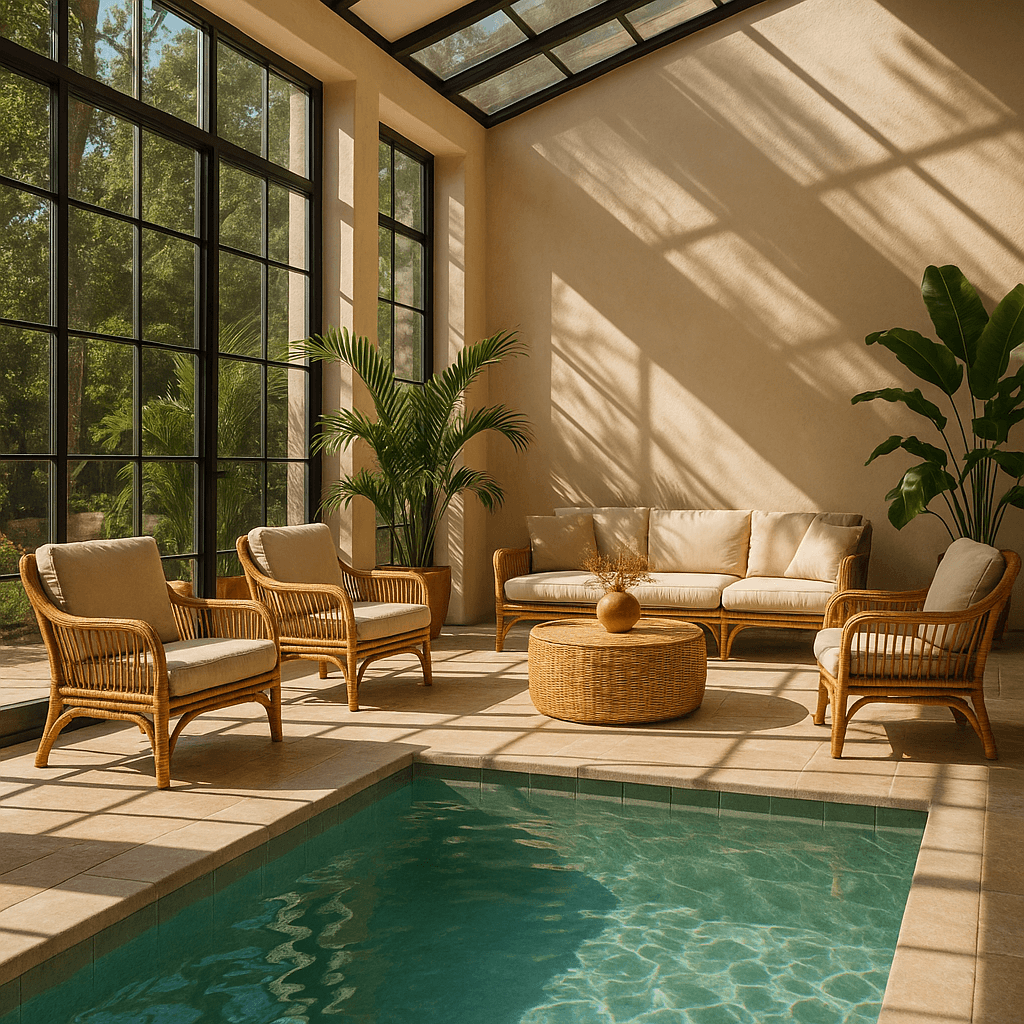 |
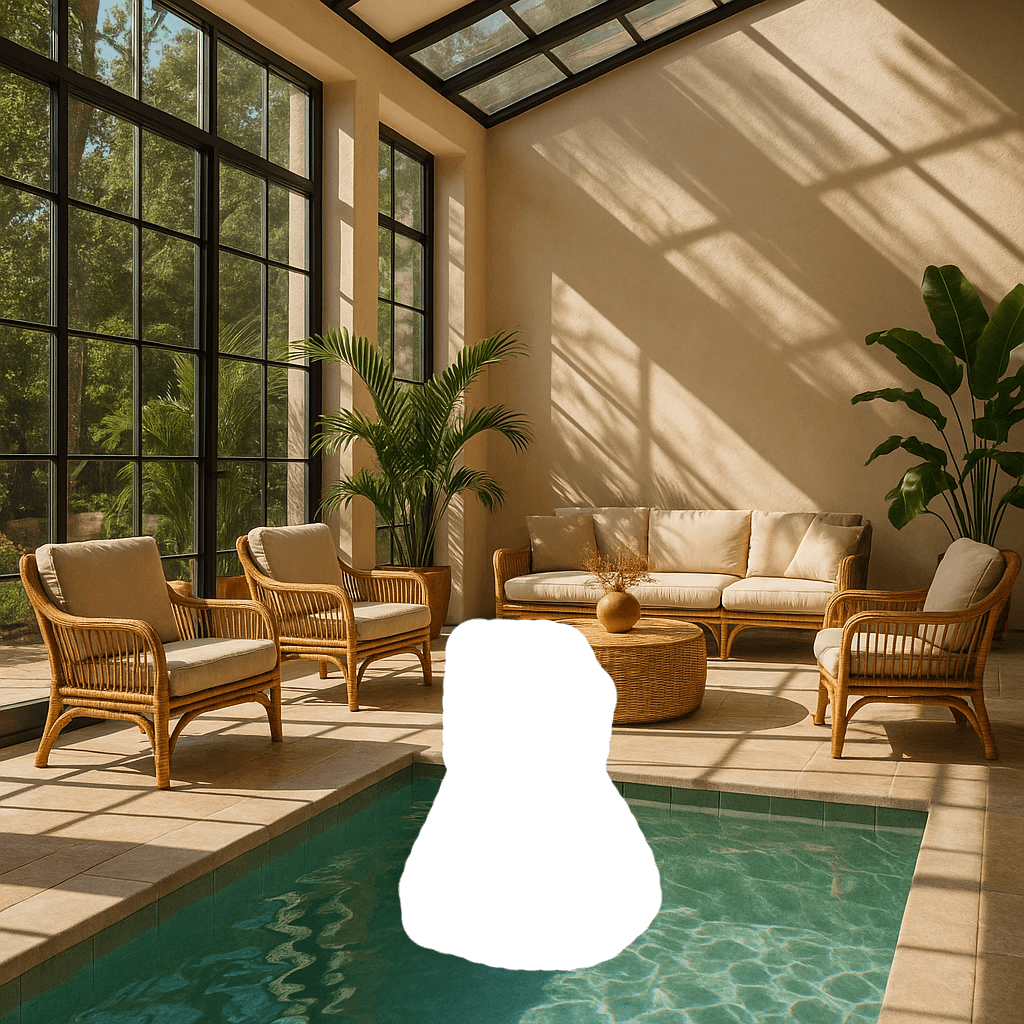 |
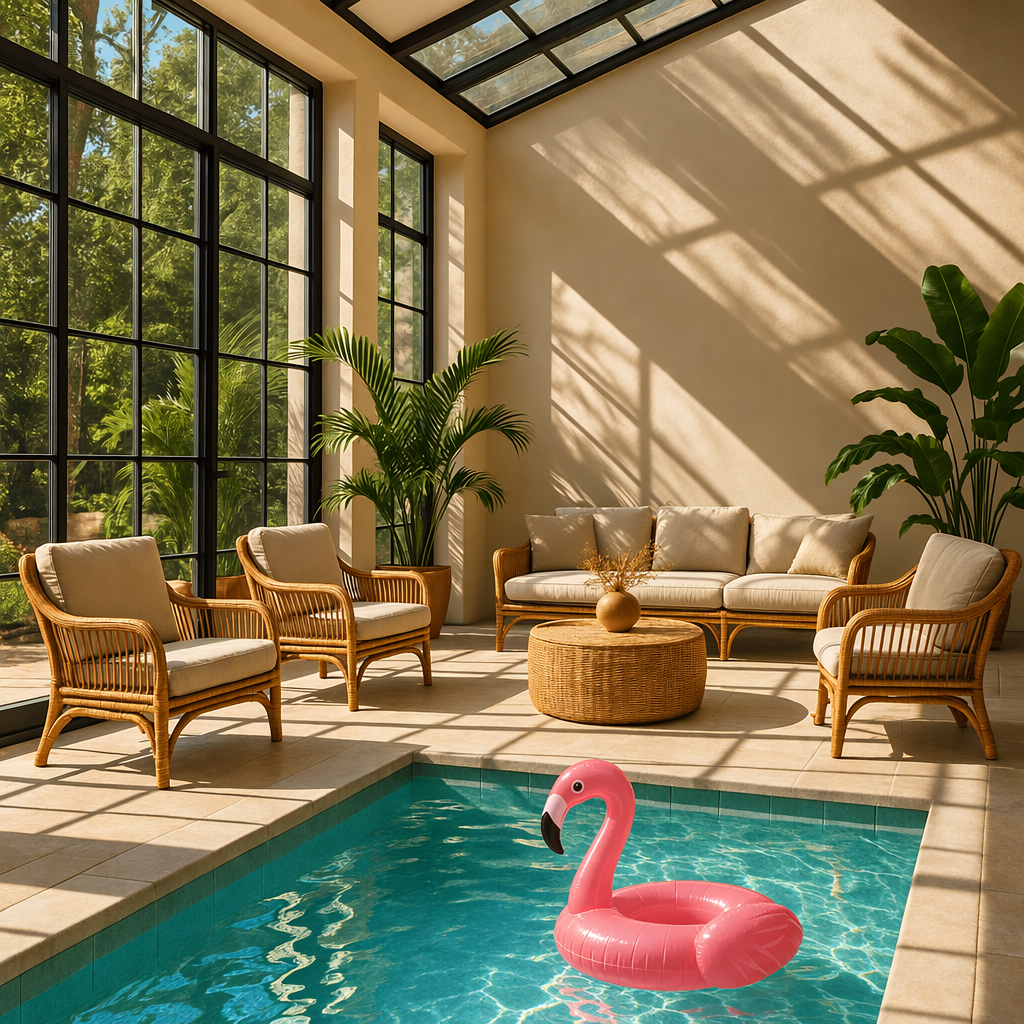 |
Prompt: a sunlit indoor lounge area with a pool containing a flamingo
Mask requirements
The image to edit and mask must be of the same format and size (less than 50MB in size).
The mask image must also contain an alpha channel. If you're using an image editing tool to create the mask, make sure to save the mask with an alpha channel.
You can modify a black and white image programmatically to add an alpha channel.
Add an alpha channel to a black and white mask
from PIL import Image
from io import BytesIO

# 1. Load your black & white mask as a grayscale image
mask = Image.open("mask.png").convert("L")

# 2. Convert it to RGBA so it has space for an alpha channel
mask_rgba = mask.convert("RGBA")

# 3. Then use the mask itself to fill that alpha channel
mask_rgba.putalpha(mask)

# 4. Convert the mask into bytes
buf = BytesIO()
mask_rgba.save(buf, format="PNG")
mask_bytes = buf.getvalue()

# 5. Save the resulting file
img_path_mask_alpha = "mask_alpha.png"
with open(img_path_mask_alpha, "wb") as f:
    f.write(mask_bytes)
package main

import (
	"image"
	"image/color"
	"image/png"
	"os"
)

func main() {
	file, err := os.Open("mask.png")
	if err != nil {
		panic(err)
	}
	defer file.Close()

	mask, _, err := image.Decode(file)
	if err != nil {
		panic(err)
	}
	bounds := mask.Bounds()
	withAlpha := image.NewNRGBA(bounds)
	for y := bounds.Min.Y; y < bounds.Max.Y; y++ {
		for x := bounds.Min.X; x < bounds.Max.X; x++ {
			gray := color.GrayModel.Convert(mask.At(x, y)).(color.Gray)
			withAlpha.SetNRGBA(x, y, color.NRGBA{R: gray.Y, G: gray.Y, B: gray.Y, A: gray.Y})
		}
	}

	output, err := os.Create("mask_alpha.png")
	if err != nil {
		panic(err)
	}
	if err := png.Encode(output, withAlpha); err != nil {
		panic(err)
	}
	if err := output.Close(); err != nil {
		panic(err)
	}
}
Customize Image Output
You can configure the following output options:
- Size: Image dimensions (for example,
1024x1024,1024x1536) - Quality: Rendering quality (for example,
low,medium,high) - Format: File output format
- Compression: Compression level (0-100%) for JPEG and WebP formats
- Background: Transparent, opaque, or automatic
size, quality, and background support the auto option, where the model will automatically select the best option based on the prompt.
Size and quality options
gpt-image-2.5-sunburst and gpt-image-2.5-flare add xhigh and max quality settings. Both default to auto. Earlier GPT Image models support quality settings up to high.
| Setting | Options |
|---|---|
| Recommended sizes | 1024x1024 (square), 1536x1024 (landscape), 1024x1536 (portrait) |
| Quality | low, medium, high, xhigh, max, auto |
Both models also support custom dimensions as WIDTHxHEIGHT strings, such as 1536x864. Width and height must be multiples of 16, the aspect ratio must be between 1:3 and 3:1, and neither edge may exceed 3840 pixels. The total pixel count must be between 655,360 and 8,294,400 (4K). Resolutions above 2560x1440 are experimental.
For transparent backgrounds with either model, set background: "transparent" and use output_format: "png" or "webp".
Use quality: "low" for quick drafts. For final assets, compare higher quality settings to find the right balance of detail, latency, and cost.
Output format
The Image API returns base64-encoded image data.
The default format is png, but you can also request jpeg or webp.
If using jpeg or webp, you can also specify the output_compression parameter to control the compression level (0-100%). For example, output_compression=50 will compress the image by 50%.
Using jpeg is faster than png, so you should prioritize this format if
latency is a concern.
Generate SVG output
Set output_format: "svg" on POST /v1/images/generations. Use SVG for graphics that need editable paths, shapes, and colors, such as icons and illustrations.
Set n to 1. SVG output does not support streaming, partial images, output_compression, or prompt_rewriter. The image edit endpoint does not support SVG output, and an SVG is not a supported raster input for image edits.
The API creates a reference image and uses it to produce the SVG. The quality setting controls that reference image. Decode data[0].b64_json as base64 and save the resulting UTF-8 XML bytes with a .svg extension. The returned document contains static vector content; it does not support scripts, external resources, or embedded raster images.
Flare and Sunburst generated these SVG logos from the same prompt for a Field & Flour bakery logo.


Generate animated GIF output
Set output_format: "gif" on POST /v1/images/generations or POST /v1/images/edits. Describe the subject, motion, and desired loop in your prompt. To guide the animation with still reference images, send them to the image edit endpoint.
Use these request fields for GIF output from either endpoint:
| Field | Values | Default |
|---|---|---|
frame_count |
2–16 frames | 9 |
frame_duration_ms |
20–2000 milliseconds per frame, rounded to 10 ms | 200 |
size |
auto, or WIDTHxHEIGHT with positive dimensions that are multiples of 16 |
auto |
size describes each finished frame. The frame count, frame dimensions, and number of animations must fit the model's size limits and the total request pixel budget. If the request exceeds those limits, reduce frame_count, the frame dimensions, or n. Use auto to let the API choose a frame size within the model's limits.
The response contains the finished animation. Decode each result's b64_json value as base64 and save the bytes with a .gif extension. GIF output does not support streaming, partial images, custom output_compression, or prompt_rewriter. Use frame_count and frame_duration_ms only with GIF output.
Sunburst generated this lantern animation with frame_count=9 and frame_duration_ms=200. The monkey returns to its starting pose after 1.8 seconds.

Limitations
GPT Image models are powerful and versatile image generation models, but they still have some limitations to be aware of:
- Latency: Complex prompts may take up to 2 minutes to process.
- Text Rendering: Although significantly improved, the model can still struggle with precise text placement and clarity.
- Consistency: While capable of producing consistent imagery, the model may occasionally struggle to maintain visual consistency for recurring characters or brand elements across multiple generations.
- Composition Control: Despite improved instruction following, the model may have difficulty placing elements precisely in structured or layout-sensitive compositions.
Content Moderation
All prompts and generated images are filtered in accordance with our content policy.
For image generation using GPT Image models, you can control moderation strictness with the moderation parameter. This parameter supports two values:
auto(default): Standard filtering that seeks to limit creating certain categories of potentially age-inappropriate content.low: Less restrictive filtering.
Handling blocked requests and other errors
Handle image generation failures the same way you handle other API errors: check the HTTP status or SDK exception type, log the request ID, and refer to the error codes guide for authentication, quota, rate-limit, and server failures. Retry transient rate-limit and server failures with backoff. Don't automatically retry quota errors or image generation user errors that require changing the request.
Some image generation failures are user-correctable and may return error.type = "image_generation_user_error". Don't automatically retry these errors without modifying the prompt or input images. For programmatic handling, use error.code as the stable discriminator.
When error.code = "moderation_blocked", the error may also include an optional error.moderation_details object:
{
  "error": {
    "type": "image_generation_user_error",
    "code": "moderation_blocked",
    "moderation_details": {
      "moderation_stage": "input",
      "categories": ["harassment"]
    }
  }
}
The moderation_details object provides coarse debugging context without exposing internal classifier labels or scores.
moderation_stage can be:
input: The block came from the prompt or request inputs.output: The block came from a generated image or downstream output moderation stage.unknown: A rare fallback when provenance is hard to determine.
categories contains coarse public labels. For example, you might see values like harassment, self-harm, sexual, or violence.
For most apps, keep the primary end-user message generic. Use moderation_details for developer logs, support workflows, analytics, and light remediation hints.
Handle moderation-blocked image generation errors
import OpenAI from "openai";

const openai = new OpenAI();

try {
  // The same error handling pattern applies to image generation requests,
  // image edits, and Responses API tool calls that generate images.
  await openai.images.generate({
    model: "gpt-image-2.5-sunburst",
    prompt: "Create a poster humiliating my coworker with insulting captions",
  });
} catch (error) {
  if (error?.code !== "moderation_blocked") {
    throw error;
  }

  const moderationDetails = error.error?.moderation_details;
  const categories = moderationDetails?.categories ?? [];
  const stage = moderationDetails?.moderation_stage;

  let hint =
    "This request could not be completed because it did not meet safety requirements.";

  if (categories.includes("harassment")) {
    hint =
      "Try removing abusive or targeting language and focus on neutral visual details instead.";
  } else if (stage === "input") {
    hint =
      "Try revising the prompt or input images and submit the request again.";
  } else if (stage === "output") {
    hint =
      "The generated result was blocked by a safety check. Try changing the prompt and generating again.";
  }

  console.error("Image generation blocked", {
    request_id: error?.requestID,
    code: error?.code,
    moderation_details: moderationDetails,
  });

  console.log(hint);
}
import openai
from openai import OpenAI

client = OpenAI()

try:
    # The same error handling pattern applies to image generation requests,
    # image edits, and Responses API tool calls that generate images.
    client.images.generate(
        model="gpt-image-2.5-sunburst",
        prompt="Create a poster humiliating my coworker with insulting captions",
    )
except openai.BadRequestError as error:
    if error.code != "moderation_blocked":
        raise

    error_body = error.body if isinstance(error.body, dict) else {}
    moderation_details = error_body.get("moderation_details") or {}
    categories = moderation_details.get("categories") or []
    stage = moderation_details.get("moderation_stage")

    hint = "This request could not be completed because it did not meet safety requirements."

    if "harassment" in categories:
        hint = "Try removing abusive or targeting language and focus on neutral visual details instead."
    elif stage == "input":
        hint = "Try revising the prompt or input images and submit the request again."
    elif stage == "output":
        hint = "The generated result was blocked by a safety check. Try changing the prompt and generating again."

    print(
        "Image generation blocked",
        {
            "request_id": error.request_id,
            "code": error.code,
            "moderation_details": moderation_details,
        },
    )

    print(hint)
package main

import (
	"context"
	"encoding/json"
	"errors"
	"fmt"
	"slices"

	"github.com/openai/openai-go/v3"
)

func main() {
	client := openai.NewClient()
	_, err := client.Images.Generate(context.Background(), openai.ImageGenerateParams{
		Model:  openai.ImageModel("gpt-image-2.5-sunburst"),
		Prompt: "Create a poster humiliating my coworker with insulting captions",
	})
	if err == nil {
		return
	}

	var apiError *openai.Error
	if !errors.As(err, &apiError) || apiError.Code != "moderation_blocked" {
		panic(err)
	}

	var body struct {
		ModerationDetails struct {
			Categories      []string `json:"categories"`
			ModerationStage string   `json:"moderation_stage"`
		} `json:"moderation_details"`
	}
	if err := json.Unmarshal([]byte(apiError.RawJSON()), &body); err != nil {
		panic(err)
	}

	hint := "This request could not be completed because it did not meet safety requirements."
	if slices.Contains(body.ModerationDetails.Categories, "harassment") {
		hint = "Try removing abusive or targeting language and focus on neutral visual details instead."
	} else if body.ModerationDetails.ModerationStage == "input" {
		hint = "Try revising the prompt or input images and submit the request again."
	} else if body.ModerationDetails.ModerationStage == "output" {
		hint = "The generated result was blocked by a safety check. Try changing the prompt and generating again."
	}

	fmt.Printf("Image generation blocked (%s): %s\n", apiError.Code, hint)
}
import com.openai.client.OpenAIClient;
import com.openai.client.okhttp.OpenAIOkHttpClient;
import com.openai.errors.BadRequestException;
import com.openai.models.images.ImageGenerateParams;
import java.util.List;
import java.util.Map;

try {
  var images =
      client
          .images()
          .generate(
              ImageGenerateParams.builder()
                  .model("gpt-image-2.5-sunburst")
                  .prompt("Create a poster humiliating my coworker with insulting captions")
                  .build());

  System.out.println(images.data().orElseThrow().get(0).b64Json().orElseThrow());
} catch (BadRequestException error) {
  if (!error.code().orElse("").equals("moderation_blocked")) {
    throw error;
  }
  Map<?, ?> body = error.body().convert(Map.class);
  Object detailsValue = body.get("moderation_details");
  Map<?, ?> details = detailsValue instanceof Map<?, ?> values ? values : Map.of();
  Object categories = details.get("categories");
  Object stage = details.get("moderation_stage");

  String hint = "This request did not meet safety requirements.";
  if (categories instanceof List<?> values && values.contains("harassment")) {
    hint = "Remove abusive or targeting language and focus on neutral visual details.";
  } else if ("input".equals(stage)) {
    hint = "Revise the prompt or input images, then submit the request again.";
  } else if ("output".equals(stage)) {
    hint = "Change the prompt and generate again; the generated result was blocked.";
  }
  System.err.println("Image generation blocked (" + error.code().orElseThrow() + "): " + hint);
}
require "openai"

client = OpenAI::Client.new
begin
  client.images.generate(
    model: "gpt-image-2.5-sunburst",
    prompt: "Create a poster humiliating my coworker with insulting captions"
  )
rescue OpenAI::Errors::BadRequestError => error
  raise unless error.code == "moderation_blocked"

  body = Hash.try_convert(error.body) || {}
  body = Hash.try_convert(body[:error] || body["error"]) || body
  moderation_details = body[:moderation_details] || body["moderation_details"] || {}
  categories = moderation_details[:categories] || moderation_details["categories"] || []
  stage = moderation_details[:moderation_stage] || moderation_details["moderation_stage"]

  hint = "This request did not meet safety requirements."
  if categories.include?("harassment")
    hint = "Remove abusive or targeting language and focus on neutral visual details."
  elsif stage == "input"
    hint = "Revise the prompt or input images, then submit the request again."
  elsif stage == "output"
    hint = "Change the prompt and generate again; the generated result was blocked."
  end

  warn("Image generation blocked (#{error.code}): #{hint}")
end
Supported models
When using image generation in the Responses API, gpt-5 and newer models should support the image generation tool. Check the model detail page for your model to confirm if your desired model can use the image generation tool.
Cost and latency
GPT Image 2.6 costs
Image output costs $30 per million billable tokens. Use the calculator to estimate the output cost for one image.
See image generation pricing for text and image rates per million tokens.
Markup-guided edits use the same token rates as other edits, with no extra fee. For SVG output, you pay the image model’s rate for the reference image and the authoring model’s rate for the tokens it uses to produce the SVG. The total depends on how many tokens each model uses.
GPT Image 2.5 costs
Responses API requests include the mainline model's token usage in addition to image generation costs.
Both GPT Image 2.5 models use the same token rates: $8 per million image input tokens, $2 per million cached image input tokens, $30 per million image output tokens, $5 per million text input tokens, and $1.25 per million cached text input tokens. See pricing.
Use the response's usage to measure token consumption for your prompts, sizes, and quality settings. Equal token rates don't mean equal cost per image: token consumption can differ by model and quality setting. For older-model pricing examples, see Earlier GPT Image models.
Cached input pricing
For GPT Image 2 and GPT Image 2.5, cached input pricing applies only to the image generation tool in the Responses API. It doesn't apply to direct Images API requests, including /v1/images/edits.
Cached image generation inputs are reflected in billing, but their cached token counts aren't included in the Responses API output. The response's usage can't verify these cache hits.
Calculating costs
Select a model, quality, and size to estimate output tokens and image output cost.
For GPT Image 2.6 and 2.5 Sunburst and Flare, the quality options are low, medium, high, xhigh, and max.
For gpt-image-2, the options are low, medium, and high.
The models can use different token counts for the same quality setting and share the same price per image output token.
Use explicit quality and size values for this estimate; auto depends on the generated image.
<GptImageTokenCalculator client:load outputPricePerMillion={Number( pricing.latest.subsections .find((section) => section.price_type === "Image tokens") ?.items.find((item) => item.name === "gpt-image-2")?.values.main.output )} />
Partial images cost
If you want to stream image generation using the partial_images parameter, each partial image will incur an additional 100 image output tokens.
Earlier GPT Image models
The details below apply to earlier models, not Sunburst or Flare. For new integrations, use one of the GPT Image 2.5 models described above.
GPT Image 2 settings and input fidelity
gpt-image-2 accepts any resolution in the size parameter when it satisfies the constraints below. Square images are typically fastest to generate.
| Popular sizes |
|
| Size constraints |
|
| Quality options |
|
Image input fidelity
The input_fidelity parameter controls how strongly a model preserves details from input images during edits and reference-image workflows. For gpt-image-2, omit this parameter; the API doesn't allow changing it because the model processes every image input at high fidelity automatically.
Because gpt-image-2 always processes image inputs at high fidelity, image
input tokens can be higher for edit requests that include reference images. To
understand the cost implications, refer to the vision
costs
section.
Older-model pricing examples
Models prior to gpt-image-2
GPT Image models prior to gpt-image-2 generate images by first producing specialized image tokens. Both latency and eventual cost are proportional to the number of tokens required to render an image—larger image sizes and higher quality settings result in more tokens.
The number of tokens generated depends on image dimensions and quality:
| Quality | Square (1024×1024) | Portrait (1024×1536) | Landscape (1536×1024) |
|---|---|---|---|
| Low | 272 tokens | 408 tokens | 400 tokens |
| Medium | 1056 tokens | 1584 tokens | 1568 tokens |
| High | 4160 tokens | 6240 tokens | 6208 tokens |
Note that you will also need to account for input tokens: text tokens for the prompt and image tokens for the input images if editing images.
Because gpt-image-2 always processes image inputs at high fidelity, edit requests that include reference images can use more input tokens.
Refer to the pricing page for current text and image token prices, and use the Calculating costs section to estimate image output costs.
The final cost is the sum of:
- input text tokens
- input image tokens if using the edits endpoint
- image output tokens
Historical output costs
gpt-image-2 supports thousands of valid resolutions; the table below lists the
same sizes used for previous GPT Image models for comparison. For GPT Image 1.5,
GPT Image 1, and GPT Image 1 Mini, the legacy per-image output pricing table is
also listed below. You should still account for text and image input tokens when
estimating the total cost of a request.
gpt-image-1 was shut down on October 23, 2026. Its prices below are retained
for historical comparisons. See the deprecation notice
for replacement models.
A larger non-square resolution can sometimes produce fewer output tokens than a smaller or square resolution at the same quality setting.
| Model | Quality | 1024 × 1024 | 1024 × 1536 | 1536 × 1024 |
|---|---|---|---|---|
|
GPT Image 2
Additional sizes available |
guides/image-generation.md +235 −5
40 console](https://platform.openai.com/settings/organization/general) before40 console](https://platform.openai.com/settings/organization/general) before
41 using GPT Image models.41 using GPT Image models.
42 42
43### GPT Image 2.6
44
45GPT Image 2.6 includes [Sunburst](https://developers.openai.com/api/docs/models/gpt-image-2.6-sunburst) for detailed visual work and [Flare](https://developers.openai.com/api/docs/models/gpt-image-2.6-flare) for fast iteration. Both models support complexity control, markup-guided edits, SVG output, and animated GIF output through the Image API. The existing examples below use GPT Image 2.5.
46
47#### Set image complexity
48
49Use the `complexity` request field to control how much the image model plans before rendering. Lower complexity can suit focused edits, such as changing a background or a sign. Higher complexity can help with dense text, complex layouts, and relationships between objects. Higher complexity can increase latency and introduce unwanted changes, so compare results for your task.
50
51The supported complexity levels for Sunburst and Flare are `low`, `medium`, and `high`. If you omit `complexity`, both models use `high`. The separate `quality` setting controls rendering quality.
52
53Adjusting complexity has no separate fee.
54
55Sunburst generated these paper-cut football scenes from the same prompt at medium quality. Compare the trophy, the uniforms, and the placement of the “CHAMPIONS” sign as complexity changes.
56
57
58
59 <figure className="m-0 min-w-0">
60 <figcaption className="mb-2 text-sm font-semibold">
61 Low complexity
62 </figcaption>
63
64
65
66
67
68 </figure>
69 <figure className="m-0 min-w-0">
70 <figcaption className="mb-2 text-sm font-semibold">
71 Medium complexity
72 </figcaption>
73
74
75
76
77
78 </figure>
79 <figure className="m-0 min-w-0">
80 <figcaption className="mb-2 text-sm font-semibold">
81 High complexity
82 </figcaption>
83
84
85
86
87
88 </figure>
89
90
91
43### Safety identifiers92### Safety identifiers
44 93
45If your application serves individual end users, include a stable,94If your application serves individual end users, include a stable,
2508 2557
2509 2558
2510 2559
2560### Guide an edit with markup
2561
2562Use the Image API’s `POST /v1/images/edits` endpoint for markup-guided edits with supported GPT Image 2.5 and 2.6 models. For regional edits with the Responses API, use a [mask](#edit-an-image-using-a-mask). Use an annotation layer to show where a change should happen and describe the change in `prompt`.
2563
2564For example, download the [kitchen photo](https://developers.openai.com/images/platform/guides/image-prompting/kitchen.webp) and [transparent overlay](https://developers.openai.com/images/platform/guides/image-prompting/markup-vase-overlay-gpt-image-2-6.png) into the same directory. The overlay circles the vase to recolor.
2565
2566Edit the circled vase with the Image API
2567
2568```python
2569import base64
2570from pathlib import Path
2571
2572from openai import OpenAI
2573
2574client = OpenAI()
2575overlay = Path("markup-vase-overlay-gpt-image-2-6.png")
2576with open("kitchen.webp", "rb") as image, overlay.open("rb") as markup:
2577 result = client.images.edit(
2578 model="gpt-image-2.6-flare",
2579 image=("kitchen.webp", image, "image/webp"),
2580 markup=(overlay.name, markup, "image/png"),
2581 quality="medium",
2582 prompt=(
2583 "Recolor the striped vase inside the red circle to solid cobalt blue ceramic. "
2584 "Keep its shape, the dried stems, and the rest of the kitchen unchanged. "
2585 "Remove the red circle from the finished photo."
2586 ),
2587 )
2588
2589Path("vase.png").write_bytes(base64.b64decode(result.data[0].b64_json))
2590```
2591
2592```go
2593client := openai.NewClient()
2594image, err := os.Open("kitchen.webp")
2595if err != nil {
2596 panic(err)
2597}
2598defer image.Close()
2599markup, err := os.Open("markup-vase-overlay-gpt-image-2-6.png")
2600if err != nil {
2601 panic(err)
2602}
2603defer markup.Close()
2604
2605response, err := client.Images.Edit(context.Background(), openai.ImageEditParams{
2606 Model: openai.ImageModel("gpt-image-2.6-flare"),
2607 Image: openai.ImageEditParamsImageUnion{OfFile: openai.File(image, "kitchen.webp", "image/webp")},
2608 Markup: openai.File(markup, "markup-vase-overlay-gpt-image-2-6.png", "image/png"),
2609 Quality: "medium",
2610 Prompt: "Recolor the striped vase inside the red circle to solid cobalt blue ceramic. " +
2611 "Keep its shape, the dried stems, and the rest of the kitchen unchanged. " +
2612 "Remove the red circle from the finished photo.",
2613})
2614if err != nil {
2615 panic(err)
2616}
2617result, err := base64.StdEncoding.DecodeString(response.Data[0].B64JSON)
2618if err != nil {
2619 panic(err)
2620}
2621if err := os.WriteFile("vase.png", result, 0o600); err != nil {
2622 panic(err)
2623}
2624```
2625
2626```bash
2627set -euo pipefail
2628
2629curl --fail --silent --show-error https://api.openai.com/v1/images/edits \
2630 -H "Authorization: Bearer $OPENAI_API_KEY" \
2631 -F model=gpt-image-2.6-flare \
2632 -F quality=medium \
2633 -F 'image=@kitchen.webp;type=image/webp' \
2634 -F 'markup=@markup-vase-overlay-gpt-image-2-6.png;type=image/png' \
2635 -F 'prompt=Recolor the striped vase inside the red circle to solid cobalt blue ceramic. Keep its shape, the dried stems, and the rest of the kitchen unchanged. Remove the red circle from the finished photo.' |
2636 jq -er '.data[0].b64_json' | base64 --decode > vase.png
2637```
2638
2639
2640
2641
2642 <figure className="m-0 min-w-0">
2643 <figcaption className="mb-2 text-sm font-semibold">
2644 Photo with the overlay
2645 </figcaption>
2646
2647
2648
2649
2650
2651 </figure>
2652 <figure className="m-0 min-w-0">
2653 <figcaption className="mb-2 min-h-10 text-sm font-semibold">
2654 Flare output
2655 </figcaption>
2656
2657
2658
2659
2660
2661 </figure>
2662
2663
2664
26651. Keep the original image as the first input image.
26662. Create a separate transparent PNG containing your circles, sketches, or other annotations. After orientation, the annotation layer and the first image must have the same width and height. The PNG must contain transparent pixels; do not flatten it onto the original image.
26673. Send the annotation layer as `markup`. Multipart requests accept a file upload. JSON requests accept an object containing exactly one of `image_url` or `file_id`; `image_url` can contain an HTTPS URL or a base64 data URL. JSON edit requests use `images` for the input image array.
26684. Describe the requested change and the details you want to preserve. Review the result before using it.
2669
2670Markup applies to the first input image. Additional images serve as references. The first input image and the annotation layer can each contain at most 16,777,216 pixels. The annotation file also has a 50 MB size limit. Do not combine `markup` with `mask` or `prompt_rewriter`.
2671
2511### Edit an image using a mask2672### Edit an image using a mask
2512 2673
2513You can provide a mask to indicate which part of the image should be edited.2674You can provide a mask to indicate which part of the image should be edited.
3132Using `jpeg` is faster than `png`, so you should prioritize this format if3293Using `jpeg` is faster than `png`, so you should prioritize this format if
3133 latency is a concern.3294 latency is a concern.
3134 3295
3296### Generate SVG output
3297
3298Set `output_format: "svg"` on `POST /v1/images/generations`. Use SVG for graphics that need editable paths, shapes, and colors, such as icons and illustrations.
3299
3300Set `n` to `1`. SVG output does not support streaming, partial images, `output_compression`, or `prompt_rewriter`. The image edit endpoint does not support SVG output, and an SVG is not a supported raster input for image edits.
3301
3302The API creates a reference image and uses it to produce the SVG. The `quality` setting controls that reference image. Decode `data[0].b64_json` as base64 and save the resulting UTF-8 XML bytes with a `.svg` extension. The returned document contains static vector content; it does not support scripts, external resources, or embedded raster images.
3303
3304Flare and Sunburst generated these SVG logos from the same prompt for a Field & Flour bakery logo.
3305
3306
3307
3308 <figure className="m-0 min-w-0 [&_[data-codex-screenshot-overlay]_img]:bg-surface">
3309 <figcaption className="mb-2 text-sm font-semibold">
3310 GPT Image 2.6 Flare
3311 </figcaption>
3312
3313
3314
3315
3316
3317 </figure>
3318 <figure className="m-0 min-w-0 [&_img]:bg-white">
3319 <figcaption className="mb-2 text-sm font-semibold">
3320 GPT Image 2.6 Sunburst
3321 </figcaption>
3322
3323
3324
3325
3326
3327 </figure>
3328
3329
3330
3331### Generate animated GIF output
3332
3333Set `output_format: "gif"` on `POST /v1/images/generations` or `POST /v1/images/edits`. Describe the subject, motion, and desired loop in your prompt. To guide the animation with still reference images, send them to the image edit endpoint.
3334
3335Use these request fields for GIF output from either endpoint:
3336
3337| Field | Values | Default |
3338| ------------------- | --------------------------------------------------------------------------- | ------- |
3339| `frame_count` | 2–16 frames | 9 |
3340| `frame_duration_ms` | 20–2000 milliseconds per frame, rounded to 10 ms | 200 |
3341| `size` | `auto`, or `WIDTHxHEIGHT` with positive dimensions that are multiples of 16 | `auto` |
3342
3343`size` describes each finished frame. The frame count, frame dimensions, and number of animations must fit the model's size limits and the total request pixel budget. If the request exceeds those limits, reduce `frame_count`, the frame dimensions, or `n`. Use `auto` to let the API choose a frame size within the model's limits.
3344
3345The response contains the finished animation. Decode each result's `b64_json` value as base64 and save the bytes with a `.gif` extension. GIF output does not support streaming, partial images, custom `output_compression`, or `prompt_rewriter`. Use `frame_count` and `frame_duration_ms` only with GIF output.
3346
3347Sunburst generated this lantern animation with `frame_count=9` and `frame_duration_ms=200`. The monkey returns to its starting pose after 1.8 seconds.
3348
3349
3350
3351
3352
3353
3354
3135## Limitations3355## Limitations
3136 3356
3137GPT Image models are powerful and versatile image generation models, but they still have some limitations to be aware of:3357GPT Image models are powerful and versatile image generation models, but they still have some limitations to be aware of:
3403 3623
3404## Cost and latency3624## Cost and latency
3405 3625
3626### GPT Image 2.6 costs
3627
3628Image output costs $30 per million billable tokens. Use the [calculator](#calculating-costs) to estimate the output cost for one image.
3629
3630See [image generation pricing](https://developers.openai.com/api/docs/pricing#image-generation) for text and image rates per million tokens.
3631
3632Markup-guided edits use the same token rates as other edits, with no extra fee. For SVG output, you pay the image model’s rate for the reference image and the authoring model’s rate for the tokens it uses to produce the SVG. The total depends on how many tokens each model uses.
3633
3406### GPT Image 2.5 costs3634### GPT Image 2.5 costs
3407 3635
3408Responses API requests include the mainline model's token usage in addition to image generation costs.3636Responses API requests include the mainline model's token usage in addition to image generation costs.
3420 3648
3421 3649
3422 3650
34233651### GPT Image 2.5 and GPT Image 2 output tokens
3652
3653
3654### Calculating costs
3424 3655
3425Select a model, quality, and size to estimate output tokens and image output cost.3656Select a model, quality, and size to estimate output tokens and image output cost.
34263657For `gpt-image-2.5-sunburst` and `gpt-image-2.5-flare`, the quality options are `low`, `medium`, `high`, `xhigh`, and `max`.For GPT Image 2.6 and 2.5 Sunburst and Flare, the quality options are `low`, `medium`, `high`, `xhigh`, and `max`.
3427For `gpt-image-2`, the options are `low`, `medium`, and `high`.3658For `gpt-image-2`, the options are `low`, `medium`, and `high`.
3428The models can use different token counts for the same quality setting and share the same price per image output token.3659The models can use different token counts for the same quality setting and share the same price per image output token.
3429Use explicit quality and size values for this estimate; `auto` depends on the generated image.3660Use explicit quality and size values for this estimate; `auto` depends on the generated image.
3558 3789
3559Refer to the [pricing page](https://developers.openai.com/api/docs/pricing#image-generation) for current3790Refer to the [pricing page](https://developers.openai.com/api/docs/pricing#image-generation) for current
3560text and image token prices, and use the [Calculating costs](#calculating-costs)3791text and image token prices, and use the [Calculating costs](#calculating-costs)
35613792section below to estimate request costs.section to estimate image output costs.
3562 3793
3563The final cost is the sum of:3794The final cost is the sum of:
3564 3795
3566- input image tokens if using the edits endpoint3797- input image tokens if using the edits endpoint
3567- image output tokens3798- image output tokens
3568 3799
35693800### Calculating costs### Historical output costs
3570 3801
3571Use the pricing calculator below to estimate request costs for GPT Image models.
3572`gpt-image-2` supports thousands of valid resolutions; the table below lists the3802`gpt-image-2` supports thousands of valid resolutions; the table below lists the
3573same sizes used for previous GPT Image models for comparison. For GPT Image 1.5,3803same sizes used for previous GPT Image models for comparison. For GPT Image 1.5,
3574GPT Image 1, and GPT Image 1 Mini, the legacy per-image output pricing table is3804GPT Image 1, and GPT Image 1 Mini, the legacy per-image output pricing table is