6 6
7> Manage every Claude Code session from one screen with agent view, keep Claude working toward a goal until a condition holds, and run fast mode on Opus 4.7 by default.7> Manage every Claude Code session from one screen with agent view, keep Claude working toward a goal until a condition holds, and run fast mode on Opus 4.7 by default.
8 8
9<div className="digest-meta">9Releases [v2.1.139 → v2.1.142](/docs/en/changelog#2-1-139)
10 <span>Releases <a href="/docs/en/changelog#2-1-139">v2.1.139 → v2.1.142</a></span>103 features · May 11–15
11 <span>3 features · May 11–15</span>11
12</div>12Agent view
13 13research preview
14<div className="digest-feature">14
15 <div className="digest-feature-header">15`claude agents` opens one screen for every Claude Code session: what's running, what's blocked on your input, and what's done. Dispatch a bug fix, a pull request review, and a flaky-test investigation as three rows, keep working in another window, and step in only when a row needs you. Attach to any row to drop into its full conversation, then press `←` to return to the list. Each background session keeps running without a terminal attached.
16 <span className="digest-feature-title">Agent view</span>16
17 <span className="digest-feature-pill">research preview</span>17<video autoPlay muted loop playsInline src="https://mintcdn.com/claude-code/ITvjicPxe1SM3GX7/images/whats-new/agent-view.mp4?fit=max&auto=format&n=ITvjicPxe1SM3GX7&q=85&s=0eefe6cbe75464c8f7902bba630ab7a4" />
18 </div>18
19 19Open the dashboard from your shell:
20 <p className="digest-feature-lede"><code>claude agents</code> opens one screen for every Claude Code session: what's running, what's blocked on your input, and what's done. Dispatch a bug fix, a pull request review, and a flaky-test investigation as three rows, keep working in another window, and step in only when a row needs you. Attach to any row to drop into its full conversation, then press <code>←</code> to return to the list. Each background session keeps running without a terminal attached.</p>20
21 21```bash terminal theme={null}
22 <Frame>22claude agents
23 <video autoPlay muted loop playsInline className="w-full" src="https://mintcdn.com/claude-code/ITvjicPxe1SM3GX7/images/whats-new/agent-view.mp4?fit=max&auto=format&n=ITvjicPxe1SM3GX7&q=85&s=0eefe6cbe75464c8f7902bba630ab7a4" data-path="images/whats-new/agent-view.mp4" />23```
24 </Frame>24
25 25[Agent view](/docs/en/agent-view)
26 <p className="digest-feature-try">Open the dashboard from your shell:</p>26
27 27/goal
28 ```bash terminal theme={null}28v2.1.139
29 claude agents29
30 ```30Set a completion condition and Claude keeps working toward it across turns without you prompting each step. After every turn, a fast model checks whether the condition holds; if not, Claude starts another turn instead of handing control back. Useful for substantial work with a verifiable end state, like migrating a module until every call site compiles and tests pass. The goal clears once the condition is met, and works in interactive, `-p`, and Remote Control.
31 31
32 <a className="digest-feature-link" href="/docs/en/agent-view">Agent view</a>32<video autoPlay muted loop playsInline src="https://mintcdn.com/claude-code/ITvjicPxe1SM3GX7/images/whats-new/goal.mp4?fit=max&auto=format&n=ITvjicPxe1SM3GX7&q=85&s=6806df3780c548b93a02d6fa71da276b" />
33</div>33
34 34Set a goal and let Claude run until it holds:
35<div className="digest-feature">35
36 <div className="digest-feature-header">36```text Claude Code theme={null}
37 <span className="digest-feature-title">/goal</span>37> /goal all tests in test/auth pass and the lint step is clean
38 <span className="digest-feature-pill">v2.1.139</span>38```
39 </div>39
40 40[Goals](/docs/en/goal)
41 <p className="digest-feature-lede">Set a completion condition and Claude keeps working toward it across turns without you prompting each step. After every turn, a fast model checks whether the condition holds; if not, Claude starts another turn instead of handing control back. Useful for substantial work with a verifiable end state, like migrating a module until every call site compiles and tests pass. The goal clears once the condition is met, and works in interactive, <code>-p</code>, and Remote Control.</p>41
42 42Fast mode on Opus 4.7
43 <Frame>43research preview
44 <video autoPlay muted loop playsInline className="w-full" src="https://mintcdn.com/claude-code/ITvjicPxe1SM3GX7/images/whats-new/goal.mp4?fit=max&auto=format&n=ITvjicPxe1SM3GX7&q=85&s=6806df3780c548b93a02d6fa71da276b" data-path="images/whats-new/goal.mp4" />44
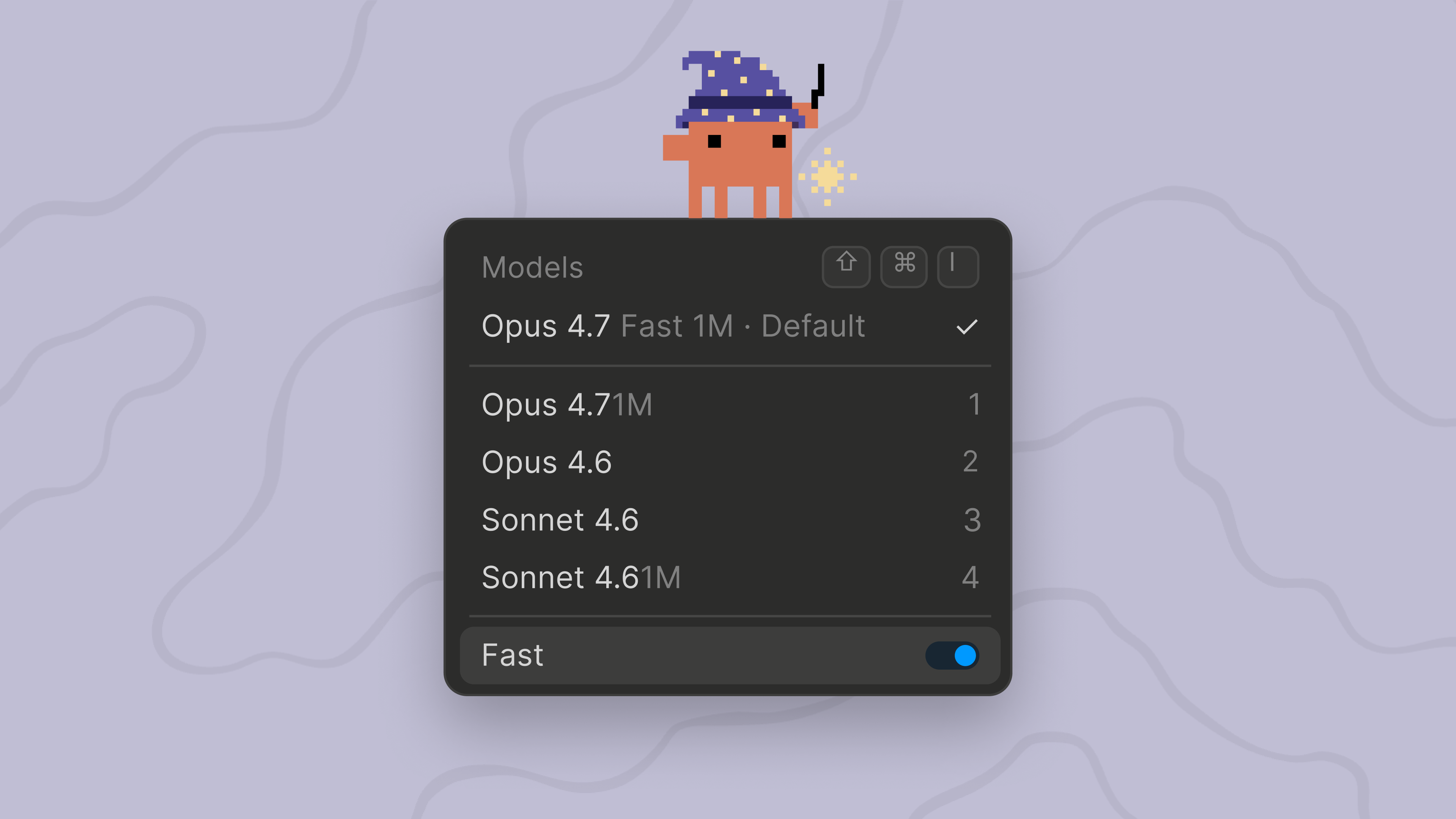
45 </Frame>45`/fast` now runs on Opus 4.7 by default instead of Opus 4.6. Fast mode is a high-speed Opus configuration: the same model quality at about 2.5x the speed for a higher per-token cost, useful for rapid iteration and live debugging. Pricing is unchanged at \$30/\$150 per MTok, the same as Opus 4.6 fast mode. To pin fast mode to Opus 4.6, set `CLAUDE_CODE_OPUS_4_6_FAST_MODE_OVERRIDE=1`.
46 46
47 <p className="digest-feature-try">Set a goal and let Claude run until it holds:</p>47
48 48
49 ```text Claude Code theme={null}49Toggle fast mode, now running on Opus 4.7:
50 > /goal all tests in test/auth pass and the lint step is clean50
51 ```51```text Claude Code theme={null}
52 52> /fast
53 <a className="digest-feature-link" href="/docs/en/goal">Goals</a>53```
54</div>54
55 55[Fast mode on Opus 4.7](/docs/en/fast-mode#understand-the-cost-tradeoff)
56<div className="digest-feature">56
57 <div className="digest-feature-header">57Other wins
58 <span className="digest-feature-title">Fast mode on Opus 4.7</span>58
59 <span className="digest-feature-pill">research preview</span>59`claude agents` gained dispatch flags (`--add-dir`, `--settings`, `--mcp-config`, `--plugin-dir`, `--permission-mode`, `--model`, `--effort`, `--dangerously-skip-permissions`) to configure background sessions, and `claude agents --cwd <path>` scopes the session list to a directoryNew hook `args: string[]` exec form spawns the command directly without a shell, so path placeholders never need quotingNew `continueOnBlock` config option for `PostToolUse` hooks feeds the hook's rejection reason back to Claude and continues the turn instead of ending itNew `terminalSequence` field in hook JSON output lets hooks emit desktop notifications, window titles, and bells without a controlling terminalThe Rewind menu added "Summarize up to here" to compress earlier context while keeping recent turns intactRemote Control, `/schedule`, claude.ai MCP connectors, and notification preferences are now disabled when `ANTHROPIC_API_KEY`, `apiKeyHelper`, or `ANTHROPIC_AUTH_TOKEN` is set, even alongside a claude.ai login; unset the API key to use these featuresMCP stdio servers now receive `CLAUDE_PROJECT_DIR` in their environment, matching hooks, and plugin configs can reference `${CLAUDE_PROJECT_DIR}` in commands`claude plugin details <name>` shows a plugin's component inventory and projected per-session token cost, and the `/plugin` details pane now also lists the LSP servers a plugin providesPlugins with a root-level `SKILL.md` and no `skills/` subdirectory are now surfaced as a skill`/feedback` can now include recent sessions from the last 24 hours or 7 days for issues spanning more than the current sessionAgent tool `subagent_type` now matches case- and separator-insensitively, so `"Code Reviewer"` resolves to `code-reviewer`
60 </div>
61
62 <p className="digest-feature-lede"><code>/fast</code> now runs on Opus 4.7 by default instead of Opus 4.6. Fast mode is a high-speed Opus configuration: the same model quality at about 2.5x the speed for a higher per-token cost, useful for rapid iteration and live debugging. Pricing is unchanged at \$30/\$150 per MTok, the same as Opus 4.6 fast mode. To pin fast mode to Opus 4.6, set <code>CLAUDE\_CODE\_OPUS\_4\_6\_FAST\_MODE\_OVERRIDE=1</code>.</p>
63
64 <Frame>
65 <img className="w-full" src="https://mintcdn.com/claude-code/ITvjicPxe1SM3GX7/images/whats-new/fast-mode-opus-47.png?fit=max&auto=format&n=ITvjicPxe1SM3GX7&q=85&s=6b6d92f7748ce5328a1ee9a269fb1a87" alt="The Claude Code model picker showing Opus 4.7 Fast 1M as the default with the Fast toggle on" width="3840" height="2160" data-path="images/whats-new/fast-mode-opus-47.png" />
66 </Frame>
67
68 <p className="digest-feature-try">Toggle fast mode, now running on Opus 4.7:</p>
69
70 ```text Claude Code theme={null}
71 > /fast
72 ```
73
74 <a className="digest-feature-link" href="/docs/en/fast-mode#understand-the-cost-tradeoff">Fast mode on Opus 4.7</a>
75</div>
76
77<div className="digest-wins">
78 <p className="digest-wins-title">Other wins</p>
79
80 <div className="digest-wins-grid">
81 <div><code>claude agents</code> gained dispatch flags (`--add-dir`, `--settings`, `--mcp-config`, `--plugin-dir`, `--permission-mode`, `--model`, `--effort`, `--dangerously-skip-permissions`) to configure background sessions, and `claude agents --cwd <path>` scopes the session list to a directory</div>
82 <div>New hook <code>args: string\[]</code> exec form spawns the command directly without a shell, so path placeholders never need quoting</div>
83 <div>New <code>continueOnBlock</code> config option for <code>PostToolUse</code> hooks feeds the hook's rejection reason back to Claude and continues the turn instead of ending it</div>
84 <div>New <code>terminalSequence</code> field in hook JSON output lets hooks emit desktop notifications, window titles, and bells without a controlling terminal</div>
85 <div>The Rewind menu added "Summarize up to here" to compress earlier context while keeping recent turns intact</div>
86 <div>Remote Control, <code>/schedule</code>, claude.ai MCP connectors, and notification preferences are now disabled when <code>ANTHROPIC\_API\_KEY</code>, <code>apiKeyHelper</code>, or <code>ANTHROPIC\_AUTH\_TOKEN</code> is set, even alongside a claude.ai login; unset the API key to use these features</div>
87 <div>MCP stdio servers now receive <code>CLAUDE\_PROJECT\_DIR</code> in their environment, matching hooks, and plugin configs can reference <code>\${"{"}CLAUDE\_PROJECT\_DIR{"}"}</code> in commands</div>
88 <div><code>claude plugin details \<name></code> shows a plugin's component inventory and projected per-session token cost, and the <code>/plugin</code> details pane now also lists the LSP servers a plugin provides</div>
89 <div>Plugins with a root-level <code>SKILL.md</code> and no <code>skills/</code> subdirectory are now surfaced as a skill</div>
90 <div><code>/feedback</code> can now include recent sessions from the last 24 hours or 7 days for issues spanning more than the current session</div>
91 <div>Agent tool <code>subagent\_type</code> now matches case- and separator-insensitively, so <code>"Code Reviewer"</code> resolves to <code>code-reviewer</code></div>
92 </div>
93</div>
94 60
95[Full changelog for v2.1.139–v2.1.142 →](/docs/en/changelog#2-1-139)61[Full changelog for v2.1.139–v2.1.142 →](/docs/en/changelog#2-1-139)