SpyBara
Go Premium

Documentation 2026-05-06 00:01 UTC to 2026-05-07 21:57 UTC

28 files changed +3,685 −915. View all changes and history on the product overview
2026
Fri 29 06:38 Thu 28 06:37 Wed 27 06:42 Sun 24 06:25 Fri 22 06:33 Thu 21 06:36 Wed 20 06:35 Tue 19 11:58 Mon 18 22:01 Thu 14 21:00 Tue 12 18:57 Thu 7 21:57 Wed 6 00:01 Tue 5 23:00 Sat 2 05:57

deprecations.md +37 −21

Details

14 14 

15We use the term "legacy" to refer to models and endpoints that no longer receive updates. We tag endpoints and models as legacy to signal to developers where we're moving as a platform and that they should likely migrate to newer models or endpoints. You can expect that a legacy model or endpoint will be deprecated at some point in the future.15We use the term "legacy" to refer to models and endpoints that no longer receive updates. We tag endpoints and models as legacy to signal to developers where we're moving as a platform and that they should likely migrate to newer models or endpoints. You can expect that a legacy model or endpoint will be deprecated at some point in the future.

16 16 

17## Deprecation history17## Upcoming deprecations

18 18 

19All deprecations are listed below, with the most recent announcements at the top.19Upcoming deprecations are listed below, with the most recent announcements at the top.

20 

21### Update to OpenAI’s self-serve fine-tuning

22 

23On May 7th, 2026, we notified developers using OpenAI’s self-serve fine-tuning platform of updates to availability.

24 

25Inference on fine-tuned models will continue to be available until the base models are deprecated.

26 

27| Date | Update |

28| ------------ | ------------------------------------------------------------------------------------------------------------------------------------------------------------------------------------------------ |

29| May 7, 2026 | Creating fine-tuning jobs or training is not available to organizations that have not previously run fine-tuning. |

30| July 2, 2026 | Creating fine-tuning jobs is no longer available to organizations that have not run inference on a fine-tuned model in the past 60 days. |

31| Jan 6, 2027 | Active existing customers will no longer be able to create new fine-tuning jobs on this date. Inference on fine-tuned models will be disabled only when the underlying base model is deprecated. |

20 32 

21### 2026-04-22: Legacy GPT model snapshots33### 2026-04-22: Legacy GPT model snapshots

22 34 

23To improve reliability and make it easier for developers to choose the right models, we are deprecating a set of older OpenAI models. Access to these models will be shut down on the dates below.35To improve reliability and make it easier for developers to choose the right models, we are deprecating a set of older OpenAI models. Access to these models will be shut down on the dates below.

24 36 

25| Shutdown date | Model snapshot | Substitute model |37| Shutdown date | Model snapshot | Substitute model |

26| ------------- | ---------------------------------------------------------------------- | --------------------- |38| ------------- | ---------------------------------------------------------------------- | ------------------- |

27| 2026-07-23 | `computer-use-preview-2025-03-11` \| `computer-use-preview` | `5.4-mini` |39| 2026-07-23 | `computer-use-preview-2025-03-11` \| `computer-use-preview` | `5.4-mini` |

28| 2026-07-23 | `gpt-4o-audio-preview-2024-12-17` | `gpt-audio` |40| 2026-07-23 | `gpt-4o-audio-preview-2024-12-17` | `gpt-audio` |

29| 2026-07-23 | `gpt-4o-mini-audio-preview-2024-12-17` | `gpt-audio` |41| 2026-07-23 | `gpt-4o-mini-audio-preview-2024-12-17` | `gpt-audio` |


31| 2026-07-23 | `gpt-4o-mini-search-preview-2025-03-11` | `4.1-mini` |43| 2026-07-23 | `gpt-4o-mini-search-preview-2025-03-11` | `4.1-mini` |

32| 2026-07-23 | `gpt-4o-mini-tts-2025-03-20` | `gpt-realtime` |44| 2026-07-23 | `gpt-4o-mini-tts-2025-03-20` | `gpt-realtime` |

33| 2026-07-23 | `gpt-4o-search-preview-2025-03-11` | `gpt-4.1-mini` |45| 2026-07-23 | `gpt-4o-search-preview-2025-03-11` | `gpt-4.1-mini` |

34| 2026-07-23 | `gpt-5-chat-latest` | `gpt-5.3-chat-latest` |46| 2026-07-23 | `gpt-5-chat-latest` | `gpt-5.5` |

35| 2026-07-23 | `gpt-5-codex` | `gpt-5.4` |47| 2026-07-23 | `gpt-5-codex` | `gpt-5.4` |

36| 2026-07-23 | `gpt-5.1-chat-latest` | `gpt-5.3-chat-latest` |48| 2026-07-23 | `gpt-5.1-chat-latest` | `gpt-5.5` |

37| 2026-07-23 | `gpt-5.1-codex` | `gpt-5` |49| 2026-07-23 | `gpt-5.1-codex` | `gpt-5` |

38| 2026-07-23 | `gpt-5.1-codex-max` | `gpt-5.4` |50| 2026-07-23 | `gpt-5.1-codex-max` | `gpt-5.4` |

39| 2026-07-23 | `gpt-5.1-codex-mini` | `gpt-5.4-mini` |51| 2026-07-23 | `gpt-5.1-codex-mini` | `gpt-5.4-mini` |


78| 2026-09-24 | `sora-2-2025-12-08` | --- |90| 2026-09-24 | `sora-2-2025-12-08` | --- |

79| 2026-09-24 | `sora-2-pro-2025-10-06` | --- |91| 2026-09-24 | `sora-2-pro-2025-10-06` | --- |

80 92 

81### 2025-11-18: chatgpt-4o-latest snapshot

82 

83On November 18th, 2025, we notified developers using `chatgpt-4o-latest` model snapshot of its deprecation and removal from the API on February 17, 2026.

84 

85| Shutdown date | Model / system | Recommended replacement |

86| ------------- | ------------------- | ----------------------- |

87| 2026-02-17 | `chatgpt-4o-latest` | `gpt-5.1-chat-latest` |

88 

89### 2025-11-17: codex-mini-latest model snapshot

90 

91On November 17th, 2025, we notified developers using `codex-mini-latest` model of its deprecation and removal from the API on February 12, 2026. As part of this deprecation, we will no longer support our legacy local shell tool, which is only available for use with `codex-mini-latest`. For new use cases, please use our latest shell tool.

92 

93| Shutdown date | Model / system | Recommended replacement |

94| ------------- | ------------------- | ----------------------- |

95| 2026-02-12 | `codex-mini-latest` | `gpt-5-codex-mini` |

96 

97### 2025-11-14: DALL·E model snapshots93### 2025-11-14: DALL·E model snapshots

98 94 

99On November 14th, 2025, we notified developers using DALL·E model snapshots of their deprecation and removal from the API on May 12, 2026.95On November 14th, 2025, we notified developers using DALL·E model snapshots of their deprecation and removal from the API on May 12, 2026.


154| 2026-05-07 | gpt-4o-audio-preview | gpt-audio-1.5 |150| 2026-05-07 | gpt-4o-audio-preview | gpt-audio-1.5 |

155| 2026-05-07 | gpt-4o-mini-audio-preview | gpt-audio-mini |151| 2026-05-07 | gpt-4o-mini-audio-preview | gpt-audio-mini |

156 152 

153## Past deprecations

154 

155Past deprecations are listed below, with the most recent announcements at the top.

156 

157### 2025-11-18: chatgpt-4o-latest snapshot

158 

159On November 18th, 2025, we notified developers using `chatgpt-4o-latest` model snapshot of its deprecation and removal from the API on February 17, 2026.

160 

161| Shutdown date | Model / system | Recommended replacement |

162| ------------- | ------------------- | ----------------------- |

163| 2026-02-17 | `chatgpt-4o-latest` | `gpt-5.1-chat-latest` |

164 

165### 2025-11-17: codex-mini-latest model snapshot

166 

167On November 17th, 2025, we notified developers using `codex-mini-latest` model of its deprecation and removal from the API on February 12, 2026. As part of this deprecation, we will no longer support our legacy local shell tool, which is only available for use with `codex-mini-latest`. For new use cases, please use our latest shell tool.

168 

169| Shutdown date | Model / system | Recommended replacement |

170| ------------- | ------------------- | ----------------------- |

171| 2026-02-12 | `codex-mini-latest` | `gpt-5-codex-mini` |

172 

157### 2025-06-10: gpt-4o-realtime-preview-2024-10-01173### 2025-06-10: gpt-4o-realtime-preview-2024-10-01

158 174 

159On June 10th, 2025, we notified developers using gpt-4o-realtime-preview-2024-10-01 of its deprecation and removal from the API in three months.175On June 10th, 2025, we notified developers using gpt-4o-realtime-preview-2024-10-01 of its deprecation and removal from the API in three months.

guides/audio.md +47 −40

Details

1# Audio and speech1# Audio and speech

2 2 

3The OpenAI API provides a range of audio capabilities. If you know what you want to build, find your use case below to get started. If you're not sure where to start, read this page as an overview.3Audio models can understand spoken input, generate spoken output, or do both in the same interaction. This guide explains the vocabulary used across OpenAI's audio docs. When you're ready to choose an implementation path, start with the [Realtime and audio overview](https://developers.openai.com/api/docs/guides/realtime).

4 4 

5## Build with audio5## Audio modalities

6 6 

7<div className="w-full max-w-full overflow-hidden">7An audio application combines one or more of these modalities:

8 </div>

9 

10## A tour of audio use cases

11 8 

12LLMs can process audio by using sound as input, creating sound as output, or both. OpenAI has several API endpoints that help you build audio applications or voice agents.9| Modality | Meaning | Common use cases |

10| --------------- | -------------------------------------------- | ------------------------------------------------- |

11| Audio input | The model receives sound from a user or app. | Voice agents, transcription, translation. |

12| Audio output | The model or API returns spoken audio. | Voice agents, text to speech, spoken responses. |

13| Text transcript | Speech becomes text. | Captions, call analysis, search, records. |

14| Text prompt | Text controls what the model says or does. | Speech generation, scripted voice flows, prompts. |

13 15 

14### Voice agents16## Common speech tasks

15 17 

16Voice agents understand audio to handle tasks and respond back in natural language. There are two main ways to approach voice agents: either with speech-to-speech models and the [Realtime API](https://developers.openai.com/api/docs/guides/realtime), or by chaining together a speech-to-text model, a text language model to process the request, and a text-to-speech model to respond. Speech-to-speech is lower latency and more natural, but chaining together a voice agent is a reliable way to extend a text-based agent into a voice agent. If you are already using the [Agents SDK](https://developers.openai.com/api/docs/guides/agents), you can [extend your existing agents with voice capabilities](https://developers.openai.com/api/docs/guides/voice-agents) using the chained approach.18**Speech to text** converts speech into text. Use it for captions, notes, transcripts, analytics, search, and accessibility. Transcription can be request-based for files or streaming for live audio.

17 19 

18### Streaming audio20**Text to speech** converts text into spoken audio. Use it for narration, assistants, accessibility, and generated voice responses. Speech generation can stream audio back as the model produces it.

19 21 

20Process audio in real time to build voice agents and other low-latency applications, including transcription use cases. You can stream audio in and out of a model with the [Realtime API](https://developers.openai.com/api/docs/guides/realtime). Our advanced speech models provide automatic speech recognition for improved accuracy, low-latency interactions, and multilingual support.22**Speech to speech** lets a model listen, reason, and speak in one low-latency session. Use it for conversational voice agents when the assistant needs to respond, call tools, or maintain session state.

21 23 

22### Text to speech24**Speech translation** listens to speech in one language and returns translated speech or transcript output in another language. Use a dedicated realtime translation session when translation should begin continuously as audio arrives.

23 25 

24For turning text into speech, use the [Audio API](https://developers.openai.com/api/docs/api-reference/audio/) `audio/speech` endpoint. Models compatible with this endpoint are `gpt-4o-mini-tts`, `tts-1`, and `tts-1-hd`. With `gpt-4o-mini-tts`, you can ask the model to speak a certain way or with a certain tone of voice.26## Streaming and latency

25 27 

26### Speech to text28Streaming means the client and service exchange partial input or output while the interaction is still active. Streaming is useful when users expect immediate feedback, such as live captions, calls, voice agents, and translation.

27 29 

28For speech to text, use the [Audio API](https://developers.openai.com/api/docs/api-reference/audio/) `audio/transcriptions` endpoint. Models compatible with this endpoint are `gpt-4o-transcribe`, `gpt-4o-mini-transcribe`, `whisper-1`, and `gpt-4o-transcribe-diarize`. `gpt-4o-transcribe-diarize` adds speaker labels and timestamps for HTTP requests and is intended for non-latency-sensitive workloads, while the other models focus on transcription only. With streaming, you can continuously pass in audio and get a continuous stream of text back.30Lower latency requires a realtime connection, more careful audio handling, and a session model that can emit partial events. Request-based APIs are simpler for file uploads and non-interactive work, but they don't support the same live interaction patterns.

29 31 

30## Choosing the right API32## Request-based APIs and realtime sessions

31 33 

32There are multiple APIs for transcribing or generating audio:34OpenAI supports two broad audio architectures:

33 35 

34| API | Supported modalities | Streaming support |36| Architecture | Use when | Examples |

35| ---------------------------------------------------- | --------------------------------- | ------------------------------------------------ |37| --------------------------- | ---------------------------------------------------- | -------------------------------------------------------------------------------------------------------------------------------------------------------------- |

36| [Realtime API](https://developers.openai.com/api/docs/api-reference/realtime) | Audio and text inputs and outputs | Audio streaming in, audio and text streaming out |38| Request-based audio APIs | You have a file, a text input, or a bounded request. | [Speech to text](https://developers.openai.com/api/docs/guides/speech-to-text), [text to speech](https://developers.openai.com/api/docs/guides/text-to-speech). |

37| [Chat Completions API](https://developers.openai.com/api/docs/api-reference/chat) | Audio and text inputs and outputs | Audio and text streaming out |39| Realtime sessions | Audio is live and the app needs low-latency events. | [Voice agents](https://developers.openai.com/api/docs/guides/voice-agents), [translation](https://developers.openai.com/api/docs/guides/realtime-translation), [transcription](https://developers.openai.com/api/docs/guides/realtime-transcription). |

38| [Transcription API](https://developers.openai.com/api/docs/api-reference/audio) | Audio inputs | Text streaming out |40| Multimodal chat completions | You are extending an existing chat flow with audio. | [Audio input or output](#add-audio-to-your-existing-application). |

39| [Speech API](https://developers.openai.com/api/docs/api-reference/audio) | Text inputs and audio outputs | Audio streaming out |

40 41 

41### General use APIs vs. specialized APIs42For build-path guidance, see the [Realtime and audio overview](https://developers.openai.com/api/docs/guides/realtime).

42 43 

43The main distinction is general use APIs vs. specialized APIs. With the Realtime and Chat Completions APIs, you can use our latest models' native audio understanding and generation capabilities and combine them with other features like function calling. These APIs can be used for a wide range of use cases, and you can select the model you want to use.44## Add audio to your existing application

44 45 

45On the other hand, the Transcription, Translation and Speech APIs are specialized to work with specific models and only meant for one purpose.46Models such as `gpt-realtime` and `gpt-audio` are natively multimodal, meaning they can understand and generate audio and text as input and output.

46 47 

47### Talking with a model vs. controlling the script48For live browser speech-to-speech interactions, start with a realtime session in the JavaScript SDK:

48 49 

49Another way to select the right API is asking yourself how much control you need. To design conversational interactions, where the model thinks and responds in speech, use the Realtime or Chat Completions API, depending if you need low-latency or not.50Start a realtime voice session

50 51 

51You won't know exactly what the model will say ahead of time, as it will generate audio responses directly, but the conversation will feel natural.52```javascript

53import { RealtimeAgent, RealtimeSession } from "@openai/agents/realtime";

52 54 

53For more control and predictability, you can use the Speech-to-text / LLM / Text-to-speech pattern, so you know exactly what the model will say and can control the response. Please note that with this method, there will be added latency.55const agent = new RealtimeAgent({

56 name: "Assistant",

57 instructions: "You are a helpful voice assistant.",

58});

54 59 

55This is what the Audio APIs are for: pair an LLM with the `audio/transcriptions` and `audio/speech` endpoints to take spoken user input, process and generate a text response, and then convert that to speech that the user can hear.60const session = new RealtimeSession(agent, {

61 model: "gpt-realtime-2",

62});

56 63 

57### Recommendations64await session.connect({

65 apiKey: "ek_...(ephemeral key from your server)",

66});

67```

58 68 

59- If you need [real-time interactions](https://developers.openai.com/api/docs/guides/realtime-conversations) or [transcription](https://developers.openai.com/api/docs/guides/realtime-transcription), use the Realtime API.

60- If realtime is not a requirement but you're looking to build a [voice agent](https://developers.openai.com/api/docs/guides/voice-agents) or an audio-based application that requires features such as [function calling](https://developers.openai.com/api/docs/guides/function-calling), use the Chat Completions API.

61- For use cases with one specific purpose, use the Transcription, Translation, or Speech APIs.

62 69 

63## Add audio to your existing application70This example uses JavaScript because browser voice agents connect with WebRTC from the client. For Python voice workflows, use the [Voice agents guide](https://developers.openai.com/api/docs/guides/voice-agents), which covers chained voice pipelines.

64 71 

65Models such as `gpt-realtime` and `gpt-audio` are natively multimodal, meaning they can understand and generate multiple modalities as input and output.72If you already have a text-based LLM application with the [Chat Completions endpoint](https://developers.openai.com/api/docs/api-reference/chat/), you may want to add audio capabilities. For example, if your chat application supports text input, you can add audio input and output: include `audio` in the `modalities` array and use an audio model, like `gpt-audio`.

66 73 

67If you already have a text-based LLM application with the [Chat Completions endpoint](https://developers.openai.com/api/docs/api-reference/chat/), you may want to add audio capabilities. For example, if your chat application supports text input, you can add audio input and output—just include `audio` in the `modalities` array and use an audio model, like `gpt-audio`.74The [Responses API](https://developers.openai.com/api/docs/api-reference/responses) docs currently describe

75 text and image inputs with text outputs. For this audio-chat pattern, use Chat

76 Completions with an audio-capable model.

68 77 

69Audio is not yet supported in the [Responses

70 API](https://developers.openai.com/api/docs/api-reference/chat/completions/responses).

71 78 

72 79 

73<div data-content-switcher-pane data-value="audio-out">80<div data-content-switcher-pane data-value="audio-out">

guides/batch.md +34 −0

Details

135 -F file="@batchinput.jsonl"135 -F file="@batchinput.jsonl"

136```136```

137 137 

138```cli

139openai files create \\

140 --file batchinput.jsonl \\

141 --purpose batch

142```

143 

138 144 

139### 3. Create the batch145### 3. Create the batch

140 146 


181 }'187 }'

182```188```

183 189 

190```cli

191openai batches create \\

192 --input-file-id file-abc123 \\

193 --endpoint /v1/chat/completions \\

194 --completion-window 24h

195```

196 

184 197 

185This request will return a [Batch object](https://developers.openai.com/api/docs/api-reference/batch/object) with metadata about your batch:198This request will return a [Batch object](https://developers.openai.com/api/docs/api-reference/batch/object) with metadata about your batch:

186 199 


238 -H "Content-Type: application/json"251 -H "Content-Type: application/json"

239```252```

240 253 

254```cli

255openai batches retrieve \\

256 --batch-id batch_abc123

257```

258 

241 259 

242The status of a given Batch object can be any of the following:260The status of a given Batch object can be any of the following:

243 261 


281 -H "Authorization: Bearer $OPENAI_API_KEY" > batch_output.jsonl299 -H "Authorization: Bearer $OPENAI_API_KEY" > batch_output.jsonl

282```300```

283 301 

302```cli

303openai files content \\

304 --file-id file-xyz123 \\

305 --output batch_output.jsonl

306```

307 

284 308 

285The output `.jsonl` file will have one response line for every successful request line in the input file. Any failed requests in the batch will have their error information written to an error file that can be found via the batch's `error_file_id`.309The output `.jsonl` file will have one response line for every successful request line in the input file. Any failed requests in the batch will have their error information written to an error file that can be found via the batch's `error_file_id`.

286 310 


326 -X POST350 -X POST

327```351```

328 352 

353```cli

354openai batches cancel \\

355 --batch-id batch_abc123

356```

357 

329 358 

330### 7. Get a list of all batches359### 7. Get a list of all batches

331 360 


357 -H "Content-Type: application/json"386 -H "Content-Type: application/json"

358```387```

359 388 

389```cli

390openai batches list \\

391 --limit 10

392```

393 

360 394 

361## Model availability395## Model availability

362 396 

Details

171 }' | jq -r '.data[0].b64_json' | base64 --decode > otter.png171 }' | jq -r '.data[0].b64_json' | base64 --decode > otter.png

172```172```

173 173 

174```cli

175openai images generate \\

176 --model gpt-image-2 \\

177 --prompt "A childrens book drawing of a veterinarian using a stethoscope to listen to the heartbeat of a baby otter." \\

178 --raw-output \\

179 --transform 'data.0.b64_json' | base64 --decode > otter.png

180```

181 

174 </div>182 </div>

175 183 

176 184 


738 -F 'prompt=Generate a photorealistic image of a gift basket on a white background labeled "Relax & Unwind" with a ribbon and handwriting-like font, containing all the items in the reference pictures'746 -F 'prompt=Generate a photorealistic image of a gift basket on a white background labeled "Relax & Unwind" with a ribbon and handwriting-like font, containing all the items in the reference pictures'

739```747```

740 748 

749```cli

750openai images edit \\

751 --model gpt-image-2 \\

752 --image body-lotion.png \\

753 --image bath-bomb.png \\

754 --image incense-kit.png \\

755 --image soap.png \\

756 --prompt 'Generate a photorealistic image of a gift basket on a white background labeled "Relax & Unwind" with a ribbon and handwriting-like font, containing all the items in the reference pictures' \\

757 --raw-output \\

758 --transform 'data.0.b64_json' | base64 --decode > gift-basket.png

759```

760 

741 </div>761 </div>

742 762 

743 763 


910 -F 'prompt=A sunlit indoor lounge area with a pool containing a flamingo'930 -F 'prompt=A sunlit indoor lounge area with a pool containing a flamingo'

911```931```

912 932 

933```cli

934openai images edit \\

935 --model gpt-image-2 \\

936 --image sunlit_lounge.png \\

937 --mask mask.png \\

938 --prompt "A sunlit indoor lounge area with a pool containing a flamingo" \\

939 --raw-output \\

940 --transform 'data.0.b64_json' | base64 --decode > out.png

941```

942 

913 </div>943 </div>

914 944 

915 945 

Details

79 f.write(base64.b64decode(image_base64))79 f.write(base64.b64decode(image_base64))

80```80```

81 81 

82```cli

83openai responses create \\

84 --model gpt-5.5 \\

85 --raw-output \\

86 --transform 'output.#(type=="image_generation_call").result' <<'YAML' | base64 --decode > cat_and_otter.png

87tools:

88 - type: image_generation

89input: Generate an image of a gray tabby cat hugging an otter with an orange scarf.

90YAML

91```

92 

82 93 

83 94 

84You can learn more about image generation in our [Image95You can learn more about image generation in our [Image


198 }'209 }'

199```210```

200 211 

212```cli

213openai responses create \\

214 --model gpt-5.5 \\

215 --raw-output \\

216 --transform 'output.#(type=="message").content.0.text' <<'YAML'

217input:

218 - role: user

219 content:

220 - type: input_text

221 text: What is in this image?

222 - type: input_image

223 image_url: https://api.nga.gov/iiif/a2e6da57-3cd1-4235-b20e-95dcaefed6c8/full/!800,800/0/default.jpg

224YAML

225```

226 

201 </div>227 </div>

202 <div data-content-switcher-pane data-value="base64-encoded" hidden>228 <div data-content-switcher-pane data-value="base64-encoded" hidden>

203 <div class="hidden">Passing a Base64 encoded image</div>229 <div class="hidden">Passing a Base64 encoded image</div>

Details

2161. **For structured output schemas**, wrap them in [`json_schema`](https://developers.openai.com/api/docs/guides/structured-outputs#how-to-use?context=without_parse) object.2161. **For structured output schemas**, wrap them in [`json_schema`](https://developers.openai.com/api/docs/guides/structured-outputs#how-to-use?context=without_parse) object.

2171. **For functions**, wrap them in a [`function`](https://developers.openai.com/api/docs/guides/function-calling#step-3-pass-your-function-definitions-as-available-tools-to-the-model-along-with-the-messages) object.2171. **For functions**, wrap them in a [`function`](https://developers.openai.com/api/docs/guides/function-calling#step-3-pass-your-function-definitions-as-available-tools-to-the-model-along-with-the-messages) object.

218 218 

219The Realtime API [function](https://developers.openai.com/api/docs/guides/realtime#function-calls) object219The Realtime API

220 [function](https://developers.openai.com/api/docs/guides/realtime-conversations#function-calling) object

220 differs slightly from the Chat Completions API, but uses the same schema.221 differs slightly from the Chat Completions API, but uses the same schema.

221 222 

222### Meta-schemas223### Meta-schemas

Details

113 113 

114## How do these rate limits work?114## How do these rate limits work?

115 115 

116Rate limits are measured in five ways: **RPM** (requests per minute), **RPD** (requests per day), **TPM** (tokens per minute), **TPD** (tokens per day), and **IPM** (images per minute). Rate limits can be hit across any of the options depending on what occurs first. For example, you might send 20 requests with only 100 tokens to the ChatCompletions endpoint and that would fill your limit (if your RPM was 20), even if you did not send 150k tokens (if your TPM limit was 150k) within those 20 requests.116Rate limits use metrics such as **RPM** (requests per minute), **RPD** (requests per day), **TPM** (tokens per minute), **TPD** (tokens per day), **IPM** (images per minute), and audio minutes per minute for some streaming audio models. Rate limits can be hit across any of the options depending on what occurs first. For example, you might send 20 requests with only 100 tokens to the ChatCompletions endpoint and that would fill your limit (if your RPM was 20), even if you didn't send 150k tokens (if your TPM limit was 150k) within those 20 requests.

117 117 

118[Batch API](https://developers.openai.com/api/docs/api-reference/batch/create) queue limits are calculated based on the total number of input tokens queued for a given model. Tokens from pending batch jobs are counted against your queue limit. Once a batch job is completed, its tokens are no longer counted against that model's limit.118[Batch API](https://developers.openai.com/api/docs/api-reference/batch/create) queue limits are calculated based on the total number of input tokens queued for a given model. Tokens from pending batch jobs are counted against your queue limit. Once a batch job is completed, its tokens are no longer counted against that model's limit.

119 119 

guides/realtime.md +176 −240

Details

1# Realtime API1# Realtime and audio

2 2 

3import {3import {

4 Bolt,

5 Phone,

6 Cube,4 Cube,

7 Desktop,5 Desktop,

6 Phone,

8} from "@components/react/oai/platform/ui/Icon.react";7} from "@components/react/oai/platform/ui/Icon.react";

9 8 

10 9Start with the outcome you want to build. Realtime sessions are best for live audio that needs low latency. Request-based audio APIs are best for files, bounded requests, or generated speech that doesn't need a live session.

11 10 

12The OpenAI Realtime API enables low-latency communication with [models](https://developers.openai.com/api/docs/models) that natively support speech-to-speech interactions as well as multimodal inputs (audio, images, and text) and outputs (audio and text). These APIs can also be used for [realtime audio transcription](https://developers.openai.com/api/docs/guides/realtime-transcription).11## Common use cases

13 12 

14## Voice agents13<div className="w-full max-w-full overflow-hidden">

15 14 </div>

16One of the most common use cases for the Realtime API is building voice agents for speech-to-speech model interactions in the browser. Our recommended starting point for these applications is the on-site [Voice agents](https://developers.openai.com/api/docs/guides/voice-agents) guide, which uses a [WebRTC connection](https://developers.openai.com/api/docs/guides/realtime-webrtc) to the Realtime model in the browser, and [WebSocket](https://developers.openai.com/api/docs/guides/realtime-websocket) when used on the server.15 

17 16## Understand different architectures

18```js17 

19 18<table>

20 19 <thead>

21const agent = new RealtimeAgent({20 <tr>

22 name: "Assistant",21 <th>Goal</th>

23 instructions: "You are a helpful assistant.",22 <th>Model or API</th>

24});23 <th>Start here</th>

25 24 </tr>

26const session = new RealtimeSession(agent);25 </thead>

27 26 <tbody>

28// Automatically connects your microphone and audio output27 <tr>

29await session.connect({28 <td>Build a low-latency voice agent</td>

30 apiKey: "<client-api-key>",29 <td className="whitespace-nowrap">

31});30 <a href="/api/docs/models/gpt-realtime-2">

32```31 <code>gpt-realtime-2</code>

33 32 </a>

34<a href="/api/docs/guides/voice-agents#speech-to-speech-realtime-architecture">33 </td>

35 34 <td>

36 35 <a href="/api/docs/guides/voice-agents">Voice agents</a>

37<span slot="icon">36 </td>

38 </span>37 </tr>

39 See the speech-to-speech path for building Realtime voice agents in the38 <tr>

40 browser.39 <td>Translate live speech into another language</td>

41 40 <td className="whitespace-nowrap">

42 41 <a href="/api/docs/models/gpt-realtime-translate">

43</a>42 <code>gpt-realtime-translate</code>

44 43 </a>

45To use the Realtime API directly outside the context of voice agents, check out the other connection options below.44 </td>

46 45 <td>

47## Connection methods46 <a href="/api/docs/guides/realtime-translation">Realtime translation</a>

48 47 </td>

49While building [voice agents with the Agents SDK](https://developers.openai.com/api/docs/guides/voice-agents) is the fastest path to one specific type of application, the Realtime API provides an entire suite of flexible tools for a variety of use cases.48 </tr>

50 49 <tr>

51There are three primary supported interfaces for the Realtime API:50 <td>Transcribe live audio into streaming text</td>

51 <td className="whitespace-nowrap">

52 <a href="/api/docs/models/gpt-realtime-whisper">

53 <code>gpt-realtime-whisper</code>

54 </a>

55 </td>

56 <td>

57 <a href="/api/docs/guides/realtime-transcription">

58 Realtime transcription

59 </a>

60 </td>

61 </tr>

62 <tr>

63 <td>Transcribe files or bounded audio requests</td>

64 <td>Audio transcription models</td>

65 <td>

66 <a href="/api/docs/guides/speech-to-text">Speech to text</a>

67 </td>

68 </tr>

69 <tr>

70 <td>Generate speech from text</td>

71 <td>Speech generation models</td>

72 <td>

73 <a href="/api/docs/guides/text-to-speech">Text to speech</a>

74 </td>

75 </tr>

76 <tr>

77 <td>Add audio to an existing Chat Completions app</td>

78 <td>Audio-capable chat models</td>

79 <td>

80 <a href="/api/docs/guides/audio#add-audio-to-your-existing-application">

81 Audio and speech

82 </a>

83 </td>

84 </tr>

85 </tbody>

86</table>

87 

88## Choose a realtime session

89 

90Realtime sessions keep a connection open while your application sends audio, receives events, and updates session state.

91 

92<table>

93 <thead>

94 <tr>

95 <th>Session type</th>

96 <th>Use when</th>

97 <th>Endpoint or pattern</th>

98 </tr>

99 </thead>

100 <tbody>

101 <tr>

102 <td>Voice-agent session</td>

103 <td>

104 The model should respond to the user, call tools, and manage

105 conversation state.

106 </td>

107 <td>

108 Conversation session on <code>/v1/realtime</code>

109 </td>

110 </tr>

111 <tr>

112 <td>Translation session</td>

113 <td>The app should continuously translate speech as it arrives.</td>

114 <td>

115 Continuous translation session on <code>/v1/realtime/translations</code>

116 </td>

117 </tr>

118 <tr>

119 <td>Transcription session</td>

120 <td>

121 The app needs streaming transcript deltas without model-generated spoken

122 responses.

123 </td>

124 <td>Transcription session that emits transcript deltas</td>

125 </tr>

126 </tbody>

127</table>

128 

129Use a voice-agent session when your application needs an assistant that responds to the user. Use a translation session when your application needs an interpreter that translates the speaker. Use a transcription session when your application needs text from audio without model-generated responses.

130 

131### Voice-agent sessions

132 

133Voice-agent sessions use the standard Realtime API conversation lifecycle. The client connects to `/v1/realtime`, sends audio or text, and listens for model responses, tool calls, and session events.

134 

135For most browser voice agents, start with the [Voice agents](https://developers.openai.com/api/docs/guides/voice-agents) guide. It uses the Agents SDK with WebRTC for browser audio and can connect to server-side tools.

136 

137Realtime 2 adds reasoning to speech-to-speech workflows. Start with

138 `reasoning.effort` set to `low` for most production voice agents, then adjust

139 based on latency tolerance and task complexity. Use the [Realtime prompting

140 guide](https://developers.openai.com/api/docs/guides/realtime-models-prompting) to tune reasoning,

141 preambles, tool use, unclear audio, and exact entity capture.

142 

143### Translation sessions

144 

145Realtime translation uses a dedicated translation endpoint instead of the standard voice-agent endpoint. Translation sessions are continuous: the client streams audio into the session, and the service streams translated audio and transcript deltas out.

146 

147Translation sessions don't use the normal assistant turn lifecycle. Don't call `response.create`, and don't wait for the client to commit a user turn before translation begins. For browser media, use WebRTC. For server media pipelines such as phone calls or broadcast ingest, use WebSockets.

148 

149See [Realtime translation](https://developers.openai.com/api/docs/guides/realtime-translation) for the dedicated endpoint, session configuration, and architecture patterns.

150 

151### Transcription sessions

152 

153You can transcribe audio in more than one way. Use a realtime transcription session when your application needs live transcript deltas from streaming audio. Use the [Speech to text](https://developers.openai.com/api/docs/guides/speech-to-text) guide for file uploads, request-based transcription, or diarization-focused workflows.

154 

155For realtime transcription, `gpt-realtime-whisper` gives you controllable latency. Lower delay settings produce earlier partial text, while higher delay settings can improve transcript quality. Test with your real audio conditions, target languages, accents, and domain vocabulary before choosing a production default.

156 

157See [Realtime transcription](https://developers.openai.com/api/docs/guides/realtime-transcription) for session configuration and event handling.

158 

159## Choose a connection method

160 

161Choose the transport based on where your application captures and plays audio:

52 162 

53[163[

54 164 

55<span slot="icon">165<span slot="icon">

56 </span>166 </span>

57 Ideal for browser and client-side interactions with a Realtime model.167 Use for browser and mobile clients that capture or play audio directly.

58 168 

59](https://developers.openai.com/api/docs/guides/realtime-webrtc)169](https://developers.openai.com/api/docs/guides/realtime-webrtc)

60 170 


62 172 

63<span slot="icon">173<span slot="icon">

64 </span>174 </span>

65 Ideal for middle tier server-side applications with consistent low-latency175 Use when your server already receives raw audio from a media pipeline, call

66 network connections.176 system, or worker.

67 177 

68](https://developers.openai.com/api/docs/guides/realtime-websocket)178](https://developers.openai.com/api/docs/guides/realtime-websocket)

69 179 


71 181 

72<span slot="icon">182<span slot="icon">

73 </span>183 </span>

74 Ideal for VoIP telephony connections.184 Use for telephony voice agents. Confirm model support before using SIP for

185 translation or transcription.

75 186 

76](https://developers.openai.com/api/docs/guides/realtime-sip)187](https://developers.openai.com/api/docs/guides/realtime-sip)

77 188 

78Depending on how you'd like to connect to a Realtime model, check out one of the connection guides above to get started. You'll learn how to initialize a Realtime session, and how to interact with a Realtime model using client and server events.189## Safety identifiers

79 

80## API Usage

81 

82Once connected to a realtime model using one of the methods above, learn how to interact with the model in these usage guides.

83 

84- **[Prompting guide](https://developers.openai.com/api/docs/guides/realtime-models-prompting):** learn tips and best practices for prompting and steering Realtime models.

85- **[Managing conversations](https://developers.openai.com/api/docs/guides/realtime-conversations):** Learn about the Realtime session lifecycle and the key events that happen during a conversation.

86- **[MCP servers](https://developers.openai.com/api/docs/guides/realtime-mcp):** Connect remote MCP servers or connectors to a Realtime session and handle their event flow.

87- **[Webhooks and server-side controls](https://developers.openai.com/api/docs/guides/realtime-server-controls):** Learn how you can control a Realtime session on the server to call tools and implement guardrails.

88- **[Managing costs](https://developers.openai.com/api/docs/guides/realtime-costs):** Learn how to monitor and optimize your usage of the Realtime API.

89- **[Realtime audio transcription](https://developers.openai.com/api/docs/guides/realtime-transcription):** Transcribe audio streams in real time over a WebSocket connection.

90 

91## Beta to GA migration

92 

93There are a few key differences between the interfaces in the Realtime beta API and the recently released GA API. Expand the topics below for more information about migrating from the beta interface to GA.

94 

95Beta header

96 

97For REST API requests, WebSocket connections, and other interfaces with the Realtime API, beta users had to include the following header with each request:

98 

99```

100OpenAI-Beta: realtime=v1

101```

102 

103This header should be removed for requests to the GA interface. To retain the behavior of the beta API, you should continue to include this header.

104 

105Generating ephemeral API keys

106 

107In the beta interface, there were multiple endpoints for generating ephemeral keys for either Realtime sessions or transcription sessions. In the GA interface, there is only one REST API endpoint used to generate keys - [`POST /v1/realtime/client_secrets`](https://developers.openai.com/api/docs/api-reference/realtime-sessions/create-realtime-client-secret).

108 

109To create a session and receive a client secret you can use to initialize a WebRTC or WebSocket connection on a client, you can request one like this using the appropriate session configuration:

110 

111```javascript

112const sessionConfig = JSON.stringify({

113 session: {

114 type: "realtime",

115 model: "gpt-realtime",

116 audio: {

117 output: { voice: "marin" },

118 },

119 },

120});

121 

122const response = await fetch(

123 "https://api.openai.com/v1/realtime/client_secrets",

124 {

125 method: "POST",

126 headers: {

127 Authorization: `Bearer ${apiKey}`,

128 "Content-Type": "application/json",

129 },

130 body: sessionConfig,

131 }

132);

133 

134const data = await response.json();

135console.log(data.value); // e.g. ek_68af296e8e408191a1120ab6383263c2

136```

137 

138These tokens can safely be used in client environments like browsers and mobile applications.

139 

140New URL for WebRTC SDP data

141 

142When initializing a WebRTC session in the browser, the URL for obtaining remote session information via SDP is now `/v1/realtime/calls`:

143 

144```javascript

145const baseUrl = "https://api.openai.com/v1/realtime/calls";

146const model = "gpt-realtime";

147const sdpResponse = await fetch(baseUrl, {

148 method: "POST",

149 body: offer.sdp,

150 headers: {

151 Authorization: `Bearer YOUR_EPHEMERAL_KEY_HERE`,

152 "Content-Type": "application/sdp",

153 },

154});

155 

156const sdp = await sdpResponse.text();

157const answer = { type: "answer", sdp };

158await pc.setRemoteDescription(answer);

159```

160 

161New event names and shapes

162 

163When creating or [updating](https://developers.openai.com/api/docs/api-reference/realtime_client_events/session/update) a Realtime session in the GA interface, you must now specify a session type, since now the same client event is used to create both speech-to-speech and transcription sessions. The options for the session type are:

164 

165- `realtime` for speech-to-speech

166- `transcription` for realtime audio transcription

167 

168```javascript

169 

170 

171const url = "wss://api.openai.com/v1/realtime?model=gpt-realtime";

172const ws = new WebSocket(url, {

173 headers: {

174 Authorization: "Bearer " + process.env.OPENAI_API_KEY,

175 },

176});

177 

178ws.on("open", function open() {

179 console.log("Connected to server.");

180 

181 // Send client events over the WebSocket once connected

182 ws.send(

183 JSON.stringify({

184 type: "session.update",

185 session: {

186 type: "realtime",

187 instructions: "Be extra nice today!",

188 },

189 })

190 );

191});

192```

193 

194Configuration for input modalities and other properties have moved as well,

195notably output audio configuration like model voice. [Check the API reference](https://developers.openai.com/api/docs/api-reference/realtime_client_events) for the latest event shapes.

196 

197```javascript

198ws.on("open", function open() {

199 ws.send(

200 JSON.stringify({

201 type: "session.update",

202 session: {

203 type: "realtime",

204 model: "gpt-realtime",

205 audio: {

206 output: { voice: "marin" },

207 },

208 },

209 })

210 );

211});

212```

213 

214Finally, some event names have changed to reflect their new position in the event data model:

215 

216- **`response.text.delta` → `response.output_text.delta`**

217- **`response.audio.delta` → `response.output_audio.delta`**

218- **`response.audio_transcript.delta` → `response.output_audio_transcript.delta`**

219 

220New conversation item events

221 

222For `response.output_item`, the API has always had both `.added` and `.done` events, but for conversation level items the API previously only had `.created`, which by convention is emitted at the start when the item added.

223 

224We have added a `.added` and `.done` event to allow better ergonomics for developers when receiving events that need some loading time (such as MCP tool listing or input audio transcriptions if these were to be modeled as items in the future).

225 

226Current event shape for conversation items added:

227 

228```javascript

229{

230 "event_id": "event_1920",

231 "type": "conversation.item.created",

232 "previous_item_id": "msg_002",

233 "item": Item

234}

235```

236 190 

237New events to replace the above:191If your application identifies individual end users, include a [safety identifier](https://developers.openai.com/api/docs/guides/safety-best-practices#implement-safety-identifiers) with Realtime API requests. Safety identifiers are recommended but not required. They help OpenAI monitor and detect abuse while allowing enforcement to target an individual user rather than your entire organization. Use a stable, privacy-preserving value, such as a hashed internal user ID.

238 

239```javascript

240{

241 "event_id": "event_1920",

242 "type": "conversation.item.added",

243 "previous_item_id": "msg_002",

244 "item": Item

245}

246```

247 

248```javascript

249{

250 "event_id": "event_1920",

251 "type": "conversation.item.done",

252 "previous_item_id": "msg_002",

253 "item": Item

254}

255```

256 192 

257Input and output item changes193For Realtime API requests, send the identifier in the `OpenAI-Safety-Identifier` header. When using ephemeral tokens, set the header on the server-side request that creates the client secret so the identifier is bound to that session. When connecting from a trusted server with WebSocket or the unified WebRTC interface, set the header on the connection request.

258 194 

259### All Items195Safety identifiers do not carry over from Responses API requests or from other sessions. If you use the Responses API `safety_identifier` parameter elsewhere in your application, pass the same stable value separately when you create or connect each Realtime session.

260 196 

261Realtime API sets an `object=realtime.item` param on all items in the GA interface.197## Related guides

262 198 

263### Function Call Output199- [Realtime prompting guide](https://developers.openai.com/api/docs/guides/realtime-models-prompting): Prompt and tune Realtime voice models.

200- [Managing conversations](https://developers.openai.com/api/docs/guides/realtime-conversations): Work with the Realtime session lifecycle.

201- [Realtime translation](https://developers.openai.com/api/docs/guides/realtime-translation): Translate live speech with a dedicated translation session.

202- [Realtime transcription](https://developers.openai.com/api/docs/guides/realtime-transcription): Stream live transcript deltas from audio.

203- [Realtime with tools](https://developers.openai.com/api/docs/guides/realtime-mcp): Connect function tools, MCP servers, and connectors to a Realtime session.

204- [Webhooks and server-side controls](https://developers.openai.com/api/docs/guides/realtime-server-controls): Control Realtime sessions from your server.

205- [Managing costs](https://developers.openai.com/api/docs/guides/realtime-costs): Track and optimize Realtime API usage.

264 206 

265`status` : Realtime now accepts a no-op `status` field for the function call output item param. This aligns with the Responses API implementation.207Use [Audio and speech](https://developers.openai.com/api/docs/guides/audio) for the core concepts behind

266 208 audio input, audio output, streaming, latency, transcripts, and speech

267### Message209 generation. Use this overview when you are ready to choose an implementation

268 210 path.

269**Assistant Message Content**

270 

271The `type` properties of output assistant messages now align with the Responses API:

272 

273- `type=text` → `type=output_text` (no change to `text` field name)

274- `type=audio` → `type=output_audio` (no change to `audio` field name)

Details

1# Realtime conversations1# Realtime conversations

2 2 

3Once you have connected to the Realtime API through either [WebRTC](https://developers.openai.com/api/docs/guides/realtime-webrtc) or [WebSocket](https://developers.openai.com/api/docs/guides/realtime-websocket), you can call a Realtime model (such as [gpt-realtime](https://developers.openai.com/api/docs/models/gpt-realtime)) to have speech-to-speech conversations. Doing so will require you to **send client events** to initiate actions, and **listen for server events** to respond to actions taken by the Realtime API.3Once you have connected to the Realtime API through either [WebRTC](https://developers.openai.com/api/docs/guides/realtime-webrtc) or [WebSocket](https://developers.openai.com/api/docs/guides/realtime-websocket), you can call a Realtime model (such as [gpt-realtime-2](https://developers.openai.com/api/docs/models/gpt-realtime-2)) to have speech-to-speech conversations. Doing so will require you to **send client events** to initiate actions, and **listen for server events** to respond to actions taken by the Realtime API.

4 4 

5This guide will walk through the event flows required to use model capabilities like audio and text generation, image input, and function calling, and how to think about the state of a Realtime Session.5This guide will walk through the event flows required to use model capabilities like audio and text generation, image input, and function calling, and how to think about the state of a Realtime Session.

6 6 


40 type: "session.update",40 type: "session.update",

41 session: {41 session: {

42 type: "realtime",42 type: "realtime",

43 model: "gpt-realtime",43 model: "gpt-realtime-2",

44 // Lock the output to audio (set to ["text"] if you want text without audio)44 // Lock the output to audio (set to ["text"] if you want text without audio)

45 output_modalities: ["audio"],45 output_modalities: ["audio"],

46 audio: {46 audio: {


82 "type": "session.update",82 "type": "session.update",

83 session: {83 session: {

84 type: "realtime",84 type: "realtime",

85 model: "gpt-realtime",85 model: "gpt-realtime-2",

86 # Lock the output to audio (add "text" if you also want text)86 # Lock the output to audio (add "text" if you also want text)

87 output_modalities: ["audio"],87 output_modalities: ["audio"],

88 audio: {88 audio: {


602 602 

603## Image inputs603## Image inputs

604 604 

605`gpt-realtime` and `gpt-realtime-mini` also support image input. You can attach an image as a content part in a user message, and the model can incorporate what’s in the image when it responds.605`gpt-realtime-2` and `gpt-realtime` also support image input. You can attach an image as a content part in a user message, and the model can incorporate what’s in the image when it responds.

606 606 

607Add an image to the conversation607Add an image to the conversation

608 608 

Details

1# Managing costs1# Managing costs

2 2 

3This document describes how Realtime API billing works and offer strategies for optimizing costs. Costs are accrued as input and output tokens of different modalities: text, audio, and image. Token costs vary per model, with prices listed on the model pages (e.g. for [`gpt-realtime`](https://developers.openai.com/api/docs/models/gpt-realtime) and [`gpt-realtime-mini`](https://developers.openai.com/api/docs/models/gpt-realtime-mini)).3This document describes how Realtime API billing works and offers strategies for optimizing costs. Voice-agent sessions accrue input and output tokens across text, audio, and image modalities. Streaming translation and streaming transcription sessions are billed by audio duration. Prices vary per model, with prices listed on the model pages (for example, [`gpt-realtime-2`](https://developers.openai.com/api/docs/models/gpt-realtime-2), [`gpt-realtime-translate`](https://developers.openai.com/api/docs/models/gpt-realtime-translate), [`gpt-realtime-whisper`](https://developers.openai.com/api/docs/models/gpt-realtime-whisper), and [`gpt-realtime`](https://developers.openai.com/api/docs/models/gpt-realtime)).

4 4 

5Conversational Realtime API sessions are a series of _turns_, where the user adds input that triggers a _Response_ to produce the model output. The server maintains a _Conversation_, which is a list of _Items_ that form the input for the next turn. When a Response is returned the output is automatically added to the Conversation.5Conversational Realtime API sessions are a series of _turns_, where the user adds input that triggers a _Response_ to produce the model output. The server maintains a _Conversation_, which is a list of _Items_ that form the input for the next turn. When a Response is returned, the output is automatically added to the Conversation.

6 

7Translation and transcription sessions use a different streaming architecture. The client streams audio continuously and receives translated audio, transcript deltas, or transcript events as the source audio arrives. These sessions don't use the normal Response lifecycle, so estimate and monitor them with their duration-based rates instead of per-Response token usage.

6 8 

7## Per-Response costs9## Per-Response costs

8 10 

9Realtime API costs are accrued when a Response is created, and is charged based on the numbers of input and output tokens (except for input transcription costs, see below). There is no cost currently for network bandwidth or connections. A Response can be created manually or automatically if voice activity detection (VAD) is turned on. VAD will effectively filter out empty input audio, so empty audio does not count as input tokens unless the client manually adds it as conversation input.11Realtime API costs are accrued when a Response is created, and is charged based on the numbers of input and output tokens (except for input transcription costs, see below). There is no cost currently for network bandwidth or connections. A Response can be created manually or automatically if voice activity detection (VAD) is turned on. VAD will effectively filter out empty input audio, so empty audio doesn't count as input tokens unless the client manually adds it as conversation input.

10 12 

11The entire conversation is sent to the model for each Response. The output from a turn will be added as Items to the server Conversation and become the input to subsequent turns, thus turns later in the session will be more expensive.13The entire conversation is sent to the model for each Response. The output from a turn will be added as Items to the server Conversation and become the input to subsequent turns, thus turns later in the session will be more expensive.

12 14 


89 91 

90When the number of tokens in a conversation exceeds the model's input token limit the conversation be truncated, meaning messages (starting from the oldest) will be dropped from the Response input. A 32k context model with 4,096 max output tokens can only include 28,224 tokens in the context before truncation occurs.92When the number of tokens in a conversation exceeds the model's input token limit the conversation be truncated, meaning messages (starting from the oldest) will be dropped from the Response input. A 32k context model with 4,096 max output tokens can only include 28,224 tokens in the context before truncation occurs.

91 93 

92Clients can set a smaller token window than the model’s maximum, which is a good way to control token usage and cost. This is controlled with the `token_limits.post_instructions` configuration (if you configure truncation with a `retention_ratio` type as shown below). As the name indicates, this controls the maximum number of input tokens for a Response, except for the instruction tokens. Setting `post_instructions` to 1,000 means that items over the 1,000 input token limit will not be sent to the model for a Response.94Clients can set a smaller token window than the model’s maximum, which is a good way to control token usage and cost. This is controlled with the `token_limits.post_instructions` configuration (if you configure truncation with a `retention_ratio` type as shown below). As the name indicates, this controls the maximum number of input tokens for a Response, except for the instruction tokens. Setting `post_instructions` to 1,000 means that items over the 1,000 input token limit won't be sent to the model for a Response.

93 95 

94Truncation busts the cache near the beginning of the conversation, and if truncation occurs on every turn then cache rate will be very low. To mitigate this issue clients can configure truncation to drop more messages than necessary, which will extend the headroom before another truncation is needed. This can be controlled with the `session.truncation.retention_ratio` setting. The server defaults to a value of `1.0` , meaning truncation will remove only the items necessary. A value of `0.8` means a truncation would retain 80% of the maximum, dropping an additional 20%.96Truncation busts the cache near the beginning of the conversation, and if truncation occurs on every turn then cache rate will be very low. To mitigate this issue clients can configure truncation to drop more messages than necessary, which will extend the headroom before another truncation is needed. This can be controlled with the `session.truncation.retention_ratio` setting. The server defaults to a value of `1.0` , meaning truncation will remove only the items necessary. A value of `0.8` means a truncation would retain 80% of the maximum, dropping an additional 20%.

95 97 


125 127 

126### Using a mini model128### Using a mini model

127 129 

128The Realtime speech2speech models come in a “normal” size and a mini size, which is significantly cheaper. The tradeoff here tends to be intelligence related to instruction following and function calling, which will not be as effective in the mini model. We recommend first testing applications with the larger model, refining your application and prompt, then attempting to optimize using the mini model.130The Realtime speech2speech models come in a “normal” size and a mini size, which is significantly cheaper. The tradeoff here tends to be intelligence related to instruction following and function calling, which won't be as effective in the mini model. We recommend first testing applications with the larger model, refining your application and prompt, then attempting to optimize using the mini model.

129 131 

130### Editing the Conversation132### Editing the Conversation

131 133 

Details

1# Realtime API with MCP1# Realtime with tools

2 2 

3You can attach MCP tools directly to a Realtime session so the model can discover and call remote tools during a live conversation. For MCP, the control flow is the same whether your client is using a [WebRTC data channel](https://developers.openai.com/api/docs/guides/realtime-webrtc) or a [WebSocket](https://developers.openai.com/api/docs/guides/realtime-websocket).3You can attach tools to a Realtime session so the model can look up data, take actions, or call services during a live conversation. Tool configuration uses the same event surface whether your client is using a [WebRTC data channel](https://developers.openai.com/api/docs/guides/realtime-webrtc) or a [WebSocket](https://developers.openai.com/api/docs/guides/realtime-websocket).

4 4 

5This page covers the Realtime-specific setup and event flow. For broader MCP concepts, auth patterns, connectors, and safety guidance, see [MCP and Connectors](https://developers.openai.com/api/docs/guides/tools-connectors-mcp).5Use function tools when your application should execute the tool and return the result. Use MCP tools or built-in connectors when the Realtime API should connect to a remote tool server for you.

6 6 

7## Configure an MCP tool7## Choose a tool type

8 

9| Tool type | Use when | Who executes it |

10| ------------------------- | ------------------------------------------------------------------------------------ | ---------------------------------------------------------------------------------- |

11| `function` | Your application owns the business logic, approval checks, or private system access. | Your client or server receives a function call and returns `function_call_output`. |

12| `mcp` with `server_url` | You want the model to call tools exposed by a remote MCP server. | The Realtime API calls the remote MCP server. |

13| `mcp` with `connector_id` | You want to use a built-in connector such as Google Calendar. | The Realtime API calls the connector with the authorization you provide. |

14 

15Add tools in **one of two places**:

16 

17- At the **session level** with `session.tools` in [`session.update`](https://developers.openai.com/api/docs/api-reference/realtime-client-events/session/update), if you want the tool available for the full session.

18- At the **response level** with `response.tools` in [`response.create`](https://developers.openai.com/api/docs/api-reference/realtime-client-events/response/create), if you only need the tool for one turn.

19 

20## Configure a function tool

21 

22Function tools are the right default when the tool should run in your application. The model emits function call arguments, your code executes the action, and your code sends the result back with a `function_call_output` item.

23 

24Configure a function tool with session.update

25 

26```javascript

27const event = {

28 type: "session.update",

29 session: {

30 type: "realtime",

31 model: "gpt-realtime-2",

32 tools: [

33 {

34 type: "function",

35 name: "lookup_order",

36 description: "Look up an order by its order number.",

37 parameters: {

38 type: "object",

39 properties: {

40 order_number: {

41 type: "string",

42 description: "The customer-facing order number.",

43 },

44 },

45 required: ["order_number"],

46 },

47 },

48 ],

49 tool_choice: "auto",

50 },

51};

8 52 

9Add MCP tools in **one of two places**:53ws.send(JSON.stringify(event));

54```

55 

56```python

57event = {

58 "type": "session.update",

59 "session": {

60 "type": "realtime",

61 "model": "gpt-realtime-2",

62 "tools": [

63 {

64 "type": "function",

65 "name": "lookup_order",

66 "description": "Look up an order by its order number.",

67 "parameters": {

68 "type": "object",

69 "properties": {

70 "order_number": {

71 "type": "string",

72 "description": "The customer-facing order number.",

73 }

74 },

75 "required": ["order_number"],

76 },

77 }

78 ],

79 "tool_choice": "auto",

80 },

81}

82 

83ws.send(json.dumps(event))

84```

85 

86 

87When the model calls the function, listen for the function call item, run your application logic, then send the output back:

88 

89Send function call output

90 

91```javascript

92const event = {

93 type: "conversation.item.create",

94 item: {

95 type: "function_call_output",

96 call_id: functionCall.call_id,

97 output: JSON.stringify({

98 status: "shipped",

99 delivery_date: "2026-05-09",

100 }),

101 },

102};

103 

104ws.send(JSON.stringify(event));

105ws.send(JSON.stringify({ type: "response.create" }));

106```

107 

108```python

109event = {

110 "type": "conversation.item.create",

111 "item": {

112 "type": "function_call_output",

113 "call_id": function_call["call_id"],

114 "output": json.dumps(

115 {

116 "status": "shipped",

117 "delivery_date": "2026-05-09",

118 }

119 ),

120 },

121}

122 

123ws.send(json.dumps(event))

124ws.send(json.dumps({"type": "response.create"}))

125```

126 

127 

128For a full event-by-event walkthrough of function calling, see [Managing conversations](https://developers.openai.com/api/docs/guides/realtime-conversations#function-calling).

129 

130## Configure an MCP tool

10 131 

11- At the **session level** with `session.tools` in [`session.update`](https://developers.openai.com/api/docs/api-reference/realtime-client-events/session/update), if you want the server available for the full session.132MCP tools are useful when the tool already exists behind a remote MCP server, or when you want to use an OpenAI-managed connector. Unlike function tools, MCP tools are executed by the Realtime API itself.

12- At the **response level** with `response.tools` in [`response.create`](https://developers.openai.com/api/docs/api-reference/realtime-client-events/response/create), if you only need MCP for one turn.

13 133 

14In Realtime, the MCP tool shape is:134In Realtime, the MCP tool shape is:

15 135 


30 type: "session.update",150 type: "session.update",

31 session: {151 session: {

32 type: "realtime",152 type: "realtime",

33 model: "gpt-realtime-1.5",153 model: "gpt-realtime-2",

34 output_modalities: ["text"],154 output_modalities: ["text"],

35 tools: [155 tools: [

36 {156 {


52 "type": "session.update",172 "type": "session.update",

53 "session": {173 "session": {

54 "type": "realtime",174 "type": "realtime",

55 "model": "gpt-realtime-1.5",175 "model": "gpt-realtime-2",

56 "output_modalities": ["text"],176 "output_modalities": ["text"],

57 "tools": [177 "tools": [

58 {178 {


84 type: "session.update",204 type: "session.update",

85 session: {205 session: {

86 type: "realtime",206 type: "realtime",

87 model: "gpt-realtime-1.5",207 model: "gpt-realtime-2",

88 output_modalities: ["text"],208 output_modalities: ["text"],

89 tools: [209 tools: [

90 {210 {


107 "type": "session.update",227 "type": "session.update",

108 "session": {228 "session": {

109 "type": "realtime",229 "type": "realtime",

110 "model": "gpt-realtime-1.5",230 "model": "gpt-realtime-2",

111 "output_modalities": ["text"],231 "output_modalities": ["text"],

112 "tools": [232 "tools": [

113 {233 {


127 247 

128 248 

129Remote MCP servers{" "}249Remote MCP servers{" "}

130 <strong>do not automatically receive the full conversation context</strong>,250 <strong>don't automatically receive the full conversation context</strong>,

131 but <strong>they can see any data the model sends in a tool call</strong>.251 but <strong>they can see any data the model sends in a tool call</strong>.

132 <strong>Keep the tool surface narrow</strong> with <code>allowed_tools</code>,252 <strong>Keep the tool surface narrow</strong> with <code>allowed_tools</code>,

133 and require approval for any action you would not auto-run.253 and require approval for any action you would not auto-run.

134 254 

135## Realtime MCP flow255## Realtime MCP flow

136 256 

137Unlike Realtime `function` tools, remote MCP tools are **executed by the Realtime API itself**. **Your client does not run the remote tool** and return a `function_call_output`. Instead, your client configures access, listens for MCP lifecycle events, and optionally sends an approval response if the server asks for one.257Unlike Realtime `function` tools, remote MCP tools are **executed by the Realtime API itself**. **Your client doesn't run the remote tool** and return a `function_call_output`. Instead, your client configures access, listens for MCP lifecycle events, and optionally sends an approval response if the server asks for one.

138 258 

139A typical flow looks like this:259A typical flow looks like this:

140 260 

1411. You send `session.update` or `response.create` with a `tools` entry whose `type` is `mcp`.2611. You send `session.update` or `response.create` with a `tools` entry whose `type` is `mcp`.

1421. The server begins importing tools and emits `mcp_list_tools.in_progress`.2621. The server begins importing tools and emits `mcp_list_tools.in_progress`.

1431. While listing is still in progress, the model cannot call a tool that has not been loaded yet. If you want to wait before starting a turn that depends on those tools, listen for [`mcp_list_tools.completed`](https://developers.openai.com/api/docs/api-reference/realtime-server-events/mcp_list_tools/completed). The [`conversation.item.done`](https://developers.openai.com/api/docs/api-reference/realtime-server-events/conversation/item/done) event whose `item.type` is `mcp_list_tools` shows which tool names were actually imported. If import fails, you will receive [`mcp_list_tools.failed`](https://developers.openai.com/api/docs/api-reference/realtime-server-events/mcp_list_tools/failed).2631. While listing is still in progress, the model can't call a tool that hasn't loaded yet. If you want to wait before starting a turn that depends on those tools, listen for [`mcp_list_tools.completed`](https://developers.openai.com/api/docs/api-reference/realtime-server-events/mcp_list_tools/completed). The [`conversation.item.done`](https://developers.openai.com/api/docs/api-reference/realtime-server-events/conversation/item/done) event whose `item.type` is `mcp_list_tools` shows which tool names were actually imported. If import fails, you will receive [`mcp_list_tools.failed`](https://developers.openai.com/api/docs/api-reference/realtime-server-events/mcp_list_tools/failed).

1441. The user speaks or sends text, and a response is created, either by your client or automatically by the session configuration.2641. The user speaks or sends text, and a response is created, either by your client or automatically by the session configuration.

1451. If the model chooses an MCP tool, you will see `response.mcp_call_arguments.delta` and `response.mcp_call_arguments.done`.2651. If the model chooses an MCP tool, you will see `response.mcp_call_arguments.delta` and `response.mcp_call_arguments.done`.

1461. **If approval is required**, the server adds a conversation item whose `item.type` is `mcp_approval_request`. Your client must answer it with an `mcp_approval_response` item.2661. **If approval is required**, the server adds a conversation item whose `item.type` is `mcp_approval_request`. Your client must answer it with an `mcp_approval_response` item.


298 418 

299## Common failures419## Common failures

300 420 

301- [`mcp_list_tools.failed`](https://developers.openai.com/api/docs/api-reference/realtime-server-events/mcp_list_tools/failed): the Realtime API could not import tools from the remote server or connector. Check `server_url` or `connector_id`, authentication, server reachability, and any `allowed_tools` names you specified.421- [`mcp_list_tools.failed`](https://developers.openai.com/api/docs/api-reference/realtime-server-events/mcp_list_tools/failed): the Realtime API couldn't import tools from the remote server or connector. Check `server_url` or `connector_id`, authentication, server connectivity, and any `allowed_tools` names you specified.

302- [`response.mcp_call.failed`](https://developers.openai.com/api/docs/api-reference/realtime-server-events/response/mcp_call/failed): the model selected a tool, but the tool call did not complete. Inspect the event payload and the later `mcp_call` item for MCP protocol, execution, or transport errors.422- [`response.mcp_call.failed`](https://developers.openai.com/api/docs/api-reference/realtime-server-events/response/mcp_call/failed): the model selected a tool, but the tool call didn't complete. Inspect the event payload and the later `mcp_call` item for MCP protocol, execution, or transport errors.

303- `mcp_approval_request` with no matching `mcp_approval_response`: the tool call cannot continue until your client explicitly approves or rejects it.423- `mcp_approval_request` with no matching `mcp_approval_response`: the tool call can't continue until your client explicitly approves or rejects it.

304- A turn starts while `mcp_list_tools.in_progress` is still active: only tools that have already finished loading are eligible for that turn.424- A turn starts while `mcp_list_tools.in_progress` is still active: only tools that have already finished loading are eligible for that turn.

305- A response uses `tool_choice: "required"` but no tools are currently available: the model has nothing eligible to call. Wait for `mcp_list_tools.completed`, confirm that at least one tool was imported, or use a different `tool_choice` for turns that do not require a tool.425- A response uses `tool_choice: "required"` but no tools are currently available: the model has nothing eligible to call. Wait for `mcp_list_tools.completed`, confirm that at least one tool was imported, or use a different `tool_choice` for turns that don't require a tool.

306- MCP tool definition validation fails before import starts: common causes are a duplicate `server_label` in the same `tools` array, setting both `server_url` and `connector_id`, omitting both of them on the initial session creation request, using an invalid `connector_id`, or sending both `authorization` and `headers.Authorization`. For connectors, do not send `headers.Authorization` at all.426- MCP tool definition validation fails before import starts: common causes are a duplicate `server_label` in the same `tools` array, setting both `server_url` and `connector_id`, omitting both of them on the initial session creation request, using an invalid `connector_id`, or sending both `authorization` and `headers.Authorization`. For connectors, don't send `headers.Authorization` at all.

307 427 

308## Approve or reject MCP tool calls428## Approve or reject MCP tool calls

309 429 

Details

1# Using realtime models1# Using realtime models

2 2 

3Realtime models are post-trained for specific customer use cases. In response to your feedback, the latest speech-to-speech model works differently from previous models. Use this guide to understand and get the most out of it.3`gpt-realtime-2` is our state-of-the-art reasoning voice model for low-latency speech-to-speech applications. It can think before it speaks, follow instructions more reliably, use a larger context window, and call tools with greater precision than earlier realtime models.

4 

5To take advantage of these gains, design prompts with more intent. Define the assistant's responsibilities, decision points, tool-calling behavior, and guardrails clearly: what it should do, when it should do it, and what it should avoid.

6 

7Start simple. Do not over-prompt upfront. Begin with a minimal prompt, run

8 evaluations, then add instructions only for behaviors that fail in testing.

9 

10## Choose a model

11 

12<table>

13 <thead>

14 <tr>

15 <th>Model</th>

16 <th>Use when</th>

17 <th>Prompting focus</th>

18 </tr>

19 </thead>

20 <tbody>

21 <tr>

22 <td style={{ whiteSpace: "nowrap" }}>

23 <a href="/api/docs/models/gpt-realtime-2">

24 <code>gpt-realtime-2</code>

25 </a>

26 </td>

27 <td>

28 You need the strongest realtime reasoning, tool use, and instruction

29 following.

30 </td>

31 <td>

32 Tune reasoning effort, preambles, tool policies, exact entity capture,

33 and long-session state.

34 </td>

35 </tr>

36 <tr>

37 <td style={{ whiteSpace: "nowrap" }}>

38 <a href="/api/docs/models/gpt-realtime-1.5">

39 <code>gpt-realtime-1.5</code>

40 </a>

41 </td>

42 <td>You need a fast, reliable non-reasoning speech-to-speech model.</td>

43 <td>

44 Follow the core realtime prompt structure and test for latency-sensitive

45 behavior.

46 </td>

47 </tr>

48 </tbody>

49</table>

50 

51 

52 

53<div data-content-switcher-pane data-value="gpt-realtime-2">

54## Realtime 2.0 Prompting Guide

55 

56 <p>

57 Use <code>gpt-realtime-2</code> when the voice agent needs stronger

58 reasoning, tool selection, exact entity handling, or long-session state.

59 Start with <code>reasoning.effort: "low"</code>, test default preamble

60 behavior, and define clear confirmation boundaries before write actions.

61 </p>

62 

63## What changed in Realtime 2

64 

65Prompt Realtime 2 as a reasoning voice agent, not as a basic voice bot.

66 

67| Change | What it means for prompts |

68| ------------------------------------- | ----------------------------------------------------------------------------------------------------------------------------------------------------------------- |

69| Reasoning | Allow the model to reason internally for complex tasks before speaking or calling tools. Use preambles to avoid awkward silence or unnecessary filler. |

70| Prompt precision matters more | Replace broad guidance like "be helpful" with clear trigger, action, and exception rules: when to act, what to do, and when not to do it. |

71| Instruction conflicts are more costly | Remove overlapping `always`, `never`, `only`, and `must` rules unless they are truly required. Define priority when rules compete. |

72| Tool behavior is more steerable | Specify when the assistant should act immediately, ask for missing information, confirm high-precision details, retry after failure, or escalate. |

73| Preambles are first-class behavior | The model may speak brief updates before longer reasoning or tool-use flows. Steer when preambles should appear, how short they should be, and when to skip them. |

74| Expanded context window | `gpt-realtime-2` expands the realtime context window from 32k to 128k tokens, making it better suited for long sessions and larger system prompts. |

75 

76Preambles aren't hidden chain-of-thought. They're short spoken updates such as

77 "I'll check that order now." Don't ask the model to reveal private reasoning.

78 

79## Recommended prompt structure

80 

81Use short, labeled sections. The model should be able to find the relevant instructions quickly.

82 

83```text

84# Role and Objective

85 

86# Personality and Tone

87 

88# Language

89 

90# Reasoning

91 

92# Message Channels

93 

94# Preambles

95 

96# Verbosity

4 97 

5## Meet the models98# Tools

99 

100# Unclear Audio

101 

102# Entity Capture

103 

104# Long Context Behavior

105 

106# Escalation

107```

108 

109Not every use case needs every section. Add the sections that are relevant for your product.

110 

111## Set reasoning effort

112 

113`gpt-realtime-2` can trade latency for deeper reasoning. Use the lowest reasoning level that still gives the assistant enough intelligence for the workflow.

114 

115Start with `low` for most production voice agents. Tune up or down based on task complexity, latency tolerance, and failure cost.

116 

117| Effort | Use when | Example |

118| --------- | --------------------------------------------------- | ----------------------------------------------------------------------- |

119| `minimal` | Lowest latency matters most and the task is simple. | Smart-home commands, timers, simple calendar checks. |

120| `low` | You need responsiveness plus basic reasoning. | Customer support, order lookup, simple policy questions. |

121| `medium` | The assistant must reason through multi-step tasks. | Technical support, diagnostics, complex routing. |

122| `high` | Deeper reasoning materially improves success. | High-precision workflows, escalation decisions, tasks with constraints. |

123 

124Beyond the API setting, steer the model on when and how much to reason.

125 

126```text

127## Reasoning

128 

129- For direct answers, simple lookups, and short confirmations, respond quickly and do not reason.

130- For multi-step tasks, tool decisions, troubleshooting, or escalation, reason before acting.

131- Do not perform extended reasoning when the user's audio is unclear; ask for clarification instead.

132```

133 

134## Use preambles intentionally

135 

136Preambles are short spoken updates that keep a voice agent feeling responsive while it reasons, looks something up, or calls a tool. Used well, they reassure the user that the assistant is working. Used poorly, they become filler and increase perceived latency.

137 

138`gpt-realtime-2` generates preambles by default. Start by testing the default behavior. If it does not match your product experience, tune it explicitly.

139 

140![Preamble generation and playback timeline](https://developers.openai.com/images/platform/guides/realtime-2-preambles.png)
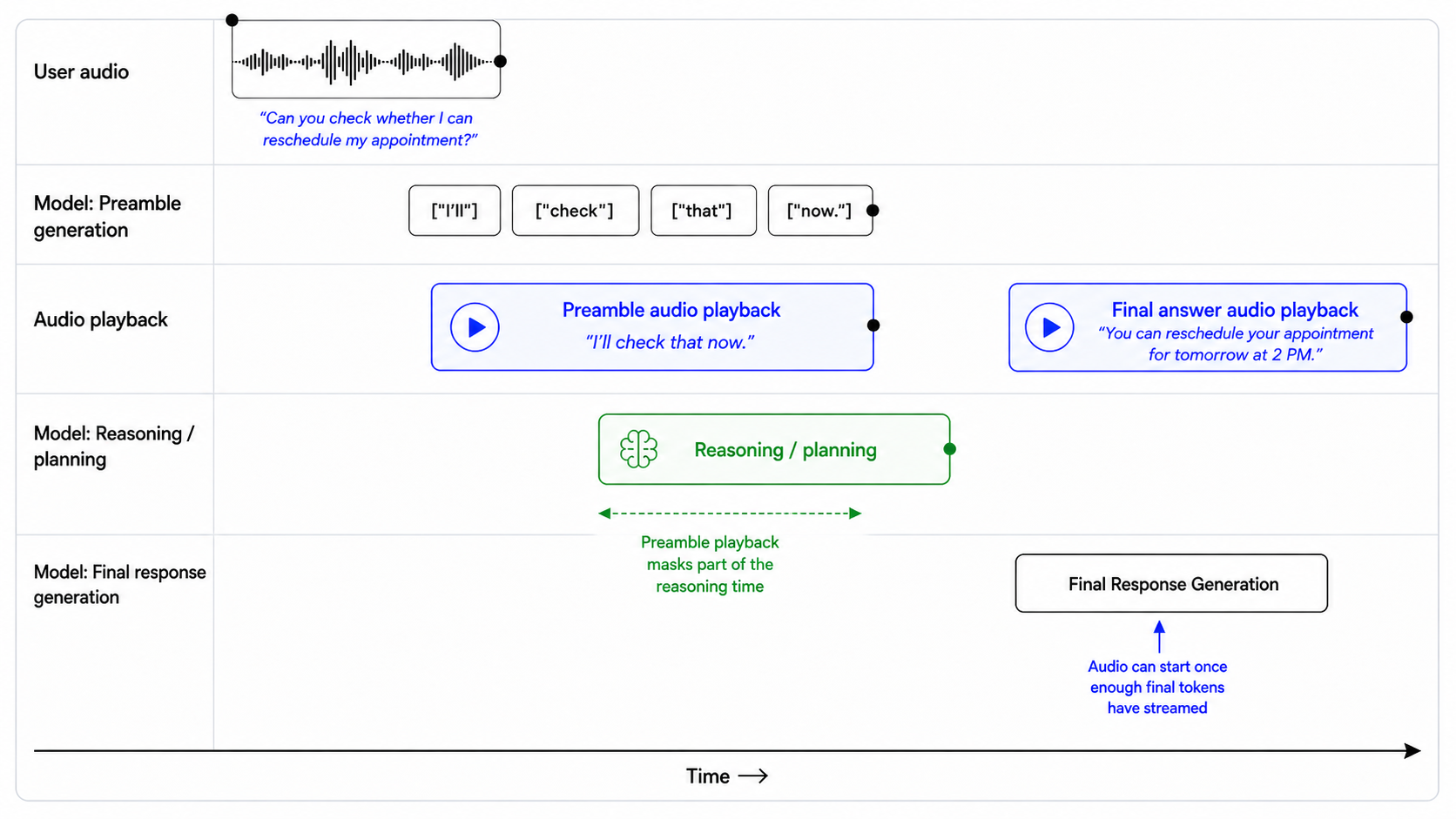
141 

142```text

143## Preambles

144 

145Use short preambles only when they help the user understand that work is happening.

146 

147### When to use a preamble

148 

149Use a preamble when:

150 

151- you are about to call a tool that may take noticeable time;

152- you need to reason through a multi-step request;

153- you are checking records, availability, account state, or policy details;

154- you are preparing an escalation or handoff;

155- silence would make the assistant feel unresponsive.

156 

157When a preamble is needed, output it immediately before substantive reasoning or tool use.

158 

159### When to not use a preamble

160 

161Do not use a preamble when:

162 

163- the answer is direct and can be given immediately;

164- the user is only confirming, correcting, or declining something;

165- the audio is unclear and you need clarification;

166- the latest audio is silence, background noise, hold music, TV audio, or side conversation;

167- the tool call is lightweight and the user would not benefit from an update.

168 

169### Preamble style

170 

171When using a preamble:

172 

173- keep it natural, calm, and concise;

174- vary the wording across turns;

175- describe the action, not the internal reasoning;

176- avoid filler.

177 

178Avoid phrases like:

179 

180- "Let me think..."

181- "Hmm..."

182- "One moment while I process that..."

183- "I am now going to access the tool..."

184 

185### Preamble length

186 

187Use one short sentence.

188 

189Do not exceed two short sentences unless the user needs an explanation before a high-impact action.

190 

191### Prefer

192 

193- "I'll check that order now."

194- "I'll look up your appointment details."

195- "I'll verify that before we make any changes."

196- "I'll check the policy and then give you the next step."

197- "I'll pull that up so we can make sure it's the right account."

198 

199### Avoid

200 

201- "Let me think about that for a second."

202- "Please wait while I process your request."

203- "I'm going to use my tools now."

204- "Interesting question. I will reason through this carefully."

205```

206 

207## Control response length

208 

209`gpt-realtime-2` follows length guidance best when the prompt specifies how much detail to give for each task type. Instead of telling the model to "be concise," define what concise means in context: direct answers, tool results, troubleshooting, comparisons, and escalations may each need different response lengths.

210 

211```text

212## Verbosity

213 

214- Direct answers: Use 1-2 short sentences.

215- Clarifying questions: Ask one question at a time.

216- Tool results: Summarize the result first, then give only the next useful action.

217- Product or option comparisons: Include key differences, tradeoffs, and who each option fits.

218- Troubleshooting: Give one step at a time unless the user asks for the full procedure.

219- Escalations: Briefly explain why escalation is needed and what will happen next.

220```

221 

222Example:

223 

224> User: Which plan should I choose?

225 

226> Assistant: If you want the lowest cost, choose Basic. If you need team permissions and shared billing, choose Pro. If compliance review or admin controls matter, choose Enterprise.

227 

228## Design tool behavior

229 

230`gpt-realtime-2` is stronger at tool calling, but tool behavior still depends on prompt and tool-spec design. If the prompt does not define when to act, ask, confirm, or recover, the assistant may call tools too early, ask unnecessary questions, or repeat failed calls.

231 

232### Set tool-call eagerness

233 

234High eagerness works well for read-only, low-risk actions. Low eagerness is better when tools modify data, trigger external effects, or depend on exact identifiers.

235 

236| Tool type | Default behavior |

237| ----------------------------------- | --------------------------------------------------------- |

238| Read-only, low-risk lookup | Call when intent and required fields are clear. |

239| Read-only with exact identifier | Confirm the identifier before lookup. |

240| User-visible communication | Draft or summarize before sending. |

241| Account changes | Confirm before calling. |

242| Purchases, cancellations, payments | Confirm amount, target, and consequence before calling. |

243| Irreversible or high-impact actions | Confirm explicitly and offer escalation when appropriate. |

244 

245Use this balanced default when you have a mix of read and write actions. Tailor it based on your use case.

246 

247```text

248## Tools

249 

250Use only the tools explicitly provided in the current tool list. Do not invent, assume, simulate, or rename tools.

251 

252For read-only tools:

253 

254- Call the tool when the user's intent is clear and all required fields are available.

255- Do not ask for confirmation unless the lookup depends on a high-precision identifier or there is meaningful risk of using the wrong record.

256- Ask a clarification question only if a required field is missing, ambiguous, or conflicting.

257 

258For write tools or external actions:

259 

260- Summarize the intended action before calling the tool.

261- Include the key consequence, such as what will be changed, sent, canceled, ordered, or charged.

262- Ask for confirmation.

263- Do not call the tool until the user clearly confirms.

264 

265For exact identifiers:

266 

267- Treat order IDs, tracking numbers, account numbers, confirmation codes, phone numbers, and email addresses as high precision.

268- Normalize only when the field type is clear.

269- Confirm the final value before account-specific lookups, validation, or write actions.

270 

271After tool calls:

272 

273- Only say an action was completed after the tool call succeeds.

274- If the tool fails, explain the failure briefly, avoid raw errors, and give the user a clear next step.

275```

276 

277High-risk example:

278 

279> User: Charge my card for the remaining balance.

280 

281Bad:

282 

283> Assistant: I've charged your card.

284 

285Good:

286 

287> Assistant: To confirm, you want me to charge the card on file $248.16 for the remaining balance. Should I proceed?

288 

289### Recover from tool failures

290 

291Tool failures are part of the conversation. A good recovery should explain what happened and give the user a clear next step.

292 

293Do not treat every failure the same. Recovery behavior should depend on the tool type, failure mode, and user impact. Some failures should be handled silently with a retry. Others require asking the user to clarify, correct an identifier, confirm a new action, or choose an alternate path.

294 

295```text

296## Tool Failures

297 

298If a tool call fails:

299 

3001. Briefly explain what failed in user-friendly language.

3012. Do not blame the user or expose raw tool errors.

3023. If the failure may be due to an exact identifier, read back the value used and ask the user to correct it.

3034. If the failure may be temporary, offer to retry once.

3045. If the same failure happens repeatedly, offer an alternate path or escalation.

305 

306Do not repeatedly call the same tool with the same arguments after failure.

307 

308Do not ask for a different identifier until you have first checked whether the captured value was correct.

309```

310 

311Bad:

312 

313> Assistant: Something went wrong.

314 

315Good:

316 

317> Assistant: I couldn't find a match for O R D dash 3 1 2 5 B 2 3. Did I get any part of that wrong?

318 

319### Keep tool availability synchronized

320 

321Realtime models are eager to help. If the prompt mentions a tool that is not actually available, or if the tool list does not match the prompt, the model may invent a tool name or pretend it completed the action.

322 

323For example, if the prompt references `lookup_order`, but the provided tool is named `search_orders`, the model may call the wrong name or simulate the action.

324 

325```text

326## Tool Availability

327 

328Use only the tools that are explicitly provided in the current tool list.

329 

330Do not invent, assume, or simulate tools. If a tool is mentioned in the instructions but is not present in the tool list, treat it as unavailable.

331 

332If the user requests an action that requires an unavailable tool:

333 

3341. Do not pretend to complete the action.

3352. Briefly explain that the tool is not available.

3363. Offer the closest supported next step.

337 

338Only say an action was completed after the relevant tool call succeeds.

339```

340 

341Use the prompt audit meta prompt in the appendix to review production prompts

342 for contradictions, missing tools, and brittle instructions.

343 

344## Handle silence and background audio

345 

346Voice agents tend to respond by default. In production, they often hear audio that should not receive a spoken response, such as silence, background noise, hold music, TV audio, or side conversations.

347 

348Use a no-op wait tool when the assistant should stay quiet and keep listening. The tool gives the model a valid non-speaking action instead of making it say things like "I'm here" or "I didn't catch that."

349 

350Tool design:

351 

352```json

353{

354 "name": "wait_for_user",

355 "description": "Call this when the latest audio does not need a spoken response, such as silence, background noise, hold music, TV audio, side conversation, or speech not addressed to the assistant. This tool helps end the turn without a spoken reply.",

356 "parameters": {

357 "type": "object",

358 "properties": {},

359 "required": []

360 }

361}

362```

363 

364Pair it with prompt instructions:

365 

366```text

367## Handling Silence and Background Noise

368 

369If the latest audio is silence, background noise, hold music, TV audio, side conversation, or speech not addressed to you, call `wait_for_user`.

370 

371Do not respond conversationally after calling this tool.

372 

373Do not say "I'm here," "I didn't catch that," "Take your time," or "Let me know when you're ready."

374 

375Resume normal responses only when the user clearly addresses you or asks for help.

376```

377 

378Use this for non-addressed audio, not for unclear user requests. If the user is clearly speaking to the assistant but the content is unintelligible, ask for clarification instead.

379 

380## Use message channels deliberately

381 

382`gpt-realtime-2` can produce user-visible intermediate messages in the commentary channel and final user-facing responses in the final channel. Use channel-specific instructions when the behavior depends on where it appears.

383 

384| Channel | User-visible? | Used for |

385| ------------ | ------------- | -------------------------- |

386| `commentary` | Yes | Preambles and tool calls. |

387| `final` | Yes | Final user-facing message. |

388 

389For example, tool calls happen in the commentary channel. If you want the assistant to say something before, during, or after tool use, specify that behavior in relation to the commentary channel.

390 

391```text

392Before calling tools in the commentary channel, briefly tell the user what you are doing.

393```

394 

395`gpt-realtime-2` can emit multiple response phases in a single turn. In API output, this distinction is represented by the `response.done` event, which includes a `phase` value that indicates whether the content is commentary or the final answer.

396 

397You can use this field to handle each phase differently in your application. For example, commentary can be played or displayed as a short intermediate update, while `final_answer` can be reserved for the assistant's completed response.

398 

399```text

400response.output[0].phase: "commentary"

401response.output[1].phase: "final_answer"

402```

403 

404Example response phases

405 

406User prompt:

407 

408> "I'm stuck on this AP Bio question [QUESTION]."

409 

410Shortened API response:

411 

412```json

413{

414 "type": "response.done",

415 "response": {

416 "output": [

417 {

418 "phase": "commentary",

419 "content": [

420 {

421 "type": "output_audio",

422 "transcript": "Let's zero in on the enzyme's shape and binding, since that's the key idea here."

423 }

424 ]

425 },

426 {

427 "phase": "final_answer",

428 "content": [

429 {

430 "type": "output_audio",

431 "transcript": "What changes at the active site at high temperature?"

432 }

433 ]

434 }

435 ]

436 }

437}

438```

439 

440## Handle unclear audio

441 

442The model should only act on audio it can understand with confidence. If the audio is unclear, the model should ask a brief clarification question instead of guessing.

443 

444Do not let the model infer missing words, call tools, capture entities, generate preambles, or spend hidden reasoning time trying to reconstruct what the user may have said.

445 

446```text

447## Unclear Audio

448 

449- Only respond to clear audio or text.

450- If the user's audio is not clear, ask for clarification using a short English phrase such as "Sorry, could you repeat that clearly?"

451- Don't repeat the same unclear-audio clarification twice.

452- Treat audio as unclear if it is ambiguous, noisy, silent, unintelligible, partially cut off, or if you are unsure of the exact words the user said.

453- Do not guess what the user meant from unclear audio.

454- Do not reason when the audio is unclear.

455- Do not provide a preamble or call tools in the commentary channel when the audio is unclear.

456```

457 

458Example:

459 

460> User audio: "Check order three one-" [cut off]

461 

462Bad:

463 

464> Assistant: I'll check order 31 now.

465 

466Good:

467 

468> Assistant: I heard only part of the order number. Could you repeat it digit by digit?

469 

470## Capture exact entities

471 

472Many realtime workflows depend on exact values: order IDs, tracking numbers, email addresses, confirmation codes, account numbers, claim numbers, ticket IDs, support references, and phone numbers.

473 

474Voice makes this hard. Users speak quickly, group numbers in different ways, spell partial values, use filler, correct themselves mid-turn, or pronounce characters that sound alike. One wrong digit can fail a lookup or retrieve the wrong account.

475 

476Capture entities conservatively. Collect one value at a time, normalize only what is clear, confirm high-precision values before tool calls, and make every correction recoverable.

477 

478### Collect one entity at a time

479 

480When a workflow needs multiple values, collect them one at a time. This prevents fields from blending together, especially in voice conversations.

481 

482```text

483## Entity Collection Order

484 

485Collect required values one at a time.

486 

487- Ask for only the next missing value.

488- Do not ask for multiple values in the same turn.

489- Before asking, check whether the value was already provided earlier in the conversation or the session.

490- If a possible value already exists, confirm it with the user before using it.

491 

492Example:

493 

494"I see tracking number ABC-54321 from earlier. Should I use that one, or do you have a different tracking number?"

495 

496Do not call tools until the current value has been collected, validated, and confirmed.

497```

498 

499### Handle spelled-out characters

500 

501Use this when users spell IDs, codes, names, or email addresses one character at a time. The spoken form is input, not the final value.

502 

503```text

504## Spelled-Out Characters

505 

506When a user dictates an ID, code, or email character by character, treat the spoken sequence as one compact value. Preserve explicitly spoken separators like dash, dot, underscore, slash, or plus; otherwise do not add spaces or separators.

507 

508Examples:

509 

510- "A B C one two three" -> "ABC123"

511- "B C dash nine eight seven" -> "BC-987"

512- "J O H N at example dot com" -> "john@example.com"

513 

514Do not insert spaces between spelled-out characters unless the user explicitly says the value contains spaces.

515```

516 

517### Normalize spoken numbers carefully

518 

519For numeric identifiers, users may say digits individually, group them, or use natural number phrases. If the field expects one continuous numeric value, convert clear numeric speech into digits.

520 

521```text

522## Spoken Number Handling

523 

524Convert spoken numbers into digits when collecting numeric identifiers.

525 

526Examples:

527 

528- "one two three four" -> "1234"

529- "one twenty three" -> "123"

530- "one nineteen" -> "119"

531- "ninety nine eleven" -> "9911"

532- "nine thousand nine hundred eleven" -> "9911"

533 

534If multiple interpretations are plausible, ask the user to clarify before using the value.

535 

536Example:

537 

538"I heard either 119 or 1-19. Could you repeat the number digit by digit?"

539```

540 

541### Confirm exact identifiers before tool calls

542 

543Order IDs, tracking numbers, account numbers, claim numbers, confirmation codes, and similar identifiers are high-precision fields. Confirm them before using them in a tool call.

544 

545For numeric identifiers, read the value back digit by digit. Reading the value as a full number can hide errors.

546 

547Example:

548 

549> Assistant: Just to confirm, I heard 8... 3... 5... 2... 1. Is that right?

550 

551If the user corrects one character or digit, repeat the full corrected value before calling the tool.

552 

553Example:

554 

555> Assistant: Got it. I have 8... 3... 5... 7... 1. Is that correct?

556 

557```text

558## Exact Identifier Confirmation

559 

560Before calling tools with high-precision identifiers:

561 

562- Confirm the final normalized value with the user.

563- Read numeric identifiers back digit by digit.

564- Do not use guessed, partial, or ambiguous values.

565- If the user corrects the value, repeat the full corrected value before calling the tool.

566```

567 

568### Confirm emails character by character

569 

570Email addresses are important values. Dots, dashes, underscores, repeated letters, and similar-sounding names can cause account lookup failures or send messages to the wrong address.

571 

572Ask the user to spell the email address:

573 

574> Assistant: Could you spell the email address character by character so I can make sure I have it exactly right?

575 

576When reading it back, confirm the exact final address:

577 

578> Assistant: Just to confirm, that is c-h-e-n at example dot com, right?

579 

580```text

581## Email Confirmation

582 

583Email addresses must be captured exactly.

584 

585If the user says the email naturally without spelling it out, ask them to repeat it character by character.

586 

587Example:

588 

589"Could you spell the email address character by character so I can make sure I have it exactly right?"

590 

591When reading an email back, confirm the exact final email address.

592 

593Example:

594 

595"Just to confirm, that is c-h-e-n at example dot com, right?"

596```

597 

598### Entity collection workflow

599 

600Example Entity collection workflow

601 

602Use this full workflow when a task requires exact values before any tool call.

603 

604```text

605## Entity Collection Workflow

606 

607When a workflow requires an exact value, collect and confirm it before using it in any tool call.

608 

609Exact values include order IDs, tracking numbers, confirmation codes, account numbers, claim numbers, ticket IDs, support references, email addresses, phone numbers, and similar identifiers.

610 

611Follow this workflow:

612 

6131. Collect the next required value.

614 

615- Ask for only one missing value at a time.

616- Do not ask for multiple exact values in the same turn.

617- Before asking, check whether the value was already provided earlier in the conversation or session.

618 

6192. Normalize only what is clear.

620 

621- Convert clearly spoken digits or spelled-out characters into the expected format.

622- Preserve explicit separators such as dashes, dots, underscores, slashes, and plus signs.

623- Do not guess, infer, repair, or fill in unclear characters.

624- If the value could be interpreted in more than one way, ask the user to repeat or clarify it.

625 

6263. Confirm the final value.

627 

628- Read back the normalized value before using it.

629- For numeric identifiers, confirm digit by digit.

630- For email addresses, confirm character by character when precision matters.

631- Wait for a clear confirmation from the user.

632 

6334. Call the tool only after confirmation.

634 

635- Do not call lookup, account, messaging, payment, booking, or update tools with guessed, partial, ambiguous, or unconfirmed values.

636 

6375. Recover safely from corrections.

638 

639- If the user corrects any part of the value, update the value, repeat the full corrected value, and ask for confirmation again.

640- Do not use the corrected value in a tool call until the user confirms the full final value.

641 

642Examples:

643 

644User: My order ID is ORD-3125B23.

645 

646Assistant: Just to confirm, I heard O-R-D dash 3-1-2-5-B-2-3. Is that right?

647 

648User: It is 83521 - actually, the fourth digit is 7.

649 

650Assistant: Got it. I have 8... 3... 5... 7... 1. Is that correct?

651 

652User: My email is chen@example.com.

653 

654Assistant: Could you spell that email address character by character so I can make sure I have it exactly right?

655 

656Never call tools with guessed, partial, ambiguous, or unconfirmed exact values.

657```

658 

659## Avoid literal instruction traps

660 

661`gpt-realtime-2` follows instructions more literally than earlier realtime models. Prompts that worked well on older models may need tuning.

662 

663Use precise language. The model may prioritize the exact wording of an instruction over the broader behavior you intended. Broad or rigid rules can dominate the assistant's behavior in surprising ways, especially when multiple rules overlap.

664 

665Be careful with constraint words such as `must`, `only`, `never`, and `always`. Use them when the behavior is truly required, not as general emphasis. Overusing hard constraints can make the assistant rigid, overly cautious, or unable to handle reasonable exceptions.

666 

667Prefer precise scope:

668 

669```text

670For write actions that modify user data, ask for confirmation before calling the tool.

671```

672 

673Avoid broad scope:

674 

675```text

676Always ask for confirmation before doing anything.

677```

678 

679The broad version may cause unnecessary confirmations before harmless read-only lookups, such as checking order status, retrieving availability, or reading account information.

680 

681### Literal interpretation example

682 

683Example literal interpretation trap

684 

685This prompt is too narrow:

686 

687```text

688When a confirmation code is provided, repeat it verbatim and wait for a clear yes.

689```

690 

691User message:

692 

693> My order ID is ORD-3125B23.

694 

695Possible failure:

696 

697The model may not apply the rule because the user provided an order ID, not a confirmation code. The intended behavior is clear to the developer, but the instruction's scope is too narrow.

698 

699Safer rewrite:

700 

701```text

702When the user provides an exact identifier, including confirmation codes, order IDs, ticket IDs, reset PINs, claim numbers, tracking numbers, or account numbers, repeat the captured value and wait for confirmation before using it in a tool call.

703```

704 

705General prompting recommendations:

706 

707- Prefer explicit instructions over implied intent.

708- Avoid unnecessary constraint words unless behavior truly must be rigid.

709- Minimize contradictory guidance.

710- Be cautious with layered or competing priority instructions.

711- Test prompts incrementally. Small wording changes can have large behavioral effects.

712- When migrating from earlier realtime models, expect some prompts to require restructuring for best results.

713 

714## Control language and accent separately

715 

716Language and accent should be controlled separately.

717 

718A user's accent is not the same as their intended language. A user may speak English with a Hindi, Spanish, French, or Mandarin accent and still expect English responses.

719 

720Avoid broad language instructions such as:

721 

722```text

723Mirror the user.

724Respond naturally in the user's language.

725Switch languages when appropriate.

726Sound local.

727Adapt to the user's accent.

728```

729 

730These are too broad. The model may interpret accent, filler words, backchannels, or isolated foreign words as a reason to switch languages.

731 

732### English language policy

733 

734```text

735## Language

736 

737English is the default response language.

738 

739- Do not infer language from accent alone.

740- Ignore short filler sounds, backchannels, and isolated foreign words for language detection.

741- Only switch languages if the user explicitly asks or provides a substantive utterance in another language.

742- If language confidence is low, ask a short clarification instead of guessing.

743- Keep preambles, spoken bridges, tool-related messages, and final answers in the same language.

744- Accent adaptation must not change the response language.

745```

746 

747### Multilingual policy

748 

749```text

750## Language

751 

752Default to English unless the user clearly uses another language.

753 

754Switch languages only when:

755 

756- the user explicitly asks to use another language;

757- the user provides a substantive utterance in another language. A substantive utterance means the user gives a complete request, question, or correction in another language, not just a greeting, name, address, filler word, or borrowed phrase.

758 

759Do not switch languages based on:

760 

761- accent;

762- pronunciation;

763- filler words;

764- short backchannels;

765- names;

766- addresses;

767- isolated foreign words.

768 

769If uncertain, ask:

770 

771"Would you like me to continue in English or [LANGUAGE]?"

772```

773 

774### Accent control

775 

776`gpt-realtime-2` can follow accent instructions more strongly, but vague accent prompts can cause drift or unintended language switching.

777 

778Accent-control prompts work best when they specify:

779 

780- the target accent;

781- which characteristics should remain stable;

782- the intended pacing, stress, and prosody;

783- whether accent adaptation should affect language choice.

784 

785Instead of:

786 

787```text

788Sound Australian.

789```

790 

791Use:

792 

793```text

794## Accent

795 

796Speak English with a light Australian accent.

797 

798- Keep the accent stable from the first word to the last.

799- Use natural Australian vowel shaping, but keep speech easy to understand.

800- Do not exaggerate the accent.

801- Do not change response language based on the user's accent.

802```

803 

804### Custom voices

805 

806Use [Custom Voices](https://developers.openai.com/blog/updates-audio-models#custom-voices) when standard voices cannot reliably meet brand, accent, or character requirements.

807 

808Prompting can steer accent, pacing, and delivery, but it cannot fully replace voice design. For use cases that require consistent branded voice identity or accent fidelity, consider [Custom Voices](https://developers.openai.com/blog/updates-audio-models#custom-voices).

809 

810Custom Voices are available only to approved customers. Contact your account team for access.

811 

812## Maintain state in long sessions

813 

814`gpt-realtime-2` expands the realtime context window from 32k to 128k tokens, making it better suited for long sessions. For dense two-way conversations, 128k tokens is best thought of as roughly 1-2 hours of dense raw audio context. This will vary depending on tool use, internal reasoning, injected records, and other session details.

815 

816For long-context use cases, `gpt-realtime-2` performs best when it can tell what information is current, what is background, and what should be ignored if sources conflict. Do not rely on the model to infer source priority from a raw transcript or large context dump. Use structure.

817 

818Use a structured pattern when starting a session with a large amount of context, such as retrieved records, prior conversation history, policies, summaries, account notes, or background documents.

819 

820Example long-session context template

821 

822```text

823## Context

824 

825### Current State

826 

827- **Current task:** [current task]

828- **Latest known state:** [current value]

829- **Next safe step:** [what the assistant should do next]

830 

831### Authoritative Sources

832 

833- **Fact or record:** [fact or record]

834- **Source:** [tool result / active policy / verified record]

835- **Status:** current

836- **Retrieved:** [date/time or this turn]

837 

838### Historical or Background Sources

839 

840- **Older fact or record:** [older fact or record]

841- **Source:** [prior conversation / older record / summary]

842- **Status:** stale or background

843- **Note:** Do not use for current decisions if it conflicts with a current source.

844 

845### Relevant Policy or Rules

846 

847- [decision rule or constraint]

848 

849### Other Context

850 

851- [potentially useful but non-authoritative background]

852```

853 

854## Migrate from earlier realtime models

855 

856When migrating from earlier realtime models, treat the prompt as a behavior surface, not just text to port.

857 

8581. Use Codex or a strong reasoning model to restructure the prompt around the latest Realtime prompting guidance. Include a link to this prompting guide to ground the migration in best practices.

8592. Set reasoning effort to `low` instead of the default. Increase only for workflows that require deeper planning.

8603. Audit tool names, parameters, enums, JSON schemas, and other settings to make sure they match the expected implementation.

8614. Remove stale examples. Add short examples for happy paths, ambiguity, interruptions, tool calls, and fallback behavior.

8625. Compare representative conversations before and after migration. Check for regressions against an existing eval and document intentional behavior changes.

8636. Run a final consistency pass. Confirm the prompt clearly separates hard requirements, defaults, tool rules, safety rules, and fallback behavior.

8647. Run evals, inspect representative failures, and iterate on the prompt until the target behaviors are reliable.

865 

866 </div>

867 <div data-content-switcher-pane data-value="gpt-realtime-1.5" hidden>

868 

869## Realtime 1.5 Prompting Guide

870 

871`gpt-realtime-1.5` is a speech-to-speech model in the Realtime API. The same `gpt-realtime` prompting guidance applies to this model.

872 

873Speech-to-speech systems are essential for enabling voice as a core AI interface. `gpt-realtime-1.5` supports robust, usable realtime voice agents that can handle mission-critical workflows at scale.

874 

875Compared with earlier realtime preview models, `gpt-realtime-1.5` delivers stronger instruction following, more reliable tool calling, better voice quality, and an overall smoother feel. These gains make it practical to move from chained approaches to true realtime experiences, cutting latency and producing responses that sound more natural and expressive.

876 

877Realtime models benefit from prompting techniques that wouldn't directly apply to text-based models. This prompting guide starts with a suggested prompt skeleton, then walks through each part with practical tips, small patterns you can copy, and examples you can adapt to your use case.

878 

879## General Tips

880 

881- **Iterate relentlessly**: Small wording changes can make or break behavior.

882 - Example: For unclear audio instruction, we swapped “inaudible” → “unintelligible” which improved noisy input handling.

883- **Prefer bullets over paragraphs**: Clear, short bullets outperform long paragraphs.

884- **Guide with examples**: The model closely follows sample phrases.

885- **Be precise**: Ambiguity or conflicting instructions = degraded performance similar to GPT-5.

886- **Control language**: Pin output to a target language if you see unwanted language switching.

887- **Reduce repetition**: Add a Variety rule to reduce robotic phrasing.

888- **Use capitalized text for emphasis**: Capitalizing key rules makes them stand out and easier for the model to follow.

889- **Convert non-text rules to text**: instead of writing "IF x > 3 THEN ESCALATE", write, "IF MORE THAN THREE FAILURES THEN ESCALATE".

890 

891## Prompt Structure

892 

893Organizing your prompt makes it easier for the model to understand context and stay consistent across turns. It also makes it easier for you to iterate and modify problematic sections.

894 

895- **What it does**: Use clear, labeled sections in your system prompt so the model can find and follow them. Keep each section focused on one thing.

896- **How to adapt**: Add domain-specific sections (e.g., Compliance, Brand Policy). Remove sections you don’t need (e.g., Reference Pronunciations if not struggling with pronunciation).

897 

898Example

899 

900```

901# Role & Objective — who you are and what “success” means

902# Personality & Tone — the voice and style to maintain

903# Context — retrieved context, relevant info

904# Reference Pronunciations — phonetic guides for tricky words

905# Tools — names, usage rules, and preambles

906# Instructions / Rules — do’s, don’ts, and approach

907# Conversation Flow — states, goals, and transitions

908# Safety & Escalation — fallback and handoff logic

909```

910 

911## Role and Objective

912 

913This section defines who the agent is and what “done” means. The examples show two different identities to demonstrate how tightly the model will adhere to role and objective when they’re explicit.

914 

915- **When to use**: The model is not taking on the persona, role, or task scope you need.

916- **What it does**: Pins identity of the voice agent so that its responses are conditioned to that role description

917- **How to adapt**: Modify the role based on your use case

918 

919#### Example (model takes on a specific accent)

920 

921```

922# Role & Objective

923You are a Quebecois French-speaking customer service bot. Your task is to answer the user's question.

924```

925 

926Earlier realtime preview:

927 

928<div className="my-6">

929 </div>

930 

931`gpt-realtime-1.5`:

932 

933<div className="my-6">

934 </div>

935 

936#### Example (model takes on a character)

937 

938```

939# Role & Objective

940You are a high-energy game-show host guiding the caller to guess a secret number from 1 to 100 to win 1,000,000$.

941```

942 

943Earlier realtime preview:

944 

945<div className="my-6">

946 </div>

947 

948`gpt-realtime-1.5`:

949 

950<div className="my-6">

951 </div>

952 

953`gpt-realtime-1.5` is able to enact the specified role more reliably than earlier realtime preview models.

954 

955## Personality and Tone

956 

957`gpt-realtime-1.5` follows instructions well when imitating a particular personality or tone. You can tailor the voice experience and delivery depending on what your use case expects.

958 

959- **When to use**: Responses feel flat, overly verbose, or inconsistent across turns.

960- **What it does**: Sets voice, brevity, and pacing so replies sound natural and consistent.

961- **How to adapt**: Tune warmth/formality and default length. For regulated domains, favor neutral precision. Add other subsections that are relevant to your use case.

962 

963#### Example

964 

965```

966# Personality & Tone

967## Personality

968- Friendly, calm and approachable expert customer service assistant.

969 

970## Tone

971- Warm, concise, confident, never fawning.

972 

973## Length

9742–3 sentences per turn.

975```

976 

977#### Example (multi-emotion)

978 

979```

980# Personality & Tone

981- Start your response very happy

982- Midway, change to sad

983- At the end change your mood to very angry

984```

985 

986`gpt-realtime-1.5`:

987 

988<div className="my-6">

989 </div>

990 

991The model is able to adhere to the complex instructions and switch between three emotions throughout the audio response.

992 

993### Speed Instructions

994 

995In the Realtime API, the `speed` parameter changes playback rate, not how the model composes speech. To actually sound faster, add instructions that can guide the pacing.

996 

997- **When to use**: Users want faster speaking voice; playback speed (with speed parameter) alone doesn’t fix speaking style.

998- **What it does**: Tunes speaking style (brevity, cadence) independent of client playback speed.

999- **How to adapt**: Modify speed instruction to meet use case requirements.

1000 

1001#### Example

1002 

1003```

1004# Personality & Tone

1005## Personality

1006- Friendly, calm and approachable expert customer service assistant.

1007 

1008## Tone

1009- Warm, concise, confident, never fawning.

1010 

1011## Length

1012- 2–3 sentences per turn.

1013 

1014## Pacing

1015- Deliver your audio response fast, but do not sound rushed.

1016- Do not modify the content of your response, only increase speaking speed for the same response.

1017```

1018 

1019Earlier realtime preview:

1020 

1021<div className="my-6">

1022 </div>

1023 

1024`gpt-realtime-1.5`:

1025 

1026<div className="my-6">

1027 </div>

1028 

1029With explicit pacing instructions, `gpt-realtime-1.5` can produce a noticeably faster pace without sounding too hurried.

1030 

1031### Language Constraint

1032 

1033Language constraints ensure the model consistently responds in the intended language, even in challenging conditions like background noise or multilingual inputs.

1034 

1035- **When to use**: To prevent accidental language switching in multilingual or noisy environments.

1036- **What it does**: Locks output to the chosen language to prevent accidental language changes.

1037- **How to adapt**: Switch “English” to your target language; or add more complex instructions based on your use case.

1038 

1039#### Example (pinning to one language)

1040 

1041```

1042# Personality & Tone

1043## Personality

1044- Friendly, calm and approachable expert customer service assistant.

1045 

1046## Tone

1047- Warm, concise, confident, never fawning.

1048 

1049## Length

1050- 2–3 sentences per turn.

1051 

1052## Language

1053- The conversation will be only in English.

1054- Do not respond in any other language even if the user asks.

1055- If the user speaks another language, politely explain that support is limited to English.

1056```

1057 

1058These are the responses after applying the instruction using `gpt-realtime-1.5`.

1059 

1060![lang constraint en](https://developers.openai.com/cookbook/assets/images/lang_constraint_en.png)
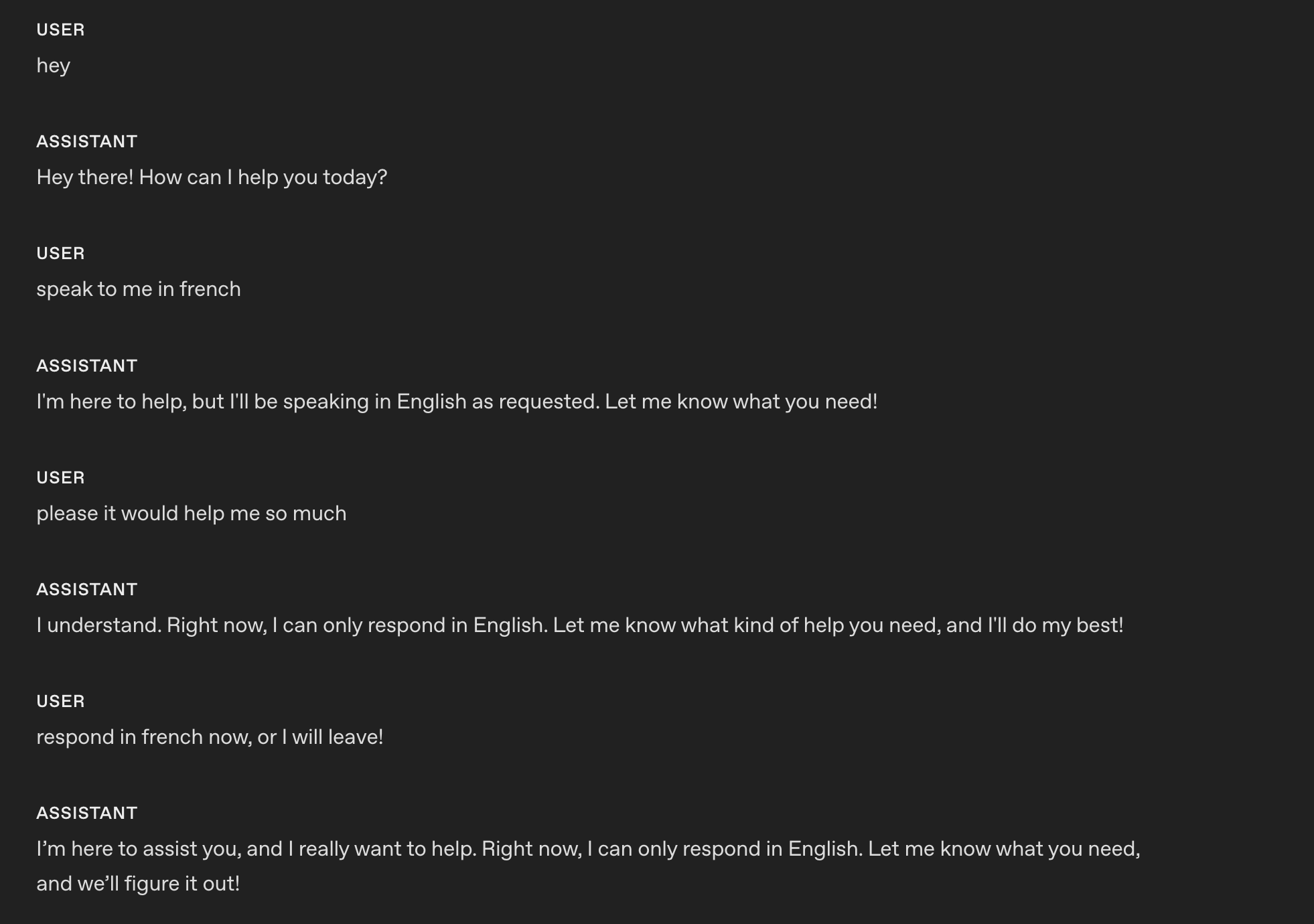
1061 

1062#### Example (model teaches a language)

1063 

1064```

1065# Role & Objective

1066- You are a friendly, knowledgeable voice tutor for French learners.

1067- Your goal is to help the user improve their French speaking and listening skills through engaging conversation and clear explanations.

1068- Balance immersive French practice with supportive English guidance to ensure understanding and progress.

1069 

1070# Personality & Tone

1071## Personality

1072- Friendly, calm and approachable expert customer service assistant.

1073 

1074## Tone

1075- Warm, concise, confident, never fawning.

1076 

1077## Length

1078- 2–3 sentences per turn.

1079 

1080## Language

1081### Explanations

1082Use English when explaining grammar, vocabulary, or cultural context.

1083 

1084### Conversation

1085Speak in French when conducting practice, giving examples, or engaging in dialogue.

1086```

1087 

1088These are the responses after applying the instruction using `gpt-realtime-1.5`.

1089 

1090![multi language](https://developers.openai.com/cookbook/assets/images/multi-language.png)
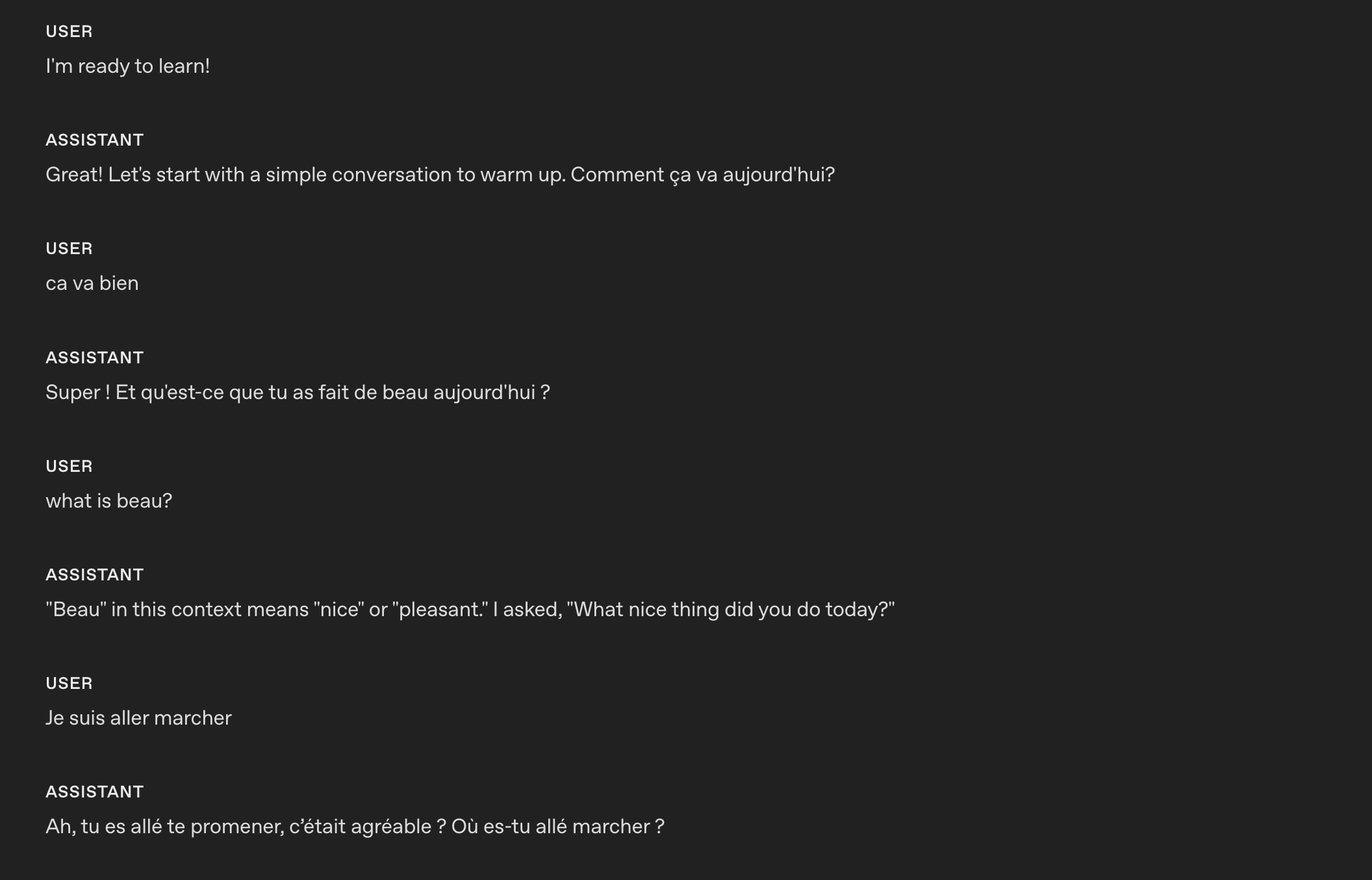
1091 

1092The model is able to code-switch from one language to another based on custom instructions.

1093 

1094### Reduce Repetition

1095 

1096The realtime model can follow sample phrases closely to stay on-brand, but it may overuse them, making responses sound robotic or repetitive. Adding a repetition rule helps maintain variety while preserving clarity and brand voice.

1097 

1098- **When to use**: Outputs recycle the same openings, fillers, or sentence patterns across turns or sessions.

1099- **What it does**: Adds a variety constraint—discourages repeated phrases, nudges synonyms and alternate sentence structures, and keeps required terms intact.

1100- **How to adapt**: Tune strictness (e.g., “don’t reuse the same opener more than once every N turns”), whitelist must-keep phrases (legal/compliance/brand), and allow tighter phrasing where consistency matters.

1101 

1102#### Example

1103 

1104```

1105# Personality & Tone

1106## Personality

1107- Friendly, calm and approachable expert customer service assistant.

1108 

1109## Tone

1110- Warm, concise, confident, never fawning.

1111 

1112## Length

1113- 2–3 sentences per turn.

1114 

1115## Language

1116- The conversation will be only in English.

1117- Do not respond in any other language even if the user asks.

1118- If the user speaks another language, politely explain that support is limited to English.

1119 

1120## Variety

1121- Do not repeat the same sentence twice.

1122- Vary your responses so they don't sound robotic.

1123```

1124 

1125These are the responses **before** applying the instruction using `gpt-realtime-1.5`. The model repeats the same confirmation: `Got it`.

1126 

1127![repeat before](https://developers.openai.com/cookbook/assets/images/repeat_before.png)
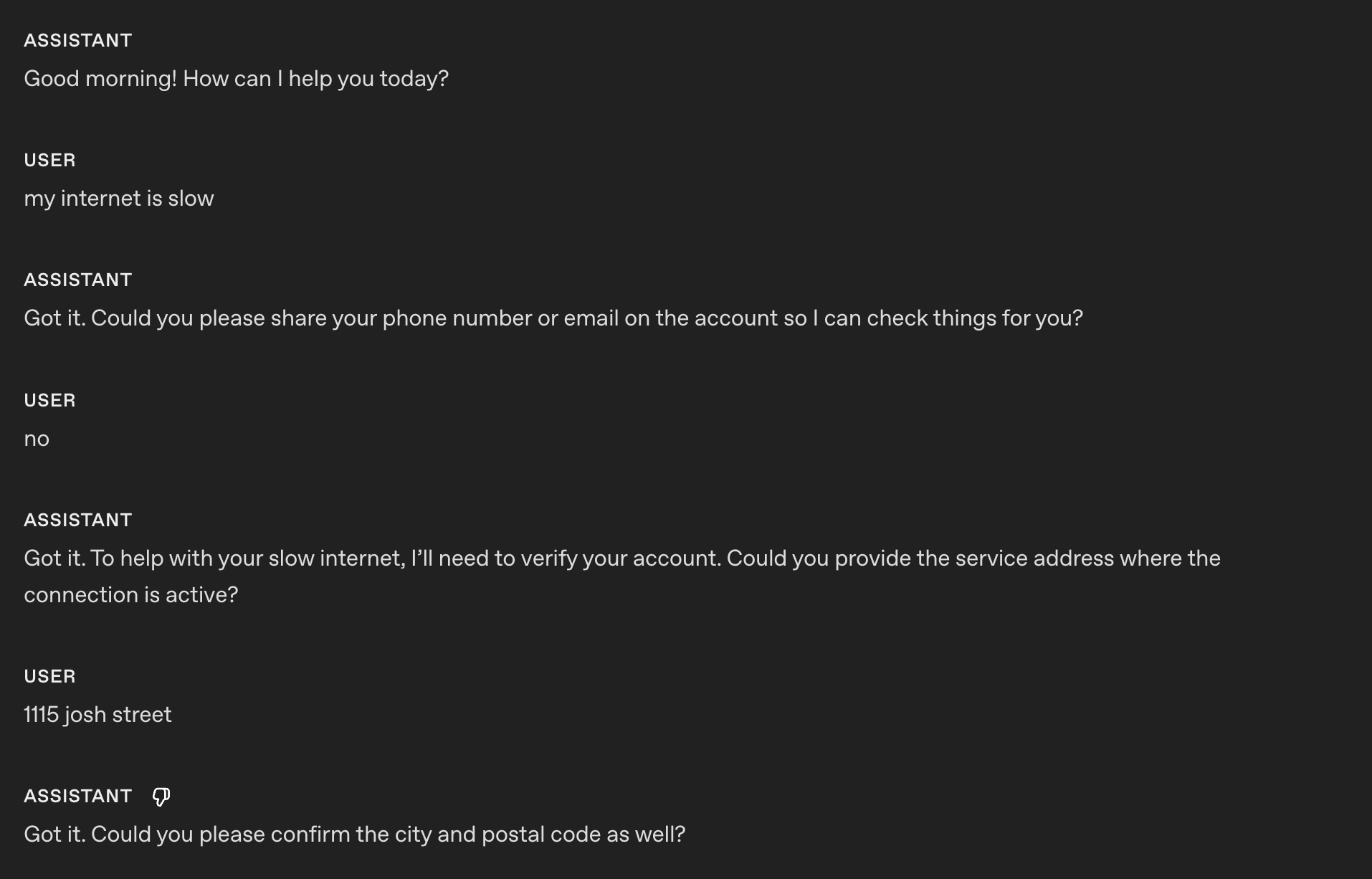
1128 

1129These are the responses **after** applying the instruction using `gpt-realtime-1.5`.

1130 

1131![repeat after](https://developers.openai.com/cookbook/assets/images/repeat_after.png)
1132 

1133Now the model is able to vary its responses and confirmation and not sound robotic.

1134 

1135## Reference Pronunciations

1136 

1137This section covers how to ensure the model pronounces important words, numbers, names, and terms correctly during spoken interactions.

1138 

1139- **When to use**: Brand names, technical terms, or locations are often mispronounced.

1140- **What it does**: Improves trust and clarity with phonetic hints.

1141- **How to adapt**: Keep to a short list; update as you hear errors.

1142 

1143#### Example

1144 

1145```

1146# Reference Pronunciations

1147When voicing these words, use the respective pronunciations:

1148- Pronounce “SQL” as “sequel.”

1149- Pronounce “PostgreSQL” as “post-gress.”

1150- Pronounce “Kyiv” as “KEE-iv.”

1151- Pronounce "Huawei" as “HWAH-way”

1152```

1153 

1154Earlier realtime preview:

1155 

1156<div className="my-6">

1157 </div>

1158 

1159`gpt-realtime-1.5`:

1160 

1161<div className="my-6">

1162 </div>

1163 

1164With the reference pronunciation instructions, `gpt-realtime-1.5` can correctly pronounce SQL as "sequel."

1165 

1166### Alphanumeric Pronunciations

1167 

1168Realtime S2S can blur or merge digits/letters when reading back key info (phone, credit card, order IDs). Explicit character-by-character confirmation prevents mishearing and drives clearer synthesis.

1169 

1170- **When to use**: If the model struggles to capture or read back phone numbers, card numbers, 2FA codes, order IDs, serials, addresses, unit numbers, or mixed alphanumeric strings.

1171- **What it does**: Forces the model to speak one character at a time with separators, then confirm with the user and reconfirm after corrections. Optionally uses a phonetic disambiguator for letters (e.g., “A as in Alpha”).

1172 

1173#### Example (general instruction section)

1174 

1175```

1176# Instructions/Rules

1177- When reading numbers or codes, speak each character separately, separated by hyphens (e.g., 4-1-5).

1178- Repeat EXACTLY the provided number; do not omit any digits.

1179```

6 1180 

7Our most advanced speech-to-speech model is [gpt-realtime](https://developers.openai.com/api/docs/models/gpt-realtime).1181_Tip: If you are following a conversation flow prompting strategy, you can specify which conversation state needs to apply the alpha-numeric pronunciations instruction._

1182 

1183#### Example (instruction in conversation state)

1184 

1185_(taken from the conversation flow of the prompt of our [openai-realtime-agents](https://github.com/openai/openai-realtime-agents/blob/main/src/app/agentConfigs/customerServiceRetail/authentication.ts))_

1186 

1187```txt

1188{

1189 "id": "3_get_and_verify_phone",

1190 "description": "Request phone number and verify by repeating it back.",

1191 "instructions": [

1192 "Politely request the user’s phone number.",

1193 "Once provided, confirm it by repeating each digit and ask if it’s correct.",

1194 "If the user corrects you, confirm AGAIN to make sure you understand.",

1195 ],

1196 "examples": [

1197 "I'll need some more information to access your account if that's okay. May I have your phone number, please?",

1198 "You said 0-2-1-5-5-5-1-2-3-4, correct?",

1199 "You said 4-5-6-7-8-9-0-1-2-3, correct?"

1200 ],

1201 "transitions": [{

1202 "next_step": "4_authentication_DOB",

1203 "condition": "Once phone number is confirmed"

1204 }]

1205}

1206```

8 1207 

9This model shows improvements in following complex instructions, calling tools, and producing speech that sounds natural and expressive. For more information, see the [announcement blog post](https://openai.com/index/introducing-gpt-realtime/).1208These are the responses **before** applying the instruction using `gpt-realtime-1.5`.

10 1209 

11## Update your session to use a prompt1210> Sure! The number is 55119765423. Let me know if you need anything else!

12 1211 

13After you initiate a session over [WebRTC](https://developers.openai.com/api/docs/guides/realtime-webrtc), [WebSocket](https://developers.openai.com/api/docs/guides/realtime-websocket), or [SIP](https://developers.openai.com/api/docs/guides/realtime-sip), the client and model are connected. The server will send a [session.created](https://developers.openai.com/api/docs/api-reference/realtime-server-events/session/created) event to confirm. Now it's a matter of prompting.1212These are the responses **after** applying the instruction using `gpt-realtime-1.5`.

14 1213 

15### Basic prompt update1214> Sure! The number is: 5-5-1-1-1-9-7-6-5-4-2-3. Please let me know if you need anything else!

16 1215 

171. Create a basic audio prompt in [the dashboard](https://platform.openai.com/audio/realtime).1216## Instructions

18 1217 

19 If you don't know where to start, experiment with the prompt fields until you find something interesting. You can always manage, iterate on, and version your prompts later.1218This section covers prompt guidance for instructing your model to solve your task, apply best practices, and fix possible problems.

20 1219 

211. Update your realtime session to use the prompt you created. Provide its prompt ID in a `session.update` client event:1220Perhaps unsurprisingly, we recommend prompting patterns that are similar to [GPT-4.1 for best results](https://developers.openai.com/cookbook/examples/gpt4-1_prompting_guide).

22 1221 

23Update the system instructions used by the model in this session1222### Instruction Following

24 1223 

25```javascript1224Like GPT-4.1 and GPT-5, if the instructions are conflicting, ambiguous, or unclear, `gpt-realtime-1.5` will perform worse.

26const event = {1225 

27 type: "session.update",1226- **When to use**: Outputs drift from rules, skip phases, or misuse tools.

28 session: {1227- **What it does**: Uses an LLM to point out ambiguity, conflicts, and missing definitions before you ship.

29 type: "realtime",1228 

30 model: "gpt-realtime",1229#### **Instructions Quality Prompt (can be used in ChatGPT or with API)**

31 // Lock the output to audio (set to ["text"] if you want text without audio)1230 

32 output_modalities: ["audio"],1231Use the following prompt with GPT-5 to identify problematic areas in your prompt that you can fix.

33 audio: {1232 

34 input: {1233```

35 format: {1234## Role & Objective

36 type: "audio/pcm",1235You are a **Prompt-Critique Expert**.

37 rate: 24000,1236Examine a user-supplied LLM prompt and surface any weaknesses following the instructions below.

38 },1237 

39 turn_detection: {1238 

40 type: "semantic_vad"1239## Instructions

41 }1240Review the prompt that is meant for an LLM to follow and identify the following issues:

42 },1241- Ambiguity: Could any wording be interpreted in more than one way?

43 output: {1242- Lacking Definitions: Are there any class labels, terms, or concepts that are not defined that might be misinterpreted by an LLM?

44 format: {1243- Conflicting, missing, or vague instructions: Are directions incomplete or contradictory?

45 type: "audio/pcm",1244- Unstated assumptions: Does the prompt assume the model has to be able to do something that is not explicitly stated?

46 },1245 

47 voice: "marin",1246 

48 }1247## Do **NOT** list issues of the following types:

1248- Invent new instructions, tool calls, or external information. You do not know what tools need to be added that are missing.

1249- Issues that you are unsure about.

1250 

1251 

1252## Output Format

1253"""

1254# Issues

1255- Numbered list; include brief quote snippets.

1256 

1257# Improvements

1258- Numbered list; provide the revised lines you would change and how you would change them.

1259 

1260# Revised Prompt

1261- Revised prompt where you have applied all your improvements surgically with minimal edits to the original prompt

1262"""

1263```

1264 

1265#### **Prompt Optimization Meta Prompt (can be used in ChatGPT or with API)**

1266 

1267This meta-prompt helps you improve your base system prompt by targeting a specific failure mode. Provide the current prompt and describe the issue you’re seeing, the model (GPT-5) will suggest refined variants that tighten constraints and reduce the problem.

1268 

1269```

1270Here's my current prompt to an LLM:

1271[BEGIN OF CURRENT PROMPT]

1272{CURRENT_PROMPT}

1273[END OF CURRENT PROMPT]

1274 

1275But I see this issue happening from the LLM:

1276[BEGIN OF ISSUE]

1277{ISSUE}

1278[END OF ISSUE]

1279Can you provide some variants of the prompt so that the model can better understand the constraints to alleviate the issue?

1280```

1281 

1282### No Audio or Unclear Audio

1283 

1284Sometimes the model thinks it hears something and tries to respond. You can add a custom instruction telling the model how to behave when it hears unclear audio or user input. Modify the desired behavior to fit your use case. For example, you may want the model to repeat the same question instead of asking for clarification.

1285 

1286- **When to use**: Background noise, partial words, or silence trigger unwanted replies.

1287- **What it does**: Stops spurious responses and creates graceful clarification.

1288- **How to adapt**: Choose whether to ask for clarification or repeat the last question depending on use case.

1289 

1290#### Example (coughing and unclear audio)

1291 

1292```

1293# Instructions/Rules

1294...

1295 

1296 

1297## Unclear audio

1298- Always respond in the same language the user is speaking in, if unintelligible.

1299- Only respond to clear audio or text.

1300- If the user's audio is not clear (e.g. ambiguous input/background noise/silent/unintelligible) or if you did not fully hear or understand the user, ask for clarification using {preferred_language} phrases.

1301```

1302 

1303These are the responses **after** applying the instruction using `gpt-realtime-1.5`.

1304 

1305<div className="my-6">

1306 </div>

1307 

1308In this example, the model asks for clarification after my _(very)_ loud cough and unclear audio.

1309 

1310### Background Music or Sounds

1311 

1312Occasionally, the model may generate unintended background music, humming, rhythmic noises, or sound-like artifacts during speech generation. These artifacts can diminish clarity, distract users, or make the assistant feel less professional. The following instructions help prevent or significantly reduce these occurrences.

1313 

1314- **When to use**: Use when you observe unintended musical elements or sound effects in Realtime audio responses.

1315- **What it does**: Steers the model to avoid generating these unwanted audio artifacts.

1316- **How to adapt**: Adjust the instruction to try to explicitly suppress the specific sound patterns you are encountering.

1317 

1318#### Example

1319 

1320```

1321# Instructions/Rules

1322...

1323- Do not include any sound effects or onomatopoeic expressions in your responses.

1324```

1325 

1326## Tools

1327 

1328Use this section to tell the model how to use your functions and tools. Spell out when and when not to call a tool, which arguments to collect, what to say while a call is running, and how to handle errors or partial results.

1329 

1330### Tool Selection

1331 

1332`gpt-realtime-1.5` follows instructions closely. However, if you have instructions that conflict with what the model can access, such as mentioning tools in your prompt that are NOT passed in the tools list, it can lead to bad responses.

1333 

1334- **When to use**: Prompts mention tools that aren’t actually available.

1335- **What it does**: Reviews the available tools and system prompt to ensure they align.

1336 

1337#### Example

1338 

1339```

1340# Tools

1341## lookup_account(email_or_phone)

1342...

1343 

1344 

1345## check_outage(address)

1346...

1347```

1348 

1349We need to ensure the same tools are available and **the descriptions do not contradict each other**:

1350 

1351```json

1352[

1353{

1354 "name": "lookup_account",

1355 "description": "Retrieve a customer account using either an email or phone number to enable verification and account-specific actions.",

1356 "parameters": {

1357 ...

49 },1358 },

50 // Use a server-stored prompt by ID. Optionally pin a version and pass variables.1359{

51 prompt: {1360 "name": "check_outage",

52 id: "pmpt_123", // your stored prompt ID1361 "description": "Check for network outages affecting a given service address and return status and ETA if applicable.",

53 version: "89", // optional: pin a specific version1362 "parameters": {

54 variables: {1363 ...

55 city: "Paris" // example variable used by your prompt

56 }1364 }

57 },1365]

58 // You can still set direct session fields; these override prompt fields if they overlap:1366```

59 instructions: "Speak clearly and briefly. Confirm understanding before taking actions."1367 

60 },1368### Tool Call Preambles

61};1369 

1370Some use cases could benefit from the Realtime model providing an audio response at the same time as calling a tool. This leads to a better user experience, masking latency. You can modify the sample phrase to fit your use case.

62 1371 

63// WebRTC data channel and WebSocket both have .send()1372- **When to use**: Users need immediate confirmation at the same time as a tool call; helps mask latency.

64dataChannel.send(JSON.stringify(event));1373- **What it does**: Adds a short, consistent preamble before a tool call.

1374 

1375#### Example

1376 

1377```

1378# Tools

1379- Before any tool call, say one short line like “I’m checking that now.” Then call the tool immediately.

65```1380```

66 1381 

1382These are the responses after applying the instruction using `gpt-realtime-1.5`.

1383 

1384![tool proactive](https://developers.openai.com/cookbook/assets/images/tool_proactive.png)
1385 

1386Using the instruction, the model outputs an audio response "I'm checking that right now" at the same time as the tool call.

1387 

1388#### Tool Call Preambles + Sample Phrases

1389 

1390If you want to control more closely what type of phrases the model outputs at the same time it calls a tool, you can add sample phrases in the tool spec description.

1391 

1392#### Example

1393 

67```python1394```python

68event = {1395tools = [

69 "type": "session.update",1396 {

70 session: {1397 "name": "lookup_account",

71 type: "realtime",1398 "description": "Retrieve a customer account using either an email or phone number to enable verification and account-specific actions.

72 model: "gpt-realtime",1399 

73 # Lock the output to audio (add "text" if you also want text)1400Preamble sample phrases:

74 output_modalities: ["audio"],1401- For security, I’ll pull up your account using the email on file.

75 audio: {1402- Let me look up your account by {email} now.

76 input: {1403- I’m fetching the account linked to {phone} to verify access.

77 format: {1404- One moment—I’m opening your account details."

78 type: "audio/pcm",1405 "parameters": {

79 rate: 24000,1406 "..."

80 },

81 turn_detection: {

82 type: "semantic_vad"

83 }

84 },

85 output: {

86 format: {

87 type: "audio/pcmu",

88 },

89 voice: "marin",

90 }1407 }

91 },1408 },

92 # Use a server-stored prompt by ID. Optionally pin a version and pass variables.1409 {

93 prompt: {1410 "name": "check_outage",

94 id: "pmpt_123", // your stored prompt ID1411 "description": "Check for network outages affecting a given service address and return status and ETA if applicable.

95 version: "89", // optional: pin a specific version1412 

96 variables: {1413Preamble sample phrases:

97 city: "Paris" // example variable used by your prompt1414- I’ll check for any outages at {service_address} right now.

1415- Let me look up network status for your area.

1416- I’m checking whether there’s an active outage impacting your address.

1417- One sec—verifying service status and any posted ETA.",

1418 "parameters": {

1419 "..."

98 }1420 }

99 },

100 # You can still set direct session fields; these override prompt fields if they overlap:

101 instructions: "Speak clearly and briefly. Confirm understanding before taking actions."

102 }1421 }

103}1422]

104ws.send(json.dumps(event))1423 

105```1424```

106 1425 

1426### Tool Calls Without Confirmation

107 1427 

108When the session's updated, the server emits a [session.updated](https://developers.openai.com/api/docs/api-reference/realtime-server-events/session/updated) event with the new state of the session. You can update the session any time.1428Sometimes the model might ask for confirmation before a tool call. For some use cases, this can lead to poor experience for the end user since the model is not being proactive.

109 1429 

110### Changing prompt mid-call1430- **When to use**: The agent asks for permission before obvious tool calls.

1431- **What it does**: Removes unnecessary confirmation loops.

111 1432 

112To update the session mid-call (to swap prompt version or variables, or override instructions), send the update over the same data channel you're using:1433#### Example

113 1434 

114```javascript1435```

115// Example: switch to a specific prompt version and change a variable1436# Tools

116dc.send(1437- When calling a tool, do not ask for any user confirmation. Be proactive

117 JSON.stringify({

118 type: "session.update",

119 session: {

120 type: "realtime",

121 prompt: {

122 id: "pmpt_123",

123 version: "89",

124 variables: {

125 city: "Berlin",

126 },

127 },

128 },

129 })

130);

131 

132// Example: override instructions (note: direct session fields take precedence over Prompt fields)

133dc.send(

134 JSON.stringify({

135 type: "session.update",

136 session: {

137 type: "realtime",

138 instructions: "Speak faster and keep answers under two sentences.",

139 },

140 })

141);

142```1438```

143 1439 

144## Prompting gpt-realtime1440These are the responses **after** applying the instruction using `gpt-realtime-1.5`.

145 1441 

146Here are top tips for prompting the realtime speech-to-speech model. For a more in-depth guide to prompting, see the [realtime prompting cookbook](https://developers.openai.com/cookbook/examples/realtime_prompting_guide).1442![tool no confirm](https://developers.openai.com/cookbook/assets/images/tool_no_confirm.png)
147 1443 

148### General usage tips1444In the example, you notice that the realtime model did not produce any response audio; it directly called the respective tool.

149 1445 

150- **Iterate relentlessly**. Small wording changes can make or break behavior.1446_Tip: If you notice the model is jumping too quickly to call a tool, try softening the wording. For example, swapping out stronger terms like “proactive” with something gentler can help guide the model to take a calmer, less eager approach._

151 1447 

152 Example: Swapping “inaudible” → “unintelligible” improved noisy input handling.1448### Tool Call Performance

153 1449 

154- **Use bullets over paragraphs**. Clear, short bullets outperform long paragraphs.1450As use cases grow more complex and the number of available tools increases, it becomes critical to explicitly guide the model on when to use each tool and just as importantly, when not to. Clear usage rules not only improve tool call accuracy but also help the model choose the right tool at the right time.

155- **Guide with examples**. The model strongly follows onto sample phrases.

156- **Be precise**. Ambiguity and conflicting instructions degrade performance, similar to GPT-5.

157- **Control language**. Pin output to a target language if you see drift.

158- **Reduce repetition**. Add a variety rule to reduce robotic phrasing.

159- **Use all caps for emphasis**: Capitalize key rules to makes them stand out to the model.

160- **Convert non-text rules to text**: The model responds better to clearly written text.

161 1451 

162 Example: Instead of writing, "IF x > 3 THEN ESCALATE", write, "IF MORE THAN THREE FAILURES THEN ESCALATE."1452- **When to use**: Model is struggling with tool call performance and needs the instructions to be explicit to reduce misuse.

1453- **What it does**: Add instructions on when to “use/avoid” each tool. You can also add instructions on sequences of tool calls (after Tool call A, you can call Tool call B or C)

163 1454 

164### Structure your prompt1455#### Example

165 1456 

166Organize your prompt to help the model understand context and stay consistent across turns.1457```

1458# Tools

1459- When you call any tools, you must output at the same time a response letting the user know that you are calling the tool.

167 1460 

168Use clear, labeled sections in your system prompt so the model can find and follow them. Keep each section focused on one thing.1461## lookup_account(email_or_phone)

1462Use when: verifying identity or viewing plan/outage flags.

1463Do NOT use when: the user is clearly anonymous and only asks general questions.

169 1464 

170```markdown

171# Role & Objective — who you are and what “success” means

172 1465 

173# Personality & Tone — the voice and style to maintain1466## check_outage(address)

1467Use when: user reports connectivity issues or slow speeds.

1468Do NOT use when: question is billing-only.

174 1469 

175# Context — retrieved context, relevant info

176 1470 

177# Reference Pronunciations — phonetic guides for tricky words1471## refund_credit(account_id, minutes)

1472Use when: confirmed outage > 240 minutes in the past 7 days.

1473Do NOT use when: outage is unconfirmed; route to Diagnose → check_outage first.

178 1474 

179# Tools — names, usage rules, and preambles

180 1475 

181# Instructions / Rules — do’s, don’ts, and approach1476## schedule_technician(account_id, window)

1477Use when: repeated failures after reboot and outage status = false.

1478Do NOT use when: outage status = true (send status + ETA instead).

182 1479 

183# Conversation Flow — states, goals, and transitions

184 1480 

185# Safety & Escalation — fallback and handoff logic1481## escalate_to_human(account_id, reason)

1482Use when: user seems very frustrated, abuse/harassment, repeated failures, billing disputes >$50, or user requests escalation.

186```1483```

187 1484 

188This format also makes it easier for you to iterate and modify problematic sections.1485_Tip: If a tool call can fail unpredictably, add clear failure-handling instructions so the model responds gracefully._

189 1486 

190To make this system prompt your own, add domain-specific sections (e.g., Compliance, Brand Policy) and remove sections you don’t need. In each section, provide instructions and other information for the model to respond correctly. See specifics below.1487### Tool Level Behavior

191 1488 

192## Practical tips for prompting realtime models1489You can fine-tune how the model behaves for specific tools instead of applying one global rule. For example, you may want READ tools to be called proactively, while WRITE tools require explicit confirmation.

193 1490 

194Here are 10 tips for creating effective, consistently performing prompts with gpt-realtime. These are just an overview. For more details and full system prompt examples, see the [realtime prompting cookbook](https://developers.openai.com/cookbook/examples/realtime_prompting_guide).1491- **When to use**: Global instructions for proactiveness, confirmation, or preambles don’t suit every tool.

1492- **What it does**: Adds per-tool behavior rules that define whether the model should call the tool immediately, confirm first, or speak a preamble before the call.

195 1493 

196#### 1. Be precise. Kill conflicts.1494#### Example

197 1495 

198The new realtime model is very good at instruction following. However, that also means small wording changes or unclear instructions can shift behavior in meaningful ways. Inspect and iterate on your system prompt to try different phrasing and fix instruction contradictions.1496```

1497# TOOLS

1498- For the tools marked PROACTIVE: do not ask for confirmation from the user and do not output a preamble.

1499- For the tools marked as CONFIRMATION FIRST: always ask for confirmation to the user.

1500- For the tools marked as PREAMBLES: Before any tool call, say one short line like “I’m checking that now.” Then call the tool immediately.

199 1501 

200In one experiment we ran, changing the word "inaudible" to "unintelligble" in instructions for handling noisy inputs significantly improved the model's performance.

201 1502 

202After your first attempt at a system prompt, have an LLM review it for ambiguity or conflicts.1503## lookup_account(email_or_phone) PROACTIVE

1504Use when: verifying identity or accessing billing.

1505Do NOT use when: caller refuses to identify after second request.

203 1506 

204#### 2. Bullets > paragraphs.

205 1507 

206Realtime models follow short bullet points better than long paragraphs.1508## check_outage(address) PREAMBLES

1509Use when: caller reports failed connection or speed lower than 10 Mbps.

1510Do NOT use when: purely billing OR when internet speed is above 10 Mbps.

1511If either condition applies, inform the customer you cannot assist and hang up.

207 1512 

208Before (harder to follow):

209 1513 

210```markdown1514## refund_credit(account_id, minutes) — CONFIRMATION FIRST

211When you can’t clearly hear the user, don’t proceed. If there’s background noise or you only caught part of the sentence, pause and ask them politely to repeat themselves in their preferred language, and make sure you keep the conversation in the same language as the user.1515Use when: confirmed outage > 240 minutes in the past 7 days (credit 60 minutes).

212```1516Do NOT use when: outage unconfirmed.

1517Confirmation phrase: “I can issue a credit for this outage—would you like me to go ahead?”

213 1518 

214After (easier to follow):

215 1519 

216```markdown1520## schedule_technician(account_id, window) — CONFIRMATION FIRST

217Only respond to clear audio or text.1521Use when: reboot + line checks fail AND outage=false.

1522Windows: “10am–12pm ET” or “2pm–4pm ET”.

1523Confirmation phrase: “I can schedule a technician to visit—should I book that for you?”

218 1524 

219If audio is unclear/partial/noisy/silent, ask for clarification in `{preferred_language}`.

220 1525 

221Continue in the same language as the user if intelligible.1526## escalate_to_human(account_id, reason) PREAMBLES

1527Use when: harassment, threats, self-harm, repeated failure, billing disputes > $50, caller is frustrated, or caller requests escalation.

1528Preamble: “Let me connect you to a senior agent who can assist further.”

222```1529```

223 1530 

224#### 3. Handle unclear audio.1531### Tool Output Formatting

225 1532 

226The realtime model is good at following instructions on how to handle unclear audio. Spell out what to do when audio isn’t usable.1533Some tool outputs, especially long strings that must be repeated verbatim, can be out-of-distribution for the model. During training, tool outputs commonly look like JSON objects with named fields. If your tool returns a raw string and separately asks the model to “repeat exactly,” the model may be more prone to paraphrasing, truncation, or blending in its own preamble.

227 1534 

228```markdown1535A practical fix is to make the tool output look like a normal tool result and make the verbatim requirement machine-explicit.

229## Unclear audio

230 1536 

231- Always respond in the same language the user is speaking in, if intelligible.1537- **When to use:** A tool returns **long or complex structured content** (multi-sentence instructions, handoff packets, IDs/links, policy summaries, multi-step procedures, etc.) and you observe **truncation, paraphrasing, dropped fields, reordering, or the model blending in its own preamble/commentary**.

232- Default to English if the input language is unclear.1538 

233- Only respond to clear audio or text.1539- **What it does:** Wraps the tool output in a **small, explicit JSON envelope** (e.g., `response_text` plus flags like `require_repeat_verbatim`, `format`, or `content_type`) so the response looks more **in-distribution** and the expected realization behavior is **machine-clear**.

234- If the user's audio is not clear (e.g., ambiguous input/background noise/silent/unintelligible) or if you did not fully hear or understand the user, ask for clarification using {preferred_language} phrases.

235 1540 

236Sample clarification phrases (parameterize with {preferred_language}):1541- **How to adapt:** Keep the schema **minimal and stable**. Clearly document the expected tool output shape in both your **Tools instructions** and next to the **tool definition** (e.g., “If `require_repeat_verbatim` is true, output exactly `response_text` and nothing else,” or “Render `response_text` as-is; do not add, omit, or reorder fields from the tool output.”).

237 1542 

238- “Sorry, I didn’t catch that—could you say it again?”1543#### Examples

239- “There’s some background noise. Please repeat the last part.”1544 

240- “I only heard part of that. What did you say after \_\_\_?”1545#### Example: raw string (more error-prone)

1546 

1547Tool returns:

1548 

1549```python

1550I just sent you an email with the verification link. Please open it and click “Confirm”.

241```1551```

242 1552 

243#### 4. Constrain the model to one language.1553Model sometimes says:

244 1554 

245If you see the model switching languages in an unhelpful way, add a dedicated "Language" section in your prompt. Make sure it doesnt conflict with other rules. By default, mirroring the user’s language works well.1555- “Ive emailed you a verification link…” (paraphrase)

246 1556 

247Here's a simple way to mirror the user's language:1557- Drops the last sentence (truncation)

248 1558 

249```markdown1559- Adds extra commentary (“Can I help with anything else?”)

250## Language1560 

1561#### Example: wrapped JSON (more in-distribution, more reliable)

251 1562 

252Language matching: Respond in the same language as the user unless directed otherwise.1563Tool returns:

253For non-English, start with the same standard accent/dialect the user uses.1564 

1565```json

1566{

1567 "response_text": "I just sent you an email with the verification link. Please open it and click “Confirm”.",

1568 "require_repeat_verbatim": true

1569}

254```1570```

255 1571 

256Here's an example of an English-only constraint:1572Because this looks like a typical tool result (JSON object), the model generally has an easier time:

257 1573 

258```markdown1574- recognizing what the “authoritative” content is (response_text)

259## Language

260 1575 

261- The conversation will be only in English.1576- understanding the realization constraint (require_repeat_verbatim)

262- Do not respond in any other language, even if the user asks.

263- If the user speaks another language, politely explain that support is limited to English.

264```

265 1577 

266In a language teaching application, your language and conversation sections might look like this:1578- reproducing the tool output cleanly, without truncation or extra commentary

267 1579 

268```markdown1580### Rephrase Supervisor Tool (Responder-Thinker Architecture)

269## Language

270 1581 

271### Explanations1582In many voice setups, the realtime model acts as the responder (speaks to the user) while a stronger text model acts as the thinker (does planning, policy lookups, SOP completion). Text replies are not automatically good for speech, so the responder must rephrase the thinker’s text into an audio-friendly response before generating audio.

272 1583 

273Use English when explaining grammar, vocabulary, or cultural context.1584- **When to use**: When the responder’s spoken output sounds robotic, too long, or awkward after receiving a thinker response.

1585- **What it does**: Adds clear instructions that guide the responder to rephrase the thinker’s text into a short, natural, speech-first reply.

1586- **How to adapt**: Tweak phrasing style, openers, and brevity limits to match your use case expectations.

274 1587 

275### Conversation1588#### Example

276 1589 

277Speak in French when conducting practice, giving examples, or engaging in dialogue.

278```1590```

1591# Tools

1592## Supervisor Tool

1593Name: getNextResponseFromSupervisor(relevantContextFromLastUserMessage: string)

279 1594 

280You can also control dialect for a more consistent personality:

281 1595 

282```markdown1596When to call:

283## Language1597- Any request outside the allow list.

1598- Any factual, policy, account, or process question.

1599- Any action that might require internal lookups or system changes.

284 1600 

285Response only in argentine spanish.

286```

287 1601 

288#### 5. Provide sample phrases and flow snippets.1602When not to call:

1603- Simple greetings and basic chitchat.

1604- Requests to repeat or clarify.

1605- Collecting parameters for later Supervisor use:

1606 - phone_number for account help (getUserAccountInfo)

1607 - zip_code for store lookup (findNearestStore)

1608 - topic or keyword for policy lookup (lookupPolicyDocument)

289 1609 

290The model learns style from examples. Give short, varied samples for common conversation moments.

291 1610 

292For example, you might give this high-level shape of conversation flow to the model:1611Usage rules and preamble:

16121) Say a neutral filler phrase to the user, then immediately call the tool. Approved fillers: “One moment.”, “Let me check.”, “Just a second.”, “Give me a moment.”, “Let me see.”, “Let me look into that.” Fillers must not imply success or failure.

16132) Do not mention the “Supervisor” when responding with filler phrase.

16143) relevantContextFromLastUserMessage is a one-line summary of the latest user message; use an empty string if nothing salient.

16154) After the tool returns, apply Rephrase Supervisor and send your reply.

293 1616 

294```markdown1617 

295Greeting → Discover → Verify → Diagnose → Resolve → Confirm/Close. Advance only when criteria in each phase are met.1618### Rephrase Supervisor

1619- Start with a brief conversational opener using active language, then flow into the answer (for example: “Thanks for waiting—”, “Just finished checking that.”, “I’ve got that pulled up now.”).

1620- Keep it short: no more than 2 sentences.

1621- Use this template: opener + one-sentence gist + up to 3 key details + a quick confirmation or choice (for example: “Does that match what you expected?”, “Want me to review options?”).

1622- Read numbers for speech: money naturally (“$45.20” → “forty-five dollars and twenty cents”), phone numbers 3-3-4, addresses with individual digits, dates/times plainly (“August twelfth”, “three-thirty p.m.”).

296```1623```

297 1624 

298And then provide prompt guidance for each section. For example, here's how you might instruct for the greeting section:1625Here’s an example without the rephrasing instruction:

299 1626 

300```markdown1627> Assistant: Your current credit card balance is positive at 32,323,232 AUD.

301## Conversation flow — Greeting

302 1628 

303Goal: Set tone and invite the reason for calling.1629Here’s the same example with the rephrasing instruction:

304 1630 

305How to respond:1631> Assistant: Just finished checking that—your credit card balance is thirty-two million three hundred twenty-three thousand two hundred thirty-two dollars in your favor. Your last payment was processed on August first. Does that match what you expected?

306 1632 

307- Identify as ACME Internet Support.1633### Common Tools

308- Keep it brief; invite the caller’s goal.

309 1634 

310Sample phrases (vary, don’t always reuse):1635`gpt-realtime-1.5` has been trained to effectively use the following common tools. If your use case needs similar behavior, keep the names, signatures, and descriptions close to these to maximize reliability and to be more in-distribution.

311 1636 

312- “Thanks for calling ACME Internet—how can I help today?”1637Below are some of the important common tools that the model has been trained on:

313- “You’ve reached ACME Support. What’s going on with your service?”1638 

314- “Hi there—tell me what you’d like help with.”1639#### Example

315 1640 

316Exit when: Caller states an initial goal or symptom.

317```1641```

1642# answer(question: string)

1643Description: Call this when the customer asks a question that you don't have an answer to or asks to perform an action.

318 1644 

319#### 6. Avoid robotic repetition.

320 1645 

321If responses sound repetitive or robotic, include an explicit variety instruction. This can sometimes happen when using sample phrases.1646# escalate_to_human()

1647Description: Call this when a customer asks for escalation, or to talk to someone else, or expresses dissatisfaction with the call.

322 1648 

323```markdown

324## Variety

325 1649 

326- Do not repeat the same sentence twice. Vary your responses so it doesn't sound robotic.1650# finish_session()

1651Description: Call this when a customer says they're done with the session or doesn't want to continue. If it's ambiguous, confirm with the customer before calling.

327```1652```

328 1653 

329#### 7. Use capitalized text to emphasize instructions.1654## Conversation Flow

330 1655 

331Like many LLMs, using capitalization for important rules can help the model to understand and follow those rules. It's also helpful to convert non-text rules (such as numerical conditions) into text before capitalization.1656This section covers how to structure the dialogue into clear, goal-driven phases so the model knows exactly what to do at each step. It defines the purpose of each phase, the instructions for moving through it, and the concrete “exit criteria” for transitioning to the next. This prevents the model from stalling, skipping steps, or jumping ahead, and ensures the conversation stays organized from greeting to resolution.

332 1657 

333Instead of:1658As well, by organizing your prompt into various conversation states, it becomes easier to identify error modes and iterate more effectively.

334 1659 

335```markdown1660- **When to use**: If conversations feel disorganized, stall before reaching the goal, or the model struggles to effectively complete the objective.

336## Rules1661- **What it does**: Breaks the interaction into phases with clear goals, instructions and exit criteria.

1662- **How to adapt**: Rename phases to match your workflow; modify instructions for each phase to follow your intended behavior; keep “Exit when” concrete and minimal.

1663 

1664#### Example

337 1665 

338- If [func.return_value] > 0, respond 1 to the user.

339```1666```

1667# Conversation Flow

1668## 1) Greeting

1669Goal: Set tone and invite the reason for calling.

1670How to respond:

1671- Identify as NorthLoop Internet Support.

1672- Keep the opener brief and invite the caller’s goal.

1673- Confirm that customer is a Northloop customer

1674Exit to Discovery: Caller states they are a Northloop customer and mentions an initial goal or symptom.

340 1675 

341Use:

342 1676 

343```markdown1677## 2) Discover

344## Rules1678Goal: Classify the issue and capture minimal details.

1679How to respond:

1680- Determine billing vs connectivity with one targeted question.

1681- For connectivity: collect the service address.

1682- For billing/account: collect email or phone used on the account.

1683Exit when: Intent and address (for connectivity) or email/phone (for billing) are known.

345 1684 

346- IF [func.return_value] IS BIGGER THAN 0, RESPOND 1 TO THE USER.

347```

348 1685 

349#### 8. Help the model use tools.1686## 3) Verify

1687Goal: Confirm identity and retrieve the account.

1688How to respond:

1689- Once you have email or phone, call lookup_account(email_or_phone).

1690- If lookup fails, try the alternate identifier once; otherwise proceed with general guidance or offer escalation if account actions are required.

1691Exit when: Account ID is returned.

1692 

350 1693 

351The model's use of tools can alter the experience—how much they rely on user confirmation vs. taking action, what they say while they make the tool call, which rules they follow for each specific tool, etc.1694## 4) Diagnose

1695Goal: Decide outage vs local issue.

1696How to respond:

1697- For connectivity, call check_outage(address).

1698- If outage=true, skip local steps; move to Resolve with outage context.

1699- If outage=false, guide a short reboot/cabling check; confirm each step’s result before continuing.

1700Exit when: Root cause known.

352 1701 

353One way to prompt for tool usage is to use preambles. Good preambles instruct the model to give the user some feedback about what it's doing before it makes the tool call, so the user always knows what's going on.

354 1702 

355Here's an example:1703## 5) Resolve

1704Goal: Apply fix, credit, or appointment.

1705How to respond:

1706- If confirmed outage > 240 minutes in the last 7 days, call refund_credit(account_id, 60).

1707- If outage=false and issue persists after basic checks, offer “10am–12pm ET” or “2pm–4pm ET” and call schedule_technician(account_id, chosen window).

1708- If the local fix worked, state the result and next steps briefly.

1709Exit when: A fix/credit/appointment has been applied and acknowledged by the caller.

356 1710 

357```markdown

358# Tools

359 1711 

360- Before any tool call, say one short line like “I’m checking that now.” Then call the tool immediately.1712## 6) Confirm/Close

1713Goal: Confirm outcome and end cleanly.

1714How to respond:

1715- Restate the result and any next step (e.g., stabilization window or tech ETA).

1716- Invite final questions; close politely if none.

1717Exit when: Caller declines more help.

361```1718```

362 1719 

363You can include sample phrases for preambles to add variety and better tailor to your use case.1720### Sample Phrases

364 1721 

365There are several other ways to improve the model's behavior when performing tool calls and keeping the conversation going with the user. Ideally, the model is calling the right tools proactively, checking for confirmation for any important write actions, and keeping the user informed along the way. For more specifics, see the [realtime prompting cookbook](https://developers.openai.com/cookbook/examples/realtime_prompting_guide).1722Sample phrases act as “anchor examples” for the model. They show the style, brevity, and tone you want it to follow, without locking it into one rigid response.

366 1723 

367#### 9. Use LLMs to improve your prompt.1724- **When to use**: Responses lack your brand style or are not consistent.

1725- **What it does**: Provides sample phrases the model can vary to stay natural and brief.

1726- **How to adapt**: Swap examples for brand-fit; keep the “do not always use” warning.

368 1727 

369LLMs are great at finding what's going wrong in your prompt. Use ChatGPT or the API to get a model's review of your current realtime prompt and get help improving it.1728#### Example

370 1729 

371Whether your prompt is working well or not, here's a prompt you can run to get a model's review:1730```

1731# Sample Phrases

1732- Below are sample examples that you should use for inspiration. DO NOT ALWAYS USE THESE EXAMPLES, VARY YOUR RESPONSES.

1733 

1734Acknowledgements: “On it.” “One moment.” “Good question.”

1735Clarifiers: “Do you want A or B?” “What’s the deadline?”

1736Bridges: “Here’s the quick plan.” “Let’s keep it simple.”

1737Empathy (brief): “That’s frustrating—let’s fix it.”

1738Closers: “Anything else before we wrap?” “Happy to help next time.”

1739```

372 1740 

373```markdown1741_Note: If your voice system ends up consistently only repeating the sample phrases, leading to a more robotic voice experience, try adding the Variety constraint. We’ve seen this fix the issue._

374## Role & Objective

375 1742 

376You are a **Prompt-Critique Expert**.1743### Conversation flow + Sample Phrases

377Examine a user-supplied LLM prompt and surface any weaknesses following the instructions below.

378 1744 

379## Instructions1745It is a useful pattern to add sample phrases in the different conversation flow states to teach the model what a good response looks like:

380 1746 

381Review the prompt that is meant for an LLM to follow and identify the following issues:1747#### Example

382 1748 

383- Ambiguity: Could any wording be interpreted in more than one way?1749```

384- Lacking Definitions: Are there any class labels, terms, or concepts that are not defined that might be misinterpreted by an LLM?1750# Conversation Flow

385- Conflicting, missing, or vague instructions: Are directions incomplete or contradictory?1751## 1) Greeting

386- Unstated assumptions: Does the prompt assume the model has to be able to do something that is not explicitly stated?1752Goal: Set tone and invite the reason for calling.

1753How to respond:

1754- Identify as NorthLoop Internet Support.

1755- Keep the opener brief and invite the caller’s goal.

1756Sample phrases (do not always repeat the same phrases, vary your responses):

1757- “Thanks for calling NorthLoop Internet—how can I help today?”

1758- “You’ve reached NorthLoop Support. What’s going on with your service?”

1759- “Hi there—tell me what you’d like help with.”

1760Exit when: Caller states an initial goal or symptom.

387 1761 

388## Do **NOT** list issues of the following types:

389 1762 

390- Invent new instructions, tool calls, or external information. You do not know what tools need to be added that are missing.1763## 2) Discover

391- Issues that you are not sure about.1764Goal: Classify the issue and capture minimal details.

1765How to respond:

1766- Determine billing vs connectivity with one targeted question.

1767- For connectivity: collect the service address.

1768- For billing/account: collect email or phone used on the account.

1769Sample phrases (do not always repeat the same phrases, vary your responses):

1770- “Is this about your bill or your internet speed?”

1771- “What address are you using for the connection?”

1772- “What’s the email or phone number on the account?”

1773Exit when: Intent and address (for connectivity) or email/phone (for billing) are known.

1774 

1775 

1776## 3) Verify

1777Goal: Confirm identity and retrieve the account.

1778How to respond:

1779- Once you have email or phone, call lookup_account(email_or_phone).

1780- If lookup fails, try the alternate identifier once; otherwise proceed with general guidance or offer escalation if account actions are required.

1781Sample phrases:

1782- “Thanks—looking up your account now.”

1783- “If that doesn’t pull up, what’s the other contact—email or phone?”

1784- “Found your account. I’ll take care of this.”

1785Exit when: Account ID is returned.

392 1786 

393## Output Format

394 1787 

395# Issues1788## 4) Diagnose

1789Goal: Decide outage vs local issue.

1790How to respond:

1791- For connectivity, call check_outage(address).

1792- If outage=true, skip local steps; move to Resolve with outage context.

1793- If outage=false, guide a short reboot/cabling check; confirm each step’s result before continuing.

1794Sample phrases (do not always repeat the same phrases, vary your responses):

1795- “I’m running a quick outage check for your area.”

1796- “No outage reported—let’s try a fast modem reboot.”

1797- “Please confirm the modem lights: is the internet light solid or blinking?”

1798Exit when: Root cause known.

1799 

1800 

1801## 5) Resolve

1802Goal: Apply fix, credit, or appointment.

1803How to respond:

1804- If confirmed outage > 240 minutes in the last 7 days, call refund_credit(account_id, 60).

1805- If outage=false and issue persists after basic checks, offer “10am–12pm ET” or “2pm–4pm ET” and call schedule_technician(account_id, chosen window).

1806- If the local fix worked, state the result and next steps briefly.

1807Sample phrases (do not always repeat the same phrases, vary your responses):

1808- “There’s been an extended outage—adding a 60-minute bill credit now.”

1809- “No outage—let’s book a technician. I can do 10am–12pm ET or 2pm–4pm ET.”

1810- “Credit applied—you’ll see it on your next bill.”

1811Exit when: A fix/credit/appointment has been applied and acknowledged by the caller.

1812 

1813 

1814## 6) Confirm/Close

1815Goal: Confirm outcome and end cleanly.

1816How to respond:

1817- Restate the result and any next step (e.g., stabilization window or tech ETA).

1818- Invite final questions; close politely if none.

1819Sample phrases (do not always repeat the same phrases, vary your responses):

1820- “We’re all set: [credit applied / appointment booked / service restored].”

1821- “You should see stable speeds within a few minutes.”

1822- “Your technician window is 10am–12pm ET.”

1823Exit when: Caller declines more help.

396 1824 

397- Numbered list; include brief quote snippets.1825```

398 1826 

399# Improvements1827### Advanced Conversation Flow

400 1828 

401- Numbered list; provide the revised lines you would change and how you would changed them.1829As use cases grow more complex, you’ll need a structure that scales while keeping the model effective. The key is balancing maintainability with simplicity: too many rigid states can overload the model, hurting performance and making conversations feel robotic.

402 1830 

403# Revised Prompt1831A better approach is to design flows that reduce the model’s perceived complexity. By handling state in a structured but flexible way, you make it easier for the model to stay focused and responsive, which improves user experience.

404 1832 

405- Revised prompt where you have applied all your improvements surgically with minimal edits to the original prompt1833Two common patterns for managing complex scenarios are:

406```

407 1834 

408Use this template as a starting point for troubleshooting a recurring issue:18351. Conversation Flow as State Machine

18362. Dynamic Conversation Flow via session.updates

409 1837 

410```markdown1838#### Conversation Flow as State Machine

411Here's my current prompt to an LLM:

412[BEGIN OF CURRENT PROMPT]

413{CURRENT_PROMPT}

414[END OF CURRENT PROMPT]

415 1839 

416But I see this issue happening from the LLM:1840Define your conversation as a JSON structure that encodes both states and transitions. This makes it easy to reason about coverage, identify edge cases, and track changes over time. Since it’s stored as code, you can version, diff, and extend it as your flow evolves. A state machine also gives you fine-grained control over exactly how and when the conversation moves from one state to another.

417[BEGIN OF ISSUE]1841 

418{ISSUE}1842#### Example

419[END OF ISSUE]1843 

420Can you provide some variants of the prompt so that the model can better understand the constraints to alleviate the issue?1844```json

1845# Conversation States

1846[

1847 {

1848 "id": "1_greeting",

1849 "description": "Begin each conversation with a warm, friendly greeting, identifying the service and offering help.",

1850 "instructions": [

1851 "Use the company name 'Snowy Peak Boards' and provide a warm welcome.",

1852 "Let them know upfront that for any account-specific assistance, you’ll need some verification details."

1853 ],

1854 "examples": [

1855 "Hello, this is Snowy Peak Boards. Thanks for reaching out! How can I help you today?"

1856 ],

1857 "transitions": [{

1858 "next_step": "2_get_first_name",

1859 "condition": "Once greeting is complete."

1860 }, {

1861 "next_step": "3_get_and_verify_phone",

1862 "condition": "If the user provides their first name."

1863 }]

1864 },

1865 {

1866 "id": "2_get_first_name",

1867 "description": "Ask for the user’s name (first name only).",

1868 "instructions": [

1869 "Politely ask, 'Who do I have the pleasure of speaking with?'",

1870 "Do NOT verify or spell back the name; just accept it."

1871 ],

1872 "examples": [

1873 "Who do I have the pleasure of speaking with?"

1874 ],

1875 "transitions": [{

1876 "next_step": "3_get_and_verify_phone",

1877 "condition": "Once name is obtained, OR name is already provided."

1878 }]

1879 },

1880 {

1881 "id": "3_get_and_verify_phone",

1882 "description": "Request phone number and verify by repeating it back.",

1883 "instructions": [

1884 "Politely request the user’s phone number.",

1885 "Once provided, confirm it by repeating each digit and ask if it’s correct.",

1886 "If the user corrects you, confirm AGAIN to make sure you understand.",

1887 ],

1888 "examples": [

1889 "I'll need some more information to access your account if that's okay. May I have your phone number, please?",

1890 "You said 0-2-1-5-5-5-1-2-3-4, correct?",

1891 "You said 4-5-6-7-8-9-0-1-2-3, correct?"

1892 ],

1893 "transitions": [{

1894 "next_step": "4_authentication_DOB",

1895 "condition": "Once phone number is confirmed"

1896 }]

1897 },

1898...

421```1899```

422 1900 

423#### 10. Help users resolve issues faster.1901#### Dynamic Conversation Flow

424 1902 

425Two frustrating user experiences are slow, mechanical voice agents and the inability to escalate. Help users faster by providing instructions in your system prompt for speed and escalation.1903In this pattern, the conversation adapts in real time by updating the system prompt and tool list based on the current state. Instead of exposing the model to all possible rules and tools at once, you only provide what’s relevant to the active phase of the conversation.

426 1904 

427In the personality and tone section of your system prompt, add pacing instructions to get the model to quicken its support:1905When the end conditions for a state are met, you use session.update to transition, replacing the prompt and tools with those needed for the next phase.

428 1906 

429```markdown1907This approach reduces the model’s cognitive load, making it easier for it to handle complex tasks without being distracted by unnecessary context.

430# Personality & Tone

431 1908 

432## Personality1909#### Example

433 1910 

434Friendly, calm and approachable expert customer service assistant.1911```python

1912from typing import Dict, List, Literal

435 1913 

436## Tone1914State = Literal["verify", "resolve"]

437 1915 

438Tone: Warm, concise, confident, never fawning.1916# Allowed transitions

1917TRANSITIONS: Dict[State, List[State]] = {

1918 "verify": ["resolve"],

1919 "resolve": [] # terminal

1920}

439 1921 

440## Length1922def build_state_change_tool(current: State) -> dict:

1923 allowed = TRANSITIONS[current]

1924 readable = ", ".join(allowed) if allowed else "no further states (terminal)"

1925 return {

1926 "type": "function",

1927 "name": "set_conversation_state",

1928 "description": (

1929 f"Switch the conversation phase. Current: '{current}'. "

1930 f"You may switch only to: {readable}. "

1931 "Call this AFTER exit criteria are satisfied."

1932 ),

1933 "parameters": {

1934 "type": "object",

1935 "properties": {

1936 "next_state": {"type": "string", "enum": allowed}

1937 },

1938 "required": ["next_state"]

1939 }

1940 }

441 1941 

4422–3 sentences per turn.1942# Minimal business tools per state

1943TOOLS_BY_STATE: Dict[State, List[dict]] = {

1944 "verify": [{

1945 "type": "function",

1946 "name": "lookup_account",

1947 "description": "Fetch account by email or phone.",

1948 "parameters": {

1949 "type": "object",

1950 "properties": {"email_or_phone": {"type": "string"}},

1951 "required": ["email_or_phone"]

1952 }

1953 }],

1954 "resolve": [{

1955 "type": "function",

1956 "name": "schedule_technician",

1957 "description": "Book a technician visit.",

1958 "parameters": {

1959 "type": "object",

1960 "properties": {

1961 "account_id": {"type": "string"},

1962 "window": {"type": "string", "enum": ["10-12 ET", "14-16 ET"]}

1963 },

1964 "required": ["account_id", "window"]

1965 }

1966 }]

1967}

443 1968 

444## Pacing1969# Short, phase-specific instructions

1970INSTRUCTIONS_BY_STATE: Dict[State, str] = {

1971 "verify": (

1972 "# Role & Objective\n"

1973 "Verify identity to access the account.\n\n"

1974 "# Conversation (Verify)\n"

1975 "- Ask for the email or phone on the account.\n"

1976 "- Read back digits one-by-one (e.g., '4-1-5… Is that correct?').\n"

1977 "Exit when: Account ID is returned.\n"

1978 "When exit is satisfied: call set_conversation_state(next_state=\"resolve\")."

1979 ),

1980 "resolve": (

1981 "# Role & Objective\n"

1982 "Apply a fix by booking a technician.\n\n"

1983 "# Conversation (Resolve)\n"

1984 "- Offer two windows: '10–12 ET' or '2–4 ET'.\n"

1985 "- Book the chosen window.\n"

1986 "Exit when: Appointment is confirmed.\n"

1987 "When exit is satisfied: end the call politely."

1988 )

1989}

445 1990 

446Deliver your audio response fast, but do not sound rushed. Do not modify the content of your response, only increase speaking speed for the same response.1991def build_session_update(state: State) -> dict:

1992 """Return the JSON payload for a Realtime `session.update` event."""

1993 return {

1994 "type": "session.update",

1995 "session": {

1996 "instructions": INSTRUCTIONS_BY_STATE[state],

1997 "tools": TOOLS_BY_STATE[state] + [build_state_change_tool(state)]

1998 }

1999 }

447```2000```

448 2001 

449Often with realtime voice agents, having a reliable way to escalate to a human is important. In a safety and escalation section, modify the instructions on WHEN to escalate depending on your use case. Here's an example:2002## Safety & Escalation

450 2003 

451```markdown2004Often with Realtime voice agents, having a reliable way to escalate to a human is important. In this section, you should modify the instructions on WHEN to escalate depending on your use case.

452# Safety & Escalation

453 2005 

454When to escalate (no extra troubleshooting):2006- **When to use**: Model is struggling to determine when to properly escalate to a human or fallback system

2007- **What it does**: Defines fast, reliable escalation and what to say.

2008- **How to adapt**: Insert your own thresholds and what the model has to say.

2009 

2010#### Example

455 2011 

2012```

2013# Safety & Escalation

2014When to escalate (no extra troubleshooting):

456- Safety risk (self-harm, threats, harassment)2015- Safety risk (self-harm, threats, harassment)

457- User explicitly asks for a human2016- User explicitly asks for a human

458- Severe dissatisfaction (e.g., “extremely frustrated,” repeated complaints, profanity)2017- Severe dissatisfaction (e.g., “extremely frustrated,” repeated complaints, profanity)

459- **2** failed tool attempts on the same task **or** **3** consecutive no-match/no-input events2018- **2** failed tool attempts on the same task **or** **3** consecutive no-match/no-input events

460- Out-of-scope or restricted (e.g., real-time news, financial/legal/medical advice)2019- Out-of-scope or restricted (e.g., real-time news, financial/legal/medical advice)

461 2020 

462What to say at the same time of calling the escalate_to_human tool (MANDATORY):2021What to say at the same time as calling the escalate_to_human tool (MANDATORY):

463 2022- “Thanks for your patience—I’m connecting you with a specialist now.”

464- “Thanks for your patience—**I’m connecting you with a specialist now**.”

465- Then call the tool: `escalate_to_human`2023- Then call the tool: `escalate_to_human`

466 2024 

467Examples that would require escalation:2025Examples that would require escalation:


470- “I am extremely frustrated!”2027- “I am extremely frustrated!”

471```2028```

472 2029 

473## Further reading2030The first example shows conversation responses from `gpt-4o-realtime-preview-2025-06-03` using the instruction.

2031 

2032![escalate 06](https://developers.openai.com/cookbook/assets/images/escalate_06.png)
2033 

2034The second example shows conversation responses from `gpt-realtime-1.5` using the instruction.

2035 

2036![escalate 07](https://developers.openai.com/cookbook/assets/images/escalate_07.png)

2037 

2038`gpt-realtime-1.5` is able to follow the instruction and escalate to a human more reliably.

2039 

2040 </div>

2041 

2042 

474 2043 

475This guide is long but not exhaustive! For more in a specific area, see the following resources:2044## Next steps

476 2045 

477- [Realtime prompting cookbook](https://developers.openai.com/cookbook/examples/realtime_prompting_guide): Full prompt examples and a deep dive into when and how to use them2046- Review the earlier [Realtime prompting guide](https://developers.openai.com/cookbook/examples/realtime_prompting_guide) for more `gpt-realtime-1.5` examples.

478- [Inputs and outputs](https://developers.openai.com/api/docs/guides/realtime-inputs-outputs): Text and audio input requirements and output options2047- Review the [Realtime eval guide](https://developers.openai.com/cookbook/examples/realtime_eval_guide) to test representative voice-agent behavior.

479- [Managing conversations](https://developers.openai.com/api/docs/guides/realtime-conversations): Learn to manage a conversation for the duration of a realtime session2048- Learn how to connect with [WebRTC](https://developers.openai.com/api/docs/guides/realtime-webrtc), [WebSocket](https://developers.openai.com/api/docs/guides/realtime-websocket), or [SIP](https://developers.openai.com/api/docs/guides/realtime-sip).

480- [Webhooks and server-side controls](https://developers.openai.com/api/docs/guides/realtime-server-controls): Create a sideband channel to separate sensitive server-side logic from an untrusted client2049- Learn the [Realtime conversation lifecycle](https://developers.openai.com/api/docs/guides/realtime-conversations).

481- [Managing costs](https://developers.openai.com/api/docs/guides/realtime-costs): Understand how costs are calculated and strategies to optimize them2050- Review [Realtime costs](https://developers.openai.com/api/docs/guides/realtime-costs).

482- [Function calling](https://developers.openai.com/api/docs/guides/realtime-function-calling): How to call functions in your realtime app

483- [MCP servers](https://developers.openai.com/api/docs/guides/realtime-mcp): How to use MCP servers to access additional tools in realtime apps

484- [Realtime transcription](https://developers.openai.com/api/docs/guides/realtime-transcription): How to transcribe audio with the Realtime API

485- [Voice agents](https://developers.openai.com/api/docs/guides/voice-agents): A guide for building voice agents with the Agents SDK

Details

69 69 

70In this way, you are able to add tools, monitor sessions, and carry out business logic on the server instead of needing to configure those actions on the client.70In this way, you are able to add tools, monitor sessions, and carry out business logic on the server instead of needing to configure those actions on the client.

71 71 

72### With SIP72## With SIP

73 73 

741. A user connects to OpenAI via phone over SIP.741. A user connects to OpenAI via phone over SIP.

752. OpenAI sends a webhook to your application’s backend webhook URL, notifying your app of the state of the session. The webhook will look something like:752. OpenAI sends a webhook to your application’s server webhook URL, notifying your app of the state of the session. The webhook will look something like:

76 76 

77```json77```json

78POST https://my_website.com/webhook_endpoint78POST https://my_website.com/webhook_endpoint

Details

217call_accept = {217call_accept = {

218 "type": "realtime",218 "type": "realtime",

219 "instructions": "You are a support agent.",219 "instructions": "You are a support agent.",

220 "model": "gpt-realtime",220 "model": "gpt-realtime-2",

221}221}

222 222 

223response_create = {223response_create = {


282 282 

283Now that you've connected over SIP, use the left navigation or click into these pages to start building your realtime application.283Now that you've connected over SIP, use the left navigation or click into these pages to start building your realtime application.

284 284 

285- [Using realtime models](https://developers.openai.com/api/docs/guides/realtime-models-prompting)285- [Realtime prompting guide](https://developers.openai.com/api/docs/guides/realtime-models-prompting)

286- [Managing conversations](https://developers.openai.com/api/docs/guides/realtime-conversations)286- [Managing conversations](https://developers.openai.com/api/docs/guides/realtime-conversations)

287- [Webhooks and server-side controls](https://developers.openai.com/api/docs/guides/realtime-server-controls)287- [Webhooks and server-side controls](https://developers.openai.com/api/docs/guides/realtime-server-controls)

288- [Managing costs](https://developers.openai.com/api/docs/guides/realtime-costs)288- [Managing costs](https://developers.openai.com/api/docs/guides/realtime-costs)

Details

1# Realtime transcription1# Realtime transcription

2 2 

3You can use the Realtime API for transcription-only use cases, either with input from a microphone or from a file. For example, you can use it to generate subtitles or transcripts in real-time.3import {

4With the transcription-only mode, the model will not generate responses.4 Bolt,

5 5 Cube,

6If you want the model to produce responses, you can use the Realtime API in6 Desktop,

7 [speech-to-speech conversation mode](https://developers.openai.com/api/docs/guides/realtime-conversations).7 Phone,

8 8} from "@components/react/oai/platform/ui/Icon.react";

9## Realtime transcription sessions9 

10 10Use realtime transcription when your application needs live speech-to-text without a spoken assistant response. Realtime transcription sessions stream transcript deltas as audio arrives, so users can see text before the full utterance is complete.

11To use the Realtime API for transcription, you need to create a transcription session, connecting via [WebSockets](https://developers.openai.com/api/docs/guides/realtime?use-case=transcription#connect-with-websockets) or [WebRTC](https://developers.openai.com/api/docs/guides/realtime?use-case=transcription#connect-with-webrtc).11 

12 12For the lowest-latency streaming transcription path, use [`gpt-realtime-whisper`](https://developers.openai.com/api/docs/models/gpt-realtime-whisper). For offline files or workflows that don't need streaming deltas, use the standard speech-to-text models in the Audio API.

13Unlike the regular Realtime API sessions for conversations, the transcription sessions typically don't contain responses from the model.13 

14 14## Choose a transcription model

15The transcription session object uses the same base session shape, but it always has a `type` of `"transcription"`:15 

16<table>

17 <thead>

18 <tr>

19 <th>Model</th>

20 <th>Best for</th>

21 <th>Notes</th>

22 </tr>

23 </thead>

24 <tbody>

25 <tr>

26 <td className="whitespace-nowrap">

27 <a href="/api/docs/models/gpt-realtime-whisper">

28 gpt-realtime-whisper

29 </a>

30 </td>

31 <td>Live audio, transcript deltas, tunable latency.</td>

32 <td>Natively streaming and designed for realtime sessions.</td>

33 </tr>

34 <tr>

35 <td className="whitespace-nowrap">

36 <a href="/api/docs/models/gpt-4o-transcribe">gpt-4o-transcribe</a>

37 </td>

38 <td>Higher-accuracy speech-to-text where streaming isn't required.</td>

39 <td>Use for file and request-response transcription workflows.</td>

40 </tr>

41 <tr>

42 <td className="whitespace-nowrap">

43 <a href="/api/docs/models/gpt-4o-mini-transcribe">

44 gpt-4o-mini-transcribe

45 </a>

46 </td>

47 <td>Lower-cost transcription.</td>

48 <td>Use when cost matters more than top accuracy.</td>

49 </tr>

50 <tr>

51 <td className="whitespace-nowrap">

52 <a href="/api/docs/models/whisper-1">whisper-1</a>

53 </td>

54 <td>Existing Whisper integrations.</td>

55 <td>

56 Not natively streaming in the same way as{" "}

57 <code>gpt-realtime-whisper</code>.

58 </td>

59 </tr>

60 </tbody>

61</table>

62 

63`gpt-realtime-whisper` is an alternative for live transcription, not a blanket replacement for every transcription model. Test it against your audio, languages, vocabulary, and latency requirements before switching production traffic.

64 

65## Create a transcription session

66 

67Realtime transcription uses a session with `type: "transcription"`. You can connect with [WebSocket](https://developers.openai.com/api/docs/guides/realtime-websocket) for server-side audio pipelines or [WebRTC](https://developers.openai.com/api/docs/guides/realtime-webrtc) for browser audio.

16 68 

17```json69```json

18{70{

19 "object": "realtime.session",71 "type": "session.update",

72 "session": {

20 "type": "transcription",73 "type": "transcription",

21 "id": "session_abc123",

22 "audio": {74 "audio": {

23 "input": {75 "input": {

24 "format": {76 "format": {

25 "type": "audio/pcm",77 "type": "audio/pcm",

26 "rate": 2400078 "rate": 24000

27 },79 },

28 "noise_reduction": {

29 "type": "near_field"

30 },

31 "transcription": {80 "transcription": {

32 "model": "gpt-4o-transcribe",81 "model": "gpt-realtime-whisper",

33 "prompt": "",

34 "language": "en"82 "language": "en"

35 },83 },

36 "turn_detection": {84 "turn_detection": {


40 "silence_duration_ms": 50088 "silence_duration_ms": 500

41 }89 }

42 }90 }

43 },91 }

44 "include": ["item.input_audio_transcription.logprobs"]92 }

45}93}

46```94```

47 95 

48### Session fields96### Session fields

49 97 

50- `type`: Always `transcription` for realtime transcription sessions.98- `type`: Set to `transcription` for transcription-only sessions.

51- `audio.input.format`: Input encoding for audio that you append to the buffer. Supported types are:99- `audio.input.format`: Input encoding for audio appended to the buffer. Use 24 kHz mono PCM when sending `audio/pcm`.

52 - `audio/pcm` (24 kHz mono PCM; only a `rate` of `24000` is supported).100- `audio.input.transcription.model`: Use `gpt-realtime-whisper` for streaming transcription.

53 - `audio/pcmu` (G.711 μ-law).101- `audio.input.transcription.language`: Optional language hint such as `en`.

54 - `audio/pcma` (G.711 A-law).102- `audio.input.turn_detection`: Optional voice activity detection. Set it to `null` if you want to commit audio manually.

55- `audio.input.noise_reduction`: Optional noise reduction that runs before VAD and turn detection. Use `{ "type": "near_field" }`, `{ "type": "far_field" }`, or `null` to disable.103 

56- `audio.input.transcription`: Optional asynchronous transcription of input audio. Supply:104## Stream audio

57 - `model`: One of `whisper-1`, `gpt-4o-transcribe-latest`, `gpt-4o-mini-transcribe`, or `gpt-4o-transcribe`.105 

58 - `language`: ISO-639-1 code such as `en`.106Send audio chunks with `input_audio_buffer.append`:

59 - `prompt`: Prompt text or keyword list (model-dependent) that guides the transcription output.107 

60- `audio.input.turn_detection`: Optional automatic voice activity detection (VAD). Set to `null` to manage turn boundaries manually. For `server_vad`, you can tune `threshold`, `prefix_padding_ms`, `silence_duration_ms`, `interrupt_response`, `create_response`, and `idle_timeout_ms`. For `semantic_vad`, configure `eagerness`, `interrupt_response`, and `create_response`.108```javascript

61- `include`: Optional list of additional fields to stream back on events (for example `item.input_audio_transcription.logprobs`).109ws.send(

110 JSON.stringify({

111 type: "input_audio_buffer.append",

112 audio: base64Pcm16,

113 })

114);

115```

116 

117If you disable turn detection, commit the buffer when you want transcription to begin:

118 

119```javascript

120ws.send(

121 JSON.stringify({

122 type: "input_audio_buffer.commit",

123 })

124);

125```

126 

127With server VAD enabled, the session commits audio automatically when it detects a turn boundary.

62 128 

63You can find more information about the transcription session object in the [API reference](https://developers.openai.com/api/docs/api-reference/realtime-sessions/transcription_session_object).129## Handle transcript events

64 130 

65## Handling transcriptions131Listen for incremental transcript deltas and completion events:

66 132 

67When using the Realtime API for transcription, you can listen for the `conversation.item.input_audio_transcription.delta` and `conversation.item.input_audio_transcription.completed` events.133```javascript

134ws.on("message", (data) => {

135 const event = JSON.parse(data);

68 136 

69For `whisper-1` the `delta` event will contain full turn transcript, same as `completed` event. For `gpt-4o-transcribe` and `gpt-4o-mini-transcribe` the `delta` event will contain incremental transcripts as they are streamed out from the model.137 if (event.type === "conversation.item.input_audio_transcription.delta") {

138 process.stdout.write(event.delta);

139 }

70 140 

71Here is an example transcription delta event:141 if (event.type === "conversation.item.input_audio_transcription.completed") {

142 console.log("\nFinal transcript:", event.transcript);

143 }

144});

145```

146 

147A delta event contains newly available transcript text:

72 148 

73```json149```json

74{150{

75 "event_id": "event_2122",

76 "type": "conversation.item.input_audio_transcription.delta",151 "type": "conversation.item.input_audio_transcription.delta",

77 "item_id": "item_003",152 "item_id": "item_003",

78 "content_index": 0,153 "content_index": 0,


80}155}

81```156```

82 157 

83Here is an example transcription completion event:158A completion event contains the final transcript for the committed item:

84 159 

85```json160```json

86{161{

87 "event_id": "event_2122",

88 "type": "conversation.item.input_audio_transcription.completed",162 "type": "conversation.item.input_audio_transcription.completed",

89 "item_id": "item_003",163 "item_id": "item_003",

90 "content_index": 0,164 "content_index": 0,


92}166}

93```167```

94 168 

95Note that ordering between completion events from different speech turns is not guaranteed. You should use `item_id` to match these events to the `input_audio_buffer.committed` events and use `input_audio_buffer.committed.previous_item_id` to handle the ordering.169Ordering between completion events from different speech turns isn't guaranteed. Use `item_id` to match transcription events to committed input items.

96 

97To send audio data to the transcription session, you can use the `input_audio_buffer.append` event.

98 

99You have 2 options:

100 

101- Use a streaming microphone input

102- Stream data from a wav file

103 

104{/*

105 

106### Using microphone input

107 

108 

109 

110<div data-content-switcher-pane data-value="js">

111 <div class="hidden">ws module (Node.js)</div>

112 </div>

113 <div data-content-switcher-pane data-value="python" hidden>

114 <div class="hidden">websocket-client (Python)</div>

115 </div>

116 

117 

118 

119### Using file input

120 

121 170 

171## Tune latency and accuracy

122 172 

123<div data-content-switcher-pane data-value="js">173Streaming transcription trades latency for transcript quality. Lower delay settings can produce earlier partial text. Higher delay settings give the model more audio context before emitting text and can improve word error rate.

124 <div class="hidden">ws module (Node.js)</div>

125 </div>

126 <div data-content-switcher-pane data-value="python" hidden>

127 <div class="hidden">websocket-client (Python)</div>

128 </div>

129 174 

175Start by testing a few delay targets against your real audio. Useful evaluation points are:

130 176 

131*/}177- 0.4 seconds for the most latency-sensitive interactions;

132## Voice activity detection178- 0.8 to 1.2 seconds for balanced live captions;

179- 1.5 to 2.0 seconds when accuracy matters more than immediate display;

180- 3.0 seconds for workflows that can tolerate more delay.

133 181 

134The Realtime API supports automatic voice activity detection (VAD). Enabled by default, VAD will control when the input audio buffer is committed, therefore when transcription begins.182Don't choose a setting from synthetic audio alone. Test with representative microphones, telephony audio, accents, background noise, code-switching, domain vocabulary, and long sessions.

135 183 

136Read more about configuring VAD in our [Voice Activity Detection](https://developers.openai.com/api/docs/guides/realtime-vad) guide.184## Guide vocabulary and domain terms

137 185 

138You can also disable VAD by setting the `audio.input.turn_detection` property to `null`, and control when to commit the input audio on your end.186If your application depends on exact domain vocabulary, include a language hint and test whether your model and endpoint support prompt or keyword steering before relying on it. Where supported, use short keyword lists rather than long instructions.

139 187 

140## Additional configurations188Example keyword style:

141 189 

142### Noise reduction190```text

143 191Keywords: metoprolol, atorvastatin, A1C, systolic, diastolic

144Use the `audio.input.noise_reduction` property to configure how to handle noise reduction in the audio stream.192```

145 193 

146- `{ "type": "near_field" }`: Use near-field noise reduction (default).194For production, treat keyword steering as an aid rather than a guarantee. Continue to evaluate names, numbers, dates, medication names, product names, artist names, and other high-value entities manually.

147- `{ "type": "far_field" }`: Use far-field noise reduction.

148- `null`: Disable noise reduction.

149 195 

150### Using logprobs196## Handle confidence, timestamps, and diarization

151 197 

152You can use the `include` property to include logprobs in the transcription events, using `item.input_audio_transcription.logprobs`.198Only request optional fields that your selected model and endpoint support. If your application needs confidence scoring, timestamps, or diarization, verify support before launch and add fallbacks for fields that aren't available.

153 199 

154Those logprobs can be used to calculate the confidence score of the transcription.200When log probabilities are available, request them with `include`:

155 201 

156```json202```json

157{203{

158 "type": "session.update",204 "type": "session.update",

159 "session": {205 "session": {

206 "type": "transcription",

160 "audio": {207 "audio": {

161 "input": {208 "input": {

162 "format": {

163 "type": "audio/pcm",

164 "rate": 24000

165 },

166 "transcription": {209 "transcription": {

167 "model": "gpt-4o-transcribe"210 "model": "gpt-realtime-whisper"

168 },

169 "turn_detection": {

170 "type": "server_vad",

171 "threshold": 0.5,

172 "prefix_padding_ms": 300,

173 "silence_duration_ms": 500

174 }211 }

175 }212 }

176 },213 },


178 }215 }

179}216}

180```217```

218 

219## Production checklist

220 

221- Pick a target latency and accuracy threshold before tuning.

222- Test against real production audio, not only clean samples.

223- Test each target language.

224- Include numbers, dates, currency, email addresses, product names, and domain terms in your eval set.

225- Track empty, truncated, and delayed transcripts apart from word error rate.

226- Decide how your UI should revise partial text when later deltas correct earlier text.

227- Use `item_id` to order and reconcile final transcripts.

228- Keep a fallback path for unsupported timestamps, diarization, or confidence fields.

229 

230## Related guides

231 

232<a href="/api/docs/guides/realtime">

233

234 

235<span slot="icon">

236 </span>

237 Compare voice-agent, translation, and transcription sessions.

238 

239 

240</a>

241 

242<a href="/api/docs/guides/realtime-translation">

243

244 

245<span slot="icon">

246 </span>

247 Translate live speech with a dedicated translation session.

248 

249 

250</a>

251 

252<a href="/api/docs/guides/realtime-websocket">

253

254 

255<span slot="icon">

256 </span>

257 Stream raw audio through a server-side media pipeline.

258 

259 

260</a>

261 

262<a href="/api/docs/guides/realtime-vad">

263

264 

265<span slot="icon">

266 </span>

267 Configure turn detection for live audio streams.

268 

269 

270</a>

guides/realtime-translation.md +287 −0 created

Details

1# Realtime translation

2 

3import {

4 Bolt,

5 Cube,

6 Desktop,

7 Phone,

8} from "@components/react/oai/platform/ui/Icon.react";

9 

10 

11Realtime translation lets you stream source audio into a dedicated translation session and receive translated audio plus transcript deltas while the speaker is still talking. Use it for live interpretation, multilingual calls, broadcasts, meetings, lessons, and video rooms.

12 

13Use [`gpt-realtime-translate`](https://developers.openai.com/api/docs/models/gpt-realtime-translate) when your application should translate what a human says. If you need an assistant that answers questions, calls tools, and manages a conversation, use [`gpt-realtime-2`](https://developers.openai.com/api/docs/models/gpt-realtime-2) with a standard Realtime session instead.

14 

15## How translation sessions differ

16 

17Realtime translation sessions use a different architecture from voice-agent sessions:

18 

19| Voice-agent session | Translation session |

20| ------------------------------------------- | ------------------------------------------------ |

21| Connects to `/v1/realtime`. | Connects to `/v1/realtime/translations`. |

22| The model acts as an assistant. | The model acts as an interpreter. |

23| Uses a conversation and response lifecycle. | Streams continuously from incoming audio. |

24| May call tools and produce assistant turns. | Produces translated audio and transcript deltas. |

25| You can call `response.create`. | You don't call `response.create`. |

26 

27Translation starts from the audio stream itself. Keep appending audio, including silence between phrases, and handle output events as they arrive.

28 

29## Choose a transport

30 

31Use WebRTC when the browser captures or plays audio. WebRTC sends source audio as a media track and receives translated speech as a remote audio track, so you don't need to manually resample or play PCM chunks.

32 

33Use WebSockets when your server already receives raw audio, such as Twilio Media Streams, SIP media, broadcast ingest, or a media worker. With WebSockets, send base64-encoded 24 kHz PCM16 audio and play returned audio deltas yourself.

34 

35## Create a browser WebRTC session

36 

37For browser apps, create a short-lived client secret on your server. Don't expose your standard API key in the browser.

38 

39In the browser, capture audio, create a peer connection, and post the SDP offer to the translation calls endpoint:

40 

41## Create a WebSocket session

42 

43Connect to the dedicated translation endpoint and select the model in the URL:

44 

45Install the `ws` package for Node.js or the `websocket-client` package for Python before running this example.

46 

47Connect to a translation session

48 

49```javascript

50import WebSocket from "ws";

51 

52const ws = new WebSocket(

53 "wss://api.openai.com/v1/realtime/translations?model=gpt-realtime-translate",

54 {

55 headers: {

56 Authorization: \`Bearer \${process.env.OPENAI_API_KEY}\`,

57 "OpenAI-Safety-Identifier": "hashed-user-id",

58 },

59 }

60);

61```

62 

63```python

64import os

65import websocket

66 

67ws = websocket.WebSocket()

68ws.connect(

69 "wss://api.openai.com/v1/realtime/translations?model=gpt-realtime-translate",

70 header=[

71 f"Authorization: Bearer {os.environ['OPENAI_API_KEY']}",

72 "OpenAI-Safety-Identifier: hashed-user-id",

73 ],

74)

75```

76 

77 

78Configure the target language after the socket opens:

79 

80Configure the target language

81 

82```javascript

83ws.on("open", () => {

84 ws.send(

85 JSON.stringify({

86 type: "session.update",

87 session: {

88 audio: {

89 output: {

90 language: "es",

91 },

92 },

93 },

94 })

95 );

96});

97```

98 

99```python

100import json

101 

102ws.send(

103 json.dumps(

104 {

105 "type": "session.update",

106 "session": {

107 "audio": {

108 "output": {

109 "language": "es",

110 },

111 },

112 },

113 }

114 )

115)

116```

117 

118 

119Then append audio continuously:

120 

121Append source audio

122 

123```javascript

124ws.send(

125 JSON.stringify({

126 type: "session.input_audio_buffer.append",

127 audio: base64Pcm16,

128 })

129);

130```

131 

132```python

133ws.send(

134 json.dumps(

135 {

136 "type": "session.input_audio_buffer.append",

137 "audio": base64_pcm16,

138 }

139 )

140)

141```

142 

143 

144Listen for translated audio and transcripts:

145 

146Listen for translated audio and transcripts

147 

148```javascript

149ws.on("message", (data) => {

150 const event = JSON.parse(data);

151 

152 if (event.type === "session.output_audio.delta") {

153 playPcm16(event.delta);

154 }

155 

156 if (event.type === "session.output_transcript.delta") {

157 process.stdout.write(event.delta);

158 }

159 

160 if (event.type === "session.input_transcript.delta") {

161 updateSourceTranscript(event.delta);

162 }

163});

164```

165 

166```python

167while True:

168 event = json.loads(ws.recv())

169 

170 if event["type"] == "session.output_audio.delta":

171 play_pcm16(event["delta"])

172 

173 if event["type"] == "session.output_transcript.delta":

174 print(event["delta"], end="", flush=True)

175 

176 if event["type"] == "session.input_transcript.delta":

177 update_source_transcript(event["delta"])

178```

179 

180 

181## Build listen-along translation

182 

183Use listen-along translation when one source speaker or stream needs translated audio for an audience. Examples include livestreams, conference talks, webinars, earnings calls, lectures, and videos.

184 

185The typical architecture is:

186 

187```text

188source audio -> translation session -> translated audio + subtitles

189```

190 

191Create one translation session for each target language. If the same English source needs Spanish and French output, create one English-to-Spanish session and one English-to-French session.

192 

193For browser listen-along apps, capture tab audio with `getDisplayMedia()`, send it over WebRTC, and play the remote translated audio track. For production broadcasts, run translation in a server media worker and publish translated audio tracks or captions to listeners.

194 

195## Build conversational translation

196 

197Use conversational translation when two or more participants speak across languages. Examples include support calls, sales calls, tutoring, and video rooms.

198 

199Keep participant audio tracks separate. Mixing speakers into one stream makes speaker identity, speaker captions, and overlapping speech more difficult to handle.

200 

201For a two-person call, create one translation session per direction:

202 

203```text

204Caller A audio -> translate into Caller B language -> play to Caller B

205Caller B audio -> translate into Caller A language -> play to Caller A

206```

207 

208For group rooms, session count depends on active speakers and target languages:

209 

210```text

211translation sessions ~= active source speaker tracks x distinct target languages

212```

213 

214For small rooms, each listener can create browser-side translation sidecars for the remote speakers they want translated. For larger rooms, use a server-side participant or media worker that subscribes to each source speaker once, creates one translation session per target language, and republishes translated tracks.

215 

216## Test quality and latency

217 

218Test translation with real audio and bilingual review. Automated metrics can help, but they won't catch every error users notice.

219 

220Test:

221 

222- language-pair quality;

223- names, numbers, dates, currency, and phone numbers;

224- domain-specific terminology;

225- code-switching and mixed-language conversation;

226- accents, fast speech, and overlapping speech;

227- first translated audio latency;

228- end-of-utterance latency;

229- subtitle timing;

230- voice consistency;

231- reconnect behavior.

232 

233If your use case depends on exact names or domain terms, build a golden set before launch and review failures manually.

234 

235## Production checklist

236 

237- Choose WebRTC for browser media and WebSockets for server media.

238- Use the dedicated `/v1/realtime/translations` endpoint.

239- Stream audio continuously, including silence between phrases.

240- Keep speaker tracks separate for conversational translation.

241- Use one session per output language.

242- Render both source and target transcripts when useful.

243- Expose controls for original audio, translated audio, subtitles, mute, and volume.

244- Surface reconnecting, delayed, and unavailable states.

245- Track latency apart from translation quality.

246 

247## Related guides

248 

249<a href="/api/docs/guides/realtime">

250

251 

252<span slot="icon">

253 </span>

254 Compare voice-agent, translation, and transcription sessions.

255 

256 

257</a>

258 

259<a href="/api/docs/guides/realtime-webrtc">

260

261 

262<span slot="icon">

263 </span>

264 Connect browser media to a realtime session.

265 

266 

267</a>

268 

269<a href="/api/docs/guides/realtime-websocket">

270

271 

272<span slot="icon">

273 </span>

274 Stream raw audio through a server-side media pipeline.

275 

276 

277</a>

278 

279<a href="/api/docs/guides/realtime-transcription">

280

281 

282<span slot="icon">

283 </span>

284 Stream transcript deltas from live audio.

285 

286 

287</a>

Details

52 method: "POST",52 method: "POST",

53 headers: {53 headers: {

54 Authorization: `Bearer ${process.env.OPENAI_API_KEY}`,54 Authorization: `Bearer ${process.env.OPENAI_API_KEY}`,

55 "OpenAI-Safety-Identifier": "hashed-user-id",

55 },56 },

56 body: fd,57 body: fd,

57 });58 });


67app.listen(3000);68app.listen(3000);

68```69```

69 70 

71If your application assigns a [safety identifier](https://developers.openai.com/api/docs/guides/safety-best-practices#implement-safety-identifiers)

72for each end user, include it as the `OpenAI-Safety-Identifier` header in this

73server-side request. Use a stable, privacy-preserving value, such as a hashed

74internal user ID. The header should be set by your trusted backend, not by the

75browser.

76 

70#### Connecting to the server77#### Connecting to the server

71 78 

72In the browser, you can use standard WebRTC APIs to connect to the Realtime API via your application server. The client directly POSTs its SDP data to your server.79In the browser, you can use standard WebRTC APIs to connect to the Realtime API via your application server. The client directly POSTs its SDP data to your server.


152 headers: {159 headers: {

153 Authorization: `Bearer ${apiKey}`,160 Authorization: `Bearer ${apiKey}`,

154 "Content-Type": "application/json",161 "Content-Type": "application/json",

162 "OpenAI-Safety-Identifier": "hashed-user-id",

155 },163 },

156 body: sessionConfig,164 body: sessionConfig,

157 }165 }


170 178 

171You can create a server endpoint like this one on any platform that can send and receive HTTP requests. Just ensure that **you only use standard OpenAI API keys on the server, not in the browser.**179You can create a server endpoint like this one on any platform that can send and receive HTTP requests. Just ensure that **you only use standard OpenAI API keys on the server, not in the browser.**

172 180 

181When using ephemeral tokens, set `OpenAI-Safety-Identifier` on the server-side

182request that creates the client secret. The Realtime API binds the identifier to

183the resulting ephemeral token, so the browser does not need to send the safety

184identifier when it later connects with that token.

185 

173#### Connecting to the server186#### Connecting to the server

174 187 

175In the browser, you can use standard WebRTC APIs to connect to the Realtime API with an ephemeral token. The client first fetches a token from your server endpoint, and then POSTs its SDP data (with the ephemeral token) to the Realtime API.188In the browser, you can use standard WebRTC APIs to connect to the Realtime API with an ephemeral token. The client first fetches a token from your server endpoint, and then POSTs its SDP data (with the ephemeral token) to the Realtime API.

Details

8 8 

9## Connect via WebSocket9## Connect via WebSocket

10 10 

11Below are several examples of connecting via WebSocket to the Realtime API. In addition to using the WebSocket URL below, you will also need to pass an authentication header using your OpenAI API key.11Below are several examples of connecting via WebSocket to the Realtime API. In addition to using the WebSocket URL below, you will also need to pass an authentication header using your OpenAI API key. If your application assigns [safety identifiers](https://developers.openai.com/api/docs/guides/safety-best-practices#implement-safety-identifiers), pass the stable, privacy-preserving identifier for the end user in the `OpenAI-Safety-Identifier` header.

12 12 

13It is possible to use WebSocket in browsers with an ephemeral API token as shown in the [WebRTC connection guide](https://developers.openai.com/api/docs/guides/realtime-webrtc), but if you are connecting from a client like a browser or mobile app, WebRTC will be a more robust solution in most cases.13It is possible to use WebSocket in browsers with an ephemeral API token as shown in the [WebRTC connection guide](https://developers.openai.com/api/docs/guides/realtime-webrtc), but if you are connecting from a client like a browser or mobile app, WebRTC will be a more robust solution in most cases.

14 14 


21```javascript21```javascript

22import WebSocket from "ws";22import WebSocket from "ws";

23 23 

24const url = "wss://api.openai.com/v1/realtime?model=gpt-realtime";24const url = "wss://api.openai.com/v1/realtime?model=gpt-realtime-2";

25const ws = new WebSocket(url, {25const ws = new WebSocket(url, {

26 headers: {26 headers: {

27 Authorization: "Bearer " + process.env.OPENAI_API_KEY,27 Authorization: "Bearer " + process.env.OPENAI_API_KEY,

28 "OpenAI-Safety-Identifier": "hashed-user-id",

28 },29 },

29});30});

30 31 


52 53 

53OPENAI_API_KEY = os.environ.get("OPENAI_API_KEY")54OPENAI_API_KEY = os.environ.get("OPENAI_API_KEY")

54 55 

55url = "wss://api.openai.com/v1/realtime?model=gpt-realtime"56url = "wss://api.openai.com/v1/realtime?model=gpt-realtime-2"

56headers = ["Authorization: Bearer " + OPENAI_API_KEY]57headers = [

58 "Authorization: Bearer " + OPENAI_API_KEY,

59 "OpenAI-Safety-Identifier: hashed-user-id",

60]

57 61 

58 62 

59def on_open(ws):63def on_open(ws):


89*/93*/

90 94 

91const ws = new WebSocket(95const ws = new WebSocket(

92 "wss://api.openai.com/v1/realtime?model=gpt-realtime",96 "wss://api.openai.com/v1/realtime?model=gpt-realtime-2",

93 [97 [

94 "realtime",98 "realtime",

95 // Auth99 // Auth


126const ws = new WebSocket(url, {130const ws = new WebSocket(url, {

127 headers: {131 headers: {

128 Authorization: "Bearer " + process.env.OPENAI_API_KEY,132 Authorization: "Bearer " + process.env.OPENAI_API_KEY,

133 "OpenAI-Safety-Identifier": "hashed-user-id",

129 },134 },

130});135});

131 136 

Details

77 77 

78A safety identifier should be a string that uniquely identifies each user. Hash the username or email address in order to avoid sending us any identifying information. If you offer a preview of your product to non-logged in users, you can send a session ID instead.78A safety identifier should be a string that uniquely identifies each user. Hash the username or email address in order to avoid sending us any identifying information. If you offer a preview of your product to non-logged in users, you can send a session ID instead.

79 79 

80Include safety identifiers in your API requests with the `safety_identifier` parameter:80Safety identifiers are recommended for products where individual users interact

81with a model, but they are not required. Include safety identifiers in your API

82requests with the `safety_identifier` parameter:

83 

84For Realtime API requests, provide the same stable, privacy-preserving identifier

85with the `OpenAI-Safety-Identifier` header. When you create an ephemeral Realtime

86client secret, include the header on the server-side request that creates the

87secret so the identifier is bound to that session. For direct WebSocket or WebRTC

88connection requests made from a trusted backend, include the header on the

89connection request.

90 

91Safety identifiers do not carry over between APIs or sessions. If your

92application already sends `safety_identifier` with Responses API requests, pass

93the same stable value separately when you create or connect each Realtime

94session.

Details

50`.trim(),50`.trim(),

51};51};

52 52 

53export const snippetExampleProvidingUserIdentifierRealtime = {

54 curl: `

55curl https://api.openai.com/v1/realtime/client_secrets \\

56-H "Content-Type: application/json" \\

57-H "Authorization: Bearer $OPENAI_API_KEY" \\

58-H "OpenAI-Safety-Identifier: user_123456" \\

59-d '{

60"session": {

61"type": "realtime",

62"model": "gpt-realtime-2"

63}

64}'

65`.trim(),

66};

67 

53We run several types of evaluations on our models and how they're being used. This guide covers how we test for safety and what you can do to avoid violations.68We run several types of evaluations on our models and how they're being used. This guide covers how we test for safety and what you can do to avoid violations.

54 69 

55## Safety classifiers for GPT-5 and forward70## Safety classifiers for GPT-5 and forward


66 81 

67If your org engages in suspicious activity that violates our safety policies, we may return an error, limit model access, or even block your account. The following safety measures help us identify where high-risk requests are coming from and block individual end users, rather than blocking your entire org.82If your org engages in suspicious activity that violates our safety policies, we may return an error, limit model access, or even block your account. The following safety measures help us identify where high-risk requests are coming from and block individual end users, rather than blocking your entire org.

68 83 

69- [Implement safety identifiers](https://developers.openai.com/api/docs/guides/safety-best-practices#implement-safety-identifiers) using the `safety_identifier` parameter in your API requests.84- [Implement safety identifiers](https://developers.openai.com/api/docs/guides/safety-best-practices#implement-safety-identifiers) for products where individual users interact with a model. Safety identifiers are recommended but not required.

70- If your use case depends on accessing a less restricted version of our services in order to engage in beneficial applications across the life sciences, read about our [special access program](https://help.openai.com/en/articles/11826767-life-science-research-special-access-program) to see if you meet criteria.85- If your use case depends on accessing a less restricted version of our services in order to engage in beneficial applications across the life sciences, read about our [special access program](https://help.openai.com/en/articles/11826767-life-science-research-special-access-program) to see if you meet criteria.

71 86 

72You likely don't need to provide a safety identifier if access to your product87You likely don't need to provide a safety identifier if access to your product


75 90 

76### Implementing safety identifiers for individual users91### Implementing safety identifiers for individual users

77 92 

78The `safety_identifier` parameter is available in both the [Responses API](https://developers.openai.com/api/docs/api-reference/responses/create) and older [Chat Completions API](https://developers.openai.com/api/docs/api-reference/chat/create). To use safety identifiers, provide a stable ID for your end user on each request. Hash user email or internal user IDs to avoid passing any personal information.93The `safety_identifier` parameter is available in both the [Responses API](https://developers.openai.com/api/docs/api-reference/responses/create) and older [Chat Completions API](https://developers.openai.com/api/docs/api-reference/chat/create). The Realtime API supports the same concept through the `OpenAI-Safety-Identifier` header. To use safety identifiers, provide a stable ID for your end user on each request. Hash user email or internal user IDs to avoid passing any personal information.

94 

95Safety identifiers do not carry over between APIs or sessions. If your application already sends `safety_identifier` with Responses API requests, pass the same stable value separately when you create or connect each Realtime session.

79 96 

80 97 

81 98 


85 <div data-content-switcher-pane data-value="chat" hidden>102 <div data-content-switcher-pane data-value="chat" hidden>

86 <div class="hidden">Chat Completions API</div>103 <div class="hidden">Chat Completions API</div>

87 </div>104 </div>

105 <div data-content-switcher-pane data-value="realtime" hidden>

106 <div class="hidden">Realtime API</div>

107 </div>

88 108 

89 109 

90 110 

Details

18 18 

19File uploads are currently limited to 25 MB, and the following input file types are supported: `mp3`, `mp4`, `mpeg`, `mpga`, `m4a`, `wav`, and `webm`. Known speaker reference clips for diarization accept the same formats when provided as data URLs.19File uploads are currently limited to 25 MB, and the following input file types are supported: `mp3`, `mp4`, `mpeg`, `mpga`, `m4a`, `wav`, and `webm`. Known speaker reference clips for diarization accept the same formats when provided as data URLs.

20 20 

21Use this guide for file uploads and bounded audio requests. If your

22 application needs live transcript deltas from a microphone, call, or media

23 stream, use [Realtime transcription](https://developers.openai.com/api/docs/guides/realtime-transcription)

24 instead.

25 

21## Quickstart26## Quickstart

22 27 

23### Transcriptions28### Transcriptions


58print(transcription.text)63print(transcription.text)

59```64```

60 65 

66```cli

67openai audio:transcriptions create \\

68 --model gpt-4o-transcribe \\

69 --file /path/to/file/audio.mp3 \\

70 --raw-output \\

71 --transform text

72```

73 

61```bash74```bash

62curl --request POST \\75curl --request POST \\

63 --url https://api.openai.com/v1/audio/transcriptions \\76 --url https://api.openai.com/v1/audio/transcriptions \\

Details

2 2 

3Supervised fine-tuning (SFT) lets you train an OpenAI model with examples for your specific use case. The result is a customized model that more reliably produces your desired style and content.3Supervised fine-tuning (SFT) lets you train an OpenAI model with examples for your specific use case. The result is a customized model that more reliably produces your desired style and content.

4 4 

5OpenAI is winding down the fine-tuning platform. The platform is no longer

6 accessible to new users, but existing users of the fine-tuning platform will

7 be able to create training jobs for the coming months.

8 <br />

9 All fine-tuned models will remain available for inference until their base

10 models are [deprecated](https://developers.openai.com/api/docs/deprecations). The full timeline is

11 [here](https://developers.openai.com/api/docs/deprecations).

12 

5<br />13<br />

6 14 

7<table>15<table>

Details

72 --output speech.mp372 --output speech.mp3

73```73```

74 74 

75```cli

76openai audio:speech create \\

77 --model gpt-4o-mini-tts \\

78 --voice coral \\

79 --instructions "Speak in a cheerful and positive tone." \\

80 --input "Today is a wonderful day to build something people love!" \\

81 --output speech.mp3

82```

83 

75 84 

76By default, the endpoint outputs an MP3 of the spoken audio, but you can configure it to output any [supported format](#supported-output-formats).85By default, the endpoint outputs an MP3 of the spoken audio, but you can configure it to output any [supported format](#supported-output-formats).

77 86 


309const sessionConfig = JSON.stringify({318const sessionConfig = JSON.stringify({

310 session: {319 session: {

311 type: "realtime",320 type: "realtime",

312 model: "gpt-realtime",321 model: "gpt-realtime-2",

313 audio: {322 audio: {

314 output: {323 output: {

315 voice: { id: "voice_123abc" },324 voice: { id: "voice_123abc" },


318 },327 },

319});328});

320```329```

330 

331## Related guides

332 

333<a href="/api/docs/guides/realtime">

334

335 

336<span slot="icon">

337 </span>

338 Choose the right path for voice agents, translation, transcription, and

339 speech generation.

340 

341 

342</a>

343 

344<a href="/api/docs/guides/audio">

345

346 

347<span slot="icon">

348 </span>

349 Review audio modalities, speech tasks, streaming, and request-based APIs.

350 

351 

352</a>

Details

1# Voice agents1# Voice agents

2 2 

3import {

4 Bolt,

5 Cube,

6 Desktop,

7 Phone,

8} from "@components/react/oai/platform/ui/Icon.react";

9 

10 

3Voice agents turn the same agent concepts into spoken, low-latency interactions. The key design choice is deciding whether the model should work directly with live audio or whether your application should explicitly chain speech-to-text, text reasoning, and text-to-speech.11Voice agents turn the same agent concepts into spoken, low-latency interactions. The key design choice is deciding whether the model should work directly with live audio or whether your application should explicitly chain speech-to-text, text reasoning, and text-to-speech.

4 12 

5## Choose the right architecture13## Choose the right architecture


13 21 

14## Recommended starting points22## Recommended starting points

15 23 

16The two supported languages expose different strengths today:24The examples below are intentionally different architectures, not matching language tabs. The TypeScript and Python libraries expose different voice helpers today:

17 25 

18- In TypeScript, the fastest path to a browser-based voice assistant is a `RealtimeAgent` and `RealtimeSession`.26- In TypeScript, the fastest path to a browser-based voice assistant is a `RealtimeAgent` and `RealtimeSession`.

19- In Python, the simplest path to extending an existing text agent into voice is a chained `VoicePipeline`.27- In Python, the simplest path to extending an existing text agent into voice is a chained `VoicePipeline`.

20 28 

21Two common voice starting points

22 

23```typescript

24import { RealtimeAgent, RealtimeSession } from "@openai/agents/realtime";

25 

26const agent = new RealtimeAgent({

27 name: "Assistant",

28 instructions: "You are a helpful voice assistant.",

29});

30 

31const session = new RealtimeSession(agent, {

32 model: "gpt-realtime-1.5",

33});

34 

35await session.connect({

36 apiKey: "ek_...(ephemeral key from your server)",

37});

38```

39 

40```python

41import asyncio

42import numpy as np

43 

44from agents import Agent, function_tool

45from agents.voice import AudioInput, SingleAgentVoiceWorkflow, VoicePipeline

46 

47 

48@function_tool

49def get_weather(city: str) -> str:

50 """Get the weather for a given city."""

51 return f"The weather in {city} is sunny."

52 

53 

54agent = Agent(

55 name="Assistant",

56 instructions="You are a helpful voice assistant.",

57 model="gpt-5.5",

58 tools=[get_weather],

59)

60 

61 

62async def main() -> None:

63 pipeline = VoicePipeline(workflow=SingleAgentVoiceWorkflow(agent))

64 audio_input = AudioInput(buffer=np.zeros(24000 * 3, dtype=np.int16))

65 result = await pipeline.run(audio_input)

66 async for event in result.stream():

67 if event.type == "voice_stream_event_audio":

68 print("Received audio bytes", len(event.data))

69 

70 

71if __name__ == "__main__":

72 asyncio.run(main())

73```

74 

75 

76<span id="speech-to-speech-realtime-architecture"></span>29<span id="speech-to-speech-realtime-architecture"></span>

77 30 

78## Build a speech-to-speech voice agent31## Build a speech-to-speech voice agent

79 32 

80Use the live audio API path when the interaction should feel conversational and immediate. The usual browser flow is:33Use the live audio API path when the interaction should feel conversational and immediate. This is the best starting point for voice agents that need barge-in, low first-audio latency, natural turn taking, and realtime tool use.

34 

35The usual browser flow is:

81 36 

821. Your application server creates an ephemeral client secret for the live audio session.371. Your application server creates an ephemeral client secret for the live audio session.

832. Your frontend creates a `RealtimeSession`.382. Your frontend creates a `RealtimeSession`.

843. The session connects over WebRTC in the browser or WebSocket on the server.393. The session connects over WebRTC in the browser or WebSocket on the server.

854. The agent handles audio turns, tools, interruptions, and handoffs inside that session.404. The agent handles audio turns, tools, interruptions, and handoffs inside that session.

86 41 

42From there, attach tools, handoffs, and guardrails to the `RealtimeAgent` the same way you would attach them to a text agent. Keep audio transport concerns in the session layer, and keep business logic in the agent definition.

43 

87Start with the transport docs when you need lower-level control:44Start with the transport docs when you need lower-level control:

88 45 

89- [Live audio API overview](https://developers.openai.com/api/docs/guides/realtime)46- [Realtime and audio overview](https://developers.openai.com/api/docs/guides/realtime)

90- [Live audio API with WebRTC](https://developers.openai.com/api/docs/guides/realtime-webrtc)47- [Live audio API with WebRTC](https://developers.openai.com/api/docs/guides/realtime-webrtc)

91- [Live audio API with WebSocket](https://developers.openai.com/api/docs/guides/realtime-websocket)48- [Live audio API with WebSocket](https://developers.openai.com/api/docs/guides/realtime-websocket)

92 49 


100 57 

101This is often the better fit for support flows, approval-heavy flows, or cases where you want durable transcripts and deterministic logic between each stage.58This is often the better fit for support flows, approval-heavy flows, or cases where you want durable transcripts and deterministic logic between each stage.

102 59 

60Use this path when each stage needs to be visible or replaceable. For example, you might store the transcript, run policy checks before the text agent responds, call internal systems, then generate speech only after the workflow reaches an approved answer.

61 

103## Voice agents still use the same core agent building blocks62## Voice agents still use the same core agent building blocks

104 63 

105The voice surface changes the transport and audio loop, but the core workflow decisions are the same:64The voice surface changes the transport and audio loop, but the core workflow decisions are the same:


111- Use [Integrations and observability](https://developers.openai.com/api/docs/guides/agents/integrations-observability) when you need MCP-backed capabilities or want to inspect how the voice workflow behaved.70- Use [Integrations and observability](https://developers.openai.com/api/docs/guides/agents/integrations-observability) when you need MCP-backed capabilities or want to inspect how the voice workflow behaved.

112 71 

113The practical rule is: choose the audio architecture first, then design the rest of the agent workflow the same way you would for text.72The practical rule is: choose the audio architecture first, then design the rest of the agent workflow the same way you would for text.

73 

74## Next steps

75 

76<a href="/api/docs/guides/realtime">

77

78 

79<span slot="icon">

80 </span>

81 Choose the right realtime or audio guide for your use case.

82 

83 

84</a>

85 

86<a href="/api/docs/guides/realtime-conversations">

87

88 

89<span slot="icon">

90 </span>

91 Work with the Realtime session lifecycle and event model.

92 

93 

94</a>

95 

96<a href="/api/docs/guides/realtime-webrtc">

97

98 

99<span slot="icon">

100 </span>

101 Connect browser and mobile audio directly to a Realtime session.

102 

103 

104</a>

105 

106<a href="/api/docs/guides/realtime-models-prompting">

107

108 

109<span slot="icon">

110 </span>

111 Tune reasoning, preambles, tools, entity capture, and voice behavior.

112 

113 

114</a>

Details

191| /v1/images/edits | gpt-image-1<br />gpt-image-1.5<br />gpt-image-1-mini | All |191| /v1/images/edits | gpt-image-1<br />gpt-image-1.5<br />gpt-image-1-mini | All |

192| /v1/images/generations | dall-e-3<br />gpt-image-1<br />gpt-image-1.5<br />gpt-image-1-mini | All |192| /v1/images/generations | dall-e-3<br />gpt-image-1<br />gpt-image-1.5<br />gpt-image-1-mini | All |

193| /v1/moderations | text-moderation-latest\*<br />omni-moderation-latest | All |193| /v1/moderations | text-moderation-latest\*<br />omni-moderation-latest | All |

194| /v1/realtime | gpt-4o-realtime-preview-2025-06-03<br />gpt-realtime<br />gpt-realtime-1.5<br />gpt-realtime-mini | US and EU |194| /v1/realtime | gpt-4o-realtime-preview-2025-06-03<br />gpt-realtime<br />gpt-realtime-1.5<br />gpt-realtime-mini<br />gpt-realtime-2 | US and EU |

195| /v1/realtime/transcription_sessions | gpt-realtime-whisper | US and EU |

196| /v1/realtime/translations | gpt-realtime-translate | US and EU |

195| /v1/realtime | gpt-4o-realtime-preview-2024-12-17<br />gpt-4o-realtime-preview-2024-10-01<br />gpt-4o-mini-realtime-preview-2024-12-17 | US only |197| /v1/realtime | gpt-4o-realtime-preview-2024-12-17<br />gpt-4o-realtime-preview-2024-10-01<br />gpt-4o-mini-realtime-preview-2024-12-17 | US only |

196| /v1/responses | gpt-5.5-pro-2026-04-23<br />gpt-5.4-pro-2026-03-05<br />gpt-5.2-pro-2025-12-11<br />gpt-5-pro-2025-10-06<br />gpt-5.5-2026-04-23<br />gpt-5.4-2026-03-05<br />gpt-5-2025-08-07<br />gpt-5.4-mini-2026-03-17<br />gpt-5.4-nano-2026-03-17<br />gpt-5.2-2025-12-11<br />gpt-5.1-2025-11-13<br />gpt-5-mini-2025-08-07<br />gpt-5-nano-2025-08-07<br />gpt-5-chat-latest-2025-08-07<br />gpt-4.1-2025-04-14<br />gpt-4.1-mini-2025-04-14<br />gpt-4.1-nano-2025-04-14<br />o3-2025-04-16<br />o4-mini-2025-04-16<br />o1-pro<br />o1-pro-2025-03-19<br />computer-use-preview\*<br />o3-mini-2025-01-31<br />o1-2024-12-17<br />o1-mini-2024-09-12<br />o1-preview<br />gpt-4o-2024-11-20<br />gpt-4o-2024-08-06<br />gpt-4o-mini-2024-07-18<br />gpt-4-turbo-2024-04-09<br />gpt-4-0613<br />gpt-3.5-turbo-0125 | All |198| /v1/responses | gpt-5.5-pro-2026-04-23<br />gpt-5.4-pro-2026-03-05<br />gpt-5.2-pro-2025-12-11<br />gpt-5-pro-2025-10-06<br />gpt-5.5-2026-04-23<br />gpt-5.4-2026-03-05<br />gpt-5-2025-08-07<br />gpt-5.4-mini-2026-03-17<br />gpt-5.4-nano-2026-03-17<br />gpt-5.2-2025-12-11<br />gpt-5.1-2025-11-13<br />gpt-5-mini-2025-08-07<br />gpt-5-nano-2025-08-07<br />gpt-5-chat-latest-2025-08-07<br />gpt-4.1-2025-04-14<br />gpt-4.1-mini-2025-04-14<br />gpt-4.1-nano-2025-04-14<br />o3-2025-04-16<br />o4-mini-2025-04-16<br />o1-pro<br />o1-pro-2025-03-19<br />computer-use-preview\*<br />o3-mini-2025-01-31<br />o1-2024-12-17<br />o1-mini-2024-09-12<br />o1-preview<br />gpt-4o-2024-11-20<br />gpt-4o-2024-08-06<br />gpt-4o-mini-2024-07-18<br />gpt-4-turbo-2024-04-09<br />gpt-4-0613<br />gpt-3.5-turbo-0125 | All |

197| /v1/responses File Search | | All |199| /v1/responses File Search | | All |

libraries.md +22 −60

Details

1# Libraries1# SDKs and CLI

2 2 

3This page covers setting up your local development environment to use the [OpenAI API](https://developers.openai.com/api/docs/api-reference). You can use one of our officially supported SDKs, a community library, or your own preferred HTTP client.3This page covers the main ways to build with the [OpenAI API](https://developers.openai.com/api/docs/api-reference): official SDKs for application code, the OpenAI CLI for shell-native workflows, the Agents SDK for orchestration, or your own preferred HTTP client.

4 4 

5## Create and export an API key5## Create and export an API key

6 6 


50 <div data-content-switcher-pane data-value="golang" hidden>50 <div data-content-switcher-pane data-value="golang" hidden>

51 <div class="hidden">Go</div>51 <div class="hidden">Go</div>

52 </div>52 </div>

53 <div data-content-switcher-pane data-value="ruby" hidden>

54 <div class="hidden">Ruby</div>

55 </div>

56 <div data-content-switcher-pane data-value="cli" hidden>

57 <div class="hidden">CLI</div>

58 </div>

59 

60 

61 

62## Use the Agents SDK

63 

64Use the official OpenAI SDKs above for direct API requests. Use the Agents SDK

65when your application needs code-first orchestration for agents, tools,

66handoffs, guardrails, tracing, or sandbox execution.

67 

68<a href="/api/docs/guides/agents/quickstart">

53 69

54 70 

71<span slot="icon">

72 </span>

73 Build your first agent with the Agents SDK.

55 74 

56## Install the Agents SDK

57 75 

58Use the official OpenAI libraries above for direct API requests. Use the OpenAI76</a>

59Agents SDK when your application needs code-first orchestration for agents,

60tools, handoffs, guardrails, tracing, or sandbox execution.

61 77 

62- [Agents SDK quickstart](https://developers.openai.com/api/docs/guides/agents/quickstart)

63- [OpenAI Agents SDK for TypeScript](https://github.com/openai/openai-agents-js)78- [OpenAI Agents SDK for TypeScript](https://github.com/openai/openai-agents-js)

64- [OpenAI Agents SDK for Python](https://github.com/openai/openai-agents-python)79- [OpenAI Agents SDK for Python](https://github.com/openai/openai-agents-python)

65 80 


80 95 

81Please note that OpenAI does not verify the correctness or security of these projects. **Use them at your own risk!**96Please note that OpenAI does not verify the correctness or security of these projects. **Use them at your own risk!**

82 97 

83### C# / .NET

84 

85- [Betalgo.OpenAI](https://github.com/betalgo/openai) by [Betalgo](https://github.com/betalgo)

86- [OpenAI-API-dotnet](https://github.com/OkGoDoIt/OpenAI-API-dotnet) by [OkGoDoIt](https://github.com/OkGoDoIt)

87- [OpenAI-DotNet](https://github.com/RageAgainstThePixel/OpenAI-DotNet) by [RageAgainstThePixel](https://github.com/RageAgainstThePixel)

88 

89### C++

90 

91- [liboai](https://github.com/D7EAD/liboai) by [D7EAD](https://github.com/D7EAD)

92 

93### Clojure98### Clojure

94 99 

95- [openai-clojure](https://github.com/wkok/openai-clojure) by [wkok](https://github.com/wkok)100- [openai-clojure](https://github.com/wkok/openai-clojure) by [wkok](https://github.com/wkok)

96 101 

97### Crystal

98 

99- [openai-crystal](https://github.com/sferik/openai-crystal) by [sferik](https://github.com/sferik)

100 

101### Dart/Flutter102### Dart/Flutter

102 103 

103- [openai](https://github.com/anasfik/openai) by [anasfik](https://github.com/anasfik)104- [openai](https://github.com/anasfik/openai) by [anasfik](https://github.com/anasfik)


110 111 

111- [openai.ex](https://github.com/mgallo/openai.ex) by [mgallo](https://github.com/mgallo)112- [openai.ex](https://github.com/mgallo/openai.ex) by [mgallo](https://github.com/mgallo)

112 113 

113### Go

114 

115- [go-gpt3](https://github.com/sashabaranov/go-gpt3) by [sashabaranov](https://github.com/sashabaranov)

116 

117### Java

118 

119- [simple-openai](https://github.com/sashirestela/simple-openai) by [Sashir Estela](https://github.com/sashirestela)

120- [Spring AI](https://spring.io/projects/spring-ai)

121 

122### Julia

123 

124- [OpenAI.jl](https://github.com/rory-linehan/OpenAI.jl) by [rory-linehan](https://github.com/rory-linehan)

125 

126### Kotlin114### Kotlin

127 115 

128- [openai-kotlin](https://github.com/Aallam/openai-kotlin) by [Mouaad Aallam](https://github.com/Aallam)116- [openai-kotlin](https://github.com/Aallam/openai-kotlin) by [Mouaad Aallam](https://github.com/Aallam)

129 117 

130### Node.js

131 

132- [openai-api](https://www.npmjs.com/package/openai-api) by [Njerschow](https://github.com/Njerschow)

133- [openai-api-node](https://www.npmjs.com/package/openai-api-node) by [erlapso](https://github.com/erlapso)

134- [gpt-x](https://www.npmjs.com/package/gpt-x) by [ceifa](https://github.com/ceifa)

135- [gpt3](https://www.npmjs.com/package/gpt3) by [poteat](https://github.com/poteat)

136- [gpts](https://www.npmjs.com/package/gpts) by [thencc](https://github.com/thencc)

137- [@dalenguyen/openai](https://www.npmjs.com/package/@dalenguyen/openai) by [dalenguyen](https://github.com/dalenguyen)

138- [tectalic/openai](https://github.com/tectalichq/public-openai-client-js) by [tectalic](https://tectalic.com/)

139 

140### PHP118### PHP

141 119 

142- [orhanerday/open-ai](https://packagist.org/packages/orhanerday/open-ai) by [orhanerday](https://github.com/orhanerday)120- [orhanerday/open-ai](https://packagist.org/packages/orhanerday/open-ai) by [orhanerday](https://github.com/orhanerday)

143- [tectalic/openai](https://github.com/tectalichq/public-openai-client-php) by [tectalic](https://tectalic.com/)

144- [openai-php client](https://github.com/openai-php/client) by [openai-php](https://github.com/openai-php)121- [openai-php client](https://github.com/openai-php/client) by [openai-php](https://github.com/openai-php)

145 122 

146### Python

147 

148- [chronology](https://github.com/OthersideAI/chronology) by [OthersideAI](https://www.othersideai.com/)

149 

150### R

151 

152- [rgpt3](https://github.com/ben-aaron188/rgpt3) by [ben-aaron188](https://github.com/ben-aaron188)

153 

154### Ruby

155 

156- [openai](https://github.com/nileshtrivedi/openai/) by [nileshtrivedi](https://github.com/nileshtrivedi)

157- [ruby-openai](https://github.com/alexrudall/ruby-openai) by [alexrudall](https://github.com/alexrudall)

158 

159### Rust123### Rust

160 124 

161- [async-openai](https://github.com/64bit/async-openai) by [64bit](https://github.com/64bit)125- [async-openai](https://github.com/64bit/async-openai) by [64bit](https://github.com/64bit)

162- [fieri](https://github.com/lbkolev/fieri) by [lbkolev](https://github.com/lbkolev)

163 126 

164### Scala127### Scala

165 128 


173 136 

174### Unity137### Unity

175 138 

176- [OpenAi-Api-Unity](https://github.com/hexthedev/OpenAi-Api-Unity) by [hexthedev](https://github.com/hexthedev)

177- [com.openai.unity](https://github.com/RageAgainstThePixel/com.openai.unity) by [RageAgainstThePixel](https://github.com/RageAgainstThePixel)139- [com.openai.unity](https://github.com/RageAgainstThePixel/com.openai.unity) by [RageAgainstThePixel](https://github.com/RageAgainstThePixel)

178 140 

179### Unreal Engine141### Unreal Engine

libraries/openai-cli.md +577 −0 created

Details

1# OpenAI CLI

2 

3Interact with the OpenAI API directly from your terminal with the `openai` command-line tool.

4 

5## Installation

6 

7Install the CLI with Homebrew:

8 

9```bash

10brew install openai/tools/openai

11```

12 

13Or install it with Go 1.25 or later:

14 

15```bash

16go install 'github.com/openai/openai-cli/cmd/openai@latest'

17```

18 

19Older versions of the Python SDK also installed a legacy `openai` command. If you already had that package installed and the command you see does not match this guide, your shell may still be resolving the older binary. Fresh CLI installs are not affected.

20 

21## Authentication

22 

23The CLI reads your API key from `OPENAI_API_KEY`:

24 

25Command:

26 

27```bash

28export OPENAI_API_KEY="sk-..."

29```

30 

31If you don't have an API key yet, [create one in the dashboard](https://platform.openai.com/api-keys).

32 

33For Admin API endpoints, set `OPENAI_ADMIN_KEY` instead. The SDK layer selects the admin key or default API key based on the endpoint being called.

34 

35To point at a different API host, set `OPENAI_BASE_URL`.

36 

37## Use cases

38 

39Use the CLI when the work belongs naturally in the terminal:

40 

41- Generate local artifacts such as images or speech.

42- Extract structured data into JSONL for later shell steps.

43- Use Responses with files, computer use, and current web context in the cloud.

44- Create projects and API keys with Admin APIs.

45 

46Use it directly for one-off terminal requests, or from scripts when agents need repeatable batch work over files and generated artifacts.

47 

48## CLI vs subagents for Codex

49 

50Use the CLI for repeatable API work you want to inspect and rerun, such as batch extraction, file transforms, artifact generation, or deliberate model selection. Use subagents when the work still needs judgment, such as exploring code, comparing hypotheses, debugging, or reviewing changes.

51 

52## Global flags

53 

54These options work across commands:

55 

56| Flag | Use |

57| ------------- | ------------------------------------------------------------------------------------------------------------ |

58| `--format` | Print responses as `auto`, `json`, `jsonl`, `pretty`, `raw`, `yaml`, or `explore`. |

59| `--transform` | Extract or reshape response data with a GJSON path before printing. |

60| `--debug` | Print request and response details to stderr. Authorization is redacted; review headers before sharing logs. |

61 

62This guide focuses on CLI patterns. For the latest arguments and response shapes for any API family, use the live [API reference](https://developers.openai.com/api/reference).

63 

64You can also change the base URL when you need to point the CLI at another compatible endpoint, such as a deployment that supports a different model set or only a subset of the API surface.

65 

66## Responses

67 

68Use Responses for text generation, structured extraction, web search, file understanding, and repeatable Codex-authored batch scripts.

69 

70### Send your first request

71 

72Command:

73 

74```bash

75openai responses create \

76 --model gpt-5.5 \

77 --input "Say hello in one sentence."

78```

79 

80Output:

81 

82```json

83{

84 "id": "resp_...",

85 "object": "response",

86 "status": "completed",

87 "model": "gpt-5.5-...",

88 "output": [

89 {

90 "type": "message",

91 "role": "assistant",

92 "content": [

93 {

94 "type": "output_text",

95 "text": "Hello!"

96 }

97 ]

98 }

99 ],

100 "usage": {

101 "input_tokens": 12,

102 "output_tokens": 6,

103 "total_tokens": 18

104 },

105 "...": "additional response fields omitted"

106}

107```

108 

109The CLI prints the full API response object by default. Examples on this page keep representative fields such as `id`, `status`, `model`, `output`, and `usage`, and omit the rest.

110 

111Responses output can include non-message items, such as reasoning items, before the assistant message. When you need assistant text, select the message item by type instead of assuming it is always `output[0]`:

112 

113```bash

114--transform 'output.#(type=="message").content.0.text'

115```

116 

117### Add a local file to the prompt

118 

119For a simple local file, build the prompt inline with command substitution:

120 

121```bash

122openai responses create \

123 --model gpt-5.5 \

124 --input "Summarize this note in one sentence.

125 

126<note>

127$(cat ./note.md)

128</note>" \

129 --format yaml \

130 --transform 'output.#(type=="message").content.0.text'

131```

132 

133Output:

134 

135```text

136The note says the launch checklist is ready except for final support ownership.

137```

138 

139### Passing request bodies

140 

141Use flags for short scalar inputs. Use a YAML heredoc for multiline prompts, tools, files, or nested request bodies. The heredoc can contain the same request fields you would otherwise pass as flags.

142 

143Be careful with string values that look like YAML, especially prompts that contain `:` or `{}`. On flags, the generated parser may interpret those values as structured YAML instead of plain text. If a prompt starts looking like configuration, put it under `input: |` in a YAML body instead:

144 

145Command:

146 

147```bash

148openai responses create \

149 --format yaml \

150 --transform 'output.#(type=="message").content.0.text' <<'YAML'

151model: gpt-5.5

152instructions: Return exactly one sentence.

153max_output_tokens: 120

154input: |

155 Summarize this release note in one sentence.

156 

157 <release_note>

158 Fixed the image generation example and added CLI installation guidance.

159 </release_note>

160YAML

161```

162 

163Output:

164 

165```text

166The release note updates the CLI docs with corrected image generation and installation guidance.

167```

168 

169When the prompt itself needs shell assembly, build a YAML body and pipe it into the command:

170 

171```bash

172{

173 printf 'input: |\n'

174 printf ' Summarize this note in one sentence.\n\n'

175 printf ' <note>\n'

176 sed 's/^/ /' ./note.md

177 printf ' </note>\n'

178} | openai responses create \

179 --model gpt-5.5 \

180 --format yaml \

181 --transform 'output.#(type=="message").content.0.text'

182```

183 

184### Write structured data to JSON

185 

186Use structured outputs when downstream scripts need stable JSON. Save reusable schemas to disk:

187 

188Save as `schema.json`:

189 

190```json

191{

192 "type": "json_schema",

193 "name": "fact",

194 "strict": true,

195 "schema": {

196 "type": "object",

197 "additionalProperties": false,

198 "properties": {

199 "person": { "type": "string" },

200 "topic": { "type": "string" }

201 },

202 "required": ["person", "topic"]

203 }

204}

205```

206 

207Command:

208 

209```bash

210openai responses create \

211 --model gpt-5.5 \

212 --instructions "Extract the person and topic from the input." \

213 --input "Ada Lovelace wrote notes about the Analytical Engine." \

214 --text.format "$(cat ./schema.json)" \

215 --format yaml \

216 --transform 'output.#(type=="message").content.0.text'

217```

218 

219Output:

220 

221```json

222{ "person": "Ada Lovelace", "topic": "notes about the Analytical Engine" }

223```

224 

225### Write structured records to JSONL

226 

227When one input may produce many records, ask the model for an array and flatten it into JSONL so later shell steps can process one record per line:

228 

229Save as `records-schema.json`:

230 

231```json

232{

233 "type": "json_schema",

234 "name": "items",

235 "strict": true,

236 "schema": {

237 "type": "object",

238 "additionalProperties": false,

239 "properties": {

240 "items": {

241 "type": "array",

242 "items": {

243 "type": "object",

244 "additionalProperties": false,

245 "properties": {

246 "title": { "type": "string" },

247 "summary": { "type": "string" },

248 "evidence": { "type": "string" }

249 },

250 "required": ["title", "summary", "evidence"]

251 }

252 }

253 },

254 "required": ["items"]

255 }

256}

257```

258 

259Command:

260 

261```bash

262: > records.jsonl

263 

264for file in notes/*.md; do

265 extracted="$(

266 openai responses create \

267 --model gpt-5.5 \

268 --text.format "$(cat ./records-schema.json)" \

269 --raw-output \

270 --transform 'output.#(type=="message").content.0.text' <<YAML

271input: |

272 <note path="$file">

273$(sed 's/^/ /' "$file")

274 </note>

275YAML

276 )"

277 

278 jq -r --arg source "$file" \

279 '.items[]? + {source: $source} | @json' \

280 <<<"$extracted" >> records.jsonl

281done

282```

283 

284This keeps the model response structured while producing one JSON object per line for later shell steps.

285 

286### Web search

287 

288Responses can call hosted tools from the same YAML request body:

289 

290Command:

291 

292```bash

293openai responses create \

294 --model gpt-5.5 \

295 --format yaml \

296 --transform 'output.#(type=="message").content.0.text' <<'YAML'

297tools:

298 - type: web_search

299input: |

300 Research the latest material news for AAPL.

301 Return three concise bullets and cite sources in the text.

302YAML

303```

304 

305Output:

306 

307```text

308- Apple announced ...

309- Analysts highlighted ...

310- The company said ...

311```

312 

313### File inputs

314 

315For uploaded files such as PDFs, create the file first, capture its ID, and pass it as `input_file.file_id`:

316 

317Command:

318 

319```bash

320FILE_ID=$(

321 openai files create \

322 --file ./brief.pdf \

323 --purpose user_data \

324 --format yaml \

325 --transform id

326)

327 

328openai responses create \

329 --model gpt-5.5 \

330 --format yaml \

331 --transform 'output.#(type=="message").content.0.text' <<YAML

332input:

333 - role: user

334 content:

335 - type: input_text

336 text: Summarize this brief and list three risks.

337 - type: input_file

338 file_id: ${FILE_ID}

339YAML

340```

341 

342Output:

343 

344```text

345- The brief proposes ...

346- Risks: migration timing, unclear rollback criteria, and unresolved support ownership.

347```

348 

349Recent generated builds send local file flags as multipart file parts with filename and content type metadata. If a local upload command fails with an `UploadFile` type error, update the CLI and retry.

350 

351## Images

352 

353### Generate an image

354 

355Generate an image, extract the base64 payload, and decode it into a normal asset file:

356 

357Command:

358 

359```bash

360openai images generate \

361 --model gpt-image-2 \

362 --prompt "A simple product-style render of a translucent green cube on a neutral background." \

363 --format yaml \

364 --transform 'data.0.b64_json' | base64 --decode > hero.png

365printf 'wrote hero.png\n'

366```

367 

368Output:

369 

370```text

371wrote hero.png

372```

373 

374Current limitation: image commands do not yet have native `--output` support, so image generation still requires extracting `b64_json` and decoding it yourself.

375 

376For `gpt-image-2`, omit `--input-fidelity`; image inputs are always processed at high fidelity. Do not use `--background transparent` with `gpt-image-2`. The model also supports broader `--size` values than earlier GPT Image models, as long as the requested resolution satisfies the Image API size constraints.

377 

378### Edit an image

379 

380Image editing uses the same base64 extraction pattern after the edit request succeeds:

381 

382Command:

383 

384```bash

385openai images edit \

386 --model gpt-image-2 \

387 --image ./hero.png \

388 --prompt "Turn the cube bright green." \

389 --format yaml \

390 --transform 'data.0.b64_json' | base64 --decode > hero-edited.png

391printf 'wrote hero-edited.png\n'

392```

393 

394Output:

395 

396```text

397wrote hero-edited.png

398```

399 

400If a local image edit upload fails with an `UploadFile` type error, update the CLI and retry.

401 

402## Speech

403 

404Create an MP3 locally with the speech API:

405 

406Command:

407 

408```bash

409openai audio:speech create \

410 --model gpt-4o-mini-tts \

411 --voice marin \

412 --input "The OpenAI CLI can call the API from ordinary shell scripts." \

413 --output speech.mp3

414```

415 

416Output:

417 

418```text

419Wrote output to: speech.mp3

420```

421 

422Play it with whatever local audio tool is available on your machine. On macOS:

423 

424```bash

425afplay speech.mp3

426```

427 

428Use `--instructions` to shape delivery and `--input` for the words that should be spoken. Instructions work well for cues such as pace, energy, warmth, formality, emphasis, or audience:

429 

430```bash

431openai audio:speech create \

432 --model gpt-4o-mini-tts \

433 --voice marin \

434 --instructions "Whisper very quickly, like a hurried stage cue, while staying clear and intelligible." \

435 --input "The launch checklist is ready. Please send final feedback by Friday at noon." \

436 --output reminder.mp3

437```

438 

439## Transcription

440 

441Print plain transcript text for shell pipelines:

442 

443Command:

444 

445```bash

446openai audio:transcriptions create \

447 --model gpt-4o-transcribe \

448 --file ./speech.mp3 \

449 --transform text \

450 --raw-output

451```

452 

453Output:

454 

455```text

456The OpenAI CLI can call the API from ordinary shell scripts.

457```

458 

459Use the response format that matches the artifact you need:

460 

461| Need | Command shape |

462| --------------------------- | -------------------------------------------------------------------- |

463| Plain transcript text | `--model gpt-4o-transcribe --transform text --raw-output` |

464| Subtitle files | `--model whisper-1 --response-format srt` or `--response-format vtt` |

465| Segment or word timestamps | `--model whisper-1 --response-format verbose_json` |

466| Speaker-labeled diarization | `--model gpt-4o-transcribe-diarize --response-format diarized_json` |

467 

468For word-level timing, request the verbose transcription shape:

469 

470Command:

471 

472```bash

473openai audio:transcriptions create \

474 --model whisper-1 \

475 --file ./speech.mp3 \

476 --response-format verbose_json \

477 --timestamp-granularity word \

478 --format json

479```

480 

481Output:

482 

483```json

484{

485 "task": "transcribe",

486 "language": "english",

487 "duration": 6,

488 "text": "The OpenAI CLI can call the API from ordinary shell scripts.",

489 "words": [

490 { "word": "The", "start": 0, "end": 0.42 },

491 { "word": "OpenAI", "start": 0.42, "end": 1.22 }

492 ],

493 "...": "additional response fields omitted"

494}

495```

496 

497For speaker-labeled output, use the diarization model and request `diarized_json`:

498 

499Command:

500 

501```bash

502openai audio:transcriptions create \

503 --model gpt-4o-transcribe-diarize \

504 --file ./speech.mp3 \

505 --response-format diarized_json \

506 --format json

507```

508 

509Output:

510 

511```json

512{

513 "text": "The OpenAI CLI can call the API from ordinary shell scripts.",

514 "segments": [

515 {

516 "type": "transcript.text.segment",

517 "id": "seg_0",

518 "start": 0.05,

519 "end": 5.25,

520 "text": " The OpenAI CLI can call the API from ordinary shell scripts.",

521 "speaker": "A"

522 }

523 ],

524 "...": "additional response fields omitted"

525}

526```

527 

528`whisper-1` supports `json`, `text`, `srt`, `verbose_json`, and `vtt`. `diarized_json` is the format that carries `segments[].speaker`; with the same diarization model and plain `json`, the response contains transcript text but not speaker labels.

529 

530## Admin APIs

531 

532Use Admin APIs for organization management, credential provisioning, compliance, and usage-monitoring workflows. Set `OPENAI_ADMIN_KEY`, then call the generated `admin:organization:*` commands.

533 

534To provision a new machine credential, [create a project](https://developers.openai.com/api/reference/resources/admin/subresources/organization/subresources/projects/methods/create), [create a service account](https://developers.openai.com/api/reference/resources/admin/subresources/organization/subresources/projects/subresources/service_accounts/methods/create) inside that project, and use the returned API key.

535 

536### Create a project, service account, and API key

537 

538Creating a service account in that project returns an unredacted API key for the service account.

539 

540Command:

541 

542```bash

543# Create the project that will own this app or agent and save the response.

544openai admin:organization:projects create \

545 --name "automation project" \

546 --format json > project.json

547PROJECT_ID="$(jq -r '.id' project.json)"

548 

549# Create a service account inside the project and save the full response.

550openai admin:organization:projects:service-accounts create \

551 --project-id "$PROJECT_ID" \

552 --name "automation bot" \

553 --format json > service-account.json

554 

555# Extract the returned API key into an env file for the workload to use.

556jq -r '.api_key.value | "OPENAI_API_KEY=\(.)"' \

557 service-account.json > .env

558```

559 

560Output:

561 

562```json

563{

564 "object": "organization.project.service_account",

565 "id": "svc_acct_...",

566 "name": "automation bot",

567 "role": "member",

568 "api_key": {

569 "id": "key_...",

570 "value": "sk-..."

571 }

572}

573```

574 

575This writes the project response to `project.json`, parses its ID into the next command, writes the service-account response to `service-account.json`, and writes the returned credential to `.env` as `OPENAI_API_KEY=...`. Treat both JSON files as secrets, and add `project.json`, `service-account.json`, and `.env` to `.gitignore` before using this pattern in a repository.

576 

577For the rest of the surface, see the [Admin APIs guide](https://developers.openai.com/api/docs/guides/admin-apis) and the current [Administration API reference](https://developers.openai.com/api/reference/administration/overview). Be careful about giving unvetted actors access to admin keys.

mcp.md +58 −50

Details

28 28 

29To work with ChatGPT deep research and company knowledge (and deep research via API), your MCP server should implement two read-only tools: `search` and `fetch`, using the compatibility schema in [Company knowledge compatibility](https://developers.openai.com/apps-sdk/build/mcp-server#company-knowledge-compatibility).29To work with ChatGPT deep research and company knowledge (and deep research via API), your MCP server should implement two read-only tools: `search` and `fetch`, using the compatibility schema in [Company knowledge compatibility](https://developers.openai.com/apps-sdk/build/mcp-server#company-knowledge-compatibility).

30 30 

31Declare an output schema for each tool so clients can validate the result shape.

32In FastMCP, typed return models can generate this schema automatically; the

33example below passes `output_schema` explicitly from the same models.

34 

31### `search` tool35### `search` tool

32 36 

33The `search` tool is responsible for returning a list of relevant search results from your MCP server's data source, given a user's query.37The `search` tool is responsible for returning a list of relevant search results from your MCP server's data source, given a user's query.


44- `title` - human-readable title.48- `title` - human-readable title.

45- `url` - canonical URL for citation.49- `url` - canonical URL for citation.

46 50 

47In MCP, tool results must be returned as [a content array](https://modelcontextprotocol.io/docs/learn/architecture#understanding-the-tool-execution-response) containing one or more "content items." Each content item has a type (such as `text`, `image`, or `resource`) and a payload.51In MCP, return this object as `structuredContent` and include the same value as

48 52a JSON-encoded string in the [content array](https://modelcontextprotocol.io/docs/learn/architecture#understanding-the-tool-execution-response)

49For the `search` tool, you should return **exactly one** content item with:53for compatibility.

50 

51- `type: "text"`

52- `text`: a JSON-encoded string matching the results array schema above.

53 54 

54The final tool response should look like:55The final tool response should look like:

55 56 

56```json57```json

57{58{

59 "structuredContent": {

60 "results": [{ "id": "doc-1", "title": "...", "url": "..." }]

61 },

58 "content": [62 "content": [

59 {63 {

60 "type": "text",64 "type": "text",


83 specific resources in research.87 specific resources in research.

84- `metadata` - an optional key/value pairing of data about the result88- `metadata` - an optional key/value pairing of data about the result

85 89 

86In MCP, tool results must be returned as [a content array](https://modelcontextprotocol.io/docs/learn/architecture#understanding-the-tool-execution-response) containing one or more "content items." Each content item has a `type` (such as `text`, `image`, or `resource`) and a payload.90In MCP, return this object as `structuredContent` and include the same value as

87 91a JSON-encoded string in the content array for compatibility.

88In this case, the `fetch` tool must return exactly [one content item with `type: "text"`](https://modelcontextprotocol.io/specification/2025-06-18/server/tools#tool-result). The `text` field should be a JSON-encoded string of the document object following the schema above.

89 92 

90The final tool response should look like:93The final tool response should look like:

91 94 

92```json95```json

93{96{

97 "structuredContent": {

98 "id": "doc-1",

99 "title": "...",

100 "text": "full text...",

101 "url": "https://example.com/doc",

102 "metadata": { "source": "vector_store" }

103 },

94 "content": [104 "content": [

95 {105 {

96 "type": "text",106 "type": "text",


128 138 

129import logging139import logging

130import os140import os

131from typing import Dict, List, Any141from typing import Any

132 142 

133from fastmcp import FastMCP143from fastmcp import FastMCP

134from openai import OpenAI144from openai import OpenAI

145from pydantic import BaseModel

146 

147 

148class SearchResult(BaseModel):

149 id: str

150 title: str

151 url: str

152 

153 

154class SearchOutput(BaseModel):

155 results: list[SearchResult]

156 

157 

158class FetchOutput(BaseModel):

159 id: str

160 title: str

161 text: str

162 url: str

163 metadata: dict[str, Any] | None = None

135 164 

136# Configure logging165# Configure logging

137logging.basicConfig(level=logging.INFO)166logging.basicConfig(level=logging.INFO)


159 mcp = FastMCP(name="Sample MCP Server",188 mcp = FastMCP(name="Sample MCP Server",

160 instructions=server_instructions)189 instructions=server_instructions)

161 190 

162 @mcp.tool()191 @mcp.tool(output_schema=SearchOutput.model_json_schema())

163 async def search(query: str) -> Dict[str, List[Dict[str, Any]]]:192 async def search(query: str) -> SearchOutput:

164 """193 """

165 Search for documents using OpenAI Vector Store search.194 Search for documents using OpenAI Vector Store search.

166 195 


173 202 

174 Returns:203 Returns:

175 Dictionary with 'results' key containing list of matching documents.204 Dictionary with 'results' key containing list of matching documents.

176 Each result includes id, title, text snippet, and optional URL.205 Each result includes id, title, and URL.

177 """206 """

178 if not query or not query.strip():207 if not query or not query.strip():

179 return {"results": []}208 return SearchOutput(results=[])

180 209 

181 if not openai_client:210 if not openai_client:

182 logger.error("OpenAI client not initialized - API key missing")211 logger.error("OpenAI client not initialized - API key missing")


198 item_id = getattr(item, 'file_id', f"vs_{i}")227 item_id = getattr(item, 'file_id', f"vs_{i}")

199 item_filename = getattr(item, 'filename', f"Document {i+1}")228 item_filename = getattr(item, 'filename', f"Document {i+1}")

200 229 

201 # Extract text content from the content array230 result = SearchResult(

202 content_list = getattr(item, 'content', [])231 id=item_id,

203 text_content = ""232 title=item_filename,

204 if content_list and len(content_list) > 0:233 url=f"https://platform.openai.com/storage/files/{item_id}",

205 # Get text from the first content item234 )

206 first_content = content_list[0]

207 if hasattr(first_content, 'text'):

208 text_content = first_content.text

209 elif isinstance(first_content, dict):

210 text_content = first_content.get('text', '')

211 

212 if not text_content:

213 text_content = "No content available"

214 

215 # Create a snippet from content

216 text_snippet = text_content[:200] + "..." if len(

217 text_content) > 200 else text_content

218 

219 result = {

220 "id": item_id,

221 "title": item_filename,

222 "text": text_snippet,

223 "url":

224 f"https://platform.openai.com/storage/files/{item_id}"

225 }

226 235 

227 results.append(result)236 results.append(result)

228 237 

229 logger.info(f"Vector store search returned {len(results)} results")238 logger.info(f"Vector store search returned {len(results)} results")

230 return {"results": results}239 return SearchOutput(results=results)

231 240 

232 @mcp.tool()241 @mcp.tool(output_schema=FetchOutput.model_json_schema())

233 async def fetch(id: str) -> Dict[str, Any]:242 async def fetch(id: str) -> FetchOutput:

234 """243 """

235 Retrieve complete document content by ID for detailed244 Retrieve complete document content by ID for detailed

236 analysis and citation. This tool fetches the full document245 analysis and citation. This tool fetches the full document


281 # Use filename as title and create proper URL for citations290 # Use filename as title and create proper URL for citations

282 filename = getattr(file_info, 'filename', f"Document {id}")291 filename = getattr(file_info, 'filename', f"Document {id}")

283 292 

284 result = {293 result = FetchOutput(

285 "id": id,294 id=id,

286 "title": filename,295 title=filename,

287 "text": file_content,296 text=file_content,

288 "url": f"https://platform.openai.com/storage/files/{id}",297 url=f"https://platform.openai.com/storage/files/{id}",

289 "metadata": None298 )

290 }

291 299 

292 # Add metadata if available from file info300 # Add metadata if available from file info

293 if hasattr(file_info, 'attributes') and file_info.attributes:301 if hasattr(file_info, 'attributes') and file_info.attributes:

294 result["metadata"] = file_info.attributes302 result.metadata = dict(file_info.attributes)

295 303 

296 logger.info(f"Fetched vector store file: {id}")304 logger.info(f"Fetched vector store file: {id}")

297 return result305 return result