1# Building MCP servers for ChatGPT Apps and API integrations1# Building MCP servers for plugins and API integrations
2 2
3[Model Context Protocol](https://modelcontextprotocol.io/introduction) (MCP) is an open protocol that's becoming the industry standard for extending AI models with additional tools and knowledge. Remote MCP servers can be used to connect models over the Internet to new data sources and capabilities.3[Model Context Protocol](https://modelcontextprotocol.io/introduction) (MCP) is an open protocol that's becoming the industry standard for extending AI models with additional tools and knowledge. Remote MCP servers can be used to connect models over the Internet to new data sources and capabilities.
4 4
5In this guide, we'll cover how to build a remote MCP server that reads data from a private data source (a [vector store](https://developers.openai.com/api/docs/guides/retrieval)) and makes it available in ChatGPT as a data-only app (formerly called a connector) for chat, deep research, and company knowledge, as well as [via API](https://developers.openai.com/api/docs/guides/deep-research).5In this guide, we'll cover how to build a remote MCP server that reads data from a private data source (a [vector store](https://developers.openai.com/api/docs/guides/retrieval)) and makes it available through a plugin in ChatGPT and Codex, through ChatGPT deep research and company knowledge, and [through the API](https://developers.openai.com/api/docs/guides/deep-research).
6 6
7**Note**: For ChatGPT app setup (developer mode, connecting your MCP server, and optional UI), start with the Apps SDK docs: [Quickstart](https://developers.openai.com/apps-sdk/quickstart), [Build your MCP server](https://developers.openai.com/apps-sdk/build/mcp-server), [Connect from ChatGPT](https://developers.openai.com/apps-sdk/deploy/connect-chatgpt), and [Authentication](https://developers.openai.com/apps-sdk/build/auth). If you are building a data-only app, you can skip UI resources and just expose tools.7**Note**: To build a plugin with an MCP server, start with the plugin docs: [Quickstart](https://developers.openai.com/plugins/quickstart), [Build your MCP server](https://developers.openai.com/plugins/build/mcp-server), [Connect and test your plugin](https://developers.openai.com/plugins/deploy/connect-chatgpt), and [Authentication](https://developers.openai.com/plugins/build/auth). If your MCP server doesn't need UI, you can expose tools without UI resources.
8
9**Terminology update**: As of **December 17, 2025**, ChatGPT renamed connectors to apps. Existing functionality remains, but current docs and product UI use "apps". See the Help Center updates: [ChatGPT apps with sync](https://help.openai.com/en/articles/10847137-chatgpt-apps-with-sync), [Company knowledge in ChatGPT](https://help.openai.com/en/articles/12628342-company-knowledge-in-chatgpt-business-enterprise-and-edu), and [Admin controls, security, and compliance in apps](https://help.openai.com/en/articles/11509118-admin-controls-security-and-compliance-in-apps-connectors-enterprise-edu-and-business).
10 8
11## Configure a data source9## Configure a data source
12 10
22 20
23Next, let's create a remote MCP server that will do search queries against our vector store, and be able to return document content for files with a given ID.21Next, let's create a remote MCP server that will do search queries against our vector store, and be able to return document content for files with a given ID.
24 22
25In this example, we are going to build our MCP server using Python and [FastMCP](https://github.com/jlowin/fastmcp). A full implementation of the server will be provided at the end of this section, along with instructions for running it on [Replit](https://replit.com/).23In this example, we are going to build our MCP server using Python and [FastMCP](https://github.com/jlowin/fastmcp). A full implementation of the server appears at the end of this section, along with instructions for running it in a [browser-based development environment](https://replit.com/).
26 24
27Note that there are a number of other MCP server frameworks you can use in a variety of programming languages. Whichever framework you use though, the tool definitions in your server will need to conform to the shape described here.25Note that there are a number of other MCP server frameworks you can use in a variety of programming languages. Whichever framework you use though, the tool definitions in your server will need to conform to the shape described here.
28 26
29To work with ChatGPT deep research and company knowledge (and deep research via API), your MCP server should implement two read-only tools: `search` and `fetch`, using the compatibility schema in [Company knowledge compatibility](https://developers.openai.com/apps-sdk/build/mcp-server#company-knowledge-compatibility).27To work with ChatGPT deep research and company knowledge (and deep research via API), your MCP server should implement two read-only tools: `search` and `fetch`, using the compatibility schema in [Company knowledge compatibility](https://developers.openai.com/plugins/build/mcp-server#company-knowledge-compatibility).
30 28
31Declare an output schema for each tool so clients can validate the result shape.29Declare an output schema for each tool so clients can validate the result shape.
32In FastMCP, typed return models can generate this schema automatically; the30In FastMCP, typed return models can generate this schema automatically; the
152 150
153### Server example151### Server example
154 152
155An easy way to try out this example MCP server is using [Replit](https://replit.com/). You can configure this sample application with your own API credentials and vector store information to try it yourself.153You can try this example MCP server in a [browser-based development environment](https://replit.com/). Configure the sample with your own API credentials and vector store information.
156 154
157<a href="https://replit.com/@kwhinnery-oai/DeepResearchServer?v=1#README.md">155<a href="https://replit.com/@kwhinnery-oai/DeepResearchServer?v=1#README.md">
158 156
401 399
402You can test your MCP server with a deep research model [in the prompts dashboard](https://platform.openai.com/chat). Create a new prompt, or edit an existing one, and add a new MCP tool to the prompt configuration. Remember that MCP servers used via API for deep research have to be configured with no approval required.400You can test your MCP server with a deep research model [in the prompts dashboard](https://platform.openai.com/chat). Create a new prompt, or edit an existing one, and add a new MCP tool to the prompt configuration. Remember that MCP servers used via API for deep research have to be configured with no approval required.
403 401
404If you are testing this server in ChatGPT as an app, follow [Connect from ChatGPT](https://developers.openai.com/apps-sdk/deploy/connect-chatgpt).402If you are testing this server as part of a plugin, follow [Connect and test your plugin](https://developers.openai.com/plugins/deploy/connect-chatgpt).
405 403
406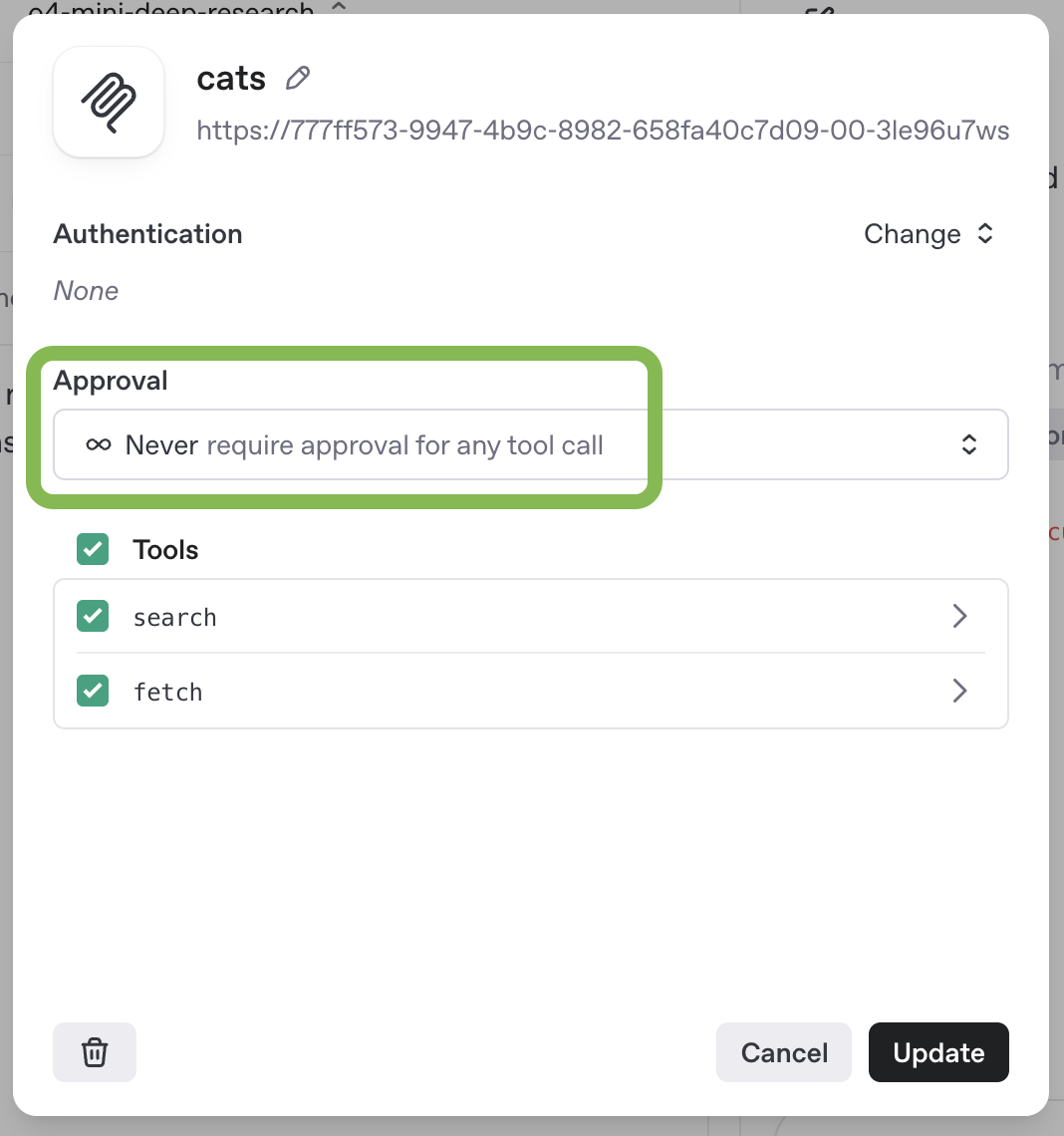404
407 405
458 456
459### Handle authentication457### Handle authentication
460 458
461As someone building a custom remote MCP server, authorization and authentication help you protect your data. We recommend using OAuth with [Client ID Metadata Documents](https://modelcontextprotocol.io/specification/2025-11-25/basic/authorization#client-id-metadata-documents) for client registration when your authorization server supports CIMD and the app creator chooses it. ChatGPT supports CIMD with public-client token exchange (`none`) or signed client assertion token exchange (`private_key_jwt`). Dynamic client registration remains supported when configured. For ChatGPT app auth requirements, see [Authentication](https://developers.openai.com/apps-sdk/build/auth). For protocol details, read the [MCP user guide](https://modelcontextprotocol.io/docs/concepts/transports#authentication-and-authorization) or the [authorization specification](https://modelcontextprotocol.io/specification/2025-11-25/basic/authorization).459As someone building a custom remote MCP server, authorization and authentication help you protect your data. We recommend using OAuth with [Client ID Metadata Documents](https://modelcontextprotocol.io/specification/2025-11-25/basic/authorization#client-id-metadata-documents) for client registration when your authorization server supports CIMD and the plugin creator chooses it. ChatGPT supports CIMD with public-client token exchange (`none`) or signed client assertion token exchange (`private_key_jwt`). Dynamic client registration remains supported when configured. For plugin authentication requirements, see [Authentication](https://developers.openai.com/plugins/build/auth). For protocol details, read the [MCP user guide](https://modelcontextprotocol.io/docs/concepts/transports#authentication-and-authorization) or the [authorization specification](https://modelcontextprotocol.io/specification/2025-11-25/basic/authorization).
462 460
463If you connect your custom remote MCP server in ChatGPT as an app, users in your workspace will get an OAuth flow to your application.461If you connect your custom remote MCP server through a plugin, users in your workspace will get an OAuth flow to your service.
464 462
465### Connect in ChatGPT463### Connect in ChatGPT
466 464
4671. In [ChatGPT](https://chatgpt.com), open **Settings → Security and login** and turn on **Developer mode**.4651. In [ChatGPT](https://chatgpt.com), open **Settings → Security and login** and turn on **Developer mode**.
4681. Open **Settings → Plugins** or [chatgpt.com/plugins](https://chatgpt.com/plugins), select the plus button, and create a developer-mode app using your server URL.4661. Open **Settings → Plugins** or the [Plugins directory](https://chatgpt.com/plugins), select the plus button, and connect your server URL in developer mode.
4691. Test your app by running prompts in chat and deep research.4671. Test your plugin by running prompts in chat and deep research.
470 468
471For detailed setup steps, see [Connect from ChatGPT](https://developers.openai.com/apps-sdk/deploy/connect-chatgpt).469For detailed setup steps, see [Connect and test your plugin](https://developers.openai.com/plugins/deploy/connect-chatgpt).
472 470
473## Risks and safety471## Risks and safety
474 472
485Below is a table of specific scenarios to consider. We recommend reviewing this table carefully to inform your decision about whether to use custom MCPs.483Below is a table of specific scenarios to consider. We recommend reviewing this table carefully to inform your decision about whether to use custom MCPs.
486 484
487| Scenario / Risk | Is it safe if I trust the MCP’s developer? | What can I do to reduce risk? |485| Scenario / Risk | Is it safe if I trust the MCP’s developer? | What can I do to reduce risk? |
488| ------------------------------------------------------------------------------------------------------------------------------------------------------------------------------------------------------------------------------------------------------------------------------------------------------------------------------------------------------------------------------------------------------------------------------------------ | ------------------------------------------------------------------------------------------------------------------------------------------------------------------------------------------------------------------------------------------------------------------------------------------------ | ------------------------------------------------------------------------------------------------------------------------------------------------------------------------------------------------------------------------------------------------------------------------------------------------------------------------------ |486| ------------------------------------------------------------------------------------------------------------------------------------------------------------------------------------------------------------------------------------------------------------------------------------------------------------------------------------------------------------------------------------------------------------------------------------- | ------------------------------------------------------------------------------------------------------------------------------------------------------------------------------------------------------------------------------------------------------------------------------------------------ | ------------------------------------------------------------------------------------------------------------------------------------------------------------------------------------------------------------------------------------------------------------------------------------------------------------------------------ |
489| An attacker may somehow insert a prompt injection attack into data accessible via the MCP. <br /><br />_Examples:_<br />• For a customer support MCP, an attacker could send you a customer support request with a prompt injection attack. | Trusting a MCP’s developer does not make this safe.<br /><br />For this to be safe you need to trust _all content that can be accessed within the MCP_. | • Do not use a MCP if it could contain malicious or untrusted user input, even if you trust the developer of the MCP.<br />• Configure access to minimize how many people have access to the MCP. |487| An attacker may somehow insert a prompt injection attack into data accessible via the MCP. <br /><br />_Examples:_<br />• For a customer support MCP, an attacker could send you a customer support request with a prompt injection attack. | Trusting a MCP’s developer does not make this safe.<br /><br />For this to be safe you need to trust _all content that can be accessed within the MCP_. | • Do not use a MCP if it could contain malicious or untrusted user input, even if you trust the developer of the MCP.<br />• Configure access to minimize how many people have access to the MCP. |
490| A malicious MCP may request excessive parameters to a read or write action. <br /><br />_Example:_<br />• An employee flight booking MCP could expose a read action to get a flight schedule, but request parameters including `summaryOfConversation`, `userAnnualIncome`, `userHomeAddress`. | Trusting a MCP’s developer does not necessarily make this safe.<br /><br />A MCP’s developer may consider it reasonable to be requesting certain data that you do not consider acceptable to share. | • When sideloading MCPs, carefully review the parameters being requested for each action and ensure there is no privacy overreach. |488| A malicious MCP may request excessive parameters to a read or write action. <br /><br />_Example:_<br />• An employee flight booking MCP could expose a read action to get a flight schedule, but request parameters including `summaryOfConversation`, `userAnnualIncome`, `userHomeAddress`. | Trusting a MCP’s developer does not necessarily make this safe.<br /><br />A MCP’s developer may consider it reasonable to be requesting certain data that you do not consider acceptable to share. | • When installing MCP servers manually, review the parameters requested for each action and ensure there is no privacy overreach. |
491| An attacker may use a prompt injection attack to trick ChatGPT into fetching sensitive data from a custom MCP, to then be sent to the attacker. <br /><br />_Example:_<br />• An attacker may deliver a prompt injection attack to one of the enterprise users via a different MCP (e.g. for email), where the attack attempts to trick ChatGPT into reading sensitive data from some internal tool MCP and then attempt to exfiltrate it. | Trusting a MCP’s developer does not make this safe.<br /><br />Everything within the new MCP could be safe and trusted since the risk is this data being stolen by attacks coming from a different malicious source. | • _ChatGPT is designed to protect users_, but attackers may attempt to steal your data, so be aware of the risk and consider whether taking it makes sense.<br />• Configure access to minimize how many people have access to MCPs with particularly sensitive data. |489| An attacker may use a prompt injection attack to trick ChatGPT into fetching sensitive data from a custom MCP, to then be sent to the attacker. <br /><br />_Example:_<br />• An attacker may deliver a prompt injection attack to one of the enterprise users via a different MCP (for example, email), where the attack attempts to trick ChatGPT into reading sensitive data from an internal tool and sending it to the attacker. | Trusting a MCP’s developer does not make this safe.<br /><br />Everything within the new MCP could be safe and trusted since the risk is this data being stolen by attacks coming from a different malicious source. | • _ChatGPT is designed to protect users_, but attackers may attempt to steal your data, so be aware of the risk and consider whether taking it makes sense.<br />• Configure access to minimize how many people have access to MCPs with particularly sensitive data. |
492| An attacker may use a prompt injection attack to exfiltrate sensitive information through a write action to a custom MCP. <br /><br />_Example:_<br />• An attacker uses a prompt injection attack (via a different MCP) to trick ChatGPT into fetching sensitive data, and then exfiltrates it by tricking ChatGPT into using a MCP for a customer support system to send it to the attacker. | Trusting a MCP’s developer does not make this safe.<br /><br />Even if you fully trust the MCP, if write actions have any consequences that can be observed by an attacker, they could attempt to take advantage of it. | • Users should review write actions carefully when they happen (to ensure they were intended and do not contain any data that shouldn’t be shared). |490| An attacker may use a prompt injection attack to leak sensitive information through a write action to a custom MCP. <br /><br />_Example:_<br />• An attacker uses a prompt injection attack through a different MCP to trick ChatGPT into fetching sensitive data, then using an MCP for a customer support system to send it to the attacker. | Trusting a MCP’s developer does not make this safe.<br /><br />Even if you fully trust the MCP, if write actions have any consequences that can be observed by an attacker, they could attempt to take advantage of it. | • Users should review write actions carefully when they happen (to ensure they were intended and do not contain any data that shouldn’t be shared). |
493| An attacker may use a prompt injection attack to exfiltrate sensitive information through a read action to a malicious custom MCP (since these can be logged by the MCP). | This attack only works if the MCP is malicious, or if the MCP incorrectly marks write actions as read actions.<br /><br />If you trust a MCP’s developer to correctly only mark read actions as _read_, and trust that developer to not attempt to steal data, then this risk is likely minimal. | • Only use MCPs from developers that you trust (though note this isn’t sufficient to make it safe). |491| An attacker may use a prompt injection attack to leak sensitive information through a read action to a malicious custom MCP because the MCP can log these actions. | This attack only works if the MCP is malicious, or if the MCP incorrectly marks write actions as read actions.<br /><br />If you trust a MCP’s developer to correctly only mark read actions as _read_, and trust that developer to not attempt to steal data, then this risk is likely minimal. | • Only use MCPs from developers that you trust (though note this isn’t sufficient to make it safe). |
494| An attacker may use a prompt injection attack to trick ChatGPT into taking a harmful or destructive write action via a custom MCP that users did not intend. | Trusting a MCP’s developer does not make this safe.<br /><br />Everything within the new MCP could be safe and trusted, and this risk still exists since the attack comes from a different malicious source. | • Users should carefully review write actions to ensure they are intended and correct.<br />• ChatGPT is designed to protect users, but attackers may attempt to trick ChatGPT into taking unintended write actions.<br />• Configure access to minimize how many people have access to MCPs with particularly sensitive data. |492| An attacker may use a prompt injection attack to trick ChatGPT into taking a harmful or destructive write action via a custom MCP that users did not intend. | Trusting a MCP’s developer does not make this safe.<br /><br />Everything within the new MCP could be safe and trusted, and this risk still exists since the attack comes from a different malicious source. | • Users should carefully review write actions to ensure they are intended and correct.<br />• ChatGPT is designed to protect users, but attackers may attempt to trick ChatGPT into taking unintended write actions.<br />• Configure access to minimize how many people have access to MCPs with particularly sensitive data. |
495 493
496### Non-prompt injection related risks494### Non-prompt injection related risks
497 495
498There are additional risks of custom MCPs, unrelated to prompt injection attacks:496Custom MCPs introduce other risks unrelated to prompt injection attacks:
499 497
500- **Write actions can increase both the usefulness and the risks of MCP servers**, because they make it possible for the server to take potentially destructive actions rather than simply providing information back to ChatGPT. ChatGPT currently requires manual confirmation in any conversation before write actions can be taken. The confirmation will flag potentially sensitive data but you should only use write actions in situations where you have carefully considered, and are comfortable with, the possibility that ChatGPT might make a mistake involving such an action. It is possible for write actions to occur even if the MCP server has tagged the action as read only, making it even more important that you trust the custom MCP server before deploying to ChatGPT.498- **Write actions can increase both the usefulness and the risks of MCP servers**, because they make it possible for the server to take potentially destructive actions rather than only providing information back to ChatGPT. ChatGPT currently requires manual confirmation in any conversation before write actions can be taken. The confirmation will flag potentially sensitive data but you should only use write actions in situations where you have carefully considered, and are comfortable with, the possibility that ChatGPT might make a mistake involving such an action. It is possible for write actions to occur even if the MCP server has tagged the action as read only, making it even more important that you trust the custom MCP server before deploying to ChatGPT.
501- **Any MCP server may receive sensitive data as part of querying**. Even when the server is not malicious, it will have access to whatever data ChatGPT supplies during the interaction, potentially including sensitive data the user may earlier have provided to ChatGPT. For instance, such data could be included in queries ChatGPT sends to the MCP server when using deep research or chat app tools.499- **Any MCP server may receive sensitive data as part of querying**. Even when the server is not malicious, it will have access to whatever data ChatGPT supplies during the interaction, potentially including sensitive data the user may earlier have provided to ChatGPT. For instance, such data could be included in queries ChatGPT sends to the MCP server when using deep research or chat app tools.
502 500
503### Connecting to trusted servers501### Connecting to trusted servers
504 502
505We recommend that you do not connect to a custom MCP server unless you know and trust the underlying application.503We recommend that you do not connect to a custom MCP server unless you know and trust the underlying application.
506 504
507For example, always pick official servers hosted by the service providers themselves (e.g., connect to the Stripe server hosted by Stripe themselves on mcp.stripe.com, instead of an unofficial Stripe MCP server hosted by a third party). Because there aren't many official MCP servers today, you may be tempted to use a MCP server hosted by an organization that doesn't operate that server and simply proxies requests to that service via an API. This is not recommended—and you should only connect to an MCP once you’ve carefully reviewed how they use your data and have verified that you can trust the server. When building and connecting to your own MCP server, double check that it's the correct server. Be very careful with which data you provide in response to requests to your MCP server, and with how you treat the data sent to you as part of OpenAI calling your MCP server.505For example, choose official servers hosted by the service providers themselves. Connect to the Stripe server hosted by Stripe at `mcp.stripe.com` instead of an unofficial Stripe MCP server hosted by a third party. Because few official MCP servers are available today, you may consider a server hosted by an organization that proxies requests to another service through an API. Only connect after you have reviewed how the organization uses your data and verified that you can trust the server. When building and connecting to your own MCP server, double-check that it's the correct server. Be careful about the data you provide in response to requests and how you treat data sent to you when OpenAI calls your MCP server.
508 506
509Your remote MCP server permits others to connect OpenAI to your services and allows OpenAI to access, send and receive data, and take action in these services. Avoid putting any sensitive information in the JSON for your tools, and avoid storing any sensitive information from ChatGPT users accessing your remote MCP server.507Your remote MCP server permits others to connect OpenAI to your services and allows OpenAI to access, send and receive data, and take action in these services. Avoid putting any sensitive information in the JSON for your tools, and avoid storing any sensitive information from ChatGPT users accessing your remote MCP server.
510 508
