SpyBara
Go Premium

Documentation 2026-04-07 05:51 UTC to 2026-04-08 05:51 UTC

20 files changed +1,976 −399. View all changes and history on the product overview
2026
Thu 30 06:13 Tue 28 06:15 Sat 25 05:52 Fri 24 05:58 Thu 23 05:56 Wed 22 05:55 Thu 16 05:55 Wed 15 05:55 Tue 14 05:55 Sat 11 05:41 Thu 9 05:52 Wed 8 05:51 Tue 7 05:51 Wed 1 05:53
Details

1# Agent evals1# Evaluate agent workflows

2 2 

3The OpenAI Platform offers a suite of evaluation tools to help you ensure your agents perform consistently and accurately.3The OpenAI Platform offers a suite of evaluation tools to help you ensure your agents perform consistently and accurately.

4 4 

5For identifying errors at the workflow-level, we recommend our [trace grading](https://developers.openai.com/api/docs/guides/trace-grading) functionality.5Use this page as the decision point for the evaluation surfaces that matter most for agent workflows.

6 6 

7For an easy way to build and iterate on your evals, we recommend exploring [Datasets](https://developers.openai.com/api/docs/guides/evaluation-getting-started).7## Start with traces when you are still debugging behavior

8 8 

9If you need advanced features such as evaluation against external models, want to interact with your eval runs via API, or want to run evaluations on a larger scale, consider using [Evals](https://developers.openai.com/api/docs/guides/evals) instead.9Trace grading is the fastest way to identify workflow-level issues. A trace captures the end-to-end record of model calls, tool calls, guardrails, and handoffs for one run. Graders let you score those traces with structured criteria so you can find regressions and failure modes at scale.

10 10 

11## Next steps11Use trace grading when you want to answer questions like:

12 12 

13For more inspiration, visit the [OpenAI Cookbook](https://developers.openai.com/cookbook), which contains example code and links to third-party resources, or learn more about our tools for evals:13- Did the agent pick the right tool?

14- Did a handoff happen when it should have?

15- Did the workflow violate an instruction or safety policy?

16- Did a prompt or routing change improve the end-to-end behavior?

17 

18### Trace-grading workflow

19 

201. Open **Logs** > **Traces** in the dashboard.

212. Inspect a representative workflow trace from Agent Builder or an SDK-based app with tracing enabled.

223. Create a grader and run it against the selected traces.

234. Use the results to refine prompts, tool surfaces, routing logic, or guardrails.

24 

25For code-first SDK workflows, start with [Integrations and observability](https://developers.openai.com/api/docs/guides/agents/integrations-observability#tracing) to get high-signal traces before you formalize graders.

26 

27## Move to datasets and eval runs when you need repeatability

28 

29Once you know what “good” looks like, move from individual traces to repeatable datasets and eval runs. This is the right step when you want to benchmark changes, compare prompts, or run larger-scale evaluations over time.

30 

31If you need advanced features such as evaluation against external models, evaluation APIs, or larger-scale batch evaluation, use [Evals](https://developers.openai.com/api/docs/guides/evals) alongside datasets.

32 

33## Related evaluation surfaces

14 34 

15<a35<a

16 href="/api/docs/guides/evaluation-getting-started"36 href="/api/docs/guides/evaluation-getting-started"

guides/agents.md +63 −31

Details

1# Agents1# Agents SDK

2 2 

3Agents are systems that intelligently accomplish tasks—from simple goals to complex, open-ended workflows. OpenAI provides models with agentic strengths, a toolkit for agent creation and deploys, and dashboard features for monitoring and optimizing agents.3Agents are applications that plan, call tools, collaborate across specialists, and keep enough state to complete multi-step work.

4 4 

5## AgentKit5- Use the **Agents SDK** pages when your application owns orchestration, tool execution, approvals, and state.

6- Use **Agent Builder** only when you specifically want the hosted workflow editor and ChatKit path.

6 7 

7AgentKit is a modular toolkit for building, deploying, and optimizing agents.8## Get the SDKs

8 9 

9## How to build an agent10Use the GitHub repositories for installation, issues, examples, and language-specific reference details.

10 11 

11Building an agent is a process of designing workflows and connecting pieces of the OpenAI platform to meet your goals. Agent Builder brings all these primitives into one UI.12<div class="not-prose mt-4 grid gap-3">

13 <a

14 href="https://github.com/openai/openai-agents-js"

15 class="block no-underline hover:no-underline"

16 target="_blank"

17 rel="noopener noreferrer"

18 >

12 19

13| <div style={{ minWidth: '150px', whiteSpace: 'nowrap' }}>Goal</div> | What to use | Description |

14| ------------------------------------------------------------------- | ------------------------------------------------------------------------------------------------------------------------------------------------------- | ------------------------------------------------------------------------------------------------------------------------------------------------------------------------------------------------------------------------------------------------------------------------------------------------------------------------- |

15| Build an agent workflow | [Agent Builder](https://developers.openai.com/api/docs/guides/agent-builder) | Visual canvas for creating agent workflows. Brings models, tools, knowledge, and logic all into one place. |

16| Connect to LLMs | [OpenAI models](https://developers.openai.com/api/docs/models) | Core intelligence capable of reasoning, making decisions, and processing data. Select your model in Agent Builder. |

17| Equip your agent | [Tools](https://developers.openai.com/api/docs/guides/node-reference#tool-nodes), [guardrails](https://developers.openai.com/api/docs/guides/node-reference#guardrails) | Access to third-party services with connectors and MCP, search vector stores, and prevent misuse. See [Function calling](https://developers.openai.com/api/docs/guides/function-calling), [Web search](https://developers.openai.com/api/docs/guides/tools-web-search), [File search](https://developers.openai.com/api/docs/guides/tools-file-search), and [Computer use](https://developers.openai.com/api/docs/guides/tools-computer-use). |

18| Provide knowledge and memory | [Vector stores](https://developers.openai.com/api/docs/guides/retrieval#vector-stores), [file search](https://developers.openai.com/api/docs/guides/tools-file-search), [embeddings](https://developers.openai.com/api/docs/guides/embeddings) | External and persistent knowledge for more relevant information for your use case, hosted by OpenAI. |

19| Add control-flow logic | [Logic nodes](https://developers.openai.com/api/docs/guides/node-reference#logic-nodes) | Custom logic for how agents work together, handle conditions, and route to other agents. |

20| Write your own code | [Agents SDK](https://developers.openai.com/api/docs/guides/agents-sdk) | Build agentic applications, with tools and orchestration, instead of using Agent Builder as the backend. |

21 20 

22To build a voice agent that understands audio and responds in natural language, see the [voice agents docs](https://developers.openai.com/api/docs/guides/voice-agents). Voice agents are not supported in Agent Builder.21<span slot="icon">

22 </span>

23 Open the TypeScript SDK repository on GitHub.

23 24 

24## Deploy agents in your product

25 25 

26When you're ready to bring your agent to production, use ChatKit to bring the agent workflow into your product UI, with an embeddable chat connected to your agentic backend.26 </a>

27 <a

28 href="https://github.com/openai/openai-agents-python"

29 class="block no-underline hover:no-underline"

30 target="_blank"

31 rel="noopener noreferrer"

32 >

27 33

28| <div style={{ minWidth: '175px', whiteSpace: 'nowrap' }}>Goal</div> | <div style={{ minWidth: '130px', whiteSpace: 'nowrap' }}>What to use</div> | Description |

29| ------------------------------------------------------------------- | -------------------------------------------------------------------------- | ------------------------------------------------------------------------------------------------- |

30| Embed your agent | [ChatKit](https://developers.openai.com/api/docs/guides/chatkit) | Customizable UI component. Paste your workflow ID to embed your agent workflow in your product. |

31| Get more customization | [Advanced ChatKit](https://developers.openai.com/api/docs/guides/agents-sdk) | Run ChatKit on your own infrastructure. Use widgets and connect to any agentic backend with SDKs. |

32 34 

33## Optimize agent performance35<span slot="icon">

36 </span>

37 Open the Python SDK repository on GitHub.

34 38 

35Use the OpenAI platform to evaluate agent performance and automate improvements.

36 39 

37| <div style={{ minWidth: '175px', whiteSpace: 'nowrap' }}>Goal</div> | <div style={{ minWidth: '130px', whiteSpace: 'nowrap' }}>What to use</div> | Description |40 </a>

38| ------------------------------------------------------------------- | -------------------------------------------------------------------------- | ---------------------------------------------------------------------------------- |41</div>

39| Evaluate agent performance | [Evals features](https://developers.openai.com/api/docs/guides/agent-evals) | Full evaluation platform, including support for external model evaluation. |

40| Automate trace grading | [Trace grading](https://developers.openai.com/api/docs/guides/trace-grading) | Develop, deploy, monitor, and improve agents. |

41| Build and track evals | [Datasets](https://developers.openai.com/api/docs/guides/evaluation-getting-started) | A collaborative interface to build agent-level evals in a test environment. |

42| Optimize prompts | [Prompt optimizer](https://developers.openai.com/api/docs/guides/prompt-optimizer) | Measure agent performance, identify areas for improvement, and refine your agents. |

43 42 

44## Get started43## Choose your starting point

45 44 

46Design an agent workflow with [Agent Builder](https://developers.openai.com/api/docs/guides/agent-builder) →

45| If you want to | Start here | Why |

46| ---------------------------------------- | ------------------------------------------------------------------------------------------------------------------------------------------------------ | --------------------------------------------------------------------------------------- |

47| Build a code-first agent app | [Quickstart](https://developers.openai.com/api/docs/guides/agents/quickstart) | This is the shortest path to a working SDK integration. |

48| Define one specialist cleanly | [Agent definitions](https://developers.openai.com/api/docs/guides/agents/define-agents) | Start here when you are still shaping the contract for a single agent. |

49| Choose models, defaults, and transport | [Models and providers](https://developers.openai.com/api/docs/guides/agents/models) | Use this when model choice, provider setup, or transport strategy affects the workflow. |

50| Understand the runtime loop and state | [Running agents](https://developers.openai.com/api/docs/guides/agents/running-agents) | This is where the agent loop, streaming, and continuation strategies live. |

51| Design specialist ownership | [Orchestration and handoffs](https://developers.openai.com/api/docs/guides/agents/orchestration) | Use this when you need more than one agent and must decide who owns the reply. |

52| Add validation or human review | [Guardrails and human review](https://developers.openai.com/api/docs/guides/agents/guardrails-approvals) | Use this when the workflow should block or pause before risky work continues. |

53| Understand what a run returns | [Results and state](https://developers.openai.com/api/docs/guides/agents/results) | This page explains final output, resumable state, and next-turn surfaces. |

54| Add hosted tools, function tools, or MCP | [Using tools](https://developers.openai.com/api/docs/guides/tools#usage-in-the-agents-sdk) and [Integrations and observability](https://developers.openai.com/api/docs/guides/agents/integrations-observability) | Tool semantics live in the platform tools docs; SDK-specific MCP and tracing live here. |

55| Inspect and improve runs | [Integrations and observability](https://developers.openai.com/api/docs/guides/agents/integrations-observability) and [evaluate agent workflows](https://developers.openai.com/api/docs/guides/agent-evals) | Use traces for debugging first, then move into evaluation loops. |

56| Build a voice-first workflow | [Voice agents](https://developers.openai.com/api/docs/guides/voice-agents) | Voice is still an SDK-first path because Agent Builder doesn't support it. |

57 

58## Build with the SDK

59 

60Use the SDK track when your server owns orchestration, tool execution, state, and approvals. That path is the best fit when you want:

61 

62- typed application code in TypeScript or Python

63- direct control over tools, MCP servers, and runtime behavior

64- custom storage or server-managed conversation strategies

65- tight integration with existing product logic or infrastructure

66 

67A typical SDK reading order is:

68 

69- Start with [Quickstart](https://developers.openai.com/api/docs/guides/agents/quickstart) to get one working run on screen.

70- Use [Agent definitions](https://developers.openai.com/api/docs/guides/agents/define-agents) and [Models and providers](https://developers.openai.com/api/docs/guides/agents/models) to shape one specialist cleanly.

71- Continue to [Running agents](https://developers.openai.com/api/docs/guides/agents/running-agents), [Orchestration and handoffs](https://developers.openai.com/api/docs/guides/agents/orchestration), and [Guardrails and human review](https://developers.openai.com/api/docs/guides/agents/guardrails-approvals) as the workflow grows more complex.

72- Use [Results and state](https://developers.openai.com/api/docs/guides/agents/results) and [Integrations and observability](https://developers.openai.com/api/docs/guides/agents/integrations-observability) when application logic depends on the run object or deeper visibility into behavior.

73 

74## Use Agent Builder for the hosted workflow path

75 

76Use Agent Builder when you want OpenAI-hosted workflow creation, publishing, and ChatKit deployment. Those pages stay grouped together because they describe one product surface: building a workflow in the visual editor, publishing versions, embedding them, customizing the UI, and evaluating the results.

77 

78Voice agents are an exception: they live in the SDK track because Agent Builder doesn't currently support voice workflows. Use [Voice agents](https://developers.openai.com/api/docs/guides/voice-agents) when you need speech-to-speech or chained voice pipelines.

Details

7Access the latest version in the following GitHub repositories:7Access the latest version in the following GitHub repositories:

8 8 

9- [Agents SDK Python](https://github.com/openai/openai-agents-python)9- [Agents SDK Python](https://github.com/openai/openai-agents-python)

10- [Agents SDK TypeScript](https://openai.github.io/openai-agents-js)10- [Agents SDK TypeScript](https://github.com/openai/openai-agents-js)

11 11 

12## Documentation12## Documentation

13 13 

14Documentation for the Agents SDK lives in the SDK docs:14Documentation for the Agents SDK lives in the platform guides:

15 15 

16- [Agents SDK JavaScript](https://openai.github.io/openai-agents-js)

17- [Agents SDK Python](https://openai.github.io/openai-agents-python)

16- [Agents SDK](https://developers.openai.com/api/docs/guides/agents)

guides/agents/define-agents.md +282 −0 created

Details

1# Agent definitions

2 

3An agent is the core unit of an SDK-based workflow. It packages a model, instructions, and optional runtime behavior such as tools, guardrails, MCP servers, handoffs, and structured outputs.

4 

5## What belongs on an agent

6 

7Use agent configuration for decisions that are intrinsic to that specialist:

8 

9| Property | Use it for | Read next |

10| ----------------------------------------------------------------------------------------------------------------- | ----------------------------------------------------------- | ---------------------------------------------------------------------------------------- |

11| `name` | Human-readable identity in traces and tool/handoff surfaces | This page |

12| `instructions` | The job, constraints, and style for that agent | This page |

13| `prompt` | Stored prompt configuration for Responses-based runs | [Models and providers](https://developers.openai.com/api/docs/guides/agents/models) |

14| `model` and model settings | Choosing the model and tuning behavior | [Models and providers](https://developers.openai.com/api/docs/guides/agents/models) |

15| `tools` | Capabilities the agent can call directly | [Using tools](https://developers.openai.com/api/docs/guides/tools#usage-in-the-agents-sdk) |

16| | Hinting when another agent should delegate here | [Orchestration and handoffs](https://developers.openai.com/api/docs/guides/agents/orchestration) |

17| `handoffs` | Delegating to another agent | [Orchestration and handoffs](https://developers.openai.com/api/docs/guides/agents/orchestration) |

18| | Returning structured output instead of plain text | This page |

19| Guardrails and approvals | Validation, blocking, and review flows | [Guardrails and human review](https://developers.openai.com/api/docs/guides/agents/guardrails-approvals) |

20| MCP servers and hosted MCP tools | Attaching MCP-backed capabilities | [Integrations and observability](https://developers.openai.com/api/docs/guides/agents/integrations-observability#mcp) |

21 

22## Start with one focused agent

23 

24Define the smallest agent that can own a clear task. Add more agents only when you need separate ownership, different instructions, different tool surfaces, or different approval policies.

25 

26Define a single agent

27 

28```typescript

29import { Agent, tool } from "@openai/agents";

30import { z } from "zod";

31 

32const getWeather = tool({

33 name: "get_weather",

34 description: "Return the weather for a given city.",

35 parameters: z.object({ city: z.string() }),

36 async execute({ city }) {

37 return \`The weather in \${city} is sunny.\`;

38 },

39});

40 

41const agent = new Agent({

42 name: "Weather bot",

43 instructions: "You are a helpful weather bot.",

44 model: "gpt-5.4",

45 tools: [getWeather],

46});

47```

48 

49```python

50from agents import Agent, function_tool

51 

52 

53@function_tool

54def get_weather(city: str) -> str:

55 """Return the weather for a given city."""

56 return f"The weather in {city} is sunny."

57 

58 

59agent = Agent(

60 name="Weather bot",

61 instructions="You are a helpful weather bot.",

62 model="gpt-5.4",

63 tools=[get_weather],

64)

65```

66 

67 

68## Shape instructions, handoffs, and outputs

69 

70Three configuration choices deserve extra care:

71 

72- Start with static `instructions`. When the guidance depends on the current user, tenant, or runtime context, switch to a dynamic instructions callback instead of stitching strings together at the call site.

73- Keep short and concrete so routing agents know when to pick this specialist.

74- Use when downstream code needs typed data rather than free-form prose.

75 

76Return structured output

77 

78```typescript

79import { Agent, run } from "@openai/agents";

80import { z } from "zod";

81 

82const calendarEvent = z.object({

83 name: z.string(),

84 date: z.string(),

85 participants: z.array(z.string()),

86});

87 

88const agent = new Agent({

89 name: "Calendar extractor",

90 instructions: "Extract calendar events from text.",

91 outputType: calendarEvent,

92});

93 

94const result = await run(

95 agent,

96 "Dinner with Priya and Sam on Friday.",

97);

98 

99console.log(result.finalOutput);

100```

101 

102```python

103import asyncio

104 

105from pydantic import BaseModel

106 

107from agents import Agent, Runner

108 

109 

110class CalendarEvent(BaseModel):

111 name: str

112 date: str

113 participants: list[str]

114 

115 

116agent = Agent(

117 name="Calendar extractor",

118 instructions="Extract calendar events from text.",

119 output_type=CalendarEvent,

120)

121 

122 

123async def main() -> None:

124 result = await Runner.run(

125 agent,

126 "Dinner with Priya and Sam on Friday.",

127 )

128 print(result.final_output)

129 

130 

131if __name__ == "__main__":

132 asyncio.run(main())

133```

134 

135 

136Use `prompt` when you want to reference a stored prompt configuration from the Responses API instead of embedding the entire system prompt in code.

137 

138## Keep local context separate from model context

139 

140The SDK lets you pass application state and dependencies into a run without sending them to the model. Use this for data like authenticated user info, database clients, loggers, and helper functions.

141 

142Pass local context to tools

143 

144```typescript

145import { Agent, RunContext, run, tool } from "@openai/agents";

146import { z } from "zod";

147 

148interface UserInfo {

149 name: string;

150 uid: number;

151}

152 

153const fetchUserAge = tool({

154 name: "fetch_user_age",

155 description: "Return the age of the current user.",

156 parameters: z.object({}),

157 async execute(_args, runContext?: RunContext<UserInfo>) {

158 return \`User \${runContext?.context.name} is 47 years old\`;

159 },

160});

161 

162const agent = new Agent<UserInfo>({

163 name: "Assistant",

164 tools: [fetchUserAge],

165});

166 

167const result = await run(agent, "What is the age of the user?", {

168 context: { name: "John", uid: 123 },

169});

170 

171console.log(result.finalOutput);

172```

173 

174```python

175import asyncio

176from dataclasses import dataclass

177 

178from agents import Agent, RunContextWrapper, Runner, function_tool

179 

180 

181@dataclass

182class UserInfo:

183 name: str

184 uid: int

185 

186 

187@function_tool

188async def fetch_user_age(wrapper: RunContextWrapper[UserInfo]) -> str:

189 """Fetch the age of the current user."""

190 return f"The user {wrapper.context.name} is 47 years old."

191 

192 

193agent = Agent[UserInfo](

194 name="Assistant",

195 tools=[fetch_user_age],

196)

197 

198 

199async def main() -> None:

200 result = await Runner.run(

201 agent,

202 "What is the age of the user?",

203 context=UserInfo(name="John", uid=123),

204 )

205 print(result.final_output)

206 

207 

208if __name__ == "__main__":

209 asyncio.run(main())

210```

211 

212 

213The important boundary is:

214 

215- Conversation history is what the model sees.

216- Run context is what your code sees.

217 

218If the model needs a fact, put it in instructions, input, retrieval, or a tool. If only your runtime needs it, keep it in local context.

219 

220## When to split one agent into several

221 

222Split an agent when one specialist shouldn't own the full reply or when separate capabilities are materially different. Common reasons are:

223 

224- A specialist needs a different tool or MCP surface.

225- A specialist needs a different approval policy or guardrail.

226- One branch of the workflow needs a different model or output style.

227- You want explicit routing in traces rather than a single large prompt.

228 

229## Next steps

230 

231Once one specialist is defined cleanly, move to the guide that matches the next design question.

232 

233<div class="not-prose mt-4 grid gap-3">

234 <a

235 href="/api/docs/guides/agents/models"

236 class="block no-underline hover:no-underline"

237 >

238

239 

240<span slot="icon">

241 </span>

242 Choose models, defaults, and transport strategy for this agent.

243 

244 

245 </a>

246 <a

247 href="/api/docs/guides/tools#usage-in-the-agents-sdk"

248 class="block no-underline hover:no-underline"

249 >

250

251 

252<span slot="icon">

253 </span>

254 Add capabilities the agent can call directly.

255 

256 

257 </a>

258 <a

259 href="/api/docs/guides/agents/orchestration"

260 class="block no-underline hover:no-underline"

261 >

262

263 

264<span slot="icon">

265 </span>

266 Choose how specialists collaborate once one agent is no longer enough.

267 

268 

269 </a>

270 <a

271 href="/api/docs/guides/agents/running-agents"

272 class="block no-underline hover:no-underline"

273 >

274

275 

276<span slot="icon">

277 </span>

278 Understand the runtime loop, state, and streaming behavior.

279 

280 

281 </a>

282</div>

Details

1# Guardrails and human review

2 

3Use guardrails for automatic checks and human review for approval decisions. Together, they define when a run should continue, pause, or stop.

4 

5- **Guardrails** validate input, output, or tool behavior automatically.

6- **Human review** pauses the run so a person or policy can approve or reject a sensitive action.

7 

8## Choose the right control

9 

10| Use case | Start with |

11| --------------------------------------------------------------------------------------------- | --------------------------- |

12| Block disallowed user requests before the main model runs | Input guardrails |

13| Validate or redact the final output before it leaves the system | Output guardrails |

14| Check arguments or results around a function tool call | Tool guardrails |

15| Pause before side effects like cancellations, edits, shell commands, or sensitive MCP actions | Human-in-the-loop approvals |

16 

17## Add a blocking guardrail

18 

19Use input guardrails when you want a fast validation step to run before the expensive or side-effecting part of the workflow starts.

20 

21Block a request with an input guardrail

22 

23```typescript

24import {

25 Agent,

26 InputGuardrailTripwireTriggered,

27 run,

28} from "@openai/agents";

29import { z } from "zod";

30 

31const guardrailAgent = new Agent({

32 name: "Homework check",

33 instructions: "Detect whether the user is asking for math homework help.",

34 outputType: z.object({

35 isMathHomework: z.boolean(),

36 reasoning: z.string(),

37 }),

38});

39 

40const agent = new Agent({

41 name: "Customer support",

42 instructions: "Help customers with support questions.",

43 inputGuardrails: [

44 {

45 name: "Math homework guardrail",

46 runInParallel: false,

47 async execute({ input, context }) {

48 const result = await run(guardrailAgent, input, { context });

49 return {

50 outputInfo: result.finalOutput,

51 tripwireTriggered: result.finalOutput?.isMathHomework === true,

52 };

53 },

54 },

55 ],

56});

57 

58try {

59 await run(agent, "Can you solve 2x + 3 = 11 for me?");

60} catch (error) {

61 if (error instanceof InputGuardrailTripwireTriggered) {

62 console.log("Guardrail blocked the request.");

63 }

64}

65```

66 

67```python

68import asyncio

69 

70from pydantic import BaseModel

71 

72from agents import (

73 Agent,

74 GuardrailFunctionOutput,

75 InputGuardrailTripwireTriggered,

76 RunContextWrapper,

77 Runner,

78 TResponseInputItem,

79 input_guardrail,

80)

81 

82 

83class MathHomeworkOutput(BaseModel):

84 is_math_homework: bool

85 reasoning: str

86 

87 

88guardrail_agent = Agent(

89 name="Homework check",

90 instructions="Detect whether the user is asking for math homework help.",

91 output_type=MathHomeworkOutput,

92)

93 

94 

95@input_guardrail

96async def math_guardrail(

97 ctx: RunContextWrapper[None],

98 agent: Agent,

99 input: str | list[TResponseInputItem],

100) -> GuardrailFunctionOutput:

101 result = await Runner.run(guardrail_agent, input, context=ctx.context)

102 return GuardrailFunctionOutput(

103 output_info=result.final_output,

104 tripwire_triggered=result.final_output.is_math_homework,

105 )

106 

107 

108agent = Agent(

109 name="Customer support",

110 instructions="Help customers with support questions.",

111 input_guardrails=[math_guardrail],

112)

113 

114 

115async def main() -> None:

116 try:

117 await Runner.run(agent, "Can you solve 2x + 3 = 11 for me?")

118 except InputGuardrailTripwireTriggered:

119 print("Guardrail blocked the request.")

120 

121 

122if __name__ == "__main__":

123 asyncio.run(main())

124```

125 

126 

127Use blocking execution when the cost or risk of starting the main agent is too high. Use parallel guardrails when lower latency matters more than avoiding speculative work.

128 

129## Pause for human review

130 

131Approvals are the human-in-the-loop path for tool calls. The model can still decide that an action is needed, but the run pauses until you approve or reject it.

132 

133Pause for approval before a sensitive action

134 

135```typescript

136import { Agent, run, tool } from "@openai/agents";

137import { z } from "zod";

138 

139const cancelOrder = tool({

140 name: "cancel_order",

141 description: "Cancel a customer order.",

142 parameters: z.object({ orderId: z.number() }),

143 needsApproval: true,

144 async execute({ orderId }) {

145 return \`Cancelled order \${orderId}\`;

146 },

147});

148 

149const agent = new Agent({

150 name: "Support agent",

151 instructions: "Handle support requests and ask for approval when needed.",

152 tools: [cancelOrder],

153});

154 

155let result = await run(agent, "Cancel order 123.");

156 

157if (result.interruptions?.length) {

158 const state = result.state;

159 for (const interruption of result.interruptions) {

160 state.approve(interruption);

161 }

162 result = await run(agent, state);

163}

164 

165console.log(result.finalOutput);

166```

167 

168```python

169import asyncio

170 

171from agents import Agent, Runner, function_tool

172 

173 

174@function_tool(needs_approval=True)

175async def cancel_order(order_id: int) -> str:

176 return f"Cancelled order {order_id}"

177 

178 

179agent = Agent(

180 name="Support agent",

181 instructions="Handle support requests and ask for approval when needed.",

182 tools=[cancel_order],

183)

184 

185 

186async def main() -> None:

187 result = await Runner.run(agent, "Cancel order 123.")

188 

189 if result.interruptions:

190 state = result.to_state()

191 for interruption in result.interruptions:

192 state.approve(interruption)

193 result = await Runner.run(agent, state)

194 

195 print(result.final_output)

196 

197 

198if __name__ == "__main__":

199 asyncio.run(main())

200```

201 

202 

203This same interruption pattern applies even when the approving tool lives deeper in the workflow, such as after a handoff or inside a nested call.

204 

205## Approval lifecycle

206 

207When a tool call needs review, the SDK follows the same pattern every time:

208 

2091. The run records an approval interruption instead of executing the tool.

2102. The result returns `interruptions` plus a resumable `state`.

2113. Your application approves or rejects the pending items.

2124. You resume the same run from `state` instead of starting a new user turn.

213 

214If the review might take time, serialize `state`, store it, and resume later. That's still the same run.

215 

216## Workflow boundaries matter

217 

218Agent-level guardrails don't run everywhere:

219 

220- Input guardrails run only for the first agent in the chain.

221- Output guardrails run only for the agent that produces the final output.

222- Tool guardrails run on the function tools they're attached to.

223 

224If you need checks around every custom tool call in a manager-style workflow, don't rely only on agent-level input or output guardrails. Put validation next to the tool that creates the side effect.

225 

226## Streaming and delayed review use the same state model

227 

228Streaming doesn't create a separate approval system. If a streamed run pauses, wait for it to settle, inspect `interruptions`, resolve the approvals, and resume from the same `state`. If the review happens later, store the serialized state and continue the same run when the decision arrives.

229 

230## Next steps

231 

232Once the control boundaries are clear, continue with the guide that covers the runtime or tool surface around them.

233 

234<div class="not-prose mt-4 grid gap-3">

235 <a

236 href="/api/docs/guides/agents/running-agents"

237 class="block no-underline hover:no-underline"

238 >

239

240 

241<span slot="icon">

242 </span>

243 See how interruptions and resumptions fit into the runtime loop.

244 

245 

246 </a>

247 <a

248 href="/api/docs/guides/agents/results"

249 class="block no-underline hover:no-underline"

250 >

251

252 

253<span slot="icon">

254 </span>

255 Learn which result surfaces paused runs return to your application.

256 

257 

258 </a>

259 <a

260 href="/api/docs/guides/tools#usage-in-the-agents-sdk"

261 class="block no-underline hover:no-underline"

262 >

263

264 

265<span slot="icon">

266 </span>

267 Decide which tool surfaces need validation or approval before side effects

268 happen.

269 

270 

271 </a>

272</div>

Details

1# Integrations and observability

2 

3After the workflow shape is clear, the next questions are which external surfaces should live inside the agent loop and how you will inspect what actually happened at runtime.

4 

5## Choose what lives in the SDK

6 

7| Need | Start with | Why |

8| --------------------------------------------------------- | ----------------------------------------------------- | ------------------------------------------------------------------- |

9| Give an agent access to public, remotely hosted MCP tools | Hosted MCP tools in the SDK | The model can call the remote MCP server through the hosted surface |

10| Connect local or private MCP servers from your runtime | SDK-managed MCP servers over stdio or streamable HTTP | Your runtime owns the connection, approvals, and network boundaries |

11| Debug prompts, tools, handoffs, or approvals | Built-in tracing | Traces show the end-to-end record before you formalize evals |

12 

13Tool capability semantics still live in [Using tools](https://developers.openai.com/api/docs/guides/tools). This page focuses on the SDK-specific MCP wiring and observability loop.

14 

15## MCP

16 

17Use hosted MCP tools when the remote server should run through the model surface.

18 

19Attach a hosted MCP server

20 

21```typescript

22import { Agent, hostedMcpTool } from "@openai/agents";

23 

24const agent = new Agent({

25 name: "MCP assistant",

26 instructions: "Use the MCP tools to answer questions.",

27 tools: [

28 hostedMcpTool({

29 serverLabel: "gitmcp",

30 serverUrl: "https://gitmcp.io/openai/codex",

31 }),

32 ],

33});

34```

35 

36```python

37from agents import Agent, HostedMCPTool

38 

39agent = Agent(

40 name="MCP assistant",

41 instructions="Use the MCP tools to answer questions.",

42 tools=[

43 HostedMCPTool(

44 tool_config={

45 "type": "mcp",

46 "server_label": "gitmcp",

47 "server_url": "https://gitmcp.io/openai/codex",

48 "require_approval": "never",

49 }

50 )

51 ],

52)

53```

54 

55 

56Use local transports when your application should connect to the MCP server directly.

57 

58Connect a local MCP server

59 

60```typescript

61import { Agent, MCPServerStdio, run } from "@openai/agents";

62 

63const server = new MCPServerStdio({

64 name: "Filesystem MCP Server",

65 fullCommand: "npx -y @modelcontextprotocol/server-filesystem ./sample_files",

66});

67 

68await server.connect();

69 

70try {

71 const agent = new Agent({

72 name: "Filesystem assistant",

73 instructions: "Read files with the MCP tools before answering.",

74 mcpServers: [server],

75 });

76 

77 const result = await run(agent, "Read the files and list them.");

78 console.log(result.finalOutput);

79} finally {

80 await server.close();

81}

82```

83 

84```python

85import asyncio

86 

87from agents import Agent, Runner

88from agents.mcp import MCPServerStdio

89 

90 

91async def main() -> None:

92 async with MCPServerStdio(

93 name="Filesystem MCP Server",

94 params={

95 "command": "npx",

96 "args": [

97 "-y",

98 "@modelcontextprotocol/server-filesystem",

99 "./sample_files",

100 ],

101 },

102 ) as server:

103 agent = Agent(

104 name="Filesystem assistant",

105 instructions="Read files with the MCP tools before answering.",

106 mcp_servers=[server],

107 )

108 result = await Runner.run(agent, "Read the files and list them.")

109 print(result.final_output)

110 

111 

112if __name__ == "__main__":

113 asyncio.run(main())

114```

115 

116 

117The practical split is:

118 

119- Use **hosted MCP** for public remote servers that fit the platform trust model.

120- Use **local or private MCP** when your runtime should own connectivity, filtering, or approvals.

121 

122For the platform-wide concept, trust model, and product support story, keep [MCP and Connectors](https://developers.openai.com/api/docs/guides/tools-connectors-mcp) as the canonical reference.

123 

124## Tracing

125 

126Tracing is built into the Agents SDK and is enabled by default in the normal server-side SDK path. Every run can emit a structured record of model calls, tool calls, handoffs, guardrails, and custom spans, which you can inspect in the [Traces dashboard](https://platform.openai.com/traces).

127 

128The default trace usually gives you:

129 

130- the overall run or workflow

131- each model call

132- tool calls and their outputs

133- handoffs and guardrails

134- any custom spans you wrap around the workflow

135 

136If you need less tracing, use the SDK-level or per-run tracing controls rather than removing all observability from the workflow.

137 

138Wrap multiple runs in one trace

139 

140```typescript

141import { Agent, run, withTrace } from "@openai/agents";

142 

143const agent = new Agent({

144 name: "Joke generator",

145 instructions: "Tell funny jokes.",

146});

147 

148await withTrace("Joke workflow", async () => {

149 const first = await run(agent, "Tell me a joke");

150 const second = await run(agent, \`Rate this joke: \${first.finalOutput}\`);

151 console.log(first.finalOutput);

152 console.log(second.finalOutput);

153});

154```

155 

156```python

157import asyncio

158 

159from agents import Agent, Runner, trace

160 

161agent = Agent(

162 name="Joke generator",

163 instructions="Tell funny jokes.",

164)

165 

166 

167async def main() -> None:

168 with trace("Joke workflow"):

169 first = await Runner.run(agent, "Tell me a joke")

170 second = await Runner.run(

171 agent,

172 f"Rate this joke: {first.final_output}",

173 )

174 print(first.final_output)

175 print(second.final_output)

176 

177 

178if __name__ == "__main__":

179 asyncio.run(main())

180```

181 

182 

183Use traces for two jobs:

184 

185- Debug one workflow run and understand what happened.

186- Feed higher-signal examples into [agent workflow evaluation](https://developers.openai.com/api/docs/guides/agent-evals) once you are ready to score behavior systematically.

187 

188## Next steps

189 

190Once the external surfaces are wired in, continue with the guide that covers capability design, review boundaries, or evaluation.

191 

192<div class="not-prose mt-4 grid gap-3">

193 <a

194 href="/api/docs/guides/tools#usage-in-the-agents-sdk"

195 class="block no-underline hover:no-underline"

196 >

197

198 

199<span slot="icon">

200 </span>

201 See how hosted tools, function tools, and agents-as-tools fit beside MCP.

202 

203 

204 </a>

205 <a

206 href="/api/docs/guides/agents/guardrails-approvals"

207 class="block no-underline hover:no-underline"

208 >

209

210 

211<span slot="icon">

212 </span>

213 Add approval or validation boundaries around sensitive capabilities.

214 

215 

216 </a>

217 <a

218 href="/api/docs/guides/agent-evals"

219 class="block no-underline hover:no-underline"

220 >

221

222 

223<span slot="icon">

224 </span>

225 Move from one-off traces into repeatable grading once behavior stabilizes.

226 

227 

228 </a>

229</div>

guides/agents/models.md +154 −0 created

Details

1# Models and providers

2 

3Every SDK run eventually resolves a model and a transport. Most applications should keep that setup straightforward: choose models explicitly, use the standard OpenAI path by default, and reach for provider or transport overrides only when the workflow actually needs them.

4 

5## Start with explicit model selection

6 

7In production, prefer explicit model choice over whichever runtime default your SDK release happens to ship with.

8 

9- Set `model` on an agent when that specialist consistently needs a different quality, latency, or cost profile.

10- Set a run-level default when one workflow should override several agents at once.

11- Set `OPENAI_DEFAULT_MODEL` when you want a process-wide fallback for agents that omit `model`.

12 

13Set models per agent and per run

14 

15```typescript

16import { Agent, Runner } from "@openai/agents";

17 

18const fastAgent = new Agent({

19 name: "Fast support agent",

20 instructions: "Handle routine support questions.",

21 model: "gpt-5.4-mini",

22});

23 

24const generalAgent = new Agent({

25 name: "General support agent",

26 instructions: "Handle support questions carefully.",

27});

28 

29const runner = new Runner({

30 model: "gpt-5.4",

31});

32 

33await runner.run(fastAgent, "Summarize ticket 123.");

34const result = await runner.run(

35 generalAgent,

36 "Investigate the billing issue on account 456.",

37);

38 

39console.log(result.finalOutput);

40```

41 

42```python

43import asyncio

44 

45from agents import Agent, RunConfig, Runner

46 

47fast_agent = Agent(

48 name="Fast support agent",

49 instructions="Handle routine support questions.",

50 model="gpt-5.4-mini",

51)

52 

53general_agent = Agent(

54 name="General support agent",

55 instructions="Handle support questions carefully.",

56)

57 

58 

59async def main() -> None:

60 await Runner.run(fast_agent, "Summarize ticket 123.")

61 

62 result = await Runner.run(

63 general_agent,

64 "Investigate the billing issue on account 456.",

65 run_config=RunConfig(model="gpt-5.4"),

66 )

67 print(result.final_output)

68 

69 

70if __name__ == "__main__":

71 asyncio.run(main())

72```

73 

74 

75For most new SDK workflows, start with [`gpt-5.4`](https://developers.openai.com/api/docs/models/gpt-5.4) and move to a smaller variant only when latency or cost matters enough to justify it. Use the platform-wide [Using GPT-5.4](https://developers.openai.com/api/docs/guides/latest-model) guide for current model-selection advice.

76 

77## Choose the simplest default strategy

78 

79| If you need | Start with | Why |

80| ---------------------------------------------- | ------------------------- | ------------------------------------------------------------------------------------ |

81| One explicit model per specialist | Set `model` on each agent | The workflow stays readable in code and traces |

82| One fallback across a whole process | `OPENAI_DEFAULT_MODEL` | Agents that omit `model` still resolve predictably |

83| One workflow-level override | A run-level default | You can swap models for a script, worker, or environment without editing every agent |

84| Different model sizes across the same workflow | Mix per-agent models | A fast triage agent and a slower deep specialist can coexist cleanly |

85 

86If your team cares about the exact default, don't rely on the SDK fallback. Set it yourself.

87 

88## Providers and transport

89 

90| Need | Start with |

91| ------------------------------------------------------- | ----------------------------------------------------------------- |

92| Standard SDK runs on OpenAI | The default OpenAI provider path |

93| Many repeated Responses model round trips over a socket | Responses WebSocket transport in the SDK |

94| Non-OpenAI models or a mixed-provider stack | The provider or adapter surface in the language-specific SDK docs |

95 

96Two distinctions matter:

97 

98- The Responses WebSocket transport still uses the normal text-and-tools agent loop. It's separate from the voice session path.

99- Live audio sessions over WebRTC or WebSocket are for low-latency voice or image interactions. Use [Voice agents](https://developers.openai.com/api/docs/guides/voice-agents) and the [live audio API guide](https://developers.openai.com/api/docs/guides/realtime) for that path.

100 

101Exact provider configuration, provider lifecycle management, and transport helper APIs remain language-specific material. Keep those details in the SDK docs instead of duplicating them here.

102 

103## Model settings, prompts, and feature support

104 

105Model choice is only part of the runtime contract.

106 

107- Use for tuning such as reasoning effort, verbosity, and tool behavior.

108- Use `prompt` when you want a stored prompt configuration to control the run instead of embedding the full system prompt in code.

109- Some SDK features depend on the OpenAI Responses path rather than older compatibility surfaces, so check the SDK docs when you need advanced tool-loading or transport features.

110 

111Keep the model contract close to the agent definition when it's intrinsic to that specialist. Move it to a workflow-level default only when a group of agents should share the same runtime choice.

112 

113## Next steps

114 

115Once the runtime contract is clear, continue with the guide that matches the rest of the workflow design.

116 

117<div class="not-prose mt-4 grid gap-3">

118 <a

119 href="/api/docs/guides/agents/define-agents"

120 class="block no-underline hover:no-underline"

121 >

122

123 

124<span slot="icon">

125 </span>

126 Keep model choices aligned with the responsibilities of each specialist.

127 

128 

129 </a>

130 <a

131 href="/api/docs/guides/agents/running-agents"

132 class="block no-underline hover:no-underline"

133 >

134

135 

136<span slot="icon">

137 </span>

138 See how transport and model choices affect the runtime loop.

139 

140 

141 </a>

142 <a

143 href="/api/docs/guides/external-models"

144 class="block no-underline hover:no-underline"

145 >

146

147 

148<span slot="icon">

149 </span>

150 Compare broader provider options when a mixed-model stack matters.

151 

152 

153 </a>

154</div>

guides/agents/orchestration.md +151 −0 created

Details

1# Orchestration and handoffs

2 

3Multi-agent workflows are useful when specialists should own different parts of the job. The first design choice is deciding who owns the final user-facing answer at each branch of the workflow.

4 

5## Choose the orchestration pattern

6 

7| Pattern | Use it when | What happens |

8| --------------- | ----------------------------------------------------------------------------- | ---------------------------------------- |

9| Handoffs | A specialist should take over the conversation for that branch of the work | Control moves to the specialist agent |

10| Agents as tools | A manager should stay in control and call specialists as bounded capabilities | The manager keeps ownership of the reply |

11 

12## Use handoffs for delegated ownership

13 

14Handoffs are the clearest fit when a specialist should own the next response rather than merely helping behind the scenes.

15 

16Delegate with handoffs

17 

18```typescript

19import { Agent, handoff } from "@openai/agents";

20 

21const billingAgent = new Agent({ name: "Billing agent" });

22const refundAgent = new Agent({ name: "Refund agent" });

23 

24const triageAgent = Agent.create({

25 name: "Triage agent",

26 handoffs: [billingAgent, handoff(refundAgent)],

27});

28```

29 

30```python

31from agents import Agent, handoff

32 

33billing_agent = Agent(name="Billing agent")

34refund_agent = Agent(name="Refund agent")

35 

36triage_agent = Agent(

37 name="Triage agent",

38 handoffs=[billing_agent, handoff(refund_agent)],

39)

40```

41 

42 

43Keep the routing surface legible:

44 

45- Give each specialist a narrow job.

46- Keep short and concrete.

47- Split only when the next branch truly needs different instructions, tools, or policy.

48 

49At the advanced end, handoffs can also carry structured metadata or filtered history. Those exact APIs stay in the SDK docs because the wiring differs by language.

50 

51## Use agents as tools for manager-style workflows

52 

53Use when the main agent should stay responsible for the final answer and call specialists as helpers.

54 

55Call a specialist as a tool

56 

57```typescript

58import { Agent } from "@openai/agents";

59 

60const summarizer = new Agent({

61 name: "Summarizer",

62 instructions: "Generate a concise summary of the supplied text.",

63});

64 

65const mainAgent = new Agent({

66 name: "Research assistant",

67 tools: [

68 summarizer.asTool({

69 toolName: "summarize_text",

70 toolDescription: "Generate a concise summary of the supplied text.",

71 }),

72 ],

73});

74```

75 

76```python

77from agents import Agent

78 

79summarizer = Agent(

80 name="Summarizer",

81 instructions="Generate a concise summary of the supplied text.",

82)

83 

84main_agent = Agent(

85 name="Research assistant",

86 tools=[

87 summarizer.as_tool(

88 tool_name="summarize_text",

89 tool_description="Generate a concise summary of the supplied text.",

90 )

91 ],

92)

93```

94 

95 

96This is usually the better fit when:

97 

98- the manager should synthesize the final answer

99- the specialist is doing a bounded task like summarization or classification

100- you want one stable outer workflow with nested specialist calls instead of ownership transfer

101 

102## Add specialists only when the contract changes

103 

104Start with one agent whenever you can. Add specialists only when they materially improve capability isolation, policy isolation, prompt clarity, or trace legibility.

105 

106Splitting too early creates more prompts, more traces, and more approval surfaces without necessarily making the workflow better.

107 

108## Next steps

109 

110Once the ownership pattern is clear, continue with the guide that covers the adjacent runtime or state question.

111 

112<div class="not-prose mt-4 grid gap-3">

113 <a

114 href="/api/docs/guides/agents/define-agents"

115 class="block no-underline hover:no-underline"

116 >

117

118 

119<span slot="icon">

120 </span>

121 Refine each specialist's instructions, tools, and output contract.

122 

123 

124 </a>

125 <a

126 href="/api/docs/guides/agents/running-agents"

127 class="block no-underline hover:no-underline"

128 >

129

130 

131<span slot="icon">

132 </span>

133 Understand how handoffs and tools behave inside a run.

134 

135 

136 </a>

137 <a

138 href="/api/docs/guides/agents/results"

139 class="block no-underline hover:no-underline"

140 >

141

142 

143<span slot="icon">

144 </span>

145 See how{" "}

146 {" "}

147 and resumable state affect the next turn.

148 

149 

150 </a>

151</div>

guides/agents/quickstart.md +273 −0 created

Details

1# Quickstart

2 

3Use this page when you want the shortest path to a working SDK-based agent. The examples below use the same high-level concepts in both TypeScript and Python: define an agent, run it, then add tools and specialist agents as your workflow grows.

4 

5## Install the SDK

6 

7Create a project, install the SDK, and set your API key.

8 

9```bash

10# TypeScript

11npm install @openai/agents zod

12 

13# Python

14pip install openai-agents

15 

16export OPENAI_API_KEY=sk-...

17```

18 

19## Create and run your first agent

20 

21Start with one focused agent and one turn. The SDK handles the model call and returns a result object with the final output plus the run history.

22 

23Create and run an agent

24 

25```typescript

26import { Agent, run } from "@openai/agents";

27 

28const agent = new Agent({

29 name: "History tutor",

30 instructions:

31 "You answer history questions clearly and concisely.",

32 model: "gpt-5.4",

33});

34 

35const result = await run(agent, "When did the Roman Empire fall?");

36console.log(result.finalOutput);

37```

38 

39```python

40import asyncio

41 

42from agents import Agent, Runner

43 

44agent = Agent(

45 name="History tutor",

46 instructions="You answer history questions clearly and concisely.",

47 model="gpt-5.4",

48)

49 

50 

51async def main() -> None:

52 result = await Runner.run(agent, "When did the Roman Empire fall?")

53 print(result.final_output)

54 

55 

56if __name__ == "__main__":

57 asyncio.run(main())

58```

59 

60 

61You should see a concise answer in the terminal. Once that loop works, keep the same shape and add capabilities incrementally rather than starting with a large multi-agent design.

62 

63## Carry state into the next turn

64 

65The first run result is also how you decide what the second turn should use as state.

66 

67| If you want | Start with |

68| ----------------------------------------------------- | ---------------------------------------------------------------------------------------------------------------------------------------- |

69| Keep the full history in your application | |

70| Let the SDK load and save history for you | A session |

71| Let OpenAI manage continuation state | A server-managed continuation ID |

72| Resume a run that paused for approval or interruption | , together with `interruptions` |

73 

74After handoffs, reuse for the next turn when that specialist should stay in control.

75 

76## Give the agent a tool

77 

78The first capability you add is often a function tool or a hosted OpenAI tool such as web search or file search.

79 

80Add a function tool

81 

82```typescript

83import { Agent, run, tool } from "@openai/agents";

84import { z } from "zod";

85 

86const historyFunFact = tool({

87 name: "history_fun_fact",

88 description: "Return a short history fact.",

89 parameters: z.object({}),

90 async execute() {

91 return "Sharks are older than trees.";

92 },

93});

94 

95const agent = new Agent({

96 name: "History tutor",

97 instructions:

98 "Answer history questions clearly. Use history_fun_fact when it helps.",

99 tools: [historyFunFact],

100});

101 

102const result = await run(

103 agent,

104 "Tell me something surprising about ancient life on Earth.",

105);

106 

107console.log(result.finalOutput);

108```

109 

110```python

111import asyncio

112 

113from agents import Agent, Runner, function_tool

114 

115 

116@function_tool

117def history_fun_fact() -> str:

118 """Return a short history fact."""

119 return "Sharks are older than trees."

120 

121 

122agent = Agent(

123 name="History tutor",

124 instructions="Answer history questions clearly. Use history_fun_fact when it helps.",

125 tools=[history_fun_fact],

126)

127 

128 

129async def main() -> None:

130 result = await Runner.run(

131 agent,

132 "Tell me something surprising about ancient life on Earth.",

133 )

134 print(result.final_output)

135 

136 

137if __name__ == "__main__":

138 asyncio.run(main())

139```

140 

141 

142Use the shared [Using tools](https://developers.openai.com/api/docs/guides/tools#usage-in-the-agents-sdk) guide when you need hosted tools, tool search, or agents-as-tools.

143 

144## Add specialist agents

145 

146A common next step is to split the workflow into specialists and let a router delegate to them with handoffs.

147 

148Route to specialist agents

149 

150```typescript

151import { Agent, run } from "@openai/agents";

152 

153const historyTutor = new Agent({

154 name: "History tutor",

155 instructions: "Answer history questions clearly and concisely.",

156});

157 

158const mathTutor = new Agent({

159 name: "Math tutor",

160 instructions: "Explain math step by step and include worked examples.",

161});

162 

163const triageAgent = Agent.create({

164 name: "Homework triage",

165 instructions: "Route each homework question to the right specialist.",

166 handoffs: [historyTutor, mathTutor],

167});

168 

169const result = await run(

170 triageAgent,

171 "Who was the first president of the United States?",

172);

173 

174console.log(result.finalOutput);

175console.log(result.lastAgent?.name);

176```

177 

178```python

179import asyncio

180 

181from agents import Agent, Runner

182 

183history_tutor = Agent(

184 name="History tutor",

185 handoff_description="Specialist for history questions.",

186 instructions="Answer history questions clearly and concisely.",

187)

188 

189math_tutor = Agent(

190 name="Math tutor",

191 handoff_description="Specialist for math questions.",

192 instructions="Explain math step by step and include worked examples.",

193)

194 

195triage_agent = Agent(

196 name="Homework triage",

197 instructions="Route each homework question to the right specialist.",

198 handoffs=[history_tutor, math_tutor],

199)

200 

201 

202async def main() -> None:

203 result = await Runner.run(

204 triage_agent,

205 "Who was the first president of the United States?",

206 )

207 print(result.final_output)

208 print(result.last_agent.name)

209 

210 

211if __name__ == "__main__":

212 asyncio.run(main())

213```

214 

215 

216## Inspect traces early

217 

218The normal server-side SDK path includes tracing. As soon as the first run works, open the [Traces dashboard](https://platform.openai.com/traces) to inspect model calls, tool calls, handoffs, and guardrails before you start tuning prompts.

219 

220## Next steps

221 

222Once the first run works, continue with the guide that matches the next capability you want to add.

223 

224<div class="not-prose mt-4 grid gap-3">

225 <a

226 href="/api/docs/guides/agents/define-agents"

227 class="block no-underline hover:no-underline"

228 >

229

230 

231<span slot="icon">

232 </span>

233 Shape one specialist cleanly before you scale the workflow.

234 

235 

236 </a>

237 <a

238 href="/api/docs/guides/tools#usage-in-the-agents-sdk"

239 class="block no-underline hover:no-underline"

240 >

241

242 

243<span slot="icon">

244 </span>

245 Add hosted tools, function tools, and agents-as-tools.

246 

247 

248 </a>

249 <a

250 href="/api/docs/guides/agents/running-agents"

251 class="block no-underline hover:no-underline"

252 >

253

254 

255<span slot="icon">

256 </span>

257 Learn the agent loop, streaming, and continuation strategies.

258 

259 

260 </a>

261 <a

262 href="/api/docs/guides/agents/orchestration"

263 class="block no-underline hover:no-underline"

264 >

265

266 

267<span slot="icon">

268 </span>

269 Decide when specialists should take over the conversation.

270 

271 

272 </a>

273</div>

guides/agents/results.md +89 −0 created

Details

1# Results and state

2 

3When you run an agent, the result is more than just the final answer. It's also the handoff boundary, the next-turn continuation surface, and the resumable snapshot when a run pauses for review.

4 

5## Choose the result surface you need

6 

7Most applications only need a small set of result properties:

8 

9| If you need | Use |

10| ---------------------------------------------------- | ----------------------------------------------------------------------------------- |

11| The final answer to show the user | |

12| Local replay-ready history | |

13| The specialist that should usually own the next turn | |

14| OpenAI-managed response chaining | |

15| Pending approvals and a resumable snapshot | `interruptions` plus |

16 

17Those are the guide-level surfaces to learn first. Richer run items, raw model responses, and detailed diagnostics still belong in the SDK docs and reference material.

18 

19## What to carry into the next turn

20 

21Use the result in a way that matches your continuation strategy:

22 

23- If your application owns full local history, reuse .

24- If you are using a session, keep passing the same session and let the SDK load and persist history for you.

25- If you are using server-managed continuation, pass only the new user input and reuse the stored ID instead of replaying the full transcript.

26- After handoffs, reuse when that specialist should stay in control for the next turn.

27 

28## Interrupted runs return state, not a final answer

29 

30Approval flows are the main case where a result is intentionally incomplete.

31 

32- can

33 stay empty because the run hasn't actually finished.

34- `interruptions` tells you which pending tool calls need a decision.

35- is the saved

36 snapshot you pass back into the runtime after approving or rejecting those

37 items.

38 

39That same state surface is what you serialize when a review might happen later rather than in the same request.

40 

41## Richer item and diagnostics surfaces

42 

43The SDK also exposes richer run items and diagnostics for applications that need more than the high-level surfaces above. That includes item-level tool and handoff records, raw model responses, guardrail results, and usage details.

44 

45Those are useful for audits, custom interfaces, and deep debugging, but they don't need to be the first thing most developers learn on this site.

46 

47## Next steps

48 

49Once you know which result surfaces matter, continue with the guide that explains how those surfaces get produced or inspected.

50 

51<div class="not-prose mt-4 grid gap-3">

52 <a

53 href="/api/docs/guides/agents/running-agents"

54 class="block no-underline hover:no-underline"

55 >

56

57 

58<span slot="icon">

59 </span>

60 Connect result handling back to the runtime loop and continuation

61 strategy.

62 

63 

64 </a>

65 <a

66 href="/api/docs/guides/agents/guardrails-approvals"

67 class="block no-underline hover:no-underline"

68 >

69

70 

71<span slot="icon">

72 </span>

73 See how paused runs return interruptions and resumable state.

74 

75 

76 </a>

77 <a

78 href="/api/docs/guides/agents/integrations-observability"

79 class="block no-underline hover:no-underline"

80 >

81

82 

83<span slot="icon">

84 </span>

85 Use traces when you need to inspect the richer workflow record.

86 

87 

88 </a>

89</div>

Details

1# Running agents

2 

3Defining an agent is only the setup step. The runtime questions are what a single run does, how the next turn continues, and how the workflow behaves when it pauses for approvals or tool work.

4 

5## The agent loop

6 

7One SDK run is one application-level turn. The runner keeps looping until it reaches a real stopping point:

8 

91. Call the current agent's model with the prepared input.

102. Inspect the model output.

113. If the model produced tool calls, execute them and continue.

124. If the model handed off to another specialist, switch agents and continue.

135. If the model produced a final answer with no more tool work, return a result.

14 

15That loop is the core concept behind the SDK. Tools, handoffs, approvals, and streaming all build on top of it rather than replacing it.

16 

17## Choose one conversation strategy

18 

19There are four common ways to carry state into the next turn:

20 

21| Strategy | Where state lives | Best for | What you pass on the next turn |

22| ------------------------------------------------------------------------------------------------------------------ | ------------------------- | ---------------------------------------------------------------------- | ---------------------------------------------- |

23| | Your application | Small chat loops and maximum control | The replay-ready history |

24| `session` | Your storage plus the SDK | Persistent chat state, resumable runs, and storage you control | The same session |

25| `conversationId` | OpenAI Conversations API | Shared server-managed state across workers or services | The same conversation ID and only the new turn |

26| | OpenAI Responses API | The lightest server-managed continuation from one response to the next | The last response ID and only the new turn |

27 

28In most applications, pick one strategy per conversation. Mixing local replay with server-managed state can duplicate context unless you are deliberately reconciling both layers.

29 

30Persist multi-turn state with sessions

31 

32```typescript

33import { Agent, MemorySession, run } from "@openai/agents";

34 

35const agent = new Agent({

36 name: "Tour guide",

37 instructions: "Answer with compact travel facts.",

38});

39 

40const session = new MemorySession();

41 

42const firstTurn = await run(

43 agent,

44 "What city is the Golden Gate Bridge in?",

45 { session },

46);

47console.log(firstTurn.finalOutput);

48 

49const secondTurn = await run(agent, "What state is it in?", { session });

50console.log(secondTurn.finalOutput);

51```

52 

53```python

54import asyncio

55 

56from agents import Agent, Runner, SQLiteSession

57 

58agent = Agent(

59 name="Tour guide",

60 instructions="Answer with compact travel facts.",

61)

62 

63session = SQLiteSession("conversation_123")

64 

65 

66async def main() -> None:

67 first_turn = await Runner.run(

68 agent,

69 "What city is the Golden Gate Bridge in?",

70 session=session,

71 )

72 print(first_turn.final_output)

73 

74 second_turn = await Runner.run(

75 agent,

76 "What state is it in?",

77 session=session,

78 )

79 print(second_turn.final_output)

80 

81 

82if __name__ == "__main__":

83 asyncio.run(main())

84```

85 

86 

87Sessions are the best default when you want durable memory, resumable approval flows, or storage that your application controls.

88 

89Continue with server-managed state

90 

91```typescript

92import { Agent, run } from "@openai/agents";

93import OpenAI from "openai";

94 

95const agent = new Agent({

96 name: "Assistant",

97 instructions: "Reply very concisely.",

98});

99 

100const client = new OpenAI();

101const { id: conversationId } = await client.conversations.create({});

102 

103const first = await run(agent, "What city is the Golden Gate Bridge in?", {

104 conversationId,

105});

106console.log(first.finalOutput);

107 

108const second = await run(agent, "What state is it in?", {

109 conversationId,

110});

111console.log(second.finalOutput);

112```

113 

114```python

115import asyncio

116 

117from agents import Agent, Runner

118 

119agent = Agent(

120 name="Assistant",

121 instructions="Reply very concisely.",

122)

123 

124 

125async def main() -> None:

126 first = await Runner.run(

127 agent,

128 "What city is the Golden Gate Bridge in?",

129 )

130 print(first.final_output)

131 

132 second = await Runner.run(

133 agent,

134 "What state is it in?",

135 previous_response_id=first.last_response_id,

136 )

137 print(second.final_output)

138 

139 

140if __name__ == "__main__":

141 asyncio.run(main())

142```

143 

144 

145Use `conversationId` when multiple systems should share one named conversation. Use when you want the cheapest response-to-response continuation option.

146 

147## Stream runs incrementally

148 

149Streaming uses the same agent loop and the same state strategies. The only difference is that you consume events while the run is still happening.

150 

151Stream a run as text arrives

152 

153```typescript

154import { Agent, run } from "@openai/agents";

155 

156const agent = new Agent({

157 name: "Planet guide",

158 instructions: "Answer with short facts.",

159});

160 

161const stream = await run(agent, "Give me three short facts about Saturn.", {

162 stream: true,

163});

164 

165for await (const event of stream) {

166 if (

167 event.type === "raw_model_stream_event" &&

168 event.data.type === "response.output_text.delta"

169 ) {

170 process.stdout.write(event.data.delta);

171 }

172}

173 

174await stream.completed;

175console.log("\\nFinal:", stream.finalOutput);

176```

177 

178```python

179import asyncio

180 

181from openai.types.responses import ResponseTextDeltaEvent

182 

183from agents import Agent, Runner

184 

185agent = Agent(

186 name="Planet guide",

187 instructions="Answer with short facts.",

188)

189 

190 

191async def main() -> None:

192 stream = Runner.run_streamed(

193 agent,

194 "Give me three short facts about Saturn.",

195 )

196 

197 async for event in stream.stream_events():

198 if (

199 event.type == "raw_response_event"

200 and isinstance(event.data, ResponseTextDeltaEvent)

201 ):

202 print(event.data.delta, end="", flush=True)

203 

204 print(f"\\nFinal: {stream.final_output}")

205 

206 

207if __name__ == "__main__":

208 asyncio.run(main())

209```

210 

211 

212Three practical rules matter:

213 

214- Wait for the stream to finish before treating the run as settled.

215- If the run pauses for approval, resolve `interruptions` and resume from `state` rather than starting a fresh user turn.

216- If you cancel a stream mid-turn, resume the unfinished turn from `state` if you want the same turn to continue later.

217 

218## Handle pauses and failures deliberately

219 

220Two broad classes of non-happy-path outcomes matter:

221 

222- **Runtime or validation failures** such as max-turn limits, guardrail exceptions, or tool errors.

223- **Expected pauses** such as human approval requests, where the run is intentionally interrupted and should later resume from the same state.

224 

225Treat approvals as paused runs, not as new turns. That distinction keeps turn counts, history, and server-managed continuation IDs consistent.

226 

227## Next steps

228 

229Once the runtime loop is clear, move to the guide that matches the next workflow boundary you need to design.

230 

231<div class="not-prose mt-4 grid gap-3">

232 <a

233 href="/api/docs/guides/agents/results"

234 class="block no-underline hover:no-underline"

235 >

236

237 

238<span slot="icon">

239 </span>

240 Learn which result surfaces your application should carry into the next

241 turn.

242 

243 

244 </a>

245 <a

246 href="/api/docs/guides/agents/orchestration"

247 class="block no-underline hover:no-underline"

248 >

249

250 

251<span slot="icon">

252 </span>

253 Decide how multiple specialists behave inside the same runtime loop.

254 

255 

256 </a>

257 <a

258 href="/api/docs/guides/agents/guardrails-approvals"

259 class="block no-underline hover:no-underline"

260 >

261

262 

263<span slot="icon">

264 </span>

265 Add validation and approval pauses without breaking turn continuity.

266 

267 

268 </a>

269</div>

guides/audio.md +1 −1

Details

13 13 

14### Voice agents14### Voice agents

15 15 

16Voice agents understand audio to handle tasks and respond back in natural language. There are two main ways to approach voice agents: either with speech-to-speech models and the [Realtime API](https://developers.openai.com/api/docs/guides/realtime), or by chaining together a speech-to-text model, a text language model to process the request, and a text-to-speech model to respond. Speech-to-speech is lower latency and more natural, but chaining together a voice agent is a reliable way to extend a text-based agent into a voice agent. If you are already using the [Agents SDK](https://developers.openai.com/api/docs/guides/agents), you can [extend your existing agents with voice capabilities](https://openai.github.io/openai-agents-python/voice/quickstart/) using the chained approach.16Voice agents understand audio to handle tasks and respond back in natural language. There are two main ways to approach voice agents: either with speech-to-speech models and the [Realtime API](https://developers.openai.com/api/docs/guides/realtime), or by chaining together a speech-to-text model, a text language model to process the request, and a text-to-speech model to respond. Speech-to-speech is lower latency and more natural, but chaining together a voice agent is a reliable way to extend a text-based agent into a voice agent. If you are already using the [Agents SDK](https://developers.openai.com/api/docs/guides/agents), you can [extend your existing agents with voice capabilities](https://developers.openai.com/api/docs/guides/voice-agents) using the chained approach.

17 17 

18### Streaming audio18### Streaming audio

19 19 

Details

13 13 

14## Voice agents14## Voice agents

15 15 

16One of the most common use cases for the Realtime API is building voice agents for speech-to-speech model interactions in the browser. Our recommended starting point for these types of applications is the [Agents SDK for TypeScript](https://openai.github.io/openai-agents-js/guides/voice-agents/), which uses a [WebRTC connection](https://developers.openai.com/api/docs/guides/realtime-webrtc) to the Realtime model in the browser, and [WebSocket](https://developers.openai.com/api/docs/guides/realtime-websocket) when used on the server.16One of the most common use cases for the Realtime API is building voice agents for speech-to-speech model interactions in the browser. Our recommended starting point for these applications is the on-site [Voice agents](https://developers.openai.com/api/docs/guides/voice-agents) guide, which uses a [WebRTC connection](https://developers.openai.com/api/docs/guides/realtime-webrtc) to the Realtime model in the browser, and [WebSocket](https://developers.openai.com/api/docs/guides/realtime-websocket) when used on the server.

17 17 

18```js18```js

19 19 


31});31});

32```32```

33 33 

34<a34<a href="/api/docs/guides/voice-agents#speech-to-speech-realtime-architecture">

35 href="https://openai.github.io/openai-agents-js/guides/voice-agents/quickstart/"

36 target="_blank"

37 rel="noreferrer"

38>

39 35

40 36 

41<span slot="icon">37<span slot="icon">

42 </span>38 </span>

43 Follow the voice agent quickstart to build Realtime agents in the browser.39 See the speech-to-speech path for building Realtime voice agents in the

40 browser.

44 41 

45 42 

46</a>43</a>


49 46 

50## Connection methods47## Connection methods

51 48 

52While building [voice agents with the Agents SDK](https://openai.github.io/openai-agents-js/guides/voice-agents/) is the fastest path to one specific type of application, the Realtime API provides an entire suite of flexible tools for a variety of use cases.49While building [voice agents with the Agents SDK](https://developers.openai.com/api/docs/guides/voice-agents) is the fastest path to one specific type of application, the Realtime API provides an entire suite of flexible tools for a variety of use cases.

53 50 

54There are three primary supported interfaces for the Realtime API:51There are three primary supported interfaces for the Realtime API:

55 52 

Details

482- [Function calling](https://developers.openai.com/api/docs/guides/realtime-function-calling): How to call functions in your realtime app482- [Function calling](https://developers.openai.com/api/docs/guides/realtime-function-calling): How to call functions in your realtime app

483- [MCP servers](https://developers.openai.com/api/docs/guides/realtime-mcp): How to use MCP servers to access additional tools in realtime apps483- [MCP servers](https://developers.openai.com/api/docs/guides/realtime-mcp): How to use MCP servers to access additional tools in realtime apps

484- [Realtime transcription](https://developers.openai.com/api/docs/guides/realtime-transcription): How to transcribe audio with the Realtime API484- [Realtime transcription](https://developers.openai.com/api/docs/guides/realtime-transcription): How to transcribe audio with the Realtime API

485- [Voice agents](https://openai.github.io/openai-agents-js/guides/voice-agents/quickstart/): A quickstart for building a voice agent with the Agents SDK

485- [Voice agents](https://developers.openai.com/api/docs/guides/voice-agents): A guide for building voice agents with the Agents SDK

Details

2 2 

3[WebRTC](https://webrtc.org/) is a powerful set of standard interfaces for building real-time applications. The OpenAI Realtime API supports connecting to realtime models through a WebRTC peer connection.3[WebRTC](https://webrtc.org/) is a powerful set of standard interfaces for building real-time applications. The OpenAI Realtime API supports connecting to realtime models through a WebRTC peer connection.

4 4 

5For browser-based speech-to-speech voice applications, we recommend starting with the [Agents SDK for TypeScript](https://openai.github.io/openai-agents-js/guides/voice-agents/quickstart/), which provides higher-level helpers and APIs for managing Realtime sessions. The WebRTC interface is powerful and flexible, but lower level than the Agents SDK.5For browser-based speech-to-speech voice applications, we recommend starting with [Voice agents](https://developers.openai.com/api/docs/guides/voice-agents), which covers the Agents SDK's higher-level helpers and APIs for managing Realtime sessions. The WebRTC interface is powerful and flexible, but lower level than the Agents SDK.

6 6 

7When connecting to a Realtime model from the client (like a web browser or7When connecting to a Realtime model from the client (like a web browser or

8 mobile device), we recommend using WebRTC rather than WebSockets for more8 mobile device), we recommend using WebRTC rather than WebSockets for more

guides/tools.md +82 −3

Details

15 15 

16 16 

17 17 

18When generating model responses, you can extend capabilities using built‑in tools, function calling, tool search, and remote MCP servers. These enable the model to search the web, retrieve from your files, load deferred tool definitions at runtime, call your own functions, or access third‑party services. Only `gpt-5.4` and later models support `tool_search`.18 

19When generating model responses or building agents, you can extend capabilities using built‑in tools, function calling, tool search, and remote MCP servers. These enable the model to search the web, retrieve from your files, load deferred tool definitions at runtime, call your own functions, or access third‑party services. Only `gpt-5.4` and later models support `tool_search`.

19 20 

20 21 

21 22 


200 201 

201</a>202</a>

202 203 

203<a href="/api/docs/guides/tools-remote-mcp">204<a href="/api/docs/guides/tools-connectors-mcp">

204 205

205 206 

206<span slot="icon">207<span slot="icon">


280 281 

281Based on the provided [prompt](https://developers.openai.com/api/docs/guides/text), the model automatically decides whether to use a configured tool. For instance, if your prompt requests information beyond the model's training cutoff date and web search is enabled, the model will typically invoke the web search tool to retrieve relevant, up-to-date information.282Based on the provided [prompt](https://developers.openai.com/api/docs/guides/text), the model automatically decides whether to use a configured tool. For instance, if your prompt requests information beyond the model's training cutoff date and web search is enabled, the model will typically invoke the web search tool to retrieve relevant, up-to-date information.

282 283 

283Some advanced workflows can also load additional tool definitions during the interaction. For example, [tool search](https://developers.openai.com/api/docs/guides/tools-tool-search) can defer function definitions until the model decides they are needed.284Some advanced workflows can also load more tool definitions during the interaction. For example, [tool search](https://developers.openai.com/api/docs/guides/tools-tool-search) can defer function definitions until the model decides they're needed.

284 285 

285You can explicitly control or guide this behavior by setting the `tool_choice` parameter [in the API request](https://developers.openai.com/api/docs/api-reference/responses/create).286You can explicitly control or guide this behavior by setting the `tool_choice` parameter [in the API request](https://developers.openai.com/api/docs/api-reference/responses/create).

287 

288## Usage in the Agents SDK

289 

290In the Agents SDK, the tool semantics stay the same, but the wiring moves into the agent definition and workflow design rather than a single Responses API request.

291 

292- Attach hosted tools, function tools, or hosted MCP tools directly on the agent when one specialist should call them itself.

293- Expose a specialist as a tool when a manager should stay in control of the user-facing reply.

294- Keep shell, apply patch, and computer-use harnesses in your runtime even when the SDK models the tool decision.

295 

296Wrap local logic as a function tool

297 

298```typescript

299import { tool } from "@openai/agents";

300import { z } from "zod";

301 

302const getWeatherTool = tool({

303 name: "get_weather",

304 description: "Get the weather for a given city.",

305 parameters: z.object({ city: z.string() }),

306 async execute({ city }) {

307 return \`The weather in \${city} is sunny.\`;

308 },

309});

310```

311 

312```python

313from agents import function_tool

314 

315 

316@function_tool

317def get_weather(city: str) -> str:

318 """Get the weather for a given city."""

319 return f"The weather in {city} is sunny."

320```

321 

322 

323Expose a specialist as a tool

324 

325```typescript

326import { Agent } from "@openai/agents";

327 

328const summarizer = new Agent({

329 name: "Summarizer",

330 instructions: "Generate a concise summary of the supplied text.",

331});

332 

333const mainAgent = new Agent({

334 name: "Research assistant",

335 tools: [

336 summarizer.asTool({

337 toolName: "summarize_text",

338 toolDescription: "Generate a concise summary of the supplied text.",

339 }),

340 ],

341});

342```

343 

344```python

345from agents import Agent

346 

347summarizer = Agent(

348 name="Summarizer",

349 instructions="Generate a concise summary of the supplied text.",

350)

351 

352main_agent = Agent(

353 name="Research assistant",

354 tools=[

355 summarizer.as_tool(

356 tool_name="summarize_text",

357 tool_description="Generate a concise summary of the supplied text.",

358 )

359 ],

360)

361```

362 

363 

364Use [Agent definitions](https://developers.openai.com/api/docs/guides/agents/define-agents) when you are shaping a single specialist, [Orchestration and handoffs](https://developers.openai.com/api/docs/guides/agents/orchestration) when tools affect ownership, [Guardrails and human review](https://developers.openai.com/api/docs/guides/agents/guardrails-approvals) when tools affect approvals, and [Integrations and observability](https://developers.openai.com/api/docs/guides/agents/integrations-observability#mcp) when the capability comes from MCP.

Details

88 88 

89## Use the apply patch tool with the Agents SDK89## Use the apply patch tool with the Agents SDK

90 90 

91Alternatively, you can use the [Agents SDK](https://developers.openai.com/api/docs/guides/agents-sdk) to use the apply patch tool. You'll still have to implement the harness that handles the actual file operations but you can use the `applyDiff` function to hande the diff processing.91Alternatively, you can use the [Agents SDK](https://developers.openai.com/api/docs/guides/tools#usage-in-the-agents-sdk) to use the apply patch tool. You'll still have to implement the harness that handles the actual file operations but you can use the `applyDiff` function to handle the diff processing.

92 92 

93You can find full working examples on GitHub.93You can find full working examples on GitHub.

94 94 

Details

644 644 

645## Use local shell with Agents SDK645## Use local shell with Agents SDK

646 646 

647If you are using the [Agents SDK](https://developers.openai.com/api/docs/guides/agents-sdk), you can pass your own shell executor implementation to the shell tool helper.647If you are using the [Agents SDK](https://developers.openai.com/api/docs/guides/tools#usage-in-the-agents-sdk), you can pass your own shell executor implementation to the shell tool helper.

648 648 

649You can find working examples in the SDK repositories.649You can find working examples in the SDK repositories.

650 650 

Details

1# Voice agents1# Voice agents

2 2 

3import {3Voice agents turn the same agent concepts into spoken, low-latency interactions. The key design choice is deciding whether the model should work directly with live audio or whether your application should explicitly chain speech-to-text, text reasoning, and text-to-speech.

4 TextToSpeech,

5 CaretRight,

6 Text,

7 Wave,

8 Voice,

9} from "@components/react/oai/platform/ui/Icon.react";

10import {

11 speechToSpeechIcon,

12 chainedIcon,

13} from "@components/react/guides/VoiceAgentIcons.react";

14 

15 

16 

17 

18 

19 

20 

21Use the OpenAI API and Agents SDK to create powerful, context-aware voice agents for applications like customer support and language tutoring. This guide helps you design and build a voice agent.

22 4 

23## Choose the right architecture5## Choose the right architecture

24 6 

25OpenAI provides two primary architectures for building voice agents:7| Architecture | Best for | Why |

26 8| ----------------------------------------- | --------------------------------------------------------- | ------------------------------------------------------------------------------------- |

27### Speech-to-speech (realtime) architecture9| Speech-to-speech with live audio sessions | Natural, low-latency conversations | The model handles live audio input and output directly |

28 10| Chained voice pipeline | Predictable workflows or extending an existing text agent | Your app keeps explicit control over transcription, text reasoning, and speech output |

29![Diagram of a speech-to-speech agent](https://cdn.openai.com/API/docs/images/diagram-speech-to-speech.png)
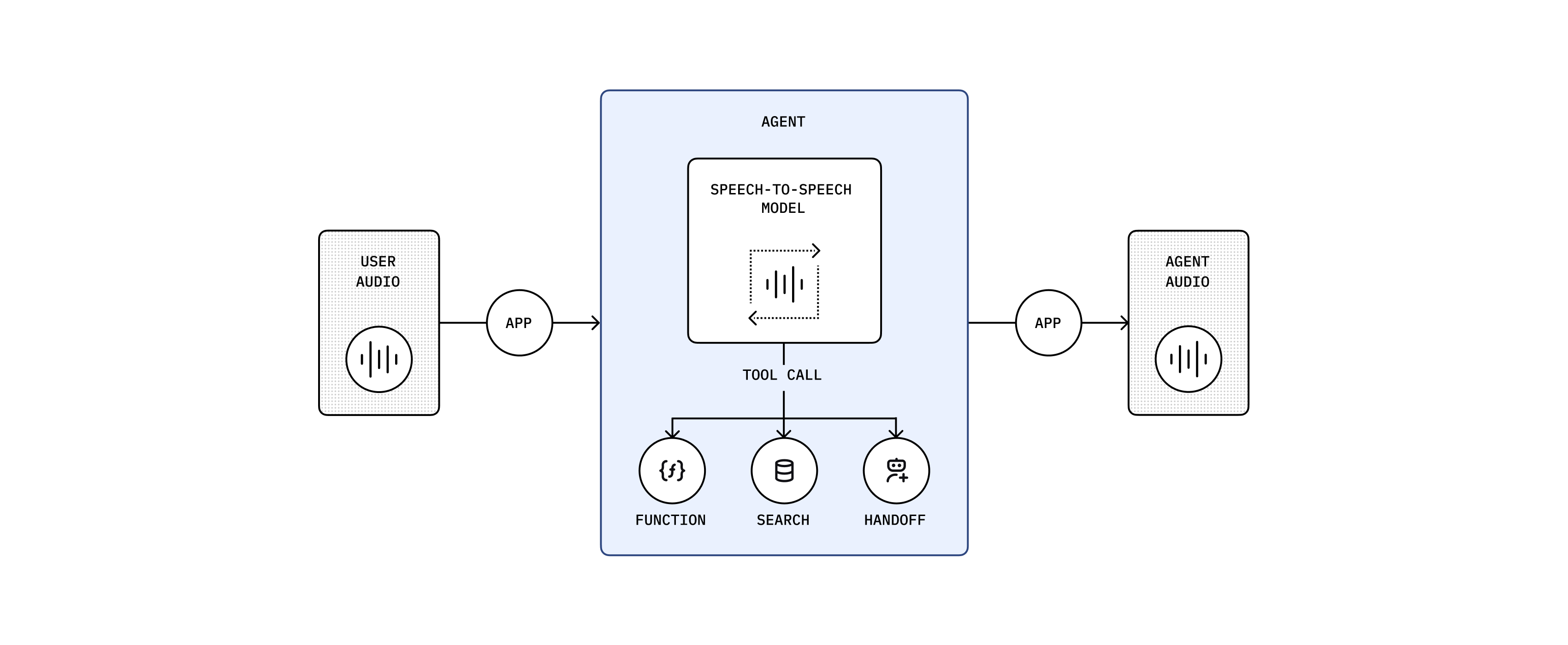
30 

31The multimodal speech-to-speech (S2S) architecture directly processes audio inputs and outputs, handling speech in real time in a single multimodal model, `gpt-4o-realtime-preview`. The model thinks and responds in speech. It doesn't rely on a transcript of the user's input—it hears emotion and intent, filters out noise, and responds directly in speech. Use this approach for highly interactive, low-latency, conversational use cases.

32 

33| Strengths | Best for |

34| ------------------------------------------------------------- | ------------------------------------------------------ |

35| Low latency interactions | Interactive and unstructured conversations |

36| Rich multimodal understanding (audio and text simultaneously) | Language tutoring and interactive learning experiences |

37| Natural, fluid conversational flow | Conversational search and discovery |

38| Enhanced user experience through vocal context understanding | Interactive customer service scenarios |

39 

40### Chained architecture

41 

42![Diagram of a chained agent architecture](https://cdn.openai.com/API/docs/images/diagram-chained-agent.png)
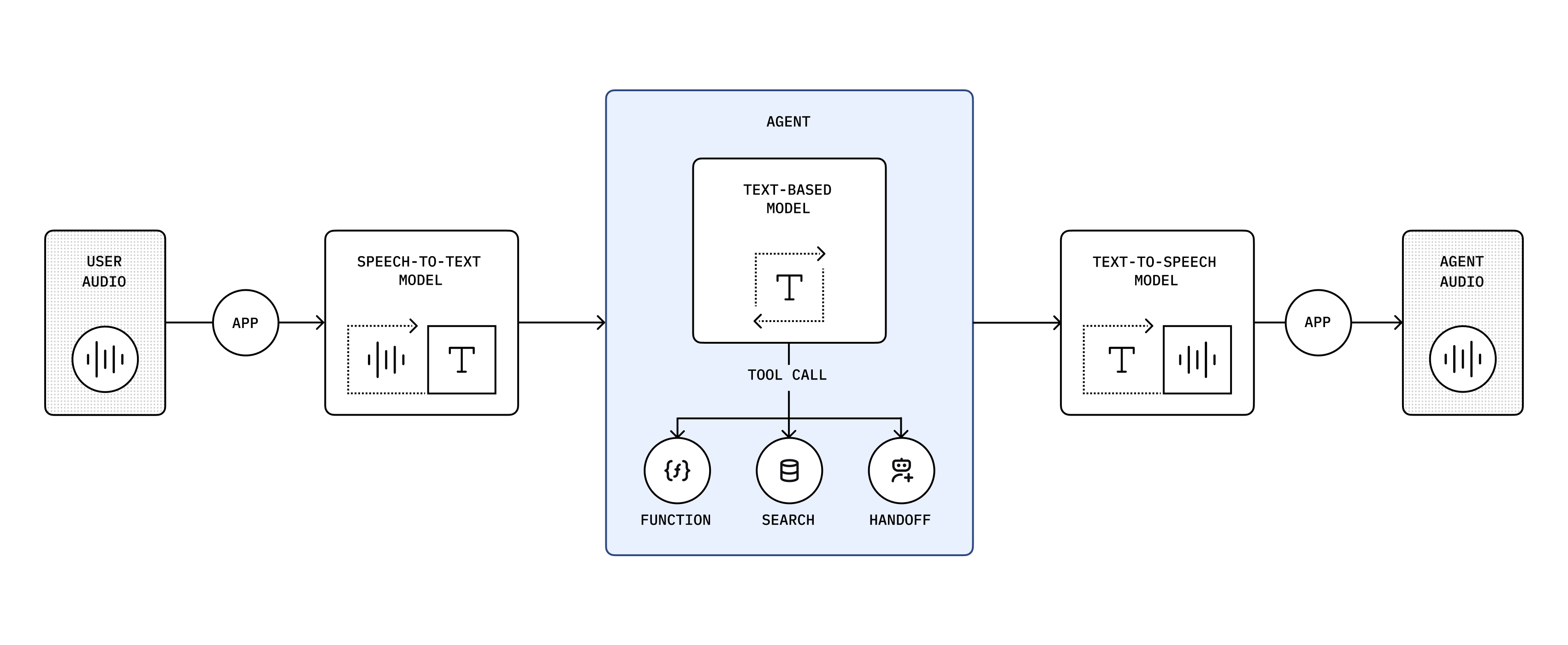
43 

44A chained architecture processes audio sequentially, converting audio to text, generating intelligent responses using large language models (LLMs), and synthesizing audio from text. We recommend this predictable architecture if you're new to building voice agents. Both the user input and model's response are in text, so you have a transcript and can control what happens in your application. It's also a reliable way to convert an existing LLM-based application into a voice agent.

45 

46You're chaining these models: `gpt-4o-transcribe` → `gpt-4.1` → `gpt-4o-mini-tts`

47 

48| Strengths | Best for |

49| --------------------------------------------------- | --------------------------------------------------------- |

50| High control and transparency | Structured workflows focused on specific user objectives |

51| Robust function calling and structured interactions | Customer support |

52| Reliable, predictable responses | Sales and inbound triage |

53| Support for extended conversational context | Scenarios that involve transcripts and scripted responses |

54 

55 

56The following guide below is for building agents using our recommended **speech-to-speech architecture**.<br/><br/>

57 

58To learn more about the chained architecture, see [the chained architecture guide](https://developers.openai.com/api/docs/guides/voice-agents?voice-agent-architecture=chained).

59 

60 

61 

62 

63## Build a voice agent

64 

65Use OpenAI's APIs and SDKs to create powerful, context-aware voice agents.

66 

67 

68Building a speech-to-speech voice agent requires:

69 

701. Establishing a connection for realtime data transfer

712. Creating a realtime session with the Realtime API

723. Using an OpenAI model with realtime audio input and output capabilities

73 

74If you are new to building voice agents, we recommend using the [Realtime Agents in the TypeScript Agents SDK](https://openai.github.io/openai-agents-js/guides/voice-agents/) to get started with your voice agents.

75 

76```bash

77npm install @openai/agents

78```

79 

80If you want to get an idea of what interacting with a speech-to-speech voice agent looks like, check

81out our [quickstart guide](https://openai.github.io/openai-agents-js/guides/voice-agents/) to get started or check out our example application below.

82 

83<a

84 href="https://github.com/openai/openai-realtime-agents"

85 target="_blank"

86 rel="noreferrer"

87>

88

89 

90<span slot="icon">

91 </span>

92 A collection of example speech-to-speech voice agents including handoffs and

93 reasoning model validation.

94 11 

12Agent Builder doesn't currently support voice workflows, so voice stays an SDK-first surface.

95 13 

96</a>14## Recommended starting points

97 15 

98### Choose your transport method16The two supported languages expose different strengths today:

99 17 

100As latency is critical in voice agent use cases, the Realtime API provides two low-latency18- In TypeScript, the fastest path to a browser-based voice assistant is a `RealtimeAgent` and `RealtimeSession`.

101transport methods:19- In Python, the simplest path to extending an existing text agent into voice is a chained `VoicePipeline`.

102 20 

1031. **WebRTC**: A peer-to-peer protocol that allows for low-latency audio and video communication.21Two common voice starting points

1042. **WebSocket**: A common protocol for realtime data transfer.

105 22 

106The two transport methods for the Realtime API support largely the same capabilities, but which one23```typescript

107is more suitable for you will depend on your use case.24import { RealtimeAgent, RealtimeSession } from "@openai/agents/realtime";

108 

109WebRTC is generally the better choice if you are building client-side applications such as

110browser-based voice agents.

111 

112For anything where you are executing the agent server-side such as building an agent that can

113[answer phone calls](https://github.com/openai/openai-realtime-twilio-demo), WebSockets will be the

114better option.

115 

116If you are using the [OpenAI Agents SDK for TypeScript](https://openai.github.io/openai-agents-js/),

117we will automatically use WebRTC if you are building in the browser and WebSockets otherwise.

118 

119### Design your voice agent

120 

121Just like when designing a text-based agent, you'll want to start small and keep your agent focused

122on a single task.

123 

124Try to limit the number of tools your agent has access to and provide an escape hatch for the agent

125to deal with tasks that it is not equipped to handle.

126 

127This could be a tool that allows the agent to handoff the conversation to a human or a certain

128phrase that it can fall back to.

129 

130While providing tools to text-based agents is a great way to provide additional context to the

131agent, for voice agents you should consider giving critical information as part of the prompt as

132opposed to requiring the agent to call a tool first.

133 

134If you are just getting started, check out our [Realtime Playground](https://platform.openai.com/playground/realtime) that

135provides prompt generation helpers, as well as a way to stub out your function tools including

136stubbed tool responses to try end to end flows.

137 

138### Precisely prompt your agent

139 25 

140With speech-to-speech agents, prompting is even more powerful than with text-based agents as the26const agent = new RealtimeAgent({

141prompt allows you to not just control the content of the agent's response but also the way the agent27 name: "Assistant",

142speaks or help it understand audio content.28 instructions: "You are a helpful voice assistant.",

29});

143 30 

144A good example of what a prompt might look like:31const session = new RealtimeSession(agent, {

32 model: "gpt-realtime-1.5",

33});

145 34 

35await session.connect({

36 apiKey: "ek_...(ephemeral key from your server)",

37});

146```38```

147# Personality and Tone

148## Identity

149// Who or what the AI represents (e.g., friendly teacher, formal advisor, helpful assistant). Be detailed and include specific details about their character or backstory.

150 39 

151## Task40```python

152// At a high level, what is the agent expected to do? (e.g. "you are an expert at accurately handling user returns")41import asyncio

42import numpy as np

153 43 

154## Demeanor44from agents import Agent, function_tool

155// Overall attitude or disposition (e.g., patient, upbeat, serious, empathetic)45from agents.voice import AudioInput, SingleAgentVoiceWorkflow, VoicePipeline

156 46 

157## Tone

158// Voice style (e.g., warm and conversational, polite and authoritative)

159 47 

160## Level of Enthusiasm48@function_tool

161// Degree of energy in responses (e.g., highly enthusiastic vs. calm and measured)49def get_weather(city: str) -> str:

50 """Get the weather for a given city."""

51 return f"The weather in {city} is sunny."

162 52 

163## Level of Formality

164// Casual vs. professional language (e.g., “Hey, great to see you!” vs. “Good afternoon, how may I assist you?”)

165 53 

166## Level of Emotion54agent = Agent(

167// How emotionally expressive or neutral the AI should be (e.g., compassionate vs. matter-of-fact)55 name="Assistant",

56 instructions="You are a helpful voice assistant.",

57 model="gpt-5.4",

58 tools=[get_weather],

59)

168 60 

169## Filler Words

170// Helps make the agent more approachable, e.g. “um,” “uh,” "hm," etc.. Options are generally "none", "occasionally", "often", "very often"

171 61 

172## Pacing62async def main() -> None:

173// Rhythm and speed of delivery63 pipeline = VoicePipeline(workflow=SingleAgentVoiceWorkflow(agent))

64 audio_input = AudioInput(buffer=np.zeros(24000 * 3, dtype=np.int16))

65 result = await pipeline.run(audio_input)

66 async for event in result.stream():

67 if event.type == "voice_stream_event_audio":

68 print("Received audio bytes", len(event.data))

174 69 

175## Other details

176// Any other information that helps guide the personality or tone of the agent.

177 70 

178# Instructions71if __name__ == "__main__":

179- If a user provides a name or phone number, or something else where you need to know the exact spelling, always repeat it back to the user to confirm you have the right understanding before proceeding. // Always include this72 asyncio.run(main())

180- If the caller corrects any detail, acknowledge the correction in a straightforward manner and confirm the new spelling or value.

181```73```

182 74 

183You do not have to be as detailed with your instructions. This is for illustrative purposes. For

184shorter examples, check out the prompts on [OpenAI.fm](https://openai.fm).

185 75 

186For use cases with common conversation flows you can encode those inside the prompt using markup language like JSON76<span id="speech-to-speech-realtime-architecture"></span>

187 77 

188```78## Build a speech-to-speech voice agent

189# Conversation States

190[

191 {

192 "id": "1_greeting",

193 "description": "Greet the caller and explain the verification process.",

194 "instructions": [

195 "Greet the caller warmly.",

196 "Inform them about the need to collect personal information for their record."

197 ],

198 "examples": [

199 "Good morning, this is the front desk administrator. I will assist you in verifying your details.",

200 "Let us proceed with the verification. May I kindly have your first name? Please spell it out letter by letter for clarity."

201 ],

202 "transitions": [{

203 "next_step": "2_get_first_name",

204 "condition": "After greeting is complete."

205 }]

206 },

207 {

208 "id": "2_get_first_name",

209 "description": "Ask for and confirm the caller's first name.",

210 "instructions": [

211 "Request: 'Could you please provide your first name?'",

212 "Spell it out letter-by-letter back to the caller to confirm."

213 ],

214 "examples": [

215 "May I have your first name, please?",

216 "You spelled that as J-A-N-E, is that correct?"

217 ],

218 "transitions": [{

219 "next_step": "3_get_last_name",

220 "condition": "Once first name is confirmed."

221 }]

222 },

223 {

224 "id": "3_get_last_name",

225 "description": "Ask for and confirm the caller's last name.",

226 "instructions": [

227 "Request: 'Thank you. Could you please provide your last name?'",

228 "Spell it out letter-by-letter back to the caller to confirm."

229 ],

230 "examples": [

231 "And your last name, please?",

232 "Let me confirm: D-O-E, is that correct?"

233 ],

234 "transitions": [{

235 "next_step": "4_next_steps",

236 "condition": "Once last name is confirmed."

237 }]

238 },

239 {

240 "id": "4_next_steps",

241 "description": "Attempt to verify the caller's information and proceed with next steps.",

242 "instructions": [

243 "Inform the caller that you will now attempt to verify their information.",

244 "Call the 'authenticateUser' function with the provided details.",

245 "Once verification is complete, transfer the caller to the tourGuide agent for further assistance."

246 ],

247 "examples": [

248 "Thank you for providing your details. I will now verify your information.",

249 "Attempting to authenticate your information now.",

250 "I'll transfer you to our agent who can give you an overview of our facilities. Just to help demonstrate different agent personalities, she's instructed to act a little crabby."

251 ],

252 "transitions": [{

253 "next_step": "transferAgents",

254 "condition": "Once verification is complete, transfer to tourGuide agent."

255 }]

256 }

257]

258```

259 79 

260Instead of writing this out by hand, you can also check out this80Use the live audio API path when the interaction should feel conversational and immediate. The usual browser flow is:

261[Voice Agent Metaprompter](https://chatgpt.com/g/g-678865c9fb5c81918fa28699735dd08e-voice-agent-metaprompt-gpt)

262or [copy the metaprompt](https://github.com/openai/openai-realtime-agents/blob/main/src/app/agentConfigs/voiceAgentMetaprompt.txt) and use it directly.

263 81 

264### Handle agent handoff821. Your application server creates an ephemeral client secret for the live audio session.

832. Your frontend creates a `RealtimeSession`.

843. The session connects over WebRTC in the browser or WebSocket on the server.

854. The agent handles audio turns, tools, interruptions, and handoffs inside that session.

265 86 

266In order to keep your agent focused on a single task, you can provide the agent with the ability to87Start with the transport docs when you need lower-level control:

267transfer or handoff to another specialized agent. You can do this by providing the agent with a

268function tool to initiate the transfer. This tool should have information on when to use it for a

269handoff.

270 88 

271If you are using the [OpenAI Agents SDK for TypeScript](https://openai.github.io/openai-agents-js/),89- [Live audio API overview](https://developers.openai.com/api/docs/guides/realtime)

272you can define any agent as a potential handoff to another agent.90- [Live audio API with WebRTC](https://developers.openai.com/api/docs/guides/realtime-webrtc)

91- [Live audio API with WebSocket](https://developers.openai.com/api/docs/guides/realtime-websocket)

273 92 

274```typescript93## Build a chained voice workflow

275 94 

95Use the chained path when you want stronger control over intermediate text, existing text-agent reuse, or a simpler extension path from a non-voice workflow. In that design, your application explicitly manages:

276 96 

277const productSpecialist = new RealtimeAgent({971. speech-to-text

278 name: "Product Specialist",982. the agent workflow itself

279 instructions:993. text-to-speech

280 "You are a product specialist. You are responsible for answering questions about our products.",

281});

282 

283const triageAgent = new RealtimeAgent({

284 name: "Triage Agent",

285 instructions:

286 "You are a customer service frontline agent. You are responsible for triaging calls to the appropriate agent.",

287 tools: [productSpecialist],

288});

289```

290 

291The SDK will automatically facilitate the handoff between the agents for you.

292 

293Alternatively if you are building your own voice agent, here is an example of such a tool definition:

294 

295```js

296const tool = {

297 type: "function",

298 function: {

299 name: "transferAgents",

300 description: `

301Triggers a transfer of the user to a more specialized agent.

302Calls escalate to a more specialized LLM agent or to a human agent, with additional context.

303Only call this function if one of the available agents is appropriate. Don't transfer to your own agent type.

304 

305Let the user know you're about to transfer them before doing so.

306 

307Available Agents:

308- returns_agent

309- product_specialist_agent

310 `.trim(),

311 parameters: {

312 type: "object",

313 properties: {

314 rationale_for_transfer: {

315 type: "string",

316 description: "The reasoning why this transfer is needed.",

317 },

318 conversation_context: {

319 type: "string",

320 description:

321 "Relevant context from the conversation that will help the recipient perform the correct action.",

322 },

323 destination_agent: {

324 type: "string",

325 description:

326 "The more specialized destination_agent that should handle the user's intended request.",

327 enum: ["returns_agent", "product_specialist_agent"],

328 },

329 },

330 },

331 },

332};

333```

334 

335Once the agent calls that tool you can then use the `session.update` event of the Realtime API to

336update the configuration of the session to use the instructions and tools available to the

337specialized agent.

338 

339### Extend your agent with specialized models

340 100 

341![Diagram showing the speech-to-speech model calling other agents as tools](https://cdn.openai.com/API/docs/diagram-speech-to-speech-agent-tools.png)101This is often the better fit for support flows, approval-heavy flows, or cases where you want durable transcripts and deterministic logic between each stage.
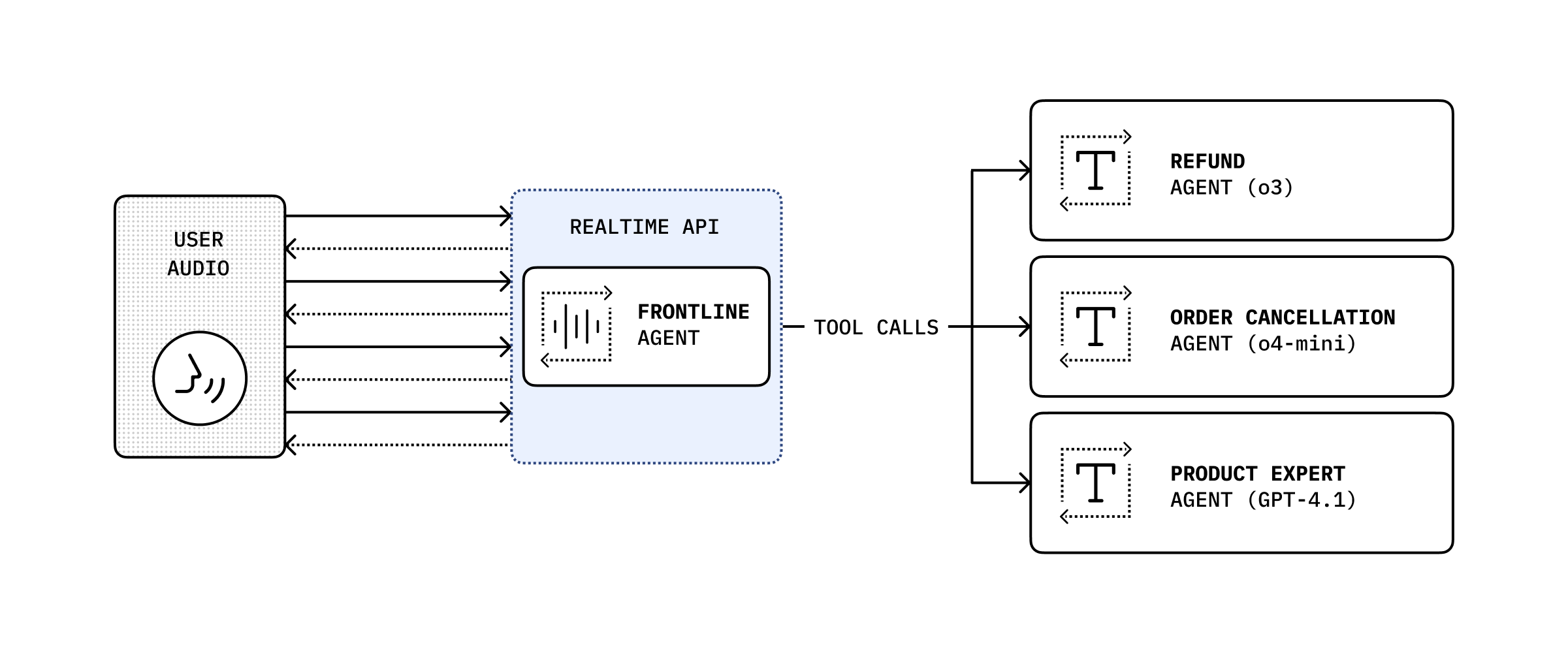
342 102 

343While the speech-to-speech model is useful for conversational use cases, there might be use cases103## Voice agents still use the same core agent building blocks

344where you need a specific model to handle the task like having o3 validate a return request against

345a detailed return policy.

346 104 

347In that case you can expose your text-based agent using your preferred model as a function tool105The voice surface changes the transport and audio loop, but the core workflow decisions are the same:

348call that your agent can send specific requests to.

349 106 

350If you are using the [OpenAI Agents SDK for TypeScript](https://openai.github.io/openai-agents-js/),107- Use [Using tools](https://developers.openai.com/api/docs/guides/tools#usage-in-the-agents-sdk) when the voice agent needs external capabilities.

351you can give a `RealtimeAgent` a `tool` that will trigger the specialized agent on your server.108- Use [Running agents](https://developers.openai.com/api/docs/guides/agents/running-agents) when spoken workflows need streaming, continuation, or durable state.

109- Use [Orchestration and handoffs](https://developers.openai.com/api/docs/guides/agents/orchestration) when spoken workflows branch across specialists.

110- Use [Guardrails and human review](https://developers.openai.com/api/docs/guides/agents/guardrails-approvals) when spoken workflows need safety checks or approvals.

111- Use [Integrations and observability](https://developers.openai.com/api/docs/guides/agents/integrations-observability) when you need MCP-backed capabilities or want to inspect how the voice workflow behaved.

352 112 

353```typescript

354 

355 

356 

357const supervisorAgent = tool({

358 name: "supervisorAgent",

359 description: "Passes a case to your supervisor for approval.",

360 parameters: z.object({

361 caseDetails: z.string(),

362 }),

363 execute: async ({ caseDetails }, details) => {

364 const history = details.context.history;

365 const response = await fetch("/request/to/your/specialized/agent", {

366 method: "POST",

367 body: JSON.stringify({

368 caseDetails,

369 history,

370 }),

371 });

372 return response.text();

373 },

374});

375 

376const returnsAgent = new RealtimeAgent({

377 name: "Returns Agent",

378 instructions:

379 "You are a returns agent. You are responsible for handling return requests. Always check with your supervisor before making a decision.",

380 tools: [supervisorAgent],

381});

382```

113The practical rule is: choose the audio architecture first, then design the rest of the agent workflow the same way you would for text.

quickstart.md +1 −1

Details

618 618 

619## Build agents619## Build agents

620 620 

621Use the OpenAI platform to build [agents](https://developers.openai.com/api/docs/guides/agents) capable of taking action—like [controlling computers](https://developers.openai.com/api/docs/guides/tools-computer-use)—on behalf of your users. Use the Agents SDK for [Python](https://openai.github.io/openai-agents-python) or [TypeScript](https://openai.github.io/openai-agents-js) to create orchestration logic on the backend.621Use the OpenAI platform to build [agents](https://developers.openai.com/api/docs/guides/agents) capable of taking action—like [controlling computers](https://developers.openai.com/api/docs/guides/tools-computer-use)—on behalf of your users. Use the [Agents SDK](https://developers.openai.com/api/docs/guides/agents) to create orchestration logic on the backend.

622 622 

623[623[

624 624