SpyBara
Go Premium

Documentation 2026-08-12 02:57 UTC to 2026-08-13 22:00 UTC

35 files changed +571 −434. View all changes and history on the product overview
2026
Thu 13 22:00 Wed 12 02:57 Tue 11 19:59 Mon 10 19:00 Fri 7 00:58 Thu 6 21:58 Wed 5 18:01 Tue 4 22:59 Mon 3 18:01
Details

297 }297 }

298 298 

299 async handleRequiresAction(data, runId, threadId) {299 async handleRequiresAction(data, runId, threadId) {

300 try {300 const toolOutputs = data.required_action.submit_tool_outputs.tool_calls.map(

301 const toolOutputs =301 (toolCall) => {

302 data.required_action.submit_tool_outputs.tool_calls.map((toolCall) => {

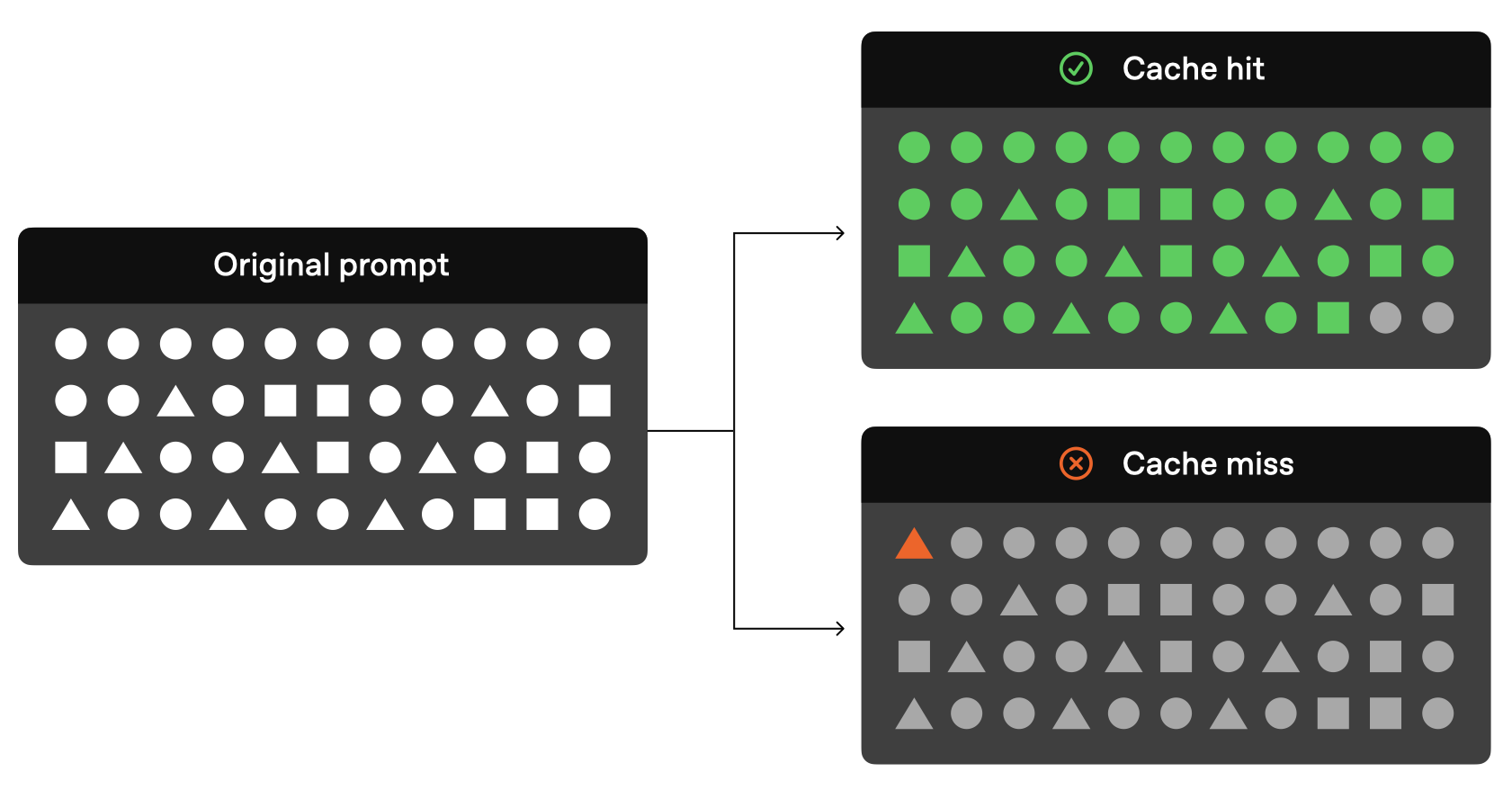
303 if (toolCall.function.name === "getCurrentTemperature") {302 if (toolCall.function.name === "getCurrentTemperature") {

304 return {303 return { tool_call_id: toolCall.id, output: "57" };

305 tool_call_id: toolCall.id,

306 output: "57",

307 };

308 } else if (toolCall.function.name === "getRainProbability") {304 } else if (toolCall.function.name === "getRainProbability") {

309 return {305 return { tool_call_id: toolCall.id, output: "0.06" };

310 tool_call_id: toolCall.id,

311 output: "0.06",

312 };

313 }306 }

314 });307 throw new Error(`Unknown tool: ${toolCall.function.name}`);

308 }

309 );

315 // Submit all the tool outputs at the same time310 // Submit all the tool outputs at the same time

316 await this.submitToolOutputs(toolOutputs, runId, threadId);311 await this.submitToolOutputs(toolOutputs, runId, threadId);

317 } catch (error) {

318 console.error("Error processing required action:", error);

319 }

320 }312 }

321 313 

322 async submitToolOutputs(toolOutputs, runId, threadId) {314 async submitToolOutputs(toolOutputs, runId, threadId) {


409`required_action` and submit them at the same time to the 'submit tool outputs and poll' helper.401`required_action` and submit them at the same time to the 'submit tool outputs and poll' helper.

410 402 

411```javascript403```javascript

412const handleRequiresAction = async (run) => {404async function handleRequiresAction(run) {

413 // Check if there are tools that require outputs405 // Check if there are tools that require outputs

414 if (406 if (

415 run.required_action &&407 run.required_action &&


420 const toolOutputs = run.required_action.submit_tool_outputs.tool_calls.map(412 const toolOutputs = run.required_action.submit_tool_outputs.tool_calls.map(

421 (tool) => {413 (tool) => {

422 if (tool.function.name === "getCurrentTemperature") {414 if (tool.function.name === "getCurrentTemperature") {

423 return {415 return { tool_call_id: tool.id, output: "57" };

424 tool_call_id: tool.id,

425 output: "57",

426 };

427 } else if (tool.function.name === "getRainProbability") {416 } else if (tool.function.name === "getRainProbability") {

428 return {417 return { tool_call_id: tool.id, output: "0.06" };

429 tool_call_id: tool.id,

430 output: "0.06",

431 };

432 }418 }

419 throw new Error(`Unknown tool: ${tool.function.name}`);

433 }420 }

434 );421 );

435 422 


447 // Check status after submitting tool outputs434 // Check status after submitting tool outputs

448 return handleRunStatus(run);435 return handleRunStatus(run);

449 }436 }

450};437}

451 438 

452const handleRunStatus = async (run) => {439async function handleRunStatus(run) {

453 // Check if the run is completed440 // Check if the run is completed

454 if (run.status === "completed") {441 if (run.status === "completed") {

455 let messages = await client.beta.threads.messages.list(thread.id);442 let messages = await client.beta.threads.messages.list(thread.id);


461 } else {448 } else {

462 console.error("Run did not complete:", run);449 console.error("Run did not complete:", run);

463 }450 }

464};451}

465 452 

466// Create and poll run453// Create and poll run

467let run = await client.beta.threads.runs.createAndPoll(thread.id, {454let run = await client.beta.threads.runs.createAndPoll(thread.id, {

Details

27 27 

28Define a single agent28Define a single agent

29 29 

30```typescript30```javascript

31import { Agent, tool } from "@openai/agents";31import { Agent, tool } from "@openai/agents";

32import { z } from "zod";32import { z } from "zod";

33 33 


77 77 

78Return structured output78Return structured output

79 79 

80```typescript80```javascript

81import { Agent, run } from "@openai/agents";81import { Agent, run } from "@openai/agents";

82import { z } from "zod";82import { z } from "zod";

83 83 


140 140 

141Pass local context to tools141Pass local context to tools

142 142 

143```typescript143```javascript

144import { Agent, RunContext, run, tool } from "@openai/agents";144import { Agent, run, tool } from "@openai/agents";

145import { z } from "zod";145import { z } from "zod";

146 146 

147interface UserInfo {

148 name: string;

149 uid: number;

150}

151 

152const fetchUserAge = tool({147const fetchUserAge = tool({

153 name: "fetch_user_age",148 name: "fetch_user_age",

154 description: "Return the age of the current user.",149 description: "Return the age of the current user.",

155 parameters: z.object({}),150 parameters: z.object({}),

156 async execute(_args, runContext?: RunContext<UserInfo>) {151 // TypeScript users can type this as RunContext<{ name: string; uid: number }>.

152 async execute(_args, runContext) {

157 return `User ${runContext?.context.name} is 47 years old`;153 return `User ${runContext?.context.name} is 47 years old`;

158 },154 },

159});155});

160 156 

161const agent = new Agent<UserInfo>({157const agent = new Agent({

162 name: "Assistant",158 name: "Assistant",

163 tools: [fetchUserAge],159 tools: [fetchUserAge],

164});160});

Details

22 22 

23Block a request with an input guardrail23Block a request with an input guardrail

24 24 

25```typescript25```javascript

26import { Agent, InputGuardrailTripwireTriggered, run } from "@openai/agents";26import { Agent, InputGuardrailTripwireTriggered, run } from "@openai/agents";

27import { z } from "zod";27import { z } from "zod";

28 28 


130 130 

131Pause for approval before a sensitive action131Pause for approval before a sensitive action

132 132 

133```typescript133```javascript

134import { Agent, run, tool } from "@openai/agents";134import { Agent, run, tool } from "@openai/agents";

135import { z } from "zod";135import { z } from "zod";

136 136 

Details

20 20 

21Attach a hosted MCP server21Attach a hosted MCP server

22 22 

23```typescript23```javascript

24import { Agent, hostedMcpTool } from "@openai/agents";24import { Agent, hostedMcpTool } from "@openai/agents";

25 25 

26const agent = new Agent({26const agent = new Agent({


59 59 

60Connect a local MCP server60Connect a local MCP server

61 61 

62```typescript62```javascript

63import { Agent, MCPServerStdio, run } from "@openai/agents";63import { Agent, MCPServerStdio, run } from "@openai/agents";

64 64 

65const server = new MCPServerStdio({65const server = new MCPServerStdio({


140 140 

141Wrap multiple runs in one trace141Wrap multiple runs in one trace

142 142 

143```typescript143```javascript

144import { Agent, run, withTrace } from "@openai/agents";144import { Agent, run, withTrace } from "@openai/agents";

145 145 

146const agent = new Agent({146const agent = new Agent({

Details

14 14 

15Set models per agent and per run15Set models per agent and per run

16 16 

17```typescript17```javascript

18import { Agent, Runner } from "@openai/agents";18import { Agent, Runner } from "@openai/agents";

19 19 

20const fastAgent = new Agent({20const fastAgent = new Agent({

Details

17 17 

18Delegate with handoffs18Delegate with handoffs

19 19 

20```typescript20```javascript

21import { Agent, handoff } from "@openai/agents";21import { Agent, handoff } from "@openai/agents";

22 22 

23const billingAgent = new Agent({ name: "Billing agent" });23const billingAgent = new Agent({ name: "Billing agent" });


56 56 

57Call a specialist as a tool57Call a specialist as a tool

58 58 

59```typescript59```javascript

60import { Agent } from "@openai/agents";60import { Agent } from "@openai/agents";

61 61 

62const summarizer = new Agent({62const summarizer = new Agent({

Details

2 2 

3> For the complete documentation index, see [llms.txt](/llms.txt). Markdown versions of documentation pages are available by appending `.md` to the page URL.3> For the complete documentation index, see [llms.txt](/llms.txt). Markdown versions of documentation pages are available by appending `.md` to the page URL.

4 4 

5Use this page when you want the shortest path to a working SDK-based agent. The examples below use the same high-level concepts in both TypeScript and Python: define an agent, run it, then add tools and specialist agents as your workflow grows.5Use this page when you want the shortest path to a working SDK-based agent. The examples below use the same high-level concepts in both JavaScript and Python: define an agent, run it, then add tools and specialist agents as your workflow grows.

6 6 

7## Install the SDK7## Install the SDK

8 8 


18 18 

19 19 

20```bash20```bash

21# TypeScript21# JavaScript

22npm install @openai/agents zod22npm install @openai/agents zod

23 23 

24# Python24# Python


33 33 

34Create and run an agent34Create and run an agent

35 35 

36```typescript36```javascript

37import { Agent, run } from "@openai/agents";37import { Agent, run } from "@openai/agents";

38 38 

39const agent = new Agent({39const agent = new Agent({


89 89 

90Add a function tool90Add a function tool

91 91 

92```typescript92```javascript

93import { Agent, run, tool } from "@openai/agents";93import { Agent, run, tool } from "@openai/agents";

94import { z } from "zod";94import { z } from "zod";

95 95 


157 157 

158Route to specialist agents158Route to specialist agents

159 159 

160```typescript160```javascript

161import { Agent, run } from "@openai/agents";161import { Agent, run } from "@openai/agents";

162 162 

163const historyTutor = new Agent({163const historyTutor = new Agent({

Details

31 31 

32Persist multi-turn state with sessions32Persist multi-turn state with sessions

33 33 

34```typescript34```javascript

35import { Agent, MemorySession, run } from "@openai/agents";35import { Agent, MemorySession, run } from "@openai/agents";

36 36 

37const agent = new Agent({37const agent = new Agent({


88 88 

89Continue with server-managed state89Continue with server-managed state

90 90 

91```typescript91```javascript

92import { Agent, run } from "@openai/agents";92import { Agent, run } from "@openai/agents";

93import OpenAI from "openai";93import OpenAI from "openai";

94 94 


150 150 

151Stream a run as text arrives151Stream a run as text arrives

152 152 

153```typescript153```javascript

154import { Agent, run } from "@openai/agents";154import { Agent, run } from "@openai/agents";

155 155 

156const agent = new Agent({156const agent = new Agent({

Details

199 199 

200Load skills200Load skills

201 201 

202```typescript202```javascript

203import {203import {

204 Capabilities,204 Capabilities,

205 SandboxAgent,205 SandboxAgent,


270 270 

271Run a Unix-local sandbox agent271Run a Unix-local sandbox agent

272 272 

273```typescript273```javascript

274import { run } from "@openai/agents";274import { run } from "@openai/agents";

275import { Manifest, SandboxAgent, file, shell } from "@openai/agents/sandbox";275import { Manifest, SandboxAgent, file, shell } from "@openai/agents/sandbox";

276import { UnixLocalSandboxClient } from "@openai/agents/sandbox/local";276import { UnixLocalSandboxClient } from "@openai/agents/sandbox/local";


385 385 

386Switch to Docker386Switch to Docker

387 387 

388```typescript388```javascript

389import { run } from "@openai/agents";389import { run } from "@openai/agents";

390import { SandboxAgent } from "@openai/agents/sandbox";390import { SandboxAgent } from "@openai/agents/sandbox";

391import { DockerSandboxClient } from "@openai/agents/sandbox/local";391import { DockerSandboxClient } from "@openai/agents/sandbox/local";


479 479 

480Serialize and resume sandbox state480Serialize and resume sandbox state

481 481 

482```typescript482```javascript

483import { run } from "@openai/agents";483import { run } from "@openai/agents";

484import { Manifest, SandboxAgent } from "@openai/agents/sandbox";484import { Manifest, SandboxAgent } from "@openai/agents/sandbox";

485import { UnixLocalSandboxClient } from "@openai/agents/sandbox/local";485import { UnixLocalSandboxClient } from "@openai/agents/sandbox/local";


495});495});

496 496 

497const session = await client.create({ manifest });497const session = await client.create({ manifest });

498let conversation: any[] = [];498let conversation = [];

499let frozenSessionState;499let frozenSessionState;

500 500 

501try {501try {


600 600 

601Enable sandbox memory601Enable sandbox memory

602 602 

603```typescript603```javascript

604import {604import {

605 Manifest,605 Manifest,

606 SandboxAgent,606 SandboxAgent,

guides/audio.md +3 −3

Details

47 47 

48Models such as [`gpt-realtime-2.1`](https://developers.openai.com/api/docs/models/gpt-realtime-2.1) and [`gpt-audio-1.5`](https://developers.openai.com/api/docs/models/gpt-audio-1.5) are natively multimodal, meaning they can understand and generate audio and text as input and output.48Models such as [`gpt-realtime-2.1`](https://developers.openai.com/api/docs/models/gpt-realtime-2.1) and [`gpt-audio-1.5`](https://developers.openai.com/api/docs/models/gpt-audio-1.5) are natively multimodal, meaning they can understand and generate audio and text as input and output.

49 49 

50For live browser speech-to-speech interactions, start with a realtime session in the TypeScript Agents SDK:50For live browser speech-to-speech interactions, start with a realtime session in the Agents SDK for JavaScript:

51 51 

52Start a realtime voice session52Start a realtime voice session

53 53 

54```typescript54```javascript

55import { RealtimeAgent, RealtimeSession } from "@openai/agents/realtime";55import { RealtimeAgent, RealtimeSession } from "@openai/agents/realtime";

56 56 

57const agent = new RealtimeAgent({57const agent = new RealtimeAgent({


69```69```

70 70 

71 71 

72This TypeScript example uses the Agents SDK to connect browser voice agents with WebRTC from the client. For Python voice workflows, use the [Voice agents guide](https://developers.openai.com/api/docs/guides/voice-agents), which covers chained voice pipelines.72This JavaScript example uses the Agents SDK to connect browser voice agents with WebRTC from the client. For Python voice workflows, use the [Voice agents guide](https://developers.openai.com/api/docs/guides/voice-agents), which covers chained voice pipelines.

73 73 

74If you already have a text-based LLM application with the [Chat Completions endpoint](https://developers.openai.com/api/reference/resources/chat), you may want to add audio capabilities. For example, if your chat application supports text input, you can add audio input and output: include `audio` in the `modalities` array and use an audio model, like [`gpt-audio-1.5`](https://developers.openai.com/api/docs/models/gpt-audio-1.5).74If you already have a text-based LLM application with the [Chat Completions endpoint](https://developers.openai.com/api/reference/resources/chat), you may want to add audio capabilities. For example, if your chat application supports text input, you can add audio input and output: include `audio` in the `modalities` array and use an audio model, like [`gpt-audio-1.5`](https://developers.openai.com/api/docs/models/gpt-audio-1.5).

75 75 

Details

127 127 

128 See the [chatkit-js repo](https://github.com/openai/chatkit-js) on GitHub.128 See the [chatkit-js repo](https://github.com/openai/chatkit-js) on GitHub.

129 129 

130 chatkit.ts130 chatkit.js

131 131 

132```typescript132```javascript

133export default async function getChatKitSessionToken(133export default async function getChatKitSessionToken(deviceId) {

134 deviceId: string

135): Promise<string> {

136 const apiKey = process.env.OPENAI_API_KEY;134 const apiKey = process.env.OPENAI_API_KEY;

137 if (!apiKey) {135 if (!apiKey) {

138 throw new Error("OPENAI_API_KEY is required");136 throw new Error("OPENAI_API_KEY is required");


157 );155 );

158 }156 }

159 157 

160 const { client_secret } = (await response.json()) as {158 const { client_secret } = await response.json();

161 client_secret?: string;159 

162 };

163 if (!client_secret) {160 if (!client_secret) {

164 throw new Error("ChatKit session response did not include client_secret");161 throw new Error("ChatKit session response did not include client_secret");

165 }162 }

Details

23 23 

24Actions can also be sent imperatively by your frontend with `sendAction()`. This is probably most useful when you need ChatKit to respond to interaction happening outside ChatKit, but it can also be used to chain actions when you need to respond on both the client and the server (more on that below).24Actions can also be sent imperatively by your frontend with `sendAction()`. This is probably most useful when you need ChatKit to respond to interaction happening outside ChatKit, but it can also be used to chain actions when you need to respond on both the client and the server (more on that below).

25 25 

26```typescript26```javascript

27await chatKit.sendAction({27await chatKit.sendAction({

28 type: "example",28 type: "example",

29 payload: { id: 123 },29 payload: { id: 123 },


84 84 

85Then, when the action is triggered, it will then be passed to a callback that you provide when instantiating ChatKit.85Then, when the action is triggered, it will then be passed to a callback that you provide when instantiating ChatKit.

86 86 

87```typescript87```javascript

88async function handleWidgetAction(action: WidgetAction) {88async function handleWidgetAction(action) {

89 if (action.type === "example") {89 if (action.type === "example") {

90 const res = await doSomething(action);90 const res = await doSomething(action);

91 91 

Details

57 57 

58For all theming options, see the [API reference](https://openai.github.io/chatkit-js/api/openai/chatkit/type-aliases/themeoption/).58For all theming options, see the [API reference](https://openai.github.io/chatkit-js/api/openai/chatkit/type-aliases/themeoption/).

59 59 

60```typescript60```javascript

61const options: Partial<ChatKitOptions> = {61const options = {

62 theme: {62 theme: {

63 colorScheme: "dark",63 colorScheme: "dark",

64 color: {64 color: {


79 79 

80Let users know what to ask or guide their first input by changing the composer’s placeholder text.80Let users know what to ask or guide their first input by changing the composer’s placeholder text.

81 81 

82```typescript82```javascript

83const options: Partial<ChatKitOptions> = {83const options = {

84 composer: {84 composer: {

85 placeholder: "Ask anything about your data…",85 placeholder: "Ask anything about your data…",

86 },86 },


95 95 

96Guide users on what to ask or do by suggesting prompt ideas when starting a conversation.96Guide users on what to ask or do by suggesting prompt ideas when starting a conversation.

97 97 

98```typescript98```javascript

99const options: Partial<ChatKitOptions> = {99const options = {

100 startScreen: {100 startScreen: {

101 greeting: "What can I help you build today?",101 greeting: "What can I help you build today?",

102 prompts: [102 prompts: [


120 120 

121Custom header buttons help you add navigation, context, or actions relevant to your integration.121Custom header buttons help you add navigation, context, or actions relevant to your integration.

122 122 

123```typescript123```javascript

124const options: Partial<ChatKitOptions> = {124const options = {

125 header: {125 header: {

126 customButtonLeft: {126 customButtonLeft: {

127 icon: "settings-cog",127 icon: "settings-cog",


144 144 

145You can also control the number, size, and types of files that users can attach to messages.145You can also control the number, size, and types of files that users can attach to messages.

146 146 

147```typescript147```javascript

148const options: Partial<ChatKitOptions> = {148const options = {

149 composer: {149 composer: {

150 attachments: {150 attachments: {

151 uploadStrategy: { type: "hosted" },151 uploadStrategy: { type: "hosted" },


165- Use `onTagSearch` to return a list of entities based on the input query.165- Use `onTagSearch` to return a list of entities based on the input query.

166- Use `onClick` to handle the click event of an entity.166- Use `onClick` to handle the click event of an entity.

167 167 

168```typescript168```javascript

169const options: Partial<ChatKitOptions> = {169const options = {

170 entities: {170 entities: {

171 async onTagSearch(query: string) {171 async onTagSearch(query) {

172 void query;172 void query;

173 return [173 return [

174 {174 {


185 },185 },

186 ];186 ];

187 },187 },

188 onClick: (entity: { id: string }) => {188 onClick: (entity) => {

189 navigateToEntity(entity.id);189 navigateToEntity(entity.id);

190 },190 },

191 },191 },


203 203 

204 Browse available widgets.](https://widgets.chatkit.studio)204 Browse available widgets.](https://widgets.chatkit.studio)

205 205 

206```typescript206```javascript

207const options: Partial<ChatKitOptions> = {207const options = {

208 entities: {208 entities: {

209 async onTagSearch() {209 async onTagSearch() {

210 return [];210 return [];

211 },211 },

212 onRequestPreview: async (entity: { title: string }) => ({212 onRequestPreview: async (entity) => ({

213 preview: {213 preview: {

214 type: "Card",214 type: "Card",

215 children: [215 children: [


228Enhance productivity by letting users trigger app-specific actions from the composer bar. The selected tool228Enhance productivity by letting users trigger app-specific actions from the composer bar. The selected tool

229will be sent to the model as a tool preference.229will be sent to the model as a tool preference.

230 230 

231```typescript231```javascript

232const options: Partial<ChatKitOptions> = {232const options = {

233 composer: {233 composer: {

234 tools: [234 tools: [

235 {235 {


248 248 

249Disable major UI regions and features if you need more customization over the options available in the header and want to implement your own instead. Disabling history can be useful when the concept of threads and history doesn't make sense for your use case—e.g., in a support chatbot.249Disable major UI regions and features if you need more customization over the options available in the header and want to implement your own instead. Disabling history can be useful when the concept of threads and history doesn't make sense for your use case—e.g., in a support chatbot.

250 250 

251```typescript251```javascript

252const options: Partial<ChatKitOptions> = {252const options = {

253 history: { enabled: false },253 history: { enabled: false },

254 header: { enabled: false },254 header: { enabled: false },

255};255};


260 260 

261Override the default locale if you have an app-wide language setting. By default, the locale is set to the browser's locale.261Override the default locale if you have an app-wide language setting. By default, the locale is set to the browser's locale.

262 262 

263```typescript263```javascript

264const options: Partial<ChatKitOptions> = {264const options = {

265 locale: "de-DE",265 locale: "de-DE",

266};266};

267```267```

Details

22 22 

23Capture widget events with the `onAction` callback from `WidgetsOption` or equivalent React hook. Forward the action payload to your backend to handle actions.23Capture widget events with the `onAction` callback from `WidgetsOption` or equivalent React hook. Forward the action payload to your backend to handle actions.

24 24 

25```typescript25```javascript

26chatkit.setOptions({26chatkit.setOptions({

27 widgets: {27 widgets: {

28 async onAction(action, item) {28 async onAction(action, item) {

Details

204 204 

205### Events reference205### Events reference

206 206 

207ChatKit emits `CustomEvent` instances from the Web Component. The payload shapes are:207ChatKit emits `CustomEvent` instances from the Web Component. Listen for lifecycle events and read payload data from `event.detail`:

208 208 

209```typescript209```javascript

210type Events = {210chatkit.addEventListener("chatkit.error", (event) => {

211 "chatkit.error": CustomEvent<{ error: Error }>;211 console.error(event.detail.error);

212 "chatkit.response.start": CustomEvent<void>;212});

213 "chatkit.response.end": CustomEvent<void>;213 

214 "chatkit.thread.change": CustomEvent<{ threadId: string | null }>;214chatkit.addEventListener("chatkit.response.start", () => {

215 "chatkit.log": CustomEvent<{ name: string; data?: Record<string, unknown> }>;215 console.log("Response started");

216};216});

217 

218chatkit.addEventListener("chatkit.response.end", () => {

219 console.log("Response ended");

220});

221 

222chatkit.addEventListener("chatkit.thread.change", (event) => {

223 console.log("Active thread:", event.detail.threadId);

224});

225 

226chatkit.addEventListener("chatkit.log", (event) => {

227 console.log(event.detail.name, event.detail.data);

228});

217```229```

218 230 

219 231 

Details

545 if (name === "send_email") {545 if (name === "send_email") {

546 return sendEmail(args.to, args.body);546 return sendEmail(args.to, args.body);

547 }547 }

548 throw new Error(`Unknown function: ${name}`);

548};549};

549```550```

550 551 


942const finalToolCalls = {};943const finalToolCalls = {};

943 944 

944for await (const event of stream) {945for await (const event of stream) {

945 if (event.type === "response.output_item.added") {946 if (

947 event.type === "response.output_item.added" &&

948 event.item.type === "function_call"

949 ) {

946 finalToolCalls[event.output_index] = event.item;950 finalToolCalls[event.output_index] = event.item;

947 } else if (event.type === "response.function_call_arguments.delta") {951 } else if (event.type === "response.function_call_arguments.delta") {

948 const index = event.output_index;952 const index = event.output_index;

Details

2161 throw error;2161 throw error;

2162 }2162 }

2163 2163 

2164 const moderationDetails = error?.moderation_details;2164 const moderationDetails = error.error?.moderation_details;

2165 const categories = moderationDetails?.categories ?? [];2165 const categories = moderationDetails?.categories ?? [];

2166 const stage = moderationDetails?.moderation_stage;2166 const stage = moderationDetails?.moderation_stage;

2167 2167 


2180 }2180 }

2181 2181 

2182 console.error("Image generation blocked", {2182 console.error("Image generation blocked", {

2183 request_id: error?.request_id,2183 request_id: error?.requestID,

2184 code: error?.code,2184 code: error?.code,

2185 moderation_details: moderationDetails,2185 moderation_details: moderationDetails,

2186 });2186 });

Details

8 8 

9## Code refactoring example9## Code refactoring example

10 10 

11Predicted Outputs are particularly useful for regenerating text documents and code files with small modifications. Let's say you want the [GPT-4o model](https://developers.openai.com/api/docs/models#gpt-4o) to refactor a piece of TypeScript code, and convert the `username` property of the `User` class to be `email` instead:11Predicted Outputs are particularly useful for regenerating text documents and code files with small modifications. Let's say you want the [GPT-4o model](https://developers.openai.com/api/docs/models#gpt-4o) to refactor a piece of JavaScript code, and convert the `username` property of the `User` class to be `email` instead:

12 12 

13```typescript13```javascript

14class User {14class User {

15 firstName: string = "";15 firstName = "";

16 lastName: string = "";16 lastName = "";

17 username: string = "";17 username = "";

18}18}

19 19 

20export default User;20export default User;


25 25 

26Below is an example of using the `prediction` parameter in our SDKs to predict that the final output of the model will be very similar to our original code file, which we use as the prediction text.26Below is an example of using the `prediction` parameter in our SDKs to predict that the final output of the model will be very similar to our original code file, which we use as the prediction text.

27 27 

28Refactor a TypeScript class with a Predicted Output28Refactor a JavaScript class with a Predicted Output

29 29 

30```javascript30```javascript

31import OpenAI from "openai";31import OpenAI from "openai";

32 32 

33const code = `33const code = `

34class User {34class User {

35 firstName: string = "";35 firstName = "";

36 lastName: string = "";36 lastName = "";

37 username: string = "";37 username = "";

38}38}

39 39 

40export default User;40export default User;


76 76 

77code = """77code = """

78class User {78class User {

79 firstName: string = "";79 firstName = "";

80 lastName: string = "";80 lastName = "";

81 username: string = "";81 username = "";

82}82}

83 83 

84export default User;84export default User;

85"""85""".strip()

86 86 

87refactor_prompt = """87refactor_prompt = """

88Replace the "username" property with an "email" property. Respond only88Replace the "username" property with an "email" property. Respond only


120 client := openai.NewClient()120 client := openai.NewClient()

121 code := strings.TrimSpace(`121 code := strings.TrimSpace(`

122class User {122class User {

123 firstName: string = "";123 firstName = "";

124 lastName: string = "";124 lastName = "";

125 username: string = "";125 username = "";

126}126}

127 127 

128export default User;128export default User;


179{179{

180 "id": "chatcmpl-xxx",180 "id": "chatcmpl-xxx",

181 "object": "chat.completion",181 "object": "chat.completion",

182 "created": 1730918466,182 "created": 1786652188,

183 "model": "gpt-4o-2024-08-06",183 "model": "gpt-4.1-2025-04-14",

184 "usage": {184 "usage": {

185 "prompt_tokens": 81,185 "prompt_tokens": 59,

186 "completion_tokens": 39,186 "completion_tokens": 24,

187 "total_tokens": 120,187 "total_tokens": 83,

188 "prompt_tokens_details": { "cached_tokens": 0, "audio_tokens": 0 },188 "prompt_tokens_details": { "cached_tokens": 0, "audio_tokens": 0 },

189 "completion_tokens_details": {189 "completion_tokens_details": {

190 "reasoning_tokens": 0,190 "reasoning_tokens": 0,

191 "audio_tokens": 0,191 "audio_tokens": 0,

192 "accepted_prediction_tokens": 18,192 "accepted_prediction_tokens": 14,

193 "rejected_prediction_tokens": 10193 "rejected_prediction_tokens": 2

194 }194 }

195 },195 },

196 "system_fingerprint": "fp_159d8341cc"196 "system_fingerprint": "fp_6ddb4f7408"

197}197}

198```198```

199 199 

200Note both the `accepted_prediction_tokens` and `rejected_prediction_tokens` in the `usage` object. In this example, 18 tokens from the prediction were used to speed up the response, while 10 were rejected.200Note both the `accepted_prediction_tokens` and `rejected_prediction_tokens` in the `usage` object. In this example, 14 tokens from the prediction were used to speed up the response, while 2 were rejected.

201 201 

202Note that any rejected tokens are still billed like other completion tokens202Note that any rejected tokens are still billed like other completion tokens

203 generated by the API, so Predicted Outputs can introduce higher costs for your203 generated by the API, so Predicted Outputs can introduce higher costs for your


214 214 

215const code = `215const code = `

216class User {216class User {

217 firstName: string = "";217 firstName = "";

218 lastName: string = "";218 lastName = "";

219 username: string = "";219 username = "";

220}220}

221 221 

222export default User;222export default User;


260 260 

261code = """261code = """

262class User {262class User {

263 firstName: string = "";263 firstName = "";

264 lastName: string = "";264 lastName = "";

265 username: string = "";265 username = "";

266}266}

267 267 

268export default User;268export default User;

269"""269""".strip()

270 270 

271refactor_prompt = """271refactor_prompt = """

272Replace the "username" property with an "email" property. Respond only272Replace the "username" property with an "email" property. Respond only


306 client := openai.NewClient()306 client := openai.NewClient()

307 code := strings.TrimSpace(`307 code := strings.TrimSpace(`

308class User {308class User {

309 firstName: string = "";309 firstName = "";

310 lastName: string = "";310 lastName = "";

311 username: string = "";311 username = "";

312}312}

313 313 

314export default User;314export default User;


344 344 

345When providing prediction text, your prediction can appear anywhere within the generated response, and still provide latency reduction for the response. Let's say your predicted text is the simple [Hono](https://hono.dev/) server shown below:345When providing prediction text, your prediction can appear anywhere within the generated response, and still provide latency reduction for the response. Let's say your predicted text is the simple [Hono](https://hono.dev/) server shown below:

346 346 

347```typescript347```javascript

348import { serve } from "@hono/node-server";348import { serve } from "@hono/node-server";

349import { serveStatic } from "@hono/node-server/serve-static";349import { serveStatic } from "@hono/node-server/serve-static";

350import { Hono } from "hono";350import { Hono } from "hono";


384 384 

385The response to the prompt might look something like this:385The response to the prompt might look something like this:

386 386 

387```typescript387```javascript

388import { serve } from "@hono/node-server";388import { serve } from "@hono/node-server";

389import { serveStatic } from "@hono/node-server/serve-static";389import { serveStatic } from "@hono/node-server/serve-static";

390import { Hono } from "hono";390import { Hono } from "hono";

Details

2 2 

3> For the complete documentation index, see [llms.txt](/llms.txt). Markdown versions of documentation pages are available by appending `.md` to the page URL.3> For the complete documentation index, see [llms.txt](/llms.txt). Markdown versions of documentation pages are available by appending `.md` to the page URL.

4 4 

5## Prompt caching fundamentals

6 

5Model prompts often contain repetitive content, like system prompts and common instructions. OpenAI routes API requests to servers that recently processed the same prompt, making it faster and less expensive to reuse an exact prompt prefix than to process it from scratch. Prompt Caching works automatically for eligible requests, with no code changes required. It is enabled for all recent [models](https://developers.openai.com/api/docs/models), `gpt-4o` and newer.7Model prompts often contain repetitive content, like system prompts and common instructions. OpenAI routes API requests to servers that recently processed the same prompt, making it faster and less expensive to reuse an exact prompt prefix than to process it from scratch. Prompt Caching works automatically for eligible requests, with no code changes required. It is enabled for all recent [models](https://developers.openai.com/api/docs/models), `gpt-4o` and newer.

6 8 

7Cache writes have no additional fee on models before the GPT-5.6 family. For GPT-5.6 models and later model families, cache writes cost 1.25× the uncached input token rate. On these models, both implicit and explicit caching are more consistent and reliable. You can also use explicit cache breakpoints to control exactly which prompt prefixes OpenAI caches. OpenAI reports writes in `cache_write_tokens` and reads in `cached_tokens`, so you can measure the cost of writes against the savings from later cache hits.9This guide describes how prompt caching works in detail, so that you can optimize your prompts for lower latency and cost.

8 10 

9This guide describes how Prompt Caching works in detail, so that you can optimize your prompts for lower latency and cost.11### Caching best practices

10 12 

11## Caching behavior changes when migrating to GPT-5.613Cache hits are only possible for exact prefix matches within a prompt. To realize caching benefits, place static content like instructions and examples at the beginning of your prompt, and put variable content, such as user-specific information, at the end. This also applies to images and tools, which must be identical between requests.

12 14 

13GPT-5.6 models and later model families cache exact prompt prefixes at cache15- Keep instructions, tools, schemas, and shared context stable. Place request-specific content after the reusable prefix.

14breakpoints. By default, the service places an implicit breakpoint at the latest16- Set [`prompt_cache_key`](https://developers.openai.com/api/reference/resources/responses/methods/create#responses-create-prompt_cache_key) on requests that share long, common prompt prefixes. Reuse the same key for those requests to help improve cache hit rates.

15user or tool message. Unlike earlier models, it does not automatically fall17- Monitor cache reads with `cached_tokens`. On GPT-5.6 and later, use `cache_write_tokens` to compare cache-write costs with later cache reads.

16back to the longest matching unmarked prefix before that breakpoint.

17 18 

18For example, requests might share 4,000 tokens of instructions and other static19![Prompt comparison showing a cache hit when prefixes match and a cache miss when early content differs](https://openaidevs.retool.com/api/file/8593d9bb-4edb-4eb6-bed9-62bfb98db5ee)
19content, followed by changing timestamps, tool-call history, or user input. If

20the implicit breakpoint includes that changing content, the full prefix at the

21breakpoint differs between requests. As a result, `cached_tokens` can be `0`

22even though the requests share thousands of identical tokens, and the service

23can repeatedly write the changing prefix to cache.

24 20 

25To reuse the shared content, add an explicit `prompt_cache_breakpoint` at the21### How prompt caching works

26end of the stable prefix and set the same `prompt_cache_key` on requests that

27share it. Content after the breakpoint can then change without invalidating the

28cached prefix.

29 22 

30To avoid cache-write charges for the changing suffix, set23By default, caching is enabled automatically for prompts that are 1,024 tokens or longer. When you make an API request, the following steps occur:

31`prompt_cache_options.mode` to `explicit`. This disables the implicit

32breakpoint, so only your explicit breakpoints are eligible for cache reads and

33writes. On GPT-5.6 models and later model families, cache writes cost 1.25× the

34uncached input token rate, so caching only the reusable prefix can reduce costs.

35 24 

36See [Prompt cache breakpoints](#prompt-cache-breakpoints) for request examples,251. **Cache routing**

37supported content blocks, and cache policy options.

38 26 

39## Structuring prompts27 Requests are routed to a machine based on `prompt_cache_key`, with a hash of the initial prefix of the prompt as a secondary key.

40 28 

41Cache hits are only possible for exact prefix matches within a prompt. To realize caching benefits, place static content like instructions and examples at the beginning of your prompt, and put variable content, such as user-specific information, at the end. This also applies to images and tools, which must be identical between requests.292. **Cache lookup**

42 30 

43![Prompt Caching visualization](https://openaidevs.retool.com/api/file/8593d9bb-4edb-4eb6-bed9-62bfb98db5ee)31 The system checks whether the initial portion (prefix) of your prompt exists in the cache on the selected machine.

44 32 

45## How it works333. **Cache hit**

46 34 

47By default, caching is enabled automatically for prompts that are 1024 tokens or longer. When you make an API request, the following steps occur:35 If a matching prefix is found, the system uses the cached result. This decreases latency and bills those tokens at the cached-input rate.

48 36 

491. **Cache Routing**:374. **Cache miss**

50 38 

51- Requests are routed to a machine based on a hash of the initial prefix of the prompt. The hash typically uses the first 256 tokens, though the exact length varies depending on the model.39 If no matching prefix is found, the system processes your full prompt. When automatic caching is enabled, it may write an eligible prefix to cache on that machine for future requests.

52- If you provide the [`prompt_cache_key`](https://developers.openai.com/api/reference/resources/responses/methods/create#responses-create-prompt_cache_key) parameter, it is combined with the prefix hash, allowing you to influence routing and improve cache hit rates. This is especially beneficial when many requests share long, common prefixes.

53 40 

542. **Cache Lookup**: The system checks if the initial portion (prefix) of your prompt exists in the cache on the selected machine.41For GPT-5.6 and later, 1,024 tokens is a strict minimum. For earlier models,

553. **Cache Hit**: If a matching prefix is found, the system uses the cached result. This decreases latency and bills those tokens at the cached-input rate.42 the minimum varies by model from 1,024 to 2,048 tokens, so prompts just above

564. **Cache Miss**: If no matching prefix is found, the system processes your full prompt. When automatic caching is enabled, it may cache an eligible prefix on that machine for future requests. On GPT-5.6 models and later model families, tokens written to cache are billed at the cache-write rate.43 1,024 tokens may not cache consistently.

57 44 

58### Improve cache hit rates with a prompt cache key45### How caching differs by model

59 46 

60Set `prompt_cache_key` on requests that share long, common prompt prefixes. Reuse the same key for those requests to help route them to the same cache and improve cache hit rates.47| Behavior | GPT-5.6 and later | Earlier models |

48| -------------------------- | ------------------------------------------------------- | ------------------------------------------------------------------- |

49| Cache matching | Exact matching at eligible cache breakpoints | Automatic best-effort reuse of matching prefixes |

50| Explicit cache breakpoints | Supported. Implicit caching is also available. | Not supported. Caching is automatic. |

51| Minimum cacheable prefix | 1,024 tokens | 1,024 to 2,048 tokens, depending on the model |

52| Cache write charges | 1.25× the uncached input token rate | No additional cache-write fee |

53| Cache lifetime | 30-minute exact TTL set with `prompt_cache_options.ttl` | Model-dependent maximum retention set with `prompt_cache_retention` |

61 54 

62On GPT-5.6 models and later model families, you must set `prompt_cache_key` to use the more reliable matching for both implicit and explicit caching. At each breakpoint, the service matches the key with the exact prompt prefix. Without a key, requests may still receive automatic cache hits, but they do not use the improved matching.55For GPT-5.6 and later models, see [Prompt caching for GPT-5.6 and later models](#prompt-caching-for-gpt-56-and-later-models). For earlier models, see [Prompt caching for earlier models](#prompt-caching-for-earlier-models).

63 56 

64Keep the total traffic across all prefixes for each key to approximately 15 requests per minute. If a key receives a higher rate, some requests may miss the cache. For higher-volume workloads, partition traffic across more keys and use a stable mapping so requests with the same key continue to share prefixes.57## Prompt caching for GPT-5.6 and later models

58 

59GPT-5.6 and later model families cache exact prompt prefixes at cache breakpoints. By default, the service places an implicit breakpoint at the latest user or tool message. Unlike earlier models, it does not automatically fall back to the longest matching unmarked prefix before that breakpoint.

60 

61To improve cache reuse, identify the prompt content that stays the same across requests. Then choose a breakpoint that ends after that content and use a consistent `prompt_cache_key`.

62 

63### How cache breakpoints work

64 

65A cache breakpoint marks the end of a reusable prompt prefix. The prefix includes the marked content block and all prompt content rendered before it. Content after the breakpoint can change without invalidating that prefix.

66 

67For a prefix to be eligible for caching, it must contain at least 1,024 tokens through the breakpoint. The minimum applies to the complete rendered prefix, not just the marked content block.

68 

69**Cache writes and cache reads**

70 

71A cache write creates an entry for an eligible prompt prefix. A cache read reuses an entry that an earlier request wrote.

72 

731. The first request writes an eligible prefix at a cache breakpoint.

742. A later request can read that prefix when the content through an eligible breakpoint matches the earlier cache entry and the two requests share the same `prompt_cache_key`.

753. A change before the breakpoint changes the prefix and will prevent a cache hit.

764. A change after the breakpoint does not invalidate the earlier cached prefix.

77 

78Repeated prompt content alone does not guarantee a cache hit. If no matching entry was written at an eligible breakpoint, the system cannot read that prefix from the cache.

79 

80**When the default breakpoint works**

81 

82Implicit caching works well when a conversation grows by appending new messages and the earlier conversation history stays the same.

83 

84```text

85Request 1: Instructions → User message 1 [implicit breakpoint]

86Request 2: Instructions → User message 1 → Assistant message 1 → User message 2 [implicit breakpoint]

87```

88 

89The first request can write the prefix through user message 1. On the next request, that earlier breakpoint can provide a cache read. The newly appended content can then be written at the latest implicit breakpoint.

90 

91**When changing content prevents reuse**

92 

93Some applications send separate requests that share the same instructions but have different timestamps and user messages. Unlike successive turns in a conversation, these requests do not share conversation history.

94 

95```text

96Request 1: Stable instructions → Timestamp 1 → User message 1 [implicit breakpoint]

97Request 2: Stable instructions → Timestamp 2 → User message 2 [implicit breakpoint]

98```

99 

100The first request writes a prefix that includes timestamp 1 and user message 1. On the second request, timestamp 2 and user message 2 change the prefix at the breakpoint. If no earlier matching entry exists, `cached_tokens` can be `0` and the service can write the changing prefix again.

101 

102Add an explicit breakpoint at the end of the stable content to make that content reusable:

103 

104```text

105Stable instructions [explicit breakpoint] → Timestamp → User message

106```

107 

108The first request writes the stable prefix. Later requests with the same prefix and `prompt_cache_key` can read that entry, even when the timestamp and user message change.

109 

110### Choose a caching mode

65 111 

66## Prompt cache breakpoints112Use `prompt_cache_options.mode` to set the request-wide caching policy.

67 113 

68For GPT-5.6 models and later model families, you can mark the end of a reusable prompt prefix with an explicit cache breakpoint. Breakpoints are available in both the Responses API and Chat Completions API.114**Implicit caching**

69 115 

70Set the request-wide cache policy with `prompt_cache_options.mode`:116- `implicit` is the default. OpenAI places a cache breakpoint on the latest user or tool message and also uses any explicit breakpoints you provide.

117- Use implicit caching when the prompt grows by appending reusable content. Earlier eligible breakpoints can provide cache reads, while the latest message creates a new checkpoint for future requests.

71 118 

72- `implicit` is the default. OpenAI places a cache breakpoint on the latest message and also uses any explicit breakpoints you provide.119**Explicit breakpoints with implicit caching**

73- `explicit` disables the implicit breakpoint. Only explicit breakpoints are used for cache reads and writes. If the conversation contains no explicit breakpoints, the request does not use prompt caching or incur cache-write charges.

74 120 

75Add `prompt_cache_breakpoint: { "mode": "explicit" }` to a supported prompt content block. The breakpoint marks the exact end of the cached prefix, including that block and all prompt content rendered before it. Content after the breakpoint can change without invalidating the earlier cached prefix. All breakpoints use the request-wide `prompt_cache_options.ttl`, which currently defaults to `30m` and is the only supported value.121- You can add an explicit breakpoint without changing the default caching mode. This lets requests read a stable prefix while the implicit breakpoint continues to cache the latest eligible message.

122- This approach is useful when both the shared prefix and the growing conversation history are likely to be reused. However, the latest implicit breakpoint can still write a changing suffix to the cache.

76 123 

77Each request can create up to four new cache writes. Breakpoints from earlier conversation turns are read-only: they can match the cache, but the request does not write them again. In `implicit` mode, the breakpoint on the latest message uses one write slot, so up to the latest three explicit breakpoints can be written. In `explicit` mode, up to the latest four explicit breakpoints can be written. For cache reads, OpenAI considers up to the latest 50 breakpoints in the conversation.124**Explicit-only caching**

78 125 

79Responses API supports breakpoints on `input_text`, `input_image`, and `input_file` blocks. Chat Completions API supports them on `text`, `image_url`, `input_audio`, `file`, and `refusal` blocks.126- Set `prompt_cache_options.mode` to `explicit` to disable the implicit breakpoint. Only explicit breakpoints are used for cache reads and writes.

127- Use explicit-only mode when the prompt has a stable prefix followed by request-specific content that is unlikely to be reused. This caches the reusable prefix without creating a new cache write for the changing suffix.

128- Adding an explicit breakpoint does not automatically switch a request to explicit-only mode. If you set `mode` to `explicit` but provide no explicit breakpoints, the request does not use prompt caching or incur cache-write charges.

80 129 

81When several breakpoints match cached content, the service reads from the longest matching prefix.130### Add explicit cache breakpoints

82 131 

83The following examples are abbreviated to show the request shape. In a real request, the rendered prefix before the marked breakpoint must contain at least 1,024 tokens to be cacheable.132Add `prompt_cache_breakpoint: { "mode": "explicit" }` to the last supported content block in the reusable prefix. The breakpoint includes that block and all prompt content rendered before it.

133 

134The following examples are abbreviated to show the request shape. In a real request, the rendered prefix through the marked breakpoint must contain at least 1,024 tokens.

84 135 

85 136 

86 137 

87Responses API138Responses API

88 139 

89 140 

90 This request uses the default `implicit` mode, which places a breakpoint on141 This request places an explicit breakpoint after stable developer instructions. Explicit-only mode prevents the changing user message from creating an additional implicit cache write.

91 the latest message, and adds an explicit breakpoint after a stable file.

92 142 

93```json143```json

94{144{

95 "model": "gpt-5.6",145 "model": "gpt-5.6",

96 "prompt_cache_key": "tenant:acme:knowledge-base-v1",146 "prompt_cache_key": "support:knowledge-base-v1",

147 "prompt_cache_options": {

148 "mode": "explicit"

149 },

97 "input": [150 "input": [

98 {151 {

99 "type": "message",152 "type": "message",

100 "role": "user",153 "role": "developer",

101 "content": [154 "content": [

102 {155 {

103 "type": "input_file",156 "type": "input_text",

104 "file_id": "file_123",157 "text": "Follow the shared support policies and reference material...",

105 "prompt_cache_breakpoint": {158 "prompt_cache_breakpoint": {

106 "mode": "explicit"159 "mode": "explicit"

107 }160 }

161 }

162 ]

108 },163 },

164 {

165 "type": "message",

166 "role": "user",

167 "content": [

109 {168 {

110 "type": "input_text",169 "type": "input_text",

111 "text": "Answer the current question."170 "text": "Where is order 1234?"

112 }171 }

113 ]172 ]

114 }173 }


117```176```

118 177 

119 178 

179 Top-level `instructions` cannot contain a `prompt_cache_breakpoint`. To mark reusable developer instructions, place them in an `input_text` block inside a developer message, as shown above.

180 

120 181

121 182 

122 183


125Chat Completions API186Chat Completions API

126 187 

127 188 

128 This request disables automatic breakpoint placement. Only the marked189 This request marks the system-message prefix. Explicit-only mode limits cache reads and writes to the marked stable content.

129 system-message prefix is eligible for billable cache writes and discounted

130 cache reads.

131 190 

132```json191```json

133{192{

134 "model": "gpt-5.6",193 "model": "gpt-5.6",

135 "prompt_cache_key": "tenant:acme:support-assistant-v1",194 "prompt_cache_key": "support:knowledge-base-v1",

136 "prompt_cache_options": {195 "prompt_cache_options": {

137 "mode": "explicit"196 "mode": "explicit"

138 },197 },


142 "content": [201 "content": [

143 {202 {

144 "type": "text",203 "type": "text",

145 "text": "You are a support assistant.",204 "text": "You are a support assistant. Follow the shared policies...",

146 "prompt_cache_breakpoint": {205 "prompt_cache_breakpoint": {

147 "mode": "explicit"206 "mode": "explicit"

148 }207 }


159 218 

160 219 

161 220 

162Only `explicit` is valid for `prompt_cache_breakpoint.mode`. A marker on an unsupported or non-cacheable block returns a `400 invalid_request_error`. Older models also reject `prompt_cache_options` and `prompt_cache_breakpoint`; continue using their existing automatic prompt caching behavior.221To combine an explicit breakpoint with the default implicit breakpoint, omit `prompt_cache_options.mode` or set it to `implicit`.

222 

223**Supported content blocks**

224 

225The Responses API supports breakpoints on `input_text`, `input_image`, and `input_file` blocks. The Chat Completions API supports them on `text`, `image_url`, `input_audio`, `file`, and `refusal` blocks.

226 

227Only `explicit` is valid for `prompt_cache_breakpoint.mode`. A marker on an unsupported or non-cacheable block returns a `400 invalid_request_error`.

228 

229Tool definitions, structured output schemas, messages, images, and files can contribute to the rendered prefix. Keep the content, order, and relevant settings identical across requests that should share a cache.

230 

231### Use multiple cache breakpoints

232 

233Use multiple explicit breakpoints when parts of a prompt change at different rates. For example, shared instructions can stay stable while reference material is updated more often. Separate breakpoints let requests reuse the longest eligible prefix that remains unchanged.

234 

235Each request can create up to four new cache writes. Breakpoints from earlier conversation turns are read-only: they can match the cache, but the request does not write them again. If more than four breakpoints are set, only the last four are written.

236 

237In `implicit` mode, the breakpoint on the latest message uses one write slot. Up to the latest three explicit breakpoints can use the remaining slots. In `explicit` mode, up to the latest four explicit breakpoints can create new cache writes.

238 

239For cache reads, OpenAI considers up to the latest 50 breakpoints in the conversation. When several breakpoints match cached content, the service reads from the longest matching prefix.

240 

241### Improve cache matching with a prompt cache key

242 

243Set `prompt_cache_key` on requests that share long, common prompt prefixes. Reuse the same key for those requests to help route them to the same cache and improve cache hit rates. Common values for `prompt_cache_key` include session IDs and user IDs.

244 

245For GPT-5.6, you must set `prompt_cache_key` to use the more reliable matching for both implicit and explicit caching. At each breakpoint, the service matches the key with the exact prompt prefix. Without a key, requests may still receive automatic cache hits, but they do not use the improved matching.

246 

247Keep the total traffic across all prefixes for each key to approximately 15 requests per minute. If a key receives a higher rate, some requests may miss the cache. For higher-volume workloads, partition traffic across more keys and use a stable mapping so requests with the same key continue to share prefixes.

248 

249### Measure cache reads and writes

250 

251Monitor `cached_tokens` and `cache_write_tokens` to understand whether your breakpoint placement produces cache reuse or repeated cache writes.

252 

253`cached_tokens` is the number of input tokens read from the cache. `cache_write_tokens` is the number of input tokens newly written to the cache.

254 

255For the Responses API, both fields appear in `usage.input_tokens_details`. For the Chat Completions API, they appear in `usage.prompt_tokens_details`.

256 

257```json

258{

259 "usage": {

260 "input_tokens": 2600,

261 "input_tokens_details": {

262 "cached_tokens": 2000,

263 "cache_write_tokens": 400

264 }

265 }

266}

267```

268 

269In this example, 2,000 tokens were read from the cache and 400 additional tokens were written. The remaining 200 input tokens were neither read nor written. A longer cache write does not bill the already cached 2,000 tokens again.

270 

271**Understand cache-write pricing**

272 

273Cache reads, cache writes, and ordinary input tokens are separate billing categories.

163 274 

164## Prompt cache retention2751. Cached input tokens are billed at 0.1× the uncached input token rate.

2762. Tokens written to the cache are billed at 1.25× the uncached input token rate.

2773. Tokens that are neither read nor written are billed at the uncached input token rate.

165 278 

166Prompt caching has two controls with different semantics:279The 1.25× cache-write rate is the total rate for written tokens. It is not an additional charge on top of another full input-token charge. A breakpoint does not create a charge by itself. Charges apply to tokens that are actually written to the cache.

167 280 

168- For GPT-5.6 models and later model families, `prompt_cache_options.ttl` sets a minimum cache lifetime. It does not select a storage policy or maximum retention period.281Repeated writes increase cost when the resulting cache entries are not reused. If `cache_write_tokens` stays high while `cached_tokens` remains low, check whether an implicit breakpoint includes content that changes between requests.

169- For earlier models, `prompt_cache_retention` selects a maximum-retention policy. This field is deprecated for GPT-5.6 models and later model families.

170 282 

171For GPT-5.6 models and later model families, use `prompt_cache_options.ttl` to set the minimum lifetime of all breakpoints written by the request. The only supported value is `30m`, which is also the default. A cached prefix remains eligible for reuse for at least 30 minutes, but OpenAI may retain it longer.283### Set cache lifetime

172 284 

173For models before the GPT-5.6 family, continue to set `prompt_cache_retention` on your `Responses.create` request or `chat.completions.create` request. For models that support both in-memory and extended retention, prompt cache pricing is the same for both policies.285Use `prompt_cache_options.ttl` to set the lifetime of all breakpoints written by a request. The only supported value is `30m`, which is also the default.

174 286 

175### In-memory prompt cache retention287The 30-minute lifetime begins when the prefix is written and refreshes whenever the prefix is reused. A cached prefix remains eligible for reuse for 30 minutes after its most recent write or reuse, though OpenAI may retain it longer.

288 

289Reusing a cached prefix refreshes its lifetime without creating another cache-write charge.

290 

291### Troubleshoot common caching issues

292 

293- **`cached_tokens` is zero:** Check that the rendered prefix through the breakpoint contains at least 1,024 tokens. Confirm that an earlier request wrote the same prefix and that related requests use the same `prompt_cache_key`.

294 

295- **Cache writes repeat on every request:** Check whether a timestamp, changing user input, tool-call history, or other request-specific content appears before the eligible breakpoint. Move the explicit breakpoint to the end of the stable prefix.

296 

297- **Cache reads and writes are both nonzero:** In implicit mode, a request can read an earlier cached prefix and write newly appended content at the latest breakpoint. Use explicit-only mode if that new content should not be cached.

298 

299- **Explicit mode produces no cache hits:** Confirm that at least one supported content block has `prompt_cache_breakpoint: { "mode": "explicit" }` and that the rendered prefix through the marker meets the 1,024-token minimum.

300 

301- **Cache hits decrease at higher request volumes:** Keep traffic for each `prompt_cache_key` to approximately 15 requests per minute. Use stable, deterministic keys to partition larger workloads.

302 

303- **A previously cached prompt no longer matches:** Check whether tool definitions, tool ordering, structured output schemas, images, prompt content, or request settings changed before the breakpoint.

304 

305- **A breakpoint is rejected:** Attach the marker to a supported content block and use `explicit` as its mode. Do not attach a breakpoint to top-level Responses API `instructions`.

306 

307## Prompt caching for earlier models

308 

309Earlier models use automatic prompt caching to reuse matching prompt prefixes. When an eligible request is routed to a machine that recently processed the same prefix, the service can reuse the cached result instead of processing that content again.

310 

311Prompt caching works automatically for supported models. A consistent `prompt_cache_key`, stable prompt structure, and an appropriate `prompt_cache_retention` setting can improve cache reuse.

312 

313### How automatic prompt caching works

314 

315Cache hits are only possible for exact prefix matches within a prompt. When a request arrives, the service checks whether an eligible initial portion of the prompt already exists in the cache on the selected machine.

316 

317If a matching prefix is available, the service can reuse an eligible matching prefix and report those tokens in `cached_tokens`. If no match is available, the service processes the full prompt and may cache eligible content for future requests.

318 

319Cache reuse is best-effort. A cache hit depends on the prompt prefix remaining identical, the cached content still being available, and the request reaching a machine that holds the matching entry.

320 

321For example, separate requests can reuse shared instructions and reference material while the user message changes:

322 

323```text

324Request 1: Shared instructions → Shared reference material → User message 1

325Request 2: Shared instructions → Shared reference material → User message 2

326```

327 

328When the shared prefix is eligible and available, the second request can reuse that content without requiring additional request-specific cache configuration.

329 

330**Minimum cacheable prefix**

331 

332The minimum cacheable prefix length varies by model and can range from 1,024 to 2,048 tokens. Prompts just above 1,024 tokens may not be cached consistently.

333 

334Cache hits occur in increments of 128 tokens. The number of cached tokens can therefore be smaller than the full length of the shared prompt content.

335 

336Make sure the repeated portion of the prompt meets the minimum for the model. A request can exceed the minimum overall and still fail to produce a cache hit if its matching prefix is too short.

337 

338### Structure prompts for reuse

339 

340Cache hits are only possible for exact prefix matches within a prompt. To realize caching benefits, place static content like instructions and examples at the beginning of your prompt, and put variable content, such as user-specific information, at the end. This also applies to images and tools, which must be identical between requests.

341 

342Keep system or developer instructions, shared reference material, examples, tool definitions, and structured output schemas stable. Put user input, request identifiers, timestamps, and other changing content after the reusable prefix.

343 

344If a dynamic value is needed only for logging or debugging, consider placing it in request metadata instead of inserting it into the prompt.

345 

346**Keep tools and schemas identical**

347 

348Tool definitions, tool ordering, and structured output schemas contribute to the prompt prefix. Changes to tool descriptions, parameter schemas, schema keys, or ordering can reduce cache reuse.

349 

350When you need to restrict which tools are available on a particular request, keep the underlying `tools` array unchanged and use `allowed_tools` where supported.

351 

352**Preserve conversation history**

353 

354For multi-turn conversations, append new user and assistant messages instead of rewriting earlier messages. Changing, deleting, or reordering earlier content changes the prefix and can cause a cache miss.

355 

356Context truncation, summarization, and compaction can reduce prompt size, but they can also reset the reusable prefix. Balance the savings from shorter prompts against the loss of existing cache reuse.

357 

358### Improve cache hit rates with a prompt cache key

359 

360Set `prompt_cache_key` on requests that share long, common prompt prefixes. Reuse the same key for those requests to help route them to the same cache and improve cache hit rates.

361 

362Requests are routed based on the initial prompt prefix. When you provide `prompt_cache_key`, it is combined with the prefix hash, allowing you to influence routing. This is especially beneficial when many requests share long, common prefixes.

363 

364Keep the total traffic across all prefixes for each key to approximately 15 requests per minute. If a key receives a higher rate, some requests may miss the cache. For higher-volume workloads, partition traffic across more keys and use a stable mapping so requests with the same key continue to share prefixes.

365 

366A cache key improves routing but does not make different prompt prefixes match. Keep the prefix and the cache key consistent across requests that should share cached content.

367 

368<a id="prompt-cache-retention"></a>

369 

370### Configure prompt cache retention

371 

372Use `prompt_cache_retention` to select the retention policy for a supported Responses API or Chat Completions request. Available values depend on the model.

373 

374For models that support both in-memory and extended retention, prompt cache pricing is the same for both policies.

375 

376**In-memory prompt cache retention**

176 377 

177In-memory prompt cache retention is available for models that accept `prompt_cache_retention: "in_memory"`.378In-memory prompt cache retention is available for models that accept `prompt_cache_retention: "in_memory"`.

178 379 

179When using the in-memory policy, cached prefixes generally remain active for 5 to 10 minutes of inactivity, up to a maximum of one hour. In-memory cached prefixes are only held within volatile GPU memory.380When using the in-memory policy, cached prefixes generally remain active for 5 to 10 minutes of inactivity, up to a maximum of one hour. In-memory cached prefixes are held only in volatile memory.

381 

382<a id="extended-prompt-cache-retention"></a>

180 383 

181### Extended prompt cache retention384**Extended prompt cache retention**

385 

386Extended prompt cache retention keeps cached prefixes active for longer, up to a maximum of 24 hours.

387 

388The 24-hour period is a maximum, not a guarantee that every request will receive a cache hit. Reuse still depends on an exact matching prefix, cache availability, and request routing.

389 

390**Models that support extended retention**

182 391 

183Extended prompt cache retention is available for the following models:392Extended prompt cache retention is available for the following models:

184 393 


195- `gpt-5-codex`404- `gpt-5-codex`

196- `gpt-4.1`405- `gpt-4.1`

197 406 

198Extended prompt cache retention keeps cached prefixes active for longer, up to a maximum of 24 hours. Extended Prompt Caching works by offloading the key/value tensors to GPU-local storage when memory is full, significantly increasing the storage capacity available for caching. Note that only key/value tensors are cached in GPU-local storage, not the prompts themselves.407**Retention defaults and Zero Data Retention**

199 

200Key/value tensors are the intermediate representation from the model's attention layers produced during prefill. Only the key/value tensors may be persisted in local storage; the original customer content, such as prompt text, is only retained in memory.

201 

202### Configure retention for older models

203 408 

204For `gpt-5.5` and `gpt-5.5-pro`, only `24h` is supported through `prompt_cache_retention`.409For `gpt-5.5` and `gpt-5.5-pro`, only `24h` is supported through `prompt_cache_retention`.

205 410 

206For older models that support both `in_memory` and `24h`, the default depends on your organization's data retention policy:411For models that support both `in_memory` and `24h`, the default depends on your organization's data retention policy:

207 

208- Organizations without ZDR enabled default to `24h`.

209- Organizations with ZDR enabled default to `in_memory` when `prompt_cache_retention` is not specified.

210 

211The following legacy example sets the retention policy for a `gpt-5.5` request:

212 

213```json

214{

215 "model": "gpt-5.5",

216 "input": "Your prompt goes here...",

217 "prompt_cache_retention": "24h"

218}

219```

220 

221 412 

222## Requirements413- Organizations without Zero Data Retention enabled default to `24h`.

414- Organizations with Zero Data Retention enabled default to `in_memory` when `prompt_cache_retention` is not specified.

223 415 

224The minimum prefix length required for caching depends on the model:416Verify the available retention policies for your model and organization before selecting a value.

225 417 

226- **GPT-5.6 and later models:** Caching is available for prefixes containing at least 1,024 tokens. This is a strict minimum.418### Measure cache hits and costs

227- **GPT-5.5 and earlier models:** The minimum cacheable prefix length varies by model and can range from 1,024 to 2,048 tokens. Prompts just above 1,024 tokens may not be cached consistently.

228 419 

229All requests, including those with fewer than 1,024 tokens, display a `cached_tokens` field in the usage token details. Responses API returns this field in `usage.input_tokens_details` on the [Response object](https://developers.openai.com/api/reference/resources/responses); Chat Completions API returns it in `usage.prompt_tokens_details` on the [Chat object](https://developers.openai.com/api/reference/resources/chat). The field indicates how many input tokens were read from cache. For requests under 1,024 tokens, `cached_tokens` is zero.420Use `cached_tokens` to see how many input tokens were read from the cache. The field is present even when no tokens were cached.

230 421 

231For GPT-5.6 models and later model families, `cache_write_tokens` reports the number of prompt tokens written to cache. Cache write billing uses this value at 1.25× the uncached input token rate.422For the Responses API, the field appears in `usage.input_tokens_details.cached_tokens`. For the Chat Completions API, it appears in `usage.prompt_tokens_details.cached_tokens`.

232 423 

233The following Chat Completions usage example shows both fields. In this response, 1,920 tokens were read from cache and no tokens were written:424The following Chat Completions usage example shows a request that reused 1,920 of its 2,006 prompt tokens:

234 425 

235```json426```json

236"usage": {427{

428 "usage": {

237 "prompt_tokens": 2006,429 "prompt_tokens": 2006,

238 "completion_tokens": 300,430 "completion_tokens": 300,

239 "total_tokens": 2306,431 "total_tokens": 2306,

240 "prompt_tokens_details": {432 "prompt_tokens_details": {

241 "cached_tokens": 1920,433 "cached_tokens": 1920

242 "cache_write_tokens": 0434 }

243 },

244 "completion_tokens_details": {

245 "reasoning_tokens": 0,

246 "accepted_prediction_tokens": 0,

247 "rejected_prediction_tokens": 0

248 }435 }

249}436}

250```437```

251 438 

252### What can be cached439In this example, the remaining 86 prompt tokens were not read from the cache. Monitor cached-token usage across requests to identify changes in prompt structure, traffic patterns, or cache availability.

253 440 

254- **Messages:** The complete messages array, encompassing system, user, and assistant interactions.441**Pricing and rate limits**

255- **Images:** Images included in user messages, either as links or as base64-encoded data, as well as multiple images can be sent. Ensure the detail parameter is set identically, as it impacts image tokenization.442 

256- **Tool use:** Both the messages array and the list of available `tools` can be cached, contributing to the model's minimum cacheable prefix length.443Creating a cache entry has no additional fee. Cached input is billed at the cached-input rate when the model offers one. Rates and discounts vary by model.

257- **Structured outputs:** The structured output schema serves as a prefix to the system message and can be cached.444 

445Cached input tokens still count toward tokens-per-minute rate limits. Prompt caching does not change rate-limit calculations or guarantee identical model outputs.

446 

447### What can be cached

258 448 

259## Best practices449- **Messages:** System, developer, user, and assistant messages can contribute to a reusable prompt prefix.

450- **Images:** Image inputs can be cached when the images, their order, and their detail settings remain the same.

451- **Tools:** Tool definitions, descriptions, parameter schemas, and tool ordering can contribute to the prefix.

452- **Structured outputs:** A structured output schema can be included in the reusable prompt prefix.

453- **Audio:** Supported audio inputs can contribute to cacheable prompt content.

260 454 

261- Structure prompts with **static or repeated content at the beginning** and dynamic, user-specific content at the end.455All reusable content must remain identical across requests. Changes earlier in the prompt can invalidate reuse for the content that follows.

262- Use the **[`prompt_cache_key`](https://developers.openai.com/api/reference/resources/responses/methods/create#responses-create-prompt_cache_key) parameter** consistently across requests that share long, common prefixes to improve cache hit rates. On GPT-5.6 models and later model families, you must set this parameter to use the more reliable cache matching. Keep the total traffic for each key to approximately 15 requests per minute, and use more keys for higher-volume workloads.

263- On GPT-5.6 models and later model families, place **explicit cache breakpoints** after stable prompt content that is likely to be reused. Set `prompt_cache_options.mode` to `explicit` when you want the service to use only the breakpoints you provide.

264- **Monitor cache reads and writes** by logging `cached_tokens` and `cache_write_tokens`. Compare cache-write volume with subsequent cache reads to understand net cost and adjust breakpoint placement. You can also monitor cached token counts in the OpenAI Usage dashboard.

265- **Maintain a steady stream of requests** with identical prompt prefixes to minimize cache evictions and maximize caching benefits.

266 456 

267## Frequently asked questions457## Frequently asked questions

268 458 


276 466 

2773. **Is there a way to manually clear the cache?**4673. **Is there a way to manually clear the cache?**

278 468 

279 Manual cache clearing is not currently available. For models before the GPT-5.6 family that use in-memory retention, typical cache evictions occur after 5-10 minutes of inactivity, though entries can remain for up to one hour during off-peak periods. For GPT-5.6 models and later model families, cached prefixes remain eligible for reuse for at least 30 minutes and may be retained longer.469 Manual cache clearing is not currently available. For models before the GPT-5.6 family that use in-memory retention, typical cache evictions occur after 5-10 minutes of inactivity, though entries can remain for up to one hour during off-peak periods. For GPT-5.6 models and later model families, cached prefixes remain eligible for reuse for 30 minutes and may be retained longer.

280 470 

2814. **Will I be expected to pay extra for writing to Prompt Caching?**4714. **Will I be expected to pay extra for writing to Prompt Caching?**

282 472 

Details

484 const chunkSize = 0x8000; // 32KB chunk size484 const chunkSize = 0x8000; // 32KB chunk size

485 for (let i = 0; i < bytes.length; i += chunkSize) {485 for (let i = 0; i < bytes.length; i += chunkSize) {

486 let chunk = bytes.subarray(i, i + chunkSize);486 let chunk = bytes.subarray(i, i + chunkSize);

487 binary += String.fromCharCode.apply(null, chunk);487 binary += String.fromCharCode(...chunk);

488 }488 }

489 return btoa(binary);489 return btoa(binary);

490}490}

Details

228 228 

229```javascript229```javascript

230ws.on("message", (data) => {230ws.on("message", (data) => {

231 const event = JSON.parse(data);231 const event = JSON.parse(data.toString());

232 232 

233 if (event.type === "session.output_audio.delta") {233 if (event.type === "session.output_audio.delta") {

234 playPcm16(event.delta);234 playPcm16(event.delta);


284}284}

285 285 

286ws.on("message", (data) => {286ws.on("message", (data) => {

287 const event = JSON.parse(data);287 const event = JSON.parse(data.toString());

288 288 

289 if (event.type === "session.output_audio.delta") {289 if (event.type === "session.output_audio.delta") {

290 playPcm16(event.delta);290 playPcm16(event.delta);

Details

36 36 

37## Quickstart37## Quickstart

38 38 

39The Python and TypeScript examples use the beta Responses SDK. For HTTP39The Python and JavaScript examples use the beta Responses SDK. For HTTP

40 requests, use `client.beta.responses` and pass `responses_multi_agent=v1` in40 requests, use `client.beta.responses` and pass `responses_multi_agent=v1` in

41 the `betas` argument. For raw HTTP requests and WebSocket connections, pass41 the `betas` argument. For raw HTTP requests and WebSocket connections, pass

42 `OpenAI-Beta: responses_multi_agent=v1` in the request or connection headers.42 `OpenAI-Beta: responses_multi_agent=v1` in the request or connection headers.


46 46 

47Review a pull request with subagents47Review a pull request with subagents

48 48 

49```typescript49```javascript

50import OpenAI from "openai";50import OpenAI from "openai";

51 51 

52const client = new OpenAI();52const client = new OpenAI();

53 53 

54async function reviewPullRequest(diff: string): Promise<string> {54async function reviewPullRequest(diff) {

55 const response = await client.beta.responses.create({55 const response = await client.beta.responses.create({

56 model: "gpt-5.6-sol",56 model: "gpt-5.6-sol",

57 input:57 input:


186 186 

187Handle HTTP streaming tool calls187Handle HTTP streaming tool calls

188 188 

189```typescript189```javascript

190import OpenAI from "openai";190import OpenAI from "openai";

191import type {

192 BetaResponseInput,

193 BetaResponseInputItem,

194 BetaResponseOutputItem,

195 BetaTool,

196} from "openai/resources/beta/responses/responses";

197 191 

198const client = new OpenAI();192const client = new OpenAI();

199const ROOT = "/root";193const ROOT = "/root";


201 alpha: { estimated_weeks: 6, risk: "medium" },195 alpha: { estimated_weeks: 6, risk: "medium" },

202 beta: { estimated_weeks: 8, risk: "low" },196 beta: { estimated_weeks: 8, risk: "low" },

203};197};

204const tools: BetaTool[] = [198/** @type {import("openai/resources/beta/responses").BetaTool[]} */

199const tools = [

205 {200 {

206 type: "function",201 type: "function",

207 name: "get_proposal",202 name: "get_proposal",


221 strict: true,216 strict: true,

222 },217 },

223];218];

224const history: Array<BetaResponseInputItem | BetaResponseOutputItem> = [219/**

220 * @type {Array<

221 * import("openai/resources/beta/responses").BetaResponseInputItem |

222 * import("openai/resources/beta/responses").BetaResponseOutputItem

223 * >}

224 */

225const history = [

225 {226 {

226 role: "user",227 role: "user",

227 content: "Compare proposal alpha and proposal beta.",228 content: "Compare proposal alpha and proposal beta.",

228 },229 },

229];230];

230 231 

231function agentName(item: BetaResponseOutputItem): string {232function agentName(item) {

232 return item.agent?.agent_name ?? ROOT;233 return item.agent?.agent_name ?? ROOT;

233}234}

234 235 

235function processToolCall(name: string, argumentsJson: string): string {236function processToolCall(name, argumentsJson) {

236 if (name !== "get_proposal") {237 if (name !== "get_proposal") {

237 throw new Error(`Unknown tool: ${name}`);238 throw new Error(`Unknown tool: ${name}`);

238 }239 }

239 const { proposal } = JSON.parse(argumentsJson) as {240 const { proposal } = JSON.parse(argumentsJson);

240 proposal: keyof typeof proposals;241 

241 };

242 return JSON.stringify(proposals[proposal]);242 return JSON.stringify(proposals[proposal]);

243}243}

244 244 

245while (true) {245while (true) {

246 const outputItems: BetaResponseOutputItem[] = [];246 const outputItems = [];

247 const pendingCalls: Extract<247 const pendingCalls = [];

248 BetaResponseOutputItem,248 const itemAgents = new Map();

249 { type: "function_call" }

250 >[] = [];

251 const itemAgents = new Map<number, string>();

252 249 

253 const stream = await client.beta.responses.create({250 const stream = await client.beta.responses.create({

254 model: "gpt-5.6-sol",251 model: "gpt-5.6-sol",

255 // Beta output items can be replayed as input on the next request.252 // Beta output items can be replayed as input on the next request.

256 input: history as BetaResponseInput,253 input:

254 /** @type {import("openai/resources/beta/responses").BetaResponseInput} */ (

255 history

256 ),

257 tools,257 tools,

258 store: false,258 store: false,

259 multi_agent: {259 multi_agent: {


481 481 

482Inject tool outputs over WebSocket482Inject tool outputs over WebSocket

483 483 

484```typescript484```javascript

485import OpenAI from "openai";485import OpenAI from "openai";

486import type { BetaResponseInput } from "openai/resources/beta/responses/responses";486 

487import { ResponsesWS } from "openai/resources/beta/responses/ws";487import { ResponsesWS } from "openai/resources/beta/responses/ws";

488 488 

489const client = new OpenAI();489const client = new OpenAI();


493};493};

494const tools = [494const tools = [

495 {495 {

496 type: "function" as const,496 type: "function",

497 name: "get_proposal",497 name: "get_proposal",

498 description:498 description:

499 "Return details for a proposal that the agents should compare.",499 "Return details for a proposal that the agents should compare.",


512 },512 },

513];513];

514 514 

515function processToolCall(name: string, argumentsJson: string): string {515function processToolCall(name, argumentsJson) {

516 if (name !== "get_proposal") {516 if (name !== "get_proposal") {

517 throw new Error(`Unknown tool: ${name}`);517 throw new Error(`Unknown tool: ${name}`);

518 }518 }

519 const { proposal } = JSON.parse(argumentsJson) as {519 const { proposal } = JSON.parse(argumentsJson);

520 proposal: keyof typeof proposals;520 

521 };

522 return JSON.stringify(proposals[proposal]);521 return JSON.stringify(proposals[proposal]);

523}522}

524 523 

525async function runMultiAgent(ws: ResponsesWS) {524async function runMultiAgent(ws) {

526 let previousResponseId: string | undefined;525 let previousResponseId;

527 let pendingInput: BetaResponseInput = [526 let pendingInput = [

528 { role: "user", content: process.argv.slice(2).join(" ") },527 { role: "user", content: process.argv.slice(2).join(" ") },

529 ];528 ];

530 529 


542 previous_response_id: previousResponseId,541 previous_response_id: previousResponseId,

543 });542 });

544 543 

545 const nextInput: BetaResponseInput = [];544 const nextInput = [];

546 let completedResponseId: string | undefined;545 let completedResponseId;

547 let responseId: string | undefined;546 let responseId;

548 let pendingInjections = 0;547 let pendingInjections = 0;

549 548 

550 for await (const message of ws) {549 for await (const message of ws) {

Details

1441function formatResults(results) {1441function formatResults(results) {

1442 let formattedResults = "";1442 let formattedResults = "";

1443 for (const result of results.data) {1443 for (const result of results.data) {

1444 let formattedResult = `<result file_id='${result.file_id}' file_name='${result.file_name}'>`;1444 let formattedResult = `<result file_id='${result.file_id}' file_name='${result.filename}'>`;

1445 for (const part of result.content) {1445 for (const part of result.content) {

1446 formattedResult += `<content>${part.text}</content>`;1446 formattedResult += `<content>${part.text}</content>`;

1447 }1447 }

guides/tools.md +2 −2

Details

861 861 

862Wrap local logic as a function tool862Wrap local logic as a function tool

863 863 

864```typescript864```javascript

865import { tool } from "@openai/agents";865import { tool } from "@openai/agents";

866import { z } from "zod";866import { z } from "zod";

867 867 


888 888 

889Expose a specialist as a tool889Expose a specialist as a tool

890 890 

891```typescript891```javascript

892import { Agent } from "@openai/agents";892import { Agent } from "@openai/agents";

893 893 

894const summarizer = new Agent({894const summarizer = new Agent({

Details

239 239 

240Use the apply patch tool with the Agents SDK240Use the apply patch tool with the Agents SDK

241 241 

242```typescript242```javascript

243import {243import { applyDiff, Agent, run, applyPatchTool } from "@openai/agents";

244 applyDiff,244 

245 Agent,245class WorkspaceEditor {

246 run,246 /** @returns {Promise<import("@openai/agents").ApplyPatchResult>} */

247 applyPatchTool,247 async createFile(operation) {

248 type ApplyPatchOperation,

249 type ApplyPatchResult,

250 type Editor,

251} from "@openai/agents";

252 

253class WorkspaceEditor implements Editor {

254 async createFile(

255 operation: Extract<ApplyPatchOperation, { type: "create_file" }>

256 ): Promise<ApplyPatchResult> {

257 // convert the diff to the file content248 // convert the diff to the file content

258 const content = applyDiff("", operation.diff, "create");249 const content = applyDiff("", operation.diff, "create");

259 // write the file content to the file system250 // write the file content to the file system

260 return { status: "completed", output: `Created ${operation.path}` };251 return { status: "completed", output: `Created ${operation.path}` };

261 }252 }

262 253 

263 async updateFile(254 /** @returns {Promise<import("@openai/agents").ApplyPatchResult>} */

264 operation: Extract<ApplyPatchOperation, { type: "update_file" }>255 async updateFile(operation) {

265 ): Promise<ApplyPatchResult> {

266 // read the file content from the file system256 // read the file content from the file system

267 const current = "";257 const current = "";

268 // convert the diff to the new file content258 // convert the diff to the new file content


271 return { status: "completed", output: `Updated ${operation.path}` };261 return { status: "completed", output: `Updated ${operation.path}` };

272 }262 }

273 263 

274 async deleteFile(264 /** @returns {Promise<import("@openai/agents").ApplyPatchResult>} */

275 operation: Extract<ApplyPatchOperation, { type: "delete_file" }>265 async deleteFile(operation) {

276 ): Promise<ApplyPatchResult> {

277 // delete the file from the file system266 // delete the file from the file system

278 return { status: "completed", output: `Deleted ${operation.path}` };267 return { status: "completed", output: `Deleted ${operation.path}` };

279 }268 }

Details

1836 1836 

1837### Code-execution harness examples1837### Code-execution harness examples

1838 1838 

1839These minimal TypeScript and Python implementations demonstrate a code-execution harness. They give the model a code-execution tool, keep Playwright objects available to the runtime, return text and screenshots back to the model, and let the model ask the user clarifying questions when it gets blocked.1839These minimal JavaScript and Python implementations demonstrate a code-execution harness. They give the model a code-execution tool, keep Playwright objects available to the runtime, return text and screenshots back to the model, and let the model ask the user clarifying questions when it gets blocked.

1840 1840 

1841Run model-generated code only inside a disposable, least-privilege container or VM with resource and network limits. Language-level sandboxes such as Node.js `vm` and restricted Python global variables are not security boundaries. Keep the sandbox in a separate process and security boundary from the API client, with no shared credentials or host mounts. Enforce time and resource limits inside the sandbox, and terminate the runtime when it exceeds them.1841Run model-generated code only inside a disposable, least-privilege container or VM with resource and network limits. Language-level sandboxes such as Node.js `vm` and restricted Python global variables are not security boundaries. Keep the sandbox in a separate process and security boundary from the API client, with no shared credentials or host mounts. Enforce time and resource limits inside the sandbox, and terminate the runtime when it exceeds them.

1842 1842 


1844 1844 

1845 1845 

1846 1846 

1847TypeScript1847JavaScript

1848 1848 

1849 Code-execution harness1849 Code-execution harness

1850 1850 

1851```typescript1851```javascript

1852// Run with:1852// Run with:

1853// pnpm example -- tools/cua/015-code-execution-harness-example.ts1853// pnpm example -- tools/cua/015-code-execution-harness-example.mjs

1854// Override the user prompt with:1854// Override the user prompt with:

1855// pnpm example -- tools/cua/015-code-execution-harness-example.ts --prompt "Go to example.com and summarize the page."1855// pnpm example -- tools/cua/015-code-execution-harness-example.mjs --prompt "Go to example.com and summarize the page."

1856//1856//

1857// Requires OPENAI_EXAMPLE_CODE_EXECUTION_URL to point to a separately isolated1857// Requires OPENAI_EXAMPLE_CODE_EXECUTION_URL to point to a separately isolated

1858// sandbox service. The service keeps a browser, context, and page alive for each1858// sandbox service. The service keeps a browser, context, and page alive for each


1866 1866 

1867const EXECUTION_TIMEOUT_MS = 30_000;1867const EXECUTION_TIMEOUT_MS = 30_000;

1868 1868 

1869type ExecutionOutput =1869function isExecutionOutput(value) {

1870 | { type: "input_text"; text: string }

1871 | {

1872 type: "input_image";

1873 image_url: string;

1874 detail: "original";

1875 };

1876 

1877function isExecutionOutput(value: unknown): value is ExecutionOutput {

1878 if (typeof value !== "object" || value === null || !("type" in value)) {1870 if (typeof value !== "object" || value === null || !("type" in value)) {

1879 return false;1871 return false;

1880 }1872 }


1894 );1886 );

1895}1887}

1896 1888 

1897async function executeInSandbox(1889async function executeInSandbox(code, sessionId) {

1898 code: string,

1899 sessionId: string

1900): Promise<ExecutionOutput[]> {

1901 const endpoint = process.env.OPENAI_EXAMPLE_CODE_EXECUTION_URL;1890 const endpoint = process.env.OPENAI_EXAMPLE_CODE_EXECUTION_URL;

1902 if (!endpoint) {1891 if (!endpoint) {

1903 return [1892 return [


1908 ];1897 ];

1909 }1898 }

1910 1899 

1911 const headers: Record<string, string> = {1900 const headers = new Headers({

1912 "content-type": "application/json",1901 "content-type": "application/json",

1913 };1902 });

1914 const token = process.env.OPENAI_EXAMPLE_CODE_EXECUTION_TOKEN;1903 const token = process.env.OPENAI_EXAMPLE_CODE_EXECUTION_TOKEN;

1915 if (token) headers.authorization = `Bearer ${token}`;1904 if (token) headers.set("authorization", `Bearer ${token}`);

1916 1905 

1917 const response = await fetch(endpoint, {1906 const response = await fetch(endpoint, {

1918 method: "POST",1907 method: "POST",


1930 );1919 );

1931 }1920 }

1932 1921 

1933 const payload: unknown = await response.json();1922 const payload = await response.json();

1934 if (1923 if (

1935 typeof payload !== "object" ||1924 typeof payload !== "object" ||

1936 payload === null ||1925 payload === null ||


1944}1933}

1945 1934 

1946async function main(1935async function main(

1947 prompt: string = "Go to Hacker News, click on the most interesting link (be prepared to justify your choice), take a screenshot, and give me a critique of the visual layout.",1936 prompt = "Go to Hacker News, click on the most interesting link (be prepared to justify your choice), take a screenshot, and give me a critique of the visual layout.",

1948 maxSteps: number = 50,1937 maxSteps = 50,

1949 model: string = "gpt-5.6"1938 model = "gpt-5.6"

1950) {1939) {

1951 type Phase = null | "commentary" | "final_answer";

1952 const client = new OpenAI();1940 const client = new OpenAI();

1953 const rl = readline.createInterface({1941 const rl = readline.createInterface({

1954 input: process.stdin,1942 input: process.stdin,

1955 output: process.stdout,1943 output: process.stdout,

1956 });1944 });

1957 const sessionId = randomUUID();1945 const sessionId = randomUUID();

1958 const conversation: any[] = [{ role: "user", content: prompt }];1946 const conversation = [{ role: "user", content: prompt }];

1959 1947 

1960 try {1948 try {

1961 for (let i = 0; i < maxSteps; i++) {1949 for (let i = 0; i < maxSteps; i++) {


1963 model,1951 model,

1964 tools: [1952 tools: [

1965 {1953 {

1966 type: "function" as const,1954 type: "function",

1967 name: "exec_js",1955 name: "exec_js",

1968 description:1956 description:

1969 "Execute provided interactive JavaScript in a persistent, isolated browser runtime.",1957 "Execute provided interactive JavaScript in a persistent, isolated browser runtime.",


1989 strict: true,1977 strict: true,

1990 },1978 },

1991 {1979 {

1992 type: "function" as const,1980 type: "function",

1993 name: "ask_user",1981 name: "ask_user",

1994 description:1982 description:

1995 "Ask the user a clarification question and wait for their response.",1983 "Ask the user a clarification question and wait for their response.",


2016 2004 

2017 conversation.push(...response.output);2005 conversation.push(...response.output);

2018 let hadToolCall = false;2006 let hadToolCall = false;

2019 let latestPhase: Phase = null;2007 let latestPhase = null;

2020 2008 

2021 for (const item of response.output) {2009 for (const item of response.output) {

2022 if (item.type === "function_call" && item.name === "exec_js") {2010 if (item.type === "function_call" && item.name === "exec_js") {

2023 hadToolCall = true;2011 hadToolCall = true;

2024 const parsed = JSON.parse(item.arguments ?? "{}") as {2012 const parsed = JSON.parse(item.arguments ?? "{}");

2025 code?: string;2013 

2026 };

2027 const code = parsed.code ?? "";2014 const code = parsed.code ?? "";

2028 console.log(code);2015 console.log(code);

2029 console.log("----");2016 console.log("----");

2030 2017 

2031 let executionOutput: ExecutionOutput[];2018 let executionOutput;

2032 const endpoint = process.env.OPENAI_EXAMPLE_CODE_EXECUTION_URL;2019 const endpoint = process.env.OPENAI_EXAMPLE_CODE_EXECUTION_URL;

2033 if (!endpoint) {2020 if (!endpoint) {

2034 executionOutput = await executeInSandbox(code, sessionId);2021 executionOutput = await executeInSandbox(code, sessionId);


2074 console.log("=====");2061 console.log("=====");

2075 } else if (item.type === "function_call" && item.name === "ask_user") {2062 } else if (item.type === "function_call" && item.name === "ask_user") {

2076 hadToolCall = true;2063 hadToolCall = true;

2077 const parsed = JSON.parse(item.arguments ?? "{}") as {2064 const parsed = JSON.parse(item.arguments ?? "{}");

2078 question?: string;2065 

2079 };

2080 const question =2066 const question =

2081 parsed.question ?? "Please provide more information.";2067 parsed.question ?? "Please provide more information.";

2082 console.log(`MODEL QUESTION: ${question}`);2068 console.log(`MODEL QUESTION: ${question}`);


2090 const text = item.content.find((part) => part.type === "output_text");2076 const text = item.content.find((part) => part.type === "output_text");

2091 console.log(text?.text ?? item.content);2077 console.log(text?.text ?? item.content);

2092 if ("phase" in item) {2078 if ("phase" in item) {

2093 latestPhase = (item.phase as Phase) ?? null;2079 latestPhase = item.phase ?? null;

2094 }2080 }

2095 }2081 }

2096 }2082 }


2102 }2088 }

2103}2089}

2104 2090 

2105function getCliPrompt(): string | undefined {2091function getCliPrompt() {

2106 const args = process.argv.slice(2);2092 const args = process.argv.slice(2);

2107 for (let i = 0; i < args.length; i++) {2093 for (let i = 0; i < args.length; i++) {

2108 if (args[i] === "--prompt") return args[i + 1];2094 if (args[i] === "--prompt") return args[i + 1];

Details

1352 1352 

1353Use local shell with Agents SDK1353Use local shell with Agents SDK

1354 1354 

1355```typescript1355```javascript

1356import {1356import { Agent, run, withTrace, shellTool } from "@openai/agents";

1357 Agent,

1358 run,

1359 withTrace,

1360 Shell,

1361 ShellAction,

1362 ShellResult,

1363 shellTool,

1364} from "@openai/agents";

1365 1357 

1366class LocalShell implements Shell {1358class LocalShell {

1367 async run(action: ShellAction): Promise<ShellResult> {1359 /** @returns {Promise<import("@openai/agents").ShellResult>} */

1360 async run(action) {

1368 return {1361 return {

1369 output: [1362 output: [

1370 {1363 {

Details

15 15 

16## Recommended starting points16## Recommended starting points

17 17 

18The examples below are intentionally different architectures, not matching language tabs. The TypeScript and Python libraries expose different voice helpers today:18The examples below are intentionally different architectures, not matching language tabs. The JavaScript and Python libraries expose different voice helpers today:

19 19 

20- In TypeScript, the fastest path to a browser-based voice assistant is a `RealtimeAgent` and `RealtimeSession`.20- In JavaScript, the fastest path to a browser-based voice assistant is a `RealtimeAgent` and `RealtimeSession`.

21- In Python, the simplest path to extending an existing text agent into voice is a chained `VoicePipeline`.21- In Python, the simplest path to extending an existing text agent into voice is a chained `VoicePipeline`.

22 22 

23 23 


37 37 

38Start a realtime voice session38Start a realtime voice session

39 39 

40```typescript40```javascript

41import { RealtimeAgent, RealtimeSession } from "@openai/agents/realtime";41import { RealtimeAgent, RealtimeSession } from "@openai/agents/realtime";

42 42 

43const agent = new RealtimeAgent({43const agent = new RealtimeAgent({

Details

157 157 

158Authenticate from an AWS-issued OIDC token158Authenticate from an AWS-issued OIDC token

159 159 

160```typescript160```javascript

161import { GetWebIdentityTokenCommand, STSClient } from "@aws-sdk/client-sts";161import { GetWebIdentityTokenCommand, STSClient } from "@aws-sdk/client-sts";

162import OpenAI from "openai";162import OpenAI from "openai";

163import type { SubjectTokenProvider } from "openai/auth/index";

164 163 

165const identityProviderId = process.env.OPENAI_IDENTITY_PROVIDER_ID;164const identityProviderId = process.env.OPENAI_IDENTITY_PROVIDER_ID;

166const serviceAccountId = process.env.OPENAI_SERVICE_ACCOUNT_ID;165const serviceAccountId = process.env.OPENAI_SERVICE_ACCOUNT_ID;


176 175 

177const sts = new STSClient({ region: awsRegion });176const sts = new STSClient({ region: awsRegion });

178 177 

179function awsOutboundWebIdentityTokenProvider(): SubjectTokenProvider {178/** @returns {import("openai/auth/index").SubjectTokenProvider} */

179function awsOutboundWebIdentityTokenProvider() {

180 return {180 return {

181 tokenType: "jwt",181 tokenType: "jwt",

182 getToken: async () => {182 getToken: async () => {


648 648 

649Authenticate from an EKS projected service account token649Authenticate from an EKS projected service account token

650 650 

651```typescript651```javascript

652import { readFile } from "node:fs/promises";652import { readFile } from "node:fs/promises";

653import OpenAI from "openai";653import OpenAI from "openai";

654import type { SubjectTokenProvider } from "openai/auth/index";

655 654 

656const tokenPath = "/var/run/secrets/tokens/token";655const tokenPath = "/var/run/secrets/tokens/token";

657const identityProviderId = process.env.OPENAI_IDENTITY_PROVIDER_ID;656const identityProviderId = process.env.OPENAI_IDENTITY_PROVIDER_ID;


663 );662 );

664}663}

665 664 

666function mountedEksServiceAccountTokenProvider(665/** @returns {import("openai/auth/index").SubjectTokenProvider} */

667 path: string666function mountedEksServiceAccountTokenProvider(path) {

668): SubjectTokenProvider {

669 return {667 return {

670 tokenType: "jwt",668 tokenType: "jwt",

671 getToken: async () => {669 getToken: async () => {

Details

163 163 

164Authenticate from a GitHub Actions OIDC token164Authenticate from a GitHub Actions OIDC token

165 165 

166```typescript166```javascript

167import OpenAI from "openai";167import OpenAI from "openai";

168import type { SubjectTokenProvider } from "openai/auth/index";

169 168 

170const identityProviderId = process.env.OPENAI_IDENTITY_PROVIDER_ID;169const identityProviderId = process.env.OPENAI_IDENTITY_PROVIDER_ID;

171const serviceAccountId = process.env.OPENAI_SERVICE_ACCOUNT_ID;170const serviceAccountId = process.env.OPENAI_SERVICE_ACCOUNT_ID;


185 );184 );

186}185}

187 186 

188function githubActionsOIDCTokenProvider(187/** @returns {import("openai/auth/index").SubjectTokenProvider} */

189 requestURL: string,188function githubActionsOIDCTokenProvider(requestURL, requestToken, audience) {

190 requestToken: string,

191 audience: string

192): SubjectTokenProvider {

193 return {189 return {

194 tokenType: "jwt",190 tokenType: "jwt",

195 getToken: async () => {191 getToken: async () => {


206 );202 );

207 }203 }

208 204 

209 const body = (await response.json()) as { value?: string };205 const body = await response.json();

210 if (!body.value) {206 if (!body.value) {

211 throw new Error("GitHub OIDC token response did not include a value.");207 throw new Error("GitHub OIDC token response did not include a value.");

212 }208 }

Details

112 112 

113Authenticate from a Google metadata server identity token113Authenticate from a Google metadata server identity token

114 114 

115```typescript115```javascript

116import OpenAI from "openai";116import OpenAI from "openai";

117import type { SubjectTokenProvider } from "openai/auth/index";

118 117 

119const metadataEndpoint =118const metadataEndpoint =

120 "http://metadata.google.internal/computeMetadata/v1/instance/service-accounts/default/identity";119 "http://metadata.google.internal/computeMetadata/v1/instance/service-accounts/default/identity";


129 );128 );

130}129}

131 130 

132function googleMetadataIdentityTokenProvider(131/** @returns {import("openai/auth/index").SubjectTokenProvider} */

133 audience: string132function googleMetadataIdentityTokenProvider(audience) {

134): SubjectTokenProvider {

135 return {133 return {

136 tokenType: "jwt",134 tokenType: "jwt",

137 getToken: async () => {135 getToken: async () => {


675 673 

676Authenticate from a GKE projected service account token674Authenticate from a GKE projected service account token

677 675 

678```typescript676```javascript

679import { readFile } from "node:fs/promises";677import { readFile } from "node:fs/promises";

680import OpenAI from "openai";678import OpenAI from "openai";

681import type { SubjectTokenProvider } from "openai/auth/index";

682 679 

683const tokenPath = "/var/run/secrets/tokens/token";680const tokenPath = "/var/run/secrets/tokens/token";

684const identityProviderId = process.env.OPENAI_IDENTITY_PROVIDER_ID;681const identityProviderId = process.env.OPENAI_IDENTITY_PROVIDER_ID;


690 );687 );

691}688}

692 689 

693function mountedGkeServiceAccountTokenProvider(690/** @returns {import("openai/auth/index").SubjectTokenProvider} */

694 path: string691function mountedGkeServiceAccountTokenProvider(path) {

695): SubjectTokenProvider {

696 return {692 return {

697 tokenType: "jwt",693 tokenType: "jwt",

698 getToken: async () => {694 getToken: async () => {

Details

140 140 

141Authenticate from a Kubernetes projected service account token141Authenticate from a Kubernetes projected service account token

142 142 

143```typescript143```javascript

144import { readFile } from "node:fs/promises";144import { readFile } from "node:fs/promises";

145import OpenAI from "openai";145import OpenAI from "openai";

146import type { SubjectTokenProvider } from "openai/auth/index";

147 146 

148const tokenPath = "/var/run/secrets/tokens/token";147const tokenPath = "/var/run/secrets/tokens/token";

149const identityProviderId = process.env.OPENAI_IDENTITY_PROVIDER_ID;148const identityProviderId = process.env.OPENAI_IDENTITY_PROVIDER_ID;


155 );154 );

156}155}

157 156 

158function mountedServiceAccountTokenProvider(157/** @returns {import("openai/auth/index").SubjectTokenProvider} */

159 path: string158function mountedServiceAccountTokenProvider(path) {

160): SubjectTokenProvider {

161 return {159 return {

162 tokenType: "jwt",160 tokenType: "jwt",

163 getToken: async () => {161 getToken: async () => {

Details

118 118 

119Authenticate from an Azure managed identity token119Authenticate from an Azure managed identity token

120 120 

121```typescript121```javascript

122import OpenAI from "openai";122import OpenAI from "openai";

123import type { SubjectTokenProvider } from "openai/auth/index";

124 123 

125const imdsEndpoint = "http://169.254.169.254/metadata/identity/oauth2/token";124const imdsEndpoint = "http://169.254.169.254/metadata/identity/oauth2/token";

126 125 


134 );133 );

135}134}

136 135 

137function azureManagedIdentityTokenProvider(136/** @returns {import("openai/auth/index").SubjectTokenProvider} */

138 resource: string137function azureManagedIdentityTokenProvider(resource) {

139): SubjectTokenProvider {

140 return {138 return {

141 tokenType: "jwt",139 tokenType: "jwt",

142 getToken: async () => {140 getToken: async () => {


159 );157 );

160 }158 }

161 159 

162 const body = (await response.json()) as { access_token?: string };160 const body = await response.json();

163 if (!body.access_token) {161 if (!body.access_token) {

164 throw new Error("Azure IMDS did not return an access token.");162 throw new Error("Azure IMDS did not return an access token.");

165 }163 }


709 707 

710Authenticate from an AKS projected service account token708Authenticate from an AKS projected service account token

711 709 

712```typescript710```javascript

713import { readFile } from "node:fs/promises";711import { readFile } from "node:fs/promises";

714import OpenAI from "openai";712import OpenAI from "openai";

715import type { SubjectTokenProvider } from "openai/auth/index";

716 713 

717const tokenPath = "/var/run/secrets/tokens/token";714const tokenPath = "/var/run/secrets/tokens/token";

718const identityProviderId = process.env.OPENAI_IDENTITY_PROVIDER_ID;715const identityProviderId = process.env.OPENAI_IDENTITY_PROVIDER_ID;


724 );721 );

725}722}

726 723 

727function mountedAksServiceAccountTokenProvider(724/** @returns {import("openai/auth/index").SubjectTokenProvider} */

728 path: string725function mountedAksServiceAccountTokenProvider(path) {

729): SubjectTokenProvider {

730 return {726 return {

731 tokenType: "jwt",727 tokenType: "jwt",

732 getToken: async () => {728 getToken: async () => {

Details

168 168 

169Authenticate from a SPIFFE JWT-SVID169Authenticate from a SPIFFE JWT-SVID

170 170 

171```typescript171```javascript

172import { readFile } from "node:fs/promises";172import { readFile } from "node:fs/promises";

173import OpenAI from "openai";173import OpenAI from "openai";

174import type { SubjectTokenProvider } from "openai/auth/index";

175 174 

176const tokenPath = "/var/run/spiffe/openai.jwt";175const tokenPath = "/var/run/spiffe/openai.jwt";

177const identityProviderId = process.env.OPENAI_IDENTITY_PROVIDER_ID;176const identityProviderId = process.env.OPENAI_IDENTITY_PROVIDER_ID;


183 );182 );

184}183}

185 184 

186function spiffeJwtSvidProvider(path: string): SubjectTokenProvider {185/** @returns {import("openai/auth/index").SubjectTokenProvider} */

186function spiffeJwtSvidProvider(path) {

187 return {187 return {

188 tokenType: "jwt",188 tokenType: "jwt",

189 getToken: async () => {189 getToken: async () => {