SpyBara
Go Premium

Documentation 2026-08-21 19:59 UTC to 2026-08-24 22:00 UTC

30 files changed +1,326 −409. View all changes and history on the product overview
2026
Mon 31 23:00 Fri 28 18:00 Thu 27 22:01 Wed 26 22:57 Tue 25 18:59 Mon 24 22:00 Fri 21 19:59 Thu 20 23:59 Wed 19 18:02 Tue 18 04:58 Mon 17 22:57 Sat 15 01:01 Fri 14 20:01 Thu 13 22:00 Wed 12 02:57 Tue 11 19:59 Mon 10 19:00 Fri 7 00:58 Thu 6 21:58 Wed 5 18:01 Tue 4 22:59 Mon 3 18:01
Details

42- Readable Text: Clearly formatted source material.42- Readable Text: Clearly formatted source material.

43- Metadata (optional): URLs, timestamps, titles, and similar context.43- Metadata (optional): URLs, timestamps, titles, and similar context.

44 44 

45Example citable material45 

46 

47### Example citable material

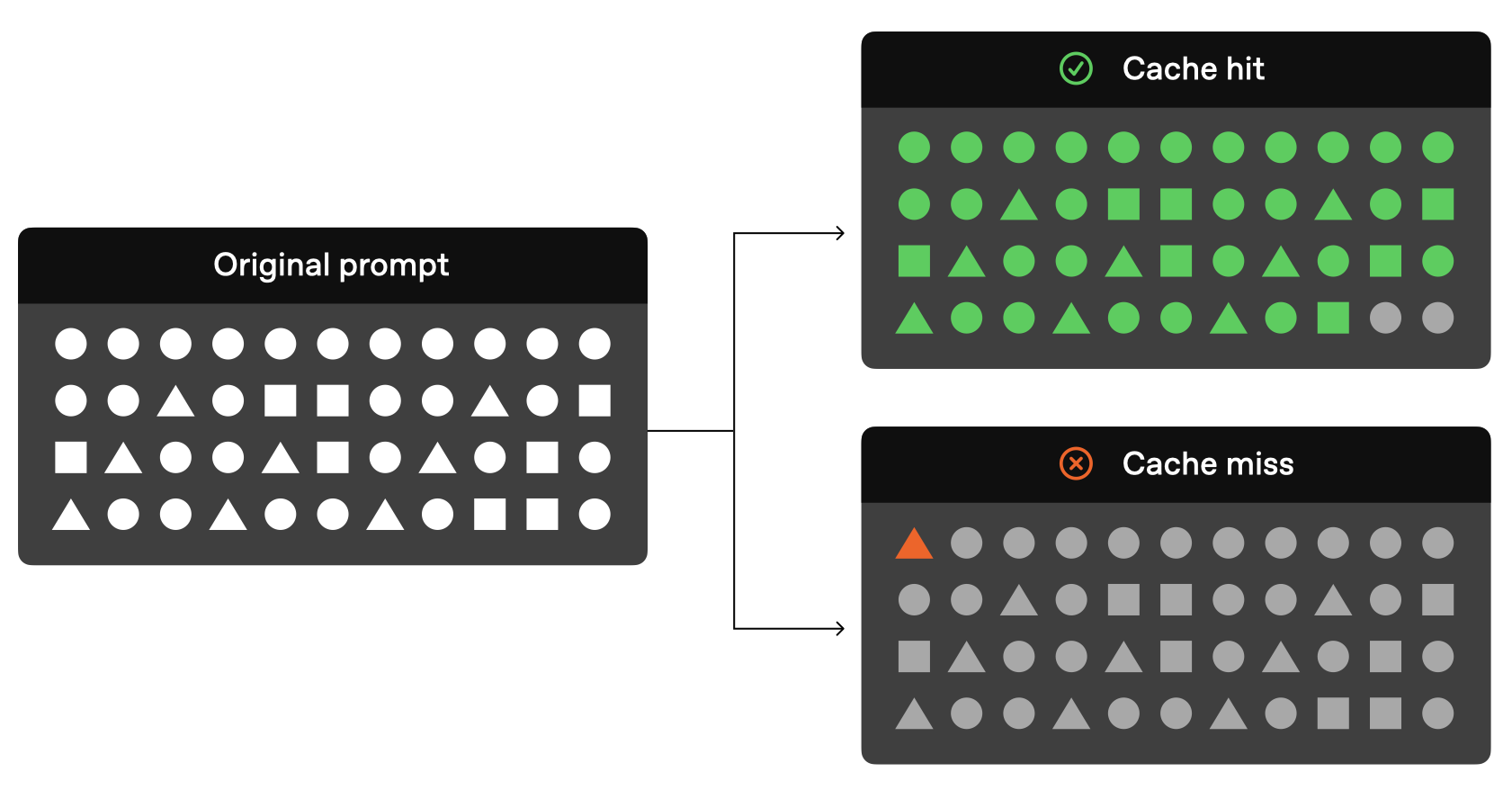
48 

49 

46 50 

47```text51```text

48Citation Marker: {CITATION_START}cite{CITATION_DELIMITER}file0{CITATION_STOP}52Citation Marker: {CITATION_START}cite{CITATION_DELIMITER}file0{CITATION_STOP}


125- what formats are forbidden.133- what formats are forbidden.

126- what to do when support is missing.134- what to do when support is missing.

127 135 

128Recommended prompt instructions136 

137 

138### Recommended prompt instructions

139 

140 

129 141 

130Clearly instruct the model using the following format:142Clearly instruct the model using the following format:

131 143 


160- Do not attempt to cite items without a corresponding citation marker, as they are not meant to be cited.172- Do not attempt to cite items without a corresponding citation marker, as they are not meant to be cited.

161- You MUST include line ranges in your citations.173- You MUST include line ranges in your citations.

162 174 

163Optional instructions for higher-quality grounding175 

176 

177 

178 

179 

180 

181### Optional instructions for higher-quality grounding

182 

183 

164 184 

165The following rules are often worth including when you need higher-quality grounding behavior. Adapt this section based on your use case requirements.185The following rules are often worth including when you need higher-quality grounding behavior. Adapt this section based on your use case requirements.

166 186 


193This example supports line locators only and should be adapted if your system217This example supports line locators only and should be adapted if your system

194uses a different locator format.218uses a different locator format.

195 219 

196Post-processor examples220 

221 

222### Post-processor examples

223 

197 224 

198Citation parsing helpers225Citation parsing helpers

199 226 


407 438 

408The examples below show a few recommended tool output formats. The underlying tool may vary by application, but what matters most is that the output is presented in a clear, stable structure like these examples.439The examples below show a few recommended tool output formats. The underlying tool may vary by application, but what matters most is that the output is presented in a clear, stable structure like these examples.

409 440 

410Line-level example441 

442 

443##### Line-level example

444 

445 

411 446 

412The following is an example of the tool call output:447The following is an example of the tool call output:

413 448 


423 458 

424Here, `turn0file0` is the stable source ID. The line numbers are the locators.459Here, `turn0file0` is the stable source ID. The line numbers are the locators.

425 460 

426Block-level example461 

462 

463 

464 

465 

466 

467##### Block-level example

468 

469 

427 470 

428The following is an example of the tool call output:471The following is an example of the tool call output:

429 472 

Details

748 748 

749 749 

750 750 

751 Data retention for model responses

752 751

753Response objects are saved for 30 days by default. They can be viewed in the dashboard 752 

753##### Data retention for model responses

754 

755 

756 Response objects are saved for 30 days by default. They can be viewed in the dashboard

754 [logs](https://platform.openai.com/logs?api=responses) page or 757 [logs](https://platform.openai.com/logs?api=responses) page or

755 [retrieved](https://developers.openai.com/api/reference/resources/responses/methods/retrieve) via the API. 758 [retrieved](https://developers.openai.com/api/reference/resources/responses/methods/retrieve) via the API.

756 You can disable this behavior by setting `store` to `false`759 You can disable this behavior by setting `store` to `false`

Details

219 219 

220Before launching in production, review and follow the following safety information.220Before launching in production, review and follow the following safety information.

221 221 

222How we assess for safety222 

223 

224### How we assess for safety

225 

226 

223 227 

224Once a fine-tuning job is completed, we assess the resulting model’s behavior across 13 distinct safety categories. Each category represents a critical area where AI outputs could potentially cause harm if not properly controlled.228Once a fine-tuning job is completed, we assess the resulting model’s behavior across 13 distinct safety categories. Each category represents a critical area where AI outputs could potentially cause harm if not properly controlled.

225 229 


241 245 

242Each category has a predefined pass threshold; if too many evaluated examples in a given category fail, OpenAI blocks the fine-tuned model from deployment. If your fine-tuned model does not pass the safety checks, OpenAI sends a message in the fine-tuning job explaining which categories don't meet the required thresholds. You can view the results in the moderation checks section of the fine-tuning job.246Each category has a predefined pass threshold; if too many evaluated examples in a given category fail, OpenAI blocks the fine-tuned model from deployment. If your fine-tuned model does not pass the safety checks, OpenAI sends a message in the fine-tuning job explaining which categories don't meet the required thresholds. You can view the results in the moderation checks section of the fine-tuning job.

243 247 

244How to pass safety checks248 

249 

250 

251 

252 

253 

254### How to pass safety checks

255 

256 

245 257 

246In addition to reviewing any failed safety checks in the fine-tuning job object, you can retrieve details about which categories failed by querying the [fine-tuning API events endpoint](https://platform.openai.com/docs/api-reference/fine-tuning/list-events). Look for events of type `moderation_checks` for details about category results and enforcement. This information can help you narrow down which categories to target for retraining and improvement. The [model spec](https://cdn.openai.com/spec/model-spec-2024-05-08.html#overview) has rules and examples that can help identify areas for additional training data.258In addition to reviewing any failed safety checks in the fine-tuning job object, you can retrieve details about which categories failed by querying the [fine-tuning API events endpoint](https://platform.openai.com/docs/api-reference/fine-tuning/list-events). Look for events of type `moderation_checks` for details about category results and enforcement. This information can help you narrow down which categories to target for retraining and improvement. The [model spec](https://cdn.openai.com/spec/model-spec-2024-05-08.html#overview) has rules and examples that can help identify areas for additional training data.

247 259 

Details

241```241```

242 242 

243 243 

244Reducing embedding dimensions244 

245 

246#### Reducing embedding dimensions

247 

248 

245 249 

246Using larger embeddings, for example storing them in a vector store for retrieval, generally costs more and consumes more compute, memory and storage than using smaller embeddings.250Using larger embeddings, for example storing them in a vector store for retrieval, generally costs more and consumes more compute, memory and storage than using smaller embeddings.

247 251 


306 310 

307Dynamically changing the dimensions enables very flexible usage. For example, when using a vector data store that only supports embeddings up to 1024 dimensions long, developers can now still use our best embedding model `text-embedding-3-large` and specify a value of 1024 for the `dimensions` API parameter, which will shorten the embedding down from 3072 dimensions, trading off some accuracy in exchange for the smaller vector size.311Dynamically changing the dimensions enables very flexible usage. For example, when using a vector data store that only supports embeddings up to 1024 dimensions long, developers can now still use our best embedding model `text-embedding-3-large` and specify a value of 1024 for the `dimensions` API parameter, which will shorten the embedding down from 3072 dimensions, trading off some accuracy in exchange for the smaller vector size.

308 312 

309Question answering using embeddings-based search313 

314 

315 

316 

317 

318 

319#### Question answering using embeddings-based search

320 

321 

310 322 

311 323 

312 324 


368```380```

369 381 

370 382 

371Text search using embeddings383 

384 

385 

386 

387 

388 

389#### Text search using embeddings

390 

391 

372 392 

373 393 

374 394 


437```457```

438 458 

439 459 

440Code search using embeddings460 

461 

462 

463 

464 

465 

466#### Code search using embeddings

467 

468 

441 469 

442 470 

443 471 


509```537```

510 538 

511 539 

512Recommendations using embeddings540 

541 

542 

543 

544 

545 

546#### Recommendations using embeddings

547 

548 

513 549 

514 550 

515 551 


594```630```

595 631 

596 632 

597Data visualization in 2D633 

634 

635 

636 

637 

638 

639#### Data visualization in 2D

640 

641 

598 642 

599 643 

600 644 


640```684```

641 685 

642 686 

643Embedding as a text feature encoder for ML algorithms687 

688 

689 

690 

691 

692 

693#### Embedding as a text feature encoder for ML algorithms

694 

695 

644 696 

645 697 

646 698 


677```729```

678 730 

679 731 

680Classification using the embedding features732 

733 

734 

735 

736 

737 

738#### Classification using the embedding features

739 

740 

681 741 

682 742 

683 743 


698```758```

699 759 

700 760 

701Zero-shot classification761 

762 

763 

764 

765 

766 

767#### Zero-shot classification

768 

769 

702 770 

703 771 

704 772 


751```819```

752 820 

753 821 

754Obtaining user and product embeddings for cold-start recommendation822 

823 

824 

825 

826 

827 

828#### Obtaining user and product embeddings for cold-start recommendation

829 

830 

755 831 

756 832 

757 833 


768```844```

769 845 

770 846 

771Clustering847 

848 

849 

850 

851 

852 

853#### Clustering

854 

855 

772 856 

773 857 

774 858 

Details

8 8 

9| Code | Overview |9| Code | Overview |

10| ---------------------------------------------------------------- | ------------------------------------------------------------------------------------------------------------------------------------------------------------------------------------------------------------------------------------------------------------------------------------------------- |10| ---------------------------------------------------------------- | ------------------------------------------------------------------------------------------------------------------------------------------------------------------------------------------------------------------------------------------------------------------------------------------------- |

11| 400 - Invalid `service_tier` argument | **Cause:** The requested or resolved service tier is not allowed for the project. <br /> **Solution:** Set `service_tier` to a tier allowed for the project, or update the allowed service tiers in [project settings](https://platform.openai.com/settings/). |

11| 401 - Invalid Authentication | **Cause:** Invalid Authentication <br /> **Solution:** Ensure the correct [API key](https://platform.openai.com/settings/organization/api-keys) and requesting organization are being used. |12| 401 - Invalid Authentication | **Cause:** Invalid Authentication <br /> **Solution:** Ensure the correct [API key](https://platform.openai.com/settings/organization/api-keys) and requesting organization are being used. |

12| 401 - Incorrect API key provided | **Cause:** The requesting API key is not correct. <br /> **Solution:** Ensure the API key used is correct, clear your browser cache, or [generate a new one](https://platform.openai.com/settings/organization/api-keys). |13| 401 - Incorrect API key provided | **Cause:** The requesting API key is not correct. <br /> **Solution:** Ensure the API key used is correct, clear your browser cache, or [generate a new one](https://platform.openai.com/settings/organization/api-keys). |

13| 401 - You must be a member of an organization to use the API | **Cause:** Your account is not part of an organization. <br /> **Solution:** Contact us to get added to a new organization or ask your organization manager to [invite you to an organization](https://platform.openai.com/settings/organization/people). |14| 401 - You must be a member of an organization to use the API | **Cause:** Your account is not part of an organization. <br /> **Solution:** Contact us to get added to a new organization or ask your organization manager to [invite you to an organization](https://platform.openai.com/settings/organization/people). |


33- `previous_response_not_found`: The `previous_response_id` cannot be resolved from available state. Retry with full input context and `previous_response_id` set to `null`.34- `previous_response_not_found`: The `previous_response_id` cannot be resolved from available state. Retry with full input context and `previous_response_id` set to `null`.

34- `websocket_connection_limit_reached`: The connection hit the 60-minute limit. Open a new WebSocket connection and continue.35- `websocket_connection_limit_reached`: The connection hit the 60-minute limit. Open a new WebSocket connection and continue.

35 36 

36401 - Invalid Authentication37 

38 

39### 400 - Invalid service_tier argument

40 

41 

42The API returns the message "Invalid service_tier argument: The requested service tier is not allowed for this project." as an `invalid_request_error` with `error.param` set to `service_tier` when a request selects or resolves to a service tier that is not allowed for the project.

43 

44Project restrictions apply to the `default`, `flex`, and `priority` service tiers. The `fast` service tier is evaluated as `priority`. Requests that omit `service_tier` or set it to `auto` can also return this error if they resolve to a disallowed tier. Scale Tier remains outside this project policy.

45 

46To resolve this error:

47 

48- Check the allowed service tiers in [project settings](https://platform.openai.com/settings/).

49- Set `service_tier` to a tier allowed for the project.

50- If the request uses `auto` or omits `service_tier`, update the project settings so the resolved tier is allowed.

51 

52 

53 

54 

55 

56 

57 

58### 401 - Invalid Authentication

59 

37 60 

38This error message indicates that your authentication credentials are invalid. This could happen for several reasons, such as:61This error message indicates that your authentication credentials are invalid. This could happen for several reasons, such as:

39 62 


46- Check that you are using the correct API key and organization ID in your request header. You can find your API key and organization ID in [your account settings](https://platform.openai.com/settings/organization/api-keys) or your can find specific project related keys under [General settings](https://platform.openai.com/settings/organization/general) by selecting the desired project.69- Check that you are using the correct API key and organization ID in your request header. You can find your API key and organization ID in [your account settings](https://platform.openai.com/settings/organization/api-keys) or your can find specific project related keys under [General settings](https://platform.openai.com/settings/organization/general) by selecting the desired project.

47- If you are unsure whether your API key is valid, you can [generate a new one](https://platform.openai.com/settings/organization/api-keys). Make sure to replace your old API key with the new one in your requests and follow our [best practices guide](https://help.openai.com/en/articles/5112595-best-practices-for-api-key-safety).70- If you are unsure whether your API key is valid, you can [generate a new one](https://platform.openai.com/settings/organization/api-keys). Make sure to replace your old API key with the new one in your requests and follow our [best practices guide](https://help.openai.com/en/articles/5112595-best-practices-for-api-key-safety).

48 71 

49401 - Incorrect API key provided72 

73 

74 

75 

76 

77 

78### 401 - Incorrect API key provided

79 

50 80 

51This error message indicates that the API key you are using in your request is not correct. This could happen for several reasons, such as:81This error message indicates that the API key you are using in your request is not correct. This could happen for several reasons, such as:

52 82 


61- Check that you are using the correct API key in your request header.91- Check that you are using the correct API key in your request header.

62- If you are unsure whether your API key is correct, you can [generate a new one](https://platform.openai.com/settings/organization/api-keys). Make sure to replace your old API key in your codebase and follow our [best practices guide](https://help.openai.com/en/articles/5112595-best-practices-for-api-key-safety).92- If you are unsure whether your API key is correct, you can [generate a new one](https://platform.openai.com/settings/organization/api-keys). Make sure to replace your old API key in your codebase and follow our [best practices guide](https://help.openai.com/en/articles/5112595-best-practices-for-api-key-safety).

63 93 

64401 - You must be a member of an organization to use the API94 

95 

96 

97 

98 

99 

100### 401 - You must be a member of an organization to use the API

101 

65 102 

66This error message indicates that your account is not part of an organization. This could happen for several reasons, such as:103This error message indicates that your account is not part of an organization. This could happen for several reasons, such as:

67 104 


76- Existing organization owners can invite you to join their organization via the [Team page](https://platform.openai.com/settings/organization/people) or can create a new project from the [Settings page](https://platform.openai.com/settings/organization/general).113- Existing organization owners can invite you to join their organization via the [Team page](https://platform.openai.com/settings/organization/people) or can create a new project from the [Settings page](https://platform.openai.com/settings/organization/general).

77- If you have left or been removed from a previous project, you can ask your organization or project owner to add you to it, or create a new one.114- If you have left or been removed from a previous project, you can ask your organization or project owner to add you to it, or create a new one.

78 115 

79429 - Credit balance exhausted116 

117 

118 

119 

120 

121 

122### 429 - Credit balance exhausted

123 

80 124 

81The `credit_balance_exhausted` error indicates that your organization's prepaid credit balance is depleted.125The `credit_balance_exhausted` error indicates that your organization's prepaid credit balance is depleted.

82 126 

83To restore API access, [add credits in your billing settings](https://platform.openai.com/settings/organization/billing).127To restore API access, [add credits in your billing settings](https://platform.openai.com/settings/organization/billing).

84 128 

85429 - Rate limit reached for requests129 

130 

131 

132 

133 

134 

135### 429 - Rate limit reached for requests

136 

86 137 

87This error message indicates that you have hit your assigned rate limit for the API. This means that you have submitted too many tokens or requests in a short period of time and have exceeded the number of requests allowed. This could happen for several reasons, such as:138This error message indicates that you have hit your assigned rate limit for the API. This means that you have submitted too many tokens or requests in a short period of time and have exceeded the number of requests allowed. This could happen for several reasons, such as:

88 139 


99- If you are using a free or low-tier plan, consider upgrading to a pay-as-you-go plan that offers a higher rate limit. You can compare the restrictions of each plan in our [rate limit guide](https://developers.openai.com/api/docs/guides/rate-limits).150- If you are using a free or low-tier plan, consider upgrading to a pay-as-you-go plan that offers a higher rate limit. You can compare the restrictions of each plan in our [rate limit guide](https://developers.openai.com/api/docs/guides/rate-limits).

100- Reach out to your organization owner to increase the rate limits on your project151- Reach out to your organization owner to increase the rate limits on your project

101 152 

102429 - Organization spend limit reached153 

154 

155 

156 

157 

158 

159### 429 - Organization spend limit reached

160 

103 161 

104The `organization_spend_limit_exceeded` error indicates that your organization reached its enforced monthly [spend limit](https://developers.openai.com/api/docs/guides/spend-limits). The limit applies to API traffic across all projects in the organization.162The `organization_spend_limit_exceeded` error indicates that your organization reached its enforced monthly [spend limit](https://developers.openai.com/api/docs/guides/spend-limits). The limit applies to API traffic across all projects in the organization.

105 163 

106To restore API access, increase or remove the limit in your [organization limit settings](https://platform.openai.com/settings/organization/limits). Otherwise, access resumes after the monthly limit resets.164To restore API access, increase or remove the limit in your [organization limit settings](https://platform.openai.com/settings/organization/limits). Otherwise, access resumes after the monthly limit resets.

107 165 

108429 - Project spend limit reached166 

167 

168 

169 

170 

171 

172### 429 - Project spend limit reached

173 

109 174 

110The `project_spend_limit_exceeded` error indicates that your project reached its enforced monthly [spend limit](https://developers.openai.com/api/docs/guides/spend-limits). Other projects can continue unless their own limit or the organization limit is also reached.175The `project_spend_limit_exceeded` error indicates that your project reached its enforced monthly [spend limit](https://developers.openai.com/api/docs/guides/spend-limits). Other projects can continue unless their own limit or the organization limit is also reached.

111 176 

112To restore API access, increase or remove the limit in your [project settings](https://platform.openai.com/settings/). Otherwise, access resumes after the monthly limit resets.177To restore API access, increase or remove the limit in your [project settings](https://platform.openai.com/settings/). Otherwise, access resumes after the monthly limit resets.

113 178 

114429 - Organization usage limit reached179 

180 

181 

182 

183 

184 

185### 429 - Organization usage limit reached

186 

115 187 

116The `organization_usage_limit_exceeded` error indicates that your organization reached its OpenAI-assigned monthly [usage limit](https://developers.openai.com/api/docs/guides/rate-limits#usage-tiers). This limit is separate from organization and project spend limits that you configure.188The `organization_usage_limit_exceeded` error indicates that your organization reached its OpenAI-assigned monthly [usage limit](https://developers.openai.com/api/docs/guides/rate-limits#usage-tiers). This limit is separate from organization and project spend limits that you configure.

117 189 

118To restore API access, request a higher [approved usage limit](https://platform.openai.com/settings/organization/limits) or [contact support](https://help.openai.com/).190To restore API access, request a higher [approved usage limit](https://platform.openai.com/settings/organization/limits) or [contact support](https://help.openai.com/).

119 191 

120503 - The engine is currently overloaded, please try again later192 

193 

194 

195 

196 

197 

198### 503 - The engine is currently overloaded, please try again later

199 

121 200 

122This error message indicates that our servers are experiencing high traffic and are unable to process your request at the moment. This could happen for several reasons, such as:201This error message indicates that our servers are experiencing high traffic and are unable to process your request at the moment. This could happen for several reasons, such as:

123 202 


131- Check our [status page](https://status.openai.com/) for any updates or announcements regarding our services and servers.210- Check our [status page](https://status.openai.com/) for any updates or announcements regarding our services and servers.

132- If you are still getting this error after a reasonable amount of time, please contact us for further assistance. We apologize for any inconvenience and appreciate your patience and understanding.211- If you are still getting this error after a reasonable amount of time, please contact us for further assistance. We apologize for any inconvenience and appreciate your patience and understanding.

133 212 

134503 - Slow Down213 

214 

215 

216 

217 

218 

219### 503 - Slow Down

220 

135 221 

136This error can occur with Pay-As-You-Go models, which are shared across all OpenAI users. It indicates that your traffic has significantly increased, overloading the model and triggering temporary throttling to maintain service stability.222This error can occur with Pay-As-You-Go models, which are shared across all OpenAI users. It indicates that your traffic has significantly increased, overloading the model and triggering temporary throttling to maintain service stability.

137 223 


156| RateLimitError | **Cause:** You have hit your assigned rate limit. <br /> **Solution:** Pace your requests and follow `Retry-After` when it's present. Each official SDK already honors this header for eligible retries. Read more in our [Rate limit guide](https://developers.openai.com/api/docs/guides/rate-limits). |246| RateLimitError | **Cause:** You have hit your assigned rate limit. <br /> **Solution:** Pace your requests and follow `Retry-After` when it's present. Each official SDK already honors this header for eligible retries. Read more in our [Rate limit guide](https://developers.openai.com/api/docs/guides/rate-limits). |

157| UnprocessableEntityError | **Cause:** Unable to process the request despite the format being correct. <br /> **Solution:** Please try the request again. |247| UnprocessableEntityError | **Cause:** Unable to process the request despite the format being correct. <br /> **Solution:** Please try the request again. |

158 248 

159APIConnectionError249 

250 

251### APIConnectionError

252 

160 253 

161An `APIConnectionError` indicates that your request could not reach our servers or establish a secure connection. This could be due to a network issue, a proxy configuration, an SSL certificate, or a firewall rule.254An `APIConnectionError` indicates that your request could not reach our servers or establish a secure connection. This could be due to a network issue, a proxy configuration, an SSL certificate, or a firewall rule.

162 255 


169- If appropriate, check that your container has the correct permissions to send and receive traffic.262- If appropriate, check that your container has the correct permissions to send and receive traffic.

170- If the issue persists, check out our persistent errors next steps section.263- If the issue persists, check out our persistent errors next steps section.

171 264 

172APITimeoutError265 

266 

267 

268 

269 

270 

271### APITimeoutError

272 

173 273 

174A `APITimeoutError` error indicates that your request took too long to complete and our server closed the connection. This could be due to a network issue, a heavy load on our services, or a complex request that requires more processing time.274A `APITimeoutError` error indicates that your request took too long to complete and our server closed the connection. This could be due to a network issue, a heavy load on our services, or a complex request that requires more processing time.

175 275 


179- Check your network settings and make sure you have a stable and fast internet connection. You may need to switch to a different network, use a wired connection, or reduce the number of devices or applications using your bandwidth.279- Check your network settings and make sure you have a stable and fast internet connection. You may need to switch to a different network, use a wired connection, or reduce the number of devices or applications using your bandwidth.

180- If the issue persists, check out our persistent errors next steps section.280- If the issue persists, check out our persistent errors next steps section.

181 281 

182AuthenticationError282 

283 

284 

285 

286 

287 

288### AuthenticationError

289 

183 290 

184An `AuthenticationError` indicates that your API key or token was invalid, expired, or revoked. This could be due to a typo, a formatting error, or a security breach.291An `AuthenticationError` indicates that your API key or token was invalid, expired, or revoked. This could be due to a typo, a formatting error, or a security breach.

185 292 


188- Check your API key or token and make sure it is correct and active. You may need to generate a new key from the API Key dashboard, ensure there are no extra spaces or characters, or use a different key or token if you have multiple ones.295- Check your API key or token and make sure it is correct and active. You may need to generate a new key from the API Key dashboard, ensure there are no extra spaces or characters, or use a different key or token if you have multiple ones.

189- Ensure that you have followed the correct formatting.296- Ensure that you have followed the correct formatting.

190 297 

191BadRequestError298 

299 

300 

301 

302 

303 

304### BadRequestError

305 

306 

192 307 

193An `BadRequestError` (formerly `InvalidRequestError`) indicates that your request was malformed or missing some required parameters, such as a token or an input. This could be due to a typo, a formatting error, or a logic error in your code.308An `BadRequestError` (formerly `InvalidRequestError`) indicates that your request was malformed or missing some required parameters, such as a token or an input. This could be due to a typo, a formatting error, or a logic error in your code.

194 309 


200- Test your request using a tool like Postman or curl and make sure it works as expected. You may need to debug your code and fix any errors or inconsistencies in your request logic.315- Test your request using a tool like Postman or curl and make sure it works as expected. You may need to debug your code and fix any errors or inconsistencies in your request logic.

201- If the issue persists, check out our persistent errors next steps section.316- If the issue persists, check out our persistent errors next steps section.

202 317 

203InternalServerError318 

319 

320 

321 

322 

323 

324### InternalServerError

325 

204 326 

205An `InternalServerError` indicates that something went wrong on our side when processing your request. This could be due to a temporary error, a bug, or a system outage.327An `InternalServerError` indicates that something went wrong on our side when processing your request. This could be due to a temporary error, a bug, or a system outage.

206 328 


214 336 

215Our support team will investigate the issue and get back to you as soon as possible. Note that our support queue times may be long due to high demand. You can also [post in our Community Forum](https://community.openai.com) but be sure to omit any sensitive information.337Our support team will investigate the issue and get back to you as soon as possible. Note that our support queue times may be long due to high demand. You can also [post in our Community Forum](https://community.openai.com) but be sure to omit any sensitive information.

216 338 

217RateLimitError339 

340 

341 

342 

343 

344 

345### RateLimitError

346 

218 347 

219A `RateLimitError` indicates that you have hit your assigned rate limit. This means that you have sent too many tokens or requests in a given period of time, and our services have temporarily blocked you from sending more.348A `RateLimitError` indicates that you have hit your assigned rate limit. This means that you have sent too many tokens or requests in a given period of time, and our services have temporarily blocked you from sending more.

220 349 

guides/evals.md +14 −2

Details

299```299```

300 300 

301 301 

302Explanation: data_source_config parameter302 

303 

304### Explanation: data_source_config parameter

305 

306 

303 307 

304Running this eval will require a test data set that represents the type of data you expect your prompt to work with (more on creating the test data set later in this guide). In our `data_source_config` parameter, we specify that each **item** in the data set will conform to a [JSON schema](https://json-schema.org/) with two properties:308Running this eval will require a test data set that represents the type of data you expect your prompt to work with (more on creating the test data set later in this guide). In our `data_source_config` parameter, we specify that each **item** in the data set will conform to a [JSON schema](https://json-schema.org/) with two properties:

305 309 


323}327}

324```328```

325 329 

326Explanation: testing_criteria parameter330 

331 

332 

333 

334 

335 

336### Explanation: testing_criteria parameter

337 

338 

327 339 

328In our `testing_criteria`, we define how we will conclude if the model output satisfies our requirements for each item in the data set. In this case, we just want the model to output one of three category strings based on the input ticket. The string it outputs should exactly match the human-labeled `correct_label` field in our test data. So in this case, we will want to use a `string_check` grader to evaluate the output.340In our `testing_criteria`, we define how we will conclude if the model output satisfies our requirements for each item in the data set. In this case, we just want the model to output one of three category strings based on the input ticket. The string it outputs should exactly match the human-labeled `correct_label` field in our test data. So in this case, we will want to use a `string_check` grader to evaluate the output.

329 341 

Details

10 10 

11Let's begin by understanding a few key terms about tool calling. After we have a shared vocabulary for tool calling, we'll show you how it's done with some practical examples.11Let's begin by understanding a few key terms about tool calling. After we have a shared vocabulary for tool calling, we'll show you how it's done with some practical examples.

12 12 

13Tools - functionality we give the model13 

14 

15### Tools - functionality we give the model

16 

17 

14 18 

15A **function** or **tool** refers in the abstract to a piece of functionality that we tell the model it has access to. As a model generates a response to a prompt, it may decide that it needs data or functionality provided by a tool to follow the prompt's instructions.19A **function** or **tool** refers in the abstract to a piece of functionality that we tell the model it has access to. As a model generates a response to a prompt, it may decide that it needs data or functionality provided by a tool to follow the prompt's instructions.

16 20 


24 28 

25When we make an API request to the model with a prompt, we can include a list of tools the model could consider using. For example, if we wanted the model to be able to answer questions about the current weather somewhere in the world, we might give it access to a `get_weather` tool that takes `location` as an argument.29When we make an API request to the model with a prompt, we can include a list of tools the model could consider using. For example, if we wanted the model to be able to answer questions about the current weather somewhere in the world, we might give it access to a `get_weather` tool that takes `location` as an argument.

26 30 

27Tool calls - requests from the model to use tools31 

32 

33 

34 

35 

36 

37### Tool calls - requests from the model to use tools

38 

39 

28 40 

29A **function call** or **tool call** refers to a special kind of response we can get from the model if it examines a prompt, and then determines that in order to follow the instructions in the prompt, it needs to call one of the tools we made available to it.41A **function call** or **tool call** refers to a special kind of response we can get from the model if it examines a prompt, and then determines that in order to follow the instructions in the prompt, it needs to call one of the tools we made available to it.

30 42 

31If the model receives a prompt like "what is the weather in Paris?" in an API request, it could respond to that prompt with a tool call for the `get_weather` tool, with `Paris` as the `location` argument.43If the model receives a prompt like "what is the weather in Paris?" in an API request, it could respond to that prompt with a tool call for the `get_weather` tool, with `Paris` as the `location` argument.

32 44 

33Tool call outputs - output we generate for the model45 

46 

47 

48 

49 

50 

51### Tool call outputs - output we generate for the model

52 

53 

34 54 

35A **function call output** or **tool call output** refers to the response a tool generates using the input from a model's tool call. The tool call output can either be structured JSON or plain text, and it should contain a reference to a specific model tool call (referenced by `call_id` in the examples to come).55A **function call output** or **tool call output** refers to the response a tool generates using the input from a model's tool call. The tool call output can either be structured JSON or plain text, and it should contain a reference to a specific model tool call (referenced by `call_id` in the examples to come).

36To complete our weather example:56To complete our weather example:


45The weather in Paris today is 25C.65The weather in Paris today is 25C.

46```66```

47 67 

48Functions versus tools68 

69 

70 

71 

72 

73 

74### Functions versus tools

75 

76 

49 77 

50- A function is a specific kind of tool, defined by a JSON schema. A function definition allows the model to pass data to your application, where your code can access data or take actions suggested by the model.78- A function is a specific kind of tool, defined by a JSON schema. A function definition allows the model to pass data to your application, where your code can access data or take actions suggested by the model.

51- In addition to function tools, there are custom tools (described in this guide) that work with free text inputs and outputs.79- In addition to function tools, there are custom tools (described in this guide) that work with free text inputs and outputs.

Details

55 55 

56For example, to access the model output content as a string, `{{ sample.output_text }}` can be used within the grader.56For example, to access the model output content as a string, `{{ sample.output_text }}` can be used within the grader.

57 57 

58Details on grading tool calls58 

59 

60#### Details on grading tool calls

61 

62 

59 63 

60When training a model to improve tool-calling behavior, you will need to write your grader to operate over the `sample.output_tools` variable. The contents of this variable will be the same as the contents of the `response.choices[0].message.tool_calls` ([see function calling docs](https://developers.openai.com/api/docs/guides/function-calling?api-mode=chat)).64When training a model to improve tool-calling behavior, you will need to write your grader to operate over the `sample.output_tools` variable. The contents of this variable will be the same as the contents of the `response.choices[0].message.tool_calls` ([see function calling docs](https://developers.openai.com/api/docs/guides/function-calling?api-mode=chat)).

61 65 

Details

1131 1131 

1132| Model | Multiplier |1132| Model | Multiplier |

1133| --------------- | ---------- |1133| --------------- | ---------- |

1134| `gpt-5.4-mini` | 1.62 |1134| `gpt-5.6-sol` | 1.2 |

1135| `gpt-5.4-nano` | 2.46 |1135| `gpt-5.6-terra` | 1.2 |

1136| `gpt-5-mini` | 1.62 |1136| `gpt-5.6-luna` | 1.2 |

1137| `gpt-5-nano` | 2.46 |1137| `gpt-5.5` | 1.2 |

1138| `gpt-5.4-mini` | 1.2 |

1139| `gpt-5.4-nano` | 1.2 |

1140| `gpt-5-mini` | 1.2 |

1141| `gpt-5-nano` | 1.5 |

1138| `gpt-4.1-mini*` | 1.62 |1142| `gpt-4.1-mini*` | 1.62 |

1139| `gpt-4.1-nano*` | 2.46 |1143| `gpt-4.1-nano*` | 2.46 |

1140| `o4-mini` | 1.72 |1144| `o4-mini` | 1.72 |

Details

146Places where you see placeholders like "**[user input here]**" represent146Places where you see placeholders like "**[user input here]**" represent

147 dynamic portions, that would be replaced by actual data at runtime.147 dynamic portions, that would be replaced by actual data at runtime.

148 148 

149Query contextualization prompt149 

150 

151#### Query contextualization prompt

152 

153 

150 154 

151Re-writes user query to be a self-contained search query.155Re-writes user query to be a self-contained search query.

152 156 


168USER: [JSON-formatted input conversation here]172USER: [JSON-formatted input conversation here]

169```173```

170 174 

171Retrieval check prompt175 

176 

177 

178 

179 

180 

181#### Retrieval check prompt

182 

172 183 

173Determines whether a query requires performing retrieval to respond.184Determines whether a query requires performing retrieval to respond.

174 185 


186USER: [input user query here]197USER: [input user query here]

187```198```

188 199 

189Assistant prompt200 

201 

202 

203 

204 

205 

206#### Assistant prompt

207 

190 208 

191Fills the fields of a JSON to reason through a pre-defined set of steps to produce a final response given a user conversation and relevant retrieved information.209Fills the fields of a JSON to reason through a pre-defined set of steps to produce a final response given a user conversation and relevant retrieved information.

192 210 


232 254 

233![Assistants object architecture diagram](https://cdn.openai.com/API/docs/images/diagram-latency-customer-service-3.png)255![Assistants object architecture diagram](https://cdn.openai.com/API/docs/images/diagram-latency-customer-service-3.png)

234 256 

235Combined query contextualization and retrieval check prompt257 

258 

259##### Combined query contextualization and retrieval check prompt

260 

261 

236 262 

237**What changed?** Before, we had one prompt to re-write the query and one to determine whether this requires doing a retrieval lookup. Now, this combined prompt does both. Specifically, notice the updated instruction in the first line of the prompt, and the updated output JSON:263**What changed?** Before, we had one prompt to re-write the query and one to determine whether this requires doing a retrieval lookup. Now, this combined prompt does both. Specifically, notice the updated instruction in the first line of the prompt, and the updated output JSON:

238 264 


344 374 

345**Note:** We'll be grouping `response` and `enough_information_in_context` together in the second prompt to avoid passing the retrieved context to both new prompts.375**Note:** We'll be grouping `response` and `enough_information_in_context` together in the second prompt to avoid passing the retrieved context to both new prompts.

346 376 

347Assistants prompt - reasoning377 

378 

379##### Assistants prompt - reasoning

380 

381 

348 382 

349This prompt will be passed to GPT-3.5 and can be fine-tuned on curated examples.383This prompt will be passed to GPT-3.5 and can be fine-tuned on curated examples.

350 384 


371 "user_requesting_to_talk_to_human": "False",405 "user_requesting_to_talk_to_human": "False",

372}406}

373```407```

374Assistants prompt - response408 

409 

410 

411 

412 

413 

414##### Assistants prompt - response

415 

416 

375 417 

376This prompt will be processed by GPT-4 and will receive the reasoning steps determined in the prior prompt, as well as the results from retrieval.418This prompt will be processed by GPT-4 and will receive the reasoning steps determined in the prior prompt, as well as the results from retrieval.

377 419 

Details

69 69 

70These can be a little difficult to visualize, so we’ll run through an example where we test these out with a practical example. Let’s use gpt-4-turbo to correct Icelandic sentences to see how this can work.70These can be a little difficult to visualize, so we’ll run through an example where we test these out with a practical example. Let’s use gpt-4-turbo to correct Icelandic sentences to see how this can work.

71 71 

72Prompt engineering for language corrections 72 

73 

74##### Prompt engineering for language corrections

75 

76 

73 77 

74The [Icelandic Errors Corpus](https://repository.clarin.is/repository/xmlui/handle/20.500.12537/105) contains combinations of an Icelandic sentence with errors, and the corrected version of that sentence. We’ll use the baseline GPT-4 model to try to solve this task, and then apply different optimization techniques to see how we can improve the model’s performance.78The [Icelandic Errors Corpus](https://repository.clarin.is/repository/xmlui/handle/20.500.12537/105) contains combinations of an Icelandic sentence with errors, and the corrected version of that sentence. We’ll use the baseline GPT-4 model to try to solve this task, and then apply different optimization techniques to see how we can improve the model’s performance.

75 79 


223- **Teaching complex behavior** using extensive fine-tuning231- **Teaching complex behavior** using extensive fine-tuning

224- Using RAG to **inject context**, more recent content or any other specialized context required for your use cases232- Using RAG to **inject context**, more recent content or any other specialized context required for your use cases

225 233 

226Using these tools to improve language translation234 

235 

236#### Using these tools to improve language translation

237 

238 

227 239 

228We’ll continue building on the Icelandic correction example we used above. We’ll test out the following approaches:240We’ll continue building on the Icelandic correction example we used above. We’ll test out the following approaches:

229 241 

Details

2 2 

3> For the complete documentation index, see [llms.txt](/llms.txt). Markdown versions of documentation pages are available by appending `.md` to the page URL.3> For the complete documentation index, see [llms.txt](/llms.txt). Markdown versions of documentation pages are available by appending `.md` to the page URL.

4 4 

5## Prompt caching fundamentals5## Why prompt caching matters

6 6 

7Model prompts often contain repetitive content, like system prompts and common instructions. OpenAI routes API requests to servers that recently processed the same prompt, making it faster and less expensive to reuse an exact prompt prefix than to process it from scratch. Prompt Caching works automatically for eligible requests, with no code changes required. It is enabled for all recent [models](https://developers.openai.com/api/docs/models), `gpt-4o` and newer.7Prompt caching reuses work when requests share the same prompt prefix. This provides three main benefits:

8 8 

9This guide describes how prompt caching works in detail, so that you can optimize your prompts for lower latency and cost.9- **Compute-efficient:** Avoid recalculating a prompt prefix that the model has already processed.

10- **Cheaper input tokens:** Pay the model's reduced cached-input rate for reused tokens, discounted up to 90%.

11- **Faster:** Reduce the time spent processing input before the response starts.

10 12 

11### Caching best practices13Prompt caching is enabled by default for supported OpenAI models. Use the [Prompt Caching Dashboard](https://platform.openai.com/usage?usage_section=prompt-caching) to monitor cache read hit rates.

12 14 

13Cache hits are only possible for exact prefix matches within a prompt. To realize caching benefits, place static content like instructions and examples at the beginning of your prompt, and put variable content, such as user-specific information, at the end. This also applies to images and tools, which must be identical between requests.15## What is the prompt cache?

14 16 

15- Keep instructions, tools, schemas, and shared context stable. Place request-specific content after the reusable prefix.17As the model processes input tokens, it calculates intermediate key-value (KV) states. These states let the model refer back to earlier tokens while processing new input and generating a response.

16- Set [`prompt_cache_key`](https://developers.openai.com/api/reference/resources/responses/methods/create#responses-create-prompt_cache_key) on requests that share long, common prompt prefixes. Reuse the same key for those requests to help improve cache hit rates.

17- Monitor cache reads with `cached_tokens`. On GPT-5.6 and later, use `cache_write_tokens` to compare cache-write costs with later cache reads.

18 18 

19![Prompt comparison showing a cache hit when prefixes match and a cache miss when early content differs](https://openaidevs.retool.com/api/file/8593d9bb-4edb-4eb6-bed9-62bfb98db5ee)19Prompt caching preserves that state for a reusable prefix. When a later request has the same prefix and finds a matching cache entry, the model can reuse the saved state instead of processing those tokens again. It still needs to process any new input to generate a new response.
20 20 

21### How prompt caching works21The prompt cache stores key-value (KV) tensors, not the tokens themselves.

22 22 

23By default, caching is enabled automatically for prompts that are 1,024 tokens or longer. When you make an API request, the following steps occur:

24 23 

251. **Cache routing**

26 24 

27 Requests are routed to a machine based on `prompt_cache_key`, with a hash of the initial prefix of the prompt as a secondary key.25Ask ChatGPT for a deeper explanation

28 26 

292. **Cache lookup**

30 27 

31 The system checks whether the initial portion (prefix) of your prompt exists in the cache on the selected machine.

32 28 

333. **Cache hit**29OpenAI caches the model's full rendered context including OpenAI-provided instructions, [developer messages](https://developers.openai.com/api/docs/guides/prompt-engineering#message-roles-and-instruction-following), [tool definitions](https://developers.openai.com/api/docs/guides/function-calling), and [conversation history](https://developers.openai.com/api/docs/guides/conversation-state) containing [text](https://developers.openai.com/api/docs/guides/text), [images](https://developers.openai.com/api/docs/guides/images-vision), [documents](https://developers.openai.com/api/docs/guides/file-inputs), and supported [audio](https://developers.openai.com/api/docs/guides/audio).

34 30 

35 If a matching prefix is found, the system uses the cached result. This decreases latency and bills those tokens at the cached-input rate.31Cache reuse requires the entire rendered prefix to match. If content or a relevant setting changes before a breakpoint, the prefix after that change cannot match the existing cache entry.

36 32 

374. **Cache miss**33### Which settings affect the cached prefix?

38 34 

39 If no matching prefix is found, the system processes your full prompt. When automatic caching is enabled, it may write an eligible prefix to cache on that machine for future requests.

40 35 

41For GPT-5.6 and later, 1,024 tokens is a strict minimum. For earlier models,

42 the minimum varies by model from 1,024 to 2,048 tokens, so prompts just above

43 1,024 tokens may not cache consistently.

44 36 

45### How caching differs by model37Changing a request does not necessarily discard an existing cache entry. What matters is whether a subsequent request has the same prefix and can find an eligible matching breakpoint. The main settings to check are:

46 38 

47| Behavior | GPT-5.6 and later | Earlier models |39| Setting | Impact |

48| -------------------------- | ------------------------------------------------------- | ------------------------------------------------------------------- |40| ----------------------------------------------------------------------------------------------------------------------------------------------------------------------------------------------------------------------------------------------------------------------------------- | -------------------------------------------------------------------------------------------------------------------------- |

49| Cache matching | Exact matching at eligible cache breakpoints | Automatic best-effort reuse of matching prefixes |41| [`model`](https://developers.openai.com/api/reference/resources/responses/methods/create#%28resource%29%20responses%20%3E%20%28method%29%20create%20%3E%20%28params%29%200.non_streaming%20%3E%20%28param%29%20model%20%3E%20%28schema%29) | A different model can use different weights and caching behavior. |

50| Explicit cache breakpoints | Supported. Implicit caching is also available. | Not supported. Caching is automatic. |42| [`tools`](https://developers.openai.com/api/reference/resources/responses/methods/create#%28resource%29%20responses%20%3E%20%28method%29%20create%20%3E%20%28params%29%200.non_streaming%20%3E%20%28param%29%20tools%20%3E%20%28schema%29) | Changes tool names, descriptions, schemas, ordering, or tool-specific instructions. |

51| Minimum cacheable prefix | 1,024 tokens | 1,024 to 2,048 tokens, depending on the model |43| [`parallel_tool_calls`](https://developers.openai.com/api/reference/resources/responses/methods/create#%28resource%29%20responses%20%3E%20%28method%29%20create%20%3E%20%28params%29%200.non_streaming%20%3E%20%28param%29%20parallel_tool_calls%20%3E%20%28schema%29) | Can change instructions about calling multiple tools in one turn. |

52| Cache write charges | 1.25× the uncached input token rate | No additional cache-write fee |44| [`text.format`](https://developers.openai.com/api/reference/resources/responses/methods/create#%28resource%29%20responses%20%3E%20%28method%29%20create%20%3E%20%28params%29%200.non_streaming%20%3E%20%28param%29%20text%20%3E%20%28schema%29) ([Structured Outputs](https://developers.openai.com/api/docs/guides/structured-outputs)) | Adds output-format instructions and the requested schema. |

53| Cache lifetime | 30-minute exact TTL set with `prompt_cache_options.ttl` | Model-dependent maximum retention set with `prompt_cache_retention` |45| [`reasoning.effort`](https://developers.openai.com/api/reference/resources/responses/methods/create#%28resource%29%20responses%20%3E%20%28method%29%20create%20%3E%20%28params%29%200.non_streaming%20%3E%20%28param%29%20reasoning%20%3E%20%28schema%29) | Can change model-side reasoning instructions. |

46| [`text.verbosity`](https://developers.openai.com/api/reference/resources/responses/methods/create#%28resource%29%20responses%20%3E%20%28method%29%20create%20%3E%20%28params%29%200.non_streaming%20%3E%20%28param%29%20text%20%3E%20%28schema%29) | Can change instructions about response detail. |

47| [`context_management`](https://developers.openai.com/api/reference/resources/responses/methods/create#%28resource%29%20responses%20%3E%20%28method%29%20create%20%3E%20%28params%29%200.non_streaming%20%3E%20%28param%29%20context_management%20%3E%20%28schema%29) ([Compaction](https://developers.openai.com/api/docs/guides/compaction)) | Replaces earlier conversation content with a compacted context that can prevent reuse from the first changed token onward. |

54 48 

55For GPT-5.6 and later models, see [Prompt caching for GPT-5.6 and later models](#prompt-caching-for-gpt-56-and-later-models). For earlier models, see [Prompt caching for earlier models](#prompt-caching-for-earlier-models).

56 49 

57## Prompt caching for GPT-5.6 and later models

58 50 

59GPT-5.6 and later model families cache exact prompt prefixes at cache breakpoints. By default, the service places an implicit breakpoint at the latest user or tool message. Unlike earlier models, it does not automatically fall back to the longest matching unmarked prefix before that breakpoint.

60 51 

61To improve cache reuse, identify the prompt content that stays the same across requests. Then choose a breakpoint that ends after that content and use a consistent `prompt_cache_key`.

62 52 

63### How cache breakpoints work53## How caching works

64 54 

65A cache breakpoint marks the end of a reusable prompt prefix. The prefix includes the marked content block and all prompt content rendered before it. Content after the breakpoint can change without invalidating that prefix.55A **cache breakpoint** marks the end of a prompt prefix that OpenAI can save to the cache and reuse in later requests. The first request writes an eligible prefix to the cache and a later request looks for the longest matching cached prefix available, working backward through eligible breakpoints until it finds a match.

66 56 

67For a prefix to be eligible for caching, it must contain at least 1,024 tokens through the breakpoint. The minimum applies to the complete rendered prefix, not just the marked content block.57A prompt prefix must meet the model's **minimum cacheable token length** before it can be cached. Tokens in the OpenAI-provided hidden system content do not count toward this minimum. The minimum cacheable prompt length is 1,024 tokens for GPT-5.6 and later and 2,048 tokens for models older than GPT-5.6. You may occasionally get cache hits below 2,048 tokens for some earlier models. See the [model comparison](#summary-of-model-differences) for other differences.

68 58 

69**Cache writes and cache reads**59After the minimum cacheable token length, you can choose where to place cache breakpoints explicitly, or let OpenAI choose their locations implicitly. The available options depend on the model.

70 60 

71A cache write creates an entry for an eligible prompt prefix. A cache read reuses an entry that an earlier request wrote.

72 61 

731. The first request writes an eligible prefix at a cache breakpoint.

742. A later request can read that prefix when the content through an eligible breakpoint matches the earlier cache entry and the two requests share the same `prompt_cache_key`.

753. A change before the breakpoint changes the prefix and will prevent a cache hit.

764. A change after the breakpoint does not invalidate the earlier cached prefix.

77 62 

78Repeated prompt content alone does not guarantee a cache hit. If no matching entry was written at an eligible breakpoint, the system cannot read that prefix from the cache.63### GPT-5.6 and later

79 64 

80**When the default breakpoint works**

81 65 

82Implicit caching works well when a conversation grows by appending new messages and the earlier conversation history stays the same.

83 66 

84```text67For GPT-5.6 and later, cache writes cost 1.25× the standard, uncached input-token rate. It is worth incurring this charge when a prefix will be reused, because subsequent reads cost only 0.1× that rate. Writing a prefix once and fully reusing it once costs 1.35× its ordinary input cost, compared with 2× for processing it twice without caching. The savings grow with each additional cache read: across ten requests, one write and nine full reads cost 2.15×, compared with 10× without caching.

85Request 1: Instructions → User message 1 [implicit breakpoint]

86Request 2: Instructions → User message 1 → Assistant message 1 → User message 2 [implicit breakpoint]

87```

88 68 

89The first request can write the prefix through user message 1. On the next request, that earlier breakpoint can provide a cache read. The newly appended content can then be written at the latest implicit breakpoint.69Both implicit and explicit caching are supported, where explicit caching gives you more control over which context is written to cache.

90 70 

91**When changing content prevents reuse**71**Explicit mode:** You choose where to place cache breakpoints based on your context management.

92 72 

93Some applications send separate requests that share the same instructions but have different timestamps and user messages. Unlike successive turns in a conversation, these requests do not share conversation history.73- Set `prompt_cache_options.mode` to `explicit` to use only developer-selected breakpoints and mark each desired breakpoint by adding `prompt_cache_breakpoint: { "mode": "explicit" }` to a supported content block inside an input message.

74- When no explicit breakpoints are placed, the request does not use prompt caching or create cache writes.

75- Explicit-only mode lets you choose where cache writes end. Content after the last selected breakpoint is processed at the uncached input-token rate without a cache-write charge, so you can avoid writing changing content that is unlikely to be reused.

76- Multiple explicit breakpoints can preserve prefixes that change at different rates. Each request can create up to four cache writes.

77- For cache reads, OpenAI considers up to the latest 50 breakpoints in the conversation and reuses the longest matching cached prefix.

94 78 

95```text79Top-level `instructions` cannot contain an explicit breakpoint. To mark reusable developer instructions, place them in an `input_text` block inside a developer message.

96Request 1: Stable instructions → Timestamp 1 → User message 1 [implicit breakpoint]

97Request 2: Stable instructions → Timestamp 2 → User message 2 [implicit breakpoint]

98```

99 80 

100The first request writes a prefix that includes timestamp 1 and user message 1. On the second request, timestamp 2 and user message 2 change the prefix at the breakpoint. If no earlier matching entry exists, `cached_tokens` can be `0` and the service can write the changing prefix again.81**Implicit mode:** OpenAI chooses breakpoint locations out of the box that work well for most use cases.

101 82 

102Add an explicit breakpoint at the end of the stable content to make that content reusable:83- When `prompt_cache_options.mode` is `implicit`, OpenAI places a breakpoint at the end of the latest eligible message.

84- You can add explicit breakpoints without turning off the implicit breakpoint; an implicit breakpoint uses one of the four cache write slots to leave three usable explicit cache write slots.

85- The implicit breakpoint creates a cache write through the latest eligible message.

103 86 

104```text

105Stable instructions [explicit breakpoint] → Timestamp → User message

106```

107 87 

108The first request writes the stable prefix. Later requests with the same prefix and `prompt_cache_key` can read that entry, even when the timestamp and user message change.

109 88 

110### Choose a caching mode

111 89 

112Use `prompt_cache_options.mode` to set the request-wide caching policy.

113 90 

114**Implicit caching**

115 91 

116- `implicit` is the default. OpenAI places a cache breakpoint on the latest user or tool message and also uses any explicit breakpoints you provide.

117- Use implicit caching when the prompt grows by appending reusable content. Earlier eligible breakpoints can provide cache reads, while the latest message creates a new checkpoint for future requests.

118 92 

119**Explicit breakpoints with implicit caching**93### Earlier models

94 

95 

96 

97Only implicit caching is supported. OpenAI places implicit breakpoints at [model-dependent intervals](#summary-of-model-differences), counted from the beginning of the hidden OpenAI system message. Only breakpoints at or beyond the minimum cacheable length (counted from the end of the hidden context) are eligible.

98 

99Reported `cached_tokens` is calculated by subtracting the hidden system tokens from the last matched breakpoint, then rounding down to the nearest multiple of 128.

100 

101 

102 

103 

104 

105## Cache lifetime

106 

107Cache entries are not stored indefinitely. A later request can reuse a cached prefix only while its entry remains available, and reusing the prefix refreshes its lifetime without another cache-write charge. The lifetime and retention settings [depend on the model](#summary-of-model-differences).

108 

109<a id="prompt-cache-retention"></a>

110 

111 

112 

113### GPT-5.6 and later

114 

115 

116 

117Use `prompt_cache_options.ttl` to control the minimum cache lifetime. The only supported value, `30m`, is also the default. A cached prefix remains eligible for reuse for 30 minutes after its most recent write or reuse, though OpenAI may retain it longer.

118 

119 

120 

121 

122 

123<a id="extended-prompt-cache-retention"></a>

124 

125 

126 

127### Earlier models

128 

129 

130 

131Use `prompt_cache_retention`, with supported values that depend on the model:

132 

133- `in_memory`: Entries typically remain active for around 5 to 10 minutes of inactivity, up to one hour.

134- `24h`: Extended retention typically keeps entries available for around 30 minutes and can retain them for up to 24 hours.

135 

136**Retention defaults and Zero Data Retention**

137 

138Prompt caching may store encrypted key/value tensors in GPU-local storage as application state. For models that support both `in_memory` and `24h`, the default depends on your organization's data retention policy:

139 

140- Organizations _without_ Zero Data Retention enabled default to `24h`.

141- Organizations _with_ Zero Data Retention enabled default to `in_memory`.

142 

143Verify the available retention policies for your model and organization before selecting a value.

144 

145 

146 

147 

148 

149<a id="where-caching-happens-and-how-long-it-lasts"></a>

150 

151<a id="cache-location-and-duration"></a>

152 

153<a id="cache-location-and-lifetime"></a>

154 

155## Cache location

156 

157Cached states live on individual machines, where traffic above 15 requests per minute can lead to overflow routing. A request can reuse a cached prefix only if it reaches a machine holding a matching entry that has not expired. Routing requests to the right machine is therefore important for cache reuse.

158 

159Caches are not shared across organizations and cannot be reused across [regional processing boundaries](https://developers.openai.com/api/docs/guides/your-data#data-residency-controls).

160 

161OpenAI handles routing automatically. Within an organization and processing region, routing for a given model depends on:

162 

163- Current machine load and available capacity.

164- A hash of the initial tokens after the hidden OpenAI content, including tool definitions when present. The number of tokens hashed varies by model.

165- The optionally supplied [`prompt_cache_key`](#prompt-cache-keys) that controls grouping and distribution during higher-volume traffic, to mitigate request overflow to other machines and, therefore, cache misses.

166 

167<a id="prompt-cache-keys"></a>

168 

169 

170 

171### Prompt cache keys

172 

173 

174 

175When traffic exceeds a machine's available capacity, requests may overflow to another machine. If that machine does not have a matching cache entry, the initial overflow request incurs a cache miss.

176 

177Set [`prompt_cache_key`](https://developers.openai.com/api/reference/resources/responses/methods/create#%28resource%29%20responses%20%3E%20%28method%29%20create%20%3E%20%28params%29%200.non_streaming%20%3E%20%28param%29%20prompt_cache_key%20%3E%20%28schema%29) to help requests with the same prefix reach the same cache. Keys influence routing; they do not pin requests to a machine or guarantee a cache read hit. See [how to tune prompt cache keys](#prompt-cache-key-best-practices).

178 

179 

180 

181 

182 

183<a id="model-differences-at-a-glance"></a>

120 184 

121- You can add an explicit breakpoint without changing the default caching mode. This lets requests read a stable prefix while the implicit breakpoint continues to cache the latest eligible message.185## Summary of model differences

122- This approach is useful when both the shared prefix and the growing conversation history are likely to be reused. However, the latest implicit breakpoint can still write a changing suffix to the cache.

123 186 

124**Explicit-only caching**187| Behavior | GPT-5.6 and later | GPT-5.5 and GPT-5.5 Pro | Other earlier models |

188| -------------------------- | ------------------------------------------------------- | ------------------------------------------------------------------ | ------------------------------------------------------------------------------- |

189| Implicit breakpoints | At the end of the latest eligible user or tool message. | Spaced at regular 2,048-token intervals. | Spaced at regular, model-dependent intervals. |

190| Explicit breakpoints | Supported | Not supported | Not supported |

191| Minimum cacheable prefix | 1,024 visible input tokens | 2,048 visible input tokens; some models may cache shorter prefixes | 2,048 visible input tokens; some models may cache shorter prefixes |

192| Cached-token reporting | Exact eligible boundary, excluding hidden tokens | Excludes hidden tokens and rounds down to a multiple of 128 | Excludes hidden tokens and rounds down to a multiple of 128 |

193| Cache read charge | 0.1× the uncached input-token rate | Model-dependent cached-input rate | Model-dependent cached-input rate |

194| Cache write charge | 1.25× the uncached input-token rate | No additional cache-write charge | No additional cache-write charge |

195| Cache lifetime control | `prompt_cache_options.ttl` | `prompt_cache_retention` | `prompt_cache_retention` |

196| Supported retention values | `"30m"` | `"24h"` only | `"in_memory"` or `"24h"`<sup>[\*](#extended-retention-models)</sup> |

197| Cache lifetime | At least 30 minutes after the latest write or reuse | Typically around 30 minutes, up to 24 hours | Typically 5 to 10 minutes inactive for `in_memory`, or up to 24 hours for `24h` |

125 198 

126- Set `prompt_cache_options.mode` to `explicit` to disable the implicit breakpoint. Only explicit breakpoints are used for cache reads and writes.199<a id="extended-retention-models"></a>

127- Use explicit-only mode when the prompt has a stable prefix followed by request-specific content that is unlikely to be reused. This caches the reusable prefix without creating a new cache write for the changing suffix.

128- Adding an explicit breakpoint does not automatically switch a request to explicit-only mode. If you set `mode` to `explicit` but provide no explicit breakpoints, the request does not use prompt caching or incur cache-write charges.

129 200 

130### Add explicit cache breakpoints

131 201 

132Add `prompt_cache_breakpoint: { "mode": "explicit" }` to the last supported content block in the reusable prefix. The breakpoint includes that block and all prompt content rendered before it.

133 202 

134The following examples are abbreviated to show the request shape. In a real request, the rendered prefix through the marked breakpoint must contain at least 1,024 tokens.

135 203 

204\* Extended retention is supported by `gpt-5.5`, `gpt-5.5-pro`, `gpt-5.4`, `gpt-5.2`, `gpt-5.1-codex-max`, `gpt-5.1`, `gpt-5.1-codex`, `gpt-5.1-codex-mini`, `gpt-5.1-chat-latest`, `gpt-5`, `gpt-5-codex`, and `gpt-4.1`.

136 205 

137 206 

138Responses API

139 207 

140 208 

141 This request places an explicit breakpoint after stable developer instructions. Explicit-only mode prevents the changing user message from creating an additional implicit cache write.209<a id="best-practices"></a>

210 

211## How to optimize prompt caching

212 

213Focus on [preserving conversation history](#preserve-conversation-history), [keeping tool definitions stable](#tools), and understanding the three main cache controls. Use [`prompt_cache_options.mode` and `prompt_cache_breakpoint`](#choose-a-caching-mode) to choose where caching occurs, and [`prompt_cache_key`](#prompt-cache-key-best-practices) to help related requests reach the same cache.

214 

215 

216 

217Ask ChatGPT to optimize my prompt caching

218 

219 

220 

221<a id="preserve-conversation-history"></a>

222 

223 

224 

225### Preserve conversation history

226 

227 

228 

229In multi-turn applications, reusing the growing conversation history can save more input tokens than caching only the initial instructions. Preserve earlier messages and tool results so later turns can reuse the full shared prefix.

230 

231- **Keep the prefix stable.** Put stable developer instructions and shared reference material first. If developer instructions or shared material contain timestamps, user-specific content, or other dynamic content, place those at the end rather than the beginning, or move them into later conversation messages.

232- **Preserve conversation history.** Append new messages rather than rewriting earlier turns. Summarization, compaction, or context truncation can change the prefix and reset cache reuse.

233 

234Keep changing content after the breakpoint

142 235 

143```json236```json

144{237{

145 "model": "gpt-5.6",238 "model": "gpt-5.6",

146 "prompt_cache_key": "support:knowledge-base-v1",239 "reasoning": { "effort": "low", "context": "all_turns" },

147 "prompt_cache_options": {240 "text": { "verbosity": "medium" },

148 "mode": "explicit"241 "prompt_cache_options": { "mode": "explicit" },

149 },

150 "input": [242 "input": [

151 {243 {

152 "type": "message",

153 "role": "developer",244 "role": "developer",

154 "content": [245 "content": [

155 {246 {

156 "type": "input_text",247 "type": "input_text",

157 "text": "Follow the shared support policies and reference material...",248 "text": "Stable instructions and shared reference material...",

158 "prompt_cache_breakpoint": {249 "prompt_cache_breakpoint": { "mode": "explicit" }

159 "mode": "explicit"

160 }

161 }250 }

162 ]251 ]

163 },252 },

164 {253 {

165 "type": "message",254 "role": "developer",

166 "role": "user",255 "content": "Dynamic developer instructions, such as user-specific content and timestamps..."

167 "content": [256 },

168 {257 {

169 "type": "input_text",258 "role": "user",

170 "text": "Where is order 1234?"259 "content": "The user's current question..."

171 }

172 ]

173 }260 }

174 ]261 ]

175}262}

176```263```

177 264 

178 265 

179 Top-level `instructions` cannot contain a `prompt_cache_breakpoint`. To mark reusable developer instructions, place them in an `input_text` block inside a developer message, as shown above.

180 266 

181 267 

182 268 

183 269 

270<a id="tools"></a>

184 271 

185 272 

186Chat Completions API

187 273 

274### Manage tools with append-only updates

188 275 

189 This request marks the system-message prefix. Explicit-only mode limits cache reads and writes to the marked stable content.

190 276 

191```json

192{

193 "model": "gpt-5.6",

194 "prompt_cache_key": "support:knowledge-base-v1",

195 "prompt_cache_options": {

196 "mode": "explicit"

197 },

198 "messages": [

199 {

200 "role": "system",

201 "content": [

202 {

203 "type": "text",

204 "text": "You are a support assistant. Follow the shared policies...",

205 "prompt_cache_breakpoint": {

206 "mode": "explicit"

207 }

208 }

209 ]

210 },

211 {

212 "role": "user",

213 "content": "What should I do next?"

214 }

215 ]

216}

217```

218 277 

278When the tools your application needs vary between requests, change which tools are callable while keeping their definitions stable to preserve reusable prefixes.

219 279 

280- **Keep tools consistent.** Preserve tool definitions, ordering, and schemas.

281- **Disable tool use for a request.** Set [`tool_choice`](https://developers.openai.com/api/docs/guides/function-calling#tool-choice) to `"none"` instead of removing the tool definitions.

282- **Enable only selected tools.** Use [`allowed_tools`](https://developers.openai.com/api/docs/guides/function-calling#tool-choice) to restrict which tools are callable while keeping the supplied `tools` list stable.

283- **Load tools when needed.** Use [tool search](https://developers.openai.com/api/docs/guides/tools-tool-search) with `defer_loading: true` to reduce input tokens spent on tool definitions in early requests of multi-turn threads. Discovered tools are appended at the end of context, preserving earlier reusable content.

284- **Preserve tool-loading history.** Use a developer-role [`additional_tools` input item](https://developers.openai.com/api/docs/guides/tools-tool-search#add-tools-at-a-specific-point-in-the-input) to add tools during a thread according to your application's logic.

220 285 

221To combine an explicit breakpoint with the default implicit breakpoint, omit `prompt_cache_options.mode` or set it to `implicit`.

222 286 

223**Supported content blocks**

224 287 

225The Responses API supports breakpoints on `input_text`, `input_image`, and `input_file` blocks. The Chat Completions API supports them on `text`, `image_url`, `input_audio`, `file`, and `refusal` blocks.

226 288 

227Only `explicit` is valid for `prompt_cache_breakpoint.mode`. A marker on an unsupported or non-cacheable block returns a `400 invalid_request_error`.

228 289 

229Tool definitions, structured output schemas, messages, images, and files can contribute to the rendered prefix. Keep the content, order, and relevant settings identical across requests that should share a cache.290<a id="choose-a-caching-mode"></a>

230 291 

231### Use multiple cache breakpoints

232 292 

233Use multiple explicit breakpoints when parts of a prompt change at different rates. For example, shared instructions can stay stable while reference material is updated more often. Separate breakpoints let requests reuse the longest eligible prefix that remains unchanged.

234 293 

235Each request can create up to four new cache writes. Breakpoints from earlier conversation turns are read-only: they can match the cache, but the request does not write them again. If more than four breakpoints are set, only the last four are written.294### Choose a caching mode

236 295 

237In `implicit` mode, the breakpoint on the latest message uses one write slot. Up to the latest three explicit breakpoints can use the remaining slots. In `explicit` mode, up to the latest four explicit breakpoints can create new cache writes.

238 296 

239For cache reads, OpenAI considers up to the latest 50 breakpoints in the conversation. When several breakpoints match cached content, the service reads from the longest matching prefix.

240 297 

241### Improve cache matching with a prompt cache key298On GPT-5.6 and later, two controls determine where cache breakpoints are placed: `prompt_cache_options.mode` selects implicit or explicit-only caching, and `prompt_cache_breakpoint` marks a boundary you choose.

242 299 

243Set `prompt_cache_key` on requests that share long, common prompt prefixes. Reuse the same key for those requests to help route them to the same cache and improve cache hit rates. Common values for `prompt_cache_key` include session IDs and user IDs.300- **Place breakpoints automatically.** Use implicit caching to place a breakpoint at the end of the latest eligible message. This is convenient for multi-turn threads that append to existing context.

301- **Choose breakpoints deliberately.** Place explicit markers at the end of stable content. Use explicit-only mode to avoid unnecessary cache writes for changing suffixes.

244 302 

245For GPT-5.6, you must set `prompt_cache_key` to use the more reliable matching for both implicit and explicit caching. At each breakpoint, the service matches the key with the exact prompt prefix. Without a key, requests may still receive automatic cache hits, but they do not use the improved matching.

246 303 

247Keep the total traffic across all prefixes for each key to approximately 15 requests per minute. If a key receives a higher rate, some requests may miss the cache. For higher-volume workloads, partition traffic across more keys and use a stable mapping so requests with the same key continue to share prefixes.

248 304 

249### Measure cache reads and writes305> Illustration: In explicit-only mode, tools and schemas precede a stable developer-message prefix and breakpoint 1. One branch adds a variable developer suffix and more conversation turns before breakpoint 2, then splits into new user inputs. Another branch has an unselected variable suffix. Content after each branch's last selected breakpoint is charged at the uncached input rate without a cache-write charge.

250 306 

251Monitor `cached_tokens` and `cache_write_tokens` to understand whether your breakpoint placement produces cache reuse or repeated cache writes.

252 307 

253`cached_tokens` is the number of input tokens read from the cache. `cache_write_tokens` is the number of input tokens newly written to the cache.

254 308 

255For the Responses API, both fields appear in `usage.input_tokens_details`. For the Chat Completions API, they appear in `usage.prompt_tokens_details`.

256 309 

257```json310 

258{311 

259 "usage": {312 

260 "input_tokens": 2600,313<a id="prompt-cache-key-best-practices"></a>

261 "input_tokens_details": {314 

262 "cached_tokens": 2000,315 

263 "cache_write_tokens": 400316 

264 }317### Tune prompt cache keys

265 }318 

266}319 

320 

321- **Group related requests.** Combine a prompt version with a stable user, workspace, session, or thread ID that matches how your application reuses context. For example:

322 - `prompt_name_v1:user_123` groups a user's related requests that share a prompt version.

323 - `prompt_name_v1:session_456` groups requests within one session.

324 - `prompt_name_v1:workspace_acme:shard_3` groups requests within a stable shard of a workspace.

325- **Keep keys stable.** Reuse the key while its prefix remains useful; do not generate a new key for every request.

326- **Split busy groups.** If a group receives high traffic and cache read hits decline, distribute it across more keys with a stable, deterministic mapping. Keep related requests on the same shard so they can reuse its cache.

327 

328Create stable cache keys

329 

330```javascript

331import { createHash } from "node:crypto";

332 

333const tenantId = "acme";

334const sessionId = "session-42";

335const promptVersion = "support-v3";

336// Tune for peak traffic per tenant and reusable prompt group; monitor cache hits.

337const shardCount = 16;

338 

339const digest = createHash("sha256")

340 .update(`${tenantId}:${sessionId}`)

341 .digest("hex");

342const shard = Number.parseInt(digest.slice(0, 8), 16) % shardCount;

343const promptCacheKey = `${promptVersion}:${tenantId}:shard-${shard}`;

267```344```

268 345 

269In this example, 2,000 tokens were read from the cache and 400 additional tokens were written. The remaining 200 input tokens were neither read nor written. A longer cache write does not bill the already cached 2,000 tokens again.346```python

347import hashlib

270 348 

271**Understand cache-write pricing**349tenant_id = "acme"

350session_id = "session-42"

351prompt_version = "support-v3"

352# Tune for peak traffic per tenant and reusable prompt group; monitor cache hits.

353shard_count = 16

354 

355digest = hashlib.sha256(f"{tenant_id}:{session_id}".encode()).hexdigest()

356shard = int(digest[:8], 16) % shard_count

357prompt_cache_key = f"{prompt_version}:{tenant_id}:shard-{shard}"

358```

359 

360```java

361import java.nio.charset.StandardCharsets;

362import java.security.MessageDigest;

363import java.util.HexFormat;

364 

365String tenantId = "acme";

366String sessionId = "session-42";

367String promptVersion = "support-v3";

368int shardCount = 16;

369 

370String digest =

371 HexFormat.of()

372 .formatHex(

373 MessageDigest.getInstance("SHA-256")

374 .digest((tenantId + ":" + sessionId).getBytes(StandardCharsets.UTF_8)));

375long shard = Long.parseLong(digest.substring(0, 8), 16) % shardCount;

376String promptCacheKey = promptVersion + ":" + tenantId + ":shard-" + shard;

377```

272 378 

273Cache reads, cache writes, and ordinary input tokens are separate billing categories.

274 379 

2751. Cached input tokens are billed at 0.1× the uncached input token rate.

2762. Tokens written to the cache are billed at 1.25× the uncached input token rate.

2773. Tokens that are neither read nor written are billed at the uncached input token rate.

278 380 

279The 1.25× cache-write rate is the total rate for written tokens. It is not an additional charge on top of another full input-token charge. A breakpoint does not create a charge by itself. Charges apply to tokens that are actually written to the cache.

280 381 

281Repeated writes increase cost when the resulting cache entries are not reused. If `cache_write_tokens` stays high while `cached_tokens` remains low, check whether an implicit breakpoint includes content that changes between requests.

282 382 

283### Set cache lifetime

284 383 

285Use `prompt_cache_options.ttl` to set the lifetime of all breakpoints written by a request. The only supported value is `30m`, which is also the default.384<a id="choose-a-cache-lifetime"></a>

286 385 

287The 30-minute lifetime begins when the prefix is written and refreshes whenever the prefix is reused. A cached prefix remains eligible for reuse for 30 minutes after its most recent write or reuse, though OpenAI may retain it longer.

288 386 

289Reusing a cached prefix refreshes its lifetime without creating another cache-write charge.

290 387 

291### Troubleshoot common caching issues388### Configure cache retention

292 389 

293- **`cached_tokens` is zero:** Check that the rendered prefix through the breakpoint contains at least 1,024 tokens. Confirm that an earlier request wrote the same prefix and that related requests use the same `prompt_cache_key`.

294 390 

295- **Cache writes repeat on every request:** Check whether a timestamp, changing user input, tool-call history, or other request-specific content appears before the eligible breakpoint. Move the explicit breakpoint to the end of the stable prefix.

296 391 

297- **Cache reads and writes are both nonzero:** In implicit mode, a request can read an earlier cached prefix and write newly appended content at the latest breakpoint. Use explicit-only mode if that new content should not be cached.392For earlier models, prefer setting `prompt_cache_retention` to `"24h"` for extended retention when the model and your data-retention requirements allow it. See [Cache lifetime](#cache-lifetime) for supported settings and defaults.

298 393 

299- **Explicit mode produces no cache hits:** Confirm that at least one supported content block has `prompt_cache_breakpoint: { "mode": "explicit" }` and that the rendered prefix through the marker meets the 1,024-token minimum.

300 394 

301- **Cache hits decrease at higher request volumes:** Keep traffic for each `prompt_cache_key` to approximately 15 requests per minute. Use stable, deterministic keys to partition larger workloads.

302 395 

303- **A previously cached prompt no longer matches:** Check whether tool definitions, tool ordering, structured output schemas, images, prompt content, or request settings changed before the breakpoint.

304 396 

305- **A breakpoint is rejected:** Attach the marker to a supported content block and use `explicit` as its mode. Do not attach a breakpoint to top-level Responses API `instructions`.

306 397 

307## Prompt caching for earlier models398<a id="a-shared-prefix-just-below-the-caching-minimum"></a>

308 399 

309Earlier models use automatic prompt caching to reuse matching prompt prefixes. When an eligible request is routed to a machine that recently processed the same prefix, the service can reuse the cached result instead of processing that content again.

310 400 

311Prompt caching works automatically for supported models. A consistent `prompt_cache_key`, stable prompt structure, and an appropriate `prompt_cache_retention` setting can improve cache reuse.

312 401 

313### How automatic prompt caching works402### Escape the minimum cacheable length cost trap

314 403 

315Cache hits are only possible for exact prefix matches within a prompt. When a request arrives, the service checks whether an eligible initial portion of the prompt already exists in the cache on the selected machine.

316 404 

317If a matching prefix is available, the service can reuse an eligible matching prefix and report those tokens in `cached_tokens`. If no match is available, the service processes the full prompt and may cache eligible content for future requests.

318 405 

319Cache reuse is best-effort. A cache hit depends on the prompt prefix remaining identical, the cached content still being available, and the request reaching a machine that holds the matching entry.406If many requests reuse the same developer instructions and tool definitions, but that shared prefix falls below the model's [minimum cacheable length](#summary-of-model-differences), consider shortening it or expanding it with useful, stable instructions, examples, or reference material. Measure whether cache reuse offsets the additional input tokens and any cache-write charges, and ensure evaluations and behaviour remain stable.

320 407 

321For example, separate requests can reuse shared instructions and reference material while the user message changes:408The chart highlights the minimum cacheable length cost trap where short prefix lengths can cost more uncached than expanding to the minimum cacheable token length.

322 409 

323```text410#### Mathematical details

324Request 1: Shared instructions → Shared reference material → User message 1411 

325Request 2: Shared instructions → Shared reference material → User message 2412 

413 

414For a cost-only comparison, let $$M$$ be the minimum cacheable length, $$L < M$$ the original prefix length, $$r$$ the cache-read multiplier, $$w$$ the cache-write multiplier, and $$N$$ the total number of requests. Assume the expanded prefix is exactly $$M$$ tokens, is written once, and is fully reused on every later request. In uncached-input-token equivalents, keeping the original prefix costs $$N \times L$$, while expanding it costs $$M \left[w + (N - 1)r\right]$$. The break-even original length is:

415 

416$$

417L_{\mathrm{break\text{-}even}} = M\left(r + \frac{w-r}{N}\right)

418$$

419 

420Expand when $$L > L_{\mathrm{break\text{-}even}}$$; keeping the shorter prefix costs less when $$L < L_{\mathrm{break\text{-}even}}$$. At equality, the costs are the same. The smallest whole-token length for which expansion is cheaper is $$\left\lfloor L_{\mathrm{break\text{-}even}} \right\rfloor + 1$$. Conversely, shrinking a cacheable prefix below $$M$$ loses caching: under the same assumptions, the shorter uncached prefix must fall below $$L_{\mathrm{break\text{-}even}}$$ to cost less than caching $$M$$ tokens. There is no universal maximum-cost prompt length; the crossover depends on reuse and pricing.

421 

422For example, with $$M = 1{,}024$$, $$r = 0.1$$, and $$w = 1.25$$, the crossover is $$102.4 + \frac{1{,}177.6}{N}$$ tokens. Across 10 requests, expanding an original prefix of at least 221 tokens to 1,024 tokens is cheaper. As reuse grows, the crossover approaches 102.4 tokens. A 103-token prefix needs at least 1,963 total requests to benefit; a prefix of 102 tokens or fewer never does under these assumptions. This comparison excludes performance, output tokens, and unchanged request costs. Additional misses, writes, or different model rates change the result.

423 

424 

425 

426 

427 

428 

429 

430 

431 

432<a id="monitor-cache-performance"></a>

433 

434 

435 

436### Monitor cache performance

437 

438 

439 

440- **Measure actual cache performance.** Track `usage.input_tokens_details.cached_tokens`, `usage.input_tokens_details.cache_write_tokens`, input-token counts, latency, and realized cost. Track the token cache-hit rate by dividing total cached tokens by total input tokens, aggregating both counts by user, workspace, day, or another useful grouping.

441- **Calculate input cost.** Use the token counts in `response.usage` and the model's [prices per million tokens](https://developers.openai.com/api/docs/pricing).

442- **Use the prompt caching dashboard.** Monitor cache hit rates in the [Prompt Caching Dashboard](https://platform.openai.com/usage?usage_section=prompt-caching).

443 

444Calculate input cost

445 

446```javascript

447function calculateInputCost(

448 usage,

449 inputPricePerMillion,

450 cacheInputMultiplier = 0.1,

451 cacheWriteMultiplier = 1.25

452) {

453 const inputTokens = usage.input_tokens;

454 const cachedTokens = usage.input_tokens_details.cached_tokens;

455 const cacheWriteTokens = usage.input_tokens_details.cache_write_tokens;

456 const ordinaryInputTokens = inputTokens - cachedTokens - cacheWriteTokens;

457 

458 const weightedInputTokens =

459 ordinaryInputTokens +

460 cachedTokens * cacheInputMultiplier +

461 cacheWriteTokens * cacheWriteMultiplier;

462 const inputCost = (weightedInputTokens * inputPricePerMillion) / 1_000_000;

463 return inputCost;

464}

326```465```

327 466 

328When the shared prefix is eligible and available, the second request can reuse that content without requiring additional request-specific cache configuration.467```python

468from openai.types.responses import ResponseUsage

469 

470 

471def calculate_input_cost(

472 usage: ResponseUsage,

473 input_price_per_million: float,

474 cache_input_multiplier: float = 0.1,

475 cache_write_multiplier: float = 1.25,

476) -> float:

477 input_tokens = usage.input_tokens

478 cached_tokens = usage.input_tokens_details.cached_tokens

479 cache_write_tokens = usage.input_tokens_details.cache_write_tokens

480 ordinary_input_tokens = input_tokens - cached_tokens - cache_write_tokens

481 

482 weighted_input_tokens = (

483 ordinary_input_tokens

484 + cached_tokens * cache_input_multiplier

485 + cache_write_tokens * cache_write_multiplier

486 )

487 input_cost = weighted_input_tokens * input_price_per_million / 1_000_000

488 return input_cost

489```

329 490 

330**Minimum cacheable prefix**

331 491 

332The minimum cacheable prefix length varies by model and can range from 1,024 to 2,048 tokens. Prompts just above 1,024 tokens may not be cached consistently.

333 492 

334Cache hits occur in increments of 128 tokens. The number of cached tokens can therefore be smaller than the full length of the shared prompt content.

335 493 

336Make sure the repeated portion of the prompt meets the minimum for the model. A request can exceed the minimum overall and still fail to produce a cache hit if its matching prefix is too short.

337 494 

338### Structure prompts for reuse

339 495 

340Cache hits are only possible for exact prefix matches within a prompt. To realize caching benefits, place static content like instructions and examples at the beginning of your prompt, and put variable content, such as user-specific information, at the end. This also applies to images and tools, which must be identical between requests.

341 496 

342Keep system or developer instructions, shared reference material, examples, tool definitions, and structured output schemas stable. Put user input, request identifiers, timestamps, and other changing content after the reusable prefix.

343 497 

344If a dynamic value is needed only for logging or debugging, consider placing it in request metadata instead of inserting it into the prompt.498### Migrate prompt caching from an earlier model to GPT-5.6 and later

345 499 

346**Keep tools and schemas identical**

347 500 

348Tool definitions, tool ordering, and structured output schemas contribute to the prompt prefix. Changes to tool descriptions, parameter schemas, schema keys, or ordering can reduce cache reuse.

349 501 

350When you need to restrict which tools are available on a particular request, keep the underlying `tools` array unchanged and use `allowed_tools` where supported.502- Keep existing stable prefixes.

503- Keep existing `prompt_cache_key` values.

504- Replace `prompt_cache_retention` with `prompt_cache_options.ttl`.

505- Confirm that reusable prefixes meet the model's [minimum cacheable length](#summary-of-model-differences).

506- If the default breakpoint includes content that changes between requests, add an explicit breakpoint after the stable prefix.

507- Use `prompt_cache_options.mode: "explicit"` when later content is not worth writing.

508- Compare `cached_tokens`, `cache_write_tokens`, latency, and total cost before and after migration.

351 509 

352**Preserve conversation history**

353 510 

354For multi-turn conversations, append new user and assistant messages instead of rewriting earlier messages. Changing, deleting, or reordering earlier content changes the prefix and can cause a cache miss.

355 511 

356Context truncation, summarization, and compaction can reduce prompt size, but they can also reset the reusable prefix. Balance the savings from shorter prompts against the loss of existing cache reuse.

357 512 

358### Improve cache hit rates with a prompt cache key

359 513 

360Set `prompt_cache_key` on requests that share long, common prompt prefixes. Reuse the same key for those requests to help route them to the same cache and improve cache hit rates.514## Examples

361 515 

362Requests are routed based on the initial prompt prefix. When you provide `prompt_cache_key`, it is combined with the prefix hash, allowing you to influence routing. This is especially beneficial when many requests share long, common prefixes.516<a id="single-turn-llm-as-a-judge"></a>

363 517 

364Keep the total traffic across all prefixes for each key to approximately 15 requests per minute. If a key receives a higher rate, some requests may miss the cache. For higher-volume workloads, partition traffic across more keys and use a stable mapping so requests with the same key continue to share prefixes.

365 518 

366A cache key improves routing but does not make different prompt prefixes match. Keep the prefix and the cache key consistent across requests that should share cached content.

367 519 

368<a id="prompt-cache-retention"></a>520### Single-turn LLM-as-a-Judge

369 521 

370### Configure prompt cache retention

371 522 

372Use `prompt_cache_retention` to select the retention policy for a supported Responses API or Chat Completions request. Available values depend on the model.

373 523 

374For models that support both in-memory and extended retention, prompt cache pricing is the same for both policies.524Consider a single-turn LLM judge that determines whether a completed interaction shows evidence that the user is satisfied after an interaction with a chatbot. Each request uses the same grading rubric and labeled few-shot examples to evaluate a different interaction.

375 525 

376**In-memory prompt cache retention**526- **Preserving the prefix:** The fixed rubric and examples come first. Their combined length is deliberately kept just above the model's [minimum cacheable length](#summary-of-model-differences), using material that helps calibrate the judge. The interaction being evaluated comes last.

527- **Prompt cache key:** A stable `prompt_cache_key`, such as `satisfaction_judge_v1`, groups requests using the same rubric version.

528- **Caching mode and breakpoint:** Explicit-only caching is enabled, with a breakpoint after the fixed rubric and examples. The user–chatbot conversation being evaluated comes after that breakpoint and is not written to the cache, avoiding a cache-write charge for content that is unlikely to be reused.

377 529 

378In-memory prompt cache retention is available for models that accept `prompt_cache_retention: "in_memory"`.530For illustration, a deployment using these principles might achieve a **token cache-hit rate of around 70%**. This is a hypothetical figure, not a measured deployment result. Actual cache-hit rates depend on your context and application usage.

379 531 

380When using the in-memory policy, cached prefixes generally remain active for 5 to 10 minutes of inactivity, up to a maximum of one hour. In-memory cached prefixes are held only in volatile memory.532Responses API request for a single-turn judge

381 533 

382<a id="extended-prompt-cache-retention"></a>534```json

535{

536 "model": "gpt-5.6-sol",

537 "reasoning": { "effort": "medium", "context": "all_turns" },

538 "text": { "verbosity": "low" },

539 "prompt_cache_key": "satisfaction_judge_v1",

540 "prompt_cache_options": { "mode": "explicit" },

541 "input": [

542 {

543 "role": "developer",

544 "content": [

545 {

546 "type": "input_text",

547 "text": "Judge whether the completed interaction provides evidence that the user is satisfied. Return true or false. Full grading rubric and labeled few-shot examples...",

548 "prompt_cache_breakpoint": { "mode": "explicit" }

549 }

550 ]

551 },

552 {

553 "role": "user",

554 "content": "Completed interaction to evaluate..."

555 }

556 ]

557}

558```

383 559 

384**Extended prompt cache retention**

385 560 

386Extended prompt cache retention keeps cached prefixes active for longer, up to a maximum of 24 hours.

387 561 

388The 24-hour period is a maximum, not a guarantee that every request will receive a cache hit. Reuse still depends on an exact matching prefix, cache availability, and request routing.

389 562 

390**Models that support extended retention**

391 563 

392Extended prompt cache retention is available for the following models:

393 564 

394- `gpt-5.5`565<a id="customer-support-agent"></a>

395- `gpt-5.5-pro`

396- `gpt-5.4`

397- `gpt-5.2`

398- `gpt-5.1-codex-max`

399- `gpt-5.1`

400- `gpt-5.1-codex`

401- `gpt-5.1-codex-mini`

402- `gpt-5.1-chat-latest`

403- `gpt-5`

404- `gpt-5-codex`

405- `gpt-4.1`

406 566 

407**Retention defaults and Zero Data Retention**

408 567 

409For `gpt-5.5` and `gpt-5.5-pro`, only `24h` is supported through `prompt_cache_retention`.

410 568 

411For models that support both `in_memory` and `24h`, the default depends on your organization's data retention policy:569### Multi-turn agent

412 570 

413- Organizations without Zero Data Retention enabled default to `24h`.

414- Organizations with Zero Data Retention enabled default to `in_memory` when `prompt_cache_retention` is not specified.

415 571 

416Verify the available retention policies for your model and organization before selecting a value.

417 572 

418### Measure cache hits and costs573Consider a multi-turn agent with long, shared developer instructions and frequent tool calls. Typical usage sees users running multiple sessions with the agent at once, and often forking the threads.

419 574 

420Use `cached_tokens` to see how many input tokens were read from the cache. The field is present even when no tokens were cached.575- **Preserving the prefix**: Each turn appends new messages, tool calls, and results without rewriting earlier context, so the reusable prefix grows over time.

576- **Prompt cache key:** The `prompt_cache_key` is defined for each user-agent pair, shared across that user's sessions with the agent. For example, `agent_123_v1:user_456` groups user 456's sessions and forks with agent 123. The session and thread IDs are kept out of the key when those sessions should share the same reusable prefix.

577- **Implicit caching mode:** Implicit caching is enabled so the latest eligible user or tool message provides a breakpoint.

578- **Explicit breakpoints:** A breakpoint is added after each tool result to preserve earlier reusable prefixes and improve cache efficiency of forking.

421 579 

422For the Responses API, the field appears in `usage.input_tokens_details.cached_tokens`. For the Chat Completions API, it appears in `usage.prompt_tokens_details.cached_tokens`.580An example deployment using these principles reported a **token cache-hit rate >90%**. This figure illustrates a possible outcome. Actual cache-hit rate ceilings will depend upon your own context and application usage.

423 581 

424The following Chat Completions usage example shows a request that reused 1,920 of its 2,006 prompt tokens:582Responses API request for a multi-turn agent

425 583 

426```json584```json

427{585{

428 "usage": {586 "model": "gpt-5.6-sol",

429 "prompt_tokens": 2006,587 "reasoning": { "effort": "medium", "context": "all_turns" },

430 "completion_tokens": 300,588 "text": { "verbosity": "medium" },

431 "total_tokens": 2306,589 "prompt_cache_key": "agent_123_v1:user_456",

432 "prompt_tokens_details": {590 "prompt_cache_options": { "mode": "implicit" },

433 "cached_tokens": 1920591 "tools": [

592 {

593 "type": "function",

594 "name": "function_name",

595 "description": "Function description",

596 "parameters": { "...": "..." }

434 }597 }

598 ],

599 "input": [

600 {

601 "role": "developer",

602 "content": "Stable developer instructions and reference material..."

603 },

604 { "role": "user", "content": "Can you do...?" },

605 {

606 "type": "function_call",

607 "call_id": "call_123",

608 "name": "function_name",

609 "arguments": "..."

610 },

611 {

612 "type": "function_call_output",

613 "call_id": "call_123",

614 "output": [

615 {

616 "type": "input_text",

617 "text": "Tool result...",

618 "prompt_cache_breakpoint": { "mode": "explicit" }

435 }619 }

620 ]

621 },

622 { "role": "assistant", "content": "Assistant response..." },

623 { "role": "user", "content": "Can you also do...?" }

624 ]

436}625}

437```626```

438 627 

439In this example, the remaining 86 prompt tokens were not read from the cache. Monitor cached-token usage across requests to identify changes in prompt structure, traffic patterns, or cache availability.

440 628 

441**Pricing and rate limits**

442 629 

443Creating a cache entry has no additional fee. Cached input is billed at the cached-input rate when the model offers one. Rates and discounts vary by model.

444 630 

445Cached input tokens still count toward tokens-per-minute rate limits. Prompt caching does not change rate-limit calculations or guarantee identical model outputs.

446 631 

447### What can be cached

448 632 

449- **Messages:** System, developer, user, and assistant messages can contribute to a reusable prompt prefix.633<a id="troubleshooting"></a>

450- **Images:** Image inputs can be cached when the images, their order, and their detail settings remain the same.634 

451- **Tools:** Tool definitions, descriptions, parameter schemas, and tool ordering can contribute to the prefix.635## Gotchas

452- **Structured outputs:** A structured output schema can be included in the reusable prompt prefix.636 

453- **Audio:** Supported audio inputs can contribute to cacheable prompt content.637 

638 

639### A shared prefix is not always a cached prefix

640 

641 

642 

643This is particularly prevalent when migrating from earlier models to GPT-5.6 or later due to the change in implicit caching behaviour. If requests share a long prefix but have different suffixes, caching the first complete request implicitly-only does not make the shorter shared prefix reusable.

644 

645Consider a static developer message followed by a dynamic user message in each request. This request writes through the dynamic content. Changing that content in the next request does not match the longer cached prefix, and there is no separate breakpoint after the static content.

646 

647Without a breakpoint after the static content

648 

649```json

650{

651 "model": "gpt-5.6-sol",

652 "reasoning": { "effort": "medium", "context": "all_turns" },

653 "text": { "verbosity": "low" },

654 "prompt_cache_key": "prompt_name_v1",

655 "prompt_cache_options": { "mode": "implicit" },

656 "input": [

657 { "role": "developer", "content": "Static content..." },

658 { "role": "user", "content": "Dynamic content..." }

659 ]

660}

661```

662 

663 

664To remediate, place an explicit breakpoint after the static content in both requests. The first request writes the reusable prefix; the next can reuse it even when the dynamic content changes. This example uses explicit-only mode to avoid writing the dynamic content to cache.

665 

666With a breakpoint after the static content

667 

668```json

669{

670 "model": "gpt-5.6-sol",

671 "reasoning": { "effort": "medium", "context": "all_turns" },

672 "text": { "verbosity": "low" },

673 "prompt_cache_key": "prompt_name_v1",

674 "prompt_cache_options": { "mode": "explicit" },

675 "input": [

676 {

677 "role": "developer",

678 "content": [{

679 "type": "input_text",

680 "text": "Static content...",

681 "prompt_cache_breakpoint": { "mode": "explicit" }

682 }]

683 },

684 { "role": "user", "content": "Dynamic content..." }

685 ]

686}

687```

688 

689 

690 

691 

692 

693 

694 

695 

696### Minimum cacheable length varies by model

697 

698 

699 

700A prefix that qualifies for caching on one model may be too short on another. Check the [model comparison](#summary-of-model-differences) and measure the reusable prefix with the model and settings you actually use. When changing models, repeat that check rather than assuming the previous model's threshold still applies.

701 

702 

703 

704 

705 

706 

707 

708### Compaction can reduce cache reuse

709 

710 

711 

712[Compaction](https://developers.openai.com/api/docs/guides/compaction) replaces earlier conversation context with a shorter representation. That can change the prefix, so the first request after compaction may reuse less of the previous cache even when the conversation is logically the same.

713 

714Keep reusable instructions and reference material stable where possible, then let subsequent turns build on the compacted context. Compare total input cost before and after compaction: fewer input tokens can still save money even when the cache-hit rate falls.

715 

716 

717 

454 718 

455All reusable content must remain identical across requests. Changes earlier in the prompt can invalidate reuse for the content that follows.

456 719 

457## Frequently asked questions720## Frequently asked questions

458 721 

4591. **How is data privacy maintained for caches?**

460 722 

461 Prompt caches are not shared between organizations. Only members of the same organization can access caches of identical prompts. Cache data handling depends on the model and retention policy. See the [Your data](https://developers.openai.com/api/docs/guides/your-data) guide for the current application-state, Zero Data Retention, and data residency details.

462 723 

4632. **Does Prompt Caching affect output token generation or the final response of the API?**724### Does prompt caching affect output generation?

725 

726 

727 

728No. Prompt caching does not change how the model generates output tokens. The model generates a new response using the cached prefix, so identical requests are not guaranteed to produce identical outputs.

729 

730 

731 

732 

733 

734 

735 

736### Can I manually clear the cache?

737 

738 

739 

740No. Manual cache clearing is not currently available. Cache entries expire according to the model's [cache lifetime](#cache-lifetime) and retention settings.

741 

742 

743 

464 744 

465 Prompt Caching does not change how the model generates output tokens. The model computes a new response from the cached prompt prefix, so otherwise identical nondeterministic requests are not guaranteed to return identical output.

466 745 

4673. **Is there a way to manually clear the cache?**

468 746 

469 Manual cache clearing is not currently available. For models before the GPT-5.6 family that use in-memory retention, typical cache evictions occur after 5-10 minutes of inactivity, though entries can remain for up to one hour during off-peak periods. For GPT-5.6 models and later model families, cached prefixes remain eligible for reuse for 30 minutes and may be retained longer.

470 747 

4714. **Will I be expected to pay extra for writing to Prompt Caching?**748### Do cached prompts count toward rate limits?

472 749 

473 Cache writes have no additional fee on models before the GPT-5.6 family. On GPT-5.6 models and later model families, cache writes are billed at 1.25× the uncached input token rate and reported in `cache_write_tokens`. Cache reads continue to be reported in `cached_tokens`.

474 750 

4755. **Do cached prompts contribute to TPM rate limits?**

476 751 

477 Yes, as caching does not affect rate limits.752Yes. Cached input tokens still count toward tokens-per-minute limits. Prompt caching does not change how [rate limits](https://developers.openai.com/api/docs/guides/rate-limits) are calculated.

Details

756 756 

757For the full current treatment, use the [latest GPT-5 prompting best practices](https://developers.openai.com/api/docs/guides/latest-model#prompting-best-practices). The practical reminders below still apply.757For the full current treatment, use the [latest GPT-5 prompting best practices](https://developers.openai.com/api/docs/guides/latest-model#prompting-best-practices). The practical reminders below still apply.

758 758 

759Coding759 

760 

761#### Coding

762 

763 

760 764 

761#### Coding765#### Coding

762 766 


776 780 

777For detailed guidance and prompt samples specific to coding, see the [latest GPT-5 prompting best practices](https://developers.openai.com/api/docs/guides/latest-model#prompting-best-practices).781For detailed guidance and prompt samples specific to coding, see the [latest GPT-5 prompting best practices](https://developers.openai.com/api/docs/guides/latest-model#prompting-best-practices).

778 782 

779Front-end engineering783 

784 

785 

786 

787 

788 

789#### Front-end engineering

790 

791 

780 792 

781[GPT-5.6](https://developers.openai.com/api/docs/models/gpt-5.6-sol)793[GPT-5.6](https://developers.openai.com/api/docs/models/gpt-5.6-sol)

782performs well at building front ends from scratch as well as contributing to794performs well at building front ends from scratch as well as contributing to


813 825 

814For detailed guidance and prompt samples specific to frontend development, see the [latest GPT-5 prompting best practices](https://developers.openai.com/api/docs/guides/latest-model#prompting-best-practices).826For detailed guidance and prompt samples specific to frontend development, see the [latest GPT-5 prompting best practices](https://developers.openai.com/api/docs/guides/latest-model#prompting-best-practices).

815 827 

816Agentic tasks828 

829 

830 

831 

832 

833 

834#### Agentic tasks

835 

836 

817 837 

818For agentic and long-running rollouts with `gpt-5.6`, focus your prompts on three core practices: plan tasks thoroughly to ensure complete resolution, provide clear preambles for major tool usage decisions, and use a TODO tool to track workflow and progress in an organized manner.838For agentic and long-running rollouts with `gpt-5.6`, focus your prompts on three core practices: plan tasks thoroughly to ensure complete resolution, provide clear preambles for major tool usage decisions, and use a TODO tool to track workflow and progress in an organized manner.

819 839 

Details

109 109 

110Below are a few example solutions **for Python** that use exponential backoff.110Below are a few example solutions **for Python** that use exponential backoff.

111 111 

112Example 1: Using the Tenacity library112 

113 

114##### Example 1: Using the Tenacity library

115 

116 

113 117 

114Tenacity is an Apache 2.0 licensed general-purpose retrying library, written in Python, to simplify the task of adding retry behavior to just about anything.118Tenacity is an Apache 2.0 licensed general-purpose retrying library, written in Python, to simplify the task of adding retry behavior to just about anything.

115To add exponential backoff to your requests, you can use the `tenacity.retry` decorator. The below example uses the `tenacity.wait_random_exponential` function to add random exponential backoff to a request.119To add exponential backoff to your requests, you can use the `tenacity.retry` decorator. The below example uses the `tenacity.wait_random_exponential` function to add random exponential backoff to a request.


142Note that the Tenacity library is a third-party tool, and OpenAI makes no guarantees about146Note that the Tenacity library is a third-party tool, and OpenAI makes no guarantees about

143its reliability or security.147its reliability or security.

144 148 

145Example 2: Using the backoff library149 

150 

151 

152 

153 

154 

155##### Example 2: Using the backoff library

156 

157 

146 158 

147Another python library that provides function decorators for backoff and retry is [backoff](https://pypi.org/project/backoff/):159Another python library that provides function decorators for backoff and retry is [backoff](https://pypi.org/project/backoff/):

148 160 


170 182 

171Like Tenacity, the backoff library is a third-party tool, and OpenAI makes no guarantees about its reliability or security.183Like Tenacity, the backoff library is a third-party tool, and OpenAI makes no guarantees about its reliability or security.

172 184 

173Example 3: Manual backoff implementation185 

186 

187 

188 

189 

190 

191##### Example 3: Manual backoff implementation

192 

174 193 

175If you don't want to use third-party libraries, you can implement your own backoff logic following this example:194If you don't want to use third-party libraries, you can implement your own backoff logic following this example:

176Using manual backoff implementation195Using manual backoff implementation

Details

401response.output[1].phase: "final_answer"401response.output[1].phase: "final_answer"

402```402```

403 403 

404Example response phases404 

405 

406### Example response phases

407 

408 

405 409 

406User prompt:410User prompt:

407 411 


597 605 

598### Entity collection workflow606### Entity collection workflow

599 607 

600Example Entity collection workflow608 

609 

610#### Example Entity collection workflow

611 

612 

601 613 

602Use this full workflow when a task requires exact values before any tool call.614Use this full workflow when a task requires exact values before any tool call.

603 615 


680 696 

681### Literal interpretation example697### Literal interpretation example

682 698 

683Example literal interpretation trap699 

700 

701#### Example literal interpretation trap

702 

703 

684 704 

685This prompt is too narrow:705This prompt is too narrow:

686 706 


817 841 

818Use a structured pattern when starting a session with a large amount of context, such as retrieved records, prior conversation history, policies, summaries, account notes, or background documents.842Use a structured pattern when starting a session with a large amount of context, such as retrieved records, prior conversation history, policies, summaries, account notes, or background documents.

819 843 

820Example long-session context template844 

845 

846### Example long-session context template

847 

848 

821 849 

822```text850```text

823## Context851## Context

Details

56 56 

57During training, the platform cycles through the dataset, samples several responses per prompt, scores them with the grader, and applies policy-gradient updates based on those rewards. The loop continues until we hit the end of your training data or you stop the job at a chosen checkpoint, producing a model optimized for the metric that matters to you.57During training, the platform cycles through the dataset, samples several responses per prompt, scores them with the grader, and applies policy-gradient updates based on those rewards. The loop continues until we hit the end of your training data or you stop the job at a chosen checkpoint, producing a model optimized for the metric that matters to you.

58 58 

59When should I use reinforcement fine-tuning?59 

60 

61## When should I use reinforcement fine-tuning?

62 

63 

60 64 

61It's useful to understand the strengths and weaknesses of reinforcement fine-tuning to identify opportunities and to avoid wasted effort.65It's useful to understand the strengths and weaknesses of reinforcement fine-tuning to identify opportunities and to avoid wasted effort.

62 66 


68 72 

69See common use cases, specific implementations, and grader examples in the [reinforcement fine-tuning use case guide](https://developers.openai.com/api/docs/guides/rft-use-cases).73See common use cases, specific implementations, and grader examples in the [reinforcement fine-tuning use case guide](https://developers.openai.com/api/docs/guides/rft-use-cases).

70 74 

71What is reinforcement learning?75 

76 

77 

78 

79 

80 

81## What is reinforcement learning?

82 

83 

72 84 

73Reinforcement learning is a branch of machine learning in which a model learns by acting, receiving feedback, and readjusting itself to maximise future feedback. Instead of memorising one “right” answer per example, the model explores many possible answers, observes a numeric reward for each, and gradually shifts its behaviour so the high-reward answers become more likely and the low-reward ones disappear. Over repeated rounds, the model converges on a policy—a rule for choosing outputs—that best satisfies the reward signal you define.85Reinforcement learning is a branch of machine learning in which a model learns by acting, receiving feedback, and readjusting itself to maximise future feedback. Instead of memorising one “right” answer per example, the model explores many possible answers, observes a numeric reward for each, and gradually shifts its behaviour so the high-reward answers become more likely and the low-reward ones disappear. Over repeated rounds, the model converges on a policy—a rule for choosing outputs—that best satisfies the reward signal you define.

74 86 


293{"messages":[{"role":"user","content":"Do you enforce multi-factor authentication (MFA) internally?"}],"compliant":"yes","explanation":"The policy explicitly mentions role-based authentication with multi-factor security."}309{"messages":[{"role":"user","content":"Do you enforce multi-factor authentication (MFA) internally?"}],"compliant":"yes","explanation":"The policy explicitly mentions role-based authentication with multi-factor security."}

294```310```

295 311 

296How much training data is needed?312 

313 

314### How much training data is needed?

315 

316 

297 317 

298Start small—between several dozen and a few hundred examples—to determine the usefulness of RFT before investing in a large dataset. For product safety reasons, the training set must first pass through an automated screening process. Large datasets take longer to process. This screening process begins when you start a fine-tuning job with a file, not upon initial file upload. Once a file has successfully completed screening, you can use it repeatedly without delay.318Start small—between several dozen and a few hundred examples—to determine the usefulness of RFT before investing in a large dataset. For product safety reasons, the training set must first pass through an automated screening process. Large datasets take longer to process. This screening process begins when you start a fine-tuning job with a file, not upon initial file upload. Once a file has successfully completed screening, you can use it repeatedly without delay.

299 319 


341}365}

342```366```

343 367 

344Generating a JSON schema from a Pydantic model368 

369 

370#### Generating a JSON schema from a Pydantic model

371 

372 

345 373 

346To simplify JSON schema generation, start from a [Pydantic BaseModel](https://docs.pydantic.dev/latest/api/base_model/) class:374To simplify JSON schema generation, start from a [Pydantic BaseModel](https://docs.pydantic.dev/latest/api/base_model/) class:

347 375 


575 607 

576Before launching in production, review and follow the following safety information.608Before launching in production, review and follow the following safety information.

577 609 

578How we assess for safety610 

611 

612### How we assess for safety

613 

614 

579 615 

580Once a fine-tuning job is completed, we assess the resulting model’s behavior across 13 distinct safety categories. Each category represents a critical area where AI outputs could potentially cause harm if not properly controlled.616Once a fine-tuning job is completed, we assess the resulting model’s behavior across 13 distinct safety categories. Each category represents a critical area where AI outputs could potentially cause harm if not properly controlled.

581 617 


597 633 

598Each category has a predefined pass threshold; if too many evaluated examples in a given category fail, OpenAI blocks the fine-tuned model from deployment. If your fine-tuned model does not pass the safety checks, OpenAI sends a message in the fine-tuning job explaining which categories don't meet the required thresholds. You can view the results in the moderation checks section of the fine-tuning job.634Each category has a predefined pass threshold; if too many evaluated examples in a given category fail, OpenAI blocks the fine-tuned model from deployment. If your fine-tuned model does not pass the safety checks, OpenAI sends a message in the fine-tuning job explaining which categories don't meet the required thresholds. You can view the results in the moderation checks section of the fine-tuning job.

599 635 

600How to pass safety checks636 

637 

638 

639 

640 

641 

642### How to pass safety checks

643 

644 

601 645 

602In addition to reviewing any failed safety checks in the fine-tuning job object, you can retrieve details about which categories failed by querying the [fine-tuning API events endpoint](https://developers.openai.com/api/reference/resources/fine_tuning/subresources/jobs/methods/list). Look for events of type `moderation_checks` for details about category results and enforcement. This information can help you narrow down which categories to target for retraining and improvement. The [model spec](https://cdn.openai.com/spec/model-spec-2024-05-08.html#overview) has rules and examples that can help identify areas for additional training data.646In addition to reviewing any failed safety checks in the fine-tuning job object, you can retrieve details about which categories failed by querying the [fine-tuning API events endpoint](https://developers.openai.com/api/reference/resources/fine_tuning/subresources/jobs/methods/list). Look for events of type `moderation_checks` for details about category results and enforcement. This information can help you narrow down which categories to target for retraining and improvement. The [model spec](https://cdn.openai.com/spec/model-spec-2024-05-08.html#overview) has rules and examples that can help identify areas for additional training data.

603 647 


633 681 

634Learn more about training metrics below.682Learn more about training metrics below.

635 683 

636Full example training metrics684 

685 

686#### Full example training metrics

687 

688 

637 689 

638Below is an example metric event from a real reinforcement fine-tuning job. The various fields in this payload will be discussed in the following sections.690Below is an example metric event from a real reinforcement fine-tuning job. The various fields in this payload will be discussed in the following sections.

639 691 


740 },792 },

741```793```

742 794 

743Score metrics795 

796 

797 

798 

799 

800 

801#### Score metrics

802 

803 

744 804 

745The top-level metrics to watch are `train_reward_mean` and `valid_reward_mean`, which indicate the average reward assigned by your graders across all samples in the training and validation datasets, respectively.805The top-level metrics to watch are `train_reward_mean` and `valid_reward_mean`, which indicate the average reward assigned by your graders across all samples in the training and validation datasets, respectively.

746 806 


750 810 

751![Per-Grader Reward Metric Graph](https://cdn.openai.com/API/images/guides/RFT_MultiReward_Chart.png)811![Per-Grader Reward Metric Graph](https://cdn.openai.com/API/images/guides/RFT_MultiReward_Chart.png)

752 812 

753Usage metrics813 

814 

815 

816 

817 

818 

819#### Usage metrics

820 

821 

754 822 

755An important characteristic of a reasoning model is the number of reasoning tokens it uses before responding to a prompt. Often, during training, the model will drastically change the average number of reasoning tokens it uses to respond to a prompt. This is a sign that the model is changing its behavior in response to the reward signal. The model may learn to use fewer reasoning tokens to achieve the same reward, or it may learn to use more reasoning tokens to achieve a higher reward.823An important characteristic of a reasoning model is the number of reasoning tokens it uses before responding to a prompt. Often, during training, the model will drastically change the average number of reasoning tokens it uses to respond to a prompt. This is a sign that the model is changing its behavior in response to the reward signal. The model may learn to use fewer reasoning tokens to achieve the same reward, or it may learn to use more reasoning tokens to achieve a higher reward.

756 824 


769 837 

770![Model Grader Token Usage](https://cdn.openai.com/API/images/guides/RFT_ModelGraderTokenUsage.png)838![Model Grader Token Usage](https://cdn.openai.com/API/images/guides/RFT_ModelGraderTokenUsage.png)

771 839 

772Timing metrics840 

841 

842 

843 

844 

845 

846#### Timing metrics

847 

848 

773 849 

774We include various metrics that help you understand how long each step of the training process is taking and how different parts of the training process are contributing to the per-step timing.850We include various metrics that help you understand how long each step of the training process is taking and how different parts of the training process are contributing to the per-step timing.

775 851 


827 907 

828The error metrics are available under the `event.data.errors` object, and are aggregated into counts and rates rolled up per-grader. We also display rates and counts of errors on the fine-tuning dashboard.908The error metrics are available under the `event.data.errors` object, and are aggregated into counts and rates rolled up per-grader. We also display rates and counts of errors on the fine-tuning dashboard.

829 909 

830Grader errors910 

911 

912#### Grader errors

913 

914 

831 915 

832#### Generic grading errors916#### Generic grading errors

833 917 

Details

1892- `max_chunk_size_tokens` must be between 100 and 4096 inclusive.1892- `max_chunk_size_tokens` must be between 100 and 4096 inclusive.

1893- `chunk_overlap_tokens` must be non-negative and should not exceed `max_chunk_size_tokens / 2`.1893- `chunk_overlap_tokens` must be non-negative and should not exceed `max_chunk_size_tokens / 2`.

1894 1894 

1895Supported file types1895 

1896 

1897#### Supported file types

1898 

1899 

1896 1900 

1897_For `text/` MIME types, the encoding must be one of `utf-8`, `utf-16`, or `ascii`._1901_For `text/` MIME types, the encoding must be one of `utf-8`, `utf-16`, or `ascii`._

1898 1902 

Details

163revoke it promptly and replace it with a new key. Go to your [Security163revoke it promptly and replace it with a new key. Go to your [Security

164settings](https://platform.openai.com/settings/profile/security) to view all API164settings](https://platform.openai.com/settings/profile/security) to view all API

165keys and revoke any compromised keys.165keys and revoke any compromised keys.

166 

167### CSAM guidance

168 

169OpenAI has worked with child safety experts, including NCMEC and Thorn, to offer

170developers practical guidance for protecting children. [Read the CSAM

171guidance](https://developers.openai.com/api/docs/guides/csam-guidance).

Details

928 928 

929If you use `whisper-1` for timestamps, subtitles, or translation, these techniques can improve recognition of uncommon words and acronyms. For new general-purpose transcription, start with `gpt-transcribe` and use [transcription context](#add-transcription-context) instead.929If you use `whisper-1` for timestamps, subtitles, or translation, these techniques can improve recognition of uncommon words and acronyms. For new general-purpose transcription, start with `gpt-transcribe` and use [transcription context](#add-transcription-context) instead.

930 930 

931Using the prompt parameter931 

932 

933### Using the prompt parameter

934 

935 

932 936 

933The first method involves using the optional prompt parameter to pass a dictionary of the correct spellings.937The first method involves using the optional prompt parameter to pass a dictionary of the correct spellings.

934 938 


1058 1062 

1059While it increases reliability, this technique is limited to 224 tokens, so your list of SKUs needs to be relatively small for this to be a scalable solution.1063While it increases reliability, this technique is limited to 224 tokens, so your list of SKUs needs to be relatively small for this to be a scalable solution.

1060 1064 

1061Post-processing with a text model1065 

1066 

1067 

1068 

1069 

1070 

1071### Post-processing with a text model

1072 

1073 

1062 1074 

1063The second method uses a text model to post-process the transcript.1075The second method uses a text model to post-process the transcript.

1064 1076 

Details

1733 1733 

1734 1734 

1735 1735 

1736Step 1: Define your schema1736## Step 1: Define your schema

1737 

1738 

1737 1739 

1738First you must design the JSON Schema that the model should be constrained to follow. See the [examples](https://developers.openai.com/api/docs/guides/structured-outputs#examples) at the top of this guide for reference.1740First you must design the JSON Schema that the model should be constrained to follow. See the [examples](https://developers.openai.com/api/docs/guides/structured-outputs#examples) at the top of this guide for reference.

1739 1741 


1747- Create clear titles and descriptions for important keys in your structure1749- Create clear titles and descriptions for important keys in your structure

1748- Create and use evals to determine the structure that works best for your use case1750- Create and use evals to determine the structure that works best for your use case

1749 1751 

1750Step 2: Supply your schema in the API call1752 

1753 

1754 

1755 

1756 

1757 

1758## Step 2: Supply your schema in the API call

1759 

1760 

1761 

1762 

1751 1763 

1752To use Structured Outputs, simply specify1764To use Structured Outputs, simply specify

1753 1765 


2070 2082 

2071**Note:** the first request you make with any schema will have additional latency as our API processes the schema, but subsequent requests with the same schema will not have additional latency.2083**Note:** the first request you make with any schema will have additional latency as our API processes the schema, but subsequent requests with the same schema will not have additional latency.

2072 2084 

2073Step 3: Handle edge cases2085 

2086 

2087 

2088 

2089 

2090 

2091## Step 3: Handle edge cases

2092 

2093 

2094 

2095 

2074 2096 

2075In some cases, the model might not generate a valid response that matches the provided JSON schema.2097In some cases, the model might not generate a valid response that matches the provided JSON schema.

2076 2098 


3524- JSON mode will not guarantee the output matches any specific schema, only that it is valid and parses without errors. You should use Structured Outputs to ensure it matches your schema, or if that is not possible, you should use a validation library and potentially retries to ensure that the output matches your desired schema.3546- JSON mode will not guarantee the output matches any specific schema, only that it is valid and parses without errors. You should use Structured Outputs to ensure it matches your schema, or if that is not possible, you should use a validation library and potentially retries to ensure that the output matches your desired schema.

3525- Your application must detect and handle the edge cases that can result in the model output not being a complete JSON object (see below)3547- Your application must detect and handle the edge cases that can result in the model output not being a complete JSON object (see below)

3526 3548 

3527Handling edge cases3549 

3550 

3551### Handling edge cases

3552 

3553 

3554 

3555 

3528 3556 

3529```javascript3557```javascript

3530const we_did_not_specify_stop_tokens = true;3558const we_did_not_specify_stop_tokens = true;

Details

533 533 

534Before launching in production, review and follow the following safety information.534Before launching in production, review and follow the following safety information.

535 535 

536How we assess for safety536 

537 

538### How we assess for safety

539 

540 

537 541 

538Once a fine-tuning job is completed, we assess the resulting model’s behavior across 13 distinct safety categories. Each category represents a critical area where AI outputs could potentially cause harm if not properly controlled.542Once a fine-tuning job is completed, we assess the resulting model’s behavior across 13 distinct safety categories. Each category represents a critical area where AI outputs could potentially cause harm if not properly controlled.

539 543 


555 559 

556Each category has a predefined pass threshold; if too many evaluated examples in a given category fail, OpenAI blocks the fine-tuned model from deployment. If your fine-tuned model does not pass the safety checks, OpenAI sends a message in the fine-tuning job explaining which categories don't meet the required thresholds. You can view the results in the moderation checks section of the fine-tuning job.560Each category has a predefined pass threshold; if too many evaluated examples in a given category fail, OpenAI blocks the fine-tuned model from deployment. If your fine-tuned model does not pass the safety checks, OpenAI sends a message in the fine-tuning job explaining which categories don't meet the required thresholds. You can view the results in the moderation checks section of the fine-tuning job.

557 561 

558How to pass safety checks562 

563 

564 

565 

566 

567 

568### How to pass safety checks

569 

570 

559 571 

560In addition to reviewing any failed safety checks in the fine-tuning job object, you can retrieve details about which categories failed by querying the [fine-tuning API events endpoint](https://developers.openai.com/api/reference/resources/fine_tuning/subresources/jobs/methods/list). Look for events of type `moderation_checks` for details about category results and enforcement. This information can help you narrow down which categories to target for retraining and improvement. The [model spec](https://cdn.openai.com/spec/model-spec-2024-05-08.html#overview) has rules and examples that can help identify areas for additional training data.572In addition to reviewing any failed safety checks in the fine-tuning job object, you can retrieve details about which categories failed by querying the [fine-tuning API events endpoint](https://developers.openai.com/api/reference/resources/fine_tuning/subresources/jobs/methods/list). Look for events of type `moderation_checks` for details about category results and enforcement. This information can help you narrow down which categories to target for retraining and improvement. The [model spec](https://cdn.openai.com/spec/model-spec-2024-05-08.html#overview) has rules and examples that can help identify areas for additional training data.

561 573 

Details

14 14 

15Before you begin, prepare an environment that can capture screenshots and run the returned actions. Use an isolated environment whenever possible, and decide up front which sites, accounts, and actions the agent is allowed to reach.15Before you begin, prepare an environment that can capture screenshots and run the returned actions. Use an isolated environment whenever possible, and decide up front which sites, accounts, and actions the agent is allowed to reach.

16 16 

17Set up a local browsing environment17 

18 

19### Set up a local browsing environment

20 

21 

18 22 

19If you want the fastest path to a working prototype, start with a browser automation framework such as [Playwright](https://playwright.dev/) or [Selenium](https://www.selenium.dev/).23If you want the fastest path to a working prototype, start with a browser automation framework such as [Playwright](https://playwright.dev/) or [Selenium](https://www.selenium.dev/).

20 24 


62```66```

63 67 

64 68 

65Set up a local virtual machine69 

70 

71 

72 

73 

74 

75### Set up a local virtual machine

76 

77 

66 78 

67If you need a fuller desktop environment, run the model against a local VM or container and translate actions into OS-level input events.79If you need a fuller desktop environment, run the model against a local VM or container and translate actions into OS-level input events.

68 80 


338 354 

339If your runtime uses different names for special keys such as `CTRL`, `META`, or `ARROWLEFT`, or if you want to validate drag paths before executing them, add a small normalization helper once and reuse it in your action handlers.355If your runtime uses different names for special keys such as `CTRL`, `META`, or `ARROWLEFT`, or if you want to validate drag paths before executing them, add a small normalization helper once and reuse it in your action handlers.

340 356 

341Add normalization helpers357 

358 

359#### Add normalization helpers

360 

361 

342 362 

343 363 

344 364 


1100 1124 

1101For modifier-assisted mouse actions such as `Ctrl`+click or `Shift`+drag, see the examples below.1125For modifier-assisted mouse actions such as `Ctrl`+click or `Shift`+drag, see the examples below.

1102 1126 

1103Add modifier-key mouse actions1127 

1128 

1129#### Add modifier-key mouse actions

1130 

1131 

1104 1132 

1105Mouse actions can include an optional `keys` array for modifier-assisted workflows such as `Ctrl`+click to open a link in a new tab or `Shift`+click to extend a selection. When `keys` is present on `click`, `double_click`, `drag`, `move`, or `scroll`, hold those modifiers for the duration of the mouse action, then release them before continuing to the next action.1133Mouse actions can include an optional `keys` array for modifier-assisted workflows such as `Ctrl`+click to open a link in a new tab or `Shift`+click to extend a selection. When `keys` is present on `click`, `double_click`, `drag`, `move`, or `scroll`, hold those modifiers for the duration of the mouse action, then release them before continuing to the next action.

1106 1134 

Details

1509 1509 

1510The available tools depend on which scopes your OAuth token has available to it. Expand the tables below to see what tools you can use when connecting to each application.1510The available tools depend on which scopes your OAuth token has available to it. Expand the tables below to see what tools you can use when connecting to each application.

1511 1511 

1512Dropbox

1513 1512 

1514<table>1513 

1514#### Dropbox

1515 

1516 

1517 <table>

1515 <tr>1518 <tr>

1516 <th>Tool</th>1519 <th>Tool</th>

1517 <th>Description</th>1520 <th>Description</th>


1549 </tr>1552 </tr>

1550 </table>1553 </table>

1551 1554 

1552Gmail

1553 1555 

1554<table>1556 

1557 

1558 

1559 

1560#### Gmail

1561 

1562 

1563 <table>

1555 <tr>1564 <tr>

1556 <th>Tool</th>1565 <th>Tool</th>

1557 <th>Description</th>1566 <th>Description</th>


1589 </tr>1598 </tr>

1590 </table>1599 </table>

1591 1600 

1592Google Calendar

1593 1601 

1594<table>1602 

1603 

1604 

1605 

1606#### Google Calendar

1607 

1608 

1609 <table>

1595 <tr>1610 <tr>

1596 <th>Tool</th>1611 <th>Tool</th>

1597 <th>Description</th>1612 <th>Description</th>


1624 </tr>1639 </tr>

1625 </table>1640 </table>

1626 1641 

1627Google Drive

1628 1642 

1629<table>1643 

1644 

1645 

1646 

1647#### Google Drive

1648 

1649 

1650 <table>

1630 <tr>1651 <tr>

1631 <th>Tool</th>1652 <th>Tool</th>

1632 <th>Description</th>1653 <th>Description</th>


1659 </tr>1680 </tr>

1660 </table>1681 </table>

1661 1682 

1662Microsoft Teams

1663 1683 

1664<table>1684 

1685 

1686 

1687 

1688#### Microsoft Teams

1689 

1690 

1691 <table>

1665 <tr>1692 <tr>

1666 <th>Tool</th>1693 <th>Tool</th>

1667 <th>Description</th>1694 <th>Description</th>


1689 </tr>1716 </tr>

1690 </table>1717 </table>

1691 1718 

1692Outlook Calendar

1693 1719 

1694<table>1720 

1721 

1722 

1723 

1724#### Outlook Calendar

1725 

1726 

1727 <table>

1695 <tr>1728 <tr>

1696 <th>Tool</th>1729 <th>Tool</th>

1697 <th>Description</th>1730 <th>Description</th>


1724 </tr>1757 </tr>

1725 </table>1758 </table>

1726 1759 

1727Outlook Email

1728 1760 

1729<table>1761 

1762 

1763 

1764 

1765#### Outlook Email

1766 

1767 

1768 <table>

1730 <tr>1769 <tr>

1731 <th>Tool</th>1770 <th>Tool</th>

1732 <th>Description</th>1771 <th>Description</th>


1764 </tr>1803 </tr>

1765 </table>1804 </table>

1766 1805 

1767Sharepoint

1768 1806 

1769<table>1807 

1808 

1809 

1810 

1811#### Sharepoint

1812 

1813 

1814 <table>

1770 <tr>1815 <tr>

1771 <th>Tool</th>1816 <th>Tool</th>

1772 <th>Description</th>1817 <th>Description</th>

Details

139 139 

140Before launching in production, review and follow the following safety information.140Before launching in production, review and follow the following safety information.

141 141 

142How we assess for safety142 

143 

144### How we assess for safety

145 

146 

143 147 

144Once a fine-tuning job is completed, we assess the resulting model’s behavior across 13 distinct safety categories. Each category represents a critical area where AI outputs could potentially cause harm if not properly controlled.148Once a fine-tuning job is completed, we assess the resulting model’s behavior across 13 distinct safety categories. Each category represents a critical area where AI outputs could potentially cause harm if not properly controlled.

145 149 


161 165 

162Each category has a predefined pass threshold; if too many evaluated examples in a given category fail, OpenAI blocks the fine-tuned model from deployment. If your fine-tuned model does not pass the safety checks, OpenAI sends a message in the fine-tuning job explaining which categories don't meet the required thresholds. You can view the results in the moderation checks section of the fine-tuning job.166Each category has a predefined pass threshold; if too many evaluated examples in a given category fail, OpenAI blocks the fine-tuned model from deployment. If your fine-tuned model does not pass the safety checks, OpenAI sends a message in the fine-tuning job explaining which categories don't meet the required thresholds. You can view the results in the moderation checks section of the fine-tuning job.

163 167 

164How to pass safety checks168 

169 

170 

171 

172 

173 

174### How to pass safety checks

175 

176 

165 177 

166In addition to reviewing any failed safety checks in the fine-tuning job object, you can retrieve details about which categories failed by querying the [fine-tuning API events endpoint](https://platform.openai.com/docs/api-reference/fine-tuning/list-events). Look for events of type `moderation_checks` for details about category results and enforcement. This information can help you narrow down which categories to target for retraining and improvement. The [model spec](https://cdn.openai.com/spec/model-spec-2024-05-08.html#overview) has rules and examples that can help identify areas for additional training data.178In addition to reviewing any failed safety checks in the fine-tuning job object, you can retrieve details about which categories failed by querying the [fine-tuning API events endpoint](https://platform.openai.com/docs/api-reference/fine-tuning/list-events). Look for events of type `moderation_checks` for details about category results and enforcement. This information can help you narrow down which categories to target for retraining and improvement. The [model spec](https://cdn.openai.com/spec/model-spec-2024-05-08.html#overview) has rules and examples that can help identify areas for additional training data.

167 179 

mcp.md +14 −2

Details

165 165 

166A full implementation of both the `search` and `fetch` tools in FastMCP is below also for convenience.166A full implementation of both the `search` and `fetch` tools in FastMCP is below also for convenience.

167 167 

168Full implementation - FastMCP server168 

169 

170#### Full implementation - FastMCP server

171 

172 

169 173 

170```python174```python

171"""175"""


381```385```

382 386 

383 387 

384Replit setup388 

389 

390 

391 

392 

393 

394#### Replit setup

395 

396 

385 397 

386On Replit, you will need to configure two environment variables in the "Secrets" UI:398On Replit, you will need to configure two environment variables in the "Secrets" UI:

387 399 

models.md +15 −15

Details

34- [GPT-4 Turbo](/api/docs/models/gpt-4-turbo.md): An older high-intelligence GPT model34- [GPT-4 Turbo](/api/docs/models/gpt-4-turbo.md): An older high-intelligence GPT model

35- [GPT-4 Turbo Preview](/api/docs/models/gpt-4-turbo-preview.md): An older fast GPT model35- [GPT-4 Turbo Preview](/api/docs/models/gpt-4-turbo-preview.md): An older fast GPT model

36- [GPT-4.1](/api/docs/models/gpt-4.1.md): Smartest non-reasoning model36- [GPT-4.1](/api/docs/models/gpt-4.1.md): Smartest non-reasoning model

37- [GPT-4.1 mini](/api/docs/models/gpt-4.1-mini.md): Smaller, faster version of GPT-4.137- [GPT-4.1 Mini](/api/docs/models/gpt-4.1-mini.md): Smaller, faster version of GPT-4.1

38- [GPT-4.1 nano](/api/docs/models/gpt-4.1-nano.md): Fastest, most cost-efficient version of GPT-4.138- [GPT-4.1 nano](/api/docs/models/gpt-4.1-nano.md): Fastest, most cost-efficient version of GPT-4.1

39- [GPT-4.5 Preview](/api/docs/models/gpt-4.5-preview.md): Deprecated large model.39- [GPT-4.5 Preview](/api/docs/models/gpt-4.5-preview.md): Deprecated large model.

40- [GPT-4o](/api/docs/models/gpt-4o.md): Fast, intelligent, flexible GPT model40- [GPT-4o](/api/docs/models/gpt-4o.md): Fast, intelligent, flexible GPT model

41- [GPT-4o Audio](/api/docs/models/gpt-4o-audio-preview.md): GPT-4o models capable of audio inputs and outputs41- [GPT-4o Audio](/api/docs/models/gpt-4o-audio-preview.md): GPT-4o models capable of audio inputs and outputs

42- [GPT-4o mini](/api/docs/models/gpt-4o-mini.md): Fast, affordable small model for focused tasks42- [GPT-4o Mini](/api/docs/models/gpt-4o-mini.md): Fast, affordable small model for focused tasks

43- [GPT-4o mini Audio](/api/docs/models/gpt-4o-mini-audio-preview.md): Smaller model capable of audio inputs and outputs43- [GPT-4o Mini Audio](/api/docs/models/gpt-4o-mini-audio-preview.md): Smaller model capable of audio inputs and outputs

44- [GPT-4o mini Realtime](/api/docs/models/gpt-4o-mini-realtime-preview.md): Smaller realtime model for text and audio inputs and outputs44- [GPT-4o Mini Realtime](/api/docs/models/gpt-4o-mini-realtime-preview.md): Smaller realtime model for text and audio inputs and outputs

45- [GPT-4o mini Search Preview](/api/docs/models/gpt-4o-mini-search-preview.md): Fast, affordable small model for web search45- [GPT-4o Mini Search Preview](/api/docs/models/gpt-4o-mini-search-preview.md): Fast, affordable small model for web search

46- [GPT-4o mini Transcribe](/api/docs/models/gpt-4o-mini-transcribe.md): Speech-to-text model powered by GPT-4o mini46- [GPT-4o Mini Transcribe](/api/docs/models/gpt-4o-mini-transcribe.md): Speech-to-text model powered by GPT-4o Mini

47- [GPT-4o mini TTS](/api/docs/models/gpt-4o-mini-tts.md): Text-to-speech model powered by GPT-4o mini47- [GPT-4o Mini TTS](/api/docs/models/gpt-4o-mini-tts.md): Text-to-speech model powered by GPT-4o Mini

48- [GPT-4o Realtime](/api/docs/models/gpt-4o-realtime-preview.md): Model capable of realtime text and audio inputs and outputs48- [GPT-4o Realtime](/api/docs/models/gpt-4o-realtime-preview.md): Model capable of realtime text and audio inputs and outputs

49- [GPT-4o Search Preview](/api/docs/models/gpt-4o-search-preview.md): GPT model for web search in Chat Completions49- [GPT-4o Search Preview](/api/docs/models/gpt-4o-search-preview.md): GPT model for web search in Chat Completions

50- [GPT-4o Transcribe](/api/docs/models/gpt-4o-transcribe.md): Speech-to-text model powered by GPT-4o50- [GPT-4o Transcribe](/api/docs/models/gpt-4o-transcribe.md): Speech-to-text model powered by GPT-4o

51- [GPT-4o Transcribe Diarize](/api/docs/models/gpt-4o-transcribe-diarize.md): Transcription model that identifies who's speaking when51- [GPT-4o Transcribe Diarize](/api/docs/models/gpt-4o-transcribe-diarize.md): Transcription model that identifies who's speaking when

52- [GPT-5](/api/docs/models/gpt-5.md): Previous intelligent reasoning model for coding and agentic tasks with configurable reasoning effort52- [GPT-5](/api/docs/models/gpt-5.md): Previous intelligent reasoning model for coding and agentic tasks with configurable reasoning effort

53- [GPT-5 Chat](/api/docs/models/gpt-5-chat-latest.md): GPT-5 model used in ChatGPT53- [GPT-5 Chat](/api/docs/models/gpt-5-chat-latest.md): GPT-5 model used in ChatGPT

54- [GPT-5 mini](/api/docs/models/gpt-5-mini.md): Near-frontier intelligence for cost sensitive, low latency, high volume workloads54- [GPT-5 Mini](/api/docs/models/gpt-5-mini.md): Near-frontier intelligence for cost sensitive, low latency, high volume workloads

55- [GPT-5 nano](/api/docs/models/gpt-5-nano.md): Fastest, most cost-efficient version of GPT-555- [GPT-5 nano](/api/docs/models/gpt-5-nano.md): Fastest, most cost-efficient version of GPT-5

56- [GPT-5 Pro](/api/docs/models/gpt-5-pro.md): Version of GPT-5 that produces smarter and more precise responses56- [GPT-5 Pro](/api/docs/models/gpt-5-pro.md): Version of GPT-5 that produces smarter and more precise responses

57- [GPT-5-Codex](/api/docs/models/gpt-5-codex.md): A version of GPT-5 optimized for agentic coding in Codex57- [GPT-5-Codex](/api/docs/models/gpt-5-codex.md): A version of GPT-5 optimized for agentic coding in Codex

58- [GPT-5.1](/api/docs/models/gpt-5.1.md): The best model for coding and agentic tasks with configurable reasoning effort58- [GPT-5.1](/api/docs/models/gpt-5.1.md): The best model for coding and agentic tasks with configurable reasoning effort

59- [GPT-5.1 Chat](/api/docs/models/gpt-5.1-chat-latest.md): GPT-5.1 model used in ChatGPT59- [GPT-5.1 Chat](/api/docs/models/gpt-5.1-chat-latest.md): GPT-5.1 model used in ChatGPT

60- [GPT-5.1-Codex](/api/docs/models/gpt-5.1-codex.md): A version of GPT-5.1 optimized for agentic coding in Codex.60- [GPT-5.1-Codex](/api/docs/models/gpt-5.1-codex.md): A version of GPT-5.1 optimized for agentic coding in Codex.

61- [GPT-5.1-Codex mini](/api/docs/models/gpt-5.1-codex-mini.md): Smaller, more cost-effective, less-capable version of GPT-5.1-Codex61- [GPT-5.1-Codex Mini](/api/docs/models/gpt-5.1-codex-mini.md): Smaller, more cost-effective, less-capable version of GPT-5.1-Codex

62- [GPT-5.1-Codex-Max](/api/docs/models/gpt-5.1-codex-max.md): A version of GPT-5.1-codex optimized for long running tasks.62- [GPT-5.1-Codex-Max](/api/docs/models/gpt-5.1-codex-max.md): A version of GPT-5.1-codex optimized for long running tasks.

63- [GPT-5.2](/api/docs/models/gpt-5.2.md): Previous frontier model for professional work with configurable reasoning effort63- [GPT-5.2](/api/docs/models/gpt-5.2.md): Previous frontier model for professional work with configurable reasoning effort

64- [GPT-5.2 Chat](/api/docs/models/gpt-5.2-chat-latest.md): GPT-5.2 model used in ChatGPT64- [GPT-5.2 Chat](/api/docs/models/gpt-5.2-chat-latest.md): GPT-5.2 model used in ChatGPT


67- [GPT-5.3 Chat](/api/docs/models/gpt-5.3-chat-latest.md): GPT-5.3 Instant model used in ChatGPT67- [GPT-5.3 Chat](/api/docs/models/gpt-5.3-chat-latest.md): GPT-5.3 Instant model used in ChatGPT

68- [GPT-5.3-Codex](/api/docs/models/gpt-5.3-codex.md): The most capable agentic coding model to date.68- [GPT-5.3-Codex](/api/docs/models/gpt-5.3-codex.md): The most capable agentic coding model to date.

69- [GPT-5.4](/api/docs/models/gpt-5.4.md): A more affordable model for coding and professional work.69- [GPT-5.4](/api/docs/models/gpt-5.4.md): A more affordable model for coding and professional work.

70- [GPT-5.4 mini](/api/docs/models/gpt-5.4-mini.md): Our strongest mini model yet for coding, computer use, and subagents70- [GPT-5.4 Mini](/api/docs/models/gpt-5.4-mini.md): Our strongest mini model yet for coding, computer use, and subagents

71- [GPT-5.4 nano](/api/docs/models/gpt-5.4-nano.md): Our cheapest GPT-5.4-class model for simple high-volume tasks71- [GPT-5.4 nano](/api/docs/models/gpt-5.4-nano.md): Our cheapest GPT-5.4-class model for simple high-volume tasks

72- [GPT-5.4 Pro](/api/docs/models/gpt-5.4-pro.md): Version of GPT-5.4 that produces smarter and more precise responses.72- [GPT-5.4 Pro](/api/docs/models/gpt-5.4-pro.md): Version of GPT-5.4 that produces smarter and more precise responses.

73- [GPT-5.5](/api/docs/models/gpt-5.5.md): A new class of intelligence for coding and professional work.73- [GPT-5.5](/api/docs/models/gpt-5.5.md): A new class of intelligence for coding and professional work.


77- [GPT-5.6 Sol](/api/docs/models/gpt-5.6-sol.md): Frontier model for complex professional work77- [GPT-5.6 Sol](/api/docs/models/gpt-5.6-sol.md): Frontier model for complex professional work

78- [GPT-5.6 Terra](/api/docs/models/gpt-5.6-terra.md): GPT-5.6 model that balances intelligence and cost78- [GPT-5.6 Terra](/api/docs/models/gpt-5.6-terra.md): GPT-5.6 model that balances intelligence and cost

79- [GPT-Audio](/api/docs/models/gpt-audio.md): For audio inputs and outputs with Chat Completions API79- [GPT-Audio](/api/docs/models/gpt-audio.md): For audio inputs and outputs with Chat Completions API

80- [GPT-Audio mini](/api/docs/models/gpt-audio-mini.md): A cost-efficient version of GPT Audio80- [GPT-Audio Mini](/api/docs/models/gpt-audio-mini.md): A cost-efficient version of GPT Audio

81- [GPT-Audio-1.5](/api/docs/models/gpt-audio-1.5.md): The best voice model for audio in, audio out with Chat Completions.81- [GPT-Audio-1.5](/api/docs/models/gpt-audio-1.5.md): The best voice model for audio in, audio out with Chat Completions.

82- [GPT-Image-1](/api/docs/models/gpt-image-1.md): Our previous image generation model82- [GPT-Image-1](/api/docs/models/gpt-image-1.md): Our previous image generation model

83- [GPT-Image-1 mini](/api/docs/models/gpt-image-1-mini.md): A cost-efficient version of GPT Image 183- [GPT-Image-1 Mini](/api/docs/models/gpt-image-1-mini.md): A cost-efficient version of GPT Image 1

84- [GPT-Image-1.5](/api/docs/models/gpt-image-1.5.md): Our previous image generation model84- [GPT-Image-1.5](/api/docs/models/gpt-image-1.5.md): Our previous image generation model

85- [GPT-Image-2](/api/docs/models/gpt-image-2.md): State-of-the-art image generation model85- [GPT-Image-2](/api/docs/models/gpt-image-2.md): State-of-the-art image generation model

86- [GPT-Live-Transcribe](/api/docs/models/gpt-live-transcribe.md): Low-latency speech-to-text model for realtime transcription86- [GPT-Live-Transcribe](/api/docs/models/gpt-live-transcribe.md): Low-latency speech-to-text model for realtime transcription

87- [gpt-oss-120b](/api/docs/models/gpt-oss-120b.md): Most powerful open-weight model, fits into an H100 GPU87- [gpt-oss-120b](/api/docs/models/gpt-oss-120b.md): Most powerful open-weight model, fits into an H100 GPU

88- [gpt-oss-20b](/api/docs/models/gpt-oss-20b.md): Medium-sized open-weight model for low latency88- [gpt-oss-20b](/api/docs/models/gpt-oss-20b.md): Medium-sized open-weight model for low latency

89- [GPT-Realtime](/api/docs/models/gpt-realtime.md): Model capable of realtime text and audio inputs and outputs89- [GPT-Realtime](/api/docs/models/gpt-realtime.md): Model capable of realtime text and audio inputs and outputs

90- [GPT-Realtime mini](/api/docs/models/gpt-realtime-mini.md): A cost-efficient version of GPT-Realtime90- [GPT-Realtime Mini](/api/docs/models/gpt-realtime-mini.md): A cost-efficient version of GPT-Realtime

91- [GPT-Realtime-1.5](/api/docs/models/gpt-realtime-1.5.md): The best voice model for audio in, audio out91- [GPT-Realtime-1.5](/api/docs/models/gpt-realtime-1.5.md): The best voice model for audio in, audio out

92- [GPT-Realtime-2](/api/docs/models/gpt-realtime-2.md): Reasoning model with tool use92- [GPT-Realtime-2](/api/docs/models/gpt-realtime-2.md): Reasoning model with tool use

93- [GPT-Realtime-2.1](/api/docs/models/gpt-realtime-2.1.md): Reasoning model with tool use93- [GPT-Realtime-2.1](/api/docs/models/gpt-realtime-2.1.md): Reasoning model with tool use

94- [GPT-Realtime-2.1 mini](/api/docs/models/gpt-realtime-2.1-mini.md): Reasoning model with tool use94- [GPT-Realtime-2.1 Mini](/api/docs/models/gpt-realtime-2.1-mini.md): Reasoning model with tool use

95- [GPT-Realtime-Translate](/api/docs/models/gpt-realtime-translate.md): Streaming speech-to-speech translation model95- [GPT-Realtime-Translate](/api/docs/models/gpt-realtime-translate.md): Streaming speech-to-speech translation model

96- [GPT-Realtime-Whisper](/api/docs/models/gpt-realtime-whisper.md): Streaming speech-to-text model for realtime transcription96- [GPT-Realtime-Whisper](/api/docs/models/gpt-realtime-whisper.md): Streaming speech-to-text model for realtime transcription

97- [GPT-Transcribe](/api/docs/models/gpt-transcribe.md): High-accuracy speech-to-text model for file and Realtime input transcription97- [GPT-Transcribe](/api/docs/models/gpt-transcribe.md): High-accuracy speech-to-text model for file and Realtime input transcription


103- [o3-deep-research](/api/docs/models/o3-deep-research.md): Our most powerful deep research model103- [o3-deep-research](/api/docs/models/o3-deep-research.md): Our most powerful deep research model

104- [o3-mini](/api/docs/models/o3-mini.md): A small model alternative to o3104- [o3-mini](/api/docs/models/o3-mini.md): A small model alternative to o3

105- [o3-pro](/api/docs/models/o3-pro.md): Version of o3 with more compute for better responses105- [o3-pro](/api/docs/models/o3-pro.md): Version of o3 with more compute for better responses

106- [o4-mini](/api/docs/models/o4-mini.md): Fast, cost-efficient reasoning model, succeeded by GPT-5 mini106- [o4-mini](/api/docs/models/o4-mini.md): Fast, cost-efficient reasoning model, succeeded by GPT-5 Mini

107- [o4-mini-deep-research](/api/docs/models/o4-mini-deep-research.md): Faster, more affordable deep research model107- [o4-mini-deep-research](/api/docs/models/o4-mini-deep-research.md): Faster, more affordable deep research model

108- [omni-moderation](/api/docs/models/omni-moderation-latest.md): Identify potentially harmful content in text and images108- [omni-moderation](/api/docs/models/omni-moderation-latest.md): Identify potentially harmful content in text and images

109- [Sora 2](/api/docs/models/sora-2.md): Flagship video generation with synced audio109- [Sora 2](/api/docs/models/sora-2.md): Flagship video generation with synced audio

models/all.md +15 −15

Details

34- [GPT-4 Turbo](/api/docs/models/gpt-4-turbo.md): An older high-intelligence GPT model34- [GPT-4 Turbo](/api/docs/models/gpt-4-turbo.md): An older high-intelligence GPT model

35- [GPT-4 Turbo Preview](/api/docs/models/gpt-4-turbo-preview.md): An older fast GPT model35- [GPT-4 Turbo Preview](/api/docs/models/gpt-4-turbo-preview.md): An older fast GPT model

36- [GPT-4.1](/api/docs/models/gpt-4.1.md): Smartest non-reasoning model36- [GPT-4.1](/api/docs/models/gpt-4.1.md): Smartest non-reasoning model

37- [GPT-4.1 mini](/api/docs/models/gpt-4.1-mini.md): Smaller, faster version of GPT-4.137- [GPT-4.1 Mini](/api/docs/models/gpt-4.1-mini.md): Smaller, faster version of GPT-4.1

38- [GPT-4.1 nano](/api/docs/models/gpt-4.1-nano.md): Fastest, most cost-efficient version of GPT-4.138- [GPT-4.1 nano](/api/docs/models/gpt-4.1-nano.md): Fastest, most cost-efficient version of GPT-4.1

39- [GPT-4.5 Preview](/api/docs/models/gpt-4.5-preview.md): Deprecated large model.39- [GPT-4.5 Preview](/api/docs/models/gpt-4.5-preview.md): Deprecated large model.

40- [GPT-4o](/api/docs/models/gpt-4o.md): Fast, intelligent, flexible GPT model40- [GPT-4o](/api/docs/models/gpt-4o.md): Fast, intelligent, flexible GPT model

41- [GPT-4o Audio](/api/docs/models/gpt-4o-audio-preview.md): GPT-4o models capable of audio inputs and outputs41- [GPT-4o Audio](/api/docs/models/gpt-4o-audio-preview.md): GPT-4o models capable of audio inputs and outputs

42- [GPT-4o mini](/api/docs/models/gpt-4o-mini.md): Fast, affordable small model for focused tasks42- [GPT-4o Mini](/api/docs/models/gpt-4o-mini.md): Fast, affordable small model for focused tasks

43- [GPT-4o mini Audio](/api/docs/models/gpt-4o-mini-audio-preview.md): Smaller model capable of audio inputs and outputs43- [GPT-4o Mini Audio](/api/docs/models/gpt-4o-mini-audio-preview.md): Smaller model capable of audio inputs and outputs

44- [GPT-4o mini Realtime](/api/docs/models/gpt-4o-mini-realtime-preview.md): Smaller realtime model for text and audio inputs and outputs44- [GPT-4o Mini Realtime](/api/docs/models/gpt-4o-mini-realtime-preview.md): Smaller realtime model for text and audio inputs and outputs

45- [GPT-4o mini Search Preview](/api/docs/models/gpt-4o-mini-search-preview.md): Fast, affordable small model for web search45- [GPT-4o Mini Search Preview](/api/docs/models/gpt-4o-mini-search-preview.md): Fast, affordable small model for web search

46- [GPT-4o mini Transcribe](/api/docs/models/gpt-4o-mini-transcribe.md): Speech-to-text model powered by GPT-4o mini46- [GPT-4o Mini Transcribe](/api/docs/models/gpt-4o-mini-transcribe.md): Speech-to-text model powered by GPT-4o Mini

47- [GPT-4o mini TTS](/api/docs/models/gpt-4o-mini-tts.md): Text-to-speech model powered by GPT-4o mini47- [GPT-4o Mini TTS](/api/docs/models/gpt-4o-mini-tts.md): Text-to-speech model powered by GPT-4o Mini

48- [GPT-4o Realtime](/api/docs/models/gpt-4o-realtime-preview.md): Model capable of realtime text and audio inputs and outputs48- [GPT-4o Realtime](/api/docs/models/gpt-4o-realtime-preview.md): Model capable of realtime text and audio inputs and outputs

49- [GPT-4o Search Preview](/api/docs/models/gpt-4o-search-preview.md): GPT model for web search in Chat Completions49- [GPT-4o Search Preview](/api/docs/models/gpt-4o-search-preview.md): GPT model for web search in Chat Completions

50- [GPT-4o Transcribe](/api/docs/models/gpt-4o-transcribe.md): Speech-to-text model powered by GPT-4o50- [GPT-4o Transcribe](/api/docs/models/gpt-4o-transcribe.md): Speech-to-text model powered by GPT-4o

51- [GPT-4o Transcribe Diarize](/api/docs/models/gpt-4o-transcribe-diarize.md): Transcription model that identifies who's speaking when51- [GPT-4o Transcribe Diarize](/api/docs/models/gpt-4o-transcribe-diarize.md): Transcription model that identifies who's speaking when

52- [GPT-5](/api/docs/models/gpt-5.md): Previous intelligent reasoning model for coding and agentic tasks with configurable reasoning effort52- [GPT-5](/api/docs/models/gpt-5.md): Previous intelligent reasoning model for coding and agentic tasks with configurable reasoning effort

53- [GPT-5 Chat](/api/docs/models/gpt-5-chat-latest.md): GPT-5 model used in ChatGPT53- [GPT-5 Chat](/api/docs/models/gpt-5-chat-latest.md): GPT-5 model used in ChatGPT

54- [GPT-5 mini](/api/docs/models/gpt-5-mini.md): Near-frontier intelligence for cost sensitive, low latency, high volume workloads54- [GPT-5 Mini](/api/docs/models/gpt-5-mini.md): Near-frontier intelligence for cost sensitive, low latency, high volume workloads

55- [GPT-5 nano](/api/docs/models/gpt-5-nano.md): Fastest, most cost-efficient version of GPT-555- [GPT-5 nano](/api/docs/models/gpt-5-nano.md): Fastest, most cost-efficient version of GPT-5

56- [GPT-5 Pro](/api/docs/models/gpt-5-pro.md): Version of GPT-5 that produces smarter and more precise responses56- [GPT-5 Pro](/api/docs/models/gpt-5-pro.md): Version of GPT-5 that produces smarter and more precise responses

57- [GPT-5-Codex](/api/docs/models/gpt-5-codex.md): A version of GPT-5 optimized for agentic coding in Codex57- [GPT-5-Codex](/api/docs/models/gpt-5-codex.md): A version of GPT-5 optimized for agentic coding in Codex

58- [GPT-5.1](/api/docs/models/gpt-5.1.md): The best model for coding and agentic tasks with configurable reasoning effort58- [GPT-5.1](/api/docs/models/gpt-5.1.md): The best model for coding and agentic tasks with configurable reasoning effort

59- [GPT-5.1 Chat](/api/docs/models/gpt-5.1-chat-latest.md): GPT-5.1 model used in ChatGPT59- [GPT-5.1 Chat](/api/docs/models/gpt-5.1-chat-latest.md): GPT-5.1 model used in ChatGPT

60- [GPT-5.1-Codex](/api/docs/models/gpt-5.1-codex.md): A version of GPT-5.1 optimized for agentic coding in Codex.60- [GPT-5.1-Codex](/api/docs/models/gpt-5.1-codex.md): A version of GPT-5.1 optimized for agentic coding in Codex.

61- [GPT-5.1-Codex mini](/api/docs/models/gpt-5.1-codex-mini.md): Smaller, more cost-effective, less-capable version of GPT-5.1-Codex61- [GPT-5.1-Codex Mini](/api/docs/models/gpt-5.1-codex-mini.md): Smaller, more cost-effective, less-capable version of GPT-5.1-Codex

62- [GPT-5.1-Codex-Max](/api/docs/models/gpt-5.1-codex-max.md): A version of GPT-5.1-codex optimized for long running tasks.62- [GPT-5.1-Codex-Max](/api/docs/models/gpt-5.1-codex-max.md): A version of GPT-5.1-codex optimized for long running tasks.

63- [GPT-5.2](/api/docs/models/gpt-5.2.md): Previous frontier model for professional work with configurable reasoning effort63- [GPT-5.2](/api/docs/models/gpt-5.2.md): Previous frontier model for professional work with configurable reasoning effort

64- [GPT-5.2 Chat](/api/docs/models/gpt-5.2-chat-latest.md): GPT-5.2 model used in ChatGPT64- [GPT-5.2 Chat](/api/docs/models/gpt-5.2-chat-latest.md): GPT-5.2 model used in ChatGPT


67- [GPT-5.3 Chat](/api/docs/models/gpt-5.3-chat-latest.md): GPT-5.3 Instant model used in ChatGPT67- [GPT-5.3 Chat](/api/docs/models/gpt-5.3-chat-latest.md): GPT-5.3 Instant model used in ChatGPT

68- [GPT-5.3-Codex](/api/docs/models/gpt-5.3-codex.md): The most capable agentic coding model to date.68- [GPT-5.3-Codex](/api/docs/models/gpt-5.3-codex.md): The most capable agentic coding model to date.

69- [GPT-5.4](/api/docs/models/gpt-5.4.md): A more affordable model for coding and professional work.69- [GPT-5.4](/api/docs/models/gpt-5.4.md): A more affordable model for coding and professional work.

70- [GPT-5.4 mini](/api/docs/models/gpt-5.4-mini.md): Our strongest mini model yet for coding, computer use, and subagents70- [GPT-5.4 Mini](/api/docs/models/gpt-5.4-mini.md): Our strongest mini model yet for coding, computer use, and subagents

71- [GPT-5.4 nano](/api/docs/models/gpt-5.4-nano.md): Our cheapest GPT-5.4-class model for simple high-volume tasks71- [GPT-5.4 nano](/api/docs/models/gpt-5.4-nano.md): Our cheapest GPT-5.4-class model for simple high-volume tasks

72- [GPT-5.4 Pro](/api/docs/models/gpt-5.4-pro.md): Version of GPT-5.4 that produces smarter and more precise responses.72- [GPT-5.4 Pro](/api/docs/models/gpt-5.4-pro.md): Version of GPT-5.4 that produces smarter and more precise responses.

73- [GPT-5.5](/api/docs/models/gpt-5.5.md): A new class of intelligence for coding and professional work.73- [GPT-5.5](/api/docs/models/gpt-5.5.md): A new class of intelligence for coding and professional work.


77- [GPT-5.6 Sol](/api/docs/models/gpt-5.6-sol.md): Frontier model for complex professional work77- [GPT-5.6 Sol](/api/docs/models/gpt-5.6-sol.md): Frontier model for complex professional work

78- [GPT-5.6 Terra](/api/docs/models/gpt-5.6-terra.md): GPT-5.6 model that balances intelligence and cost78- [GPT-5.6 Terra](/api/docs/models/gpt-5.6-terra.md): GPT-5.6 model that balances intelligence and cost

79- [GPT-Audio](/api/docs/models/gpt-audio.md): For audio inputs and outputs with Chat Completions API79- [GPT-Audio](/api/docs/models/gpt-audio.md): For audio inputs and outputs with Chat Completions API

80- [GPT-Audio mini](/api/docs/models/gpt-audio-mini.md): A cost-efficient version of GPT Audio80- [GPT-Audio Mini](/api/docs/models/gpt-audio-mini.md): A cost-efficient version of GPT Audio

81- [GPT-Audio-1.5](/api/docs/models/gpt-audio-1.5.md): The best voice model for audio in, audio out with Chat Completions.81- [GPT-Audio-1.5](/api/docs/models/gpt-audio-1.5.md): The best voice model for audio in, audio out with Chat Completions.

82- [GPT-Image-1](/api/docs/models/gpt-image-1.md): Our previous image generation model82- [GPT-Image-1](/api/docs/models/gpt-image-1.md): Our previous image generation model

83- [GPT-Image-1 mini](/api/docs/models/gpt-image-1-mini.md): A cost-efficient version of GPT Image 183- [GPT-Image-1 Mini](/api/docs/models/gpt-image-1-mini.md): A cost-efficient version of GPT Image 1

84- [GPT-Image-1.5](/api/docs/models/gpt-image-1.5.md): Our previous image generation model84- [GPT-Image-1.5](/api/docs/models/gpt-image-1.5.md): Our previous image generation model

85- [GPT-Image-2](/api/docs/models/gpt-image-2.md): State-of-the-art image generation model85- [GPT-Image-2](/api/docs/models/gpt-image-2.md): State-of-the-art image generation model

86- [GPT-Live-Transcribe](/api/docs/models/gpt-live-transcribe.md): Low-latency speech-to-text model for realtime transcription86- [GPT-Live-Transcribe](/api/docs/models/gpt-live-transcribe.md): Low-latency speech-to-text model for realtime transcription

87- [gpt-oss-120b](/api/docs/models/gpt-oss-120b.md): Most powerful open-weight model, fits into an H100 GPU87- [gpt-oss-120b](/api/docs/models/gpt-oss-120b.md): Most powerful open-weight model, fits into an H100 GPU

88- [gpt-oss-20b](/api/docs/models/gpt-oss-20b.md): Medium-sized open-weight model for low latency88- [gpt-oss-20b](/api/docs/models/gpt-oss-20b.md): Medium-sized open-weight model for low latency

89- [GPT-Realtime](/api/docs/models/gpt-realtime.md): Model capable of realtime text and audio inputs and outputs89- [GPT-Realtime](/api/docs/models/gpt-realtime.md): Model capable of realtime text and audio inputs and outputs

90- [GPT-Realtime mini](/api/docs/models/gpt-realtime-mini.md): A cost-efficient version of GPT-Realtime90- [GPT-Realtime Mini](/api/docs/models/gpt-realtime-mini.md): A cost-efficient version of GPT-Realtime

91- [GPT-Realtime-1.5](/api/docs/models/gpt-realtime-1.5.md): The best voice model for audio in, audio out91- [GPT-Realtime-1.5](/api/docs/models/gpt-realtime-1.5.md): The best voice model for audio in, audio out

92- [GPT-Realtime-2](/api/docs/models/gpt-realtime-2.md): Reasoning model with tool use92- [GPT-Realtime-2](/api/docs/models/gpt-realtime-2.md): Reasoning model with tool use

93- [GPT-Realtime-2.1](/api/docs/models/gpt-realtime-2.1.md): Reasoning model with tool use93- [GPT-Realtime-2.1](/api/docs/models/gpt-realtime-2.1.md): Reasoning model with tool use

94- [GPT-Realtime-2.1 mini](/api/docs/models/gpt-realtime-2.1-mini.md): Reasoning model with tool use94- [GPT-Realtime-2.1 Mini](/api/docs/models/gpt-realtime-2.1-mini.md): Reasoning model with tool use

95- [GPT-Realtime-Translate](/api/docs/models/gpt-realtime-translate.md): Streaming speech-to-speech translation model95- [GPT-Realtime-Translate](/api/docs/models/gpt-realtime-translate.md): Streaming speech-to-speech translation model

96- [GPT-Realtime-Whisper](/api/docs/models/gpt-realtime-whisper.md): Streaming speech-to-text model for realtime transcription96- [GPT-Realtime-Whisper](/api/docs/models/gpt-realtime-whisper.md): Streaming speech-to-text model for realtime transcription

97- [GPT-Transcribe](/api/docs/models/gpt-transcribe.md): High-accuracy speech-to-text model for file and Realtime input transcription97- [GPT-Transcribe](/api/docs/models/gpt-transcribe.md): High-accuracy speech-to-text model for file and Realtime input transcription


103- [o3-deep-research](/api/docs/models/o3-deep-research.md): Our most powerful deep research model103- [o3-deep-research](/api/docs/models/o3-deep-research.md): Our most powerful deep research model

104- [o3-mini](/api/docs/models/o3-mini.md): A small model alternative to o3104- [o3-mini](/api/docs/models/o3-mini.md): A small model alternative to o3

105- [o3-pro](/api/docs/models/o3-pro.md): Version of o3 with more compute for better responses105- [o3-pro](/api/docs/models/o3-pro.md): Version of o3 with more compute for better responses

106- [o4-mini](/api/docs/models/o4-mini.md): Fast, cost-efficient reasoning model, succeeded by GPT-5 mini106- [o4-mini](/api/docs/models/o4-mini.md): Fast, cost-efficient reasoning model, succeeded by GPT-5 Mini

107- [o4-mini-deep-research](/api/docs/models/o4-mini-deep-research.md): Faster, more affordable deep research model107- [o4-mini-deep-research](/api/docs/models/o4-mini-deep-research.md): Faster, more affordable deep research model

108- [omni-moderation](/api/docs/models/omni-moderation-latest.md): Identify potentially harmful content in text and images108- [omni-moderation](/api/docs/models/omni-moderation-latest.md): Identify potentially harmful content in text and images

109- [Sora 2](/api/docs/models/sora-2.md): Flagship video generation with synced audio109- [Sora 2](/api/docs/models/sora-2.md): Flagship video generation with synced audio

Details

7- Albania7- Albania

8- Algeria8- Algeria

9- Afghanistan9- Afghanistan

10- Aland Islands

10- Andorra11- Andorra

11- Angola12- Angola

12- Antigua and Barbuda13- Antigua and Barbuda

13- Argentina14- Argentina

14- Armenia15- Armenia

16- Aruba

15- Australia17- Australia

16- Austria18- Austria

17- Azerbaijan19- Azerbaijan


21- Barbados23- Barbados

22- Belgium24- Belgium

23- Belize25- Belize

26- Bermuda

24- Benin27- Benin

25- Bhutan28- Bhutan

26- Bolivia29- Bolivia


35- Cambodia38- Cambodia

36- Cameroon39- Cameroon

37- Canada40- Canada

41- Cayman Islands

38- Central African Republic42- Central African Republic

39- Chad43- Chad

40- Chile44- Chile


59- Estonia63- Estonia

60- Eswatini (Swaziland)64- Eswatini (Swaziland)

61- Ethiopia65- Ethiopia

66- Faroe Islands

62- Fiji67- Fiji

63- Finland68- Finland

64- France69- France

70- French Guiana

71- French Polynesia

72- French Southern Territories

65- Gabon73- Gabon

66- Gambia74- Gambia

67- Georgia75- Georgia


69- Ghana77- Ghana

70- Greece78- Greece

71- Grenada79- Grenada

80- Greenland

72- Guatemala81- Guatemala

82- Guadeloupe

73- Guinea83- Guinea

74- Guinea-Bissau84- Guinea-Bissau

75- Guyana85- Guyana


108- Mali118- Mali

109- Malta119- Malta

110- Marshall Islands120- Marshall Islands

121- Martinique

111- Mauritania122- Mauritania

112- Mauritius123- Mauritius

124- Mayotte

113- Mexico125- Mexico

114- Micronesia126- Micronesia

115- Moldova127- Moldova


123- Nauru135- Nauru

124- Nepal136- Nepal

125- Netherlands137- Netherlands

138- New Caledonia

126- New Zealand139- New Zealand

127- Nicaragua140- Nicaragua

128- Niger141- Niger


141- Poland154- Poland

142- Portugal155- Portugal

143- Qatar156- Qatar

157- Réunion

144- Romania158- Romania

145- Rwanda159- Rwanda

160- Saint Barthelemy

161- Saint Helena

146- Saint Kitts and Nevis162- Saint Kitts and Nevis

147- Saint Lucia163- Saint Lucia

164- Saint Martin (French part)

165- Saint Pierre and Miquelon

148- Saint Vincent and the Grenadines166- Saint Vincent and the Grenadines

149- Samoa167- Samoa

150- San Marino168- San Marino


168- Sweden186- Sweden

169- Switzerland187- Switzerland

170- Sudan188- Sudan

189- Svalbard and Jan Mayen

171- Taiwan190- Taiwan

172- Tajikistan191- Tajikistan

173- Tanzania192- Tanzania


189- Uzbekistan208- Uzbekistan

190- Vanuatu209- Vanuatu

191- Vietnam210- Vietnam

211- Wallis and Futuna

192- Yemen212- Yemen

193- Zambia213- Zambia

194- Zimbabwe214- Zimbabwe

Details

24 24 

25The primary focus of this tutorial is the OpenAI API so if you prefer, you can skip the context on how to create a web crawler and just [download the source code](https://github.com/openai/web-crawl-q-and-a-example). Otherwise, expand the section below to work through the scraping mechanism implementation.25The primary focus of this tutorial is the OpenAI API so if you prefer, you can skip the context on how to create a web crawler and just [download the source code](https://github.com/openai/web-crawl-q-and-a-example). Otherwise, expand the section below to work through the scraping mechanism implementation.

26 26 

27Learn how to build a web crawler27 

28 

29### Learn how to build a web crawler

30 

31 

28 32 

29 33 

30 34