SpyBara
Go Premium

Documentation 2026-09-21 23:00 UTC to 2026-09-22 18:59 UTC

19 files changed +767 −147. View all changes and history on the product overview
2026
Tue 29 22:57 Mon 28 22:57 Sat 26 23:59 Fri 25 23:58 Thu 24 23:58 Wed 23 23:58 Tue 22 23:57 Mon 21 23:00 Sat 19 23:00 Fri 18 22:59 Thu 17 10:04 Wed 16 20:58 Tue 15 22:59 Mon 14 22:58 Sun 13 15:02 Fri 11 20:00 Thu 10 18:01 Wed 9 23:59 Sat 5 17:01 Fri 4 23:59 Thu 3 23:00 Wed 2 22:59

guides/batch.md +1 −1

Details

678 678 

679## Model availability679## Model availability

680 680 

681The Batch API is widely available across most of our models, but not all. Please refer to the [model reference docs](https://developers.openai.com/api/docs/models) to ensure the model you're using supports the Batch API.681The Batch API is widely available across most of our models, but not all. Please refer to the [model reference docs](https://developers.openai.com/api/docs/models) to ensure the model you're using supports the Batch API. For GPT-6 Sol and Luna, EU data residency is available only with Standard processing. See [data residency eligibility](https://developers.openai.com/api/docs/guides/your-data#which-models-and-features-are-eligible-for-data-residency).

682 682 

683## Rate limits683## Rate limits

684 684 

Details

17 17 

18[**Codex**](https://developers.openai.com/codex) is OpenAI's coding agent for software development. It helps you write, review and debug code. Interact with Codex in a variety of interfaces: in your IDE, through the CLI, on web and mobile sites, or in your CI/CD pipelines with the SDK. Codex is the best way to get agentic software engineering on your projects.18[**Codex**](https://developers.openai.com/codex) is OpenAI's coding agent for software development. It helps you write, review and debug code. Interact with Codex in a variety of interfaces: in your IDE, through the CLI, on web and mobile sites, or in your CI/CD pipelines with the SDK. Codex is the best way to get agentic software engineering on your projects.

19 19 

20Codex works best with the latest general-purpose models, such as [`gpt-5.6`](https://developers.openai.com/api/docs/models/gpt-5.6-sol). We offer a range of models specifically designed to work with coding agents like Codex, such as [`gpt-5.3-codex`](https://developers.openai.com/api/docs/models/gpt-5.3-codex), but we recommend using the latest general-purpose model for most code generation tasks.20Codex works best with the latest general-purpose models, such as [`gpt-6-sol`](https://developers.openai.com/api/docs/models/gpt-6-sol). We offer a range of models specifically designed to work with coding agents like Codex, such as [`gpt-5.3-codex`](https://developers.openai.com/api/docs/models/gpt-5.3-codex), but we recommend using the latest general-purpose model for most code generation tasks.

21 21 

22See the [ChatGPT docs](https://developers.openai.com/codex) for setup guides, reference material, pricing, and more information.22See the [ChatGPT docs](https://developers.openai.com/codex) for setup guides, reference material, pricing, and more information.

23 23 

guides/daybreak.md +84 −0 created

Details

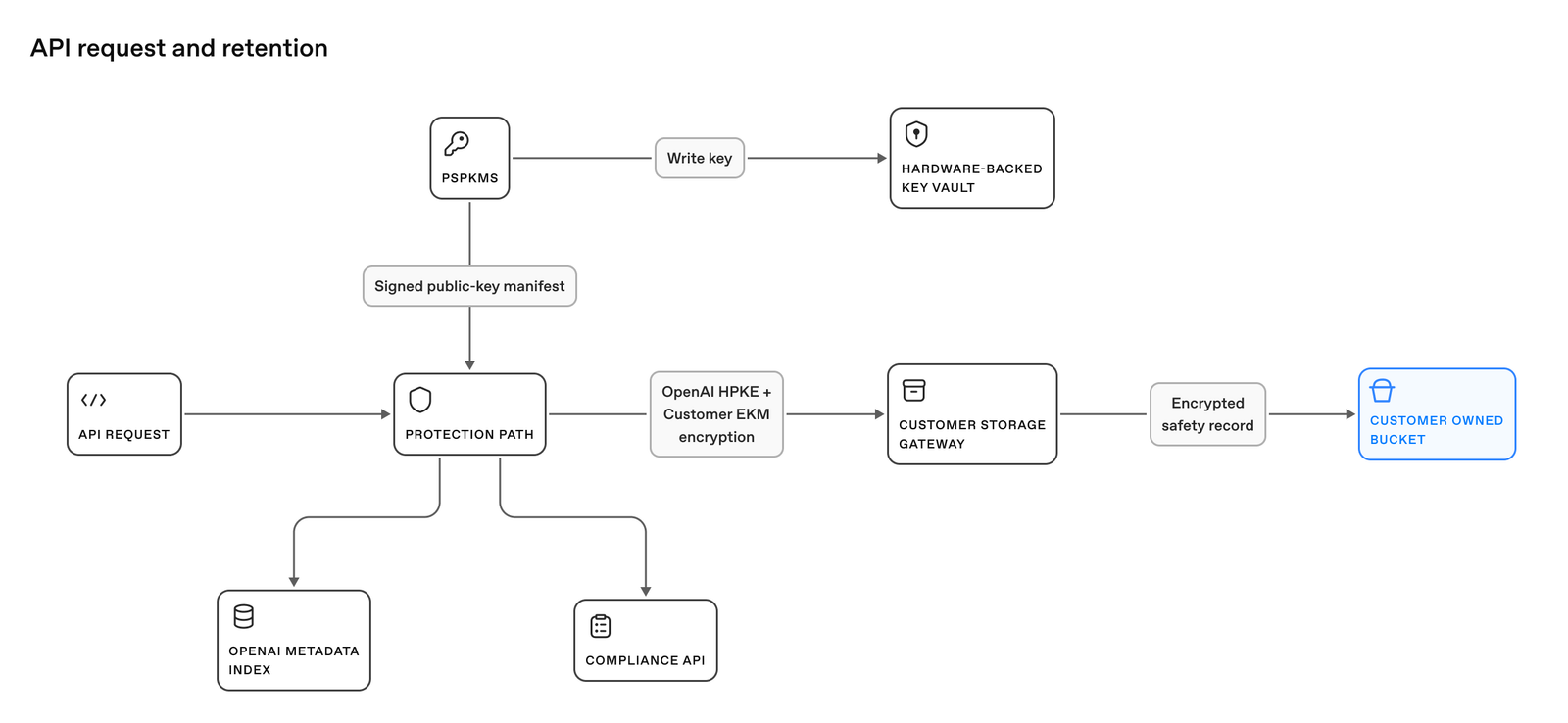
1# Use Daybreak in the Responses API

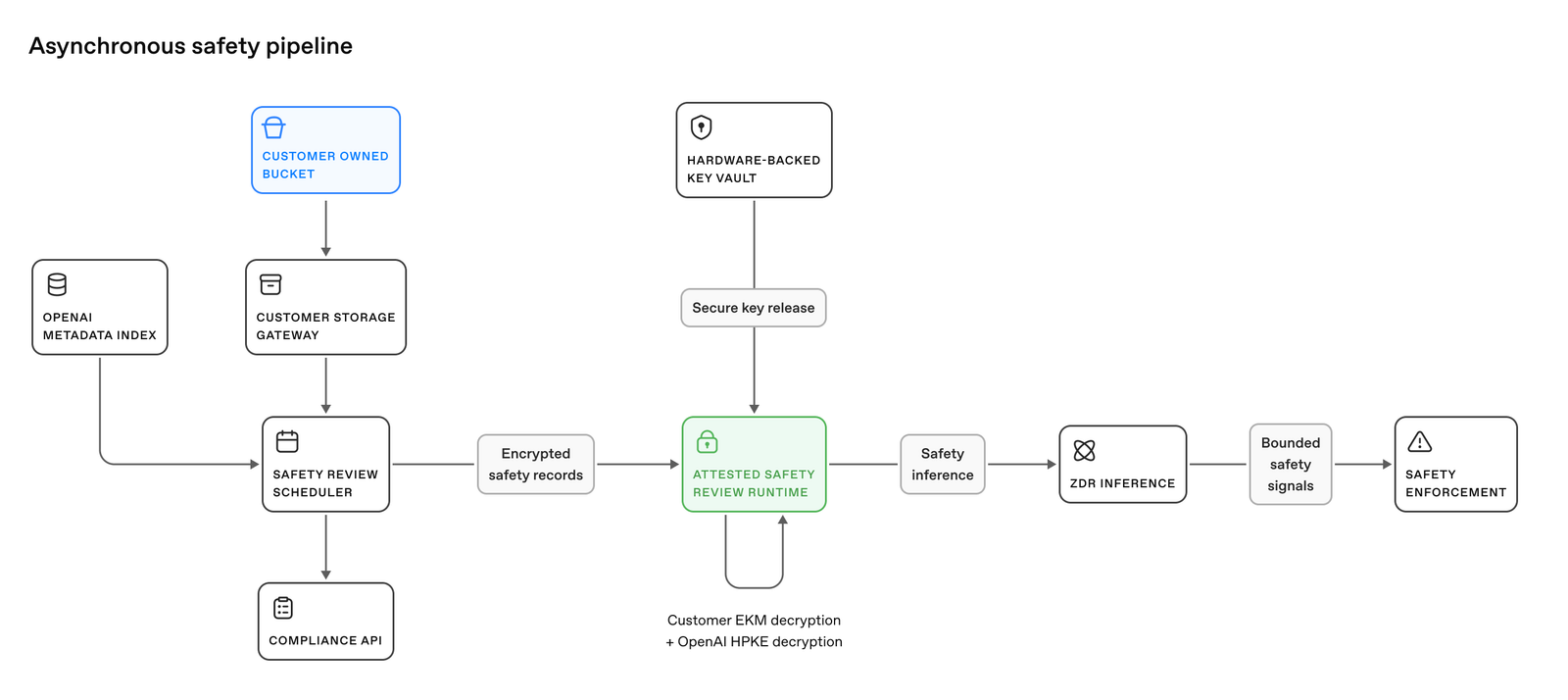
2 

3> For the complete documentation index, see [llms.txt](/llms.txt). Markdown versions of documentation pages are available by appending `.md` to the page URL.

4 

5Use `access_programs.cyber` to select a cybersecurity access program for a Responses API request. The [Daybreak Blue and Daybreak Red programs](https://help.openai.com/en/articles/20001258-trusted-access-for-cyber) provide approved access for cybersecurity work. Other [API cybersecurity safeguards](https://developers.openai.com/api/docs/guides/safety-checks/cybersecurity) continue to apply.

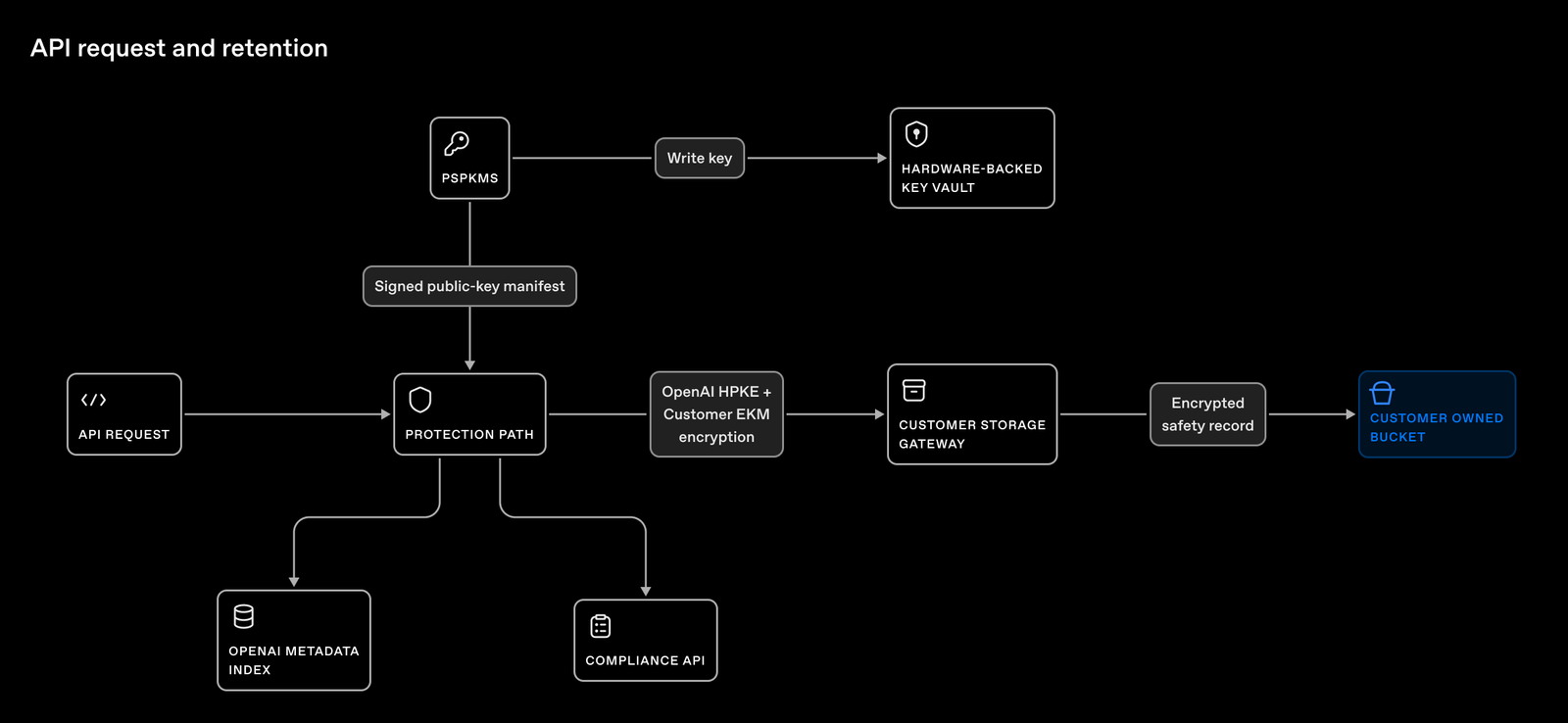
6 

7Before using Daybreak, complete [organization approval and project setup](https://help.openai.com/en/articles/20001261-enterprise-daybreak-onboarding). Your project needs access to both the program and the model. Use an API key from that project. The request parameter selects behavior within your approved access; it doesn't grant access.

8 

9## Choose the model and access program

10 

11The `model` field selects the model. The `access_programs.cyber` field selects a supported access program for that request: `standard`, `daybreak_blue`, or `daybreak_red`.

12 

13| Model | Set `model` to | Set `access_programs.cyber` to | When to use |

14| --------------------------------------- | -------------------------- | ------------------------------ | ---------------------------------------------------------------------------------------------------------------------------- |

15| Mainline model with standard safeguards | `gpt-6-sol` | `standard` | General-purpose or security tasks with standard safeguards, even if you have Daybreak access. |

16| Mainline model with Daybreak Blue | `gpt-6-sol` | `daybreak_blue` | Approved defensive security work with a specific mainline model. |

17| Cyber model with Daybreak Red | `gpt-5.6-cyber` | `daybreak_red` | Advanced, authorized security work with a specific cyber model. Requires Daybreak Red approval. |

18| Daybreak Blue alias | `gpt-daybreak-blue-latest` | `daybreak_blue` | Approved defensive security work that follows updates to the Blue alias's underlying model. |

19| Daybreak Red alias | `gpt-daybreak-red-latest` | `daybreak_red` | Advanced, authorized security work that follows updates to the Red alias's underlying model. Requires Daybreak Red approval. |

20 

21Match the request value to the model, not your organization's approval level. For example, when using `gpt-6-sol` with Daybreak, send `daybreak_blue` even if your organization has Daybreak Red approval. Sending `daybreak_red` with this model returns `invalid_access_program`.

22 

23Daybreak aliases accept only their matching program. For example, requesting `gpt-daybreak-blue-latest` with `daybreak_red` returns an error.

24 

25Reduced refusals on `gpt-6-astra` require Daybreak Red access, but the request

26 value is `daybreak_blue`. This model rejects `daybreak_red`. Daybreak Blue

27 approval alone doesn't authorize reduced refusals on this model. Your project

28 must also have the required access enabled.

29 

30## Send a request

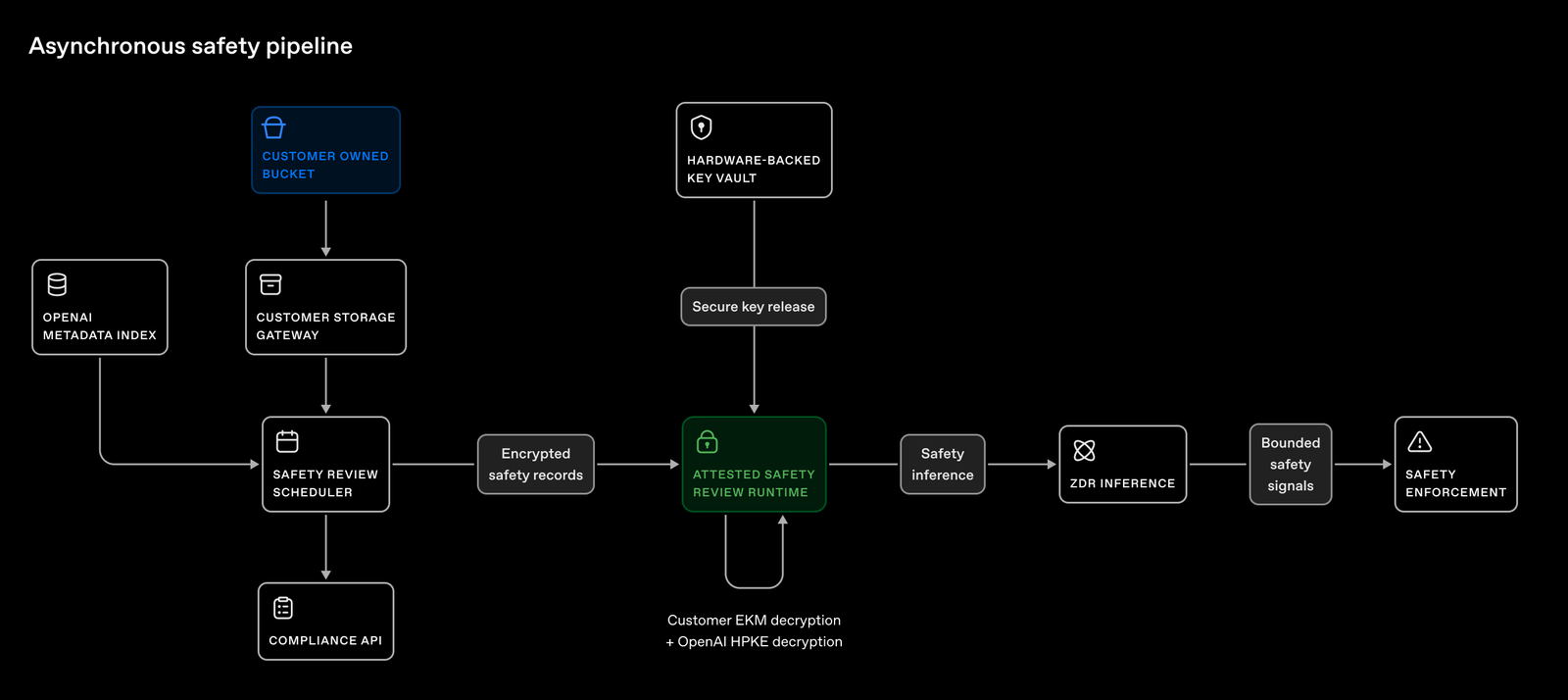
31 

32This example explicitly selects Daybreak Blue with `gpt-6-sol`:

33 

34```bash

35curl https://api.openai.com/v1/responses \

36 -H "Authorization: Bearer $OPENAI_API_KEY" \

37 -H "Content-Type: application/json" \

38 -d '{

39 "model": "gpt-6-sol",

40 "input": "Explain how to validate a security patch in a test environment.",

41 "access_programs": {

42 "cyber": "daybreak_blue"

43 }

44 }'

45```

46 

47 

48Both `access_programs` and `cyber` are optional, but neither accepts `null` in a request. An empty `access_programs` object leaves the selection unspecified.

49 

50## Understand defaults when omitted

51 

52If you omit `access_programs.cyber`, the API selects a compatible program based on the model and your organization and project access:

53 

54- **Mainline models such as `gpt-6-sol`:** Daybreak Blue treatment when your organization and project have the required access; otherwise, standard safeguards.

55- **Daybreak aliases and Red models:** The matching Daybreak program. For example, `gpt-daybreak-blue-latest` selects `daybreak_blue`. The request fails if the required access is missing.

56- **`gpt-6-astra`:** Reduced refusals for eligible callers with Daybreak Red access enabled for their project; otherwise, standard safeguards.

57 

58Model permissions still apply. To explicitly request standard safeguards on a compatible model, send `standard`. An explicit Daybreak selection fails if it's incompatible with the model or you don't have the required access.

59 

60## Check the response

61 

62When available, `access_programs.cyber` records the selected program. This partial response shows Daybreak Blue:

63 

64```json

65{

66 "model": "gpt-6-sol",

67 "access_programs": {

68 "cyber": "daybreak_blue"

69 }

70}

71```

72 

73 

74When no program is specified and the request uses standard safeguards, `access_programs` is `null`. For a `-latest` alias, inspect `model` to see which model served the request. Alias resolution can change and depends on your approved access.

75 

76## Handle errors

77 

78| HTTP status and code | What to do |

79| -------------------------------- | ------------------------------------------------------------------------------------------------------------------------------------------------------------------------------------------------------------------------------------------------------------- |

80| `400 invalid_access_program` | The selected model requires a different program value. Change `access_programs.cyber` to the value named in the error, then retry. |

81| `400 unsupported_access_program` | Switch to a model that supports Daybreak, or set `access_programs.cyber` to `standard` to keep using this model with standard safeguards. |

82| `403 access_program_not_enabled` | Check that your API key belongs to a project with the required program enabled. If organization approval is missing, request the Daybreak level named in the error. If project access is missing, ask your organization administrator to enable that program. |

83 

84Unknown fields, invalid values, and request-side `null` values fail validation. Model permissions are checked separately. A selected Daybreak program doesn't guarantee that every safety check or prompt will succeed. For more help, see [Daybreak troubleshooting](https://help.openai.com/en/articles/20001259).

Details

176 176 

177### Is Fast mode compatible with data residency, Zero Data Retention, and a BAA?177### Is Fast mode compatible with data residency, Zero Data Retention, and a BAA?

178 178 

179Fast mode is compatible with data residency, Zero Data Retention, and a Business Associate Agreement (BAA), subject to model-specific availability. GPT-6 Astra does not support Fast mode with EU data residency. Existing endpoint, tool, eligibility, and contractual requirements still apply. See the [Your data guide](https://developers.openai.com/api/docs/guides/your-data) for details.179Fast mode is compatible with data residency, Zero Data Retention, and a Business Associate Agreement (BAA), subject to model-specific availability. For GPT-6 Astra, Sol, and Luna, EU data residency is available only with Standard processing. Existing endpoint, tool, eligibility, and contractual requirements still apply. See the [Your data guide](https://developers.openai.com/api/docs/guides/your-data) for details.

Details

5 promptingGuide: /api/docs/guides/latest-model/gpt-6-astra.md#prompting-best-practices5 promptingGuide: /api/docs/guides/latest-model/gpt-6-astra.md#prompting-best-practices

6---6---

7 7 

8# Using GPT-6 Astra8# Using GPT-6

9 9 

10> For the complete documentation index, see [llms.txt](/llms.txt). Markdown versions of documentation pages are available by appending `.md` to the page URL.10> For the complete documentation index, see [llms.txt](/llms.txt). Markdown versions of documentation pages are available by appending `.md` to the page URL.

11 11 

12## Introduction12## Introduction

13 13 

14GPT-6 Astra is our most intelligent model yet, with state-of-the-art performance in computer use, browsing, software engineering, science, and professional work. It excels at carrying out multistep workflows across code, browsers, and professional software. In [several evaluations](https://openai.com/index/gpt-6-astra/), Astra achieves stronger results while using substantially fewer output tokens—delivering a lower estimated API cost per task than earlier models despite its higher per-token pricing.14The GPT-6 model family includes GPT-6 Astra, GPT-6 Sol, and GPT-6 Luna. Choose a model based on the reasoning your task requires, latency, and cost.

15 

16GPT-6 Astra is our most intelligent model yet, with state-of-the-art performance in computer use, browsing, software engineering, science, and professional work. It excels at carrying out multi-step workflows across code, browsers, and professional software. In [several evaluations](https://openai.com/index/gpt-6-astra/), Astra achieves stronger results while using substantially fewer output tokens—delivering a lower estimated API cost per task than earlier models despite its higher per-token pricing.

15 17 

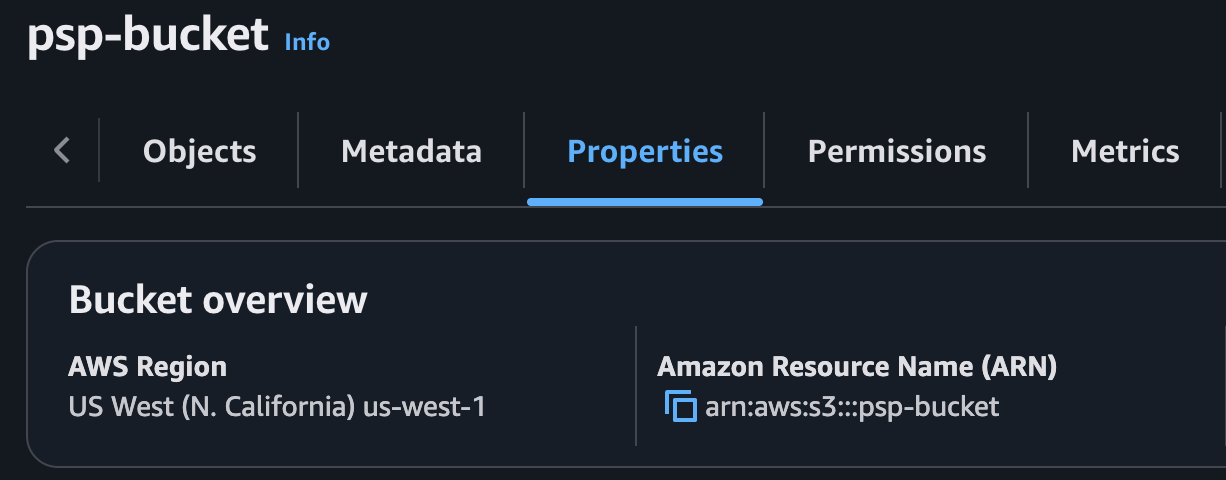
16GPT-6 Astra is also our most aligned model yet. It excels at exercising care, respecting task boundaries, and communicating transparently. When instructions leave room for interpretation, it uses the context it has to fill in routine gaps and asks focused questions when the answer could change the outcome. It incorporates new requirements, changes course when asked, and answers side questions without losing track of the broader task.18GPT-6 Astra is also our most aligned model yet. It excels at exercising care, respecting task boundaries, and communicating transparently. When instructions leave room for interpretation, it uses the context it has to fill in routine gaps and asks focused questions when the answer could change the outcome. It incorporates new requirements, changes course when asked, and answers side questions without losing track of the broader task.

17 19 

18To build with Astra, set `model` to `gpt-6-astra` in a [Responses API](https://developers.openai.com/api/docs/guides/migrate-to-responses) request.20To build with GPT-6, set `model` in a [Responses API](https://developers.openai.com/api/docs/guides/migrate-to-responses) request. Use [`gpt-6-astra`](https://developers.openai.com/api/docs/models/gpt-6-astra) for our highest level of capability, [`gpt-6-sol`](https://developers.openai.com/api/docs/models/gpt-6-sol) for strong reasoning on demanding tasks, or [`gpt-6-luna`](https://developers.openai.com/api/docs/models/gpt-6-luna) for efficient, repeatable work at scale.

19 21 

20<a id="gpt-6-astra-what-is-new" className="scroll-mt-[110px]"></a>22<a id="gpt-6-astra-what-is-new" className="scroll-mt-[110px]"></a>

21 23 

22## What's new24## What's new

23 25 

24- **Async tool calling:** GPT-6 Astra can continue reasoning, call other tools, or answer independent parts of a request while your application runs a tool. Set `async: true` on a function or custom tool and return its result when ready using the original `call_id`. Your application still executes the tool and manages pending work. See [Async tool calling](https://developers.openai.com/api/docs/guides/async-tool-calling) for basic usage and a developer-defined wait-tool pattern.26- **Async tool calling:** GPT-6 can continue reasoning, call other tools, or answer independent parts of a request while your application runs a tool. Set `async: true` on a function or custom tool and return its result when ready using the original `call_id`. Your application still executes the tool and manages pending work. See [Async tool calling](https://developers.openai.com/api/docs/guides/async-tool-calling) for basic usage and a developer-defined wait-tool pattern.

25- **Mid-turn steering:** Send additional user instructions while GPT-6 Astra is working, such as a correction or a change in requirements. Over a WebSocket connection, the Responses API preserves completed work and includes the update in a continuation. See [Mid-turn steering](https://developers.openai.com/api/docs/guides/steering) for the event flow and tool-result handling.27- **Mid-turn steering:** Send additional user instructions while GPT-6 is working, such as a correction or a change in requirements. Over a WebSocket connection, the Responses API preserves completed work and includes the update in a continuation. See [Mid-turn steering](https://developers.openai.com/api/docs/guides/steering) for the event flow and tool-result handling.

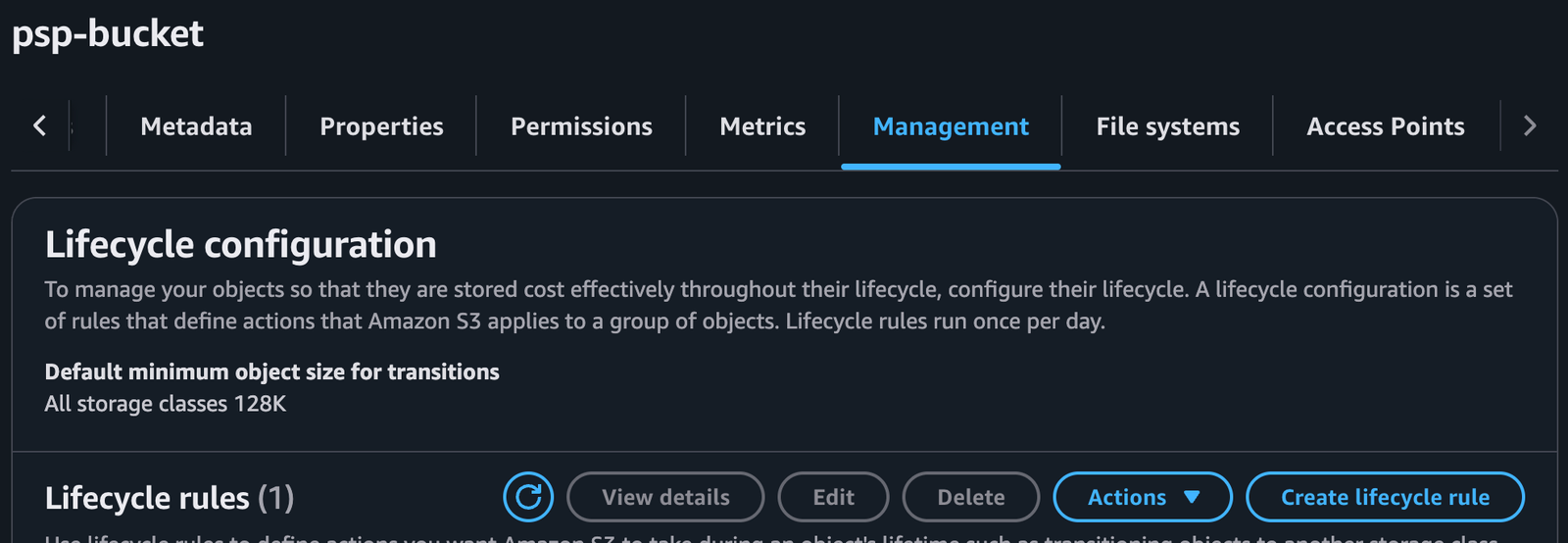
26- **Change reasoning mid-conversation while preserving cache:** Add a `configuration_update` input item to increase reasoning effort for difficult work or reduce it for routine follow-ups without rewriting the original prompt prefix. The updated reasoning effort applies until another `configuration_update` input item overrides it. See [Change reasoning mid-conversation](https://developers.openai.com/api/docs/guides/reasoning#change-reasoning-mid-conversation) for examples and compatibility.28- **Change reasoning mid-conversation while preserving cache:** Add a `configuration_update` input item to increase reasoning effort for difficult work or reduce it for routine follow-ups without rewriting the original prompt prefix. The updated reasoning effort applies until another `configuration_update` input item overrides it. See [Change reasoning mid-conversation](https://developers.openai.com/api/docs/guides/reasoning#change-reasoning-mid-conversation) for examples and compatibility.

27- **Misalignment monitoring:** As part of our [strengthened safeguards](https://openai.com/index/path-to-astra/) for GPT-6 Astra, our systems asynchronously monitor for misalignment and trigger alerts when necessary. See [Misalignment monitoring](https://developers.openai.com/api/docs/guides/safety-checks/misalignment-monitoring) for more information.29- **Misalignment monitoring:** As part of our [strengthened safeguards](https://openai.com/index/path-to-astra/) for GPT-6 Astra, our systems asynchronously monitor for misalignment and trigger alerts when necessary. See [Misalignment monitoring](https://developers.openai.com/api/docs/guides/safety-checks/misalignment-monitoring) for more information.

28- **Limitations:** GPT-6 Astra does not support the `none` reasoning effort. [Fast mode](https://developers.openai.com/api/docs/guides/fast-mode) is unavailable for GPT-6 Astra with EU data residency.

29 30 

30GPT-6 Astra also supports the existing API capabilities available with GPT-5.6, including [computer use](https://developers.openai.com/api/docs/guides/tools-computer-use), [Structured Outputs](https://developers.openai.com/api/docs/guides/structured-outputs), [streaming](https://developers.openai.com/api/docs/guides/streaming-responses), [Programmatic Tool Calling](https://developers.openai.com/api/docs/guides/tools-programmatic-tool-calling), [multi-agent orchestration](https://developers.openai.com/api/docs/guides/responses-multi-agent), [prompt caching](https://developers.openai.com/api/docs/guides/prompt-caching), [persisted reasoning](https://developers.openai.com/api/docs/guides/reasoning#preserve-reasoning-across-calls), [compaction](https://developers.openai.com/api/docs/guides/compaction), and [pro mode](https://developers.openai.com/api/docs/guides/reasoning#reasoning-mode).31GPT-6 also supports the existing API capabilities available with GPT-5.6, including [computer use](https://developers.openai.com/api/docs/guides/tools-computer-use), [Structured Outputs](https://developers.openai.com/api/docs/guides/structured-outputs), [streaming](https://developers.openai.com/api/docs/guides/streaming-responses), [Programmatic Tool Calling](https://developers.openai.com/api/docs/guides/tools-programmatic-tool-calling), [multi-agent orchestration](https://developers.openai.com/api/docs/guides/responses-multi-agent), [prompt caching](https://developers.openai.com/api/docs/guides/prompt-caching), [persisted reasoning](https://developers.openai.com/api/docs/guides/reasoning#preserve-reasoning-across-calls), [compaction](https://developers.openai.com/api/docs/guides/compaction), and [pro mode](https://developers.openai.com/api/docs/guides/reasoning#reasoning-mode).

32 

33## Limitations

34 

35- GPT-6 Astra does not support the `none` reasoning effort; GPT-6 Sol and Luna do.

36- For GPT-6 Astra, Sol, and Luna, EU data residency is available only with Standard processing. See [data residency eligibility](https://developers.openai.com/api/docs/guides/your-data#which-models-and-features-are-eligible-for-data-residency).

31 37 

32## Prompting best practices38## Prompting best practices

33 39 

34GPT-6 Astra is more intelligent and capable than prior models like GPT-5.6 Sol, and also exhibits behavior patterns that can be optimized through prompting the model for your use case.40Use the following prompts as a starting point across the GPT-6 model family. They address behavior observed with GPT-6 Astra; evaluate them with your chosen model and workload.

35 41 

36### GPT-6 Astra behavior42### GPT-6 Astra behavior

37 43 

38- [Initiative and follow-through](#initiative-and-follow-through) – The model is designed to be a more effective collaborator and is thus more likely to ask the user a question when additional input could materially change the result. This can cause it to stop when the user may expect it to make reasonable assumptions and persist.44- [Initiative and follow-through](#initiative-and-follow-through): The model is designed to be a more effective collaborator and is thus more likely to ask the user a question when additional input could materially change the result. This can cause it to stop when the user may expect it to make reasonable assumptions and persist.

39- [Instruction following](#instruction-following) – GPT-6 Astra is stronger at general instruction following than our previous models, giving you greater control over its behavior. It can be more sensitive to instructions contained in skills and other files, such as `AGENTS.md`. We **strongly recommend** auditing skills and other files accessible to your model for instructions that could influence its behavior.45- [Instruction following](#instruction-following): GPT-6 Astra is stronger at general instruction following than our previous models, giving you greater control over its behavior. It can be more sensitive to instructions contained in skills and other files, such as `AGENTS.md`. We **strongly recommend** auditing skills and other files accessible to your model for instructions that could influence its behavior.

40- [Personality and writing style](#personality-and-writing-style) – The model tends toward detailed, formatted responses and may use recurring phrases across sessions. Specify the writing style and structure your application needs.46- [Personality and writing style](#personality-and-writing-style): The model tends toward detailed, formatted responses and may use recurring phrases across sessions. Specify the writing style and structure your application needs.

41- [Subagent delegation](#subagent-delegation) – The model may delegate less often than desired for your workflow. Specify when and how much it should use subagents for parallel work.47- [Subagent delegation](#subagent-delegation): The model may delegate less often than desired for your workflow. Specify when and how much it should use subagents for parallel work.

42- [Testing and verification](#testing-and-verification) – For coding tasks, the model tends to be thorough in testing before considering a task complete. For smaller tasks, this can result in broader tests than the task requires.48- [Testing and verification](#testing-and-verification): For coding tasks, the model tends to be thorough in testing before considering a task complete. For smaller tasks, this can result in broader tests than the task requires.

43 49 

44### Initiative and follow-through50### Initiative and follow-through

45 51 


142Codex can apply the recommended changes in this guide with the [OpenAI Docs skill](https://github.com/openai/codex/tree/main/codex-rs/skills/src/assets/samples/openai-docs).148Codex can apply the recommended changes in this guide with the [OpenAI Docs skill](https://github.com/openai/codex/tree/main/codex-rs/skills/src/assets/samples/openai-docs).

143 149 

144```text150```text

145$openai-docs migrate this project to GPT-6 Astra151$openai-docs migrate this project to the GPT-6 model family

146```152```

147 153 

148To use this skill in other coding agents, download it from the [Codex repository](https://github.com/openai/codex/tree/main/codex-rs/skills/src/assets/samples/openai-docs).154To use this skill in other coding agents, download it from the [Codex repository](https://github.com/openai/codex/tree/main/codex-rs/skills/src/assets/samples/openai-docs).

149 155 

150### Update API and model parameters156### Update API and model parameters

151 157 

152Set `model` to `gpt-6-astra`, then check the following:158Set `model` to `gpt-6-astra`, `gpt-6-sol`, or `gpt-6-luna`, then check the following:

153 159 

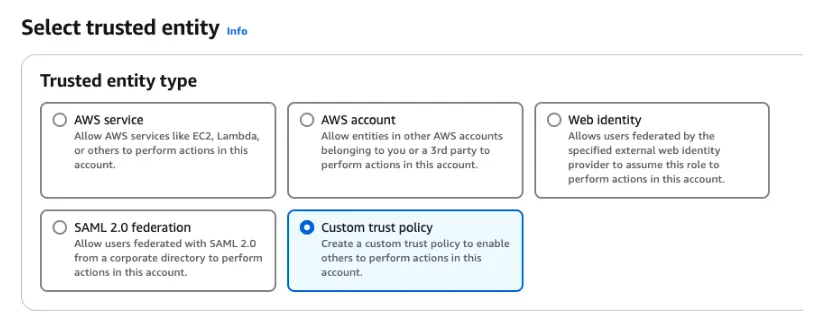
154- **Reasoning effort:** If you currently use `none` or `minimal`, start with `low` and compare results. Otherwise, preserve your current effective [reasoning effort](https://developers.openai.com/api/docs/guides/reasoning#reasoning-effort). Use `reasoning.effort` in Responses or `reasoning_effort` in Chat Completions.160- **Reasoning effort:** Preserve your current effective [reasoning effort](https://developers.openai.com/api/docs/guides/reasoning#reasoning-effort) where supported. GPT-6 Astra does not support `none`; use `low` instead. GPT-6 Sol and Luna support `none`. If your existing request uses `minimal`, start with `low` and compare results on representative tasks. Use `reasoning.effort` in Responses or `reasoning_effort` in Chat Completions.

155- **Tool calling:** Use the [Responses API](https://developers.openai.com/api/docs/guides/migrate-to-responses#migrating-from-chat-completions). GPT-6 Astra supports Chat Completions, but tool calling requires Responses.161- **Tool calling:** Use the [Responses API](https://developers.openai.com/api/docs/guides/migrate-to-responses#migrating-from-chat-completions). GPT-6 Astra supports Chat Completions, but its tool calling requires Responses. GPT-6 Sol and Luna support function calling in Chat Completions only with `reasoning_effort: "none"`. Use Responses for reasoning with tools.

156- **Unsupported parameters:** Remove `temperature`, `top_p`, and `top_logprobs`. For Chat Completions, also remove `logprobs`. For Responses, remove `message.output_text.logprobs` from `include`.162- **Unsupported parameters:** When reasoning effort is not `none`, remove `temperature`, `top_p`, and `top_logprobs`. For Chat Completions, also remove `logprobs`. For Responses, remove `message.output_text.logprobs` from `include`.

157- **Fast mode:** For EU data residency, use Standard processing. GPT-6 Astra does not support `service_tier: "fast"` or `service_tier: "priority"` with EU data residency. Fast mode for GPT-6 Astra does not include a latency SLA. See [Fast mode compatibility](https://developers.openai.com/api/docs/guides/fast-mode#is-fast-mode-compatible-with-data-residency-zero-data-retention-and-a-baa).163- **Data residency:** For GPT-6 Astra, Sol, and Luna, EU data residency is available only with Standard processing. Fast mode for GPT-6 Astra does not include a latency SLA. See [Fast mode compatibility](https://developers.openai.com/api/docs/guides/fast-mode#is-fast-mode-compatible-with-data-residency-zero-data-retention-and-a-baa).

158- **Changing reasoning effort:** If your application changes effort between responses, use `configuration_update` items in standard, single-agent requests. Keep request-level `reasoning.effort` unchanged to preserve the prompt prefix for caching. Check the [compatibility limits](https://developers.openai.com/api/docs/guides/reasoning#change-reasoning-mid-conversation) before adopting this feature.164- **Changing reasoning effort:** If your application changes effort between responses, use `configuration_update` items in standard, single-agent requests. Keep request-level `reasoning.effort` unchanged to preserve the prompt prefix for caching. Check the [compatibility limits](https://developers.openai.com/api/docs/guides/reasoning#change-reasoning-mid-conversation) before adopting this feature.

159- **Prompt caching:** When migrating from GPT-5.5 or earlier, replace `prompt_cache_retention` with `prompt_cache_options.ttl` set to `"30m"`. Review the [prompt caching changes](https://developers.openai.com/api/docs/guides/prompt-caching#summary-of-model-differences), including cache boundaries and cache-write billing.165- **Prompt caching:** When migrating from GPT-5.5 or earlier, replace `prompt_cache_retention` with `prompt_cache_options.ttl` set to `"30m"`. Review the [prompt caching changes](https://developers.openai.com/api/docs/guides/prompt-caching#summary-of-model-differences), including cache boundaries and cache-write billing.

160- **Unnecessary approval pauses:** If you run into issues where the model keeps asking for approval before proceeding, use the [initiative and follow-through guidance](#initiative-and-follow-through) to prompt for more autonomous execution. See the rest of [Prompting best practices](#prompting-best-practices) for guidance on instruction following, writing style, subagent delegation, and testing.166- **Unnecessary approval pauses:** If you run into issues where the model keeps asking for approval before proceeding, use the [initiative and follow-through guidance](#initiative-and-follow-through) to prompt for more autonomous execution. See the rest of [Prompting best practices](#prompting-best-practices) for guidance on instruction following, writing style, subagent delegation, and testing.

Details

5 promptingGuide: /api/docs/guides/latest-model/gpt-6-astra.md#prompting-best-practices5 promptingGuide: /api/docs/guides/latest-model/gpt-6-astra.md#prompting-best-practices

6---6---

7 7 

8# Using GPT-6 Astra8# Using GPT-6

9 9 

10> For the complete documentation index, see [llms.txt](/llms.txt). Markdown versions of documentation pages are available by appending `.md` to the page URL.10> For the complete documentation index, see [llms.txt](/llms.txt). Markdown versions of documentation pages are available by appending `.md` to the page URL.

11 11 

12## Introduction12## Introduction

13 13 

14GPT-6 Astra is our most intelligent model yet, with state-of-the-art performance in computer use, browsing, software engineering, science, and professional work. It excels at carrying out multistep workflows across code, browsers, and professional software. In [several evaluations](https://openai.com/index/gpt-6-astra/), Astra achieves stronger results while using substantially fewer output tokens—delivering a lower estimated API cost per task than earlier models despite its higher per-token pricing.14The GPT-6 model family includes GPT-6 Astra, GPT-6 Sol, and GPT-6 Luna. Choose a model based on the reasoning your task requires, latency, and cost.

15 

16GPT-6 Astra is our most intelligent model yet, with state-of-the-art performance in computer use, browsing, software engineering, science, and professional work. It excels at carrying out multi-step workflows across code, browsers, and professional software. In [several evaluations](https://openai.com/index/gpt-6-astra/), Astra achieves stronger results while using substantially fewer output tokens—delivering a lower estimated API cost per task than earlier models despite its higher per-token pricing.

15 17 

16GPT-6 Astra is also our most aligned model yet. It excels at exercising care, respecting task boundaries, and communicating transparently. When instructions leave room for interpretation, it uses the context it has to fill in routine gaps and asks focused questions when the answer could change the outcome. It incorporates new requirements, changes course when asked, and answers side questions without losing track of the broader task.18GPT-6 Astra is also our most aligned model yet. It excels at exercising care, respecting task boundaries, and communicating transparently. When instructions leave room for interpretation, it uses the context it has to fill in routine gaps and asks focused questions when the answer could change the outcome. It incorporates new requirements, changes course when asked, and answers side questions without losing track of the broader task.

17 19 

18To build with Astra, set `model` to `gpt-6-astra` in a [Responses API](https://developers.openai.com/api/docs/guides/migrate-to-responses) request.20To build with GPT-6, set `model` in a [Responses API](https://developers.openai.com/api/docs/guides/migrate-to-responses) request. Use [`gpt-6-astra`](https://developers.openai.com/api/docs/models/gpt-6-astra) for our highest level of capability, [`gpt-6-sol`](https://developers.openai.com/api/docs/models/gpt-6-sol) for strong reasoning on demanding tasks, or [`gpt-6-luna`](https://developers.openai.com/api/docs/models/gpt-6-luna) for efficient, repeatable work at scale.

19 21 

20<a id="gpt-6-astra-what-is-new" className="scroll-mt-[110px]"></a>22<a id="gpt-6-astra-what-is-new" className="scroll-mt-[110px]"></a>

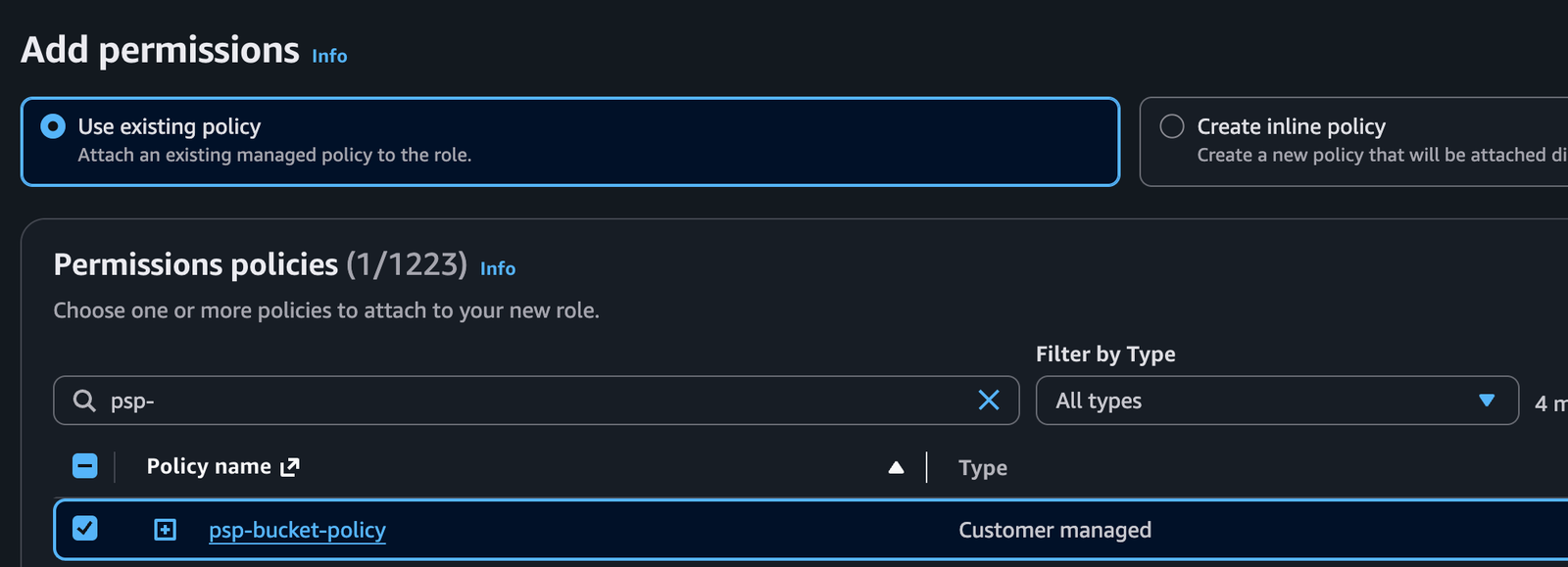
21 23 

22## What's new24## What's new

23 25 

24- **Async tool calling:** GPT-6 Astra can continue reasoning, call other tools, or answer independent parts of a request while your application runs a tool. Set `async: true` on a function or custom tool and return its result when ready using the original `call_id`. Your application still executes the tool and manages pending work. See [Async tool calling](https://developers.openai.com/api/docs/guides/async-tool-calling) for basic usage and a developer-defined wait-tool pattern.26- **Async tool calling:** GPT-6 can continue reasoning, call other tools, or answer independent parts of a request while your application runs a tool. Set `async: true` on a function or custom tool and return its result when ready using the original `call_id`. Your application still executes the tool and manages pending work. See [Async tool calling](https://developers.openai.com/api/docs/guides/async-tool-calling) for basic usage and a developer-defined wait-tool pattern.

25- **Mid-turn steering:** Send additional user instructions while GPT-6 Astra is working, such as a correction or a change in requirements. Over a WebSocket connection, the Responses API preserves completed work and includes the update in a continuation. See [Mid-turn steering](https://developers.openai.com/api/docs/guides/steering) for the event flow and tool-result handling.27- **Mid-turn steering:** Send additional user instructions while GPT-6 is working, such as a correction or a change in requirements. Over a WebSocket connection, the Responses API preserves completed work and includes the update in a continuation. See [Mid-turn steering](https://developers.openai.com/api/docs/guides/steering) for the event flow and tool-result handling.

26- **Change reasoning mid-conversation while preserving cache:** Add a `configuration_update` input item to increase reasoning effort for difficult work or reduce it for routine follow-ups without rewriting the original prompt prefix. The updated reasoning effort applies until another `configuration_update` input item overrides it. See [Change reasoning mid-conversation](https://developers.openai.com/api/docs/guides/reasoning#change-reasoning-mid-conversation) for examples and compatibility.28- **Change reasoning mid-conversation while preserving cache:** Add a `configuration_update` input item to increase reasoning effort for difficult work or reduce it for routine follow-ups without rewriting the original prompt prefix. The updated reasoning effort applies until another `configuration_update` input item overrides it. See [Change reasoning mid-conversation](https://developers.openai.com/api/docs/guides/reasoning#change-reasoning-mid-conversation) for examples and compatibility.

27- **Misalignment monitoring:** As part of our [strengthened safeguards](https://openai.com/index/path-to-astra/) for GPT-6 Astra, our systems asynchronously monitor for misalignment and trigger alerts when necessary. See [Misalignment monitoring](https://developers.openai.com/api/docs/guides/safety-checks/misalignment-monitoring) for more information.29- **Misalignment monitoring:** As part of our [strengthened safeguards](https://openai.com/index/path-to-astra/) for GPT-6 Astra, our systems asynchronously monitor for misalignment and trigger alerts when necessary. See [Misalignment monitoring](https://developers.openai.com/api/docs/guides/safety-checks/misalignment-monitoring) for more information.

28- **Limitations:** GPT-6 Astra does not support the `none` reasoning effort. [Fast mode](https://developers.openai.com/api/docs/guides/fast-mode) is unavailable for GPT-6 Astra with EU data residency.

29 30 

30GPT-6 Astra also supports the existing API capabilities available with GPT-5.6, including [computer use](https://developers.openai.com/api/docs/guides/tools-computer-use), [Structured Outputs](https://developers.openai.com/api/docs/guides/structured-outputs), [streaming](https://developers.openai.com/api/docs/guides/streaming-responses), [Programmatic Tool Calling](https://developers.openai.com/api/docs/guides/tools-programmatic-tool-calling), [multi-agent orchestration](https://developers.openai.com/api/docs/guides/responses-multi-agent), [prompt caching](https://developers.openai.com/api/docs/guides/prompt-caching), [persisted reasoning](https://developers.openai.com/api/docs/guides/reasoning#preserve-reasoning-across-calls), [compaction](https://developers.openai.com/api/docs/guides/compaction), and [pro mode](https://developers.openai.com/api/docs/guides/reasoning#reasoning-mode).31GPT-6 also supports the existing API capabilities available with GPT-5.6, including [computer use](https://developers.openai.com/api/docs/guides/tools-computer-use), [Structured Outputs](https://developers.openai.com/api/docs/guides/structured-outputs), [streaming](https://developers.openai.com/api/docs/guides/streaming-responses), [Programmatic Tool Calling](https://developers.openai.com/api/docs/guides/tools-programmatic-tool-calling), [multi-agent orchestration](https://developers.openai.com/api/docs/guides/responses-multi-agent), [prompt caching](https://developers.openai.com/api/docs/guides/prompt-caching), [persisted reasoning](https://developers.openai.com/api/docs/guides/reasoning#preserve-reasoning-across-calls), [compaction](https://developers.openai.com/api/docs/guides/compaction), and [pro mode](https://developers.openai.com/api/docs/guides/reasoning#reasoning-mode).

32 

33## Limitations

34 

35- GPT-6 Astra does not support the `none` reasoning effort; GPT-6 Sol and Luna do.

36- For GPT-6 Astra, Sol, and Luna, EU data residency is available only with Standard processing. See [data residency eligibility](https://developers.openai.com/api/docs/guides/your-data#which-models-and-features-are-eligible-for-data-residency).

31 37 

32## Prompting best practices38## Prompting best practices

33 39 

34GPT-6 Astra is more intelligent and capable than prior models like GPT-5.6 Sol, and also exhibits behavior patterns that can be optimized through prompting the model for your use case.40Use the following prompts as a starting point across the GPT-6 model family. They address behavior observed with GPT-6 Astra; evaluate them with your chosen model and workload.

35 41 

36### GPT-6 Astra behavior42### GPT-6 Astra behavior

37 43 

38- [Initiative and follow-through](#initiative-and-follow-through) – The model is designed to be a more effective collaborator and is thus more likely to ask the user a question when additional input could materially change the result. This can cause it to stop when the user may expect it to make reasonable assumptions and persist.44- [Initiative and follow-through](#initiative-and-follow-through): The model is designed to be a more effective collaborator and is thus more likely to ask the user a question when additional input could materially change the result. This can cause it to stop when the user may expect it to make reasonable assumptions and persist.

39- [Instruction following](#instruction-following) – GPT-6 Astra is stronger at general instruction following than our previous models, giving you greater control over its behavior. It can be more sensitive to instructions contained in skills and other files, such as `AGENTS.md`. We **strongly recommend** auditing skills and other files accessible to your model for instructions that could influence its behavior.45- [Instruction following](#instruction-following): GPT-6 Astra is stronger at general instruction following than our previous models, giving you greater control over its behavior. It can be more sensitive to instructions contained in skills and other files, such as `AGENTS.md`. We **strongly recommend** auditing skills and other files accessible to your model for instructions that could influence its behavior.

40- [Personality and writing style](#personality-and-writing-style) – The model tends toward detailed, formatted responses and may use recurring phrases across sessions. Specify the writing style and structure your application needs.46- [Personality and writing style](#personality-and-writing-style): The model tends toward detailed, formatted responses and may use recurring phrases across sessions. Specify the writing style and structure your application needs.

41- [Subagent delegation](#subagent-delegation) – The model may delegate less often than desired for your workflow. Specify when and how much it should use subagents for parallel work.47- [Subagent delegation](#subagent-delegation): The model may delegate less often than desired for your workflow. Specify when and how much it should use subagents for parallel work.

42- [Testing and verification](#testing-and-verification) – For coding tasks, the model tends to be thorough in testing before considering a task complete. For smaller tasks, this can result in broader tests than the task requires.48- [Testing and verification](#testing-and-verification): For coding tasks, the model tends to be thorough in testing before considering a task complete. For smaller tasks, this can result in broader tests than the task requires.

43 49 

44### Initiative and follow-through50### Initiative and follow-through

45 51 


142Codex can apply the recommended changes in this guide with the [OpenAI Docs skill](https://github.com/openai/codex/tree/main/codex-rs/skills/src/assets/samples/openai-docs).148Codex can apply the recommended changes in this guide with the [OpenAI Docs skill](https://github.com/openai/codex/tree/main/codex-rs/skills/src/assets/samples/openai-docs).

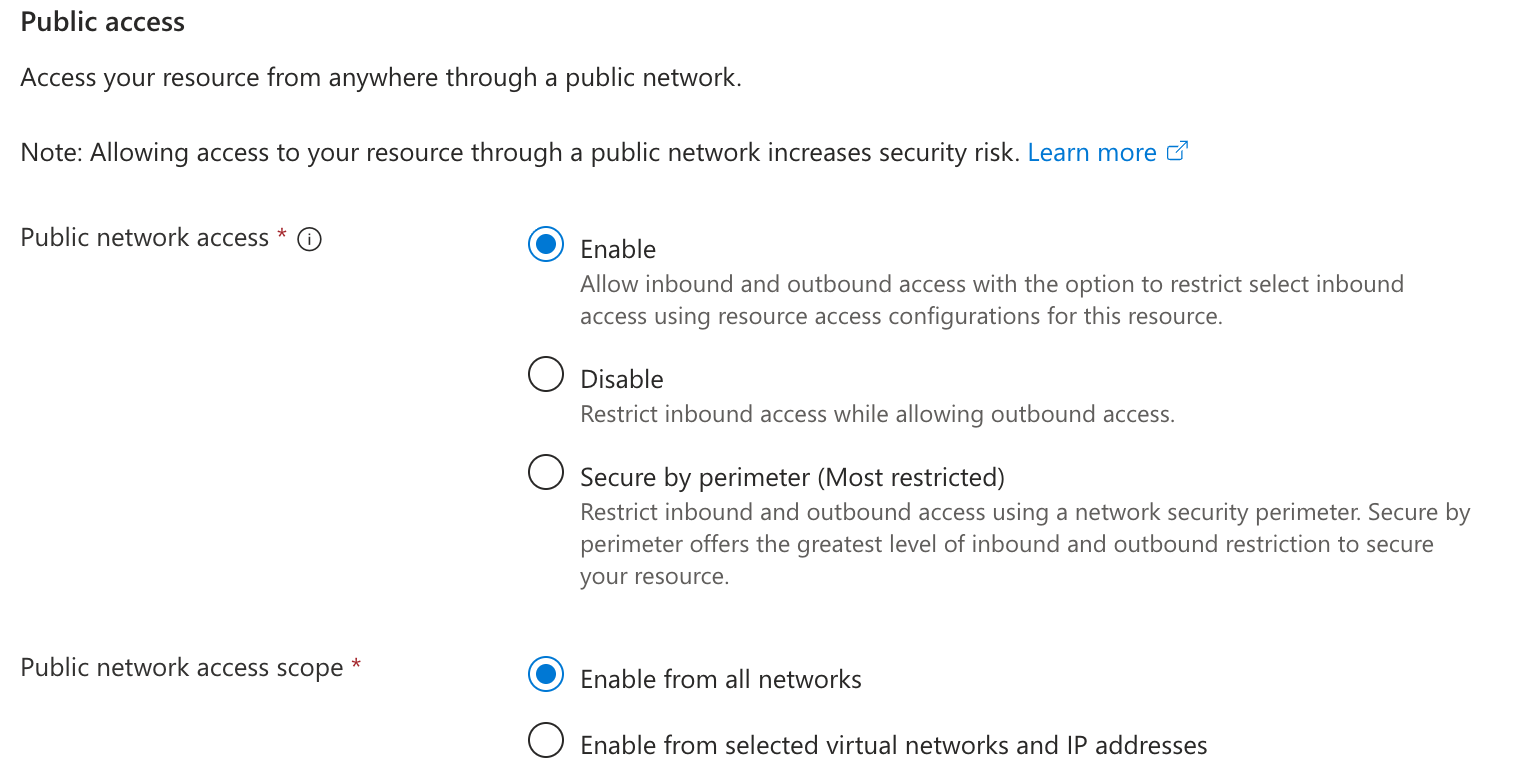
143 149 

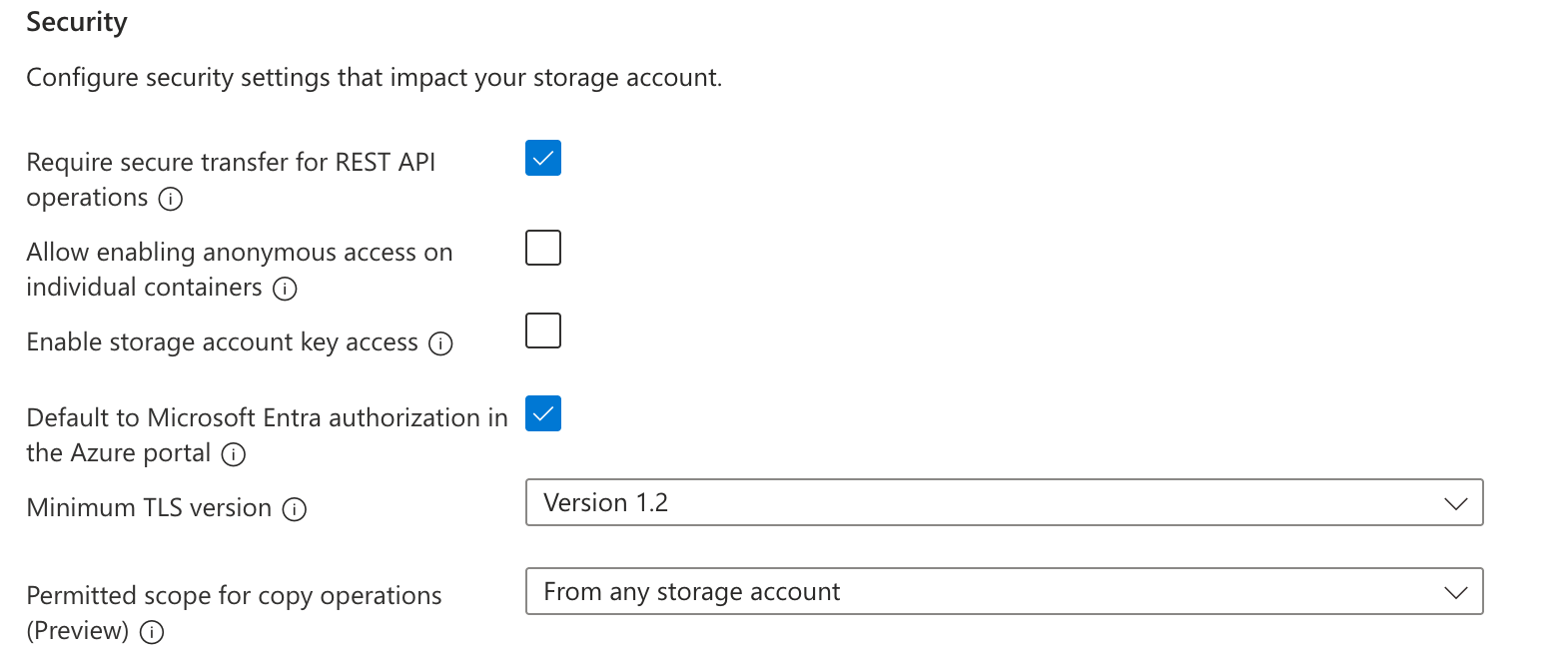
144```text150```text

145$openai-docs migrate this project to GPT-6 Astra151$openai-docs migrate this project to the GPT-6 model family

146```152```

147 153 

148To use this skill in other coding agents, download it from the [Codex repository](https://github.com/openai/codex/tree/main/codex-rs/skills/src/assets/samples/openai-docs).154To use this skill in other coding agents, download it from the [Codex repository](https://github.com/openai/codex/tree/main/codex-rs/skills/src/assets/samples/openai-docs).

149 155 

150### Update API and model parameters156### Update API and model parameters

151 157 

152Set `model` to `gpt-6-astra`, then check the following:158Set `model` to `gpt-6-astra`, `gpt-6-sol`, or `gpt-6-luna`, then check the following:

153 159 

154- **Reasoning effort:** If you currently use `none` or `minimal`, start with `low` and compare results. Otherwise, preserve your current effective [reasoning effort](https://developers.openai.com/api/docs/guides/reasoning#reasoning-effort). Use `reasoning.effort` in Responses or `reasoning_effort` in Chat Completions.160- **Reasoning effort:** Preserve your current effective [reasoning effort](https://developers.openai.com/api/docs/guides/reasoning#reasoning-effort) where supported. GPT-6 Astra does not support `none`; use `low` instead. GPT-6 Sol and Luna support `none`. If your existing request uses `minimal`, start with `low` and compare results on representative tasks. Use `reasoning.effort` in Responses or `reasoning_effort` in Chat Completions.

155- **Tool calling:** Use the [Responses API](https://developers.openai.com/api/docs/guides/migrate-to-responses#migrating-from-chat-completions). GPT-6 Astra supports Chat Completions, but tool calling requires Responses.161- **Tool calling:** Use the [Responses API](https://developers.openai.com/api/docs/guides/migrate-to-responses#migrating-from-chat-completions). GPT-6 Astra supports Chat Completions, but its tool calling requires Responses. GPT-6 Sol and Luna support function calling in Chat Completions only with `reasoning_effort: "none"`. Use Responses for reasoning with tools.

156- **Unsupported parameters:** Remove `temperature`, `top_p`, and `top_logprobs`. For Chat Completions, also remove `logprobs`. For Responses, remove `message.output_text.logprobs` from `include`.162- **Unsupported parameters:** When reasoning effort is not `none`, remove `temperature`, `top_p`, and `top_logprobs`. For Chat Completions, also remove `logprobs`. For Responses, remove `message.output_text.logprobs` from `include`.

157- **Fast mode:** For EU data residency, use Standard processing. GPT-6 Astra does not support `service_tier: "fast"` or `service_tier: "priority"` with EU data residency. Fast mode for GPT-6 Astra does not include a latency SLA. See [Fast mode compatibility](https://developers.openai.com/api/docs/guides/fast-mode#is-fast-mode-compatible-with-data-residency-zero-data-retention-and-a-baa).163- **Data residency:** For GPT-6 Astra, Sol, and Luna, EU data residency is available only with Standard processing. Fast mode for GPT-6 Astra does not include a latency SLA. See [Fast mode compatibility](https://developers.openai.com/api/docs/guides/fast-mode#is-fast-mode-compatible-with-data-residency-zero-data-retention-and-a-baa).

158- **Changing reasoning effort:** If your application changes effort between responses, use `configuration_update` items in standard, single-agent requests. Keep request-level `reasoning.effort` unchanged to preserve the prompt prefix for caching. Check the [compatibility limits](https://developers.openai.com/api/docs/guides/reasoning#change-reasoning-mid-conversation) before adopting this feature.164- **Changing reasoning effort:** If your application changes effort between responses, use `configuration_update` items in standard, single-agent requests. Keep request-level `reasoning.effort` unchanged to preserve the prompt prefix for caching. Check the [compatibility limits](https://developers.openai.com/api/docs/guides/reasoning#change-reasoning-mid-conversation) before adopting this feature.

159- **Prompt caching:** When migrating from GPT-5.5 or earlier, replace `prompt_cache_retention` with `prompt_cache_options.ttl` set to `"30m"`. Review the [prompt caching changes](https://developers.openai.com/api/docs/guides/prompt-caching#summary-of-model-differences), including cache boundaries and cache-write billing.165- **Prompt caching:** When migrating from GPT-5.5 or earlier, replace `prompt_cache_retention` with `prompt_cache_options.ttl` set to `"30m"`. Review the [prompt caching changes](https://developers.openai.com/api/docs/guides/prompt-caching#summary-of-model-differences), including cache boundaries and cache-write billing.

160- **Unnecessary approval pauses:** If you run into issues where the model keeps asking for approval before proceeding, use the [initiative and follow-through guidance](#initiative-and-follow-through) to prompt for more autonomous execution. See the rest of [Prompting best practices](#prompting-best-practices) for guidance on instruction following, writing style, subagent delegation, and testing.166- **Unnecessary approval pauses:** If you run into issues where the model keeps asking for approval before proceeding, use the [initiative and follow-through guidance](#initiative-and-follow-through) to prompt for more autonomous execution. See the rest of [Prompting best practices](#prompting-best-practices) for guidance on instruction following, writing style, subagent delegation, and testing.

Details

2 2 

3> For the complete documentation index, see [llms.txt](/llms.txt). Markdown versions of documentation pages are available by appending `.md` to the page URL.3> For the complete documentation index, see [llms.txt](/llms.txt). Markdown versions of documentation pages are available by appending `.md` to the page URL.

4 4 

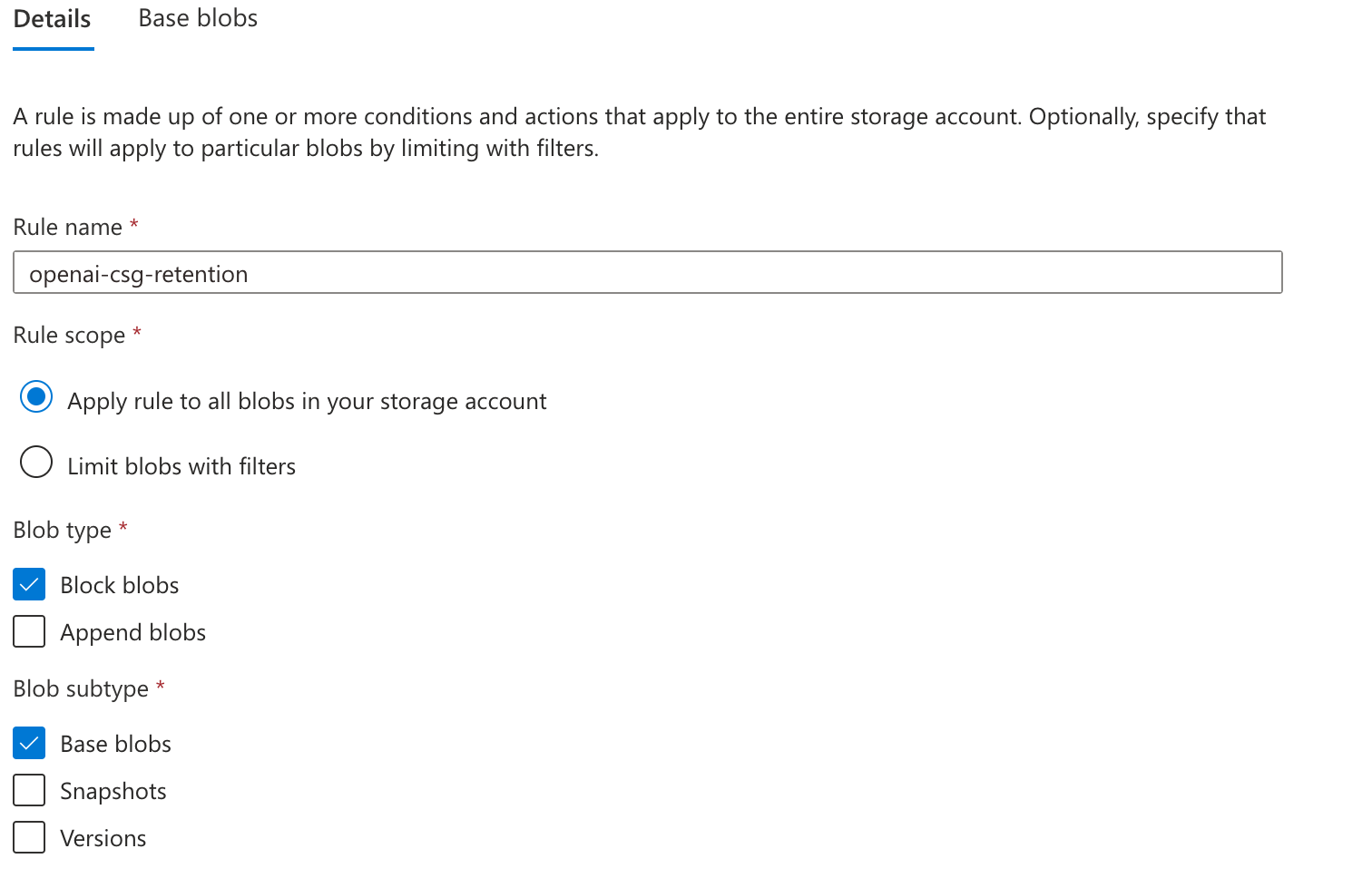
5Choosing the right model, whether [`gpt-6-astra`](https://developers.openai.com/api/docs/models/gpt-6-astra) or a smaller option like [`gpt-5.6-terra`](https://developers.openai.com/api/docs/models/gpt-5.6-terra), requires balancing **accuracy**, **latency**, and **cost**. This guide explains key principles to help you make informed decisions, along with a practical example.5## Meet the models

6 6 

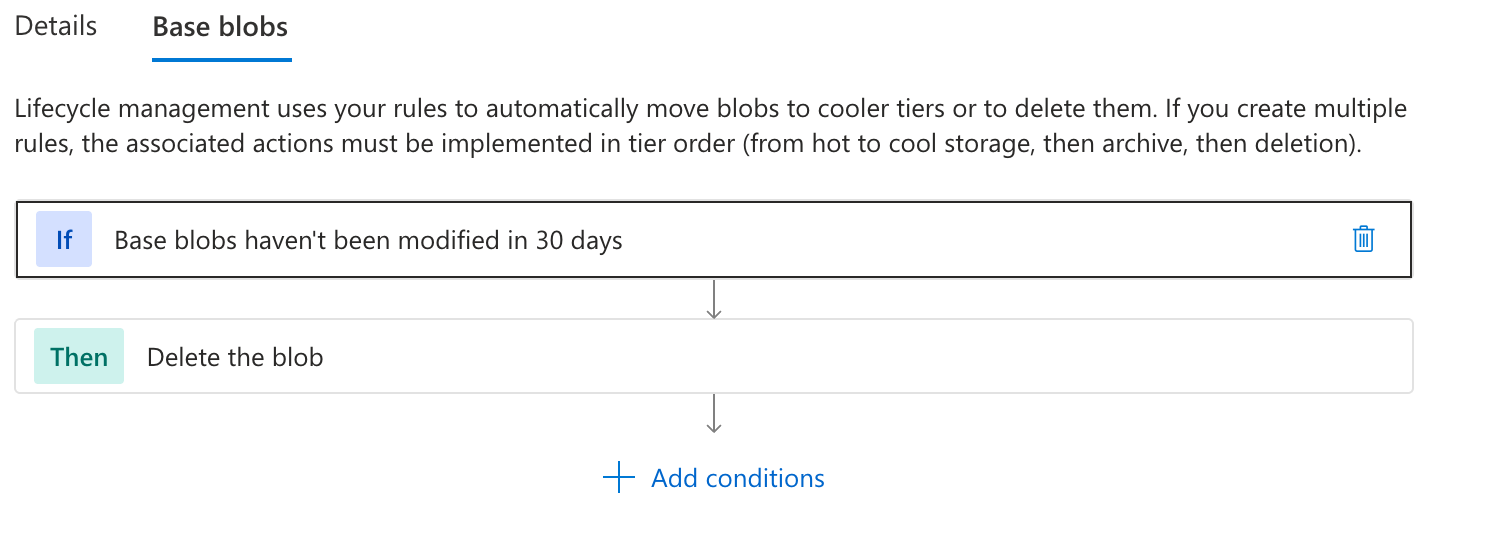
7## Core principles7Availability, tools, reasoning settings, and usage limits differ by product and

8model version. Check the [models available in ChatGPT](https://developers.openai.com/codex/models) or the

9[API model catalog](https://developers.openai.com/api/docs/models).

8 10 

9The principles for model selection are simple:11## Find the right model for your workflow

10 12 

11- **Optimize for accuracy first:** Optimize for accuracy until you hit your accuracy target.13Choose your work and task and get a recommendation.

12- **Optimize for cost and latency second:** Then aim to maintain accuracy with the cheapest, fastest model possible.

13 14 

14### 1. Focus on accuracy first15## How to think about models and reasoning effort

15 16 

16Begin by setting a clear accuracy goal for your use case, where you're clear on the accuracy that would be "good enough" for this use case to go to production. You can accomplish this through:

17 17 

18- **Setting a clear accuracy target:** Identify what your target accuracy statistic is going to be.

19 - For example, 90% of customer service calls need to be triaged correctly at the first interaction.

20- **Developing an evaluation dataset:** Create a dataset that allows you to measure the model's performance against these goals.

21 - To extend the example above, capture 100 interaction examples where we have what the user asked for, what the LLM triaged them to, what the correct triage should be, and whether this was correct or not.

22- **Using the most powerful model to optimize:** Start with the most capable model available to achieve your accuracy targets. Log all responses so we can use them for distillation of a smaller model.

23 - Use retrieval-augmented generation to optimize for accuracy

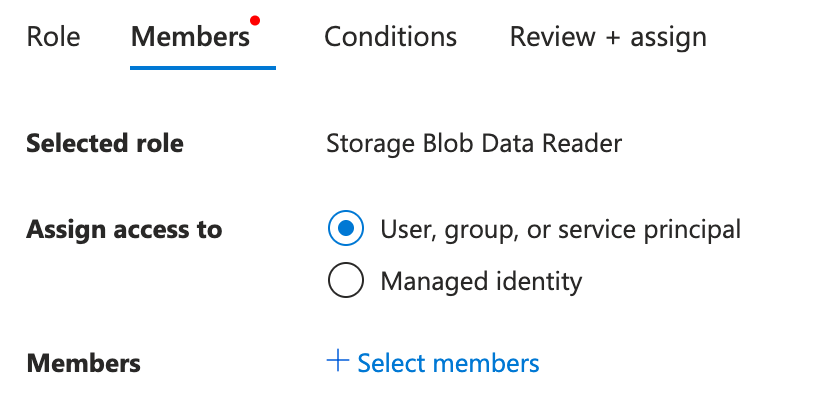
24 - Use fine-tuning to optimize for consistency and behavior

25 18 

26During this process, collect prompt and completion pairs for use in evaluations, few-shot learning, or fine-tuning. This practice, known as **prompt baking**, helps you produce high-quality examples for future use.19 Luna is the most cost-efficient model, while Astra is our state-of-the-art,

20 most powerful model. If cost and latency aren't a concern, you can default to

21 Astra. To reduce costs or latency, use the guidance below to choose a model

22 and reasoning effort for your needs.

27 23 

28For more methods and tools here, see our [Accuracy Optimization Guide](https://developers.openai.com/api/docs/guides/optimizing-llm-accuracy).

29 24 

30#### Setting a realistic accuracy target

31 25 

32Calculate a realistic accuracy target by evaluating the financial impact of model decisions. For example, in a fake news classification scenario:

33 26 

34- **Correctly classified news:** If the model classifies it correctly, it saves you the cost of a human reviewing it - let's assume **$50**.

35- **Incorrectly classified news:** If it falsely classifies a safe article or misses a fake news article, it may trigger a review process and possible complaint, which might cost us **$300**.

36 27 

37Our news classification example would need **85.8%** accuracy to cover costs, so targeting 90% or more ensures an overall return on investment. Use these calculations to set an effective accuracy target based on your specific cost structures.281. **Luna · Low**

38 29 

39### 2. Optimize cost and latency30 Fine-grained edits, well-scoped problem-solving, and simple data extraction.

40 31 

41Cost and latency are considered secondary because if the model can’t hit your accuracy target then these concerns are moot. However, once you’ve got a model that works for your use case, you can take one of two approaches:322. **Luna · Medium**

42 33 

43- **Compare with a smaller model zero- or few-shot:** Swap out the model for a smaller, cheaper one and test whether it maintains accuracy at the lower cost and latency point.34 Creating from clear briefs and making coordinated updates to existing work.

44- **Model distillation:** Fine-tune a smaller model using the data gathered during accuracy optimization.

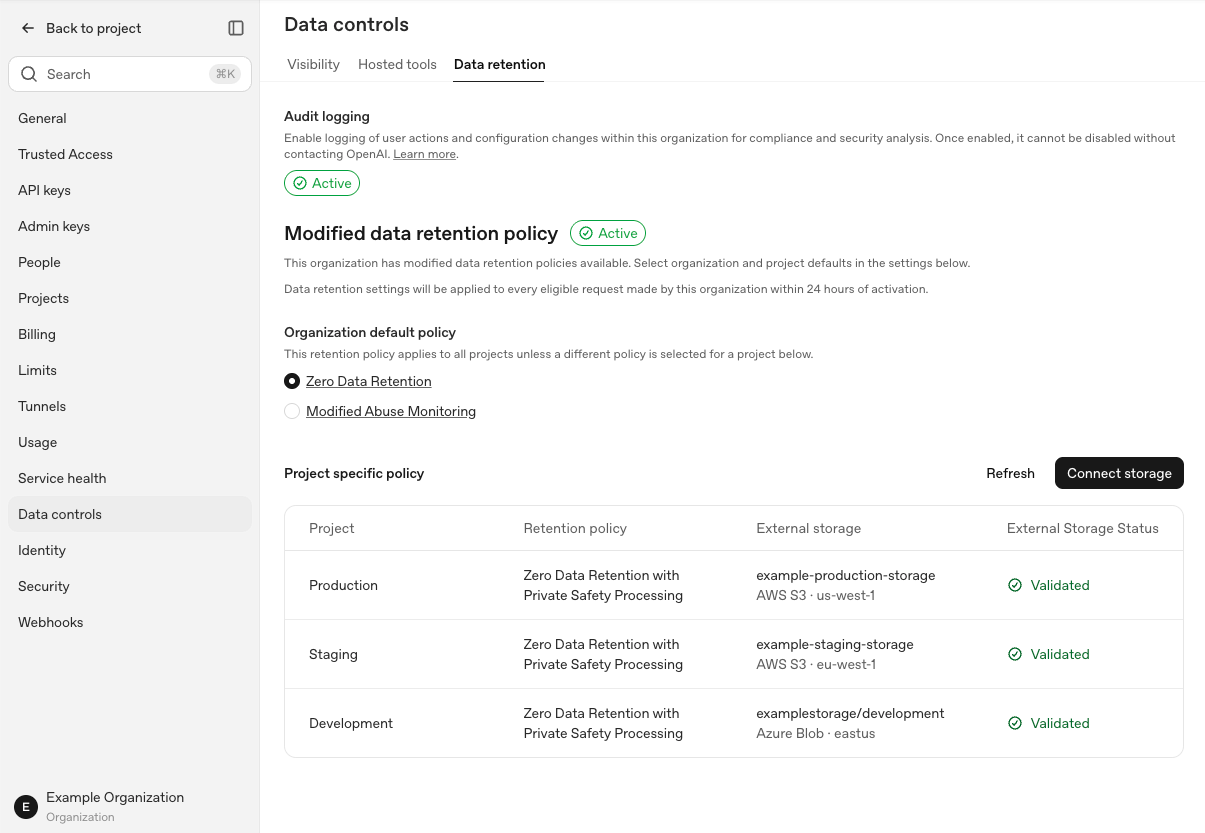
45 35 

46Cost and latency are typically interconnected; reducing tokens and requests generally leads to faster processing.363. **Luna · Extra high**

47 37 

48The main strategies to consider here are:38 Finding current context across multiple apps, prioritizing work, and solving problems with clear constraints.

49 39 

50- **Reduce requests:** Limit the number of necessary requests to complete tasks.404. **Sol · Low**

51- **Minimize tokens:** Lower the number of input tokens and optimize for shorter model outputs.

52- **Select a smaller model:** Use models that balance reduced costs and latency with maintained accuracy.

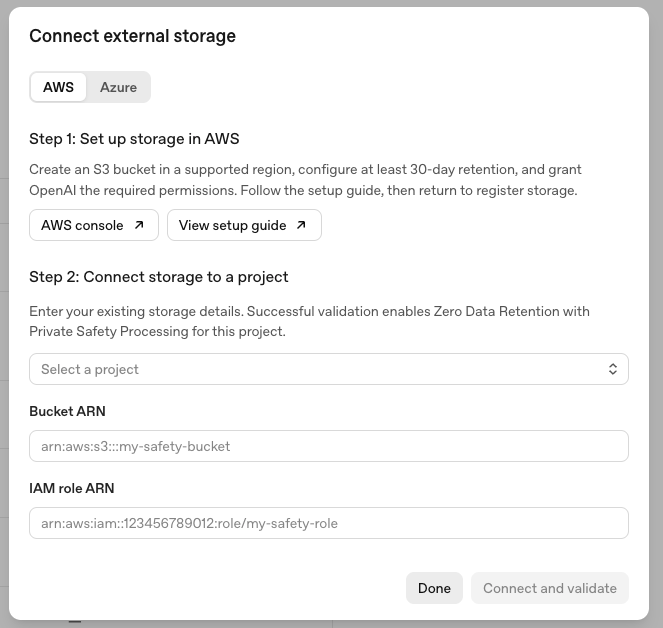
53 41 

54To dive deeper into these, please refer to our guide on [latency optimization](https://developers.openai.com/api/docs/guides/latency-optimization).42 Focused writing and editing, fact-checking, and straightforward work in apps.

55 43 

56#### Exceptions to the rule445. **Sol · Medium**

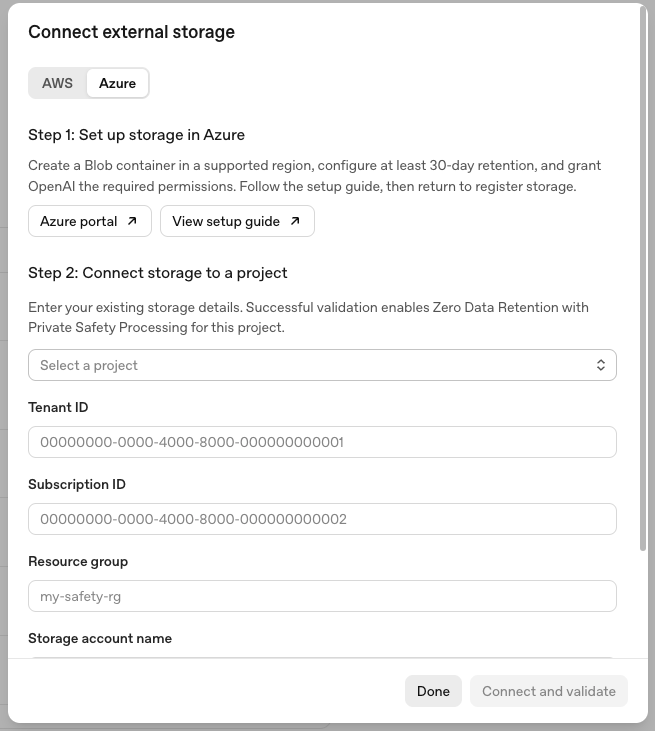
57 45 

58Clear exceptions exist for these principles. If your use case is extremely cost or latency sensitive, establish thresholds for these metrics before beginning your testing, then remove the models that exceed those from consideration. Once benchmarks are set, these guidelines will help you refine model accuracy within your constraints.46 Everyday coding, research, and workflows that need judgment and completeness.

59 47 

60## Practical example486. **Sol · Extra high**

61 49 

62To demonstrate these principles, we'll develop a fake news classifier with the following target metrics. The experiment below uses historical GPT-4o-family results to show the workflow; for current evaluations, start with [`gpt-6-astra`](https://developers.openai.com/api/docs/models/gpt-6-astra) and compare against smaller or fine-tuned models.50 Deeper analysis, thorough verification, and careful review of documents, data, and code.

63 51 

64- **Accuracy:** Achieve 90% correct classification527. **Astra · Low**

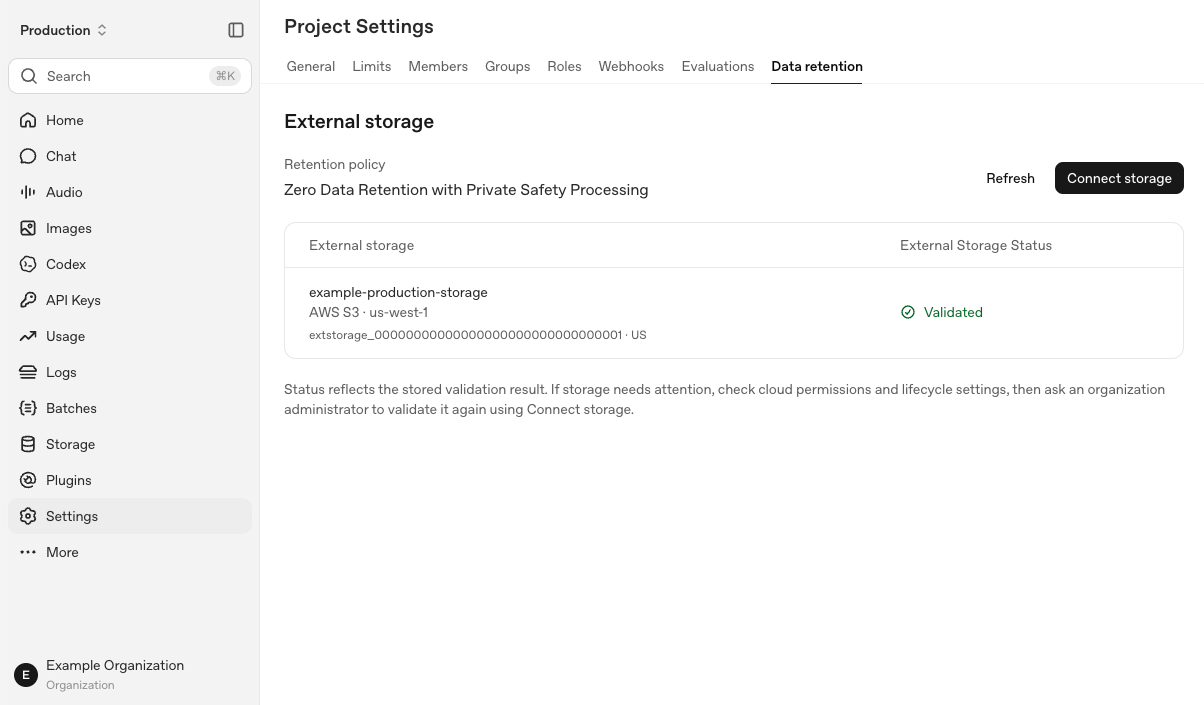
65- **Cost:** Spend less than $5 per 1,000 articles

66- **Latency:** Maintain processing time under 2 seconds per article

67 53 

68### Experiments54 Concise writing and content adaptation that preserve facts and nuance.

69 55 

70We ran three experiments to reach our goal:568. **Astra · Medium**

71 57 

721. **Zero-shot:** Used `GPT-4o` with a basic prompt for 1,000 records, but missed the accuracy target.58 Ambitious projects that need broad context, reliable interactions, and complete results.

732. **Few-shot learning:** Included 5 few-shot examples, meeting the accuracy target but exceeding cost due to more prompt tokens.

743. **Fine-tuned model:** Fine-tuned `GPT-4o-mini` with 1,000 labeled examples, meeting all targets with similar latency and accuracy but significantly lower costs.

75 59 

76| ID | Method | Accuracy | Accuracy target | Cost | Cost target | Avg. latency | Latency target |609. **Astra · Extra high**

77| --- | --------------------------------------- | -------- | --------------- | ------ | ----------- | ------------ | -------------- |

78| 1 | gpt-4o zero-shot | 84.5% | | $1.72 | | < 1s | |

79| 2 | gpt-4o few-shot (n=5) | 91.5% | ✓ | $11.92 | | < 1s | ✓ |

80| 3 | gpt-4o-mini fine-tuned w/ 1000 examples | 91.5% | ✓ | $0.21 | ✓ | < 1s | ✓ |

81 61 

82## Conclusion62 Demanding analysis and complex deliverables with exacting requirements.

83 63 

84By switching from `gpt-4o` to `gpt-4o-mini` with fine-tuning, we achieved **equivalent performance for less than 2%** of the cost, using only 1,000 labeled examples.64### Experiment

85 65 

86This process is important - you often can’t jump right to fine-tuning because you don’t know whether fine-tuning is the right tool for the optimization you need, or you don’t have enough labeled examples. Start with [`gpt-6-astra`](https://developers.openai.com/api/docs/models/gpt-6-astra) to establish your accuracy target, then test smaller or fine-tuned models when cost and latency matter.66Treat the guidance on this page as a starting point. The best way to find the right

67model for your workflow is to experiment with different models and reasoning

68settings to see what works.

69 

70Start by considering:

71 

72- **How often does your workflow run?** A frequent automation makes usage and cost

73 add up faster than an occasional project.

74- **How quickly do you need the result?** A task you're waiting on may need a

75 faster setting than one that runs overnight.

76- **How will you use the output?** A draft for your review may need less polish

77 than something you'll share externally.

78- **How important is the quality of the result?** Depending on your use case or

79 industry, you might want to use a stronger model to put an emphasis on quality.

80 

81If you can, experiment using the same inputs to compare results and keep the

82lightest setting that meets your quality bar.

Details

1# ZDR with Private Safety Processing (PSP)

2 

3> For the complete documentation index, see [llms.txt](/llms.txt). Markdown versions of documentation pages are available by appending `.md` to the page URL.

4 

5li+li]:mt-2! [&_ul>li>p]:my-0! [&_#built-with-three-principles+ol>li+li]:mt-2! [&_#check-storage-status]:mt-0!">

6 

7ZDR with PSP enables offline, automated safety review without OpenAI retaining customer prompts or responses. This guide provides an overview of how ZDR with PSP works and your operating responsibilities. For the full architecture and security model, see the [Private Safety Processing technical white paper](https://openaiassets.blob.core.windows.net/$web/pdf/c7284810-2252-462f-803e-075b0c95bccb/psp-whitepaper.pdf).

8 

9## Built with Three Principles

10 

111. **Customers control their content**

12 

13 Customer content is stored in customer-controlled storage. Customers control the permissions and customer-managed Enterprise Key Management (EKM) authorization required to retrieve and decrypt protected safety records.

142. **No human review**

15 

16 Safety review must not create a new way for OpenAI personnel to read protected customer content. Encrypted customer content is decrypted in an approved, hardware-attested safety runtime that disables human access. Only bounded safety signals and operational metadata leave the PSP protected review in plaintext.

173. **Content retention for safety only**

18 

19 Content stored in customer-controlled storage serves only approved safety purposes. Customer content cannot be used to train models or be made available to other groups within OpenAI or its partners.

20 

21## How ZDR with PSP Works

22 

23The architecture consists of two flows:

24 

25- The API Request and Retention flow protects and retains eligible API content in a customer-controlled storage container.

26- The Asynchronous Safety Pipeline retrieves records only for approved automated safety review and releases bounded safety decisions.

27 

28### API Request and Retention

29 

30An interaction - your prompt and the model’s response - is selected through a safety classifier referral or an approved sampling policy. A referral does not establish a policy violation.

31 

32The system encrypts the record and writes it to your regional cloud storage. OpenAI keeps an index with operational metadata and a storage reference, not a copy of the content. Encryption and storage run asynchronously without blocking inference.

33 

34 

35 

36 

37![API request flow showing encrypted safety records stored in customer-controlled storage.](https://developers.openai.com/images/platform/guides/private-safety-processing/main-01-data-protection.webp)
38 

39 

40 

41 

42 

43 

44 

45![API request flow showing encrypted safety records stored in customer-controlled storage.](https://developers.openai.com/images/platform/guides/private-safety-processing/main-01-data-protection-dark.webp)

46 

47 

48 

49 

50 

51 

52 

53### Asynchronous Safety Pipeline

54 

55ZDR with PSP retrieves encrypted records from your storage and checks their ability to be decrypted. The Safety Review Runtime, a hardware-attested computing environment that disables human access, is designed to be the only workload that can decrypt customer content. It performs automated safety review using an approved reviewer prompt and output schema that does not expose customer content.

56 

57Only predefined, bounded safety signals and approved operational metadata may leave the review in plaintext. Detailed results are encrypted before leaving the runtime and stored in your cloud storage with the original record’s expiration. ZDR with PSP encrypts the records and writes them to your regional cloud storage with a TTL of 30 days.

58 

59 

60 

61 

62![Asynchronous safety-review flow showing encrypted record retrieval, protected review, and bounded outputs.](https://developers.openai.com/images/platform/guides/private-safety-processing/main-02-automated-safety-review.webp)
63 

64 

65 

66 

67 

68 

69 

70![Asynchronous safety-review flow showing encrypted record retrieval, protected review, and bounded outputs.](https://developers.openai.com/images/platform/guides/private-safety-processing/main-02-automated-safety-review-dark.webp)

71 

72 

73 

74 

75## Customer Content Encryption

76 

77Each stored record is doubly encrypted when it is retained in customer storage:

78 

79- **OpenAI-managed HPKE encryption:** The inner encryption layer restricts decryption of customer content to the authorized Safety Review Runtime.

80- **Customer-managed encryption:** [Enterprise Key Management (EKM)](https://help.openai.com/en/articles/20000943-openai-enterprise-key-management-ekm-overview) adds an outer layer using your customer-controlled key-management service.

81 

82OpenAI’s inner decryption key is not enough to decrypt a stored record when EKM is enabled: your customer-managed key authorization is also required. Revoking that authorization prevents decryption of retained records, but does not delete them or undo completed processing.

83 

84We recommend enabling EKM for this additional control. See the [EKM technical FAQ](https://help.openai.com/en/articles/20000945-ekm-technical-faq) for authorization and revocation, and the [technical whitepaper](https://openaiassets.blob.core.windows.net/$web/pdf/c7284810-2252-462f-803e-075b0c95bccb/psp-whitepaper.pdf) for encryption, confidential computing, guardrails, and transparency.

85 

86 

87 

88<a id="customer-storage-setup-steps"></a>

89 

90 

91 

92<a id="set-up-and-verify-customer-storage"></a>

93 

94 

95 

96## Set Up and Verify Storage

97 

98 

99 

100Connect your own AWS S3 bucket or Azure Blob container to an OpenAI project. Follow the setup steps for your cloud, then register and validate the connection.

101 

102### Before you start

103 

104- Ask your OpenAI contact to approve your organization.

105- Choose a storage region that matches your project's data residency. You need permission to create storage and delegate access in your cloud account.

106- Have an organization administrator register and validate storage in the API console. For the Management API, use an OpenAI organization Admin API key. Project administrators can view guidance and status; a project inference key won't work for the Management API calls.

107 

108### Open storage setup in the API console

109 

1101. Open **Organization settings > Data controls > Data retention**, then select **Connect storage**.

1112. In **Connect external storage**, choose **AWS** or **Azure** and select your project. You can also open **Connect storage** from **Project Settings > Data retention**.

1123. Complete the cloud setup below. Then enter your storage details in the modal and select **Connect and validate**.

113 

114### Cloud-specific Setups

115 

116 

117 

118<a id="aws-s3"></a>

119 

120 

121 

122#### AWS S3

123 

124 

125 

126Complete these steps if you're using AWS. For Azure, skip to **Azure Blob Storage**.

127 

128#### 1. Create the bucket

129 

130Create a dedicated S3 bucket in a region compatible with your project's data residency. If Data Residency is off, the recommended region is us-west-1.

131 

132- Keep **ACLs disabled**.

133- Turn on **Block all Public Access**.

134- Record the bucket ARN. You'll use it as `CUSTOMER_BUCKET_ARN` below.

135 

136![AWS S3 bucket Properties page showing the bucket overview, AWS Region, and Amazon Resource Name.](https://developers.openai.com/images/platform/guides/private-safety-processing/setup-01-aws-create-bucket.webp)
137 

138#### 2. Set the lifecycle rule

139 

140Open the bucket's **Management > Create lifecycle rule** page and use these settings:

141 

142- **Rule name:** `psp-retention`

143- **Prefix:** `openai/`

144- **Action:** Expire current versions of objects

145- **Age:** 30 days

146 

147Enable the rule. Make sure no other rule expires these records earlier. This sets the objects' lifecycle expiration; OpenAI's decryption-key expiration is separate.

148 

149![AWS S3 Management page showing Lifecycle configuration, one lifecycle rule, and the Create lifecycle rule control.](https://developers.openai.com/images/platform/guides/private-safety-processing/setup-02-aws-lifecycle-rule.webp)
150 

151#### 3. Create the access policy

152 

153In **IAM > Policies > Create policy**, choose **JSON**. Replace `CUSTOMER_BUCKET_ARN` with your bucket ARN, for example `arn:aws:s3:::your-psp-bucket`, and save the policy as `psp-bucket-policy`.

154 

155```json

156{

157 "Version": "2012-10-17",

158 "Statement": [

159 {

160 "Effect": "Allow",

161 "Action": "s3:GetLifecycleConfiguration",

162 "Resource": "CUSTOMER_BUCKET_ARN"

163 },

164 {

165 "Effect": "Allow",

166 "Action": ["s3:GetObject", "s3:PutObject", "s3:DeleteObject"],

167 "Resource": "CUSTOMER_BUCKET_ARN/*"

168 }

169 ]

170}

171```

172 

173#### 4. Create the IAM role

174 

175In **IAM > Roles > Create role**, choose **Custom trust policy**.

176 

177![AWS IAM Select trusted entity page with Custom trust policy selected.](https://developers.openai.com/images/platform/guides/private-safety-processing/setup-03-aws-custom-trust-policy.webp)
178 

179Use the policy below. Replace `CUSTOMER_PROJECT_ID` with your OpenAI project ID. Leave the OpenAI principal ARN unchanged.

180 

181```json

182{

183 "Version": "2012-10-17",

184 "Statement": [

185 {

186 "Effect": "Allow",

187 "Principal": {

188 "AWS": "arn:aws:iam::790389265272:role/CustomerStorage"

189 },

190 "Action": "sts:AssumeRole",

191 "Condition": {

192 "StringEquals": {

193 "sts:ExternalId": ["CUSTOMER_PROJECT_ID"]

194 }

195 }

196 }

197 ]

198}

199```

200 

201Attach `psp-bucket-policy` to the role you are creating. You can name the role `psp-role`. Record its ARN as `CUSTOMER_ROLE_ARN`; the project ID in `sts:ExternalId` must match the project you register.

202 

203![AWS IAM Add permissions page with Use existing policy selected and the customer-managed psp-bucket-policy checked.](https://developers.openai.com/images/platform/guides/private-safety-processing/setup-04-aws-iam-role.webp)
204 

205Continue to **Register your storage**.

206 

207 

208 

209 

210 

211 

212 

213<a id="azure-blob-storage"></a>

214 

215 

216 

217#### Azure Blob Storage

218 

219 

220 

221Complete these steps if you're using Azure.

222 

223#### 1. Create the storage account

224 

225Create a dedicated account in commercial Azure. Choose an approved US or EU storage region that matches your project's data residency.

226 

227- **Account kind:** `StorageV2`

228- **Basics > Performance:** Standard

229- **Basics > Redundancy:** LRS or ZRS (preferred)

230- **Advanced > Access tier:** Hot

231- **Advanced > Hierarchical namespace:** Disabled

232- **Networking > Public network access:** Enabled from all networks

233- **Security > Secure transfer:** HTTPS required; minimum TLS 1.2

234- **Security > Anonymous Blob access:** Disabled

235- **Security > Storage account key access:** Disabled

236- **Security > Microsoft Entra Authorization:** Enabled

237 

238Confirm the network setting meets your cloud requirements. Use the account's primary Blob endpoint, not a sovereign-cloud or custom endpoint.

239 

240![Azure storage-account Public access settings with public network access enabled from all networks.](https://developers.openai.com/images/platform/guides/private-safety-processing/setup-10-azure-public-access.webp)
241 

242![Azure storage-account Security settings with secure transfer and Microsoft Entra authorization enabled, anonymous access and storage-account key access disabled, and minimum TLS 1.2.](https://developers.openai.com/images/platform/guides/private-safety-processing/setup-11-azure-security-settings.webp)

243 

244#### 2. Create the container

245 

246Create a private container in **Storage Account > Data Storage > Containers > Add Container**. Add this container metadata in **Container > Settings > Metadata** with your exact OpenAI organization ID:

247 

248- `openai_organization_id`: your OpenAI organization ID

249 

250Add the metadata to the container, not the storage account or individual blobs.

251 

252#### 3. Set the lifecycle rule

253 

254Add an enabled rule in **Storage Account > Data Management > Lifecycle management > Add** that applies to all current/base block blobs in the dedicated account:

255 

256- **Action:** Delete after 30 days since last modification

257- **Filters:** No prefix or tag filter

258 

259![Azure lifecycle-rule Details with the rule applied to all blobs and Block blobs and Base blobs selected.](https://developers.openai.com/images/platform/guides/private-safety-processing/setup-12-azure-lifecycle-scope.webp)
260 

261![Azure lifecycle-rule Base blobs settings that delete blobs after 30 days without modification.](https://developers.openai.com/images/platform/guides/private-safety-processing/setup-13-azure-lifecycle-delete.webp)

262 

263#### 4. Grant OpenAI access

264 

265Ask your directory administrator to add OpenAI's application to your tenant. Replace `CUSTOMER_TENANT_ID` below with your Azure tenant ID. Leave the application ID unchanged.

266 

267```bash

268az login --tenant '<CUSTOMER_TENANT_ID>'

269az ad sp create --id 'e5627955-3059-4a88-89f8-73843190624d' \

270 --query '{name:displayName,objectId:id}' -o table

271```

272 

273If the application already exists, use `az ad sp show` with the same `--id` and query. Record the application name and its tenant-local object ID.

274 

275Open **Storage Account > Access control (IAM) > Add role assignment** on your storage account. Select the **Reader** role, set **Assign access to** to **User, group, or service principal**, then search for and select **CSG - Azure Blob Storage Prod**.

276 

277![Azure role-assignment Members tab showing the Storage Blob Data Reader role and User, group, or service principal selected.](https://developers.openai.com/images/platform/guides/private-safety-processing/setup-14-azure-role-members.webp)
278 

279![Azure Select members pane with CSG - Azure Blob Storage Prod listed as an application.](https://developers.openai.com/images/platform/guides/private-safety-processing/setup-15-azure-select-application.webp)

280 

281Then select the **Storage Blob Data Contributor** role, set **Assign access to** to **User, group, or service principal**, and search for and select **CSG - Azure Blob Storage Prod**.

282 

283OpenAI manages the application credentials. Don't create or share a storage key, SAS token, or client secret.

284 

285 

286 

287 

288 

289### Register your storage

290 

291After completing the cloud setup above, use either the API console or the Management API to register and validate your storage. You only need to use one method.

292 

293#### Option 1: API console

294 

295Sign in as an organization administrator. The API console uses your signed-in session; you don't need an Admin API key or curl commands for this method.

296 

297##### 1. Open Connect storage

298 

299Open **Organization settings > Data controls > Data retention** and select **Connect storage**. You can also connect from **Project Settings > Data retention**.

300 

301![OpenAI organization Data controls page showing the Data retention tab, project policy table, and Connect storage control.](https://developers.openai.com/images/platform/guides/private-safety-processing/setup-06-platform-open-storage.webp)
302 

303##### 2. Enter your storage details

304 

305Choose **AWS** or **Azure**, then select the project. If you opened the modal from project settings, that project is already selected. If **Registered storage** appears, choose **Connect new storage** to add a destination.

306 

307For **AWS**, enter the **Bucket ARN** and **IAM role ARN** from your cloud setup.

308 

309![Connect external storage dialog for AWS showing project selection, Bucket ARN, IAM role ARN, and Connect and validate.](https://developers.openai.com/images/platform/guides/private-safety-processing/setup-07-platform-aws-connect.webp)
310 

311For **Azure**, enter **Tenant ID**, **Subscription ID**, **Resource group**, **Storage account name**, and **Container name**. Scroll down in the modal to complete all fields.

312 

313![Connect external storage dialog for Azure showing the project and Azure storage configuration fields.](https://developers.openai.com/images/platform/guides/private-safety-processing/setup-08-platform-azure-connect.webp)
314 

315##### 3. Connect and validate

316 

317Select **Connect and validate**. The API console registers the storage, runs validation, and refreshes the storage status and project policy. Registration alone doesn't change the policy.

318 

319Wait for **Storage validated** and confirmation that the project now uses ZDR with PSP, then select **Done**.

320 

321![OpenAI Project Settings showing validated AWS S3 storage and the Zero Data Retention with Private Safety Processing policy.](https://developers.openai.com/images/platform/guides/private-safety-processing/setup-09-platform-storage-validated.webp)
322 

323If validation fails after registration, fix the reported issue and select **Retry validation**. To resume later, select the destination under **Registered storage** and choose **Validate storage**. If the API console can't refresh the result, select **Refresh status** before starting over.

324 

325#### Option 2: Management API

326 

327Use an organization Admin API key for this method. Register storage with the commands below, then follow [**3. Verify your setup**](#3-verify-your-setup) to run validation.

328 

329##### 1. Prepare your API settings

330 

331Load your organization Admin API key securely into `OPENAI_ADMIN_KEY`.

332 

333Set `OPENAI_API_BASE` to the endpoint confirmed for your project: `https://api.openai.com` for global, `https://us.api.openai.com` for US, or `https://eu.api.openai.com` for Europe.

334 

335Replace the placeholders below with that endpoint and your OpenAI organization ID. Run the remaining commands in the same shell session.

336 

337```bash

338OPENAI_API_BASE='<OPENAI_API_BASE>'

339OPENAI_ORG_ID='<OPENAI_ORG_ID>'

340OPENAI_STORAGE_URL="$OPENAI_API_BASE/v1/organization/external_storage"

341```

342 

343##### 2. Send the registration request

344 

345Run the request for your provider only. Replace every `CUSTOMER_...` placeholder with your IDs and the resources you created.

346 

347**AWS S3**

348 

349```bash

350curl --fail-with-body -sS -X POST "$OPENAI_STORAGE_URL" \

351 -H "Authorization: Bearer $OPENAI_ADMIN_KEY" \

352 -H "OpenAI-Organization: $OPENAI_ORG_ID" \

353 -H 'Content-Type: application/json' \

354 --data-binary '{

355 "project_id": "CUSTOMER_PROJECT_ID",

356 "provider": {

357 "type": "aws",

358 "bucket": "CUSTOMER_BUCKET_ARN",

359 "role_arn": "CUSTOMER_ROLE_ARN"

360 }

361 }'

362```

363 

364**Azure Blob Storage**

365 

366```bash

367curl --fail-with-body -sS -X POST "$OPENAI_STORAGE_URL" \

368 -H "Authorization: Bearer $OPENAI_ADMIN_KEY" \

369 -H "OpenAI-Organization: $OPENAI_ORG_ID" \

370 -H 'Content-Type: application/json' \

371 --data-binary '{

372 "project_id": "CUSTOMER_PROJECT_ID",

373 "provider": {

374 "type": "azure",

375 "tenant_id": "CUSTOMER_TENANT_ID",

376 "subscription_id": "CUSTOMER_SUBSCRIPTION_ID",

377 "resource_group": "CUSTOMER_RESOURCE_GROUP",

378 "account_name": "CUSTOMER_STORAGE_ACCOUNT",

379 "container": "CUSTOMER_CONTAINER_NAME"

380 }

381 }'

382```

383 

384The response contains an `id` beginning with `extstorage_` and `status: "pending"`. Keep the ID for validation. The API console shows **Pending validation** and leaves the project's retention policy unchanged.

385 

386##### 3. Verify your setup

387 

388For API validation, replace `EXTERNAL_STORAGE_ID` with the ID returned by registration, then run:

389 

390```bash

391EXTERNAL_STORAGE_ID='<EXTERNAL_STORAGE_ID>'

392curl --fail-with-body -sS -X POST \

393 "$OPENAI_STORAGE_URL/$EXTERNAL_STORAGE_ID/validate" \

394 -H "Authorization: Bearer $OPENAI_ADMIN_KEY" \

395 -H "OpenAI-Organization: $OPENAI_ORG_ID"

396```

397 

398A successful response has `status: "validated"`. Validation checks configuration and access, then activates customer-managed retention for that project. The API console shows **Validated** and the read-only policy **Zero Data Retention with Private Safety Processing**.

399 

400If you used the Management API, retrieve the saved registration:

401 

402```bash

403curl --fail-with-body -sS \

404 "$OPENAI_STORAGE_URL/$EXTERNAL_STORAGE_ID" \

405 -H "Authorization: Bearer $OPENAI_ADMIN_KEY" \

406 -H "OpenAI-Organization: $OPENAI_ORG_ID"

407```

408 

409For either method, open **Project Settings > Data retention** and select **Refresh**. Confirm the destination, provider, geography, and **Validated** status, then check the policy is **Zero Data Retention with Private Safety Processing**. The organization Data retention table also shows storage and status for each project.

410 

411![OpenAI Project Settings Data retention page showing an AWS S3 external-storage connection with Validated status and the Zero Data Retention with PSP retention policy.](https://developers.openai.com/images/platform/guides/private-safety-processing/setup-05-verify-project-retention.webp)
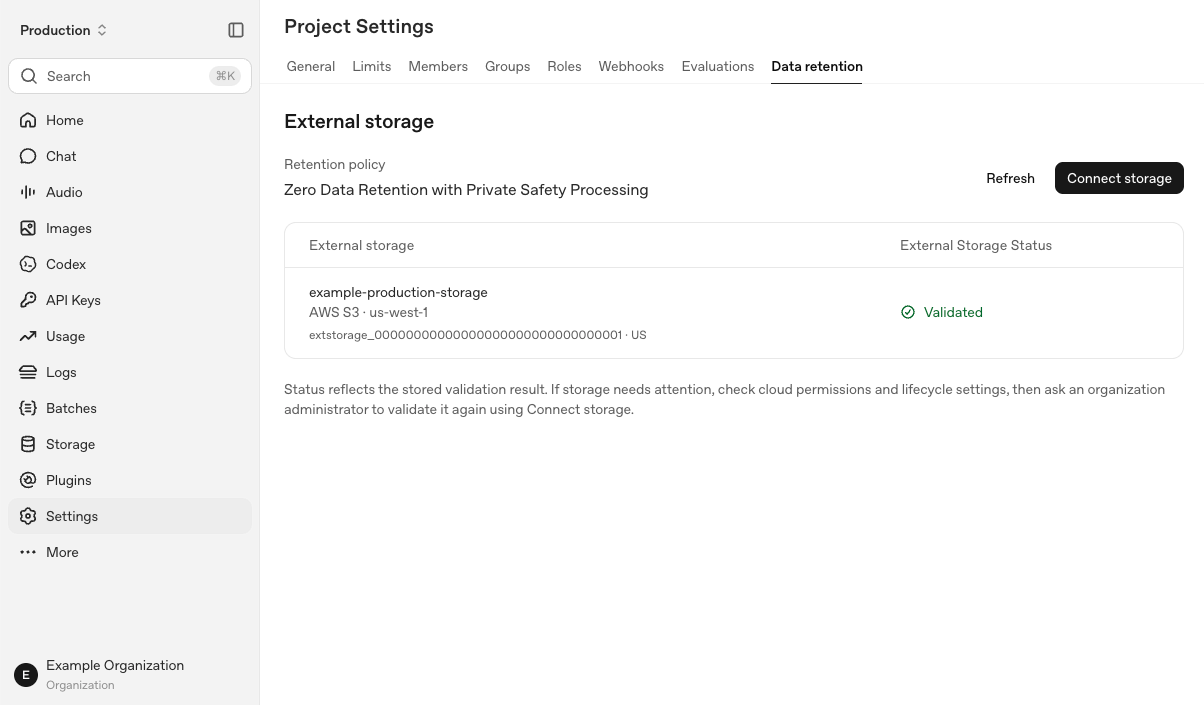
412 

413**Validated** records a successful check, not continuous storage health. **Refresh** doesn't rerun validation. Use [Operations and Troubleshooting](#operate-and-troubleshoot-customer-storage) for ongoing monitoring and revalidation.

414 

415 

416 

417 

418 

419 

420 

421<a id="customer-storage-operations-steps"></a>

422 

423 

424 

425<a id="operate-and-troubleshoot-customer-storage"></a>

426 

427 

428 

429## Troubleshooting

430 

431 

432 

433### Check storage status

434 

435Open **Organization settings > Data controls > Data retention** for the project table, or **Project Settings > Data retention** for the project's storage details. Check the destination and geography, then read the status. You can also retrieve the registration through the API in [Setup and Verification](#set-up-and-verify-customer-storage).

436 

437- **Pending validation** (`pending`): Storage is registered but hasn't passed validation. The project's retention policy stays unchanged until validation succeeds.

438- **Validated** (`validated`): Storage passed a validation check. This doesn't guarantee live connectivity.

439- **Needs attention** (`unhealthy`): A check found a storage or configuration problem. Fix the cause and validate again.

440 

441**Refresh** reloads saved status; it doesn't test the connection. A runtime failure may not change the displayed status. If the API console can't load storage, check the API before treating that as a bucket outage.

442 

443### Monitor storage activity

444 

445Check these sources separately:

446 

447- **Storage registration:** Check the project, provider, geography, and validation result.

448- **Cloud activity:** Check provider access logs and read/write errors, where enabled. Separate validation probes from actual PSP activity.

449- **Safety and compliance events:** Check available content-lifecycle events in the Compliance API, if separately enabled. These aren't storage-registration events or cloud access logs.

450 

451Your sampling policy determines which requests create retained objects. A missing object or event alone doesn't mean storage has failed.

452 

453### Recover from a failure

454 

455#### 1. Check the error

456 

457- `customer_managed_retention_not_enabled`: Ask your onboarding contact to confirm organization access.

458- **Authentication or permission failure:** Check that you're using an organization Admin key with the required external-storage permission.

459- **Configuration problem:** Check the cloud identity, trust policy or access permissions, lifecycle rules, and approved network configuration.

460- `401 customer_storage_not_ready`: Check that validated storage exists for the requested project's geography.

461- `incorrect_hostname`: Use the hostname that matches your fixed-residency project's configuration.

462- `503 external_storage_validation_unavailable`: Retry later. Contact support if the failure persists.

463 

464#### 2. Validate again

465 

466After fixing the configuration, open **Connect storage** for the project and run the validation command with an organization Admin API key. Retrieve the registration or select **Refresh** to confirm **Validated**. Refresh alone doesn't run validation.

467 

468### Contact support

469 

470If storage or validation issues persist after troubleshooting, [contact OpenAI Support](https://help.openai.com/en/).

471 

472### Change or stop your setup

473 

474Contact support before replacing storage, revoking access, or offboarding. Complete setup and validation for each new project and residency location.

475 

476Deleting a storage registration doesn't delete cloud objects or complete offboarding.

477 

478 

479 

480 

481 

482## Ongoing Customer Responsibilities

483 

484Customers using ZDR with PSP are required to:

485 

486- **Register and validate PSP storage.** Register and validate storage buckets through OpenAI’s admin API for each PSP-enabled project and data-residency location, and configure PSP-service bucket access in accordance with OpenAI’s published guidance.

487- **Retain encrypted records for at least 30 days**. Configure storage lifecycle rules so they do not delete PSP records earlier.

488- **Maintain storage and key access**. Keep regional storage, service permissions, and customer-managed key authorization correctly configured.

489- **Repair configuration issues.** Correct storage configuration problems after OpenAI provides notification.

490- **Respond to notices about safety concerns.** Engage with OpenAI to investigate and address the concern.

491 

492## Resources

493 

494<ul>

495 <li>

496 [{"Private Safety Processing technical whitepaper"}](https://openaiassets.blob.core.windows.net/$web/pdf/c7284810-2252-462f-803e-075b0c95bccb/psp-whitepaper.pdf)

497 {" - Full architecture, security controls, and scope."}

498 </li>

499 <li>

500 [{"API data controls"}](https://developers.openai.com/api/docs/guides/your-data)

501 {" - ZDR eligibility, endpoint-specific retention, and exceptions."}

502 </li>

503 <li>

504 [{"Data residency"}](https://developers.openai.com/api/docs/guides/your-data#data-residency-controls)

505 {" - Supported regions and processing boundaries."}

506 </li>

507</ul>

Details

284 284 

285- **Keep the prefix stable.** Put stable developer instructions and shared reference material first. If developer instructions or shared material contain timestamps, user-specific content, or other dynamic content, place those at the end rather than the beginning, or move them into later conversation messages.285- **Keep the prefix stable.** Put stable developer instructions and shared reference material first. If developer instructions or shared material contain timestamps, user-specific content, or other dynamic content, place those at the end rather than the beginning, or move them into later conversation messages.

286- **Preserve conversation history.** Append new messages rather than rewriting earlier turns. Summarization, [compaction](#compaction-can-reduce-cache-reuse), or context truncation can change the prefix and reset cache reuse.286- **Preserve conversation history.** Append new messages rather than rewriting earlier turns. Summarization, [compaction](#compaction-can-reduce-cache-reuse), or context truncation can change the prefix and reset cache reuse.

287- **Change reasoning effort without rewriting the prefix.** On GPT-6 Astra, append a `configuration_update` input item to change reasoning effort between responses while keeping request-level `reasoning.effort` unchanged. This preserves the original prefix for cache reuse. See [Change reasoning mid-conversation](https://developers.openai.com/api/docs/guides/reasoning#change-reasoning-mid-conversation) for examples and compatibility limits.287- **Change reasoning effort without rewriting the prefix.** On GPT-6 models, append a `configuration_update` input item to change reasoning effort between responses while keeping request-level `reasoning.effort` unchanged. This preserves the original prefix for cache reuse. See [Change reasoning mid-conversation](https://developers.openai.com/api/docs/guides/reasoning#change-reasoning-mid-conversation) for examples and compatibility limits.

288 288 

289Keep changing content after the breakpoint289Keep changing content after the breakpoint

290 290 

Details

5 promptingGuide: /api/docs/guides/latest-model/gpt-6-astra.md#prompting-best-practices5 promptingGuide: /api/docs/guides/latest-model/gpt-6-astra.md#prompting-best-practices

6---6---

7 7 

8# Using GPT-6 Astra8# Using GPT-6

9 9 

10> For the complete documentation index, see [llms.txt](/llms.txt). Markdown versions of documentation pages are available by appending `.md` to the page URL.10> For the complete documentation index, see [llms.txt](/llms.txt). Markdown versions of documentation pages are available by appending `.md` to the page URL.

11 11 

12## Introduction12## Introduction

13 13 

14GPT-6 Astra is our most intelligent model yet, with state-of-the-art performance in computer use, browsing, software engineering, science, and professional work. It excels at carrying out multistep workflows across code, browsers, and professional software. In [several evaluations](https://openai.com/index/gpt-6-astra/), Astra achieves stronger results while using substantially fewer output tokens—delivering a lower estimated API cost per task than earlier models despite its higher per-token pricing.14The GPT-6 model family includes GPT-6 Astra, GPT-6 Sol, and GPT-6 Luna. Choose a model based on the reasoning your task requires, latency, and cost.

15 

16GPT-6 Astra is our most intelligent model yet, with state-of-the-art performance in computer use, browsing, software engineering, science, and professional work. It excels at carrying out multi-step workflows across code, browsers, and professional software. In [several evaluations](https://openai.com/index/gpt-6-astra/), Astra achieves stronger results while using substantially fewer output tokens—delivering a lower estimated API cost per task than earlier models despite its higher per-token pricing.

15 17 

16GPT-6 Astra is also our most aligned model yet. It excels at exercising care, respecting task boundaries, and communicating transparently. When instructions leave room for interpretation, it uses the context it has to fill in routine gaps and asks focused questions when the answer could change the outcome. It incorporates new requirements, changes course when asked, and answers side questions without losing track of the broader task.18GPT-6 Astra is also our most aligned model yet. It excels at exercising care, respecting task boundaries, and communicating transparently. When instructions leave room for interpretation, it uses the context it has to fill in routine gaps and asks focused questions when the answer could change the outcome. It incorporates new requirements, changes course when asked, and answers side questions without losing track of the broader task.

17 19 

18To build with Astra, set `model` to `gpt-6-astra` in a [Responses API](https://developers.openai.com/api/docs/guides/migrate-to-responses) request.20To build with GPT-6, set `model` in a [Responses API](https://developers.openai.com/api/docs/guides/migrate-to-responses) request. Use [`gpt-6-astra`](https://developers.openai.com/api/docs/models/gpt-6-astra) for our highest level of capability, [`gpt-6-sol`](https://developers.openai.com/api/docs/models/gpt-6-sol) for strong reasoning on demanding tasks, or [`gpt-6-luna`](https://developers.openai.com/api/docs/models/gpt-6-luna) for efficient, repeatable work at scale.

19 21 

20<a id="gpt-6-astra-what-is-new" className="scroll-mt-[110px]"></a>22<a id="gpt-6-astra-what-is-new" className="scroll-mt-[110px]"></a>

21 23 

22## What's new24## What's new

23 25 

24- **Async tool calling:** GPT-6 Astra can continue reasoning, call other tools, or answer independent parts of a request while your application runs a tool. Set `async: true` on a function or custom tool and return its result when ready using the original `call_id`. Your application still executes the tool and manages pending work. See [Async tool calling](https://developers.openai.com/api/docs/guides/async-tool-calling) for basic usage and a developer-defined wait-tool pattern.26- **Async tool calling:** GPT-6 can continue reasoning, call other tools, or answer independent parts of a request while your application runs a tool. Set `async: true` on a function or custom tool and return its result when ready using the original `call_id`. Your application still executes the tool and manages pending work. See [Async tool calling](https://developers.openai.com/api/docs/guides/async-tool-calling) for basic usage and a developer-defined wait-tool pattern.

25- **Mid-turn steering:** Send additional user instructions while GPT-6 Astra is working, such as a correction or a change in requirements. Over a WebSocket connection, the Responses API preserves completed work and includes the update in a continuation. See [Mid-turn steering](https://developers.openai.com/api/docs/guides/steering) for the event flow and tool-result handling.27- **Mid-turn steering:** Send additional user instructions while GPT-6 is working, such as a correction or a change in requirements. Over a WebSocket connection, the Responses API preserves completed work and includes the update in a continuation. See [Mid-turn steering](https://developers.openai.com/api/docs/guides/steering) for the event flow and tool-result handling.

26- **Change reasoning mid-conversation while preserving cache:** Add a `configuration_update` input item to increase reasoning effort for difficult work or reduce it for routine follow-ups without rewriting the original prompt prefix. The updated reasoning effort applies until another `configuration_update` input item overrides it. See [Change reasoning mid-conversation](https://developers.openai.com/api/docs/guides/reasoning#change-reasoning-mid-conversation) for examples and compatibility.28- **Change reasoning mid-conversation while preserving cache:** Add a `configuration_update` input item to increase reasoning effort for difficult work or reduce it for routine follow-ups without rewriting the original prompt prefix. The updated reasoning effort applies until another `configuration_update` input item overrides it. See [Change reasoning mid-conversation](https://developers.openai.com/api/docs/guides/reasoning#change-reasoning-mid-conversation) for examples and compatibility.

27- **Misalignment monitoring:** As part of our [strengthened safeguards](https://openai.com/index/path-to-astra/) for GPT-6 Astra, our systems asynchronously monitor for misalignment and trigger alerts when necessary. See [Misalignment monitoring](https://developers.openai.com/api/docs/guides/safety-checks/misalignment-monitoring) for more information.29- **Misalignment monitoring:** As part of our [strengthened safeguards](https://openai.com/index/path-to-astra/) for GPT-6 Astra, our systems asynchronously monitor for misalignment and trigger alerts when necessary. See [Misalignment monitoring](https://developers.openai.com/api/docs/guides/safety-checks/misalignment-monitoring) for more information.

28- **Limitations:** GPT-6 Astra does not support the `none` reasoning effort. [Fast mode](https://developers.openai.com/api/docs/guides/fast-mode) is unavailable for GPT-6 Astra with EU data residency.

29 30 

30GPT-6 Astra also supports the existing API capabilities available with GPT-5.6, including [computer use](https://developers.openai.com/api/docs/guides/tools-computer-use), [Structured Outputs](https://developers.openai.com/api/docs/guides/structured-outputs), [streaming](https://developers.openai.com/api/docs/guides/streaming-responses), [Programmatic Tool Calling](https://developers.openai.com/api/docs/guides/tools-programmatic-tool-calling), [multi-agent orchestration](https://developers.openai.com/api/docs/guides/responses-multi-agent), [prompt caching](https://developers.openai.com/api/docs/guides/prompt-caching), [persisted reasoning](https://developers.openai.com/api/docs/guides/reasoning#preserve-reasoning-across-calls), [compaction](https://developers.openai.com/api/docs/guides/compaction), and [pro mode](https://developers.openai.com/api/docs/guides/reasoning#reasoning-mode).31GPT-6 also supports the existing API capabilities available with GPT-5.6, including [computer use](https://developers.openai.com/api/docs/guides/tools-computer-use), [Structured Outputs](https://developers.openai.com/api/docs/guides/structured-outputs), [streaming](https://developers.openai.com/api/docs/guides/streaming-responses), [Programmatic Tool Calling](https://developers.openai.com/api/docs/guides/tools-programmatic-tool-calling), [multi-agent orchestration](https://developers.openai.com/api/docs/guides/responses-multi-agent), [prompt caching](https://developers.openai.com/api/docs/guides/prompt-caching), [persisted reasoning](https://developers.openai.com/api/docs/guides/reasoning#preserve-reasoning-across-calls), [compaction](https://developers.openai.com/api/docs/guides/compaction), and [pro mode](https://developers.openai.com/api/docs/guides/reasoning#reasoning-mode).

32 

33## Limitations

34 

35- GPT-6 Astra does not support the `none` reasoning effort; GPT-6 Sol and Luna do.

36- For GPT-6 Astra, Sol, and Luna, EU data residency is available only with Standard processing. See [data residency eligibility](https://developers.openai.com/api/docs/guides/your-data#which-models-and-features-are-eligible-for-data-residency).

31 37 

32## Prompting best practices38## Prompting best practices

33 39 

34GPT-6 Astra is more intelligent and capable than prior models like GPT-5.6 Sol, and also exhibits behavior patterns that can be optimized through prompting the model for your use case.40Use the following prompts as a starting point across the GPT-6 model family. They address behavior observed with GPT-6 Astra; evaluate them with your chosen model and workload.

35 41 

36### GPT-6 Astra behavior42### GPT-6 Astra behavior

37 43 

38- [Initiative and follow-through](#initiative-and-follow-through) – The model is designed to be a more effective collaborator and is thus more likely to ask the user a question when additional input could materially change the result. This can cause it to stop when the user may expect it to make reasonable assumptions and persist.44- [Initiative and follow-through](#initiative-and-follow-through): The model is designed to be a more effective collaborator and is thus more likely to ask the user a question when additional input could materially change the result. This can cause it to stop when the user may expect it to make reasonable assumptions and persist.

39- [Instruction following](#instruction-following) – GPT-6 Astra is stronger at general instruction following than our previous models, giving you greater control over its behavior. It can be more sensitive to instructions contained in skills and other files, such as `AGENTS.md`. We **strongly recommend** auditing skills and other files accessible to your model for instructions that could influence its behavior.45- [Instruction following](#instruction-following): GPT-6 Astra is stronger at general instruction following than our previous models, giving you greater control over its behavior. It can be more sensitive to instructions contained in skills and other files, such as `AGENTS.md`. We **strongly recommend** auditing skills and other files accessible to your model for instructions that could influence its behavior.

40- [Personality and writing style](#personality-and-writing-style) – The model tends toward detailed, formatted responses and may use recurring phrases across sessions. Specify the writing style and structure your application needs.46- [Personality and writing style](#personality-and-writing-style): The model tends toward detailed, formatted responses and may use recurring phrases across sessions. Specify the writing style and structure your application needs.

41- [Subagent delegation](#subagent-delegation) – The model may delegate less often than desired for your workflow. Specify when and how much it should use subagents for parallel work.47- [Subagent delegation](#subagent-delegation): The model may delegate less often than desired for your workflow. Specify when and how much it should use subagents for parallel work.

42- [Testing and verification](#testing-and-verification) – For coding tasks, the model tends to be thorough in testing before considering a task complete. For smaller tasks, this can result in broader tests than the task requires.48- [Testing and verification](#testing-and-verification): For coding tasks, the model tends to be thorough in testing before considering a task complete. For smaller tasks, this can result in broader tests than the task requires.

43 49 

44### Initiative and follow-through50### Initiative and follow-through

45 51 


142Codex can apply the recommended changes in this guide with the [OpenAI Docs skill](https://github.com/openai/codex/tree/main/codex-rs/skills/src/assets/samples/openai-docs).148Codex can apply the recommended changes in this guide with the [OpenAI Docs skill](https://github.com/openai/codex/tree/main/codex-rs/skills/src/assets/samples/openai-docs).

143 149 

144```text150```text

145$openai-docs migrate this project to GPT-6 Astra151$openai-docs migrate this project to the GPT-6 model family

146```152```

147 153 

148To use this skill in other coding agents, download it from the [Codex repository](https://github.com/openai/codex/tree/main/codex-rs/skills/src/assets/samples/openai-docs).154To use this skill in other coding agents, download it from the [Codex repository](https://github.com/openai/codex/tree/main/codex-rs/skills/src/assets/samples/openai-docs).

149 155 

150### Update API and model parameters156### Update API and model parameters

151 157 

152Set `model` to `gpt-6-astra`, then check the following:158Set `model` to `gpt-6-astra`, `gpt-6-sol`, or `gpt-6-luna`, then check the following:

153 159 

154- **Reasoning effort:** If you currently use `none` or `minimal`, start with `low` and compare results. Otherwise, preserve your current effective [reasoning effort](https://developers.openai.com/api/docs/guides/reasoning#reasoning-effort). Use `reasoning.effort` in Responses or `reasoning_effort` in Chat Completions.160- **Reasoning effort:** Preserve your current effective [reasoning effort](https://developers.openai.com/api/docs/guides/reasoning#reasoning-effort) where supported. GPT-6 Astra does not support `none`; use `low` instead. GPT-6 Sol and Luna support `none`. If your existing request uses `minimal`, start with `low` and compare results on representative tasks. Use `reasoning.effort` in Responses or `reasoning_effort` in Chat Completions.

155- **Tool calling:** Use the [Responses API](https://developers.openai.com/api/docs/guides/migrate-to-responses#migrating-from-chat-completions). GPT-6 Astra supports Chat Completions, but tool calling requires Responses.161- **Tool calling:** Use the [Responses API](https://developers.openai.com/api/docs/guides/migrate-to-responses#migrating-from-chat-completions). GPT-6 Astra supports Chat Completions, but its tool calling requires Responses. GPT-6 Sol and Luna support function calling in Chat Completions only with `reasoning_effort: "none"`. Use Responses for reasoning with tools.

156- **Unsupported parameters:** Remove `temperature`, `top_p`, and `top_logprobs`. For Chat Completions, also remove `logprobs`. For Responses, remove `message.output_text.logprobs` from `include`.162- **Unsupported parameters:** When reasoning effort is not `none`, remove `temperature`, `top_p`, and `top_logprobs`. For Chat Completions, also remove `logprobs`. For Responses, remove `message.output_text.logprobs` from `include`.

157- **Fast mode:** For EU data residency, use Standard processing. GPT-6 Astra does not support `service_tier: "fast"` or `service_tier: "priority"` with EU data residency. Fast mode for GPT-6 Astra does not include a latency SLA. See [Fast mode compatibility](https://developers.openai.com/api/docs/guides/fast-mode#is-fast-mode-compatible-with-data-residency-zero-data-retention-and-a-baa).163- **Data residency:** For GPT-6 Astra, Sol, and Luna, EU data residency is available only with Standard processing. Fast mode for GPT-6 Astra does not include a latency SLA. See [Fast mode compatibility](https://developers.openai.com/api/docs/guides/fast-mode#is-fast-mode-compatible-with-data-residency-zero-data-retention-and-a-baa).

158- **Changing reasoning effort:** If your application changes effort between responses, use `configuration_update` items in standard, single-agent requests. Keep request-level `reasoning.effort` unchanged to preserve the prompt prefix for caching. Check the [compatibility limits](https://developers.openai.com/api/docs/guides/reasoning#change-reasoning-mid-conversation) before adopting this feature.164- **Changing reasoning effort:** If your application changes effort between responses, use `configuration_update` items in standard, single-agent requests. Keep request-level `reasoning.effort` unchanged to preserve the prompt prefix for caching. Check the [compatibility limits](https://developers.openai.com/api/docs/guides/reasoning#change-reasoning-mid-conversation) before adopting this feature.

159- **Prompt caching:** When migrating from GPT-5.5 or earlier, replace `prompt_cache_retention` with `prompt_cache_options.ttl` set to `"30m"`. Review the [prompt caching changes](https://developers.openai.com/api/docs/guides/prompt-caching#summary-of-model-differences), including cache boundaries and cache-write billing.165- **Prompt caching:** When migrating from GPT-5.5 or earlier, replace `prompt_cache_retention` with `prompt_cache_options.ttl` set to `"30m"`. Review the [prompt caching changes](https://developers.openai.com/api/docs/guides/prompt-caching#summary-of-model-differences), including cache boundaries and cache-write billing.

160- **Unnecessary approval pauses:** If you run into issues where the model keeps asking for approval before proceeding, use the [initiative and follow-through guidance](#initiative-and-follow-through) to prompt for more autonomous execution. See the rest of [Prompting best practices](#prompting-best-practices) for guidance on instruction following, writing style, subagent delegation, and testing.166- **Unnecessary approval pauses:** If you run into issues where the model keeps asking for approval before proceeding, use the [initiative and follow-through guidance](#initiative-and-follow-through) to prompt for more autonomous execution. See the rest of [Prompting best practices](#prompting-best-practices) for guidance on instruction following, writing style, subagent delegation, and testing.

Details

213 213 

214## Reasoning mode214## Reasoning mode

215 215 

216GPT-5.6 models support `standard` and `pro` reasoning modes in the Responses API. `standard` is the default. Set `reasoning.mode` to `pro` for difficult tasks that need more model work and can tolerate higher latency and token usage.216GPT-5.6 and GPT-6 models support `standard` and `pro` reasoning modes in the Responses API. `standard` is the default. Set `reasoning.mode` to `pro` for difficult tasks that need more model work and can tolerate higher latency and token usage.

217 217 

218Reasoning mode and reasoning effort are independent. Mode selects standard or pro execution, while `reasoning.effort` controls how much reasoning the model applies within that mode. If you omit `reasoning.effort`, GPT-5.6 defaults to `medium` in both modes.218Reasoning mode and reasoning effort are independent. Mode selects standard or pro execution, while `reasoning.effort` controls how much reasoning the model applies within that mode. If you omit `reasoning.effort`, GPT-5.6 defaults to `medium` in both modes. GPT-6 Sol and Luna also default to `medium` reasoning effort.

219 219 

220Using pro reasoning mode220Using pro reasoning mode

221 221 


950 950 

951Use `configuration_update` to increase reasoning effort for difficult work or reduce it for routine follow-ups. Add the update between responses while leaving the request-level `reasoning.effort` unchanged. This preserves the original prompt prefix for [prompt caching](https://developers.openai.com/api/docs/guides/prompt-caching).951Use `configuration_update` to increase reasoning effort for difficult work or reduce it for routine follow-ups. Add the update between responses while leaving the request-level `reasoning.effort` unchanged. This preserves the original prompt prefix for [prompt caching](https://developers.openai.com/api/docs/guides/prompt-caching).

952 952 

953Configuration updates are supported only by GPT-6 Astra (`gpt-6-astra`) in953Configuration updates are supported by the GPT-6 model family in standard,

954 standard, single-agent mode. They change only reasoning effort.954 single-agent mode. They change only reasoning effort.

955 955 

956Add the following item before the next user message in the `input` array of an HTTP Responses request or a WebSocket `response.create` request:956Add the following item before the next user message in the `input` array of an HTTP Responses request or a WebSocket `response.create` request:

957 957 

Details

15approval and provisioning; applying, verifying an identity, or receiving15approval and provisioning; applying, verifying an identity, or receiving

16Daybreak Blue access doesn't grant specialist-model access.16Daybreak Blue access doesn't grant specialist-model access.

17 17 

18For approved API projects, `gpt-daybreak-blue-latest` resolves to `gpt-5.6-sol`,18For approved API projects, use a Daybreak alias or a compatible underlying

19and `gpt-daybreak-red-latest` resolves to `gpt-5.6-cyber`. Use the Daybreak19model ID. Alias resolution can change and depends on your approved access.

20alias or, if your project has the required approval, the corresponding20See [Use Daybreak in the Responses API](https://developers.openai.com/api/docs/guides/daybreak) to choose a

21underlying model ID. Access and model behavior depend on the approved21model and `access_programs.cyber` value, understand defaults, and handle errors.

22organization and project; the model ID alone doesn't grant access.22Access and model behavior depend on the approved organization and project;

23the model ID alone doesn't grant access.

23 24 

24Trusted Access doesn't automatically grant Zero Data Retention. Confirm any25Trusted Access doesn't automatically grant Zero Data Retention. Confirm any

25separately approved retention controls for the exact API organization and26separately approved retention controls for the exact API organization and

Details

4 4 

5Mid-turn steering lets users add requirements or change direction without waiting for a response to finish.5Mid-turn steering lets users add requirements or change direction without waiting for a response to finish.

6 6 

7Mid-turn steering is available with GPT-6 Astra (`gpt-6-astra`) over a7Mid-turn steering is available with the GPT-6 model family over a WebSocket

8 WebSocket connection to the Responses API. GPT-5.6 and earlier models do not8 connection to the Responses API. GPT-5.6 and earlier models do not support

9 support steering.9 steering.

10 10 

11Steering does not rewrite output already sent to your application, undo earlier actions, or cancel tools that have already started.11Steering does not rewrite output already sent to your application, undo earlier actions, or cancel tools that have already started.

12 12 

Details

35 35 

36Besides those specific behavior changes, the endpoints and capabilities listed as No for Zero Data Retention Eligible in the table below may still store application state, even if Zero Data Retention is enabled.36Besides those specific behavior changes, the endpoints and capabilities listed as No for Zero Data Retention Eligible in the table below may still store application state, even if Zero Data Retention is enabled.

37 37 

38### Eyes Off38### Zero Data Retention with Private Safety Processing

39 39 

40For customers approved for Zero Data Retention or Modified Abuse Monitoring, we reserve the right to make models ineligible for Zero Data Retention or Modified Abuse Monitoring for specific customers, as notified in advance to the impacted customers in writing. In this instance, customer content will be retained in abuse monitoring logs, but such content will be excluded from human review unless required by applicable law. For customers who have executed an OpenAI Business Associate and Healthcare Addendum, once your org ID is provisioned with Eyes Off, BAA-eligible endpoints can be used for processing PHI, even if data is retained.40[Zero Data Retention with Private Safety Processing](https://developers.openai.com/api/docs/guides/private-safety-processing) enables OpenAI to perform automated safety monitoring while preserving Zero Data Retention protections. Endpoint and feature limitations listed on this page still apply.

41 

42Customers using Zero Data Retention with Private Safety Processing must configure customer-controlled storage and meet additional technical and operational requirements described in the [Zero Data Retention with Private Safety Processing (PSP) guide](https://developers.openai.com/api/docs/guides/private-safety-processing).

43 

44<a id="eyes-off"></a>

45<a id="private-retention-with-private-safety-processing"></a>

46 

47### Private Retention with Private Safety Processing (fka Eyes Off)

48 

49For customers approved for Zero Data Retention or Modified Abuse Monitoring, we reserve the right to make models ineligible for Zero Data Retention or Modified Abuse Monitoring for specific customers, as notified in advance to the impacted customers in writing. In this instance, customer content will be retained in encrypted abuse monitoring logs in OpenAI-managed infrastructure, but such content will be excluded from human review unless required by applicable law. For additional information, see Appendix A of the [Private Safety Processing technical whitepaper](https://openaiassets.blob.core.windows.net/$web/pdf/c7284810-2252-462f-803e-075b0c95bccb/psp-whitepaper.pdf#page=35).

50 

51For customers who have executed an OpenAI Business Associate and Healthcare Addendum, once your org ID is provisioned with Private Retention with Private Safety Processing, BAA-eligible endpoints can be used for processing PHI, even if data is retained. Endpoint and feature limitations listed on this page still apply.

41 52 

42### Safety Retention53### Safety Retention

43 54 


54 65 

55The table below indicates when application state is stored for each endpoint. Zero Data Retention eligible endpoints do not retain any customer content for application state, subject to the limitations below. Zero Data Retention ineligible endpoints or capabilities may retain application state when used, even if you have Zero Data Retention enabled.66The table below indicates when application state is stored for each endpoint. Zero Data Retention eligible endpoints do not retain any customer content for application state, subject to the limitations below. Zero Data Retention ineligible endpoints or capabilities may retain application state when used, even if you have Zero Data Retention enabled.

56 67 

57| Endpoint | Data used for training | Abuse monitoring retention | Application state retention | Zero Data Retention eligible | Eyes Off and Safety Retention eligible |68| Endpoint | Data used for training | Abuse monitoring retention | Application state retention | Zero Data Retention eligible | Private Retention with PSP and Safety Retention eligible |

58| -------------------------- | :--------------------: | :------------------------: | :----------------------------: | :----------------------------: | :------------------------------------: |69| -------------------------- | :--------------------: | :------------------------: | :----------------------------: | :----------------------------: | :------------------------------------------------------: |

59| `/v1/chat/completions` | No | 30 days | None, see below for exceptions | Yes, see below for limitations | Yes, see below for limitations |70| `/v1/chat/completions` | No | 30 days | None, see below for exceptions | Yes, see below for limitations | Yes, see below for limitations |

60| `/v1/responses` | No | 30 days | None, see below for exceptions | Yes, see below for limitations | Yes, see below for limitations |71| `/v1/responses` | No | 30 days | None, see below for exceptions | Yes, see below for limitations | Yes, see below for limitations |

61| `/v1/conversations` | No | Until deleted | Until deleted | No | No |72| `/v1/conversations` | No | Until deleted | Until deleted | No | No |


124 135 

125#### Image and file inputs136#### Image and file inputs

126 137 

127Images and files may be uploaded as inputs to `/v1/responses` (including when using the Computer Use tool), `/v1/chat/completions`, and `/v1/images`. Image and file inputs are scanned for CSAM content upon submission. If the classifier detects potential CSAM content, the image will be retained for manual review, even if Zero Data Retention, Modified Abuse Monitoring, or Eyes Off is enabled.138Images and files may be uploaded as inputs to `/v1/responses` (including when using the Computer Use tool), `/v1/chat/completions`, and `/v1/images`. Image and file inputs are scanned for CSAM content upon submission. If the classifier detects potential CSAM content, the image will be retained for manual review, even if Zero Data Retention, Modified Abuse Monitoring, or Private Retention with PSP is enabled.

128 139 

129#### Web Search140#### Web Search

130 141 


238 249 

239Use **Support by region** to compare regional capabilities and expand the services available in each region. Use **API Endpoint, tool and model support** for complete model lists and a detailed service view. Support for regional storage does not imply support for regional processing.250Use **Support by region** to compare regional capabilities and expand the services available in each region. Use **API Endpoint, tool and model support** for complete model lists and a detailed service view. Support for regional storage does not imply support for regional processing.

240 251 

252For GPT-6 Sol and Luna, EU data residency is available only with Standard processing for Responses and Chat Completions.

253 

241#### Support by region254#### Support by region

242 255 

243The complete, unfiltered regional support table follows. Model snapshots for each service are listed in **API Endpoint, tool and model support**. When regional processing supports only a subset of snapshots, that subset is included in the processing-services cell.256The complete, unfiltered regional support table follows. Model snapshots for each service are listed in **API Endpoint, tool and model support**. When regional processing supports only a subset of snapshots, that subset is included in the processing-services cell.


257 270 

258\* Image support in these regions requires approval for enhanced Zero Data Retention or enhanced Modified Abuse Monitoring.271\* Image support in these regions requires approval for enhanced Zero Data Retention or enhanced Modified Abuse Monitoring.

259 272 

260\*\* Requires Zero Data Retention, Modified Abuse Monitoring, Eyes Off, or Safety Retention.273\*\* Requires Zero Data Retention, Modified Abuse Monitoring, Private Retention with PSP, or Safety Retention.

261 274 

262#### API Endpoint, tool and model support275#### API Endpoint, tool and model support

263 276 

264| Endpoint or feature | Service | Storage regions | Processing regions | Supported models and snapshots | Regional processing snapshot exceptions | Notes |277| Endpoint or feature | Service | Storage regions | Processing regions | Supported models and snapshots | Regional processing snapshot exceptions | Notes |

265| -------------------------------------------------------------------- | ---------------- | ----------------------------------------- | --------------------------------------------------------------- | ------------------------------------------------------------------------------------------------------------------------------------------------------------------------------------------------------------------------------------------------------------------------------------------------------------------------------------------------------------------------------------------------------------------------------------------------------------------------------------------------------------------------------------------------------------------------------------------------------------------------------------------------------------------------------------------------------------------ | ---------------------------------------------------------------------------------------------------------- | ----------------------------------------------------------------------------------------------------------- |278| -------------------------------------------------------------------- | ---------------- | ----------------------------------------- | --------------------------------------------------------------- | --------------------------------------------------------------------------------------------------------------------------------------------------------------------------------------------------------------------------------------------------------------------------------------------------------------------------------------------------------------------------------------------------------------------------------------------------------------------------------------------------------------------------------------------------------------------------------------------------------------------------------------------------------------------------------------------------------------------------------------------- | ------------------------------------------------------------------------------------------------------------------------------------------------------------------------------------------------- | ----------------------------------------------------------------------------------------------------------- |

266| `/v1/audio/transcriptions, /v1/audio/translations, /v1/audio/speech` | Audio | All listed regions | United States, Europe (EEA + Switzerland) | `tts-1`, `whisper-1`, `gpt-4o-tts`, `gpt-4o-transcribe`, `gpt-4o-mini-transcribe`, `gpt-transcribe` | None | — |279| `/v1/audio/transcriptions, /v1/audio/translations, /v1/audio/speech` | Audio | All listed regions | United States, Europe (EEA + Switzerland) | `tts-1`, `whisper-1`, `gpt-4o-tts`, `gpt-4o-transcribe`, `gpt-4o-mini-transcribe`, `gpt-transcribe` | None | — |

267| `/v1/batches` | Batches | All listed regions | United States, Europe (EEA + Switzerland) | `gpt-6-astra`, `gpt-5.5-pro-2026-04-23`, `gpt-5.4-pro-2026-03-05`, `gpt-5.2-pro-2025-12-11`, `gpt-5-pro-2025-10-06`, `gpt-5.6-sol`, `gpt-5.6-terra`, `gpt-5.6-luna`, `gpt-5.5-2026-04-23`, `gpt-5.4-2026-03-05`, `gpt-5-2025-08-07`, `gpt-5.4-mini-2026-03-17`, `gpt-5.4-nano-2026-03-17`, `gpt-5.2-2025-12-11`, `gpt-5.1-2025-11-13`, `gpt-5-mini-2025-08-07`, `gpt-5-nano-2025-08-07`, `gpt-4.1-2025-04-14`, `gpt-4.1-mini-2025-04-14`, `gpt-4.1-nano-2025-04-14`, `o3-2025-04-16`, `o4-mini-2025-04-16`, `o1-pro`, `o1-pro-2025-03-19`, `o3-mini-2025-01-31`, `o1-2024-12-17`, `gpt-4o-2024-11-20`, `gpt-4o-2024-08-06`, `gpt-4o-mini-2024-07-18`, `gpt-4-turbo-2024-04-09`, `gpt-4-0613`, `gpt-3.5-turbo-0125` | None | — |280| `/v1/batches` | Batches | All listed regions | United States, Europe (EEA + Switzerland) | `gpt-6-astra`, `gpt-6-sol`, `gpt-6-luna`, `gpt-5.5-pro-2026-04-23`, `gpt-5.4-pro-2026-03-05`, `gpt-5.2-pro-2025-12-11`, `gpt-5-pro-2025-10-06`, `gpt-5.6-sol`, `gpt-5.6-terra`, `gpt-5.6-luna`, `gpt-5.5-2026-04-23`, `gpt-5.4-2026-03-05`, `gpt-5-2025-08-07`, `gpt-5.4-mini-2026-03-17`, `gpt-5.4-nano-2026-03-17`, `gpt-5.2-2025-12-11`, `gpt-5.1-2025-11-13`, `gpt-5-mini-2025-08-07`, `gpt-5-nano-2025-08-07`, `gpt-4.1-2025-04-14`, `gpt-4.1-mini-2025-04-14`, `gpt-4.1-nano-2025-04-14`, `o3-2025-04-16`, `o4-mini-2025-04-16`, `o1-pro`, `o1-pro-2025-03-19`, `o3-mini-2025-01-31`, `o1-2024-12-17`, `gpt-4o-2024-11-20`, `gpt-4o-2024-08-06`, `gpt-4o-mini-2024-07-18`, `gpt-4-turbo-2024-04-09`, `gpt-4-0613`, `gpt-3.5-turbo-0125` | Europe (EEA + Switzerland): `gpt-6-sol` or `gpt-6-luna`: Standard processing only | For GPT-6 Sol and Luna, EU data residency is available only with Standard processing. |

268| `/v1/chat/completions` | Chat Completions | All listed regions | United States, Europe (EEA + Switzerland), United Arab Emirates | `gpt-6-astra`, `gpt-5.6-sol`, `gpt-5.6-terra`, `gpt-5.6-luna`, `gpt-5.5-2026-04-23`, `gpt-5.4-2026-03-05`, `gpt-5.4-mini-2026-03-17`, `gpt-5.4-nano-2026-03-17`, `gpt-5.2-2025-12-11`, `gpt-5.1-2025-11-13`, `gpt-5-2025-08-07`, `gpt-5-mini-2025-08-07`, `gpt-5-nano-2025-08-07`, `gpt-4.1-2025-04-14`, `gpt-4.1-mini-2025-04-14`, `gpt-4.1-nano-2025-04-14`, `o3-mini-2025-01-31`, `o3-2025-04-16`, `o4-mini-2025-04-16`, `o1-2024-12-17`, `gpt-4o-2024-11-20`, `gpt-4o-2024-08-06`, `gpt-4o-mini-2024-07-18`, `gpt-4-turbo-2024-04-09`, `gpt-4-0613`, `gpt-3.5-turbo-0125` | United Arab Emirates: `gpt-5.6-luna`, `gpt-5.5-2026-04-23`, `gpt-5.2-2025-12-11` | — |281| `/v1/chat/completions` | Chat Completions | All listed regions | United States, Europe (EEA + Switzerland), United Arab Emirates | `gpt-6-astra`, `gpt-6-sol`, `gpt-6-luna`, `gpt-5.6-sol`, `gpt-5.6-terra`, `gpt-5.6-luna`, `gpt-5.5-2026-04-23`, `gpt-5.4-2026-03-05`, `gpt-5.4-mini-2026-03-17`, `gpt-5.4-nano-2026-03-17`, `gpt-5.2-2025-12-11`, `gpt-5.1-2025-11-13`, `gpt-5-2025-08-07`, `gpt-5-mini-2025-08-07`, `gpt-5-nano-2025-08-07`, `gpt-4.1-2025-04-14`, `gpt-4.1-mini-2025-04-14`, `gpt-4.1-nano-2025-04-14`, `o3-mini-2025-01-31`, `o3-2025-04-16`, `o4-mini-2025-04-16`, `o1-2024-12-17`, `gpt-4o-2024-11-20`, `gpt-4o-2024-08-06`, `gpt-4o-mini-2024-07-18`, `gpt-4-turbo-2024-04-09`, `gpt-4-0613`, `gpt-3.5-turbo-0125` | Europe (EEA + Switzerland): `gpt-6-sol` or `gpt-6-luna`: Standard processing only<br />United Arab Emirates: `gpt-5.6-luna`, `gpt-5.5-2026-04-23`, `gpt-5.2-2025-12-11` | For GPT-6 Sol and Luna, EU data residency is available only with Standard processing. |

269| `/v1/embeddings` | Embeddings | All listed regions | United States, Europe (EEA + Switzerland), United Arab Emirates | `text-embedding-3-small`, `text-embedding-3-large`, `text-embedding-ada-002` | United Arab Emirates: `text-embedding-3-large` | — |282| `/v1/embeddings` | Embeddings | All listed regions | United States, Europe (EEA + Switzerland), United Arab Emirates | `text-embedding-3-small`, `text-embedding-3-large`, `text-embedding-ada-002` | United Arab Emirates: `text-embedding-3-large` | — |

270| `/v1/evals` | Evals | United States, Europe (EEA + Switzerland) | United States, Europe (EEA + Switzerland) | Service-level support | None | — |283| `/v1/evals` | Evals | United States, Europe (EEA + Switzerland) | United States, Europe (EEA + Switzerland) | Service-level support | None | — |

271| `/v1/files` | Files | All listed regions | None | Service-level support | None | — |284| `/v1/files` | Files | All listed regions | None | Service-level support | None | — |


277| `/v1/realtime` | Realtime | United States, Europe (EEA + Switzerland) | United States, Europe (EEA + Switzerland) | `gpt-realtime`, `gpt-realtime-1.5`, `gpt-realtime-mini`, `gpt-realtime-2`, `gpt-realtime-2.1`, `gpt-realtime-2.1-mini` | None | — |290| `/v1/realtime` | Realtime | United States, Europe (EEA + Switzerland) | United States, Europe (EEA + Switzerland) | `gpt-realtime`, `gpt-realtime-1.5`, `gpt-realtime-mini`, `gpt-realtime-2`, `gpt-realtime-2.1`, `gpt-realtime-2.1-mini` | None | — |

278| `/v1/realtime/transcription_sessions` | Realtime | United States, Europe (EEA + Switzerland) | United States, Europe (EEA + Switzerland) | `gpt-realtime-whisper`, `gpt-live-transcribe`, `gpt-transcribe` | None | — |291| `/v1/realtime/transcription_sessions` | Realtime | United States, Europe (EEA + Switzerland) | United States, Europe (EEA + Switzerland) | `gpt-realtime-whisper`, `gpt-live-transcribe`, `gpt-transcribe` | None | — |

279| `/v1/realtime/translations` | Realtime | United States, Europe (EEA + Switzerland) | United States, Europe (EEA + Switzerland) | `gpt-realtime-translate` | None | — |292| `/v1/realtime/translations` | Realtime | United States, Europe (EEA + Switzerland) | United States, Europe (EEA + Switzerland) | `gpt-realtime-translate` | None | — |

280| `/v1/responses` | Responses | All listed regions | United States, Europe (EEA + Switzerland), United Arab Emirates | `gpt-6-astra`, `gpt-5.5-pro-2026-04-23`, `gpt-5.4-pro-2026-03-05`, `gpt-5.2-pro-2025-12-11`, `gpt-5-pro-2025-10-06`, `gpt-5.6-sol`, `gpt-5.6-terra`, `gpt-5.6-luna`, `gpt-5.5-2026-04-23`, `gpt-5.4-2026-03-05`, `gpt-5-2025-08-07`, `gpt-5.4-mini-2026-03-17`, `gpt-5.4-nano-2026-03-17`, `gpt-5.2-2025-12-11`, `gpt-5.1-2025-11-13`, `gpt-5-mini-2025-08-07`, `gpt-5-nano-2025-08-07`, `gpt-4.1-2025-04-14`, `gpt-4.1-mini-2025-04-14`, `gpt-4.1-nano-2025-04-14`, `o3-2025-04-16`, `o4-mini-2025-04-16`, `o1-pro`, `o1-pro-2025-03-19`, `o3-mini-2025-01-31`, `o1-2024-12-17`, `gpt-4o-2024-11-20`, `gpt-4o-2024-08-06`, `gpt-4o-mini-2024-07-18`, `gpt-4-turbo-2024-04-09`, `gpt-4-0613`, `gpt-3.5-turbo-0125` | United Arab Emirates: `gpt-5.5-pro-2026-04-23`, `gpt-5.6-luna`, `gpt-5.5-2026-04-23`, `gpt-5.2-2025-12-11` | — |293| `/v1/responses` | Responses | All listed regions | United States, Europe (EEA + Switzerland), United Arab Emirates | `gpt-6-astra`, `gpt-6-sol`, `gpt-6-luna`, `gpt-5.5-pro-2026-04-23`, `gpt-5.4-pro-2026-03-05`, `gpt-5.2-pro-2025-12-11`, `gpt-5-pro-2025-10-06`, `gpt-5.6-sol`, `gpt-5.6-terra`, `gpt-5.6-luna`, `gpt-5.5-2026-04-23`, `gpt-5.4-2026-03-05`, `gpt-5-2025-08-07`, `gpt-5.4-mini-2026-03-17`, `gpt-5.4-nano-2026-03-17`, `gpt-5.2-2025-12-11`, `gpt-5.1-2025-11-13`, `gpt-5-mini-2025-08-07`, `gpt-5-nano-2025-08-07`, `gpt-4.1-2025-04-14`, `gpt-4.1-mini-2025-04-14`, `gpt-4.1-nano-2025-04-14`, `o3-2025-04-16`, `o4-mini-2025-04-16`, `o1-pro`, `o1-pro-2025-03-19`, `o3-mini-2025-01-31`, `o1-2024-12-17`, `gpt-4o-2024-11-20`, `gpt-4o-2024-08-06`, `gpt-4o-mini-2024-07-18`, `gpt-4-turbo-2024-04-09`, `gpt-4-0613`, `gpt-3.5-turbo-0125` | Europe (EEA + Switzerland): `gpt-6-sol` or `gpt-6-luna`: Standard processing only<br />United Arab Emirates: `gpt-5.5-pro-2026-04-23`, `gpt-5.6-luna`, `gpt-5.5-2026-04-23`, `gpt-5.2-2025-12-11` | For GPT-6 Sol and Luna, EU data residency is available only with Standard processing. |

281| `/v1/responses File Search` | Responses | All listed regions | United States, Europe (EEA + Switzerland) | Service-level support | None | — |294| `/v1/responses File Search` | Responses | All listed regions | United States, Europe (EEA + Switzerland) | Service-level support | None | — |

282| `/v1/responses Web Search` | Responses | All listed regions | United States, Europe (EEA + Switzerland) | Service-level support | None | — |295| `/v1/responses Web Search` | Responses | All listed regions | United States, Europe (EEA + Switzerland) | Service-level support | None | — |

283| `/v1/vector_stores` | Vector stores | All listed regions | None | Service-level support | None | — |296| `/v1/vector_stores` | Vector stores | All listed regions | None | Service-level support | None | — |

libraries.md +1 −1

Details

173<dependency>173<dependency>

174 <groupId>com.openai</groupId>174 <groupId>com.openai</groupId>

175 <artifactId>openai-java</artifactId>175 <artifactId>openai-java</artifactId>

176 <version>4.66.0</version>176 <version>4.67.0</version>

177</dependency>177</dependency>

178```178```

179 179 

models.md +5 −4

Details

10 10 

11## Featured models11## Featured models

12 12 

13- [GPT-6 Astra](/api/docs/models/gpt-6-astra.md): Our most capable model, built for the hardest end-to-end work13- [GPT-6 Astra](/api/docs/models/gpt-6-astra.md): Start here for complex reasoning and coding.

14- [GPT-5.6 Sol](/api/docs/models/gpt-5.6-sol.md): Flagship model for complex professional work14- [GPT-5.6 Terra](/api/docs/models/gpt-5.6-terra.md): Balance intelligence and cost.

15- [GPT-5.6 Terra](/api/docs/models/gpt-5.6-terra.md): GPT-5.6 model that balances intelligence and cost15- [GPT-5.6 Luna](/api/docs/models/gpt-5.6-luna.md): Optimize cost-sensitive, high-volume workloads.

16- [GPT-5.6 Luna](/api/docs/models/gpt-5.6-luna.md): GPT-5.6 model optimized for cost-sensitive workloads

17 16 

18## Browse our full catalog of models17## Browse our full catalog of models

19 18 


78- [GPT-5.6 Sol](/api/docs/models/gpt-5.6-sol.md): Flagship model for complex professional work77- [GPT-5.6 Sol](/api/docs/models/gpt-5.6-sol.md): Flagship model for complex professional work

79- [GPT-5.6 Terra](/api/docs/models/gpt-5.6-terra.md): GPT-5.6 model that balances intelligence and cost78- [GPT-5.6 Terra](/api/docs/models/gpt-5.6-terra.md): GPT-5.6 model that balances intelligence and cost

80- [GPT-6 Astra](/api/docs/models/gpt-6-astra.md): Our most capable model, built for the hardest end-to-end work79- [GPT-6 Astra](/api/docs/models/gpt-6-astra.md): Our most capable model, built for the hardest end-to-end work

80- [GPT-6 Luna](/api/docs/models/gpt-6-luna.md): Our most efficient model for focused, high-volume tasks.

81- [GPT-6 Sol](/api/docs/models/gpt-6-sol.md): Built to power complex coding and agentic workflows.

81- [GPT-Audio](/api/docs/models/gpt-audio.md): For audio inputs and outputs with Chat Completions API82- [GPT-Audio](/api/docs/models/gpt-audio.md): For audio inputs and outputs with Chat Completions API

82- [GPT-Audio Mini](/api/docs/models/gpt-audio-mini.md): A cost-efficient version of GPT Audio83- [GPT-Audio Mini](/api/docs/models/gpt-audio-mini.md): A cost-efficient version of GPT Audio

83- [GPT-Audio-1.5](/api/docs/models/gpt-audio-1.5.md): The best voice model for audio in, audio out with Chat Completions.84- [GPT-Audio-1.5](/api/docs/models/gpt-audio-1.5.md): The best voice model for audio in, audio out with Chat Completions.

models/all.md +5 −4

Details

10 10 

11## Featured models11## Featured models

12 12 

13- [GPT-6 Astra](/api/docs/models/gpt-6-astra.md): Our most capable model, built for the hardest end-to-end work13- [GPT-6 Astra](/api/docs/models/gpt-6-astra.md): Start here for complex reasoning and coding.

14- [GPT-5.6 Sol](/api/docs/models/gpt-5.6-sol.md): Flagship model for complex professional work14- [GPT-5.6 Terra](/api/docs/models/gpt-5.6-terra.md): Balance intelligence and cost.

15- [GPT-5.6 Terra](/api/docs/models/gpt-5.6-terra.md): GPT-5.6 model that balances intelligence and cost15- [GPT-5.6 Luna](/api/docs/models/gpt-5.6-luna.md): Optimize cost-sensitive, high-volume workloads.

16- [GPT-5.6 Luna](/api/docs/models/gpt-5.6-luna.md): GPT-5.6 model optimized for cost-sensitive workloads

17 16 

18## Browse our full catalog of models17## Browse our full catalog of models

19 18 


78- [GPT-5.6 Sol](/api/docs/models/gpt-5.6-sol.md): Flagship model for complex professional work77- [GPT-5.6 Sol](/api/docs/models/gpt-5.6-sol.md): Flagship model for complex professional work

79- [GPT-5.6 Terra](/api/docs/models/gpt-5.6-terra.md): GPT-5.6 model that balances intelligence and cost78- [GPT-5.6 Terra](/api/docs/models/gpt-5.6-terra.md): GPT-5.6 model that balances intelligence and cost

80- [GPT-6 Astra](/api/docs/models/gpt-6-astra.md): Our most capable model, built for the hardest end-to-end work79- [GPT-6 Astra](/api/docs/models/gpt-6-astra.md): Our most capable model, built for the hardest end-to-end work

80- [GPT-6 Luna](/api/docs/models/gpt-6-luna.md): Our most efficient model for focused, high-volume tasks.

81- [GPT-6 Sol](/api/docs/models/gpt-6-sol.md): Built to power complex coding and agentic workflows.

81- [GPT-Audio](/api/docs/models/gpt-audio.md): For audio inputs and outputs with Chat Completions API82- [GPT-Audio](/api/docs/models/gpt-audio.md): For audio inputs and outputs with Chat Completions API

82- [GPT-Audio Mini](/api/docs/models/gpt-audio-mini.md): A cost-efficient version of GPT Audio83- [GPT-Audio Mini](/api/docs/models/gpt-audio-mini.md): A cost-efficient version of GPT Audio

83- [GPT-Audio-1.5](/api/docs/models/gpt-audio-1.5.md): The best voice model for audio in, audio out with Chat Completions.84- [GPT-Audio-1.5](/api/docs/models/gpt-audio-1.5.md): The best voice model for audio in, audio out with Chat Completions.

Details

7| Model | Context window | Max output | Supported endpoints |7| Model | Context window | Max output | Supported endpoints |

8| --- | ---: | ---: | --- |8| --- | ---: | ---: | --- |

9| [GPT-6 Astra](/api/docs/models/gpt-6-astra.md) | 1,050,000 | 128,000 | Chat Completions, Responses, Batch |9| [GPT-6 Astra](/api/docs/models/gpt-6-astra.md) | 1,050,000 | 128,000 | Chat Completions, Responses, Batch |

10| [GPT-5.6 Sol](/api/docs/models/gpt-5.6-sol.md) | 1,050,000 | 128,000 | Chat Completions, Responses, Batch |10| [GPT-6 Sol](/api/docs/models/gpt-6-sol.md) | 1,050,000 | 128,000 | Chat Completions, Responses, Batch |

11| [GPT-5.6 Terra](/api/docs/models/gpt-5.6-terra.md) | 1,050,000 | 128,000 | Chat Completions, Responses, Batch |11| [GPT-6 Luna](/api/docs/models/gpt-6-luna.md) | 1,050,000 | 128,000 | Chat Completions, Responses, Batch |

12| [GPT-5.6 Luna](/api/docs/models/gpt-5.6-luna.md) | 1,050,000 | 128,000 | Chat Completions, Responses, Batch |

quickstart.md +1 −1

Details

190<dependency>190<dependency>

191 <groupId>com.openai</groupId>191 <groupId>com.openai</groupId>

192 <artifactId>openai-java</artifactId>192 <artifactId>openai-java</artifactId>

193 <version>4.66.0</version>193 <version>4.67.0</version>

194</dependency>194</dependency>

195```195```

196 196