SpyBara
Go Premium

Documentation 2026-11-17 22:57 UTC to 2026-11-18 22:59 UTC

18 files changed +594 −97. View all changes and history on the product overview
2026
Thu 26 22:58 Wed 25 23:57 Tue 24 23:00 Mon 23 23:58 Sat 21 23:57 Fri 20 23:59 Thu 19 22:59 Wed 18 22:59 Tue 17 22:57 Mon 16 23:00 Fri 13 23:58 Thu 12 22:57 Wed 11 23:57 Tue 10 23:02 Mon 9 23:02 Sun 8 22:59 Sat 7 22:59 Fri 6 23:00 Thu 5 23:00 Wed 4 22:58 Tue 3 22:58 Mon 2 23:58 Sun 1 23:00
Details

712```712```

713 713 

714 714 

715A `developer` message in the initial `input` stays in the chained history. Top-level `instructions` apply only to the request that supplies them, so you can give a follow-up response its own guidance.

716 

715#### `previous_response_id` in WebSocket mode717#### `previous_response_id` in WebSocket mode

716 718 

717If you are using [the Responses API WebSocket mode](https://developers.openai.com/api/docs/guides/websocket-mode), continuation uses the same `previous_response_id` semantics as HTTP mode, but over a persistent socket with repeated `response.create` events.719If you are using [the Responses API WebSocket mode](https://developers.openai.com/api/docs/guides/websocket-mode), continuation uses the same `previous_response_id` semantics as HTTP mode, but over a persistent socket with repeated `response.create` events.

Details

12 12 

13Eligible organizations can [enable data residency](#how-to-use-data-residency) when creating a project in the API Platform. Data residency endpoints are charged a [10% uplift](https://developers.openai.com/api/docs/pricing) for models released on or after March 5, 2026, that are eligible for data residency.13Eligible organizations can [enable data residency](#how-to-use-data-residency) when creating a project in the API Platform. Data residency endpoints are charged a [10% uplift](https://developers.openai.com/api/docs/pricing) for models released on or after March 5, 2026, that are eligible for data residency.

14 14 

15[**Contact sales**](https://openai.com/contact-sales/) **to discuss your data residency needs and become eligible.**

16 

15## How does data residency work?17## How does data residency work?

16 18 

17You can select an available region when creating a project.19You can select an available region when creating a project.


36 38 

37## How to use data residency39## How to use data residency

38 40 

41[**Contact sales**](https://openai.com/contact-sales/) **to discuss your data residency needs and become eligible.**

42 

39Data residency is configured per-project within your API Organization. As an organization owner:43Data residency is configured per-project within your API Organization. As an organization owner:

40 44 

411. Open the [Projects page](https://platform.openai.com/settings/organization/projects) in the API Platform and select **Create**.451. Open the [Projects page](https://platform.openai.com/settings/organization/projects) in the API Platform and select **Create**.

Details

2 2 

3> For the complete documentation index, see [llms.txt](/llms.txt). Markdown versions of documentation pages are available by appending `.md` to the page URL.3> For the complete documentation index, see [llms.txt](/llms.txt). Markdown versions of documentation pages are available by appending `.md` to the page URL.

4 4 

5**Keep the conversation prefix unchanged.** Append new messages and tool results.

6If you need to shorten a tool result, do it before you first send it. With

7GPT-6.2 Astra and Sol, the Responses API can drop saved reasoning that follows

8an edit to earlier history as part of its safeguards. The model may spend extra

9time and tokens repeating work. If it cannot recover that work, answer quality may drop.

10 

11Before deployment, run a multi-turn task. Log each response’s

12[`input_transformations`](https://developers.openai.com/api/reference/resources/responses/methods/create#%28resource%29%20responses%20%3E%20%28model%29%20response%20%3E%20%28schema%29%20%3E%20%28property%29%20input_transformations)

13when the field is nonempty. If you see `prefix_mismatch`,

14[find and fix the edit](https://developers.openai.com/api/docs/guides/keep-prefix-unchanged#how-to-update-integrations-to-avoid-prefix-changes).

15In production, [track how often this happens](https://developers.openai.com/api/docs/guides/keep-prefix-unchanged#auditing-your-integration-for-prefix-changes)

16by measuring the percentage of GPT-6.2 responses with at least one `prefix_mismatch`.

17 

5| Contents | Expected impact |18| Contents | Expected impact |

6| ------------------------------------------------------------------------------------------------------- | ----------------------------------- |19| ------------------------------------------------------------------------------------------------------- | ----------------------------------- |

7| [Use the Responses API](#use-the-responses-api) | Quality, cost, latency, reliability |20| [Use the Responses API](#use-the-responses-api) | Quality, cost, latency, reliability |


1091## Optimize prompt caching1104## Optimize prompt caching

1092 1105 

1093[Prompt caching](https://developers.openai.com/api/docs/guides/prompt-caching) automatically reduces latency1106[Prompt caching](https://developers.openai.com/api/docs/guides/prompt-caching) automatically reduces latency

1094and cost when requests reuse the same long prefix. Put stable instructions,1107and cost when requests reuse the same long prefix. Put stable instructions in

1095examples, and reference material first, followed by dynamic user-specific1108the first `developer` message in `input`. Place shared examples and reference

1096content. Keep tool definitions and ordering stable, and append new conversation1109material before user-specific content. Keep tool definitions and ordering stable,

1097turns without rewriting earlier context.1110and append new conversation turns without rewriting earlier context.

1098 1111 

1099GPT-5.6 introduced explicit prompt caching. Implicit caching remains the1112GPT-5.6 introduced explicit prompt caching. Implicit caching remains the

1100default, but GPT-5.6 models and later model families also support explicit1113default, but GPT-5.6 models and later model families also support explicit


1143const response = await openai.responses.create({1156const response = await openai.responses.create({

1144 model: "gpt-6.2-astra",1157 model: "gpt-6.2-astra",

1145 prompt_cache_key: "tenant-acme-support-agent",1158 prompt_cache_key: "tenant-acme-support-agent",

1146 instructions,1159 input: [

1147 input: "Summarize the current escalation for the on-call lead.",1160 { role: "developer", content: instructions },

1161 {

1162 role: "user",

1163 content: "Summarize the current escalation for the on-call lead.",

1164 },

1165 ],

1148});1166});

1149 1167 

1150console.log(response.output_text);1168console.log(response.output_text);


1164response = client.responses.create(1182response = client.responses.create(

1165 model="gpt-6.2-astra",1183 model="gpt-6.2-astra",

1166 prompt_cache_key="tenant-acme-support-agent",1184 prompt_cache_key="tenant-acme-support-agent",

1167 instructions=instructions,1185 input=[

1168 input="Summarize the current escalation for the on-call lead.",1186 {"role": "developer", "content": instructions},

1187 {

1188 "role": "user",

1189 "content": "Summarize the current escalation for the on-call lead.",

1190 },

1191 ],

1169)1192)

1170 1193 

1171print(response.output_text)1194print(response.output_text)


1193 response, err := client.Responses.New(context.Background(), responses.ResponseNewParams{1216 response, err := client.Responses.New(context.Background(), responses.ResponseNewParams{

1194 Model: "gpt-6.2-astra",1217 Model: "gpt-6.2-astra",

1195 PromptCacheKey: openai.String("tenant-acme-support-agent"),1218 PromptCacheKey: openai.String("tenant-acme-support-agent"),

1196 Instructions: openai.String(instructions),1219 Input: responses.ResponseNewParamsInputUnion{

1197 Input: responses.ResponseNewParamsInputUnion{OfString: openai.String("Summarize the current escalation for the on-call lead.")},1220 OfInputItemList: responses.ResponseInputParam{

1221 responses.ResponseInputItemParamOfMessage(instructions, responses.EasyInputMessageRoleDeveloper),

1222 responses.ResponseInputItemParamOfMessage("Summarize the current escalation for the on-call lead.", responses.EasyInputMessageRoleUser),

1223 },

1224 },

1198 })1225 })

1199 if err != nil {1226 if err != nil {

1200 panic(err)1227 panic(err)


1206```java1233```java

1207import com.openai.client.OpenAIClient;1234import com.openai.client.OpenAIClient;

1208import com.openai.client.okhttp.OpenAIOkHttpClient;1235import com.openai.client.okhttp.OpenAIOkHttpClient;

1236import com.openai.models.responses.EasyInputMessage;

1209import com.openai.models.responses.ResponseCreateParams;1237import com.openai.models.responses.ResponseCreateParams;

1238import com.openai.models.responses.ResponseInputItem;

1239import java.util.List;

1210 1240 

1241String instructions =

1242 "You are the support agent for Acme.\n"

1243 + "Follow the Acme support policy and escalation rubric.\n"

1244 + "Use the same tone, safety rules, and tool plan for each ticket.";

1211ResponseCreateParams params =1245ResponseCreateParams params =

1212 ResponseCreateParams.builder()1246 ResponseCreateParams.builder()

1213 .model("gpt-6.2-astra")1247 .model("gpt-6.2-astra")

1214 .instructions(1248 .inputOfResponse(

1215 "You are the support agent for Acme.\n"1249 List.of(

1216 + "Follow the Acme support policy and escalation rubric.\n"1250 ResponseInputItem.ofEasyInputMessage(

1217 + "Use the same tone, safety rules, and tool plan for each ticket.")1251 EasyInputMessage.builder()

1218 .input("Summarize the current escalation for the on-call lead.")1252 .role(EasyInputMessage.Role.DEVELOPER)

1253 .content(instructions)

1254 .build()),

1255 ResponseInputItem.ofEasyInputMessage(

1256 EasyInputMessage.builder()

1257 .role(EasyInputMessage.Role.USER)

1258 .content("Summarize the current escalation for the on-call lead.")

1259 .build())))

1219 .promptCacheKey("tenant-acme-support-agent")1260 .promptCacheKey("tenant-acme-support-agent")

1220 .build();1261 .build();

1221 1262 


1237{1278{

1238 Model = "gpt-6.2-astra",1279 Model = "gpt-6.2-astra",

1239 PromptCacheKey = "tenant-acme-support-agent",1280 PromptCacheKey = "tenant-acme-support-agent",

1240 Instructions = "Follow the Acme support policy and escalation rubric.",

1241};1281};

1282options.InputItems.Add(ResponseItem.CreateDeveloperMessageItem("Follow the Acme support policy and escalation rubric."));

1242options.InputItems.Add(1283options.InputItems.Add(

1243 ResponseItem.CreateUserMessageItem("Summarize the current escalation for the on-call lead.")1284 ResponseItem.CreateUserMessageItem("Summarize the current escalation for the on-call lead.")

1244);1285);


1260response = client.responses.create(1301response = client.responses.create(

1261 model: "gpt-6.2-astra",1302 model: "gpt-6.2-astra",

1262 prompt_cache_key: "tenant-acme-support-agent",1303 prompt_cache_key: "tenant-acme-support-agent",

1263 instructions: instructions,1304 input: [

1264 input: "Summarize the current escalation for the on-call lead."1305 {

1306 role: :developer,

1307 content: instructions

1308 },

1309 {

1310 role: :user,

1311 content: "Summarize the current escalation for the on-call lead."

1312 }

1313 ]

1265)1314)

1266 1315 

1267puts(response.output_text)1316puts(response.output_text)


1800The TypeScript sample uses `npm install openai@^7.10.0 ws`.1849The TypeScript sample uses `npm install openai@^7.10.0 ws`.

1801The Ruby sample uses `gem install openai async-websocket`.1850The Ruby sample uses `gem install openai async-websocket`.

1802 1851 

1803For Go, run `go get github.com/openai/openai-go/v3@v3.98.0`.1852For Go, run `go get github.com/openai/openai-go/v3@v3.99.0`.

1804For Java, add the Maven dependency `com.openai:openai-java:4.101.0`.1853For Java, add the Maven dependency `com.openai:openai-java:4.105.0`.

1805These Go and Java SDK versions provide native Responses WebSocket support.1854These Go and Java SDK versions provide native Responses WebSocket support.

1806 1855 

1807Start a Responses API WebSocket session1856Start a Responses API WebSocket session

Details

14 14 

15## How to update integrations to avoid prefix changes15## How to update integrations to avoid prefix changes

16 16 

17You can change the prefix unintentionally by updating Responses API parameters such as `tools`, `instructions`, or `text.format`, or by editing earlier `input` items. Audit your integration for these changes.17You can change the prefix unintentionally by updating Responses API parameters such as `tools` or `text.format`, changing `instructions` on pre-GPT-6.2 models, or editing earlier `input` items. Audit your integration for these changes.

18 18 

19The table below shows common ways integrations change the prefix and how to achieve the same goals by appending to the context where possible.19The table below shows common ways integrations change the prefix and how to achieve the same goals by appending to the context where possible.

20 20 


23| Changing reasoning effort | Instead of changing the `reasoning.effort` parameter in the Responses API, append a [`configuration_update` item](https://developers.openai.com/api/docs/guides/reasoning#change-reasoning-mid-conversation) with the new reasoning effort to the input items list. Keep the original request-level setting the same. |23| Changing reasoning effort | Instead of changing the `reasoning.effort` parameter in the Responses API, append a [`configuration_update` item](https://developers.openai.com/api/docs/guides/reasoning#change-reasoning-mid-conversation) with the new reasoning effort to the input items list. Keep the original request-level setting the same. |

24| Changing structured output schemas | Instead of changing the `text.format` parameter in the Responses API, append a [`configuration_update` item](https://developers.openai.com/api/docs/guides/structured-outputs#change-the-response-format-mid-conversation) with the new schema to the input items list. Keep the original request-level setting the same. |24| Changing structured output schemas | Instead of changing the `text.format` parameter in the Responses API, append a [`configuration_update` item](https://developers.openai.com/api/docs/guides/structured-outputs#change-the-response-format-mid-conversation) with the new schema to the input items list. Keep the original request-level setting the same. |

25| Changing the tools available to the agent | Instead of changing the `tools` parameter in the Responses API, use an [`additional_tools` item](https://developers.openai.com/api/docs/guides/prompt-caching#manage-tools-with-append-only-updates) to add tools, or `tool_choice` with `allowed_tools` to restrict which tools the model can call on a turn. Keep existing tool definitions in order. Append `additional_tools` with the `developer` role and a `tools` array, and replay it in its original position. |25| Changing the tools available to the agent | Instead of changing the `tools` parameter in the Responses API, use an [`additional_tools` item](https://developers.openai.com/api/docs/guides/prompt-caching#manage-tools-with-append-only-updates) to add tools, or `tool_choice` with `allowed_tools` to restrict which tools the model can call on a turn. Keep existing tool definitions in order. Append `additional_tools` with the `developer` role and a `tools` array, and replay it in its original position. |

26| Updating developer instructions | Instead of editing the original developer message, append a new `developer` message asking the model to ignore older instructions and follow the new ones you provide. For instructions scoped to a single turn, place an [explicit cache breakpoint](https://developers.openai.com/api/docs/guides/prompt-caching#how-prefix-matching-works) immediately before the latest developer message so the reusable prefix ends before that message. |26| Updating developer instructions | Put reusable instructions in the first `developer` message in `input`. When you want to update those instructions, append a _new_ `developer` message at the end of the model's context instead of changing the initial developer message.<br /><br />For models starting with GPT-6.2, use top-level `instructions` for turn-scoped developer messages. The API appends these messages after `input` and bills their tokens at the uncached input rate. |

27| Compaction | Compaction changes the prefix, so cache misses are difficult to avoid in these cases.<br /><br />**OpenAI compaction:** If you use [OpenAI compaction](https://developers.openai.com/api/docs/guides/compaction) via `/responses/compact` or `context_management`, our systems retain subsequent reasoning items despite the prefix being changed. An OpenAI compaction item can appear anywhere in context. When calling `/responses/compact`, omit `instructions` and pass the returned window to the next request in its original order. `context_management` carries forward configuration updates and developer-added tools. For explicit compaction, [restore them on the next request](https://developers.openai.com/api/docs/guides/compaction).<br /><br />**Custom compaction:** If you use a different or home-grown compaction strategy, place the compacted item at the end of the model’s context, instead of before recent turns. Alternatively, you can accept the trade-off and have the reasoning items from the original history that follow it dropped. |27| Compaction | Compaction changes the prefix, so cache misses are difficult to avoid in these cases.<br /><br />**OpenAI compaction:** If you use [OpenAI compaction](https://developers.openai.com/api/docs/guides/compaction) via `/responses/compact` or `context_management`, our systems retain subsequent reasoning items despite the prefix being changed. An OpenAI compaction item can appear anywhere in context. When calling `/responses/compact`, omit `instructions` and pass the returned window to the next request in its original order. `context_management` carries forward configuration updates and developer-added tools. For explicit compaction, [restore them on the next request](https://developers.openai.com/api/docs/guides/compaction).<br /><br />**Custom compaction:** If you use a different or home-grown compaction strategy, place the compacted item at the end of the model’s context, instead of before recent turns. Alternatively, you can accept the trade-off and have the reasoning items from the original history that follow it dropped. |

28| Shortening past tool outputs or downsizing past files / images | Some integrations truncate past items, such as tool outputs, files, or images, instead of using compaction. These modifications change the prefix. We strongly recommend either using compaction, or shortening long tool outputs and downsizing images or files before they’re sent to the model for the first time. |28| Shortening past tool outputs or downsizing past files / images | Some integrations truncate past items, such as tool outputs, files, or images, instead of using compaction. These modifications change the prefix. We strongly recommend either using compaction, or shortening long tool outputs and downsizing images or files before they’re sent to the model for the first time. |

29 29 

Details

15 15 

16## What's new16## What's new

17 17 

18Starting with GPT-6.2, the API will drop reasoning items when it detects mid-conversation changes to the conversation history (prefix edits), model downgrade, end user, or organization. When the model loses access to reasoning items, answer quality can decline and the model may use more tokens to repeat earlier work. Review your integration to identify edits such as changes to instructions or tool calls. To preserve reasoning and keep earlier input eligible for [prompt caching](https://developers.openai.com/api/docs/guides/prompt-caching), [keep the prefix unchanged](https://developers.openai.com/api/docs/guides/keep-prefix-unchanged) when you change settings between responses.18- **Prefix edits**. Starting with GPT-6.2, the Responses API drops reasoning items after mid-conversation edits to the conversation history (prefix edits), certain model changes (including downgrades), or changes to the end user or organization. When the model loses access to reasoning items, answer quality can decline and the model may use more tokens to repeat earlier work. Review your integration to identify edits such as changes to earlier developer messages or tool calls. To preserve reasoning and keep earlier input eligible for [prompt caching](https://developers.openai.com/api/docs/guides/prompt-caching), [keep the prefix unchanged](https://developers.openai.com/api/docs/guides/keep-prefix-unchanged) when you change settings between responses.

19- **Changes to the `instructions` field in the Responses API**. Models starting with GPT-6.2 append top-level `instructions` after `input` in the Responses API. To make reusable instructions eligible for prompt caching, put them in a `developer` message as the first item in `input`. Use top-level `instructions` for developer guidance that applies only to the current request. See [how prefix matching works](https://developers.openai.com/api/docs/guides/prompt-caching#how-prefix-matching-works).

19 20 

20<a id="prompting-best-practices" className="scroll-mt-[110px]"></a>21<a id="prompting-best-practices" className="scroll-mt-[110px]"></a>

21 22 


142- **Reasoning effort:** Start with `medium` for a new integration. If you currently use `none` or `minimal`, use `low` instead. Use `reasoning.effort` in Responses or `reasoning_effort` in Chat Completions.143- **Reasoning effort:** Start with `medium` for a new integration. If you currently use `none` or `minimal`, use `low` instead. Use `reasoning.effort` in Responses or `reasoning_effort` in Chat Completions.

143- **Tool calling:** Use the [**Responses API**](https://developers.openai.com/api/docs/guides/migrate-to-responses#migrating-from-chat-completions). GPT-6.2 Astra and GPT-6.2 Sol support Chat Completions, but tool calling requires Responses.144- **Tool calling:** Use the [**Responses API**](https://developers.openai.com/api/docs/guides/migrate-to-responses#migrating-from-chat-completions). GPT-6.2 Astra and GPT-6.2 Sol support Chat Completions, but tool calling requires Responses.

144- **Unsupported parameters:** When migrating Chat Completions requests, omit `temperature`, `top_p`, `logprobs`, and `top_logprobs`. For Responses requests, omit `temperature`, `top_p`, and `top_logprobs` and remove `message.output_text.logprobs` from `include`.145- **Unsupported parameters:** When migrating Chat Completions requests, omit `temperature`, `top_p`, `logprobs`, and `top_logprobs`. For Responses requests, omit `temperature`, `top_p`, and `top_logprobs` and remove `message.output_text.logprobs` from `include`.

145- **Prompt caching:** When migrating from GPT-5.5 or earlier, replace `prompt_cache_retention` with `prompt_cache_options.ttl` set to `"30m"`. Review the [**prompt caching changes**](https://developers.openai.com/api/docs/guides/prompt-caching#summary-of-model-differences), including cache boundaries and cache-write billing.146- **Prompt caching:** Move stable instructions from the top-level `instructions` parameter into a [`developer` message at the beginning of `input`](https://developers.openai.com/api/docs/guides/prompt-caching#how-prefix-matching-works) to make them eligible for caching. When migrating from GPT-5.5 or earlier, replace `prompt_cache_retention` with `prompt_cache_options.ttl` set to `"30m"`. Review the [**prompt caching changes**](https://developers.openai.com/api/docs/guides/prompt-caching#summary-of-model-differences), including cache boundaries and cache-write billing.

146- **Zero Data Retention:** GPT-6.2 Astra and Sol support Zero Data Retention (ZDR) for approved organizations on eligible endpoints and features. With ZDR enabled, the Responses API treats `store` as `false`. For multi-turn work, pass the prior output items back in order, including encrypted reasoning items. See [Zero Data Retention](https://developers.openai.com/api/docs/guides/your-data#zero-data-retention) for eligibility and endpoint behavior.147- **Zero Data Retention:** GPT-6.2 Astra and Sol support Zero Data Retention (ZDR) for approved organizations on eligible endpoints and features. With ZDR enabled, the Responses API treats `store` as `false`. For multi-turn work, pass the prior output items back in order, including encrypted reasoning items. See [Zero Data Retention](https://developers.openai.com/api/docs/guides/your-data#zero-data-retention) for eligibility and endpoint behavior.

147- **Service tiers and regions:** Both models support US and EU data residency with Standard, Fast, and Batch processing. Ultrafast supports US data residency only. See [data residency](https://developers.openai.com/api/docs/guides/data-residency#which-models-and-features-are-eligible-for-data-residency) and [pricing](https://developers.openai.com/api/docs/pricing#text-tokens).148- **Service tiers and regions:** Both models support US and EU data residency with Standard, Fast, and Batch processing. Ultrafast supports US data residency only. See [data residency](https://developers.openai.com/api/docs/guides/data-residency#which-models-and-features-are-eligible-for-data-residency) and [pricing](https://developers.openai.com/api/docs/pricing#text-tokens).

148- **Prompting:** See [**Prompting best practices**](#prompting-best-practices) for guidance.149- **Prompting:** See [**Prompting best practices**](#prompting-best-practices) for guidance.

Details

22- **An agentic loop by default**: The model can call multiple tools, like `web_search`, `image_generation`, `file_search`, `code_interpreter`, remote MCP servers, as well as your own custom functions, within the span of one API request.22- **An agentic loop by default**: The model can call multiple tools, like `web_search`, `image_generation`, `file_search`, `code_interpreter`, remote MCP servers, as well as your own custom functions, within the span of one API request.

23- **Lower costs**: Results in lower costs due to improved cache utilization (40% to 80% improvement when compared to Chat Completions in internal tests).23- **Lower costs**: Results in lower costs due to improved cache utilization (40% to 80% improvement when compared to Chat Completions in internal tests).

24- **Stateful context**: Use `store: true` to maintain state from turn to turn, preserving reasoning and tool context from turn-to-turn.24- **Stateful context**: Use `store: true` to maintain state from turn to turn, preserving reasoning and tool context from turn-to-turn.

25- **Flexible inputs**: Pass a string with input or a list of messages; use instructions for system-level guidance.25- **Flexible inputs**: Pass a string or a list of messages in `input`. Use a `developer` message for standing rules and top-level `instructions` for guidance specific to one response.

26- **Encrypted reasoning**: Use advanced reasoning without storing state.26- **Encrypted reasoning**: Use advanced reasoning without storing state.

27- **Future-proof**: Future-proofed for upcoming models.27- **Future-proof**: Future-proofed for upcoming models.

28 28 


558 558

559Responses559Responses

560 560 

561 With Responses, you can separate `instructions` and `input` at the top level561 With Responses, you can use top-level `instructions` to guide this reply

562 and read generated text from `response.output_text`.562 and read generated text from `response.output_text`.

563 Generate text from a model563 Generate text from a model

564 564 


684| Chat Completions concept | Responses mapping |684| Chat Completions concept | Responses mapping |

685| ----------------------------- | ------------------------------------------------------------------------------------------------------ |685| ----------------------------- | ------------------------------------------------------------------------------------------------------ |

686| `messages[]` | `input`, as a string or an array of input Items |686| `messages[]` | `input`, as a string or an array of input Items |

687| System or developer guidance | Top-level `instructions`, or compatible message Items when you need to preserve an existing transcript |687| System or developer guidance | First `developer` message in `input` for standing rules, or top-level `instructions` for a single turn |

688| User message | An input message Item with `role: "user"` |688| User message | An input message Item with `role: "user"` |

689| Assistant message | An output message Item in `response.output`; pass it back in `input` if you manually manage state |689| Assistant message | An output message Item in `response.output`; pass it back in `input` if you manually manage state |

690| Tool or function call | A `function_call` output Item |690| Tool or function call | A `function_call` output Item |


697 697 

698If you have multi-turn conversations in your application, update your context logic. Responses gives you three common state-management options:698If you have multi-turn conversations in your application, update your context logic. Responses gives you three common state-management options:

699 699 

700- Use `previous_response_id` when you want OpenAI to manage prior response context. Resend stable `instructions` on each request, because `previous_response_id` does not carry over the previous response's top-level `instructions`.700- Use `previous_response_id` when you want OpenAI to manage prior response context. Put standing rules in the first `developer` message in `input` on the initial request. Later responses in the chain inherit that message. Use top-level `instructions` for guidance that applies only to the current turn.

701- Pass prior `output` Items back into the next request when you need to manage or trim context yourself.701- Pass prior `output` Items back into the next request when you need to manage or trim context yourself.

702- Use the [Conversations API](https://developers.openai.com/api/docs/guides/conversation-state?api-mode=responses#using-the-conversations-api) when you need a persistent conversation object.702- Use the [Conversations API](https://developers.openai.com/api/docs/guides/conversation-state?api-mode=responses#using-the-conversations-api) when you need a persistent conversation object.

703 703 

Details

15 15 

16## What's new16## What's new

17 17 

18Starting with GPT-6.2, the API will drop reasoning items when it detects mid-conversation changes to the conversation history (prefix edits), model downgrade, end user, or organization. When the model loses access to reasoning items, answer quality can decline and the model may use more tokens to repeat earlier work. Review your integration to identify edits such as changes to instructions or tool calls. To preserve reasoning and keep earlier input eligible for [prompt caching](https://developers.openai.com/api/docs/guides/prompt-caching), [keep the prefix unchanged](https://developers.openai.com/api/docs/guides/keep-prefix-unchanged) when you change settings between responses.18- **Prefix edits**. Starting with GPT-6.2, the Responses API drops reasoning items after mid-conversation edits to the conversation history (prefix edits), certain model changes (including downgrades), or changes to the end user or organization. When the model loses access to reasoning items, answer quality can decline and the model may use more tokens to repeat earlier work. Review your integration to identify edits such as changes to earlier developer messages or tool calls. To preserve reasoning and keep earlier input eligible for [prompt caching](https://developers.openai.com/api/docs/guides/prompt-caching), [keep the prefix unchanged](https://developers.openai.com/api/docs/guides/keep-prefix-unchanged) when you change settings between responses.

19- **Changes to the `instructions` field in the Responses API**. Models starting with GPT-6.2 append top-level `instructions` after `input` in the Responses API. To make reusable instructions eligible for prompt caching, put them in a `developer` message as the first item in `input`. Use top-level `instructions` for developer guidance that applies only to the current request. See [how prefix matching works](https://developers.openai.com/api/docs/guides/prompt-caching#how-prefix-matching-works).

19 20 

20<a id="prompting-best-practices" className="scroll-mt-[110px]"></a>21<a id="prompting-best-practices" className="scroll-mt-[110px]"></a>

21 22 


142- **Reasoning effort:** Start with `medium` for a new integration. If you currently use `none` or `minimal`, use `low` instead. Use `reasoning.effort` in Responses or `reasoning_effort` in Chat Completions.143- **Reasoning effort:** Start with `medium` for a new integration. If you currently use `none` or `minimal`, use `low` instead. Use `reasoning.effort` in Responses or `reasoning_effort` in Chat Completions.

143- **Tool calling:** Use the [**Responses API**](https://developers.openai.com/api/docs/guides/migrate-to-responses#migrating-from-chat-completions). GPT-6.2 Astra and GPT-6.2 Sol support Chat Completions, but tool calling requires Responses.144- **Tool calling:** Use the [**Responses API**](https://developers.openai.com/api/docs/guides/migrate-to-responses#migrating-from-chat-completions). GPT-6.2 Astra and GPT-6.2 Sol support Chat Completions, but tool calling requires Responses.

144- **Unsupported parameters:** When migrating Chat Completions requests, omit `temperature`, `top_p`, `logprobs`, and `top_logprobs`. For Responses requests, omit `temperature`, `top_p`, and `top_logprobs` and remove `message.output_text.logprobs` from `include`.145- **Unsupported parameters:** When migrating Chat Completions requests, omit `temperature`, `top_p`, `logprobs`, and `top_logprobs`. For Responses requests, omit `temperature`, `top_p`, and `top_logprobs` and remove `message.output_text.logprobs` from `include`.

145- **Prompt caching:** When migrating from GPT-5.5 or earlier, replace `prompt_cache_retention` with `prompt_cache_options.ttl` set to `"30m"`. Review the [**prompt caching changes**](https://developers.openai.com/api/docs/guides/prompt-caching#summary-of-model-differences), including cache boundaries and cache-write billing.146- **Prompt caching:** Move stable instructions from the top-level `instructions` parameter into a [`developer` message at the beginning of `input`](https://developers.openai.com/api/docs/guides/prompt-caching#how-prefix-matching-works) to make them eligible for caching. When migrating from GPT-5.5 or earlier, replace `prompt_cache_retention` with `prompt_cache_options.ttl` set to `"30m"`. Review the [**prompt caching changes**](https://developers.openai.com/api/docs/guides/prompt-caching#summary-of-model-differences), including cache boundaries and cache-write billing.

146- **Zero Data Retention:** GPT-6.2 Astra and Sol support Zero Data Retention (ZDR) for approved organizations on eligible endpoints and features. With ZDR enabled, the Responses API treats `store` as `false`. For multi-turn work, pass the prior output items back in order, including encrypted reasoning items. See [Zero Data Retention](https://developers.openai.com/api/docs/guides/your-data#zero-data-retention) for eligibility and endpoint behavior.147- **Zero Data Retention:** GPT-6.2 Astra and Sol support Zero Data Retention (ZDR) for approved organizations on eligible endpoints and features. With ZDR enabled, the Responses API treats `store` as `false`. For multi-turn work, pass the prior output items back in order, including encrypted reasoning items. See [Zero Data Retention](https://developers.openai.com/api/docs/guides/your-data#zero-data-retention) for eligibility and endpoint behavior.

147- **Service tiers and regions:** Both models support US and EU data residency with Standard, Fast, and Batch processing. Ultrafast supports US data residency only. See [data residency](https://developers.openai.com/api/docs/guides/data-residency#which-models-and-features-are-eligible-for-data-residency) and [pricing](https://developers.openai.com/api/docs/pricing#text-tokens).148- **Service tiers and regions:** Both models support US and EU data residency with Standard, Fast, and Batch processing. Ultrafast supports US data residency only. See [data residency](https://developers.openai.com/api/docs/guides/data-residency#which-models-and-features-are-eligible-for-data-residency) and [pricing](https://developers.openai.com/api/docs/pricing#text-tokens).

148- **Prompting:** See [**Prompting best practices**](#prompting-best-practices) for guidance.149- **Prompting:** See [**Prompting best practices**](#prompting-best-practices) for guidance.

Details

8model version. Check the [models available in ChatGPT](https://developers.openai.com/codex/models) or the8model version. Check the [models available in ChatGPT](https://developers.openai.com/codex/models) or the

9[API model catalog](https://developers.openai.com/api/docs/models).9[API model catalog](https://developers.openai.com/api/docs/models).

10 10 

11## Find the right model for your workflow

12 11 

13Choose a task and a priority to see a suggested model and reasoning effort.12 

13 

14 

15 

16 

14 17 

15## How to think about models and reasoning effort18## How to think about models and reasoning effort

16 19 

17 20 

18 21 

19 To reduce costs or latency, start with the lightest setting that meets your22 

20 acceptance criteria. Compare the API cost per completed task, including23- For most API workflows, start with **GPT-6.2 Sol** at medium reasoning effort.

21 retries.24- Choose **GPT-6.2 Astra** for demanding engineering or analysis.

25- Use **GPT-6 Luna** for small, repeatable tasks.

26- Choose **GPT-6.1 Terra** to interpret visual information, such as charts and screenshots.

22 27 

23 28 

24 29 

25 30 

26 31 

32 

33You can find more details on recommended tasks per model and reasoning effort below.

34 

271. **GPT-6 Luna · Low**351. **GPT-6 Luna · Low**

28 36 

29 Making small edits to files and extracting fields when the expected result is clear.37 Making small edits to files and extracting fields when the expected result is clear.


71| Computer use | GPT-6.2 Astra, GPT-6.2 Sol, GPT-6.1 Terra, GPT-6 Luna |79| Computer use | GPT-6.2 Astra, GPT-6.2 Sol, GPT-6.1 Terra, GPT-6 Luna |

72| Research decisions | GPT-6.2 Astra, GPT-6.2 Sol, GPT-6.1 Terra, GPT-6 Luna |80| Research decisions | GPT-6.2 Astra, GPT-6.2 Sol, GPT-6.1 Terra, GPT-6 Luna |

73 81 

74### Experiment82## Find the right model for your workflow

83 

84Choose a task and a priority to see a suggested model and reasoning effort.

85 

86## Experiment

75 87 

76Treat the guidance on this page as a starting point. The best way to find the right88Treat the guidance on this page as a starting point. The best way to find the right

77model for your workflow is to experiment with different models and reasoning89model for your workflow is to experiment with different models and reasoning


91If you can, experiment using the same inputs to compare results and keep the103If you can, experiment using the same inputs to compare results and keep the

92lightest setting that meets your quality bar.104lightest setting that meets your quality bar.

93 105 

94Choose acceptance criteria before comparing models:106Try the same model at two reasoning settings on a few tasks you do often.

95 107Which setting gets you to a usable result sooner, including the time you spend

96- **Writing:** check required facts, qualifications, audience, and voice. Review108checking and editing it?

97 both outputs before deciding whether the shorter one is more useful.

98- **Computer use:** reopen the affected record or page to verify saved changes,

99 confirm that the workflow preserved unrelated data, and compare the completion

100 report with the actual result.

101- **Code and interfaces:** run regression tests. For an interactive application,

102 also inspect the rendered result on desktop and mobile.

103 109 

104Repeat the comparison across representative tasks. Measure completion time110Whenever a new model comes out, try revisiting your previous settings.

105alongside quality, including time spent reviewing or repairing the result. Then

106vary reasoning effort while keeping the model and inputs fixed.

Details

210 210 

211 211 

212 212 

213Connect your own AWS S3 bucket, Azure Blob container, Google Cloud Storage bucket, or Oracle Cloud Infrastructure (OCI) Object Storage bucket to an OpenAI project. Follow the setup steps for your cloud, then register and validate the connection.213Connect your own AWS S3 bucket, Azure Blob container, Google Cloud Storage bucket, or Oracle Cloud Infrastructure (OCI) Object Storage bucket to an OpenAI project. For a direct connection, follow the setup steps for your cloud, then register and validate the connection. You can also register a custom HTTPS endpoint to route records to customer storage. This option takes more work than a direct cloud connection because you must build and operate a service that verifies signed requests, stores records, and returns them for review.

214 214 

215ZDR with PSP is enabled per project. Once enabled, the PSP policy applies to all API traffic in that project, including requests to models that do not otherwise require PSP. To use ZDR without PSP for eligible models, send those requests through a separate project configured for ZDR without PSP.215ZDR with PSP is enabled per project. Once enabled, the PSP policy applies to all API traffic in that project, including requests to models that do not otherwise require PSP. To use ZDR without PSP for eligible models, send those requests through a separate project configured for ZDR without PSP.

216 216 


219- Organizations already approved for Zero Data Retention can set up ZDR with PSP directly in the API console. If your organization isn't approved for ZDR, see the [eligibility and approval requirements](https://developers.openai.com/api/docs/guides/your-data#data-retention-controls-for-abuse-monitoring).219- Organizations already approved for Zero Data Retention can set up ZDR with PSP directly in the API console. If your organization isn't approved for ZDR, see the [eligibility and approval requirements](https://developers.openai.com/api/docs/guides/your-data#data-retention-controls-for-abuse-monitoring).

220- You can choose any supported storage region that meets your project's data residency requirements. You need permission to create storage and delegate access in your cloud account.220- You can choose any supported storage region that meets your project's data residency requirements. You need permission to create storage and delegate access in your cloud account.

221- Have an organization administrator register and validate storage in the API console. For the Management API, use an OpenAI organization Admin API key. Project administrators can view guidance and status; a project inference key won't work for the Management API calls.221- Have an organization administrator register and validate storage in the API console. For the Management API, use an OpenAI organization Admin API key. Project administrators can view guidance and status; a project inference key won't work for the Management API calls.

222- If you need to route encrypted safety records by customer or geography, skip to [Option 3: Set up a custom endpoint](#option-3-set-up-a-custom-endpoint). You’ll need an HTTPS endpoint that you operate. This setup can support zero data retention (ZDR) or data isolation commitments you’ve made to your customers.

222 223 

223### Open storage setup in the API console224### Open storage setup in the API console

224 225 


609 610 

610### Register your storage611### Register your storage

611 612 

612After completing the cloud setup above, select an eligible base data retention policy for the project. Private Safety Processing can be used with Zero Data Retention or Modified Abuse Monitoring, and the selected policy remains active while Private Safety Processing uses your connected storage. Then use either the API console or the Management API to register and validate your storage. You only need to use one method.613Select an eligible base data retention policy for the project. Private Safety Processing can be used with Zero Data Retention or Modified Abuse Monitoring, and the selected policy remains active while Private Safety Processing uses your connected storage. If you completed the cloud setup above, register and validate your storage using the API console (option 1) or the Management API (option 2). If OpenAI will send records to an HTTPS endpoint you operate, follow option 3.

614 

615 

616 

617<a id="option-1-api-console"></a>

618 

619 

613 620 

614#### Option 1: API console621#### Option 1: API console

615 622 


663 672 

664If validation fails after registration, fix the reported issue and select **Retry validation**. To resume later, select the destination under **Registered storage** and choose **Validate storage**. If the API console can't refresh the result, select **Refresh status** before starting over.673If validation fails after registration, fix the reported issue and select **Retry validation**. To resume later, select the destination under **Registered storage** and choose **Validate storage**. If the API console can't refresh the result, select **Refresh status** before starting over.

665 674 

675 

676 

677 

678 

679 

680 

681<a id="option-2-management-api"></a>

682 

683 

684 

666#### Option 2: Management API685#### Option 2: Management API

667 686 

687 

688 

668Use an organization Admin API key for this method. Set the project's base data retention policy, register storage, then follow [**4. Verify your setup**](#4-verify-your-setup) to run validation.689Use an organization Admin API key for this method. Set the project's base data retention policy, register storage, then follow [**4. Verify your setup**](#4-verify-your-setup) to run validation.

669 690 

670##### 1. Prepare your API settings691##### 1. Prepare your API settings


799 -H "OpenAI-Organization: $OPENAI_ORG_ID"820 -H "OpenAI-Organization: $OPENAI_ORG_ID"

800```821```

801 822 

802For either method, open **Project Settings > Data retention** and select **Refresh**. Confirm the destination, provider, geography, and **Validated** status, then check that the selected base policy shows Private Safety Processing. The organization Data retention table also shows storage and status for each project.823 

824 

825 

826 

827 

828 

829<a id="option-3-set-up-a-custom-endpoint"></a>

830 

831 

832 

833#### Option 3: Set up a custom endpoint

834 

835 

836 

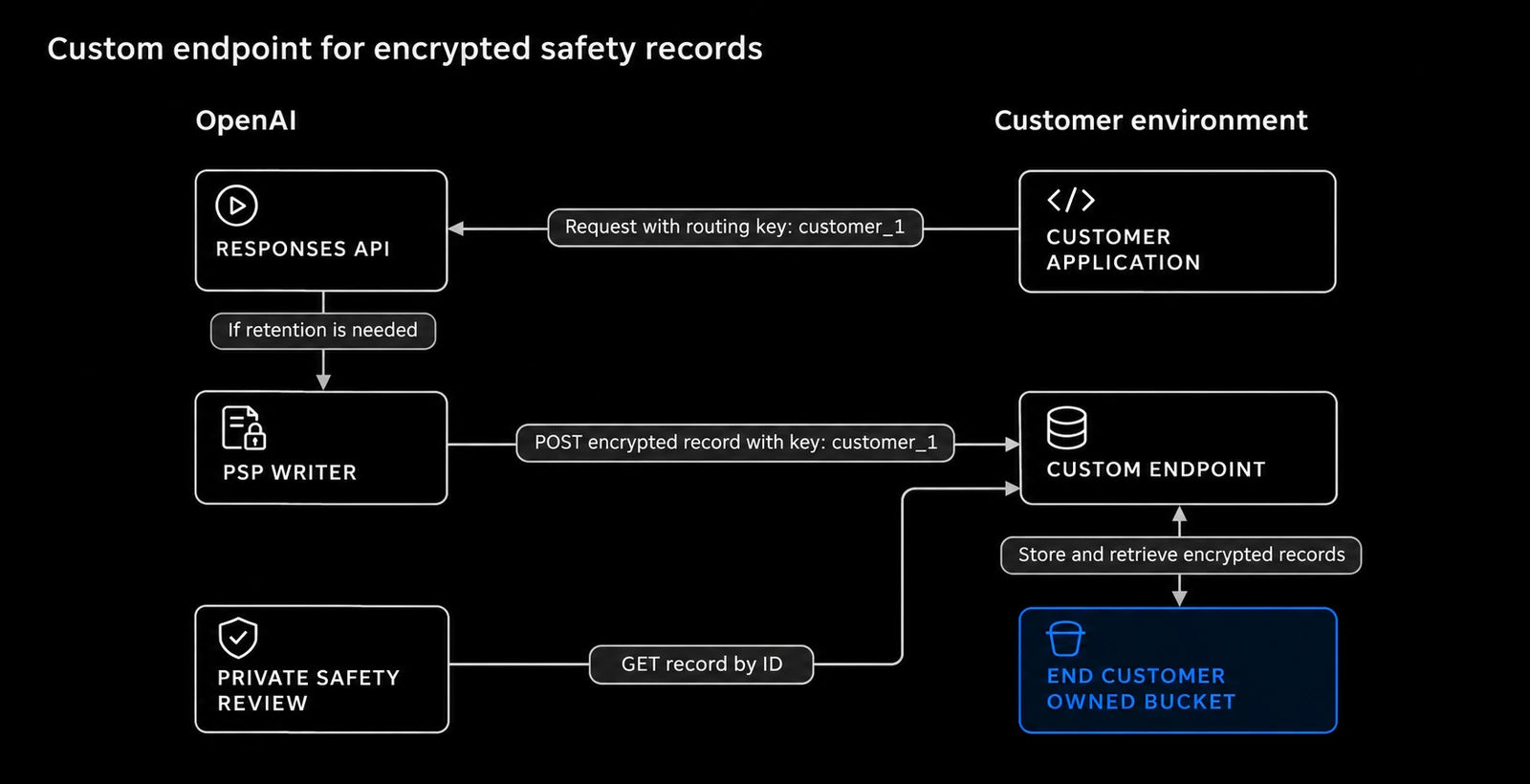
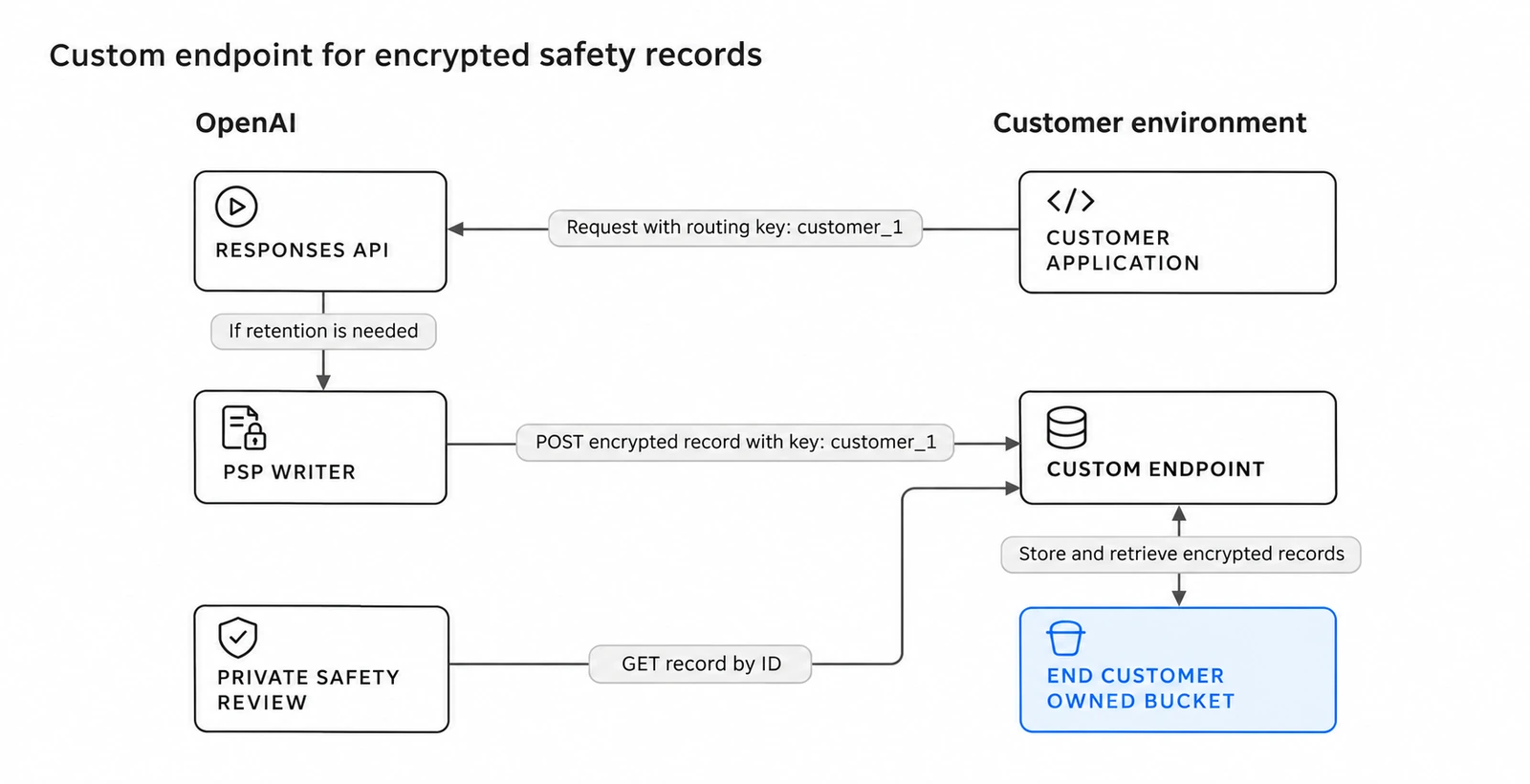
837If you serve customers with zero data retention requirements or have customer data isolation commitments, you will need to set up a custom endpoint to isolate the encrypted safety record by customer-specific, geography specific buckets. Your application will call the Responses API as usual with a storage key attached. When OpenAI needs to retain a record, it sends the encrypted bytes to an HTTPS endpoint you run.

838 

839 

840 

841 

842![The PSP writer sends an encrypted record and routing key to the custom endpoint, which stores the record in an end-customer-owned bucket and retrieves it by ID for review.](https://developers.openai.com/images/platform/guides/private-safety-processing/custom-endpoint.webp)
843 

844 

845 

846 

847 

848 

849 

850![The PSP writer sends an encrypted record and routing key to the custom endpoint, which stores the record in an end-customer-owned bucket and retrieves it by ID for review.](https://developers.openai.com/images/platform/guides/private-safety-processing/custom-endpoint-dark.webp)

851 

852 

853 

854 

855##### 1. Set the project's base retention policy

856 

857Use an organization Admin API key to set an explicit policy on the project that will send Responses requests. In the path, replace `proj_123` with your project ID. In the JSON body, set `retention_type` to `zero_data_retention` or `modified_abuse_monitoring`. An inherited organization default doesn't satisfy the validation requirement.

858 

859**Your request**

860 

861```http snippet=reference reason="HTTP message format"

862POST /v1/organization/projects/proj_123/data_retention HTTP/1.1

863Host: api.openai.com

864Authorization: Bearer <OPENAI_ADMIN_KEY>

865Content-Type: application/json

866 

867{"retention_type":"zero_data_retention"}

868```

869 

870**OpenAI responds** with `200 OK` and your selected policy. For this example, the response includes:

871 

872```json snippet=reference reason="Example JSON payload"

873{

874 "object": "project.data_retention",

875 "type": "zero_data_retention"

876}

877```

878 

879This sets the base policy. Private Safety Processing becomes active for the project when storage validation succeeds in step 3.

880 

881##### 2. Register your endpoint

882 

883```http snippet=reference reason="HTTP message format"

884POST https://api.openai.com/v1/organization/external_storage

885```

886 

887Use an organization admin API key with `api.external_storage.write`. For a Global project, include the destination geography. For a fixed-region project, you can omit it.

888 

889```json snippet=reference reason="Example JSON payload"

890{

891 "project_id": "proj_123",

892 "provider": {

893 "type": "custom_endpoint",

894 "endpoint_url": "https://storage.example.com/custom-endpoint",

895 "geography": "EU"

896 }

897}

898```

899 

900Response: `200 OK`

901 

902```json snippet=reference reason="Example JSON payload"

903{

904 "object": "organization.external_storage",

905 "id": "extstorage_abc123",

906 "project_id": "proj_123",

907 "provider": {

908 "type": "custom_endpoint",

909 "endpoint_url": "https://storage.example.com/custom-endpoint",

910 "signing_secret": "whsec_AAAAAAAAAAAAAAAAAAAAAAAAAAAAAAAAAAAAAAAAAAA=",

911 "signing_secret_hint": "whsec_...AAA="

912 },

913 "geography": "EU",

914 "status": "pending",

915 "created_at": 1793880000

916}

917```

918 

919**Save your signing secret.** Store `provider.signing_secret` in your secret manager. You'll use it to [verify requests from OpenAI](#verify-requests-from-openai). The API returns the full secret only at registration.

920 

921##### 3. Validate your endpoint

922 

923Implement `POST {endpoint_url}/v1/validate` on your server.

924 

925**You request validation.** Send the registration ID from step 2 in the URL. Authenticate with your organization Admin API key and leave the body empty.

926 

927```http snippet=reference reason="HTTP message format"

928POST /v1/organization/external_storage/extstorage_abc123/validate HTTP/1.1

929Host: api.openai.com

930Authorization: Bearer <OPENAI_ADMIN_KEY>

931Content-Length: 0

932```

933 

934**OpenAI sends a signed challenge**

935 

936```http snippet=reference reason="HTTP message format"

937POST /custom-endpoint/v1/validate HTTP/1.1

938Host: storage.example.com

939Content-Type: application/json

940webhook-id: probe_a81f907c2b6d4e13a5709f28c6103eb4

941webhook-timestamp: 1793880000

942webhook-signature: v1,R2MM/gN/BbBWiq51ShHlMTY/D8Qlsd2nuzWyZUNirm4=

943 

944{"challenge": "a81f907c2b6d4e13a5709f28c6103eb4"}

945```

946 

947**You verify the signature and return the challenge.** [Verify the raw request body](#verify-requests-from-openai) with the signing secret from step 2. If verification succeeds, parse the JSON and return the received `challenge` value.

948 

949```http snippet=reference reason="HTTP message format"

950HTTP/1.1 200 OK

951Content-Type: application/json

952 

953{"challenge":"a81f907c2b6d4e13a5709f28c6103eb4"}

954```

955 

956**Check the registration status.** OpenAI responds to your original request with `200 OK` and the updated registration. Look for `"status": "validated"` before sending a Responses request.

957 

958```http snippet=reference reason="HTTP message format"

959HTTP/1.1 200 OK

960Content-Type: application/json

961 

962{

963 "object": "organization.external_storage",

964 "id": "extstorage_abc123",

965 "project_id": "proj_123",

966 "status": "validated",

967 "provider": {

968 "type": "custom_endpoint",

969 "endpoint_url": "https://storage.example.com/custom-endpoint",

970 "signing_secret_hint": "whsec_...AAA="

971 },

972 "geography": "EU",

973 "created_at": 1793880000

974}

975```

976 

977##### 4. Send a request

978 

979```http snippet=reference reason="HTTP message format"

980POST https://api.openai.com/v1/responses

981```

982 

983Use a PSP-enabled project API key with `api.responses.write`. Pick an opaque routing key that your server recognizes, e.g. a customer identifier and geography combination. Your custom endpoint will use this later to route OpenAI’s retention requests.

984 

985```json snippet=reference reason="Example JSON payload"

986{

987 "model": "<model-id>",

988 "input": "Summarize this account update.",

989 "storage_routing": {

990 "routing_key": "customer_1-us"

991 }

992}

993```

994 

995##### 5. Accept the encrypted record

996 

997You implement `POST {endpoint_url}/v1/records` on your server.

998 

999**OpenAI sends the encrypted record.** The signed multipart request includes the encrypted bytes in the `ciphertext` part and a routing key that identifies your end-customer’s storage.

1000 

1001```http snippet=reference reason="HTTP message format"

1002POST /custom-endpoint/v1/records HTTP/1.1

1003Host: storage.example.com

1004Content-Type: multipart/form-data; boundary=custom-endpoint-example

1005webhook-id: cobj_456

1006webhook-timestamp: 1793880060

1007webhook-signature: v1,MLAK7AYd/cYh1U8Yqo28Lx2SEds5nLb/IYulCiTFXJA=

1008 

1009--custom-endpoint-example

1010Content-Disposition: form-data; name="type"

1011 

1012record.write

1013--custom-endpoint-example

1014Content-Disposition: form-data; name="id"

1015 

1016cobj_456

1017--custom-endpoint-example

1018Content-Disposition: form-data; name="storage_routing[routing_key]"

1019 

1020customer_1-us

1021--custom-endpoint-example

1022Content-Disposition: form-data; name="expires_at"

1023 

10241796472000

1025--custom-endpoint-example

1026Content-Disposition: form-data; name="ciphertext"; filename="record.bin"

1027Content-Type: application/octet-stream

1028 

1029<raw encrypted bytes>

1030--custom-endpoint-example--

1031```

1032 

1033**You return `202 Accepted` with the record ID.** [Verify the request signature](#verify-requests-from-openai) before parsing the multipart body. Once your server accepts the write, return the `id` from that request.

1034 

1035```http snippet=reference reason="HTTP message format"

1036HTTP/1.1 202 Accepted

1037Content-Type: application/json

1038 

1039{ "id": "cobj_456" }

1040```

1041 

1042You can finish storing the bytes asynchronously. OpenAI retries unacknowledged writes with backoff, so use the ID to recognize duplicates. Keep the ID with the storage location and delete the record at `expires_at` (Unix seconds).

1043 

1044##### 6. Return the record for review

1045 

1046You implement `GET {endpoint_url}/v1/records/{id}/content` on your server. During a safety review, OpenAI calls this endpoint to retrieve an unexpired record.

1047 

1048**OpenAI sends a signed GET request**

1049 

1050```http snippet=reference reason="HTTP message format"

1051GET /custom-endpoint/v1/records/cobj_456/content HTTP/1.1

1052Host: storage.example.com

1053webhook-id: cobj_456

1054webhook-timestamp: 1793883600

1055webhook-signature: v1,PYSp9wJfLMP9tl+6O476HMV+8wuFZ/q6X/gPirSbdBQ=

1056```

1057 

1058**You return the encrypted record.** [Verify the request signature](#verify-requests-from-openai) and apply your access policy. If the request is authorized, look up the record by ID and return the original encrypted bytes. Send those bytes directly in the response body, without gzip compression, additional encryption, or any other encoding.

1059 

1060```http snippet=reference reason="HTTP message format"

1061HTTP/1.1 200 OK

1062Content-Type: application/octet-stream

1063 

1064<the same encrypted bytes accepted for cobj_456>

1065```

1066 

1067OpenAI decrypts the record for review.

1068 

1069##### Verify requests from OpenAI

1070 

1071Verify each callback with the signing secret for its registration. If verification fails, return `401` before echoing a challenge, accepting a write, or returning a record.

1072 

1073The verifier reads the signed bytes from the incoming request. The examples use a Fetch API `Request` in Node.js and a FastAPI `Request` in Python.

1074 

1075- **POST:** Use the exact request body. Read it before parsing JSON or multipart data so that whitespace, multipart boundaries, and binary data are preserved.

1076- **GET:** Use the bytes of `GET`, one space, and the original public request path, including the registered path prefix. For the example above, the signed content is `GET /custom-endpoint/v1/records/cobj_456/content`.

1077 

1078Verify a callback signature

1079 

1080```typescript

1081import { createHmac, timingSafeEqual } from "node:crypto";

1082 

1083async function verifyCallback(request: Request, secret: string) {

1084 const headers = request.headers;

1085 const id = headers.get("webhook-id");

1086 const timestamp = headers.get("webhook-timestamp");

1087 const signatures = headers.get("webhook-signature");

1088 if (!id || !timestamp || !signatures || !/^\d+$/.test(timestamp))

1089 return false;

1090 

1091 // A short time window limits how long someone can replay a signed request.

1092 if (Math.abs(Date.now() / 1000 - Number(timestamp)) > 300) return false;

1093 

1094 // The whsec_ prefix identifies the secret. The rest encodes the HMAC key.

1095 if (!secret.startsWith("whsec_")) throw new Error("Invalid signing secret");

1096 const key = Buffer.from(secret.slice("whsec_".length), "base64");

1097 if (key.length !== 32) throw new Error("Invalid signing secret");

1098 // GET signs the public path. POST signs the body before any parsing.

1099 let signedContent: string | Uint8Array;

1100 if (request.method === "GET") {

1101 signedContent = "GET " + new URL(request.url).pathname;

1102 } else if (request.method === "POST") {

1103 signedContent = new Uint8Array(await request.clone().arrayBuffer());

1104 } else {

1105 return false;

1106 }

1107 const digest = createHmac("sha256", key)

1108 .update(`${id}.${timestamp}.`)

1109 .update(signedContent)

1110 .digest("base64");

1111 

1112 // Accept any matching v1 signature using a constant-time comparison.

1113 const expected = Buffer.from(`v1,${digest}`);

1114 return signatures.split(/\s+/).some((value) => {

1115 const candidate = Buffer.from(value);

1116 return (

1117 candidate.length === expected.length &&

1118 timingSafeEqual(candidate, expected)

1119 );

1120 });

1121}

1122```

1123 

1124```python

1125import base64

1126import hashlib

1127import hmac

1128import time

1129 

1130from fastapi import Request

1131 

1132 

1133async def verify_callback(request: Request, secret: str) -> bool:

1134 headers = request.headers

1135 delivery_id = headers.get("webhook-id")

1136 timestamp = headers.get("webhook-timestamp", "")

1137 signatures = headers.get("webhook-signature")

1138 if (

1139 not delivery_id

1140 or not signatures

1141 or not (timestamp.isascii() and timestamp.isdecimal())

1142 ):

1143 return False

1144 

1145 # A short time window limits how long someone can replay a signed request.

1146 if abs(time.time() - float(timestamp)) > 300:

1147 return False

1148 

1149 # The whsec_ prefix identifies the secret. The rest encodes the HMAC key.

1150 if not secret.startswith("whsec_"):

1151 raise ValueError("Invalid signing secret")

1152 key = base64.b64decode(secret.removeprefix("whsec_"), validate=True)

1153 if len(key) != 32:

1154 raise ValueError("Invalid signing secret")

1155 mac = hmac.new(key, f"{delivery_id}.{timestamp}.".encode(), hashlib.sha256)

1156 # GET signs the encoded public path. POST signs the body before any parsing.

1157 if request.method == "GET":

1158 mac.update(b"GET " + request.scope["raw_path"])

1159 elif request.method == "POST":

1160 mac.update(await request.body())

1161 else:

1162 return False

1163 

1164 # Accept any matching v1 signature using a constant-time comparison.

1165 expected = b"v1," + base64.b64encode(mac.digest())

1166 return any(

1167 hmac.compare_digest(value.encode(), expected) for value in signatures.split()

1168 )

1169```

1170 

1171 

1172 

1173 

1174 

1175 

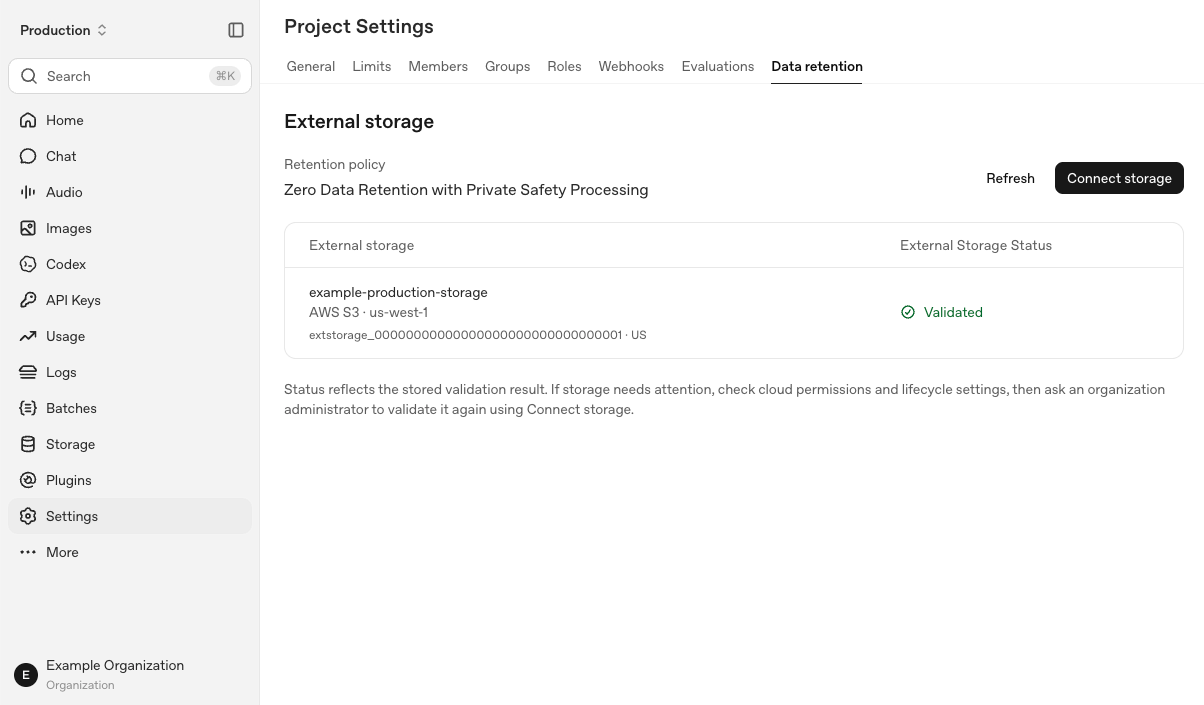
1176After validating your storage configuration, open **Project Settings > Data retention** and select **Refresh**. Confirm the destination, provider, geography, and **Validated** status, then check that the selected base policy shows Private Safety Processing. The organization Data retention table also shows storage and status for each project.

803 1177 

804![OpenAI Project Settings Data retention page showing an AWS S3 external-storage connection with Validated status and the Zero Data Retention with PSP retention policy.](https://developers.openai.com/images/platform/guides/private-safety-processing/setup-05-verify-project-retention.webp)1178![OpenAI Project Settings Data retention page showing an AWS S3 external-storage connection with Validated status and the Zero Data Retention with PSP retention policy.](https://developers.openai.com/images/platform/guides/private-safety-processing/setup-05-verify-project-retention.webp)
805 1179 

Details

26 26 

27Ask ChatGPT for a deeper explanation27Ask ChatGPT for a deeper explanation

28 28 

29OpenAI caches the model's full rendered context including OpenAI-provided instructions, [developer messages](https://developers.openai.com/api/docs/guides/prompt-engineering#message-roles-and-instruction-following), [tool definitions](https://developers.openai.com/api/docs/guides/function-calling), and [conversation history](https://developers.openai.com/api/docs/guides/conversation-state) containing [text](https://developers.openai.com/api/docs/guides/text), [images](https://developers.openai.com/api/docs/guides/images-vision), [documents](https://developers.openai.com/api/docs/guides/file-inputs), and supported [audio](https://developers.openai.com/api/docs/guides/audio).29An eligible prefix of the model's rendered context can include OpenAI-provided instructions, [developer messages](https://developers.openai.com/api/docs/guides/prompt-engineering#message-roles-and-instruction-following), [tool definitions](https://developers.openai.com/api/docs/guides/function-calling), and [conversation history](https://developers.openai.com/api/docs/guides/conversation-state) containing [text](https://developers.openai.com/api/docs/guides/text), [images](https://developers.openai.com/api/docs/guides/images-vision), [documents](https://developers.openai.com/api/docs/guides/file-inputs), and supported [audio](https://developers.openai.com/api/docs/guides/audio).

30 30 

31Cache reuse requires the entire rendered prefix to match. If content or a relevant setting changes before a breakpoint, the prefix after that change cannot match the existing cache entry.31Cache reuse requires the entire rendered prefix to match. If content or a relevant setting changes before a breakpoint, the prefix after that change cannot match the existing cache entry.

32 32 


131- **Explicit-only mode:** The first 2 and latest 50 explicit breakpoints.131- **Explicit-only mode:** The first 2 and latest 50 explicit breakpoints.

132- **Implicit mode:** The first 2 and latest 50 explicit breakpoints, the implicit breakpoint, up to 20 earlier eligible message endings, and the endpoint of the initial consecutive block of developer messages. This lets implicit mode reuse a prefix ending at an earlier message without explicit breakpoints there.132- **Implicit mode:** The first 2 and latest 50 explicit breakpoints, the implicit breakpoint, up to 20 earlier eligible message endings, and the endpoint of the initial consecutive block of developer messages. This lets implicit mode reuse a prefix ending at an earlier message without explicit breakpoints there.

133 133 

134Use top-level `instructions` for developer guidance that applies only to the current request. For example, you can ask the model to summarize findings on the final turn of a workflow. Models starting with GPT-6.2, including Astra and Sol, append these instructions after `input`, beyond eligible cache breakpoints. You can change them between turns while keeping the earlier prefix eligible for cache reuse. They do not carry over with `previous_response_id`.

135 

136OpenAI bills those instruction tokens at the uncached input-token rate on every request, even if you repeat identical instructions. To make reusable instructions eligible for caching, put them in a `developer` message at the beginning of `input`. That message remains in the conversation history when you use `previous_response_id`. Implicit mode can reuse the prefix ending at the initial developer messages. To choose a boundary explicitly, mark an `input_text` block in the developer message with `prompt_cache_breakpoint: { "mode": "explicit" }`.

137 

134## Cache lifetime138## Cache lifetime

135 139 

136Cache entries are not stored indefinitely. The minimum cache lifetime, retention settings, and behavior when a request reuses a prefix [depend on the model](#summary-of-model-differences).140Cache entries are not stored indefinitely. The minimum cache lifetime, retention settings, and behavior when a request reuses a prefix [depend on the model](#summary-of-model-differences).


308| Supported retention values | `"30m"` (default), or `"12h"` in the Responses API | `"24h"` only | `"in_memory"` or `"24h"`<sup>[\*](#extended-retention-models)</sup> |312| Supported retention values | `"30m"` (default), or `"12h"` in the Responses API | `"24h"` only | `"in_memory"` or `"24h"`<sup>[\*](#extended-retention-models)</sup> |

309| Cache lifetime | Minimum lifetime of 30 minutes or 12 hours; see [refresh behavior](#cache-lifetime) | Typically around 30 minutes, up to 24 hours | Typically 5 to 10 minutes inactive for `in_memory`, or up to 24 hours for `24h` |313| Cache lifetime | Minimum lifetime of 30 minutes or 12 hours; see [refresh behavior](#cache-lifetime) | Typically around 30 minutes, up to 24 hours | Typically 5 to 10 minutes inactive for `in_memory`, or up to 24 hours for `24h` |

310 314 

315In the Responses API, models starting with GPT-6.2 append top-level `instructions` after `input` and bill those tokens at the uncached input rate, even on a cache hit. Put reusable instructions in the first `developer` message in `input`.

316 

311<a id="extended-retention-models"></a>317<a id="extended-retention-models"></a>

312 318 

313 319 

Details

20 20 

21### Example usage21### Example usage

22 22 

23The following example sends two requests with the same model, instructions, and input, but changes a function tool's name from `get_time` to `get_date`. The second request compares cache reuse against the first.23Both requests put the same support policy in the first `developer` message in `input`. The second request changes the function name from `get_time` to `get_date` and compares cache reuse against the first.

24 24 

25Use your own policy document in `support-policy.txt`. The reusable prefix must meet the model's [minimum cacheable length](https://developers.openai.com/api/docs/guides/prompt-caching#summary-of-model-differences), which is 1,024 tokens for GPT-5.6 and later.25Use your own policy document in `support-policy.txt`. The reusable prefix must meet the model's [minimum cacheable length](https://developers.openai.com/api/docs/guides/prompt-caching#summary-of-model-differences), which is 1,024 tokens for GPT-5.6 and later.

26 26 


34client = OpenAI()34client = OpenAI()

35policy = Path("support-policy.txt").read_text() # At least 1,024 tokens.35policy = Path("support-policy.txt").read_text() # At least 1,024 tokens.

36 36 

37messages = [

38 {"role": "developer", "content": policy},

39 {"role": "user", "content": "Reply with exactly OK."},

40]

41 

37first = client.responses.create(42first = client.responses.create(

38 model="gpt-6-astra",43 model="gpt-6-astra",

39 instructions=policy,44 input=messages,

40 input="Reply with exactly OK.",

41 tools=[{"type": "function", "name": "get_time"}],45 tools=[{"type": "function", "name": "get_time"}],

42)46)

43 47 

44second = client.responses.create(48second = client.responses.create(

45 model="gpt-6-astra",49 model="gpt-6-astra",

46 instructions=policy,50 input=messages,

47 input="Reply with exactly OK.",

48 tools=[{"type": "function", "name": "get_date"}],51 tools=[{"type": "function", "name": "get_date"}],

49 prompt_cache_options={"comparison_response_id": first.id},52 prompt_cache_options={"comparison_response_id": first.id},

50)53)


62client = OpenAI::Client.new65client = OpenAI::Client.new

63policy = File.read("support-policy.txt") # At least 1,024 tokens.66policy = File.read("support-policy.txt") # At least 1,024 tokens.

64 67 

68messages = [

69 {

70 role: :developer,

71 content: policy

72 },

73 {

74 role: :user,

75 content: "Reply with exactly OK."

76 }

77]

78 

65first = client.responses.create(79first = client.responses.create(

66 model: "gpt-6-astra",80 model: "gpt-6-astra",

67 instructions: policy,81 input: messages,

68 input: "Reply with exactly OK.",

69 tools: [82 tools: [

70 {83 {

71 type: :function,84 type: :function,


76 89 

77second = client.responses.create(90second = client.responses.create(

78 model: "gpt-6-astra",91 model: "gpt-6-astra",

79 instructions: policy,92 input: messages,

80 input: "Reply with exactly OK.",

81 tools: [93 tools: [

82 {94 {

83 type: :function,95 type: :function,


142 154 

143A `cache_hit` means no cache miss was detected for the comparison. New input can still require processing. For example, a request with 2,500 input tokens can report `cache_hit` when it reuses the comparison response’s 2,000-token prefix and processes 500 new tokens.155A `cache_hit` means no cache miss was detected for the comparison. New input can still require processing. For example, a request with 2,500 input tokens can report `cache_hit` when it reuses the comparison response’s 2,000-token prefix and processes 500 new tokens.

144 156 

157Models starting with GPT-6.2 can report `cache_hit` when they reuse the eligible prefix and still bill top-level `instructions` at the uncached input rate. Check `usage.input_tokens_details.cached_tokens` for the number of tokens that received the cached-input rate.

158 

145For a `cache_miss`:159For a `cache_miss`:

146 160 

147- `comparison_reusable_tokens`, when present, is the raw token count of the comparison response’s reusable prefix.161- `comparison_reusable_tokens`, when present, is the raw token count of the comparison response’s reusable prefix.


168| `reasoning_effort_changed` | The reasoning effort changed. | On supported GPT-6 and later models, append a `configuration_update` input item to [change reasoning effort during a conversation](https://developers.openai.com/api/docs/guides/reasoning?api-mode=responses#change-reasoning-mid-conversation) while preserving the earlier cached prefix.<br />On older models, keep `reasoning.effort` consistent across requests intended to share a prefix. |182| `reasoning_effort_changed` | The reasoning effort changed. | On supported GPT-6 and later models, append a `configuration_update` input item to [change reasoning effort during a conversation](https://developers.openai.com/api/docs/guides/reasoning?api-mode=responses#change-reasoning-mid-conversation) while preserving the earlier cached prefix.<br />On older models, keep `reasoning.effort` consistent across requests intended to share a prefix. |

169| `verbosity_changed` | The response verbosity changed. | Keep `text.verbosity` consistent across requests intended to share a prefix. See [cache-affecting settings](https://developers.openai.com/api/docs/guides/prompt-caching#which-settings-affect-the-cached-prefix). |183| `verbosity_changed` | The response verbosity changed. | Keep `text.verbosity` consistent across requests intended to share a prefix. See [cache-affecting settings](https://developers.openai.com/api/docs/guides/prompt-caching#which-settings-affect-the-cached-prefix). |

170| `context_compacted` | Compaction replaced earlier conversation content. | Preserve stable instructions and let later turns build on the compacted context. Compare total input cost: fewer input tokens can still save money despite lower cache reuse. See [Compaction](https://developers.openai.com/api/docs/guides/compaction). |184| `context_compacted` | Compaction replaced earlier conversation content. | Preserve stable instructions and let later turns build on the compacted context. Compare total input cost: fewer input tokens can still save money despite lower cache reuse. See [Compaction](https://developers.openai.com/api/docs/guides/compaction). |

171| `input_changed` | Earlier input changed, for example because instructions contain a timestamp or request ID, or previous messages were edited, reordered, or removed. | Move changing content after the reusable prefix and its cache breakpoint. Preserve earlier messages and tool results, and append new turns. See [Preserve conversation history](https://developers.openai.com/api/docs/guides/prompt-caching#preserve-conversation-history). |185| `input_changed` | Earlier input changed, for example because you added a timestamp or request ID to a `developer` message or edited, reordered, or removed old turns. | Move changing content after the reusable prefix and its cache breakpoint. Preserve earlier messages and tool results, and append new turns. See [Preserve conversation history](https://developers.openai.com/api/docs/guides/prompt-caching#preserve-conversation-history). |

172 186 

173 187 

174 188 

Details

177 177 

178Because the content generated from a model is non-deterministic, prompting to get your desired output is a mix of art and science. However, you can apply techniques and best practices to get good results consistently.178Because the content generated from a model is non-deterministic, prompting to get your desired output is a mix of art and science. However, you can apply techniques and best practices to get good results consistently.

179 179 

180Some prompt engineering techniques work with every model, like using message roles. But different model types (like reasoning versus GPT models) might need to be prompted differently to produce the best results. Even different snapshots of models within the same family could produce different results. So as you build more complex applications, we strongly recommend:180Some prompt engineering techniques work with every model, like using message roles. But different model types (like reasoning versus GPT models) might need to be prompted differently to produce the best results. Even different snapshots of models within the same family could produce different results. As you build more complex applications, we strongly recommend:

181 181 

182- Pinning your production applications to specific [model snapshots](https://developers.openai.com/api/docs/models) (like `gpt-4.1-2025-04-14` for example) to ensure consistent behavior182- Pinning your production applications to specific [model snapshots](https://developers.openai.com/api/docs/models) (like `gpt-4.1-2025-04-14` for example) to ensure consistent behavior

183- Building tests and evaluation suites that measure prompt behavior so you can monitor performance as you iterate, or when you change and upgrade model versions183- Building tests and evaluation suites that measure prompt behavior so you can monitor performance as you iterate, or when you change and upgrade model versions


190 190 

191You can provide instructions to the model with [differing levels of authority](https://model-spec.openai.com/2025-02-12.html#chain_of_command) using the `instructions` API parameter or **message roles**.191You can provide instructions to the model with [differing levels of authority](https://model-spec.openai.com/2025-02-12.html#chain_of_command) using the `instructions` API parameter or **message roles**.

192 192 

193The `instructions` parameter gives the model high-level instructions on how it should behave while generating a response, including tone, goals, and examples of correct responses. Any instructions provided this way will take priority over a prompt in the `input` parameter.193The `instructions` parameter gives the model high-level instructions on how it should behave while generating a response, including tone, goals, and examples of correct responses. These instructions take priority over user messages in `input`.

194 194 

195Generate text with instructions195Generate text with instructions

196 196 


333```333```

334 334 

335 335 

336The example above is roughly equivalent to using the following input messages in the `input` array:336To use the same guidance across turns, put it in the first `developer` message in `input`.

337 337 

338Generate text with messages using different roles338Generate text with messages using different roles

339 339 


526```526```

527 527 

528 528 

529Note that the `instructions` parameter only applies to the current response generation request. If you are [managing conversation state](https://developers.openai.com/api/docs/guides/conversation-state) with the `previous_response_id` parameter, the `instructions` used on previous turns will not be present in the context.529Use top-level `instructions` for a single turn. When you [chain responses](https://developers.openai.com/api/docs/guides/conversation-state#passing-context-from-the-previous-response) with `previous_response_id`, the initial `developer` message stays in the conversation.

530 530 

531 531 

532 532 


559 559 

560- Keep prompt builders in a small module near the feature they support.560- Keep prompt builders in a small module near the feature they support.

561- Use typed function arguments or schemas for dynamic values such as customer data, files, or task options.561- Use typed function arguments or schemas for dynamic values such as customer data, files, or task options.

562- Pass the generated `instructions` and `input` directly to the [Responses API](https://developers.openai.com/api/reference/resources/responses/methods/create).562- Pass reusable guidance as the first `developer` message in `input` and use `instructions` for turn-specific guidance in the [Responses API](https://developers.openai.com/api/reference/resources/responses/methods/create).

563- Add representative fixtures, tests, and evaluation checks before changing production prompts.563- Add representative fixtures, tests, and evaluation checks before changing production prompts.

564- Roll out prompt changes through your deployment system, using feature flags or configuration when you need staged releases.564- Roll out prompt changes through your deployment system, using feature flags or configuration when you need staged releases.

565 565 


620 620

621API request621API request

622 622 

623 Save the example prompt as `prompt.txt`. Install `jq` before running the

624 curl example.

623 Send a prompt to generate code through the API625 Send a prompt to generate code through the API

624 626 

625```typescript627```typescript


631 633 

632const response = await client.responses.create({634const response = await client.responses.create({

633 model: "gpt-6.2-astra",635 model: "gpt-6.2-astra",

634 instructions,636 input: [

635 input: "How would I declare a variable for a last name?",637 { role: "developer", content: instructions },

638 {

639 role: "user",

640 content: "How would I declare a variable for a last name?",

641 },

642 ],

636});643});

637 644 

638console.log(response.output_text);645console.log(response.output_text);


648 655 

649response = client.responses.create(656response = client.responses.create(

650 model="gpt-6.2-astra",657 model="gpt-6.2-astra",

651 instructions=instructions,658 input=[

652 input="How would I declare a variable for a last name?",659 {"role": "developer", "content": instructions},

660 {"role": "user", "content": "How would I declare a variable for a last name?"},

661 ],

653)662)

654 663 

655print(response.output_text)664print(response.output_text)


677 686 

678 response, err := client.Responses.New(context.Background(), responses.ResponseNewParams{687 response, err := client.Responses.New(context.Background(), responses.ResponseNewParams{

679 Model: "gpt-6.2-astra",688 Model: "gpt-6.2-astra",

680 Instructions: openai.String(string(instructions)),

681 Input: responses.ResponseNewParamsInputUnion{689 Input: responses.ResponseNewParamsInputUnion{

682 OfString: openai.String("How would I declare a variable for a last name?"),690 OfInputItemList: responses.ResponseInputParam{

691 responses.ResponseInputItemParamOfMessage(string(instructions), responses.EasyInputMessageRoleDeveloper),

692 responses.ResponseInputItemParamOfMessage("How would I declare a variable for a last name?", responses.EasyInputMessageRoleUser),

693 },

683 },694 },

684 })695 })

685 if err != nil {696 if err != nil {


693```java704```java

694import com.openai.client.OpenAIClient;705import com.openai.client.OpenAIClient;

695import com.openai.client.okhttp.OpenAIOkHttpClient;706import com.openai.client.okhttp.OpenAIOkHttpClient;

707import com.openai.models.responses.EasyInputMessage;

696import com.openai.models.responses.ResponseCreateParams;708import com.openai.models.responses.ResponseCreateParams;

709import com.openai.models.responses.ResponseInputItem;

710import java.util.List;

697 711 

712String instructions =

713 "You are a coding assistant. Answer with concise JavaScript examples and use semicolons.";

698ResponseCreateParams params =714ResponseCreateParams params =

699 ResponseCreateParams.builder()715 ResponseCreateParams.builder()

700 .model("gpt-6.2-astra")716 .model("gpt-6.2-astra")

701 .instructions(717 .inputOfResponse(

702 "You are a coding assistant. Answer with concise JavaScript examples and use semicolons.")718 List.of(

703 .input("How would I declare a variable for a last name?")719 ResponseInputItem.ofEasyInputMessage(

720 EasyInputMessage.builder()

721 .role(EasyInputMessage.Role.DEVELOPER)

722 .content(instructions)

723 .build()),

724 ResponseInputItem.ofEasyInputMessage(

725 EasyInputMessage.builder()

726 .role(EasyInputMessage.Role.USER)

727 .content("How would I declare a variable for a last name?")

728 .build())))

704 .build();729 .build();

705 730 

706client.responses().create(params).output().stream()731client.responses().create(params).output().stream()


721CreateResponseOptions options = new()746CreateResponseOptions options = new()

722{747{

723 Model = "gpt-6.2-astra",748 Model = "gpt-6.2-astra",

724 Instructions = instructions,

725};749};

750options.InputItems.Add(ResponseItem.CreateDeveloperMessageItem(instructions));

726options.InputItems.Add(751options.InputItems.Add(

727 ResponseItem.CreateUserMessageItem("How would I declare a variable for a last name?")752 ResponseItem.CreateUserMessageItem("How would I declare a variable for a last name?")

728);753);


738instructions = File.read(File.join(__dir__, "prompt.txt"))763instructions = File.read(File.join(__dir__, "prompt.txt"))

739response = client.responses.create(764response = client.responses.create(

740 model: "gpt-6.2-astra",765 model: "gpt-6.2-astra",

741 instructions: instructions,766 input: [

742 input: "How would I declare a variable for a last name?"767 {

768 role: :developer,

769 content: instructions

770 },

771 {

772 role: :user,

773 content: "How would I declare a variable for a last name?"

774 }

775 ]

743)776)

744 777 

745puts(response.output_text)778puts(response.output_text)

746```779```

747 780 

748```bash781```bash

749curl https://api.openai.com/v1/responses \782set -euo pipefail

783 

784request=$(jq -n --rawfile instructions prompt.txt '

785 {

786 model: "gpt-6.2-astra",

787 input: [

788 {role: "developer", content: $instructions},

789 {role: "user", content: "How would I declare a variable for a last name?"}

790 ]

791 }')

792 

793curl --fail-with-body --silent --show-error https://api.openai.com/v1/responses \

750 -H "Authorization: Bearer $OPENAI_API_KEY" \794 -H "Authorization: Bearer $OPENAI_API_KEY" \

751 -H "Content-Type: application/json" \795 -H "Content-Type: application/json" \

752 -d '{796 -d "$request" |

753 "model": "gpt-6.2-astra",797 jq -er '[.output[]? | select(.type == "message") | .content[]? | select(.type == "output_text") | .text] | join("")'

754 "instructions": "'"$(< prompt.txt)"'",

755 "input": "How would I declare a variable for a last name?"

756 }'

757```798```

758 799 

759 800 

760 801 

761#### Save on cost and latency with prompt caching802#### Save on cost and latency with prompt caching

762 803 

763When constructing a message, you should try and keep content that you expect to use over and over in your API requests at the beginning of your prompt, **and** among the first API parameters you pass in the JSON request body to [Chat Completions](https://developers.openai.com/api/reference/resources/chat) or [Responses](https://developers.openai.com/api/reference/resources/responses). This enables you to maximize cost and latency savings from [prompt caching](https://developers.openai.com/api/docs/guides/prompt-caching).804Put reusable instructions in the first `developer` message in the Responses `input` array or the Chat Completions `messages` array. Put examples and reference material you reuse before the user’s changing input. This keeps the shared prefix eligible for [prompt caching](https://developers.openai.com/api/docs/guides/prompt-caching).

764 805 

765## Few-shot learning806## Few-shot learning

766 807 

Details

15 15 

16## What's new16## What's new

17 17 

18Starting with GPT-6.2, the API will drop reasoning items when it detects mid-conversation changes to the conversation history (prefix edits), model downgrade, end user, or organization. When the model loses access to reasoning items, answer quality can decline and the model may use more tokens to repeat earlier work. Review your integration to identify edits such as changes to instructions or tool calls. To preserve reasoning and keep earlier input eligible for [prompt caching](https://developers.openai.com/api/docs/guides/prompt-caching), [keep the prefix unchanged](https://developers.openai.com/api/docs/guides/keep-prefix-unchanged) when you change settings between responses.18- **Prefix edits**. Starting with GPT-6.2, the Responses API drops reasoning items after mid-conversation edits to the conversation history (prefix edits), certain model changes (including downgrades), or changes to the end user or organization. When the model loses access to reasoning items, answer quality can decline and the model may use more tokens to repeat earlier work. Review your integration to identify edits such as changes to earlier developer messages or tool calls. To preserve reasoning and keep earlier input eligible for [prompt caching](https://developers.openai.com/api/docs/guides/prompt-caching), [keep the prefix unchanged](https://developers.openai.com/api/docs/guides/keep-prefix-unchanged) when you change settings between responses.

19- **Changes to the `instructions` field in the Responses API**. Models starting with GPT-6.2 append top-level `instructions` after `input` in the Responses API. To make reusable instructions eligible for prompt caching, put them in a `developer` message as the first item in `input`. Use top-level `instructions` for developer guidance that applies only to the current request. See [how prefix matching works](https://developers.openai.com/api/docs/guides/prompt-caching#how-prefix-matching-works).

19 20 

20<a id="prompting-best-practices" className="scroll-mt-[110px]"></a>21<a id="prompting-best-practices" className="scroll-mt-[110px]"></a>

21 22 


142- **Reasoning effort:** Start with `medium` for a new integration. If you currently use `none` or `minimal`, use `low` instead. Use `reasoning.effort` in Responses or `reasoning_effort` in Chat Completions.143- **Reasoning effort:** Start with `medium` for a new integration. If you currently use `none` or `minimal`, use `low` instead. Use `reasoning.effort` in Responses or `reasoning_effort` in Chat Completions.

143- **Tool calling:** Use the [**Responses API**](https://developers.openai.com/api/docs/guides/migrate-to-responses#migrating-from-chat-completions). GPT-6.2 Astra and GPT-6.2 Sol support Chat Completions, but tool calling requires Responses.144- **Tool calling:** Use the [**Responses API**](https://developers.openai.com/api/docs/guides/migrate-to-responses#migrating-from-chat-completions). GPT-6.2 Astra and GPT-6.2 Sol support Chat Completions, but tool calling requires Responses.

144- **Unsupported parameters:** When migrating Chat Completions requests, omit `temperature`, `top_p`, `logprobs`, and `top_logprobs`. For Responses requests, omit `temperature`, `top_p`, and `top_logprobs` and remove `message.output_text.logprobs` from `include`.145- **Unsupported parameters:** When migrating Chat Completions requests, omit `temperature`, `top_p`, `logprobs`, and `top_logprobs`. For Responses requests, omit `temperature`, `top_p`, and `top_logprobs` and remove `message.output_text.logprobs` from `include`.

145- **Prompt caching:** When migrating from GPT-5.5 or earlier, replace `prompt_cache_retention` with `prompt_cache_options.ttl` set to `"30m"`. Review the [**prompt caching changes**](https://developers.openai.com/api/docs/guides/prompt-caching#summary-of-model-differences), including cache boundaries and cache-write billing.146- **Prompt caching:** Move stable instructions from the top-level `instructions` parameter into a [`developer` message at the beginning of `input`](https://developers.openai.com/api/docs/guides/prompt-caching#how-prefix-matching-works) to make them eligible for caching. When migrating from GPT-5.5 or earlier, replace `prompt_cache_retention` with `prompt_cache_options.ttl` set to `"30m"`. Review the [**prompt caching changes**](https://developers.openai.com/api/docs/guides/prompt-caching#summary-of-model-differences), including cache boundaries and cache-write billing.

146- **Zero Data Retention:** GPT-6.2 Astra and Sol support Zero Data Retention (ZDR) for approved organizations on eligible endpoints and features. With ZDR enabled, the Responses API treats `store` as `false`. For multi-turn work, pass the prior output items back in order, including encrypted reasoning items. See [Zero Data Retention](https://developers.openai.com/api/docs/guides/your-data#zero-data-retention) for eligibility and endpoint behavior.147- **Zero Data Retention:** GPT-6.2 Astra and Sol support Zero Data Retention (ZDR) for approved organizations on eligible endpoints and features. With ZDR enabled, the Responses API treats `store` as `false`. For multi-turn work, pass the prior output items back in order, including encrypted reasoning items. See [Zero Data Retention](https://developers.openai.com/api/docs/guides/your-data#zero-data-retention) for eligibility and endpoint behavior.

147- **Service tiers and regions:** Both models support US and EU data residency with Standard, Fast, and Batch processing. Ultrafast supports US data residency only. See [data residency](https://developers.openai.com/api/docs/guides/data-residency#which-models-and-features-are-eligible-for-data-residency) and [pricing](https://developers.openai.com/api/docs/pricing#text-tokens).148- **Service tiers and regions:** Both models support US and EU data residency with Standard, Fast, and Batch processing. Ultrafast supports US data residency only. See [data residency](https://developers.openai.com/api/docs/guides/data-residency#which-models-and-features-are-eligible-for-data-residency) and [pricing](https://developers.openai.com/api/docs/pricing#text-tokens).

148- **Prompting:** See [**Prompting best practices**](#prompting-best-practices) for guidance.149- **Prompting:** See [**Prompting best practices**](#prompting-best-practices) for guidance.

guides/text.md +5 −5

Details

129```129```

130 130 

131 131 

132An array of content generated by the model is in the `output` property of the response. In this simple example, we have just one output which looks like this:132An array of content generated by the model is in the `output` property of the response. In this example, we have just one output which looks like this:

133 133 

134```json134```json

135[135[


178 178 

179You can provide instructions to the model with [differing levels of authority](https://model-spec.openai.com/2025-02-12.html#chain_of_command) using the `instructions` API parameter along with **message roles**.179You can provide instructions to the model with [differing levels of authority](https://model-spec.openai.com/2025-02-12.html#chain_of_command) using the `instructions` API parameter along with **message roles**.

180 180 

181The `instructions` parameter gives the model high-level instructions on how it should behave while generating a response, including tone, goals, and examples of correct responses. Any instructions provided this way will take priority over a prompt in the `input` parameter.181The `instructions` parameter gives the model high-level instructions on how it should behave while generating a response, including tone, goals, and examples of correct responses. These instructions take priority over user messages in `input`.

182 182 

183Generate text with instructions183Generate text with instructions

184 184 


321```321```

322 322 

323 323 

324The example above is roughly equivalent to using the following input messages in the `input` array:324To use the same guidance across turns, put it in the first `developer` message in `input`.

325 325 

326Generate text with messages using different roles326Generate text with messages using different roles

327 327 


514```514```

515 515 

516 516 

517Note that the `instructions` parameter only applies to the current response generation request. If you are [managing conversation state](https://developers.openai.com/api/docs/guides/conversation-state) with the `previous_response_id` parameter, the `instructions` used on previous turns will not be present in the context.517Use top-level `instructions` for a single turn. When you [chain responses](https://developers.openai.com/api/docs/guides/conversation-state#passing-context-from-the-previous-response) with `previous_response_id`, the initial `developer` message stays in the conversation. Models starting with GPT-6.2 bill top-level `instructions` at the uncached input rate. Reusable guidance in the first `developer` message is eligible for [prompt caching](https://developers.openai.com/api/docs/guides/prompt-caching).

518 518 

519The [OpenAI model spec](https://model-spec.openai.com/2025-02-12.html#chain_of_command) describes how our models give different levels of priority to messages with different roles.519The [OpenAI model spec](https://model-spec.openai.com/2025-02-12.html#chain_of_command) describes how our models give different levels of priority to messages with different roles.

520 520 


564 564 

565- Keep prompt builders in a small module near the feature they support.565- Keep prompt builders in a small module near the feature they support.

566- Use typed function arguments or schemas for dynamic values such as customer data, files, or task options.566- Use typed function arguments or schemas for dynamic values such as customer data, files, or task options.

567- Pass the generated `instructions` and `input` directly to the [Responses API](https://developers.openai.com/api/reference/resources/responses/methods/create).567- Pass reusable guidance as the first `developer` message in `input` and use `instructions` for turn-specific guidance in the [Responses API](https://developers.openai.com/api/reference/resources/responses/methods/create).

568- Add representative fixtures, tests, and evaluation checks before changing production prompts.568- Add representative fixtures, tests, and evaluation checks before changing production prompts.

569- Roll out prompt changes through your deployment system, using feature flags or configuration when you need staged releases.569- Roll out prompt changes through your deployment system, using feature flags or configuration when you need staged releases.

570 570 

Details

16 16 

17Install the WebSocket dependencies with `pip install "openai[realtime]>=3.8.0"` for Python, `npm install openai@^7.10.0 ws` for JavaScript, or `gem install openai async-websocket` for Ruby.17Install the WebSocket dependencies with `pip install "openai[realtime]>=3.8.0"` for Python, `npm install openai@^7.10.0 ws` for JavaScript, or `gem install openai async-websocket` for Ruby.

18 18 

19For Go, run `go get github.com/openai/openai-go/v3@v3.98.0`.19For Go, run `go get github.com/openai/openai-go/v3@v3.99.0`.

20For Java, add the Maven dependency `com.openai:openai-java:4.101.0` and use Java 17 or later for these examples.20For Java, add the Maven dependency `com.openai:openai-java:4.105.0` and use Java 17 or later for these examples.

21These Go and Java SDK versions provide native Responses WebSocket support.21These Go and Java SDK versions provide native Responses WebSocket support.

22 22 

23In WebSocket mode, start each turn by sending a `response.create` event from the client. The payload mirrors the normal [Responses create body](https://developers.openai.com/api/reference/resources/responses/methods/create), except that transport-specific fields like `stream` and `background` are not used.23In WebSocket mode, start each turn by sending a `response.create` event from the client. The payload mirrors the normal [Responses create body](https://developers.openai.com/api/reference/resources/responses/methods/create), except that transport-specific fields like `stream` and `background` are not used.

libraries.md +1 −1

Details

177<dependency>177<dependency>

178 <groupId>com.openai</groupId>178 <groupId>com.openai</groupId>

179 <artifactId>openai-java</artifactId>179 <artifactId>openai-java</artifactId>

180 <version>4.107.0</version>180 <version>4.109.0</version>

181</dependency>181</dependency>

182```182```

183 183 

models.md +2 −0

Details

6 6 

7If you're not sure where to start, use [GPT-6.2 Astra](/api/docs/models/gpt-6.2-astra), our flagship model for complex reasoning and coding. Choose [GPT-6.2 Sol](/api/docs/models/gpt-6.2-sol) to balance intelligence and cost, or [GPT-6 Luna](/api/docs/models/gpt-6-luna) for cost-sensitive, high-volume workloads.7If you're not sure where to start, use [GPT-6.2 Astra](/api/docs/models/gpt-6.2-astra), our flagship model for complex reasoning and coding. Choose [GPT-6.2 Sol](/api/docs/models/gpt-6.2-sol) to balance intelligence and cost, or [GPT-6 Luna](/api/docs/models/gpt-6-luna) for cost-sensitive, high-volume workloads.

8 8 

9[Learn more in our model selection guide](/api/docs/guides/model-selection)

10 

9All latest OpenAI models support text and image input, text output, multilingual capabilities, and vision. Models are available via the [Responses API](/api/reference/resources/responses/methods/create) and our [Client SDKs](/api/docs/libraries).11All latest OpenAI models support text and image input, text output, multilingual capabilities, and vision. Models are available via the [Responses API](/api/reference/resources/responses/methods/create) and our [Client SDKs](/api/docs/libraries).

10 12 

11## Featured models13## Featured models

quickstart.md +1 −1

Details

187<dependency>187<dependency>

188 <groupId>com.openai</groupId>188 <groupId>com.openai</groupId>

189 <artifactId>openai-java</artifactId>189 <artifactId>openai-java</artifactId>

190 <version>4.107.0</version>190 <version>4.109.0</version>

191</dependency>191</dependency>

192```192```

193 193